


 Скачать презентацию Защита роутера от уровня к уровню Continuous service
егору_презентации_кусок.pptx
- Количество слайдов: 32
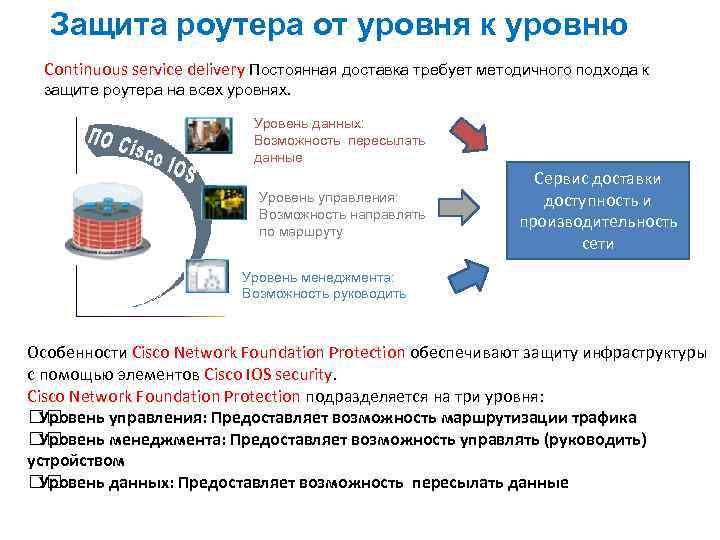 Защита роутера от уровня к уровню Continuous service delivery Постоянная доставка требует методичного подхода к защите роутера на всех уровнях. Уровень данных: Возможность пересылать данные Уровень управления: Возможность направлять по маршруту Сервис доставки доступность и производительность сети Уровень менеджмента: Возможность руководить Особенности Cisco Network Foundation Protection обеспечивают защиту инфраструктуры с помощью элементов Cisco IOS security. Cisco Network Foundation Protection подразделяется на три уровня: Уровень управления: Предоставляет возможность маршрутизации трафика Уровень менеджмента: Предоставляет возможность управлять (руководить) устройством Уровень данных: Предоставляет возможность пересылать данные
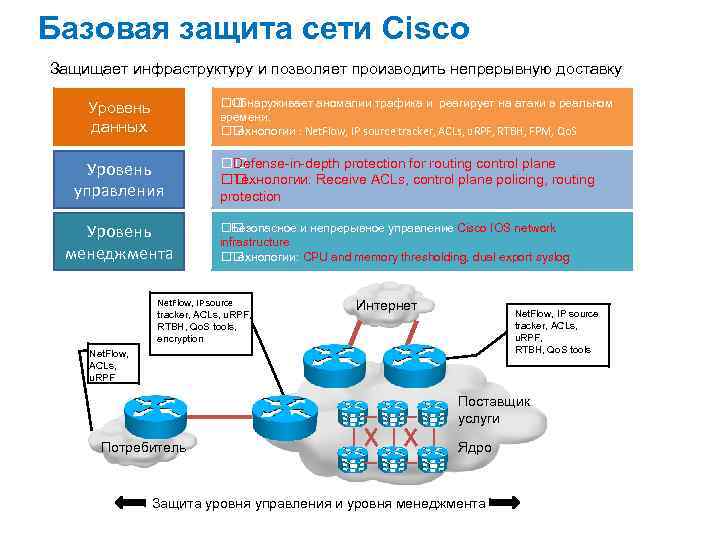 Базовая защита сети Cisco Защищает инфраструктуру и позволяет производить непрерывную доставку Обнаруживает аномалии трафика и реагирует на атаки в реальном времени. Технологии : Net. Flow, IP source tracker, ACLs, u. RPF, RTBH, FPM, Qo. S Уровень данных Уровень управления Уровень менеджмента Defense-in-depth protection for routing control plane Технологии: Receive ACLs, control plane policing, routing protection Безопасное и непрерывное управление Cisco IOS network infrastructure Технологии: CPU and memory thresholding, dual export syslog Net. Flow, IP source tracker, ACLs, u. RPF, RTBH, Qo. S tools, encryption Интернет Net. Flow, IP source tracker, ACLs, u. RPF, RTBH, Qo. S tools Net. Flow, ACLs, u. RPF Поставщик услуги Потребитель Ядро Защита уровня управления и уровня менеджмента
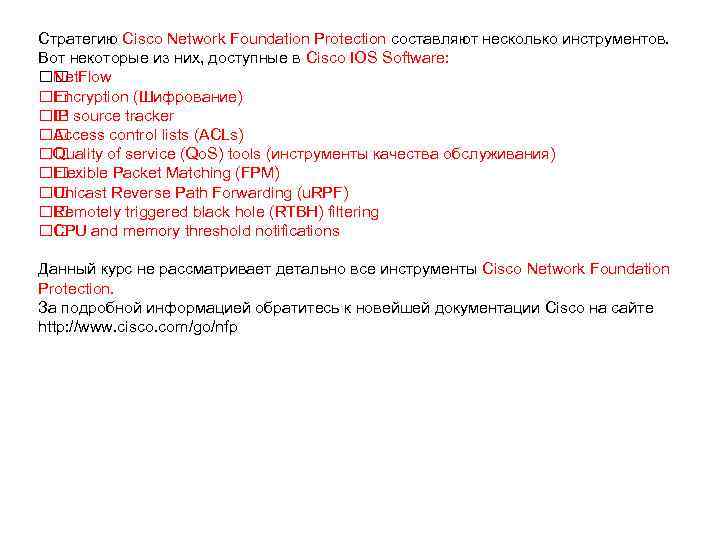 Стратегию Cisco Network Foundation Protection составляют несколько инструментов. Вот некоторые из них, доступные в Cisco IOS Software: Net. Flow Encryption (Шифрование) source tracker IP Access control lists (ACLs) Quality of service (Qo. S) tools (инструменты качества обслуживания) Flexible Packet Matching (FPM) Unicast Reverse Path Forwarding (u. RPF) Remotely triggered black hole (RTBH) filtering and memory threshold notifications CPU Данный курс не рассматривает детально все инструменты Cisco Network Foundation Protection. За подробной информацией обратитесь к новейшей документации Cisco на сайте http: //www. cisco. com/go/nfp
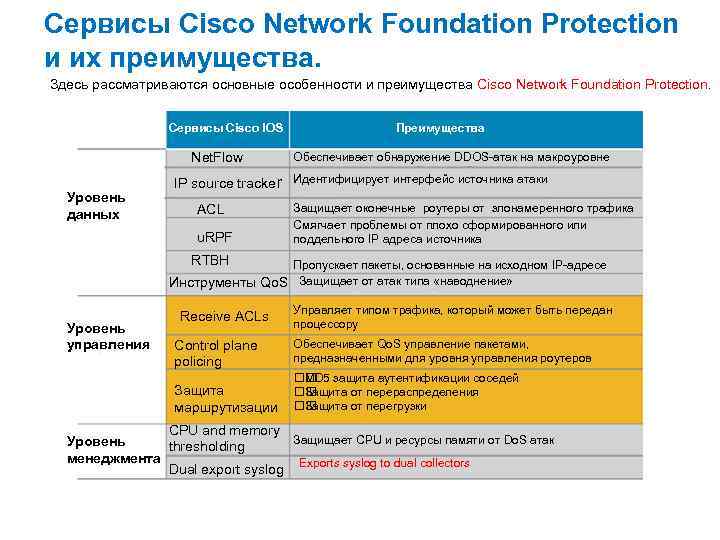 Сервисы Cisco Network Foundation Protection и их преимущества. Здесь рассматриваются основные особенности и преимущества Cisco Network Foundation Protection. Сервисы Cisco IOS Net. Flow Уровень данных Преимущества Обеспечивает обнаружение DDOS-атак на макроуровне IP source tracker Идентифицирует интерфейс источника атаки ACL u. RPF Защищает оконечные роутеры от злонамеренного трафика Смягчает проблемы от плохо сформированного или поддельного IP адреса источника RTBH Пропускает пакеты, основанные на исходном IP-адресе Инструменты Qo. S Защищает от атак типа «наводнение» Уровень управления Receive ACLs Управляет типом трафика, который может быть передан процессору Control plane policing Обеспечивает Qo. S управление пакетами, предназначенными для уровня управления роутеров Защита маршрутизации защита аутентификации соседей MD 5 Защита от перераспределения Защита от перегрузки CPU and memory Защищает CPU и ресурсы памяти от Do. S атак Уровень thresholding менеджмента Exports syslog to dual collectors Dual export syslog
 Различные сервисы, которые использует концепция Cisco Network Foundation Protection, обеспечивают множество преимуществ в области безовасности, которые обычно классифицируются следующим образом: Защита критической инфраструктуры сети: управление рисками от взаимосвязанных глобальных сетей; Поддержка сервиса доставки: обеспечение защиты на уровне устройств для гарантии доступности и производительности Обеспечение defense-in-depth: включает в себя инструменты, технологии и службы для обеспечения методического подхода к безопасности основы сети. В таблице сервисов The Cisco Network Foundation и их преимуществ различные сервисы рассмотрены более детально.
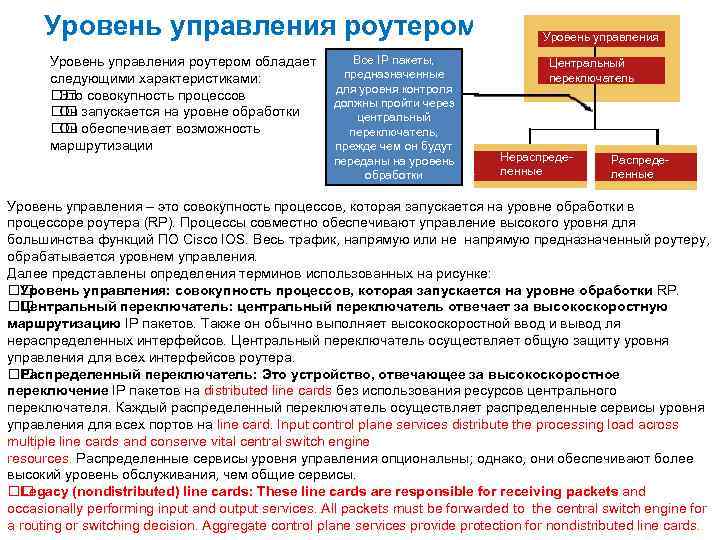 Уровень управления роутером обладает следующими характеристиками: совокупность процессов Это запускается на уровне обработки Он обеспечивает возможность Он маршрутизации Все IP пакеты, предназначенные для уровня контроля должны пройти через центральный переключатель, прежде чем он будут переданы на уровень обработки Уровень управления Центральный переключатель Нераспределенные Распределенные Уровень управления – это совокупность процессов, которая запускается на уровне обработки в процессоре роутера (RP). Процессы совместно обеспечивают управление высокого уровня для большинства функций ПО Cisco IOS. Весь трафик, напрямую или не напрямую предназначенный роутеру, обрабатывается уровнем управления. Далее представлены определения терминов использованных на рисунке: Уровень управления: совокупность процессов, которая запускается на уровне обработки RP. Центральный переключатель: центральный переключатель отвечает за высокоскоростную маршрутизацию IP пакетов. Также он обычно выполняет высокоскоростной ввод и вывод ля нераспределенных интерфейсов. Центральный переключатель осуществляет общую защиту уровня управления для всех интерфейсов роутера. Распределенный переключатель: Это устройство, отвечающее за высокоскоростное переключение IP пакетов на distributed line cards без использования ресурсов центрального переключателя. Каждый распределенный переключатель осуществляет распределенные сервисы уровня управления для всех портов на line card. Input control plane services distribute the processing load across multiple line cards and conserve vital central switch engine resources. Распределенные сервисы уровня управления опциональны; однако, они обеспечивают более высокий уровень обслуживания, чем общие сервисы. Legacy (nondistributed) line cards: These line cards are responsible for receiving packets and occasionally performing input and output services. All packets must be forwarded to the central switch engine for a routing or switching decision. Aggregate control plane services provide protection for nondistributed line cards.
 Защита уровня управления Эта тема посвящена основным функциям и преимуществам CPPr. Функции CPPr можно использовать для ограничения и контроля трафика уровня управления, предназначенного для RP. Similarly to Co. PP, CPPr has the ability to restrict and police traffic using finer granularity than Co. PP. CPPr divides the aggregate control plane into three separate control plane categories, known as subinterfaces: – Host subinterface – Transit subinterface – Cisco Express Forwarding-exception subinterface Optional port filtering polices traffic going to nonlistening ports. Optional queue thresholding limits packets for specified protocols. The CPPr feature is a framework that encompasses all policing and protection features in the control plane. The CPPr feature extends the policing functionality of the Control Plane Policing (Co. PP) feature by allowing finer policing granularity. CPPr includes a traffic classifier, which intercepts control plane traffic and classifies it into three control plane categories; the host subinterface, the transit subinterface, and the Cisco Express Forwarding-exception subinterface. CPPr extends the functionality of Co. PP by adding some new port-filtering and queuethres holding features. Port filtering enables the policing of packets that are destined for closed TCP or User Datagram Protocol (UDP) ports. Queue thresholding limits the number of packets for a specified protocol that will be allowed in the control plane IP input queue. You must understand the following to implement CPPr: Principles of Co. PP and how to classify and police control plane traffic Concepts and the general Modular Qo. S command-line interface (CLI) (MQC) configuration procedure (class map and policy map) for applying Qo. S policies on a router Note Co. PP employs a policing functionality on routers to rate-limit (or police) traffic to the control plane to counter threats directed at the processor. You can configure this functionality to identify and limit certain traffic types completely, or target only those that exceed a specified threshold level.
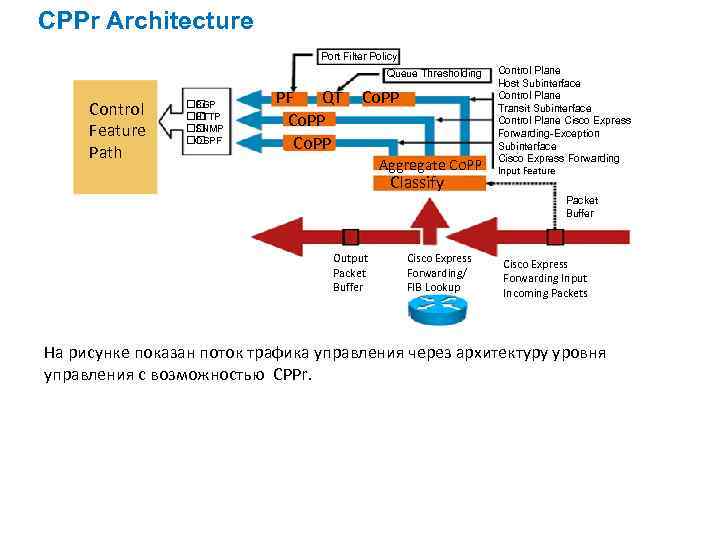 CPPr Architecture Port Filter Policy Queue Thresholding Control Feature Path BGP HTTP SNMP OSPF PF QT Co. PP Aggregate Co. PP Classify Control Plane Host Subinterface Control Plane Transit Subinterface Control Plane Cisco Express Forwarding-Exception Subinterface Cisco Express Forwarding Input Feature Packet Buffer Output Packet Buffer Cisco Express Forwarding/ FIB Lookup Cisco Express Forwarding Input Incoming Packets На рисунке показан поток трафика управления через архитектуру уровня управления с возможностью CPPr.
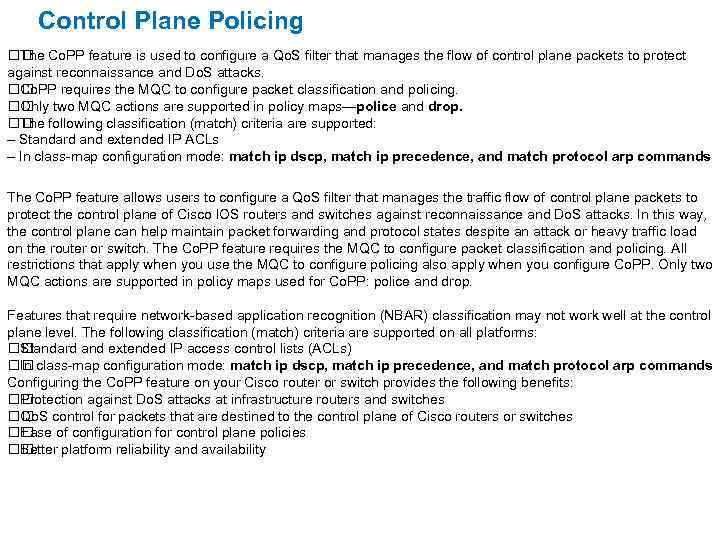 Control Plane Policing Co. PP feature is used to configure a Qo. S filter that manages the flow of control plane packets to protect The against reconnaissance and Do. S attacks. Co. PP requires the MQC to configure packet classification and policing. two MQC actions are supported in policy maps—police and drop. Only following classification (match) criteria are supported: The – Standard and extended IP ACLs – In class-map configuration mode: match ip dscp, match ip precedence, and match protocol arp commands The Co. PP feature allows users to configure a Qo. S filter that manages the traffic flow of control plane packets to protect the control plane of Cisco IOS routers and switches against reconnaissance and Do. S attacks. In this way, the control plane can help maintain packet forwarding and protocol states despite an attack or heavy traffic load on the router or switch. The Co. PP feature requires the MQC to configure packet classification and policing. All restrictions that apply when you use the MQC to configure policing also apply when you configure Co. PP. Only two MQC actions are supported in policy maps used for Co. PP: police and drop. Features that require network-based application recognition (NBAR) classification may not work well at the control plane level. The following classification (match) criteria are supported on all platforms: Standard and extended IP access control lists (ACLs) class-map configuration mode: match ip dscp, match ip precedence, and match protocol arp commands In Configuring the Co. PP feature on your Cisco router or switch provides the following benefits: Protection against Do. S attacks at infrastructure routers and switches control for packets that are destined to the control plane of Cisco routers or switches Qo. S of configuration for control plane policies Ease Better platform reliability and availability
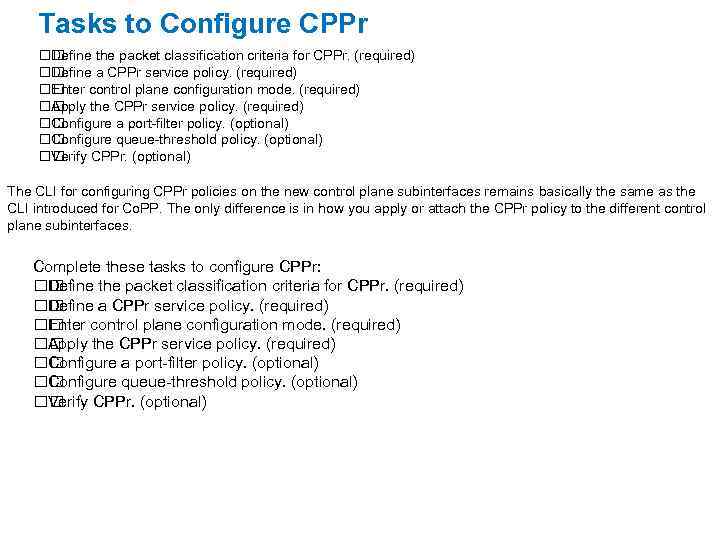 Tasks to Configure CPPr Define the packet classification criteria for CPPr. (required) Define a CPPr service policy. (required) Enter control plane configuration mode. (required) Apply the CPPr service policy. (required) Configure a port-filter policy. (optional) Configure queue-threshold policy. (optional) Verify CPPr. (optional) The CLI for configuring CPPr policies on the new control plane subinterfaces remains basically the same as the CLI introduced for Co. PP. The only difference is in how you apply or attach the CPPr policy to the different control plane subinterfaces. Complete these tasks to configure CPPr: Define the packet classification criteria for CPPr. (required) Define a CPPr service policy. (required) Enter control plane configuration mode. (required) Apply the CPPr service policy. (required) Configure a port-filter policy. (optional) Configure queue-threshold policy. (optional) Verify CPPr. (optional)
 Routing Protocol Protection Routing protocol authentication: BGP RIPv 2 OSPF EIGRP To protect routing protocols from corruption and the resulting attacks, you can configure authentication for the following routing protocols: BGP Routing Information Protocol version 2 (RIPv 2) OSPF EIGRP
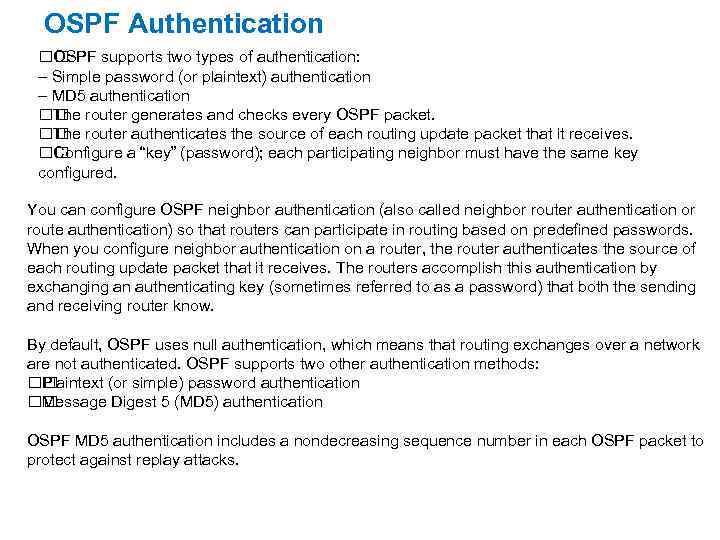 OSPF Authentication OSPF supports two types of authentication: – Simple password (or plaintext) authentication – MD 5 authentication router generates and checks every OSPF packet. The router authenticates the source of each routing update packet that it receives. The Configure a “key” (password); each participating neighbor must have the same key configured. You can configure OSPF neighbor authentication (also called neighbor router authentication or route authentication) so that routers can participate in routing based on predefined passwords. When you configure neighbor authentication on a router, the router authenticates the source of each routing update packet that it receives. The routers accomplish this authentication by exchanging an authenticating key (sometimes referred to as a password) that both the sending and receiving router know. By default, OSPF uses null authentication, which means that routing exchanges over a network are not authenticated. OSPF supports two other authentication methods: Plaintext (or simple) password authentication Message Digest 5 (MD 5) authentication OSPF MD 5 authentication includes a nondecreasing sequence number in each OSPF packet to protect against replay attacks.
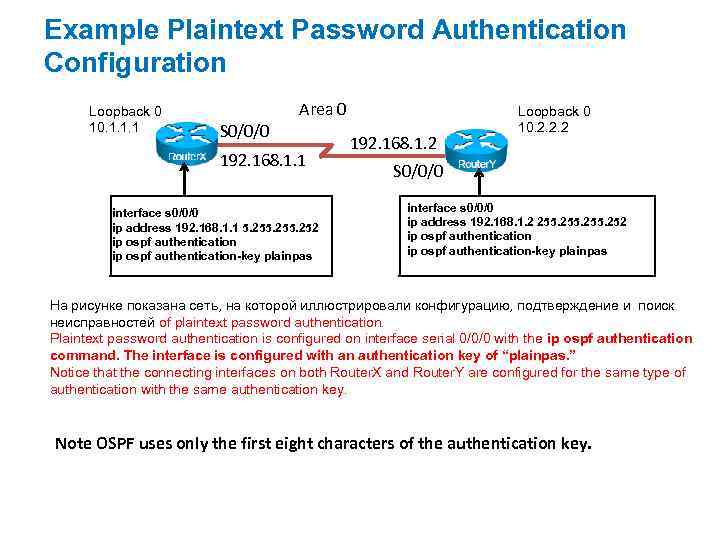 Example Plaintext Password Authentication Configuration Loopback 0 10. 1. 1. 1 Area 0 S 0/0/0 192. 168. 1. 1 interface s 0/0/0 ip address 192. 168. 1. 1 5. 255. 252 ip ospf authentication-key plainpas 192. 168. 1. 2 Loopback 0 10. 2. 2. 2 S 0/0/0 interface s 0/0/0 ip address 192. 168. 1. 2 255. 252 ip ospf authentication-key plainpas На рисунке показана сеть, на которой иллюстрировали конфигурацию, подтверждение и поиск неисправностей of plaintext password authentication. Plaintext password authentication is configured on interface serial 0/0/0 with the ip ospf authentication command. The interface is configured with an authentication key of “plainpas. ” Notice that the connecting interfaces on both Router. X and Router. Y are configured for the same type of authentication with the same authentication key. Note OSPF uses only the first eight characters of the authentication key.
 The Management Plan The management plane performs management functions for a network and coordinates functions among all of the planes (management, control, and data) in a network device. The management plane is also the logical path of all traffic that is related to the management of a routing platform and is used to manage a device through its network connection. Securing a router, in large part, includes securing the management plane. Protocols of the Management Plane The following are examples of protocols that are processed in the management plane: Secure Shell (SSH) Telnet SNMP HTTPS RADIUS TACACS+ These management protocols are used to monitor and to access the command-line interface (CLI) of Cisco devices. Therefore, for network security, it is critical that you restrict access to these devices to only trusted sources (hosts or networks).
 Protocols of the Management Plane The following are examples of protocols that are processed in the management plane: Secure Shell (SSH) Telnet SNMP HTTPS RADIUS TACACS+ These management protocols are used to monitor and to access the command-line interface (CLI) of Cisco devices. Therefore, for network security, it is critical that you restrict access to these devices to only trusted sources (hosts or networks).
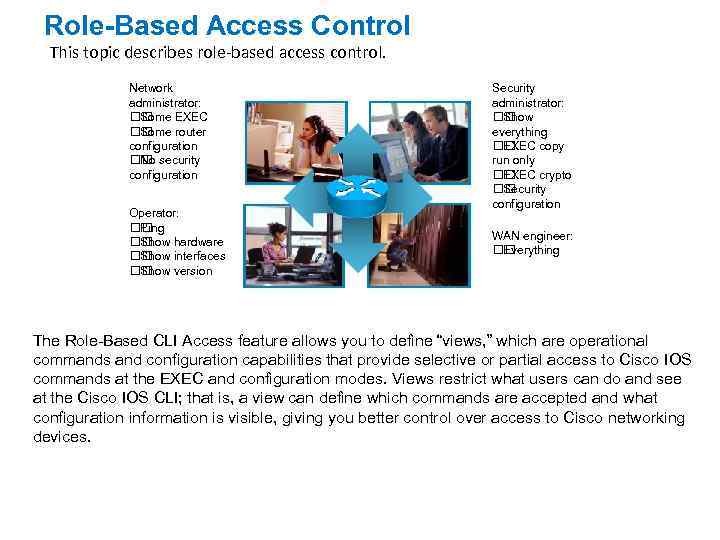 Role-Based Access Control This topic describes role-based access control. Network administrator: Some EXEC Some router configuration security No configuration Operator: Ping Show hardware Show interfaces Show version Security administrator: Show everything EXEC copy run only EXEC crypto Security configuration WAN engineer: Everything The Role-Based CLI Access feature allows you to define “views, ” which are operational commands and configuration capabilities that provide selective or partial access to Cisco IOS commands at the EXEC and configuration modes. Views restrict what users can do and see at the Cisco IOS CLI; that is, a view can define which commands are accepted and what configuration information is visible, giving you better control over access to Cisco networking devices.
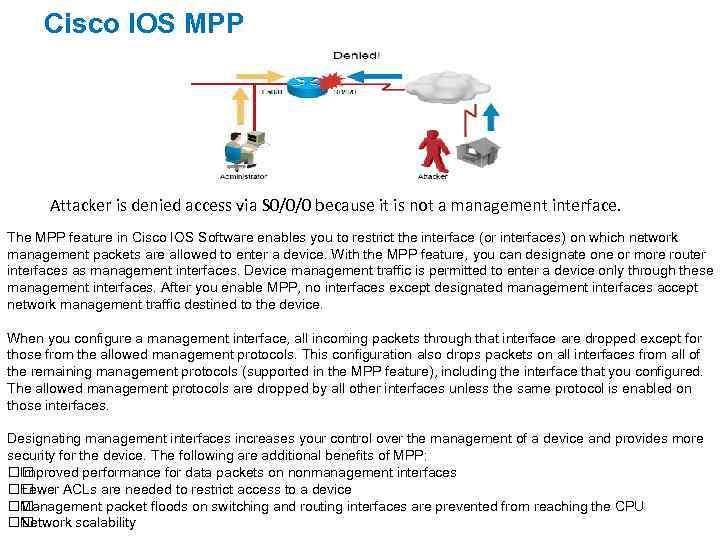 Cisco IOS MPP Attacker is denied access via S 0/0/0 because it is not a management interface. The MPP feature in Cisco IOS Software enables you to restrict the interface (or interfaces) on which network management packets are allowed to enter a device. With the MPP feature, you can designate one or more router interfaces as management interfaces. Device management traffic is permitted to enter a device only through these management interfaces. After you enable MPP, no interfaces except designated management interfaces accept network management traffic destined to the device. When you configure a management interface, all incoming packets through that interface are dropped except for those from the allowed management protocols. This configuration also drops packets on all interfaces from all of the remaining management protocols (supported in the MPP feature), including the interface that you configured. The allowed management protocols are dropped by all other interfaces unless the same protocol is enabled on those interfaces. Designating management interfaces increases your control over the management of a device and provides more security for the device. The following are additional benefits of MPP: Improved performance for data packets on nonmanagement interfaces Fewer ACLs are needed to restrict access to a device Management packet floods on switching and routing interfaces are prevented from reaching the CPU Network scalability
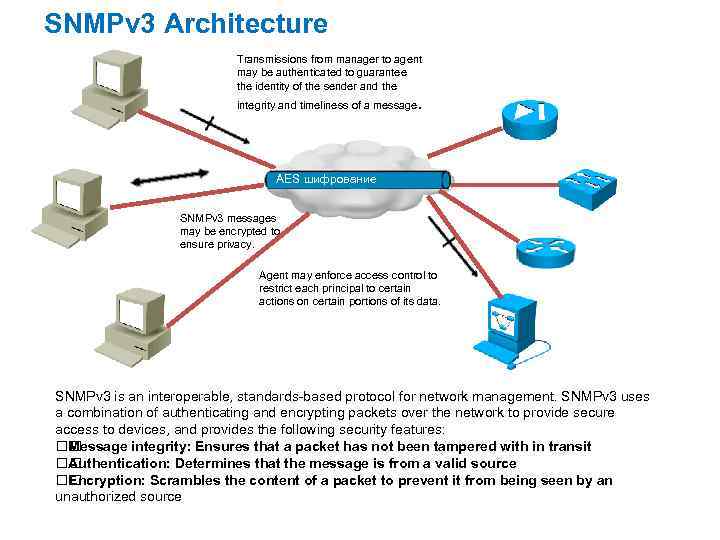 SNMPv 3 Architecture Transmissions from manager to agent may be authenticated to guarantee the identity of the sender and the . integrity and timeliness of a message AES шифрование SNMPv 3 messages may be encrypted to ensure privacy. Agent may enforce access control to restrict each principal to certain actions on certain portions of its data. SNMPv 3 is an interoperable, standards-based protocol for network management. SNMPv 3 uses a combination of authenticating and encrypting packets over the network to provide secure access to devices, and provides the following security features: Message integrity: Ensures that a packet has not been tampered with in transit Authentication: Determines that the message is from a valid source Encryption: Scrambles the content of a packet to prevent it from being seen by an unauthorized source
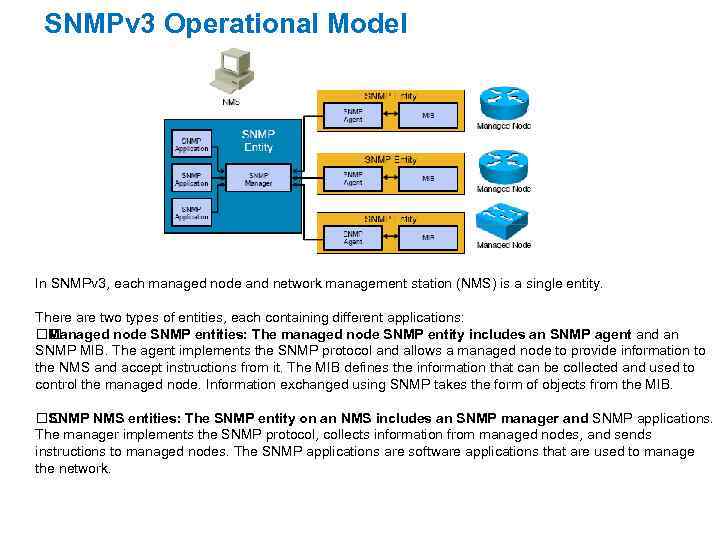 SNMPv 3 Operational Model In SNMPv 3, each managed node and network management station (NMS) is a single entity. There are two types of entities, each containing different applications: Managed node SNMP entities: The managed node SNMP entity includes an SNMP agent and an SNMP MIB. The agent implements the SNMP protocol and allows a managed node to provide information to the NMS and accept instructions from it. The MIB defines the information that can be collected and used to control the managed node. Information exchanged using SNMP takes the form of objects from the MIB. SNMP NMS entities: The SNMP entity on an NMS includes an SNMP manager and SNMP applications. The manager implements the SNMP protocol, collects information from managed nodes, and sends instructions to managed nodes. The SNMP applications are software applications that are used to manage the network.
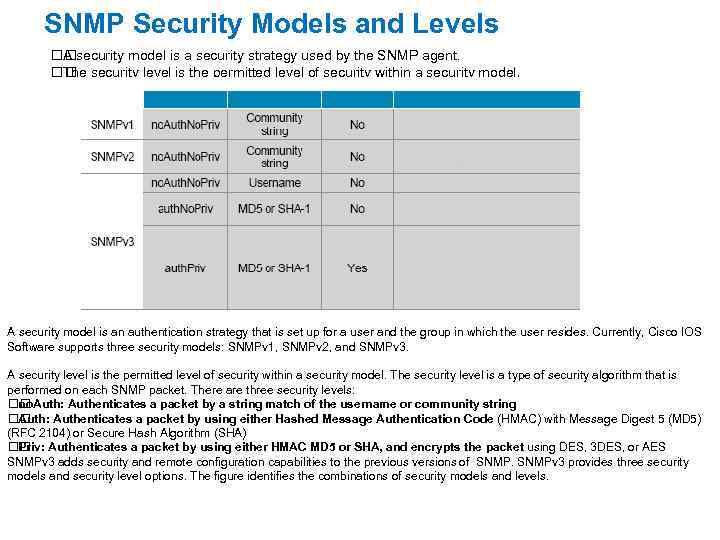 SNMP Security Models and Levels security model is a security strategy used by the SNMP agent. A security level is the permitted level of security within a security model. The A security model is an authentication strategy that is set up for a user and the group in which the user resides. Currently, Cisco IOS Software supports three security models: SNMPv 1, SNMPv 2, and SNMPv 3. A security level is the permitted level of security within a security model. The security level is a type of security algorithm that is performed on each SNMP packet. There are three security levels: no. Auth: Authenticates a packet by a string match of the username or community string Auth: Authenticates a packet by using either Hashed Message Authentication Code (HMAC) with Message Digest 5 (MD 5) (RFC 2104) or Secure Hash Algorithm (SHA) Authenticates a packet by using either HMAC MD 5 or SHA, and encrypts the packet using DES, 3 DES, or AES Priv: SNMPv 3 adds security and remote configuration capabilities to the previous versions of SNMPv 3 provides three security models and security level options. The figure identifies the combinations of security models and levels.
 The Data Plane The data plane provides the ability to forward data. It concerns itself with the functions related to forwarding IP data packets. Its function tends to be confusing; it is sometimes hard to discern the difference between routing data and forwarding data. Control plane functions refer to processes that run in software, whereas data plane functions refer to processes that run in hardware. Simply put, the control plane exists for the purpose of controlling and configuring the data plane. They are complementary planes that exist in routers.
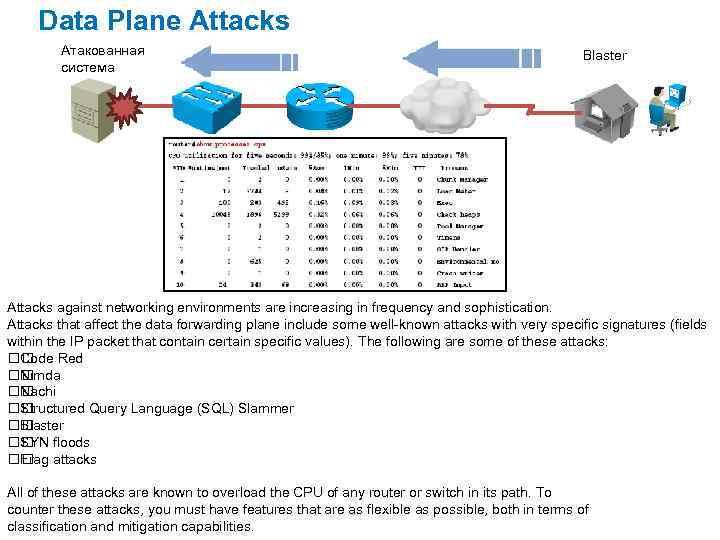 Data Plane Attacks Атакованная система Blaster Attacks against networking environments are increasing in frequency and sophistication. Attacks that affect the data forwarding plane include some well-known attacks with very specific signatures (fields within the IP packet that contain certain specific values). The following are some of these attacks: Code Red Nimda Nachi Structured Query Language (SQL) Slammer Blaster floods SYN attacks Frag All of these attacks are known to overload the CPU of any router or switch in its path. To counter these attacks, you must have features that are as flexible as possible, both in terms of classification and mitigation capabilities.
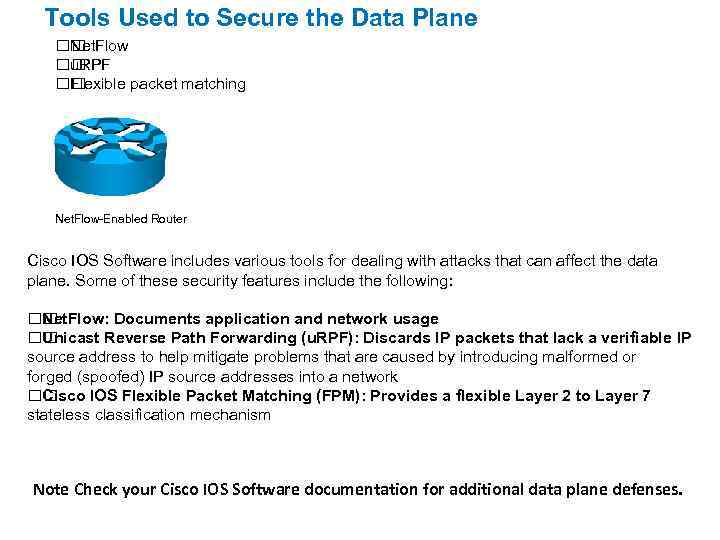 Tools Used to Secure the Data Plane Net. Flow u. RPF Flexible packet matching Net. Flow-Enabled Router Cisco IOS Software includes various tools for dealing with attacks that can affect the data plane. Some of these security features include the following: Net. Flow: Documents application and network usage Unicast Reverse Path Forwarding (u. RPF): Discards IP packets that lack a verifiable IP source address to help mitigate problems that are caused by introducing malformed or forged (spoofed) IP source addresses into a network Cisco IOS Flexible Packet Matching (FPM): Provides a flexible Layer 2 to Layer 7 stateless classification mechanism Note Check your Cisco IOS Software documentation for additional data plane defenses.
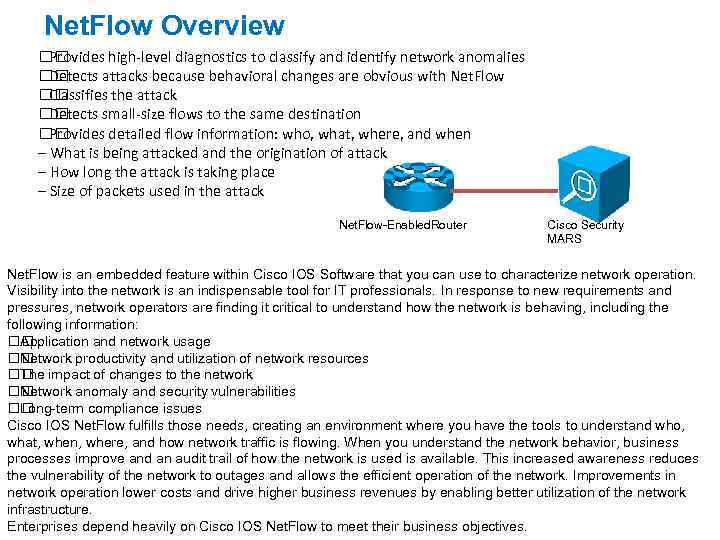 Net. Flow Overview Provides high-level diagnostics to classify and identify network anomalies Detects attacks because behavioral changes are obvious with Net. Flow Classifies the attack Detects small-size flows to the same destination Provides detailed flow information: who, what, where, and when – What is being attacked and the origination of attack – How long the attack is taking place – Size of packets used in the attack Net. Flow-Enabled. Router Cisco Security MARS Net. Flow is an embedded feature within Cisco IOS Software that you can use to characterize network operation. Visibility into the network is an indispensable tool for IT professionals. In response to new requirements and pressures, network operators are finding it critical to understand how the network is behaving, including the following information: Application and network usage Network productivity and utilization of network resources impact of changes to the network The Network anomaly and security vulnerabilities Long-term compliance issues Cisco IOS Net. Flow fulfills those needs, creating an environment where you have the tools to understand who, what, when, where, and how network traffic is flowing. When you understand the network behavior, business processes improve and an audit trail of how the network is used is available. This increased awareness reduces the vulnerability of the network to outages and allows the efficient operation of the network. Improvements in network operation lower costs and drive higher business revenues by enabling better utilization of the network infrastructure. Enterprises depend heavily on Cisco IOS Net. Flow to meet their business objectives.
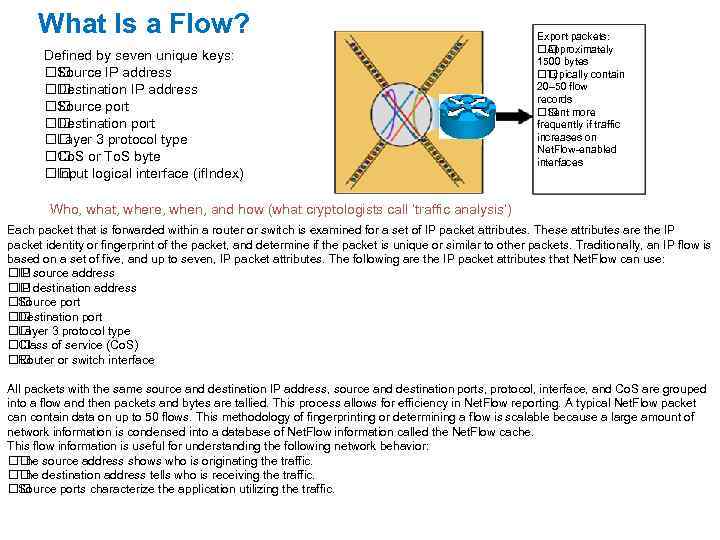 What Is a Flow? Defined by seven unique keys: Source IP address Destination IP address Source port Destination port Layer 3 protocol type or To. S byte Co. S logical interface (if. Index) Input Export packets: Approximately 1500 bytes Typically contain 20– 50 flow records more Sent frequently if traffic increases on Net. Flow-enabled interfaces Who, what, where, when, and how (what cryptologists call ‘traffic analysis’) Each packet that is forwarded within a router or switch is examined for a set of IP packet attributes. These attributes are the IP packet identity or fingerprint of the packet, and determine if the packet is unique or similar to other packets. Traditionally, an IP flow is based on a set of five, and up to seven, IP packet attributes. The following are the IP packet attributes that Net. Flow can use: source address IP destination address IP Source port Destination port Layer 3 protocol type Class of service (Co. S) Router or switch interface All packets with the same source and destination IP address, source and destination ports, protocol, interface, and Co. S are grouped into a flow and then packets and bytes are tallied. This process allows for efficiency in Net. Flow reporting. A typical Net. Flow packet can contain data on up to 50 flows. This methodology of fingerprinting or determining a flow is scalable because a large amount of network information is condensed into a database of Net. Flow information called the Net. Flow cache. This flow information is useful for understanding the following network behavior: source address shows who is originating the traffic. The destination address tells who is receiving the traffic. The Source ports characterize the application utilizing the traffic.
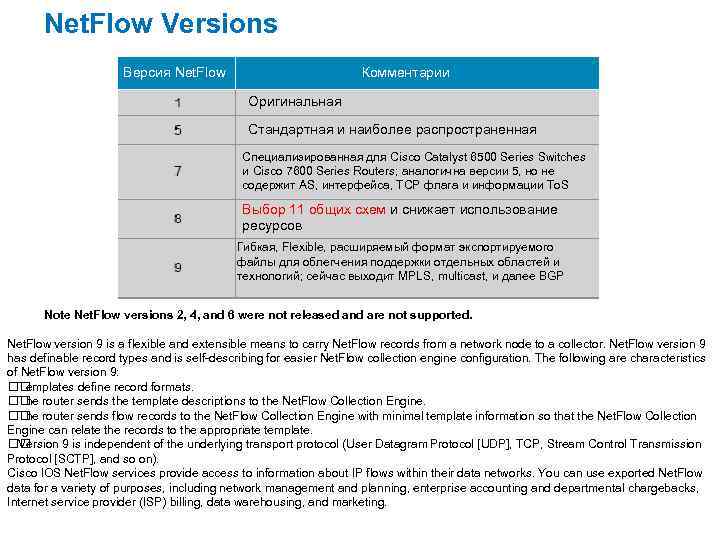 Net. Flow Versions Версия Net. Flow Комментарии Оригинальная Стандартная и наиболее распространенная Специализированная для Cisco Catalyst 6500 Series Switches и Cisco 7600 Series Routers; аналогична версии 5, но не содержит AS, интерфейса, TCP флага и информации To. S Выбор 11 общих схем и снижает использование ресурсов Гибкая, Flexible, расширяемый формат экспортируемого файлы для облегчения поддержки отдельных областей и технологий; сейчас выходит MPLS, multicast, и далее BGP Note Net. Flow versions 2, 4, and 6 were not released and are not supported. Net. Flow version 9 is a flexible and extensible means to carry Net. Flow records from a network node to a collector. Net. Flow version 9 has definable record types and is self-describing for easier Net. Flow collection engine configuration. The following are characteristics of Net. Flow version 9: Templates define record formats. router sends the template descriptions to the Net. Flow Collection Engine. The router sends flow records to the Net. Flow Collection Engine with minimal template information so that the Net. Flow Collection The Engine can relate the records to the appropriate template. Version 9 is independent of the underlying transport protocol (User Datagram Protocol [UDP], TCP, Stream Control Transmission Protocol [SCTP], and so on). Cisco IOS Net. Flow services provide access to information about IP flows within their data networks. You can use exported Net. Flow data for a variety of purposes, including network management and planning, enterprise accounting and departmental chargebacks, Internet service provider (ISP) billing, data warehousing, and marketing.
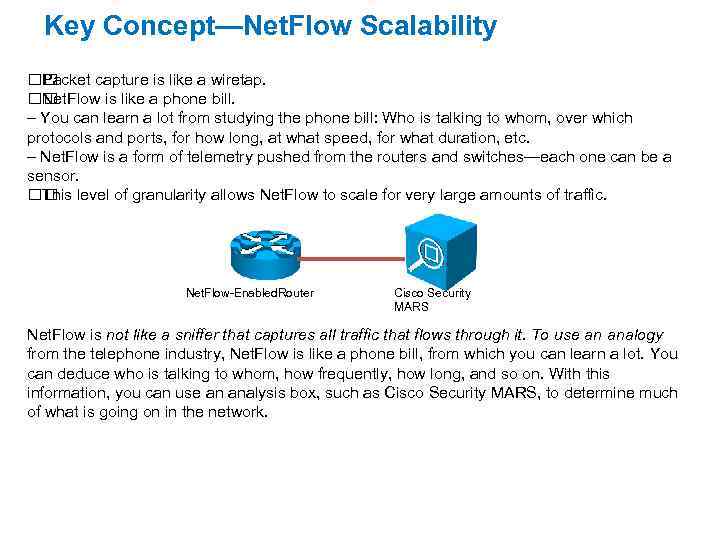 Key Concept—Net. Flow Scalability Packet capture is like a wiretap. Net. Flow is like a phone bill. – You can learn a lot from studying the phone bill: Who is talking to whom, over which protocols and ports, for how long, at what speed, for what duration, etc. – Net. Flow is a form of telemetry pushed from the routers and switches—each one can be a sensor. level of granularity allows Net. Flow to scale for very large amounts of traffic. This Net. Flow-Enabled. Router Cisco Security MARS Net. Flow is not like a sniffer that captures all traffic that flows through it. To use an analogy from the telephone industry, Net. Flow is like a phone bill, from which you can learn a lot. You can deduce who is talking to whom, how frequently, how long, and so on. With this information, you can use an analysis box, such as Cisco Security MARS, to determine much of what is going on in the network.
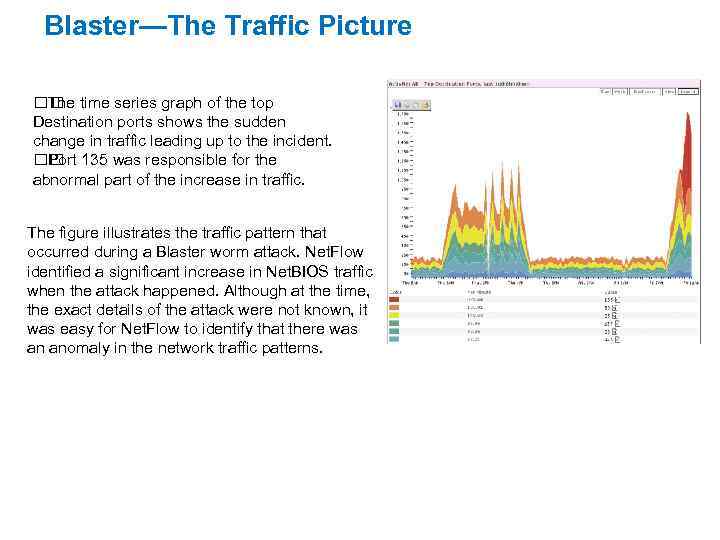 Blaster—The Traffic Picture time series graph of the top The Destination ports shows the sudden change in traffic leading up to the incident. 135 was responsible for the Port abnormal part of the increase in traffic. The figure illustrates the traffic pattern that occurred during a Blaster worm attack. Net. Flow identified a significant increase in Net. BIOS traffic when the attack happened. Although at the time, the exact details of the attack were not known, it was easy for Net. Flow to identify that there was an anomaly in the network traffic patterns.
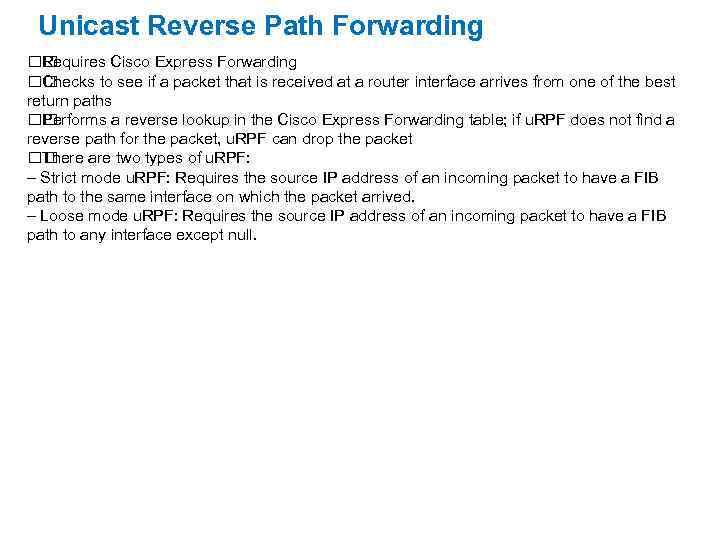 Unicast Reverse Path Forwarding Requires Cisco Express Forwarding Checks to see if a packet that is received at a router interface arrives from one of the best return paths Performs a reverse lookup in the Cisco Express Forwarding table; if u. RPF does not find a reverse path for the packet, u. RPF can drop the packet There are two types of u. RPF: – Strict mode u. RPF: Requires the source IP address of an incoming packet to have a FIB path to the same interface on which the packet arrived. – Loose mode u. RPF: Requires the source IP address of an incoming packet to have a FIB path to any interface except null.
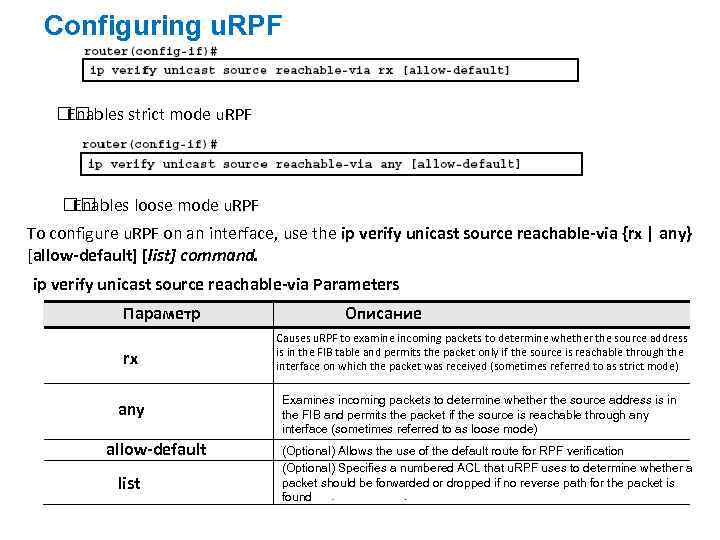 Configuring u. RPF Enables strict mode u. RPF Enables loose mode u. RPF To configure u. RPF on an interface, use the ip verify unicast source reachable-via {rx | any} [allow-default] [list] command. ip verify unicast source reachable-via Parameters Параметр rx any allow-default list Описание Causes u. RPF to examine incoming packets to determine whether the source address is in the FIB table and permits the packet only if the source is reachable through the interface on which the packet was received (sometimes referred to as strict mode) Examines incoming packets to determine whether the source address is in the FIB and permits the packet if the source is reachable through any interface (sometimes referred to as loose mode) (Optional) Allows the use of the default route for RPF verification (Optional) Specifies a numbered ACL that u. RPF uses to determine whether a packet should be forwarded or dropped if no reverse path for the packet is found
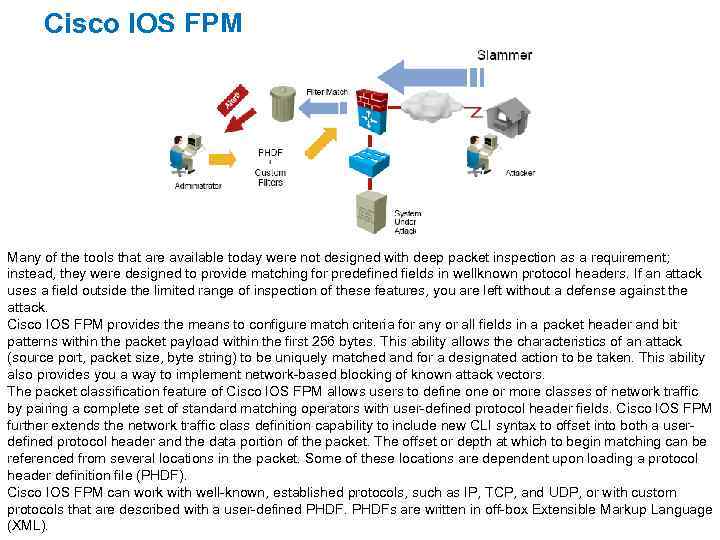 Cisco IOS FPM Many of the tools that are available today were not designed with deep packet inspection as a requirement; instead, they were designed to provide matching for predefined fields in wellknown protocol headers. If an attack uses a field outside the limited range of inspection of these features, you are left without a defense against the attack. Cisco IOS FPM provides the means to configure match criteria for any or all fields in a packet header and bit patterns within the packet payload within the first 256 bytes. This ability allows the characteristics of an attack (source port, packet size, byte string) to be uniquely matched and for a designated action to be taken. This ability also provides you a way to implement network-based blocking of known attack vectors. The packet classification feature of Cisco IOS FPM allows users to define or more classes of network traffic by pairing a complete set of standard matching operators with user-defined protocol header fields. Cisco IOS FPM further extends the network traffic class definition capability to include new CLI syntax to offset into both a userdefined protocol header and the data portion of the packet. The offset or depth at which to begin matching can be referenced from several locations in the packet. Some of these locations are dependent upon loading a protocol header definition file (PHDF). Cisco IOS FPM can work with well-known, established protocols, such as IP, TCP, and UDP, or with custom protocols that are described with a user-defined PHDFs are written in off-box Extensible Markup Language (XML).
 Protocol Header Definition File Protocol headers are defined in separate files called PHDFs. Packet filters are defined using field names in the PHDF. A PHDF defines each field contained in a particular protocol header. – Each field is defined with a name, optional comment, offset, and length. – The offset is always specified from the beginning of the header. – You can specify both the offset field and the length field in terms of either bits or bytes. can use XML to write your own custom PHDFs. You