


 Скачать презентацию YANG MING MARINE TRANSPORT CORP E-Service Introduction More
9f5c7f6e12e289b24908e75bdc7bdbb8.ppt
- Количество слайдов: 56
 YANG MING MARINE TRANSPORT CORP. E-Service Introduction More than a website! www. yml. com. tw 2006/January Updated 登高行遠 邁向卓越運輸集團
 Outline • YML E-Service Overview – Introduction – Catalogs – How to find help? – Detailed Features 登高行遠 邁向卓越運輸集團
 Introduction(1) Dear Customers, Welcome to Yang Ming’s Web site: 1. YM Group (includes English and Chinese Version): http: //www. yangming. com. tw/ 2. YM Line (includes English and Chinese Version) : www. yml. com. tw It’s about time to explore the Magic World! 登高行遠 邁向卓越運輸集團
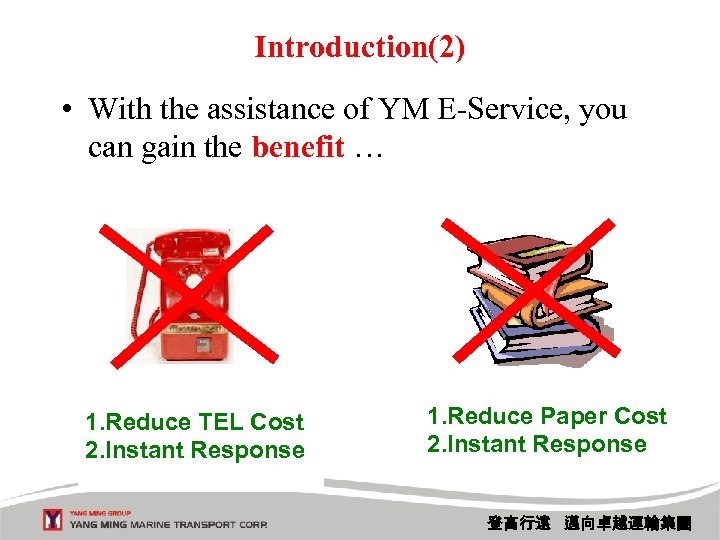 Introduction(2) • With the assistance of YM E-Service, you can gain the benefit … 1. Reduce TEL Cost 2. Instant Response 1. Reduce Paper Cost 2. Instant Response 登高行遠 邁向卓越運輸集團
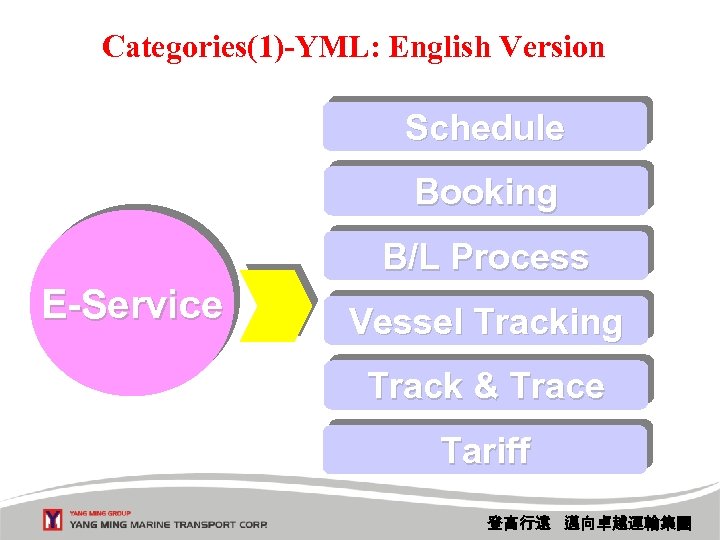 Categories(1)-YML: English Version Schedule Booking B/L Process E-Service Vessel Tracking Track & Trace Tariff 登高行遠 邁向卓越運輸集團
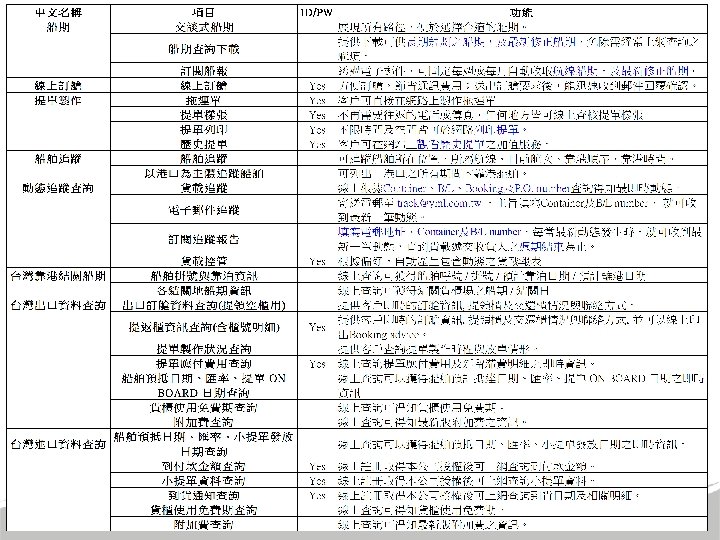
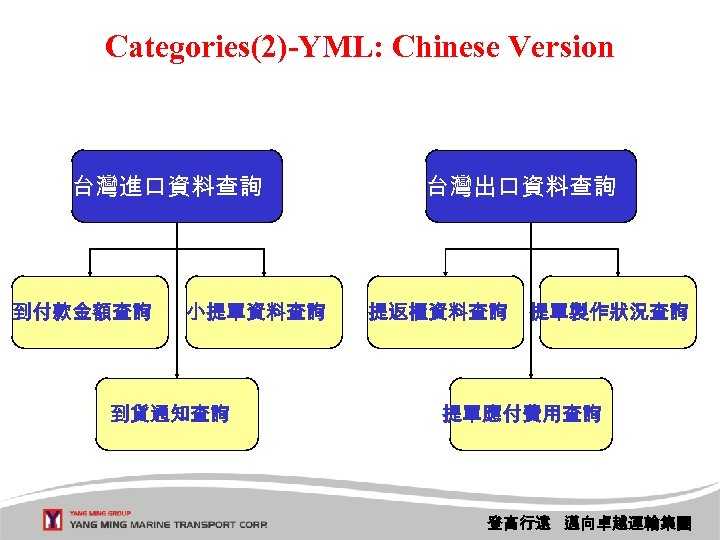 Categories(2)-YML: Chinese Version 台灣進口資料查詢 到付款金額查詢 小提單資料查詢 到貨通知查詢 台灣出口資料查詢 提返櫃資料查詢 提單製作狀況查詢 提單應付費用查詢 登高行遠 邁向卓越運輸集團
 登高行遠 邁向卓越運輸集團
 登高行遠 邁向卓越運輸集團
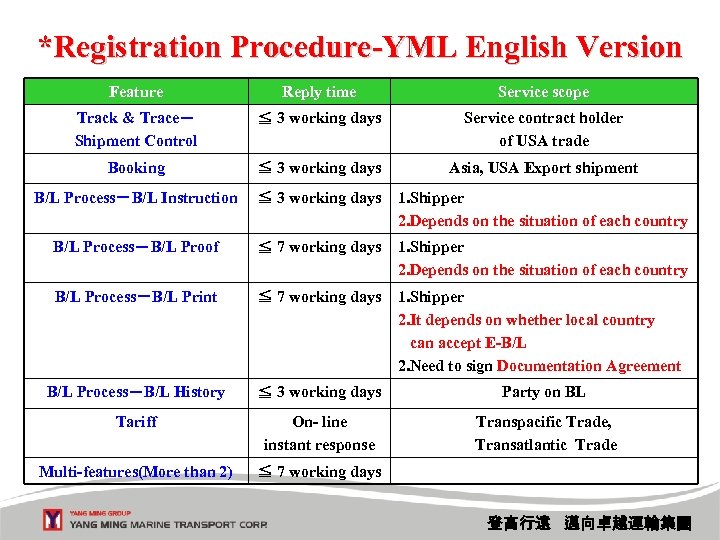 *Registration Procedure-YML English Version Feature Reply time Service scope Track & Trace- Shipment Control ≦ 3 working days Service contract holder of USA trade Booking ≦ 3 working days Asia, USA Export shipment B/L Process-B/L Instruction ≦ 3 working days 1. Shipper 2. Depends on the situation of each country B/L Process-B/L Proof ≦ 7 working days 1. Shipper 2. Depends on the situation of each country B/L Process-B/L Print ≦ 7 working days 1. Shipper 2. It depends on whether local country can accept E-B/L 2. Need to sign Documentation Agreement B/L Process-B/L History ≦ 3 working days Party on BL Tariff On- line instant response Transpacific Trade, Transatlantic Trade Multi-features(More than 2) ≦ 7 working days 登高行遠 邁向卓越運輸集團
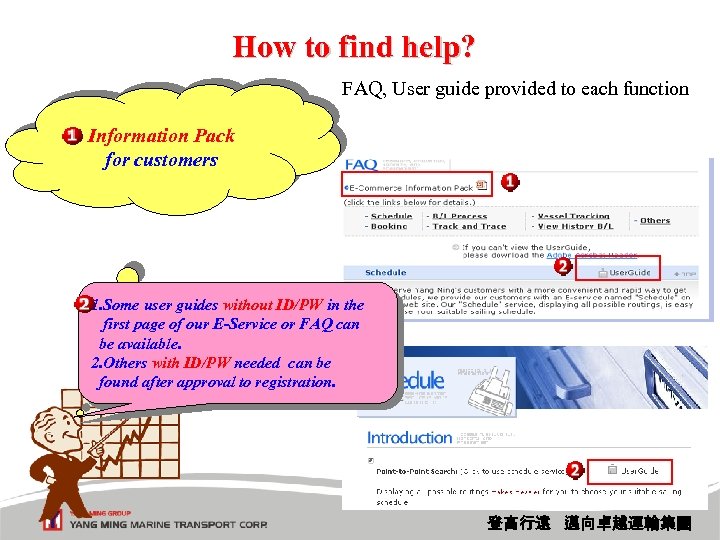 How to find help? FAQ, User guide provided to each function Information Pack for customers 1. Some user guides without ID/PW in the first page of our E-Service or FAQ can be available. 2. Others with ID/PW needed can be found after approval to registration. 登高行遠 邁向卓越運輸集團
![Detailed Features (1) Detailed Features [Schedule] Point-to-Point Search Schedule Download (Latest Schedule Download) Latest](https://present5.com/presentation/9f5c7f6e12e289b24908e75bdc7bdbb8/image-11.jpg "Detailed Features (1) Detailed Features [Schedule] Point-to-Point Search Schedule Download (Latest Schedule Download) Latest") Detailed Features (1) Detailed Features [Schedule] Point-to-Point Search Schedule Download (Latest Schedule Download) Latest Schedule Subscription [Booking] 【Register】 登高行遠 邁向卓越運輸集團
Detailed Features (1) Detailed Features [Schedule] Point-to-Point Search Schedule Download (Latest Schedule Download) Latest Schedule Subscription [Booking] 【Register】 登高行遠 邁向卓越運輸集團
![Detailed Features (2) Detailed Features [B/L Process] B/L Instruction【Register】 B/L Proof【Register】 B/L Print【Register】 B/L](https://present5.com/presentation/9f5c7f6e12e289b24908e75bdc7bdbb8/image-12.jpg "Detailed Features (2) Detailed Features [B/L Process] B/L Instruction【Register】 B/L Proof【Register】 B/L Print【Register】 B/L") Detailed Features (2) Detailed Features [B/L Process] B/L Instruction【Register】 B/L Proof【Register】 B/L Print【Register】 B/L History【Register】 [Vessel Tracking] (MOFC maintain) Search by vessel Search by port [Track & Trace] Cargo Tracking Email Tracking Report Subscription Shipment Control【Register】 [Tariff] 【Register】 登高行遠 邁向卓越運輸集團
Detailed Features (2) Detailed Features [B/L Process] B/L Instruction【Register】 B/L Proof【Register】 B/L Print【Register】 B/L History【Register】 [Vessel Tracking] (MOFC maintain) Search by vessel Search by port [Track & Trace] Cargo Tracking Email Tracking Report Subscription Shipment Control【Register】 [Tariff] 【Register】 登高行遠 邁向卓越運輸集團
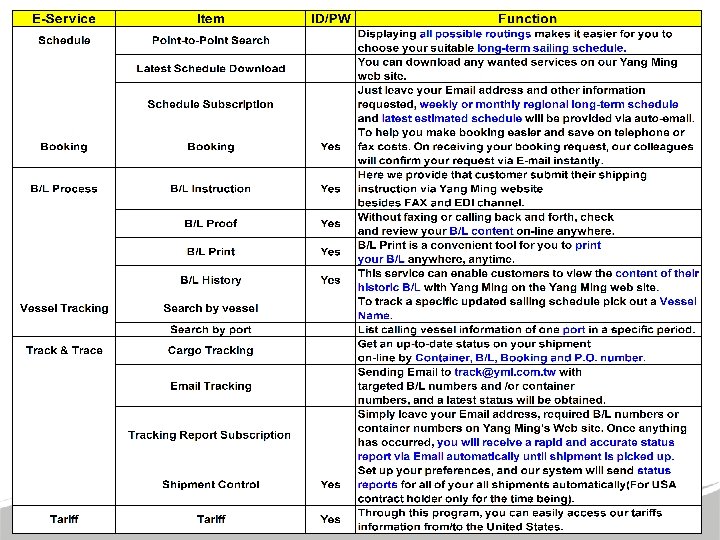
![[Schedule] • Point to Point Search By selecting locations, and date range, you can](https://present5.com/presentation/9f5c7f6e12e289b24908e75bdc7bdbb8/image-13.jpg "[Schedule] • Point to Point Search By selecting locations, and date range, you can") [Schedule] • Point to Point Search By selecting locations, and date range, you can view sailing schedule with vessel voyage, routing. • Download Schedule By selecting areas, you can view long term schedule in three file formats. Besides, you can also download schedule by HTML, TEXT, CSV, XML file. 1. Long Term Schedule Download 2. Latest Schedule Download • Subscribe Schedule System will auto e-mail the schedule report according to the criteria you subscribe to you weekly or monthly. 登高行遠 邁向卓越運輸集團
[Schedule] • Point to Point Search By selecting locations, and date range, you can view sailing schedule with vessel voyage, routing. • Download Schedule By selecting areas, you can view long term schedule in three file formats. Besides, you can also download schedule by HTML, TEXT, CSV, XML file. 1. Long Term Schedule Download 2. Latest Schedule Download • Subscribe Schedule System will auto e-mail the schedule report according to the criteria you subscribe to you weekly or monthly. 登高行遠 邁向卓越運輸集團
![[ Point to Point Search ] – (1/2) Interactive From/To Search Select location From/To,](https://present5.com/presentation/9f5c7f6e12e289b24908e75bdc7bdbb8/image-14.jpg "[ Point to Point Search ] – (1/2) Interactive From/To Search Select location From/To,") [ Point to Point Search ] – (1/2) Interactive From/To Search Select location From/To, and Date range. Click the button “Search”. 登高行遠 邁向卓越運輸集團
[ Point to Point Search ] – (1/2) Interactive From/To Search Select location From/To, and Date range. Click the button “Search”. 登高行遠 邁向卓越運輸集團
![[ Point to Point Search ] – (2/2) Two tiers display 1 st tier](https://present5.com/presentation/9f5c7f6e12e289b24908e75bdc7bdbb8/image-15.jpg "[ Point to Point Search ] – (2/2) Two tiers display 1 st tier") [ Point to Point Search ] – (2/2) Two tiers display 1 st tier Click “Detailed Routing” to view details. By clicking the vessel name, you can link to the vessel tracking, and you also can click the “e. Book” to do internet booking directly. 2 nd tier 登高行遠 邁向卓越運輸集團
[ Point to Point Search ] – (2/2) Two tiers display 1 st tier Click “Detailed Routing” to view details. By clicking the vessel name, you can link to the vessel tracking, and you also can click the “e. Book” to do internet booking directly. 2 nd tier 登高行遠 邁向卓越運輸集團
![[ Download Schedule ] – (1/2) One way Schedule Click the Area you prefer,](https://present5.com/presentation/9f5c7f6e12e289b24908e75bdc7bdbb8/image-16.jpg "[ Download Schedule ] – (1/2) One way Schedule Click the Area you prefer,") [ Download Schedule ] – (1/2) One way Schedule Click the Area you prefer, the sailing schedule reports would show there listed by trade service. We provide 4 Formats. Besides HTML, TEXT and CSV format, the XML format report file could be imported into your back end system at your I. T 's convenience. 登高行遠 邁向卓越運輸集團
[ Download Schedule ] – (1/2) One way Schedule Click the Area you prefer, the sailing schedule reports would show there listed by trade service. We provide 4 Formats. Besides HTML, TEXT and CSV format, the XML format report file could be imported into your back end system at your I. T 's convenience. 登高行遠 邁向卓越運輸集團
![[ Download Schedule ] – (2/2) Latest means Coastal Click ”Latest Schedule Download” to](https://present5.com/presentation/9f5c7f6e12e289b24908e75bdc7bdbb8/image-17.jpg "[ Download Schedule ] – (2/2) Latest means Coastal Click ”Latest Schedule Download” to") [ Download Schedule ] – (2/2) Latest means Coastal Click ”Latest Schedule Download” to view long term schedule and costal schedule simultaneously. 登高行遠 邁向卓越運輸集團
[ Download Schedule ] – (2/2) Latest means Coastal Click ”Latest Schedule Download” to view long term schedule and costal schedule simultaneously. 登高行遠 邁向卓越運輸集團
![[Schedule Subscription] – (1/3) Sent by Auto-email Input your e-mail address. Input company information,](https://present5.com/presentation/9f5c7f6e12e289b24908e75bdc7bdbb8/image-18.jpg "[Schedule Subscription] – (1/3) Sent by Auto-email Input your e-mail address. Input company information,") [Schedule Subscription] – (1/3) Sent by Auto-email Input your e-mail address. Input company information, File Format, Weekly/Monthly, Area. Click the button “Subscribe”. 登高行遠 邁向卓越運輸集團
[Schedule Subscription] – (1/3) Sent by Auto-email Input your e-mail address. Input company information, File Format, Weekly/Monthly, Area. Click the button “Subscribe”. 登高行遠 邁向卓越運輸集團
![[Schedule Subscription] – (2/3) Confirm message The subscriber will get the mail notice 登高行遠](https://present5.com/presentation/9f5c7f6e12e289b24908e75bdc7bdbb8/image-19.jpg "[Schedule Subscription] – (2/3) Confirm message The subscriber will get the mail notice 登高行遠") [Schedule Subscription] – (2/3) Confirm message The subscriber will get the mail notice 登高行遠 邁向卓越運輸集團
[Schedule Subscription] – (2/3) Confirm message The subscriber will get the mail notice 登高行遠 邁向卓越運輸集團
![[Schedule Subscription] – (3/3) 1. When using “Schedule Subscription”, the long term schedule and](https://present5.com/presentation/9f5c7f6e12e289b24908e75bdc7bdbb8/image-20.jpg "[Schedule Subscription] – (3/3) 1. When using “Schedule Subscription”, the long term schedule and") [Schedule Subscription] – (3/3) 1. When using “Schedule Subscription”, the long term schedule and costal schedule are available simultaneously via three formats: HTML, TEXT and CSV format. 2. *: costal schedule. 登高行遠 邁向卓越運輸集團
[Schedule Subscription] – (3/3) 1. When using “Schedule Subscription”, the long term schedule and costal schedule are available simultaneously via three formats: HTML, TEXT and CSV format. 2. *: costal schedule. 登高行遠 邁向卓越運輸集團
![[ Cargo Tracking ] Multiple Track, 4 kinds of numbers Select inquiring type by:](https://present5.com/presentation/9f5c7f6e12e289b24908e75bdc7bdbb8/image-21.jpg "[ Cargo Tracking ] Multiple Track, 4 kinds of numbers Select inquiring type by:") [ Cargo Tracking ] Multiple Track, 4 kinds of numbers Select inquiring type by: 1. Container number 2. B/L number 3. Booking number 4. P. O number Input one or multiple numbers. Click the button “Track”. 登高行遠 邁向卓越運輸集團
[ Cargo Tracking ] Multiple Track, 4 kinds of numbers Select inquiring type by: 1. Container number 2. B/L number 3. Booking number 4. P. O number Input one or multiple numbers. Click the button “Track”. 登高行遠 邁向卓越運輸集團
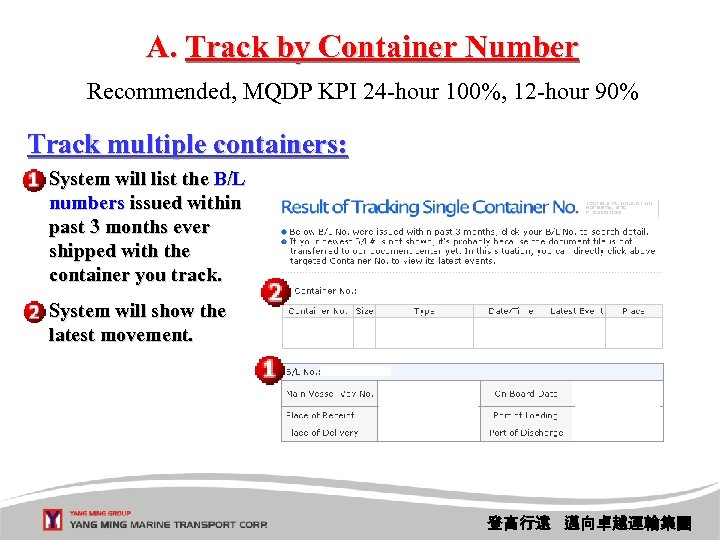 A. Track by Container Number Recommended, MQDP KPI 24 -hour 100%, 12 -hour 90% Track multiple containers: System will list the B/L numbers issued within past 3 months ever shipped with the container you track. System will show the latest movement. 登高行遠 邁向卓越運輸集團
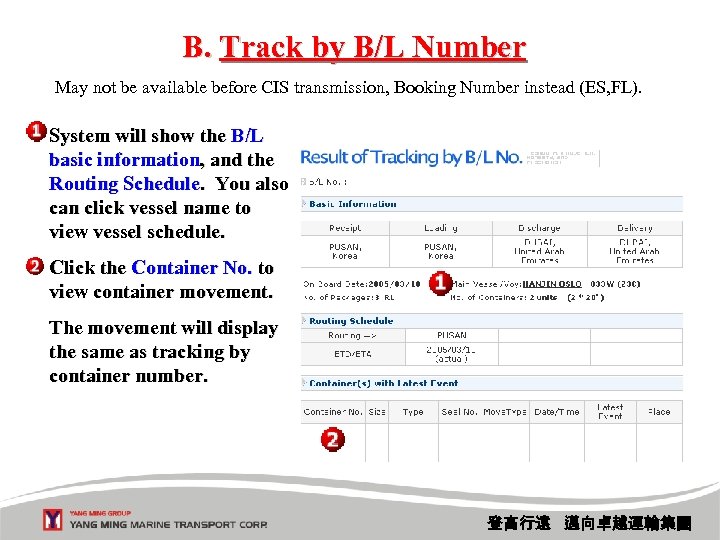 B. Track by B/L Number May not be available before CIS transmission, Booking Number instead (ES, FL). System will show the B/L basic information, and the Routing Schedule. You also can click vessel name to view vessel schedule. Click the Container No. to view container movement. The movement will display the same as tracking by container number. 登高行遠 邁向卓越運輸集團
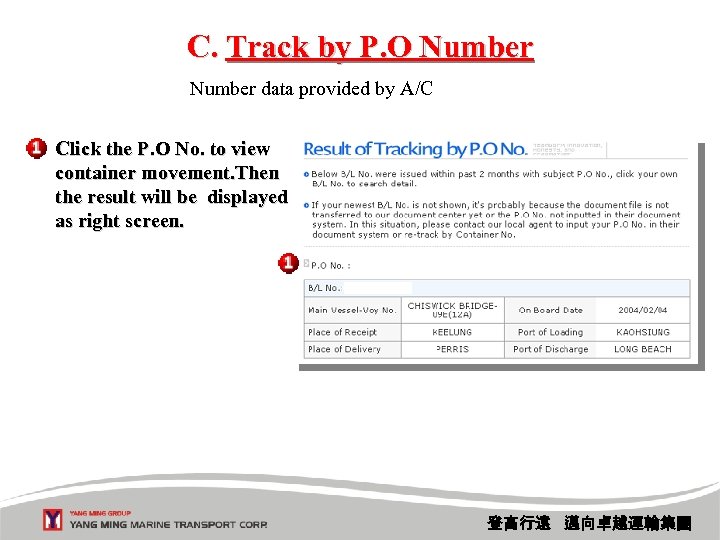 C. Track by P. O Number data provided by A/C Click the P. O No. to view container movement. Then the result will be displayed as right screen. 登高行遠 邁向卓越運輸集團
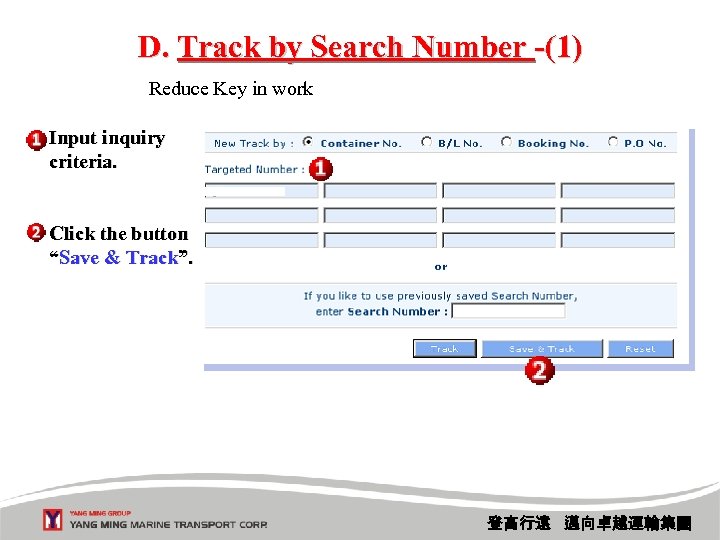 D. Track by Search Number -(1) Reduce Key in work Input inquiry criteria. Click the button “Save & Track”. 登高行遠 邁向卓越運輸集團
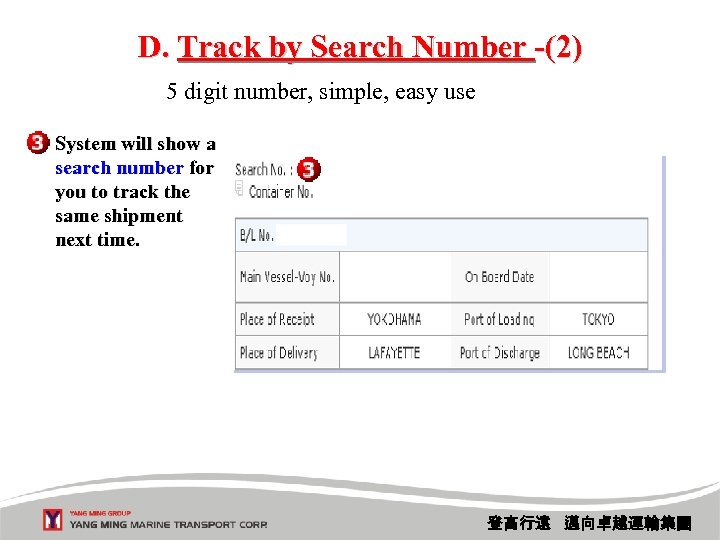 D. Track by Search Number -(2) 5 digit number, simple, easy use System will show a search number for you to track the same shipment next time. 登高行遠 邁向卓越運輸集團
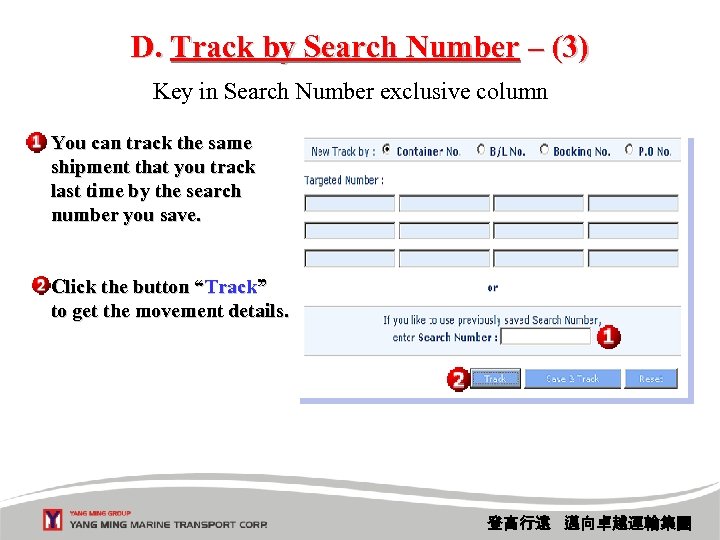 D. Track by Search Number – (3) Key in Search Number exclusive column You can track the same shipment that you track last time by the search number you save. Click the button “Track” to get the movement details. 登高行遠 邁向卓越運輸集團
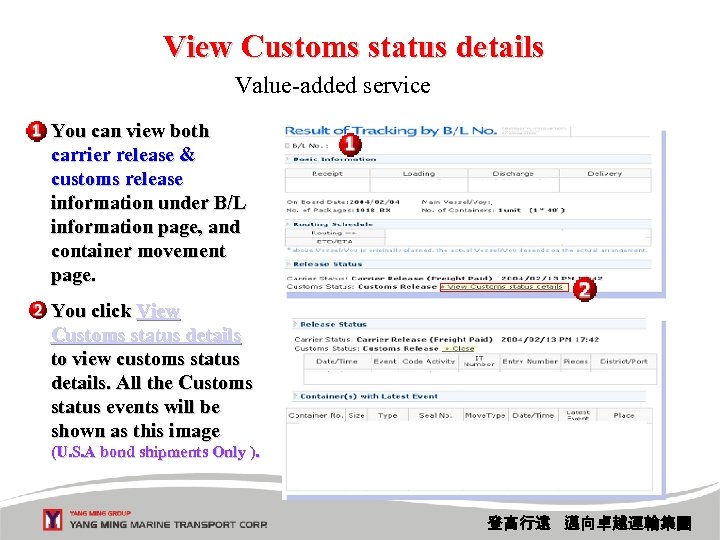 View Customs status details Value-added service You can view both carrier release & customs release information under B/L information page, and container movement page. You click View Customs status details to view customs status details. All the Customs status events will be shown as this image (U. S. A bond shipments Only ). 登高行遠 邁向卓越運輸集團
![[ E-mail Tracking ] One Time tracking Address an e-mail to track@yml. com. tw.](https://present5.com/presentation/9f5c7f6e12e289b24908e75bdc7bdbb8/image-29.jpg "[ E-mail Tracking ] One Time tracking Address an e-mail to track@yml. com. tw.") [ E-mail Tracking ] One Time tracking Address an e-mail to track@yml. com. tw. Type your B/L and /or Container number in email”Subject”. Send out this email, you'll receive current status report in minutes. 登高行遠 邁向卓越運輸集團
[ E-mail Tracking ] One Time tracking Address an e-mail to track@yml. com. tw. Type your B/L and /or Container number in email”Subject”. Send out this email, you'll receive current status report in minutes. 登高行遠 邁向卓越運輸集團
![[Tracking Report Subscription] One Life Cycle Tracking (ES, FL, OF, DF, TX, RX, OF,](https://present5.com/presentation/9f5c7f6e12e289b24908e75bdc7bdbb8/image-30.jpg "[Tracking Report Subscription] One Life Cycle Tracking (ES, FL, OF, DF, TX, RX, OF,") [Tracking Report Subscription] One Life Cycle Tracking (ES, FL, OF, DF, TX, RX, OF, DF, FC, RE) Input your Email address, and click button”Subscribe”. Input Company Name, and B/L No. /Container NO. you want to track. Click ”Subscribe”. 登高行遠 邁向卓越運輸集團
[Tracking Report Subscription] One Life Cycle Tracking (ES, FL, OF, DF, TX, RX, OF, DF, FC, RE) Input your Email address, and click button”Subscribe”. Input Company Name, and B/L No. /Container NO. you want to track. Click ”Subscribe”. 登高行遠 邁向卓越運輸集團
![*[ Shipment Control ] – (1/7) No Need to Key in B/L#, Cntr #](https://present5.com/presentation/9f5c7f6e12e289b24908e75bdc7bdbb8/image-31.jpg "*[ Shipment Control ] – (1/7) No Need to Key in B/L#, Cntr #") *[ Shipment Control ] – (1/7) No Need to Key in B/L#, Cntr # Setting up the criteria (s), you can on line view all your shipment status. Click ”Track”. 登高行遠 邁向卓越運輸集團
*[ Shipment Control ] – (1/7) No Need to Key in B/L#, Cntr # Setting up the criteria (s), you can on line view all your shipment status. Click ”Track”. 登高行遠 邁向卓越運輸集團
![[ Shipment Control ] – (2/7) Link to Cargo Tracking Click ”B/L Number“ to](https://present5.com/presentation/9f5c7f6e12e289b24908e75bdc7bdbb8/image-32.jpg "[ Shipment Control ] – (2/7) Link to Cargo Tracking Click ”B/L Number“ to") [ Shipment Control ] – (2/7) Link to Cargo Tracking Click ”B/L Number“ to view B/L details. Click ” Container Number ” Click ”View Text File“ or ”View CSV File“ to view or download the file. to view Container movement. 登高行遠 邁向卓越運輸集團
[ Shipment Control ] – (2/7) Link to Cargo Tracking Click ”B/L Number“ to view B/L details. Click ” Container Number ” Click ”View Text File“ or ”View CSV File“ to view or download the file. to view Container movement. 登高行遠 邁向卓越運輸集團
![[ Shipment Control ] – (3/7) Auto-email as long as Event occurs Create event](https://present5.com/presentation/9f5c7f6e12e289b24908e75bdc7bdbb8/image-33.jpg "[ Shipment Control ] – (3/7) Auto-email as long as Event occurs Create event") [ Shipment Control ] – (3/7) Auto-email as long as Event occurs Create event notification template of your preference. Click button”Save”. You'll receive updated status report of your all shipment via email until cargo is picked up. Explanation 登高行遠 邁向卓越運輸集團
[ Shipment Control ] – (3/7) Auto-email as long as Event occurs Create event notification template of your preference. Click button”Save”. You'll receive updated status report of your all shipment via email until cargo is picked up. Explanation 登高行遠 邁向卓越運輸集團
![[ Shipment Control ] – (4/7) Auto-email when next Event does not occur “Exception](https://present5.com/presentation/9f5c7f6e12e289b24908e75bdc7bdbb8/image-34.jpg "[ Shipment Control ] – (4/7) Auto-email when next Event does not occur “Exception") [ Shipment Control ] – (4/7) Auto-email when next Event does not occur “Exception Notification” system can alert you the exception when expected status does not occur over certain days. Click ”Create Exception Notification Template” for further using. 登高行遠 邁向卓越運輸集團
[ Shipment Control ] – (4/7) Auto-email when next Event does not occur “Exception Notification” system can alert you the exception when expected status does not occur over certain days. Click ”Create Exception Notification Template” for further using. 登高行遠 邁向卓越運輸集團
![[ Shipment Control ] – (5/7) Report Function Create ” Template of Report” of](https://present5.com/presentation/9f5c7f6e12e289b24908e75bdc7bdbb8/image-35.jpg "[ Shipment Control ] – (5/7) Report Function Create ” Template of Report” of") [ Shipment Control ] – (5/7) Report Function Create ” Template of Report” of “Report” for more detailed shipment information. System will send you an auto-email with excel file attached. 登高行遠 邁向卓越運輸集團
[ Shipment Control ] – (5/7) Report Function Create ” Template of Report” of “Report” for more detailed shipment information. System will send you an auto-email with excel file attached. 登高行遠 邁向卓越運輸集團
![[ Shipment Control ] – (6/7) Notify when Vessel Arrives Click ”Create Vessel Arrival](https://present5.com/presentation/9f5c7f6e12e289b24908e75bdc7bdbb8/image-36.jpg "[ Shipment Control ] – (6/7) Notify when Vessel Arrives Click ”Create Vessel Arrival") [ Shipment Control ] – (6/7) Notify when Vessel Arrives Click ”Create Vessel Arrival Notification Template” of “Vessel Arrival Notification” to receive notification when some unique vessels arrived before within particular days decided by A/C. System will send you an auto-email with excel file attached. 登高行遠 邁向卓越運輸集團
[ Shipment Control ] – (6/7) Notify when Vessel Arrives Click ”Create Vessel Arrival Notification Template” of “Vessel Arrival Notification” to receive notification when some unique vessels arrived before within particular days decided by A/C. System will send you an auto-email with excel file attached. 登高行遠 邁向卓越運輸集團
![[ Shipment Control ] – (7/7) Notify when Vessel Delay Click ”Create New Vessel](https://present5.com/presentation/9f5c7f6e12e289b24908e75bdc7bdbb8/image-37.jpg "[ Shipment Control ] – (7/7) Notify when Vessel Delay Click ”Create New Vessel") [ Shipment Control ] – (7/7) Notify when Vessel Delay Click ”Create New Vessel Updated ETA Template” of “Vessel Updated ETA Notification Template” to receive notification when some unique vessels arrived after within particular days decided by A/C. System will send you an auto-email with excel file attached. 登高行遠 邁向卓越運輸集團
[ Shipment Control ] – (7/7) Notify when Vessel Delay Click ”Create New Vessel Updated ETA Template” of “Vessel Updated ETA Notification Template” to receive notification when some unique vessels arrived after within particular days decided by A/C. System will send you an auto-email with excel file attached. 登高行遠 邁向卓越運輸集團
![*[ Vessel Tracking ] – Search by Vessel (1/3) More than Long Term Schedule](https://present5.com/presentation/9f5c7f6e12e289b24908e75bdc7bdbb8/image-38.jpg "*[ Vessel Tracking ] – Search by Vessel (1/3) More than Long Term Schedule") *[ Vessel Tracking ] – Search by Vessel (1/3) More than Long Term Schedule You can input vessel's partial name in ”Vessel” box. Then, click” Match by partial name” button to easily find the full vessel name you want to track. You may also select vessel name directly, and click ”Track”. 登高行遠 邁向卓越運輸集團
*[ Vessel Tracking ] – Search by Vessel (1/3) More than Long Term Schedule You can input vessel's partial name in ”Vessel” box. Then, click” Match by partial name” button to easily find the full vessel name you want to track. You may also select vessel name directly, and click ”Track”. 登高行遠 邁向卓越運輸集團
![[ Vessel Tracking ] – Search by Vessel (2/3) 3 kinds of data source](https://present5.com/presentation/9f5c7f6e12e289b24908e75bdc7bdbb8/image-39.jpg "[ Vessel Tracking ] – Search by Vessel (2/3) 3 kinds of data source") [ Vessel Tracking ] – Search by Vessel (2/3) 3 kinds of data source : Actual Coastal Long Term System will show the vessel schedule of the latest voyage for each call port. You may click ”Previous” or ”Next” to view last or next voyage’s vessel schedule. 1. Planned: Long-Term Schedule 2. Estimated: Coastal Schedule 3. Actual: Actual 登高行遠 邁向卓越運輸集團
[ Vessel Tracking ] – Search by Vessel (2/3) 3 kinds of data source : Actual Coastal Long Term System will show the vessel schedule of the latest voyage for each call port. You may click ”Previous” or ”Next” to view last or next voyage’s vessel schedule. 1. Planned: Long-Term Schedule 2. Estimated: Coastal Schedule 3. Actual: Actual 登高行遠 邁向卓越運輸集團
![[ Vessel Tracking ] – Search by Vessel (3/3) Link to Vessel Particular Click](https://present5.com/presentation/9f5c7f6e12e289b24908e75bdc7bdbb8/image-40.jpg "[ Vessel Tracking ] – Search by Vessel (3/3) Link to Vessel Particular Click") [ Vessel Tracking ] – Search by Vessel (3/3) Link to Vessel Particular Click the ”vessel name”. System will pop up the vessel particular as this image. 登高行遠 邁向卓越運輸集團
[ Vessel Tracking ] – Search by Vessel (3/3) Link to Vessel Particular Click the ”vessel name”. System will pop up the vessel particular as this image. 登高行遠 邁向卓越運輸集團
![[ Vessel Tracking ] – Search by Port Schedule Select the port, and time](https://present5.com/presentation/9f5c7f6e12e289b24908e75bdc7bdbb8/image-41.jpg "[ Vessel Tracking ] – Search by Port Schedule Select the port, and time") [ Vessel Tracking ] – Search by Port Schedule Select the port, and time frame that you want to search. Click ” Inquire”. System will show all the calling vessels’ schedule, and the terminal information. 登高行遠 邁向卓越運輸集團
[ Vessel Tracking ] – Search by Port Schedule Select the port, and time frame that you want to search. Click ” Inquire”. System will show all the calling vessels’ schedule, and the terminal information. 登高行遠 邁向卓越運輸集團
![[Booking] – (1/2) Submit anytime, anywhere without phone cost/congestion Click “New Booking “ to](https://present5.com/presentation/9f5c7f6e12e289b24908e75bdc7bdbb8/image-42.jpg "[Booking] – (1/2) Submit anytime, anywhere without phone cost/congestion Click “New Booking “ to") [Booking] – (1/2) Submit anytime, anywhere without phone cost/congestion Click “New Booking “ to After you submitted your booking, system create a new booking will show you the Transaction ID as this image. Fill in your template name that you create before, and click the button ”Change Request” to change it. Click ”Cancel Request” if you want to cancel your previous booking. 登高行遠 邁向卓越運輸集團
[Booking] – (1/2) Submit anytime, anywhere without phone cost/congestion Click “New Booking “ to After you submitted your booking, system create a new booking will show you the Transaction ID as this image. Fill in your template name that you create before, and click the button ”Change Request” to change it. Click ”Cancel Request” if you want to cancel your previous booking. 登高行遠 邁向卓越運輸集團
![[Booking] – (2/2) Make User Friendly You can maintain your partners details via [Maintain](https://present5.com/presentation/9f5c7f6e12e289b24908e75bdc7bdbb8/image-43.jpg "[Booking] – (2/2) Make User Friendly You can maintain your partners details via [Maintain") [Booking] – (2/2) Make User Friendly You can maintain your partners details via [Maintain Partner’s data]. By clicking the button [View History Bookings], you can view your booking history details. Click”Member Management”, then you can maintain your users who could login and receive email notification of booking confirmation. 登高行遠 邁向卓越運輸集團
[Booking] – (2/2) Make User Friendly You can maintain your partners details via [Maintain Partner’s data]. By clicking the button [View History Bookings], you can view your booking history details. Click”Member Management”, then you can maintain your users who could login and receive email notification of booking confirmation. 登高行遠 邁向卓越運輸集團
![[ B/L Instruction] – (1/4) No more Fax to Avoid Garble handwriting Click ”Create](https://present5.com/presentation/9f5c7f6e12e289b24908e75bdc7bdbb8/image-44.jpg "[ B/L Instruction] – (1/4) No more Fax to Avoid Garble handwriting Click ”Create") [ B/L Instruction] – (1/4) No more Fax to Avoid Garble handwriting Click ”Create B/L Instruction” to start a new one. 登高行遠 邁向卓越運輸集團
[ B/L Instruction] – (1/4) No more Fax to Avoid Garble handwriting Click ”Create B/L Instruction” to start a new one. 登高行遠 邁向卓越運輸集團
![[ B/L Instruction] – (2/4) Easy to make a new B/L Instruction You may](https://present5.com/presentation/9f5c7f6e12e289b24908e75bdc7bdbb8/image-45.jpg "[ B/L Instruction] – (2/4) Easy to make a new B/L Instruction You may") [ B/L Instruction] – (2/4) Easy to make a new B/L Instruction You may also query the ES/I by selecting criteria, and click ”Search”. The existing record could be displayed on the screen. By clicking each template, it’s easy to start a new record without inputting much data. Otherwise, click ”Create B/L Instruction” to initiate an E-S/I without template. 登高行遠 邁向卓越運輸集團
[ B/L Instruction] – (2/4) Easy to make a new B/L Instruction You may also query the ES/I by selecting criteria, and click ”Search”. The existing record could be displayed on the screen. By clicking each template, it’s easy to start a new record without inputting much data. Otherwise, click ”Create B/L Instruction” to initiate an E-S/I without template. 登高行遠 邁向卓越運輸集團
![[ B/L Instruction] – (3/4) Sufficient columns to include various shipment data You can](https://present5.com/presentation/9f5c7f6e12e289b24908e75bdc7bdbb8/image-46.jpg "[ B/L Instruction] – (3/4) Sufficient columns to include various shipment data You can") [ B/L Instruction] – (3/4) Sufficient columns to include various shipment data You can also click □ of ”Copy to a new Template- Template Name” and input a template name to create a new template. Fill in the below fields of ”Party/Service”, ”Commodity”, ”Container”, ”Weight/Measurement/Package” and ”Payment terms & Others”. Then click ”Submit”. 登高行遠 邁向卓越運輸集團
[ B/L Instruction] – (3/4) Sufficient columns to include various shipment data You can also click □ of ”Copy to a new Template- Template Name” and input a template name to create a new template. Fill in the below fields of ”Party/Service”, ”Commodity”, ”Container”, ”Weight/Measurement/Package” and ”Payment terms & Others”. Then click ”Submit”. 登高行遠 邁向卓越運輸集團
![[ B/L Instruction] – (4/4) Report function provided Inquiry records of B/L Instruction by](https://present5.com/presentation/9f5c7f6e12e289b24908e75bdc7bdbb8/image-47.jpg "[ B/L Instruction] – (4/4) Report function provided Inquiry records of B/L Instruction by") [ B/L Instruction] – (4/4) Report function provided Inquiry records of B/L Instruction by “Report” function. Select Output format. Click ”Generate Report”. 登高行遠 邁向卓越運輸集團
[ B/L Instruction] – (4/4) Report function provided Inquiry records of B/L Instruction by “Report” function. Select Output format. Click ”Generate Report”. 登高行遠 邁向卓越運輸集團
![[ B/L Print ] – (1/3) Print YM’s B/L at A/C’s office You may](https://present5.com/presentation/9f5c7f6e12e289b24908e75bdc7bdbb8/image-48.jpg "[ B/L Print ] – (1/3) Print YM’s B/L at A/C’s office You may") [ B/L Print ] – (1/3) Print YM’s B/L at A/C’s office You may also inquiry the B/Ls by selecting criteria, and click ”Query”. System will show the B/Ls, and you can click the ”B/L No. ” to view it. Click □ to select whether you want to view”Freight” or “Non-Freight”. 登高行遠 邁向卓越運輸集團
[ B/L Print ] – (1/3) Print YM’s B/L at A/C’s office You may also inquiry the B/Ls by selecting criteria, and click ”Query”. System will show the B/Ls, and you can click the ”B/L No. ” to view it. Click □ to select whether you want to view”Freight” or “Non-Freight”. 登高行遠 邁向卓越運輸集團
![[ B/L Print ] – (2/3) Multiple B/L Preview Confirm Print Click □ and](https://present5.com/presentation/9f5c7f6e12e289b24908e75bdc7bdbb8/image-49.jpg "[ B/L Print ] – (2/3) Multiple B/L Preview Confirm Print Click □ and") [ B/L Print ] – (2/3) Multiple B/L Preview Confirm Print Click □ and select “Preview” to view multiple B/L content. The Status displayed whether B/Ls were printed or not yet accepted? Click “Print” directly. 登高行遠 邁向卓越運輸集團
[ B/L Print ] – (2/3) Multiple B/L Preview Confirm Print Click □ and select “Preview” to view multiple B/L content. The Status displayed whether B/Ls were printed or not yet accepted? Click “Print” directly. 登高行遠 邁向卓越運輸集團
![[ B/L Print ] – (3/3) Original B/L YM’s fix blank form YM Logo](https://present5.com/presentation/9f5c7f6e12e289b24908e75bdc7bdbb8/image-50.jpg "[ B/L Print ] – (3/3) Original B/L YM’s fix blank form YM Logo") [ B/L Print ] – (3/3) Original B/L YM’s fix blank form YM Logo in front B/L Clause in back Sea Waybill Common printer paper Then, system will show the B/Ls as this image for you to print them in a single pdf file on your computer 登高行遠 邁向卓越運輸集團
[ B/L Print ] – (3/3) Original B/L YM’s fix blank form YM Logo in front B/L Clause in back Sea Waybill Common printer paper Then, system will show the B/Ls as this image for you to print them in a single pdf file on your computer 登高行遠 邁向卓越運輸集團
![[ B/L Proof ] – (1) Save YM’s E-FAX cost and avoid garble handwriting](https://present5.com/presentation/9f5c7f6e12e289b24908e75bdc7bdbb8/image-51.jpg "[ B/L Proof ] – (1) Save YM’s E-FAX cost and avoid garble handwriting") [ B/L Proof ] – (1) Save YM’s E-FAX cost and avoid garble handwriting Select the criteria to query the records of B/L Proof. Select the function for viewing the B/L Proof on line at your convenience 登高行遠 邁向卓越運輸集團
[ B/L Proof ] – (1) Save YM’s E-FAX cost and avoid garble handwriting Select the criteria to query the records of B/L Proof. Select the function for viewing the B/L Proof on line at your convenience 登高行遠 邁向卓越運輸集團
![[ B/L Proof ] – (2) Then, system will show the B/L proof as](https://present5.com/presentation/9f5c7f6e12e289b24908e75bdc7bdbb8/image-52.jpg "[ B/L Proof ] – (2) Then, system will show the B/L proof as") [ B/L Proof ] – (2) Then, system will show the B/L proof as this image for you. 登高行遠 邁向卓越運輸集團
[ B/L Proof ] – (2) Then, system will show the B/L proof as this image for you. 登高行遠 邁向卓越運輸集團
![[ B/L History ] Multiple Party ID, SH view Prepaid, CN view Collect Input](https://present5.com/presentation/9f5c7f6e12e289b24908e75bdc7bdbb8/image-53.jpg "[ B/L History ] Multiple Party ID, SH view Prepaid, CN view Collect Input") [ B/L History ] Multiple Party ID, SH view Prepaid, CN view Collect Input B/L No. Click ”Query”. Then the result will be displayed. 登高行遠 邁向卓越運輸集團
[ B/L History ] Multiple Party ID, SH view Prepaid, CN view Collect Input B/L No. Click ”Query”. Then the result will be displayed. 登高行遠 邁向卓越運輸集團
![[ Tariff ] – (1) Instant Register to get ID/PW You have to register](https://present5.com/presentation/9f5c7f6e12e289b24908e75bdc7bdbb8/image-54.jpg "[ Tariff ] – (1) Instant Register to get ID/PW You have to register") [ Tariff ] – (1) Instant Register to get ID/PW You have to register first to get your ID/PW on line. Then, you can use ID/PW to ”Login”. 登高行遠 邁向卓越運輸集團
[ Tariff ] – (1) Instant Register to get ID/PW You have to register first to get your ID/PW on line. Then, you can use ID/PW to ”Login”. 登高行遠 邁向卓越運輸集團
![[ Tariff ]-(2) Follow FMC 1998 Shipping Act, outsourcing by Descartes Rate Search Provide](https://present5.com/presentation/9f5c7f6e12e289b24908e75bdc7bdbb8/image-55.jpg "[ Tariff ]-(2) Follow FMC 1998 Shipping Act, outsourcing by Descartes Rate Search Provide") [ Tariff ]-(2) Follow FMC 1998 Shipping Act, outsourcing by Descartes Rate Search Provide board searching across all tariffs. Contract Search (4 items only) Provide flexible searching within contracts. Item Search 1. Port Pair Retrieve all rates associated for a specific commodity in a single tariff. 2. Commodity 3. MQC Rate Analysis 4. Duration Provide flexible searching within a tariff. Rules Inland Rates Provide flexible searching within rules. Provide flexible inland rate searching. 登高行遠 邁向卓越運輸集團
[ Tariff ]-(2) Follow FMC 1998 Shipping Act, outsourcing by Descartes Rate Search Provide board searching across all tariffs. Contract Search (4 items only) Provide flexible searching within contracts. Item Search 1. Port Pair Retrieve all rates associated for a specific commodity in a single tariff. 2. Commodity 3. MQC Rate Analysis 4. Duration Provide flexible searching within a tariff. Rules Inland Rates Provide flexible searching within rules. Provide flexible inland rate searching. 登高行遠 邁向卓越運輸集團
 Q&A Thanks for your participation! 登高行遠 邁向卓越運輸集團