 Скачать презентацию XP New Perspectives on Creating Web Pages with
b874c648ee151c545a3c5d0769636499.ppt
- Количество слайдов: 83



XP New Perspectives on Creating Web Pages with HTML Tutorial 9: Working with Java. Script Objects and Events Creating Web Pages with HTML, 3 e Prepared by: C. Hueckstaedt, Tutorial 9 1
Tutorial Objectives XP • Learn about form validation • Study the object-based nature of the Java. Script language • Work with objects, properties, methods, and events of your Web page • Create a program to calculate a value Creating Web Pages with HTML, 3 e Prepared by: C. Hueckstaedt, Tutorial 9 2
Tutorial Objectives Continued XP • Copy a value into a form field • Extract a value from a selection list and radio button • Display a message box to the user • Control a form submission Creating Web Pages with HTML, 3 e Prepared by: C. Hueckstaedt, Tutorial 9 3
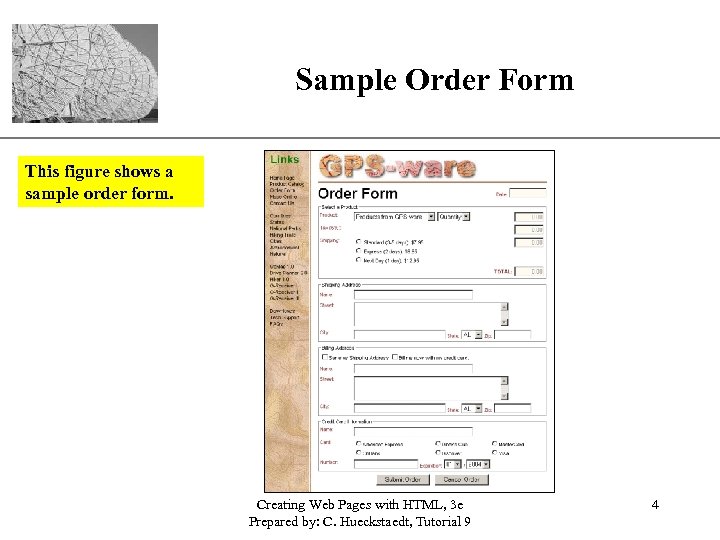
Sample Order Form XP This figure shows a sample order form. Creating Web Pages with HTML, 3 e Prepared by: C. Hueckstaedt, Tutorial 9 4
Understanding Form Validation XP • A form validation is a process by which the server on the browser checks form entries and, where possible, eliminates errors. • On the Web, validation can occur on the client or server side. • Form validation is a critical aspect of data entry. • A properly designed form reduces the possibility of faulty data being entered. Creating Web Pages with HTML, 3 e Prepared by: C. Hueckstaedt, Tutorial 9 5
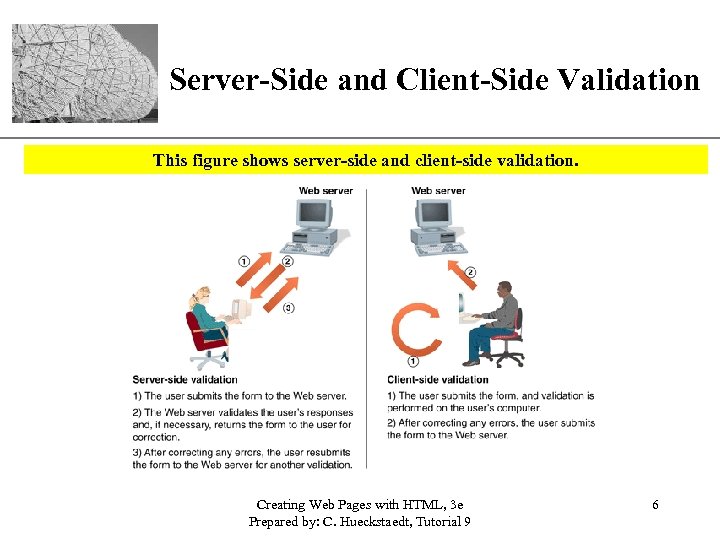
XP Server-Side and Client-Side Validation This figure shows server-side and client-side validation. Creating Web Pages with HTML, 3 e Prepared by: C. Hueckstaedt, Tutorial 9 6
XP Java. Script and Client-Side Validation • A powerful use of Java. Script is to provide clientside validation. • Using a script built into the Web page form provides immediate feedback to users as they enter data. • Client-side validation can reduce the network traffic between users and the Web server. Creating Web Pages with HTML, 3 e Prepared by: C. Hueckstaedt, Tutorial 9 7
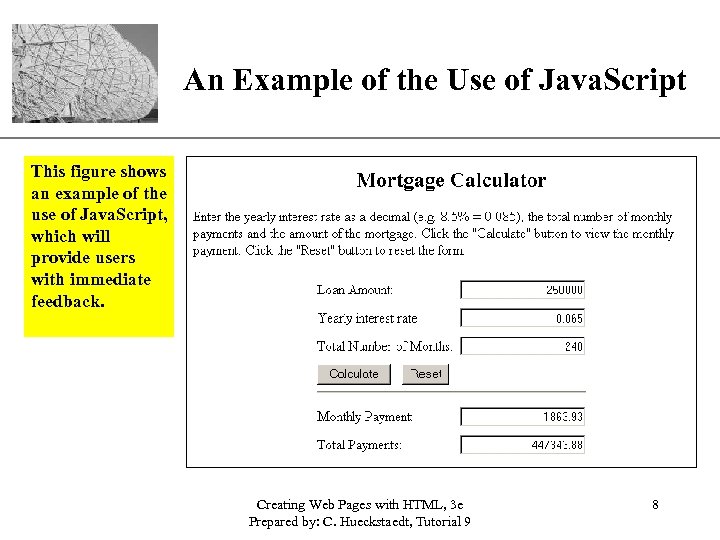
XP An Example of the Use of Java. Script This figure shows an example of the use of Java. Script, which will provide users with immediate feedback. Creating Web Pages with HTML, 3 e Prepared by: C. Hueckstaedt, Tutorial 9 8
XP Working with Java. Script Objects • Java. Script is an object-based language. • Java. Script is based on manipulating objects by modifying an object’s properties or by applying methods to an object. – objects are items that have a defined existence – each object has properties that describe its appearance, purpose, or behavior – each object has methods, which are actions that can be performed with the object or to it Creating Web Pages with HTML, 3 e Prepared by: C. Hueckstaedt, Tutorial 9 9
XP Understanding Java. Script Objects and Object Names • In Java. Script, each object is identified by an object name. – for example, when you want to use Java. Script to manipulate the current window, you use the object name “window” – operations that affect the current Web page use the “document” object name – the object name can also be based on the name assigned to the object by the user Creating Web Pages with HTML, 3 e Prepared by: C. Hueckstaedt, Tutorial 9 10
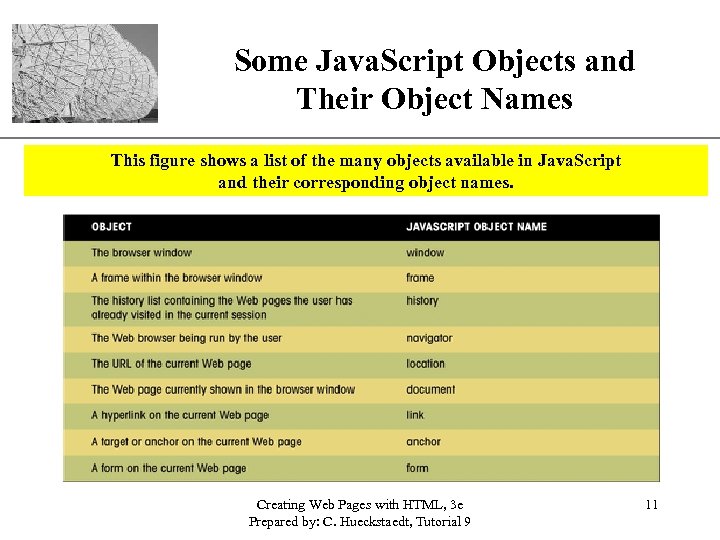
Some Java. Script Objects and Their Object Names XP This figure shows a list of the many objects available in Java. Script and their corresponding object names. Creating Web Pages with HTML, 3 e Prepared by: C. Hueckstaedt, Tutorial 9 11
Introducing the Document Object Model XP • Java. Script arranges objects in a Document Object Model or DOM. • The DOM defines the logical structure of objects and the way an object is accessed and manipulated. • The document object model can be thought of as a hierarchy moving from the most general object to the most specific. Creating Web Pages with HTML, 3 e Prepared by: C. Hueckstaedt, Tutorial 9 12
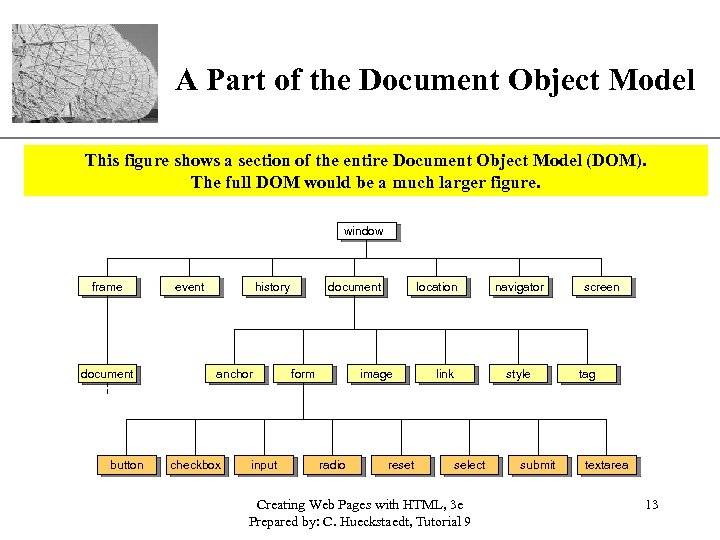
XP A Part of the Document Object Model This figure shows a section of the entire Document Object Model (DOM). The full DOM would be a much larger figure. window frame document button event history anchor checkbox input document form location image radio reset link select Creating Web Pages with HTML, 3 e Prepared by: C. Hueckstaedt, Tutorial 9 navigator style submit screen tag textarea 13
DOM Hierarchy XP • The topmost object in the hierarchy is the window object, which contains the other objects in the list, such as the current frame, history list, and the Web page document. • The Web page document contains its own set of objects, including links, anchors, and forms. • Within each form are form objects, such as input boxes, radio buttons, or selection lists. Creating Web Pages with HTML, 3 e Prepared by: C. Hueckstaedt, Tutorial 9 14
Object Names and Browsers XP • Include the DOM hierarchy when referring to an object i. e window. document. order. • Some browsers cannot interpret the object names without the complete hierarchy. Creating Web Pages with HTML, 3 e Prepared by: C. Hueckstaedt, Tutorial 9 15
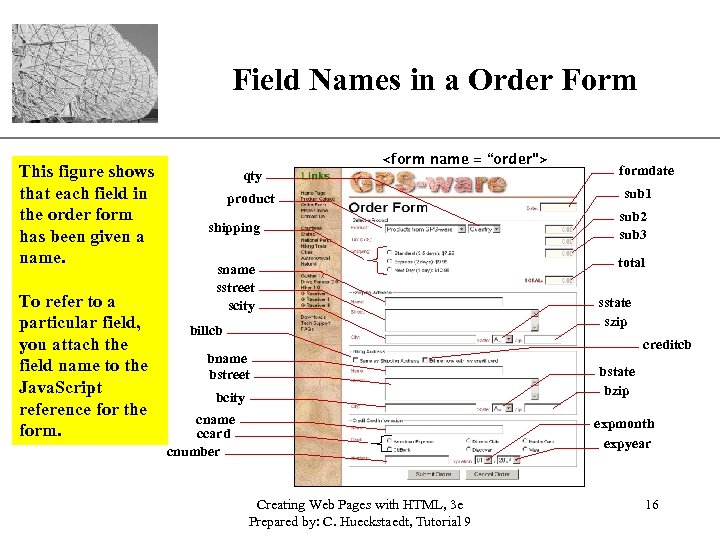
XP Field Names in a Order Form This figure shows that each field in the order form has been given a name. To refer to a particular field, you attach the field name to the Java. Script reference for the form. <form name = “order”> qty product shipping sname sstreet scity billcb bname bstreet bcity cname ccard cnumber formdate sub 1 sub 2 sub 3 total sstate szip creditcb bstate bzip expmonth expyear Creating Web Pages with HTML, 3 e Prepared by: C. Hueckstaedt, Tutorial 9 16
XP Field Names • To refer to a particular field, attach the field name to the Java. Script reference for the form. – for example, in the order form to display the current date in the formdata field use the following Java. Script object reference: document. order. formdate Creating Web Pages with HTML, 3 e Prepared by: C. Hueckstaedt, Tutorial 9 17
Object Collections XP • There is another way to reference an object and that is with an object collection. Creating Web Pages with HTML, 3 e Prepared by: C. Hueckstaedt, Tutorial 9 18
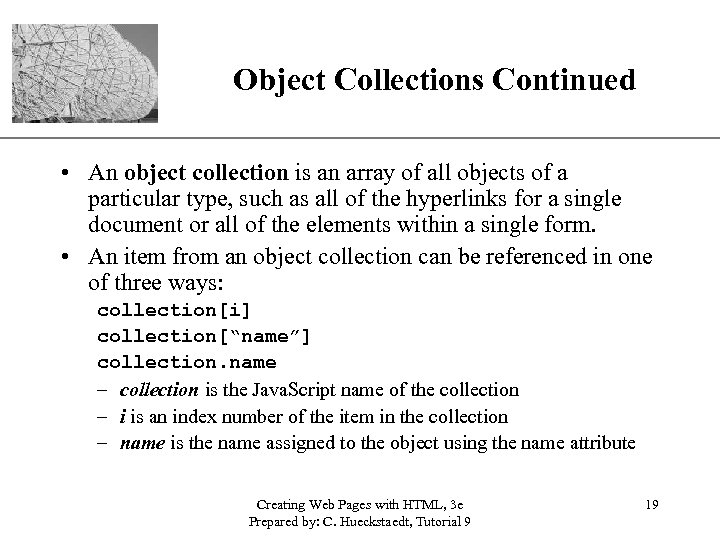
XP Object Collections Continued • An object collection is an array of all objects of a particular type, such as all of the hyperlinks for a single document or all of the elements within a single form. • An item from an object collection can be referenced in one of three ways: collection[i] collection[“name”] collection. name – collection is the Java. Script name of the collection – i is an index number of the item in the collection – name is the name assigned to the object using the name attribute Creating Web Pages with HTML, 3 e Prepared by: C. Hueckstaedt, Tutorial 9 19
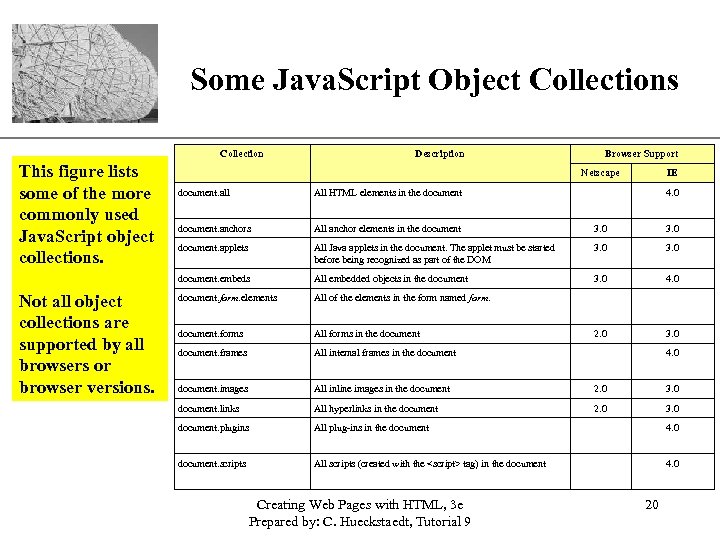
XP Some Java. Script Object Collections Collection This figure lists some of the more commonly used Java. Script object collections. Description Browser Support Netscape IE All HTML elements in the document. anchors All anchor elements in the document 3. 0 document. applets All Java applets in the document. The applet must be started before being recognized as part of the DOM 3. 0 document. embeds Not all object collections are supported by all browsers or browser versions. document. all All embedded objects in the document 3. 0 4. 0 document. form. elements All of the elements in the form named form. document. forms All forms in the document 2. 0 3. 0 document. frames All internal frames in the document. images All inline images in the document 2. 0 3. 0 document. links All hyperlinks in the document 2. 0 3. 0 document. plugins All plug-ins in the document 4. 0 document. scripts All scripts (created with the <script> tag) in the document 4. 0 Creating Web Pages with HTML, 3 e Prepared by: C. Hueckstaedt, Tutorial 9 4. 0 20
Working with Object Properties XP • Each object in Java. Script has properties associated with it. • The number of properties depends on the particular object; some objects have only a few properties, while others have many. • As with object names, certain keywords identify properties. Creating Web Pages with HTML, 3 e Prepared by: C. Hueckstaedt, Tutorial 9 21
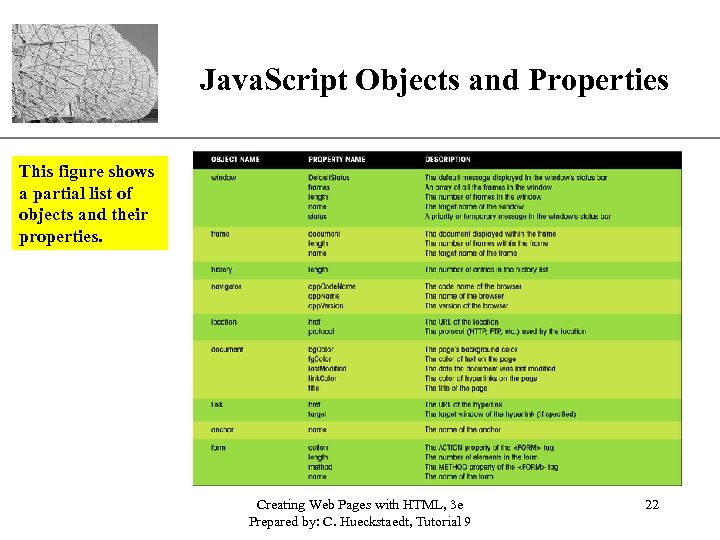
XP Java. Script Objects and Properties This figure shows a partial list of objects and their properties. Creating Web Pages with HTML, 3 e Prepared by: C. Hueckstaedt, Tutorial 9 22
XP Java. Script Properties • There are several ways of working with properties. – the value of a property can be changed – store the property’s value in a variable – test whether the property equals a specified value in an If…Then expression Creating Web Pages with HTML, 3 e Prepared by: C. Hueckstaedt, Tutorial 9 23
XP Modifying a Property’s Value • The syntax for changing the value of a property is: object. property = expression – object is the Java. Script name of the object you want to manipulate – property is a property of that object – expression is a Java. Script expression that assigns a value to the property Creating Web Pages with HTML, 3 e Prepared by: C. Hueckstaedt, Tutorial 9 24
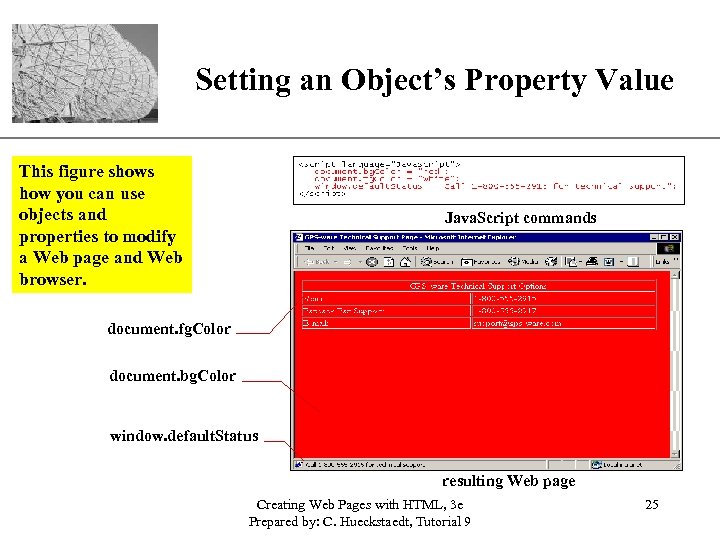
XP Setting an Object’s Property Value This figure shows how you can use objects and properties to modify a Web page and Web browser. Java. Script commands document. fg. Color document. bg. Color window. default. Status resulting Web page Creating Web Pages with HTML, 3 e Prepared by: C. Hueckstaedt, Tutorial 9 25
Changing Properties XP • Not all properties can be changed. • Some properties are read-only, which means that you can read the property value, but cannot modify it. Creating Web Pages with HTML, 3 e Prepared by: C. Hueckstaedt, Tutorial 9 26
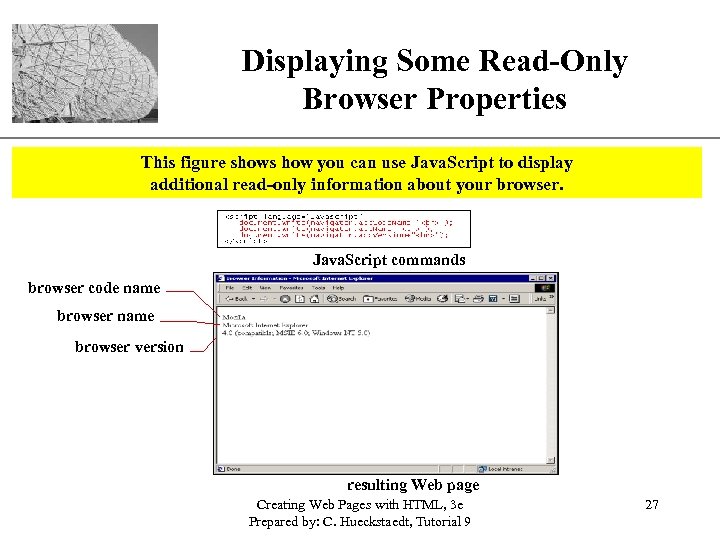
Displaying Some Read-Only Browser Properties XP This figure shows how you can use Java. Script to display additional read-only information about your browser. Java. Script commands browser code name browser version resulting Web page Creating Web Pages with HTML, 3 e Prepared by: C. Hueckstaedt, Tutorial 9 27
XP Assigning a Property to a Variable • Although you cannot change the value of readonly properties, you can assign a value to a variable in your Java. Script program. • The syntax for assigning a property to a variable is: variable = object. property – variable is the variable name – object is the name of the object – property is the name of its property Creating Web Pages with HTML, 3 e Prepared by: C. Hueckstaedt, Tutorial 9 28
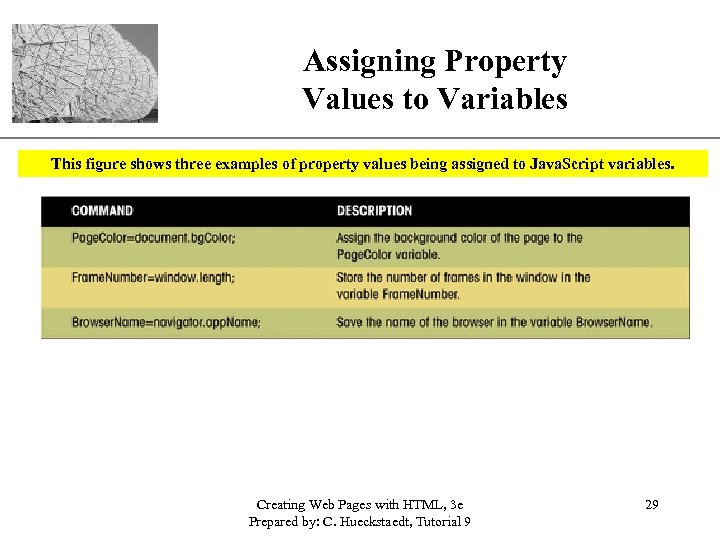
Assigning Property Values to Variables XP This figure shows three examples of property values being assigned to Java. Script variables. Creating Web Pages with HTML, 3 e Prepared by: C. Hueckstaedt, Tutorial 9 29
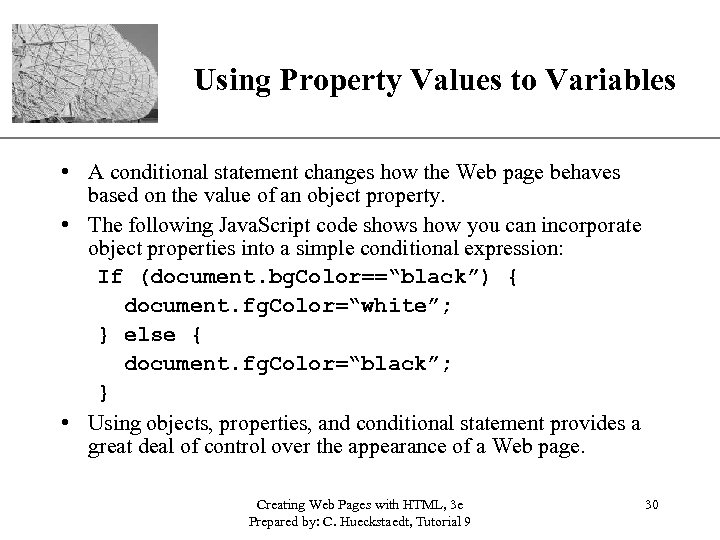
XP Using Property Values to Variables • A conditional statement changes how the Web page behaves based on the value of an object property. • The following Java. Script code shows how you can incorporate object properties into a simple conditional expression: If (document. bg. Color==“black”) { document. fg. Color=“white”; } else { document. fg. Color=“black”; } • Using objects, properties, and conditional statement provides a great deal of control over the appearance of a Web page. Creating Web Pages with HTML, 3 e Prepared by: C. Hueckstaedt, Tutorial 9 30
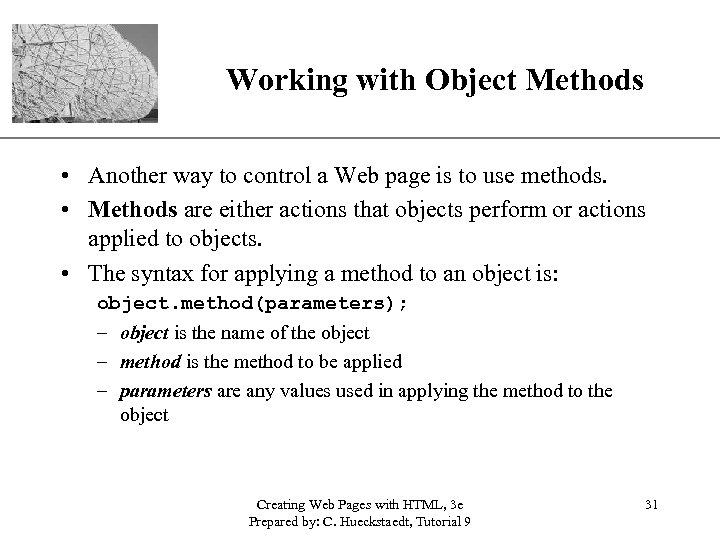
XP Working with Object Methods • Another way to control a Web page is to use methods. • Methods are either actions that objects perform or actions applied to objects. • The syntax for applying a method to an object is: object. method(parameters); – object is the name of the object – method is the method to be applied – parameters are any values used in applying the method to the object Creating Web Pages with HTML, 3 e Prepared by: C. Hueckstaedt, Tutorial 9 31
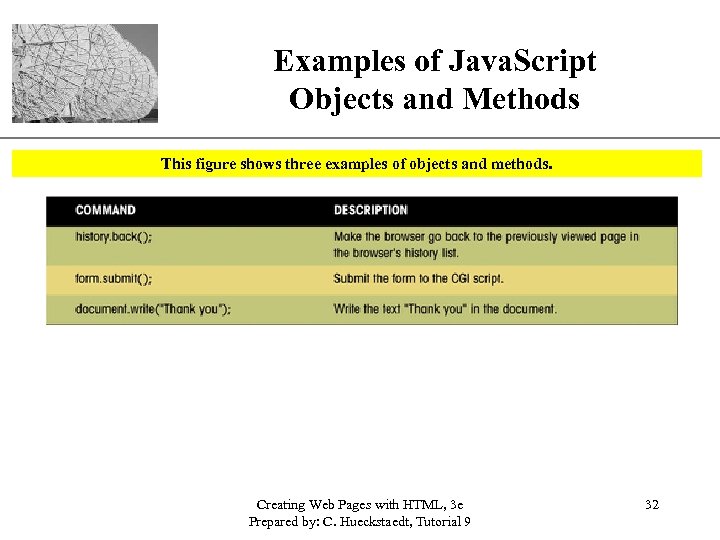
Examples of Java. Script Objects and Methods XP This figure shows three examples of objects and methods. Creating Web Pages with HTML, 3 e Prepared by: C. Hueckstaedt, Tutorial 9 32
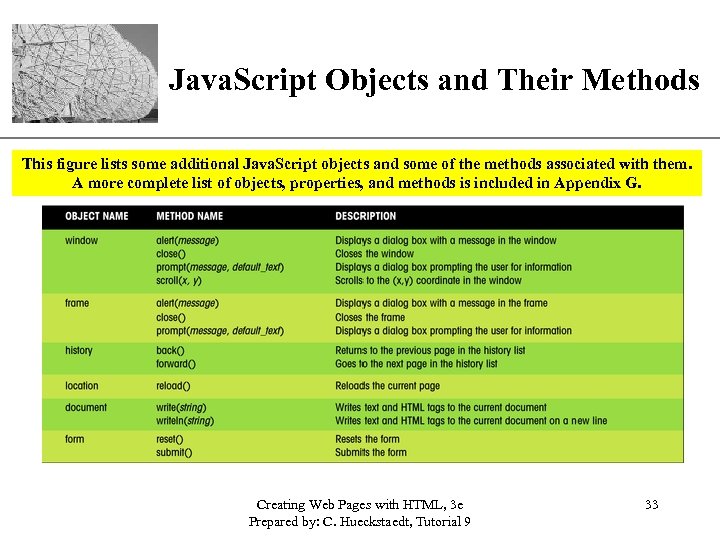
XP Java. Script Objects and Their Methods This figure lists some additional Java. Script objects and some of the methods associated with them. A more complete list of objects, properties, and methods is included in Appendix G. Creating Web Pages with HTML, 3 e Prepared by: C. Hueckstaedt, Tutorial 9 33
Managing Events XP • An event is a specific occurrence within the Web browser. For example: – opening up a Web page – positioning the mouse pointer over a location on that page • Events are an important part of Java. Script programming, you can write scripts that run in response to the actions of the user, even after the Web page has been opened. Creating Web Pages with HTML, 3 e Prepared by: C. Hueckstaedt, Tutorial 9 34
Working with Event Handlers XP • Events are controlled in Java. Script using event handlers that indicate what actions the browser takes in response to an event. • Event handlers are created as attributes added to the HTML tags in which the event is triggered. • The general syntax is: < – – – tag onevent = “Java. Script commands; ”> tag is the name of the HTML tag onevent is the name of the event that occurs within the tag Java. Script commands are the commands the browser runs in response to the event Creating Web Pages with HTML, 3 e Prepared by: C. Hueckstaedt, Tutorial 9 35
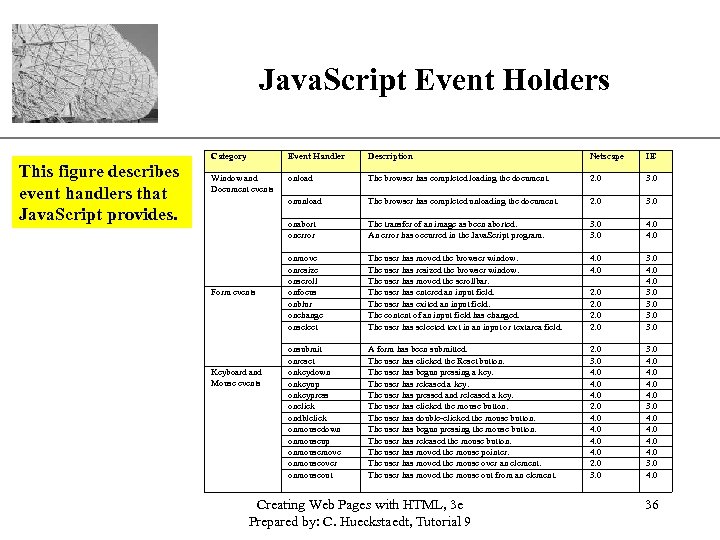
XP Java. Script Event Holders Category This figure describes event handlers that Java. Script provides. Event Handler Description Netscape IE Window and Document events onload The browser has completed loading the document. 2. 0 3. 0 onunload The browser has completed unloading the document. 2. 0 3. 0 onabort onerror The transfer of an image as been aborted. An error has occurred in the Java. Script program. 3. 0 4. 0 onmove onresize onscroll onfocus onblur onchange onselect The user has moved the browser window. The user has resized the browser window. The user has moved the scrollbar. The user has entered an input field. The user has exited an input field. The content of an input field has changed. The user has selected text in an input or textarea field. 4. 0 2. 0 3. 0 4. 0 3. 0 onsubmit onreset onkeydown onkeyup onkeypress onclick ondblclick onmousedown onmouseup onmousemove onmouseover onmouseout A form has been submitted. The user has clicked the Reset button. The user has begun pressing a key. The user has released a key. The user has pressed and released a key. The user has clicked the mouse button. The user has double-clicked the mouse button. The user has begun pressing the mouse button. The user has released the mouse button. The user has moved the mouse pointer. The user has moved the mouse over an element. The user has moved the mouse out from an element. 2. 0 3. 0 4. 0 3. 0 4. 0 Form events Keyboard and Mouse events Creating Web Pages with HTML, 3 e Prepared by: C. Hueckstaedt, Tutorial 9 36
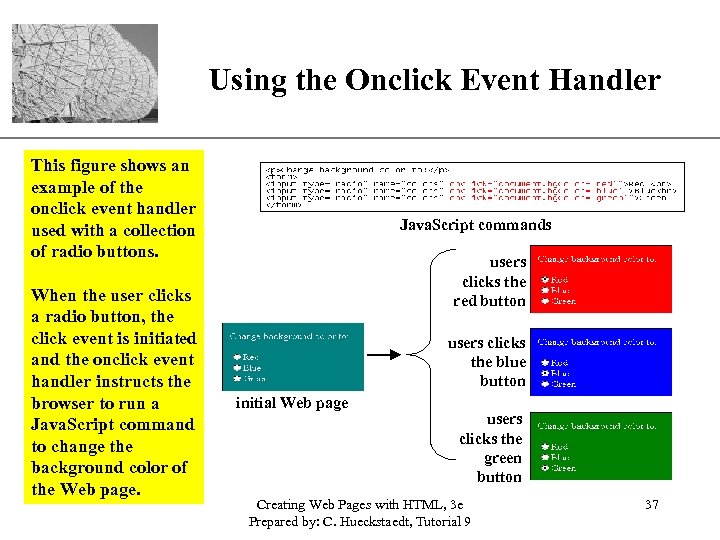
XP Using the Onclick Event Handler This figure shows an example of the onclick event handler used with a collection of radio buttons. When the user clicks a radio button, the click event is initiated and the onclick event handler instructs the browser to run a Java. Script command to change the background color of the Web page. Java. Script commands users clicks the red button users clicks the blue button initial Web page users clicks the green button Creating Web Pages with HTML, 3 e Prepared by: C. Hueckstaedt, Tutorial 9 37
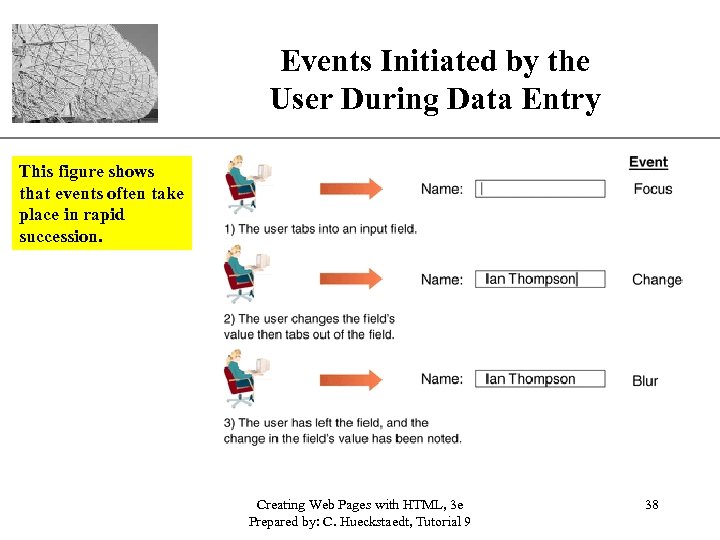
Events Initiated by the User During Data Entry XP This figure shows that events often take place in rapid succession. Creating Web Pages with HTML, 3 e Prepared by: C. Hueckstaedt, Tutorial 9 38
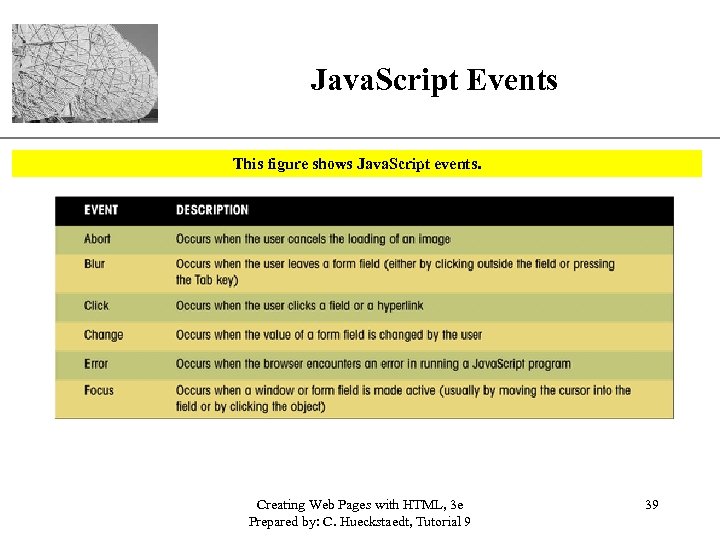
Java. Script Events XP This figure shows Java. Script events. Creating Web Pages with HTML, 3 e Prepared by: C. Hueckstaedt, Tutorial 9 39
Browser and Event Handlers XP • Generally, Internet Explorer and Netscape 6. 0 can apply event handlers to most HTML tags. • Versions of Netscape prior to 6. 0 apply event handlers to a smaller number of HTML tags. • Test Web pages with a variety of browsers and browser versions, especially if the Web page relies on Java. Script functions to operate correctly. Creating Web Pages with HTML, 3 e Prepared by: C. Hueckstaedt, Tutorial 9 40
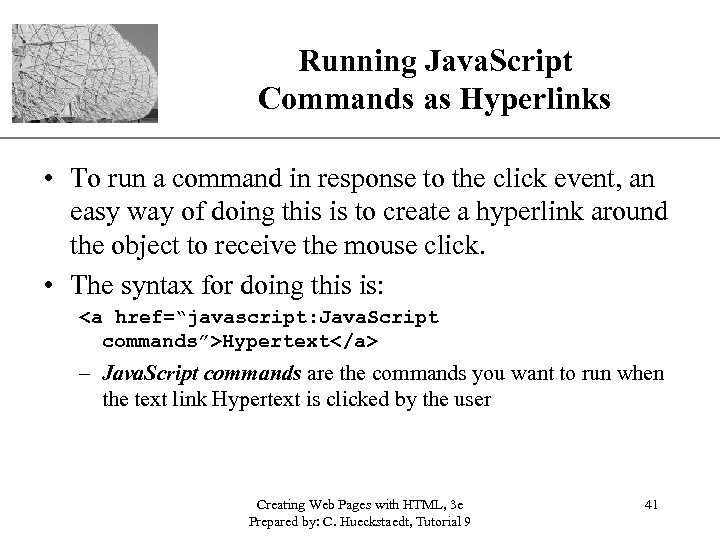
Running Java. Script Commands as Hyperlinks XP • To run a command in response to the click event, an easy way of doing this is to create a hyperlink around the object to receive the mouse click. • The syntax for doing this is: <a href=“javascript: Java. Script commands”>Hypertext</a> – Java. Script commands are the commands you want to run when the text link Hypertext is clicked by the user Creating Web Pages with HTML, 3 e Prepared by: C. Hueckstaedt, Tutorial 9 41
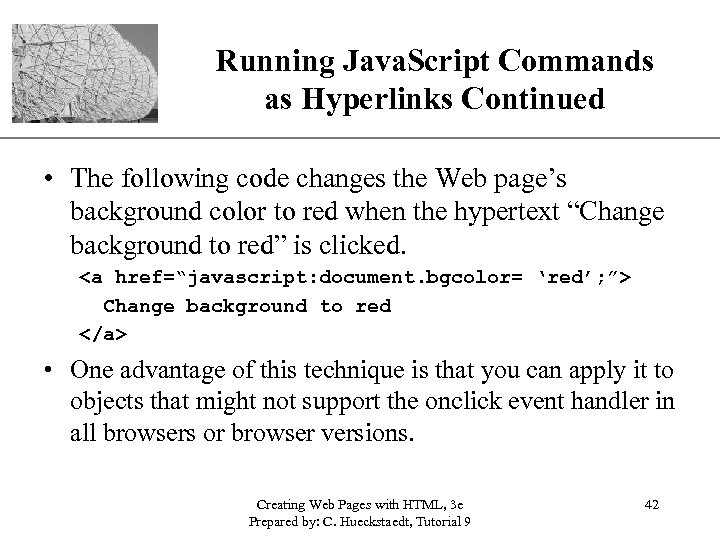
Running Java. Script Commands XP as Hyperlinks Continued • The following code changes the Web page’s background color to red when the hypertext “Change background to red” is clicked. <a href=“javascript: document. bgcolor= ‘red’; ”> Change background to red </a> • One advantage of this technique is that you can apply it to objects that might not support the onclick event handler in all browsers or browser versions. Creating Web Pages with HTML, 3 e Prepared by: C. Hueckstaedt, Tutorial 9 42
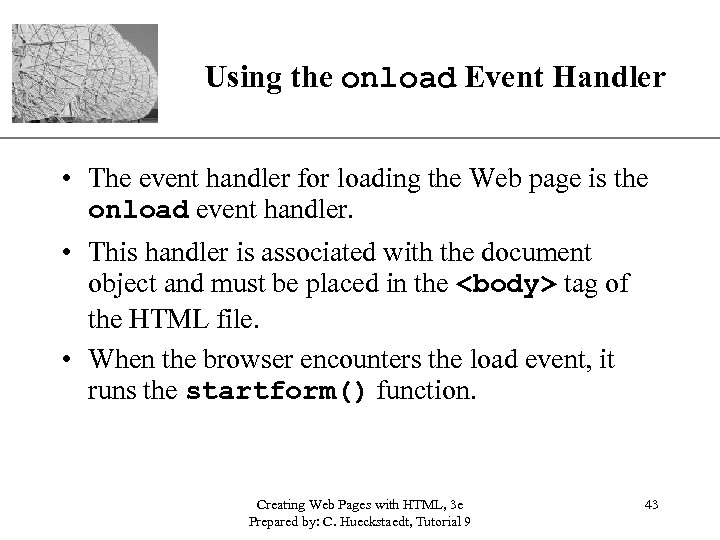
XP Using the onload Event Handler • The event handler for loading the Web page is the onload event handler. • This handler is associated with the document object and must be placed in the <body> tag of the HTML file. • When the browser encounters the load event, it runs the startform() function. Creating Web Pages with HTML, 3 e Prepared by: C. Hueckstaedt, Tutorial 9 43
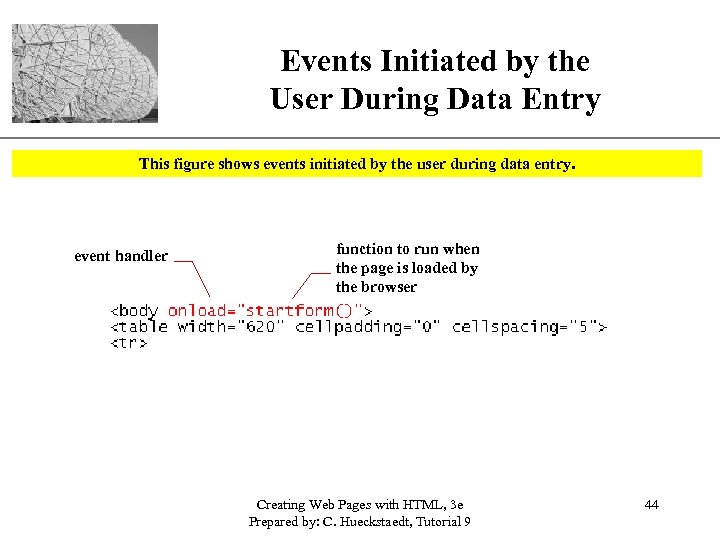
Events Initiated by the User During Data Entry XP This figure shows events initiated by the user during data entry. event handler function to run when the page is loaded by the browser Creating Web Pages with HTML, 3 e Prepared by: C. Hueckstaedt, Tutorial 9 44
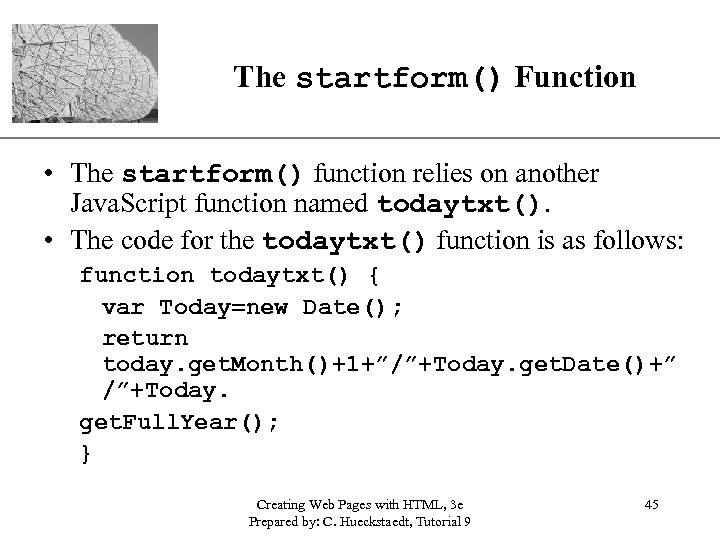
The startform() Function XP • The startform() function relies on another Java. Script function named todaytxt(). • The code for the todaytxt() function is as follows: function todaytxt() { var Today=new Date(); return today. get. Month()+1+”/”+Today. get. Date()+” /”+Today. get. Full. Year(); } Creating Web Pages with HTML, 3 e Prepared by: C. Hueckstaedt, Tutorial 9 45
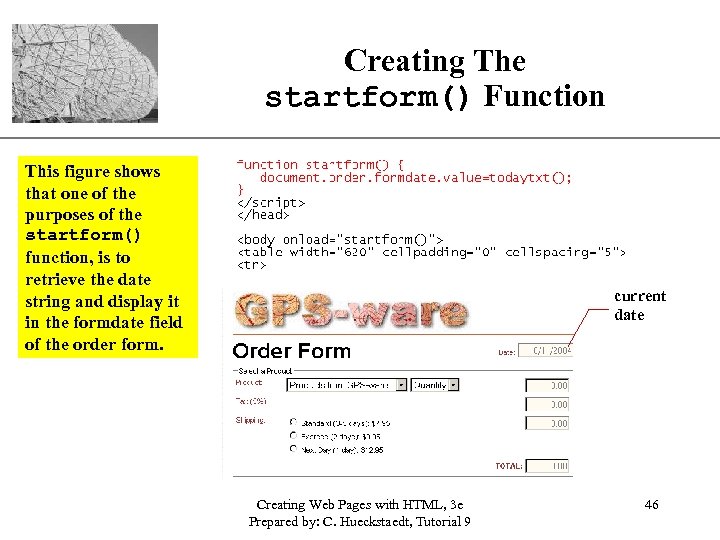
Creating The startform() Function This figure shows that one of the purposes of the startform() function, is to retrieve the date string and display it in the formdate field of the order form. XP current date Creating Web Pages with HTML, 3 e Prepared by: C. Hueckstaedt, Tutorial 9 46
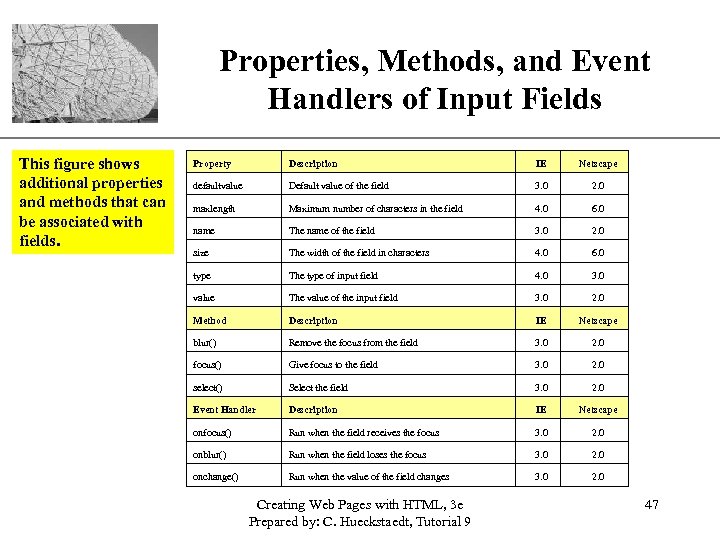
Properties, Methods, and Event XP Handlers of Input Fields This figure shows additional properties and methods that can be associated with fields. Property Description IE Netscape defaultvalue Default value of the field 3. 0 2. 0 maxlength Maximum number of characters in the field 4. 0 6. 0 name The name of the field 3. 0 2. 0 size The width of the field in characters 4. 0 6. 0 type The type of input field 4. 0 3. 0 value The value of the input field 3. 0 2. 0 Method Description IE Netscape blur() Remove the focus from the field 3. 0 2. 0 focus() Give focus to the field 3. 0 2. 0 select() Select the field 3. 0 2. 0 Event Handler Description IE Netscape onfocus() Run when the field receives the focus 3. 0 2. 0 onblur() Run when the field loses the focus 3. 0 2. 0 onchange() Run when the value of the field changes 3. 0 2. 0 Creating Web Pages with HTML, 3 e Prepared by: C. Hueckstaedt, Tutorial 9 47
Initiating Events and Java. Script XP • When using Java. Script to initiate an event, you are instructing the Web page to perform an action that a user would normally do. – for example, such as moving the cursor to a specific field in the form Creating Web Pages with HTML, 3 e Prepared by: C. Hueckstaedt, Tutorial 9 48
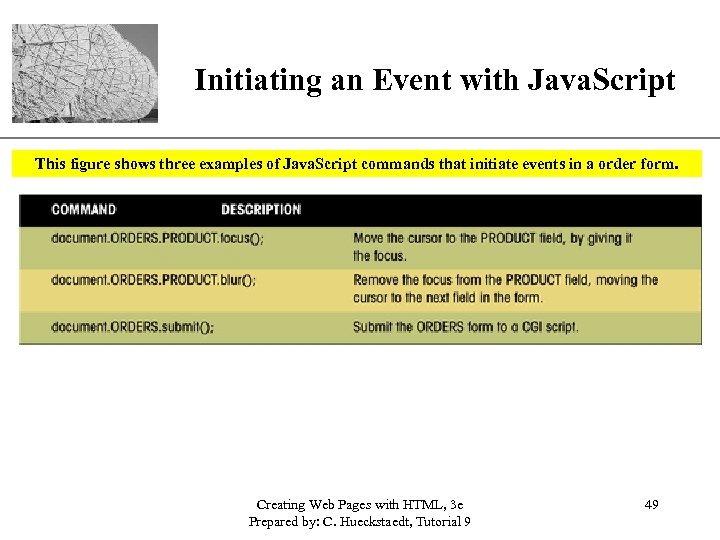
XP Initiating an Event with Java. Script This figure shows three examples of Java. Script commands that initiate events in a order form. Creating Web Pages with HTML, 3 e Prepared by: C. Hueckstaedt, Tutorial 9 49
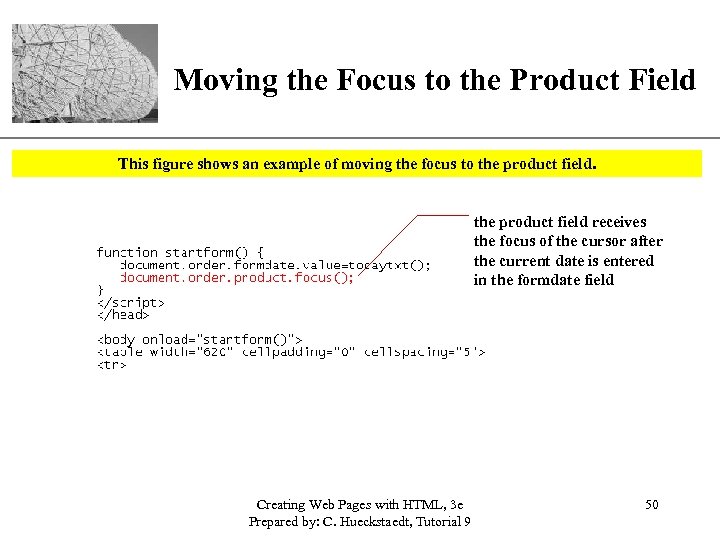
XP Moving the Focus to the Product Field This figure shows an example of moving the focus to the product field receives the focus of the cursor after the current date is entered in the formdate field Creating Web Pages with HTML, 3 e Prepared by: C. Hueckstaedt, Tutorial 9 50
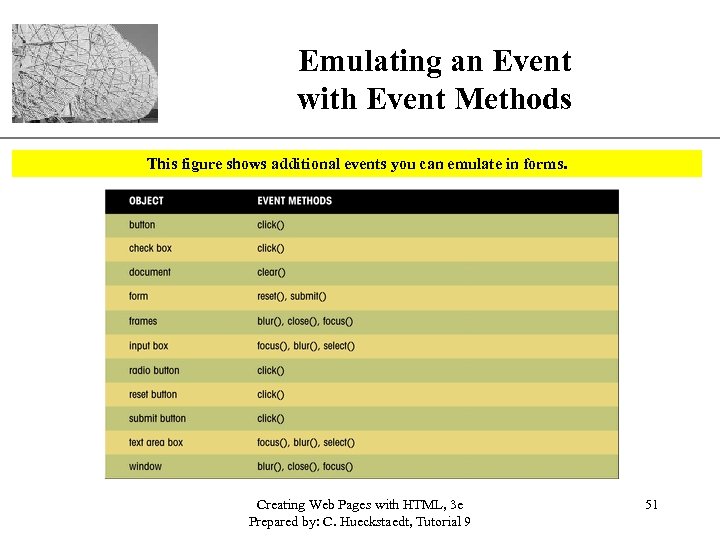
Emulating an Event with Event Methods XP This figure shows additional events you can emulate in forms. Creating Web Pages with HTML, 3 e Prepared by: C. Hueckstaedt, Tutorial 9 51
Calculate the Cost of a Customer’s Order XP • You can use Java. Script to calculate the cost of a customer’s order based on product purchased, quantity, sales tax, and shipping costs. Creating Web Pages with HTML, 3 e Prepared by: C. Hueckstaedt, Tutorial 9 52
Creating a Calculated Field XP • Java. Script: – treats the values of input fields as text strings – does not round off the values to nice digits – displays calculated values to several digits • The dollar() function takes a value, n, and rounds it to two digits to the right of the decimal point. Creating Web Pages with HTML, 3 e Prepared by: C. Hueckstaedt, Tutorial 9 53
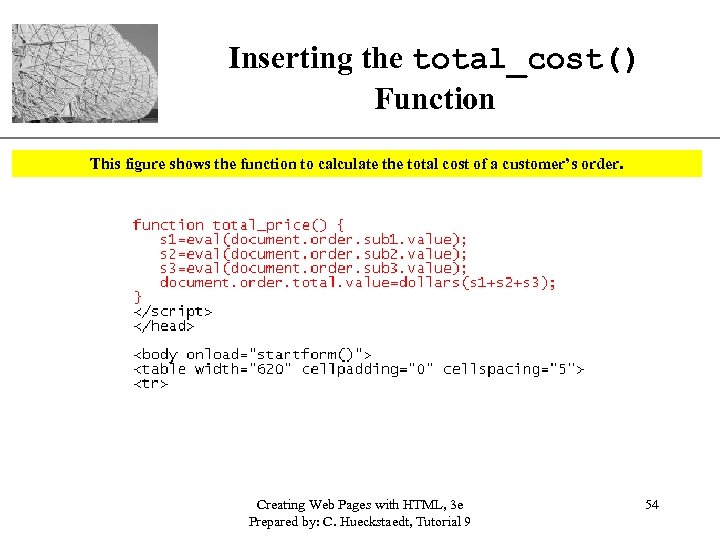
Inserting the total_cost() Function XP This figure shows the function to calculate the total cost of a customer’s order. Creating Web Pages with HTML, 3 e Prepared by: C. Hueckstaedt, Tutorial 9 54
Working with a Selection List XP • Java. Script treats a selection list as an array of option values. Creating Web Pages with HTML, 3 e Prepared by: C. Hueckstaedt, Tutorial 9 55
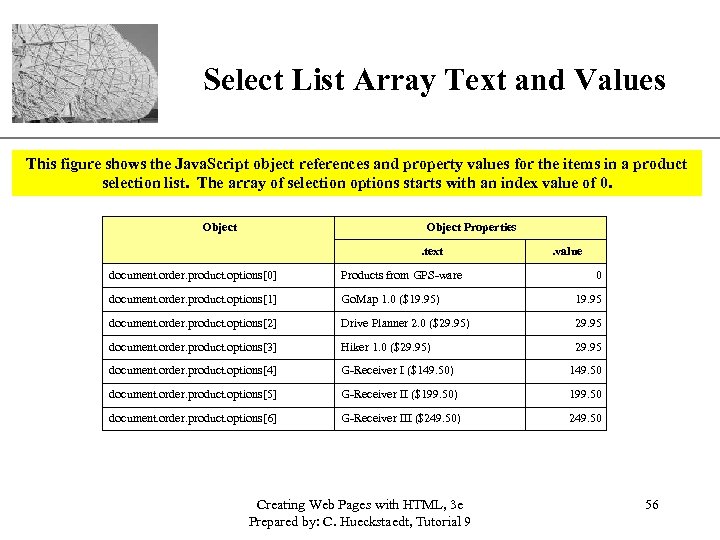
XP Select List Array Text and Values This figure shows the Java. Script object references and property values for the items in a product selection list. The array of selection options starts with an index value of 0. Object Properties. text . value document. order. product. options[0] Products from GPS-ware document. order. product. options[1] Go. Map 1. 0 ($19. 95) 19. 95 document. order. product. options[2] Drive Planner 2. 0 ($29. 95) 29. 95 document. order. product. options[3] Hiker 1. 0 ($29. 95) 29. 95 document. order. product. options[4] G-Receiver I ($149. 50) 149. 50 document. order. product. options[5] G-Receiver II ($199. 50) 199. 50 document. order. product. options[6] G-Receiver III ($249. 50) 249. 50 Creating Web Pages with HTML, 3 e Prepared by: C. Hueckstaedt, Tutorial 9 0 56
The selected. Index Property XP • There is no value property for the selection list itself, only for the options within the list. • The selected. Index property indicates the index number of the selected option. • The index number of the selected item is stored in the item_index variable. • The item_index variable is then used to determine the value of the selected item and stores the value in the item_value variable. • The text of the selected item is stored in the item_text variable. Creating Web Pages with HTML, 3 e Prepared by: C. Hueckstaedt, Tutorial 9 57
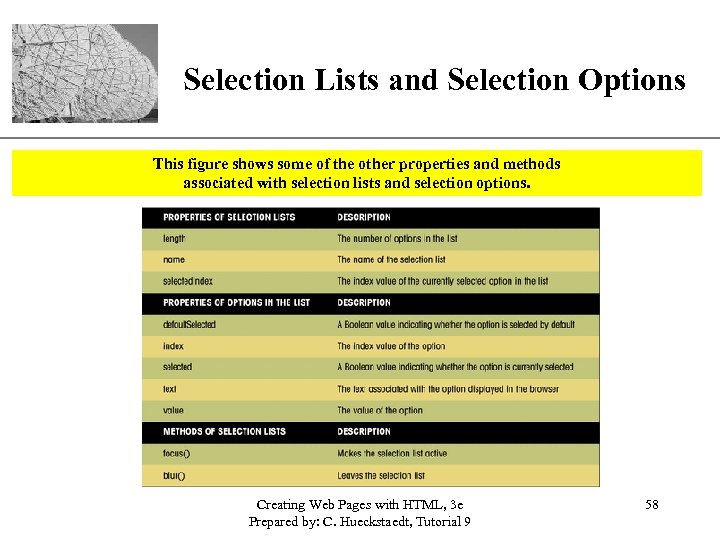
XP Selection Lists and Selection Options This figure shows some of the other properties and methods associated with selection lists and selection options. Creating Web Pages with HTML, 3 e Prepared by: C. Hueckstaedt, Tutorial 9 58
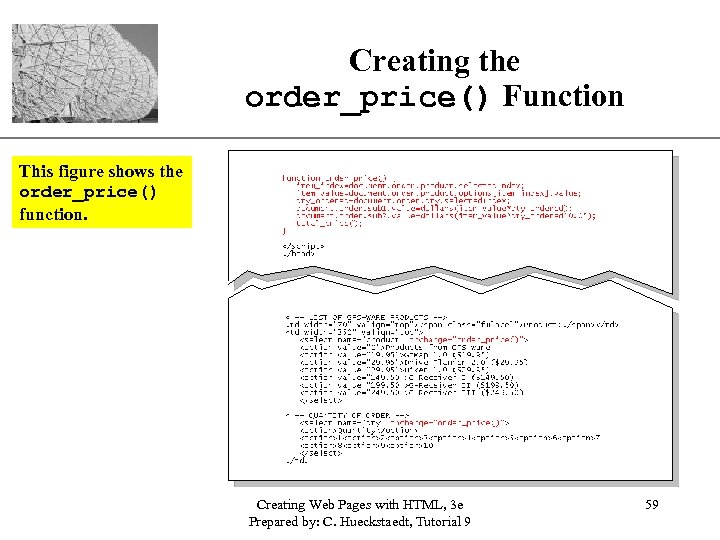
Creating the order_price() Function XP This figure shows the order_price() function. Creating Web Pages with HTML, 3 e Prepared by: C. Hueckstaedt, Tutorial 9 59
Working with Radio Buttons XP • The Java. Script reference for a radio button is: document. form. field[i] – form is the name of the Web page form – field is the name assigned to the radio button – i is the index number of specific radio button • The first radio button has an index value of 0, the second button has an index value of 1, and so on. – the Java. Script object references for three shipping radio buttons are: document. order. shipping[0] document. order. shipping[1] document. order. shipping[2] Creating Web Pages with HTML, 3 e Prepared by: C. Hueckstaedt, Tutorial 9 60
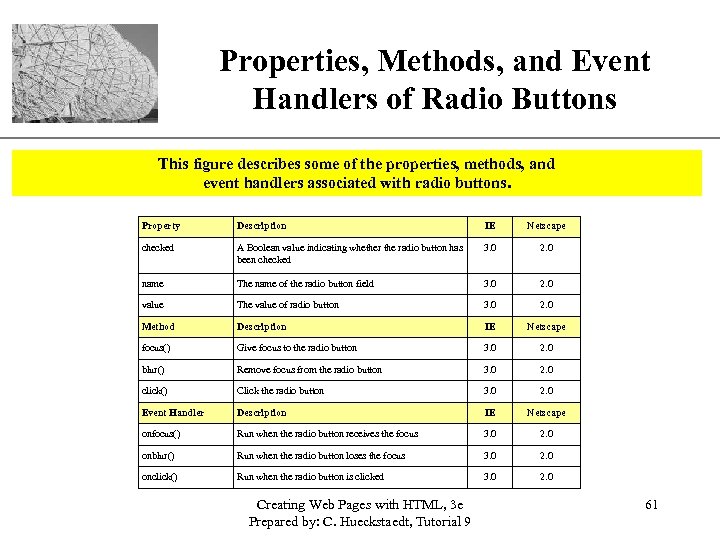
Properties, Methods, and Event XP Handlers of Radio Buttons This figure describes some of the properties, methods, and event handlers associated with radio buttons. Property Description IE Netscape checked A Boolean value indicating whether the radio button has been checked 3. 0 2. 0 name The name of the radio button field 3. 0 2. 0 value The value of radio button 3. 0 2. 0 Method Description IE Netscape focus() Give focus to the radio button 3. 0 2. 0 blur() Remove focus from the radio button 3. 0 2. 0 click() Click the radio button 3. 0 2. 0 Event Handler Description IE Netscape onfocus() Run when the radio button receives the focus 3. 0 2. 0 onblur() Run when the radio button loses the focus 3. 0 2. 0 onclick() Run when the radio button is clicked 3. 0 2. 0 Creating Web Pages with HTML, 3 e Prepared by: C. Hueckstaedt, Tutorial 9 61
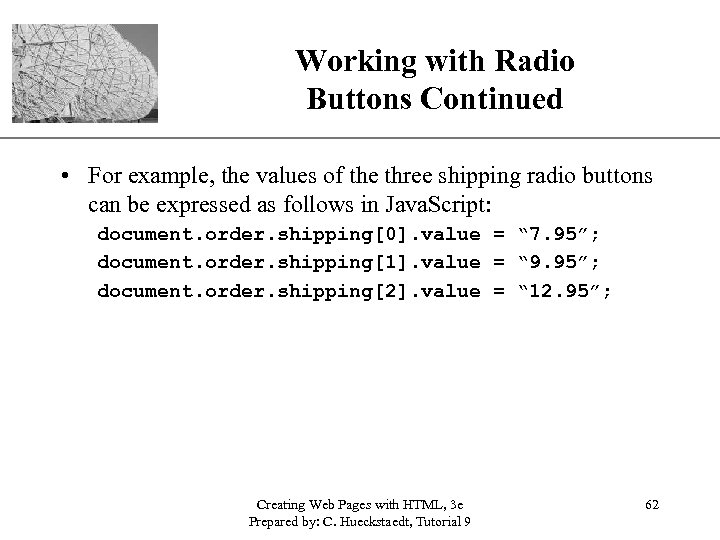
XP Working with Radio Buttons Continued • For example, the values of the three shipping radio buttons can be expressed as follows in Java. Script: document. order. shipping[0]. value = “ 7. 95”; document. order. shipping[1]. value = “ 9. 95”; document. order. shipping[2]. value = “ 12. 95”; Creating Web Pages with HTML, 3 e Prepared by: C. Hueckstaedt, Tutorial 9 62
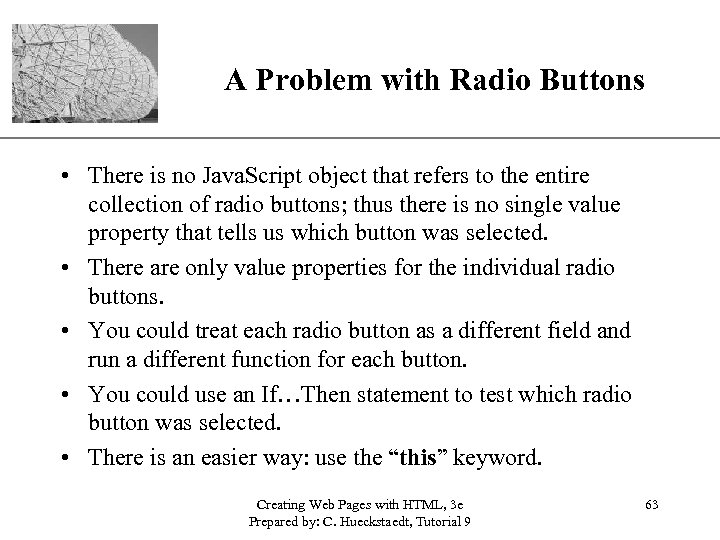
A Problem with Radio Buttons XP • There is no Java. Script object that refers to the entire collection of radio buttons; thus there is no single value property that tells us which button was selected. • There are only value properties for the individual radio buttons. • You could treat each radio button as a different field and run a different function for each button. • You could use an If…Then statement to test which radio button was selected. • There is an easier way: use the “this” keyword. Creating Web Pages with HTML, 3 e Prepared by: C. Hueckstaedt, Tutorial 9 63
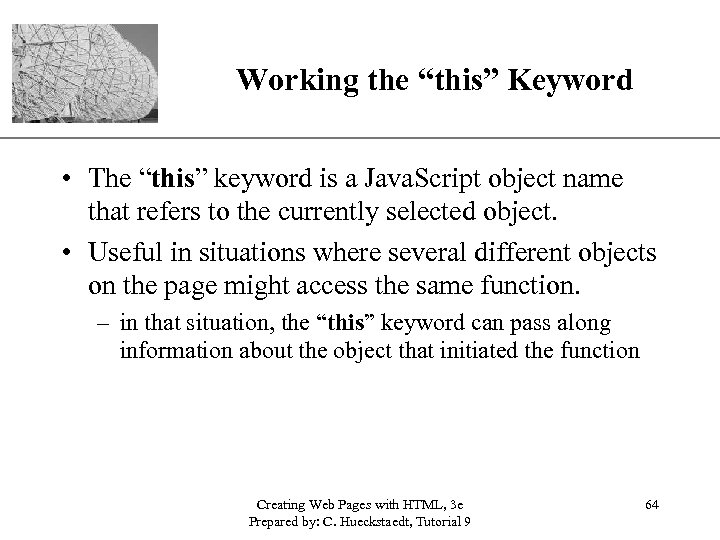
Working the “this” Keyword XP • The “this” keyword is a Java. Script object name that refers to the currently selected object. • Useful in situations where several different objects on the page might access the same function. – in that situation, the “this” keyword can pass along information about the object that initiated the function Creating Web Pages with HTML, 3 e Prepared by: C. Hueckstaedt, Tutorial 9 64
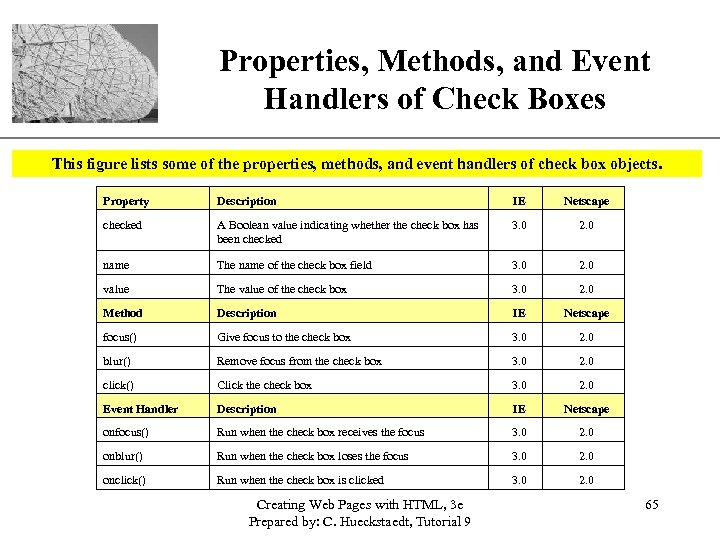
Properties, Methods, and Event XP Handlers of Check Boxes This figure lists some of the properties, methods, and event handlers of check box objects. Property Description IE Netscape checked A Boolean value indicating whether the check box has been checked 3. 0 2. 0 name The name of the check box field 3. 0 2. 0 value The value of the check box 3. 0 2. 0 Method Description IE Netscape focus() Give focus to the check box 3. 0 2. 0 blur() Remove focus from the check box 3. 0 2. 0 click() Click the check box 3. 0 2. 0 Event Handler Description IE Netscape onfocus() Run when the check box receives the focus 3. 0 2. 0 onblur() Run when the check box loses the focus 3. 0 2. 0 onclick() Run when the check box is clicked 3. 0 2. 0 Creating Web Pages with HTML, 3 e Prepared by: C. Hueckstaedt, Tutorial 9 65
XP Submitting a Form • If a condition of the form is not met, the browser should refuse the form submission and indicate to the user why the form was not submitted. Creating Web Pages with HTML, 3 e Prepared by: C. Hueckstaedt, Tutorial 9 66
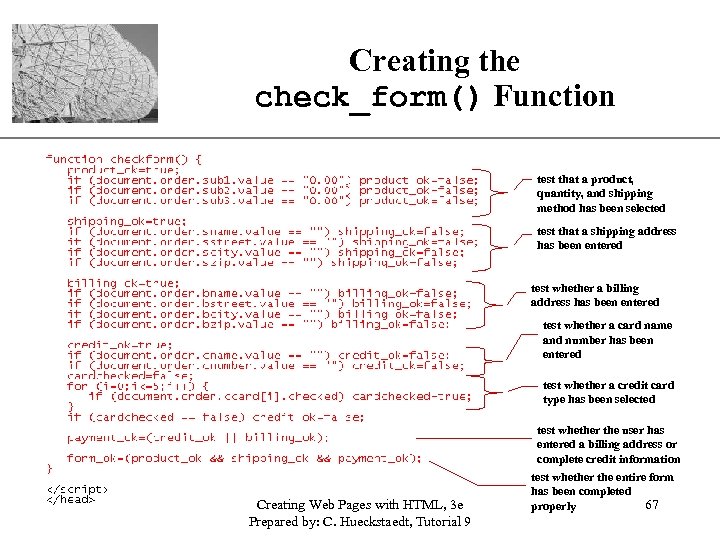
Creating the check_form() Function XP test that a product, quantity, and shipping method has been selected test that a shipping address has been entered test whether a billing address has been entered test whether a card name and number has been entered test whether a credit card type has been selected test whether the user has entered a billing address or complete credit information Creating Web Pages with HTML, 3 e Prepared by: C. Hueckstaedt, Tutorial 9 test whether the entire form has been completed 67 properly
Controlling Form Submission XP • When a user completes a form and then clicks the submit button, a submit event is initiated. • Java. Script provides the onsubmit event handler that allows you to run a program in response to this action. • The submit event is associated with the form object, the event handler must be placed within the <form> tag. • The onsubmit event handler must be able to override the act of submitting the form if the form fails a validation test. Creating Web Pages with HTML, 3 e Prepared by: C. Hueckstaedt, Tutorial 9 68
The onsubmit Event Handler XP • The syntax for doing this is: <form onsubmit=“return function(); ”> – function is the name of the function that validates your form – the function must return a value of true or false • if the value is true, the form is submitted • if the value is false, the submission is canceled, and the user is returned to the form – the keyword return in this syntax. • if the return keyword is not included, the browser submits the form whether or not it passes the validation test Creating Web Pages with HTML, 3 e Prepared by: C. Hueckstaedt, Tutorial 9 69
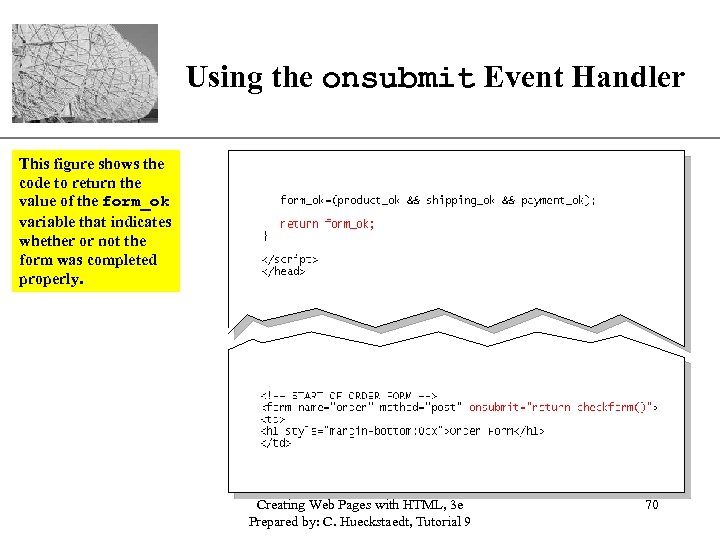
XP Using the onsubmit Event Handler This figure shows the code to return the value of the form_ok variable that indicates whether or not the form was completed properly. Creating Web Pages with HTML, 3 e Prepared by: C. Hueckstaedt, Tutorial 9 70
Dialog Boxes XP • You may want to use a dialog box to display a message to the user to indicate that the form was not properly completed. Creating Web Pages with HTML, 3 e Prepared by: C. Hueckstaedt, Tutorial 9 71
Creating a Dialog Box XP • Java. Script supports three types of dialog boxes: alert, prompt, and confirm. – an alert dialog box displays a message, usually alerting the user to a problem. – the prompt dialog box displays both a message and a text box. – the confirm dialog box display a message along with OK and Cancel buttons. Creating Web Pages with HTML, 3 e Prepared by: C. Hueckstaedt, Tutorial 9 72
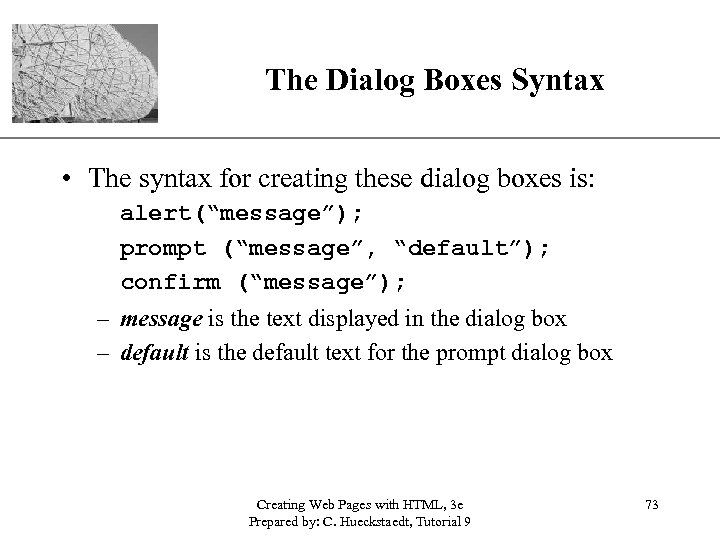
The Dialog Boxes Syntax XP • The syntax for creating these dialog boxes is: alert(“message”); prompt (“message”, “default”); confirm (“message”); – message is the text displayed in the dialog box – default is the default text for the prompt dialog box Creating Web Pages with HTML, 3 e Prepared by: C. Hueckstaedt, Tutorial 9 73
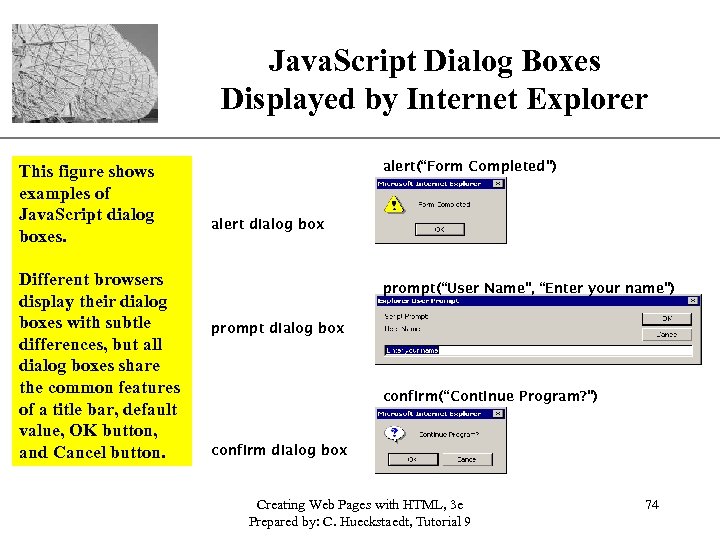
XP Java. Script Dialog Boxes Displayed by Internet Explorer This figure shows examples of Java. Script dialog boxes. Different browsers display their dialog boxes with subtle differences, but all dialog boxes share the common features of a title bar, default value, OK button, and Cancel button. alert(“Form Completed”) alert dialog box prompt(“User Name”, “Enter your name”) prompt dialog box confirm(“Continue Program? ”) confirm dialog box Creating Web Pages with HTML, 3 e Prepared by: C. Hueckstaedt, Tutorial 9 74
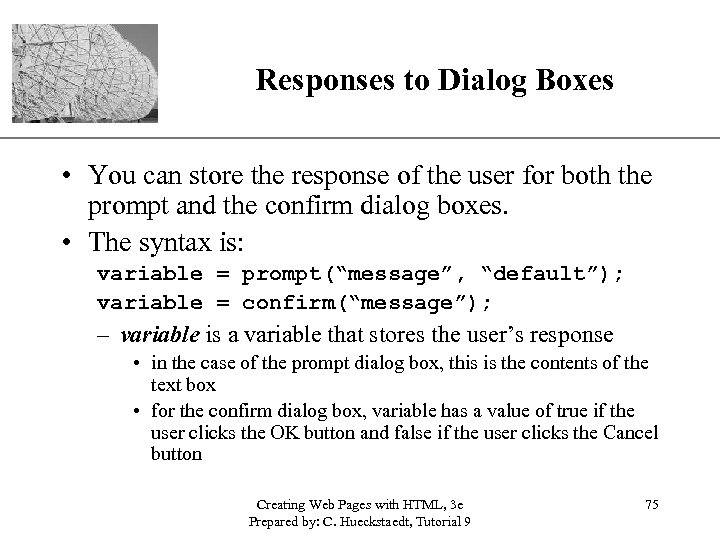
XP Responses to Dialog Boxes • You can store the response of the user for both the prompt and the confirm dialog boxes. • The syntax is: variable = prompt(“message”, “default”); variable = confirm(“message”); – variable is a variable that stores the user’s response • in the case of the prompt dialog box, this is the contents of the text box • for the confirm dialog box, variable has a value of true if the user clicks the OK button and false if the user clicks the Cancel button Creating Web Pages with HTML, 3 e Prepared by: C. Hueckstaedt, Tutorial 9 75
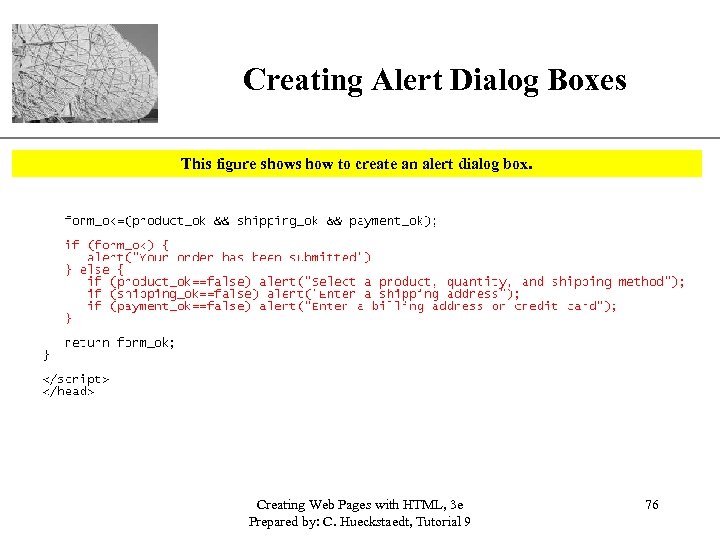
Creating Alert Dialog Boxes XP This figure shows how to create an alert dialog box. Creating Web Pages with HTML, 3 e Prepared by: C. Hueckstaedt, Tutorial 9 76
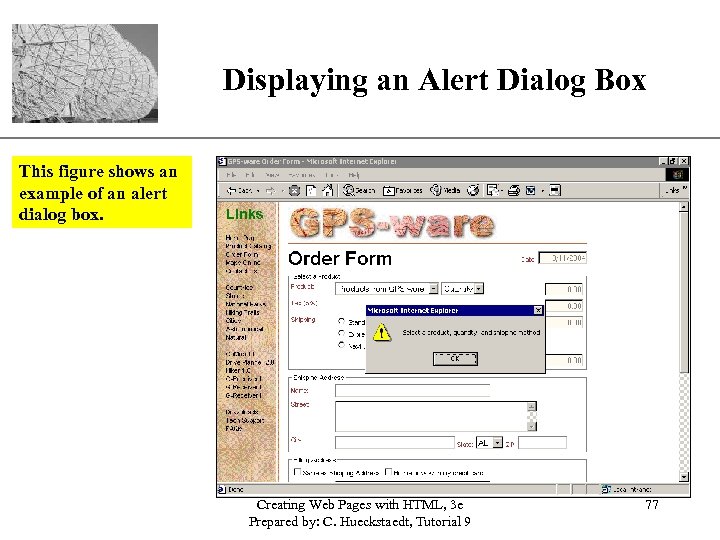
Displaying an Alert Dialog Box XP This figure shows an example of an alert dialog box. Creating Web Pages with HTML, 3 e Prepared by: C. Hueckstaedt, Tutorial 9 77
Resetting a Form XP • When designing a form, it is important to allow the user to reset the form. Creating Web Pages with HTML, 3 e Prepared by: C. Hueckstaedt, Tutorial 9 78
Resetting a Form XP • Resetting a form does not load the page. • Use Java. Script to reload the page. – this has the effect of resetting all field values and rerunning the startform() function that inserts the current date. – use the location object to reload a Web page • One of the methods associated with the location object is the reload()method, which reloads the current page. • The syntax is simply: location. reload(); Creating Web Pages with HTML, 3 e Prepared by: C. Hueckstaedt, Tutorial 9 79
XP Resetting a Form Continued • Use Java. Script to load a different page, the command is: location=“URL”; – URL is the address of the Web page you want to display in the browser • To control the reset event, use the onreset handler and apply it to the <form> tag. Creating Web Pages with HTML, 3 e Prepared by: C. Hueckstaedt, Tutorial 9 80
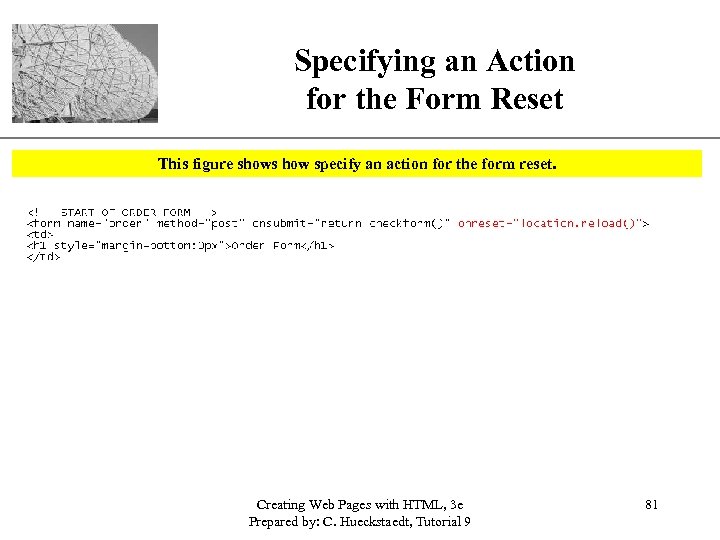
Specifying an Action for the Form Reset XP This figure shows how specify an action for the form reset. Creating Web Pages with HTML, 3 e Prepared by: C. Hueckstaedt, Tutorial 9 81
XP Tutorial 9 Summary • Learned the object-oriented nature of the Java. Script language. • Used Java. Script as a validation tool for online forms. • Learned the basic concepts of form validation. • Introduced to object-based programming concepts i. e. objects, properties, and methods. • Learned about events, and how to run programs in response to events. Creating Web Pages with HTML, 3 e Prepared by: C. Hueckstaedt, Tutorial 9 82
Tutorial 9 Summary Continued XP • Used event handlers and simulating events with event methods. • Learned about form elements. • Learned how to request information from the user by creating dialog boxes. • Learned how to create calculated fields by working with a field’s value property. Creating Web Pages with HTML, 3 e Prepared by: C. Hueckstaedt, Tutorial 9 83
Скачать презентацию XP New Perspectives on Creating Web Pages with
b874c648ee151c545a3c5d0769636499.ppt