


 Скачать презентацию www apsrtcinfo com www apsrtconline in www company
bad3abc5469880ae1cf55b52b08734ce.ppt
- Количество слайдов: 15
 www. apsrtcinfo. com www. apsrtconline. in www. company. com www. apsrtc. gov. in
 Action plan for implementation of “E-Office” The VC&MD desired to implement the “E-Office” in APSRTC. IT Department was advised to work on implementation of E-Office on the lines of Go. AP. Accordingly, file was processed and got the Approval from VC&MD to implement the E-Office in a Phased manner. www. apsrtcinfo. com www. apsrtconline. in www. apsrtc. gov. in www. company. com
 Phases involved in implementation of “E-Office” Phase 1: In the first phase, E-Office implemented in Head Office from 01 st October 2017 successfully. Phase 2: In the second phase, E-Office implemented in all Non-operating Units. Phase 3: In the third phase E-Office will be implemented in Operating Units of all Zones. www. apsrtcinfo. com www. apsrtconline. in www. apsrtc. gov. in www. company. com
 IMPLEMENTATION OF E-OFFICE IN ALL UNITS OF APSRTC At Regional and Zonal offices/units the personnel officer/ Dy. CPM will be the nodal officer. Training was given to all employees of Non-Operating Units of the corporation. Further it is advised to impart training for Operating Units staff by utilizing RCGs as TOT. www. apsrtcinfo. com www. apsrtconline. in www. apsrtc. gov. in www. company. com
 REQUIREMENTS: SYSTEMS AND SCANNERS Existing systems can be utilized for implementation of EOffice. Similarly existing printer cum scanner can be used for scanning the files. Alternatively cam scanner app can be used. www. apsrtcinfo. com www. apsrtconline. in www. apsrtc. gov. in www. company. com
 REQUIREMENTS: INTERNET & LAN Also sanction was obtained to have BB 999 internet plan of M/s BSNL and LAN facility in all 128 -locations. The same was communicated to all Regional Managers. The sanctioned letter was kept in RTCWAN (PATH: /eoffice/) also. www. apsrtcinfo. com www. apsrtconline. in www. apsrtc. gov. in www. company. com
 REQUIREMENTS: SOFTWARE & INSTALLATION Softwares for e-Office were kept in RTCWAN. (PATH: /eoffice/software) All System Supervisors, RCGs, PMS Coregroup Members are trained how to install software in the Personal Computers. www. apsrtcinfo. com www. apsrtconline. in www. apsrtc. gov. in www. company. com
 USER CREDENTIALS & MASTER DATA CREATION User IDs of all employees of corporation are created and sent the login credentials to all the employees through SMS. All the details of user IDs and Mail IDs are uploaded in www. apsrtc. gov. in. Master data of all Non-operating units is created and mapped. www. apsrtcinfo. com www. apsrtconline. in www. apsrtc. gov. in www. company. com
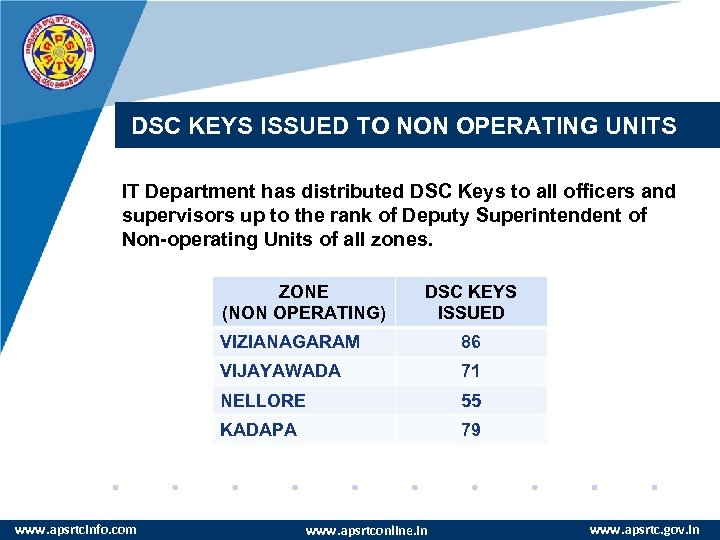 DSC KEYS ISSUED TO NON OPERATING UNITS IT Department has distributed DSC Keys to all officers and supervisors up to the rank of Deputy Superintendent of Non-operating Units of all zones. ZONE (NON OPERATING) DSC KEYS ISSUED VIZIANAGARAM VIJAYAWADA 71 NELLORE 55 KADAPA www. apsrtcinfo. com 86 79 www. apsrtconline. in www. apsrtc. gov. in www. company. com
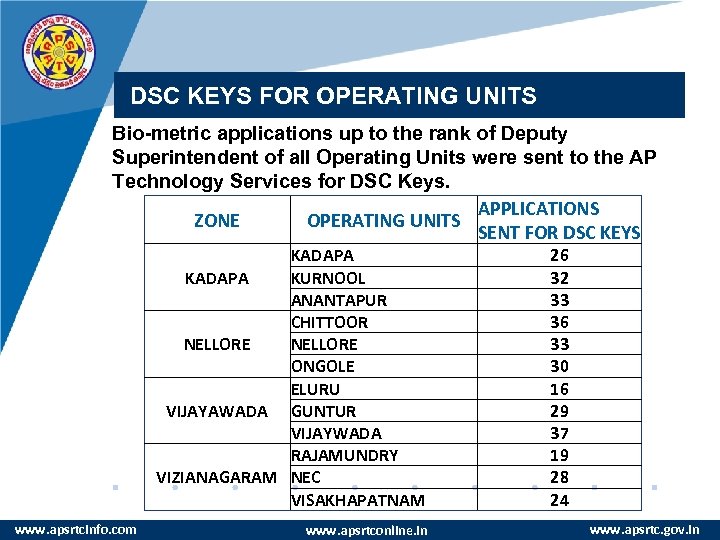 DSC KEYS FOR OPERATING UNITS Bio-metric applications up to the rank of Deputy Superintendent of all Operating Units were sent to the AP Technology Services for DSC Keys. APPLICATIONS ZONE OPERATING UNITS SENT FOR DSC KEYS KADAPA KURNOOL KADAPA ANANTAPUR CHITTOOR NELLORE ONGOLE ELURU VIJAYAWADA GUNTUR VIJAYWADA RAJAMUNDRY VIZIANAGARAM NEC VISAKHAPATNAM www. apsrtcinfo. com www. apsrtconline. in 26 32 33 36 33 30 16 29 37 19 28 24 www. apsrtc. gov. in www. company. com
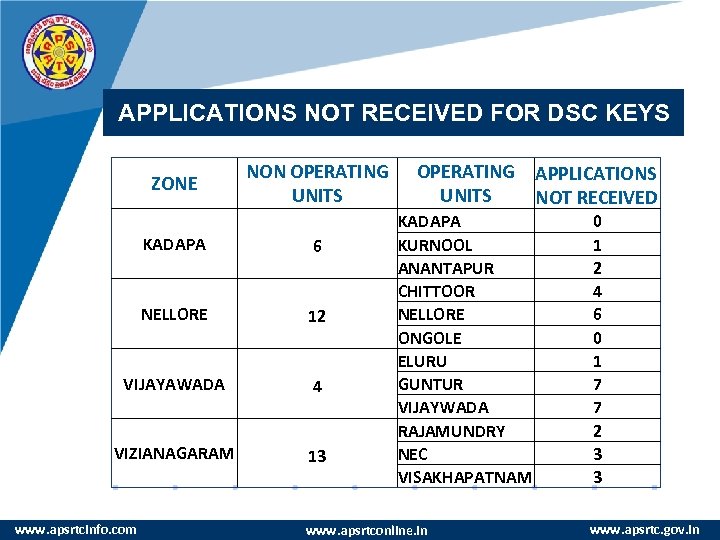 APPLICATIONS NOT RECEIVED FOR DSC KEYS ZONE NON OPERATING UNITS KADAPA 6 NELLORE 12 VIJAYAWADA 4 VIZIANAGARAM 13 www. apsrtcinfo. com OPERATING UNITS APPLICATIONS NOT RECEIVED KADAPA KURNOOL ANANTAPUR CHITTOOR NELLORE ONGOLE ELURU GUNTUR VIJAYWADA RAJAMUNDRY NEC VISAKHAPATNAM 0 1 2 4 6 0 1 7 7 2 3 3 www. apsrtconline. in www. apsrtc. gov. in www. company. com
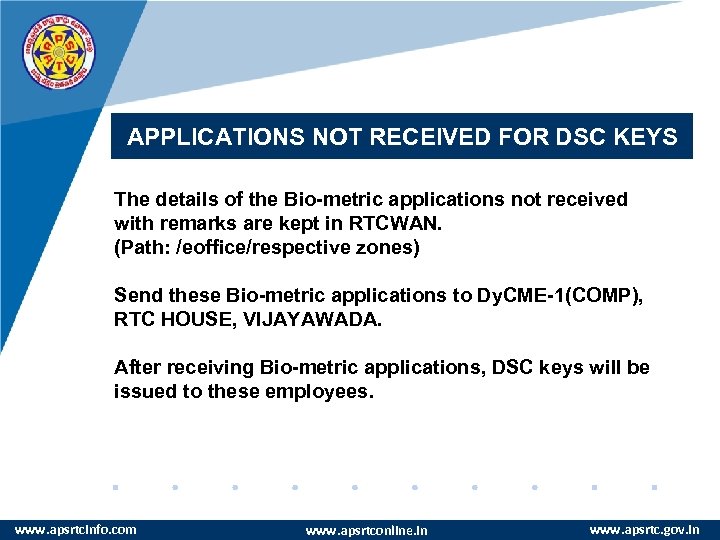 APPLICATIONS NOT RECEIVED FOR DSC KEYS The details of the Bio-metric applications not received with remarks are kept in RTCWAN. (Path: /eoffice/respective zones) Send these Bio-metric applications to Dy. CME-1(COMP), RTC HOUSE, VIJAYAWADA. After receiving Bio-metric applications, DSC keys will be issued to these employees. www. apsrtcinfo. com www. apsrtconline. in www. apsrtc. gov. in www. company. com
 DSC KEYS HANDOVER Employees of non-operating units, who are retiring should submit Digital Keys to the corresponding Deputy Chief Personnel Manager. Employees of operating units, who are retiring should submit Digital Keys to the Regional Personnel Officer. Employees who are transferred, can keep Digital Keys with them. www. apsrtcinfo. com www. apsrtconline. in www. apsrtc. gov. in www. company. com
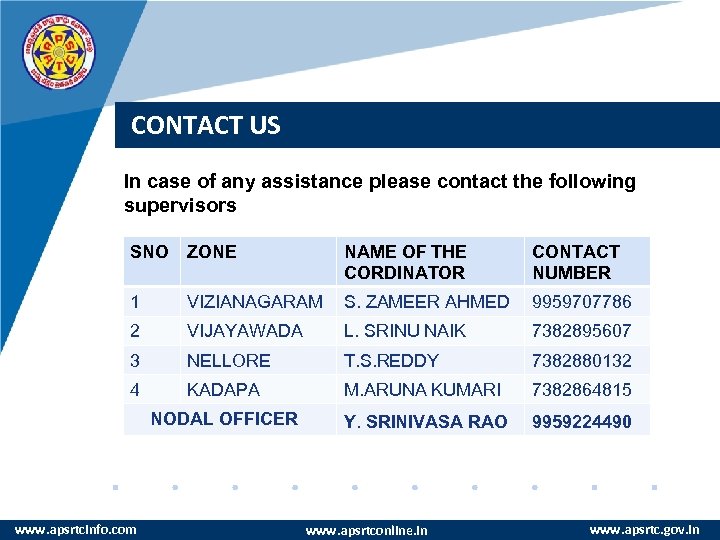 CONTACT US In case of any assistance please contact the following supervisors SNO ZONE NAME OF THE CORDINATOR CONTACT NUMBER 1 VIZIANAGARAM S. ZAMEER AHMED 9959707786 2 VIJAYAWADA L. SRINU NAIK 7382895607 3 NELLORE T. S. REDDY 7382880132 4 KADAPA M. ARUNA KUMARI 7382864815 Y. SRINIVASA RAO 9959224490 NODAL OFFICER www. apsrtcinfo. com www. apsrtconline. in www. apsrtc. gov. in www. company. com
 www. apsrtcinfo. com www. apsrtconline. in www. company. com www. apsrtc. gov. in