 Скачать презентацию World Wide Web COS 461 Computer Networks Spring
c686ccc04d93ece49d9456a3830c86bf.ppt
- Количество слайдов: 34



World Wide Web COS 461: Computer Networks Spring 2006 (MW 1: 30 -2: 50 in Friend 109) Jennifer Rexford Teaching Assistant: Mike Wawrzoniak http: //www. cs. princeton. edu/courses/archive/spring 06/cos 461/ 1
Goals of Today’s Lecture • Main ingredients of the Web – URL, HTML, and HTTP • Key properties of HTTP – Request-response, stateless, and resource meta-data • Web components – Clients, proxies, and servers – Caching vs. replication • Interaction with underlying network protocols – DNS and TCP – TCP performance for short transfers – Parallel connections, persistent connections, pipelining 2
Web History • Before the 1970 s-1980 s – Internet used mainly by researchers and academics – Log in remote machines, transfer files, exchange e-mail • Late 1980 s and early 1990 s – Initial proposal for the Web by Berners-Lee in 1989 – Competing systems for searching/accessing documents Gopher, Archie, WAIS (Wide Area Information Servers), … All eventually subsumed by the World Wide Web • Growth of the Web in the 1990 s – 1991: first Web browser and server – 1993: first version of Mosaic browser 3
Enablers for Success of the Web • Internet growth and commercialization – 1988: ARPANET gradually replaced by the NSFNET – Early 1990 s: NSFNET begins to allow commercial traffic • Personal computer – 1980 s: Home computers with graphical user interfaces – 1990 s: Power of PCs increases, and cost decreases • Hypertext – 1945: Vannevar Bush’s “As We May Think” – 1960 s: Hypertext proposed, and the mouse invented – 1980 s: Proposals for global hypertext publishing systems 4
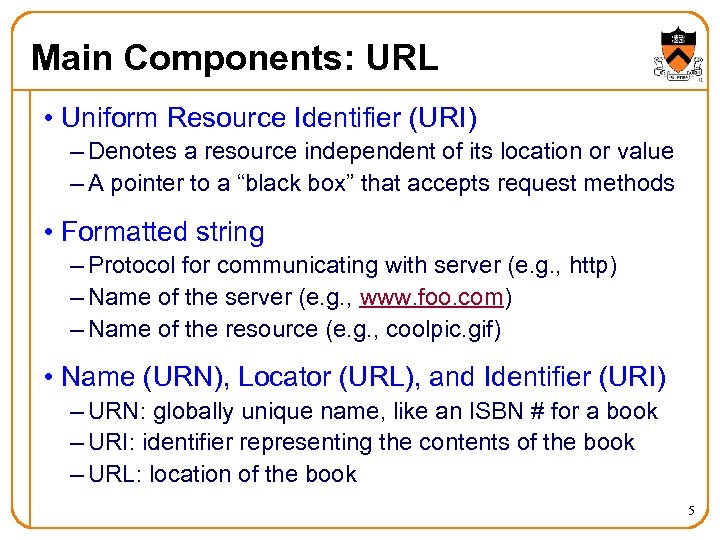
Main Components: URL • Uniform Resource Identifier (URI) – Denotes a resource independent of its location or value – A pointer to a “black box” that accepts request methods • Formatted string – Protocol for communicating with server (e. g. , http) – Name of the server (e. g. , www. foo. com) – Name of the resource (e. g. , coolpic. gif) • Name (URN), Locator (URL), and Identifier (URI) – URN: globally unique name, like an ISBN # for a book – URI: identifier representing the contents of the book – URL: location of the book 5
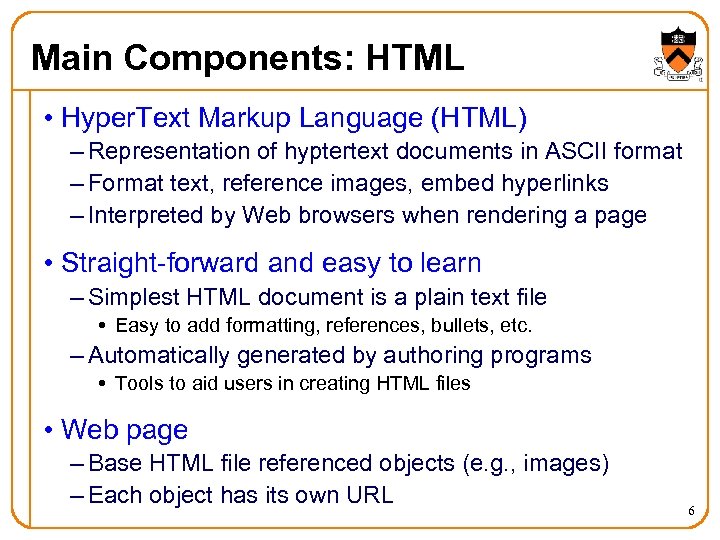
Main Components: HTML • Hyper. Text Markup Language (HTML) – Representation of hyptertext documents in ASCII format – Format text, reference images, embed hyperlinks – Interpreted by Web browsers when rendering a page • Straight-forward and easy to learn – Simplest HTML document is a plain text file Easy to add formatting, references, bullets, etc. – Automatically generated by authoring programs Tools to aid users in creating HTML files • Web page – Base HTML file referenced objects (e. g. , images) – Each object has its own URL 6
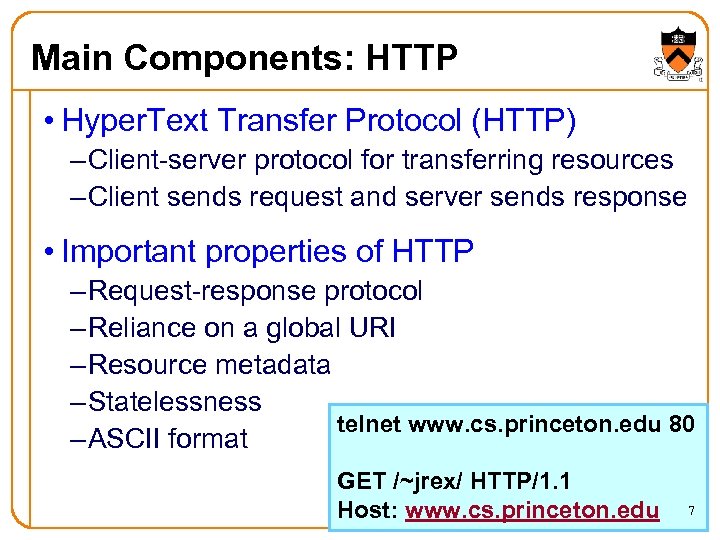
Main Components: HTTP • Hyper. Text Transfer Protocol (HTTP) – Client-server protocol for transferring resources – Client sends request and server sends response • Important properties of HTTP – Request-response protocol – Reliance on a global URI – Resource metadata – Statelessness telnet www. cs. princeton. edu 80 – ASCII format GET /~jrex/ HTTP/1. 1 Host: www. cs. princeton. edu 7
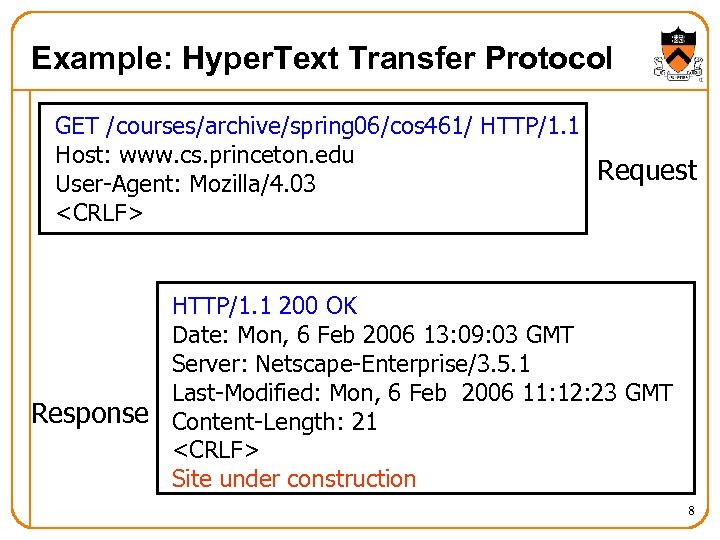
Example: Hyper. Text Transfer Protocol GET /courses/archive/spring 06/cos 461/ HTTP/1. 1 Host: www. cs. princeton. edu Request User-Agent: Mozilla/4. 03 <CRLF> HTTP/1. 1 200 OK Date: Mon, 6 Feb 2006 13: 09: 03 GMT Server: Netscape-Enterprise/3. 5. 1 Last-Modified: Mon, 6 Feb 2006 11: 12: 23 GMT Response Content-Length: 21 <CRLF> Site under construction 8
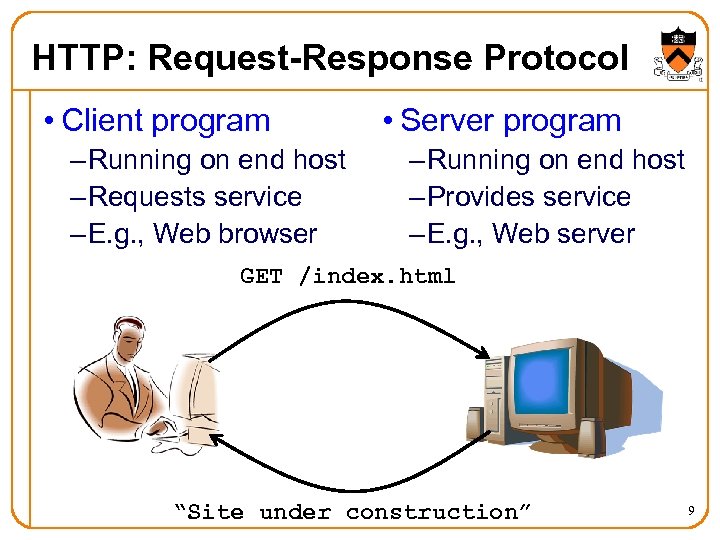
HTTP: Request-Response Protocol • Client program – Running on end host – Requests service – E. g. , Web browser • Server program – Running on end host – Provides service – E. g. , Web server GET /index. html “Site under construction” 9
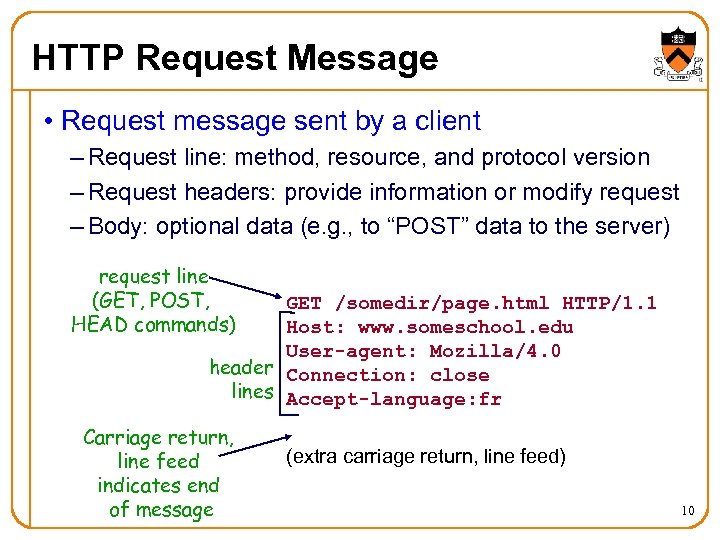
HTTP Request Message • Request message sent by a client – Request line: method, resource, and protocol version – Request headers: provide information or modify request – Body: optional data (e. g. , to “POST” data to the server) request line (GET, POST, HEAD commands) GET /somedir/page. html HTTP/1. 1 Host: www. someschool. edu User-agent: Mozilla/4. 0 header Connection: close lines Accept-language: fr Carriage return, line feed indicates end of message (extra carriage return, line feed) 10
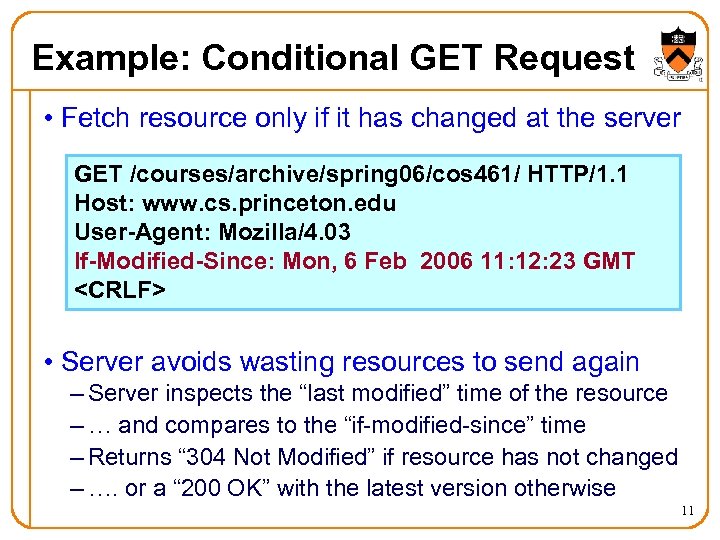
Example: Conditional GET Request • Fetch resource only if it has changed at the server GET /courses/archive/spring 06/cos 461/ HTTP/1. 1 Host: www. cs. princeton. edu User-Agent: Mozilla/4. 03 If-Modified-Since: Mon, 6 Feb 2006 11: 12: 23 GMT <CRLF> • Server avoids wasting resources to send again – Server inspects the “last modified” time of the resource – … and compares to the “if-modified-since” time – Returns “ 304 Not Modified” if resource has not changed – …. or a “ 200 OK” with the latest version otherwise 11
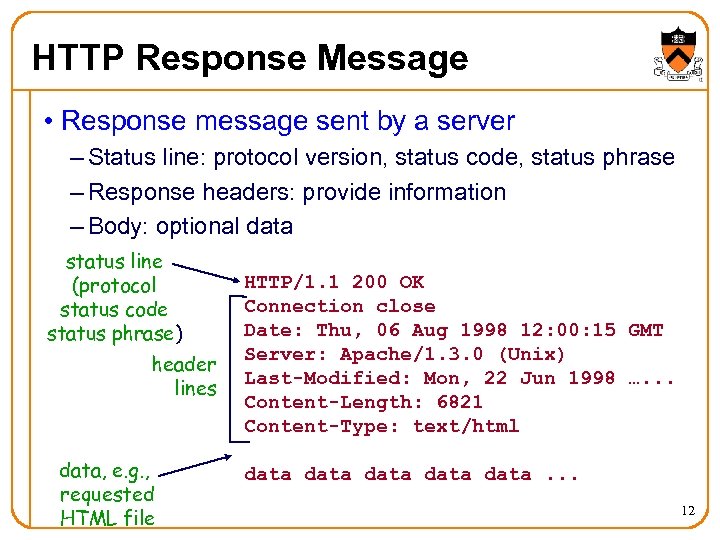
HTTP Response Message • Response message sent by a server – Status line: protocol version, status code, status phrase – Response headers: provide information – Body: optional data status line (protocol status code status phrase) header lines data, e. g. , requested HTML file HTTP/1. 1 200 OK Connection close Date: Thu, 06 Aug 1998 12: 00: 15 GMT Server: Apache/1. 3. 0 (Unix) Last-Modified: Mon, 22 Jun 1998 …. . . Content-Length: 6821 Content-Type: text/html data data. . . 12
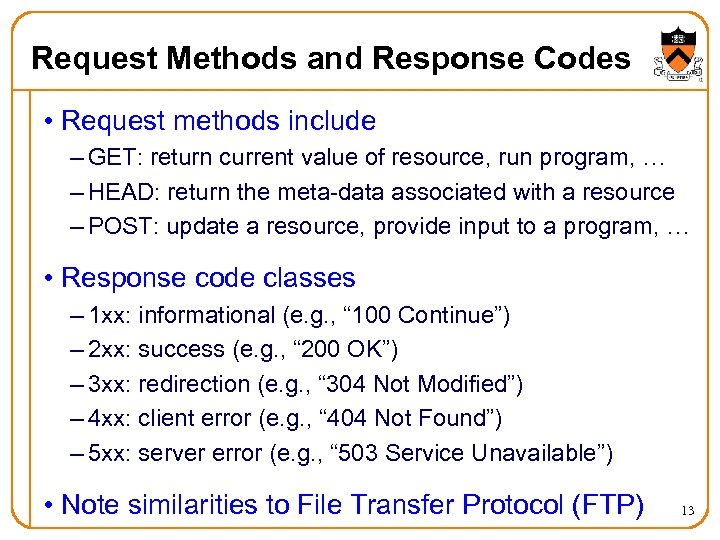
Request Methods and Response Codes • Request methods include – GET: return current value of resource, run program, … – HEAD: return the meta-data associated with a resource – POST: update a resource, provide input to a program, … • Response code classes – 1 xx: informational (e. g. , “ 100 Continue”) – 2 xx: success (e. g. , “ 200 OK”) – 3 xx: redirection (e. g. , “ 304 Not Modified”) – 4 xx: client error (e. g. , “ 404 Not Found”) – 5 xx: server error (e. g. , “ 503 Service Unavailable”) • Note similarities to File Transfer Protocol (FTP) 13
HTTP Resource Meta-Data • Meta-data – Information relating to a resource – … but not part of the resource itself • Example meta-data – Size of a resource – Type of the content – Last modification time • Concept borrowed from e-mail protocols – Multipurpose Internet Mail Extensions (MIME) – Data format classification (e. g. , Content-Type: text/html) – Enables browsers to automatically launch a viewer 14
Stateless Protocol • Stateless protocol – Each request-response exchange treated independently – Clients and servers not required to retain state • Statelessness to improve scalability – Avoid need for the server to retain info across requests – Enable the server to handle a higher rate of requests • However, some applications need state – To uniquely identify the user or store temporary info – E. g. , personalize a Web page, compute profiles or access statistics by user, keep a shopping cart, etc. – Lead to the introduction of “cookies” in the mid 1990 s 15
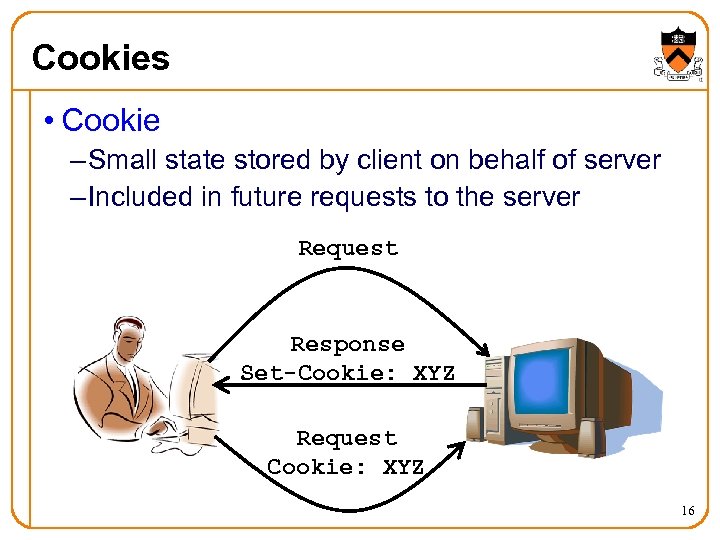
Cookies • Cookie – Small state stored by client on behalf of server – Included in future requests to the server Request Response Set-Cookie: XYZ Request Cookie: XYZ 16
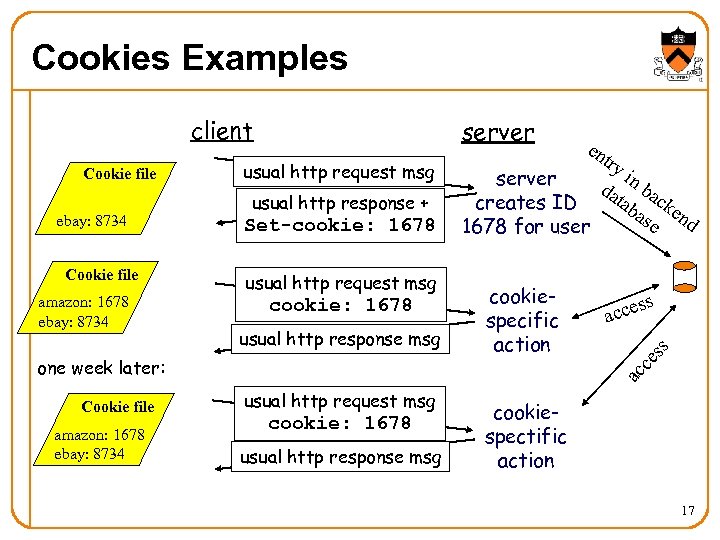
Cookies Examples Cookie file ebay: 8734 Cookie file amazon: 1678 ebay: 8734 server usual http request msg usual http response + Set-cookie: 1678 usual http request msg cookie: 1678 usual http response msg Cookie file amazon: 1678 ebay: 8734 try i server da n ba tab ck creates ID as end e 1678 for user cookiespecific action s s acce ac ce one week later: en ss client usual http request msg cookie: 1678 usual http response msg cookiespectific action 17
Web Components • Clients – Send requests and receive responses – Browsers, spiders, and agents • Servers – Receive requests and send responses – Store or generate the responses • Proxies – Act as a server for the client, and a client to the server – Perform extra functions such as anonymization, logging, transcoding, blocking of access, caching, etc. 18
Web Browser • Generating HTTP requests – User types URL, clicks a hyperlink, or selects bookmark – User clicks “reload”, or “submit” on a Web page – Automatic downloading of embedded images • Layout of response – Parsing HTML and rendering the Web page – Invoking helper applications (e. g. , Acrobat, Power. Point) • Maintaining a cache – Storing recently-viewed objects – Checking that cached objects are fresh 19
Typical Web Transaction • User clicks on a hyperlink – http: //www. cnn. com/index. html • Browser learns the IP address of the server – Invokes gethostbyname(www. cnn. com) – And gets a return value of 64. 236. 16. 20 • Browser establishes a TCP connection – Selects an ephemeral port for its end of the connection – Contacts 64. 236. 16. 20 on port 80 • Browser sends the HTTP request – “GET /index. html HTTP/1. 1 Host: www. cnn. com” 20
Typical Web Transaction (Continued) • Browser parses the HTTP response message – Extract the URL for each embedded image – Create new TCP connections and send new requests – Render the Web page, including the images • Opportunities for caching in the browser – HTML file – Each embedded image – IP address of the Web site 21
Web Server • Web site vs. Web server – Web site: collections of Web pages associated with a particular host name – Web server: program that satisfies client requests for Web resources • Handling a client request – Accept the TCP connection – Read and parse the HTTP request message – Translate the URL to a filename – Determine whether the request is authorized – Generate and transmit the response 22
Web Server: Generating a Response • Returning a file – URL corresponds to a file (e. g. , /www/index. html) – … and the server returns the file as the response – … along with the HTTP response header • Returning meta-data with no body – Example: client requests object “if-modified-since” – Server checks if the object has been modified – … and simply returns a “HTTP/1. 1 304 Not Modified” • Dynamically-generated responses – URL corresponds to a program the server needs to run – Server runs the program and sends the output to client 23
Hosting: Multiple Sites Per Machine • Multiple Web sites on a single machine – Hosting company runs the Web server on behalf of multiple sites (e. g. , www. foo. com and www. bar. com) • Problem: returning the correct content – www. foo. com/index. html vs. www. bar. com/index. html – How to differentiate when both are on same machine? • Solution #1: multiple servers on the same machine – Run multiple Web servers on the machine – Have a separate IP address for each server • Solution #2: include site name in the HTTP request – Run a single Web server with a single IP address – … and include “Host” header (e. g. , “Host: www. foo. com”) 24
Hosting: Multiple Machines Per Site • Replicating a popular Web site – Running on multiple machines to handle the load – … and to place content closer to the clients • Problem: directing client to a particular replica – To balance load across the server replicas – To pair clients with nearby servers • Solution #1: manual selection by clients – Each replica has its own site name – A Web page lists the replicas (e. g. , by name, location) – … and asks clients to click on a hyperlink to pick 25
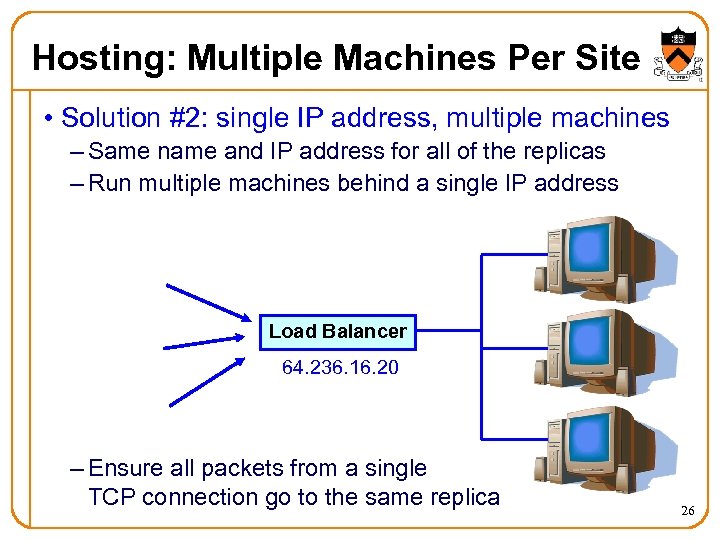
Hosting: Multiple Machines Per Site • Solution #2: single IP address, multiple machines – Same name and IP address for all of the replicas – Run multiple machines behind a single IP address Load Balancer 64. 236. 16. 20 – Ensure all packets from a single TCP connection go to the same replica 26
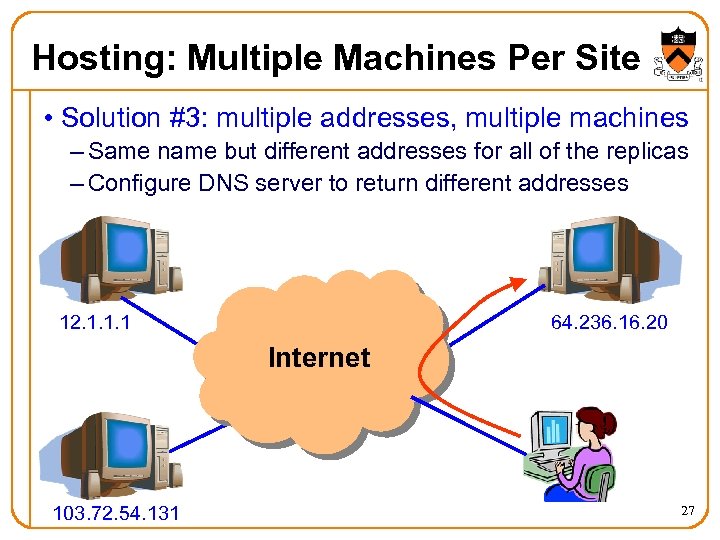
Hosting: Multiple Machines Per Site • Solution #3: multiple addresses, multiple machines – Same name but different addresses for all of the replicas – Configure DNS server to return different addresses 12. 1. 1. 1 64. 236. 16. 20 Internet 103. 72. 54. 131 27
Caching vs. Replication • Motivations for moving content close to users – Reduce latency for the user – Reduce load on the network and the server – Reduce cost for transferring data on the network • Caching – Replicating the content “on demand” after a request – Storing the response message locally for future use – May need to verify if the response has changed – … and some responses are not cacheable • Replication – Planned replication of the content in multiple locations – Updating of resources is handled outside of HTTP – Can replicate scripts that create dynamic responses 28
Caching vs. Replication (Continued) • Caching initially viewed as very important in HTTP – Many additions to HTTP to support caching – … and, in particular, cache validation • Deployment of caching proxies in the 1990 s – Service providers and enterprises deployed proxies – … to cache content across a community of users – Though, sometimes the gains weren’t very dramatic • Then, content distribution networks emerged – Companies (like Akamai) that replicate Web sites – Host all (or part) of a Web site for a content provider – Place replicas all over the world on many machines 29
TCP Interaction: Multiple Transfers • Most Web pages have multiple objects – E. g. , HTML file and multiple embedded images • Serializing the transfers is not efficient – Sending the images one at a time introduces delay – Cannot start retrieving second images until first arrives • Parallel connections – Browser opens multiple TCP connections (e. g. , 4) – … and retrieves a single image on each connection • Performance trade-offs – Multiple downloads sharing the same network links – Unfairness to other traffic traversing the links 30
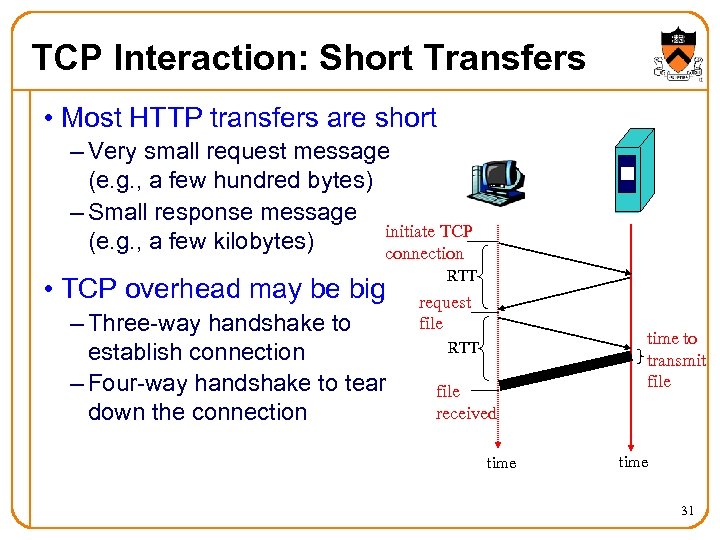
TCP Interaction: Short Transfers • Most HTTP transfers are short – Very small request message (e. g. , a few hundred bytes) – Small response message initiate TCP (e. g. , a few kilobytes) connection • TCP overhead may be big – Three-way handshake to establish connection – Four-way handshake to tear down the connection RTT request file RTT file received time to transmit file time 31
TCP Interaction: Short Transfers • Round-trip time estimation – Very large at the start of a connection (e. g. , 3 seconds) – Leads to latency in detecting lost packets • Congestion window – Small value at beginning of connection (e. g. , 1 MSS) – May not reach a high value before transfer is done • Timeout vs. triple-duplicate ACK – Two main ways of detecting packet loss – Timeout is slow, and triple-duplicate ACK is fast – However, triple-dup-ACK requires many packets in flight – … which doesn’t happen for very short transfers 32
TCP Interaction: Persistent Connections • Handle multiple transfers per connection – Maintain the TCP connection across multiple requests – Either the client or server can tear down the connection – Added to HTTP after the Web became very popular • Performance advantages – Avoid overhead of connection set-up and tear-down – Allow TCP to learn a more accurate RTT estimate – Allow the TCP congestion window to increase • Further enhancement: pipelining – Send multiple requests one after the other – … before receiving the first response 33
Conclusions • Key ideas underlying the Web – Uniform Resource Identifier (URI) – Hyper. Text Markup Language (HTML) – Hyper. Text Transfer Protocol (HTTP) – Browser helper applications based on content type • Main Web components – Clients, proxies, and servers • Dependence on underlying Internet protocols – DNS and TCP • Next week: other application-layer protocols – E-mail, peer-to-peer file sharing, Voice-over-IP 34
Скачать презентацию World Wide Web COS 461 Computer Networks Spring
c686ccc04d93ece49d9456a3830c86bf.ppt