 Скачать презентацию WIRLED PEAS World Information Resources Localized Environment Distribution
9edf5ac8037b9101e37ec20ad46a7d20.ppt
- Количество слайдов: 64



(WIRLED PEAS) World Information Resources, Localized Environment Distribution: Personalized Emergency Alerting System Presenter: Michelle Raymond michelle. raymond@honeywell. com
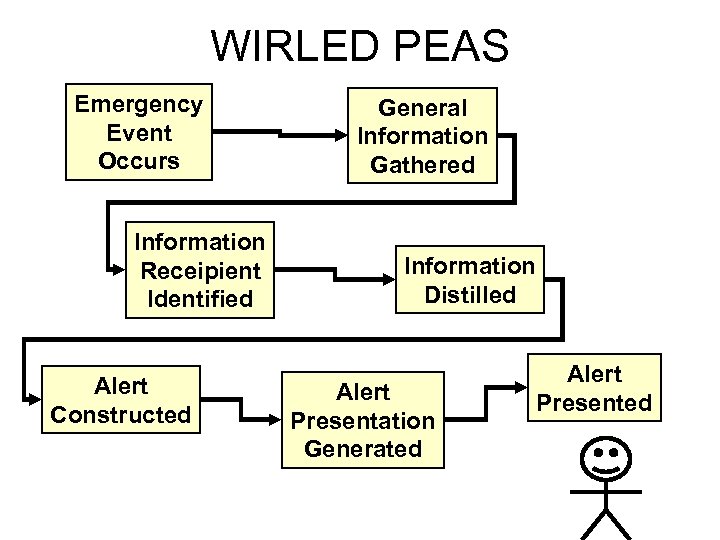
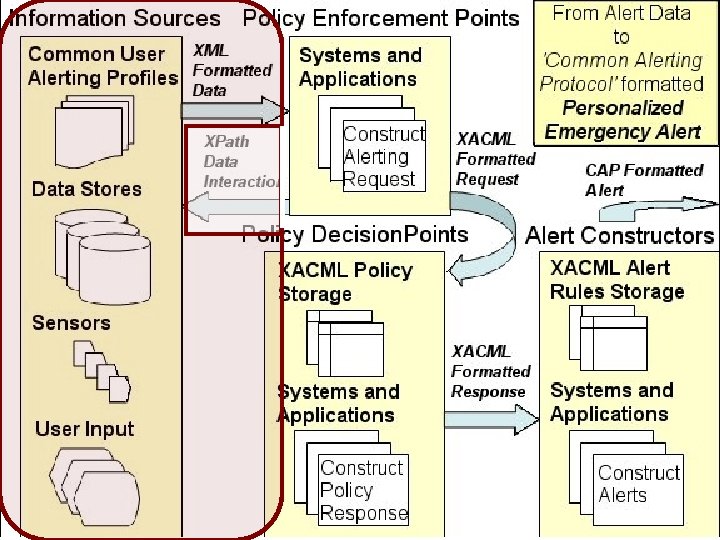
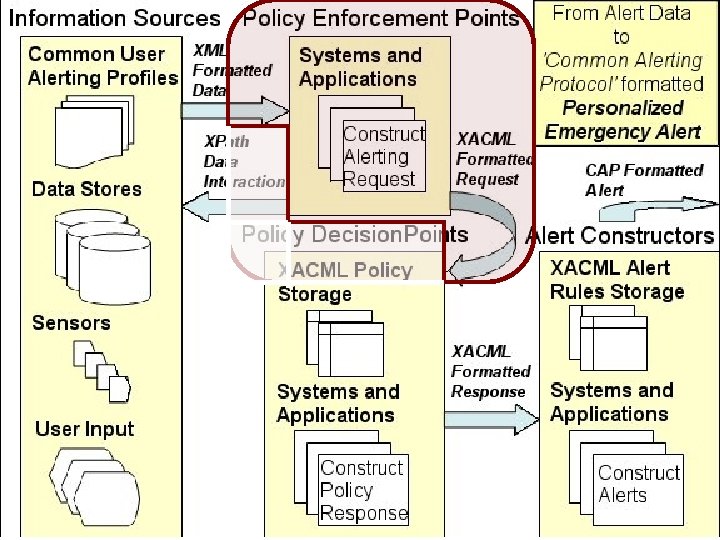
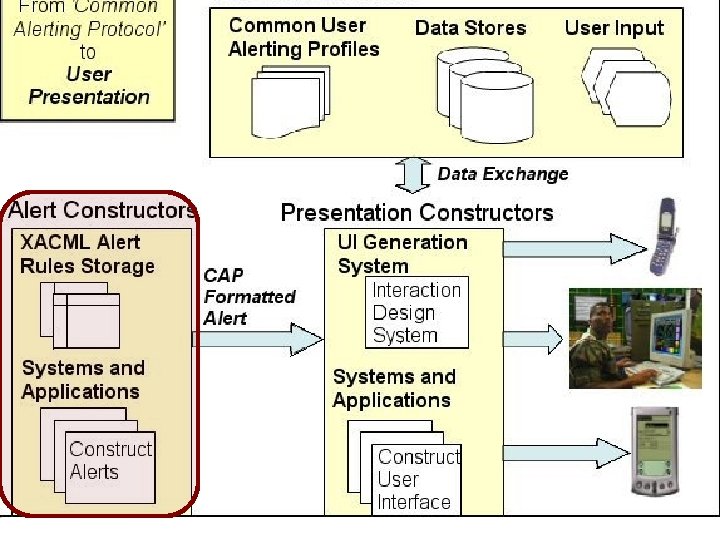
WIRLED PEAS Emergency Event Occurs Information Receipient Identified Alert Constructed General Information Gathered Information Distilled Alert Presentation Generated Alert Presented
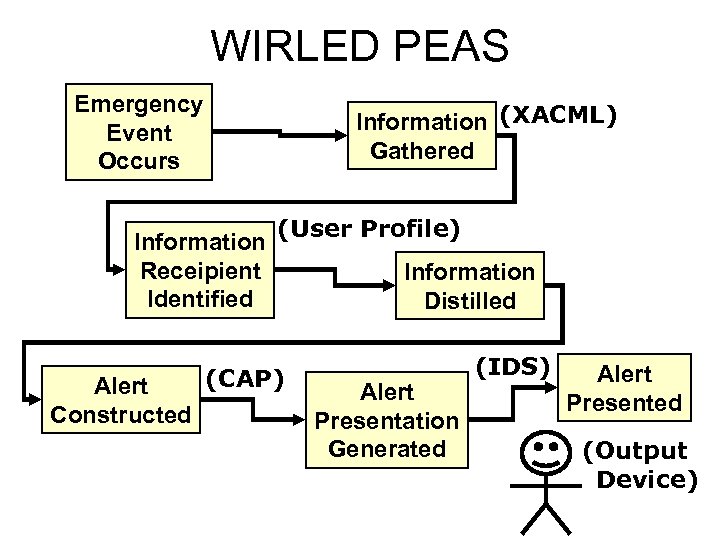
WIRLED PEAS Emergency Event Occurs Information (XACML) Gathered Information Receipient Identified Alert Constructed (User Profile) (CAP) Information Distilled Alert Presentation Generated (IDS) Alert Presented (Output Device)
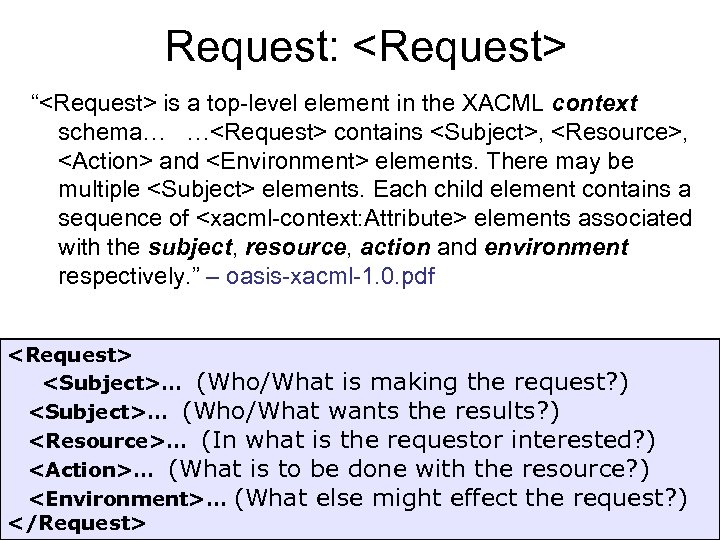
Request: <Request> “<Request> is a top-level element in the XACML context schema… …<Request> contains <Subject>, <Resource>, <Action> and <Environment> elements. There may be multiple <Subject> elements. Each child element contains a sequence of <xacml-context: Attribute> elements associated with the subject, resource, action and environment respectively. ” – oasis-xacml-1. 0. pdf <Request> <Subject>… (Who/What is making the request? ) <Subject>… (Who/What wants the results? ) <Resource>… (In what is the requestor interested? ) <Action>… (What is to be done with the resource? ) <Environment>… (What else might effect the request? ) </Request>
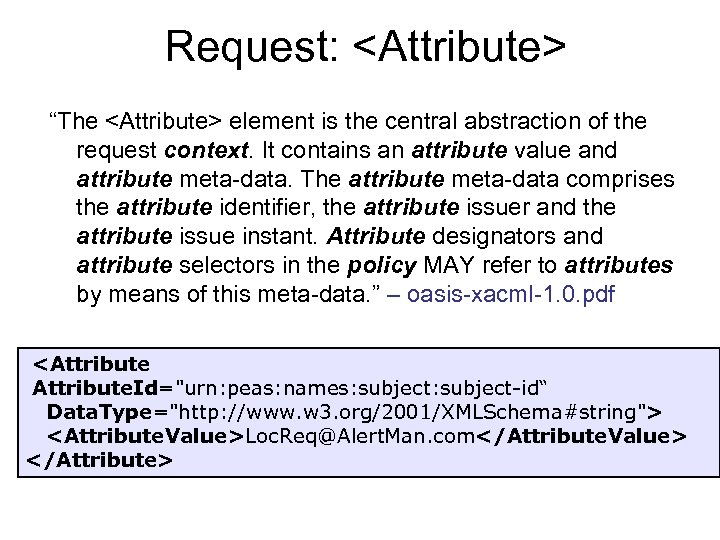
Request: <Attribute> “The <Attribute> element is the central abstraction of the request context. It contains an attribute value and attribute meta-data. The attribute meta-data comprises the attribute identifier, the attribute issuer and the attribute issue instant. Attribute designators and attribute selectors in the policy MAY refer to attributes by means of this meta-data. ” – oasis-xacml-1. 0. pdf <Attribute. Id="urn: peas: names: subject-id“ Data. Type="http: //www. w 3. org/2001/XMLSchema#string"> <Attribute. Value>Loc. Req@Alert. Man. com</Attribute. Value> </Attribute>
![Request: <Subject> [One to Many] “<Subject> specifies information about a subject of the request](https://present5.com/presentation/9edf5ac8037b9101e37ec20ad46a7d20/image-9.jpg "Request: <Subject> [One to Many] “<Subject> specifies information about a subject of the request")
Request: <Subject> [One to Many] “<Subject> specifies information about a subject of the request context by listing a sequence of <Attribute> elements associated with the subject. One or more <Subject> elements are allowed. A subject is an entity associated with the access request. • subject might represent the human user that initiated the application from which the request was issued • subject might represent the application’s executable code that created the request • subject might represent the entity that is to be the recipient of the resource Attributes of each of these entities MUST be enclosed in a separate <Subject> element. ” – oasis-xacml-1. 0. pdf
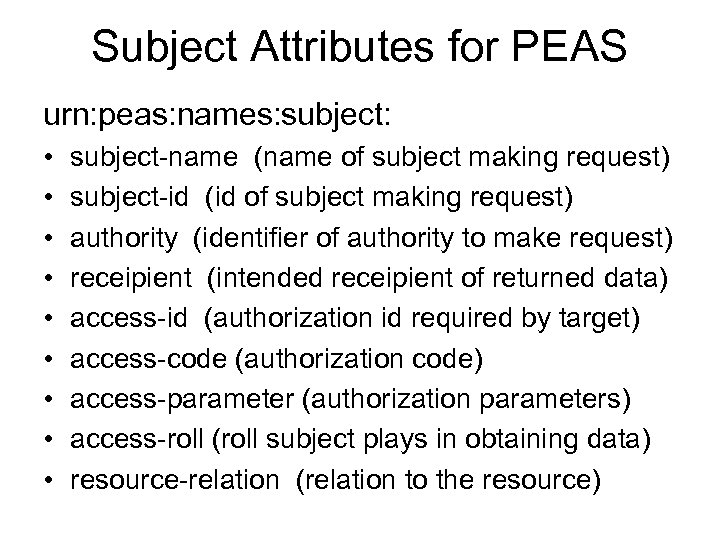
Subject Attributes for PEAS urn: peas: names: subject: • • • subject-name (name of subject making request) subject-id (id of subject making request) authority (identifier of authority to make request) receipient (intended receipient of returned data) access-id (authorization id required by target) access-code (authorization code) access-parameter (authorization parameters) access-roll (roll subject plays in obtaining data) resource-relation (relation to the resource)
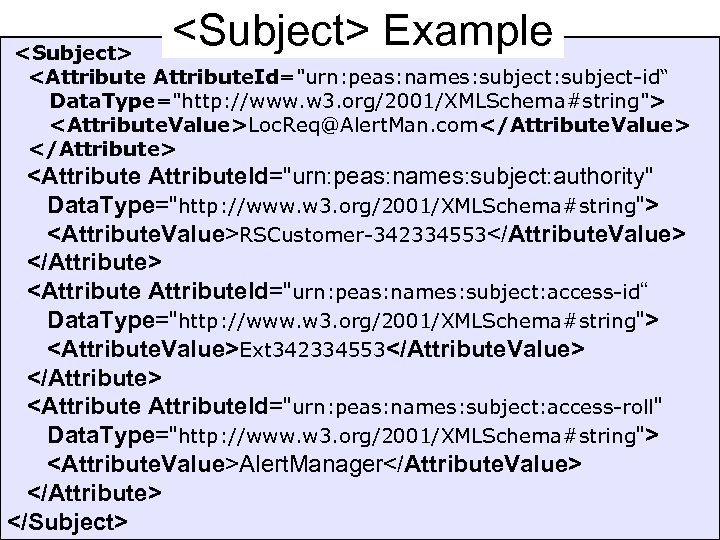
<Subject> Example <Subject> <Attribute. Id="urn: peas: names: subject-id“ Data. Type="http: //www. w 3. org/2001/XMLSchema#string"> <Attribute. Value>Loc. Req@Alert. Man. com</Attribute. Value> </Attribute> <Attribute. Id="urn: peas: names: subject: authority" Data. Type="http: //www. w 3. org/2001/XMLSchema#string"> <Attribute. Value>RSCustomer-342334553</Attribute. Value> </Attribute> <Attribute. Id="urn: peas: names: subject: access-id“ Data. Type="http: //www. w 3. org/2001/XMLSchema#string"> <Attribute. Value>Ext 342334553</Attribute. Value> </Attribute> <Attribute. Id="urn: peas: names: subject: access-roll" Data. Type="http: //www. w 3. org/2001/XMLSchema#string"> <Attribute. Value>Alert. Manager</Attribute. Value> </Attribute> </Subject>
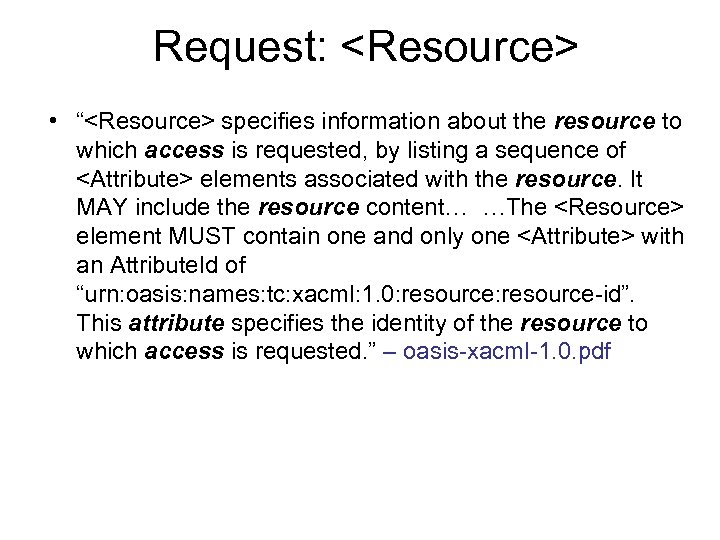
Request: <Resource> • “<Resource> specifies information about the resource to which access is requested, by listing a sequence of <Attribute> elements associated with the resource. It MAY include the resource content… …The <Resource> element MUST contain one and only one <Attribute> with an Attribute. Id of “urn: oasis: names: tc: xacml: 1. 0: resource-id”. This attribute specifies the identity of the resource to which access is requested. ” – oasis-xacml-1. 0. pdf
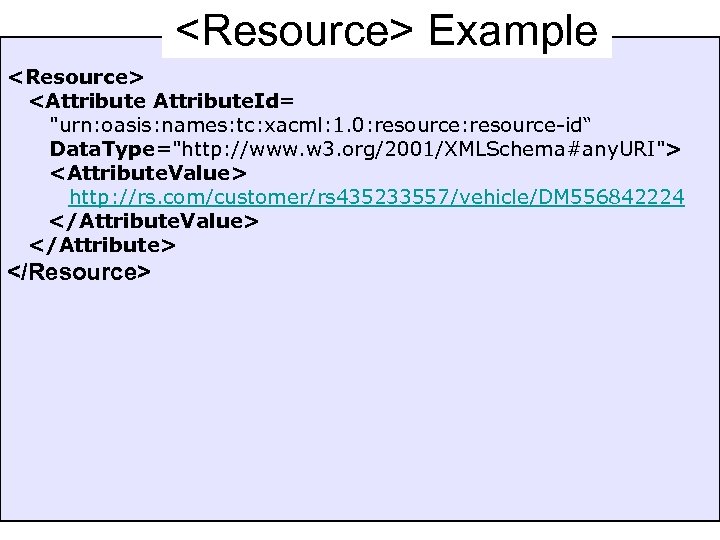
<Resource> Example <Resource> <Attribute. Id= "urn: oasis: names: tc: xacml: 1. 0: resource-id“ Data. Type="http: //www. w 3. org/2001/XMLSchema#any. URI"> <Attribute. Value> http: //rs. com/customer/rs 435233557/vehicle/DM 556842224 </Attribute. Value> </Attribute> </Resource>
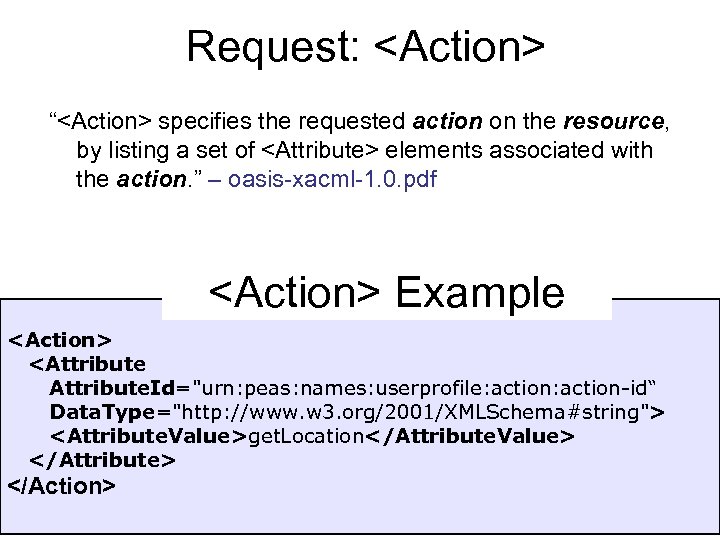
Request: <Action> “<Action> specifies the requested action on the resource, by listing a set of <Attribute> elements associated with the action. ” – oasis-xacml-1. 0. pdf <Action> Example <Action> <Attribute. Id="urn: peas: names: userprofile: action-id“ Data. Type="http: //www. w 3. org/2001/XMLSchema#string"> <Attribute. Value>get. Location</Attribute. Value> </Attribute> </Action>
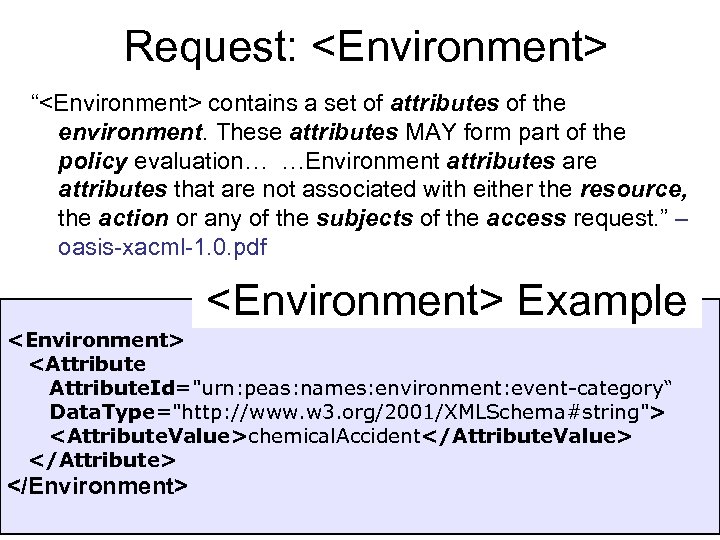
Request: <Environment> “<Environment> contains a set of attributes of the environment. These attributes MAY form part of the policy evaluation… …Environment attributes are attributes that are not associated with either the resource, the action or any of the subjects of the access request. ” – oasis-xacml-1. 0. pdf <Environment> Example <Environment> <Attribute. Id="urn: peas: names: environment: event-category“ Data. Type="http: //www. w 3. org/2001/XMLSchema#string"> <Attribute. Value>chemical. Accident</Attribute. Value> </Attribute> </Environment>
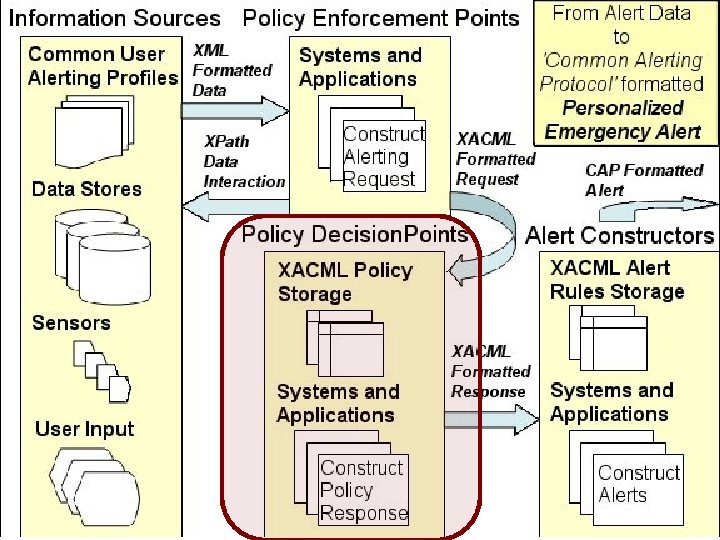
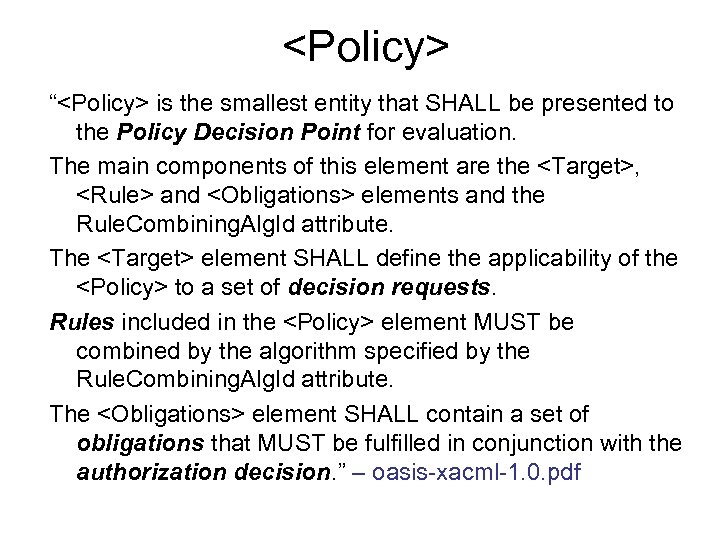
<Policy> “<Policy> is the smallest entity that SHALL be presented to the Policy Decision Point for evaluation. The main components of this element are the <Target>, <Rule> and <Obligations> elements and the Rule. Combining. Alg. Id attribute. The <Target> element SHALL define the applicability of the <Policy> to a set of decision requests. Rules included in the <Policy> element MUST be combined by the algorithm specified by the Rule. Combining. Alg. Id attribute. The <Obligations> element SHALL contain a set of obligations that MUST be fulfilled in conjunction with the authorization decision. ” – oasis-xacml-1. 0. pdf
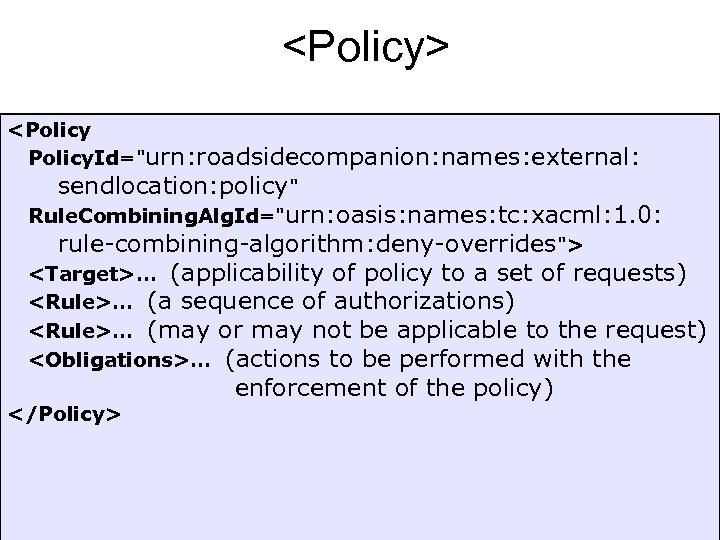
<Policy> <Policy. Id="urn: roadsidecompanion: names: external: sendlocation: policy" Rule. Combining. Alg. Id="urn: oasis: names: tc: xacml: 1. 0: rule-combining-algorithm: deny-overrides"> <Target>… (applicability of policy to a set of requests) <Rule>… (a sequence of authorizations) <Rule>… (may or may not be applicable to the request) <Obligations>… (actions to be performed with the </Policy> enforcement of the policy)
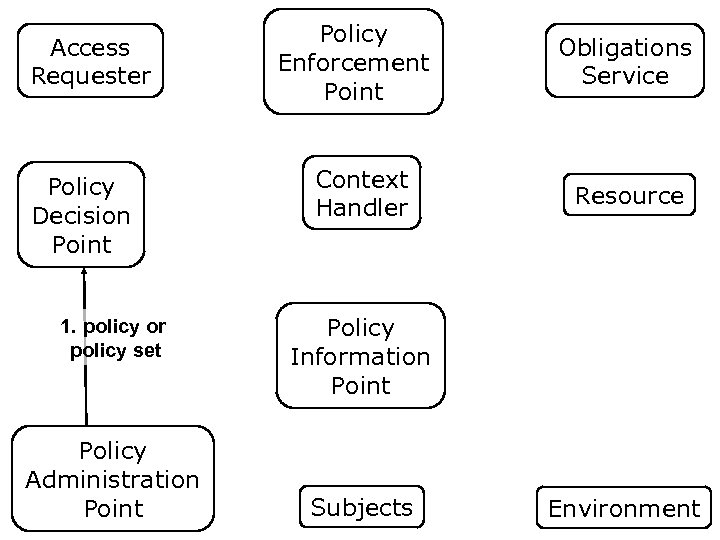
Access Requester Policy Decision Point 1. policy or policy set Policy Administration Point Policy Enforcement Point Context Handler Obligations Service Resource Policy Information Point Subjects Environment
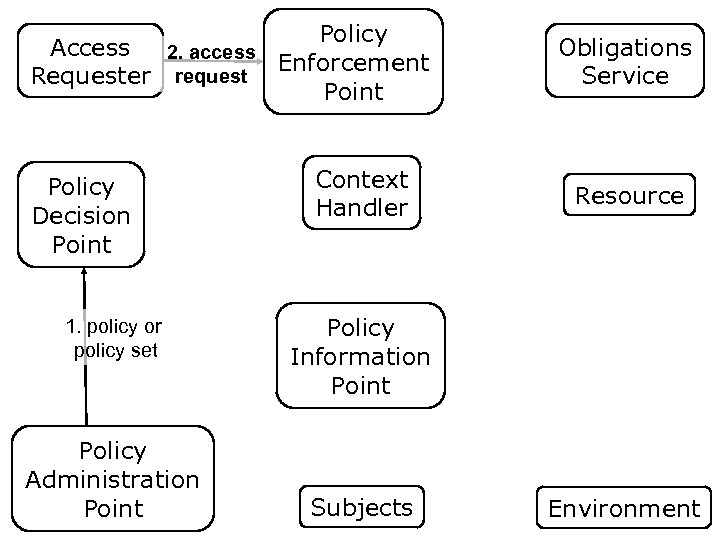
Policy Access 2. access Enforcement request Requester Point Policy Decision Point 1. policy or policy set Policy Administration Point Context Handler Obligations Service Resource Policy Information Point Subjects Environment
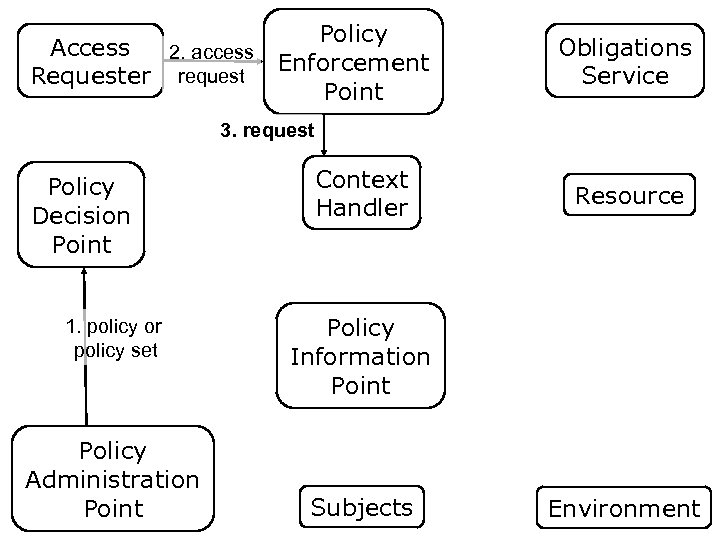
Policy Access 2. access Enforcement request Requester Point Obligations Service 3. request Policy Decision Point 1. policy or policy set Policy Administration Point Context Handler Resource Policy Information Point Subjects Environment
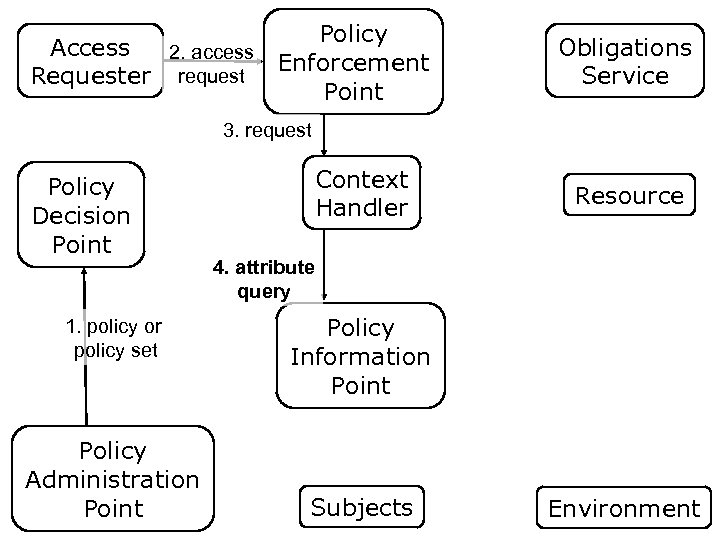
Policy Access 2. access Enforcement request Requester Point Obligations Service 3. request Policy Decision Point 1. policy or policy set Policy Administration Point Context Handler Resource 4. attribute query Policy Information Point Subjects Environment
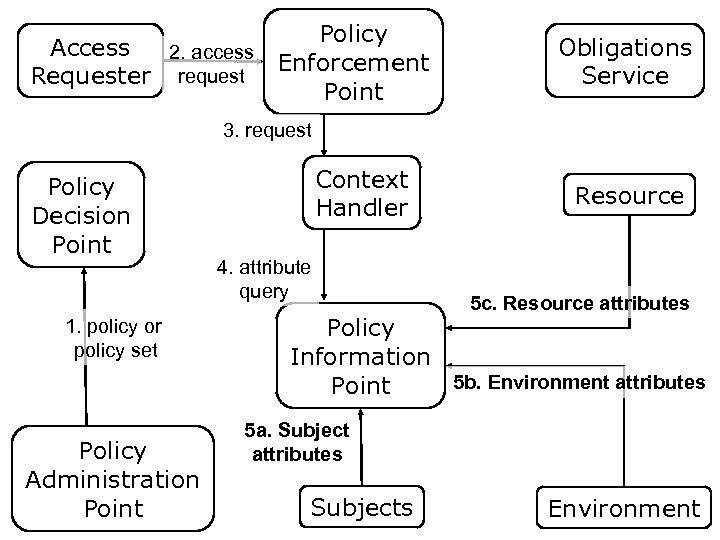
Policy Access 2. access Enforcement request Requester Point Obligations Service 3. request Policy Decision Point 1. policy or policy set Policy Administration Point Context Handler 4. attribute query Resource 5 c. Resource attributes Policy Information 5 b. Environment attributes Point 5 a. Subject attributes Subjects Environment
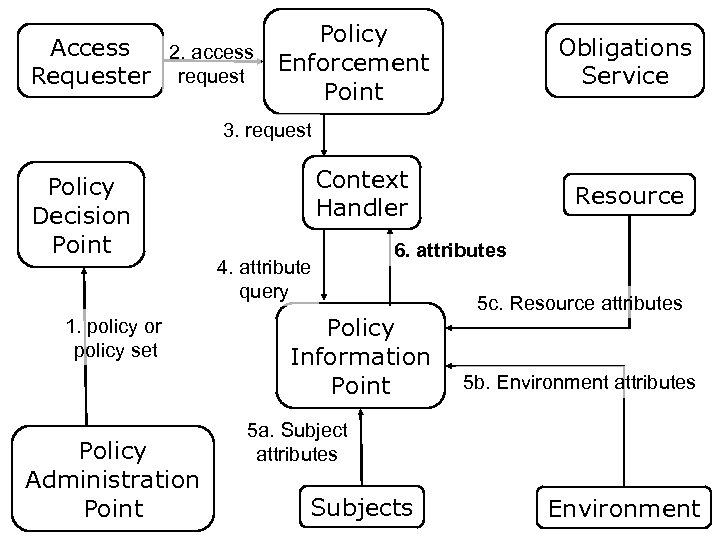
Policy Access 2. access Enforcement request Requester Point Obligations Service 3. request Policy Decision Point 1. policy or policy set Policy Administration Point Context Handler 4. attribute query Resource 6. attributes Policy Information Point 5 c. Resource attributes 5 b. Environment attributes 5 a. Subject attributes Subjects Environment
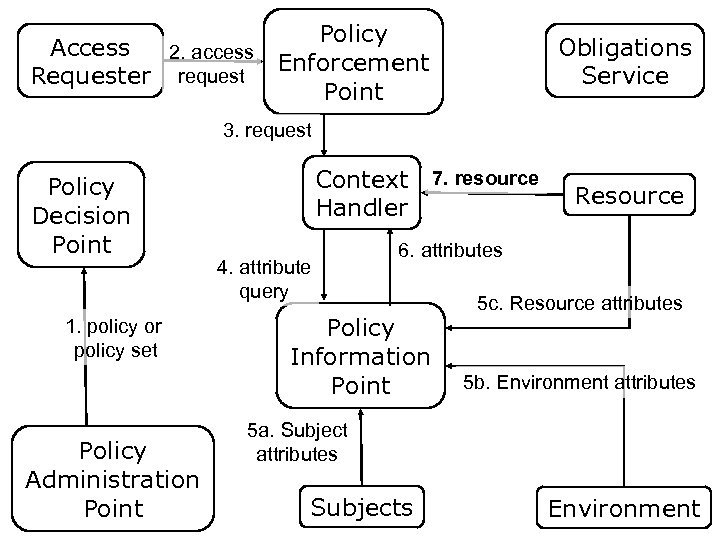
Policy Access 2. access Enforcement request Requester Point Obligations Service 3. request Policy Decision Point 1. policy or policy set Policy Administration Point Context 7. resource Handler 4. attribute query Resource 6. attributes Policy Information Point 5 c. Resource attributes 5 b. Environment attributes 5 a. Subject attributes Subjects Environment
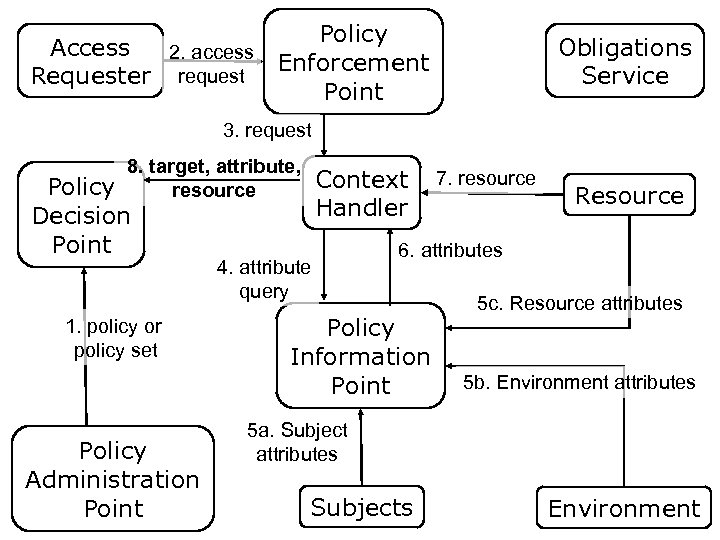
Policy Access 2. access Enforcement request Requester Point Obligations Service 3. request 8. target, attribute, resource Policy Decision Point 1. policy or policy set Policy Administration Point Context Handler 4. attribute query 7. resource Resource 6. attributes Policy Information Point 5 c. Resource attributes 5 b. Environment attributes 5 a. Subject attributes Subjects Environment
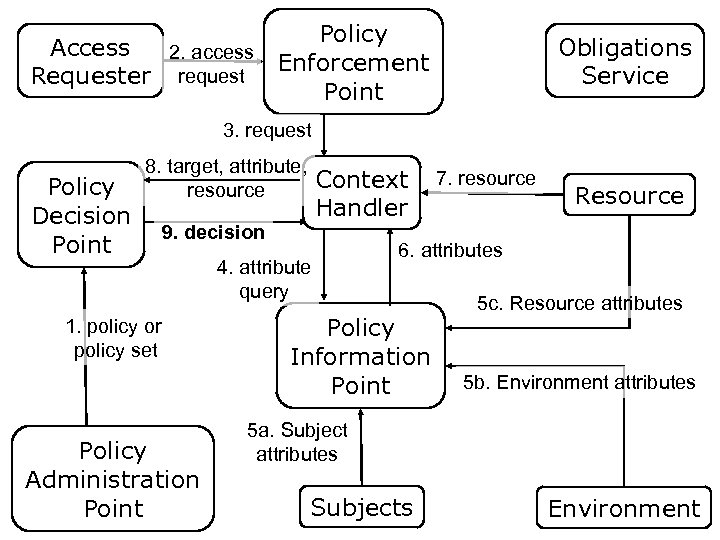
Policy Access 2. access Enforcement request Requester Point Obligations Service 3. request Policy Decision Point 8. target, attribute, resource Context Handler 9. decision 1. policy or policy set Policy Administration Point 4. attribute query 7. resource Resource 6. attributes Policy Information Point 5 c. Resource attributes 5 b. Environment attributes 5 a. Subject attributes Subjects Environment
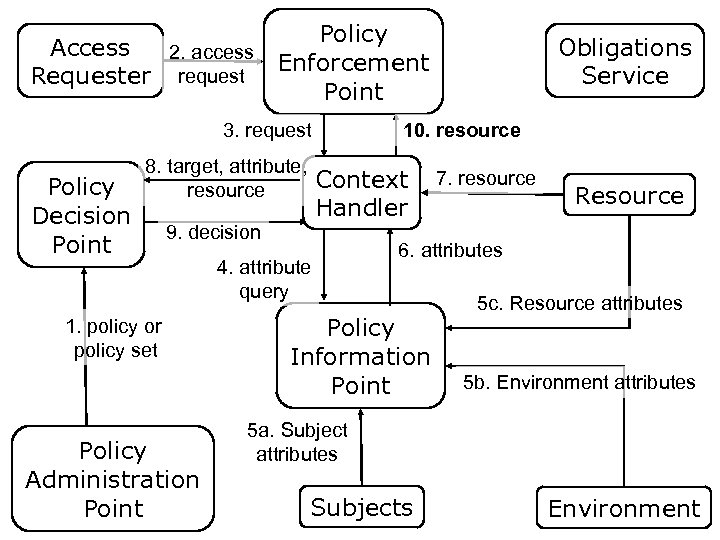
Policy Access 2. access Enforcement request Requester Point 3. request Policy Decision Point 8. target, attribute, resource 1. policy or policy set Policy Administration Point 10. resource Context Handler 9. decision Obligations Service 4. attribute query 7. resource Resource 6. attributes Policy Information Point 5 c. Resource attributes 5 b. Environment attributes 5 a. Subject attributes Subjects Environment
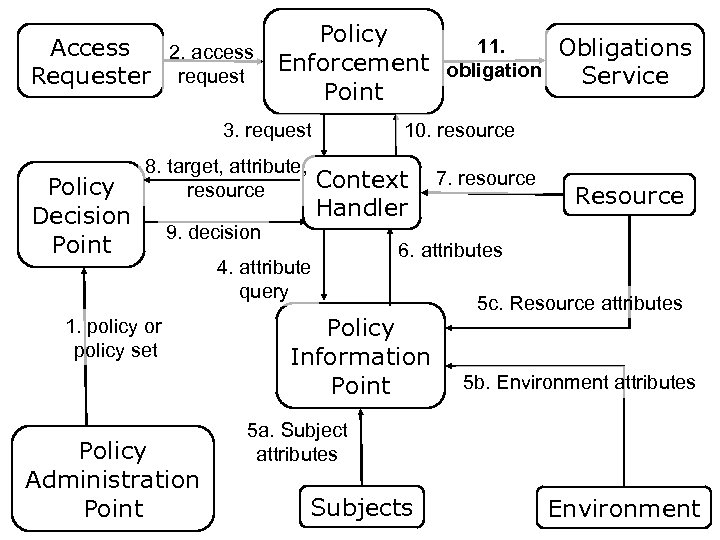
Policy 11. Access Obligations 2. access Enforcement obligation request Requester Service Point 3. request Policy Decision Point 8. target, attribute, resource Context Handler 9. decision 1. policy or policy set Policy Administration Point 10. resource 4. attribute query 7. resource Resource 6. attributes Policy Information Point 5 c. Resource attributes 5 b. Environment attributes 5 a. Subject attributes Subjects Environment
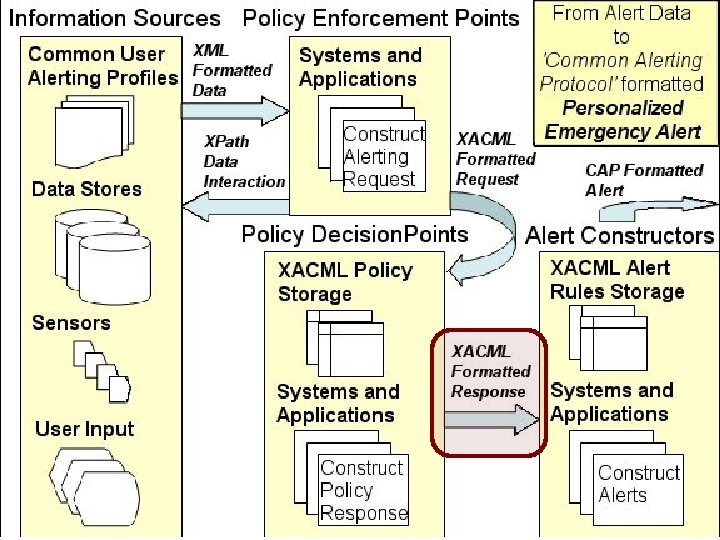
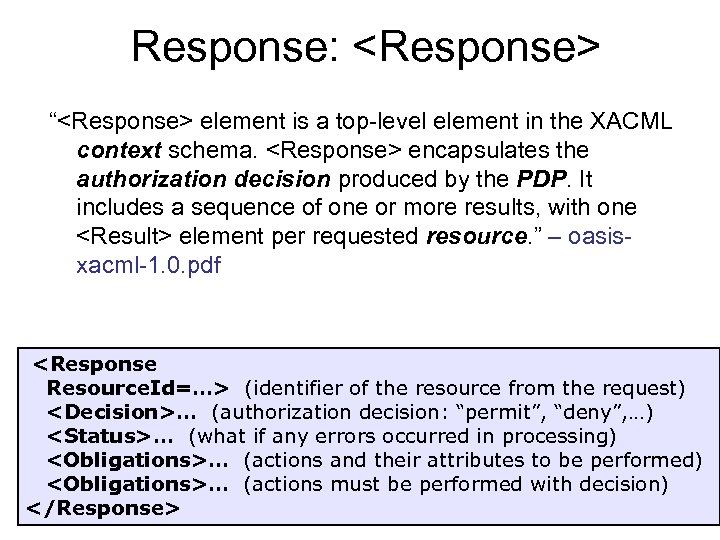
Response: <Response> “<Response> element is a top-level element in the XACML context schema. <Response> encapsulates the authorization decision produced by the PDP. It includes a sequence of one or more results, with one <Result> element per requested resource. ” – oasisxacml-1. 0. pdf <Response Resource. Id=…> (identifier of the resource from the request) <Decision>… (authorization decision: “permit”, “deny”, …) <Status>… (what if any errors occurred in processing) <Obligations>… (actions and their attributes to be performed) <Obligations>… (actions must be performed with decision) </Response>
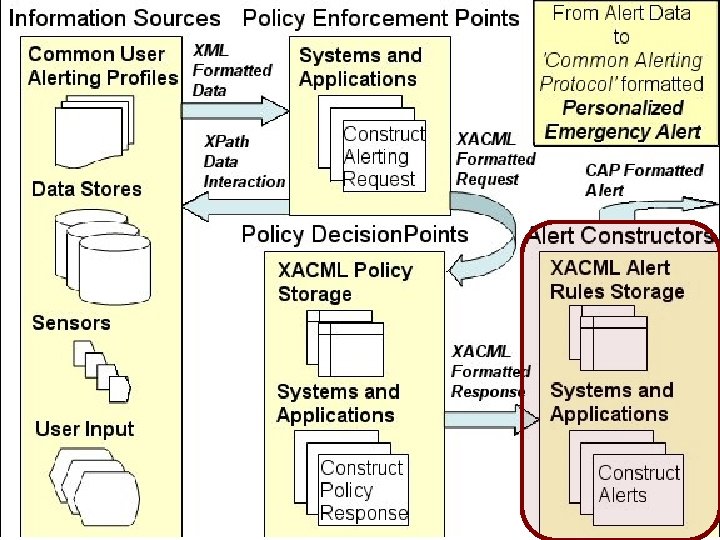
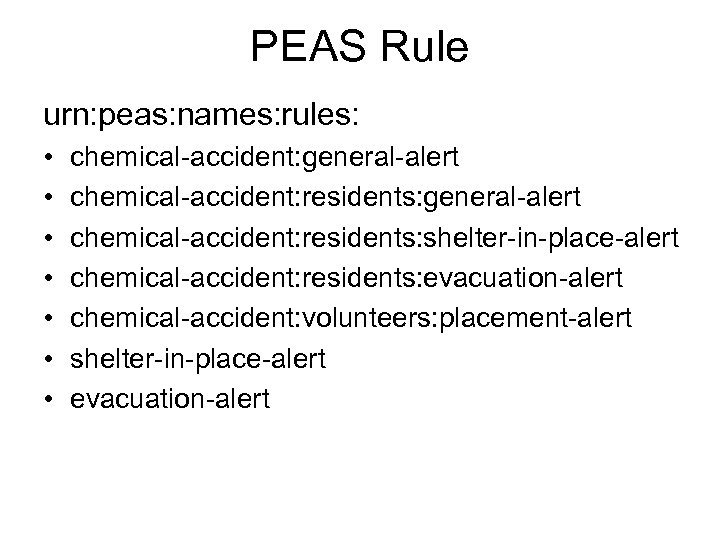
PEAS Rule urn: peas: names: rules: • • chemical-accident: general-alert chemical-accident: residents: shelter-in-place-alert chemical-accident: residents: evacuation-alert chemical-accident: volunteers: placement-alert shelter-in-place-alert evacuation-alert
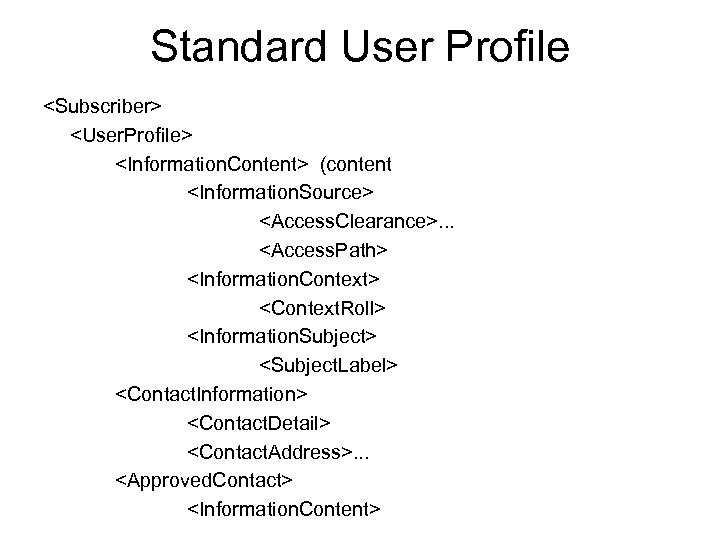
Standard User Profile <Subscriber> <User. Profile> <Information. Content> (content <Information. Source> <Access. Clearance>. . . <Access. Path> <Information. Context> <Context. Roll> <Information. Subject> <Subject. Label> <Contact. Information> <Contact. Detail> <Contact. Address>. . . <Approved. Contact> <Information. Content>
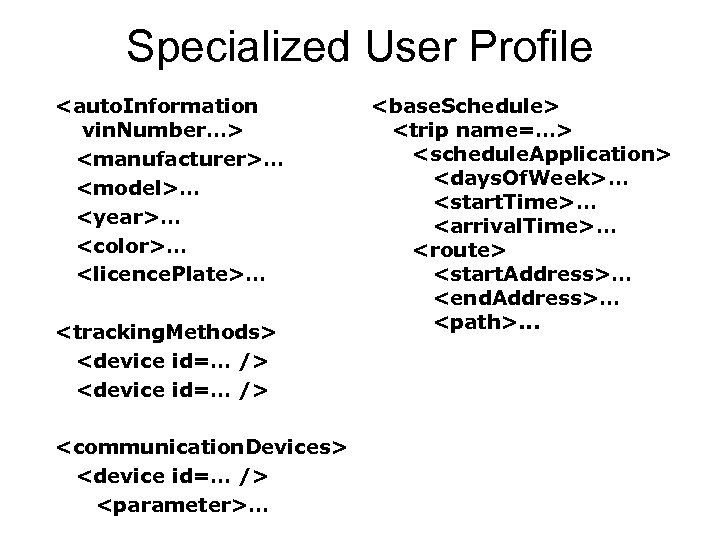
Specialized User Profile <auto. Information vin. Number…> <manufacturer>… <model>… <year>… <color>… <licence. Plate>… <tracking. Methods> <device id=… /> <communication. Devices> <device id=… /> <parameter>… <base. Schedule> <trip name=…> <schedule. Application> <days. Of. Week>… <start. Time>… <arrival. Time>… <route> <start. Address>… <end. Address>… <path>. . .
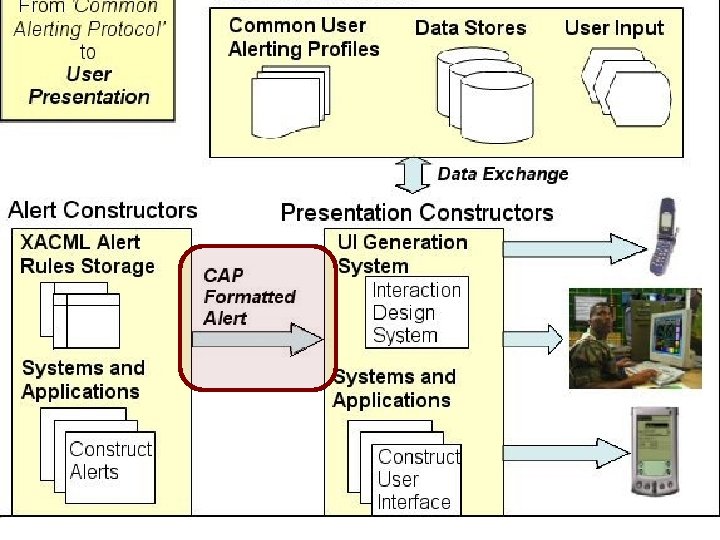
Common Alerting Protocol “Each CAP Alert Message consists of: an <alert> segment, which may contain: one or more <info> segments, each of which may include one or more <area> segments. Under most circumstances CAP messages with a <msg. Type> value of “Alert” SHOULD include at least one <info> element. ” – emergency-CAP-1. 0. pdf
CAP: <alert> “The <alert> segment provides basic information about the current message: • its purpose, • its source and • its status, as well as • unique identifier for the current message and • links to any other, related messages. An <alert> segment may be used alone for message acknowledgements, cancellations or other system functions, but most <alert> segments will include at least one <info> segment. ” – emergency-CAP-1. 0. pdf
CAP: <info> “The <info> segment describes an anticipated or actual event in terms of its – urgency (time available to prepare), – severity (intensity of impact) and – certainty (confidence in the observation or prediction), as well as providing both categorical and textual descriptions of the subject event. It may also provide instructions for appropriate response by message recipients and various other details (hazard duration, technical parameters, contact information, links to additional information sources, etc. ) Multiple <info> segments may be used to describe differing parameters (e. g. , for different probability or intensity “bands”) or to provide the information in multiple languages. ” – emergency-CAP-1. 0. pdf
CAP: <resource> “The <resource> segment provides an optional reference to additional information related to the <info> segment within which it appears in the form of a digital asset such as an image or audio file. ” – emergency-CAP-1. 0. pdf
CAP: <area> “The <area> segment describes a geographic area to which the <info> segment in which it appears applies. Textual and coded descriptions (such as postal codes) are supported, but the preferred representations use geospatial shapes (polygons and circles) and an altitude or altitude range, expressed in standard latitude / longitude / altitude terms in accordance with a specified geospatial datum. ” – emergency-CAP-1. 0. pdf
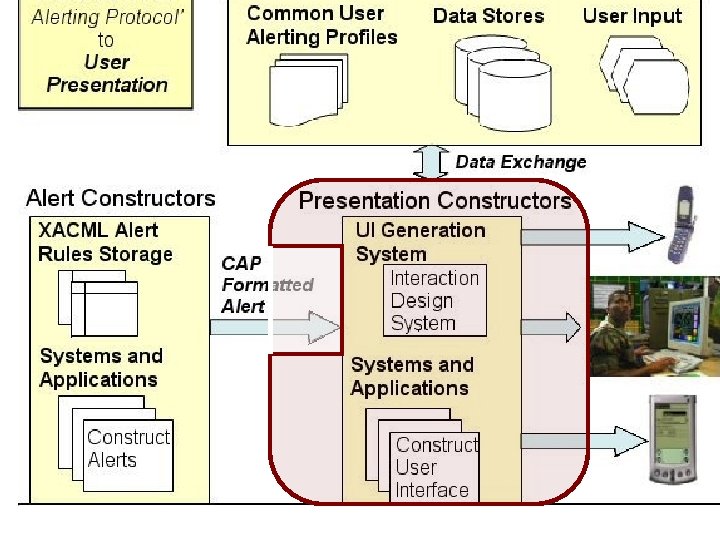
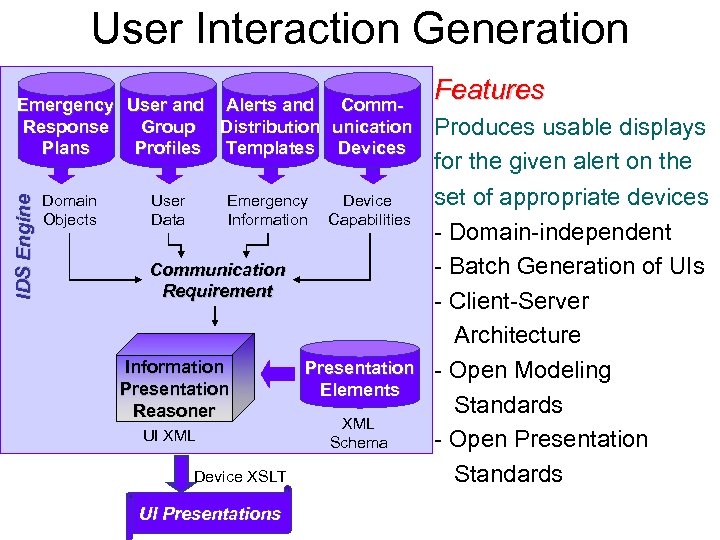
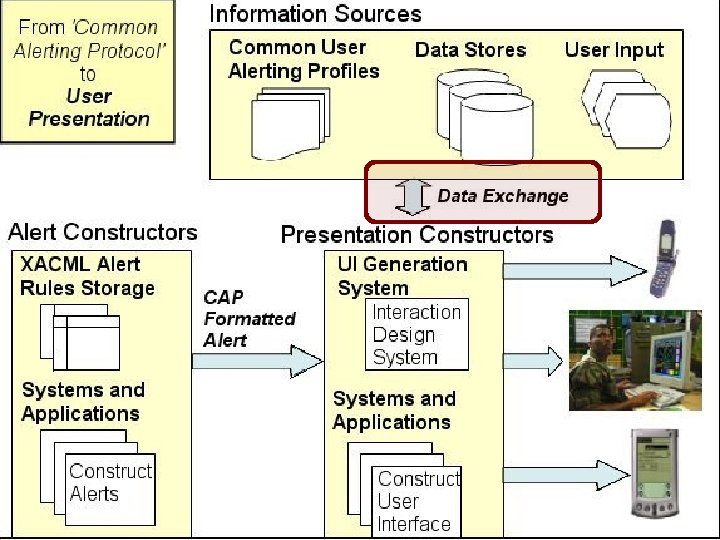
User Interaction Generation IDS Engine Emergency User and Alerts and Comm. Response Group Distribution unication Plans Profiles Templates Devices Domain Objects User Data Emergency Information Device Capabilities Communication Requirement Information Presentation Reasoner UI XML Device XSLT UI Presentations Presentation Elements XML Schema Features Produces usable displays for the given alert on the set of appropriate devices - Domain-independent - Batch Generation of UIs - Client-Server Architecture - Open Modeling Standards - Open Presentation Standards
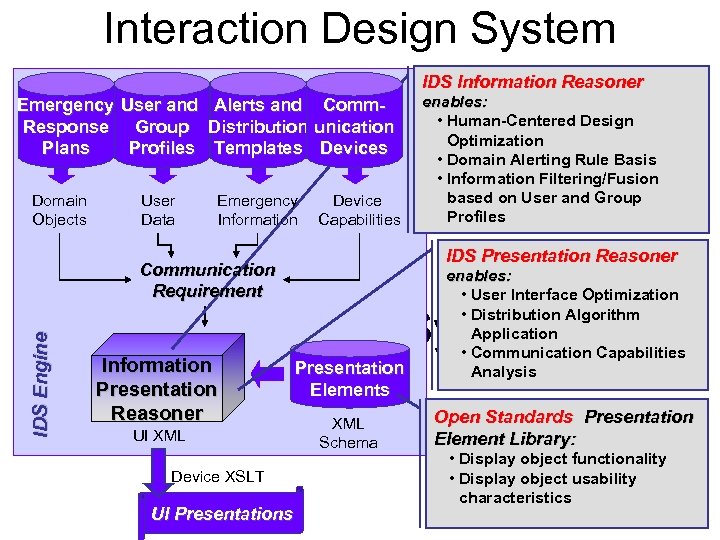
Interaction Design System IDS Information Reasoner Emergency User and Alerts and Comm. Response Group Distribution unication Plans Profiles Templates Devices Domain Objects User Data Emergency Information Device Capabilities enables: • Human-Centered Design Optimization • Domain Alerting Rule Basis • Information Filtering/Fusion based on User and Group Profiles IDS Presentation Reasoner Communication Requirement enables: • User Interface Optimization • Distribution Algorithm Application • Communication Capabilities Analysis IDS Engine Interaction Design System Information Presentation Reasoner UI XML Device XSLT UI Presentations Presentation Elements XML Schema Open Standards Presentation Element Library: • Display object functionality • Display object usability characteristics
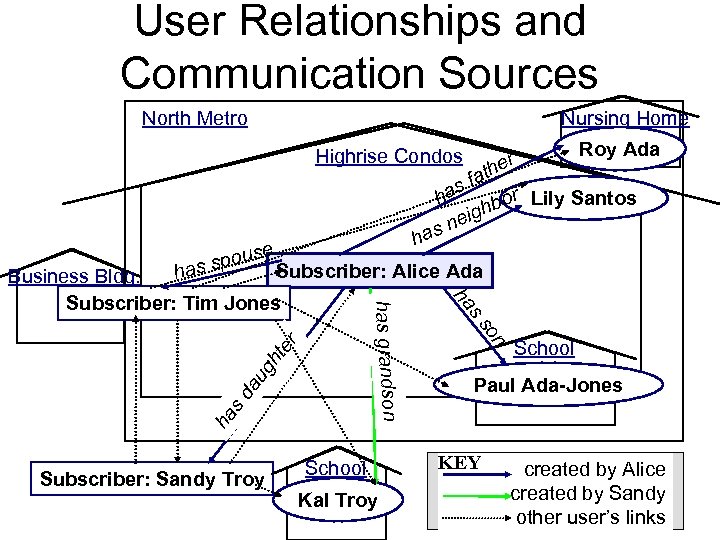
User Relationships and Communication Sources North Metro Nursing Home Roy Ada er h fat s r ha hbo Lily Santos g nei s Highrise Condos ha se spou Subscriber: Alice Ada has ht er au g ha sd Subscriber: Sandy Troy School Kal Troy on ss ha has grandson Business Bldg. Subscriber: Tim Jones School Paul Ada-Jones KEY created by Alice created by Sandy other user’s links
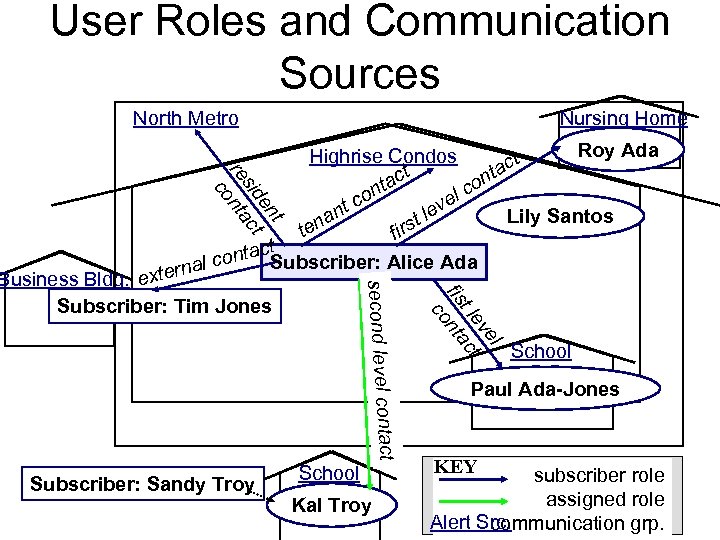
User Roles and Communication Sources Nursing Home North Metro t en t sid c re nta co Roy Ada Highrise Condos ct ct nta o ta lc on e c ev nt l Lily Santos a rst en t fi ct conta Subscriber: Alice Ada al xtern Subscriber: Sandy Troy School Kal Troy l ve t le ct fis nta co tact second level con Business Bldg. e Subscriber: Tim Jones School Paul Ada-Jones KEY subscriber role assigned role Alert Src. communication grp.
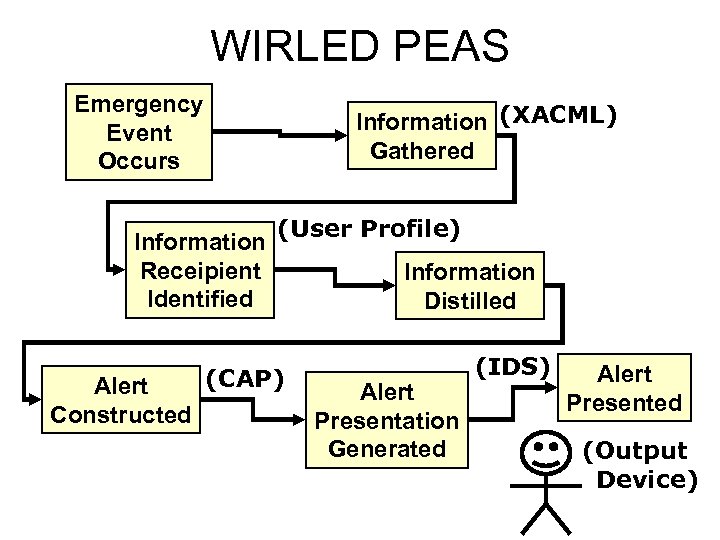
WIRLED PEAS Emergency Event Occurs Information (XACML) Gathered Information Receipient Identified Alert Constructed (User Profile) (CAP) Information Distilled Alert Presentation Generated (IDS) Alert Presented (Output Device)
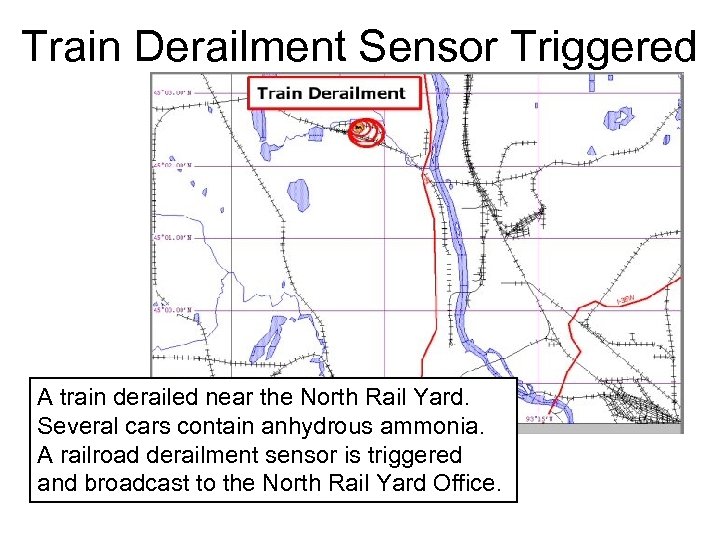
Train Derailment Sensor Triggered A train derailed near the North Rail Yard. Several cars contain anhydrous ammonia. A railroad derailment sensor is triggered and broadcast to the North Rail Yard Office.
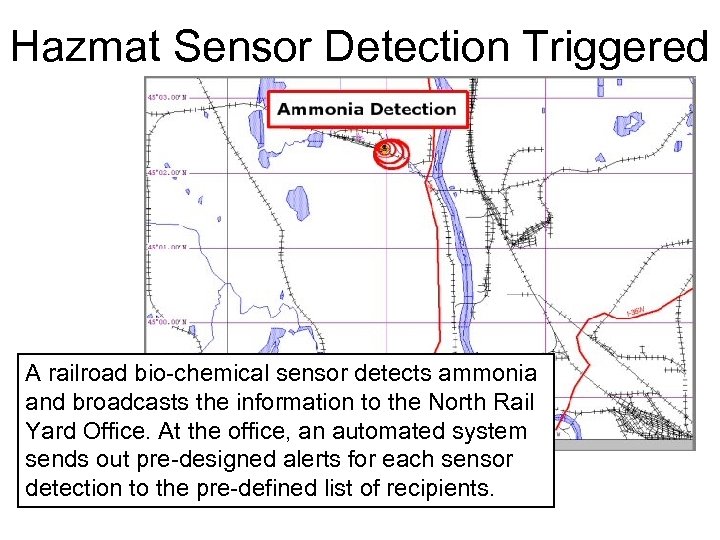
Hazmat Sensor Detection Triggered A railroad bio-chemical sensor detects ammonia and broadcasts the information to the North Rail Yard Office. At the office, an automated system sends out pre-designed alerts for each sensor detection to the pre-defined list of recipients.
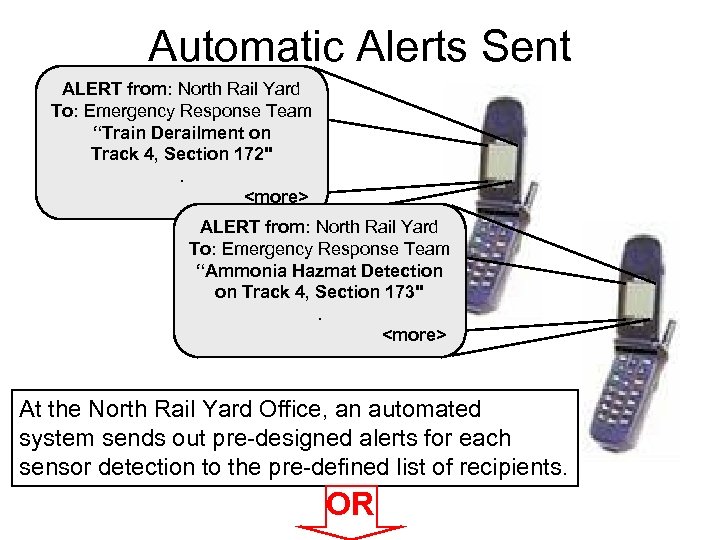
Automatic Alerts Sent ALERT from: North Rail Yard To: Emergency Response Team “Train Derailment on Track 4, Section 172". <more> ALERT from: North Rail Yard To: Emergency Response Team “Ammonia Hazmat Detection on Track 4, Section 173". <more> At the North Rail Yard Office, an automated system sends out pre-designed alerts for each sensor detection to the pre-defined list of recipients. OR
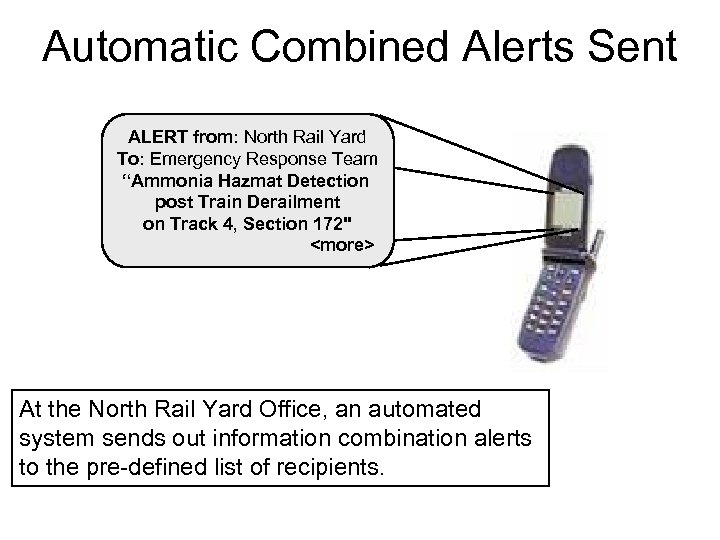
Automatic Combined Alerts Sent ALERT from: North Rail Yard To: Emergency Response Team “Ammonia Hazmat Detection post Train Derailment on Track 4, Section 172" <more> At the North Rail Yard Office, an automated system sends out information combination alerts to the pre-defined list of recipients.
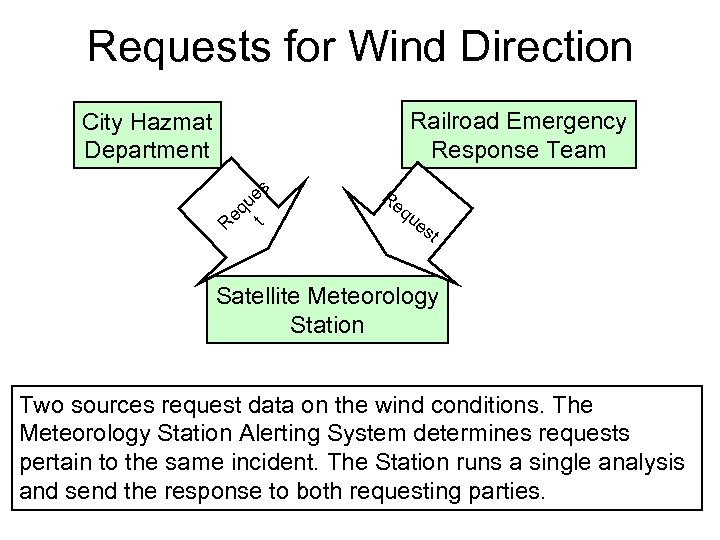
Requests for Wind Direction Railroad Emergency Response Team City Hazmat Department es u eq t R Re qu es t Satellite Meteorology Station Two sources request data on the wind conditions. The Meteorology Station Alerting System determines requests pertain to the same incident. The Station runs a single analysis and send the response to both requesting parties.
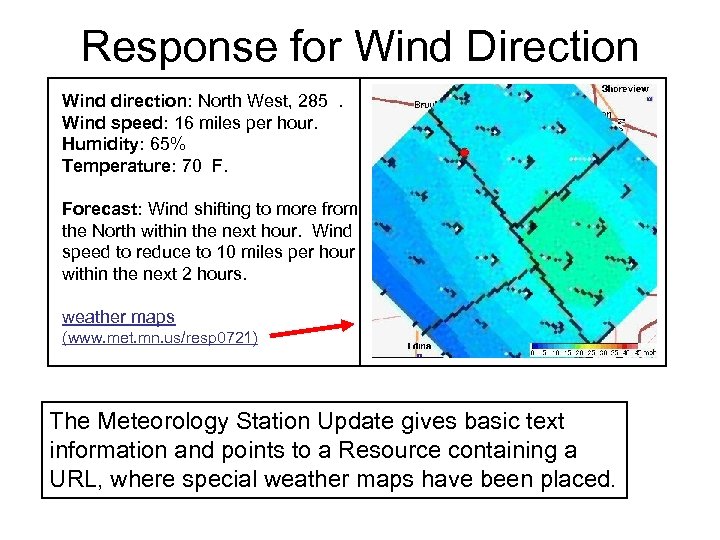
Response for Wind Direction Wind direction: North West, 285. Wind speed: 16 miles per hour. Humidity: 65% Temperature: 70 F. Forecast: Wind shifting to more from the North within the next hour. Wind speed to reduce to 10 miles per hour within the next 2 hours. weather maps (www. met. mn. us/resp 0721) The Meteorology Station Update gives basic text information and points to a Resource containing a URL, where special weather maps have been placed.
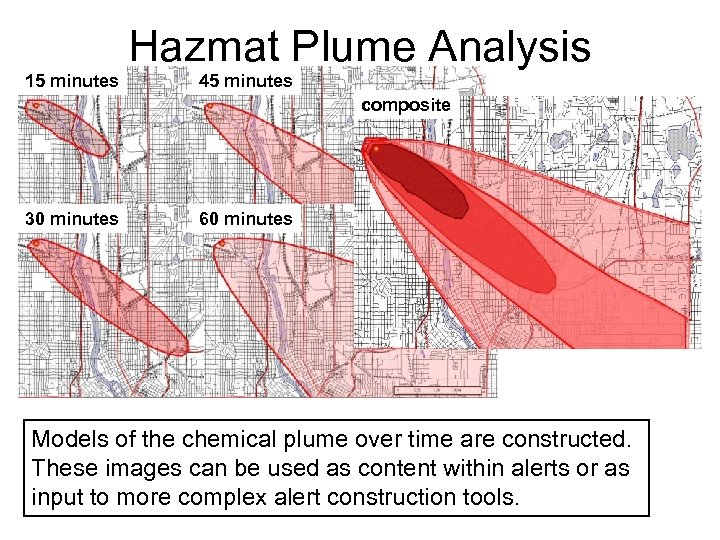
Hazmat Plume Analysis 15 minutes 45 minutes composite 30 minutes 60 minutes Models of the chemical plume over time are constructed. These images can be used as content within alerts or as input to more complex alert construction tools.
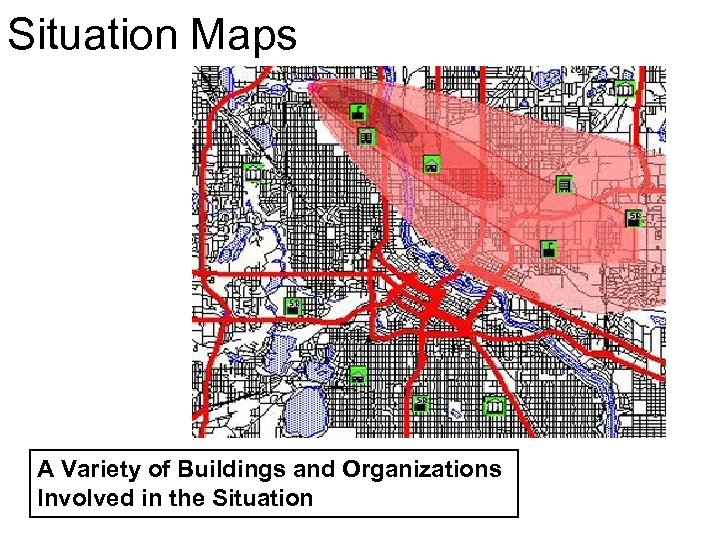
Situation Maps A Variety of Buildings and Organizations Involved in the Situation
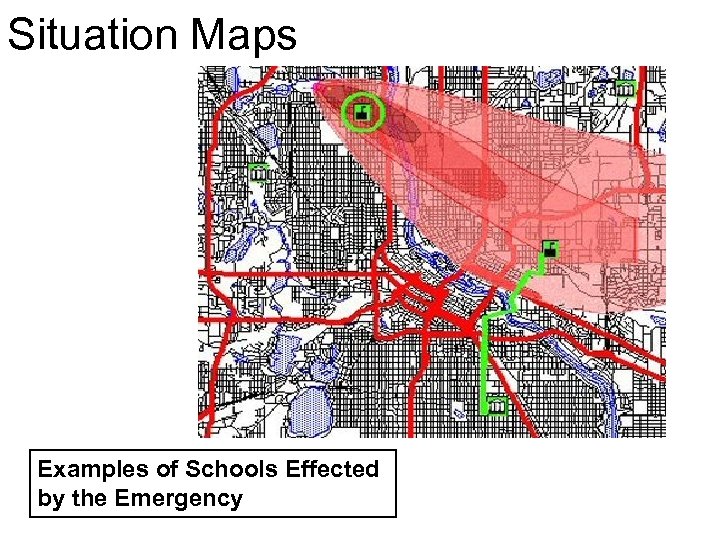
Situation Maps Examples of Schools Effected by the Emergency
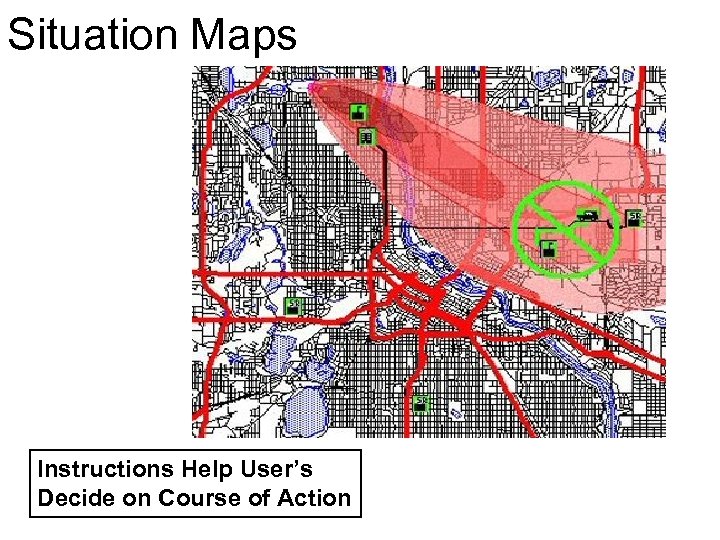
Situation Maps Instructions Help User’s Decide on Course of Action
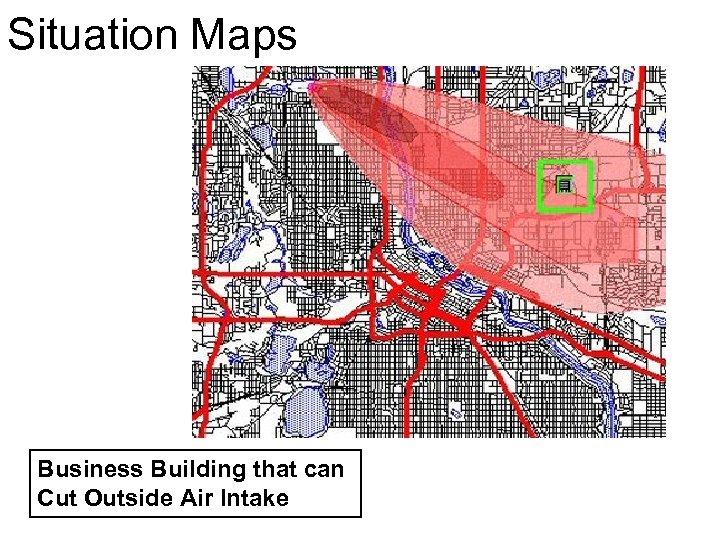
Situation Maps Business Building that can Cut Outside Air Intake
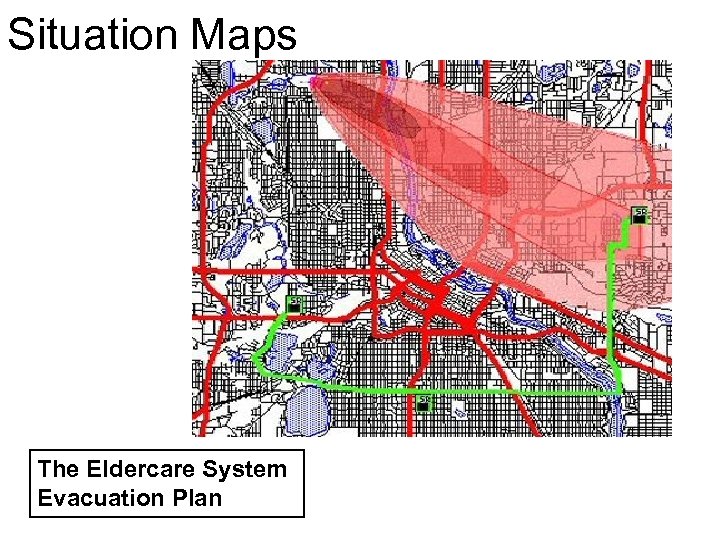
Situation Maps The Eldercare System Evacuation Plan
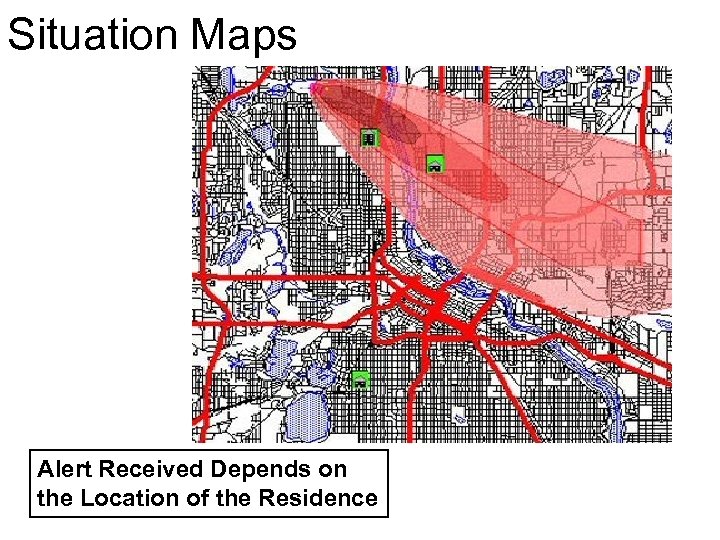
Situation Maps Alert Received Depends on the Location of the Residence
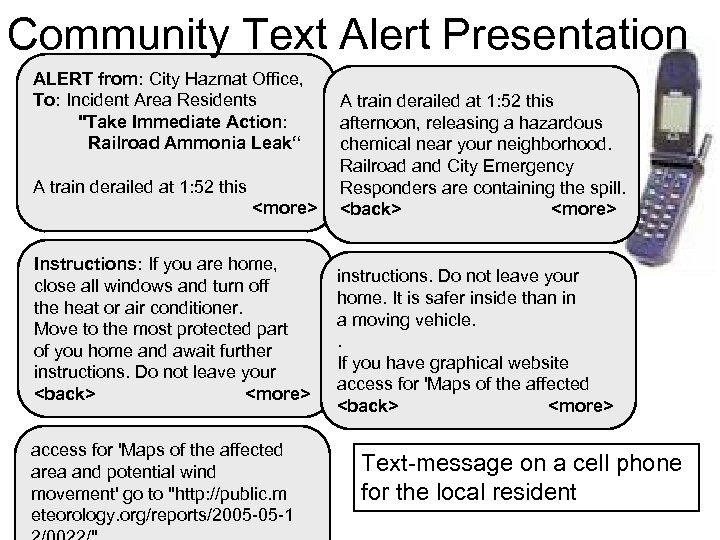
Community Text Alert Presentation ALERT from: City Hazmat Office, To: Incident Area Residents "Take Immediate Action: Railroad Ammonia Leak“ A train derailed at 1: 52 this <more> Instructions: If you are home, close all windows and turn off the heat or air conditioner. Move to the most protected part of you home and await further instructions. Do not leave your <back> <more> access for 'Maps of the affected area and potential wind movement' go to "http: //public. m eteorology. org/reports/2005 -05 -1 A train derailed at 1: 52 this afternoon, releasing a hazardous chemical near your neighborhood. Railroad and City Emergency Responders are containing the spill. <back> <more> instructions. Do not leave your home. It is safer inside than in a moving vehicle. . If you have graphical website access for 'Maps of the affected <back> <more> Text-message on a cell phone for the local resident
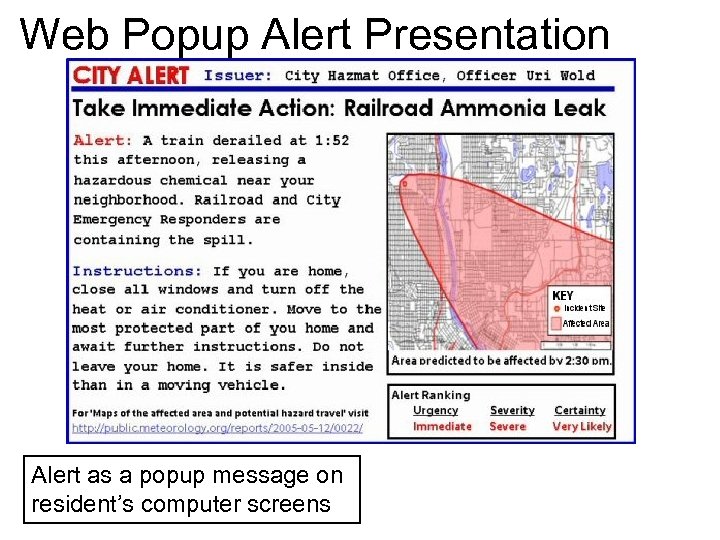
Web Popup Alert Presentation Alert as a popup message on resident’s computer screens
Скачать презентацию WIRLED PEAS World Information Resources Localized Environment Distribution
9edf5ac8037b9101e37ec20ad46a7d20.ppt