 Скачать презентацию Wireless Network Security for Future Internet Yasuo Okabe
4af2ca452f8420a6cb21d8899bc3fcf9.ppt
- Количество слайдов: 50



Wireless Network Security for Future Internet Yasuo Okabe Academic Center for Computing and Media Studies Kyoto University
Overview 1. What is Network Security? 2. W-LAN Security Technologies 3. Security Issues on Public Wireless Internet Access Services 4. Location Privacy 5. Summary
1. What is Network Security? a brief introduction
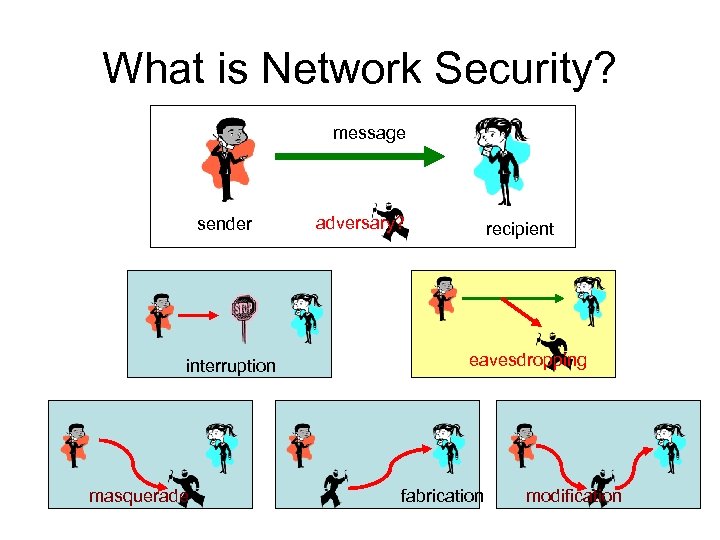
What is Network Security? message sender interruption masquerade adversary? recipient eavesdropping fabrication modification
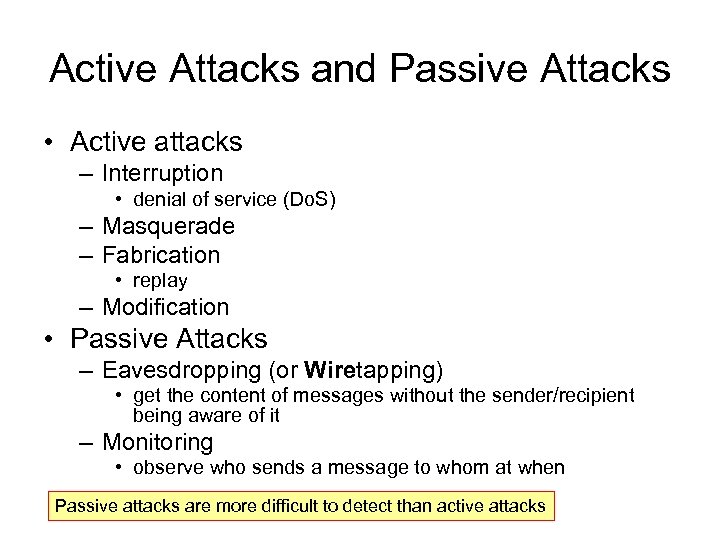
Active Attacks and Passive Attacks • Active attacks – Interruption • denial of service (Do. S) – Masquerade – Fabrication • replay – Modification • Passive Attacks – Eavesdropping (or Wiretapping) • get the content of messages without the sender/recipient being aware of it – Monitoring • observe who sends a message to whom at when Passive attacks are more difficult to detect than active attacks
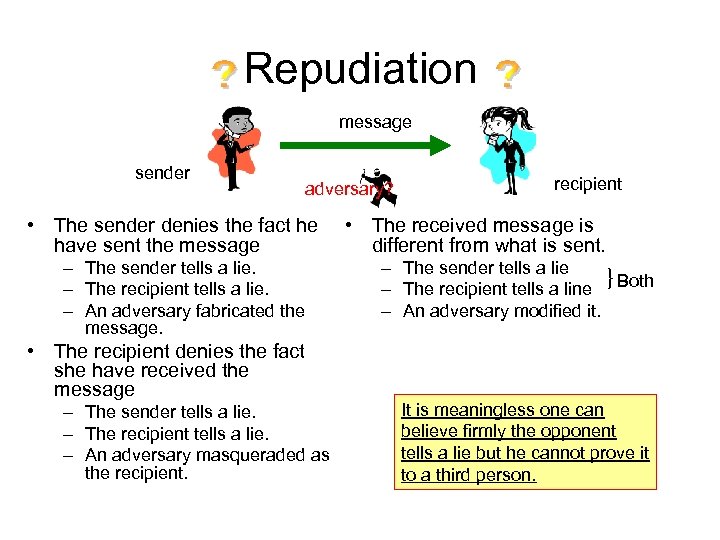
Repudiation message sender adversary? • The sender denies the fact he have sent the message – The sender tells a lie. – The recipient tells a lie. – An adversary fabricated the message. • The recipient denies the fact she have received the message – The sender tells a lie. – The recipient tells a lie. – An adversary masqueraded as the recipient • The received message is different from what is sent. – The sender tells a lie – The recipient tells a line }Both – An adversary modified it. It is meaningless one can believe firmly the opponent tells a lie but he cannot prove it to a third person.
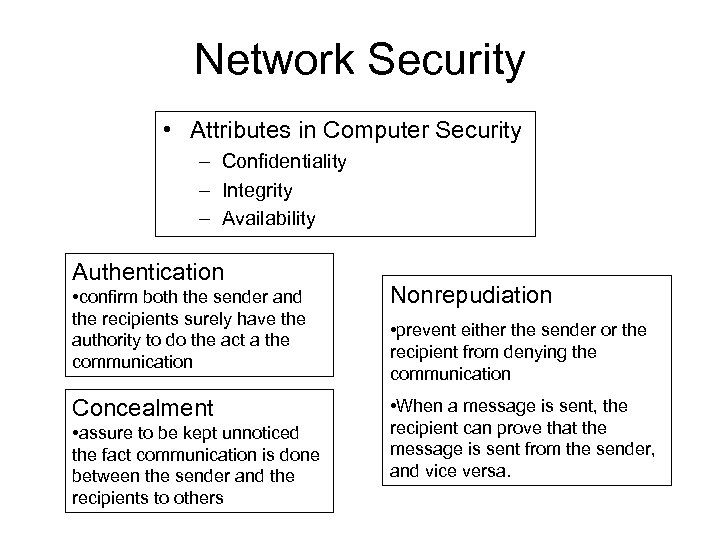
Network Security • Attributes in Computer Security – Confidentiality – Integrity – Availability Authentication • confirm both the sender and the recipients surely have the authority to do the act a the communication Nonrepudiation Concealment • When a message is sent, the recipient can prove that the message is sent from the sender, and vice versa. • assure to be kept unnoticed the fact communication is done between the sender and the recipients to others • prevent either the sender or the recipient from denying the communication
2. W-LAN Security Technologies
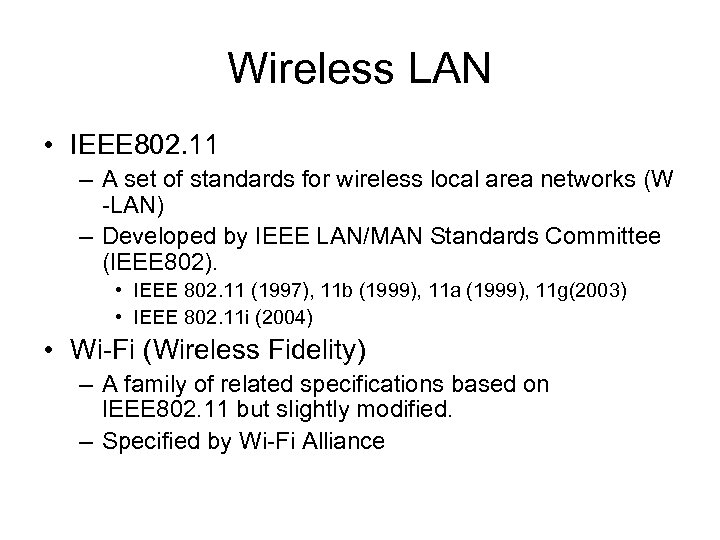
Wireless LAN • IEEE 802. 11 – A set of standards for wireless local area networks (W -LAN) – Developed by IEEE LAN/MAN Standards Committee (IEEE 802). • IEEE 802. 11 (1997), 11 b (1999), 11 a (1999), 11 g(2003) • IEEE 802. 11 i (2004) • Wi-Fi (Wireless Fidelity) – A family of related specifications based on IEEE 802. 11 but slightly modified. – Specified by Wi-Fi Alliance
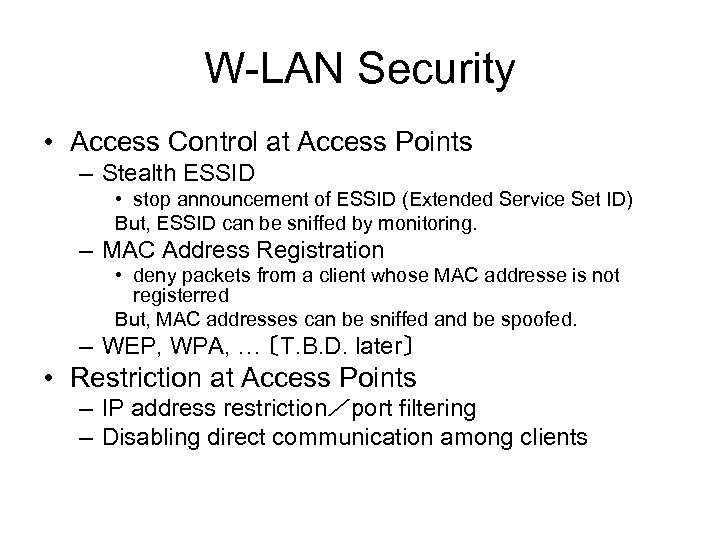
W-LAN Security • Access Control at Access Points – Stealth ESSID • stop announcement of ESSID (Extended Service Set ID) But, ESSID can be sniffed by monitoring. – MAC Address Registration • deny packets from a client whose MAC addresse is not registerred But, MAC addresses can be sniffed and be spoofed. – WEP, WPA, … 〔T. B. D. later〕 • Restriction at Access Points – IP address restriction/port filtering – Disabling direct communication among clients
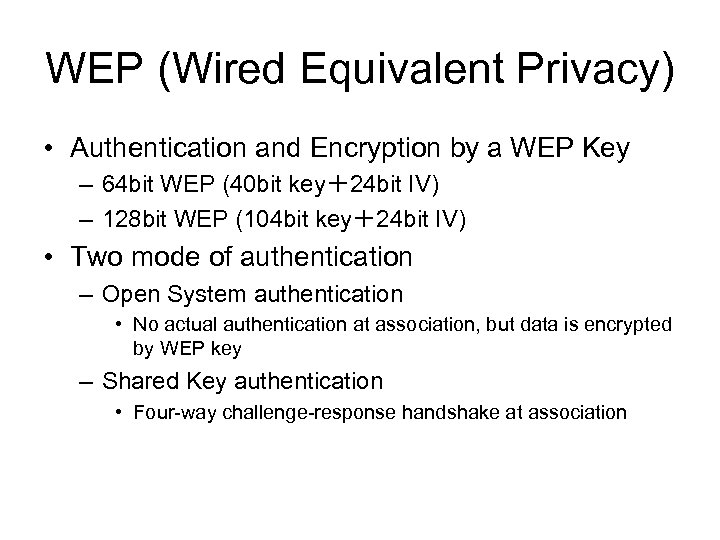
WEP (Wired Equivalent Privacy) • Authentication and Encryption by a WEP Key – 64 bit WEP (40 bit key+24 bit IV) – 128 bit WEP (104 bit key+24 bit IV) • Two mode of authentication – Open System authentication • No actual authentication at association, but data is encrypted by WEP key – Shared Key authentication • Four-way challenge-response handshake at association
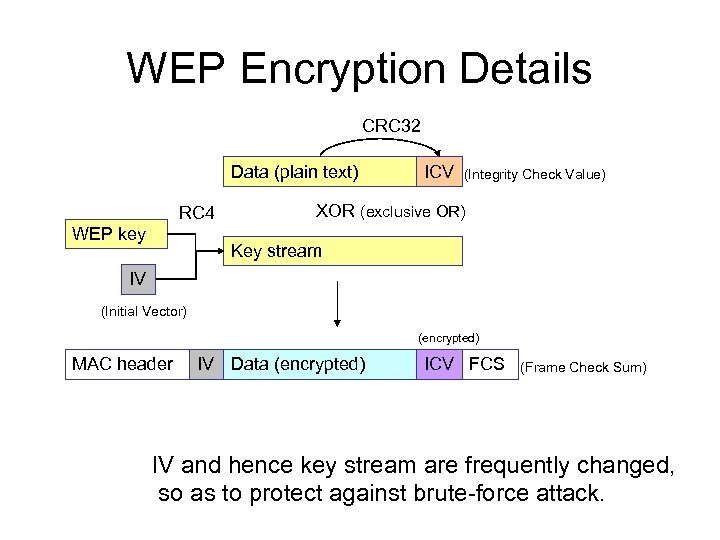
WEP Encryption Details CRC 32 Data (plain text) RC 4 WEP key ICV (Integrity Check Value) XOR (exclusive OR) Key stream IV (Initial Vector) (encrypted) MAC header IV Data (encrypted) ICV FCS (Frame Check Sum) IV and hence key stream are frequently changed, so as to protect against brute-force attack.
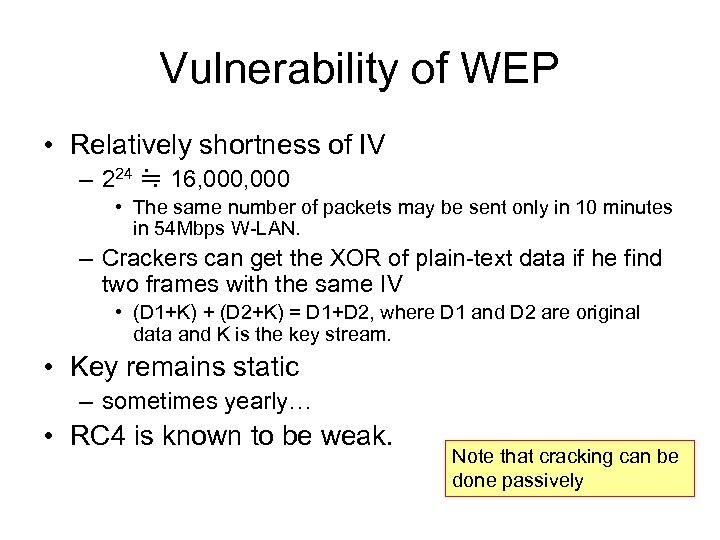
Vulnerability of WEP • Relatively shortness of IV – 224 ≒ 16, 000 • The same number of packets may be sent only in 10 minutes in 54 Mbps W-LAN. – Crackers can get the XOR of plain-text data if he find two frames with the same IV • (D 1+K) + (D 2+K) = D 1+D 2, where D 1 and D 2 are original data and K is the key stream. • Key remains static – sometimes yearly… • RC 4 is known to be weak. Note that cracking can be done passively
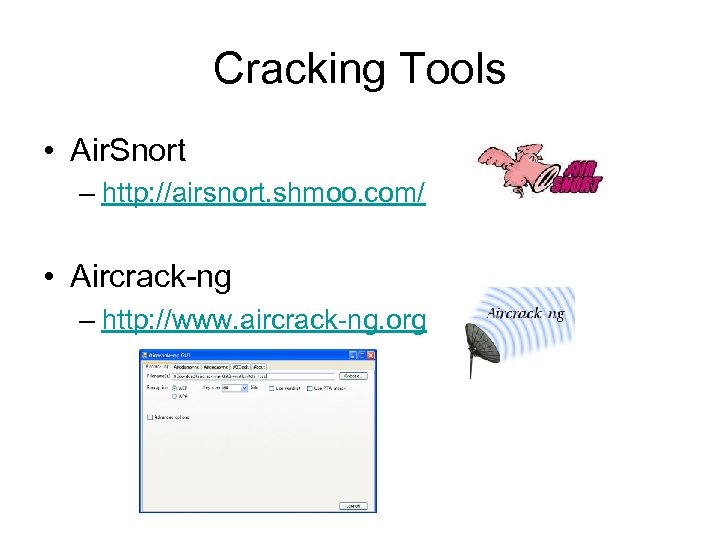
Cracking Tools • Air. Snort – http: //airsnort. shmoo. com/ • Aircrack-ng – http: //www. aircrack-ng. org
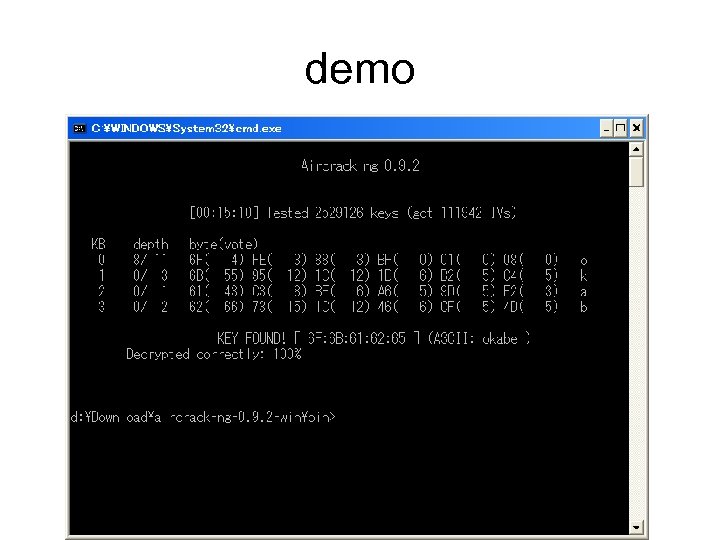
demo
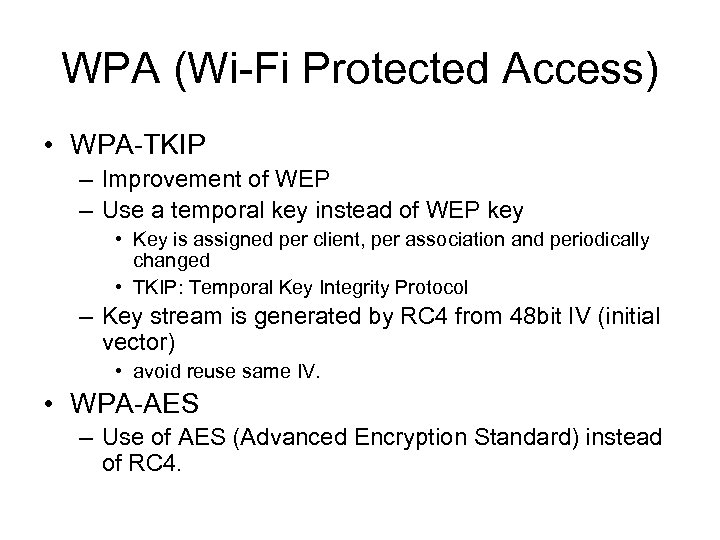
WPA (Wi-Fi Protected Access) • WPA-TKIP – Improvement of WEP – Use a temporal key instead of WEP key • Key is assigned per client, per association and periodically changed • TKIP: Temporal Key Integrity Protocol – Key stream is generated by RC 4 from 48 bit IV (initial vector) • avoid reuse same IV. • WPA-AES – Use of AES (Advanced Encryption Standard) instead of RC 4.
WPA-PSK • WPA-PSK (Pre. Shared Key) – Replacement of WEP • Initial association between AP and client is done with a pass phase as a pre-shared key • Weakness – Attacker who have the pre-shared key can eavesdrop all packets. – Dictionary attack may succeed if the preshared key is not choose enough long and not guessable.
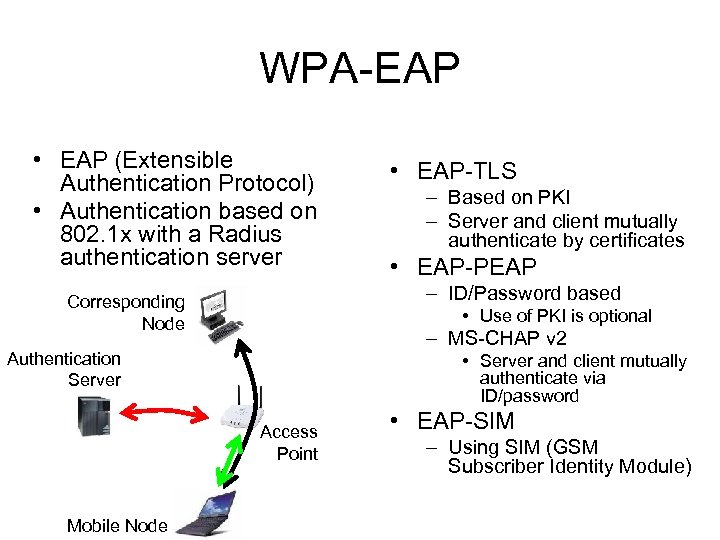
WPA-EAP • EAP (Extensible Authentication Protocol) • Authentication based on 802. 1 x with a Radius authentication server – Based on PKI – Server and client mutually authenticate by certificates • EAP-PEAP – ID/Password based Corresponding Node • Use of PKI is optional – MS-CHAP v 2 Authentication Server • Server and client mutually authenticate via ID/password Access Point Mobile Node • EAP-TLS • EAP-SIM – Using SIM (GSM Subscriber Identity Module)
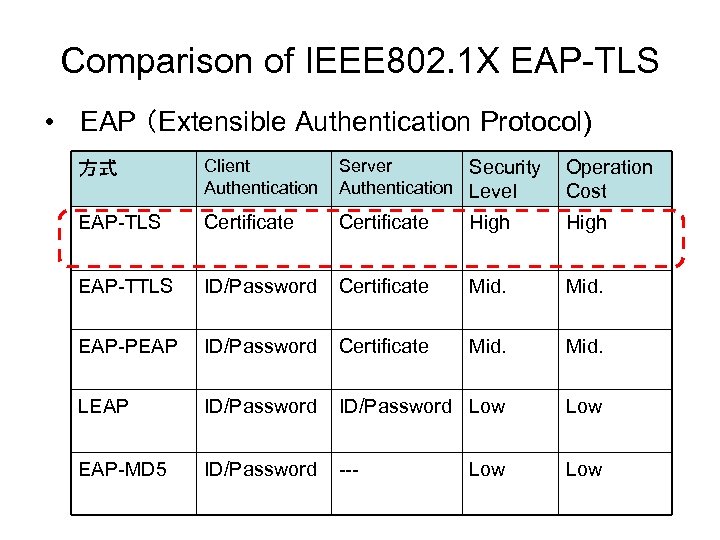
Comparison of IEEE 802. 1 X EAP-TLS • EAP (Extensible Authentication Protocol) 方式 Client Authentication Server Security Authentication Level Operation Cost EAP-TLS Certificate High EAP-TTLS ID/Password Certificate Mid. EAP-PEAP ID/Password Certificate Mid. LEAP ID/Password Low EAP-MD 5 ID/Password --- Low
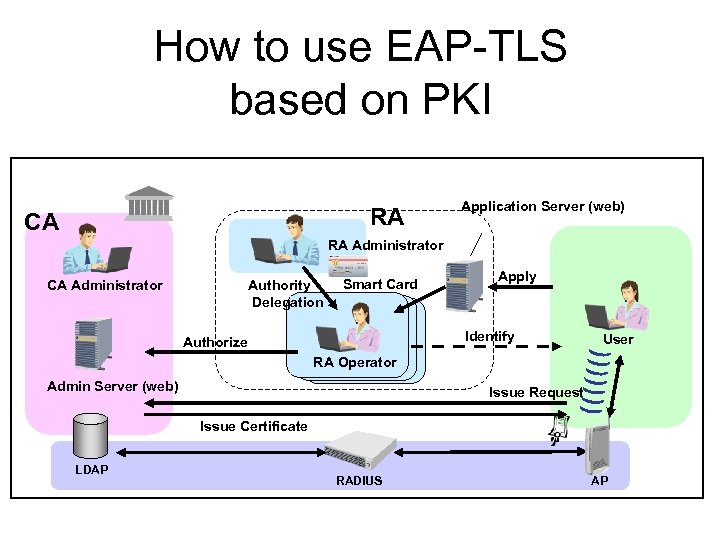
How to use EAP-TLS based on PKI RA CA Application Server (web) RA Administrator CA Administrator Authority Delegation Smart Card Apply Identify Authorize User RA Operator Admin Server (web) Issue Request Issue Certificate LDAP RADIUS AP
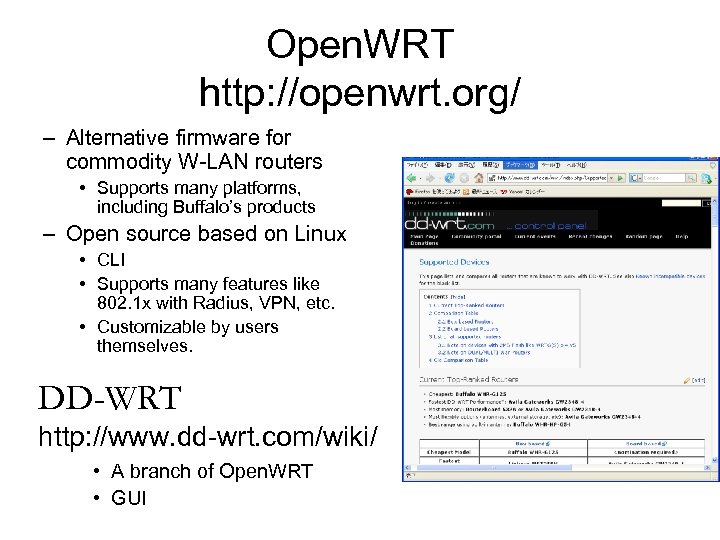
Open. WRT http: //openwrt. org/ – Alternative firmware for commodity W-LAN routers • Supports many platforms, including Buffalo’s products – Open source based on Linux • CLI • Supports many features like 802. 1 x with Radius, VPN, etc. • Customizable by users themselves. DD-WRT http: //www. dd-wrt. com/wiki/ • A branch of Open. WRT • GUI
3. Security Issues on Public Wireless Internet Access Service
Status of public wireless Internet access • Remarkably rapid deployment of IEEE 802. 11 b/g W-LAN in these 10 years – Now almost all Note PCs have W-LAN build in. – Security risks/incidents have become a social problem. • “Public wireless LAN” or “wireless Hot. Spot” – Public Internet Access Service using W-LAN technology • Attracts attention of the mass media. – In U. S. • Bankruptcy of Mobile. Star (2001) – In Japan • Paid services are not necessarily satisfactory – MIS stops the service (2002) – Livedoor Wireless canceled the plan of extending the coverage – Each of NTT group company provides service in unsystematic way. HOTSPOT (NTT. com), M-Zone (NTT Do. Co. Mo), Wireless LAN Club (NTT BP), Flets. Spot (NTT East/West)
Difficulty in the business model of public wireless Internet access service • Issues in cover area – Conflict among service providers at public hot spots like railway stations, airports, hotels • Number of channels of IEEE 802. 11 b/g is very small – In most places only one service available • Users who subscribes the service can use it. – Most of the spots are located at metropolis, few in local cities. – Covers only spots, not area • Enormous investment is needed to cover area, compared to 3 G mobile phone service • Several projects conducted by local governments are suspended in U. S.
Free Wireless Services • FON – http: //www. fon. com • Google Wi. Fi – http: //wifi. google. com • eduroam – http: //www. eduroam. org • Free. Spot – http: //www. freespot. com
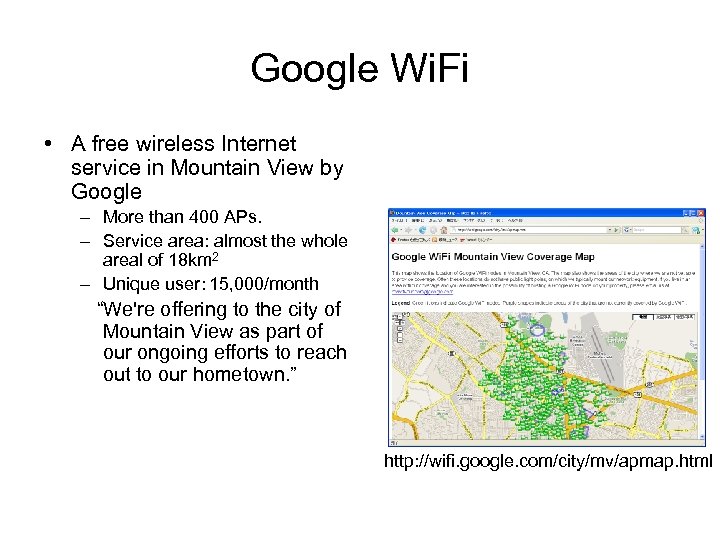
Google Wi. Fi • A free wireless Internet service in Mountain View by Google – More than 400 APs. – Service area: almost the whole areal of 18 km 2 – Unique user: 15, 000/month “We're offering to the city of Mountain View as part of our ongoing efforts to reach out to our hometown. ” http: //wifi. google. com/city/mv/apmap. html
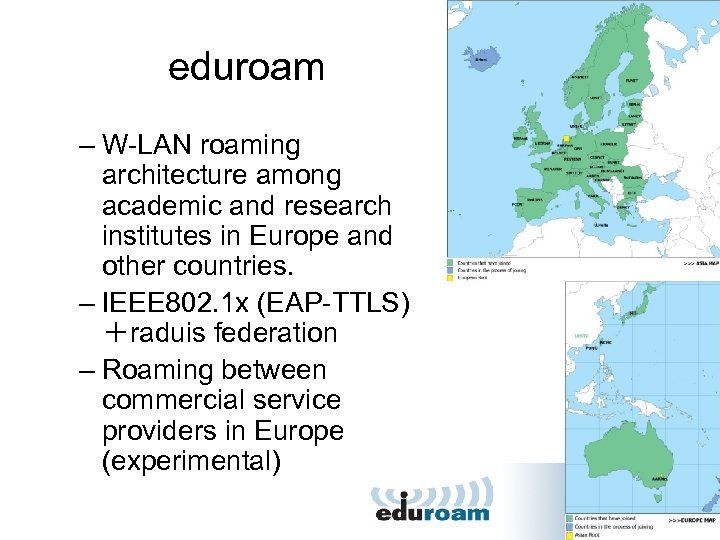
eduroam – W-LAN roaming architecture among academic and research institutes in Europe and other countries. – IEEE 802. 1 x (EAP-TTLS) +raduis federation – Roaming between commercial service providers in Europe (experimental)
Is FREE service really possible? • We already have Internet Infrastracuture. – Most of office/shops/houses have broadband access. • ADSL (1~ 10 Mbps) ⇒ FDDH (100 Mbps~ 1 Gbps) • Providing it to visitors is feasible – We rarely consumes the bandwidth fully – Wireless service needs little cost. • The issue is security – Risk of providing network access to unknown visitors • Access to the private network can be prohibited but • Malicious access to the Internet is hard to limit
Security in public wireless Internet services • What is the difference between W-LAN and public Wireless Access? – For users: • Eavesdropping, MIM (man-in-the-middle) attack • Masquerading (Impersonation) – For host people of access points • Accounting (in paid service only) • Avoiding anonymous use
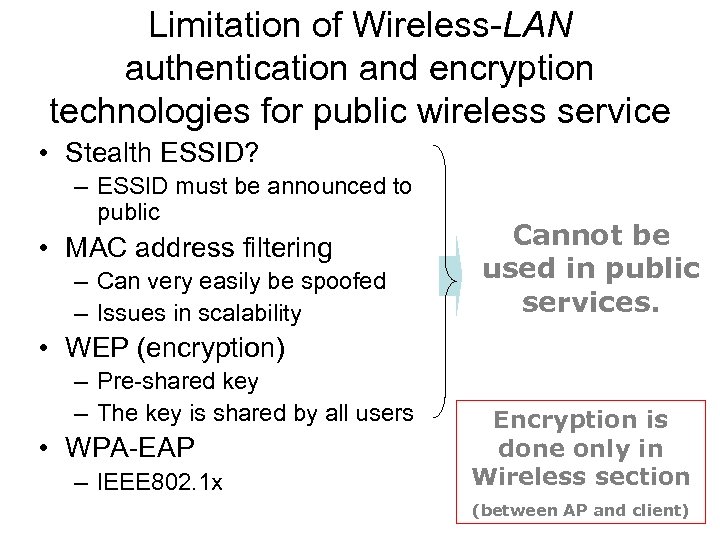
Limitation of Wireless-LAN authentication and encryption technologies for public wireless service • Stealth ESSID? – ESSID must be announced to public • MAC address filtering – Can very easily be spoofed – Issues in scalability Cannot be used in public services. • WEP (encryption) – Pre-shared key – The key is shared by all users • WPA-EAP – IEEE 802. 1 x Encryption is done only in Wireless section (between AP and client)
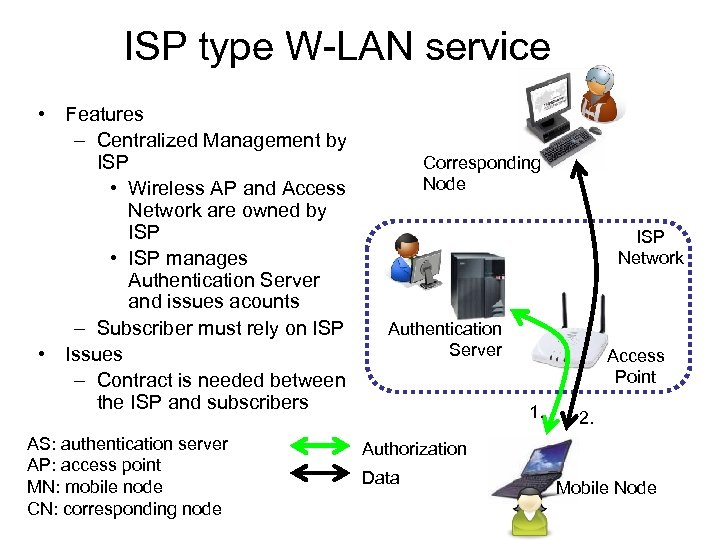
ISP type W-LAN service • Features – Centralized Management by ISP • Wireless AP and Access Network are owned by ISP • ISP manages Authentication Server and issues acounts – Subscriber must rely on ISP • Issues – Contract is needed between the ISP and subscribers AS: authentication server AP: access point MN: mobile node CN: corresponding node Corresponding Node ISP Network Authentication Server Access Point 1. 2. Authorization Data Mobile Node
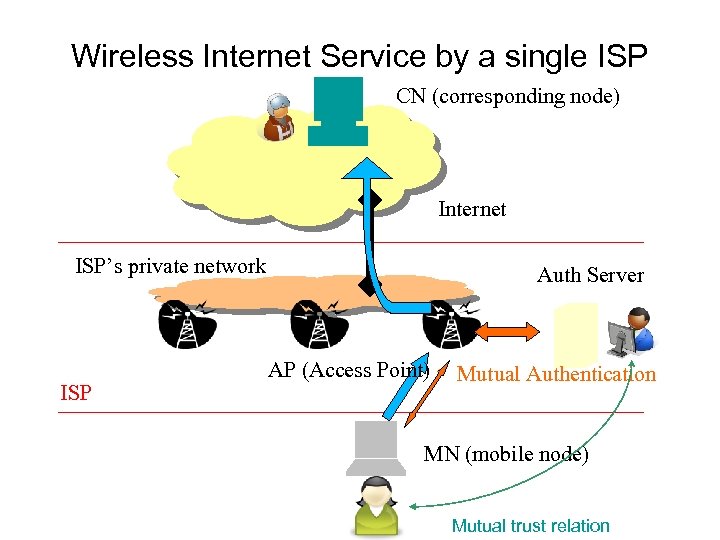
Wireless Internet Service by a single ISP CN (corresponding node) Internet ISP’s private network ISP Auth Server AP (Access Point) Mutual Authentication MN (mobile node) Mutual trust relation
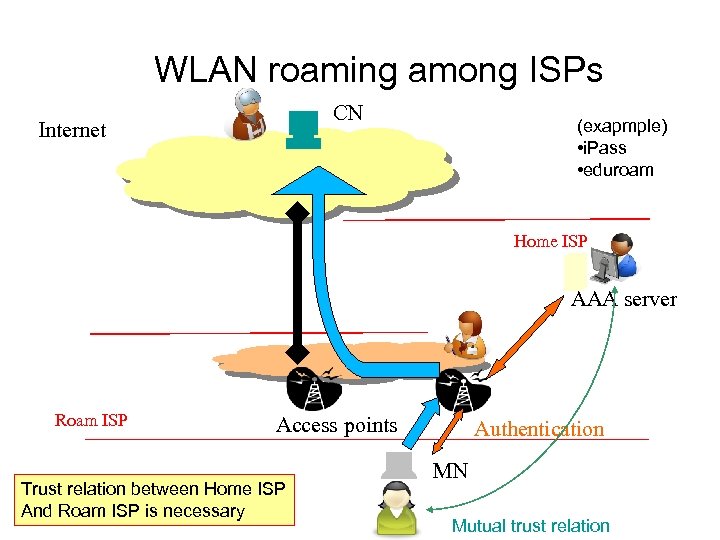
WLAN roaming among ISPs CN Internet (exapmple) • i. Pass • eduroam Home ISP AAA server Roam ISP Access points Trust relation between Home ISP And Roam ISP is necessary Authentication MN Mutual trust relation
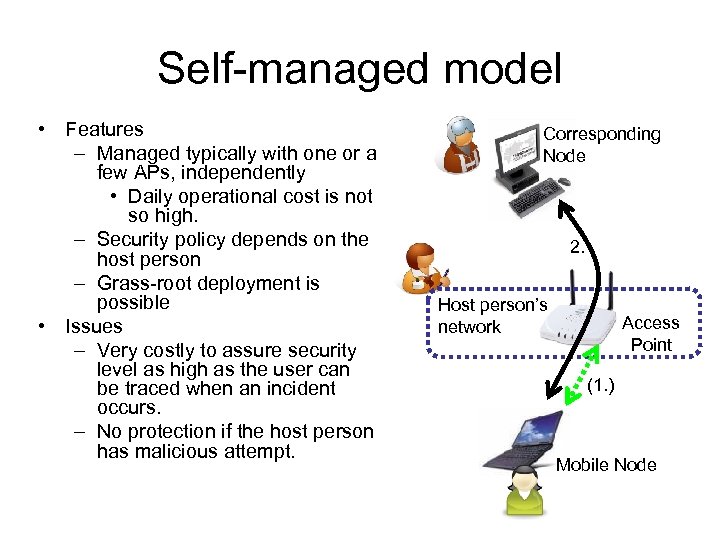
Self-managed model • Features – Managed typically with one or a few APs, independently • Daily operational cost is not so high. – Security policy depends on the host person – Grass-root deployment is possible • Issues – Very costly to assure security level as high as the user can be traced when an incident occurs. – No protection if the host person has malicious attempt. Corresponding Node 2. Host person’s network Access Point (1. ) Mobile Node
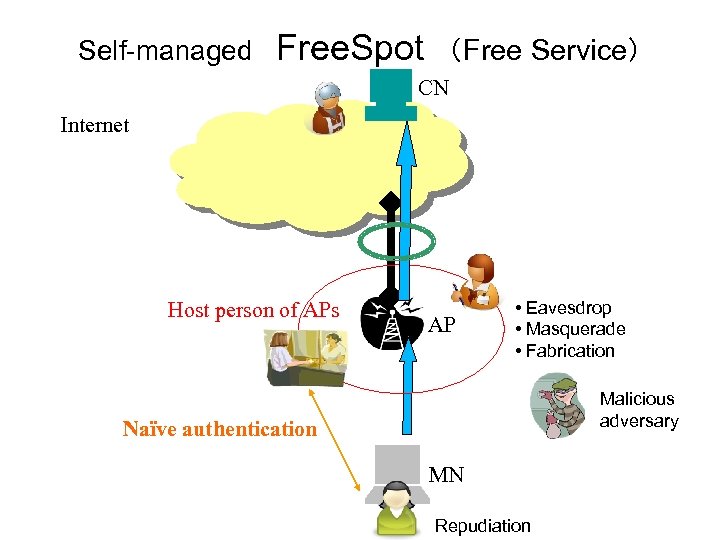
Self-managed Free. Spot (Free Service) CN Internet Host person of APs AP • Eavesdrop • Masquerade • Fabrication Malicious adversary Naïve authentication MN Repudiation
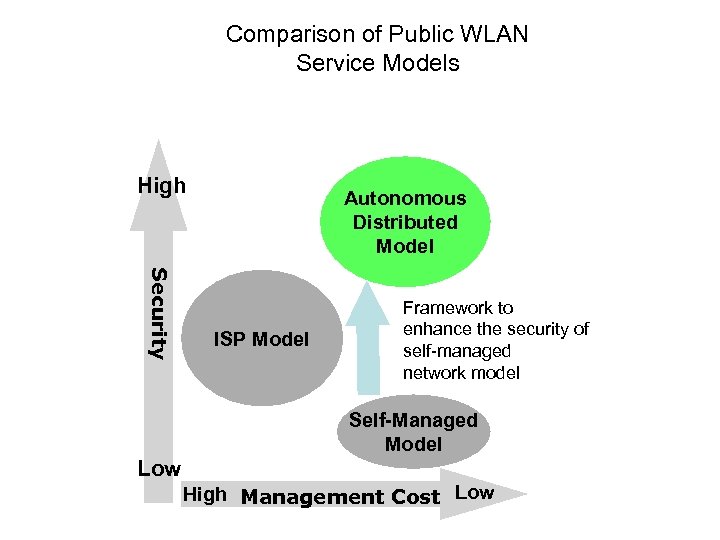
Comparison of Public WLAN Service Models High Autonomous Distributed Model Security ISP Model Framework to enhance the security of self-managed network model Self-Managed Model Low High Management Cost Low
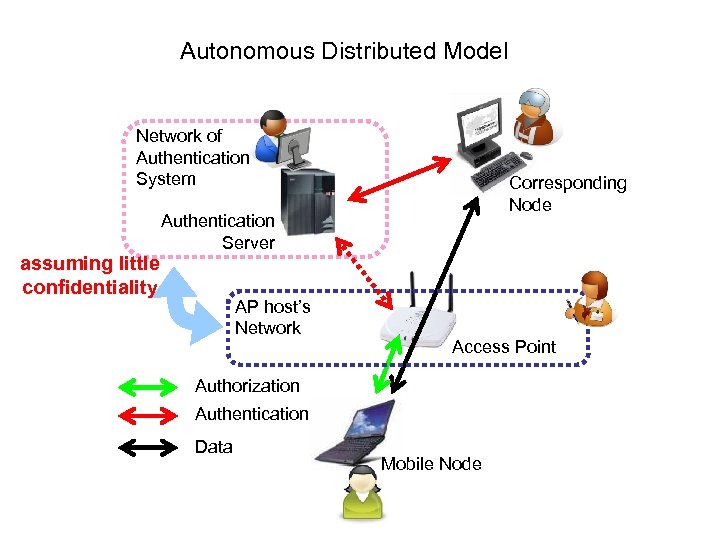
Autonomous Distributed Model Network of Authentication System assuming little confidentiality Corresponding Node Authentication Server AP host’s Network Access Point Authorization Authentication Data Mobile Node
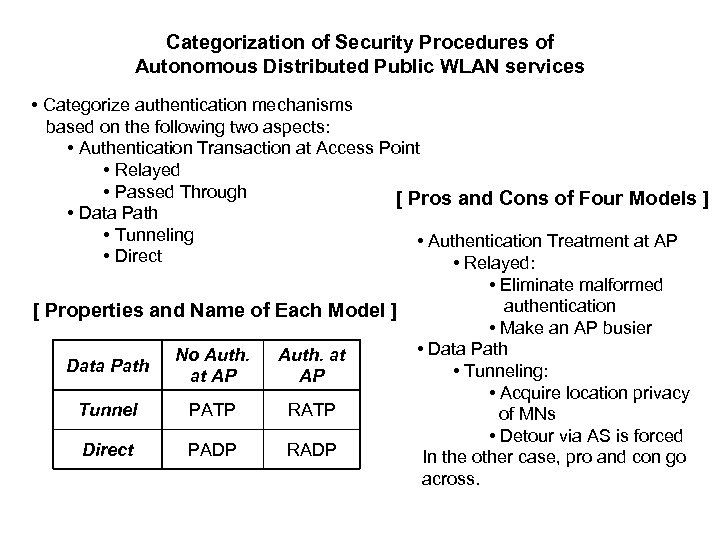
Categorization of Security Procedures of Autonomous Distributed Public WLAN services • Categorize authentication mechanisms based on the following two aspects: • Authentication Transaction at Access Point • Relayed • Passed Through [ Pros and Cons of Four Models ] • Data Path • Tunneling • Authentication Treatment at AP • Direct • Relayed: [ Properties and Name of Each Model ] Data Path No Auth. at AP Tunnel PATP RATP Direct PADP RADP • Eliminate malformed authentication • Make an AP busier • Data Path • Tunneling: • Acquire location privacy of MNs • Detour via AS is forced In the other case, pro and con go across.
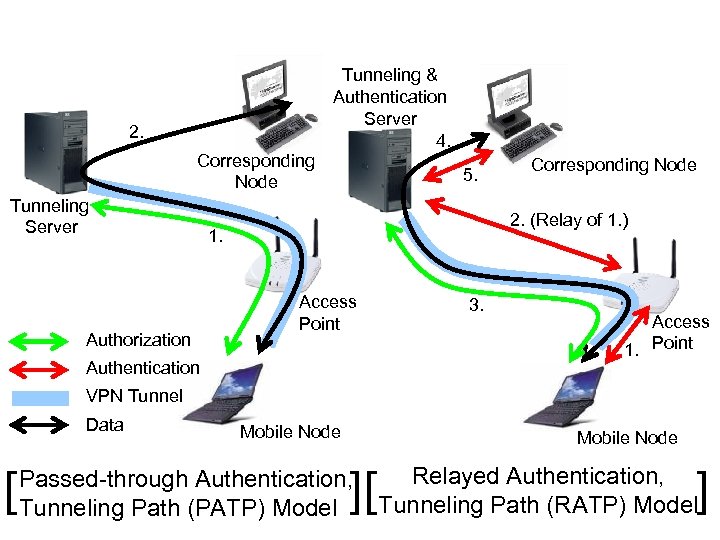
2. Corresponding Node Tunneling Server Authorization Tunneling & Authentication Server 4. 5. Corresponding Node 2. (Relay of 1. ) 1. Access Point Authentication 3. Access 1. Point VPN Tunnel Data [ Mobile Node ][ Passed-through Authentication, Tunneling Path (PATP) Model ] Relayed Authentication, Tunneling Path (RATP) Model
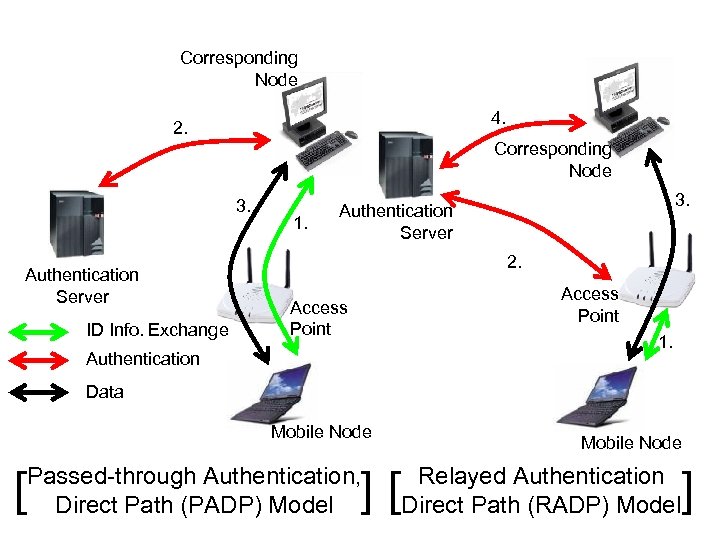
Corresponding Node 4. 2. Corresponding Node 3. Authentication Server ID Info. Exchange 1. 3. Authentication Server 2. Access Point 1. Authentication Data Mobile Node [ Mobile Node ][ Passed-through Authentication, Direct Path (PADP) Model ] Relayed Authentication Direct Path (RADP) Model
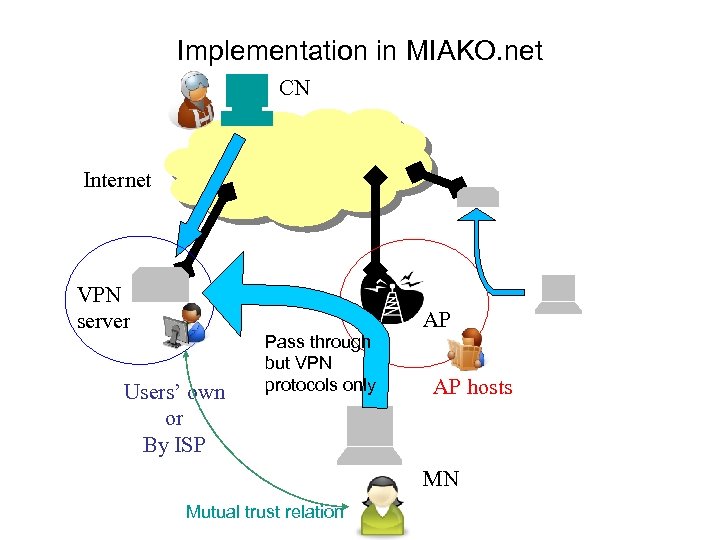
Implementation in MIAKO. net CN Internet VPN server AP Users’ own or By ISP Pass through but VPN protocols only AP hosts MN Mutual trust relation
4. Location Privacy
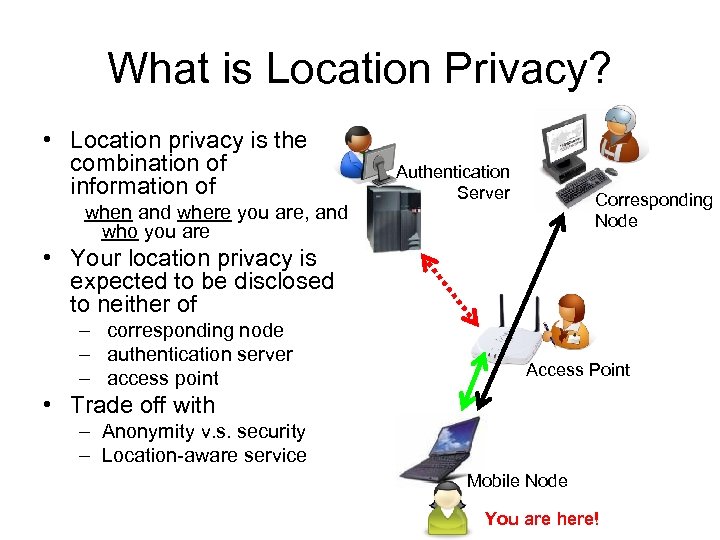
What is Location Privacy? • Location privacy is the combination of information of when and where you are, and who you are Authentication Server Corresponding Node • Your location privacy is expected to be disclosed to neither of – corresponding node – authentication server – access point Access Point • Trade off with – Anonymity v. s. security – Location-aware service Mobile Node You are here!
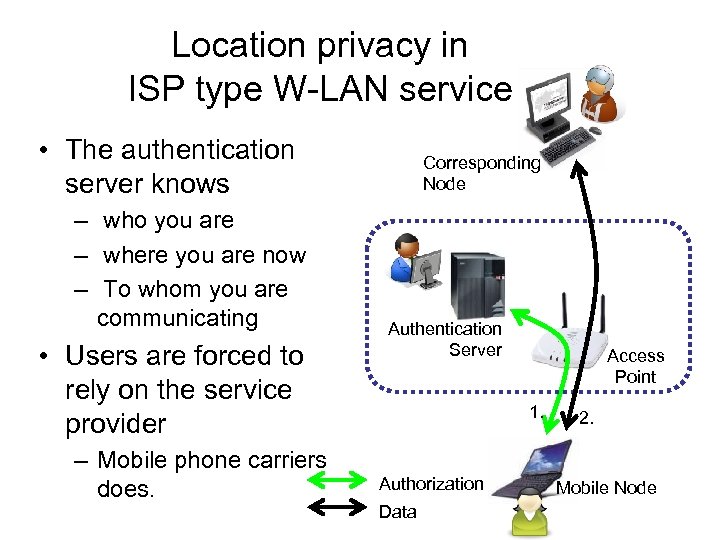
Location privacy in ISP type W-LAN service • The authentication server knows – who you are – where you are now – To whom you are communicating • Users are forced to rely on the service provider – Mobile phone carriers does. Corresponding Node Authentication Server Access Point 1. Authorization Data 2. Mobile Node
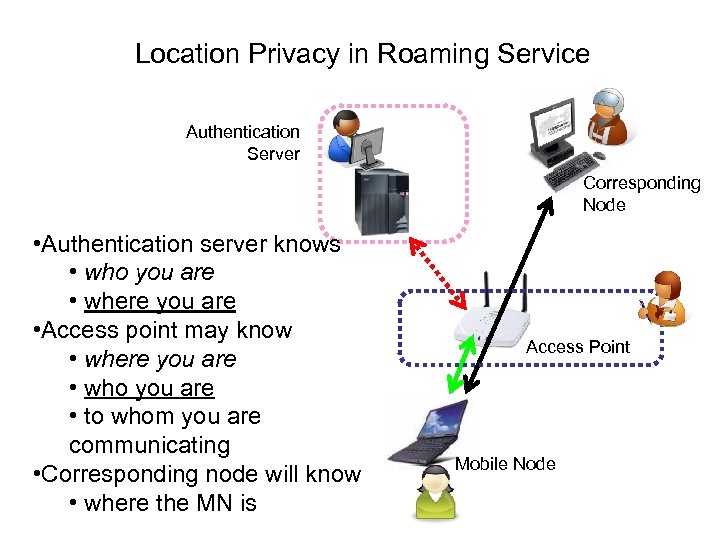
Location Privacy in Roaming Service Authentication Server Corresponding Node • Authentication server knows • who you are • where you are • Access point may know • where you are • who you are • to whom you are communicating • Corresponding node will know • where the MN is Access Point Mobile Node
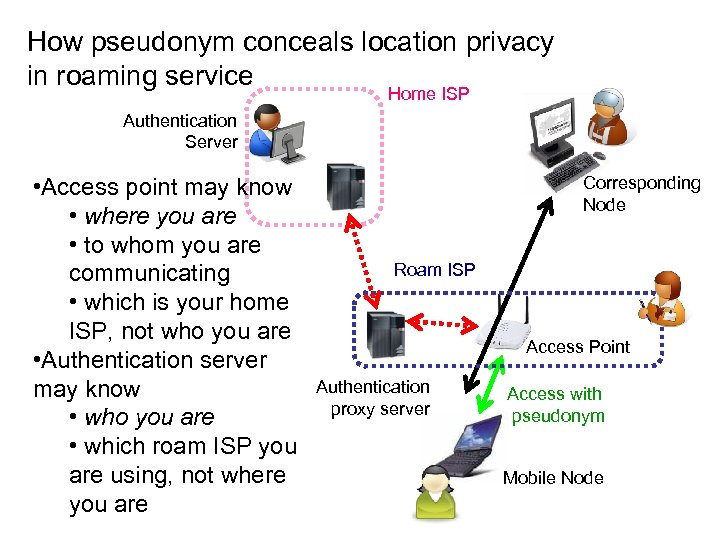
How pseudonym conceals location privacy in roaming service Home ISP Authentication Server • Access point may know • where you are • to whom you are communicating • which is your home ISP, not who you are • Authentication server may know • who you are • which roam ISP you are using, not where you are Corresponding Node Roam ISP Access Point Authentication proxy server Access with pseudonym Mobile Node
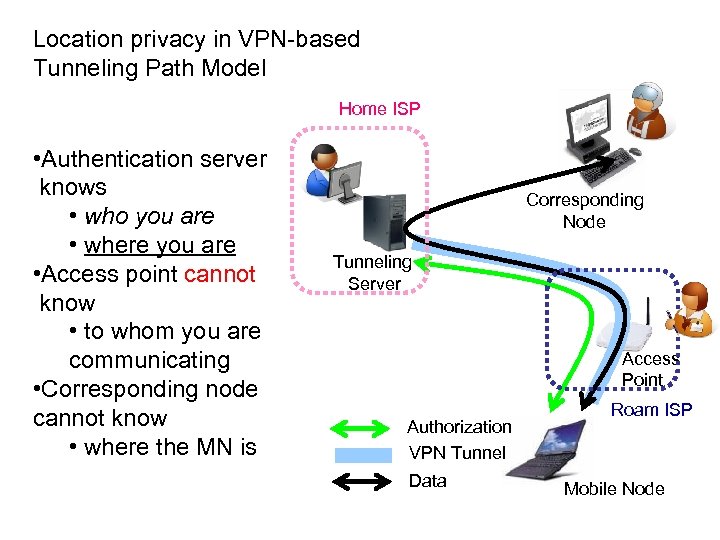
Location privacy in VPN-based Tunneling Path Model Home ISP • Authentication server knows • who you are • where you are • Access point cannot know • to whom you are communicating • Corresponding node cannot know • where the MN is Corresponding Node Tunneling Server Access Point Authorization VPN Tunnel Data Roam ISP Mobile Node

5. Summary
Summary • Security issues of W-LAN roaming services • Proposal of autonomous distributed public wireless Internet access architecture – MIAKO. net – A service model for implementing ubiquitous networking with a grass-root W-LAN roaming with enough security.
![[ Concluding Remarks ] • Categorized security problems of public WLAN services • Proposed](https://present5.com/presentation/4af2ca452f8420a6cb21d8899bc3fcf9/image-50.jpg "[ Concluding Remarks ] • Categorized security problems of public WLAN services • Proposed")
[ Concluding Remarks ] • Categorized security problems of public WLAN services • Proposed an Autonomous Distributed public WLAN service model • Compared some security procedures of Autonomous Distributed public WLAN service • Each procedure has its pros and cons therefore we cannot say which is the best for future use • MIAKO. NET public wireless service • This is based on PATP model [ References ] • A. Balanchandran et al. , ‘Wireless Hotspots: Current Challenges and Future Cirections’, 2003 • N. Borisov et al. , ‘(In)Security of the WEP Algorithm’, 2001 • D. Golombek, ‘Single Computer Breaks 40 -bit RC 4 in under 8 Days’, 1996 • T. Komura et al. , ‘The MIAKO. NET Public Wireless Internet Service in Kyoto’, 2003 • Y. Matsunaga et al. , ‘Secure Authentication System for Public WLAN Roaming’, 2003 • L. Ackerman et al. , ‘Wireless Location Pricay: Low and Policy in the U. S. , EU and Japan’, - ISOC Member Brefing, 2003
Скачать презентацию Wireless Network Security for Future Internet Yasuo Okabe
4af2ca452f8420a6cb21d8899bc3fcf9.ppt