


 Скачать презентацию Wired Physical Layer EMC 165 Computer and Communication
e3702d891b8a0a0ba54481cf4378bcb7.ppt
- Количество слайдов: 44
 Wired Physical Layer EMC 165 Computer and Communication Networks Lecture 8 Feb 10, 2004
 Outline of today’s lecture l l l How Modems Work? How ISDN Works? How DSL Works? How Cable Modems Work? How Fiber Optics Work?
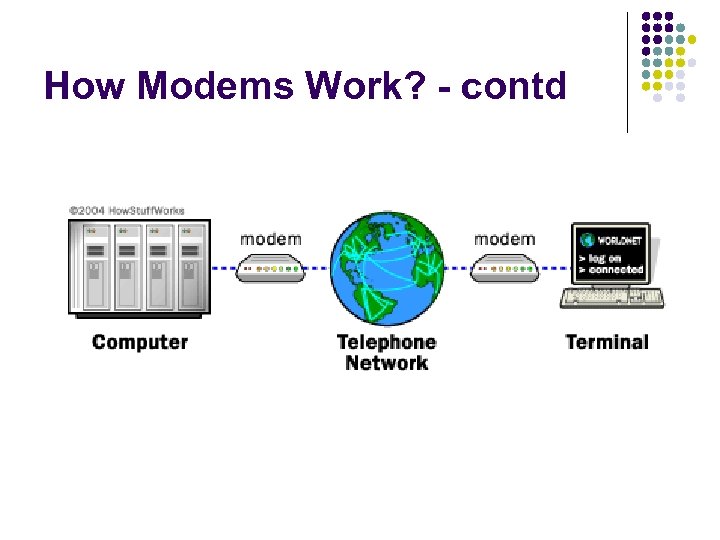
 How Modems Work? l Origin of Modems l l l Modem – contraction of the words “modulatordemodulator”. A modem Is typically used to send digital data over a phone line Sending modem modulates the data into a signal that is compatible with the phone line. Receiving modem demodulates the signal back into digital data. Wireless modems convert digital data into radio signals and back.
 How Modems Work? - contd
 How Modems Work? – contd l l In this configuration, a dumb terminal at an off-site office can “dial-in” to a large central computer Modem speeds went through a series of improvements over the years l l l l l 300 bps – 1960 s through 1983 1200 bps – 1984 -1985 2400 bps 9600 bps – first appeared in late 1990 and early 1991 19. 2 Kbps 28. 8 Kbps 33. 6 Kbps 56 Kbps – became standard in 1998 ADSL – theorectical max of up to 8 Mbps
 300 bps Modems l l l l A 300 bps modem is a device that uses Frequency Shift Keying (FSK) to transmit digital information over a telephone line. In FSK, a different tone (frequency) is used for the different bits. The originating modem transmits 1070 -Hz tone for a 0 and a 1270 -Hz tone for a 1. The answering modem transmits a 2025 -Hz tone for a 0 and a 2225 -Hz tone for a 1. Because they use different tones, they can use the line simultaneously. This is known as full-duplex operation. When the letter “a” is typed, the ASCII code for this letter is 97 decimal or 01100001 binary. A device inside the terminal called a Universal Asynchronous Receiver/Transmitter (UART) converts the byte into its bits and sends them out one at a time through a serial port called RS-232 port. The terminal’s modem is connected to the RS-232 port, so it receives the bits one at a time and its job is to send them over the phone line
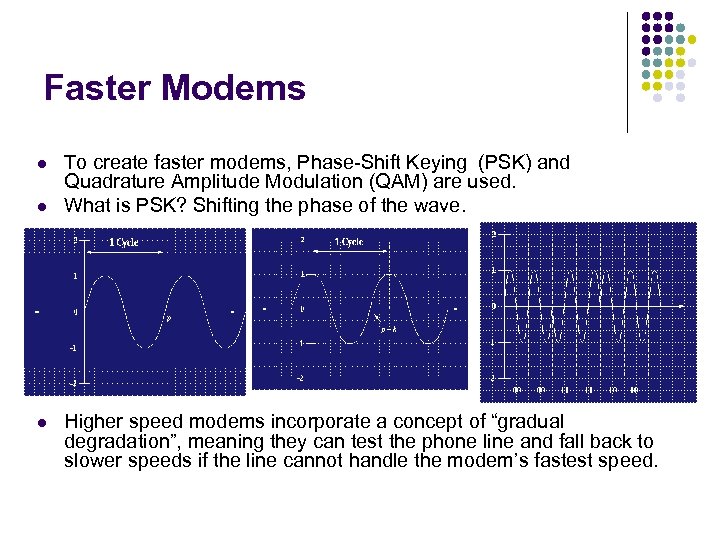 Faster Modems l l l To create faster modems, Phase-Shift Keying (PSK) and Quadrature Amplitude Modulation (QAM) are used. What is PSK? Shifting the phase of the wave. Higher speed modems incorporate a concept of “gradual degradation”, meaning they can test the phone line and fall back to slower speeds if the line cannot handle the modem’s fastest speed.
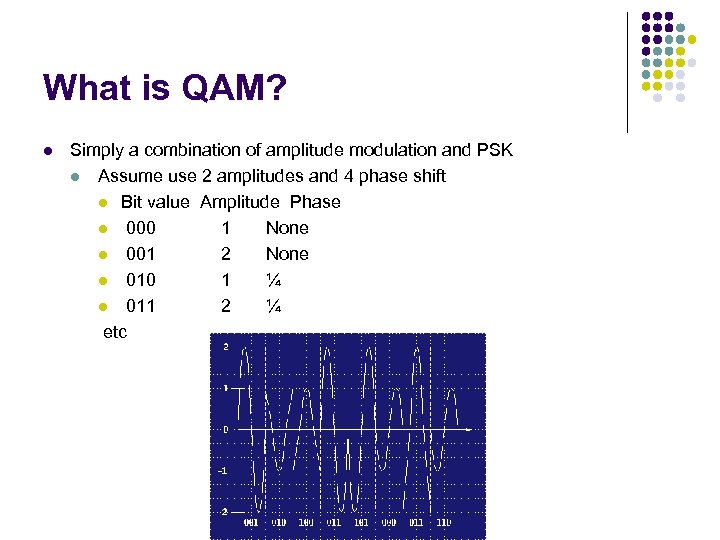 What is QAM? l Simply a combination of amplitude modulation and PSK l Assume use 2 amplitudes and 4 phase shift l Bit value Amplitude Phase l 000 1 None l 001 2 None l 010 1 ¼ l 011 2 ¼ etc
 ISDN l l l ISDN stands for Integrated Services Digital Network Using the same copper phone lines that modems use, ISDN delivers a 5 -fold speed improvement (compared to 28. 8 Kbps modem) (up to 128 Kbps). ISDN can combine voice and data services over the same wires.
 ISDN Basics l l ISDN provides a raw data rate of 144 Kbps over a single twisted pair. This 144 Kbps channel is divided into 2 64 -Kbps channels (refer to as Bearer channels) and one 16 Kbps channel (refers to as Data channel). Each B channel can carry a separate telephone call and has its own telephone number called a Directory Number (DN). One can combine the 2 B-channels together to form a single 128 Kbps data channel through a process called bonding.
 How ISDN does It? l If ISDN can squeeze 144 Kbps out of my phone line, why can’t modem do the same thing? l A given pair of wires connecting 2 parties for communication carry electrical signals in two forms: analog or digital. l An analog signal changes gradually through an infinite number of values, while a digital signal changes instantly (in theory) between just two values. l An analog signal’s infinite number of variations makes it impossible to reproduce exactly. An analog signal will go only so far in copper wire; to go further the signal must be regenerated electronically with a device called a repeater. The repeater converts the weak input signal to a stronger signal, unavoidably distorting it in the process. Each regeneration degrades the signal a bit more. l Digital signals, on the other hand, are easy to regenerate precisely because there are only 2 possible states for the signal.
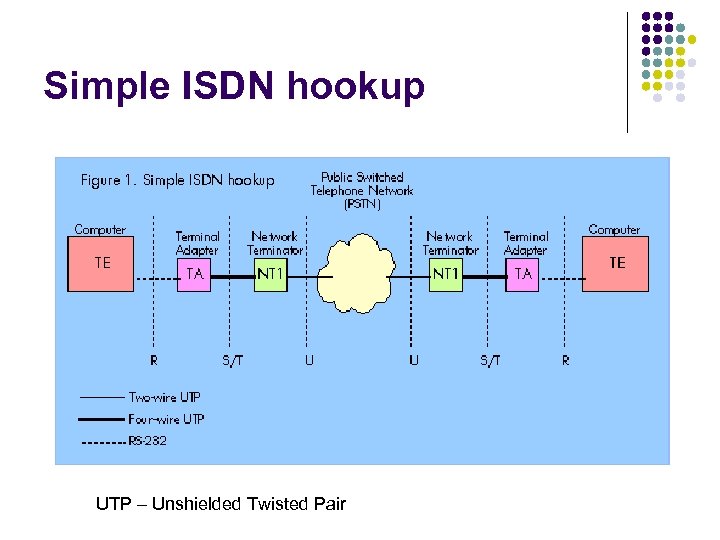 Simple ISDN hookup UTP – Unshielded Twisted Pair
 ISDN Basics l l l l The B channels carry customer voice or data signals. The D channel carries signals between your ISDN equipment and the phone company’s central office. The 2 bearer plus one data channel is called the Basic Rate Interface (BRI) in telco lingo. One can buy 23 B channels with a single 64 Kbps D channel. This service is called the Primary Rate Interface (PRI). A single 4 -wire cable carries the 2 B+D channels into another box called the Terminal Adapter (TA). Unlike the Network Terminator (NT 1), which provides only a single function (creating the 2 B+D channels), the TA can do many things. The TA can connect any of the terminal equipment (TE) – computers, fax machines, LANs or telephone sets to one or both of the B channels. External ISDN reference points labeled R, S/T, and U. Each interface point requires an electrically different device connection and cabling. The U reference point is the incoming unshielded twisted pair. The S/T reference point is a four-wire UTP cable.
 ISDN Basics l l A typical TA for data-only applications might simply emulate a pair of ordinary modems, transmitting standard modem setup and dialing commands into ISDN call-setup commands. One connects a computer to this kind of TA with a normal RS 232 cable and uses the usual modem or fax software to set the speed to 64 Kbps. The TA provides automatic rate adaptation to match whatever data rate the computer supports with ISDN’s 64 Kbps channel. Advantage of ISDN: data is sent digitally so higher reliability when compared to the analog modems which suffer from all kinds of maladies ranging from intermittent line noise to speed mismatches and protocol conflicts.
 Beyond ISDN Basics l l l One can set up ISDN to simulate the features of an office PBX, using advanced TAs or direct computer-integrated ISDN hardware. ISDN offers flexible options for mixing voice and data l Up to 8 devices can share access to the channels using a feature of ISDN called passive bus. Passive bus uses a 2 nd kind of network terminator, called NT 2 to let up to 8 separate TAs share a single 2 B+D circuit. l TAs that support passive bus have a port labeled S/T to indicate that you are making the connection at the S/T ISDN reference points. ISDN also allows you to construct sophisticated integrated voice/data applications e. g. call appearances. POTS allow you to put a call on hold while taking a second call. ISDN expands that capability to up to 15 separate calls.
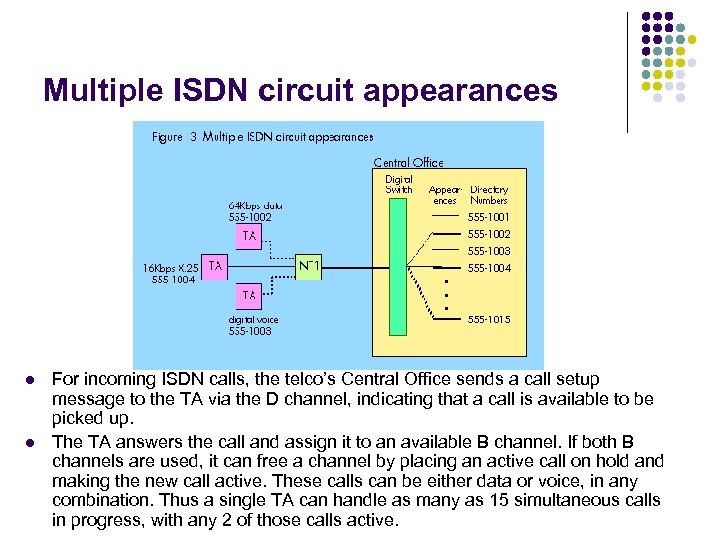 Multiple ISDN circuit appearances l l For incoming ISDN calls, the telco’s Central Office sends a call setup message to the TA via the D channel, indicating that a call is available to be picked up. The TA answers the call and assign it to an available B channel. If both B channels are used, it can free a channel by placing an active call on hold and making the new call active. These calls can be either data or voice, in any combination. Thus a single TA can handle as many as 15 simultaneous calls in progress, with any 2 of those calls active.
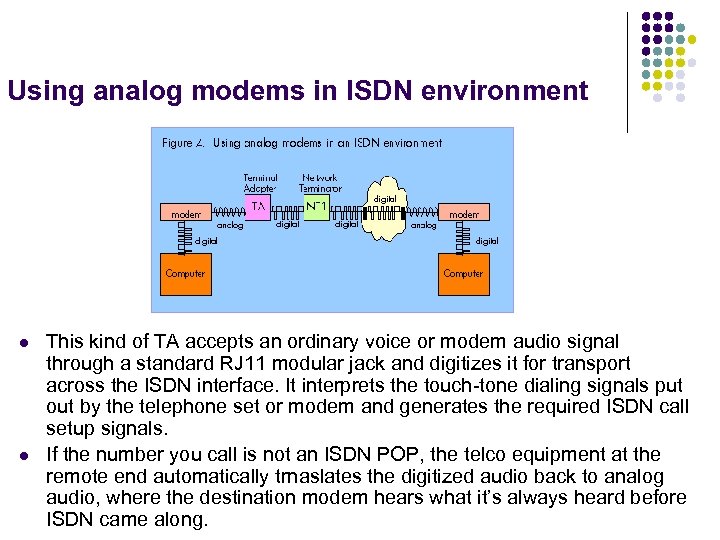 Using analog modems in ISDN environment l l This kind of TA accepts an ordinary voice or modem audio signal through a standard RJ 11 modular jack and digitizes it for transport across the ISDN interface. It interprets the touch-tone dialing signals put out by the telephone set or modem and generates the required ISDN call setup signals. If the number you call is not an ISDN POP, the telco equipment at the remote end automatically trnaslates the digitized audio back to analog audio, where the destination modem hears what it’s always heard before ISDN came along.
 Cost of ISDN l l Cheapest service (Pac. Bell) - $30/month for local access plus msg-unit charges of 4 cts for 1 st minute and 1 ct for each additional minute. Long-distance digital charges 2 -3 times higher than voice long-distance calls. NT 1 costs between $100 -$200 ISDN TAs cost range from $300 to $1500.
 Alternatives to ISDN l l Copper-wire digital services such as T 1 (1. 544 Mbps) Frame Relay services (56 Kbps to 1. 544 Mbps) Asynchronous Transfer Mode (ATM) (25 Mbps to 100 Mbps). Alternative is to replace copper wire with fiber optic cabling l The last mile also called the local loop is telco talk for the twisted wire pair between the CO and the subscriber. l Each telephone user requires a dedicated pair of copper wires. The length is more than 1 mile but fewer than 20 miles and averages over 5 miles in metropolitan areas. l Faster digital services require digital repeaters at least once per mile. l But normal copper pairs don’t have such repeaters. l The copper wires have been there for 50 years. The cost of replacing existing copper with fiber would be $250 billion.
 How DSL Works? l l DSL is a high-speed connection that uses the same wires as a regular telephone line. The wires themselves have the potential to handle frequencies up to several million Hertz but for voice communications, we limit them to 3. 4 KHz By limiting the frequencies carried over the lines, the telephone system can pack lots of wires into a very small space without worrying about interference between lines. Modern equipment that sends digital rather than analog data can safely use much more of the telephone line’s capacity. DSL does just that
 ADSL l l l ADSL stands for asymmetric digital subscriber line. Asymmetric – data sent in one direction is faster than in the other direction. An ADSL modem has a dedicated copper wire running between it and phone company’s nearest multiplexer (MUX) or central office. This dedicated copper wire can carry far more data than the 3 Kbz signal needed for our phone’s voice channel. With a dedicated copper wire between the phone company and the home, the capacity is something like 1 Mbps between the home and the phone company (referred to as upstream) and 8 Mbps between the phone company and the home (referred to as downstream) under ideal conditions.
 ADSL l l Most homes and small business users are connected to an ADSL divides up the available frequencies in a line on the assumption that most internet users look at or download much more information than they send, or upload. Under this assumption, if the connection speed from the Internet to the user is 3 -4 times faster than the connection from the user back to the Internet, then the user will see the most benefit. Other types of DSL include l Very high bit-rate DSL (VDSL) l Symmetric DSL l Rate-adaptive DSL – a variation of ADSL where the modem adjusts the speed of connection depending on the length and quality of the line.
 ADSL - contd l l l ADSL is distance-sensitive. As the connection length increases, the signal quality decreases and the connection speed goes down. The limit for ADSL services is 5460 m (18, 000 ft). ADSL technology can provide a max of 8 Mbps downstream at a distance of 6000 ft and upstream speeds of up to 640 Kbps. In practice, the best speeds widely offered today are 1. 5 Mbps downstream and 64 -640 Kbps upstreams.
 ADSL – contd l The approach an ADSL modem takes is as follows l The phone line’s bandwidth between 24 KHz and 1, 100 KHz is divided into 4 KHz bands and a virtual modem is assigned to each band. Each of these 249 virtual modems tests its band does the best it can with the slice of bandwidth it is allocated. The aggregate of the 249 virtual modems is the total speed of the pipe.
 ADSL - contd l l There are 2 competing standards for ADSL, namely “discrete multitone (DMT) and carrierless ampltitude/phase (CAP) system. CAP operates by dividing the signals on the telephone line into distinct bands: voice conversations are carried in the 0 -4 KHz band. Upstream channel is carried in a band between 25 -160 KHz and downstream begins at 240 KHz and goes up to a point that varies depending on a number of conditions (line length, line noise, no of users in a particular phone switch) but has a max of about 1. 5 MHz. DMT divides the data into 247 separate channels, each 4 KHz wide. You get an equivalent of 247 modems connected to your computer at once. Each channel is monitored and if the quality is too impaired, the signal is shifted to another channel. This system constantly shifts signals between different channels. DMT is more complex to implement than CAP but gives it more flexibility on lines of differing quality.
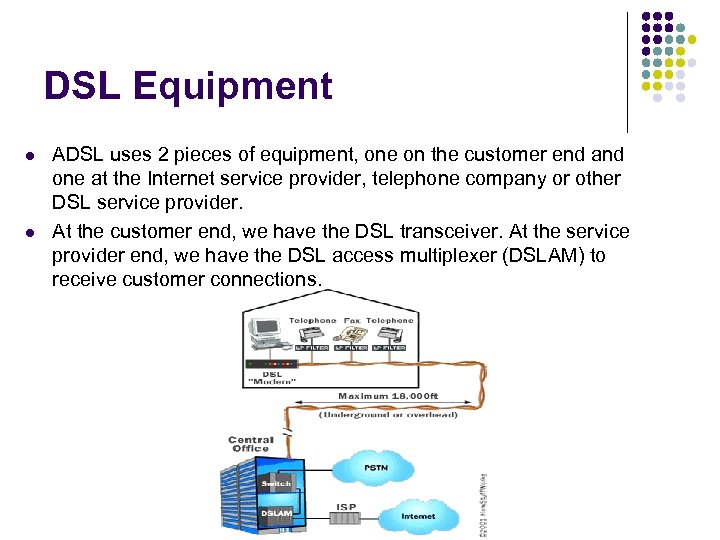 DSL Equipment l l ADSL uses 2 pieces of equipment, one on the customer end and one at the Internet service provider, telephone company or other DSL service provider. At the customer end, we have the DSL transceiver. At the service provider end, we have the DSL access multiplexer (DSLAM) to receive customer connections.
 DSL Equipment l l l DSL Transceiver – also called ATU-R. It is the point where data from the computer is connected to the DSL line DSLAM – takes connections from many customers and aggregates them onto a single, high-capacity connection to the Internet. DSLAMs are generally flexible to support multiple types of DSLAM may provide additional functions including dynamic IP address assignment. ADSL provides a dedicated connection from each user back to the DSLAM but cable modem (which we discuss next) users generally share a network look that runs through a neighborhood. Thus, ADSL users won’t see performance decrease as new users are added.
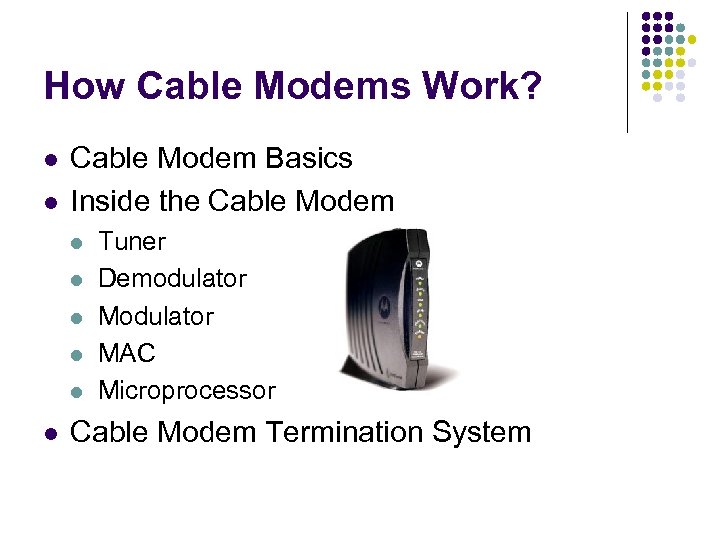 How Cable Modems Work? l l Cable Modem Basics Inside the Cable Modem l l l Tuner Demodulator MAC Microprocessor Cable Modem Termination System
 Cable Modem Basics l l l Each television signal is given a 6 MHz channel on the cable. The coaxial cable used to carry cable TV can carry hundreds of megahertz of signals. When a cable company offers internet access over the cable, the cable modem system puts downstream data into a 6 MHz channel. On the cable, the data looks just like a TV channel. So, internet downstream data takes up the same amount of cable space as any single channel of programming. Upstream data requires even less of the cable’s bandwidth, just 2 MHz, since the assumption is that most people download far more information than they upload. Putting both upstream and downstream data on the cable TV system requires two types of equipment, a cable modem on the customer end a cable modem termination system (CMTS) at the cable provider’s end.
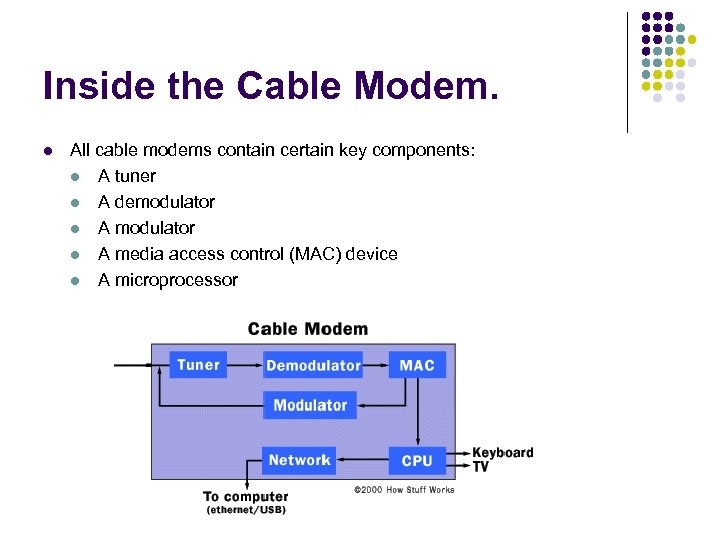 Inside the Cable Modem. l All cable modems contain certain key components: l A tuner l A demodulator l A media access control (MAC) device l A microprocessor
 Inside the Cable Modem l Tuner l l l connects to the cable outlet. Sometimes, with the addition of a splitter to separate the Internet data channel from normal CATV programming. In some cases, tuner will contain a diplexer which allows the tuner to make use of one set of frequencies for downstream traffic and another set for upstream data. In some cases, the cable modem tuner is used for downstream data and a dial-up telephone modem is used for upstream traffic. The tuner passes the received signal to the demodulator.
 Inside the Cable Modem l Demodulator l l A QAM demodulator takes a radio-frequency signal that has had information encoded in it by varying both the amplitude and phase of the wave, and turns it into a simple signal that can be processed by the Analog/Digital (A/D) converter. The A/D converter takes the signal and turns it into a series of digital 1 s and 0 s. An error correction module then checks the received information against a known standard so that problems in transmission can be found and fixed. Network frames may be in MPEG format, so an MPEG synchronizer may be used to make sure the data groups stay in line and in order.
 Inside the Cable Modem l Modulator l l If cable system is used for upstream, a modulator is used to convert the digital computer network data into radio-frequency signals for transmission. This component is called a burst modulator, because of the irregular nature of most traffic between a user and the Internet. Consists of 3 parts l l MAC l l l A section to insert information used for error correction on the receiving end. A QAM modulator. A digital to analog (D/A) converter. Sits between the upstream and downstream portions of the cable modem, and acts as the interface between the hardware and software portions of the various network protocols. Some of the MAC functions will be assigned to a central processing unit (CPU). Microprocessor l Depends on whether the cable modem is designed to be part of a larger computer system or to provide internet access with no additional computer support. In systems where the cable modem is the sole unit required for internet access, the microprocessor picks up MAC slack and much more. Motorola’s Power. PC processor is one of the common choices for system designers.
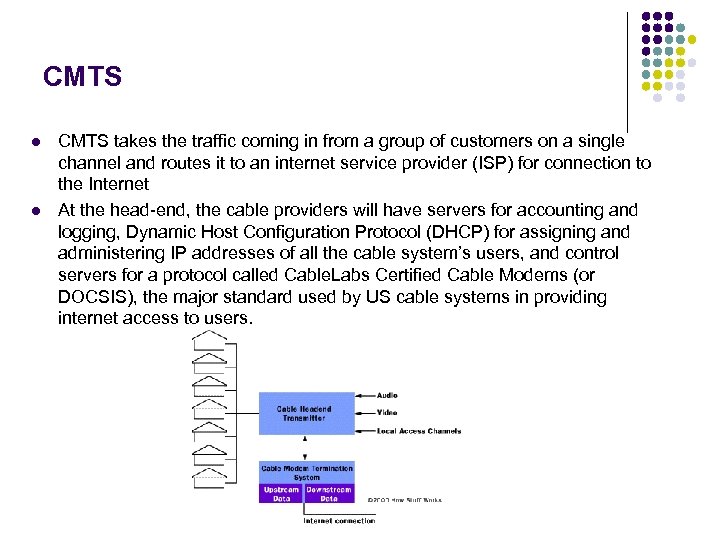 CMTS l l CMTS takes the traffic coming in from a group of customers on a single channel and routes it to an internet service provider (ISP) for connection to the Internet At the head-end, the cable providers will have servers for accounting and logging, Dynamic Host Configuration Protocol (DHCP) for assigning and administering IP addresses of all the cable system’s users, and control servers for a protocol called Cable. Labs Certified Cable Modems (or DOCSIS), the major standard used by US cable systems in providing internet access to users.
 CMTS – contd l l l The downstream data is sent to all users just like in an Ethernet network. Individual network connection decides whether a particular block of data is intended for it or not. On the upstream side, information is sent from the user to the CMTS. Other users don’t see that data at all. The narrower upstream bandwidth is divided into slices of time, measured in milliseconds, in which users can transmit one “burst” at a time to the Internet. A CMTS will enable as many as 1, 000 users to connect to the Internet through a single 6 MHz channel. Each channel is capable of 30 -40 Mbps of total throughput.
 How does Fiber Optics Work? l l What are Fiber Optics? How does an Optical Fiber Transmit Light? A Fiber-Optic Relay System Advantages of Fiber Optics
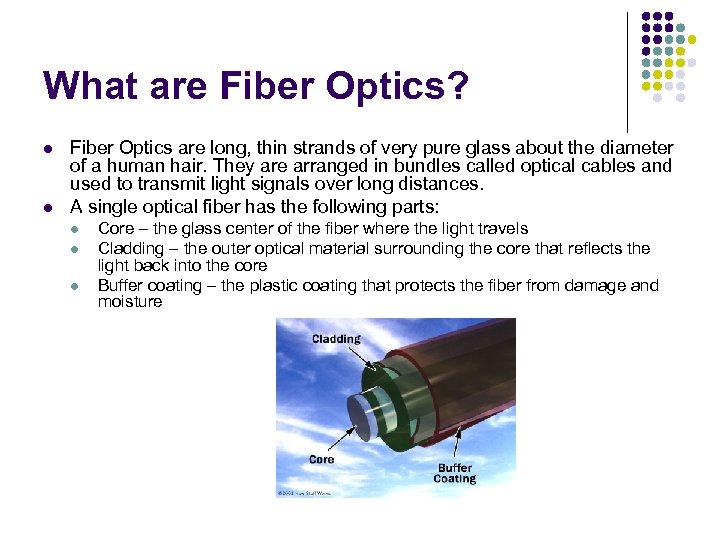 What are Fiber Optics? l l Fiber Optics are long, thin strands of very pure glass about the diameter of a human hair. They are arranged in bundles called optical cables and used to transmit light signals over long distances. A single optical fiber has the following parts: l l l Core – the glass center of the fiber where the light travels Cladding – the outer optical material surrounding the core that reflects the light back into the core Buffer coating – the plastic coating that protects the fiber from damage and moisture
 What are Fiber Optics? - contd l l l There are two types of fibers: single-mode and multimode fibers Single mode fibers have small cores (about 3. 5 x 10 -4 inches or 9 microns in diameter) and transmit infrared laser light (wavelength = 1300 to 1550 nanometers) Multi-mode fibers have larger cores (about 2. 5 x 10 -3 inches or 62. 5 microns in diameter) and transmit infrared light (wavelength=850 and 1300 nm) from light-emitting diodes (LEDs).
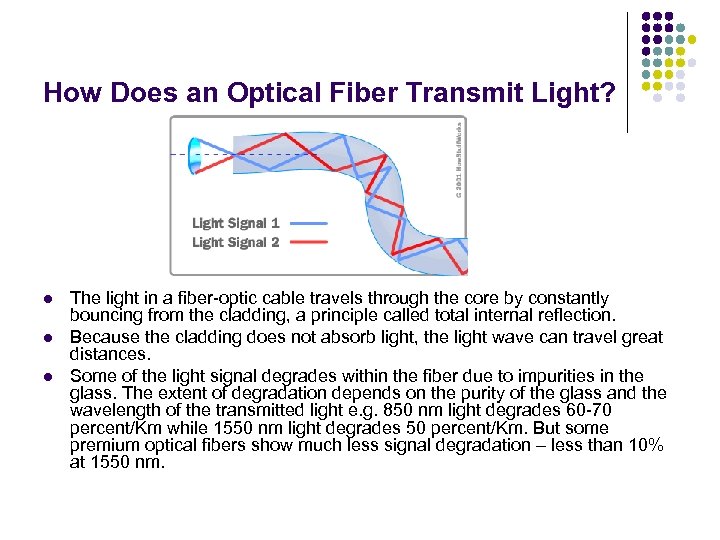 How Does an Optical Fiber Transmit Light? l l l The light in a fiber-optic cable travels through the core by constantly bouncing from the cladding, a principle called total internal reflection. Because the cladding does not absorb light, the light wave can travel great distances. Some of the light signal degrades within the fiber due to impurities in the glass. The extent of degradation depends on the purity of the glass and the wavelength of the transmitted light e. g. 850 nm light degrades 60 -70 percent/Km while 1550 nm light degrades 50 percent/Km. But some premium optical fibers show much less signal degradation – less than 10% at 1550 nm.
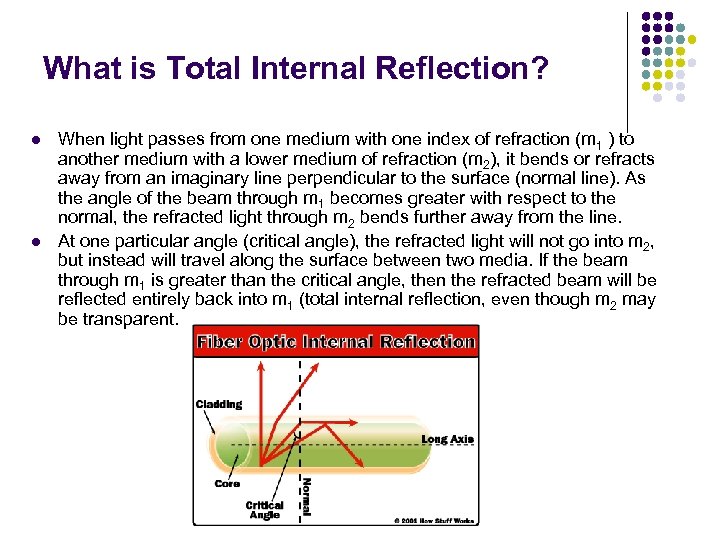 What is Total Internal Reflection? l l When light passes from one medium with one index of refraction (m 1 ) to another medium with a lower medium of refraction (m 2), it bends or refracts away from an imaginary line perpendicular to the surface (normal line). As the angle of the beam through m 1 becomes greater with respect to the normal, the refracted light through m 2 bends further away from the line. At one particular angle (critical angle), the refracted light will not go into m 2, but instead will travel along the surface between two media. If the beam through m 1 is greater than the critical angle, then the refracted beam will be reflected entirely back into m 1 (total internal reflection, even though m 2 may be transparent.
 A Fiber-Optic Relay System l l Fiber-optic relay systems consist of the following l Transmitter – produces and encodes the light signals l Optical fiber – conducts the light signals over a distance l Optical regenerator – may be necessary to boost the light signal l Optical receiver – receives and decodes the light signals. Transmitter l Directs the optical fiber device to turn the light “on” or “off” in the right sequence l Has a lens to focus the light into the fiber. Lasers have more power than LEDs but vary more with changes in temperature and are more expensive. l The most common wavelengths of light signals are 850 nm, 1300 nm, and 1550 nm.
 Fiber-Optic Relay System - contd l l Optical Regenerator l Some signal loss occurs especially over long distances (more than 0. 5 mile) such as undersea cables. l Optical regenerator consists of optical fibers with a special coating (doping). The doped portion is pumped with a laser. When the degraded signal comes into the doped coating, the energy from the laser allows the doped molecules to become lasers themselves. The doped molecules then emit a new, stronger light signal with the same characteristics as the incoming weak light signal. It is like a laser amplifier. Optical Receiver l Takes incoming digital light signals, decodes them and sends the electrical signal to the other user’s computer. The receiver uses a photocell or photodiode to detect the light.
 Advantages of Fiber Optics l l l l Less expensive – several miles of optical cable can be made cheaper than equivalent lengths of copper wire. Thinner – Optical fibers can be drawn to smaller diameters than copper wire Less signal degradation – the loss of signal in optical fiber is less than in copper wire Low power – because signals in optical fibers degrade less, lowerpower transmitters can be used. Digital signals – optical fibers are ideally suited for carrying digital information, which is especially useful in computer networks. Non-flammable – no electricity is passed through optical fibers, there is no fire hazard. Lightweight – an optical cable weights less than a comparable copper wire cable. Flexible – because they can transmit and receive light, fiber optics are used in many flexible digital cameras.
 References l www. How. Stuff. Works. com l l How Modems Work How ISDN Works? How Cable Modems Work? How Fiber Optics Work?