 Скачать презентацию Winning the Battle Against Phishing Scams as the
3228c8e57552c0a3906eb69fa3e0397e.ppt
- Количество слайдов: 58



Winning the Battle Against Phishing Scams (as the war rages on) Harvard Townsend Chief Information Security Officer Kansas State University harv@ksu. edu EDUCAUSE SPC 2012 May 16, 2012
“Don’t let anybody tell ya it’s easy!”
Agenda • History (ah, that fateful day in January 2008 when the first phishing scam arrived) • Examples • The statistics • The battle plan • What has worked for you?
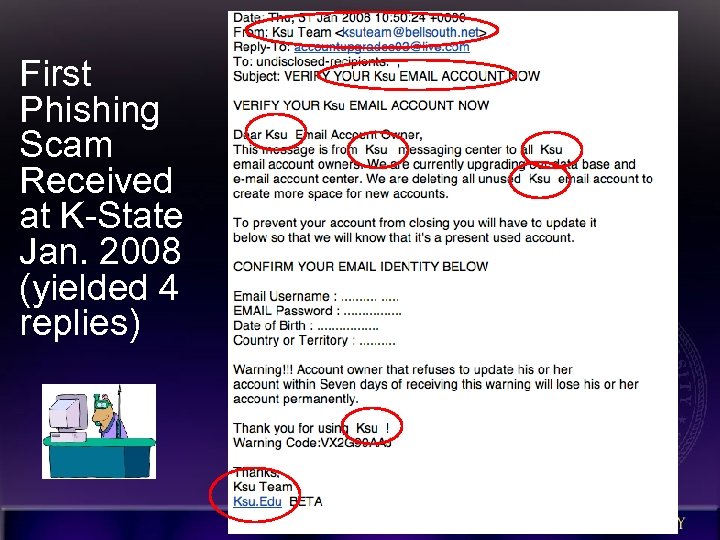
First Phishing Scam Received at K-State Jan. 2008 (yielded 4 replies)
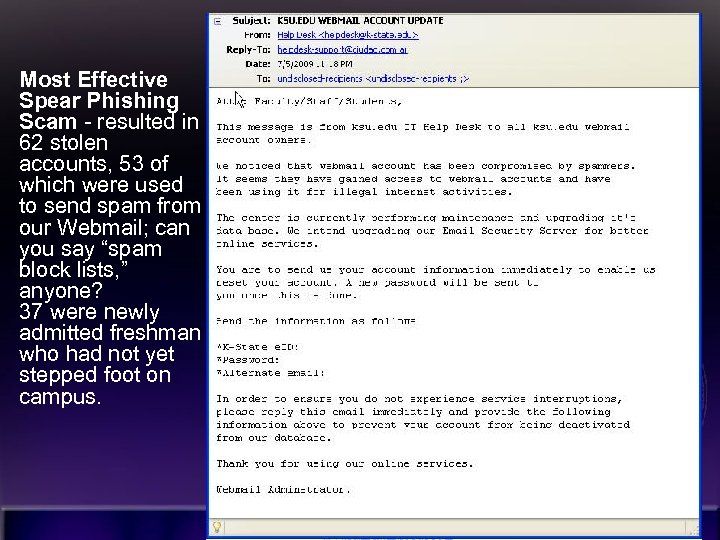
Most Effective Spear Phishing Scam - resulted in 62 stolen accounts, 53 of which were used to send spam from our Webmail; can you say “spam block lists, ” anyone? 37 were newly admitted freshman who had not yet stepped foot on campus. 6
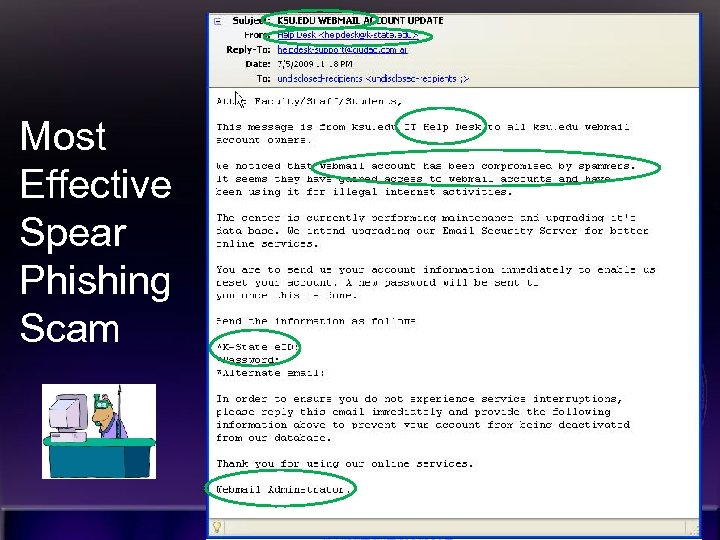
Most Effective Spear Phishing Scam 7
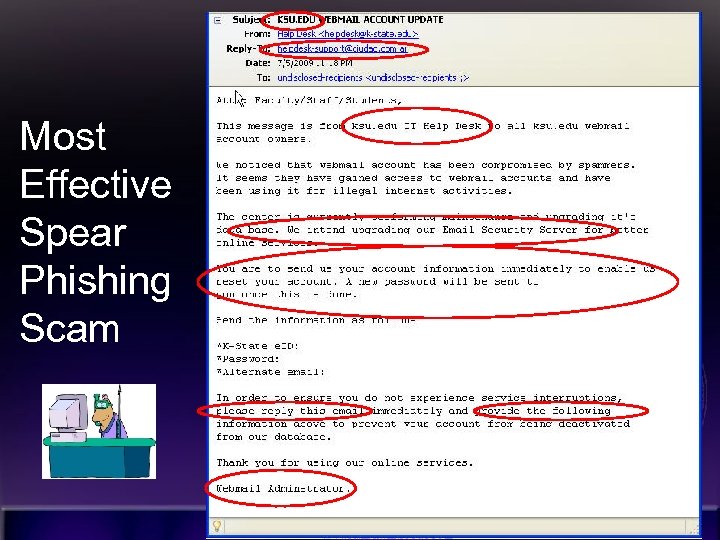
Most Effective Spear Phishing Scam 8
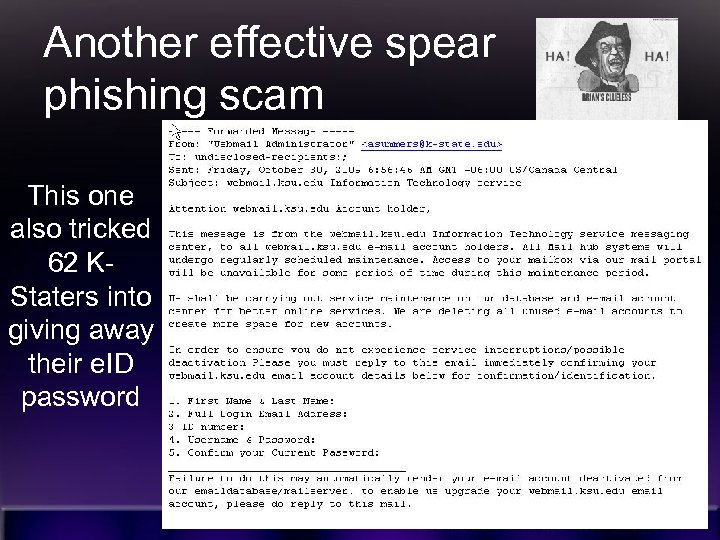
Another effective spear phishing scam This one also tricked 62 KStaters into giving away their e. ID password 9
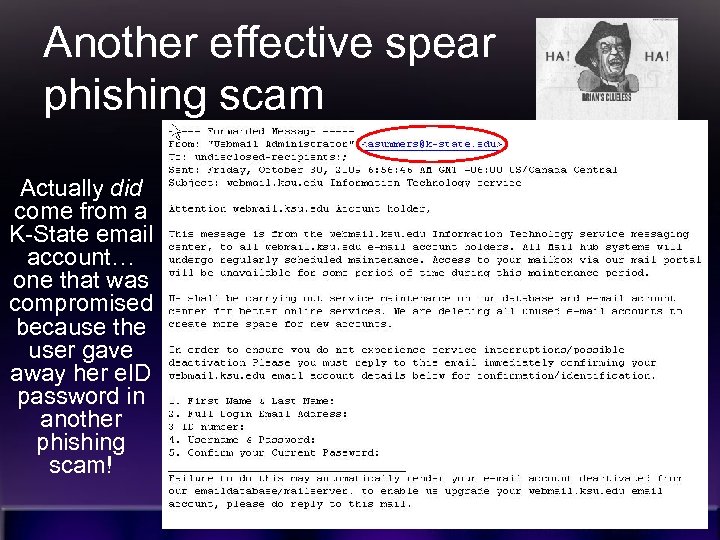
Another effective spear phishing scam Actually did come from a K-State email account… one that was compromised because the user gave away her e. ID password in another phishing scam! 10
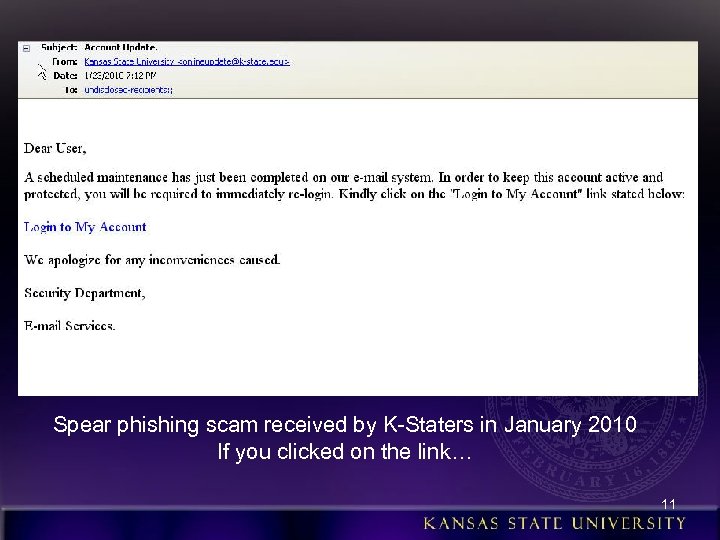
Spear phishing scam received by K-Staters in January 2010 If you clicked on the link… 11
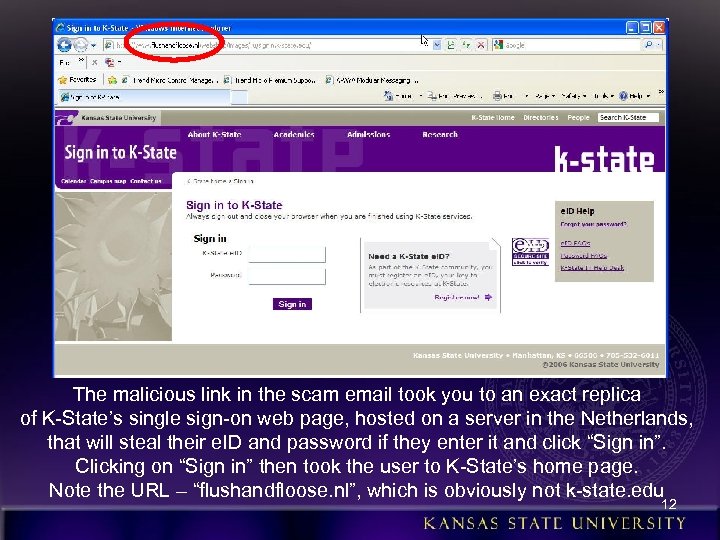
The malicious link in the scam email took you to an exact replica of K-State’s single sign-on web page, hosted on a server in the Netherlands, that will steal their e. ID and password if they enter it and click “Sign in”. Clicking on “Sign in” then took the user to K-State’s home page. Note the URL – “flushandfloose. nl”, which is obviously not k-state. edu 12
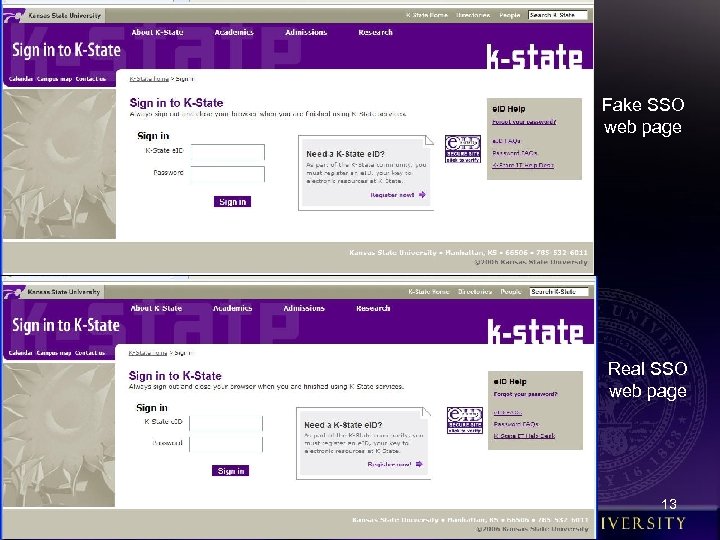
Fake SSO web page Real SSO web page 13
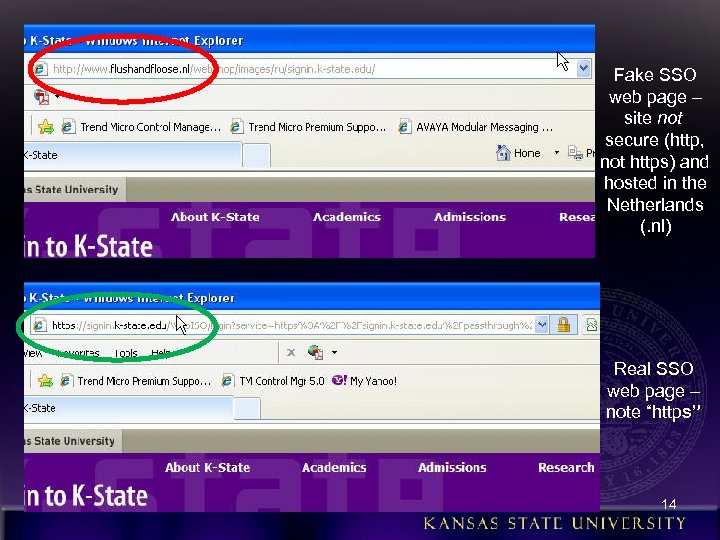
Fake SSO web page – site not secure (http, not https) and hosted in the Netherlands (. nl) Real SSO web page – note “https” 14
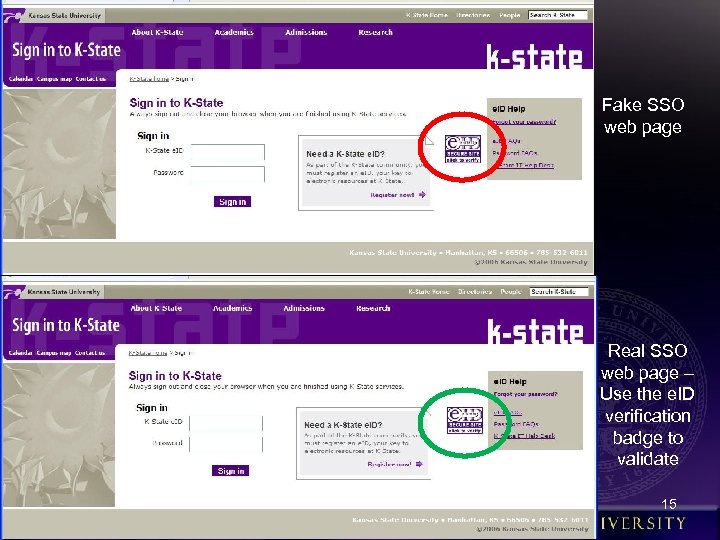
Fake SSO web page Real SSO web page – Use the e. ID verification badge to validate 15
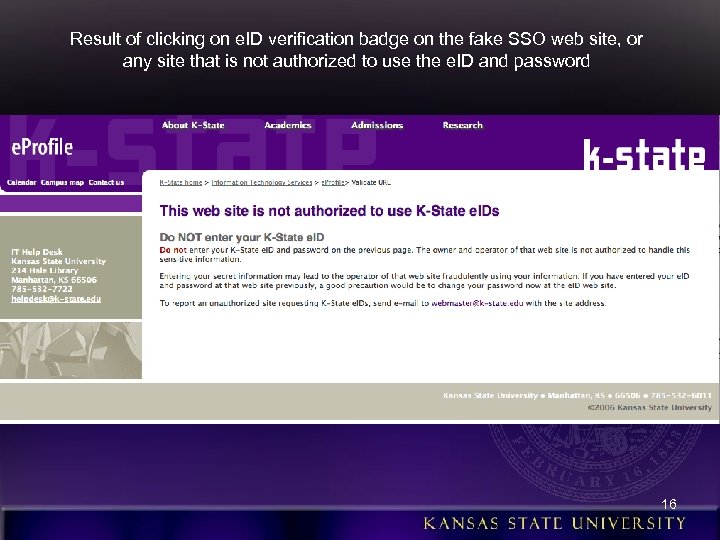
Result of clicking on e. ID verification badge on the fake SSO web site, or any site that is not authorized to use the e. ID and password 16
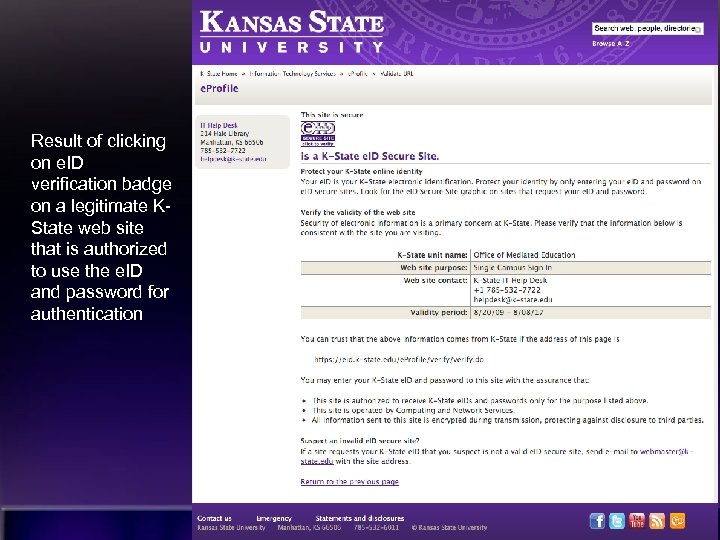
Result of clicking on e. ID verification badge on a legitimate KState web site that is authorized to use the e. ID and password for authentication 17
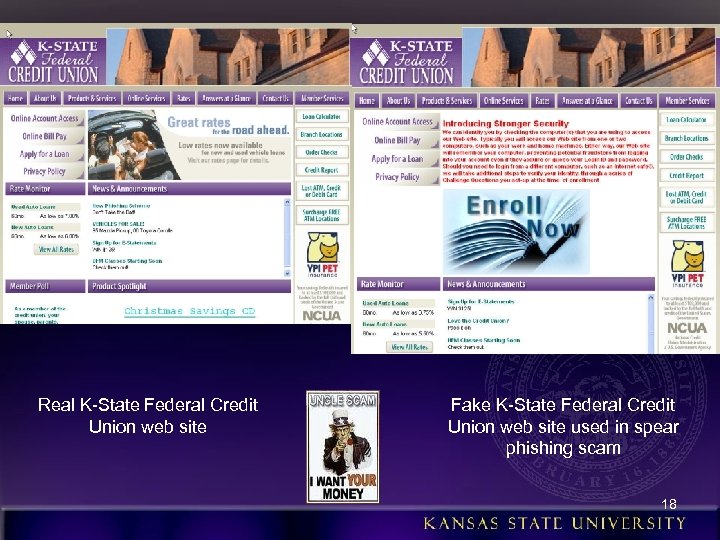
Real K-State Federal Credit Union web site Fake K-State Federal Credit Union web site used in spear phishing scam 18
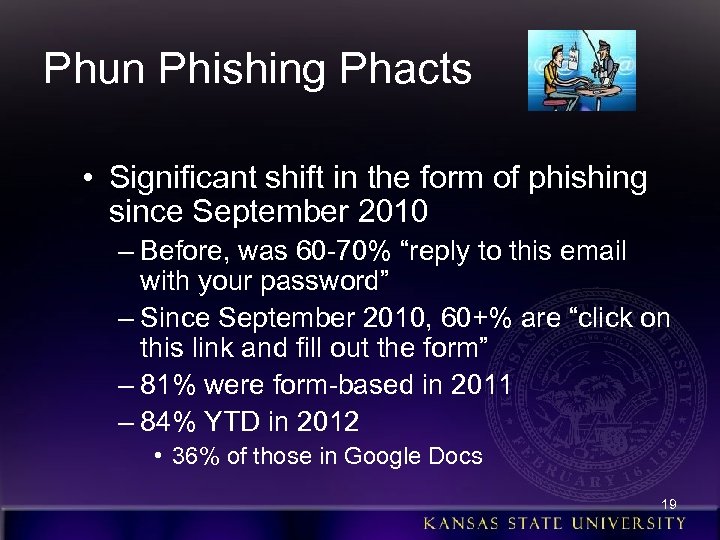
Phun Phishing Phacts • Significant shift in the form of phishing since September 2010 – Before, was 60 -70% “reply to this email with your password” – Since September 2010, 60+% are “click on this link and fill out the form” – 81% were form-based in 2011 – 84% YTD in 2012 • 36% of those in Google Docs 19
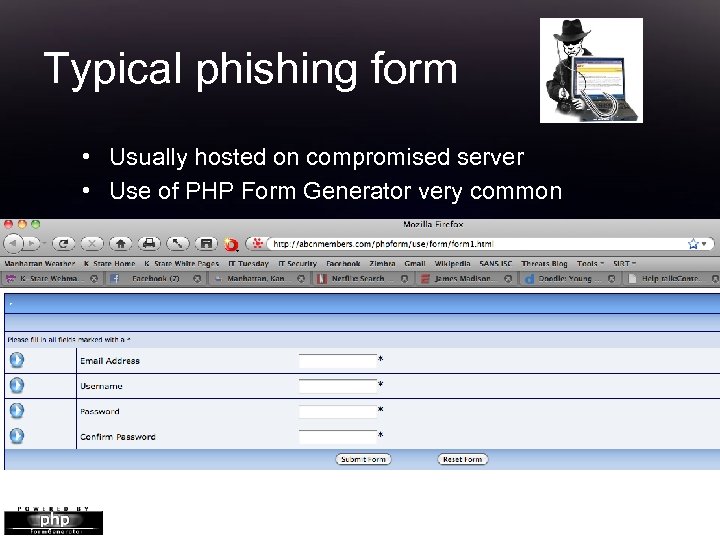
Typical phishing form • Usually hosted on compromised server • Use of PHP Form Generator very common 20
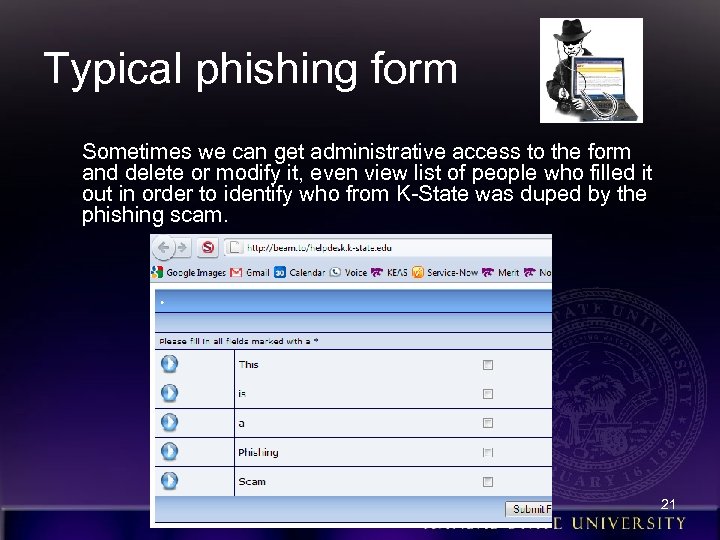
Typical phishing form Sometimes we can get administrative access to the form and delete or modify it, even view list of people who filled it out in order to identify who from K-State was duped by the phishing scam. 21
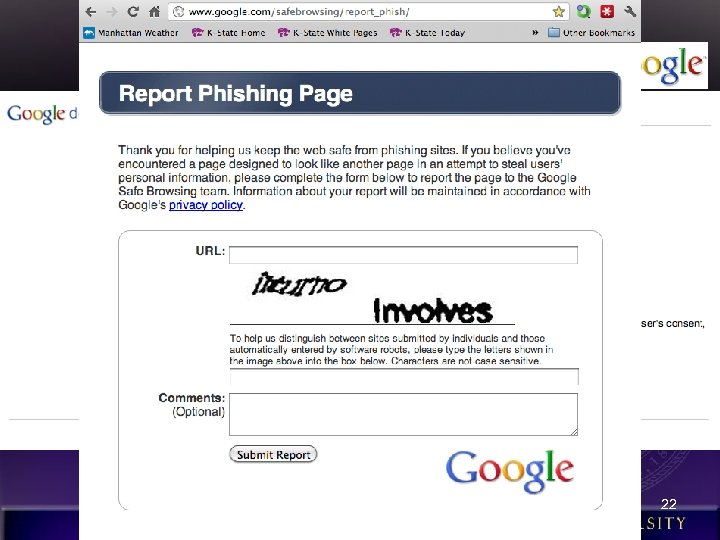
Use of Google Docs Recent trend of using forms in spreadsheets. google. com https: //spreadsheets. google. com/viewform? formkey=d. EJh. Z 2 Rw. THRpak. J 0 Rm. NJcm. Zh. X 0 Ey. Wk. E 6 MQ 22
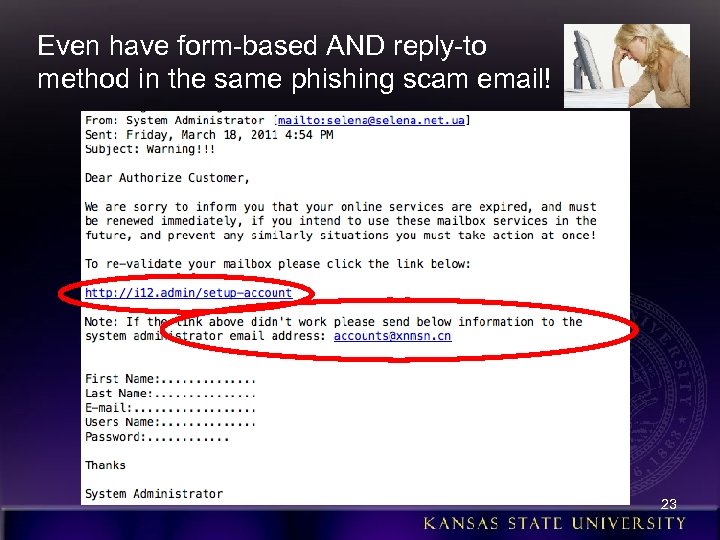
Even have form-based AND reply-to method in the same phishing scam email! 23
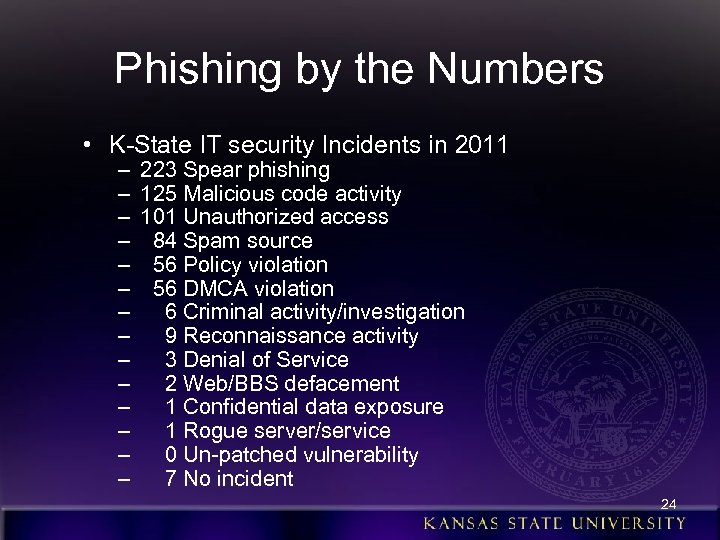
Phishing by the Numbers • K-State IT security Incidents in 2011 – – – – 223 Spear phishing 125 Malicious code activity 101 Unauthorized access 84 Spam source 56 Policy violation 56 DMCA violation 6 Criminal activity/investigation 9 Reconnaissance activity 3 Denial of Service 2 Web/BBS defacement 1 Confidential data exposure 1 Rogue server/service 0 Un-patched vulnerability 7 No incident 24
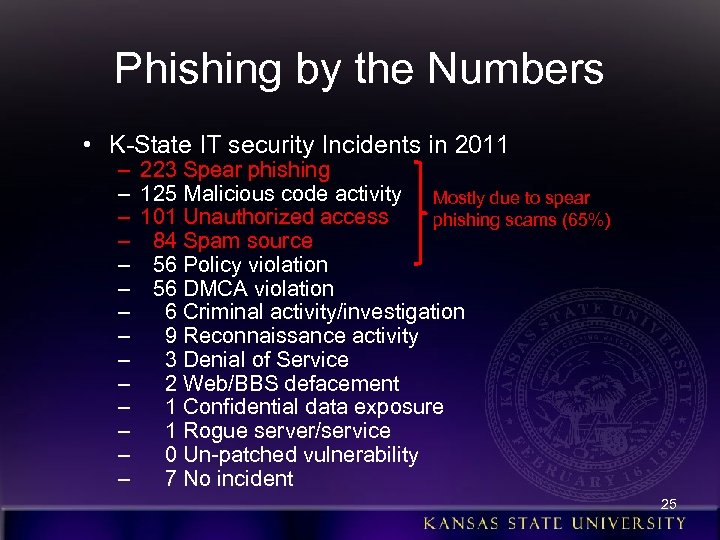
Phishing by the Numbers • K-State IT security Incidents in 2011 – – – – 223 Spear phishing 125 Malicious code activity Mostly due to spear 101 Unauthorized access phishing scams (65%) 84 Spam source 56 Policy violation 56 DMCA violation 6 Criminal activity/investigation 9 Reconnaissance activity 3 Denial of Service 2 Web/BBS defacement 1 Confidential data exposure 1 Rogue server/service 0 Un-patched vulnerability 7 No incident 25
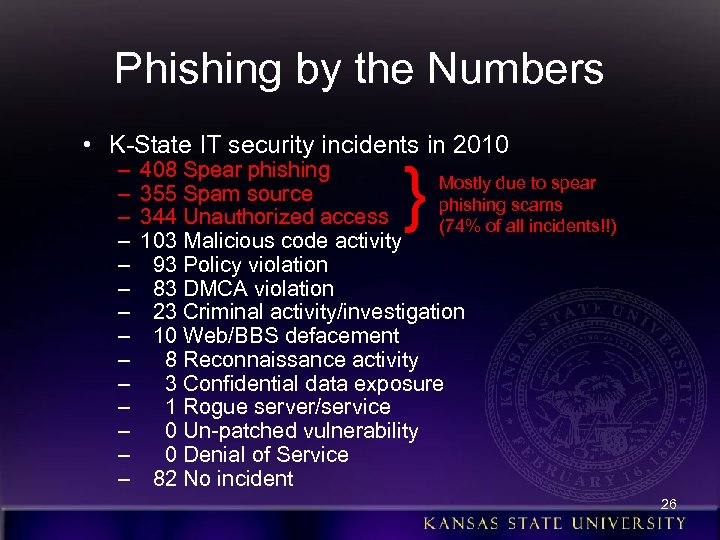
Phishing by the Numbers • K-State IT security incidents in 2010 – – – – } 408 Spear phishing Mostly due to spear 355 Spam source phishing scams 344 Unauthorized access (74% of all incidents!!) 103 Malicious code activity 93 Policy violation 83 DMCA violation 23 Criminal activity/investigation 10 Web/BBS defacement 8 Reconnaissance activity 3 Confidential data exposure 1 Rogue server/service 0 Un-patched vulnerability 0 Denial of Service 82 No incident 26
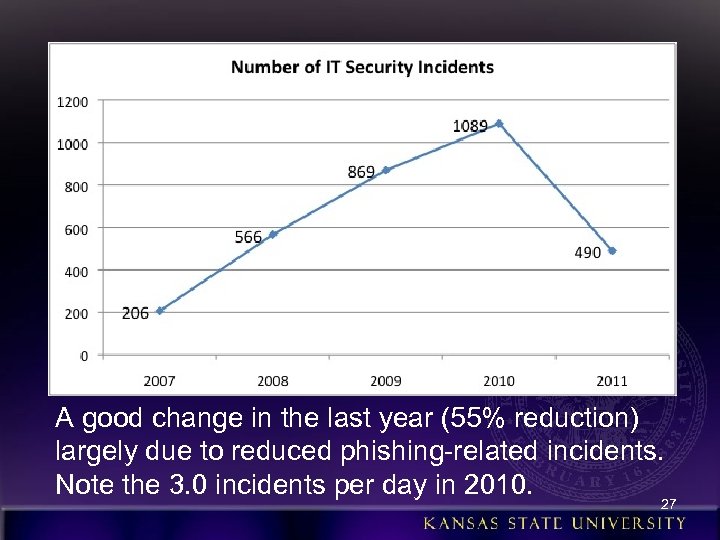
A good change in the last year (55% reduction) largely due to reduced phishing-related incidents. Note the 3. 0 incidents per day in 2010. 27
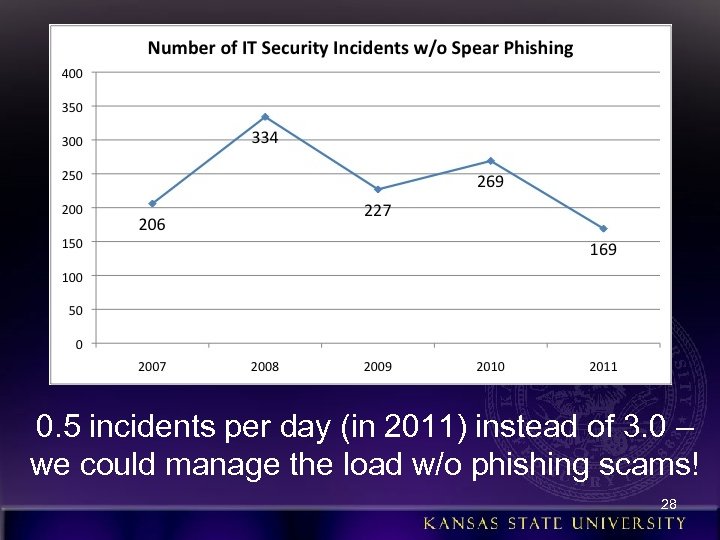
0. 5 incidents per day (in 2011) instead of 3. 0 – we could manage the load w/o phishing scams! 28
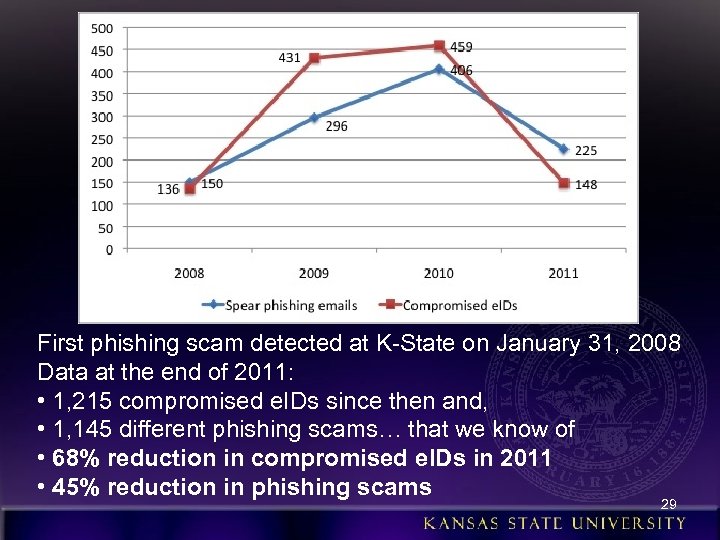
First phishing scam detected at K-State on January 31, 2008 Data at the end of 2011: • 1, 215 compromised e. IDs since then and, • 1, 145 different phishing scams… that we know of • 68% reduction in compromised e. IDs in 2011 • 45% reduction in phishing scams 29
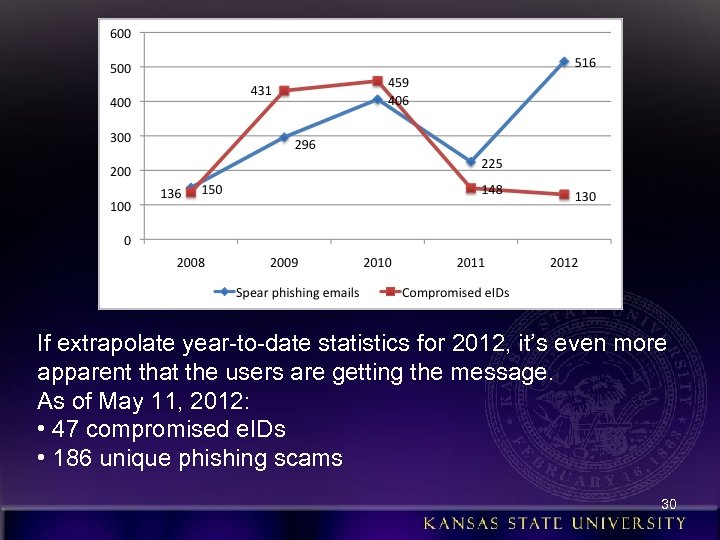
If extrapolate year-to-date statistics for 2012, it’s even more apparent that the users are getting the message. As of May 11, 2012: • 47 compromised e. IDs • 186 unique phishing scams 30
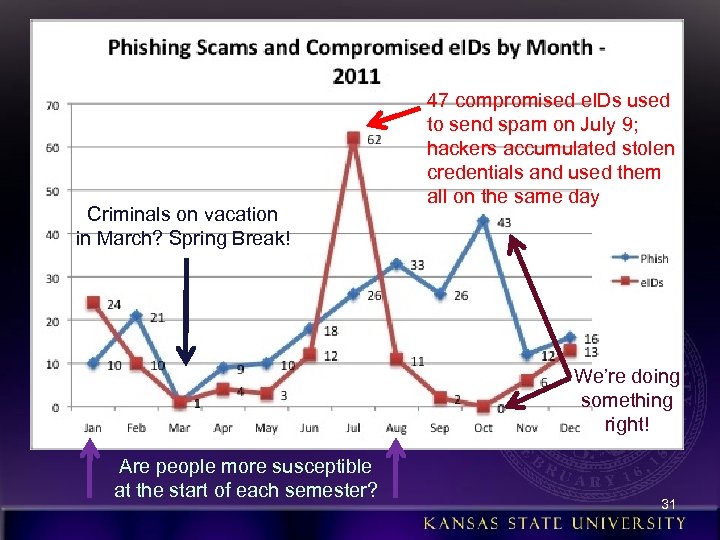
Criminals on vacation in March? Spring Break! 47 compromised e. IDs used to send spam on July 9; hackers accumulated stolen credentials and used them all on the same day We’re doing something right! Are people more susceptible at the start of each semester? 31
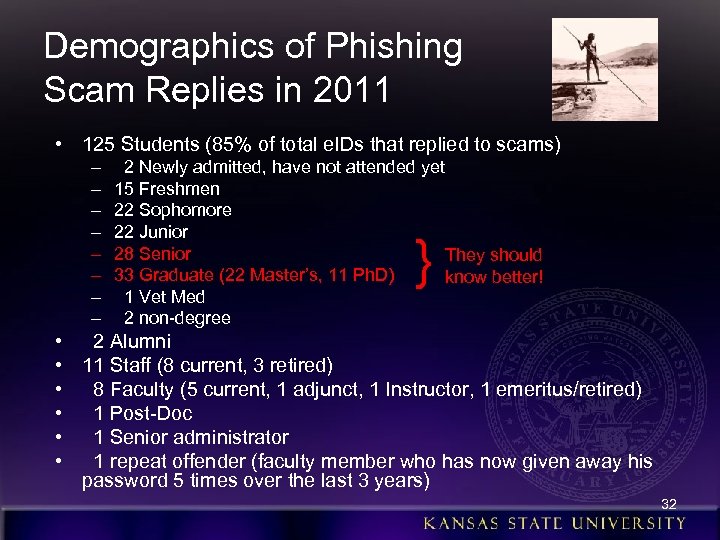
Demographics of Phishing Scam Replies in 2011 • 125 Students (85% of total e. IDs that replied to scams) – – – – 2 Newly admitted, have not attended yet 15 Freshmen 22 Sophomore 22 Junior 28 Senior They should 33 Graduate (22 Master’s, 11 Ph. D) know better! 1 Vet Med 2 non-degree } • 2 Alumni • 11 Staff (8 current, 3 retired) • 8 Faculty (5 current, 1 adjunct, 1 Instructor, 1 emeritus/retired) • 1 Post-Doc • 1 Senior administrator • 1 repeat offender (faculty member who has now given away his password 5 times over the last 3 years) 32
Demographics of Phishing Scam Replies in 2010 • 390 Students (87% of total e. IDs that replied to scams) • • – – – – – 95 Newly admitted, have not attended yet 89 Freshmen 55 Sophomore 35 Junior 54 Senior 43 Graduate (31 Master’s, 12 Ph. D) 6 Vet Med 10 Alumni 9 non-degree } They should know better! 26 Staff (24 current, 2 retired) 16 Faculty (6 current, 3 adjunct, 2 Instructor, 5 emeritus/retired) 1 Post-Doc 0 Senior administrators 0 Other (like a sorority house mom) 231 employees (i. e. , lots of student employees duped) 13 Repeat offenders (retired HUMEC faculty wins the prize for replying 5 times; barely beat retired music faculty @ 4 replies) 33
Demographics of Phishing Scam Replies in 2011 • Gender • Female: 83 (56%) • Male: 65 (44%) • (58/42 in 2010) 34
Demographics of Phishing Scam Replies in 2011 • Students by academic college: – – – 45 – Arts & Sciences 20 – Human Ecology 14 – Business 13 – Agriculture 9 – Education 8 – Engineering 4 – Architecture 4 – Technology & Aviation /Salina 2 – Non-degree students 1 – Veterinary Medicine 5 – Undecided/Unknown 35
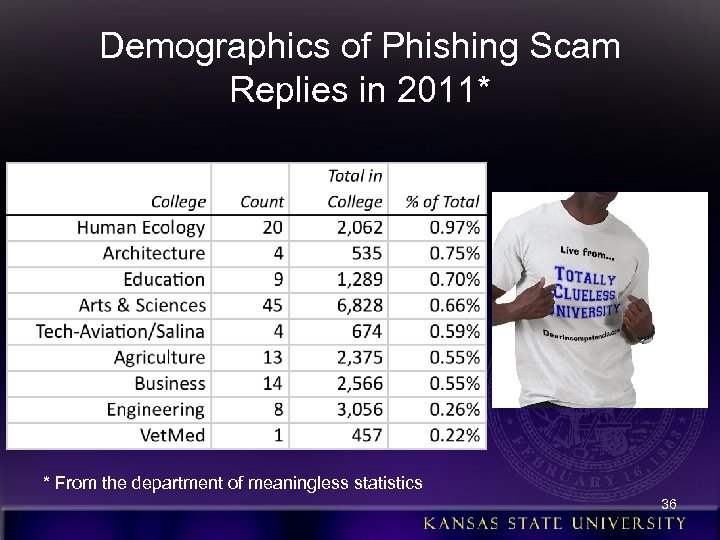
Demographics of Phishing Scam Replies in 2011* * From the department of meaningless statistics 36

More Phun Phishing Phacts • In 2009, 79 of the 296 (27%) phishing scams were “successful” (i. e. , got replies with passwords) • Given this success rate, it’s no wonder the hackers don’t stop!! 37
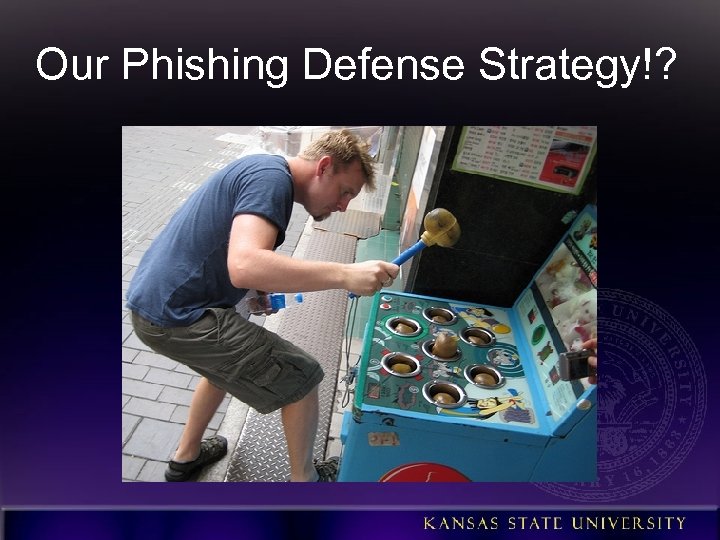
Our Phishing Defense Strategy!?
The Greatest Threat? ! • 96. 5% of the security incidents at K-State in 2010 attributed to user behavior • Every one of the 1, 262 stolen e. IDs could have been prevented by informed users • In other words, we have to “thin the bozone!” (bozone = “The substance surrounding stupid people that prevents good ideas from penetrating”) • User awareness and training a major part of our anti-phishing strategy
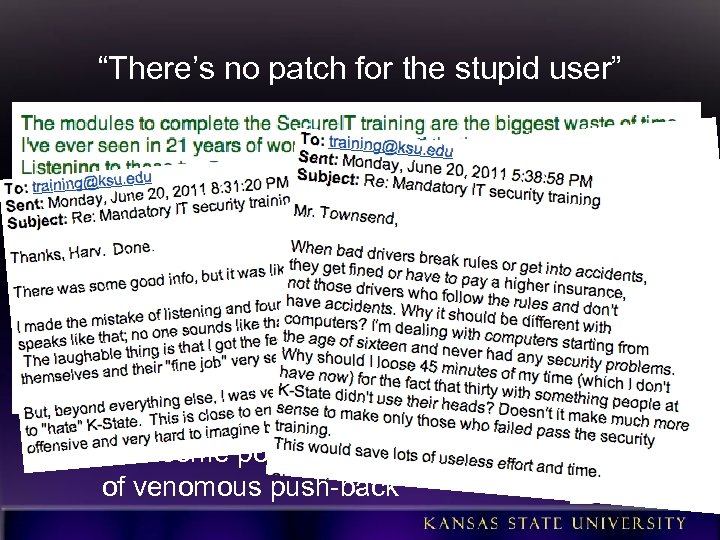
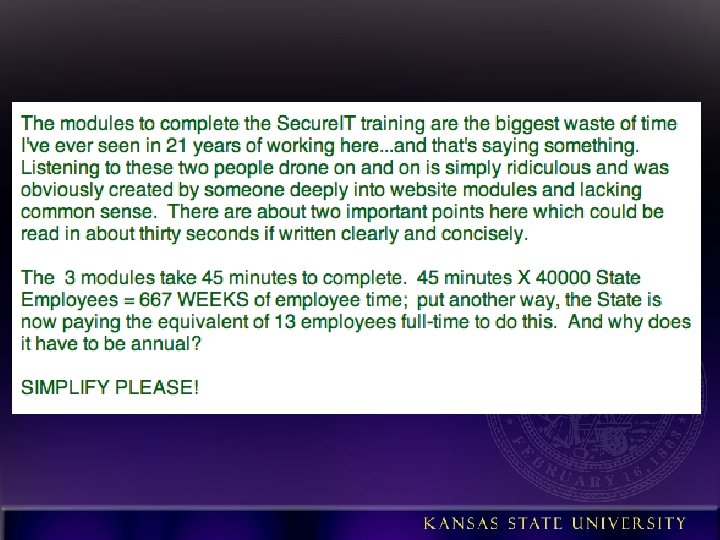
“There’s no patch for the stupid user” • Started mandatory annual security training for all employees in 2011 – Focused on phishing scams and password management – Developed in-house with K-State-specific info and examples – Refresher training in 2012 includes more on phishing – Had some positive effect in spite of venomous push-back
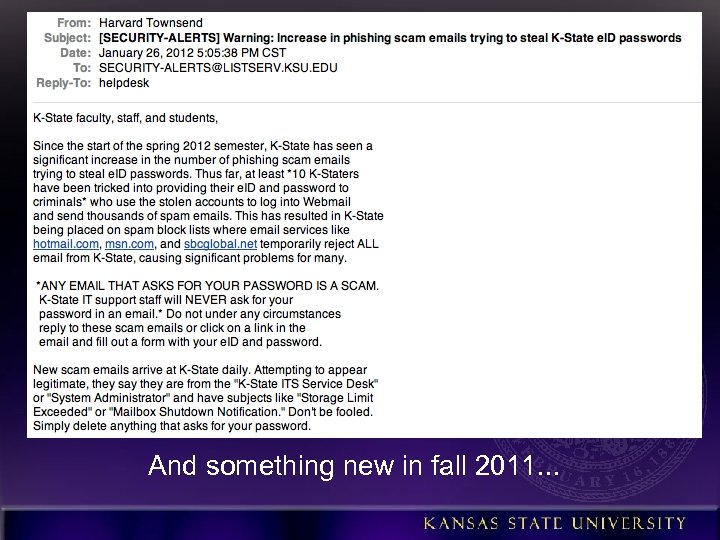
Communicate! • • • Email • Web site • Blog • Twitter • • RSS Policies/procedures/guidelines/st andards • Weekly IT newsletter articles • K-State Today news • Student newspaper articles • Advertisements Video Seminars Online training Face-to-face training Monthly IT security roundtables Annual day-long security workshop New student orientation Notices on enterprise systems IT employee email footer (“KState will never ask for. . . ”) Personal visits to committees, councils, departments And something new in fall 2011. . .
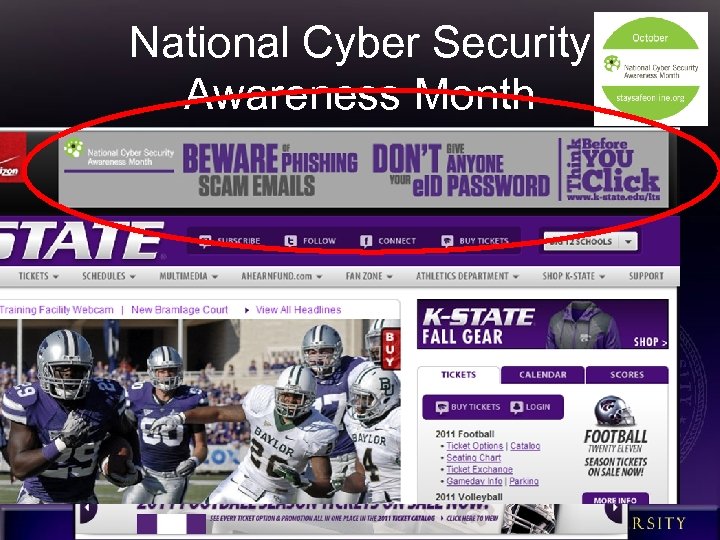
National Cyber Security Awareness Month
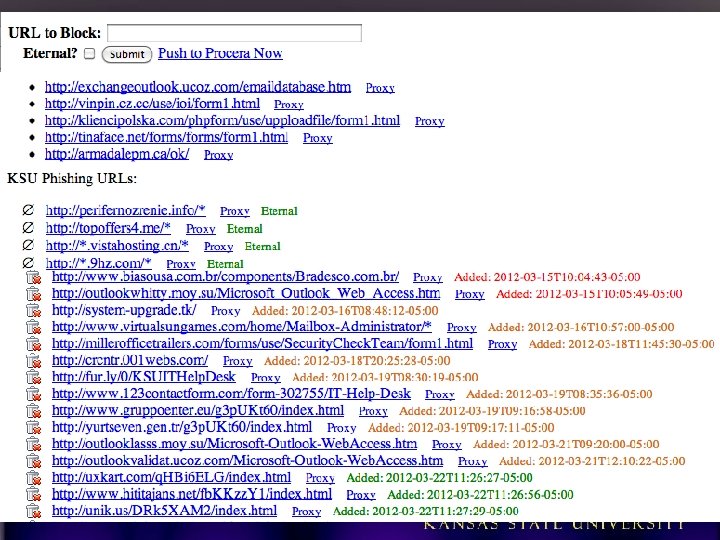
Technical Defenses • Leverage Procera Packet. Logic 8720 (primary purpose is P 2 P filtering) installed at campus border – Block known malicious IPs since Oct. 2010 – Use Python API with web app to block malicious links to phishing forms in scam emails
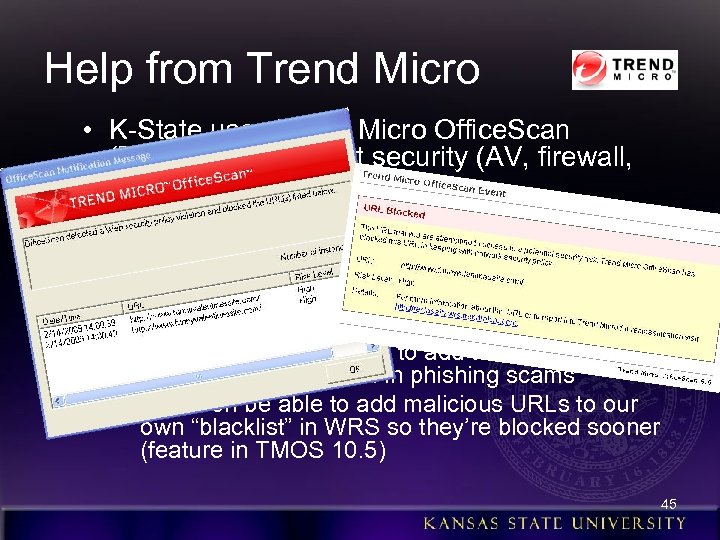
Help from Trend Micro • K-State uses Trend Micro Office. Scan (TMOS) for endpoint security (AV, firewall, host IDS) • Includes Web Reputation Services (WRS) – Blocks access to known disreputable sites, including those used in phishing scams – Enabled in both Windows and Mac versions – K-State IT security team regularly reports new malicious links to Trend to add to the block list, especially those found in phishing scams – Will soon be able to add malicious URLs to our own “blacklist” in WRS so they’re blocked sooner (feature in TMOS 10. 5) 45
Technical Defenses • Merit Network, Inc. hosts our Zimbra Collaboration Suite (email, calendar, etc. ) • Addition of Iron. Port in Sept. 2010 – Reduced # of phishing scams received (although many undetected since they come from reputable sources – compromised accts at other edu institutions) – More placed in user Junk folders (but still have users responding from there) – If user forwards their ksu. edu email to an external account, like Hotmail, Merit’s spam tagging is not recognized, so the scam still appears in their inbox – Only filters inbound email at this time
Technical Defenses • Quick detection of compromised accounts • Merit monitors for changes in user preferences, identities, and signatures – Changes made from known suspicious IP (41. 0. 0. 0/8!) – Spam-like keywords or domains (“barrister, ” “lottery, ” “claimsdept, ” 9. cn, yahoo. com. hk, live. hk, etc. ) – Email addresses in the anti-phishing-email-reply list – Many sequential addresses added to Contact List/Address. Book • Patterns in sent mail – First 3 letters of each recipient; sort; look for close sequences (aaa@aol. com, aab@yahoo. com, etc. ) – Large adds to “Emailed Contacts” • And, of course, respond to external complaints
Technical Defenses • Lock accounts that trigger any of these criteria – Merit staff alerted of any faculty/staff acct, then manually inspects it before locking – Student accounts automatically locked during nonbusiness hours (also manually inspected during business hours) – Generates a notification email to K-State • Security team verifies compromise by inspecting the account preferences, signature block, INBOX, Sent folder • Resets password so e. ID cannot be used for any services • Creates a trouble-ticket (Service-Now) and assigns it to the IT Help Desk • Help Desk contacts user or waits until they call; assists with changing their password; provides opportunistic “training” • The user changing their password removes the Zimbra lock
Fillet-o-Phish • Processing phishing scam emails to limit the threat – Growing number of users trained to submit phishing scams to abuse@ksu. edu – with full headers! – Is a priority to process them asap
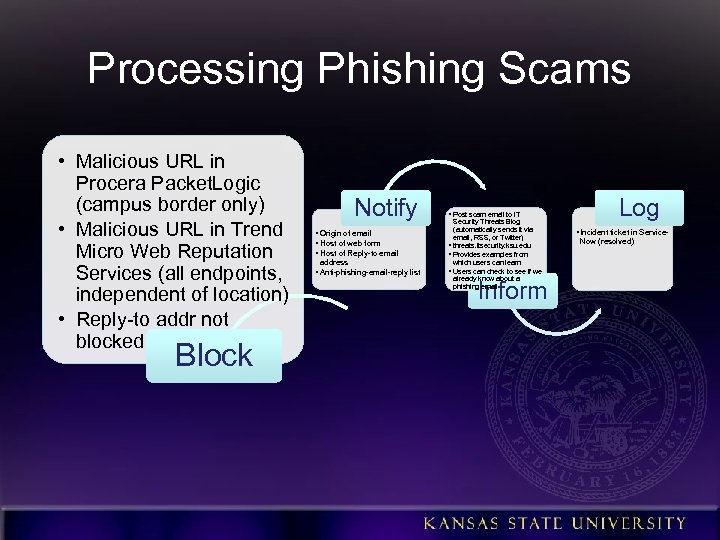
Processing Phishing Scams • Malicious URL in Procera Packet. Logic (campus border only) • Malicious URL in Trend Micro Web Reputation Services (all endpoints, independent of location) • Reply-to addr not blocked Block Notify • Origin of email • Host of web form • Host of Reply-to email address • Anti-phishing-email-reply list • Post scam email to IT Security Threats Blog (automatically sends it via email, RSS, or Twitter) • threats. itsecurity. ksu. edu • Provides examples from which users can learn • Users can check to see if we already know about a phishing email Inform Log • Incident ticket in Service. Now (resolved)
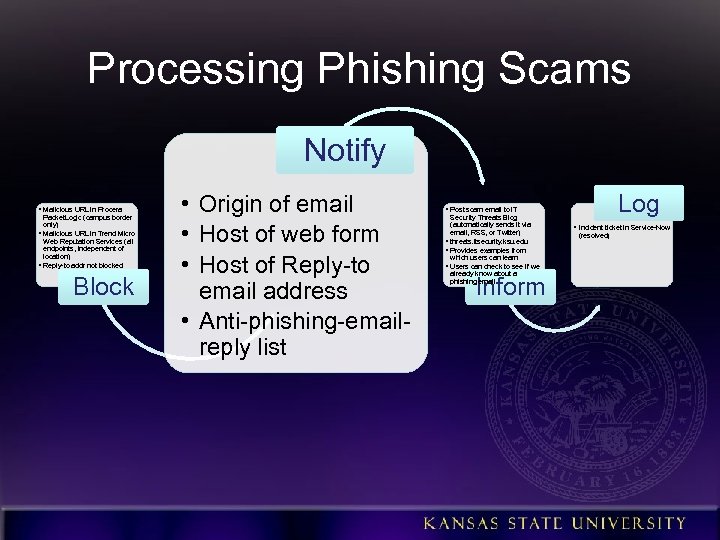
Processing Phishing Scams Notify • Malicious URL in Procera Packet. Logic (campus border only) • Malicious URL in Trend Micro Web Reputation Services (all endpoints, independent of location) • Reply-to addr not blocked Block • Origin of email • Host of web form • Host of Reply-to email address • Anti-phishing-emailreply list Log • Post scam email to IT Security Threats Blog (automatically sends it via email, RSS, or Twitter) • threats. itsecurity. ksu. edu • Provides examples from which users can learn • Users can check to see if we already know about a phishing email Inform • Incident ticket in Service-Now (resolved)
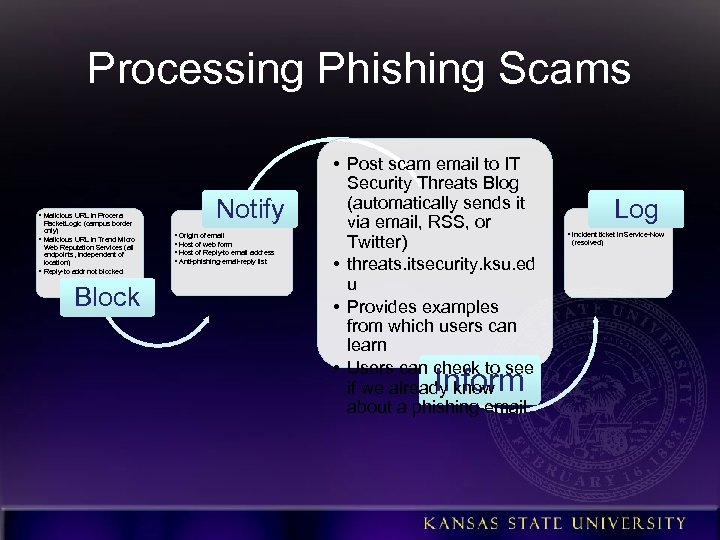
Processing Phishing Scams • Malicious URL in Procera Packet. Logic (campus border only) • Malicious URL in Trend Micro Web Reputation Services (all endpoints, independent of location) • Reply-to addr not blocked Block Notify • Origin of email • Host of web form • Host of Reply-to email address • Anti-phishing-email-reply list • Post scam email to IT Security Threats Blog (automatically sends it via email, RSS, or Twitter) • threats. itsecurity. ksu. ed u • Provides examples from which users can learn • Users can check to see if we already know about a phishing email Inform Log • Incident ticket in Service-Now (resolved)
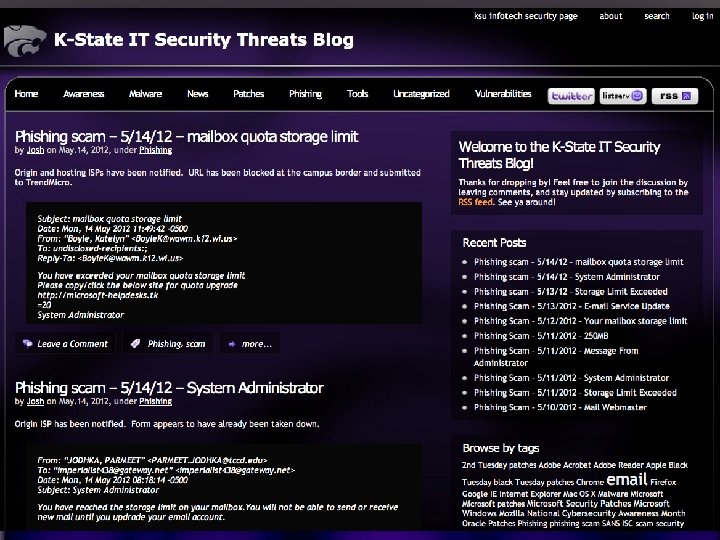
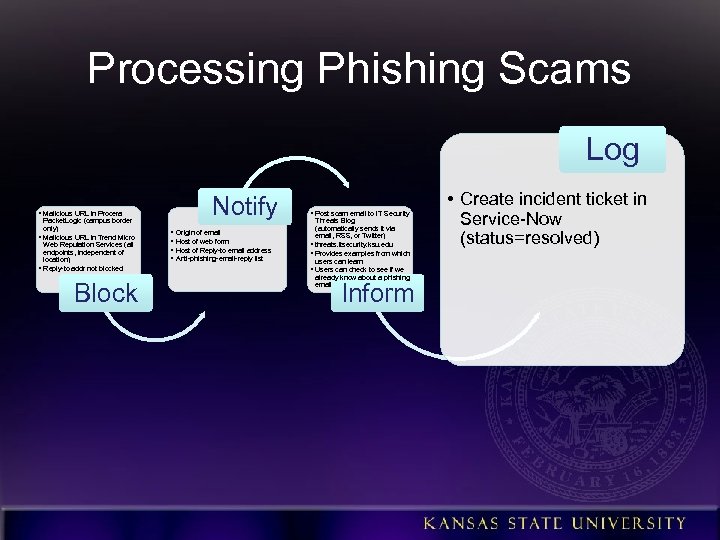
Processing Phishing Scams Log • Malicious URL in Procera Packet. Logic (campus border only) • Malicious URL in Trend Micro Web Reputation Services (all endpoints, independent of location) • Reply-to addr not blocked Block Notify • Origin of email • Host of web form • Host of Reply-to email address • Anti-phishing-email-reply list • Post scam email to IT Security Threats Blog (automatically sends it via email, RSS, or Twitter) • threats. itsecurity. ksu. edu • Provides examples from which users can learn • Users can check to see if we already know about a phishing email Inform • Create incident ticket in Service-Now (status=resolved)
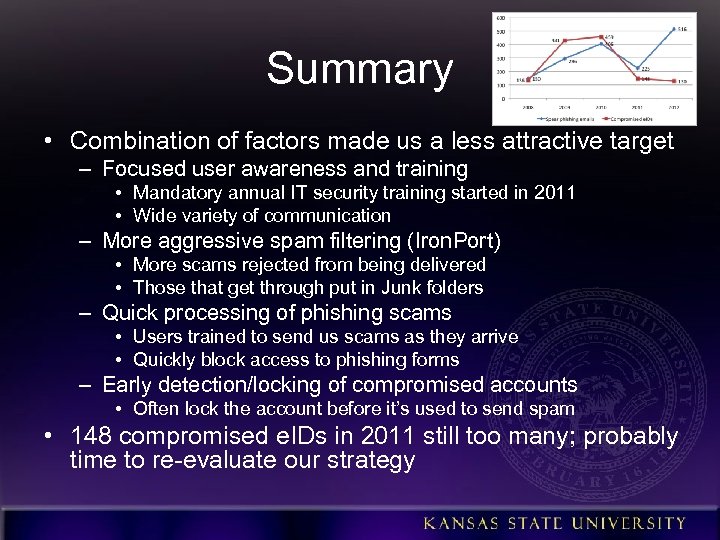
Summary • Combination of factors made us a less attractive target – Focused user awareness and training • Mandatory annual IT security training started in 2011 • Wide variety of communication – More aggressive spam filtering (Iron. Port) • More scams rejected from being delivered • Those that get through put in Junk folders – Quick processing of phishing scams • Users trained to send us scams as they arrive • Quickly block access to phishing forms – Early detection/locking of compromised accounts • Often lock the account before it’s used to send spam • 148 compromised e. IDs in 2011 still too many; probably time to re-evaluate our strategy
Dealing with spam block lists • Serious problem since so many people forward their @ksu. edu email to external accounts – 25% of current students forward – 31, 506 former students forward (!) – 15, 507 former employees forward • Merit has to request removal; have had mixed results • Paid for subscription to RBLmon (rblmon. com, $10/month) and Mx. Watch (mxtoolbox. com, $20/month) to alert us when we’re added to a block list
Other Strategies • To Phish. Me or not to Phish. Me. . . • Require annual IT security training for students • Check logs for access to other enterprise systems by compromised e. IDs – Submit bogus credentials to see how they’re used • • Outbound spam filtering Outbound mail rate limiting Use IDS or SIEM to alert us of a spam run DNS sinkhole malicious domains SPF and DKIM validation Remove scams from inboxes after delivery What has worked for you?
Q&R – Question & Response (i. e. , I don’t have all the answers!) What’s on your mind? ? ? ? ? ?
Скачать презентацию Winning the Battle Against Phishing Scams as the
3228c8e57552c0a3906eb69fa3e0397e.ppt