


 Скачать презентацию Win Plot The Data Analyst s Tool of Choice
e4c3507cdc4bcd11c4339153b733eb0b.ppt
- Количество слайдов: 21
 Win. Plot The Data Analyst’s Tool of Choice Roger Moody Computer Sciences Corporation Marshall Space Flight Center 1
 Agenda • • Objectives Significance Developmental Status Assessment of Use Innovation and Creativity Awards Closing Remarks 2
 Win. Plot Objectives • A desktop data analysis tool was needed to allow a user to conduct detailed analysis of unrestrictive amounts of propulsion test or flight data • Needed powerful tool to evaluate the large quantities of data in a very efficient and thorough manner • High sample-rate test/flight data analysis software did not exist which could handle the amount of data involved in analysis of space vehicle propulsion systems. • Commercially available tools did not … (get info here from J. Herndon) • The intent was to develop a tool that the engineer could easily use to perform post-test/flight data analysis • Ease in portability to data analyst’s desktops was key 3
 Win. Plot Background • Win. Plot and the read/write access libraries were developed solely by Roger Moody, CSC, for NASA/MSFC • Win. Plot’s architecture is object oriented providing efficient code development and maintainability for Windows-based software • Access to various test data is achieved through the use of a generic data access interface DLL (Dynamic Link Library) • New data formats can be easily incorporated by simply adding the format specific access functions to the generic data interface DLL • Data from different acquisition and recording systems easily aligned regardless of the sample rate 4
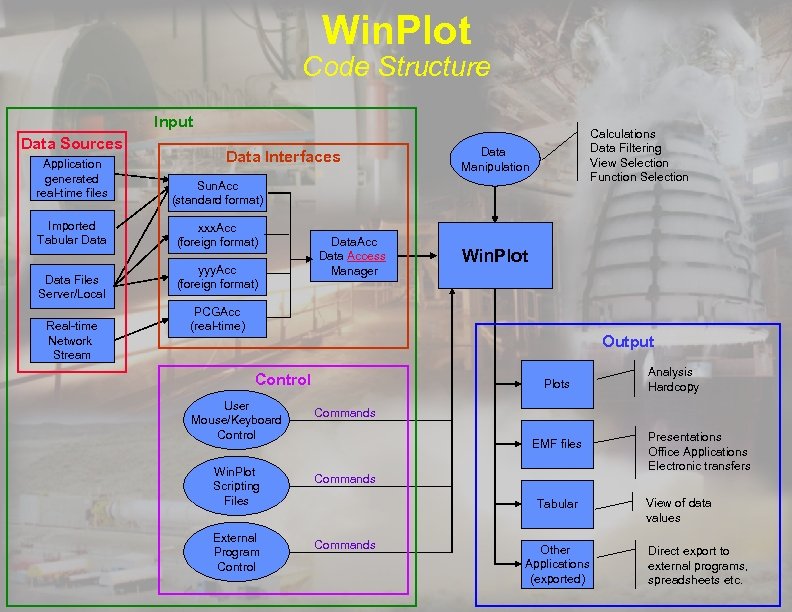 Win. Plot Code Structure Input Data Sources Application generated real-time files Imported Tabular Data Files Server/Local Real-time Network Stream Data Interfaces Calculations Data Filtering View Selection Function Selection Data Manipulation Sun. Acc (standard format) xxx. Acc (foreign format) yyy. Acc (foreign format) Data. Acc Data Access Manager Win. Plot PCGAcc (real-time) Output Control User Mouse/Keyboard Control Win. Plot Scripting Files External Program Control Plots Analysis Hardcopy Commands EMF files Commands Tabular Commands Other Applications (exported) Presentations Office Applications Electronic transfers View of data values Direct export to external programs, spreadsheets etc. 5
 Win. Plot Highlights of Capabilities • Runs on Windows 98, NT, XP, and 2000 Operating Systems • C++ Object-oriented Software • Win. Plot data files are easily created by using supplied write libraries and documentation • Executable and associated files size is 15. 5 Mb (including large help file) and performs best on processors running > 200 MHz and with RAM > 256 Mb 6
 Win. Plot Background • Win. Plot uses highly compressed data files (>10: 1), decompresses them as required, enabling quick access of very large files • Win. Plot’s native file format is structured such that complete decompression is not required to access specific data • Decompression is done within Win. Plot, which greatly reduces network bandwidth required for data servers • This file structure and compression algorithm allows Win. Plot to quickly access and display large amounts of data • Win. Plot can open up to 1000 files and display up to 1000 curves • Display still maintains individual data points for each curve to ensure proper evaluation of data • Amount of data is limited only by the memory and storage of desktop computer 7
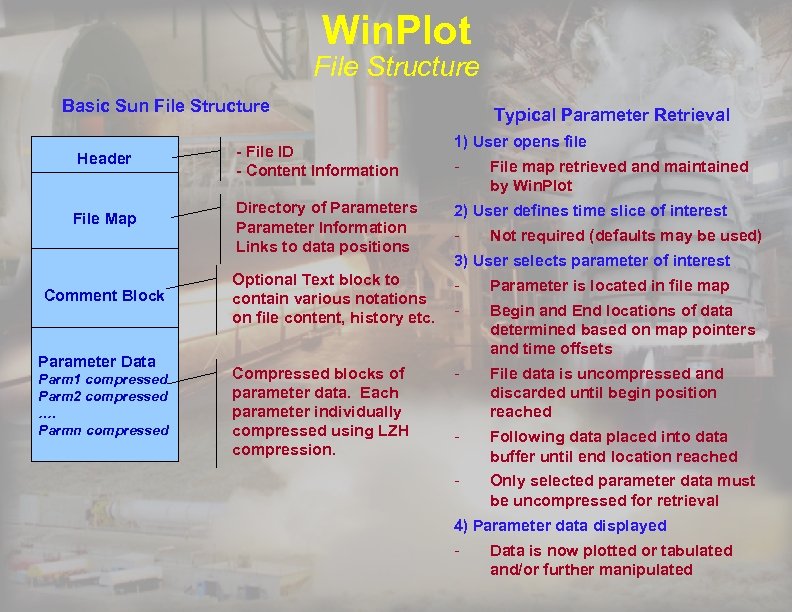 Win. Plot File Structure Basic Sun File Structure Header File Map Comment Block Parameter Data Parm 1 compressed Parm 2 compressed …. Parmn compressed - File ID - Content Information Typical Parameter Retrieval 1) User opens file - File map retrieved and maintained by Win. Plot Directory of Parameters Parameter Information Links to data positions 2) User defines time slice of interest Optional Text block to contain various notations on file content, history etc. - Parameter is located in file map - Begin and End locations of data determined based on map pointers and time offsets Compressed blocks of parameter data. Each parameter individually compressed using LZH compression. - File data is uncompressed and discarded until begin position reached - Following data placed into data buffer until end location reached - Only selected parameter data must be uncompressed for retrieval - Not required (defaults may be used) 3) User selects parameter of interest 4) Parameter data displayed - Data is now plotted or tabulated and/or further manipulated 8
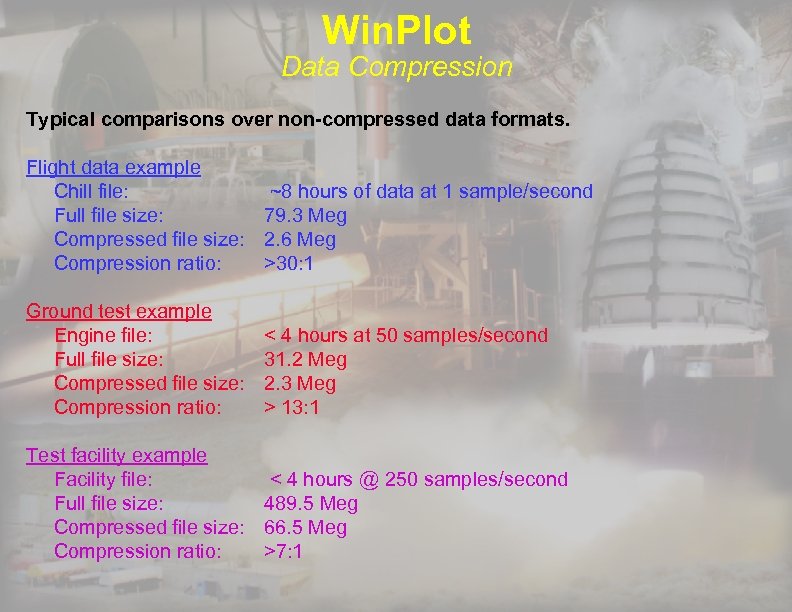 Win. Plot Data Compression Typical comparisons over non-compressed data formats. Flight data example Chill file: ~8 hours of data at 1 sample/second Full file size: 79. 3 Meg Compressed file size: 2. 6 Meg Compression ratio: >30: 1 Ground test example Engine file: Full file size: Compressed file size: Compression ratio: < 4 hours at 50 samples/second 31. 2 Meg 2. 3 Meg > 13: 1 Test facility example Facility file: < 4 hours @ 250 samples/second Full file size: 489. 5 Meg Compressed file size: 66. 5 Meg Compression ratio: >7: 1 9
 Win. Plot Developmental Status • Win. Plot is fully operational and has been implemented in flight and test data facilities across the country • During the development phase, Win. Plot went through extensive testing by both the government and industry to ensure it’s credibility • Each new release of Win. Plot goes through an extensive beta test period, with a 35 person beta test group, and verification process prior to formal release. • Boeing Rocketdyne conducts a formal Software Acceptance Test Procedure (ATP) prior to formal software release and use. • Updated versions of Win. Plot are never released with any known issues of system stability or reliability. 10
 Win. Plot Highlights of Capabilities • Win. Plot has standard Windows format and is controlled by pulldown menus or icons on the tool bar • Certain functions can also be controlled by keypad strokes or right mouse click • Key Features: • • Point and click zooming Selectable user default settings Scripts for pre-established analysis One-step export to office products Calculations/mathematical expressions Data query tool Markers and Text added to graphs Trending 11
 Win. Plot Significant Features • Scripting • All interactive functionality is supported in Win. Plot script language. • The comprehensive functional support of scripting allows a user to do everything from basic default setup to complete data analysis packages. • Expressions • Capability to perform a wide range of mathematical expressions, including standard math functions. • Allows users to make complex calculations by combining parameter data from various sources/files, constants and math functions all within the same expression with data automatically calculated for each point within a specified time period. • Real-time • Capability to display real-time data without limiting any functionality • All interactive and scripting capability is available for real-time data analysis • Real-time data can be intermixed with posttest data/flight data for comparative analysis without performing any special setups • Zoom and Pan – • Data views can be easily manipulated via mouse or keyboard to achieve desired plot • Scaling may be zoomed in/out or panned up/down/left/right to reach desired level of detail 12 • Axes may be set specifically to a desired precision
 Win. Plot Developmental Status • Win. Plot has an extensive on-line help with examples for each of its menu items • Icons have pop-up descriptions • Printed users guide is available • Win. Plot is very user-friendly and it’s basic features are frequently self-taught • Detailed classroom training is available • Training package developed by Boeing, Rocketdyne • Classes have been conducted by at several NASA centers and throughout the Boeing Company 13
 Win. Plot Publications and Awards • NASA On-line Software Catalog • Soon-to-be-released NASA Tech Brief Article • Computer Sciences Corporation’s prestigious Civil Group President’s Excellence Award- September 2002 • NASA Space Act Award- Certificate of Recognition in October 2002 • NASA Space Transportation Director Ingenuity Award- April 2002 • NASA Software Award-NASA Inventions and Contributions Board- January 02 14
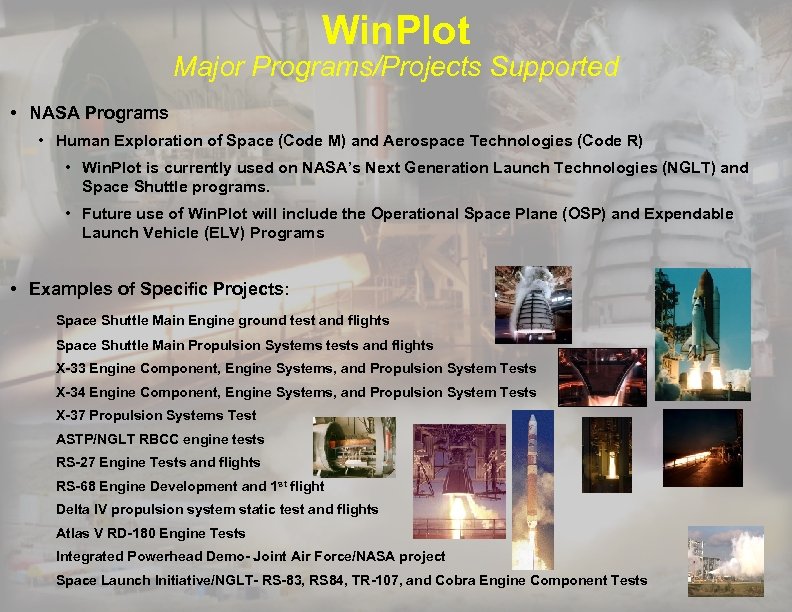 Win. Plot Major Programs/Projects Supported • NASA Programs • Human Exploration of Space (Code M) and Aerospace Technologies (Code R) • Win. Plot is currently used on NASA’s Next Generation Launch Technologies (NGLT) and Space Shuttle programs. • Future use of Win. Plot will include the Operational Space Plane (OSP) and Expendable Launch Vehicle (ELV) Programs • Examples of Specific Projects: Space Shuttle Main Engine ground test and flights Space Shuttle Main Propulsion Systems tests and flights X-33 Engine Component, Engine Systems, and Propulsion System Tests X-34 Engine Component, Engine Systems, and Propulsion System Tests X-37 Propulsion Systems Test ASTP/NGLT RBCC engine tests RS-27 Engine Tests and flights RS-68 Engine Development and 1 st flight Delta IV propulsion system static test and flights Atlas V RD-180 Engine Tests Integrated Powerhead Demo- Joint Air Force/NASA project Space Launch Initiative/NGLT- RS-83, RS 84, TR-107, and Cobra Engine Component Tests 15
 Win. Plot Current Government and Non-Government Users • Current Government Use • Current Non-Government Use (10 -50 Users) • NASA, MSFC ( 400+ Users) • Alliant Tech (Thiokol) • NASA, SSC ( 50 -250 Users) • GASL • Current Government Use (10 -50 Users) • Boeing, Huntington Beach • NASA, GRC • Florida Turbine Technologies • NASA, La. RC • Boeing Aircraft • NASA, White Sands • Det 8, SMC/MVC (CCTF) • U. S. Army AMCOM • Boeing, WSTF • U. S. Army Thaad Project • Boeing, Wichita Kansas • Current Non-Government Use • Penn State Applied Research Lab • Boeing, Rocketdyne, Canoga Park ( 400+ Users) • Health Tactics • Boeing, Rocketdyne, KSC ( 50 -250 Users) • Sverdrup Naval Systems Group • Johnson Controls, Inc • Plumbrook Operations Support Group • Stone Engineering Company • Aerojet 16
 Win. Plot Significance/Tangible Value • Data analyses more thorough, easier, faster, and ultimately cheaper than the methods previously used by NASA and the aerospace industry. • Reduced the average time of a propulsion test/flight data analysis process from ~24 hours to 4 hours • Allows more accurate and faster problem resolution. • Reduced I. T. and support personnel cost by 75% @ MSFC by allowing the test/flight data to be made available directly at the engineer’s desktop. • Similar impacts at other government and nongovernment facilities. 17
 Win. Plot Benefits • Allows researchers and engineers to examine data with precision not previously or currently competitively available. • Additional Benefits • Efficient performance reduces the time spent in research/test facilities. • Reduced man-hours, facility power consumption, and streamlined testing schedules • Helps eliminates redundant testing, fuel and manpower costs are lowered, and the risks of hazardous testing can be minimized. NASA/MSFC COST SAVINGS (to date) • Conservatively estimated at greater than $5 M (since 1998) • Based on increased analysis efficiency and decreased data processing/infrastructure 18
 Win. Plot Projected Future Use • NASA’s/Air Force ELV/EELV Program • Lockheed Martin- Atlas • Boeing- Delta • OSC- Pegasus • NASA’s OSP Program • DOD Military Aircraft Industry • DOD Air Force Research Lab- Edwards AFB • Expanded use at DOD- Army • Expanded use at DOD- NAVY • Expanded use at other NASA Centers- Ames, GRC, La. RC, JSC, JPL • Expanded use at University Research Laboratories Letters of Endorsement- Please See Attached 19
 Win. Plot Features to be Demonstrated • • • Pull down menus Help file Parameter filtering Zoom Min / max / avg Delta values Script recording Favorites Symbolic names • • Query Tool Script file Tiling plots Filter helper Export Script execution Power Point presentation Integration with Win. Display tool 20
 Win. Plot Testimonials • Special investigations … can be run in a few hours. The compressed file format takes only minutes to transfer and standardized processing programs run in a tenth of the time of the old programs. • I know of many instances where the speed, the versatility, and the ability to handle huge amounts of data have made Winplot the fastest, if not the only, tool available to rapidly assess historical data during flight anomaly investigations. • I have been extolling the virtues of Winplot to people within our organization as well as to the customers that come to our facilities to conduct test programs. Every test engineer at GASL now uses Winplot as do most of the customers that have been introduced to it. I have yet to hear a truly negative comment about the software package in all of the years of use at our facility. • Winplot has become such a standard tool for us that we often take for granted how truly amazing this code really is. It is our primary tool to plot and analyze the wide array of data that forms the backbone of our work. Winplot is as much a part of our daily activities as a word processor or a spreadsheet. • Winplot is used not only to examine collected test data, but also in coordination with our own analytical modeling tools. We use it to simultaneously plot test data and analytical model results. • Through all of this, Roger has continued with his unfailing customer focus, his inventive genius, and his willingness to listen to new ideas and try new things. His attention to detail, meticulous documentation, and thorough testing reveals itself in nearly bug-free software 21 releases.