


 Скачать презентацию What is Yahoo Trip Planner Trip Planner
5af2149cc7aa148e1d1ea8e08ee5b264.ppt
- Количество слайдов: 27
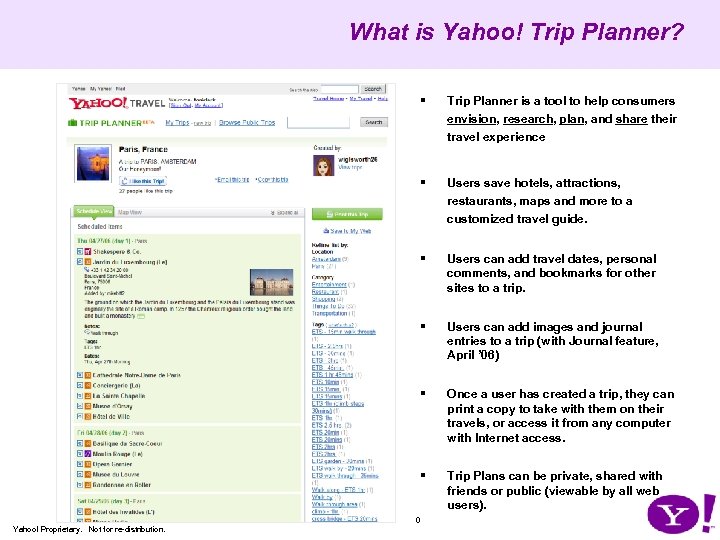 What is Yahoo! Trip Planner? § Trip Planner is a tool to help consumers envision, research, plan, and share their travel experience § Users save hotels, attractions, restaurants, maps and more to a customized travel guide. § Users can add travel dates, personal comments, and bookmarks for other sites to a trip. § Users can add images and journal entries to a trip (with Journal feature, April ’ 06) § Once a user has created a trip, they can print a copy to take with them on their travels, or access it from any computer with Internet access. § Trip Plans can be private, shared with friends or public (viewable by all web users). 0 Yahoo! Proprietary. Not for re-distribution.
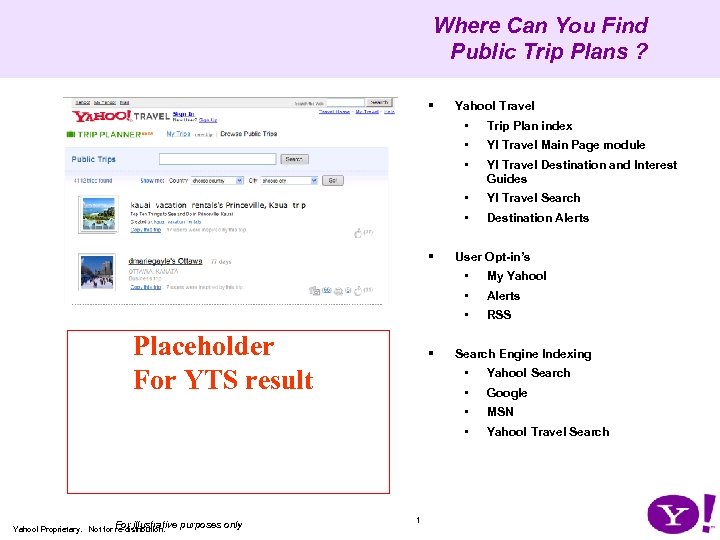 Where Can You Find Public Trip Plans ? § Yahoo! Travel • • Y! Travel Main Page module • Y! Travel Destination and Interest Guides • Y! Travel Search • § Trip Plan index Destination Alerts User Opt-in’s • • § Alerts • Placeholder For YTS result My Yahoo! RSS Search Engine Indexing • 1 Google MSN • purposes only Yahoo! Search • For illustrative Yahoo! Proprietary. Not for re-distribution. • Yahoo! Travel Search
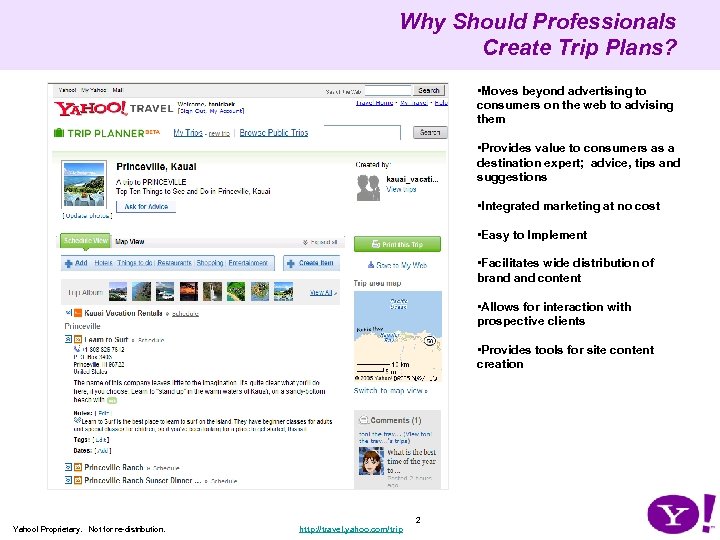 Why Should Professionals Create Trip Plans? • Moves beyond advertising to consumers on the web to advising them • Provides value to consumers as a destination expert; advice, tips and suggestions • Integrated marketing at no cost • Easy to Implement • Facilitates wide distribution of brand content • Allows for interaction with prospective clients • Provides tools for site content creation 2 Yahoo! Proprietary. Not for re-distribution. http: //travel. yahoo. com/trip
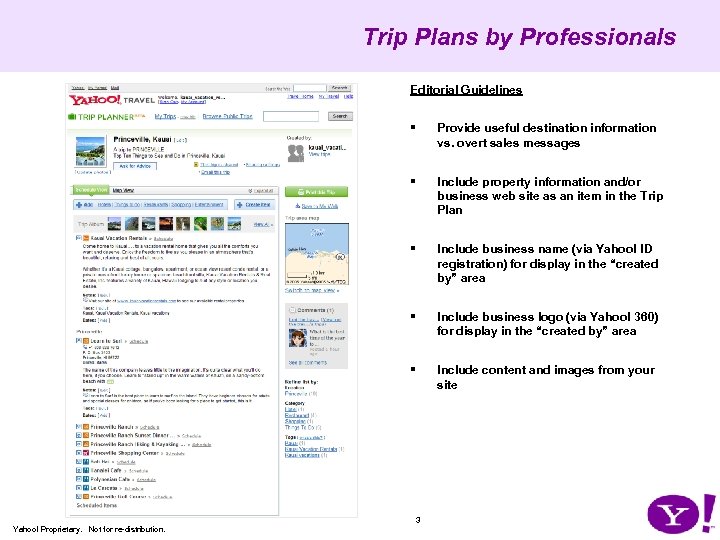 Trip Plans by Professionals Editorial Guidelines § Provide useful destination information vs. overt sales messages § Include property information and/or business web site as an item in the Trip Plan § Include business name (via Yahoo! ID registration) for display in the “created by” area § Include business logo (via Yahoo! 360) for display in the “created by” area § Include content and images from your site 3 Yahoo! Proprietary. Not for re-distribution.
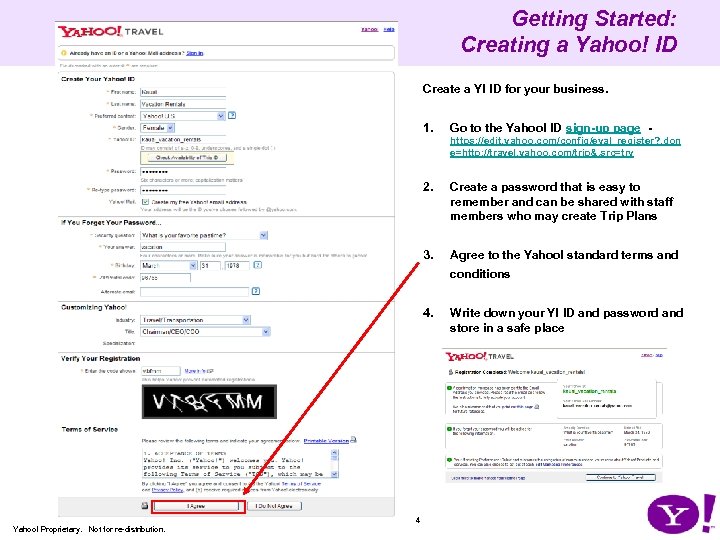 Getting Started: Creating a Yahoo! ID Create a Y! ID for your business. 1. Go to the Yahoo! ID sign-up page https: //edit. yahoo. com/config/eval_register? . don e=http: //travel. yahoo. com/trip&. src=trv 2. Create a password that is easy to remember and can be shared with staff members who may create Trip Plans 3. Agree to the Yahoo! standard terms and conditions 4. 4 Yahoo! Proprietary. Not for re-distribution. Write down your Y! ID and password and store in a safe place
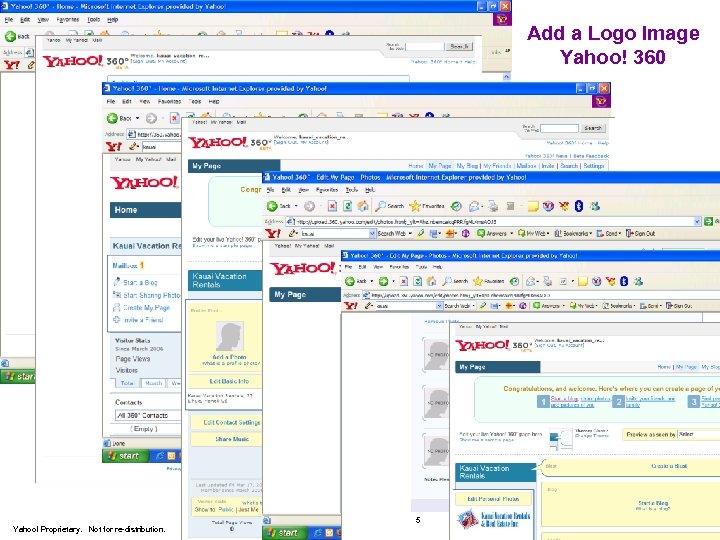 Add a Logo Image Yahoo! 360 5 Yahoo! Proprietary. Not for re-distribution.
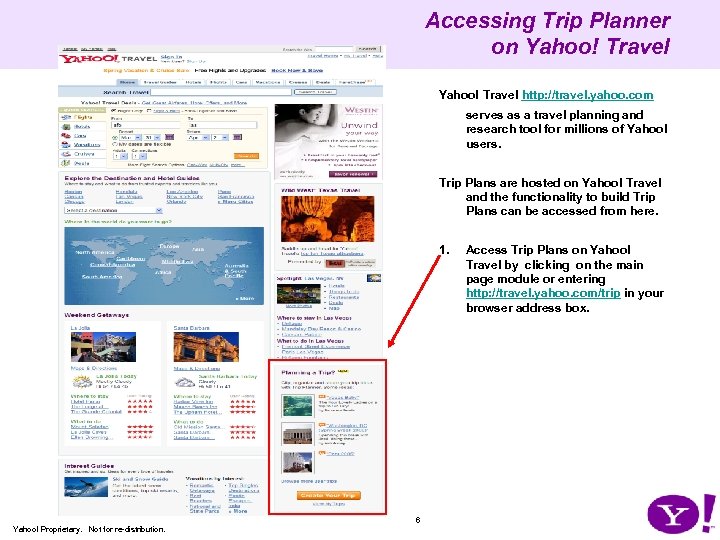 Accessing Trip Planner on Yahoo! Travel http: //travel. yahoo. com serves as a travel planning and research tool for millions of Yahoo! users. Trip Plans are hosted on Yahoo! Travel and the functionality to build Trip Plans can be accessed from here. 1. 6 Yahoo! Proprietary. Not for re-distribution. Access Trip Plans on Yahoo! Travel by clicking on the main page module or entering http: //travel. yahoo. com/trip in your browser address box.
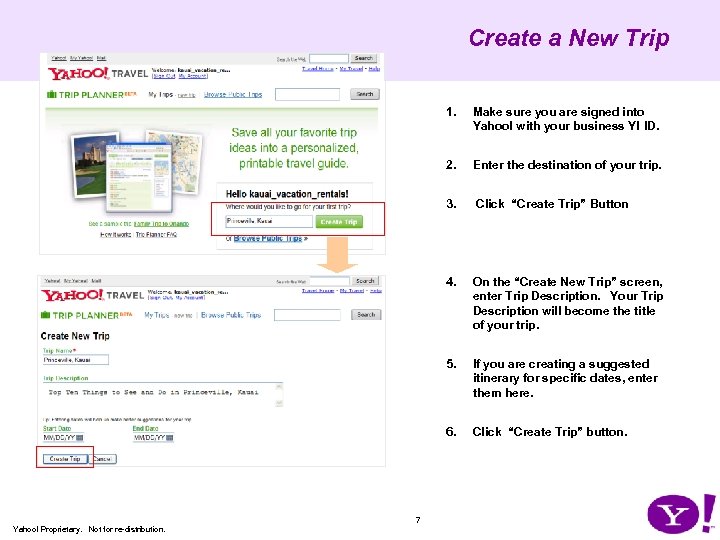 Create a New Trip 1. 2. Click “Create Trip” Button 4. On the “Create New Trip” screen, enter Trip Description. Your Trip Description will become the title of your trip. 5. If you are creating a suggested itinerary for specific dates, enter them here. 6. 7 Enter the destination of your trip. 3. Yahoo! Proprietary. Not for re-distribution. Make sure you are signed into Yahoo! with your business Y! ID. Click “Create Trip” button.
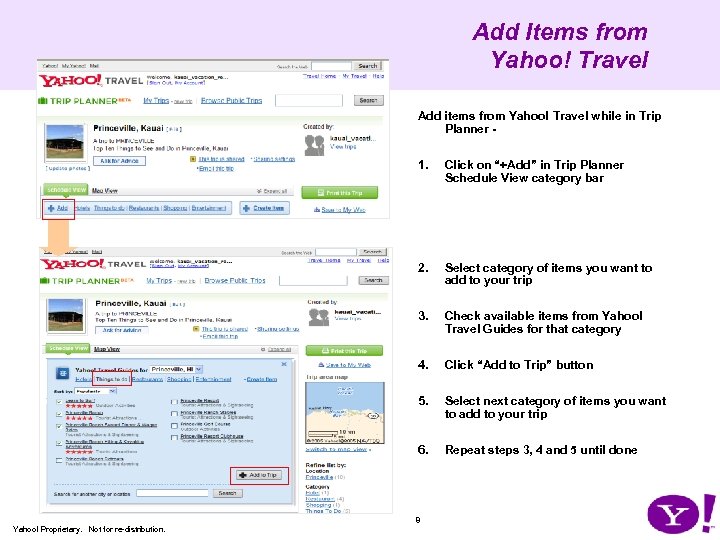 Add Items from Yahoo! Travel Add items from Yahoo! Travel while in Trip Planner - 1. Click on “+Add” in Trip Planner Schedule View category bar 2. Select category of items you want to add to your trip 3. Check available items from Yahoo! Travel Guides for that category 4. Click “Add to Trip” button 5. Select next category of items you want to add to your trip 6. Repeat steps 3, 4 and 5 until done 8 Yahoo! Proprietary. Not for re-distribution.
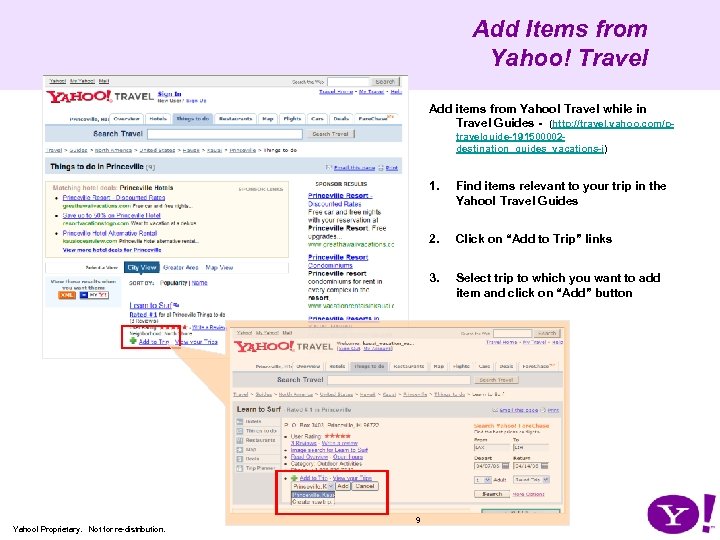 Add Items from Yahoo! Travel Add items from Yahoo! Travel while in Travel Guides - (http: //travel. yahoo. com/ptravelguide-191500002 destination_guides_vacations-i) 1. 2. 9 Click on “Add to Trip” links 3. Yahoo! Proprietary. Not for re-distribution. Find items relevant to your trip in the Yahoo! Travel Guides Select trip to which you want to add item and click on “Add” button
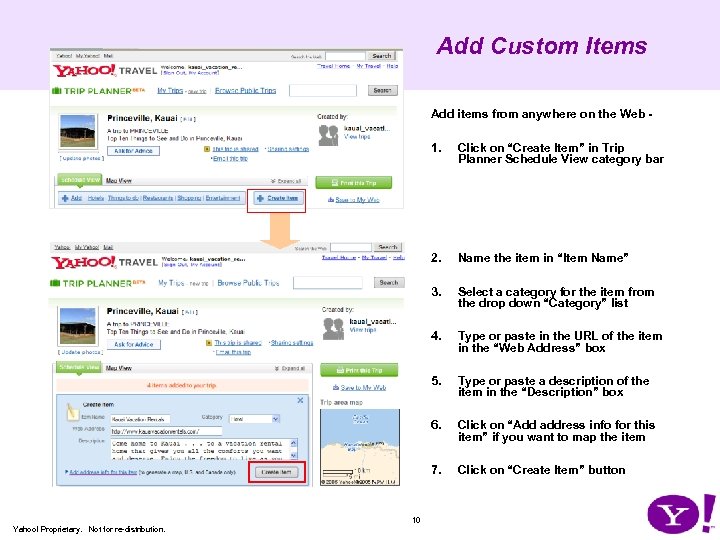 Add Custom Items Add items from anywhere on the Web - 1. 2. Select a category for the item from the drop down “Category” list 4. Type or paste in the URL of the item in the “Web Address” box 5. Type or paste a description of the item in the “Description” box 6. Click on “Add address info for this item” if you want to map the item 7. 10 Name the item in “Item Name” 3. Yahoo! Proprietary. Not for re-distribution. Click on “Create Item” in Trip Planner Schedule View category bar Click on “Create Item” button
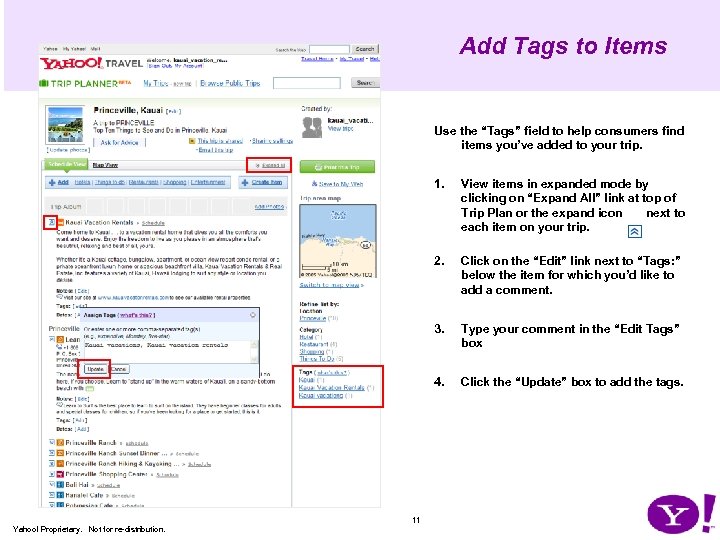 Add Tags to Items Use the “Tags” field to help consumers find items you’ve added to your trip. 1. 2. Type your comment in the “Edit Tags” box 4. 11 Click on the “Edit” link next to “Tags: ” below the item for which you’d like to add a comment. 3. Yahoo! Proprietary. Not for re-distribution. View items in expanded mode by clicking on “Expand All” link at top of Trip Plan or the expand icon next to each item on your trip. Click the “Update” box to add the tags.
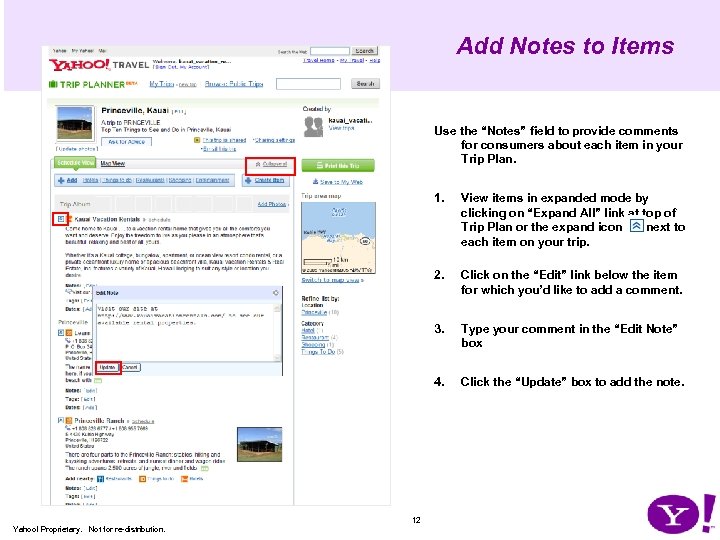 Add Notes to Items Use the “Notes” field to provide comments for consumers about each item in your Trip Plan. 1. 2. Type your comment in the “Edit Note” box 4. 12 Click on the “Edit” link below the item for which you’d like to add a comment. 3. Yahoo! Proprietary. Not for re-distribution. View items in expanded mode by clicking on “Expand All” link at top of Trip Plan or the expand icon next to each item on your trip. Click the “Update” box to add the note.
 Add Driving Directions 13 Yahoo! Proprietary. Not for re-distribution.
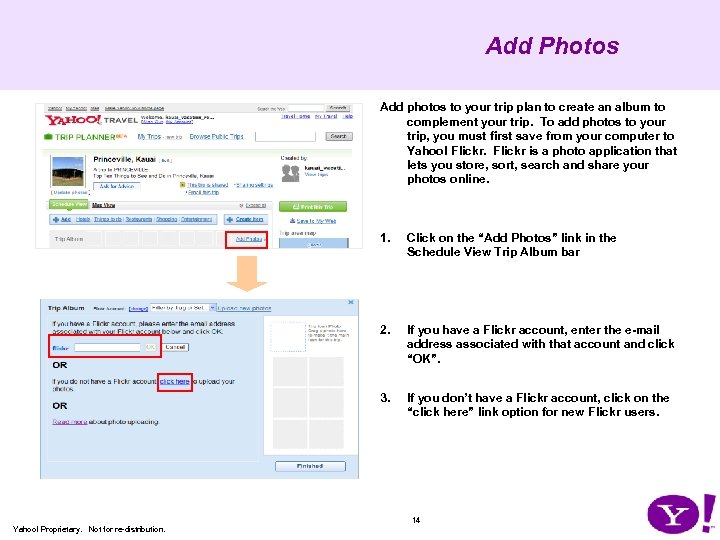 Add Photos Add photos to your trip plan to create an album to complement your trip. To add photos to your trip, you must first save from your computer to Yahoo! Flickr is a photo application that lets you store, sort, search and share your photos online. 1. Click on the “Add Photos” link in the Schedule View Trip Album bar 2. If you have a Flickr account, enter the e-mail address associated with that account and click “OK”. 3. If you don’t have a Flickr account, click on the “click here” link option for new Flickr users. 14 Yahoo! Proprietary. Not for re-distribution.
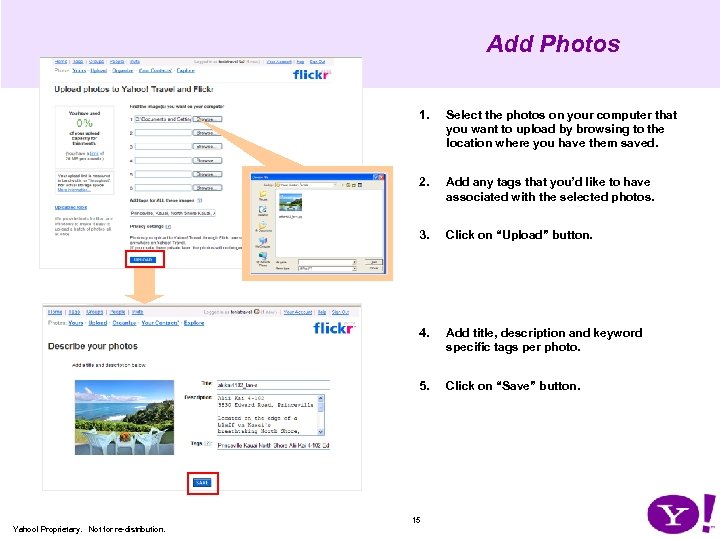 Add Photos 1. Select the photos on your computer that you want to upload by browsing to the location where you have them saved. 2. Add any tags that you’d like to have associated with the selected photos. 3. Click on “Upload” button. 4. Add title, description and keyword specific tags per photo. 5. Click on “Save” button. 15 Yahoo! Proprietary. Not for re-distribution.
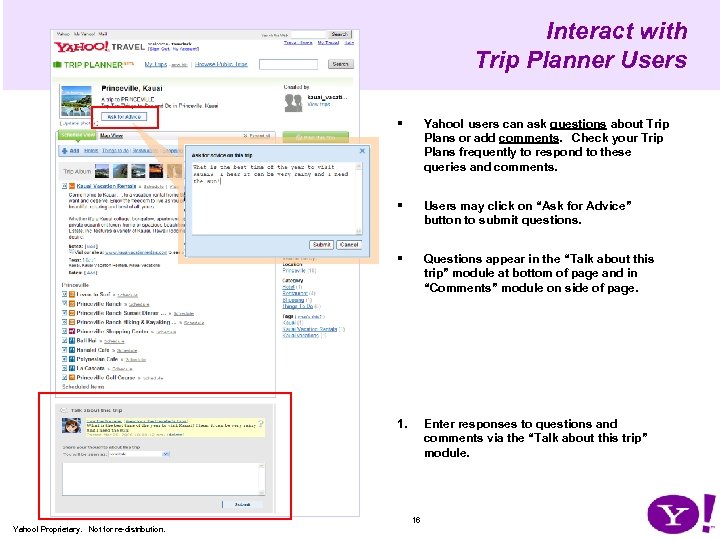 Interact with Trip Planner Users § Yahoo! users can ask questions about Trip Plans or add comments. Check your Trip Plans frequently to respond to these queries and comments. § Users may click on “Ask for Advice” button to submit questions. § Questions appear in the “Talk about this trip” module at bottom of page and in “Comments” module on side of page. 1. Enter responses to questions and comments via the “Talk about this trip” module. 16 Yahoo! Proprietary. Not for re-distribution.
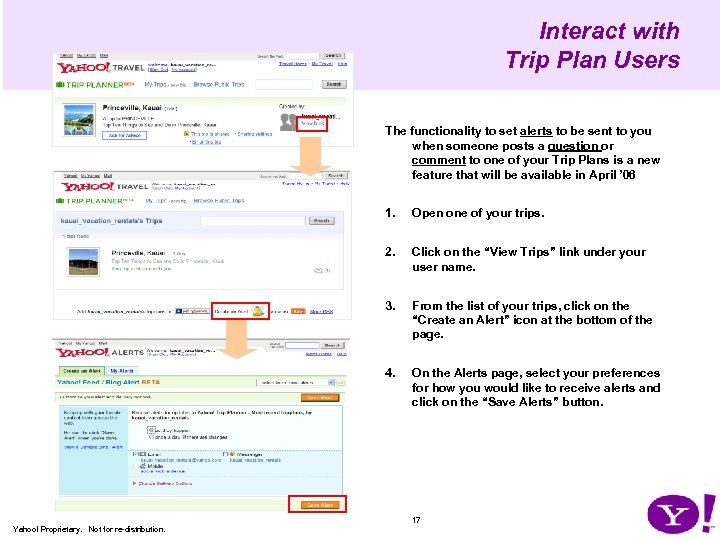 Interact with Trip Plan Users The functionality to set alerts to be sent to you when someone posts a question or comment to one of your Trip Plans is a new feature that will be available in April ’ 06 1. Open one of your trips. 2. Click on the “View Trips” link under your user name. 3. From the list of your trips, click on the “Create an Alert” icon at the bottom of the page. 4. On the Alerts page, select your preferences for how you would like to receive alerts and click on the “Save Alerts” button. 17 Yahoo! Proprietary. Not for re-distribution.
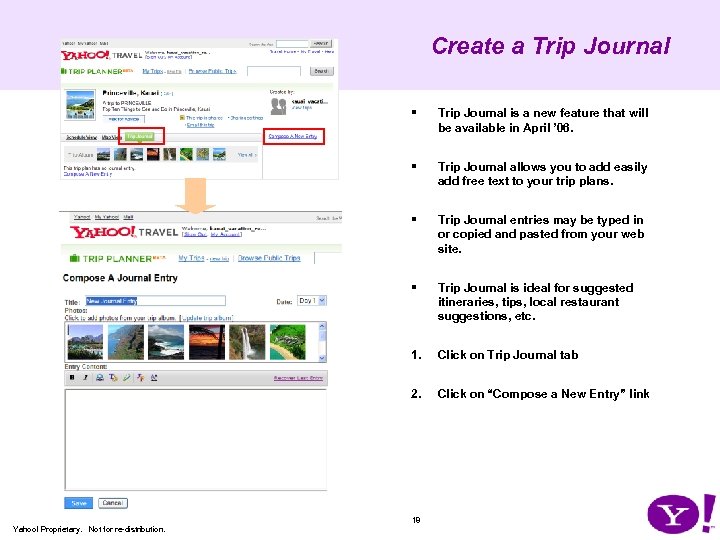 Create a Trip Journal § Trip Journal is a new feature that will be available in April ’ 06. § Trip Journal allows you to add easily add free text to your trip plans. § Trip Journal entries may be typed in or copied and pasted from your web site. § Trip Journal is ideal for suggested itineraries, tips, local restaurant suggestions, etc. 1. Click on Trip Journal tab 2. Click on “Compose a New Entry” link 18 Yahoo! Proprietary. Not for re-distribution.
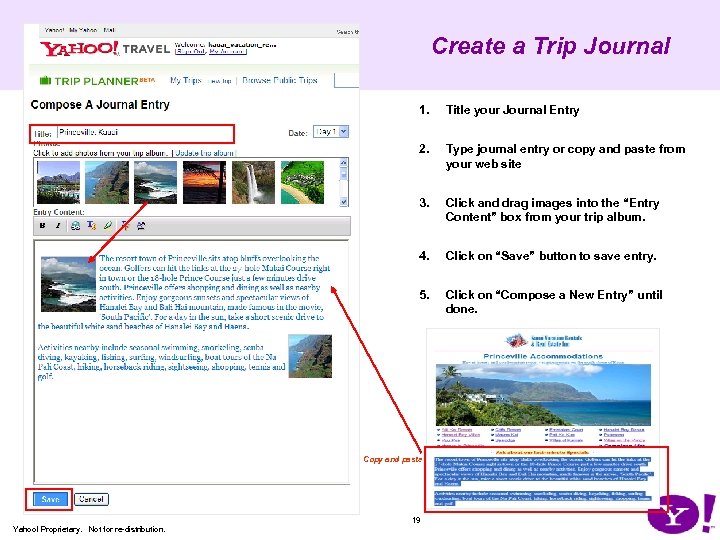 Create a Trip Journal 1. Title your Journal Entry 2. Type journal entry or copy and paste from your web site 3. Click and drag images into the “Entry Content” box from your trip album. 4. Click on “Save” button to save entry. 5. Click on “Compose a New Entry” until done. Copy and paste 19 Yahoo! Proprietary. Not for re-distribution.
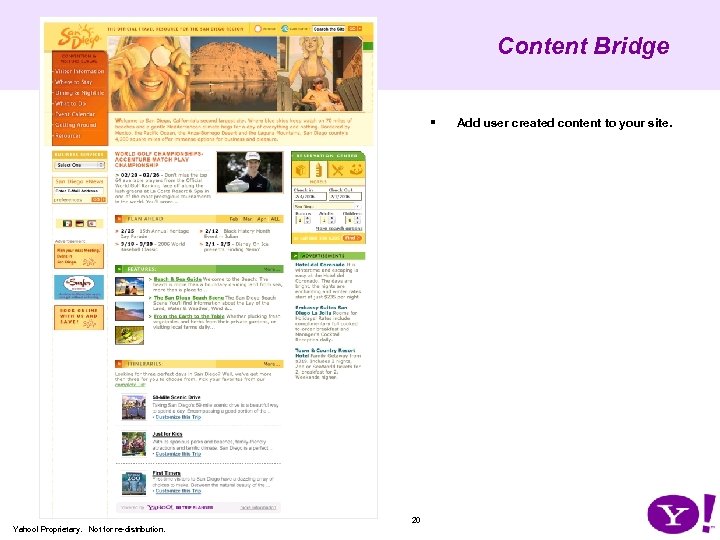 Content Bridge § 20 Yahoo! Proprietary. Not for re-distribution. Add user created content to your site.
 “Add to My Trip” buttons 21 Yahoo! Proprietary. Not for re-distribution.
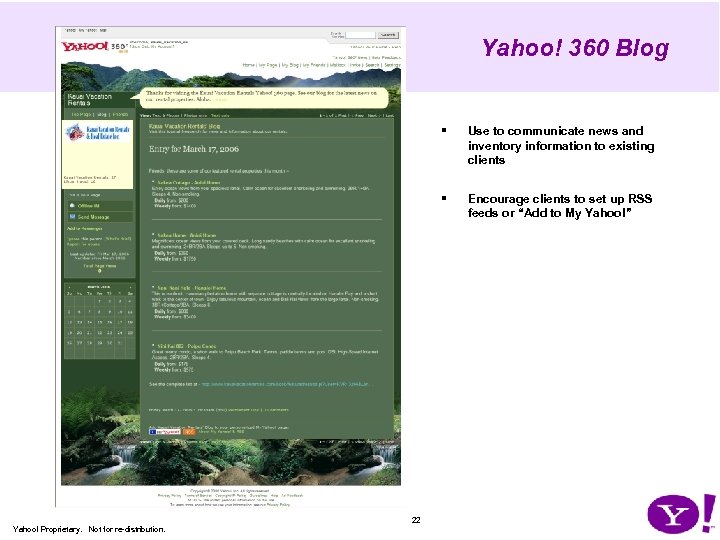 Yahoo! 360 Blog § § 22 Yahoo! Proprietary. Not for re-distribution. Use to communicate news and inventory information to existing clients Encourage clients to set up RSS feeds or “Add to My Yahoo!”
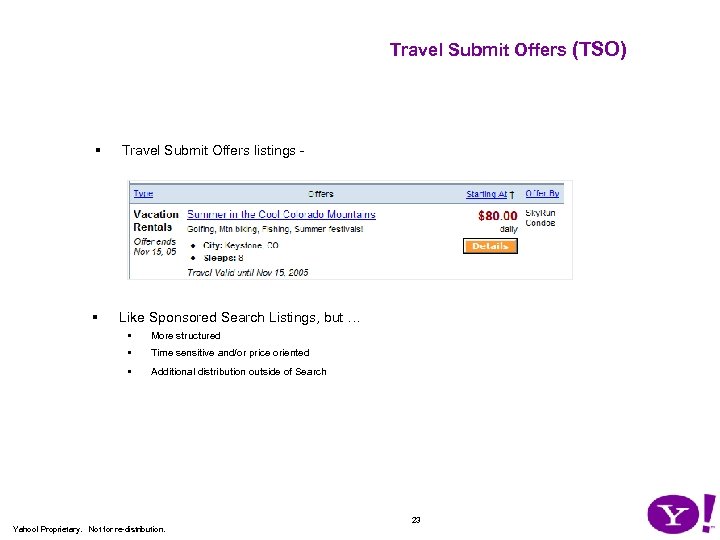 Travel Submit Offers (TSO) § Travel Submit Offers listings - § Like Sponsored Search Listings, but … • More structured • Time sensitive and/or price oriented • Additional distribution outside of Search 23 Yahoo! Proprietary. Not for re-distribution.
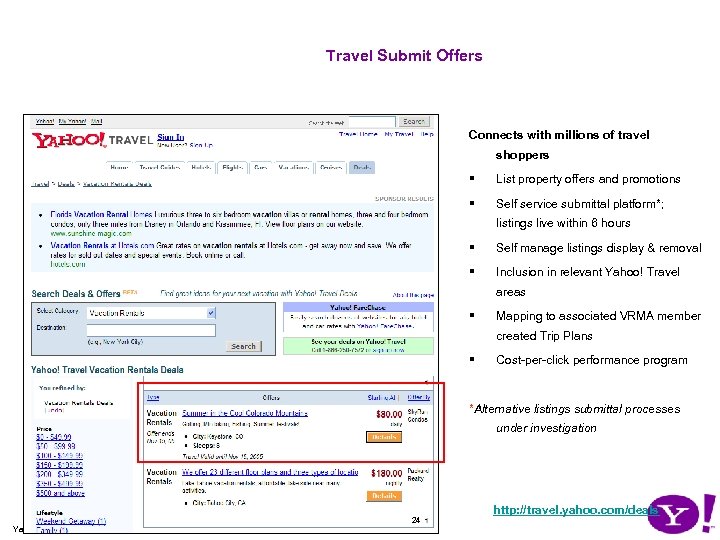 Travel Submit Offers Connects with millions of travel shoppers § List property offers and promotions § Self service submittal platform*; listings live within 6 hours § Self manage listings display & removal § Inclusion in relevant Yahoo! Travel areas § Mapping to associated VRMA member created Trip Plans § Cost-per-click performance program *Alternative listings submittal processes under investigation 24 Yahoo! Proprietary. Not for re-distribution. http: //travel. yahoo. com/deals
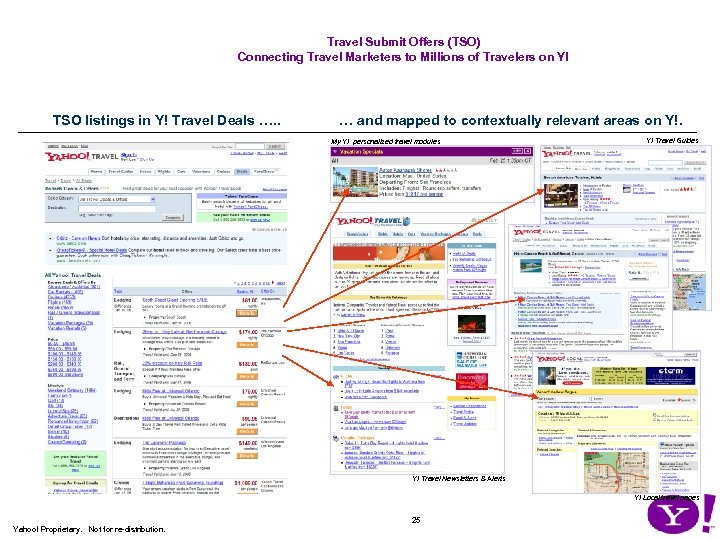 Travel Submit Offers (TSO) Connecting Travel Marketers to Millions of Travelers on Y! TSO listings in Y! Travel Deals …. . … and mapped to contextually relevant areas on Y!. My Y! personalized travel modules Y! Travel Guides Y! Travel Newsletters & Alerts Y! Local travel pages 25 Yahoo! Proprietary. Not for re-distribution.
 Mapping Travel Submit Offers to Trip Plans by Y! ID § Travel professional may be exclusive “Sponsored Deals” provider by participating in Y! Travel Submit and maintaining a minimum of five corresponding deals • § Items included from link share sites will include link share partner logo • 26 Yahoo! Proprietary. Not for re-distribution. (see …xxxx…for more information on Trip Plan Pro Travel Submit program) ( see …. xxx …. for more information on the Y! Trip Plan link share program).