


 Скачать презентацию WHAT IS RAID Christopher J Dutra Seton Hall
6a8087ab17f430c3d86797c97cea3f5f.ppt
- Количество слайдов: 12
 WHAT IS RAID? Christopher J Dutra Seton Hall University
 What is RAID? RAID stands for a redundant array of inexpensive disks. (sometimes inexpensive is replaced with independent). RAID is a storage scheme in which many hard disks are bundled together in an “array” to act as one disk. Developed by UC-Berkley scientists in 1987.
 Benefits Higher Data Security Fault Tolerance Improved Availability Increased Storage Capacity with Integrated Disks Improved Performance
 Higher Data Security A RAID can still operate if a single disk inside the RAID fails. Also would not require any data to be restored from a backup disk. Primary reason why people purchase RAIDs.
 Tradeoffs There are three components to RAID servers to consider when purchasing: Speed : overall performance, capacity Reliability : amount of fault tolerance expected Cost : amount you are willing to spend. General rule of thumb is “pick two. ” Also, for complex raid servers, hours of setup and maintenance is expected.
 RAID Limitations RAID won’t protect data loss against: viruses power surges multiple hardware failures (sometimes) sabotage IMPORTANT : MAINTAIN CURRENT BACKUPS.
 RAID LEVELS RAID 0 – Files are broken into “stripes” of a userdefined size of the array, and stripes are sent to each disk in the array. It has worse reliability than a hard disk, used for greater performance. Cheap to implement, but not very reliable. Must maintain current backups should RAID 0 fail.
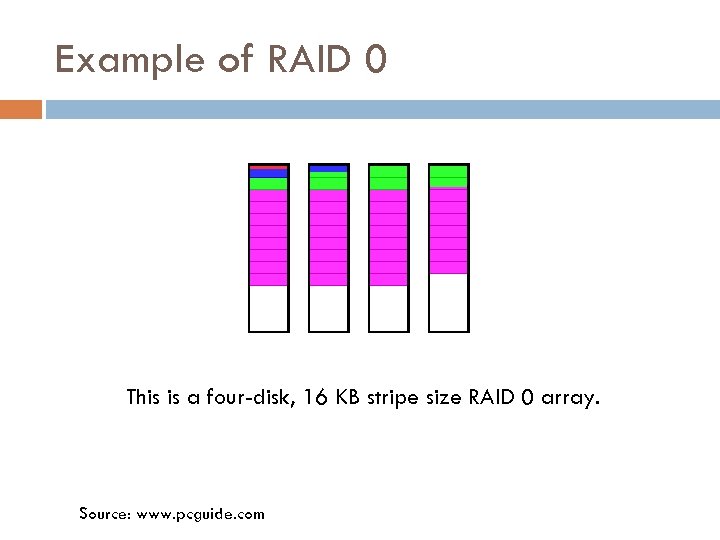 Example of RAID 0 This is a four-disk, 16 KB stripe size RAID 0 array. Source: www. pcguide. com
 RAID 1 RAID 1– has its data duplicated on another hard disk. That way, should one of the hard drives fail, the other is operable until the faulty drive is replaced. Also, a technique called duplexing provides fault tolerance against either hard drive or the RAID controller. Performance is compromised slightly.
 RAID 5 RAID level 5—one of the most popular RAID configurations, RAID 5 stripes both data and parity information across three or more drives. Fault tolerance is maintained by ensuring that the parity information for any given block of data is placed on a drive separate from those used to store the data itself. (pcguide. com)
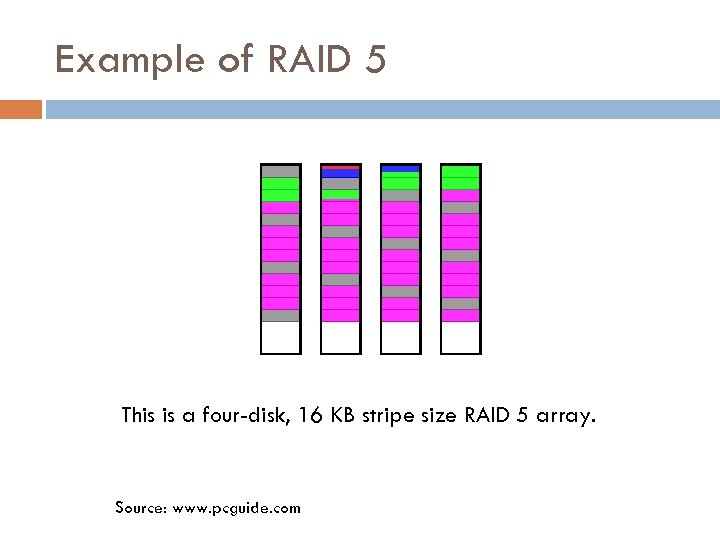 Example of RAID 5 This is a four-disk, 16 KB stripe size RAID 5 array. Source: www. pcguide. com
 Why buy RAID? Business servers – provides data protection (especially good for when loss of data could cripple a business) Workstations – for graphical design, video editing, a RAID system would improve the performance of high-overhead programs (such as 3 d. Studio Max). Regular PC’s –do not necessarily need RAID, could help in the future though (as video games and other applications become more costly in resources).