


 Скачать презентацию What is a project a group of
33572b194ccd5bf15f7d0a6c2169feb5.ppt
- Количество слайдов: 35
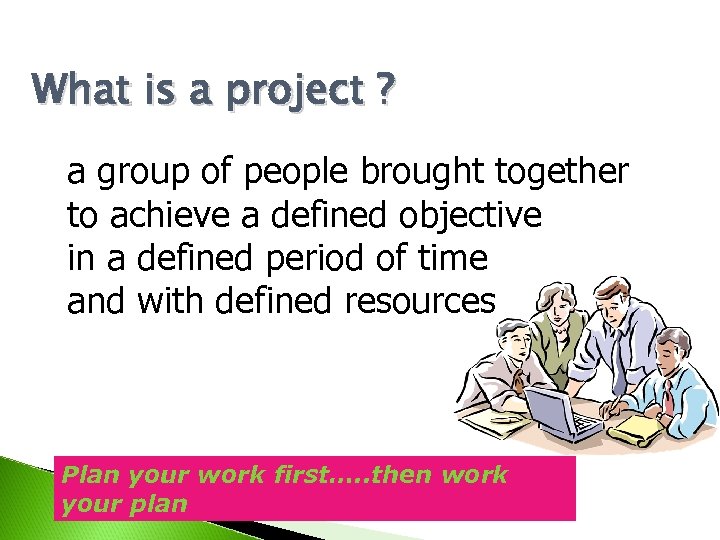 What is a project ? a group of people brought together to achieve a defined objective in a defined period of time and with defined resources Plan your work first…. . then work your plan
 Measuring success? deliverables: what will be achieved deadlines: when will it happen milestones: end of each significant stage are there quantitative parameters ?
 Success or failure ? • deadline achieved or if not then why? • budgets met or reasons for variances • acceptability of the finished item match to specification/customer expectations • consequences culture change or new strategic alliances
 Project management develops innovative, creative and committed managers provides a vehicle for measurement of resource effectiveness and for optimisation permits strategic accountability
 What is project management The application of a collection of tools and techniques to direct the use of diverse resources towards the accomplishment of a unique, complex, one time task within time, cost and quality constraints. Its origins lie in World War II, when the military authorities used the techniques of operational research to plan the optimum use of resources. One of these techniques was the use of networks to represent a system of related activities 5
 Characteristic of a project A unique, one-time operational activity or effort l Requires the completion of a large number of interrelated activities l Established to achieve specific objective l Resources, such as time and/or money, are limited l Typically has its own management structure l Need leadership l 6
 Project Management Process Project planning Project scheduling Project control Project team ◦ made up of individuals from various areas and departments within a company Matrix organization ◦ a team structure with members from functional areas, depending on skills required Project Manager ◦ most important member of project team Scope statement ◦ a document that provides an understanding, justification, and expected result of a project Statement of work ◦ written description of objectives of a project Organizational Breakdown Structure ◦ a chart that shows which organizational units are responsible for work items Responsibility Assignment Matrix ◦ shows who is responsible for work in a project 7
 Work breakdown structure A method of breaking down a project into individual elements ( components, subcomponents, activities and tasks) in a hierarchical structure which can be scheduled and cost It defines tasks that can be completed independently of other tasks, facilitating resource allocation, assignment of responsibilities and measurement and control of the project It is foundation of project planning It is developed before identification of dependencies and estimation of activity durations It can be used to identity the tasks in the CPM and PERT 8
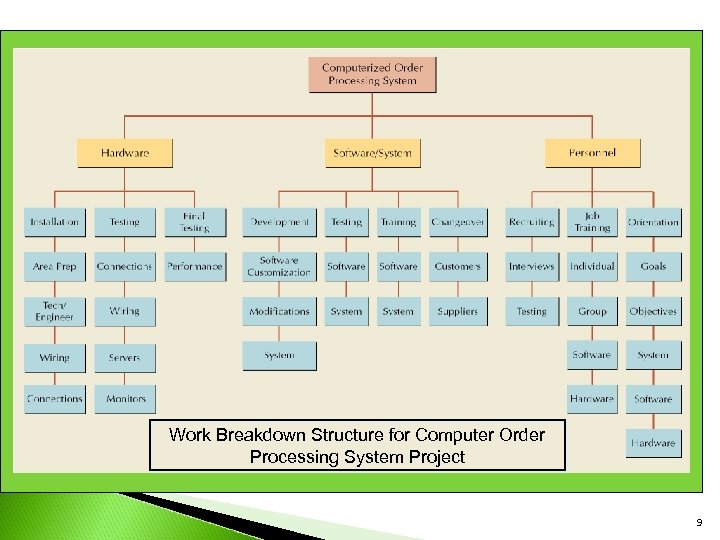 Work Breakdown Structure for Computer Order Processing System Project 9
 Project Planning Resource Availability and/or Limits ◦ Due date, late penalties, early completion incentives ◦ Budget Activity Information ◦ Identify all required activities ◦ Estimate the resources required (time) to complete each activity ◦ Immediate predecessor(s) to each activity needed to create interrelationships 10
 Network Analysis A tool for planning, scheduling, monitoring and coordinating large and complex projects comprising of number of activities Concern- minimizing some measure of performance of system such as total completion time for the project, overall cost 11
 Objectives Minimization of total time Minimization of total cost Minimization of Time for a given cost Minimization of cost for a given total time Minimization of idle resources Minimize production delays 12
 Network diagram Graphical flow plan of the activities that must be accomplished for completing the project. Arranges the activities in logical sequence following the precedence- succedence relationships between the activities.
 Project Scheduling and Control Techniques Gantt Chart Critical Path Method (CPM) Program Evaluation and Review Technique (PERT) 14
 Program Evaluation Review Technique (PERT) graphic representation of schedule for project ◦ developed by USN for Polaris missile programme shows ◦ sequence of tasks ◦ which tasks can be performed simultaneously ◦ permits determination of the critical path for the individual tasks to be completed on time in order for the project to meet its completion deadline
 Project Network • Network analysis is the general name given to certain specific techniques which can be used for the planning, management and control of projects Use of nodes and arrows Arrows An arrow leads from tail to head directionally ◦ Indicate ACTIVITY, a time consuming effort that is required to perform a part of the work. Nodes A node is represented by a circle - Indicate EVENT, a point in time where one or more activities start and/or finish. 18
 Activity A task or a certain amount of work required in the project. Requires time to complete , Represented by an arrow 1. 2. 3. 4. ◦ ◦ ◦ Concurrent Activity – activities that are carried out concurrently. Predecessor Activity – activity which must be completed before one or more other activities start Successor Activity – activity which started immediately after one or more of other activities are completed. Dummy Activity Indicates only precedence relationships Does not consume any resources Does not require any time of effort Indicated by dotted line Required when two or more parallel activities in a project have same head and tail events Two or more activities have some of their immediate predecessor activities in common 19
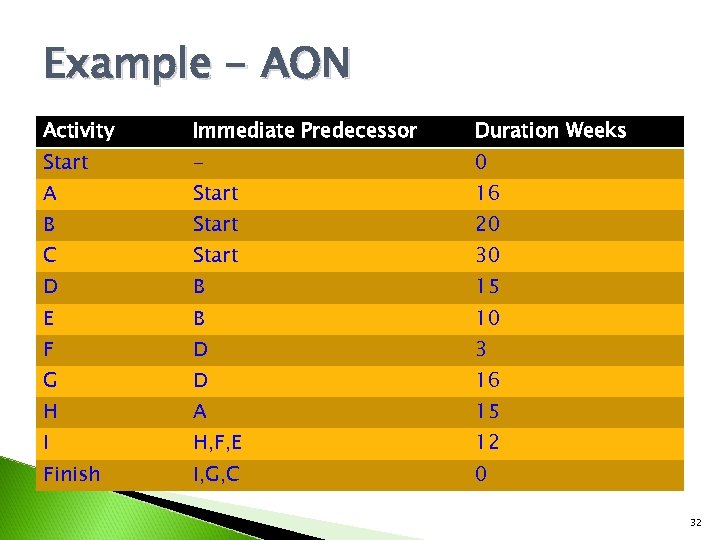
 Project Network Event ◦ Signals the beginning or ending of an activity ◦ Designates a point in time ◦ Represented by a circle (node) Network ◦ Shows the sequential relationships among activities using nodes and arrows w. Activity-on-node (AON) nodes represent activities, and arrows show precedence relationships w. Activity-on-arrow (AOA) arrows represent activities and nodes are events for points in time 20
 Basic rules Network flows from L to R Activity cannot begin until all preceding activities have been completed Arrows on network indicate precedence and flow. Hence they can cross over each other Each activity should have unique identification label. Looping is not allowed Conditional statements are not allowed Whenever there are multiple starts a common start node can be used to indicate clear project beginning of the project. 21
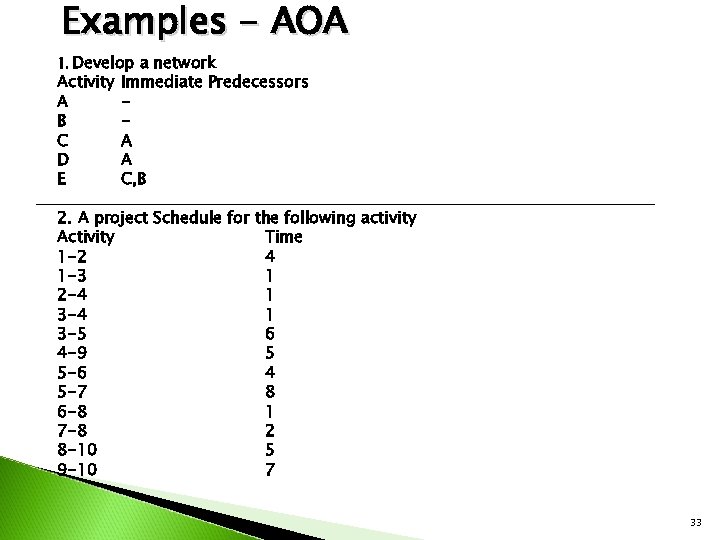
 AOA method Arrow represents one activity Arrow is drawn starting & ending in events represented as circles called nodes. Arrow is pointed towards finishing event. Arrow in broken lines represent ‘ dummy activity’. Dummy does not consume any time or resources. Description of activities is written along the arrow for easy reference. Path tracing is simplified by activity event numbering scheme. 22
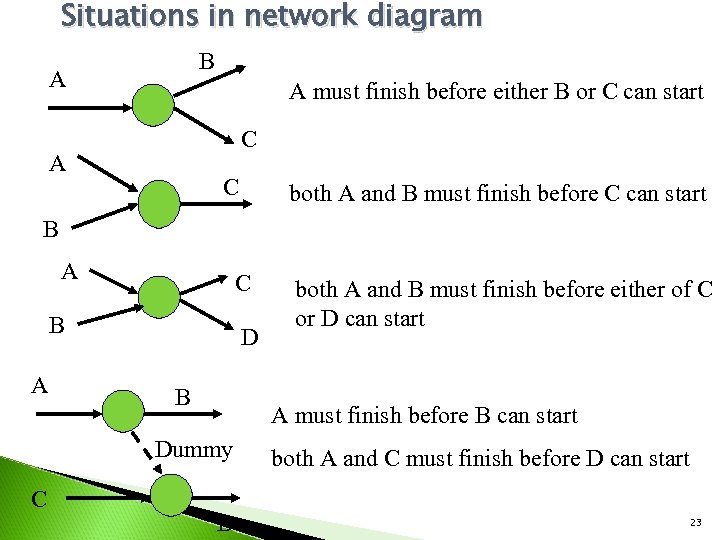 Situations in network diagram B A A must finish before either B or C can start C A C both A and B must finish before C can start B A C B A D B A must finish before B can start Dummy C both A and B must finish before either of C or D can start D both A and C must finish before D can start 23
 AON method Activities are represented by rectangles Arrows represent logical interdependencies Eliminate the need for showing of dummy activities. Events are not used Activity emphasis is easily understood by first level mgrs. But path tracing of activity no’s is difficult 24
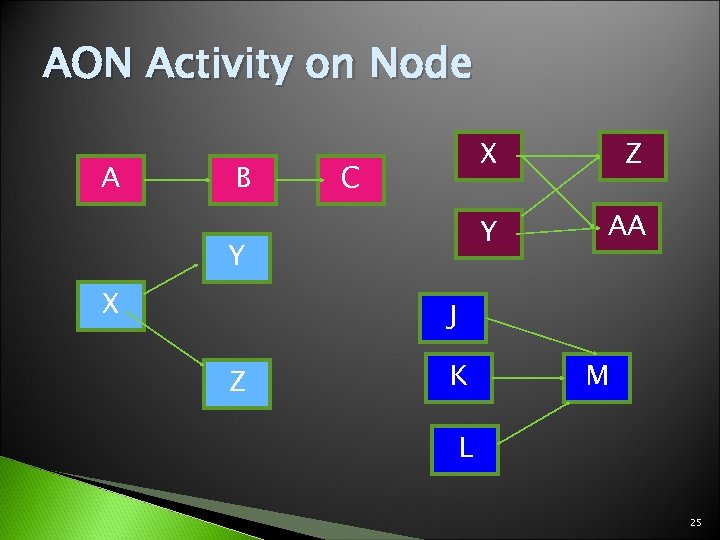 AON Activity on Node A B X Y C Y X Z AA J Z K M L 25
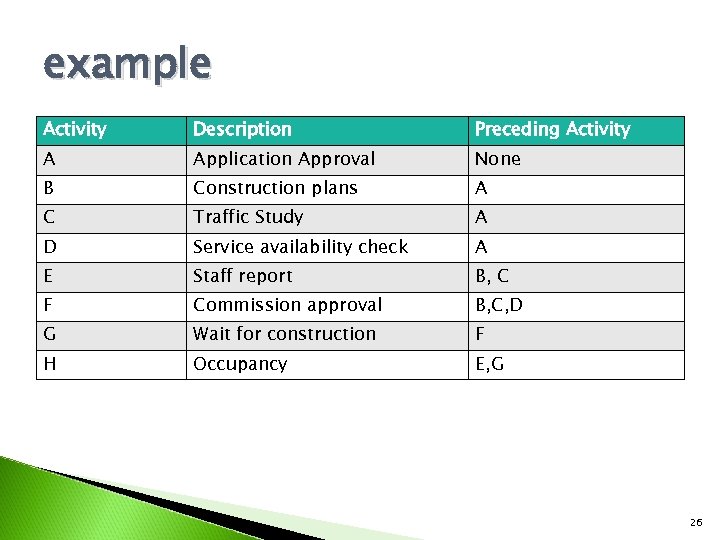 example Activity Description Preceding Activity A Application Approval None B Construction plans A C Traffic Study A D Service availability check A E Staff report B, C F Commission approval B, C, D G Wait for construction F H Occupancy E, G 26
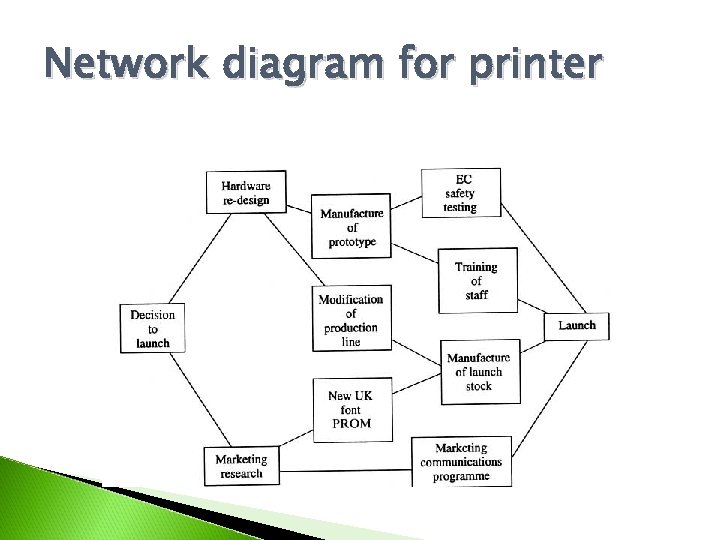 Network diagram for printer
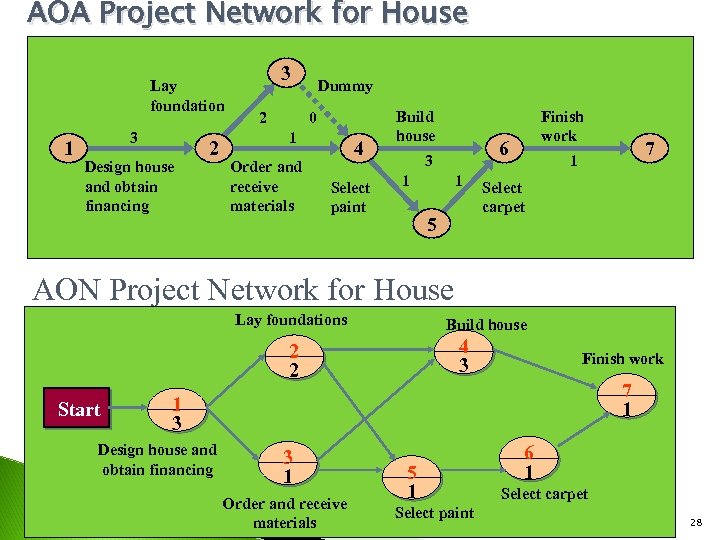 AOA Project Network for House Lay foundation 1 3 Design house and obtain financing 2 3 2 Dummy 0 1 Order and receive materials 4 Select paint Build house Finish work 6 3 1 1 5 7 1 Select carpet AON Project Network for House Lay foundations Build house 4 3 2 2 Start Finish work 7 1 1 3 Design house and obtain financing 3 1 Order and receive materials 5 1 Select paint 6 1 Select carpet 28
 Choice of method- AON or AOA In AOA dummy activities meets two needs. ◦ First when two parallel activities have same start and end nodes a dummy is inserted to give each activity a unique identification no. ◦ They help to clarify dependency relationships. 29
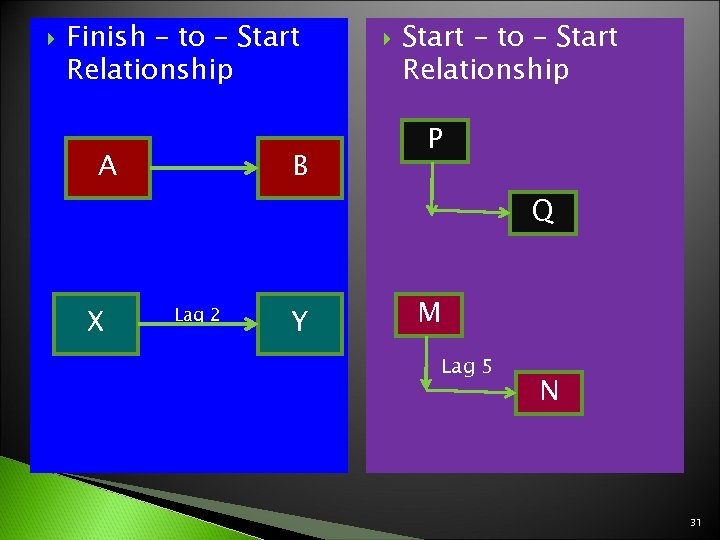
 LAD & LAG Method of showing relationships among activities discussed is called ‘ Finish-to-start ‘ relationship as it assumes all immediate preceding connected activities must be completed before next activity begins. When an activity has a long duration and will delay the start of an activity immediately following it the activity can be broken into segments and network uses Laddering Approach A lag is the minimum amount of time a dependent activity must be delayed to begin or to end. A lag is +ve and indicates no. of time periods that must pass before the succeeding activity can start. A lead can be –ve and indicates no. of time periods that a succeeding activity can start before the end of its predecessor. 30
 Finish – to – Start Relationship A B Start – to – Start Relationship P Q X Lag 2 Y M Lag 5 N 31
 Example - AON Activity Immediate Predecessor Duration Weeks Start - 0 A Start 16 B Start 20 C Start 30 D B 15 E B 10 F D 3 G D 16 H A 15 I H, F, E 12 Finish I, G, C 0 32
 Examples - AOA 1. Develop a network Activity A B C D E Immediate Predecessors A A C, B 2. A project Schedule for the following activity Activity Time 1 -2 4 1 -3 1 2 -4 1 3 -5 6 4 -9 5 5 -6 4 5 -7 8 6 -8 1 7 -8 2 8 -10 5 9 -10 7 33
 3. The activities involved in the computer installation process are detailed below Activity Predecessor activities A Physical preparation None B Organizational planning None C Personal Selection B D Equipment Installation A E Personnel training C F Detailed Systems Design C G File Conversion F H Establish standards and Control F I Programme preparation H J Programme Testing I K Parallel Operations D, E, G, J L Finalize Systems Documents I M Follow Up K, L 34
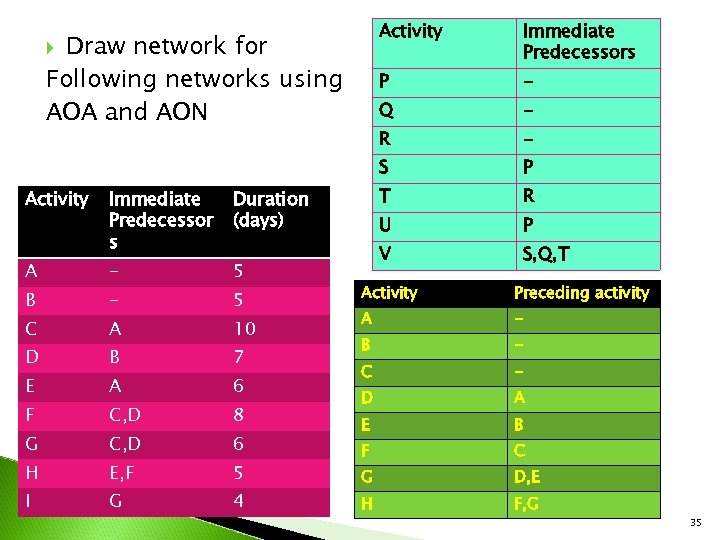 Activity P Immediate Predecessor s R A - 5 B - 5 C A 10 D B 7 E A 6 F C, D 8 G C, D 6 H E, F 5 I G 4 P T R U P V Duration (days) - S Activity - Q Draw network for Following networks using AOA and AON Immediate Predecessors S, Q, T Activity Preceding activity A - B - C - D A E B F C G D, E H F, G 35
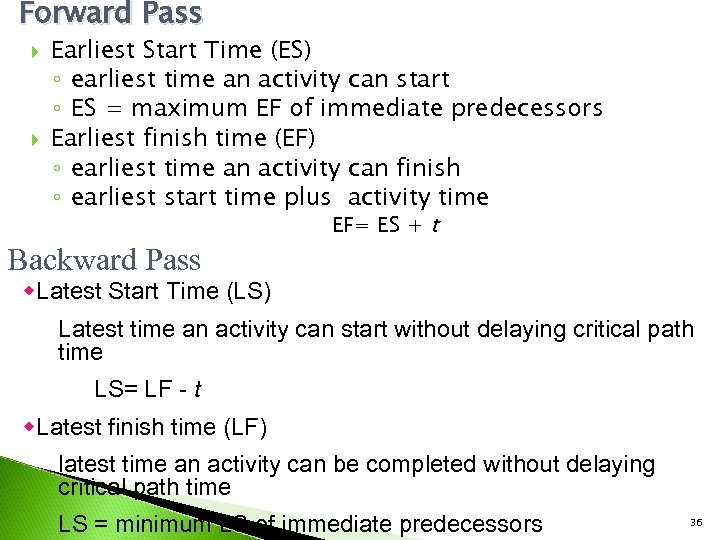 Forward Pass Earliest Start Time (ES) ◦ earliest time an activity can start ◦ ES = maximum EF of immediate predecessors Earliest finish time (EF) ◦ earliest time an activity can finish ◦ earliest start time plus activity time Backward Pass EF= ES + t w. Latest Start Time (LS) Latest time an activity can start without delaying critical path time LS= LF - t w. Latest finish time (LF) latest time an activity can be completed without delaying critical path time LS = minimum LS of immediate predecessors 36
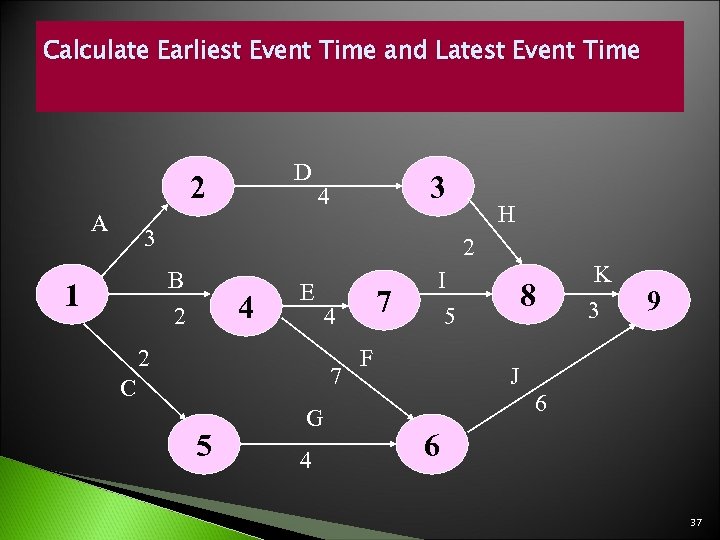 Calculate Earliest Event Time and Latest Event Time D 2 A 3 4 3 2 B 2 1 H 4 E 2 4 7 C 5 G 4 7 I 5 F 8 K 3 9 J 6 6 37