


 Скачать презентацию What is a computer q Simply put a
9845200912be1a058894ba9752782da4.ppt
- Количество слайдов: 13
 What is a computer? q Simply put, a computer is a sophisticated electronic calculating machine that: u Accepts input information, u Processes the information according to a list of internally stored instructions and u Produces the resulting output information. q Functions performed by a computer are: u Accepting information to be processed as input. u Storing a list of instructions to process the information. u Processing the information according to the list of instructions. u Providing the results of the processing as output. q What are the functional units of a computer? 0
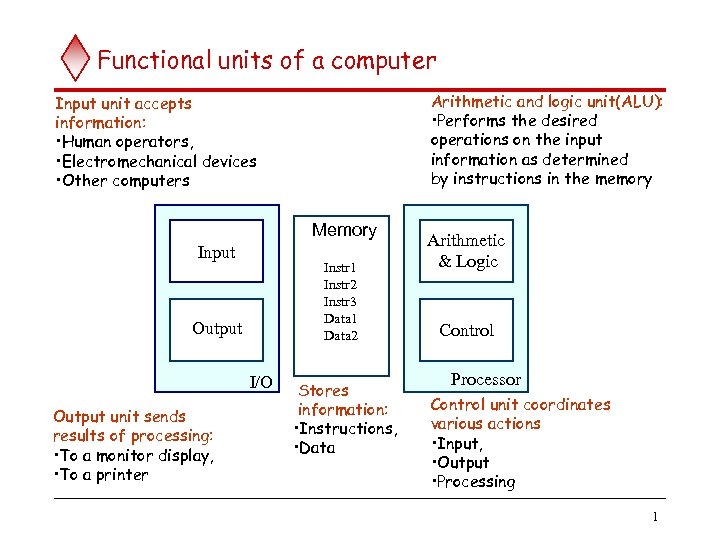 Functional units of a computer Arithmetic and logic unit(ALU): • Performs the desired operations on the input information as determined by instructions in the memory Input unit accepts information: • Human operators, • Electromechanical devices • Other computers Memory Input Instr 1 Instr 2 Instr 3 Data 1 Data 2 Output I/O Output unit sends results of processing: • To a monitor display, • To a printer Stores information: • Instructions, • Data Arithmetic & Logic Control Processor Control unit coordinates various actions • Input, • Output • Processing 1
 Information in a computer -- Instructions q Instructions specify commands to: Transfer information within a computer (e. g. , from memory to ALU) u Transfer of information between the computer and I/O devices (e. g. , from keyboard to computer, or computer to printer) u Perform arithmetic and logic operations (e. g. , Add two numbers, Perform a logical AND). u q A sequence of instructions to perform a task is called a program, which is stored in the memory. q Processor fetches instructions that make up a program from the memory and performs the operations stated in those instructions. q What do the instructions operate upon? 2
 Information in a computer -- Data q Data are the “operands” upon which instructions operate. q Data could be: u Numbers, u Encoded characters. q Data, in a broad sense means any digital information. q Computers use data that is encoded as a string of binary digits called bits. 3
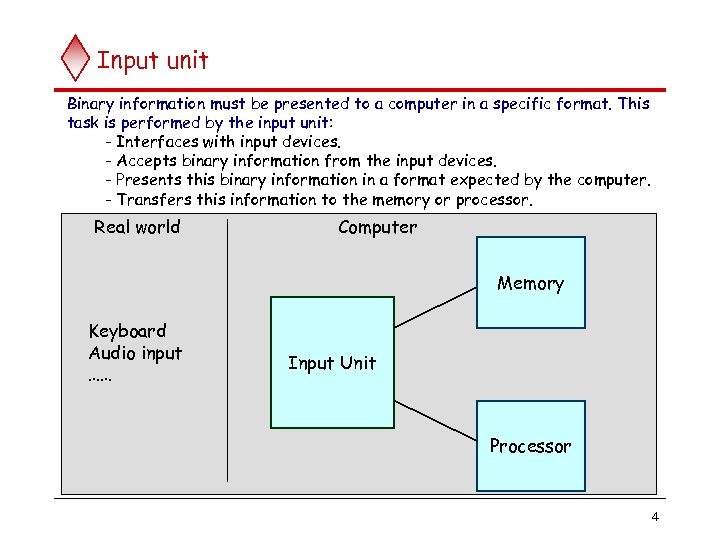 Input unit Binary information must be presented to a computer in a specific format. This task is performed by the input unit: - Interfaces with input devices. - Accepts binary information from the input devices. - Presents this binary information in a format expected by the computer. - Transfers this information to the memory or processor. Real world Computer Memory Keyboard Audio input …… Input Unit Processor 4
 Memory unit q Memory unit stores instructions and data. u Recall, data is represented as a series of bits. u To store data, memory unit thus stores bits. q Processor reads instructions and reads/writes data from/to the memory during the execution of a program. In theory, instructions and data could be fetched one bit at a time. u In practice, a group of bits is fetched at a time. u Group of bits stored or retrieved at a time is termed as “word” u Number of bits in a word is termed as the “word length” of a computer. u q In order to read/write to and from memory, a processor should know where to look: u “Address” is associated with each word location. 5
 Memory unit (contd. . ) q Processor reads/writes to/from memory based on the memory address: Access any word location in a short and fixed amount of time based on the address. u Random Access Memory (RAM) provides fixed access time independent of the location of the word. u Access time is known as “Memory Access Time”. u q Memory and processor have to “communicate” with each other in order to read/write information. In order to reduce “communication time”, a small amount of RAM (known as Cache) is tightly coupled with the processor. q Modern computers have three to four levels of RAM units with different speeds and sizes: u Fastest, smallest known as Cache u Slowest, largest known as Main memory. u 6
 Memory unit (contd. . ) q Primary storage of the computer consists of RAM units. Fastest, smallest unit is Cache. u Slowest, largest unit is Main Memory. u q Primary storage is insufficient to store large amounts of data and programs. u Primary storage can be added, but it is expensive. q Store large amounts of data on secondary storage devices: Magnetic disks and tapes, u Optical disks (CD-ROMS). u Access to the data stored in secondary storage in slower, but take advantage of the fact that some information may be accessed infrequently. u q Cost of a memory unit depends on its access time, lesser access time implies higher cost. 7
 Arithmetic and logic unit (ALU) q Operations are executed in the Arithmetic and Logic Unit (ALU). u Arithmetic operations such as addition, subtraction. u Logic operations such as comparison of numbers. q In order to execute an instruction, operands need to be brought into the ALU from the memory. Operands are stored in general purpose registers available in the ALU. u Access times of general purpose registers are faster than the cache. u q Results of the operations are stored back in the memory or retained in the processor for immediate use. 8
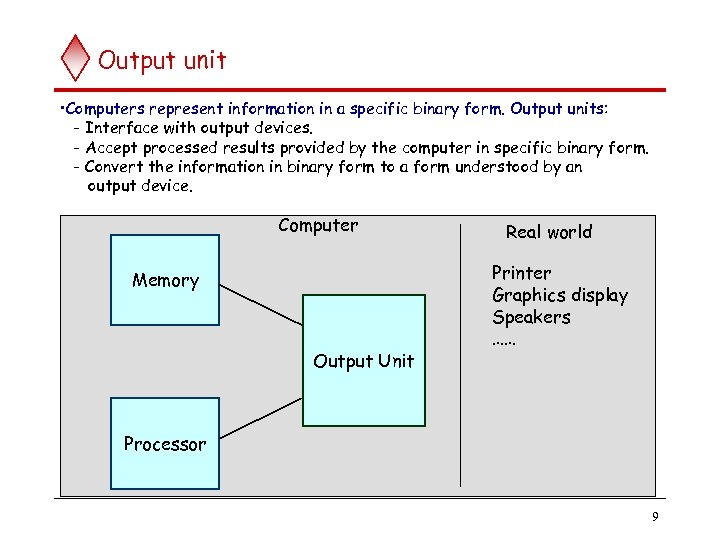 Output unit • Computers represent information in a specific binary form. Output units: - Interface with output devices. - Accept processed results provided by the computer in specific binary form. - Convert the information in binary form to a form understood by an output device. Computer Memory Output Unit Real world Printer Graphics display Speakers …… Processor 9
 Control unit q Operation of a computer can be summarized as: Accepts information from the input units (Input unit). u Stores the information (Memory). u Processes the information (ALU). u Provides processed results through the output units (Output unit). u q Operations of Input unit, Memory, ALU and Output unit are coordinated by Control unit. q Instructions control “what” operations take place (e. g. data transfer, processing). q Control unit generates timing signals which determines “when” a particular operation takes place. 10
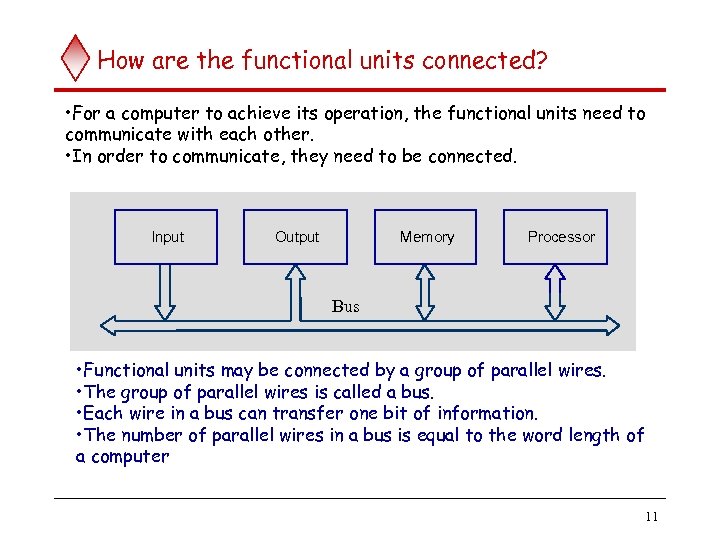 How are the functional units connected? • For a computer to achieve its operation, the functional units need to communicate with each other. • In order to communicate, they need to be connected. Input Output Memory Processor Bus • Functional units may be connected by a group of parallel wires. • The group of parallel wires is called a bus. • Each wire in a bus can transfer one bit of information. • The number of parallel wires in a bus is equal to the word length of a computer 11
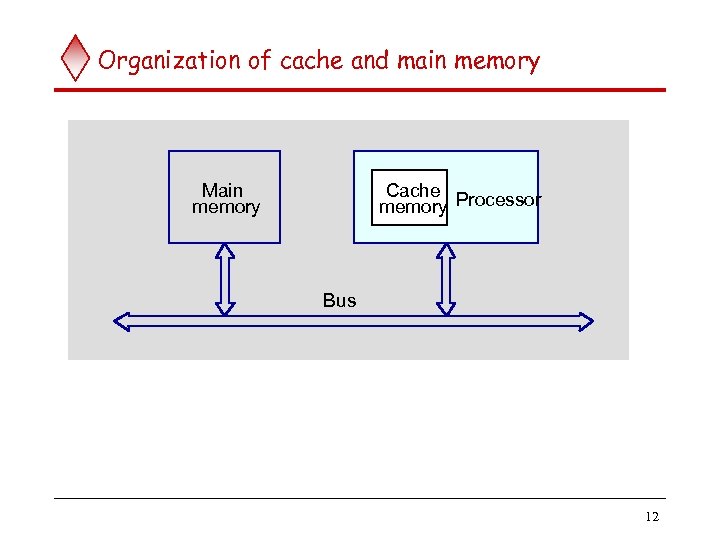 Organization of cache and main memory Main memory Cache memory Processor Bus 12