


 Скачать презентацию Welcome Wide Area Workflow Inspector and Acceptor Training
2f19019adbc89c2bf5c5550a906fe032.ppt
- Количество слайдов: 69
 Welcome Wide Area Workflow Inspector and Acceptor Training Defense Finance and Accounting Service 3/15/2018 1 of 12
 Welcome þWelcome to Using WAWF for Government Personnel. þToday you will learn how to use Wide Area Work Flow to electronically create receiving reports and process documents sent to you from a vendor. 3/15/2018 2 of 103
 Your Instructor for today is. . . Primary Instructor is: Bill Stiles 3/15/2018 3 of 103
 Time Management Class Hours : 08: 30 - 17: 00 Lunch: 1 Hour Breaks: as needed 3/15/2018 4 of 103
 Other Announcements Ø Restrooms Ø Cell Phones, be courteous Turn them off or switch to silent mode Smoking in designated outside area only Please no email or websurfing during class Ø Food Court Ø Cafeteria No food or drink in classroom In case of emergency follow posted or verbal directions 3/15/2018 5 of 103
 Materials & Supplies • Practice Exercises • Sample contract (Training Purposes Only) • Inspector/Acceptor User guide • Demo DFAS EC User Tool Box via DFAS web-site [dod. mil/dfas] • Interactive Customer Evaluation Program (ICE) survey • Instructor’s Business Card • Army Help Desk contact information: • Toll Free 1 -866 -598 -3560 • DSN 312 -869 -0290 • Email cco-ec-army-wawf-helpdesk@dfas. mil • Columbus, OH 07: 30 -18: 00 EST 3/15/2018 6 of 103
 Group Dynamics • Questions are encouraged • Questions help everyone to learn • Jot it down on a post it note so you don’t forget • Sometimes your best resource for answers is sitting right next to you! 3/15/2018 7 of 103
 Today We are Covering. . . • In class registration (Class Roster) • Electronic Commerce Tools Overview • Electronic Document Access (EDA) Overview • Wide Area Work Flow (WAWF) • • 3/15/2018 Overview Registration Information Navigation Hands on Training Exercise Status Review Demonstrate the Electronic Commerce End User's Tool Box Complete ICE survey 8 of 103
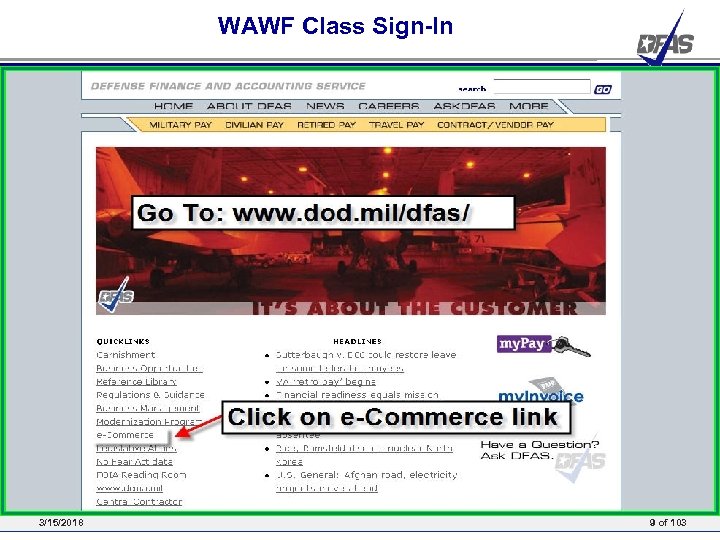 WAWF Class Sign-In 3/15/2018 9 of 103
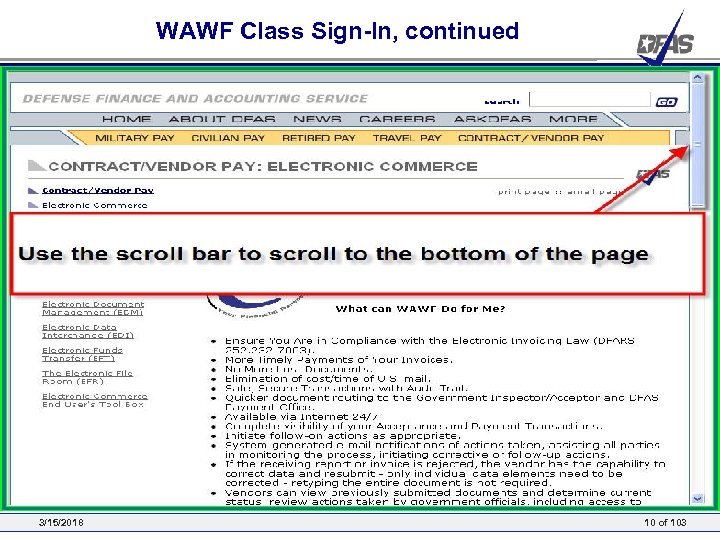 WAWF Class Sign-In, continued 3/15/2018 10 of 103
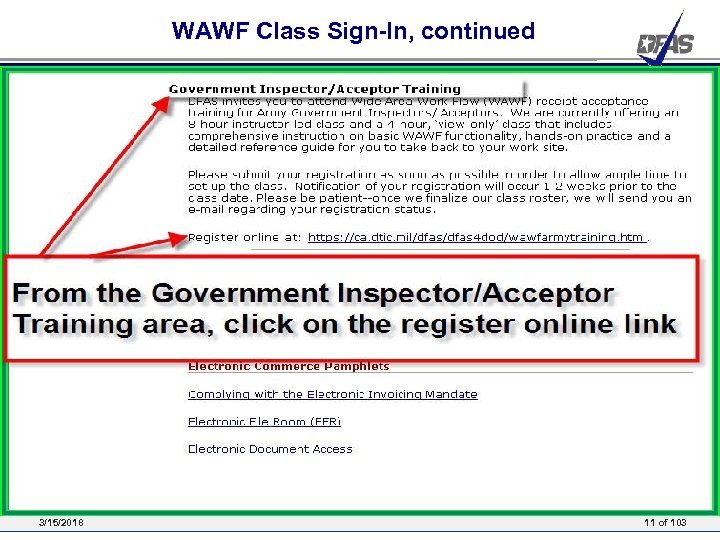 WAWF Class Sign-In, continued 3/15/2018 11 of 103
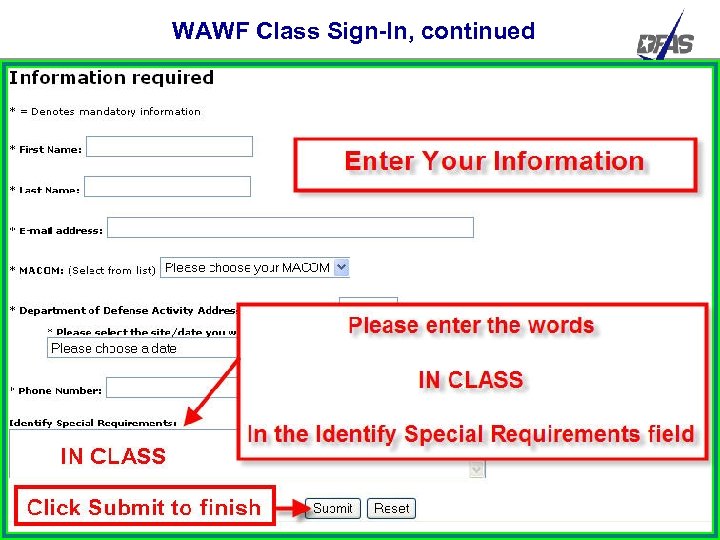 WAWF Class Sign-In, continued 3/15/2018 12 of 103
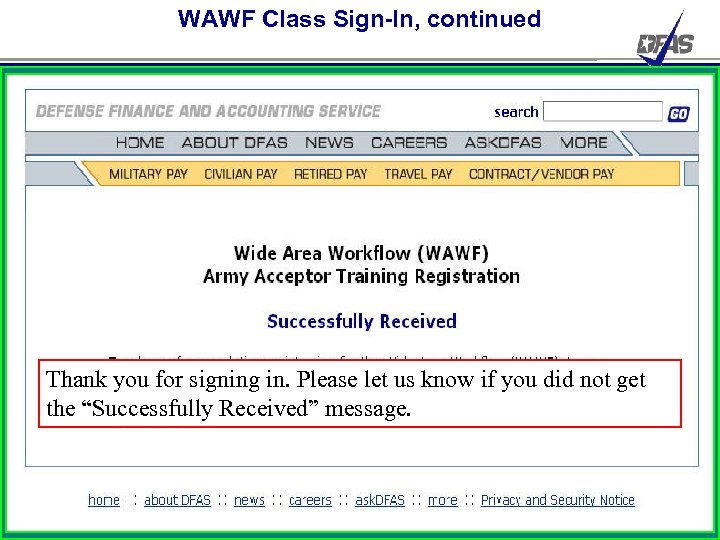 WAWF Class Sign-In, continued Thank you for signing in. Please let us know if you did not get the “Successfully Received” message. 3/15/2018 13 of 103
 Electronic Commerce Tools Overview Presented by: Defense Finance and Accounting Service 3/15/2018 14 of 12
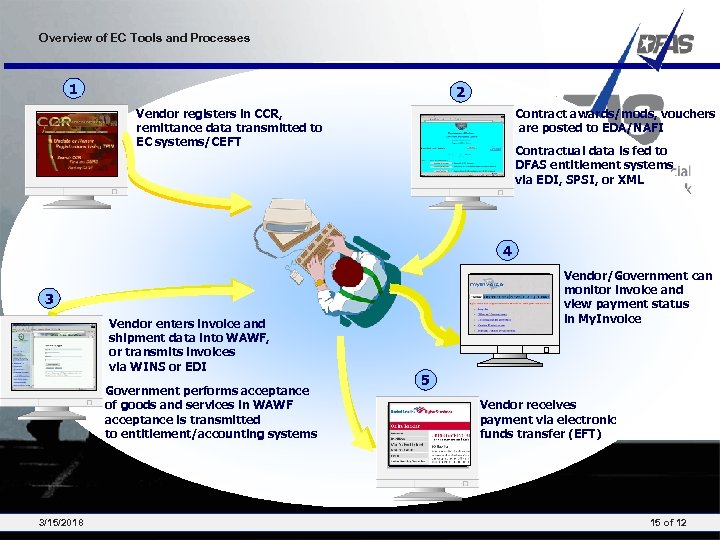 Overview of EC Tools and Processes 1 2 Vendor registers in CCR, remittance data transmitted to EC systems/CEFT Contract awards/mods, vouchers are posted to EDA/NAFI Contractual data is fed to DFAS entitlement systems via EDI, SPSI, or XML 4 Vendor/Government can monitor invoice and view payment status in My. Invoice 3 Vendor enters invoice and shipment data into WAWF, or transmits invoices via WINS or EDI Government performs acceptance of goods and services in WAWF acceptance is transmitted to entitlement/accounting systems 3/15/2018 5 Vendor receives payment via electronic funds transfer (EFT) 15 of 12
 EDA Overview Presented by: Defense Finance and Accounting Service 3/15/2018 16 of 12
 WHAT IS EDA? • EDA provides online access to virtually all of your Department of Defense (Do. D) contracts. • Contracts in EDA are your road map for electronic billing in WAWF. You can use a hard copy of the contract or an on line version in EDA • WAWF uses index information listed in EDA to route your billing documents from your system to the appropriate DFAS Entitlement System • EDA contract line item information (CLIN) details listed on your contract must be used to build invoice/receiving report line item details in WAWF • For Vendors, EDA contracts may list the type of document to create in WAWF. For all users, EDA contracts will provide you with “points of contact” for government Contracting Officers, government Inspectors/Acceptors, Payment Offices, and Vendor contact information. • The following screens show an example of what the contract looks like on your desktop if you utilize EDA. You’ll notice no difference between your hard copy contract or the EDA view. We will also show you how the contract information is used by WAWF to route your documents. • In addition, we’ll show you the EDA home page and provide you with the website info. 3/15/2018 17 of 103
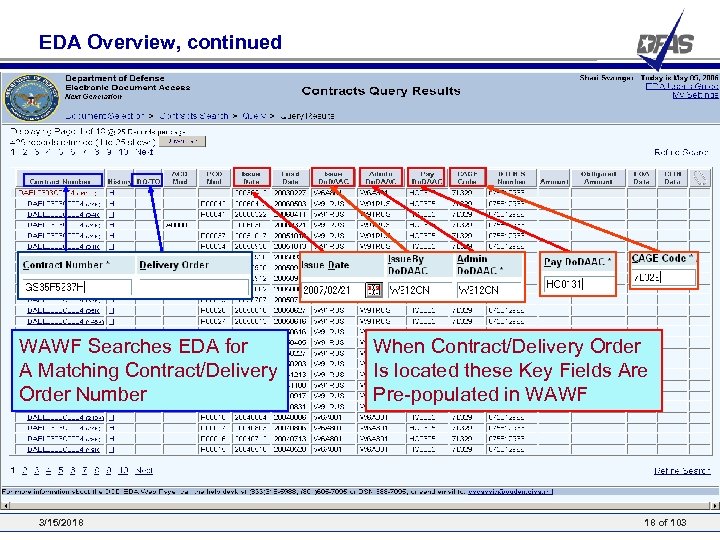 EDA Overview, continued WAWF Searches EDA for A Matching Contract/Delivery Order Number 3/15/2018 When Contract/Delivery Order Is located these Key Fields Are Pre-populated in WAWF 18 of 103
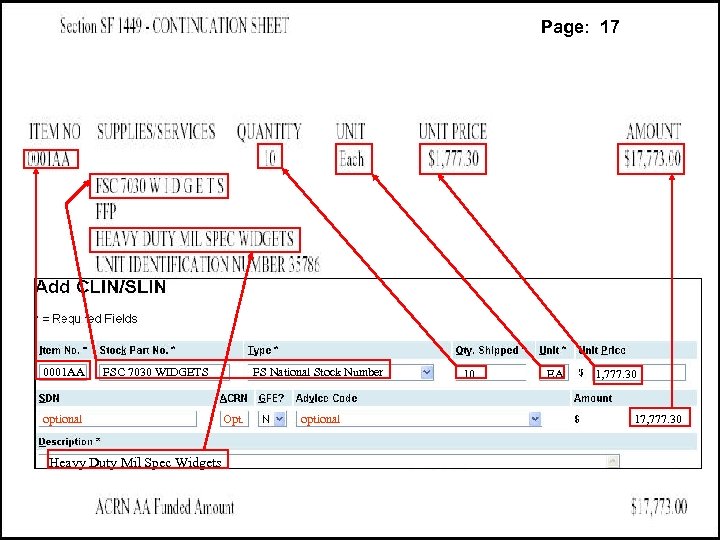 Page: 17 FA 8771 Base Contracting Office At A Real AFB Somewhere USA Ph 1 -1111 0 V 2 B 2 F 2 S 337 0001 AA FSC 7030 WIDGETS optional FS National Stock Number Opt. optional 10 EA 1, 777. 30 HQ 0131 17, 777. 30 Heavy Duty Mil Spec Widgets 3/15/2018 19 of 103
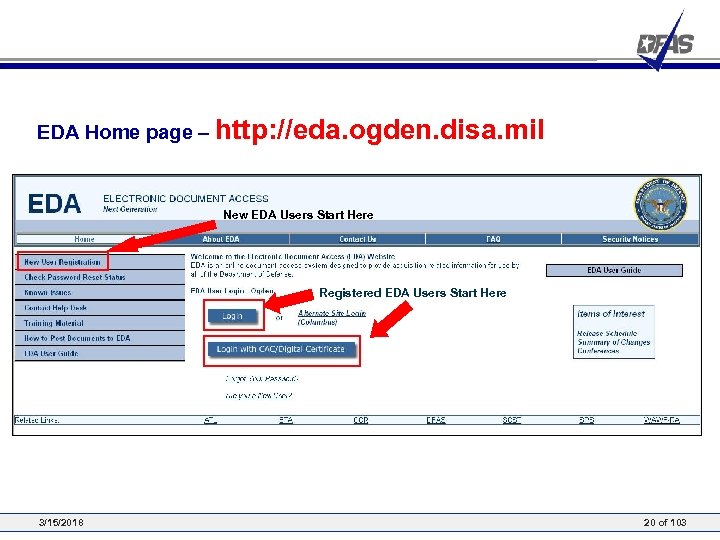 EDA Home page – http: //eda. ogden. disa. mil New EDA Users Start Here Registered EDA Users Start Here 3/15/2018 20 of 103
 Questions? 3/15/2018 21 of 103
 Wide Area Work Flow (WAWF) Overview Presented by: Defense Finance and Accounting Service 3/15/2018 22 of 12
 Presentation Outline • Background - Why was WAWF-RA Developed? • WAWF-RA - What is it and How does it Work? • WAWF Process • User Roles - Who will use WAWF-RA? • Benefits: How will Do. D Benefit? • More Information - How Can I Find Out More? 3/15/2018 23 of 103
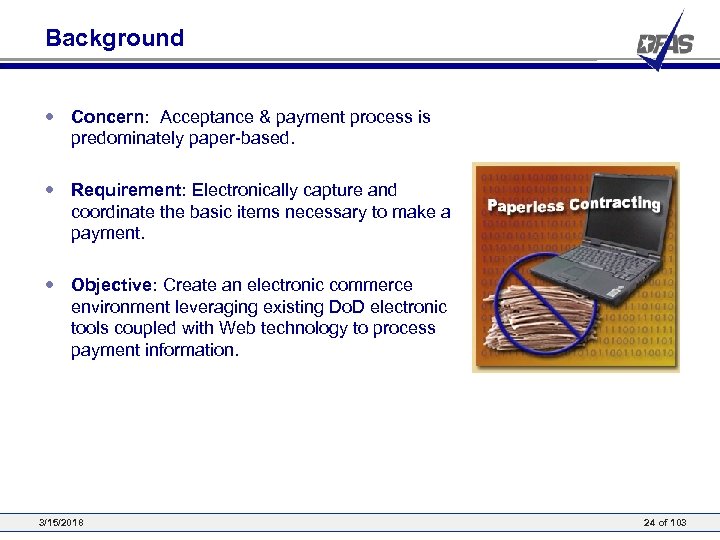 Background • Concern: Acceptance & payment process is predominately paper-based. • Requirement: Electronically capture and coordinate the basic items necessary to make a payment. • Objective: Create an electronic commerce environment leveraging existing Do. D electronic tools coupled with Web technology to process payment information. 3/15/2018 24 of 103
 Electronic Invoicing Mandate • • • Defense Federal Acquisition Regulation Supplement (DFARS) has been updated to include a requirement for electronic invoicing • 252. 232 -7003 Electronic Submission of Payment Requests (contract clause) & 232. 70—Electronic Submission and Processing of Payment Requests Revised January 13, 2004 Three Electronic Options • Except as provided in paragraph (c) of this clause, the Contractor shall submit payment requests using one of the following electronic forms: • Wide Area Work. Flow-Receipt and Acceptance (WAWF-RA). • Information regarding WAWF-RA is available on the Internet at https: //wawf. eb. mil. • (2) Web Invoicing System (WIn. S). • Information regarding WIn. S is available on the Internet at https: //ecweb. dfas. mil. • (3) American National Standards Institute (ANSI) X. 12 electronic data interchange (EDI) formats. “Electronic form” means any automated system that transmits information electronically from the initiating system to all affected systems. • Facsimile, e-mail, and scanned documents are not acceptable electronic forms for submission of payment requests. However, scanned documents are acceptable when they are part of a submission of a payment request made using one of the electronic forms provided for in paragraph (b) of this clause. 3/15/2018 25 of 103
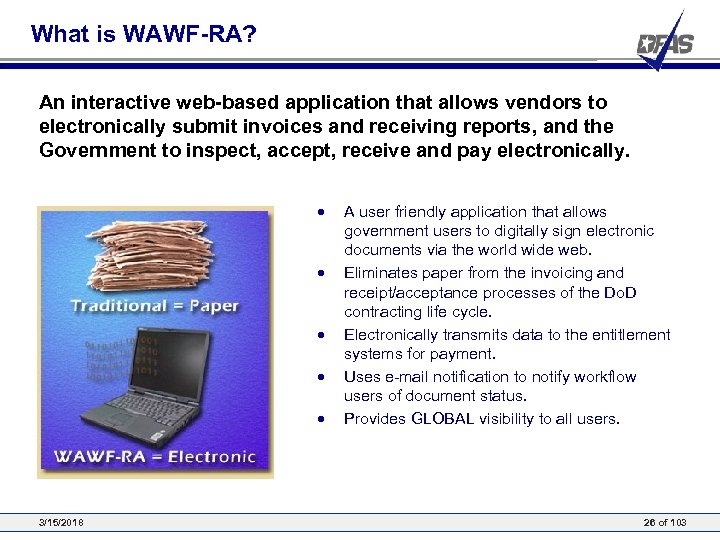 What is WAWF-RA? An interactive web-based application that allows vendors to electronically submit invoices and receiving reports, and the Government to inspect, accept, receive and pay electronically. • • • 3/15/2018 A user friendly application that allows government users to digitally sign electronic documents via the world wide web. Eliminates paper from the invoicing and receipt/acceptance processes of the Do. D contracting life cycle. Electronically transmits data to the entitlement systems for payment. Uses e-mail notification to notify workflow users of document status. Provides GLOBAL visibility to all users. 26 of 103
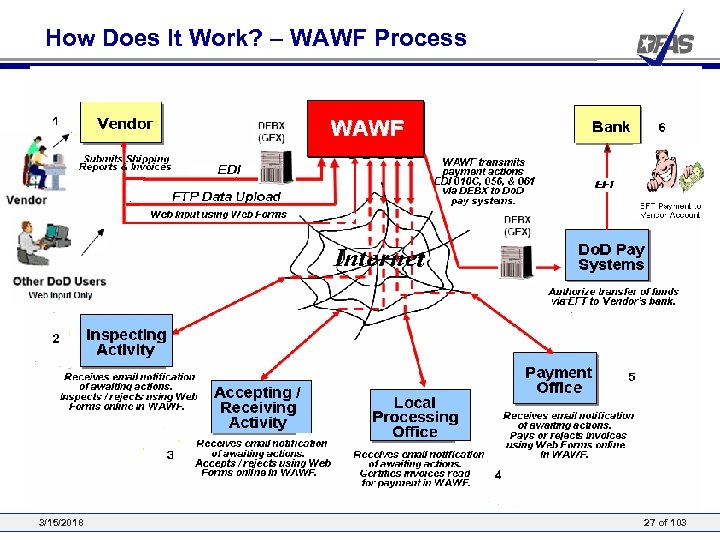 How Does It Work? – WAWF Process 3/15/2018 27 of 103
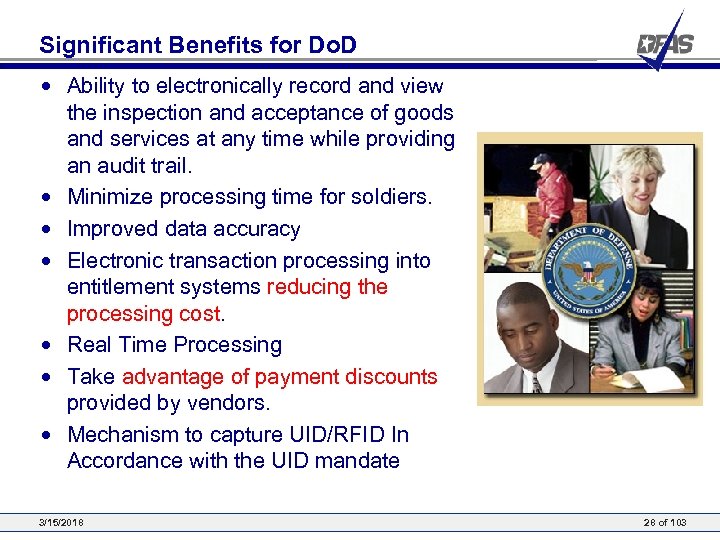 Significant Benefits for Do. D • Ability to electronically record and view the inspection and acceptance of goods and services at any time while providing an audit trail. • Minimize processing time for soldiers. • Improved data accuracy • Electronic transaction processing into entitlement systems reducing the processing cost. • Real Time Processing • Take advantage of payment discounts provided by vendors. • Mechanism to capture UID/RFID In Accordance with the UID mandate 3/15/2018 28 of 103
 Unique Identification (UID) • Unique Identification (UID) is a system of distinguishing one object from another, allowing Do. D to track identical objects separately. • Contracting officers shall include clause 252. 211 -7003, Item Identification and Valuation, in all solicitations and contracts that require delivery of items effective January 2004. • UID submission is now mandatory for items meeting these categories: • Costs over $5, 000 • Serially managed. • Mission essential. • Controlled inventory. • A consumable item or material where permanent identification is necessary. • To date UID/RFID is not fully deployed throughout the Do. D. • WAWF is the single entry point for UID/RFID information on Do. D procurement actions • In today’s training we will show you how to process a receiving report that contains UID. For further information please refer to the resource CD or student guide provided today. • For additional information. http: //www. acq. osd. mil/dpap/UID/ 3/15/2018 29 of 103
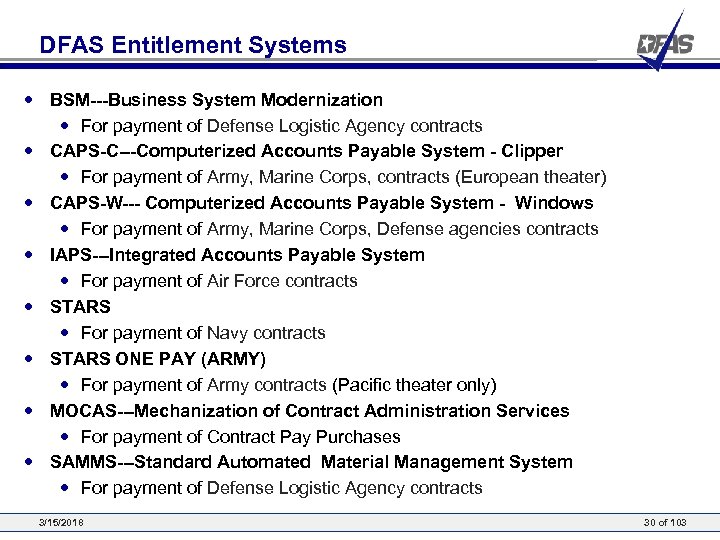 DFAS Entitlement Systems • BSM---Business System Modernization • For payment of Defense Logistic Agency contracts • CAPS-C---Computerized Accounts Payable System - Clipper • For payment of Army, Marine Corps, contracts (European theater) • CAPS-W--- Computerized Accounts Payable System - Windows • For payment of Army, Marine Corps, Defense agencies contracts • IAPS---Integrated Accounts Payable System • For payment of Air Force contracts • STARS • For payment of Navy contracts • STARS ONE PAY (ARMY) • For payment of Army contracts (Pacific theater only) • MOCAS---Mechanization of Contract Administration Services • For payment of Contract Pay Purchases • SAMMS---Standard Automated Material Management System • For payment of Defense Logistic Agency contracts 3/15/2018 30 of 103
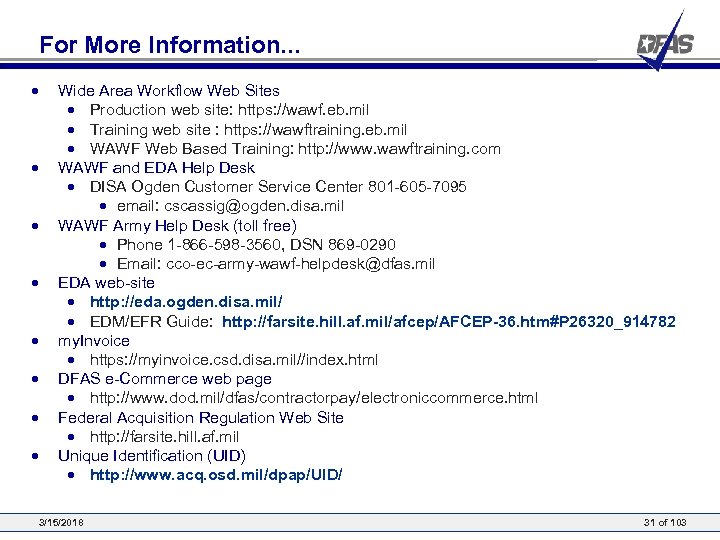 For More Information. . . • • Wide Area Workflow Web Sites • Production web site: https: //wawf. eb. mil • Training web site : https: //wawftraining. eb. mil • WAWF Web Based Training: http: //www. wawftraining. com WAWF and EDA Help Desk • DISA Ogden Customer Service Center 801 -605 -7095 • email: cscassig@ogden. disa. mil WAWF Army Help Desk (toll free) • Phone 1 -866 -598 -3560, DSN 869 -0290 • Email: cco-ec-army-wawf-helpdesk@dfas. mil EDA web-site • http: //eda. ogden. disa. mil/ • EDM/EFR Guide: http: //farsite. hill. af. mil/afcep/AFCEP-36. htm#P 26320_914782 my. Invoice • https: //myinvoice. csd. disa. mil//index. html DFAS e-Commerce web page • http: //www. dod. mil/dfas/contractorpay/electroniccommerce. html Federal Acquisition Regulation Web Site • http: //farsite. hill. af. mil Unique Identification (UID) • http: //www. acq. osd. mil/dpap/UID/ 3/15/2018 31 of 103
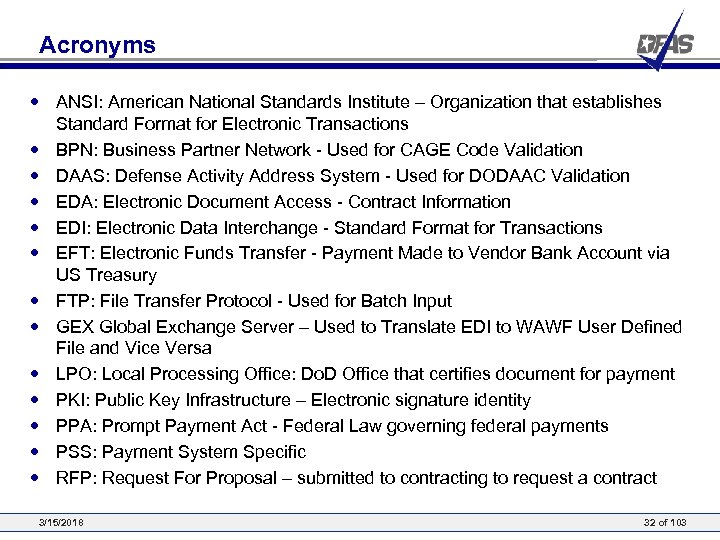 Acronyms • ANSI: American National Standards Institute – Organization that establishes Standard Format for Electronic Transactions • BPN: Business Partner Network - Used for CAGE Code Validation • DAAS: Defense Activity Address System - Used for DODAAC Validation • EDA: Electronic Document Access - Contract Information • EDI: Electronic Data Interchange - Standard Format for Transactions • EFT: Electronic Funds Transfer - Payment Made to Vendor Bank Account via US Treasury • FTP: File Transfer Protocol - Used for Batch Input • GEX Global Exchange Server – Used to Translate EDI to WAWF User Defined File and Vice Versa • LPO: Local Processing Office: Do. D Office that certifies document for payment • PKI: Public Key Infrastructure – Electronic signature identity • PPA: Prompt Payment Act - Federal Law governing federal payments • PSS: Payment System Specific • RFP: Request For Proposal – submitted to contracting to request a contract 3/15/2018 32 of 103
 Questions? 3/15/2018 33 of 103
 WAWF Registration – Government User Presented by: Defense Finance and Accounting Service 3/15/2018 34 of 12
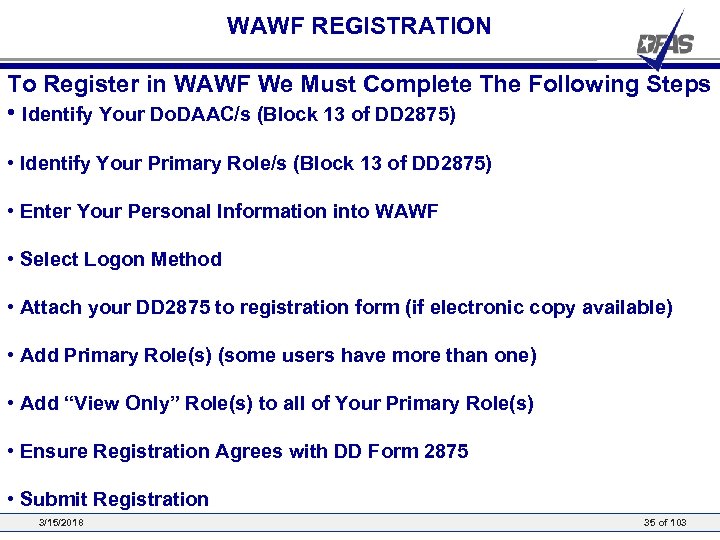 WAWF REGISTRATION To Register in WAWF We Must Complete The Following Steps • Identify Your Do. DAAC/s (Block 13 of DD 2875) • Identify Your Primary Role/s (Block 13 of DD 2875) • Enter Your Personal Information into WAWF • Select Logon Method • Attach your DD 2875 to registration form (if electronic copy available) • Add Primary Role(s) (some users have more than one) • Add “View Only” Role(s) to all of Your Primary Role(s) • Ensure Registration Agrees with DD Form 2875 • Submit Registration 3/15/2018 35 of 103
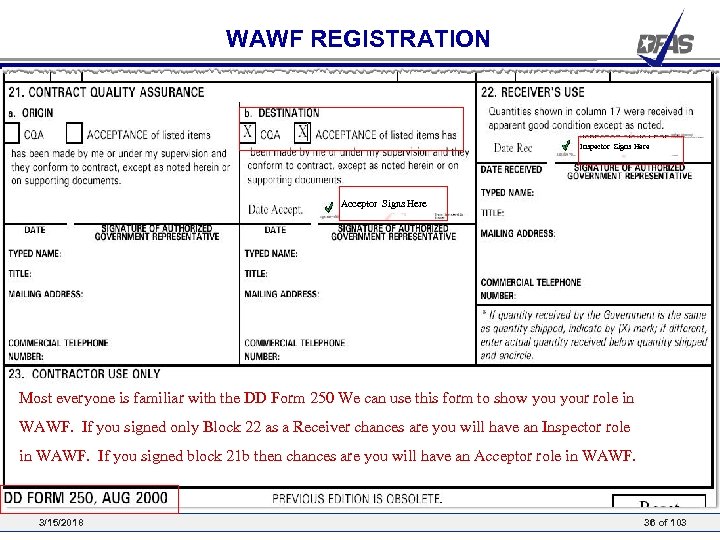 WAWF REGISTRATION Inspector Signs Here Acceptor Signs Here Most everyone is familiar with the DD Form 250 We can use this form to show your role in WAWF. If you signed only Block 22 as a Receiver chances are you will have an Inspector role in WAWF. If you signed block 21 b then chances are you will have an Acceptor role in WAWF. 3/15/2018 36 of 103
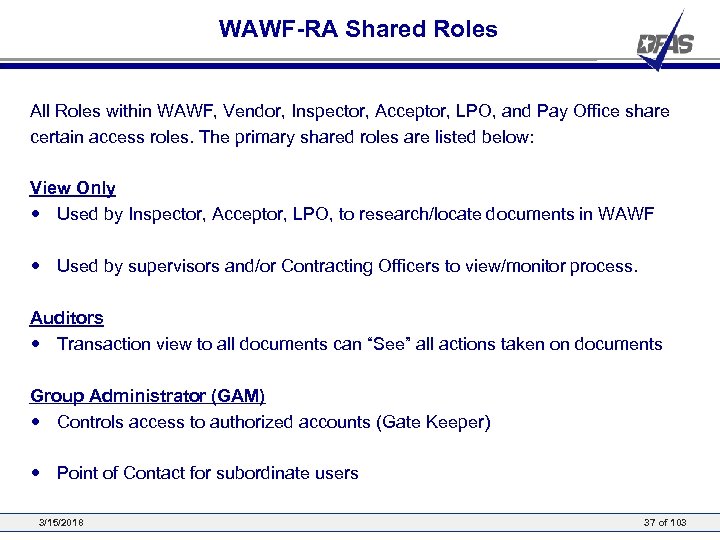 WAWF-RA Shared Roles All Roles within WAWF, Vendor, Inspector, Acceptor, LPO, and Pay Office share certain access roles. The primary shared roles are listed below: View Only • Used by Inspector, Acceptor, LPO, to research/locate documents in WAWF • Used by supervisors and/or Contracting Officers to view/monitor process. Auditors • Transaction view to all documents can “See” all actions taken on documents Group Administrator (GAM) • Controls access to authorized accounts (Gate Keeper) • Point of Contact for subordinate users 3/15/2018 37 of 103
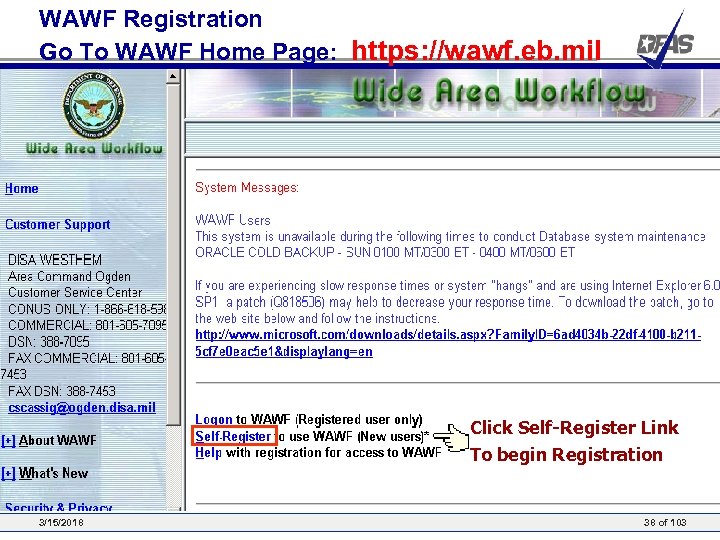 WAWF Registration Go To WAWF Home Page: https: //wawf. eb. mil Click Self-Register Link To begin Registration 3/15/2018 38 of 103
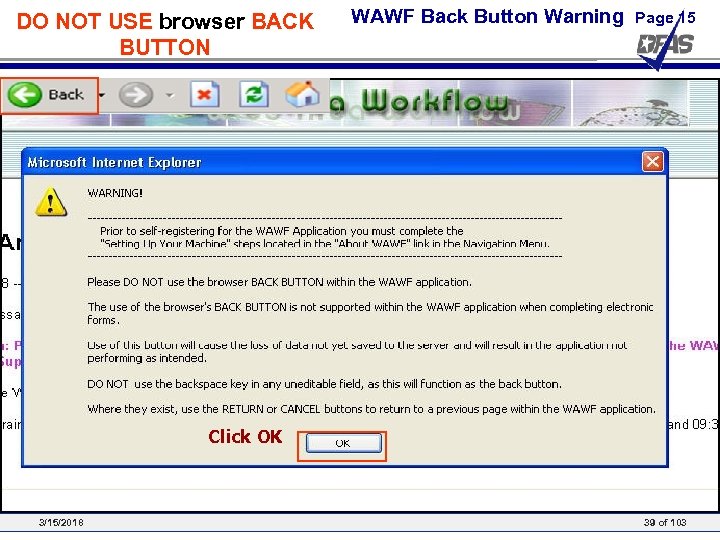 DO NOT USE browser BACK BUTTON WAWF Back Button Warning Page 15 Click OK 3/15/2018 39 of 103
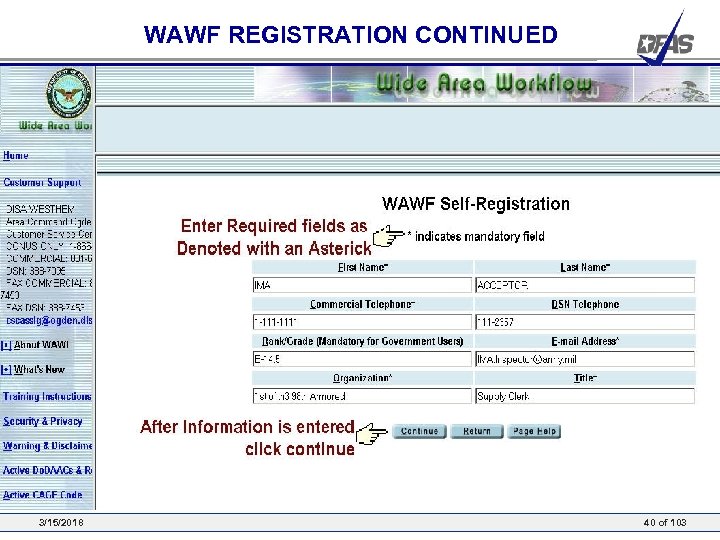 WAWF REGISTRATION CONTINUED 3/15/2018 40 of 103
 WAWF Registration – USER ID/PASSWORD Presented by: Defense Finance and Accounting Service 3/15/2018 41 of 12
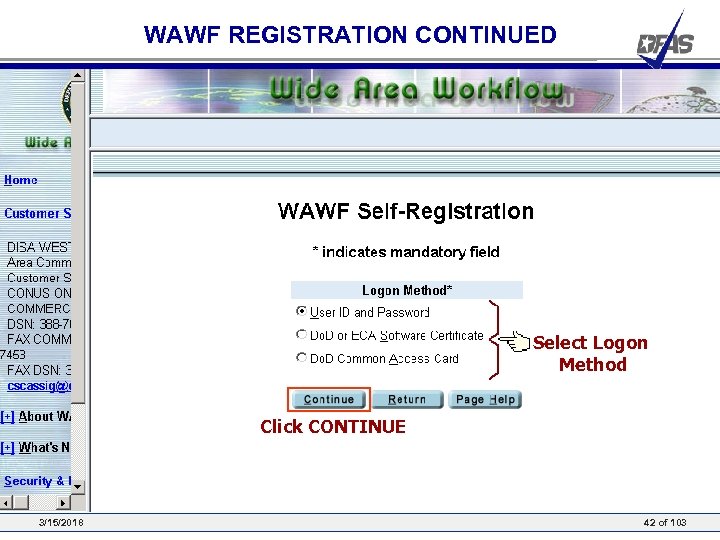 WAWF REGISTRATION CONTINUED Select Logon Method Click CONTINUE 3/15/2018 42 of 103
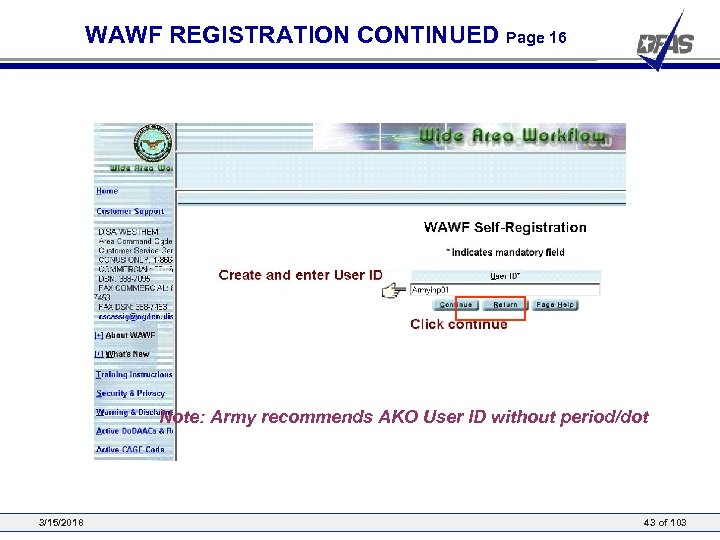 WAWF REGISTRATION CONTINUED Page 16 Note: Army recommends AKO User ID without period/dot 3/15/2018 43 of 103
 WAWF Registration – Common Access Card Presented by: Defense Finance and Accounting Service 3/15/2018 44 of 12
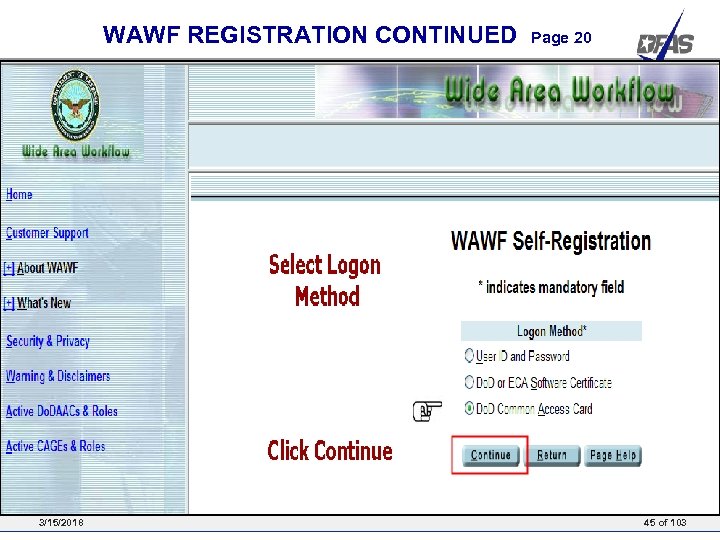 WAWF REGISTRATION CONTINUED 3/15/2018 Page 20 45 of 103
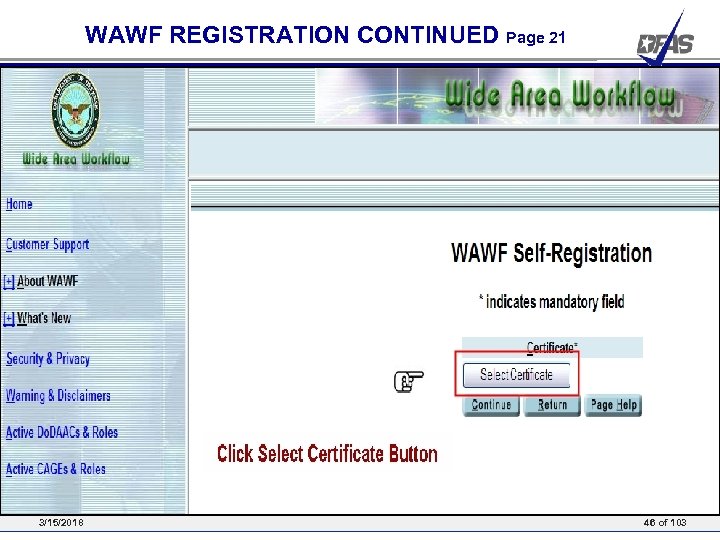 WAWF REGISTRATION CONTINUED Page 21 3/15/2018 46 of 103
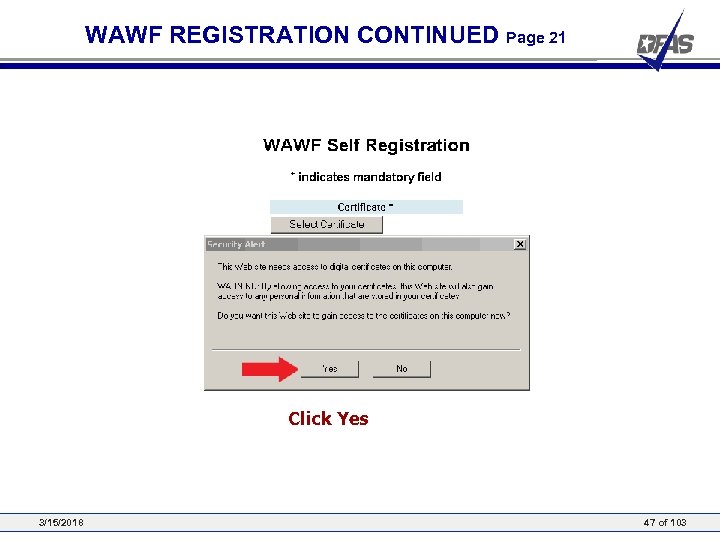 WAWF REGISTRATION CONTINUED Page 21 Click Yes 3/15/2018 47 of 103
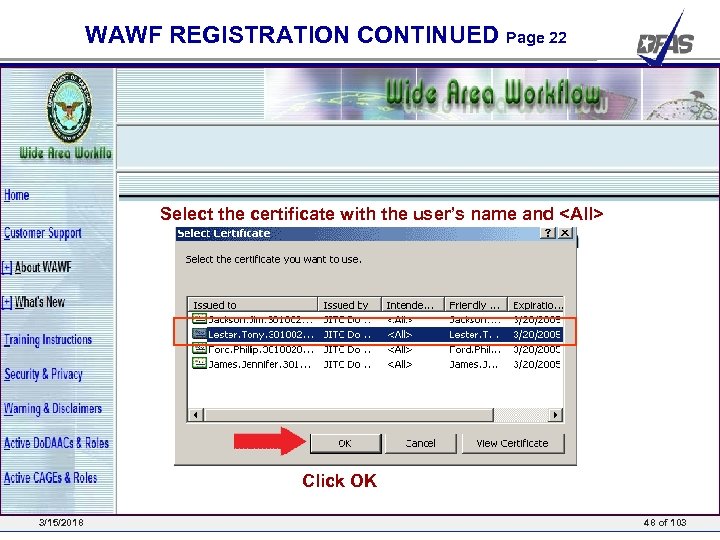 WAWF REGISTRATION CONTINUED Page 22 Select the certificate with the user’s name and
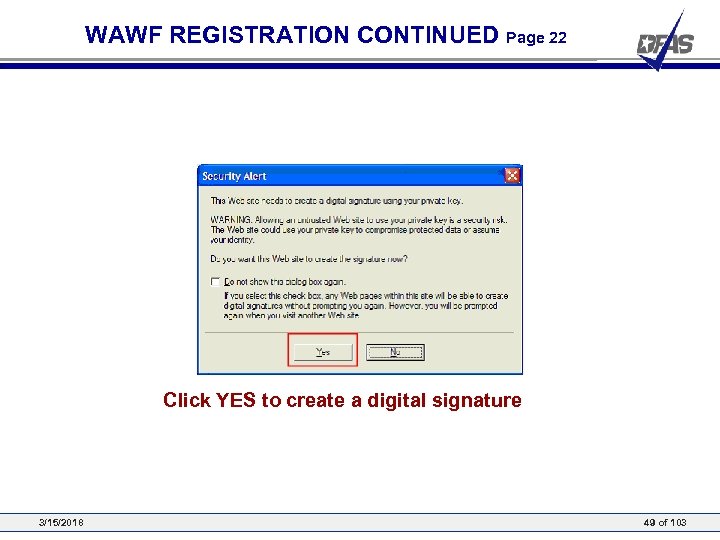 WAWF REGISTRATION CONTINUED Page 22 Click YES to create a digital signature 3/15/2018 49 of 103
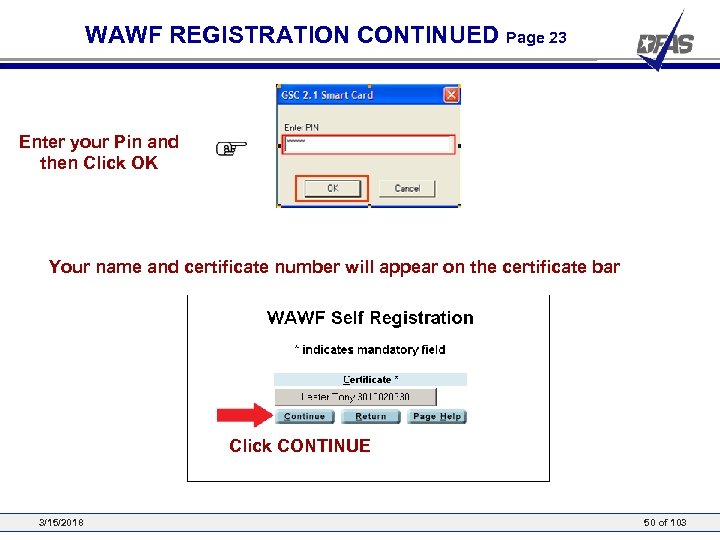 WAWF REGISTRATION CONTINUED Page 23 Enter your Pin and then Click OK Your name and certificate number will appear on the certificate bar Click CONTINUE 3/15/2018 50 of 103
 WAWF Registration – Government User Presented by: Defense Finance and Accounting Service 3/15/2018 51 of 12
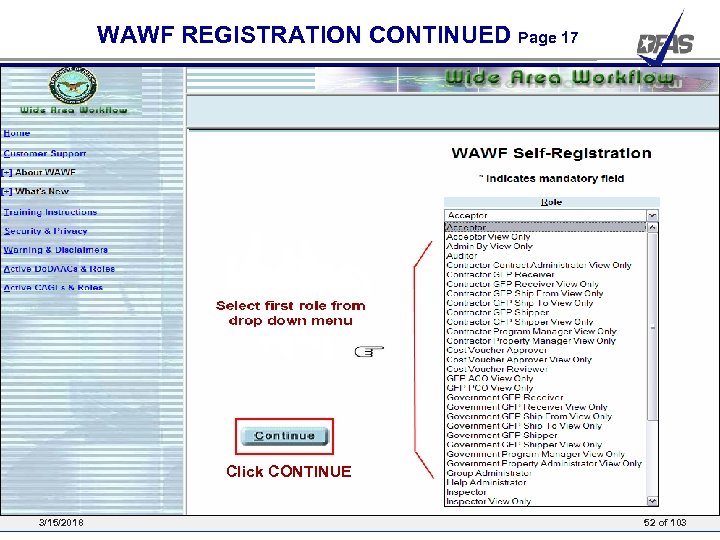 WAWF REGISTRATION CONTINUED Page 17 Click CONTINUE 3/15/2018 52 of 103
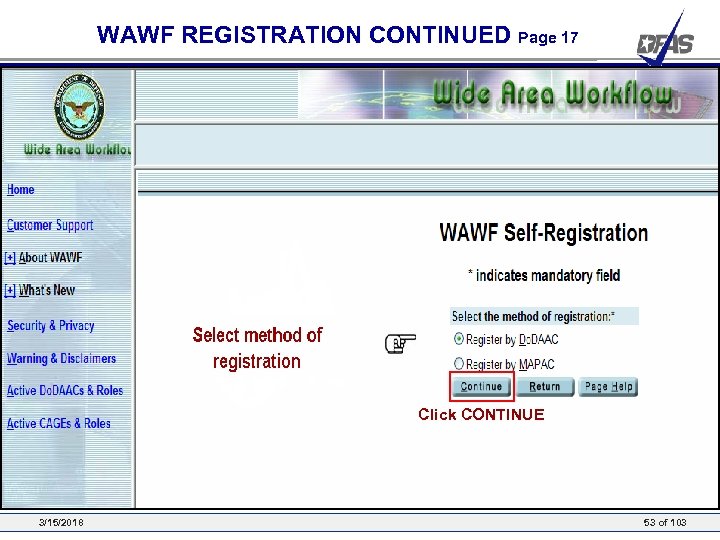 WAWF REGISTRATION CONTINUED Page 17 Click CONTINUE 3/15/2018 53 of 103
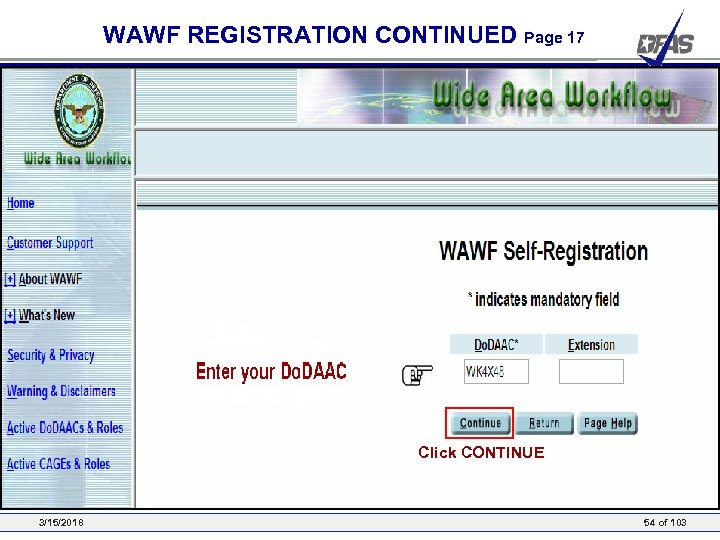 WAWF REGISTRATION CONTINUED Page 17 Click CONTINUE 3/15/2018 54 of 103
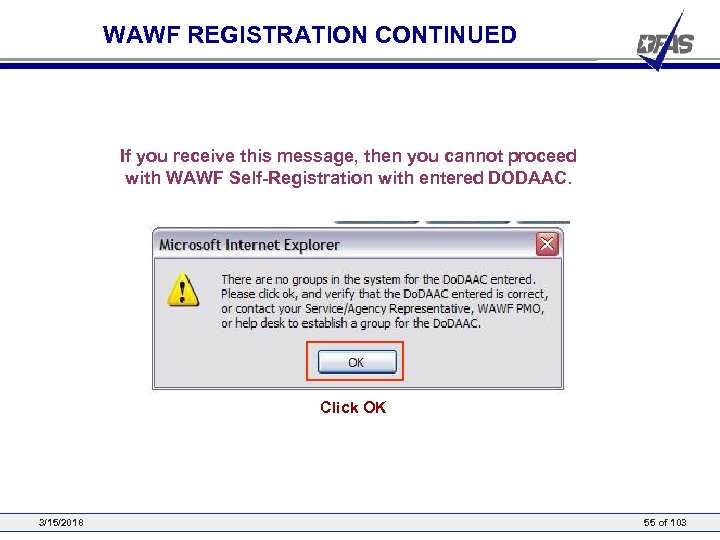 WAWF REGISTRATION CONTINUED If you receive this message, then you cannot proceed with WAWF Self-Registration with entered DODAAC. Click OK 3/15/2018 55 of 103
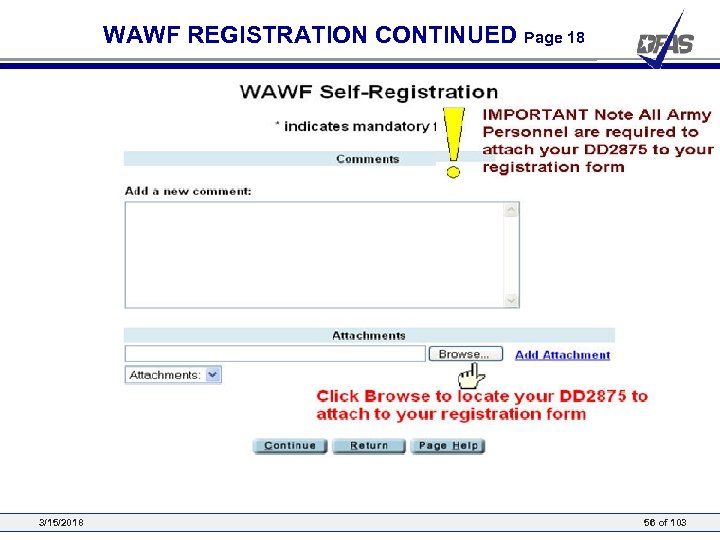 WAWF REGISTRATION CONTINUED Page 18 3/15/2018 56 of 103
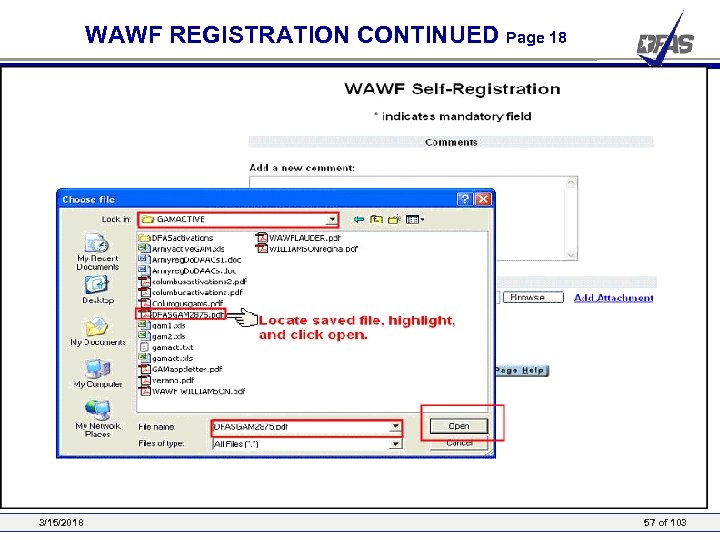 WAWF REGISTRATION CONTINUED Page 18 3/15/2018 57 of 103
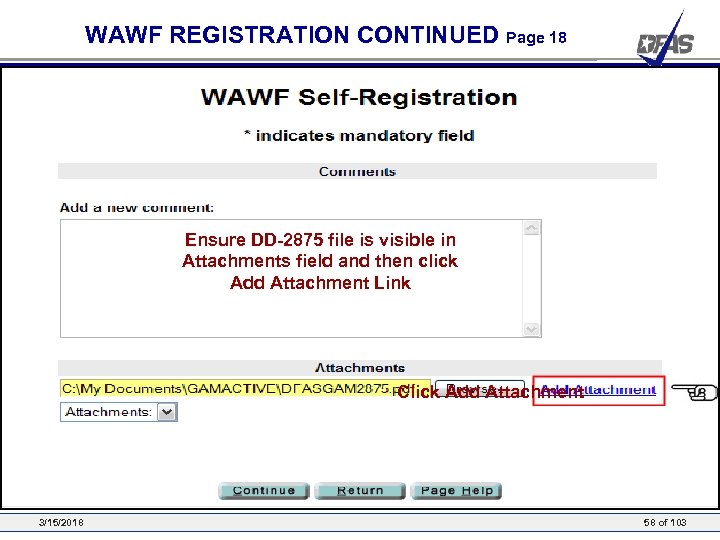 WAWF REGISTRATION CONTINUED Page 18 Ensure DD-2875 file is visible in Attachments field and then click Add Attachment Link Click Add Attachment 3/15/2018 58 of 103
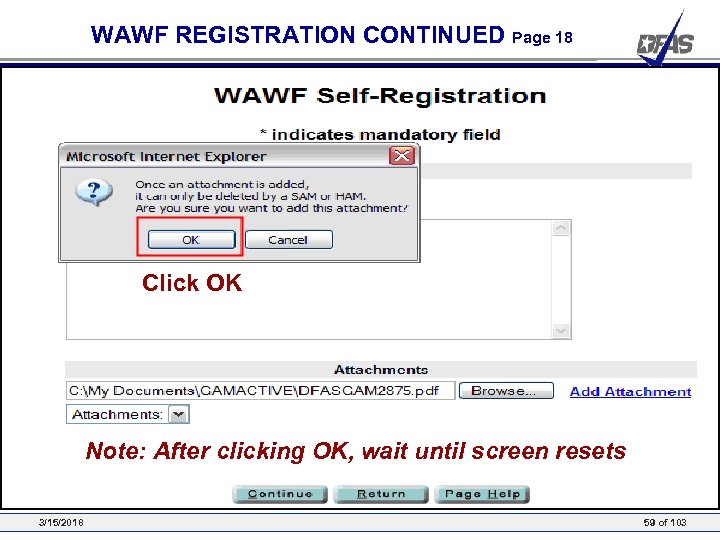 WAWF REGISTRATION CONTINUED Page 18 Click OK Note: After clicking OK, wait until screen resets 3/15/2018 59 of 103
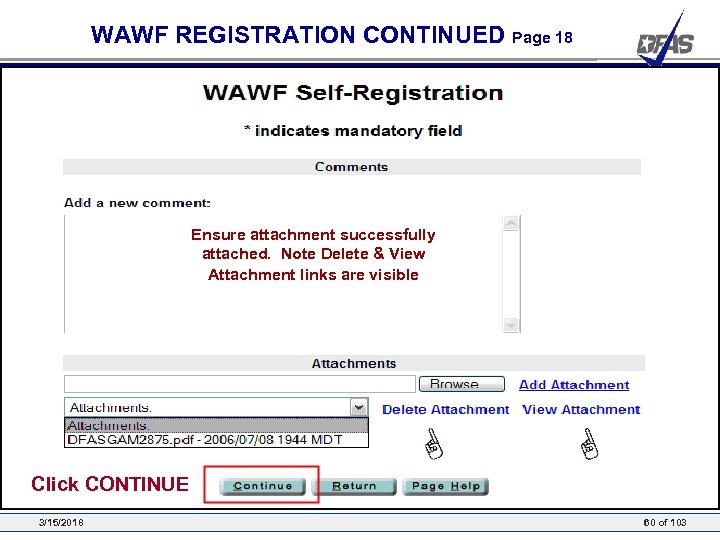 WAWF REGISTRATION CONTINUED Page 18 Ensure attachment successfully attached. Note Delete & View Attachment links are visible Click CONTINUE 3/15/2018 60 of 103
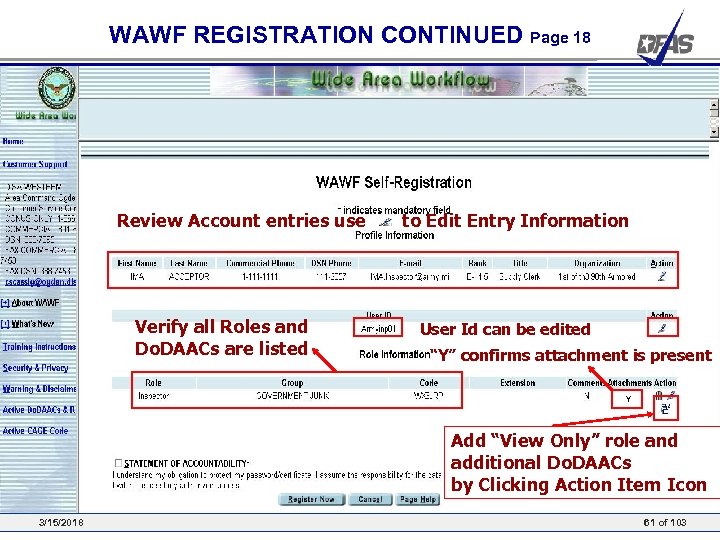 WAWF REGISTRATION CONTINUED Page 18 Review Account entries use Verify all Roles and Do. DAACs are listed to Edit Entry Information User Id can be edited “Y” confirms attachment is present Y Add “View Only” role and additional Do. DAACs by Clicking Action Item Icon 3/15/2018 61 of 103
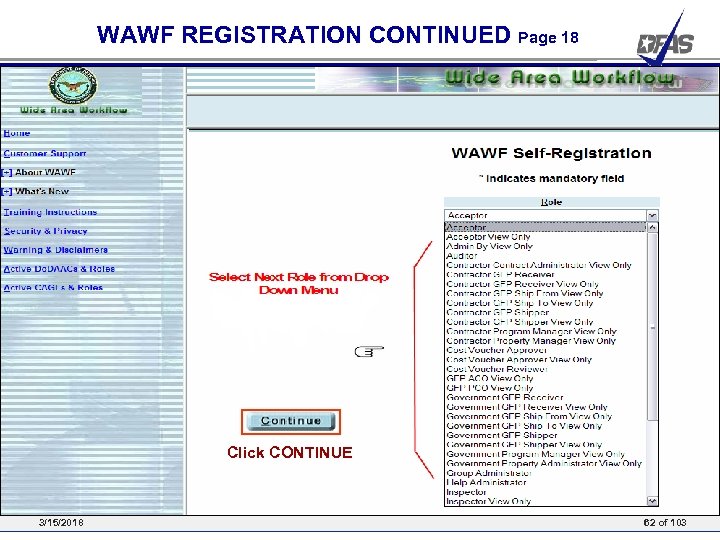 WAWF REGISTRATION CONTINUED Page 18 Click CONTINUE 3/15/2018 62 of 103
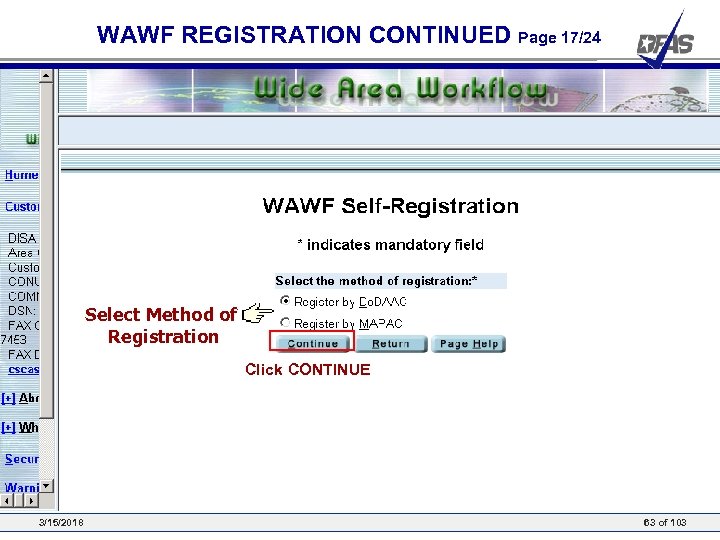 WAWF REGISTRATION CONTINUED Page 17/24 Select Method of Registration Click CONTINUE 3/15/2018 63 of 103
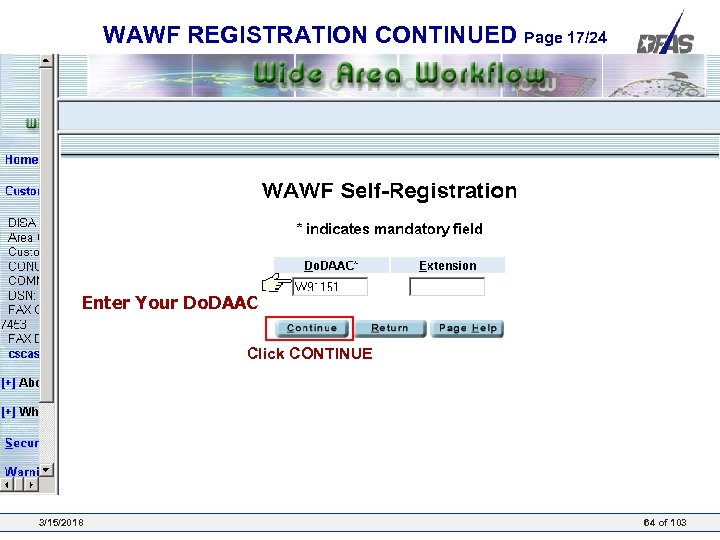 WAWF REGISTRATION CONTINUED Page 17/24 Enter Your Do. DAAC Click CONTINUE 3/15/2018 64 of 103
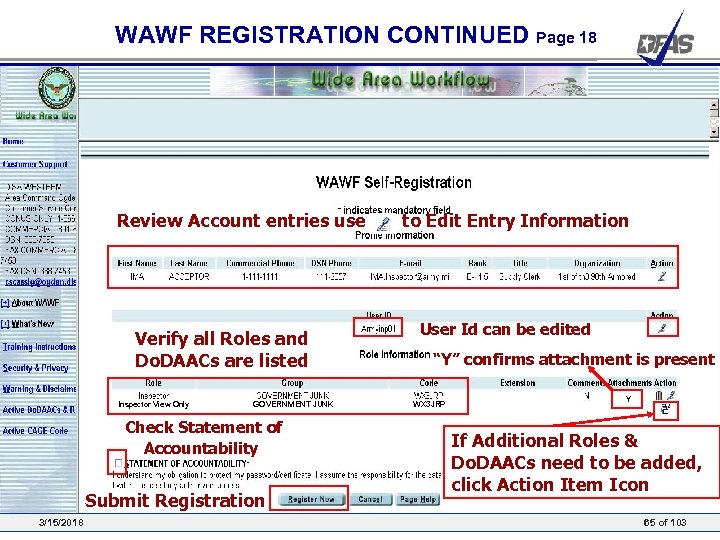 WAWF REGISTRATION CONTINUED Page 18 Review Account entries use Verify all Roles and Do. DAACs are listed Inspector View Only GOVERNMENT JUNK Check Statement of Accountability Submit Registration 3/15/2018 to Edit Entry Information User Id can be edited “Y” confirms attachment is present WX 3 JRP Y If Additional Roles & Do. DAACs need to be added, click Action Item Icon 65 of 103
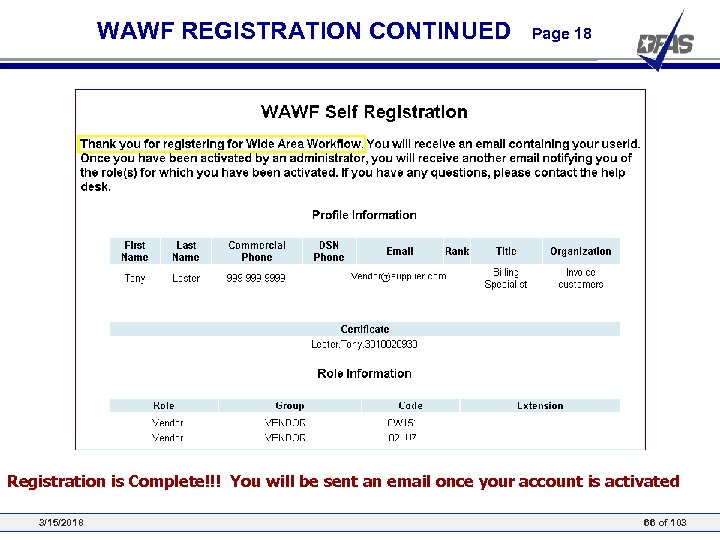 WAWF REGISTRATION CONTINUED Page 18 Registration is Complete!!! You will be sent an email once your account is activated 3/15/2018 66 of 103
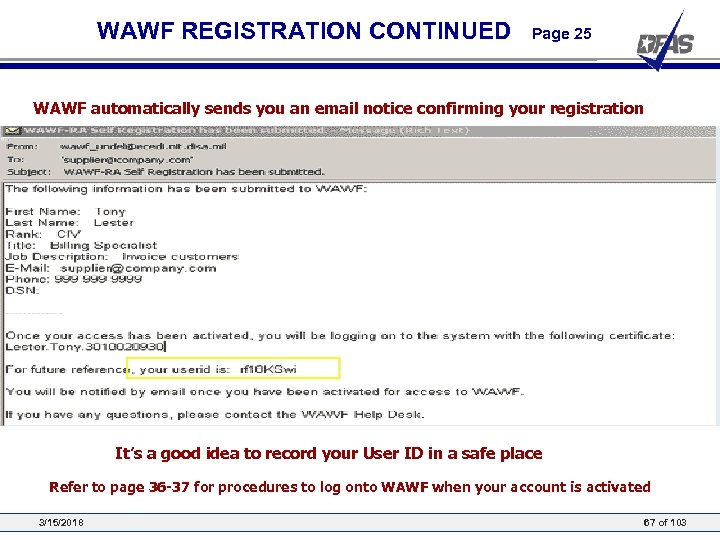 WAWF REGISTRATION CONTINUED Page 25 WAWF automatically sends you an email notice confirming your registration It’s a good idea to record your User ID in a safe place Refer to page 36 -37 for procedures to log onto WAWF when your account is activated 3/15/2018 67 of 103
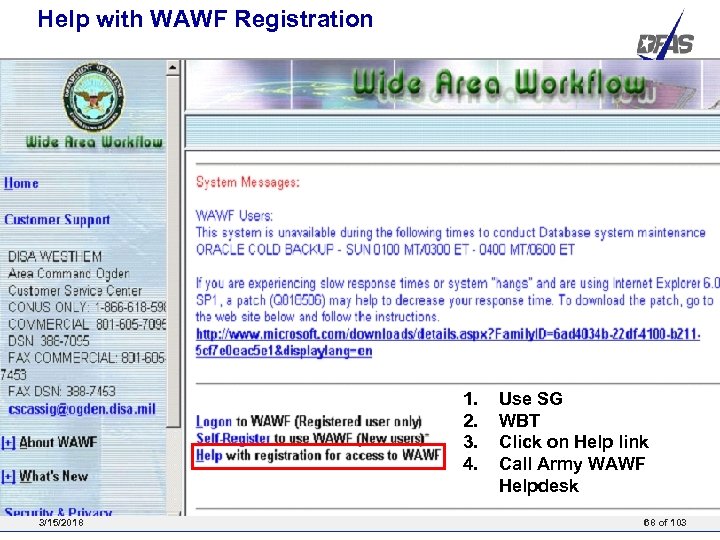 Help with WAWF Registration 1. 2. 3. 4. 3/15/2018 Use SG WBT Click on Help link Call Army WAWF Helpdesk 68 of 103
 Questions? 3/15/2018 69 of 103