


 Скачать презентацию Welcome to this Tech Net Event We would
af8735687f9197a2f5b10602cc292f5e.ppt
- Количество слайдов: 69
 Welcome to this Tech. Net Event We would like to bring your attention to the key elements of the Tech. Net programme; the central information and community resource for IT professionals in the UK: • • • FREE bi-weekly technical newsletter FREE regular technical events hosted across the UK FREE weekly UK & US led technical webcasts FREE comprehensive technical web site Monthly CD / DVD subscription with the latest technical tools & resources FREE quarterly technical magazine To subscribe to the newsletter or just to find out more, please visit www. microsoft. com/uk/technet or speak to a Microsoft representative during the break
 Terminal Services Server-Centric Computing Now and in the Future
 Welcome • Agenda 09: 00 – 09: 30 – 11: 45 – 12: 45 • Facilities Phones off Toilets in lobby Registration Supporting Terminal Services Coffee Terminal Services Roadmap
 The PSS View: Supporting Terminal Services Sasha Loncarevic Critical Problem Resolution EMEA GTSC Platforms Support
 Agenda • Microsoft GTSC Support Processes • Support Statistics for Terminal Server • Common Issues – Licensing – Scalability – Profiles – Printing • Summary • Questions
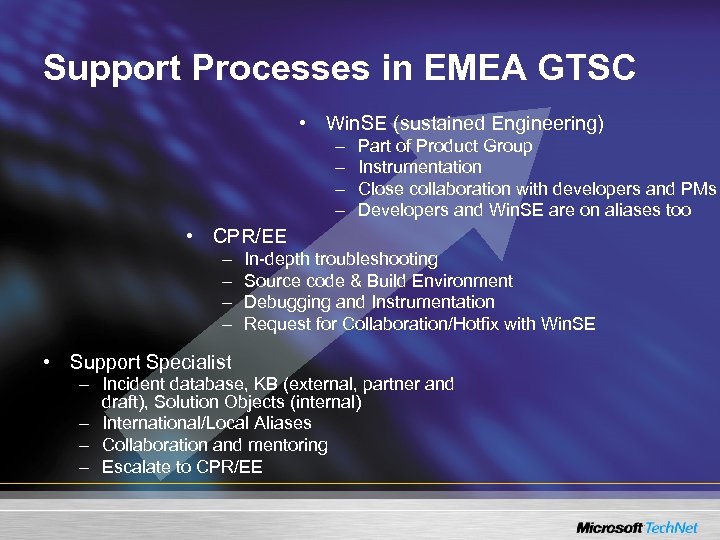 Support Processes in EMEA GTSC • Win. SE (sustained Engineering) – – Part of Product Group Instrumentation Close collaboration with developers and PMs Developers and Win. SE are on aliases too • CPR/EE – – In-depth troubleshooting Source code & Build Environment Debugging and Instrumentation Request for Collaboration/Hotfix with Win. SE • Support Specialist – Incident database, KB (external, partner and draft), Solution Objects (internal) – International/Local Aliases – Collaboration and mentoring – Escalate to CPR/EE
 Support Statistics • Terminal Services calls are categorised in two main areas – Licensing – All others • Many sub-categories also coded – by engineer when closing the case • e. g. “Printer RedirectionDriver ComatibilityMisconfiguration” • Results are analysed by Volume and Labour Time (Minutes per Incident) – Used to drive product development and documentation
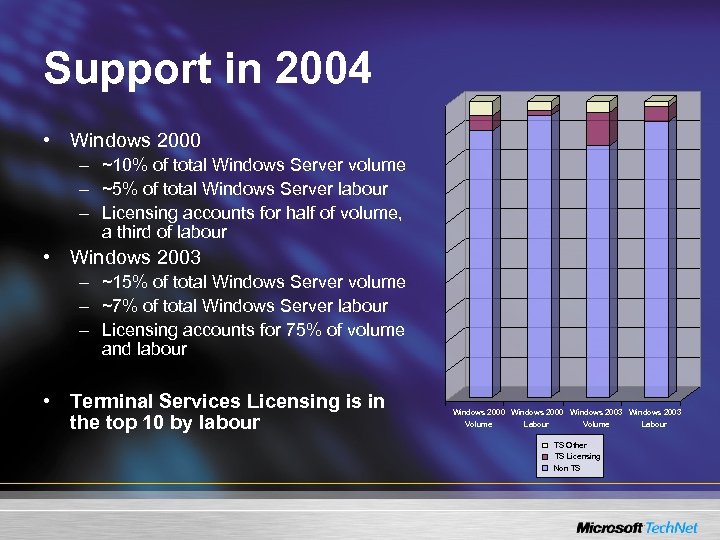 Support in 2004 • Windows 2000 – ~10% of total Windows Server volume – ~5% of total Windows Server labour – Licensing accounts for half of volume, a third of labour • Windows 2003 – ~15% of total Windows Server volume – ~7% of total Windows Server labour – Licensing accounts for 75% of volume and labour • Terminal Services Licensing is in the top 10 by labour Windows 2000 Windows 2003 Volume Labour TS Other TS Licensing Non TS
 Support Trends • Volume increasing for Windows 2003 – Terminal Services improvements in Windows 2003 driving deployment • Decreasing MPI for Windows 2000 and Windows 2003 – Bugs exposed by modern scenarios being ironed out – Building a Hotfix stockpile • Symptoms matched quickly – Up to a third of non-Licensing calls resolved with an existing Hotfix
 EMEA Virtual Team Experience • Licensing – Connections denied, or licenses not tracked • Scaling – Memory limitations – Old 3 rd party drivers – Deadlocks and hangs • Profiles – Incomplete profile upload/download • Printing – Printers not mapped or jobs not printed • Application compatibility – Lose profile settings
 Licensing - Overview • No licensing required in grace period – 90 days Windows 2000 – 120 days Windows 2003 • Grace ends when Licensing Service is discovered – First contact obtains certificates to check CALs
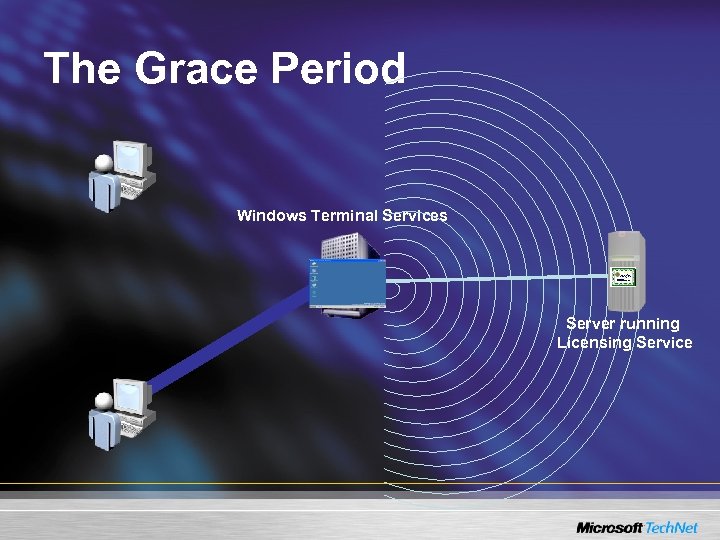 The Grace Period Windows Terminal Services Server running Licensing Service
 Finding the License Service • Discovery is done – Windows 2003 • In the background every hour until an in-site License Service is found – Windows 2000 • In the background every 15 minutes until a License Service is discovered thereafter every 2 hours – Or whenever a License Service is required • Upgrade or issue CAL • Secure Licensing option in Windows 2003 – Configured via Group Policy – Local “Terminal Server Computer” group
 Finding the License Service 1. Registry override q Multiple servers in Windows 2003 2. Check AD for site licence object q Created during install Licensing Service If Enterprise mode selected User modifiable (add servers) q Contact each and cache (Enterprise. Multi) 3. Check each DC (in site for Windows 2003) q Contact each and cache (Domain. Multi) 4. Broadcast
 License Service Discovered • Each device needs a CAL – Except with Internet Connector (Windows 2000) or Per User mode (Windows 2003) • Upon first connect, client offers a unique hardware ID • Terminal Server gets CAL from Licensing Service – CAL is uniquely identified by client hardware ID and stored in Jet db • CAL passed back to client and stored in its registry • Client offers CAL at subsequent connections – Terminal Services validates the CAL • No CAL and no License Service available = no session • License Server issues temporary CALs until Activated
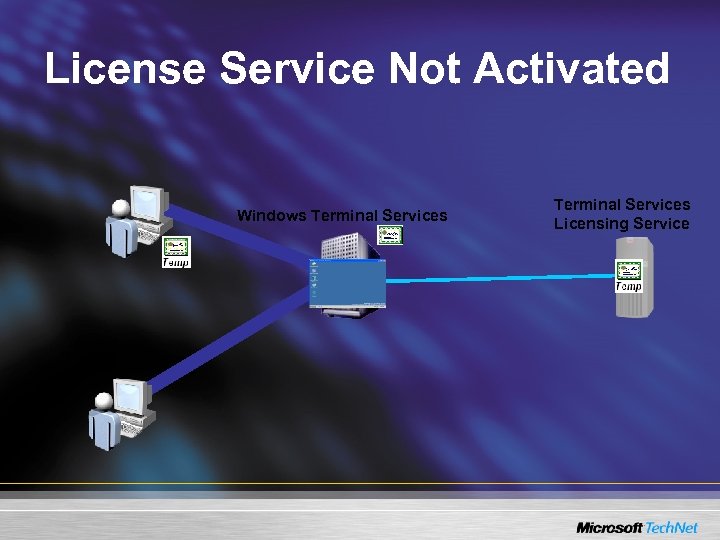 License Service Not Activated Windows Terminal Services Licensing Service
 Activating the License Service • User Interface for connection to Clearing House (CA) – Web Browser, telephone, fax, Internet • Activated Windows 2003 License Service issues – Builtin CAL for Windows 2000/Windows XP clients • Windows 2000 Terminal Services only • No Expiry, Unlimited pool, A 02 -5. 00 -EX – Temporary CALs for Windows 2000 or Windows 2003 • 90 days expiry, not renewable, A 02 -5. 00 -S or A 02 -5. 02 -S – Full CAL for other clients (if CAL pak installed) • 52 -89 day expiry, A 02 -5. 00 -S or A 02 -5. 02 -S • Temporary CAL issued at first connect, marked after logon, and upgraded to full CAL on next connect – Prevent Denial of Service, and stealing of CALs
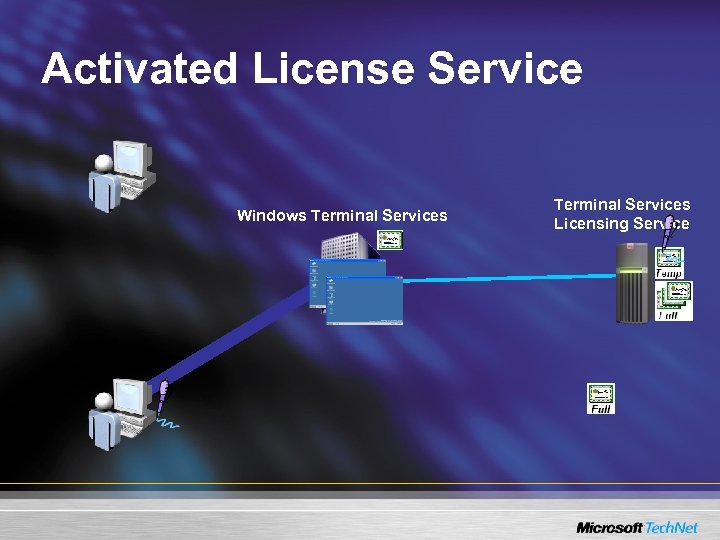 Activated License Service Windows Terminal Services Licensing Service
 Additional Considerations • Lost license is ‘found’ via hardware ID – Some thin clients do not store license – Citrix caches licenses on Terminal Servers • Metaframe XP replicates to all farm servers • Deleting entire Licensing store (registry) on client causes new hardware ID generation • Client renews CAL 7 days before expiry • Expired CALs returned to pool every 24 hours
 Problems • Multiple CALs for one client name • Cannot connect – Cannot discover License Service – Cannot upgrade temporary CAL • Backing up, moving License DB
 Troubleshooting • Eventlog (MPS Reports) • Resource Kit – LSREPORT – LSVIEW – TSCTST • PSS Tools – LSDIAG – TSTST • Checked version of LSERVER. EXE • Term. Srv tracing & additional instrumentation
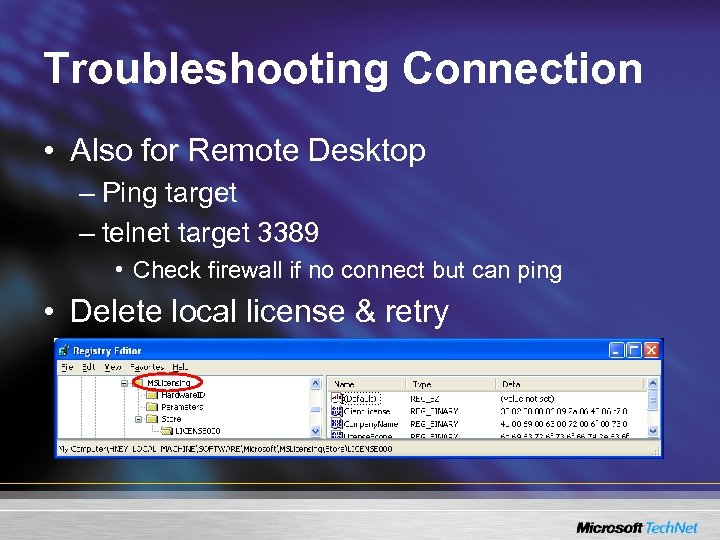 Troubleshooting Connection • Also for Remote Desktop – Ping target – telnet target 3389 • Check firewall if no connect but can ping • Delete local license & retry
 Recommendations • Implement backup LS (no licenses) – Not ideal for certain cases e. g. Metaframe 1. 8 – Policy module is complex, some cases result in no connection • Enterprise LS if possible, manual edit • Verify before deployment – TSCTST – LSVIEW – LSAdmin • Review KBs and Whitepapers 822134 - The function of Terminal Server CALs in Server 2003 823313 - Server 2003 TS licensing issues and requirements
 Scalability • Number of user sessions limited – Poor Performance – Errors during certain operations – New applications or sessions fail – Session or Server Hangs • How many sessions can a server host?
 Scaling – Windows 2000 • Tested in conjunction with NEC • Tests use classes of worker – Data Entry Dedicated (3 Mb), Data Entry (4 Mb), Knowledge (9 Mb), Structured (10 Mb) – Knowledge worker types a page in Word, responds to an email, creates a small spreadsheet, uses IE – Data Entry Worker connects to and uses SQL via simple app http: //www. microsoft. com/windows 2000/techinfo/administration/terminal/tscaling. asp
 Scaling - Windows 2000 (NEC) • 500 MHz procs used – now Xeon 3. 2 GHz with HT not uncommon – Windows 2003 uses HT better; Windows 2000 suffers slightly • Scripted: No indication of ‘usability’
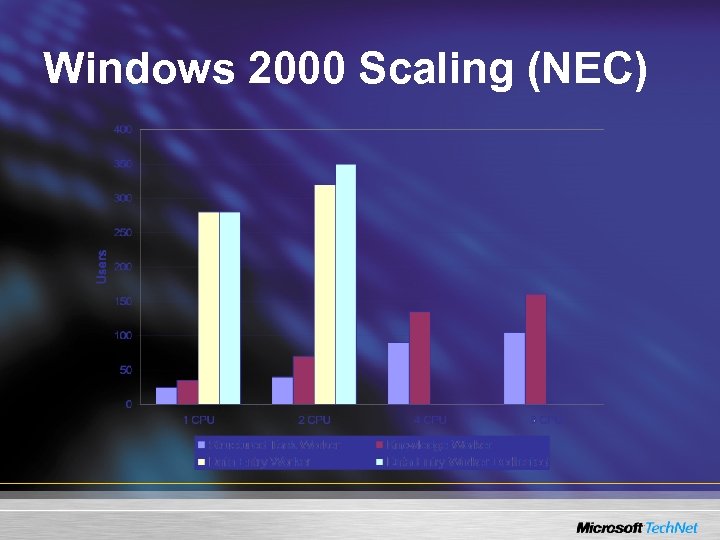 Windows 2000 Scaling (NEC)
 Scaling - Windows 2003 • From product documentation on Microsoft. com – Users classed as Light (10 Mb), Power (21 Mb) and Structured (10 -21 Mb) – Recommended RAM = 128 + user RAM as above – CPU & RAM scale linearly… • Depends on bus technology etc – No users/CPU recommendation • Test, test
 Scaling – Windows 2003 • Scalability Whitepaper – Tests use more modern hardware – Two worker classes • Data Entry Worker (3. 5 Mb) • Knowledge Worker (9. 5 Mb) http: //www. microsoft. com/windowsserver 2003/techinfo/overview/tsscaling. mspx
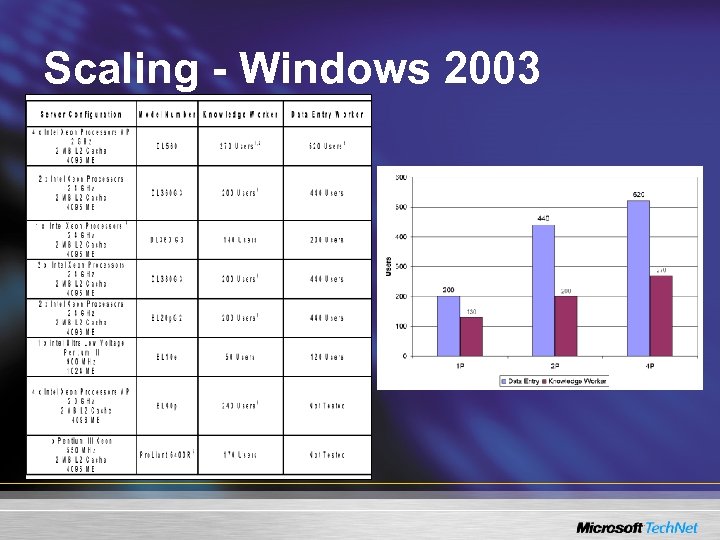 Scaling - Windows 2003
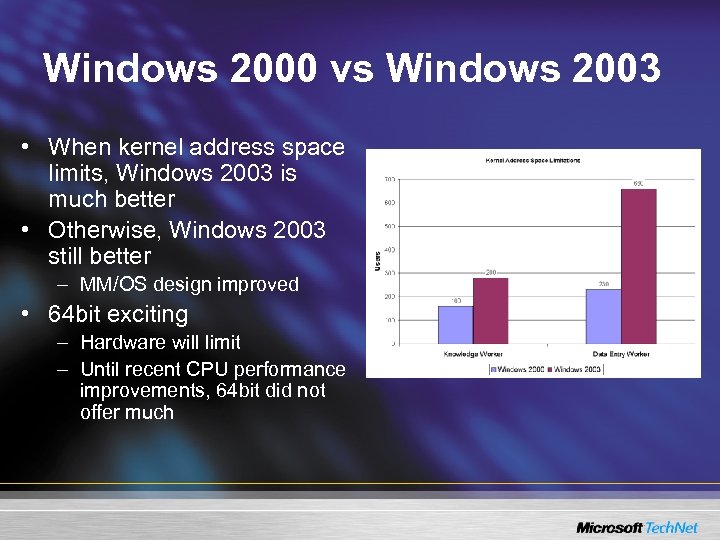 Windows 2000 vs Windows 2003 • When kernel address space limits, Windows 2003 is much better • Otherwise, Windows 2003 still better – MM/OS design improved • 64 bit exciting – Hardware will limit – Until recent CPU performance improvements, 64 bit did not offer much
 Limiters • Obvious : Hardware – CPU, Disk, RAM, Network • Less obvious : Software and Operating System – – Address space limitations (2 Gb Kernel, 2 Gb User) Redirector and other driver design Registry size/contention Applications • Polling (keyboard or otherwise) • Not multi-user friendly design – …most of these can be tuned
 Common Problems • Poor performance – Hardware limitations – Registry contention – Old client technology (UI needs accelerator) • Logon and/or network file access slow (>15 secs) – Redirector current commands, Server workitems • KB 232476 • Missing icons, user 32. dll errors – Desktop Heap or session pool • Application or session start failures – memory space limitations • Paged. Pool 160 Mb-380 Mb (Windows 2000 registry hives) • Non. Paged. Pool 128 Mb, double in Windows 2003
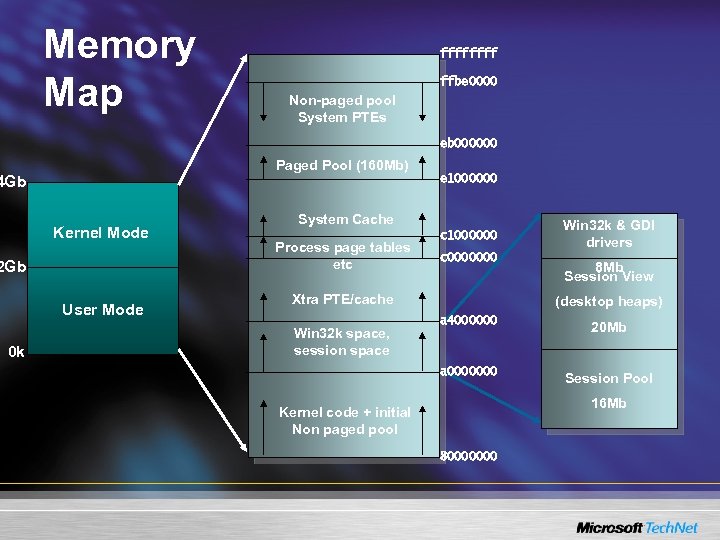 Memory Map ffff ffbe 0000 Non-paged pool System PTEs eb 000000 Paged Pool (160 Mb) 4 Gb e 1000000 Kernel Mode 2 Gb User Mode 0 k System Cache Process page tables etc c 1000000 c 0000000 Xtra PTE/cache Win 32 k & GDI drivers 8 Mb Session View (desktop heaps) a 4000000 20 Mb a 0000000 Win 32 k space, session space Session Pool 16 Mb Kernel code + initial Non paged pool 80000000
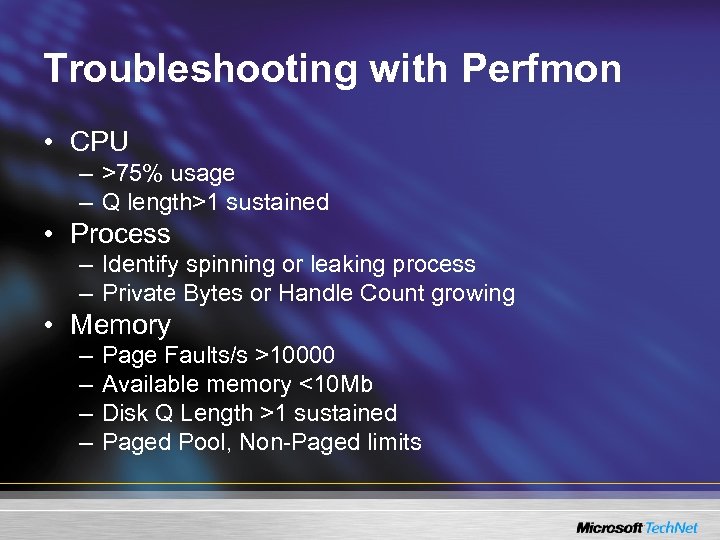 Troubleshooting with Perfmon • CPU – >75% usage – Q length>1 sustained • Process – Identify spinning or leaking process – Private Bytes or Handle Count growing • Memory – – Page Faults/s >10000 Available memory <10 Mb Disk Q Length >1 sustained Paged Pool, Non-Paged limits
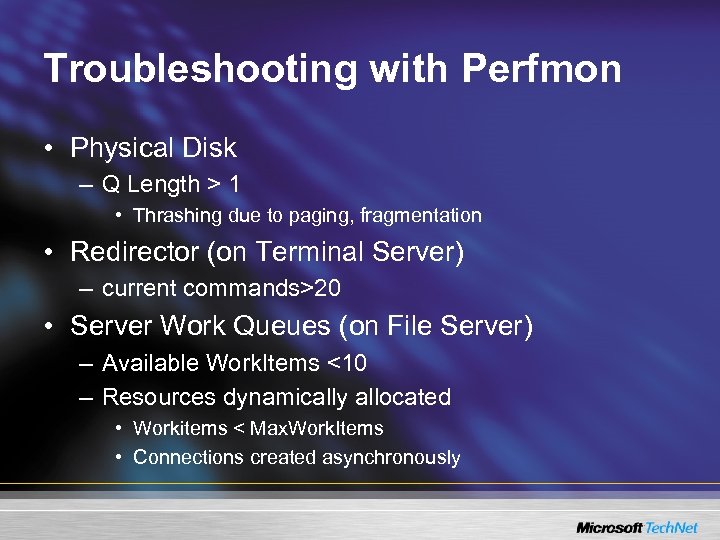 Troubleshooting with Perfmon • Physical Disk – Q Length > 1 • Thrashing due to paging, fragmentation • Redirector (on Terminal Server) – current commands>20 • Server Work Queues (on File Server) – Available Work. Items <10 – Resources dynamically allocated • Workitems < Max. Work. Items • Connections created asynchronously
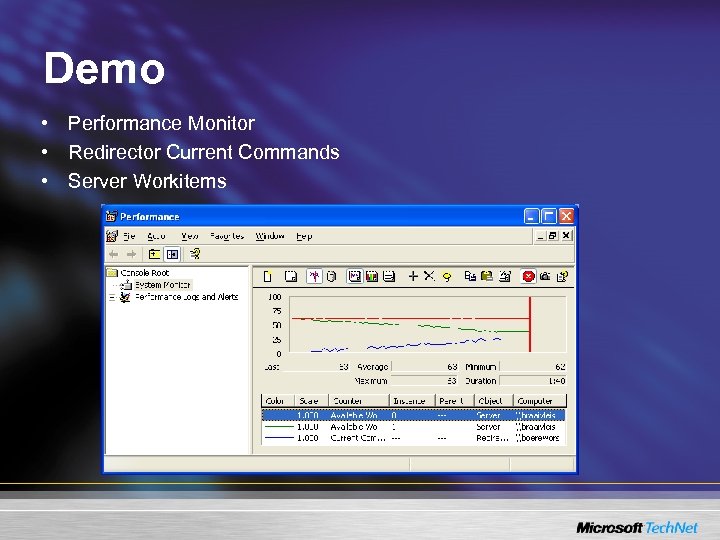 Demo • Performance Monitor • Redirector Current Commands • Server Workitems
 Other Troubleshooting • Network trace analysis – Repeated packets – Large Round. Trip. Time • User-mode Debugging • Kernel Debugging (forced dump or live) – Find deadlocked threads – Examine memory usage • OEM tools – dheapmon. exe, userdump. exe
 Recommendations • Test scalability – – Roboclient in Resource Kit Performance Monitor Sweetspot may be 4 -way CPU with 2 Gb If task takes 10% longer than on empty server, server is reaching saturation – Run User Acceptance Tests under desired load • Scale out not up – Address space limitations, until 64 bit • RAM and disk are cheap – <=4 Gb, no PAE – Pagefile & OS on separate/multiple spindles/controller
 Recommendations • Rethink folder redirection & run apps locally • Set up and test Memory Dump – Problems are more complex since hardware allows greater loading • Collect and store baseline performance data
 Profiles – Overview • User configuration, settings and files • Per machine persistence – Cached locally in c: documents and settingsusername • Optionally roaming, mandatory or temporary – PKI implications • Stored on file server for roaming • Separate profiles available for Terminal Services (not at console)
 Establishing Profile Location • WINLOGON/MSGINA handles logon & obtains normal profile path from user account – Set via UI, TSPROF, or scriptable Windows 2003 WTSADMIN • If not at console then check GPO settings – Force local – Override path (append with %username%), not for mandatory • Otherwise TS profile path retrieved via SAM API – RPC over SMB has firewall implications – Log event & optionally deny logon if SAM calls fail • If profile path is still blank, use default profile – “\logonserverNetlogonDefault User” or – local “documents and settingsDefault User”
 Profile Load • Userenv has 10 threads to copy profile – Each file is copied to a prfxxx. tmp, target is deleted & temp file renamed to target • ntuser. dat and usrclass. dat (Classes key, non-roaming) loaded into HKEY_CURRENT_USER • User policy applied – In foreground i. e. before desktop – background (90+- 30 minutes) – Loopback, if configured
 Profile Unload • Unload ntuser. dat, usrclass. dat – Retry 60 times, once per second • Copy files (as per load) to roaming store • Remove cached copy if Delete. Roaming. Cache enabled • Term. SRV waits 180 s for completion of session close
 Profile Problems • Profile load/unload failures – Registry key in HKCU in use (unload) – File copy fails (file in use or other error) • Usually Anti. Virus • Redirector timing • Profile path is blank or not collected – Password change code defect in Windows 2003 (KB 833409) – >=SP 4 provides single retry with DC rediscover – SAM 2048 handle limit (Windows 2000 DC)
 Profile Problems • XForest. Logon (Windows 2003, Win 2 k >=SP 4) – Prevent roaming profile and policy from foreign domain • Profiles shared between NT 4, Windows 2000, Windows 2003 and Windows XP – Protected. Storage one time migration
 Troubleshooting Profile Problems • Eventviewer – Userenv events in Application log • userenv debug logging – userenvdebuglevel = 0 x 10002 (HKLM. . . Winlogon) – Make userenv. bak read-only • UPHCLEAN – Identifies process holding registry key • SPOOLSV. EXE usually implies printer driver • Inspect HKEY_USERS – Each HKCU is loaded as user SID
 Demo • UPHCLEAN – Profile unload
 Recommendations • Use UPHCLEAN • Monitor event log for problems • Force local profile or use mandatory where possible • Monitor disk space and cached profiles – Delete. Roaming. Cache has overhead • Keep profiles small when using roaming • Hybrid profile solution – beware PKI
 Redirected Printing • Seamless experience – Default printer on client is default in session – Print on Word in session, job comes out of local printer • Enabled by server, per user, or by client • At connect time, client printers are mapped into user’s Terminal session • Jobs printed in session are spooled/rendered on Terminal Server • Raw data conveyed to client
 Redirected Printing • Network printers in user profile are unaffected – Default is switched to client default, if the printer is mapped • Network printers on client can also be mapped – Process is the same – rendered job conveyed to client for transfer to network printer – 5. 0 client needs Filter. Queue. Type registry change
 Mapping Printers – How it works • After logon (reconnect), RDPDR requests list of ports and printer driver names from client • Client returns filtered list (Filter. Queue. Type) • RDPDR maps ports to TSxxx and notifies Winlogon of printer ports and printer driver • Winlogon creates TSxxx port then calls Spooler to create a printer on that port – Printer similar to local queue, port is TSxxx not LPTx – Printer name is decorated with session details – Permissions for current user only
 Mapping Printers – How it works • Printers only created if driver in ntprint. inf – or if admin has already installed printer driver – Driver names can be mapped with a wizard – KB 239088 • Client settings not mirrored during first connect – Persisted to client 60 secs after a change in the session
 Problems • Bad drivers crash spooler – BSo. D in NT 4. 0, still possible in Windows 2000 but mini-driver model user-mode & more robust • No printers mapped – No drivers – Process is asynchronous with logon – may be slow • Wrong page size set (A 4, Letter) • Spooler stressed – Printers slow to appear, and get deleted – Jobs slow • Overcome now (>=Sp 4, Windows 2003) – Misdirected jobs – Printers seen by all users
 Demo • Redirected Printers • Printer Driver Redirection Wizard • Print job sizes
 Troubleshooting • System Event log – Data DWORDs helpful for PSS • Dr. Watson log or Application Event Log – Spool. SV automatically restarts – Send in user. dmp for analysis • Usually bad driver • Performance Monitor – Print mapping thrashes registry, causes performance data dropout – Registry. Lazy. Flush. Interval tuning – Spool. SV CPU time • WLNotify debug logging
 Recommendations • Be aware of rendered job sizes – Compressed in Windows 2003 but can still consume bandwidth • Pre-Install required drivers and lock down installs – Add/Remove drivers user right – Trusted. Driver. Path (KB 239536 still applies) • Review KB 324446 – Registry. Lazy. Flush. Interval may need tweaking • Monitor size of setupapi. log – Delete regularly • Install latest versions of relevant files – Usbmon. dll, spoolsv. exe, localspl. dll, winsrv. dll, wlnotify. dll, rdpdr. sys
 Application Compatibility • Remote Desktop or Remote Administration – Control Panel Add/Remove required in Windows 2000 • Application Server – Requires Control Panel Add/Remove – Check TSOC. LOG if errors occur – Additional overhead to maintain multi-user compatibility • For applications that are not multi-user aware (very few these days)
 Application Server • Install or Execute mode – Always logon into Execute mode – Install mode used when installing software • HKCU changes copied to shadow registry • master INI file copies written in %systemroot% – Execute mode to ensure multi-user awareness • INI file changes to user’s copy of INI file • Missing HKCU keys fetched from shadow
 Application Server Mode • At logon – INI files newer in %systemroot% are merged or copied to user directory – HKCU keys older than shadow keys _deleted_ • Unless overridden by registry (or process image)… – Windows directory mapped to home drive (or profile) • INI files read from user’s Windows directory – Missing HKCU keys read from shadow
 Problems • Settings revert to old values e. g. ‘Lose’ Office Config – Usually caused by NOT imaging servers… – KB 297379 • Server not in correct mode – require more than two sessions, or non-administrator • Internet Explorer, Outlook Express icons re-appear after removal – Explorer stubs difficult to remove
 Troubleshooting • 3 rd Party Tools – REGMON from Sys. Internals for registry activity • userinit deletes old shadows at logon – FILEMON from Sys. Internals for INI file activity – use filters to reduce noise – run on console to capture activity in session • PSS Tools – RDT, SDT • Show and set reg key times so that shadow keys
 Demo • Shadow key deletion (time permitting)
 3 rd Party Value Add • Many 3 rd Party solutions are now available • Full Product Suite Add-ons: – New Moon (Tarantella) – Citrix Meta. Frame • Other Add-ons: – – – – HTTP Gateway/Firewall Traversal : Whale Universal Printer Driver : Tri. Cerat, Thin. Print, Jetro Application Publishing : Jetro Seamless Windows : Jetro Application Monitoring/Eventing : Lakeside Non-Windows Clients : HOBsoft Integrated Load Balancing : Jetro
 Summary • Terminal Services stability and features in Windows 2003 is a driver of Windows 2003 deployment • Licensing is a big issue – SP 1 improvements • Current hardware allows loading up to address space limits • A few bugs are being exposed under the additional load allowed by current hardware – Unique challenges for in-depth troubleshooting • Arsenal of hotfixes driving down time to resolution
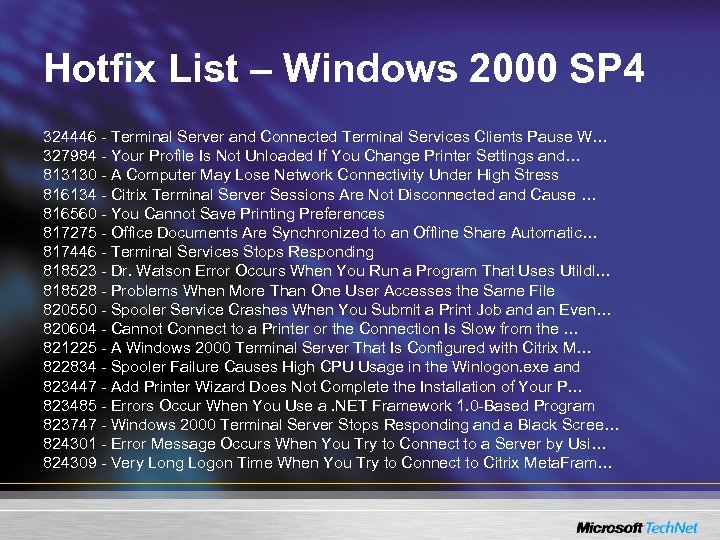 Hotfix List – Windows 2000 SP 4 324446 - Terminal Server and Connected Terminal Services Clients Pause W… 327984 - Your Profile Is Not Unloaded If You Change Printer Settings and… 813130 - A Computer May Lose Network Connectivity Under High Stress 816134 - Citrix Terminal Server Sessions Are Not Disconnected and Cause … 816560 - You Cannot Save Printing Preferences 817275 - Office Documents Are Synchronized to an Offline Share Automatic… 817446 - Terminal Services Stops Responding 818523 - Dr. Watson Error Occurs When You Run a Program That Uses Utildl… 818528 - Problems When More Than One User Accesses the Same File 820550 - Spooler Service Crashes When You Submit a Print Job and an Even… 820604 - Cannot Connect to a Printer or the Connection Is Slow from the … 821225 - A Windows 2000 Terminal Server That Is Configured with Citrix M… 822834 - Spooler Failure Causes High CPU Usage in the Winlogon. exe and 823447 - Add Printer Wizard Does Not Complete the Installation of Your P… 823485 - Errors Occur When You Use a. NET Framework 1. 0 -Based Program 823747 - Windows 2000 Terminal Server Stops Responding and a Black Scree… 824301 - Error Message Occurs When You Try to Connect to a Server by Usi… 824309 - Very Long Logon Time When You Try to Connect to Citrix Meta. Fram…
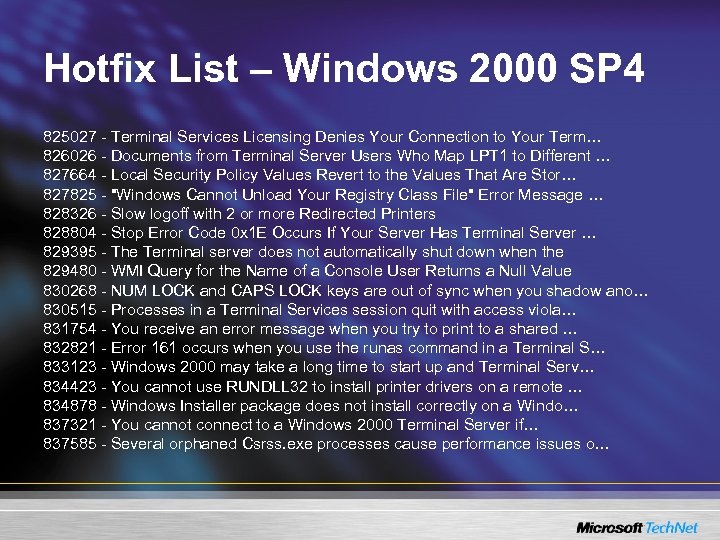 Hotfix List – Windows 2000 SP 4 825027 - Terminal Services Licensing Denies Your Connection to Your Term… 826026 - Documents from Terminal Server Users Who Map LPT 1 to Different … 827664 - Local Security Policy Values Revert to the Values That Are Stor… 827825 - "Windows Cannot Unload Your Registry Class File" Error Message … 828326 - Slow logoff with 2 or more Redirected Printers 828804 - Stop Error Code 0 x 1 E Occurs If Your Server Has Terminal Server … 829395 - The Terminal server does not automatically shut down when the 829480 - WMI Query for the Name of a Console User Returns a Null Value 830268 - NUM LOCK and CAPS LOCK keys are out of sync when you shadow ano… 830515 - Processes in a Terminal Services session quit with access viola… 831754 - You receive an error message when you try to print to a shared … 832821 - Error 161 occurs when you use the runas command in a Terminal S… 833123 - Windows 2000 may take a long time to start up and Terminal Serv… 834423 - You cannot use RUNDLL 32 to install printer drivers on a remote … 834878 - Windows Installer package does not install correctly on a Windo… 837321 - You cannot connect to a Windows 2000 Terminal Server if… 837585 - Several orphaned Csrss. exe processes cause performance issues o…
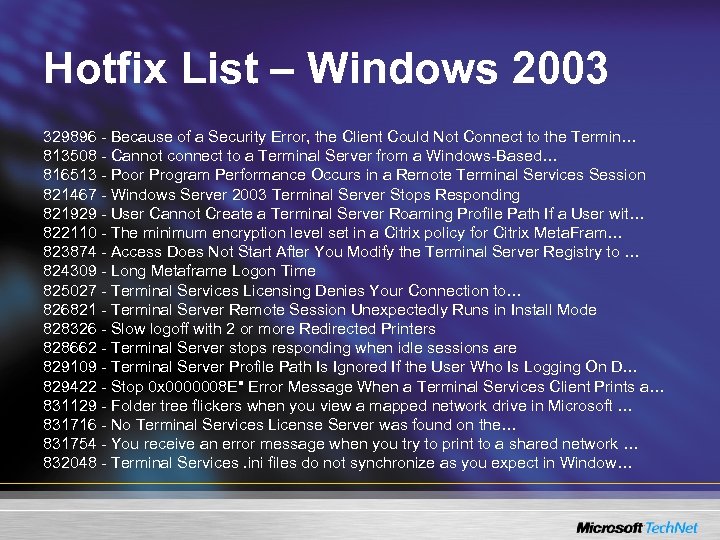 Hotfix List – Windows 2003 329896 - Because of a Security Error, the Client Could Not Connect to the Termin… 813508 - Cannot connect to a Terminal Server from a Windows-Based… 816513 - Poor Program Performance Occurs in a Remote Terminal Services Session 821467 - Windows Server 2003 Terminal Server Stops Responding 821929 - User Cannot Create a Terminal Server Roaming Profile Path If a User wit… 822110 - The minimum encryption level set in a Citrix policy for Citrix Meta. Fram… 823874 - Access Does Not Start After You Modify the Terminal Server Registry to … 824309 - Long Metaframe Logon Time 825027 - Terminal Services Licensing Denies Your Connection to… 826821 - Terminal Server Remote Session Unexpectedly Runs in Install Mode 828326 - Slow logoff with 2 or more Redirected Printers 828662 - Terminal Server stops responding when idle sessions are 829109 - Terminal Server Profile Path Is Ignored If the User Who Is Logging On D… 829422 - Stop 0 x 0000008 E" Error Message When a Terminal Services Client Prints a… 831129 - Folder tree flickers when you view a mapped network drive in Microsoft … 831716 - No Terminal Services License Server was found on the… 831754 - You receive an error message when you try to print to a shared network … 832048 - Terminal Services. ini files do not synchronize as you expect in Window…
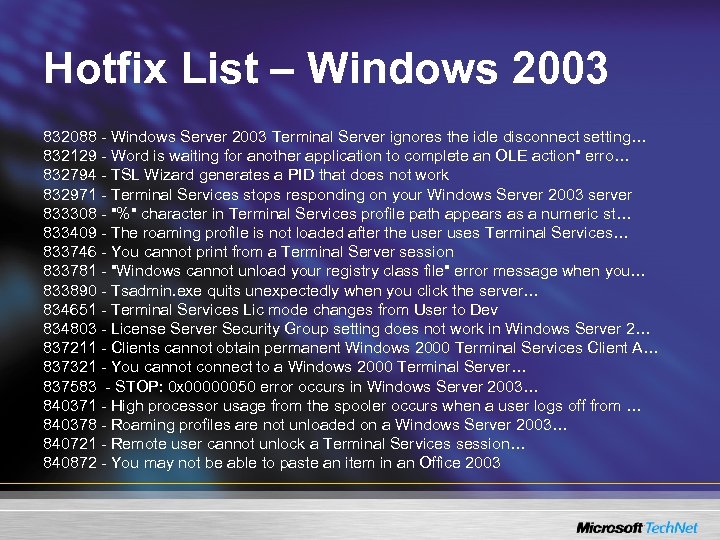 Hotfix List – Windows 2003 832088 - Windows Server 2003 Terminal Server ignores the idle disconnect setting… 832129 - Word is waiting for another application to complete an OLE action" erro… 832794 - TSL Wizard generates a PID that does not work 832971 - Terminal Services stops responding on your Windows Server 2003 server 833308 - "%" character in Terminal Services profile path appears as a numeric st… 833409 - The roaming profile is not loaded after the user uses Terminal Services… 833746 - You cannot print from a Terminal Server session 833781 - "Windows cannot unload your registry class file" error message when you… 833890 - Tsadmin. exe quits unexpectedly when you click the server… 834651 - Terminal Services Lic mode changes from User to Dev 834803 - License Server Security Group setting does not work in Windows Server 2… 837211 - Clients cannot obtain permanent Windows 2000 Terminal Services Client A… 837321 - You cannot connect to a Windows 2000 Terminal Server… 837583 - STOP: 0 x 00000050 error occurs in Windows Server 2003… 840371 - High processor usage from the spooler occurs when a user logs off from … 840378 - Roaming profiles are not unloaded on a Windows Server 2003… 840721 - Remote user cannot unlock a Terminal Services session… 840872 - You may not be able to paste an item in an Office 2003