


 Скачать презентацию Welcome Pr ch ni es en cal W-
72d462c7114c9b71c93aebaac2f19a16.ppt
- Количество слайдов: 126
 Welcome Pr ch ni es en cal W- tatio EL n P Te
 ELP Technical Presentation ! Explanatory note: This document explains the technical possibilities of ELP and it is not supposed to be a selftraining. For receiving a training please have a look into the self training manual: http: //welp. stethos. com/onlinehelp/selftraining. html
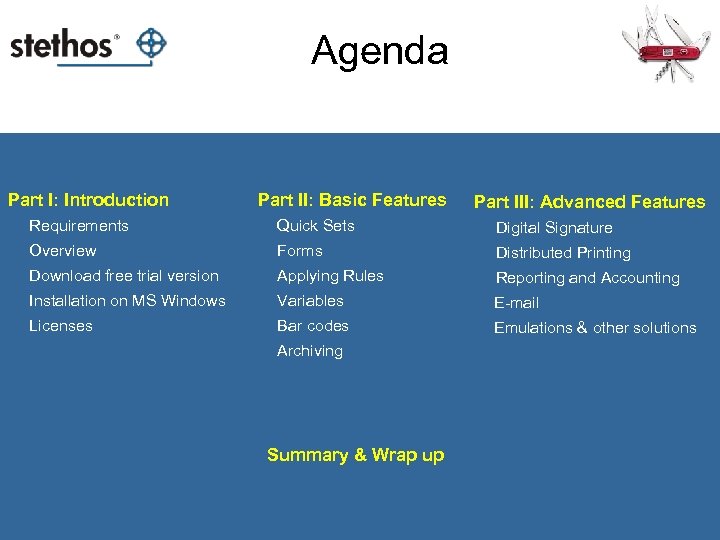 Agenda Part I: Introduction Part II: Basic Features Part III: Advanced Features Requirements Quick Sets Digital Signature Overview Forms Distributed Printing Download free trial version Applying Rules Reporting and Accounting Installation on MS Windows Variables E-mail Licenses Bar codes Emulations & other solutions Archiving Summary & Wrap up
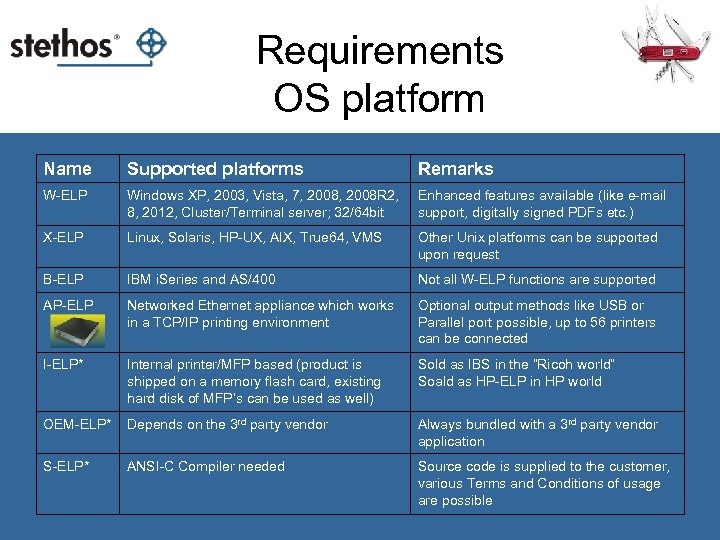 Requirements OS platform Name Supported platforms Remarks W-ELP Windows XP, 2003, Vista, 7, 2008 R 2, 8, 2012, Cluster/Terminal server; 32/64 bit Enhanced features available (like e-mail support, digitally signed PDFs etc. ) X-ELP Linux, Solaris, HP-UX, AIX, True 64, VMS Other Unix platforms can be supported upon request B-ELP IBM i. Series and AS/400 Not all W-ELP functions are supported AP-ELP Networked Ethernet appliance which works in a TCP/IP printing environment Optional output methods like USB or Parallel port possible, up to 56 printers can be connected I-ELP* Internal printer/MFP based (product is shipped on a memory flash card, existing hard disk of MFP’s can be used as well) Sold as IBS in the “Ricoh world” Soald as HP-ELP in HP world OEM-ELP* Depends on the 3 rd party vendor Always bundled with a 3 rd party vendor application S-ELP* ANSI-C Compiler needed Source code is supplied to the customer, various Terms and Conditions of usage are possible
 Requirements Printer Drivers v PCL 5 printer driver v For Windows: v Data stream contents may vary between different drivers, operating systems and used applications! v Recommended Windows drivers if no device specific PCL 5 driver is available from your vendor: v HP Color Laser. Jet 9500 PCL 5 c v Ricoh Aficio MP C 300 PCL 5 c Note: any required printer options can be setup using ELP.
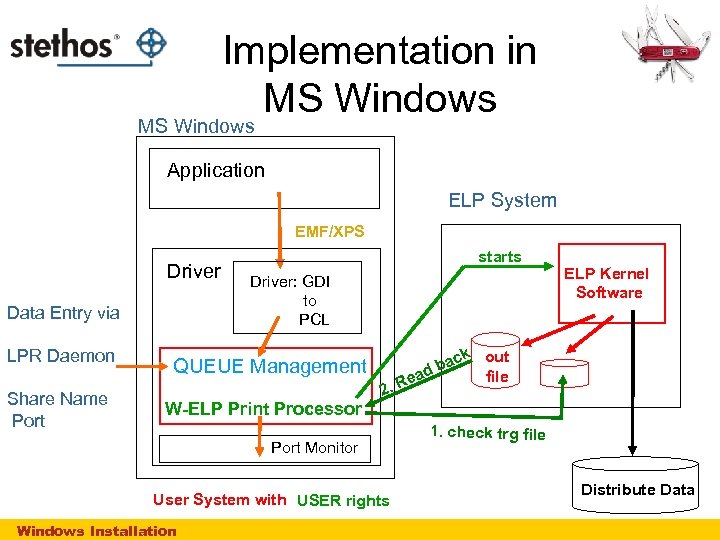 Implementation in MS Windows Application ELP System EMF/XPS Driver Data Entry via LPR Daemon Share Name Port starts Driver: GDI to PCL QUEUE Management W-ELP Print Processor Port Monitor User System with USER rights Windows Installation k out file bac d ea 2. R ELP Kernel Software 1. check trg file Distribute Data
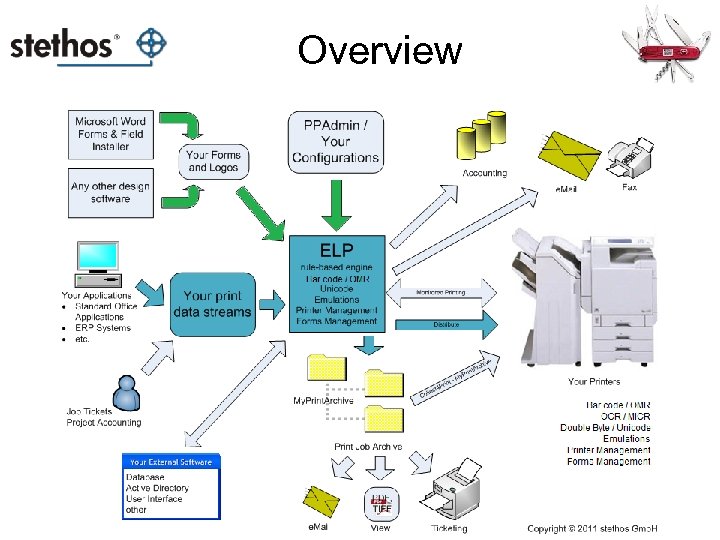
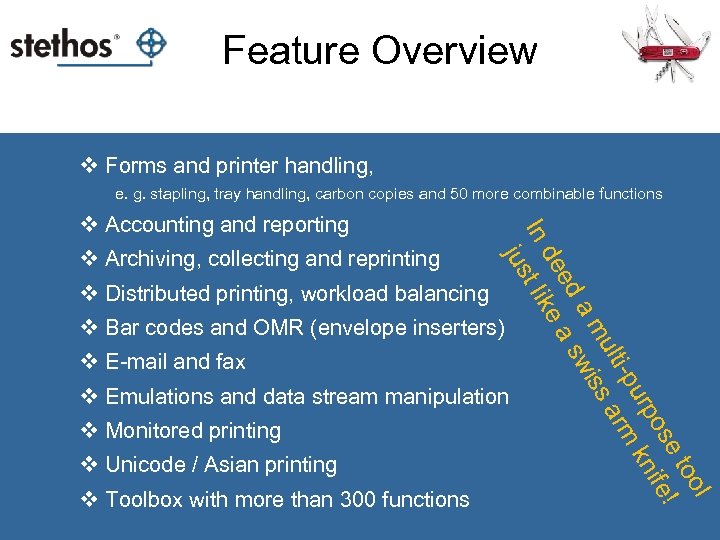 Feature Overview v Forms and printer handling, e. g. stapling, tray handling, carbon copies and 50 more combinable functions v Archiving, collecting and reprinting v Distributed printing, workload balancing l oo et os ife! urp kn i-p rm ult s a a m wis ed a s de e In t lik jus v Accounting and reporting v Bar codes and OMR (envelope inserters) v E-mail and fax v Emulations and data stream manipulation v Monitored printing v Unicode / Asian printing v Toolbox with more than 300 functions
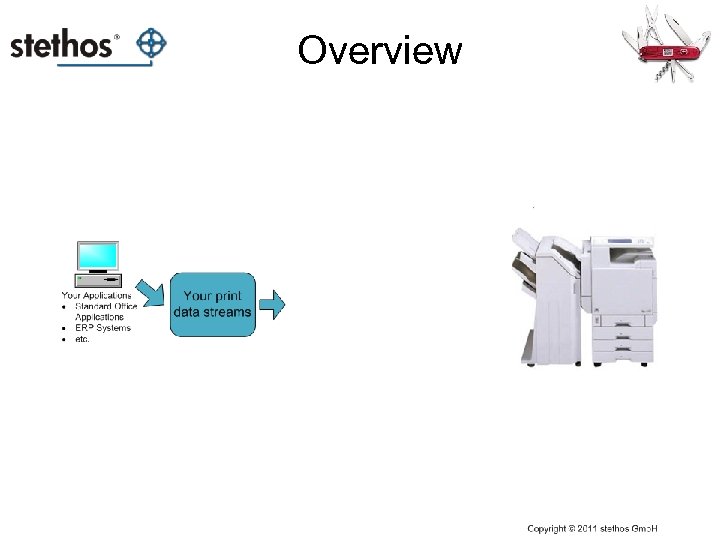 Overview
 Overview
 Download free trial version
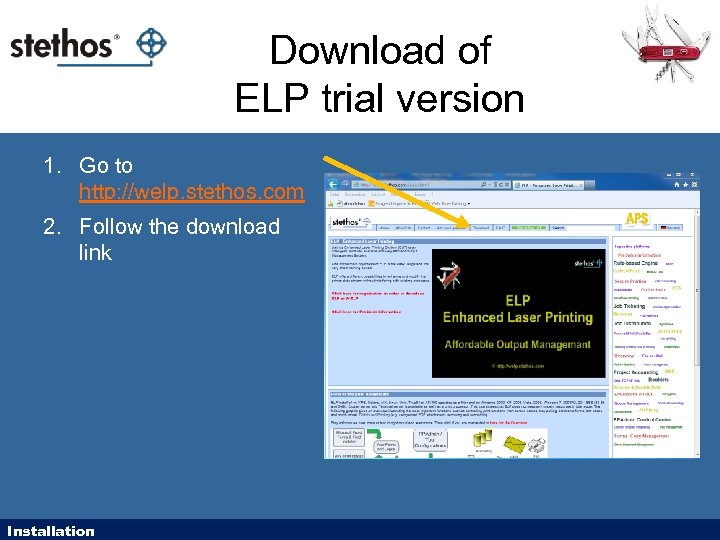 Download of ELP trial version 1. Go to http: //welp. stethos. com 2. Follow the download link Installation
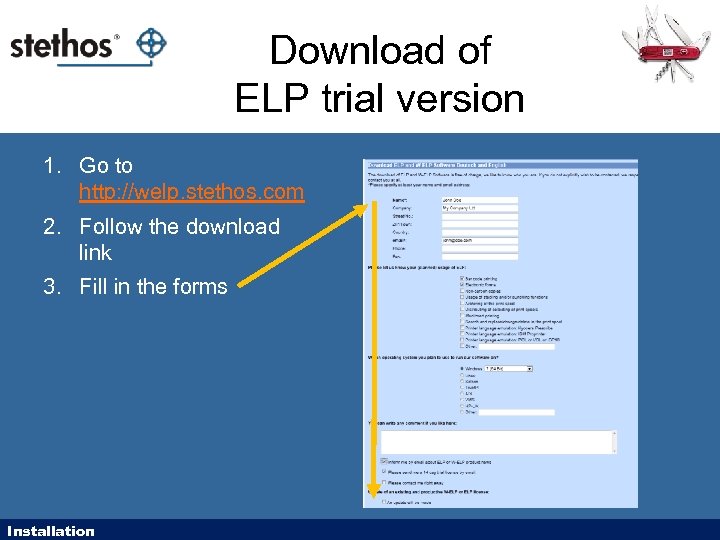 Download of ELP trial version 1. Go to http: //welp. stethos. com 2. Follow the download link 3. Fill in the forms Installation
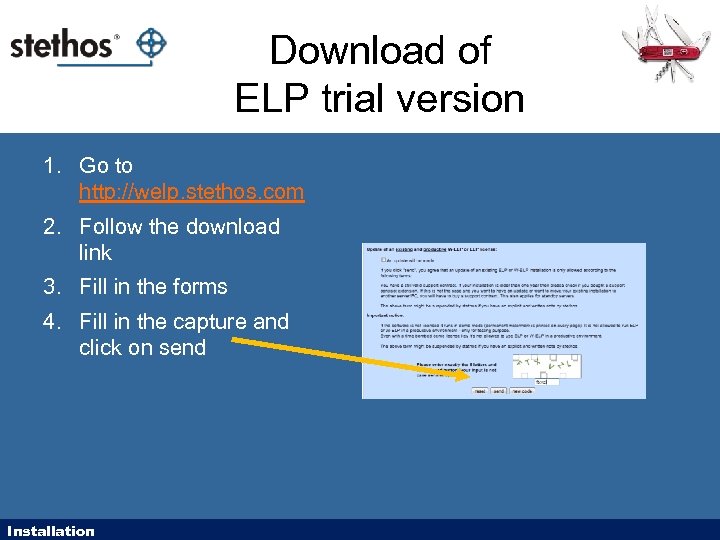 Download of ELP trial version 1. Go to http: //welp. stethos. com 2. Follow the download link 3. Fill in the forms 4. Fill in the capture and click on send Installation
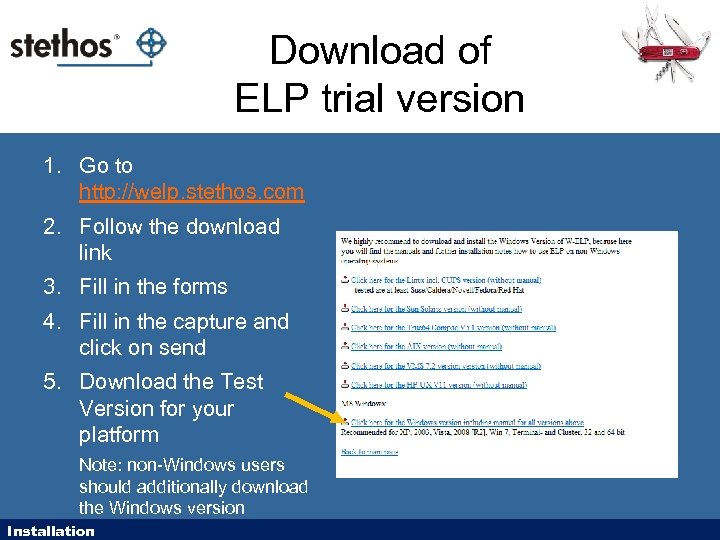 Download of ELP trial version 1. Go to http: //welp. stethos. com 2. Follow the download link 3. Fill in the forms 4. Fill in the capture and click on send 5. Download the Test Version for your platform Note: non-Windows users should additionally download the Windows version Installation
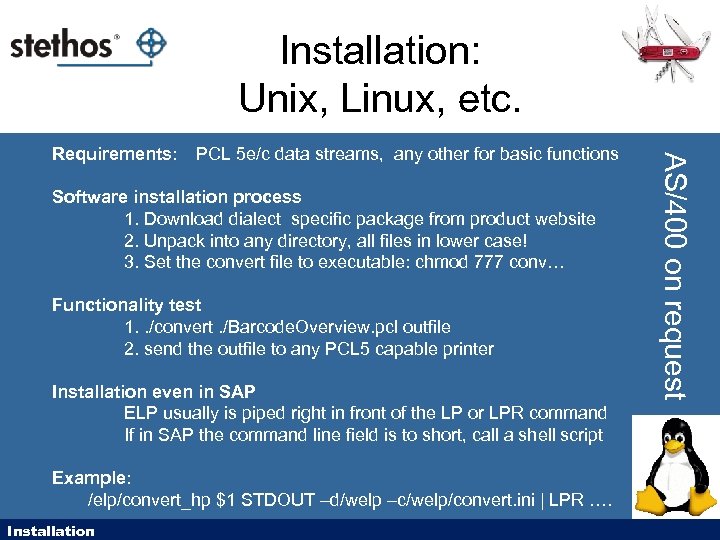 Installation: Unix, Linux, etc. PCL 5 e/c data streams, any other for basic functions Software installation process 1. Download dialect specific package from product website 2. Unpack into any directory, all files in lower case! 3. Set the convert file to executable: chmod 777 conv… Functionality test 1. . /convert. /Barcode. Overview. pcl outfile 2. send the outfile to any PCL 5 capable printer Installation even in SAP ELP usually is piped right in front of the LP or LPR command If in SAP the command line field is to short, call a shell script Example: /elp/convert_hp $1 STDOUT –d/welp –c/welp/convert. ini | LPR …. Installation AS/400 on request Requirements:
 Installation: Unix, Linux, etc. For more details please visit our online-help: http: //welp. stethos. com/online-help/user_manuals. html#Installation
 Installation on MS Windows
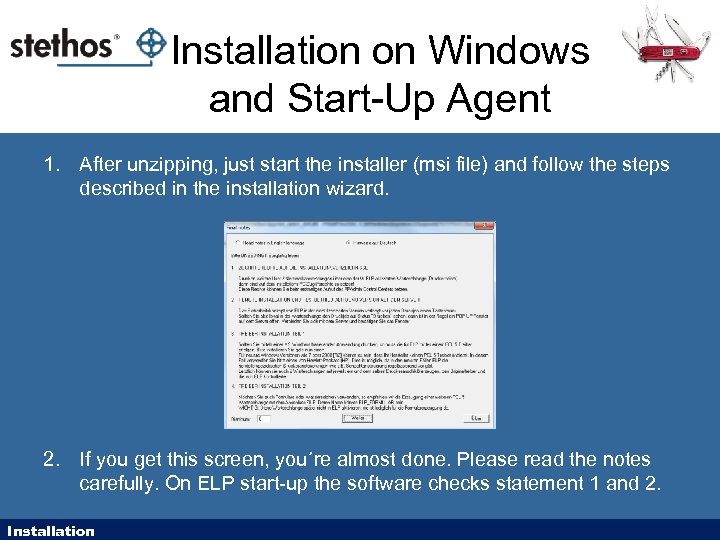 Installation on Windows and Start-Up Agent 1. After unzipping, just start the installer (msi file) and follow the steps described in the installation wizard. 2. If you get this screen, you´re almost done. Please read the notes carefully. On ELP start-up the software checks statement 1 and 2. Installation
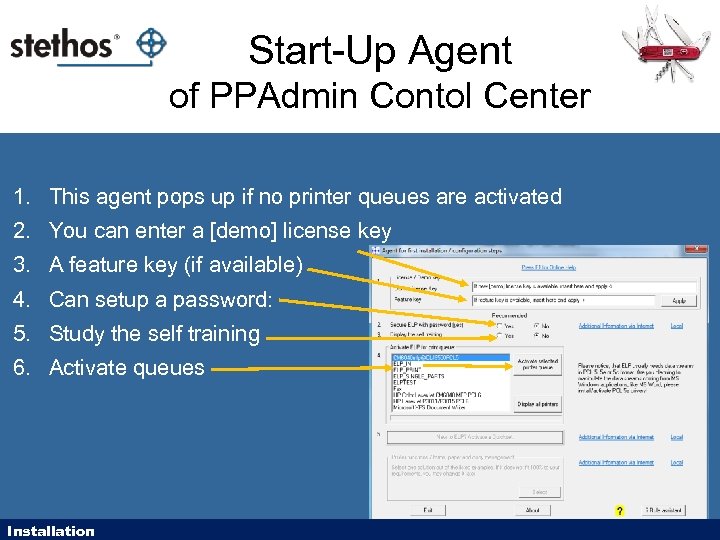 Start-Up Agent of PPAdmin Contol Center 1. This agent pops up if no printer queues are activated 2. You can enter a [demo] license key 3. A feature key (if available) 4. Can setup a password: 5. Study the self training 6. Activate queues Installation
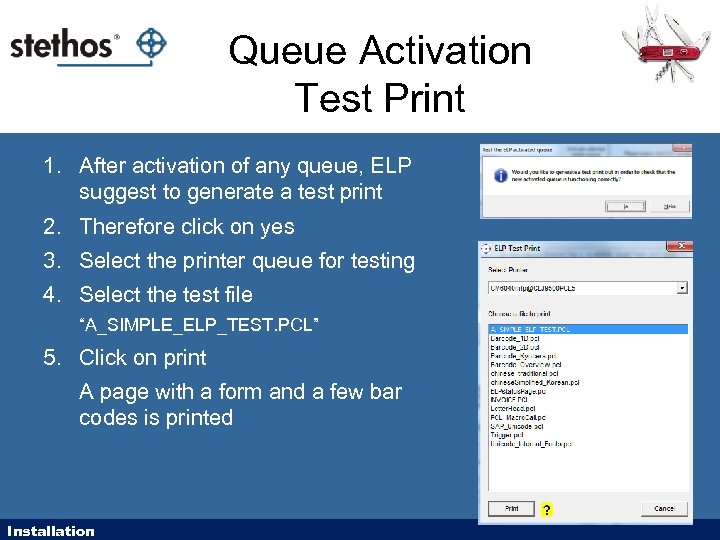 Queue Activation Test Print 1. After activation of any queue, ELP suggest to generate a test print 2. Therefore click on yes 3. Select the printer queue for testing 4. Select the test file “A_SIMPLE_ELP_TEST. PCL” 5. Click on print A page with a form and a few bar codes is printed Installation
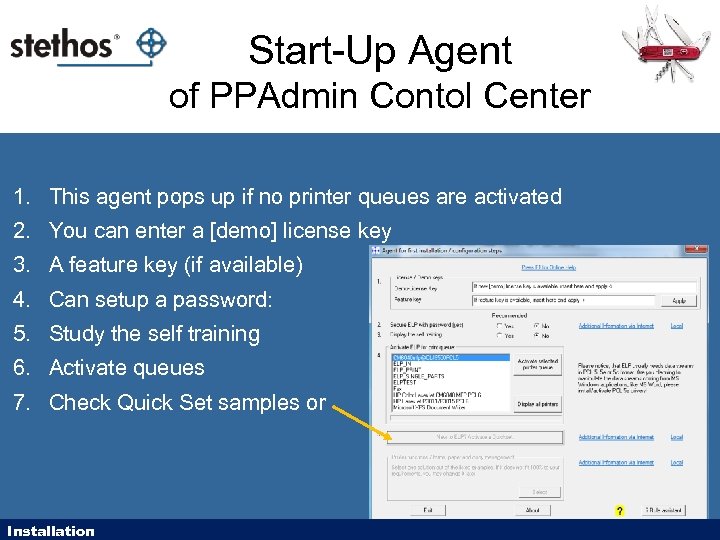 Start-Up Agent of PPAdmin Contol Center 1. This agent pops up if no printer queues are activated 2. You can enter a [demo] license key 3. A feature key (if available) 4. Can setup a password: 5. Study the self training 6. Activate queues 7. Check Quick Set samples or Installation
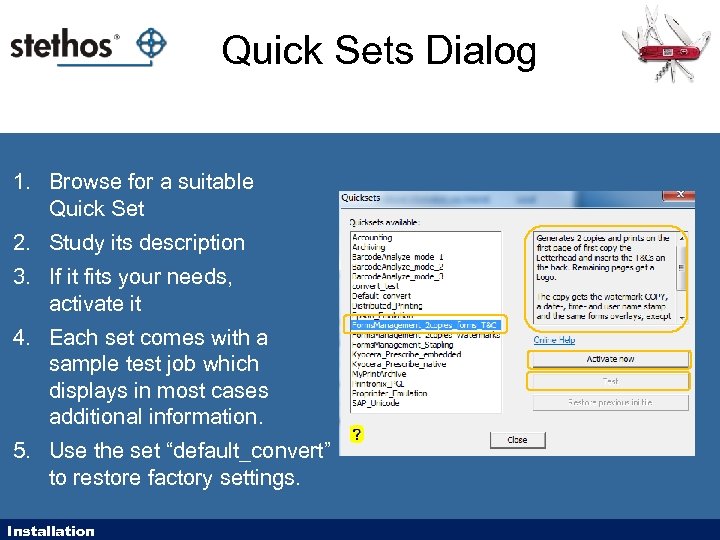 Quick Sets Dialog 1. Browse for a suitable Quick Set 2. Study its description 3. If it fits your needs, activate it 4. Each set comes with a sample test job which displays in most cases additional information. 5. Use the set “default_convert” to restore factory settings. Installation
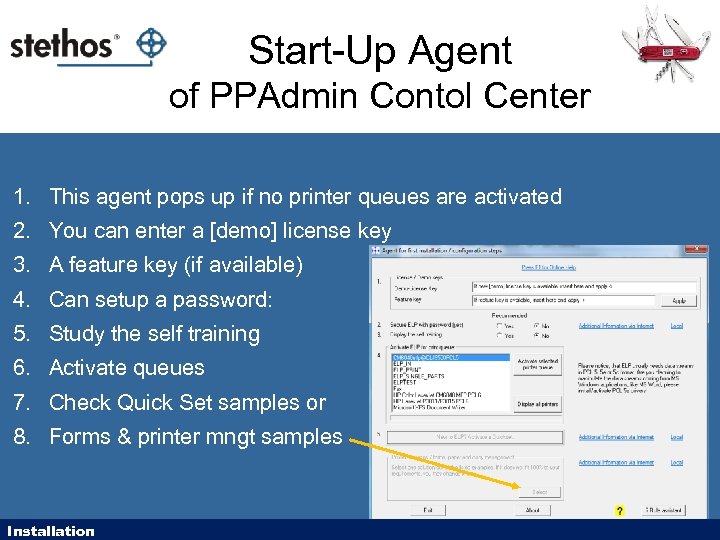 Start-Up Agent of PPAdmin Contol Center 1. This agent pops up if no printer queues are activated 2. You can enter a [demo] license key 3. A feature key (if available) 4. Can setup a password: 5. Study the self training 6. Activate queues 7. Check Quick Set samples or 8. Forms & printer mngt samples Installation
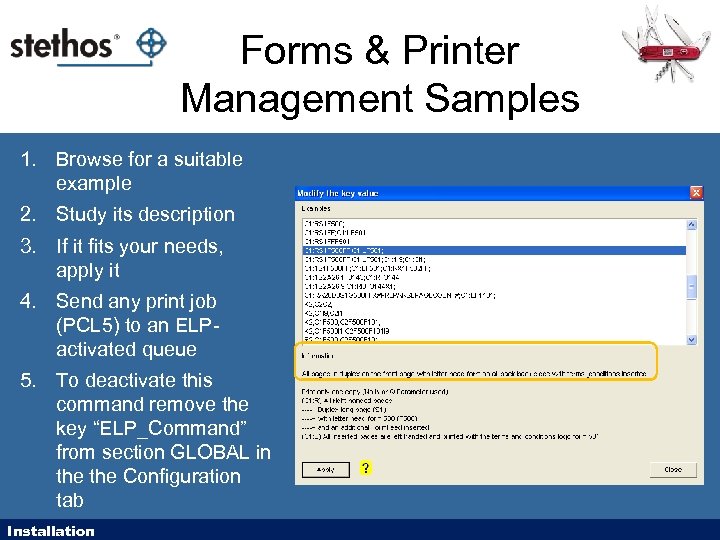 Forms & Printer Management Samples 1. Browse for a suitable example 2. Study its description 3. If it fits your needs, apply it 4. Send any print job (PCL 5) to an ELPactivated queue 5. To deactivate this command remove the key “ELP_Command” from section GLOBAL in the Configuration tab Installation
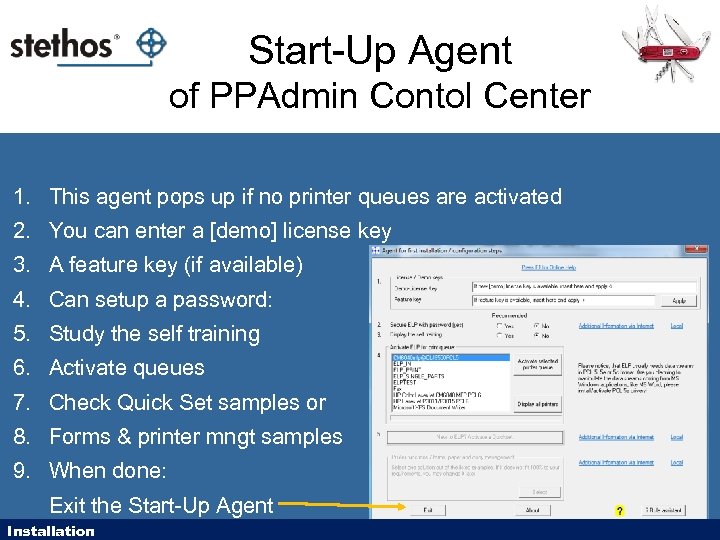 Start-Up Agent of PPAdmin Contol Center 1. This agent pops up if no printer queues are activated 2. You can enter a [demo] license key 3. A feature key (if available) 4. Can setup a password: 5. Study the self training 6. Activate queues 7. Check Quick Set samples or 8. Forms & printer mngt samples 9. When done: Exit the Start-Up Agent Installation
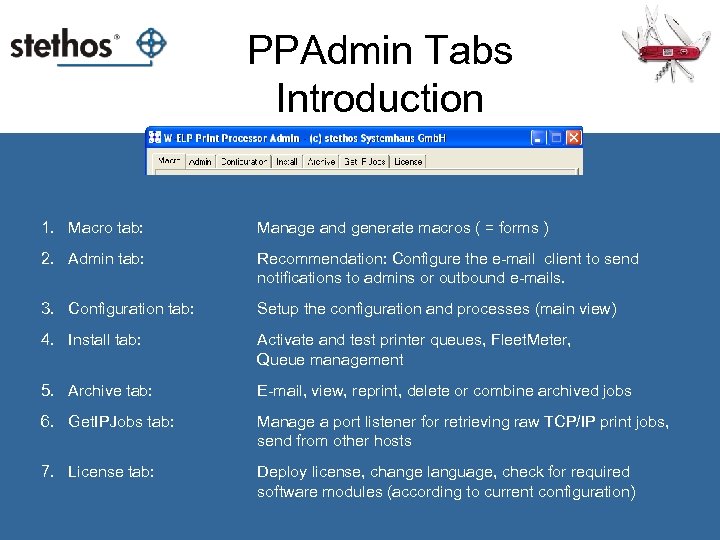 PPAdmin Tabs Introduction 1. Macro tab: Manage and generate macros ( = forms ) 2. Admin tab: Recommendation: Configure the e-mail client to send notifications to admins or outbound e-mails. 3. Configuration tab: Setup the configuration and processes (main view) 4. Install tab: Activate and test printer queues, Fleet. Meter, Queue management 5. Archive tab: E-mail, view, reprint, delete or combine archived jobs 6. Get. IPJobs tab: Manage a port listener for retrieving raw TCP/IP print jobs, send from other hosts 7. License tab: Deploy license, change language, check for required software modules (according to current configuration)
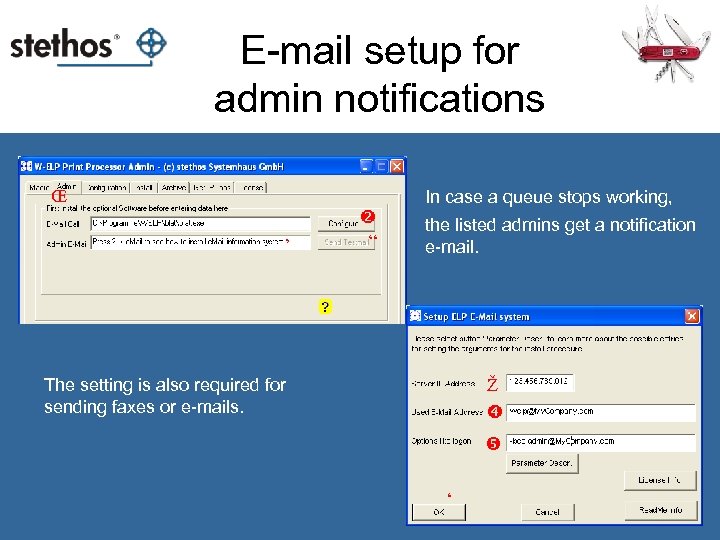 E-mail setup for admin notifications Œ In case a queue stops working, ’ “ the listed admins get a notification e-mail. Ž The setting is also required for sending faxes or e-mails. ‘
 Licenses
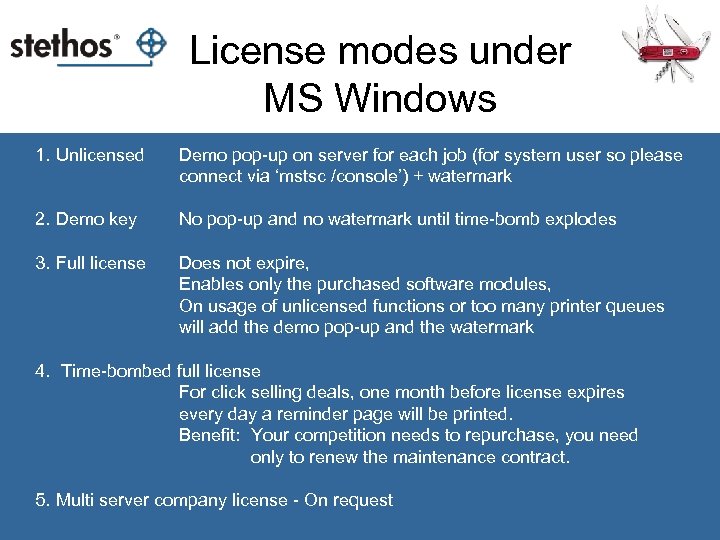 License modes under MS Windows 1. Unlicensed Demo pop-up on server for each job (for system user so please connect via ‘mstsc /console’) + watermark 2. Demo key No pop-up and no watermark until time-bomb explodes 3. Full license Does not expire, Enables only the purchased software modules, On usage of unlicensed functions or too many printer queues will add the demo pop-up and the watermark 4. Time-bombed full license For click selling deals, one month before license expires every day a reminder page will be printed. Benefit: Your competition needs to repurchase, you need only to renew the maintenance contract. 5. Multi server company license - On request
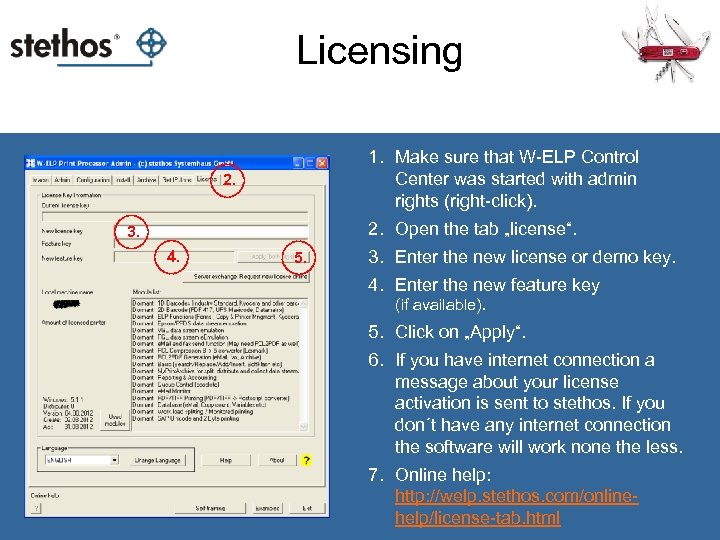 Licensing 1. Make sure that W-ELP Control Center was started with admin rights (right-click). 2. Open the tab „license“. 3. 4. 5. 3. Enter the new license or demo key. 4. Enter the new feature key (if available). 5. Click on „Apply“. 6. If you have internet connection a message about your license activation is sent to stethos. If you don´t have any internet connection the software will work none the less. 7. Online help: http: //welp. stethos. com/onlinehelp/license-tab. html
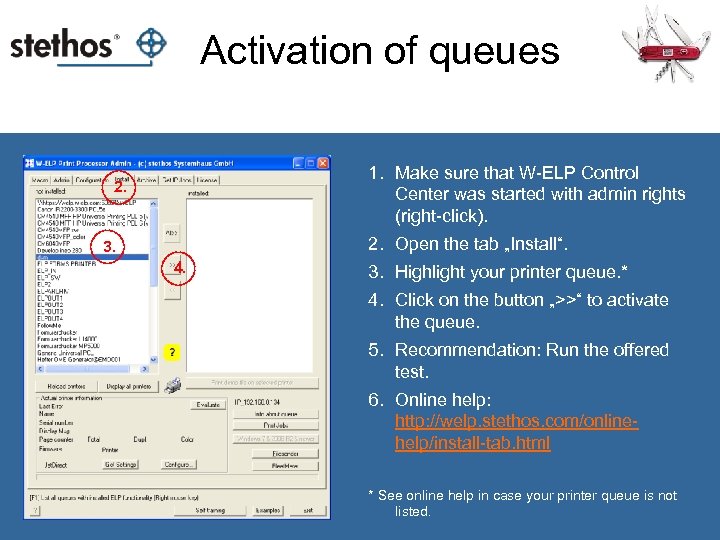 Activation of queues 1. Make sure that W-ELP Control Center was started with admin rights (right-click). 2. Open the tab „Install“. 3. 4. 3. Highlight your printer queue. * 4. Click on the button „>>“ to activate the queue. 5. Recommendation: Run the offered test. 6. Online help: http: //welp. stethos. com/onlinehelp/install-tab. html * See online help in case your printer queue is not listed.
 Basic Features: Quick Sets
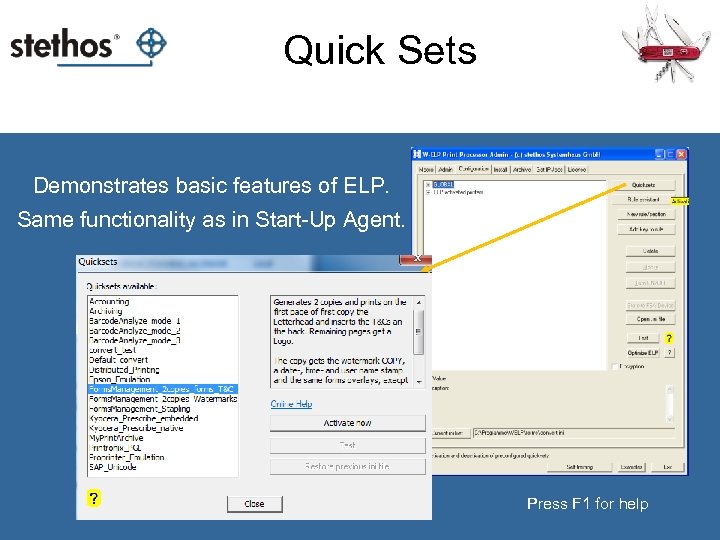 Quick Sets Demonstrates basic features of ELP. Same functionality as in Start-Up Agent. Press F 1 for help
 Basic Features: Forms
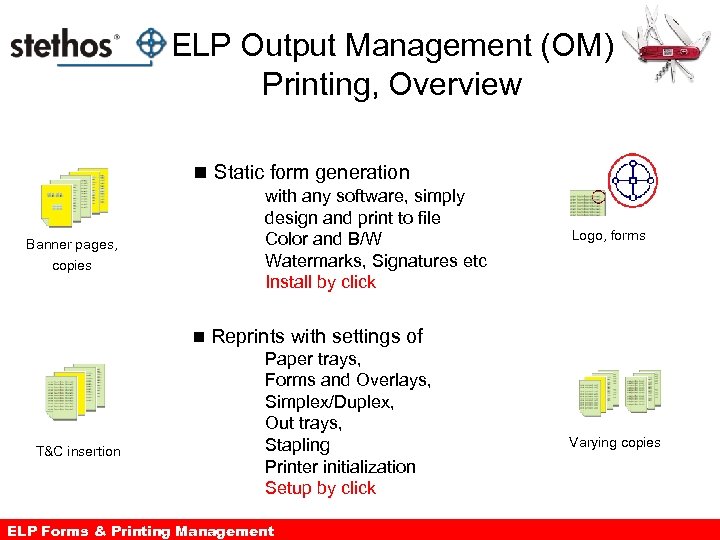 ELP Output Management (OM) Printing, Overview n Static form generation with any software, simply design and print to file Color and B/W Watermarks, Signatures etc Install by click Banner pages, copies n T&C insertion Logo, forms Reprints with settings of Paper trays, Forms and Overlays, Simplex/Duplex, Out trays, Stapling Printer initialization Setup by click ELP Forms & Printing Management Varying copies
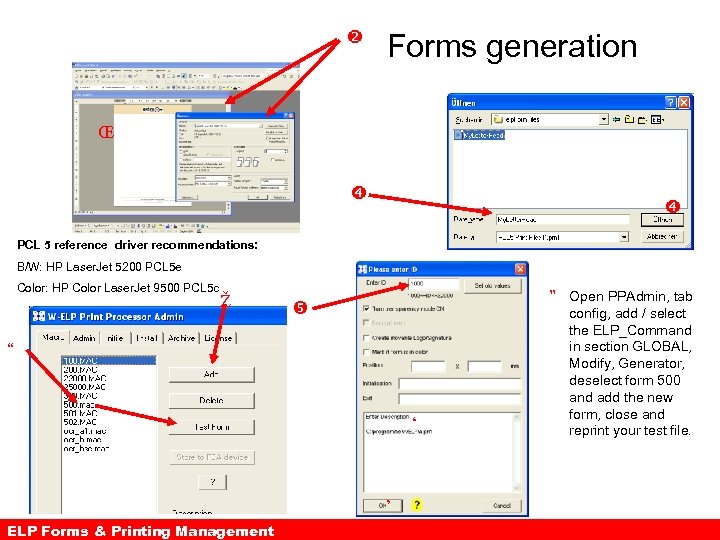 Forms generation Œ PCL 5 reference driver recommendations: B/W: HP Laser. Jet 5200 PCL 5 e Color: HP Color Laser. Jet 9500 PCL 5 c Ž ” Open PPAdmin, tab “ ‘ ’ ELP Forms & Printing Management config, add / select the ELP_Command in section GLOBAL, Modify, Generator, deselect form 500 and add the new form, close and reprint your test file.
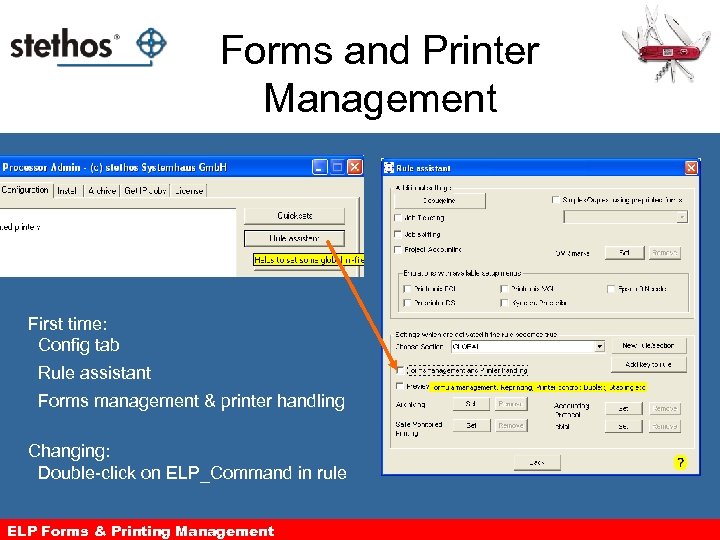 Forms and Printer Management First time: Config tab Rule assistant Forms management & printer handling Changing: Double-click on ELP_Command in rule ELP Forms & Printing Management
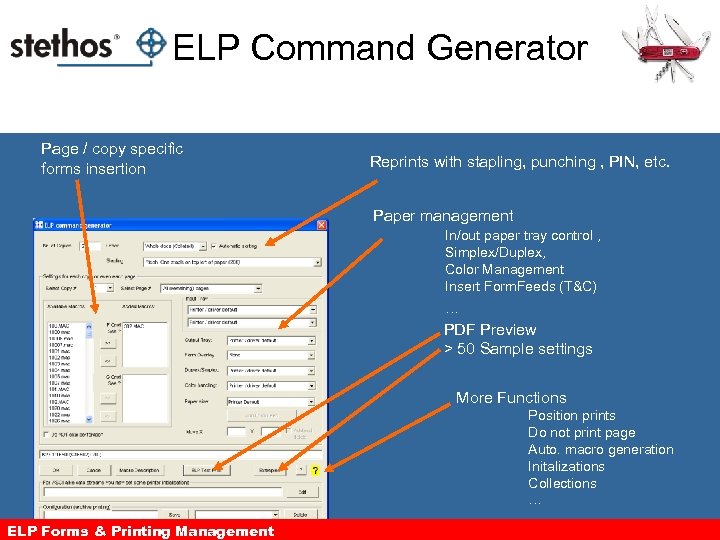 ELP Command Generator Page / copy specific forms insertion Reprints with stapling, punching , PIN, etc. Paper management In/out paper tray control , Simplex/Duplex, Color Management Insert Form. Feeds (T&C) … PDF Preview > 50 Sample settings More Functions Position prints Do not print page Auto. macro generation Initalizations Collections … ELP Forms & Printing Management
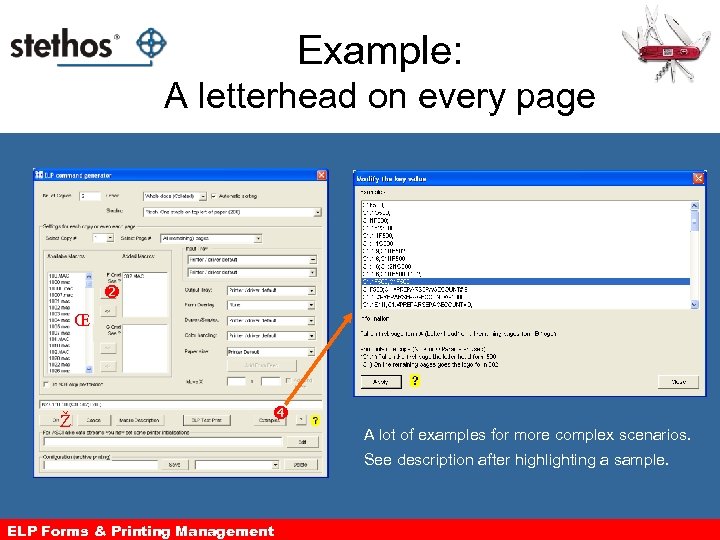 Example: A letterhead on every page Œ Ž A lot of examples for more complex scenarios. See description after highlighting a sample. ELP Forms & Printing Management
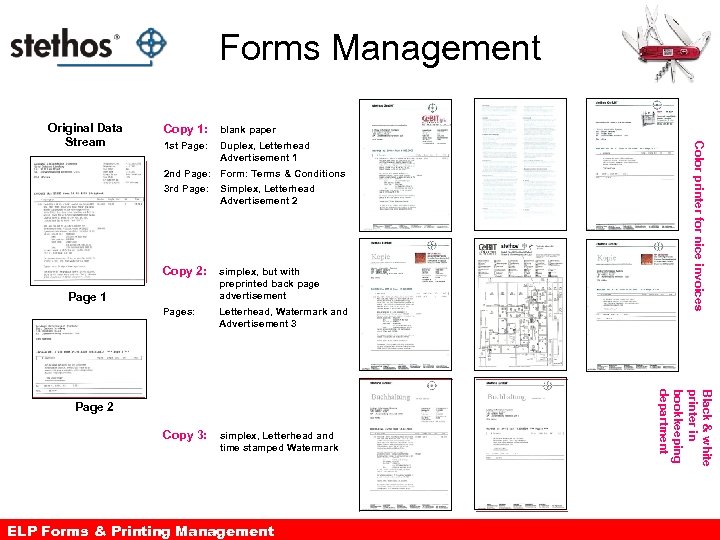 Forms Management Copy 1: blank paper 1 st Page: Duplex, Letterhead Advertisement 1 Color printer for nice invoices Original Data Stream 2 nd Page: Form: Terms & Conditions Simplex, Letterhead Advertisement 2 Copy 2: simplex, but with preprinted back page advertisement Pages: Letterhead, Watermark and Advertisement 3 Copy 3: simplex, Letterhead and time stamped Watermark Page 1 Black & white printer in bookkeeping department 3 rd Page: Page 2 ELP Forms & Printing Management The power of ELP output management
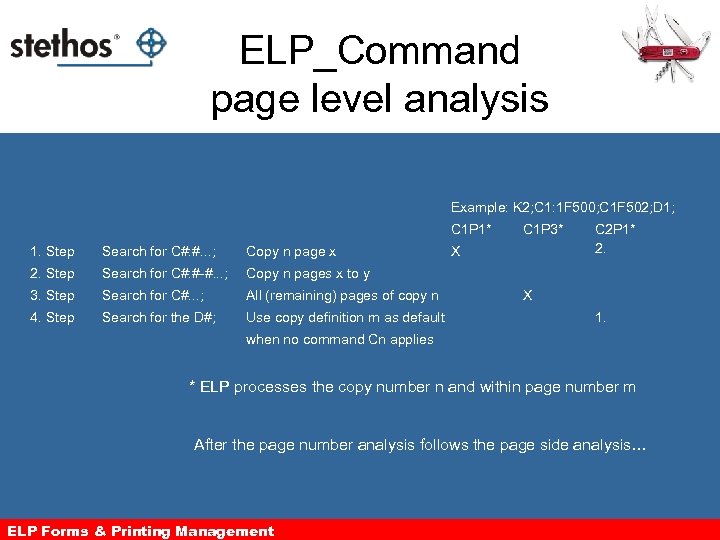 ELP_Command page level analysis Example: K 2; C 1: 1 F 500; C 1 F 502; D 1; C 1 P 1* 1. Step Search for C#: #. . . ; Copy n page x 2. Step Search for C#: #-#. . . ; Search for C#. . . ; All (remaining) pages of copy n 4. Step Search for the D#; Use copy definition m as default X C 2 P 1* 2. Copy n pages x to y 3. Step C 1 P 3* X 1. when no command Cn applies * ELP processes the copy number n and within page number m After the page number analysis follows the page side analysis… ELP Forms & Printing Management
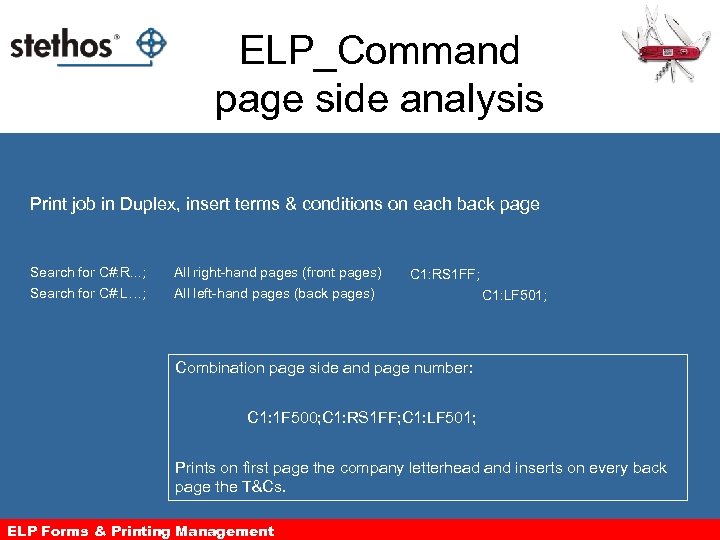 ELP_Command page side analysis Print job in Duplex, insert terms & conditions on each back page Search for C#: R. . . ; All right-hand pages (front pages) Search for C#: L…; All left-hand pages (back pages) C 1: RS 1 FF; C 1: LF 501; Combination page side and page number: C 1: 1 F 500; C 1: RS 1 FF; C 1: LF 501; Prints on first page the company letterhead and inserts on every back page the T&Cs. ELP Forms & Printing Management
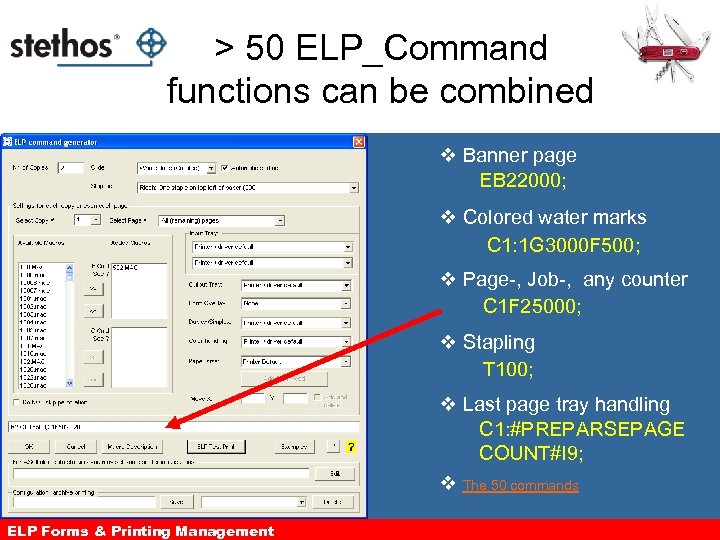 > 50 ELP_Command functions can be combined v Banner page EB 22000; v Colored water marks C 1: 1 G 3000 F 500; v Page-, Job-, any counter C 1 F 25000; v Stapling T 100; v Last page tray handling C 1: #PREPARSEPAGE COUNT#I 9; v The 50 commands ELP Forms & Printing Management
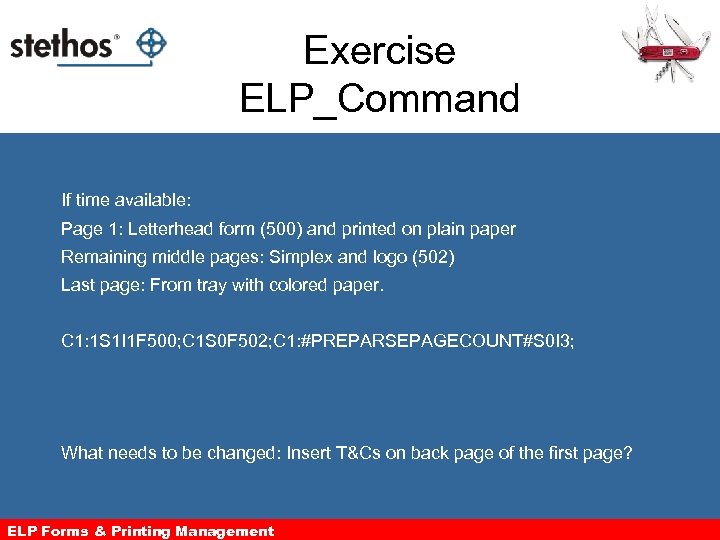 Exercise ELP_Command If time available: Page 1: Letterhead form (500) and printed on plain paper Remaining middle pages: Simplex and logo (502) Last page: From tray with colored paper. C 1: 1 S 1 I 1 F 500; C 1 S 0 F 502; C 1: #PREPARSEPAGECOUNT#S 0 I 3; What needs to be changed: Insert T&Cs on back page of the first page? ELP Forms & Management ELP Output Printing Management
 Basic Feature: Applying Rules
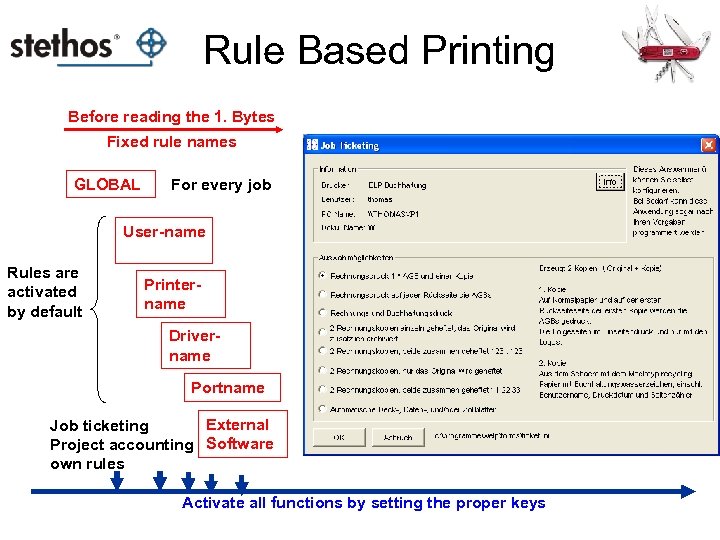 Rule Based Printing Before reading the 1. Bytes Fixed rule names GLOBAL For every job User-name Rules are activated by default Printername Drivername Portname External Job ticketing Project accounting Software own rules Activate all functions by setting the proper keys
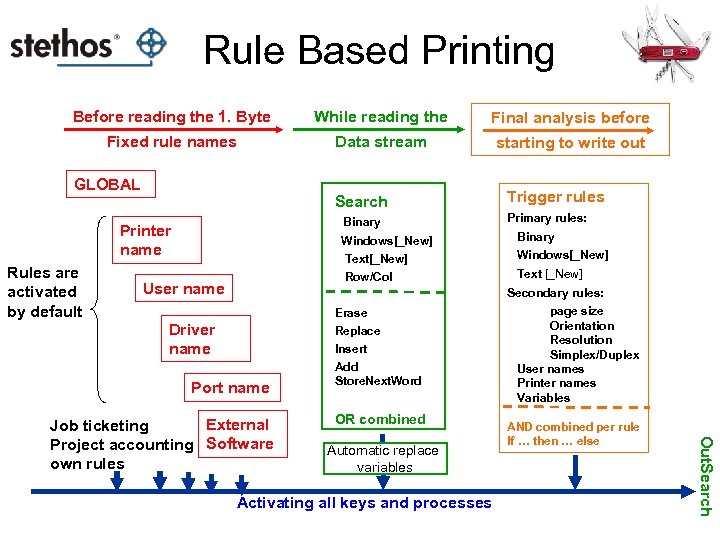 Rule Based Printing Before reading the 1. Byte While reading the Final analysis before Fixed rule names Data stream starting to write out GLOBAL Search Binary Printer name Rules are activated by default Windows[_New] Text[_New] Row/Col User name Trigger rules Primary rules: Binary Windows[_New] Text [_New] Secondary rules: Erase Driver name Replace Insert Port name OR combined Automatic replace variables Activating all keys and processes AND combined per rule If … then … else Out. Search External Job ticketing Project accounting Software own rules Add Store. Next. Word page size Orientation Resolution Simplex/Duplex User names Printer names Variables
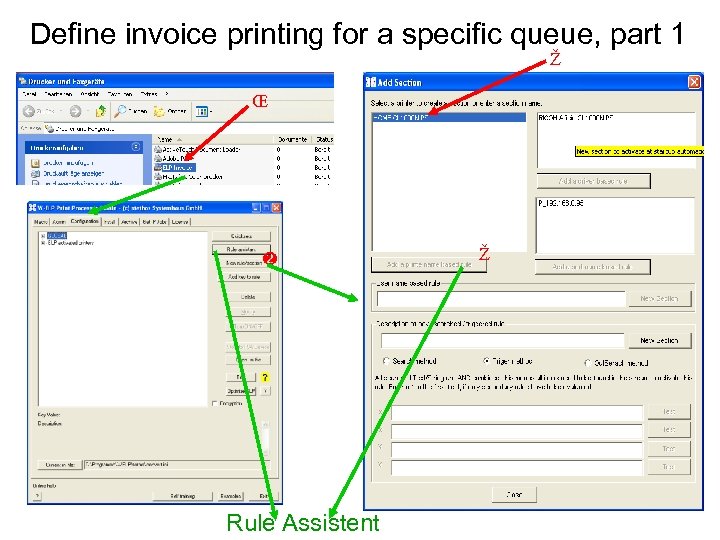 Define invoice printing for a specific queue, part 1 Ž Œ Rule Assistent Ž
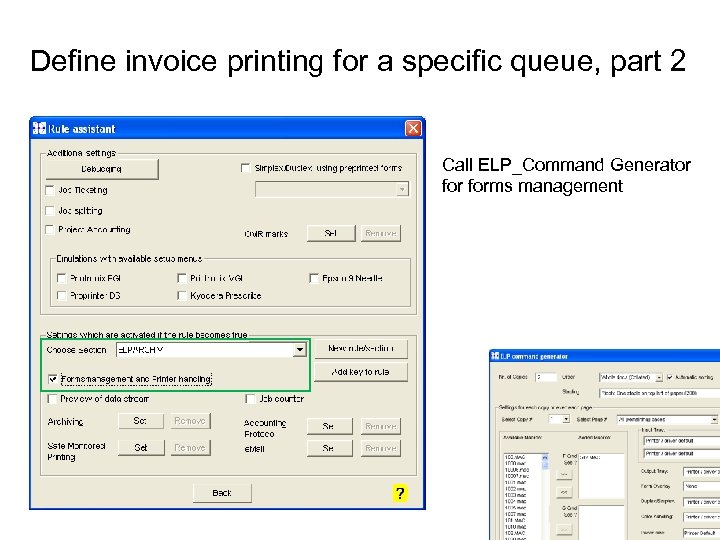 Define invoice printing for a specific queue, part 2 Call ELP_Command Generator forms management
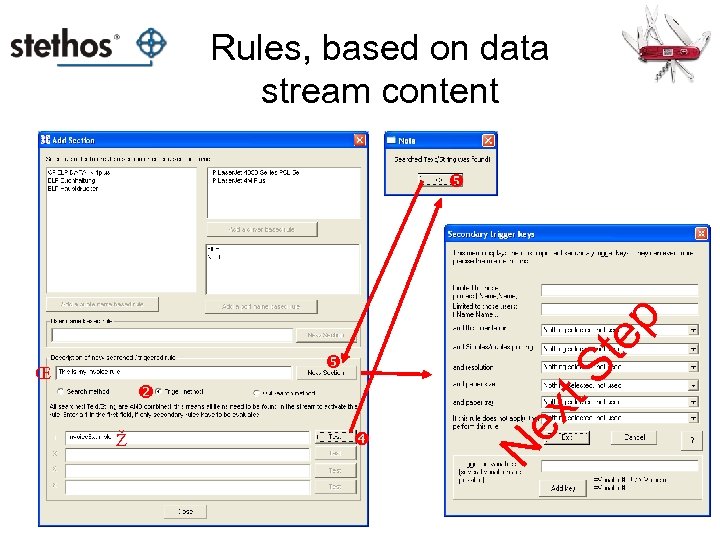 Rules, based on data stream content ep St Ž xt Ne Œ
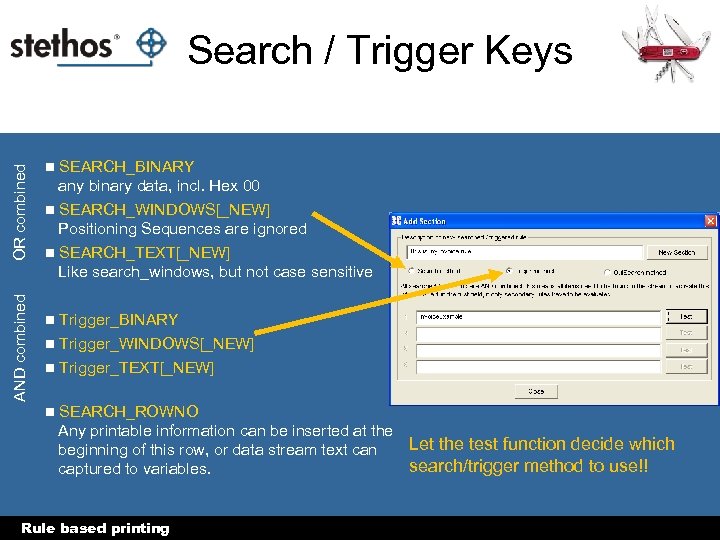 AND combined OR combined Search / Trigger Keys n SEARCH_BINARY any binary data, incl. Hex 00 n SEARCH_WINDOWS[_NEW] Positioning Sequences are ignored n SEARCH_TEXT[_NEW] Like search_windows, but not case sensitive Trigger_BINARY n Trigger_WINDOWS[_NEW] n Trigger_TEXT[_NEW] n n SEARCH_ROWNO Any printable information can be inserted at the Let the test function decide which beginning of this row, or data stream text can search/trigger method to use!! captured to variables. Rule based printing
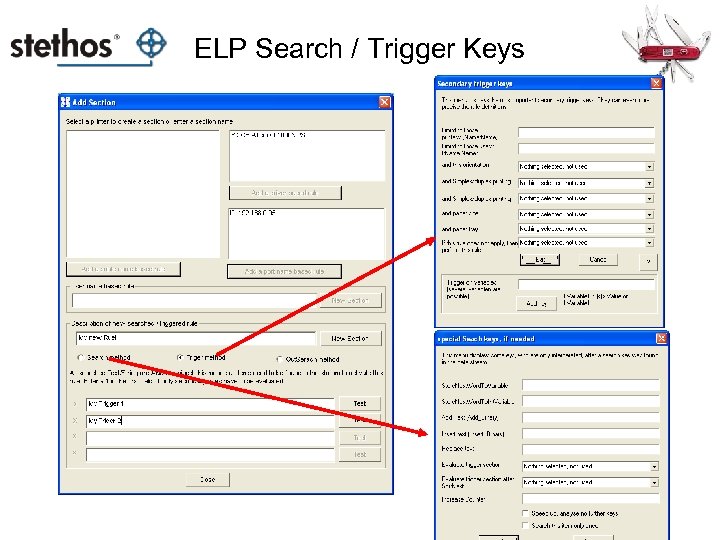 ELP Search / Trigger Keys
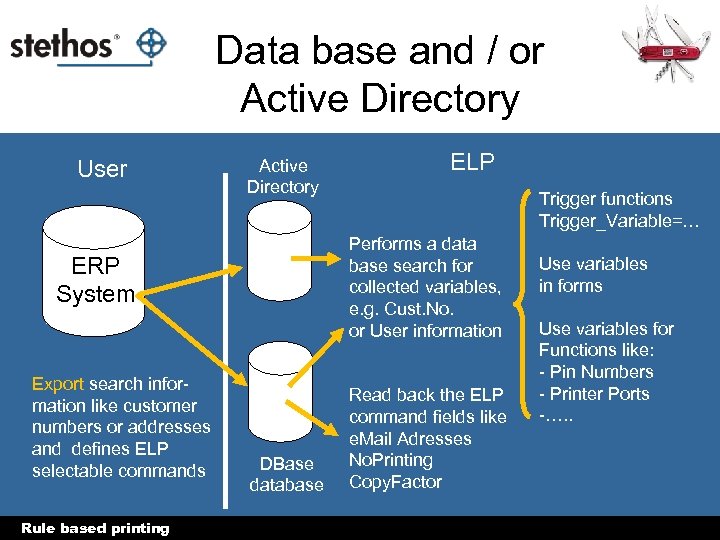 Data base and / or Active Directory User Active Directory Rule based printing Trigger functions Trigger_Variable=… Performs a data base search for collected variables, e. g. Cust. No. or User information ERP System Export search information like customer numbers or addresses and defines ELP selectable commands ELP DBase database Read back the ELP command fields like e. Mail Adresses No. Printing Copy. Factor Use variables in forms Use variables for Functions like: - Pin Numbers - Printer Ports -…. .
 Basic Features: Variables
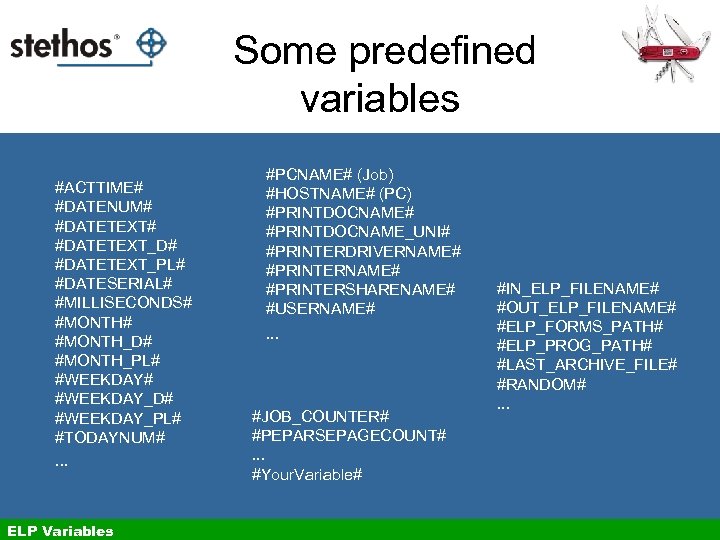 Some predefined variables #ACTTIME# #DATENUM# #DATETEXT_D# #DATETEXT_PL# #DATESERIAL# #MILLISECONDS# #MONTH_D# #MONTH_PL# #WEEKDAY_D# #WEEKDAY_PL# #TODAYNUM#. . . ELP Variables #PCNAME# (Job) #HOSTNAME# (PC) #PRINTDOCNAME# #PRINTDOCNAME_UNI# #PRINTERDRIVERNAME# #PRINTERSHARENAME# #USERNAME#. . . #JOB_COUNTER# #PEPARSEPAGECOUNT#. . . #Your. Variable# #IN_ELP_FILENAME# #OUT_ELP_FILENAME# #ELP_FORMS_PATH# #ELP_PROG_PATH# #LAST_ARCHIVE_FILE# #RANDOM#. . .
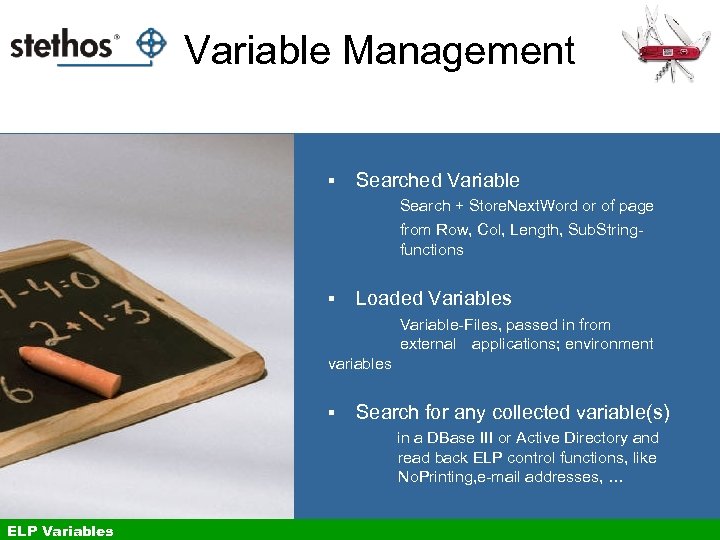 Variable Management § Searched Variable Search + Store. Next. Word or of page from Row, Col, Length, Sub. Stringfunctions § Loaded Variables Variable-Files, passed in from external applications; environment variables § Search for any collected variable(s) in a DBase III or Active Directory and read back ELP control functions, like No. Printing, e-mail addresses, … ELP Variables
 Variables Usage Can be used in Macros / forms e. g. watermarks, date stamps or [page] counters - For calculations like loops or counters - Triggering rules - Accounting - Transport information between jobs - ELP Variables
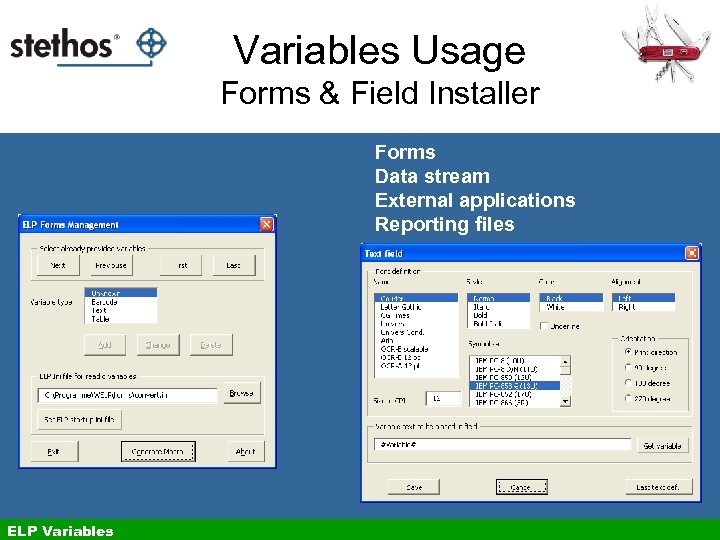 Variables Usage Forms & Field Installer Forms Data stream External applications Reporting files ELP Variables
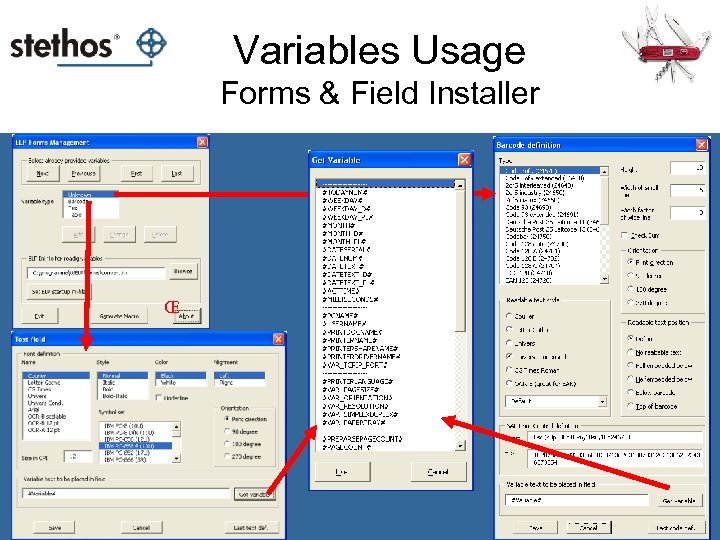 Variables Usage Forms & Field Installer Œ
 Basic Features: Bar codes
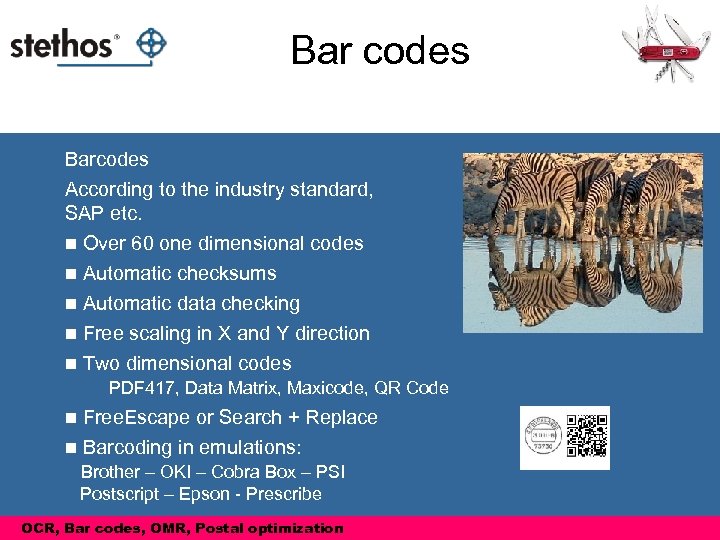 Bar codes Barcodes According to the industry standard, SAP etc. n Over 60 one dimensional codes n Automatic checksums n Automatic data checking n Free scaling in X and Y direction n Two dimensional codes PDF 417, Data Matrix, Maxicode, QR Code Free. Escape or Search + Replace n Barcoding in emulations: n Brother – OKI – Cobra Box – PSI Postscript – Epson - Prescribe OCR, Bar codes, OMR, Postal optimization
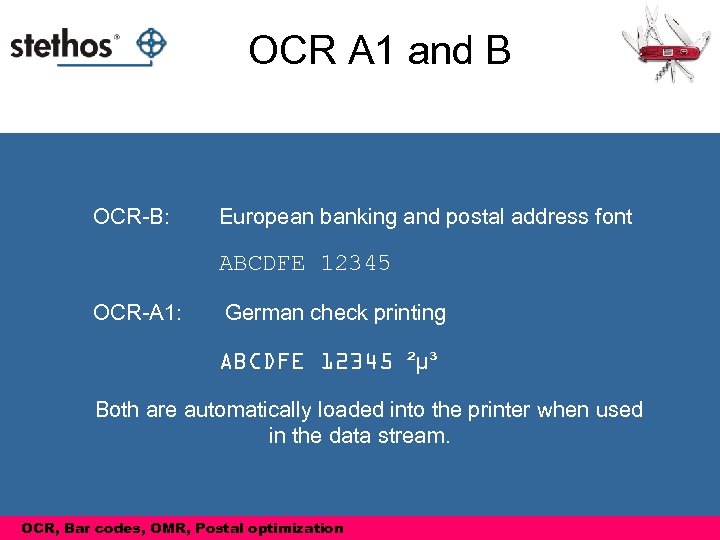 OCR A 1 and B OCR-B: European banking and postal address font ABCDFE 12345 OCR-A 1: German check printing ABCDFE 12345 ²µ³ Both are automatically loaded into the printer when used in the data stream. OCR, Bar codes, OMR, Postal optimization
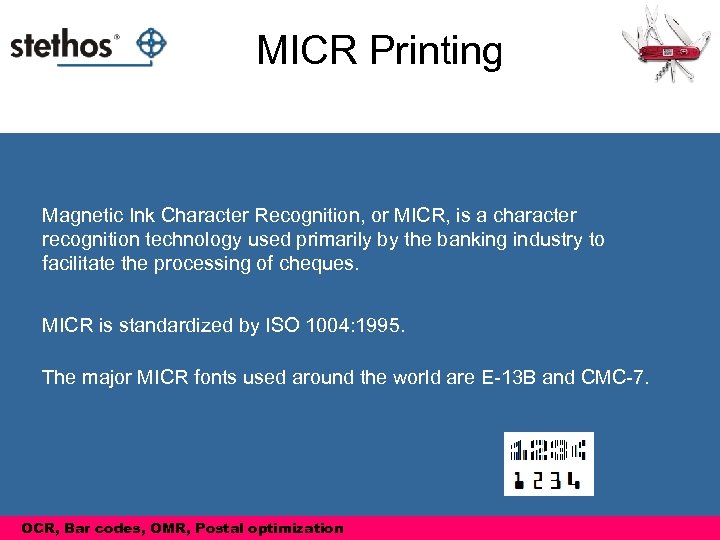 MICR Printing Magnetic Ink Character Recognition, or MICR, is a character recognition technology used primarily by the banking industry to facilitate the processing of cheques. MICR is standardized by ISO 1004: 1995. The major MICR fonts used around the world are E-13 B and CMC-7. OCR, Bar codes, OMR, Postal optimization
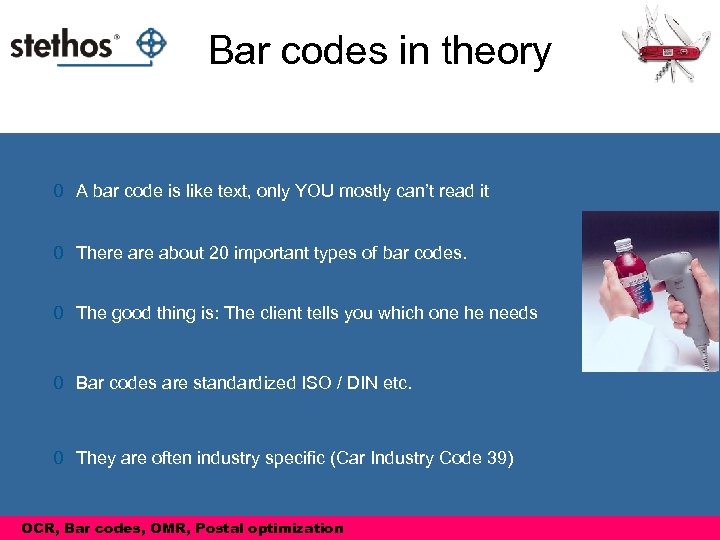 Bar codes in theory 0 A bar code is like text, only YOU mostly can’t read it 0 There about 20 important types of bar codes. 0 The good thing is: The client tells you which one he needs 0 Bar codes are standardized ISO / DIN etc. 0 They are often industry specific (Car Industry Code 39) OCR, Bar codes, OMR, Postal optimization Barcodes in theory
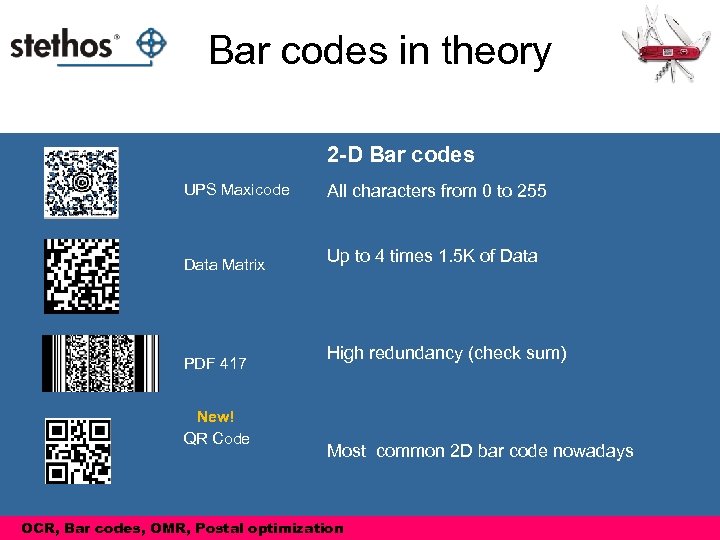 Bar codes in theory 2 -D Bar codes UPS Maxicode All characters from 0 to 255 Data Matrix Up to 4 times 1. 5 K of Data PDF 417 New! QR Code High redundancy (check sum) Most common 2 D bar code nowadays OCR, Bar codes, OMR, Postal optimization Barcodes in theory
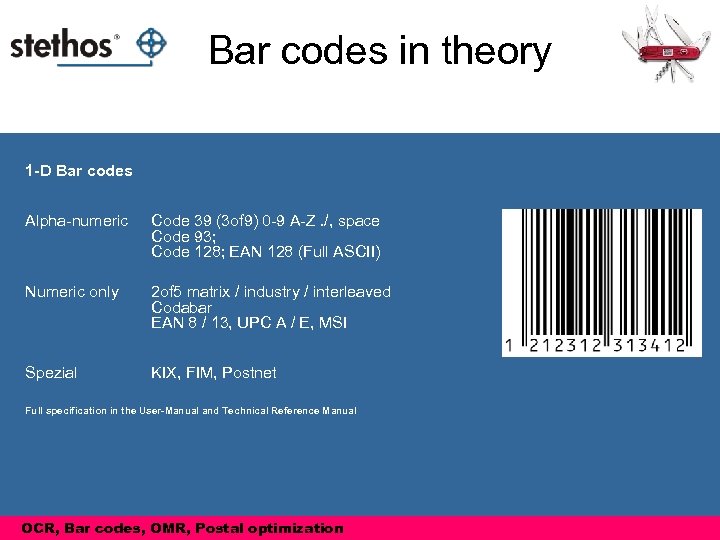 Bar codes in theory 1 -D Bar codes Alpha-numeric Code 39 (3 of 9) 0 -9 A-Z. /, space Code 93; Code 128; EAN 128 (Full ASCII) Numeric only 2 of 5 matrix / industry / interleaved Codabar EAN 8 / 13, UPC A / E, MSI Spezial KIX, FIM, Postnet Full specification in the User-Manual and Technical Reference Manual OCR, Bar codes, OMR, Postal optimization Barcodes in theory
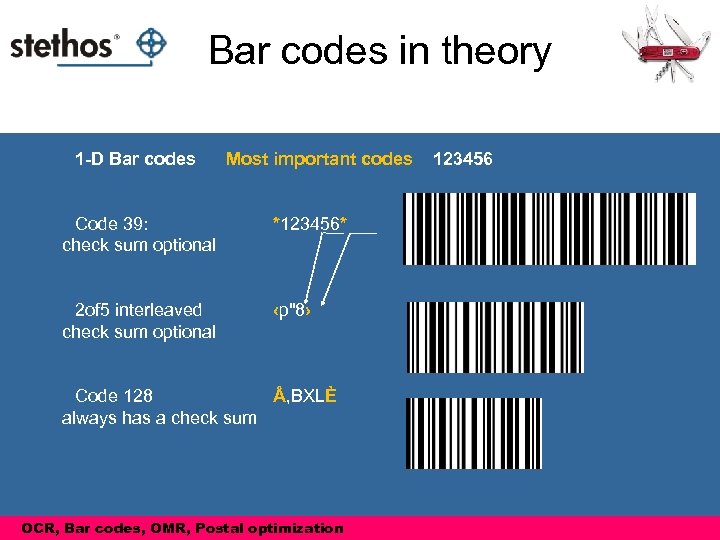 Bar codes in theory 1 -D Bar codes Most important codes Code 39: check sum optional *123456* 2 of 5 interleaved check sum optional 123456 ‹p"8› Code 128 , BXLÈ always has a check sum OCR, Bar codes, OMR, Postal optimization Barcodes in theory
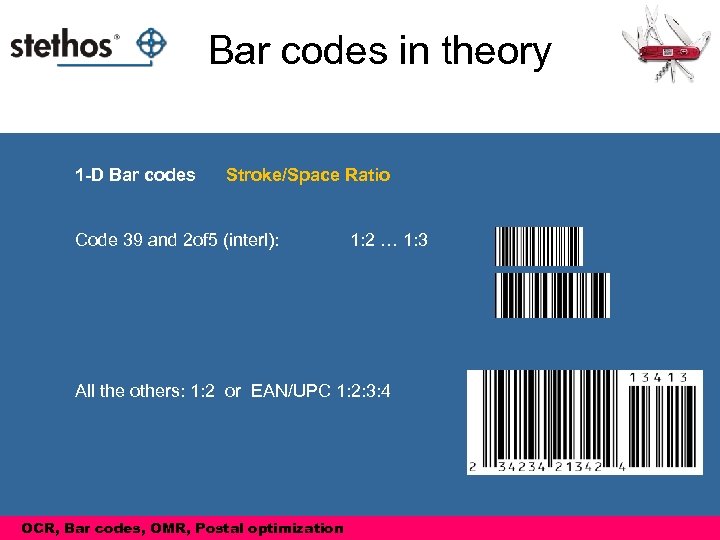 Bar codes in theory 1 -D Bar codes Stroke/Space Ratio Code 39 and 2 of 5 (interl): 1: 2 … 1: 3 All the others: 1: 2 or EAN/UPC 1: 2: 3: 4 OCR, Bar codes, OMR, Postal optimization Barcodes in theory
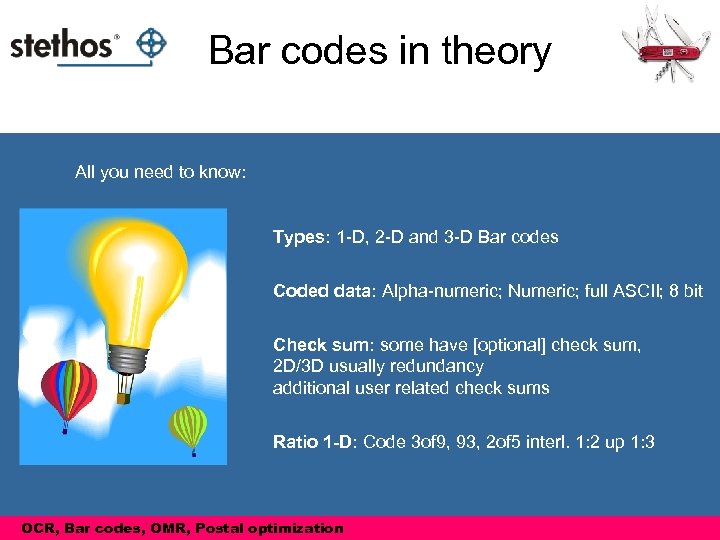 Bar codes in theory All you need to know: Types: 1 -D, 2 -D and 3 -D Bar codes Coded data: Alpha-numeric; Numeric; full ASCII; 8 bit Check sum: some have [optional] check sum, 2 D/3 D usually redundancy additional user related check sums Ratio 1 -D: Code 3 of 9, 93, 2 of 5 interl. 1: 2 up 1: 3 OCR, Bar codes, OMR, Postal optimization Barcodes in theory
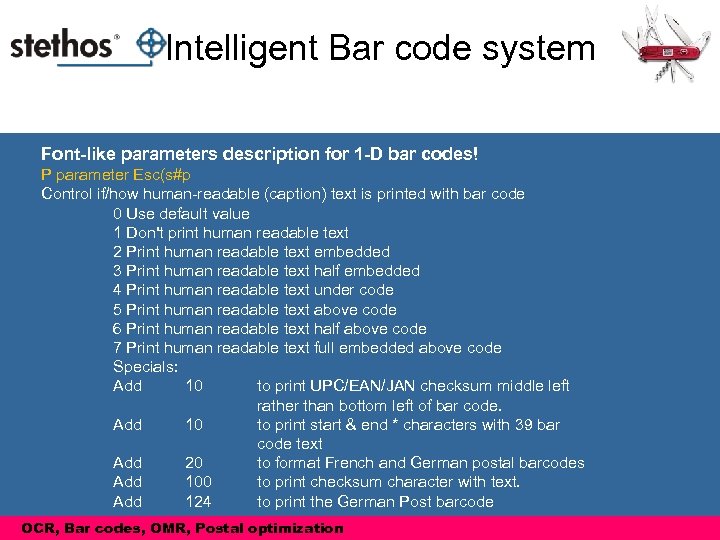 Intelligent Bar code system Font-like parameters description for 1 -D bar codes! P parameter Esc(s#p Control if/how human-readable (caption) text is printed with bar code 0 Use default value 1 Don't print human readable text 2 Print human readable text embedded 3 Print human readable text half embedded 4 Print human readable text under code 5 Print human readable text above code 6 Print human readable text half above code 7 Print human readable text full embedded above code Specials: Add 10 to print UPC/EAN/JAN checksum middle left rather than bottom left of bar code. Add 10 to print start & end * characters with 39 bar code text Add 20 to format French and German postal barcodes Add 100 to print checksum character with text. Add 124 to print the German Post barcode OCR, Bar codes, OMR, Postal optimization
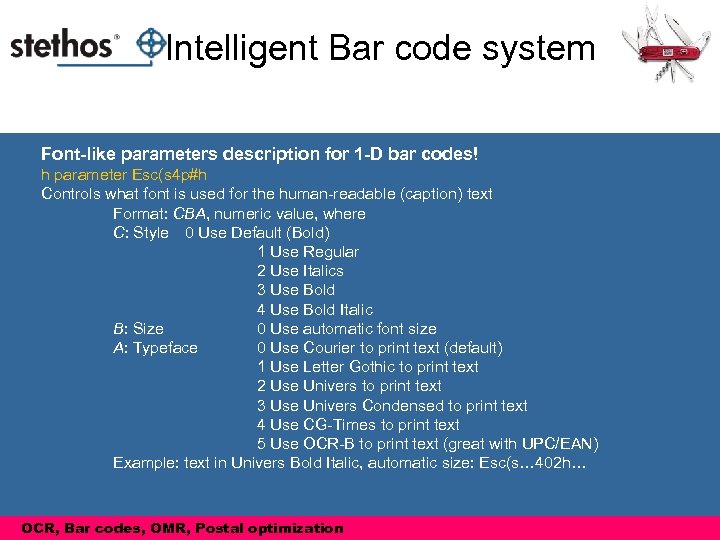 Intelligent Bar code system Font-like parameters description for 1 -D bar codes! h parameter Esc(s 4 p#h Controls what font is used for the human-readable (caption) text Format: CBA, numeric value, where C: Style 0 Use Default (Bold) 1 Use Regular 2 Use Italics 3 Use Bold 4 Use Bold Italic B: Size 0 Use automatic font size A: Typeface 0 Use Courier to print text (default) 1 Use Letter Gothic to print text 2 Use Univers to print text 3 Use Univers Condensed to print text 4 Use CG-Times to print text 5 Use OCR-B to print text (great with UPC/EAN) Example: text in Univers Bold Italic, automatic size: Esc(s… 402 h… OCR, Bar codes, OMR, Postal optimization
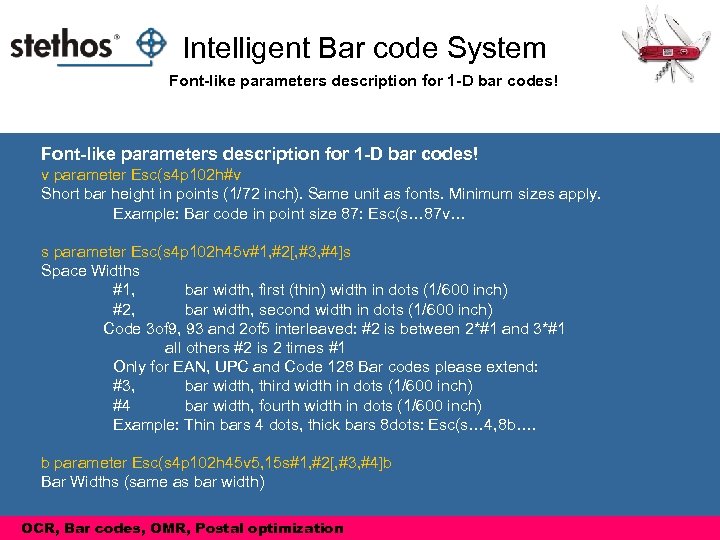 Intelligent Bar code System Font-like parameters description for 1 -D bar codes! v parameter Esc(s 4 p 102 h#v Short bar height in points (1/72 inch). Same unit as fonts. Minimum sizes apply. Example: Bar code in point size 87: Esc(s… 87 v… s parameter Esc(s 4 p 102 h 45 v#1, #2[, #3, #4]s Space Widths #1, bar width, first (thin) width in dots (1/600 inch) #2, bar width, second width in dots (1/600 inch) Code 3 of 9, 93 and 2 of 5 interleaved: #2 is between 2*#1 and 3*#1 all others #2 is 2 times #1 Only for EAN, UPC and Code 128 Bar codes please extend: #3, bar width, third width in dots (1/600 inch) #4 bar width, fourth width in dots (1/600 inch) Example: Thin bars 4 dots, thick bars 8 dots: Esc(s… 4, 8 b…. b parameter Esc(s 4 p 102 h 45 v 5, 15 s#1, #2[, #3, #4]b Bar Widths (same as bar width) OCR, Bar codes, OMR, Postal optimization
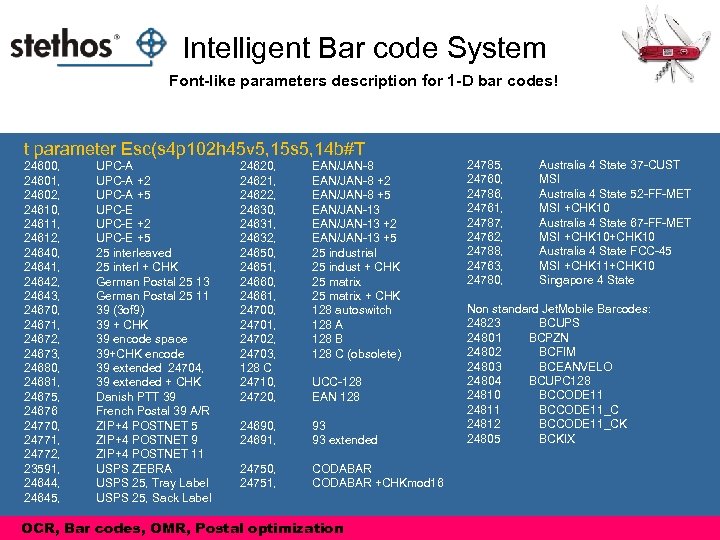 Intelligent Bar code System Font-like parameters description for 1 -D bar codes! t parameter Esc(s 4 p 102 h 45 v 5, 15 s 5, 14 b#T 24600, 24601, 24602, 24610, 24611, 24612, 24640, 24641, 24642, 24643, 24670, 24671, 24672, 24673, 24680, 24681, 24675, 24676 24770, 24771, 24772, 23591, 24644, 24645, UPC-A +2 UPC-A +5 UPC-E +2 UPC-E +5 25 interleaved 25 interl + CHK German Postal 25 13 German Postal 25 11 39 (3 of 9) 39 + CHK 39 encode space 39+CHK encode 39 extended 24704, 39 extended + CHK Danish PTT 39 French Postal 39 A/R ZIP+4 POSTNET 5 ZIP+4 POSTNET 9 ZIP+4 POSTNET 11 USPS ZEBRA USPS 25, Tray Label USPS 25, Sack Label 24620, 24621, 24622, 24630, 24631, 24632, 24650, 24651, 24660, 24661, 24700, 24701, 24702, 24703, 128 C 24710, 24720, EAN/JAN-8 +2 EAN/JAN-8 +5 EAN/JAN-13 +2 EAN/JAN-13 +5 25 industrial 25 indust + CHK 25 matrix + CHK 128 autoswitch 128 A 128 B 128 C (obsolete) 24690, 24691, 93 93 extended 24750, 24751, CODABAR +CHKmod 16 UCC-128 EAN 128 OCR, Bar codes, OMR, Postal optimization 24785, 24760, 24786, 24761, 24787, 24762, 24788, 24763, 24780, Australia 4 State 37 -CUST MSI Australia 4 State 52 -FF-MET MSI +CHK 10 Australia 4 State 67 -FF-MET MSI +CHK 10 Australia 4 State FCC-45 MSI +CHK 11+CHK 10 Singapore 4 State Non standard Jet. Mobile Barcodes: 24823 BCUPS 24801 BCPZN 24802 BCFIM 24803 BCEANVELO 24804 BCUPC 128 24810 BCCODE 11 24811 BCCODE 11_C 24812 BCCODE 11_CK 24805 BCKIX
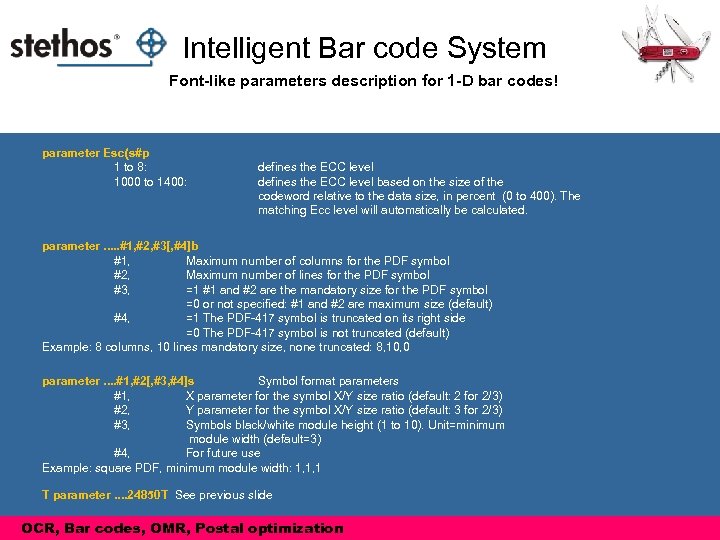 Intelligent Bar code System Font-like parameters description for 1 -D bar codes! parameter Esc(s#p 1 to 8: 1000 to 1400: defines the ECC level based on the size of the codeword relative to the data size, in percent (0 to 400). The matching Ecc level will automatically be calculated. parameter. . . #1, #2, #3[, #4]b #1, Maximum number of columns for the PDF symbol #2, Maximum number of lines for the PDF symbol #3, =1 #1 and #2 are the mandatory size for the PDF symbol =0 or not specified: #1 and #2 are maximum size (default) #4, =1 The PDF-417 symbol is truncated on its right side =0 The PDF-417 symbol is not truncated (default) Example: 8 columns, 10 lines mandatory size, none truncated: 8, 10, 0 parameter. . #1, #2[, #3, #4]s Symbol format parameters #1, X parameter for the symbol X/Y size ratio (default: 2 for 2/3) #2, Y parameter for the symbol X/Y size ratio (default: 3 for 2/3) #3, Symbols black/white module height (1 to 10). Unit=minimum module width (default=3) #4, For future use Example: square PDF, minimum module width: 1, 1, 1 T parameter. . 24850 T See previous slide OCR, Bar codes, OMR, Postal optimization
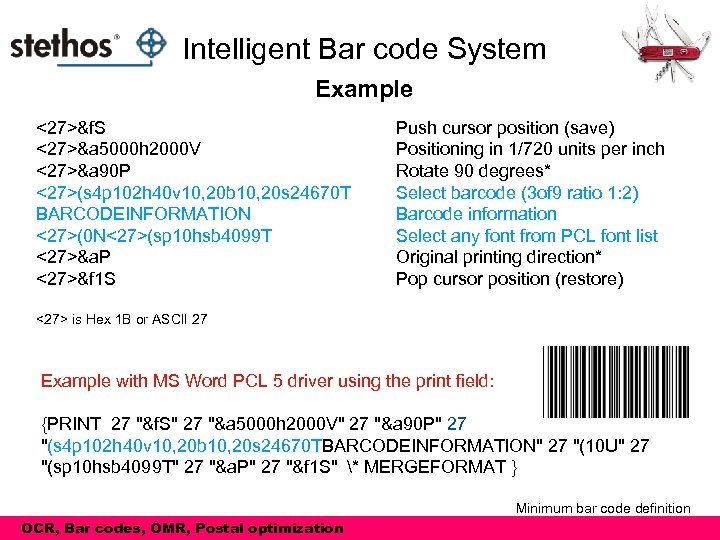 Intelligent Bar code System Example <27>&f. S <27>&a 5000 h 2000 V <27>&a 90 P <27>(s 4 p 102 h 40 v 10, 20 b 10, 20 s 24670 T BARCODEINFORMATION <27>(0 N<27>(sp 10 hsb 4099 T <27>&a. P <27>&f 1 S Push cursor position (save) Positioning in 1/720 units per inch Rotate 90 degrees* Select barcode (3 of 9 ratio 1: 2) Barcode information Select any font from PCL font list Original printing direction* Pop cursor position (restore) <27> is Hex 1 B or ASCII 27 Example with MS Word PCL 5 driver using the print field: {PRINT 27 "&f. S" 27 "&a 5000 h 2000 V" 27 "&a 90 P" 27 "(s 4 p 102 h 40 v 10, 20 b 10, 20 s 24670 TBARCODEINFORMATION" 27 "(10 U" 27 "(sp 10 hsb 4099 T" 27 "&a. P" 27 "&f 1 S" * MERGEFORMAT } Minimum bar code definition OCR, Bar codes, OMR, Postal optimization
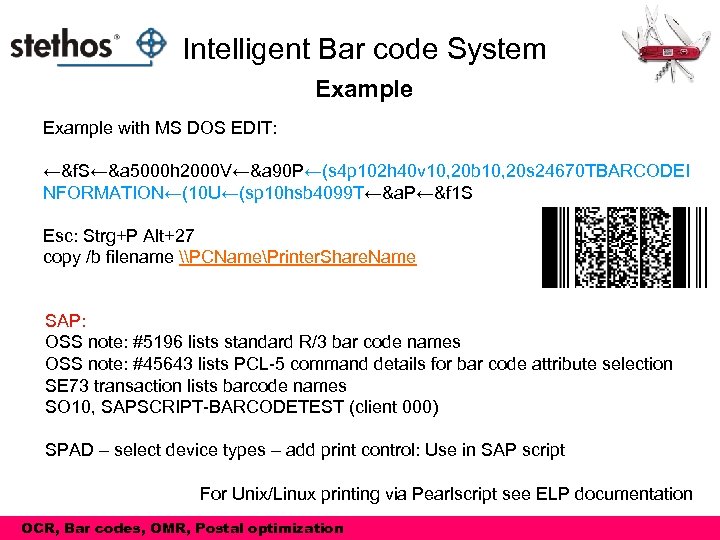 Intelligent Bar code System Example with MS DOS EDIT: ←&f. S←&a 5000 h 2000 V←&a 90 P←(s 4 p 102 h 40 v 10, 20 b 10, 20 s 24670 TBARCODEI NFORMATION←(10 U←(sp 10 hsb 4099 T←&a. P←&f 1 S Esc: Strg+P Alt+27 copy /b filename \PCNamePrinter. Share. Name SAP: OSS note: #5196 lists standard R/3 bar code names OSS note: #45643 lists PCL-5 command details for bar code attribute selection SE 73 transaction lists barcode names SO 10, SAPSCRIPT-BARCODETEST (client 000) SPAD – select device types – add print control: Use in SAP script For Unix/Linux printing via Pearlscript see ELP documentation OCR, Bar codes, OMR, Postal optimization
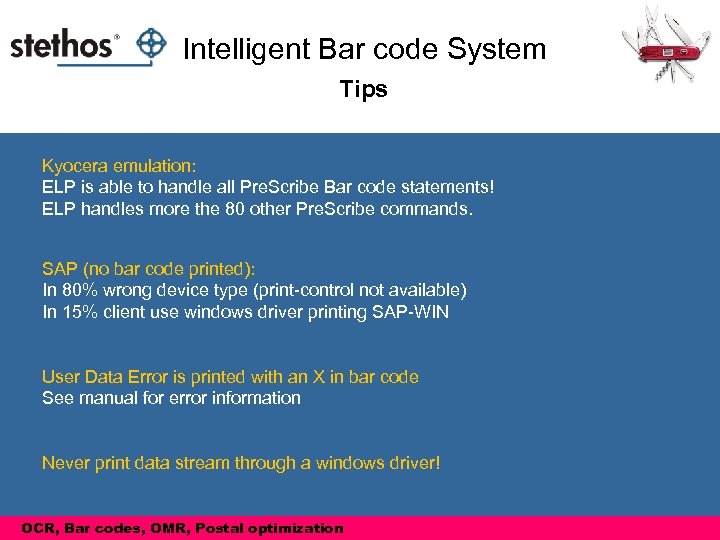 Intelligent Bar code System Tips Kyocera emulation: ELP is able to handle all Pre. Scribe Bar code statements! ELP handles more the 80 other Pre. Scribe commands. SAP (no bar code printed): In 80% wrong device type (print-control not available) In 15% client use windows driver printing SAP-WIN User Data Error is printed with an X in bar code See manual for error information Never print data stream through a windows driver! OCR, Bar codes, OMR, Postal optimization
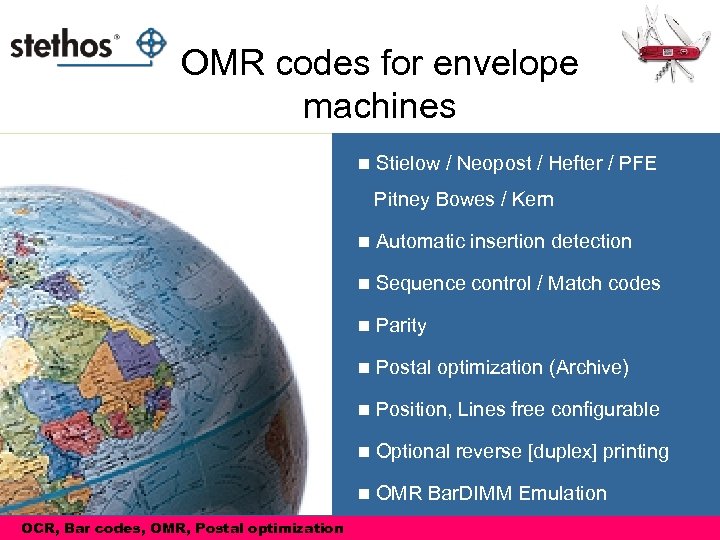 OMR codes for envelope machines n Stielow / Neopost / Hefter / PFE Pitney Bowes / Kern n n Sequence control / Match codes n Parity n Postal optimization (Archive) n Position, Lines free configurable n Optional reverse [duplex] printing n OCR, Bar codes, OMR, Postal optimization Automatic insertion detection OMR Bar. DIMM Emulation
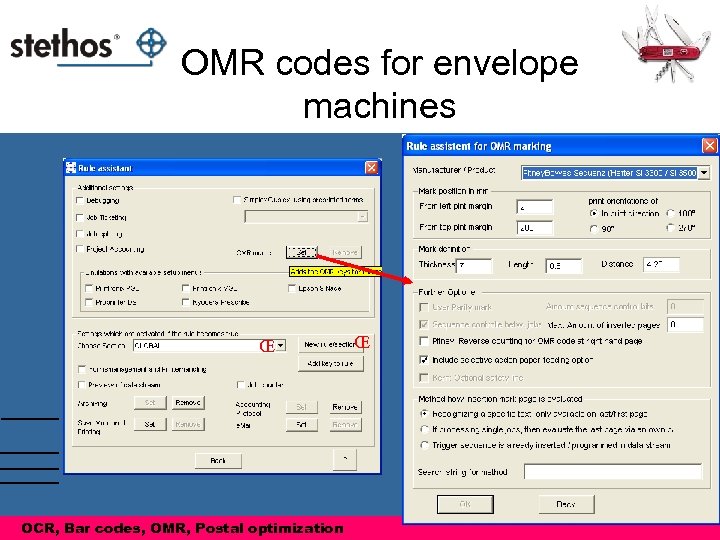 OMR codes for envelope machines Œ OCR, Bar codes, OMR, Postal optimization Œ
 Basic Features: Archiving
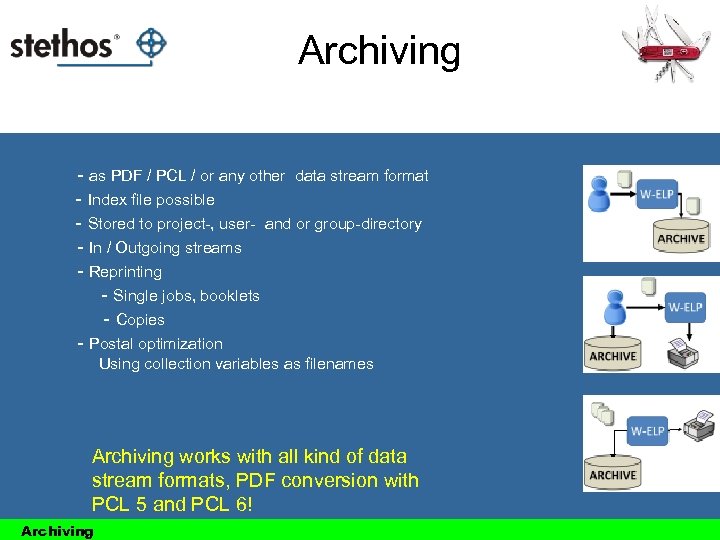 Archiving - as PDF / PCL / or any other data stream format - Index file possible - Stored to project-, user- and or group-directory - In / Outgoing streams - Reprinting - Single jobs, booklets - Copies - Postal optimization Using collection variables as filenames Archiving works with all kind of data stream formats, PDF conversion with PCL 5 and PCL 6! Archiving
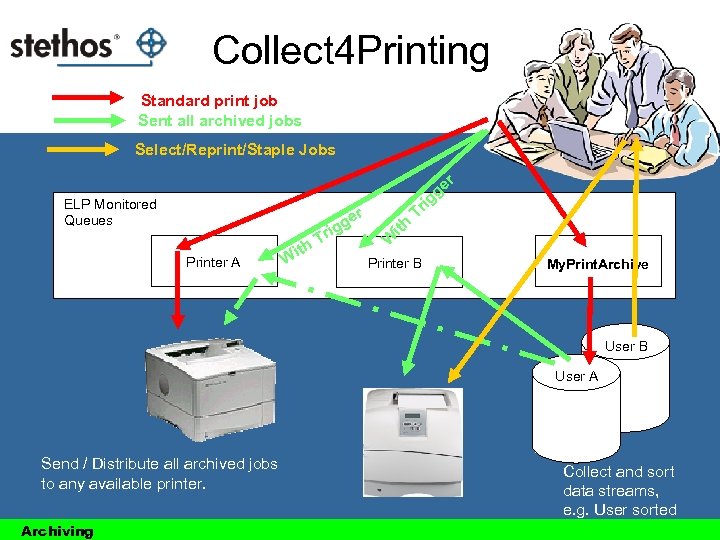 Collect 4 Printing Standard print job Sent all archived jobs Select/Reprint/Staple Jobs ELP Monitored Queues i er Printer A th Wi g rig T r ge g ith Tr W Printer B My. Print. Archive User B User A Send / Distribute all archived jobs to any available printer. Archiving Collect and sort data streams, e. g. User sorted
![Collect 4 Printing Rule Settings [Collect 4 Printing] User A ; All jobs are](https://present5.com/presentation/72d462c7114c9b71c93aebaac2f19a16/image-83.jpg "Collect 4 Printing Rule Settings [Collect 4 Printing] User A ; All jobs are") Collect 4 Printing Rule Settings [Collect 4 Printing] User A ; All jobs are printed through this named queue to local port NULL ; Store file to archive directory, coding the user name and time Out. Archive. Dir=#ELP_FORMS_PATH#archive#USERNAME#; #DATESERIAL# ; If print files are older then 5 days erase them Archive. Days=5 Exit=ON !Print. All! [Print all] Trigger_Binary=!Print. All! ; All stored jobs are inserted at actual jobs end Send Insert. Print. Files. At. Job. End=#ELP_FORMS_PATH#archive#USERNAME#*. * via Batch file ; and the trigger job is not printed to queue Kill. Job=ON Archiving
Collect 4 Printing Rule Settings [Collect 4 Printing] User A ; All jobs are printed through this named queue to local port NULL ; Store file to archive directory, coding the user name and time Out. Archive. Dir=#ELP_FORMS_PATH#archive#USERNAME#; #DATESERIAL# ; If print files are older then 5 days erase them Archive. Days=5 Exit=ON !Print. All! [Print all] Trigger_Binary=!Print. All! ; All stored jobs are inserted at actual jobs end Send Insert. Print. Files. At. Job. End=#ELP_FORMS_PATH#archive#USERNAME#*. * via Batch file ; and the trigger job is not printed to queue Kill. Job=ON Archiving
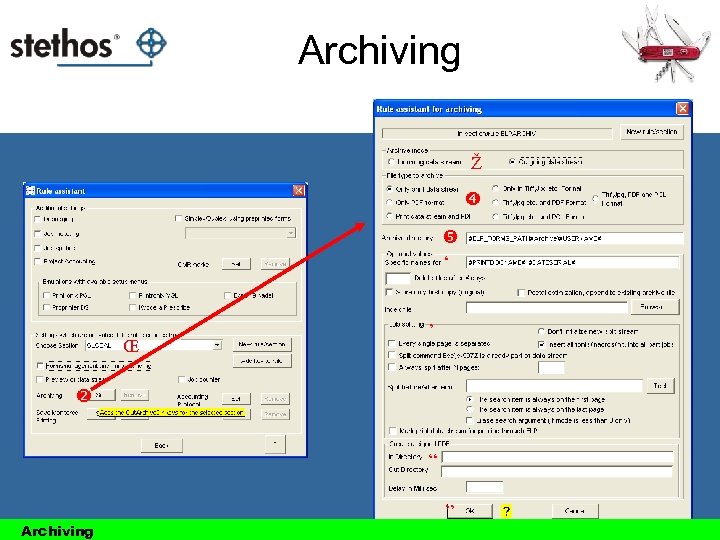 Archiving Ž ‘ Œ ’ “ Archiving ”
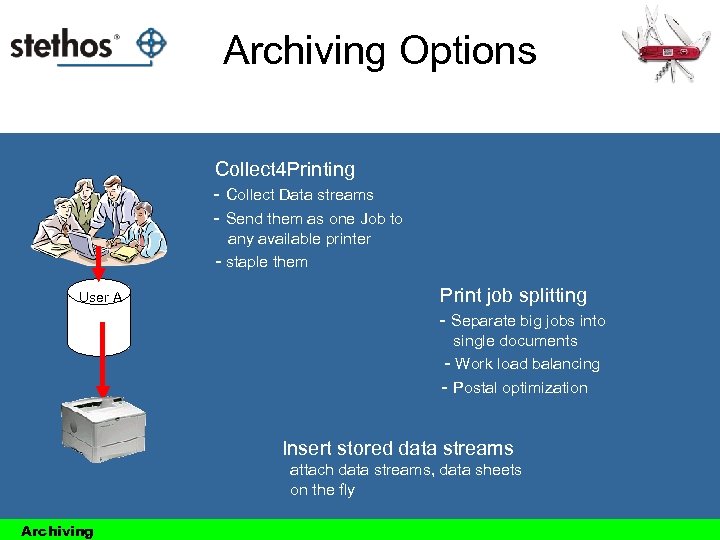 Archiving Options Collect 4 Printing - Collect Data streams - Send them as one Job to any available printer - staple them User A Print job splitting - Separate big jobs into single documents - Work load balancing - Postal optimization Insert stored data streams attach data streams, data sheets on the fly Archiving
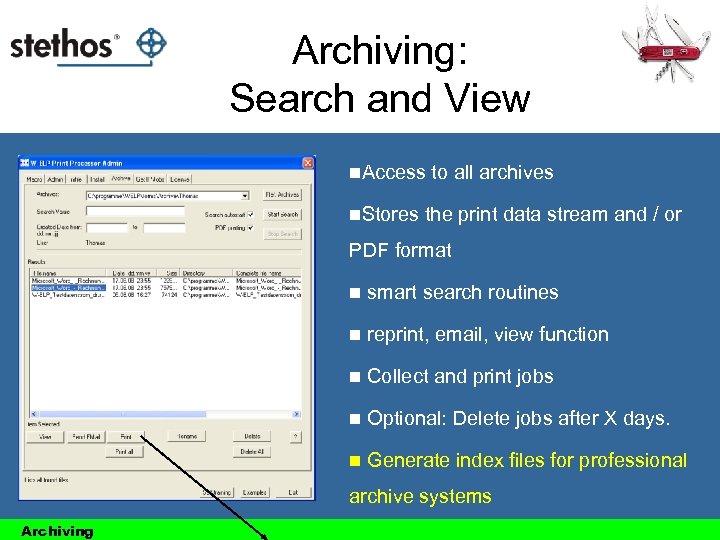 Archiving: Search and View n. Access n. Stores to all archives the print data stream and / or PDF format n smart search routines n reprint, email, view function n Collect and print jobs n Optional: Delete jobs after X days. n Generate index files for professional archive systems Archiving
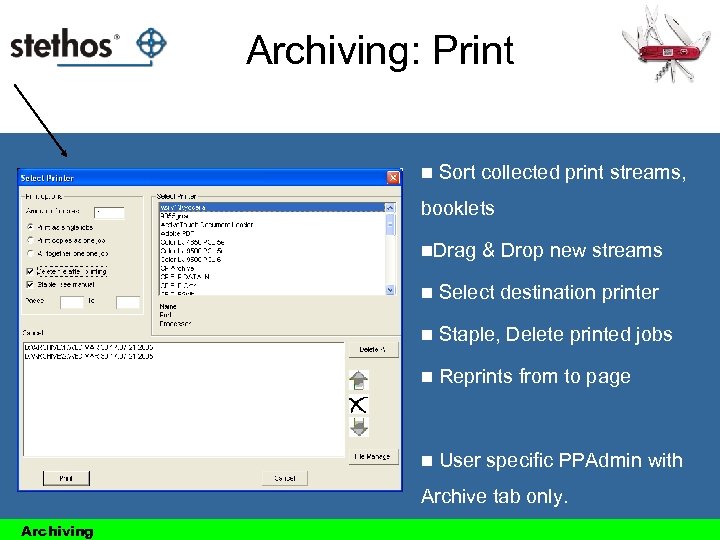 Archiving: Print n Sort collected print streams, booklets n. Drag & Drop new streams n Select destination printer n Staple, Delete printed jobs n Reprints from to page n User specific PPAdmin with Archive tab only. Archiving
 Create searchable PDF documents Problem: Modern Windows drivers don´t encode readable text with a standard symbol set. Solutions: Convert. Soft. Font 2 ISO=ON When activated ELP tries to convert all True. Type font based texts from the Windows stream based coding, into ISO. As a result, the PDF converter creates searchable PDFs. Remove. Down. Load. Font=ON Deletes the complete softfont information from the data stream and replaces it with definable printernal fonts. See online help for further details. (All ELP commands) Archiving
 Advanced Features: Digital Signature
 Digital Signatures • Digital signatures are often used to implement electronic signatures • In the European Union, electronic signatures have legal significance • W-ELP supports software certificates (PKCS#12) and various Smart. Card manufactures • Depending on the local law and the level of security needed the proper signing method has to be chosen • Smart. Cards do need of course a suitable reader
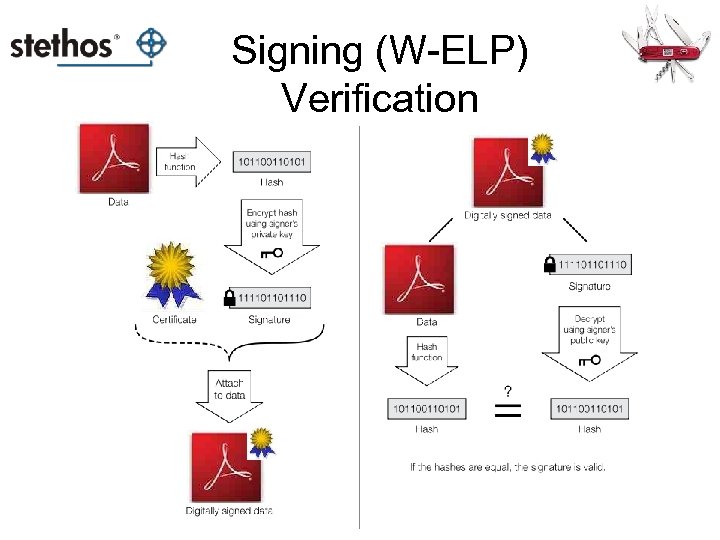 Signing (W-ELP) Verification
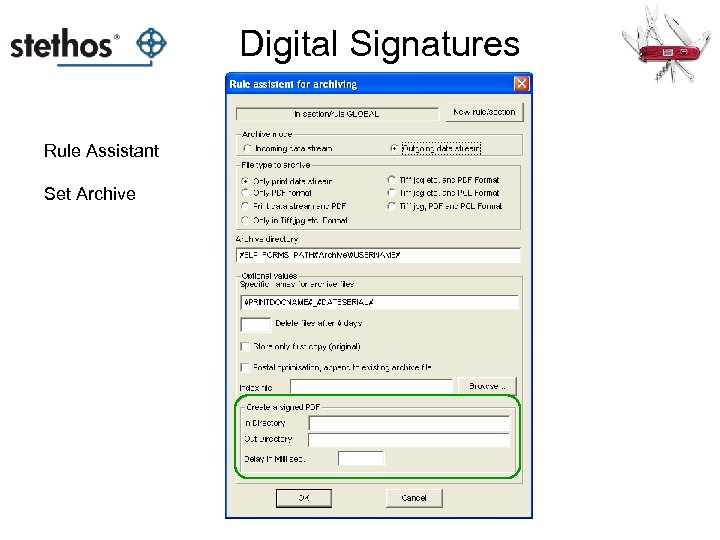 Digital Signatures Rule Assistant Set Archive
 Digital Signatures with W-ELP • W-ELP signs PDF’s – so the PDF Generator and Windows is a pre-requisite • Currently only 32 Bit Windows is supported • 30 day trial version with a revoked Software certificate available on request (so not bundled with the “normal” standard download) • If a Smart. Card certificate has to be extracted and used please contact stethos BEFORE starting the project if the type of Smart. Card is supported • Usage: e. g. legal electronic invoices or archiving purpose
 Advanced Features: Distributed Printing
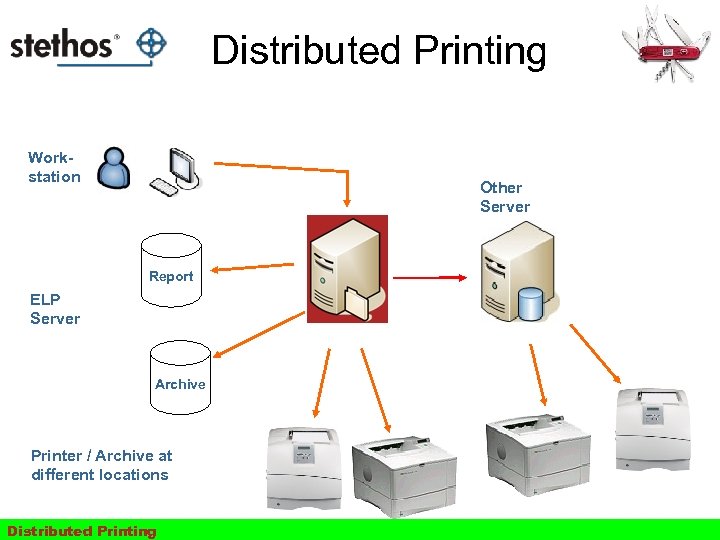 Distributed Printing Workstation Other Server Report ELP Server Archive Printer / Archive at different locations Distributed Printing
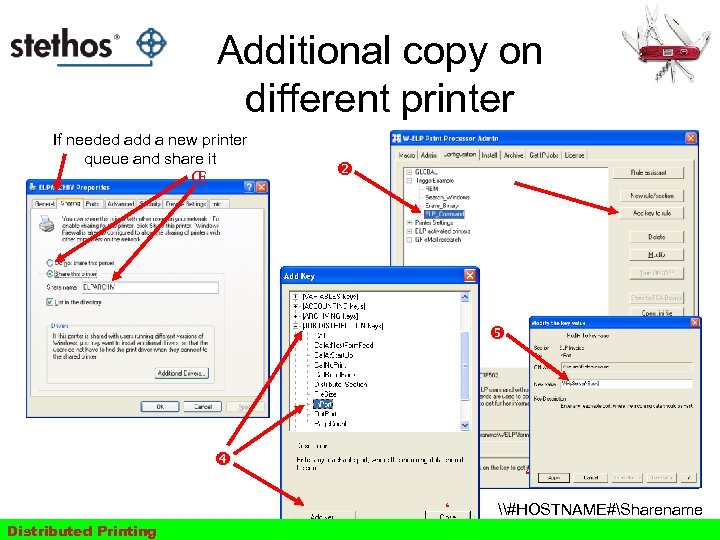 Additional copy on different printer If needed add a new printer queue and share it Œ ‘ ‘ Distributed Printing \#HOSTNAME#Sharename \127. 0. 0. 1 Sharename
![Split [Mail merge] Jobs If needed add a new printer and share it Œ](https://present5.com/presentation/72d462c7114c9b71c93aebaac2f19a16/image-97.jpg "Split [Mail merge] Jobs If needed add a new printer and share it Œ") Split [Mail merge] Jobs If needed add a new printer and share it Œ Se nd sp l itte d pa rts to th i sq Create an own rule fo this queue Distributed Printing ue ue
Split [Mail merge] Jobs If needed add a new printer and share it ΠSe nd sp l itte d pa rts to th i sq Create an own rule fo this queue Distributed Printing ue ue
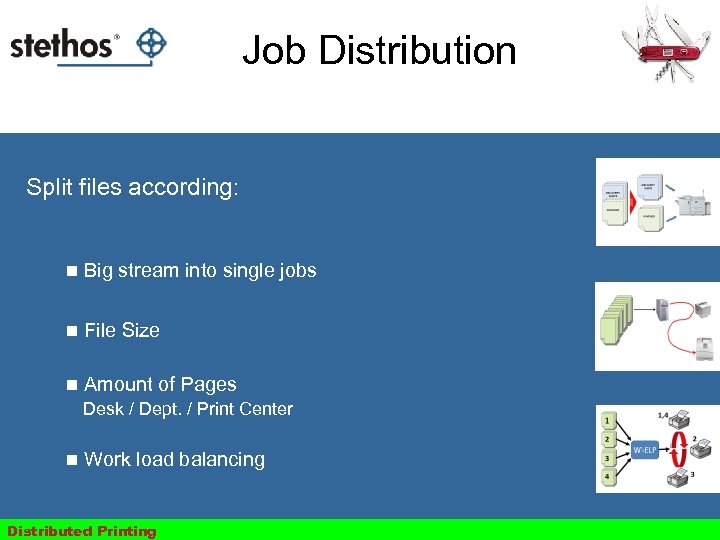 Job Distribution Split files according: n Big stream into single jobs n File Size n Amount of Pages Desk / Dept. / Print Center n Work load balancing Distributed Printing
![Job Distribution Examples [Ricoh Aficio SPC 420 dn] DISTRIBUTE_SECTION=Small. Printer [Kyocera FS-2000] DISTRIBUTE_SECTION=Medium. Printer](https://present5.com/presentation/72d462c7114c9b71c93aebaac2f19a16/image-99.jpg "Job Distribution Examples [Ricoh Aficio SPC 420 dn] DISTRIBUTE_SECTION=Small. Printer [Kyocera FS-2000] DISTRIBUTE_SECTION=Medium. Printer") Job Distribution Examples [Ricoh Aficio SPC 420 dn] DISTRIBUTE_SECTION=Small. Printer [Kyocera FS-2000] DISTRIBUTE_SECTION=Medium. Printer [Small. Printer] Distribute_File. Size=4000000, \ServernamePrinter. Share. Name 1 Distribute_File. Size=2000000, \ServernamePrinter. Share. Name 2 [Medium. Printer] Distribute_Page. Count=50, \ServernamePrinter. Share. Name 1 Distribute_Page. Count=200, \ServernamePrinter. Share. Name 2 Distributed Printing
Job Distribution Examples [Ricoh Aficio SPC 420 dn] DISTRIBUTE_SECTION=Small. Printer [Kyocera FS-2000] DISTRIBUTE_SECTION=Medium. Printer [Small. Printer] Distribute_File. Size=4000000, \ServernamePrinter. Share. Name 1 Distribute_File. Size=2000000, \ServernamePrinter. Share. Name 2 [Medium. Printer] Distribute_Page. Count=50, \ServernamePrinter. Share. Name 1 Distribute_Page. Count=200, \ServernamePrinter. Share. Name 2 Distributed Printing
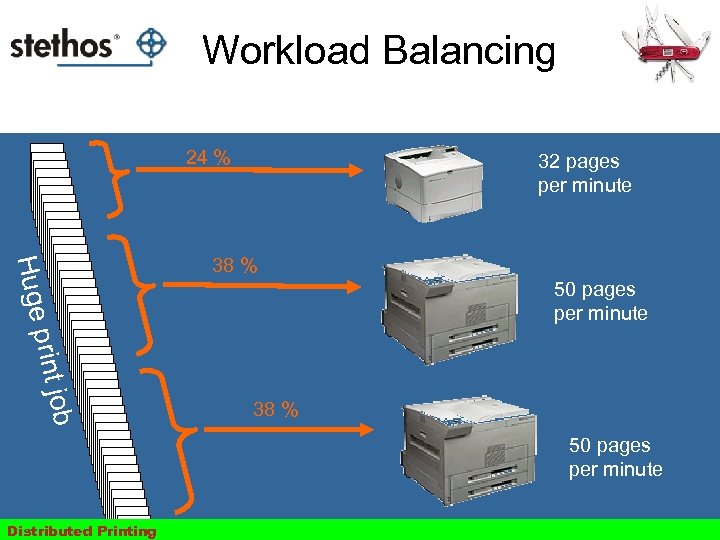 Workload Balancing 24 % 32 pages per minute Huge 38 % 50 pages per minute ob print j 38 % 50 pages per minute Distributed Printing
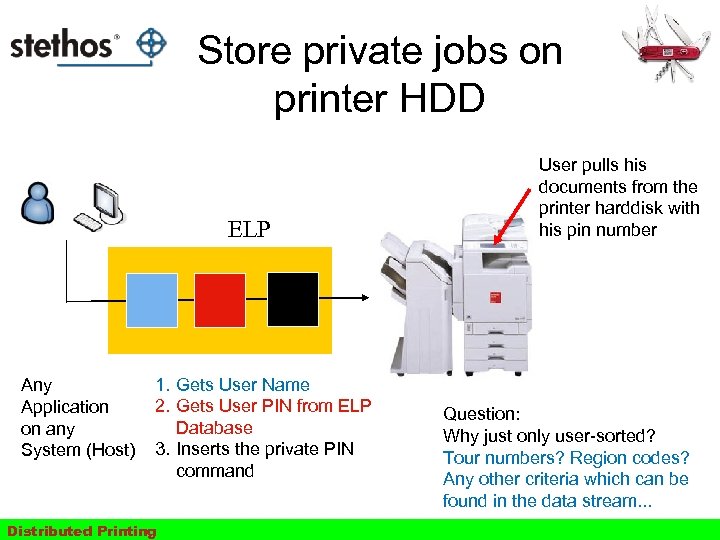 Store private jobs on printer HDD ELP Any Application on any System (Host) 1. Gets User Name 2. Gets User PIN from ELP Database 3. Inserts the private PIN command Distributed Printing User pulls his documents from the printer harddisk with his pin number Question: Why just only user-sorted? Tour numbers? Region codes? Any other criteria which can be found in the data stream. . .
 Advanced Features: Reporting and Accounting
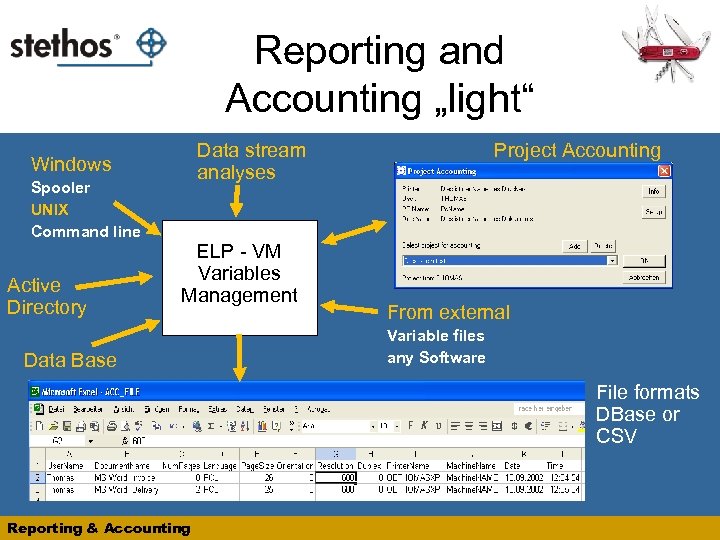 Reporting and Accounting „light“ Spooler UNIX Command line Active Directory Project Accounting Data stream analyses Windows ELP - VM Variables Management Data Base From external Variable files any Software File formats DBase or CSV Reporting & Accounting
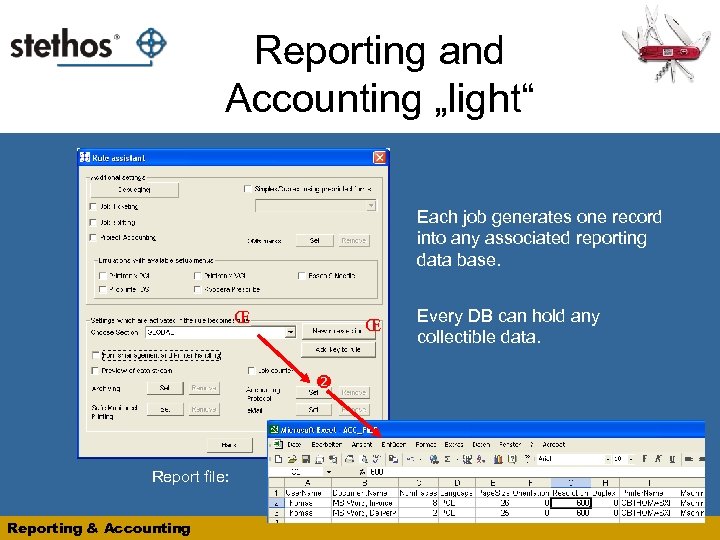 Reporting and Accounting „light“ Each job generates one record into any associated reporting data base. Œ Œ Report file: Reporting & Accounting Every DB can hold any collectible data.
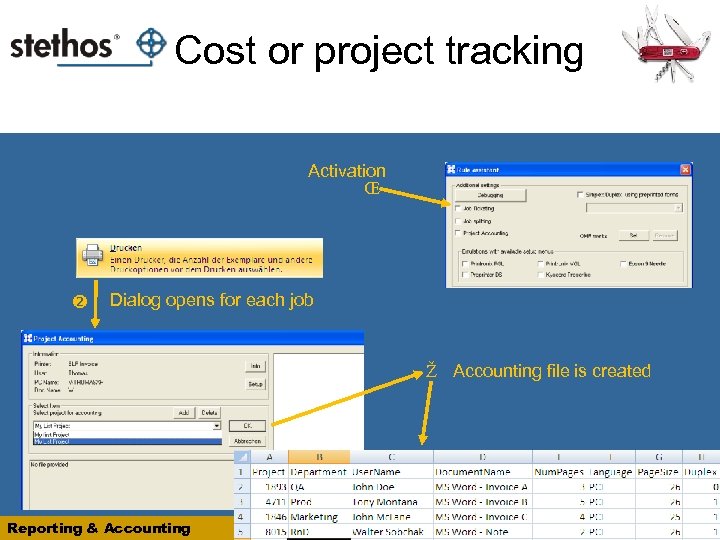 0020701028 Cost or project tracking Activation Œ Dialog opens for each job Ž Accounting file is created Reporting & Accounting
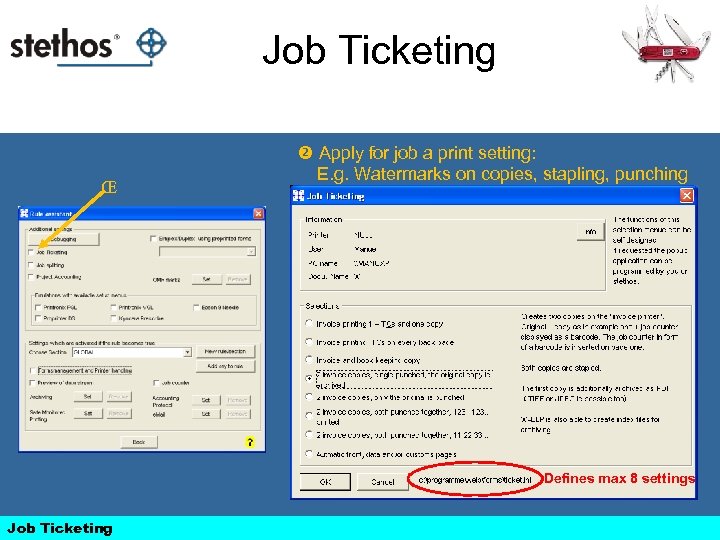 Job Ticketing ΠApply for job a print setting: E. g. Watermarks on copies, stapling, punching Defines max 8 settings Job Ticketing
 Advanced Features: E-mail
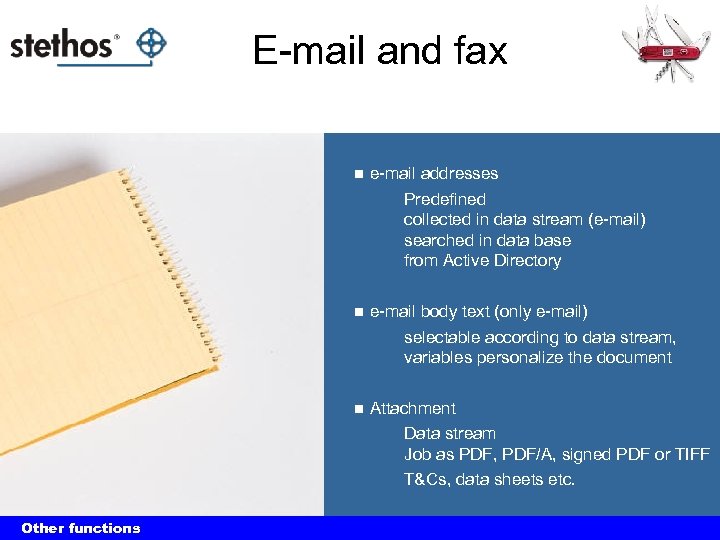 E-mail and fax n e-mail addresses Predefined collected in data stream (e-mail) searched in data base from Active Directory n e-mail body text (only e-mail) selectable according to data stream, variables personalize the document n Attachment Data stream Job as PDF, PDF/A, signed PDF or TIFF T&Cs, data sheets etc. Other functions
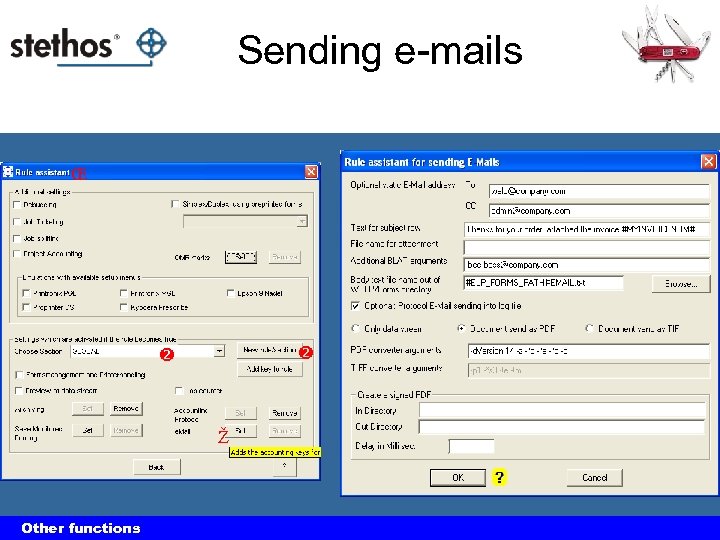 Sending e-mails Œ Ž Other functions
 Advanced Features: Emulations & other solutions
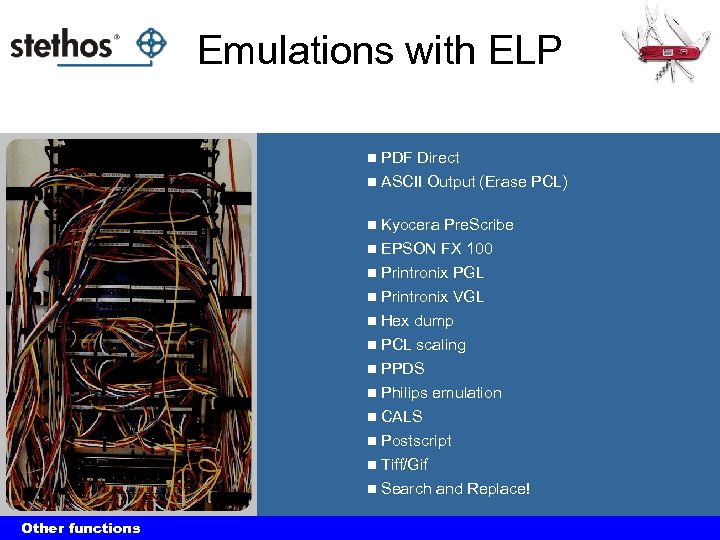 Emulations with ELP PDF Direct n ASCII Output (Erase PCL) n n Kyocera Pre. Scribe EPSON FX 100 n Printronix PGL n Printronix VGL n Hex dump n PCL scaling n PPDS n Philips emulation n CALS n Postscript n Tiff/Gif n Search and Replace! n Other functions
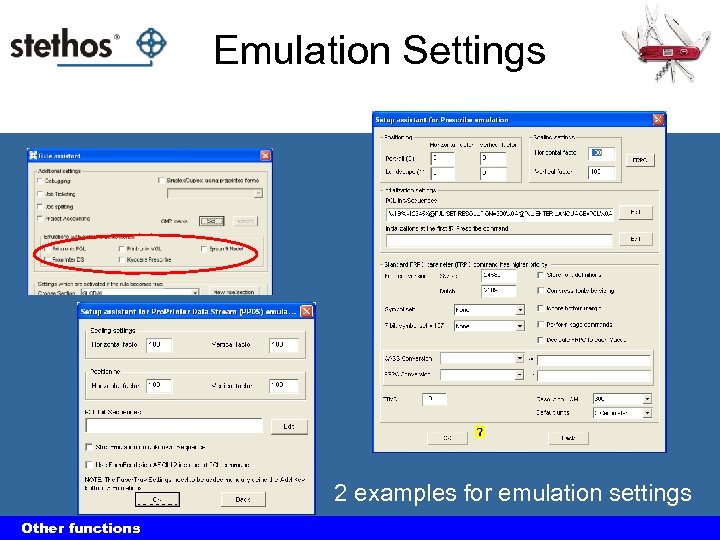 Emulation Settings 2 examples for emulation settings Other functions
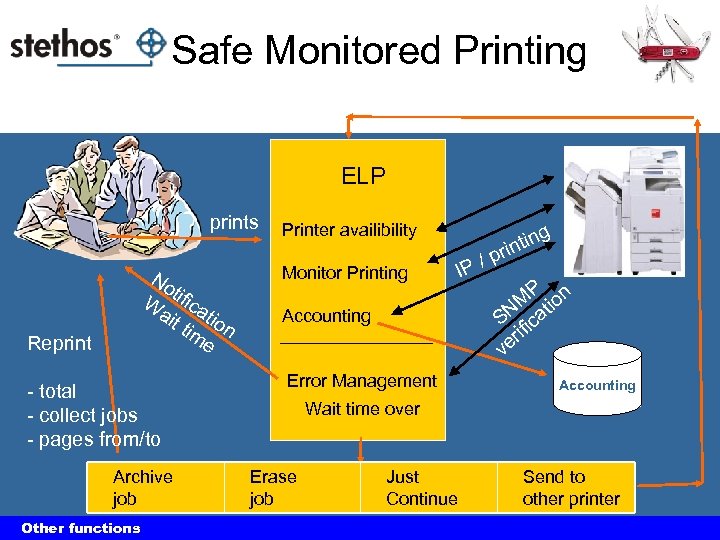 Safe Monitored Printing ELP prints No W tifica ait tio tim n e Reprint - total - collect jobs - pages from/to Archive job Other functions Printer availibility Monitor Printing Accounting Error Management ng IP / i rint p P M tion SN fica i er v Accounting Wait time over Erase job Just Continue Send to other printer
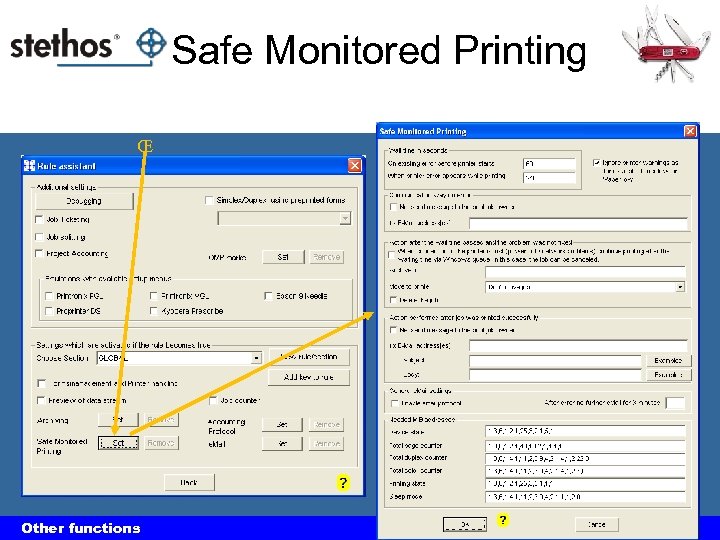 Safe Monitored Printing ΠOther functions
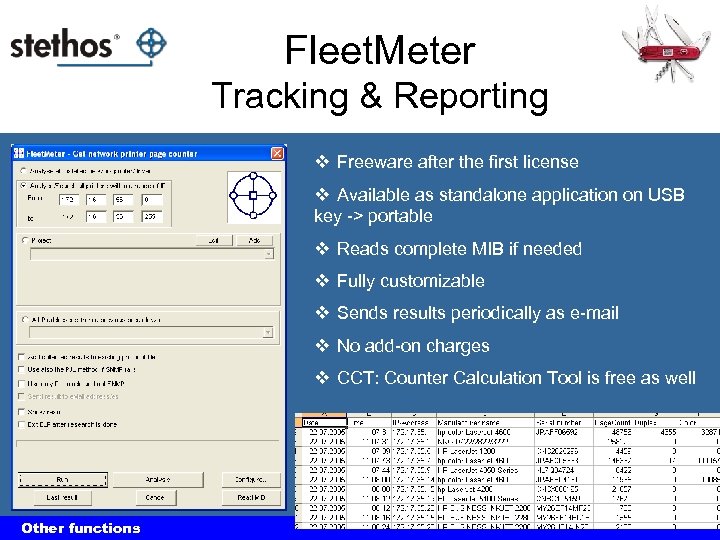 Fleet. Meter Tracking & Reporting v Freeware after the first license v Available as standalone application on USB key -> portable v Reads complete MIB if needed v Fully customizable v Sends results periodically as e-mail v No add-on charges v CCT: Counter Calculation Tool is free as well Other functions
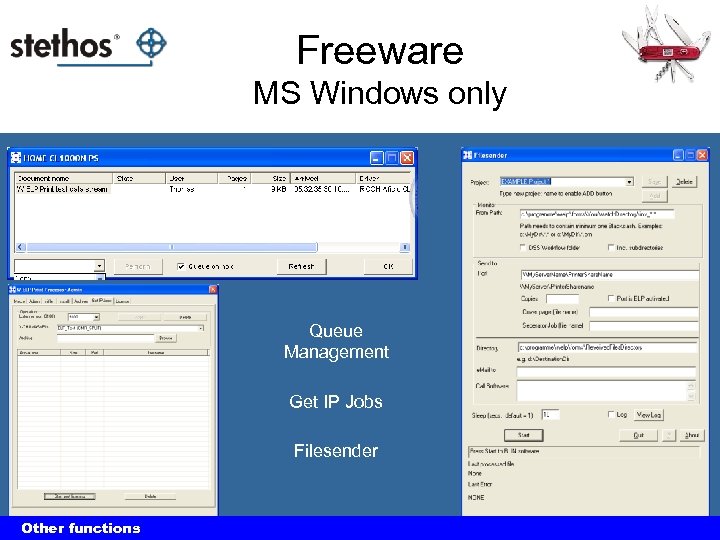 Freeware MS Windows only Queue Management Get IP Jobs Filesender Other functions The power of ELP output management
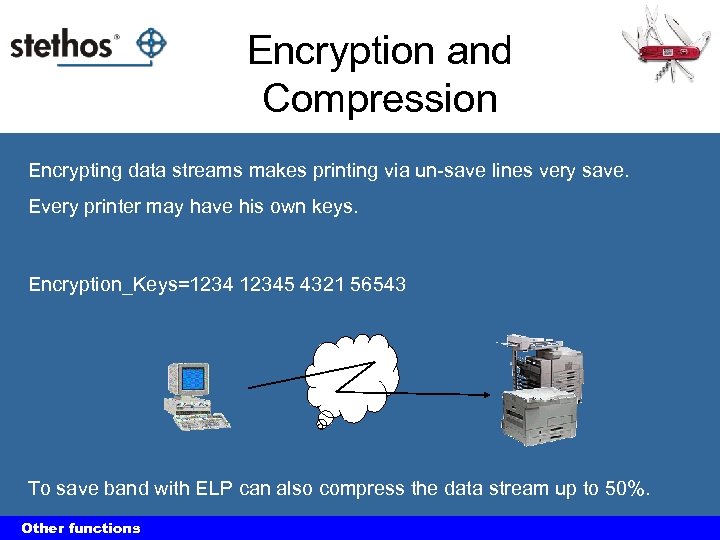 Encryption and Compression Encrypting data streams makes printing via un-save lines very save. Every printer may have his own keys. Encryption_Keys=12345 4321 56543 To save band with ELP can also compress the data stream up to 50%. Other functions The power of ELP output management
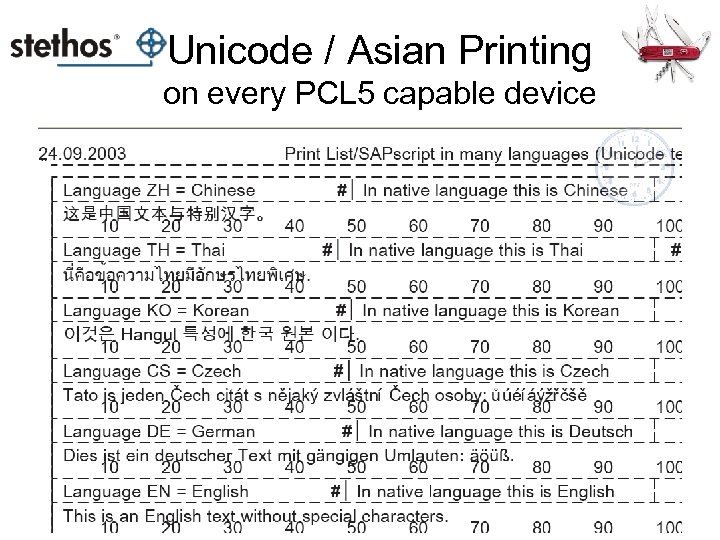 Unicode / Asian Printing on every PCL 5 capable device
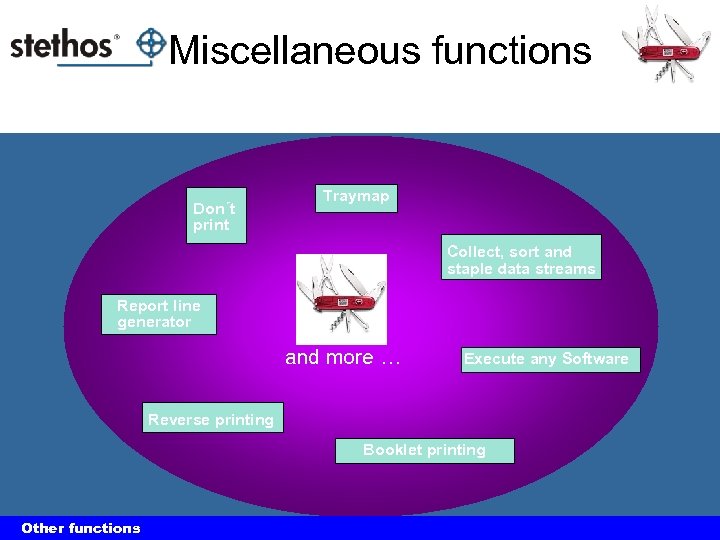 Miscellaneous functions Don´t print Traymap Collect, sort and staple data streams Report line generator and more … Execute any Software Reverse printing Booklet printing Other functions The power of ELP output management
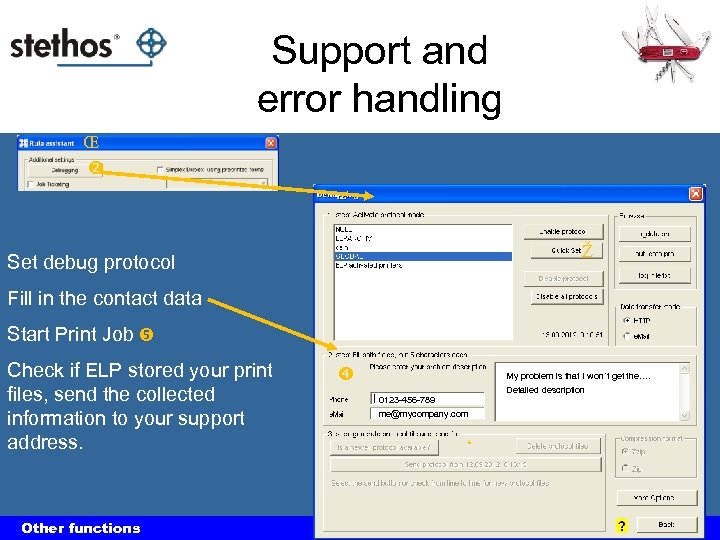 Support and error handling Œ Ž Set debug protocol Fill in the contact data Start Print Job Check if ELP stored your print files, send the collected information to your support address. Other functions My problem is that I won´t get the…. Detailed description 0123 -456 -789 me@mycompany. com ‘
 Wrap up
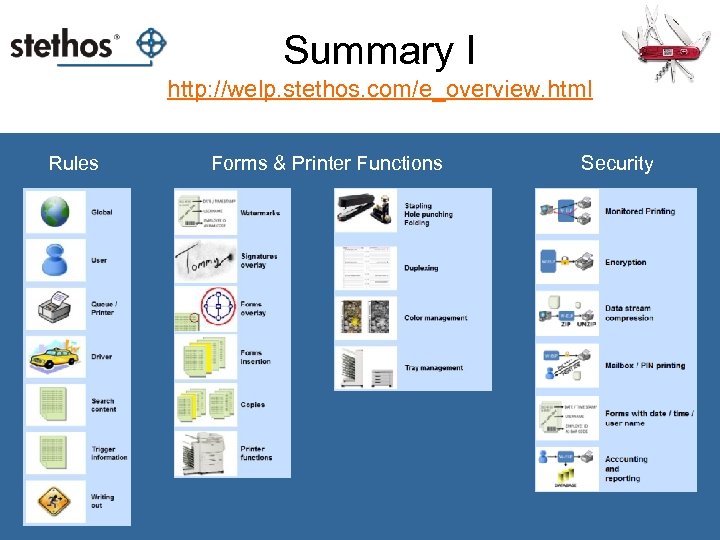 Summary I http: //welp. stethos. com/e_overview. html Rules Forms & Printer Functions Security
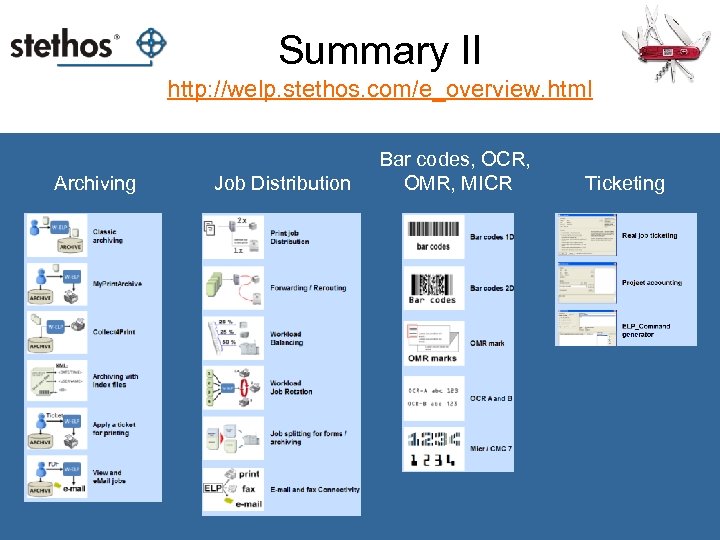 Summary II http: //welp. stethos. com/e_overview. html Archiving Job Distribution Bar codes, OCR, OMR, MICR Ticketing
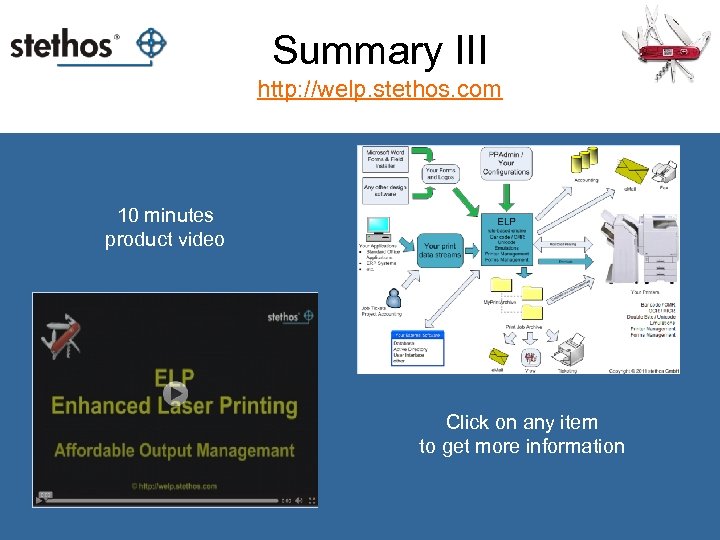 Summary III http: //welp. stethos. com 10 minutes product video Click on any item to get more information
 Even more… Yes, there are much more functions. . . and think what ELP can do for you? If You combine all FUNCTIONS! The power of ELP output management
![Who shows competence in [printer] solutions generates confidence at the customer. Thank you W-ELP](https://present5.com/presentation/72d462c7114c9b71c93aebaac2f19a16/image-126.jpg "Who shows competence in [printer] solutions generates confidence at the customer. Thank you W-ELP") Who shows competence in [printer] solutions generates confidence at the customer. Thank you W-ELP then you know it works!
Who shows competence in [printer] solutions generates confidence at the customer. Thank you W-ELP then you know it works!