


 Скачать презентацию WELCOME Module II Comprehensive Presentation Designed for use
f4016dcd1ce9c4dfc5f8090afafa2e97.ppt
- Количество слайдов: 41
 WELCOME Module II: Comprehensive Presentation Designed for use with the Qualifier Plus® Training Program Real Estate or Mortgage Workbooks Comprehensive Module - Real Estate and Mortgage Table of Contents
 TABLE OF CONTENTS This presentation includes step-by-step instruction for the following comprehensive chapters: Advanced Qualifying Future Value / Appreciation Payment Options Prices, Yields and Deeds APR Combo Loans Balances / Balloons Commission / Listing Price Estimated Tax Savings Calculating Points and Fees Rent vs. Buy Comparisons Comprehensive Module - Real Estate and Mortgage 2
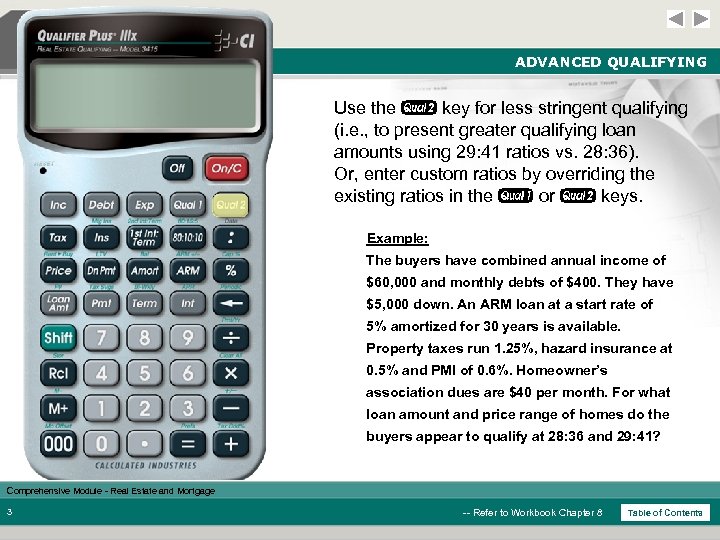 ADVANCED QUALIFYING Use the Q key for less stringent qualifying (i. e. , to present greater qualifying loan amounts using 29: 41 ratios vs. 28: 36). Or, enter custom ratios by overriding the existing ratios in the q or Q keys. Example: The buyers have combined annual income of $60, 000 and monthly debts of $400. They have $5, 000 down. An ARM loan at a start rate of 5% amortized for 30 years is available. Property taxes run 1. 25%, hazard insurance at 0. 5% and PMI of 0. 6%. Homeowner’s association dues are $40 per month. For what loan amount and price range of homes do the buyers appear to qualify at 28: 36 and 29: 41? Comprehensive Module - Real Estate and Mortgage 3 -- Refer to Workbook Chapter 8 Table of Contents
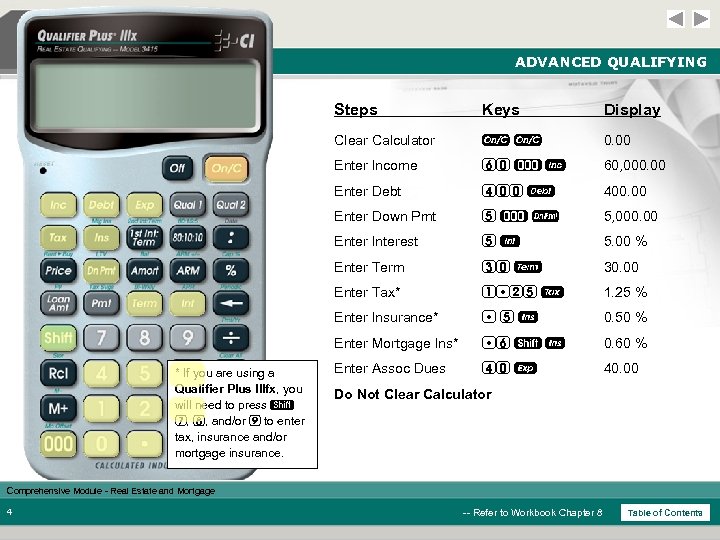 ADVANCED QUALIFYING Steps Display Clear Calculator oo 0. 00 Enter Income 60 ) i 60, 000. 00 Enter Debt 400 D 400. 00 Enter Down Pmt 5)d 5, 000. 00 Enter Interest 5 5. 00 % Enter Term 30 T 30. 00 Enter Tax* 1 25 t 1. 25 % Enter Insurance* 5 I 0. 50 % Enter Mortgage Ins* * If you are using a Qualifier Plus IIIfx, you will need to press s 7, 8, and/or 9 to enter tax, insurance and/or mortgage insurance. Keys 6 s I 0. 60 % Enter Assoc Dues 40 e 40. 00 Do Not Clear Calculator Comprehensive Module - Real Estate and Mortgage 4 -- Refer to Workbook Chapter 8 Table of Contents
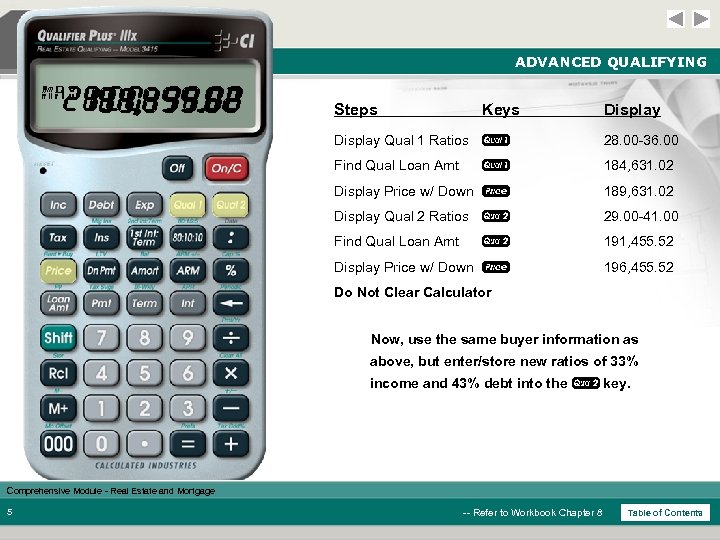 ADVANCED QUALIFYING 29. 00 -41. 00 28. 00 -36. 00 191, 455. 52 184, 631. 02 196, 455. 52 189, 631. 02 MAX Steps Keys Display Qual 1 Ratios q 28. 00 -36. 00 Find Qual Loan Amt q 184, 631. 02 Display Price w/ Down P 189, 631. 02 Display Qual 2 Ratios Q 29. 00 -41. 00 Find Qual Loan Amt Q 191, 455. 52 Display Price w/ Down P 196, 455. 52 Do Not Clear Calculator Now, use the same buyer information as above, but enter/store new ratios of 33% income and 43% debt into the Q key. Comprehensive Module - Real Estate and Mortgage 5 -- Refer to Workbook Chapter 8 Table of Contents
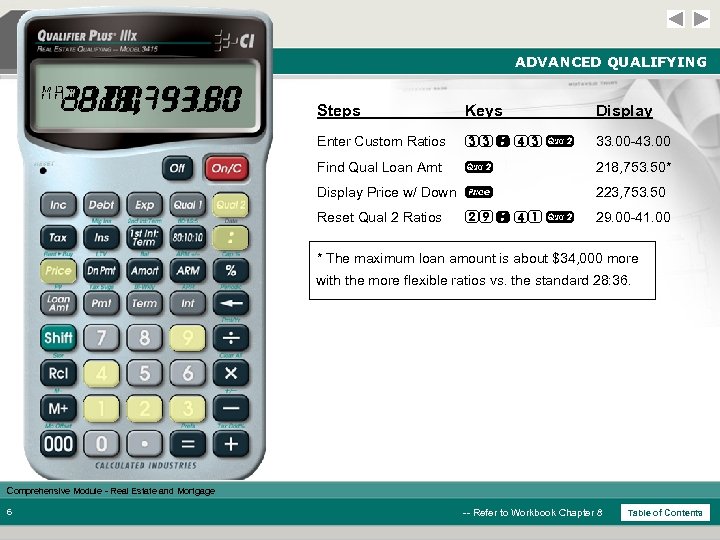 ADVANCED QUALIFYING 33. 00 -43. 00 29. 00 -41. 00 223, 753. 50 218, 753. 50 MAX Steps Keys Display Enter Custom Ratios 33 : 43 Q 33. 00 -43. 00 Find Qual Loan Amt Q 218, 753. 50* Display Price w/ Down P 223, 753. 50 Reset Qual 2 Ratios 29. 00 -41. 00 29 : 41 Q * The maximum loan amount is about $34, 000 more with the more flexible ratios vs. the standard 28: 36. Comprehensive Module - Real Estate and Mortgage 6 -- Refer to Workbook Chapter 8 Table of Contents
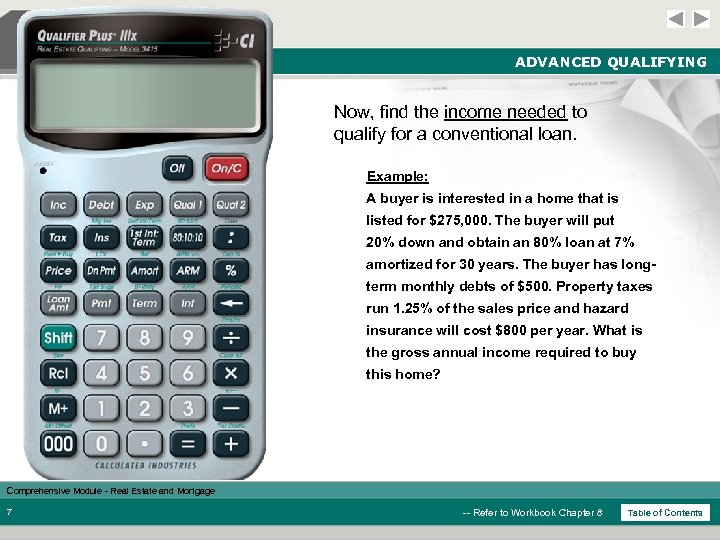 ADVANCED QUALIFYING Now, find the income needed to qualify for a conventional loan. Example: A buyer is interested in a home that is listed for $275, 000. The buyer will put 20% down and obtain an 80% loan at 7% amortized for 30 years. The buyer has longterm monthly debts of $500. Property taxes run 1. 25% of the sales price and hazard insurance will cost $800 per year. What is the gross annual income required to buy this home? Comprehensive Module - Real Estate and Mortgage 7 -- Refer to Workbook Chapter 8 Table of Contents
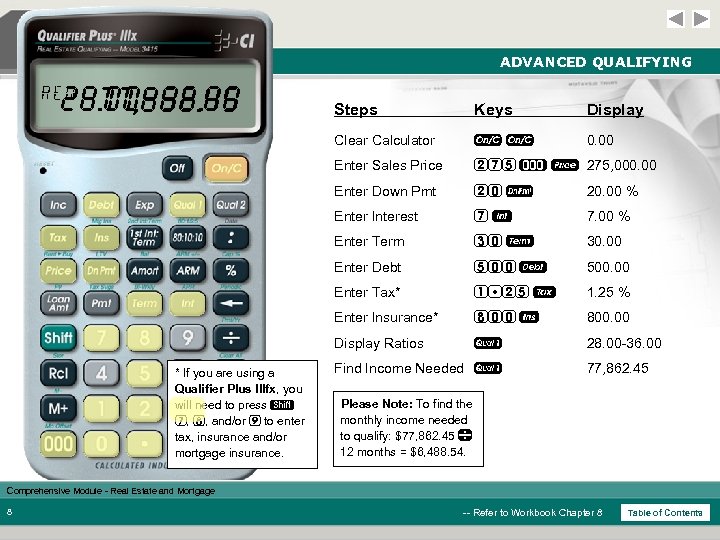 ADVANCED QUALIFYING REQ 28. 00 -36. 00 77, 862. 45 Keys Display Clear Calculator oo 0. 00 Enter Sales Price 275 ) P 275, 000. 00 Enter Down Pmt 20 d 20. 00 % Enter Interest 7 7. 00 % Enter Term 30 T 30. 00 Enter Debt 500 D 500. 00 Enter Tax* 1 25 t 1. 25 % Enter Insurance* 800 I 800. 00 Display Ratios * If you are using a Qualifier Plus IIIfx, you will need to press s 7, 8, and/or 9 to enter tax, insurance and/or mortgage insurance. Steps q 28. 00 -36. 00 Find Income Needed q 77, 862. 45 Please Note: To find the monthly income needed to qualify: $77, 862. 45 12 months = $6, 488. 54. Comprehensive Module - Real Estate and Mortgage 8 -- Refer to Workbook Chapter 8 Table of Contents
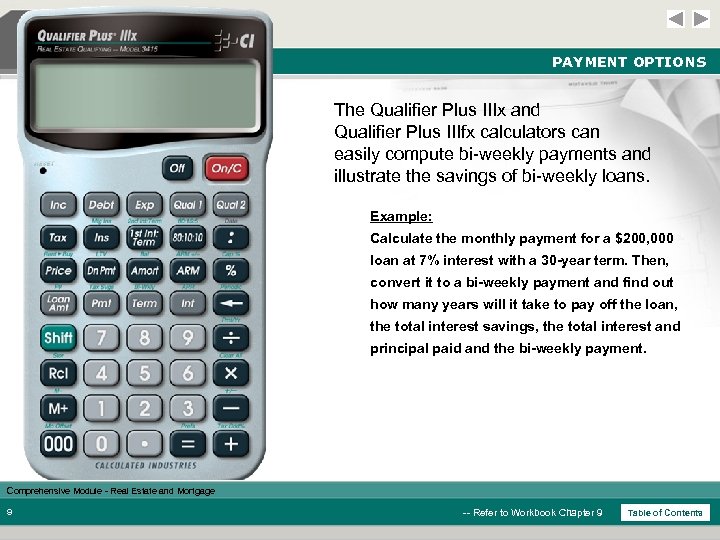 PAYMENT OPTIONS The Qualifier Plus IIIx and Qualifier Plus IIIfx calculators can easily compute bi-weekly payments and illustrate the savings of bi-weekly loans. Example: Calculate the monthly payment for a $200, 000 loan at 7% interest with a 30 -year term. Then, convert it to a bi-weekly payment and find out how many years will it take to pay off the loan, the total interest savings, the total interest and principal paid and the bi-weekly payment. Comprehensive Module - Real Estate and Mortgage 9 -- Refer to Workbook Chapter 9 Table of Contents
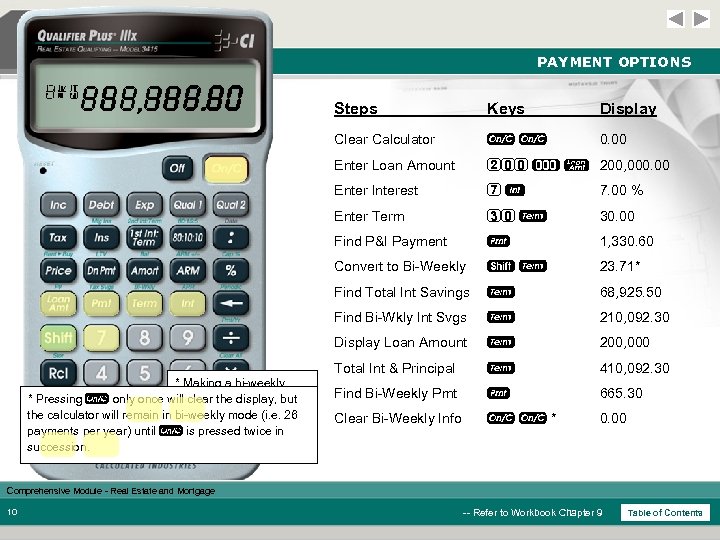 PAYMENT OPTIONS SVG P+I 0. 00 410, 092. 30 200, 000. 00 210, 092. 30 68, 925. 50 665. 30 1, 330. 60 23. 71 Keys Display Clear Calculator o o 0. 00 Enter Loan Amount 200 ) l 200, 000. 00 Enter Interest 7 7. 00 % Enter Term 30 T 30. 00 Find P&I Payment p 1, 330. 60 Convert to Bi-Weekly s. T 23. 71* Find Total Int Savings T 68, 925. 50 Find Bi-Wkly Int Svgs T 210, 092. 30 Display Loan Amount T 200, 000 Total Int & Principal * Making a bi-weekly * Pressing o only once will clear the display, but payment will pay off the calculator will remain in bi-weekly mode (i. e. 26 loan in 23. 71 years, payments per year) until o is pressed twice in for compared to 30 years succession. monthly payment. Steps T 410, 092. 30 Find Bi-Weekly Pmt p 665. 30 Clear Bi-Weekly Info oo* 0. 00 Comprehensive Module - Real Estate and Mortgage 10 -- Refer to Workbook Chapter 9 Table of Contents
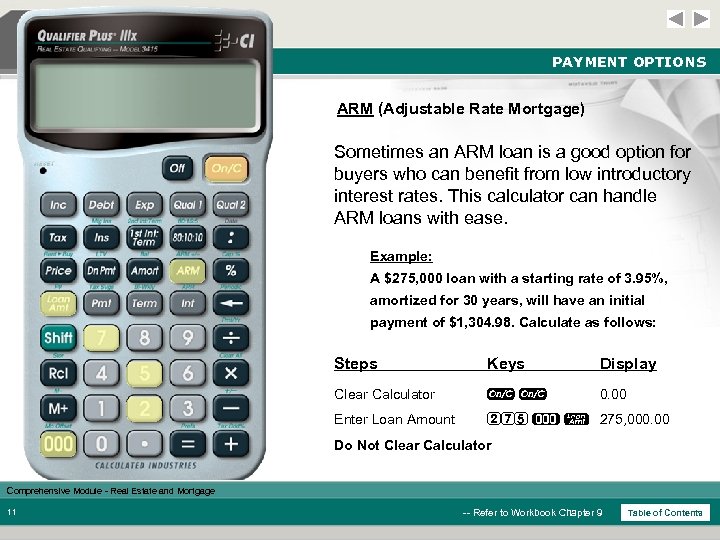 PAYMENT OPTIONS ARM (Adjustable Rate Mortgage) Sometimes an ARM loan is a good option for buyers who can benefit from low introductory interest rates. This calculator can handle ARM loans with ease. Example: A $275, 000 loan with a starting rate of 3. 95%, amortized for 30 years, will have an initial payment of $1, 304. 98. Calculate as follows: Steps Keys Display Clear Calculator oo 0. 00 Enter Loan Amount 275 ) l 275, 000. 00 Do Not Clear Calculator Comprehensive Module - Real Estate and Mortgage 11 -- Refer to Workbook Chapter 9 Table of Contents
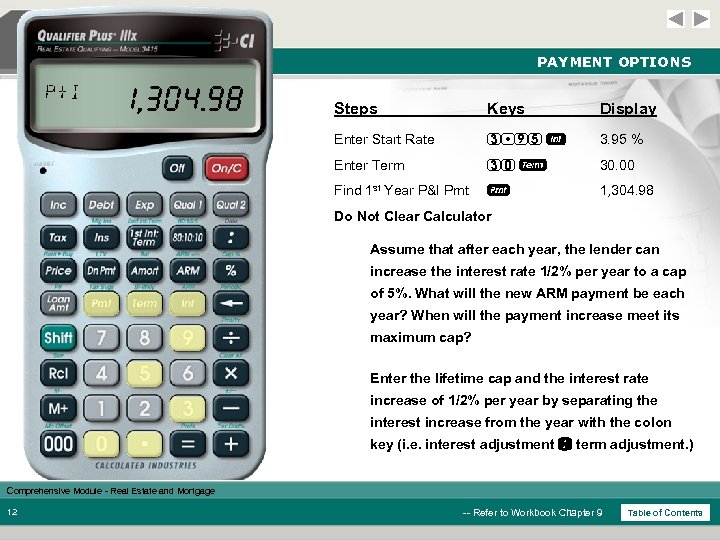 PAYMENT OPTIONS P+I 1, 304. 98 Steps Keys Display Enter Start Rate 3 95 3. 95 % Enter Term 30 T 30. 00 Find 1 st Year P&I Pmt p 1, 304. 98 Do Not Clear Calculator Assume that after each year, the lender can increase the interest rate 1/2% per year to a cap of 5%. What will the new ARM payment be each year? When will the payment increase meet its maximum cap? Enter the lifetime cap and the interest rate increase of 1/2% per year by separating the interest increase from the year with the colon key (i. e. interest adjustment : term adjustment. ) Comprehensive Module - Real Estate and Mortgage 12 -- Refer to Workbook Chapter 9 Table of Contents
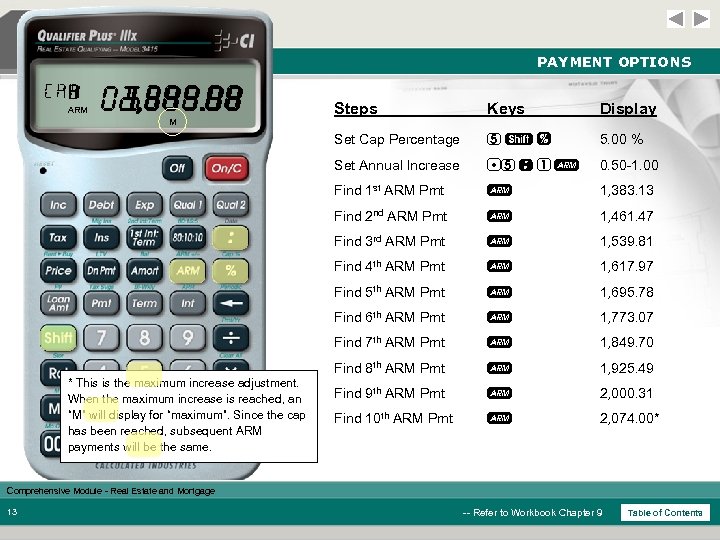 PAYMENT OPTIONS CAP 1 10 7 6 9 8 5 4 3 2 5. 00 1, 383. 13 0. 50 -1. 00 1, 849. 70 1, 773. 07 2, 074. 00 2, 000. 31 1, 925. 49 1, 695. 78 1, 617. 97 1, 539. 81 1, 461. 47 Display 5 s% 5. 00 % 5 : 1 A 0. 50 -1. 00 Find 1 st ARM Pmt A 1, 383. 13 Find 2 nd ARM Pmt A 1, 461. 47 Find 3 rd ARM Pmt A 1, 539. 81 Find 4 th ARM Pmt A 1, 617. 97 Find 5 th ARM Pmt A 1, 695. 78 Find 6 th ARM Pmt A 1, 773. 07 Find 7 th ARM Pmt A 1, 849. 70 Find 8 th ARM Pmt * This is the maximum increase adjustment. When the maximum increase is reached, an “M” will display for “maximum”. Since the cap has been reached, subsequent ARM payments will be the same. Keys Set Annual Increase M Steps Set Cap Percentage ARM A 1, 925. 49 Find 9 th ARM Pmt A 2, 000. 31 Find 10 th ARM Pmt A 2, 074. 00* Comprehensive Module - Real Estate and Mortgage 13 -- Refer to Workbook Chapter 9 Table of Contents
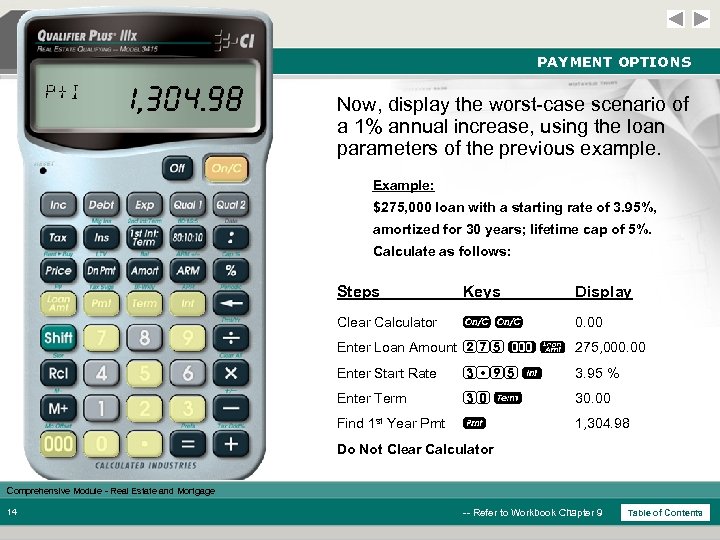 PAYMENT OPTIONS P+I 1, 304. 98 Now, display the worst-case scenario of a 1% annual increase, using the loan parameters of the previous example. Example: $275, 000 loan with a starting rate of 3. 95%, amortized for 30 years; lifetime cap of 5%. Calculate as follows: Steps Keys Display Clear Calculator oo 0. 00 Enter Loan Amount 275 ) l 275, 000. 00 Enter Start Rate 3 95 3. 95 % Enter Term 30 T 30. 00 Find 1 st Year Pmt p 1, 304. 98 Do Not Clear Calculator Comprehensive Module - Real Estate and Mortgage 14 -- Refer to Workbook Chapter 9 Table of Contents
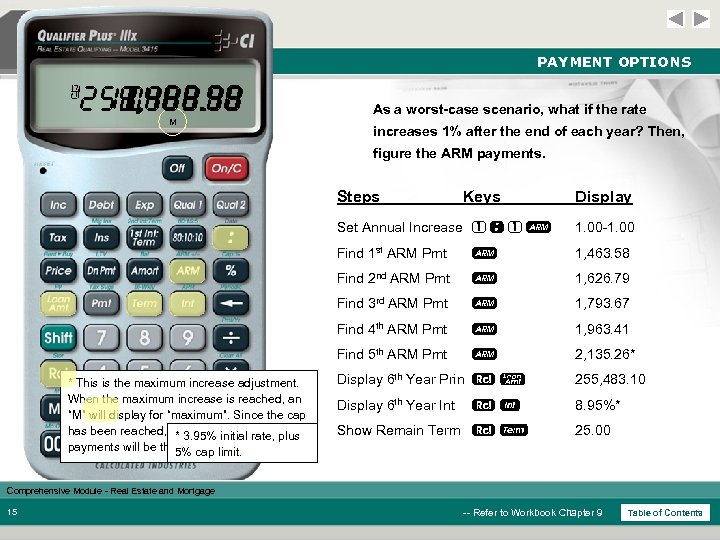 PAYMENT OPTIONS 1 5 4 3 2 8. 95 1, 463. 58 255, 483. 10 25. 00 2, 135. 26 1, 963. 41 1, 793. 67 1, 626. 79 1. 00 -1. 00 M As a worst-case scenario, what if the rate increases 1% after the end of each year? Then, figure the ARM payments. Steps Keys Display Set Annual Increase 1 : 1 A Find 1 st ARM Pmt A 1, 463. 58 Find 2 nd ARM Pmt A 1, 626. 79 Find 3 rd ARM Pmt A 1, 793. 67 Find 4 th ARM Pmt A 1, 963. 41 Find 5 th ARM Pmt * This is the maximum increase adjustment. When the maximum increase is reached, an “M” will display for “maximum”. Since the cap has been reached, subsequent ARM plus * 3. 95% initial rate, payments will be the 5% cap limit. same. 1. 00 -1. 00 A 2, 135. 26* Display 6 th Year Prin l 255, 483. 10 Display 6 th Year Int 8. 95%* Show Remain Term T 25. 00 Comprehensive Module - Real Estate and Mortgage 15 -- Refer to Workbook Chapter 9 Table of Contents
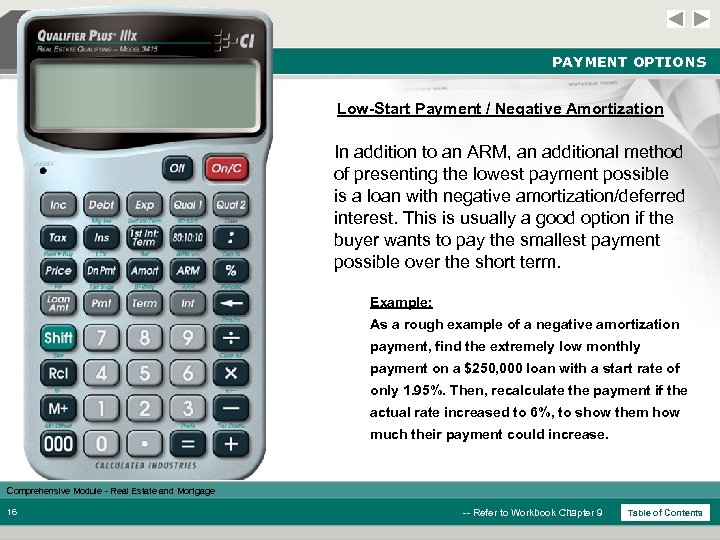 PAYMENT OPTIONS Low-Start Payment / Negative Amortization In addition to an ARM, an additional method of presenting the lowest payment possible is a loan with negative amortization/deferred interest. This is usually a good option if the buyer wants to pay the smallest payment possible over the short term. Example: As a rough example of a negative amortization payment, find the extremely low monthly payment on a $250, 000 loan with a start rate of only 1. 95%. Then, recalculate the payment if the actual rate increased to 6%, to show them how much their payment could increase. Comprehensive Module - Real Estate and Mortgage 16 -- Refer to Workbook Chapter 9 Table of Contents
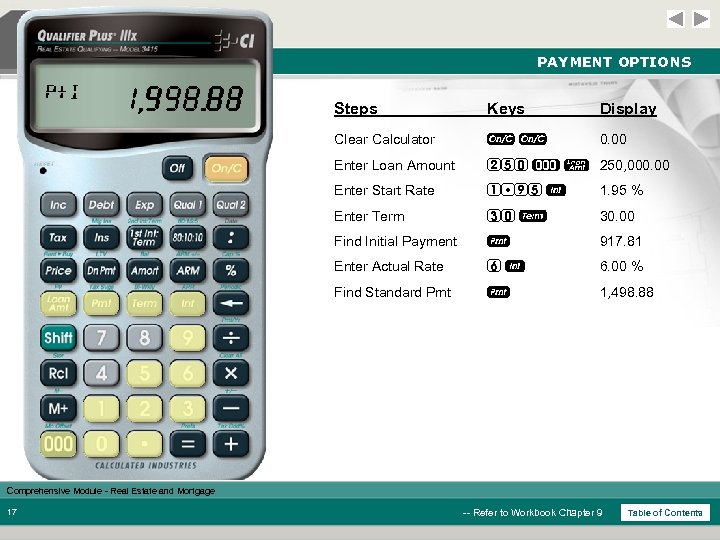 PAYMENT OPTIONS P+I 917. 81 1, 498. 88 Steps Keys Display Clear Calculator oo 0. 00 Enter Loan Amount 250 ) l 250, 000. 00 Enter Start Rate 1 95 1. 95 % Enter Term 30 T 30. 00 Find Initial Payment p 917. 81 Enter Actual Rate 6 6. 00 % Find Standard Pmt p 1, 498. 88 Comprehensive Module - Real Estate and Mortgage 17 -- Refer to Workbook Chapter 9 Table of Contents
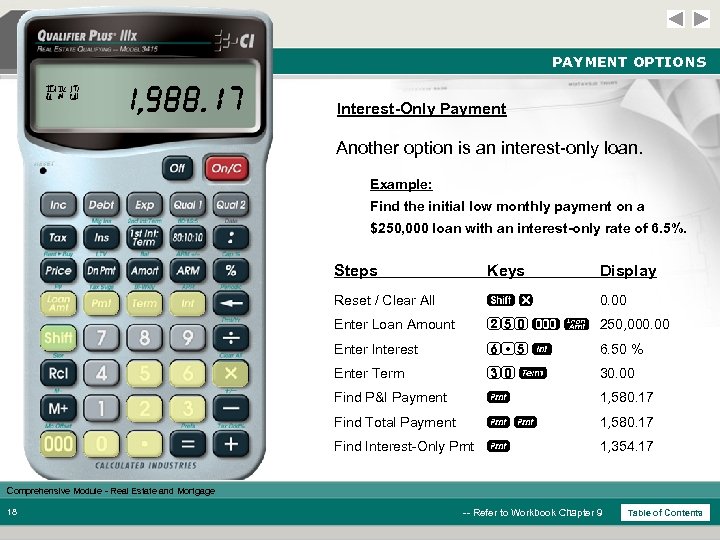 PAYMENT OPTIONS P+I I/O TTL 1, 580. 17 1, 354. 17 Interest-Only Payment Another option is an interest-only loan. Example: Find the initial low monthly payment on a $250, 000 loan with an interest-only rate of 6. 5%. Steps Keys Display Reset / Clear All sx 0. 00 Enter Loan Amount 250 ) l 250, 000. 00 Enter Interest 6 5 6. 50 % Enter Term 30 T 30. 00 Find P&I Payment p 1, 580. 17 Find Total Payment pp 1, 580. 17 Find Interest-Only Pmt p 1, 354. 17 Comprehensive Module - Real Estate and Mortgage 18 -- Refer to Workbook Chapter 9 Table of Contents
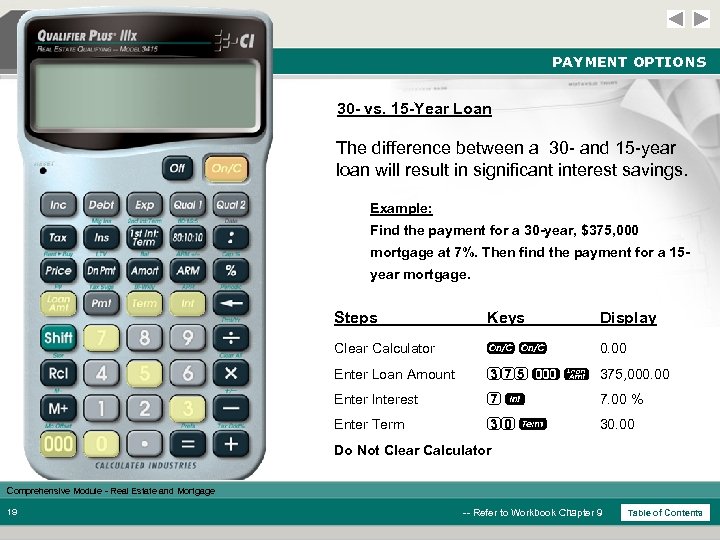 PAYMENT OPTIONS 30 - vs. 15 -Year Loan The difference between a 30 - and 15 -year loan will result in significant interest savings. Example: Find the payment for a 30 -year, $375, 000 mortgage at 7%. Then find the payment for a 15 year mortgage. Steps Keys Display Clear Calculator oo 0. 00 Enter Loan Amount 375 ) l 375, 000. 00 Enter Interest 7 7. 00 % Enter Term 30 T 30. 00 Do Not Clear Calculator Comprehensive Module - Real Estate and Mortgage 19 -- Refer to Workbook Chapter 9 Table of Contents
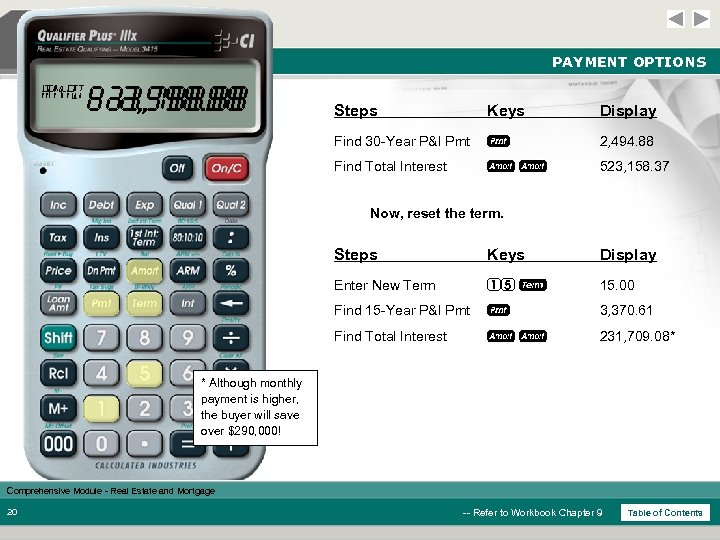 PAYMENT OPTIONS AMRT P+I 523, 158. 37 231, 709. 08 3, 370. 61 2, 494. 88 Steps Keys Display Find 30 -Year P&I Pmt p 2, 494. 88 Find Total Interest aa 523, 158. 37 Now, reset the term. Steps Keys Display Enter New Term 15 T 15. 00 Find 15 -Year P&I Pmt p 3, 370. 61 Find Total Interest aa 231, 709. 08* * Although monthly payment is higher, the buyer will save over $290, 000! Comprehensive Module - Real Estate and Mortgage 20 -- Refer to Workbook Chapter 9 Table of Contents
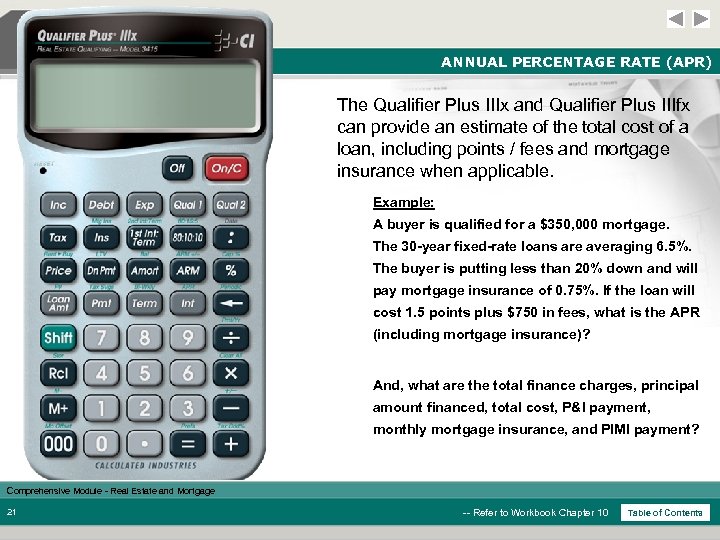 ANNUAL PERCENTAGE RATE (APR) The Qualifier Plus IIIx and Qualifier Plus IIIfx can provide an estimate of the total cost of a loan, including points / fees and mortgage insurance when applicable. Example: A buyer is qualified for a $350, 000 mortgage. The 30 -year fixed-rate loans are averaging 6. 5%. The buyer is putting less than 20% down and will pay mortgage insurance of 0. 75%. If the loan will cost 1. 5 points plus $750 in fees, what is the APR (including mortgage insurance)? And, what are the total finance charges, principal amount financed, total cost, P&I payment, monthly mortgage insurance, and PIMI payment? Comprehensive Module - Real Estate and Mortgage 21 -- Refer to Workbook Chapter 10 Table of Contents
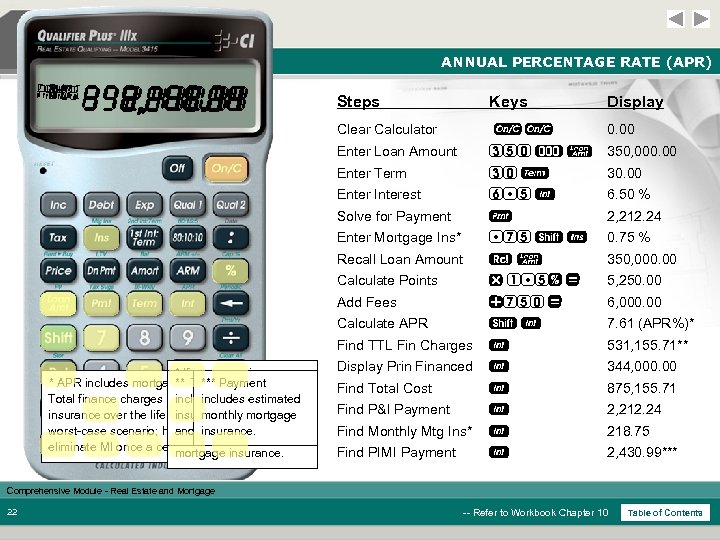 ANNUAL PERCENTAGE RATE (APR) TTL AMT MI PIMI FIN APR P+I PI 875, 155. 71 344, 000. 00 218. 75 531, 155. 71 350, 000. 00 6, 000. 00 5, 250. 00 2, 430. 99 7. 61 2, 212. 24 Keys Display Clear Calculator oo 0. 00 Enter Loan Amount 350 ) l 350, 000. 00 Enter Term 30 T 30. 00 Enter Interest 6 5 6. 50 % Solve for Payment p 2, 212. 24 Enter Mortgage Ins* 75 s I 0. 75 % Recall Loan Amount l 350, 000. 00 Calculate Points x 1 5% = 5, 250. 00 Add Fees +750 = 6, 000. 00 Calculate APR s 7. 61 (APR%)* Find TTL Fin Charges * If you are using a * APR includes mortgage insurance, if entered. ** Total Payment *** finance charge Qualifier Plus IIIfx, you Total finance charges include mortgage s includes mortgage includes estimated will need to press insurance over the life of the monthly present a insurance*, points / enter loan, to 9 to fees 7, 8, and/or mortgage worst-case scenario; however, most people can and insurance and/or insurance. tax, total interest paid. eliminate MI once a certain LTV isinsurance. mortgage met. Steps 531, 155. 71** Display Prin Financed 344, 000. 00 Find Total Cost 875, 155. 71 Find P&I Payment 2, 212. 24 Find Monthly Mtg Ins* 218. 75 Find PIMI Payment 2, 430. 99*** Comprehensive Module - Real Estate and Mortgage 22 -- Refer to Workbook Chapter 10 Table of Contents
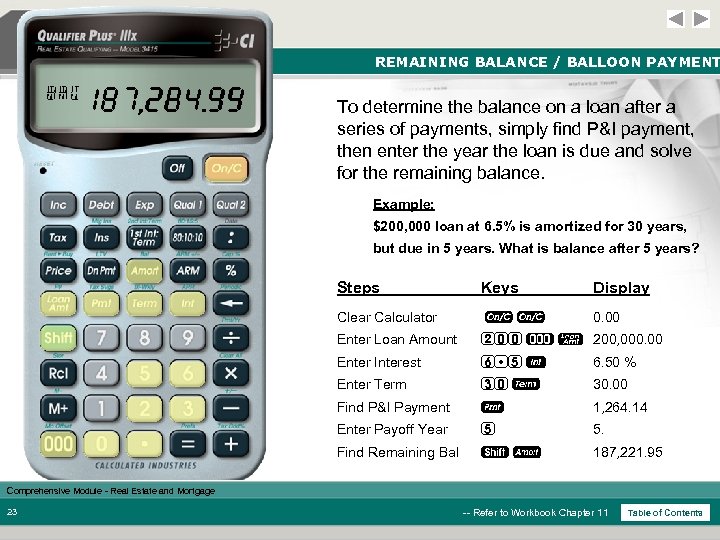 REMAINING BALANCE / BALLOON PAYMENT BAL P+I 187, 221. 95 1, 264. 14 To determine the balance on a loan after a series of payments, simply find P&I payment, then enter the year the loan is due and solve for the remaining balance. Example: $200, 000 loan at 6. 5% is amortized for 30 years, but due in 5 years. What is balance after 5 years? Steps Keys Display Clear Calculator oo 0. 00 Enter Loan Amount 200 ) l 200, 000. 00 Enter Interest 6 5 6. 50 % Enter Term 30 T 30. 00 Find P&I Payment p 1, 264. 14 Enter Payoff Year 5 5. Find Remaining Bal sa 187, 221. 95 Comprehensive Module - Real Estate and Mortgage 23 -- Refer to Workbook Chapter 11 Table of Contents
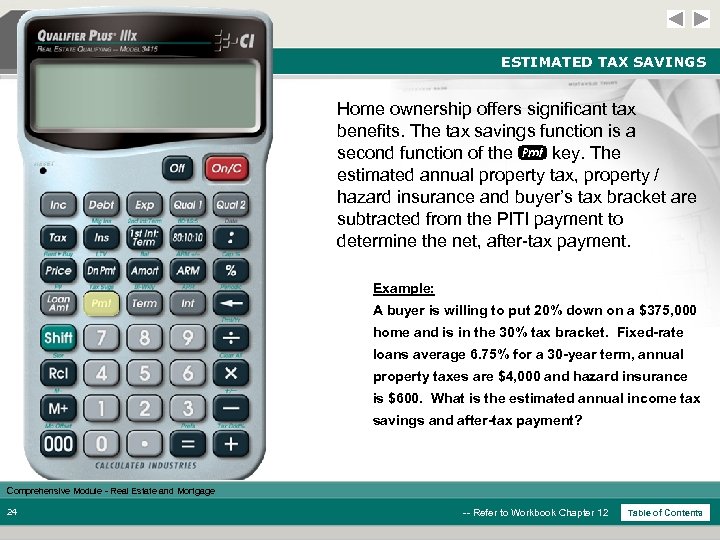 ESTIMATED TAX SAVINGS Home ownership offers significant tax benefits. The tax savings function is a second function of the p key. The estimated annual property tax, property / hazard insurance and buyer’s tax bracket are subtracted from the PITI payment to determine the net, after-tax payment. Example: A buyer is willing to put 20% down on a $375, 000 home and is in the 30% tax bracket. Fixed-rate loans average 6. 75% for a 30 -year term, annual property taxes are $4, 000 and hazard insurance is $600. What is the estimated annual income tax savings and after-tax payment? Comprehensive Module - Real Estate and Mortgage 24 -- Refer to Workbook Chapter 12 Table of Contents
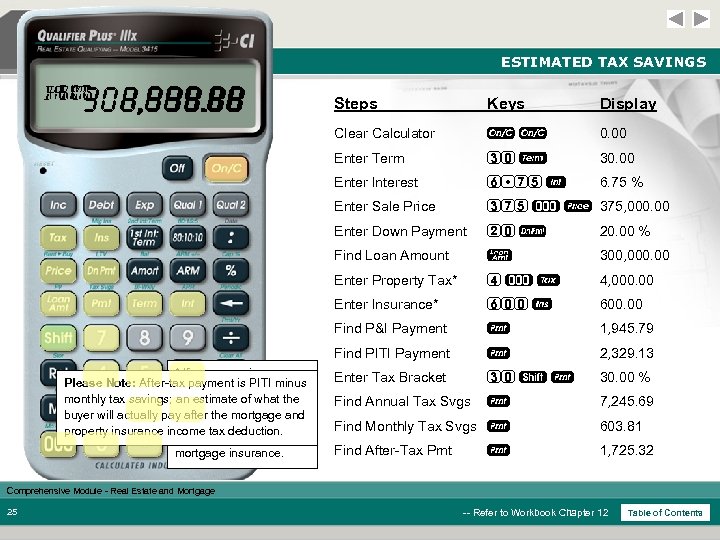 ESTIMATED TAX SAVINGS NET SVG BRKT P+I PITI 1, 725. 32 603. 81 300, 000. 00 7, 245. 69 1, 945. 79 30. 00 2, 329. 13 Display oo 0. 00 Enter Term 30 T 30. 00 Enter Interest 6 75 6. 75 % Enter Sale Price 375 ) P 375, 000. 00 Enter Down Payment 20 d 20. 00 % Find Loan Amount l 300, 000. 00 Enter Property Tax* 4)t 4, 000. 00 Enter Insurance* 600 I 600. 00 Find P&I Payment p 1, 945. 79 Find PITI Payment mortgage insurance. Keys Clear Calculator * If you are using a Please Note: After-tax payment is PITI minus Qualifier Plus IIIfx, you monthly tax savings; will estimatepress s an need to of what the buyer will actually pay after the mortgage and 7, 8, and/or 9 to enter property insurance income tax deduction. tax, insurance and/or Steps p 2, 329. 13 Enter Tax Bracket 30 s p 30. 00 % Find Annual Tax Svgs p 7, 245. 69 Find Monthly Tax Svgs p 603. 81 Find After-Tax Pmt 1, 725. 32 p Comprehensive Module - Real Estate and Mortgage 25 -- Refer to Workbook Chapter 12 Table of Contents
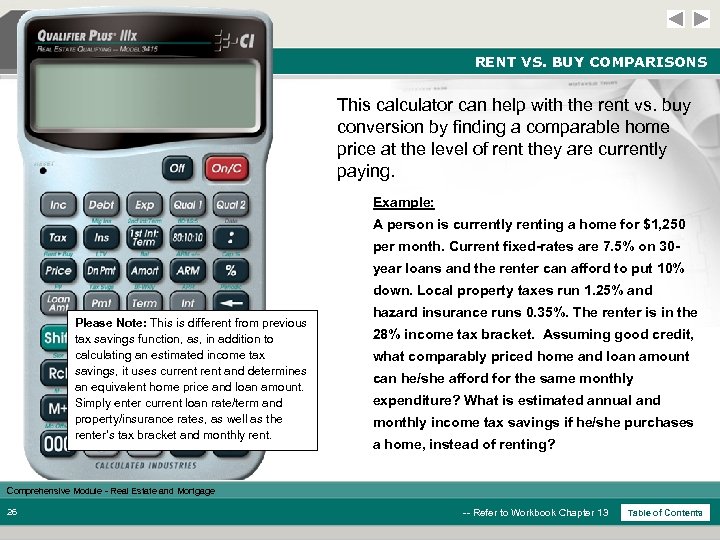 RENT VS. BUY COMPARISONS This calculator can help with the rent vs. buy conversion by finding a comparable home price at the level of rent they are currently paying. Example: A person is currently renting a home for $1, 250 per month. Current fixed-rates are 7. 5% on 30 year loans and the renter can afford to put 10% down. Local property taxes run 1. 25% and Please Note: This is different from previous tax savings function, as, in addition to calculating an estimated income tax savings, it uses current and determines an equivalent home price and loan amount. Simply enter current loan rate/term and property/insurance rates, as well as the renter’s tax bracket and monthly rent. hazard insurance runs 0. 35%. The renter is in the 28% income tax bracket. Assuming good credit, what comparably priced home and loan amount can he/she afford for the same monthly expenditure? What is estimated annual and monthly income tax savings if he/she purchases a home, instead of renting? Comprehensive Module - Real Estate and Mortgage 26 -- Refer to Workbook Chapter 13 Table of Contents
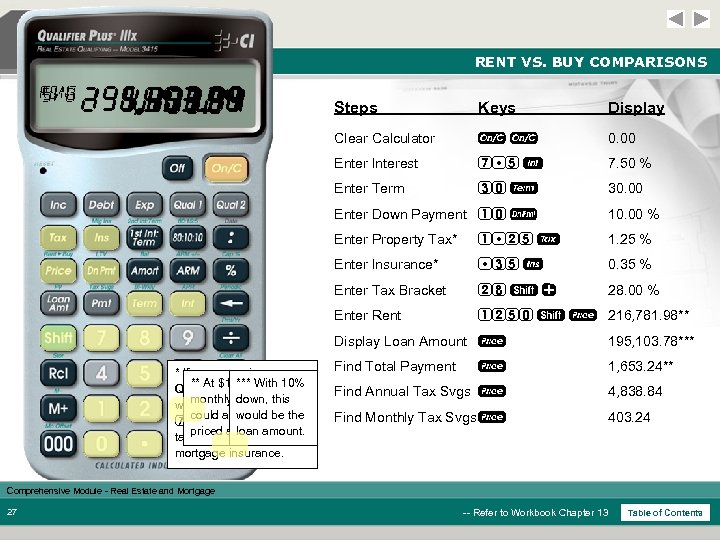 RENT VS. BUY COMPARISONS RENT SVG 195, 103. 78 1, 653. 24 216, 781. 98 4, 838. 84 403. 24 Steps Keys Display Clear Calculator oo 0. 00 Enter Interest 7 5 7. 50 % Enter Term 30 T 30. 00 Enter Down Payment 10 d 10. 00 % Enter Property Tax* 1 25 t 1. 25 % Enter Insurance* 35 I 0. 35 % Enter Tax Bracket 28 s + 28. 00 % Enter Rent 1250 s P 216, 781. 98** Display Loan Amount P * If you are using a ** At $1, 250 With you *** in Qualifier Plus IIIfx, 10% willmonthly rent, they need to down, s press this would be the 7, could afford a to enter 8, and/or 9 home priced atloan amount. over $216 K tax, insurance and/or mortgage insurance. 195, 103. 78*** Find Total Payment 1, 653. 24** P Find Annual Tax Svgs P 4, 838. 84 Find Monthly Tax Svgs P 403. 24 Comprehensive Module - Real Estate and Mortgage 27 -- Refer to Workbook Chapter 13 Table of Contents
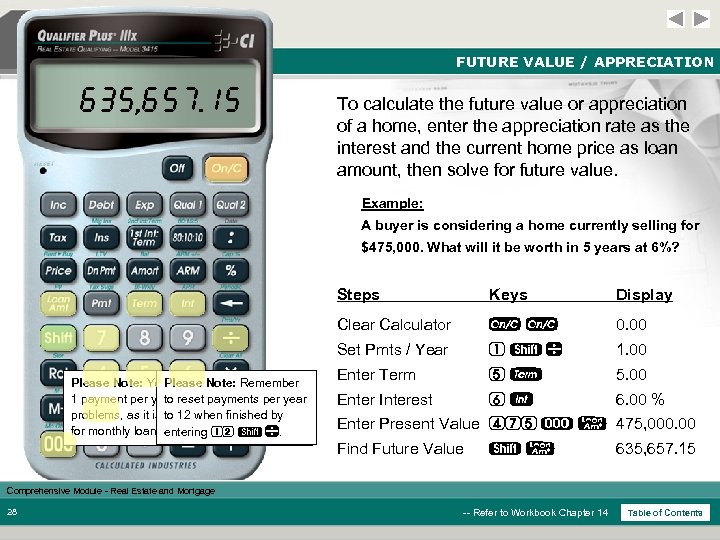 FUTURE VALUE / APPRECIATION 635, 657. 15 To calculate the future value or appreciation of a home, enter the appreciation rate as the interest and the current home price as loan amount, then solve for future value. Example: A buyer is considering a home currently selling for $475, 000. What will it be worth in 5 years at 6%? Steps Display Clear Calculator oo 0. 00 Set Pmts / Year Please Note: You must set the Remember Please Note: calculator to 1 payment per year reset payments per year to for future value problems, as it is to 12 when finished by default/factory-set to 12 for monthly loans. entering 12 s . Keys 1 s 1. 00 Enter Term 5 T 5. 00 Enter Interest 6 6. 00 % Enter Present Value 475 ) l 475, 000. 00 Find Future Value sl 635, 657. 15 Comprehensive Module - Real Estate and Mortgage 28 -- Refer to Workbook Chapter 14 Table of Contents
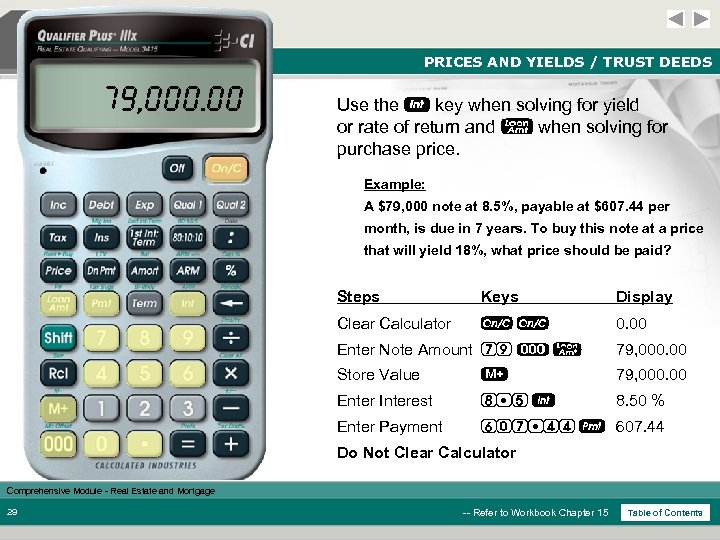 PRICES AND YIELDS / TRUST DEEDS 79, 000. 00 Use the key when solving for yield or rate of return and l when solving for purchase price. Example: A $79, 000 note at 8. 5%, payable at $607. 44 per month, is due in 7 years. To buy this note at a price that will yield 18%, what price should be paid? Steps Keys Display Clear Calculator oo 0. 00 Enter Note Amount 79 ) l 79, 000. 00 Store Value 79, 000. 00 Enter Interest 8 5 8. 50 % Enter Payment 607 44 p 607. 44 Do Not Clear Calculator Comprehensive Module - Real Estate and Mortgage 29 -- Refer to Workbook Chapter 15 Table of Contents
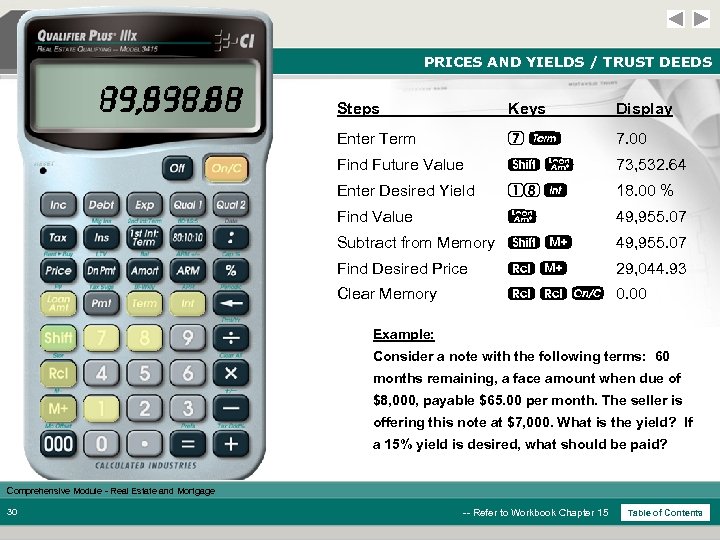 PRICES AND YIELDS / TRUST DEEDS 73, 532. 64 29, 044. 93 0. 00 49, 955. 07 Steps Keys Display Enter Term 7 T 7. 00 Find Future Value sl 73, 532. 64 Enter Desired Yield 18 18. 00 % Find Value l 49, 955. 07 Subtract from Memory s 49, 955. 07 Find Desired Price 29, 044. 93 Clear Memory o 0. 00 Example: Consider a note with the following terms: 60 months remaining, a face amount when due of $8, 000, payable $65. 00 per month. The seller is offering this note at $7, 000. What is the yield? If a 15% yield is desired, what should be paid? Comprehensive Module - Real Estate and Mortgage 30 -- Refer to Workbook Chapter 15 Table of Contents
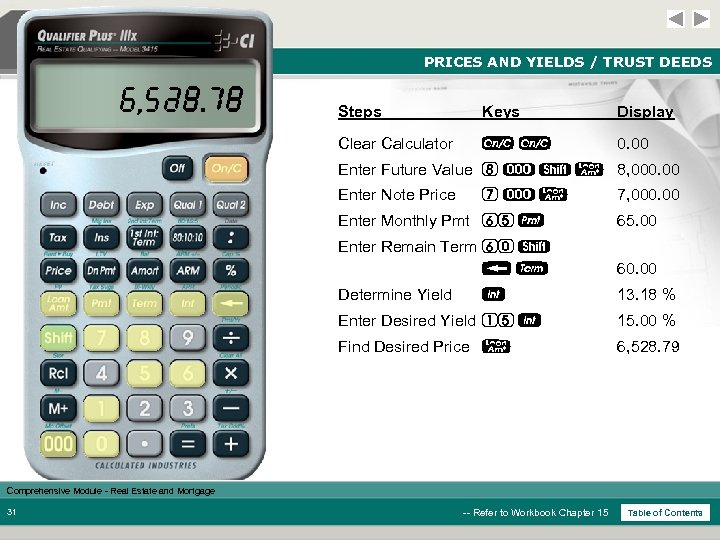 PRICES AND YIELDS / TRUST DEEDS 13. 18 6, 528. 79 Steps Keys Display Clear Calculator oo 0. 00 Enter Future Value 8 ) s l 8, 000. 00 Enter Note Price 7)l 7, 000. 00 Enter Monthly Pmt 65 p 65. 00 Enter Remain Term 60 s b. T 60. 00 Determine Yield 13. 18 % Enter Desired Yield 15 15. 00 % Find Desired Price l 6, 528. 79 Comprehensive Module - Real Estate and Mortgage 31 -- Refer to Workbook Chapter 15 Table of Contents
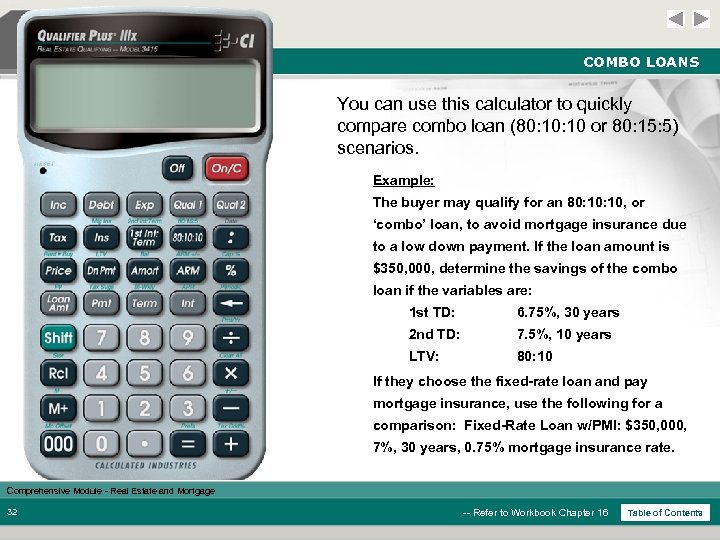 COMBO LOANS You can use this calculator to quickly compare combo loan (80: 10 or 80: 15: 5) scenarios. Example: The buyer may qualify for an 80: 10, or ‘combo’ loan, to avoid mortgage insurance due to a low down payment. If the loan amount is $350, 000, determine the savings of the combo loan if the variables are: 1 st TD: 6. 75%, 30 years 2 nd TD: 7. 5%, 10 years LTV: 80: 10 If they choose the fixed-rate loan and pay mortgage insurance, use the following for a comparison: Fixed-Rate Loan w/PMI: $350, 000, 7%, 30 years, 0. 75% mortgage insurance rate. Comprehensive Module - Real Estate and Mortgage 32 -- Refer to Workbook Chapter 16 Table of Contents
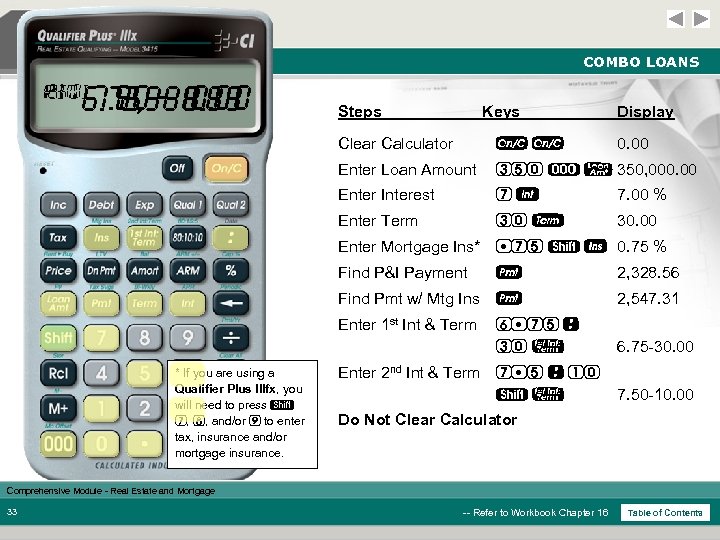 COMBO LOANS 2 ND P+I 1 ST PITI 7. 50 -10. 00 2, 328. 56 6. 75 -30. 00 2, 547. 31 Steps Keys Display Clear Calculator oo 0. 00 Enter Loan Amount 350 ) l 350, 000. 00 Enter Interest 7 7. 00 % Enter Term 30 T 30. 00 Enter Mortgage Ins* 75 s I 0. 75 % Find P&I Payment 2, 328. 56 Find Pmt w/ Mtg Ins p 2, 547. 31 Enter 1 st Int & Term * If you are using a Qualifier Plus IIIfx, you will need to press s 7, 8, and/or 9 to enter tax, insurance and/or mortgage insurance. p 6 75 : 30 ! 6. 75 -30. 00 Enter 2 nd Int & Term 7 5 : 10 s! 7. 50 -10. 00 Do Not Clear Calculator Comprehensive Module - Real Estate and Mortgage 33 -- Refer to Workbook Chapter 16 Table of Contents
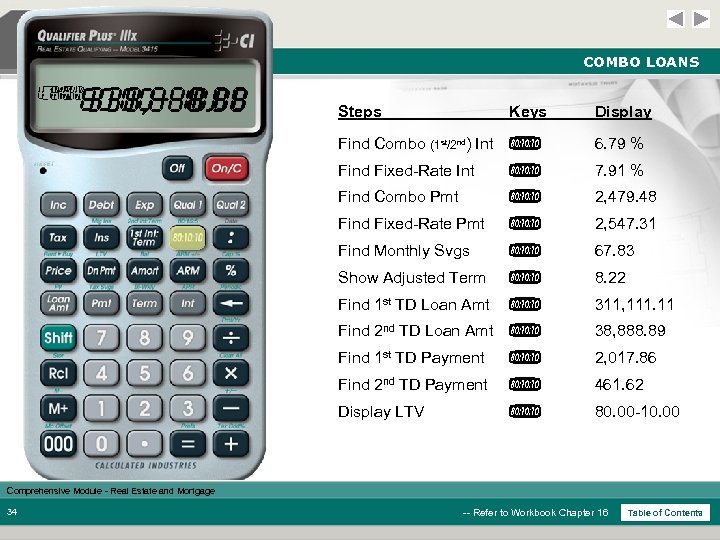 COMBO LOANS LTV CMB EQV ADJ SVG CMB 80. 00 -10. 00 311, 111. 11 38, 888. 89 2, 017. 86 2, 547. 31 2, 479. 48 461. 62 67. 83 8. 22 7. 91 6. 79 Steps Keys Display Find Combo (1 st/2 nd) Int * 6. 79 % Find Fixed-Rate Int * 7. 91 % Find Combo Pmt * 2, 479. 48 Find Fixed-Rate Pmt * 2, 547. 31 Find Monthly Svgs * 67. 83 Show Adjusted Term * 8. 22 Find 1 st TD Loan Amt * 311, 111. 11 Find 2 nd TD Loan Amt * 38, 888. 89 Find 1 st TD Payment * 2, 017. 86 Find 2 nd TD Payment * 461. 62 Display LTV * 80. 00 -10. 00 Comprehensive Module - Real Estate and Mortgage 34 -- Refer to Workbook Chapter 16 Table of Contents
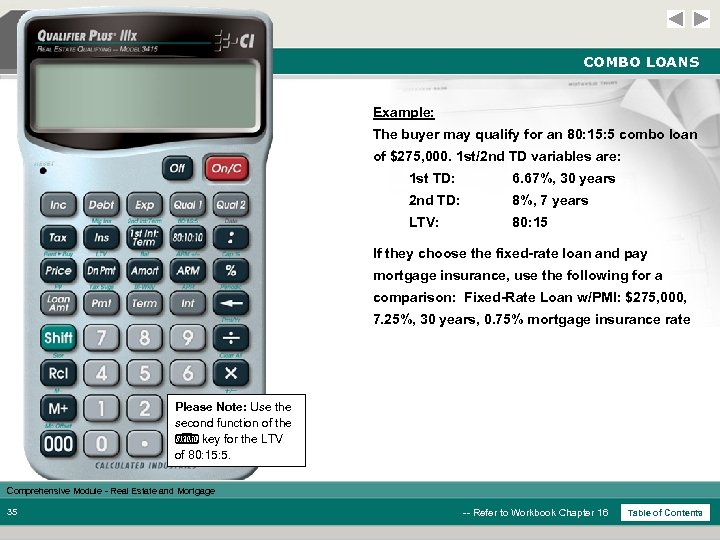 COMBO LOANS Example: The buyer may qualify for an 80: 15: 5 combo loan of $275, 000. 1 st/2 nd TD variables are: 1 st TD: 6. 67%, 30 years 2 nd TD: 8%, 7 years LTV: 80: 15 If they choose the fixed-rate loan and pay mortgage insurance, use the following for a comparison: Fixed-Rate Loan w/PMI: $275, 000, 7. 25%, 30 years, 0. 75% mortgage insurance rate Please Note: Use the second function of the * key for the LTV of 80: 15: 5. Comprehensive Module - Real Estate and Mortgage 35 -- Refer to Workbook Chapter 16 Table of Contents
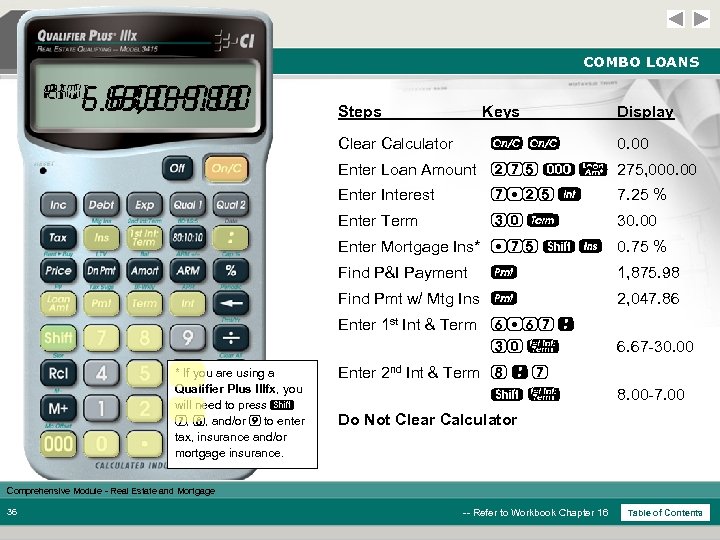 COMBO LOANS 2 ND P+I 1 ST PITI 8. 00 -7. 00 1, 875. 98 6. 67 -30. 00 2, 047. 86 Steps Keys Clear Calculator o o Display 0. 00 Enter Loan Amount 275 ) l 275, 000. 00 Enter Interest 7 25 7. 25 % Enter Term 30 T 30. 00 Enter Mortgage Ins* 75 s I 0. 75 % Find P&I Payment 1, 875. 98 Find Pmt w/ Mtg Ins p 2, 047. 86 Enter 1 st Int & Term 6 67 : 30 ! * If you are using a Qualifier Plus IIIfx, you will need to press s 7, 8, and/or 9 to enter tax, insurance and/or mortgage insurance. p 6. 67 -30. 00 Enter 2 nd Int & Term 8 : 7 s! 8. 00 -7. 00 Do Not Clear Calculator Comprehensive Module - Real Estate and Mortgage 36 -- Refer to Workbook Chapter 16 Table of Contents
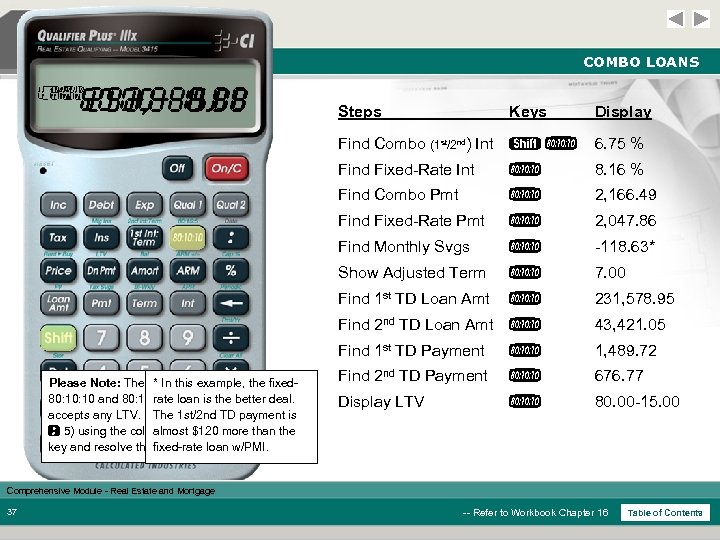 COMBO LOANS LTV CMB EQV ADJ SVG CMB 80. 00 -15. 00 231, 578. 95 43, 421. 05 1, 489. 72 2, 047. 86 2, 166. 49 -118. 63 676. 77 6. 75 7. 00 8. 16 Steps Keys Display Find Combo (1 st/2 nd) Int s * 6. 75 % Find Fixed-Rate Int * 8. 16 % Find Combo Pmt * 2, 166. 49 Find Fixed-Rate Pmt * 2, 047. 86 Find Monthly Svgs * -118. 63* Show Adjusted Term * 7. 00 Find 1 st TD Loan Amt * 231, 578. 95 Find 2 nd TD Loan Amt * Find 1 st TD Payment Please Note: The Qualifier Plus IIIx handles both * In this example, the fixed 80: 10 and 80: 15: 5 LTV combo loans, but also rate loan is the better deal. accepts any LTV. Simply enter any LTV (e. g. , is The 1 st/2 nd TD payment 90 : 5) using the colon key, then press the ! almost $120 more than the key and resolve the fixed-rate loan w/PMI. above. 43, 421. 05 * 1, 489. 72 Find 2 nd TD Payment * 676. 77 Display LTV * 80. 00 -15. 00 Comprehensive Module - Real Estate and Mortgage 37 -- Refer to Workbook Chapter 16 Table of Contents
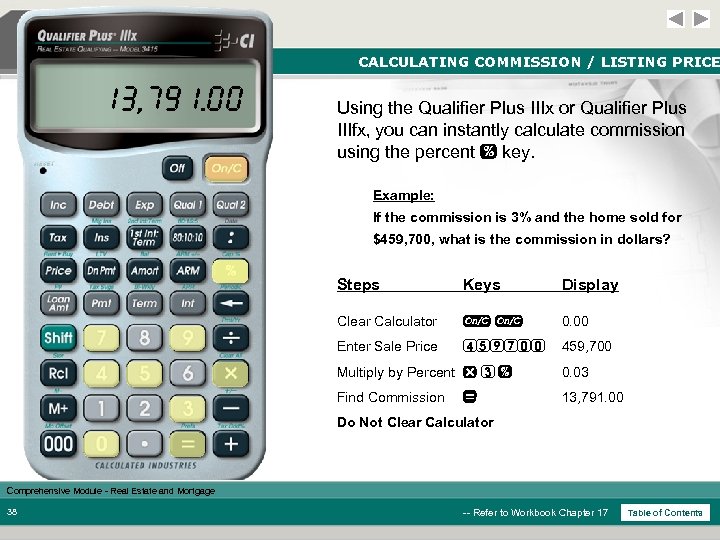 CALCULATING COMMISSION / LISTING PRICE 13, 791. 00 Using the Qualifier Plus IIIx or Qualifier Plus IIIfx, you can instantly calculate commission using the percent % key. Example: If the commission is 3% and the home sold for $459, 700, what is the commission in dollars? Steps Keys Display Clear Calculator oo 0. 00 Enter Sale Price 459700 459, 700 Multiply by Percent x 3 % 0. 03 Find Commission 13, 791. 00 = Do Not Clear Calculator Comprehensive Module - Real Estate and Mortgage 38 -- Refer to Workbook Chapter 17 Table of Contents
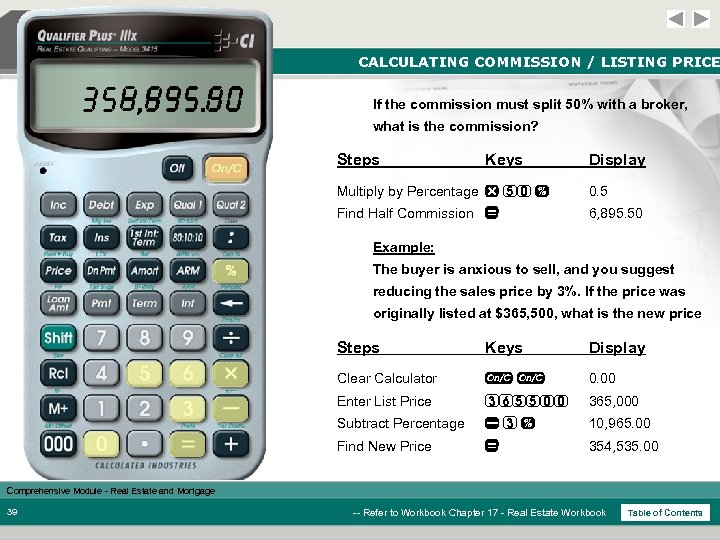 CALCULATING COMMISSION / LISTING PRICE 6, 895. 50 354, 535. 00 If the commission must split 50% with a broker, what is the commission? Steps Keys Display Multiply by Percentage x 50 % 0. 5 Find Half Commission = 6, 895. 50 Example: The buyer is anxious to sell, and you suggest reducing the sales price by 3%. If the price was originally listed at $365, 500, what is the new price Steps Keys Display Clear Calculator oo 0. 00 Enter List Price 365500 365, 000 Subtract Percentage 3% 10, 965. 00 Find New Price = 354, 535. 00 Comprehensive Module - Real Estate and Mortgage 39 -- Refer to Workbook Chapter 17 - Real Estate Workbook Table of Contents
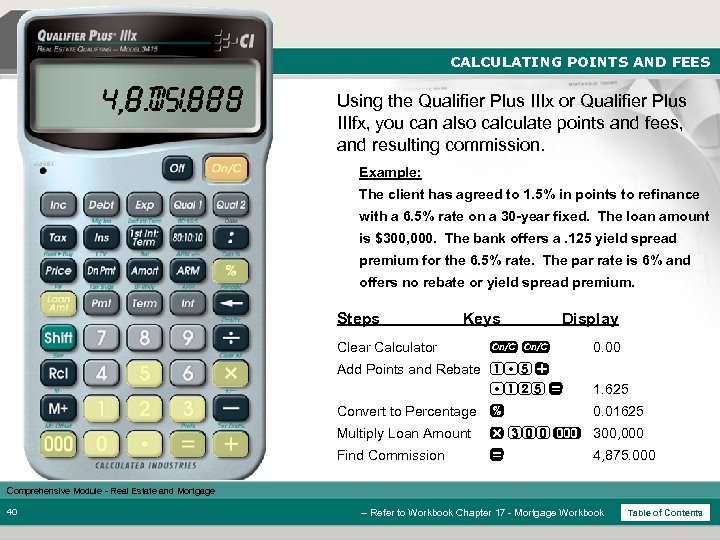 CALCULATING POINTS AND FEES 0. 01625 4, 875. 000 Using the Qualifier Plus IIIx or Qualifier Plus IIIfx, you can also calculate points and fees, and resulting commission. Example: The client has agreed to 1. 5% in points to refinance with a 6. 5% rate on a 30 -year fixed. The loan amount is $300, 000. The bank offers a. 125 yield spread premium for the 6. 5% rate. The par rate is 6% and offers no rebate or yield spread premium. Steps Keys Clear Calculator Display oo 0. 00 Add Points and Rebate 1 5 + 125 = 1. 625 Convert to Percentage % 0. 01625 Multiply Loan Amount x 300 ) 300, 000 Find Commission = 4, 875. 000 Comprehensive Module - Real Estate and Mortgage 40 -- Refer to Workbook Chapter 17 - Mortgage Workbook Table of Contents
 QUESTIONS Questions? Thank you for your attendance and participation. Good Luck! Comprehensive Module - Real Estate and Mortgage Table of Contents