 Скачать презентацию VMware Join the Virtual Revolution Brian Mc Neil
7c897db50d948a92d1350c16fb13b409.ppt
- Количество слайдов: 30



VMware Join the Virtual Revolution! Brian Mc. Neil VMware National Partner Business Manager
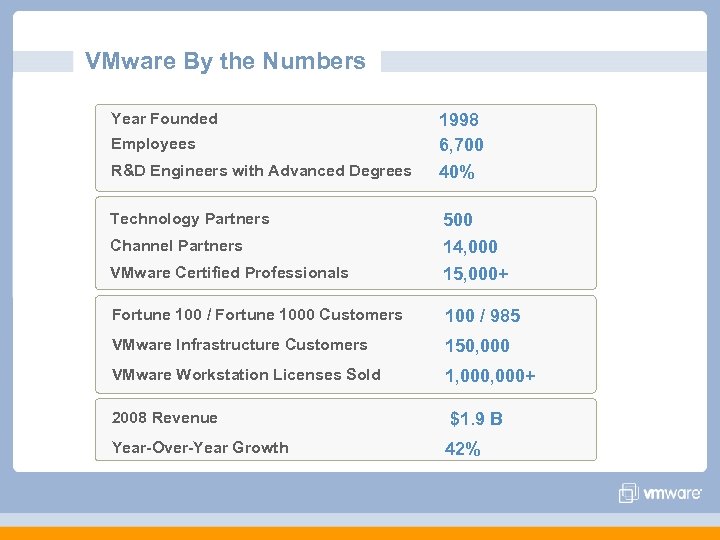
VMware By the Numbers Year Founded Employees R&D Engineers with Advanced Degrees Technology Partners 1998 6, 700 40% VMware Certified Professionals 500 14, 000 15, 000+ Fortune 100 / Fortune 1000 Customers 100 / 985 VMware Infrastructure Customers 150, 000 VMware Workstation Licenses Sold 1, 000+ Channel Partners 2008 Revenue Year-Over-Year Growth $1. 9 B 42%
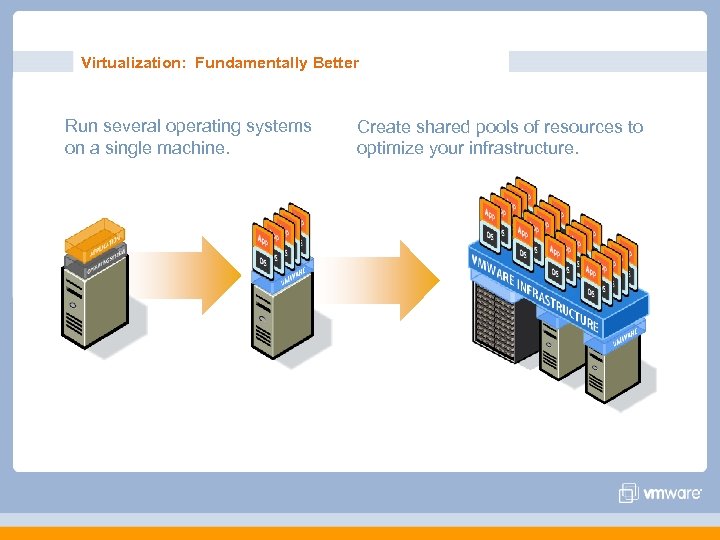
Virtualization: Fundamentally Better Run several operating systems on a single machine. Create shared pools of resources to optimize your infrastructure.
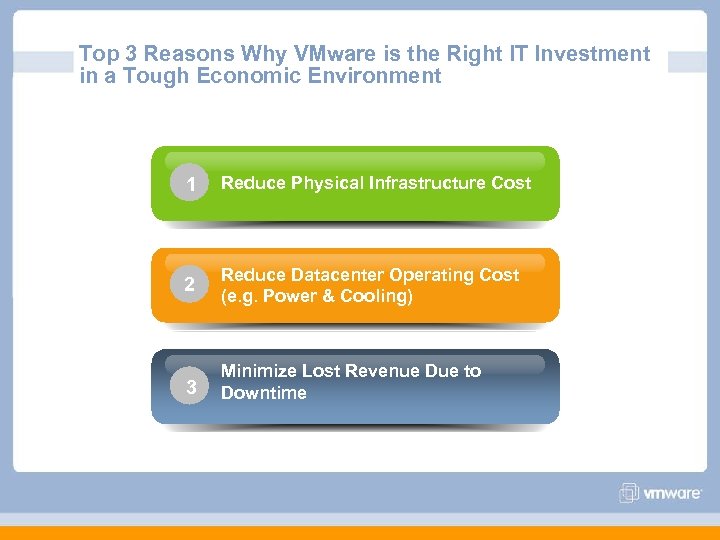
Top 3 Reasons Why VMware is the Right IT Investment in a Tough Economic Environment 1 Reduce Physical Infrastructure Cost 2 Reduce Datacenter Operating Cost (e. g. Power & Cooling) 3 Minimize Lost Revenue Due to Downtime
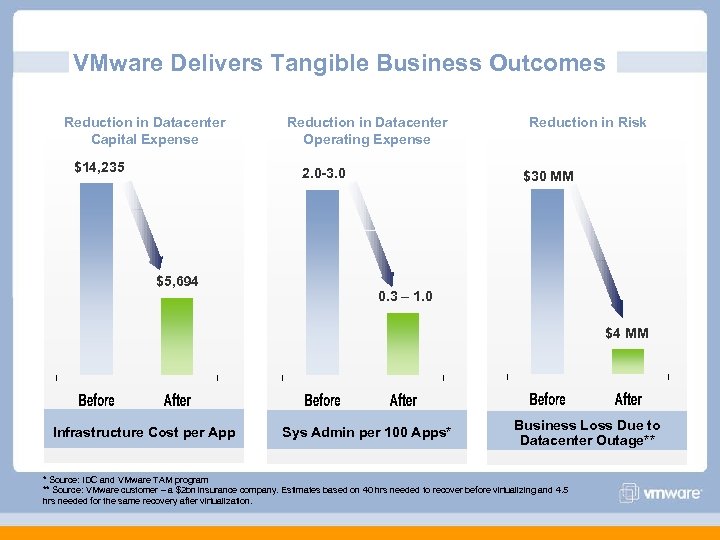
VMware Delivers Tangible Business Outcomes Reduction in Datacenter Capital Expense $14, 235 Reduction in Datacenter Operating Expense 2. 0 -3. 0 $5, 694 Reduction in Risk $30 MM 0. 3 – 1. 0 $4 MM Infrastructure Cost per App Sys Admin per 100 Apps* Business Loss Due to Datacenter Outage** * Source: IDC and VMware TAM program ** Source: VMware customer – a $2 bn insurance company. Estimates based on 40 hrs needed to recover before virtualizing and 4. 5 hrs needed for the same recovery after virtualization.
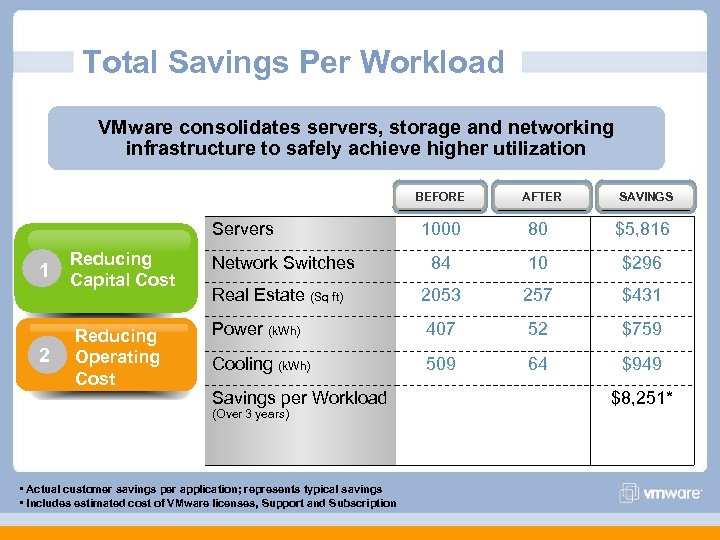
Total Savings Per Workload VMware consolidates servers, storage and networking infrastructure to safely achieve higher utilization BEFORE Servers 1 2 AFTER SAVINGS 1000 80 $5, 816 84 10 $296 Reducing Capital Cost Network Switches Real Estate (Sq ft) 2053 257 $431 Reducing Operating Cost Power (k. Wh) 407 52 $759 Cooling (k. Wh) 509 64 $949 Savings per Workload (Over 3 years) • Actual customer savings per application; represents typical savings • Includes estimated cost of VMware licenses, Support and Subscription $8, 251*
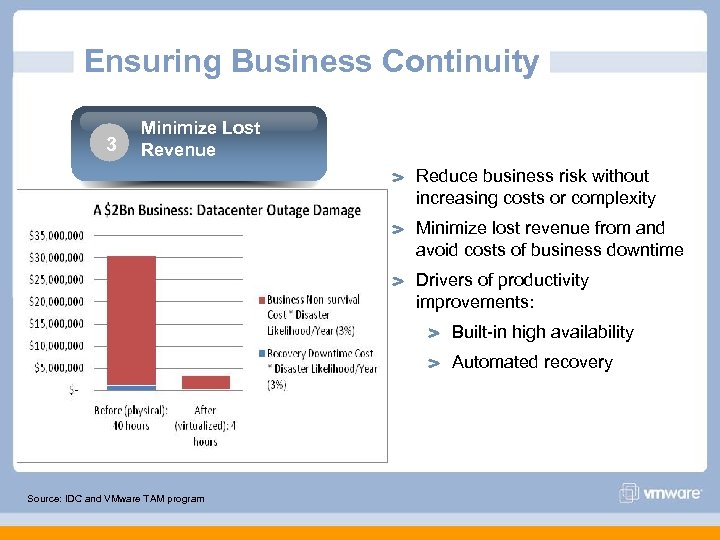
Ensuring Business Continuity Minimize Reducing Lost 3 Operating Cost Revenue Reduce business risk without increasing costs or complexity Minimize lost revenue from and avoid costs of business downtime Drivers of productivity improvements: Built-in high availability Automated recovery Source: IDC and VMware TAM program
VMware v. Sphere™ 4. 0 The next BIG thing in Virtualization.
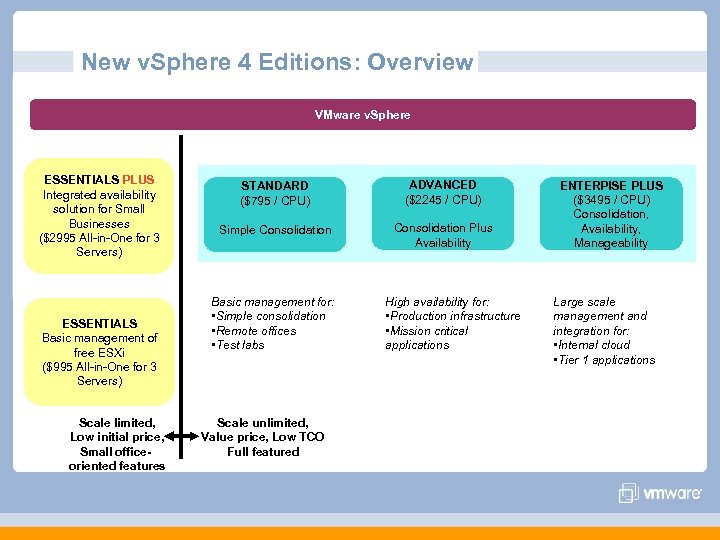
New v. Sphere 4 Editions: Overview VMware v. Sphere ESSENTIALS PLUS Integrated availability solution for Small Businesses ($2995 All-in-One for 3 Servers) ESSENTIALS Basic management of free ESXi ($995 All-in-One for 3 Servers) Scale limited, Low initial price, Small officeoriented features STANDARD ($795 / CPU) ADVANCED ($2245 / CPU) Simple Consolidation Plus Availability Basic management for: • Simple consolidation • Remote offices • Test labs Scale unlimited, Value price, Low TCO Full featured High availability for: • Production infrastructure • Mission critical applications ENTERPISE PLUS ($3495 / CPU) Consolidation, Availability, Manageability Large scale management and integration for: • Internal cloud • Tier 1 applications
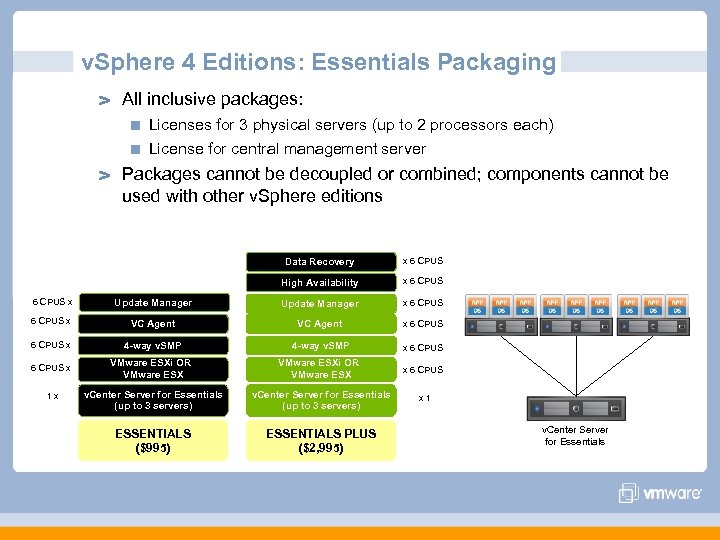
v. Sphere 4 Editions: Essentials Packaging All inclusive packages: Licenses for 3 physical servers (up to 2 processors each) License for central management server Packages cannot be decoupled or combined; components cannot be used with other v. Sphere editions Data Recovery x 6 CPUS High Availability x 6 CPUS x Update Manager x 6 CPUS x VC Agent x 6 CPUS x 4 -way v. SMP x 6 CPUS VMware ESXi OR VMware ESX v. Center Server for Essentials (up to 3 servers) ESSENTIALS ($995) ESSENTIALS PLUS ($2, 995) 6 CPUS x 1 x x 6 CPUS x 1 v. Center Server for Essentials
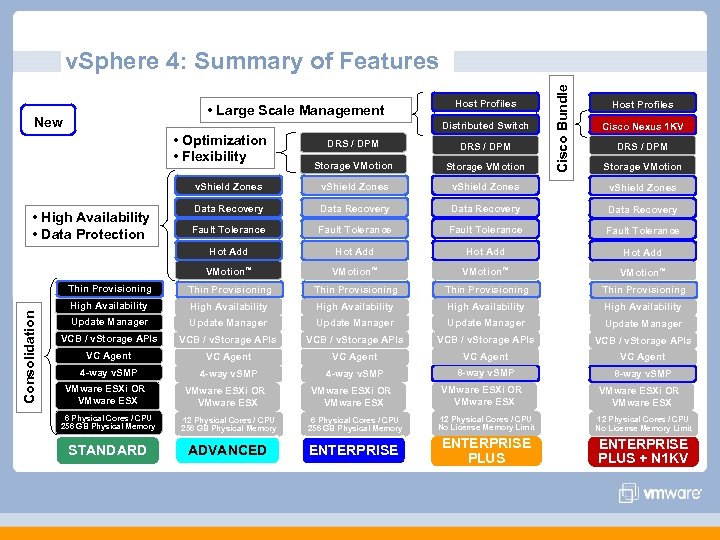
• Large Scale Management New Host Profiles Distributed Switch • Optimization • Flexibility Cisco Bundle v. Sphere 4: Summary of Features Host Profiles Cisco Nexus 1 KV DRS / DPM Storage VMotion v. Shield Zones Data Recovery Fault Tolerance Hot Add VMotion™ Thin Provisioning Thin Provisioning High Availability High Availability Update Manager Update Manager VCB / v. Storage APIs VC Agent VC Agent 4 -way v. SMP 8 -way v. SMP Consolidation • High Availability • Data Protection VMware ESXi OR VMware ESX DRS / DPM Storage VMotion VMware ESXi OR VMware ESX 6 Physical Cores / CPU 256 GB Physical Memory 12 Physical Cores / CPU 256 GB Physical Memory 6 Physical Cores / CPU 256 GB Physical Memory 12 Physical Cores / CPU No License Memory Limit STANDARD ADVANCED ENTERPRISE PLUS + N 1 KV
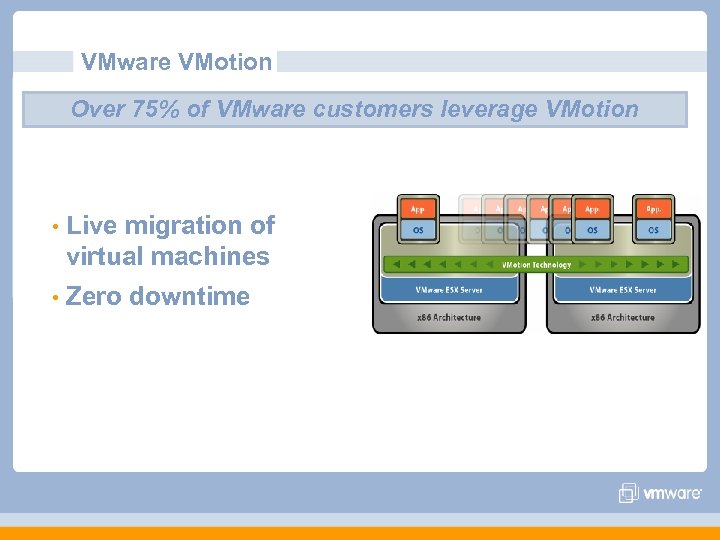
VMware VMotion Over 75% of VMware customers leverage VMotion • Live migration of virtual machines • Zero downtime
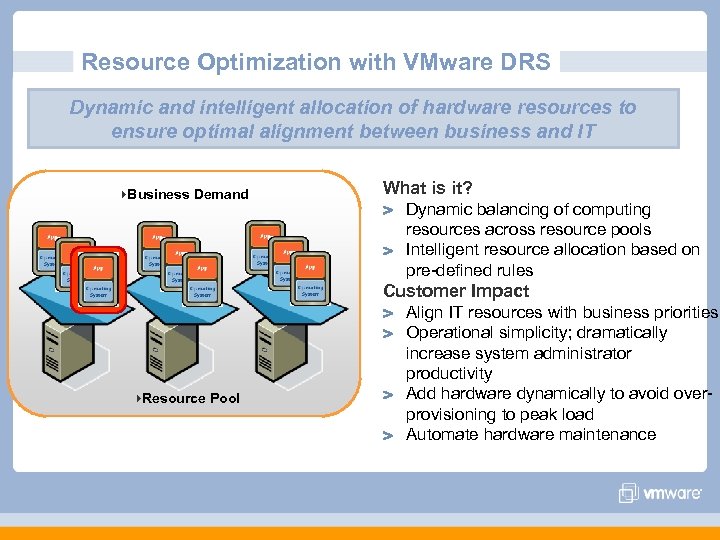
Resource Optimization with VMware DRS Dynamic and intelligent allocation of hardware resources to ensure optimal alignment between business and IT }Business Demand What is it? Dynamic balancing of computing resources across resource pools Intelligent resource allocation based on pre-defined rules Customer Impact }Resource Pool Align IT resources with business priorities Operational simplicity; dramatically increase system administrator productivity Add hardware dynamically to avoid overprovisioning to peak load Automate hardware maintenance
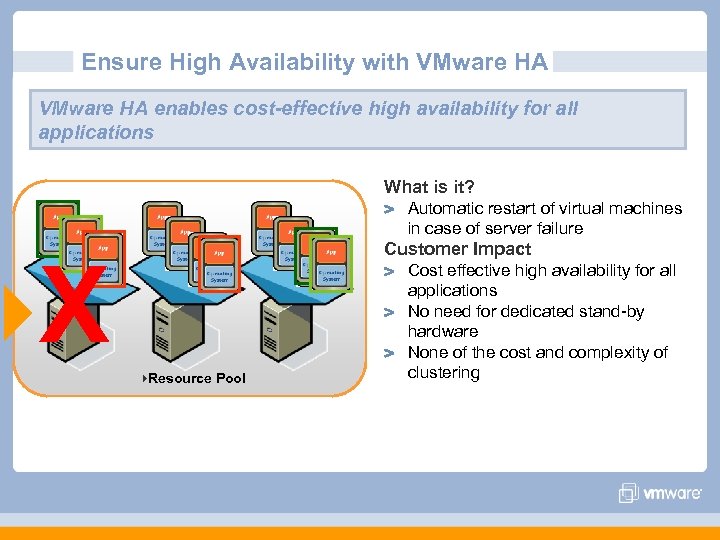
Ensure High Availability with VMware HA enables cost-effective high availability for all applications What is it? Automatic restart of virtual machines in case of server failure Customer Impact }X }Resource Pool Cost effective high availability for all applications No need for dedicated stand-by hardware None of the cost and complexity of clustering
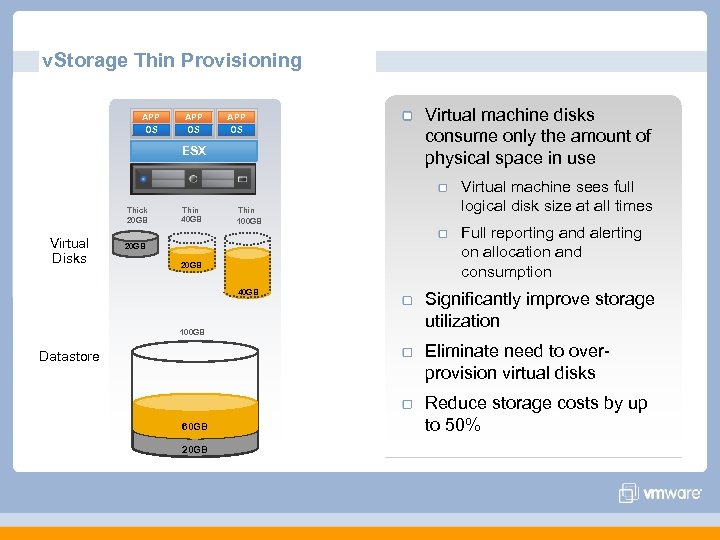
v. Storage Thin Provisioning APP OS ESX Thick 20 GB Virtual Disks Thin 40 GB Thin 100 GB 20 GB 40 GB 100 GB Virtual machine disks consume only the amount of physical space in use Virtual machine sees full logical disk size at all times Full reporting and alerting on allocation and consumption Significantly improve storage utilization Eliminate need to overprovision virtual disks Datastore 60 GB 20 GB Reduce storage costs by up to 50%
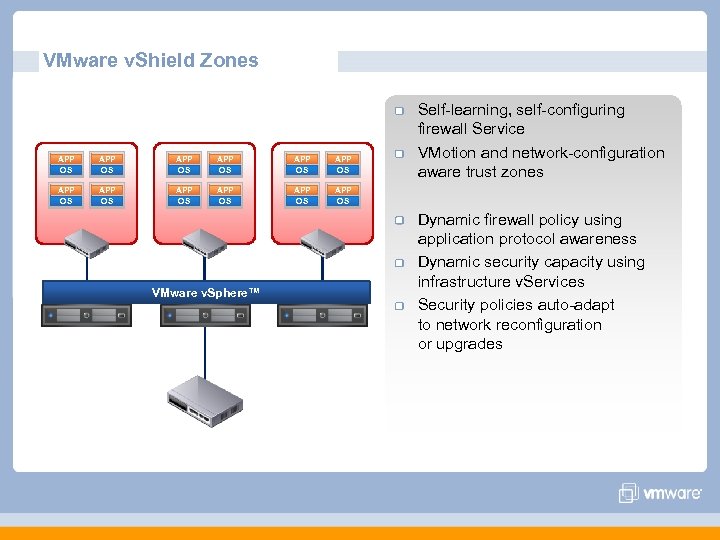
VMware v. Shield Zones APP OS APP OS APP OS Self-learning, self-configuring firewall Service VMotion and network-configuration aware trust zones APP OS VMware v. Sphere™ Dynamic firewall policy using application protocol awareness Dynamic security capacity using infrastructure v. Services Security policies auto-adapt to network reconfiguration or upgrades
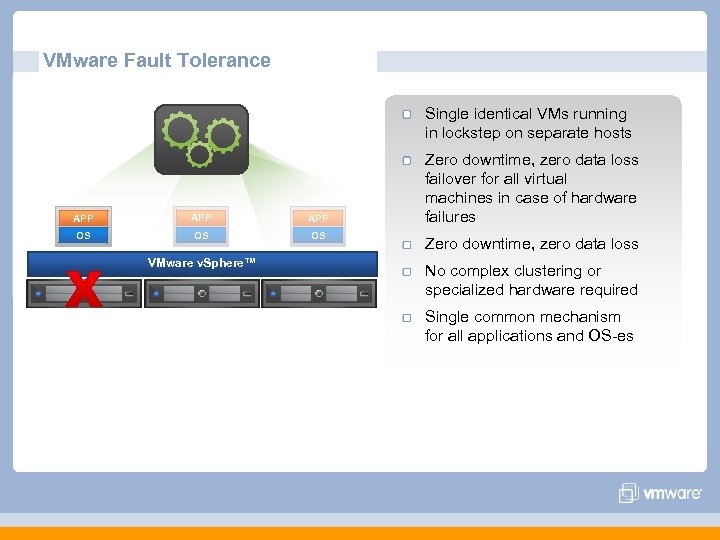
VMware Fault Tolerance Single identical VMs running in lockstep on separate hosts APP APP OS OS OS VMware v. Sphere™ Zero downtime, zero data loss failover for all virtual machines in case of hardware failures Zero downtime, zero data loss No complex clustering or specialized hardware required Single common mechanism for all applications and OS-es
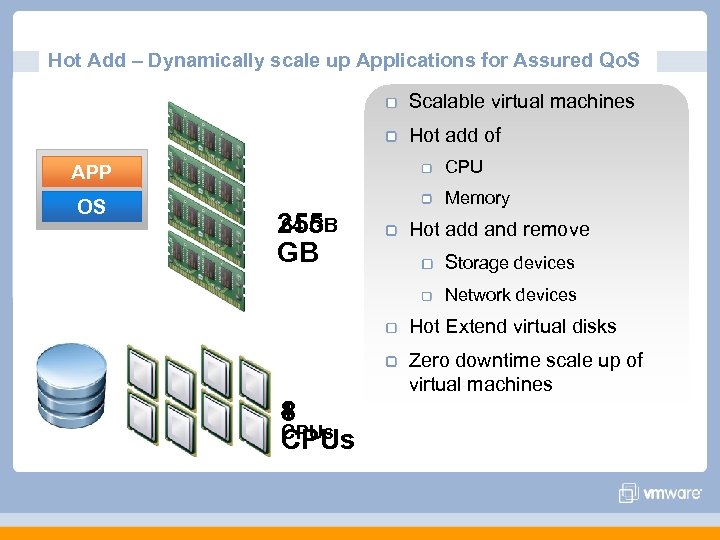
Hot Add – Dynamically scale up Applications for Assured Qo. S Scalable virtual machines Hot add of CPU APP OS Memory 64 GB 255 GB Hot add and remove Storage devices Network devices Hot Extend virtual disks Zero downtime scale up of virtual machines 4 8 CPUs
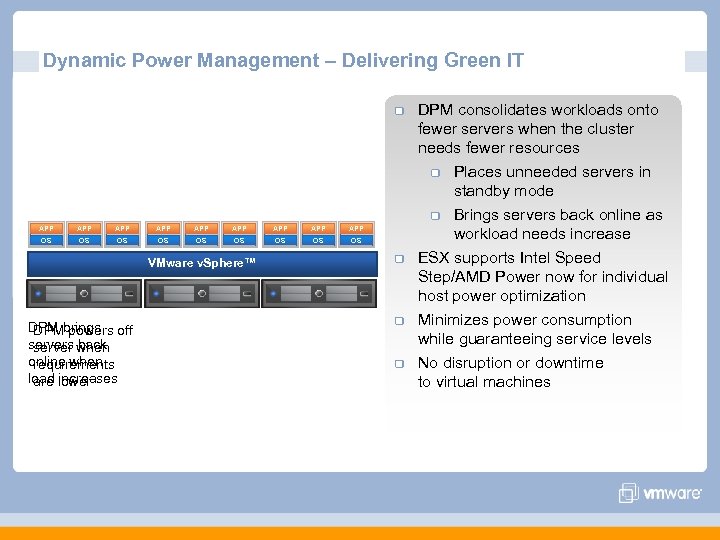
Dynamic Power Management – Delivering Green IT APP APP APP OS OS OS VMware v. Sphere™ DPM brings off DPM powers servers when server back online when requirements load lower are increases DPM consolidates workloads onto fewer servers when the cluster needs fewer resources Places unneeded servers in standby mode Brings servers back online as workload needs increase ESX supports Intel Speed Step/AMD Power now for individual host power optimization Minimizes power consumption while guaranteeing service levels No disruption or downtime to virtual machines
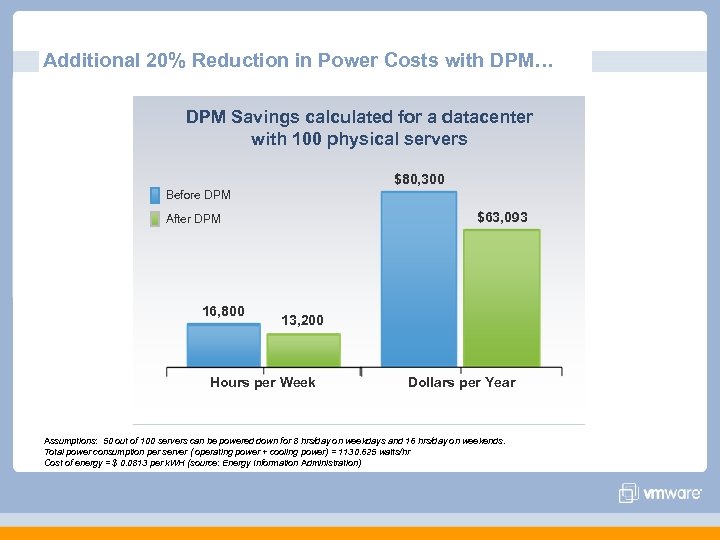
Additional 20% Reduction in Power Costs with DPM… DPM Savings calculated for a datacenter with 100 physical servers $80, 300 Before DPM $63, 093 After DPM 16, 800 13, 200 Hours per Week Dollars per Year Assumptions: 50 out of 100 servers can be powered down for 8 hrs/day on weekdays and 16 hrs/day on weekends. Total power consumption per server ( operating power + cooling power) = 1130. 625 watts/hr Cost of energy = $ 0. 0813 per k. WH (source: Energy Information Administration)
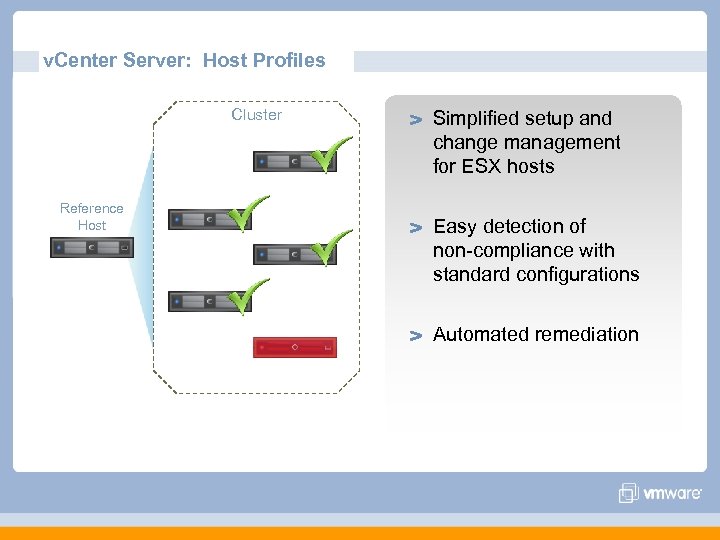
v. Center Server: Host Profiles Cluster Reference Host Simplified setup and change management for ESX hosts Easy detection of non-compliance with standard configurations Automated remediation
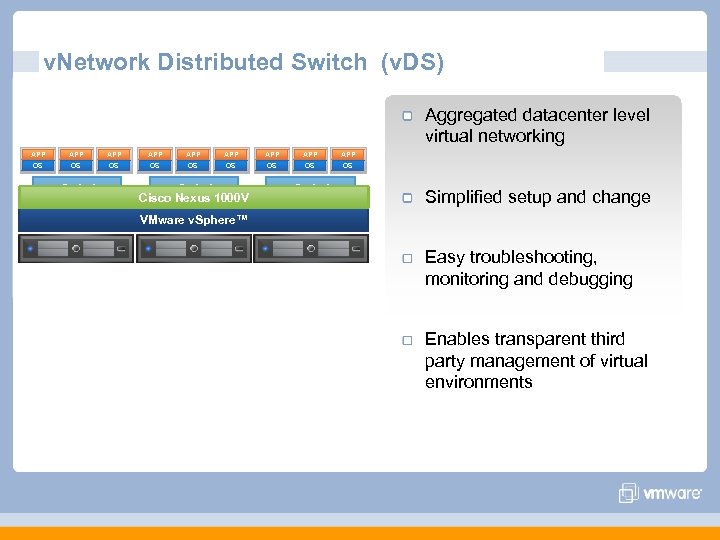
v. Network Distributed Switch (v. DS) Aggregated datacenter level virtual networking APP APP APP OS OS OS v. Switch Cisco Nexus 1000 V v. Network Distributed Switch v. Switch Simplified setup and change VMware v. Sphere™ Easy troubleshooting, monitoring and debugging Enables transparent third party management of virtual environments
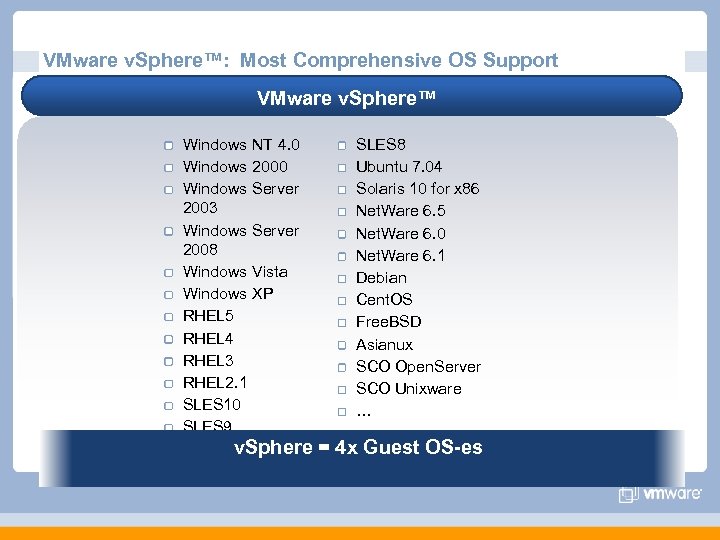
VMware v. Sphere™: Most Comprehensive OS Support VMware v. Sphere™ Windows NT 4. 0 Windows 2000 Windows Server 2003 Windows Server 2008 Windows Vista Windows XP RHEL 5 RHEL 4 RHEL 3 RHEL 2. 1 SLES 10 SLES 9 SLES 8 Ubuntu 7. 04 Solaris 10 for x 86 Net. Ware 6. 5 Net. Ware 6. 0 Net. Ware 6. 1 Debian Cent. OS Free. BSD Asianux SCO Open. Server SCO Unixware … v. Sphere == 4 x Guest OS-es v. Sphere most guest OS-es
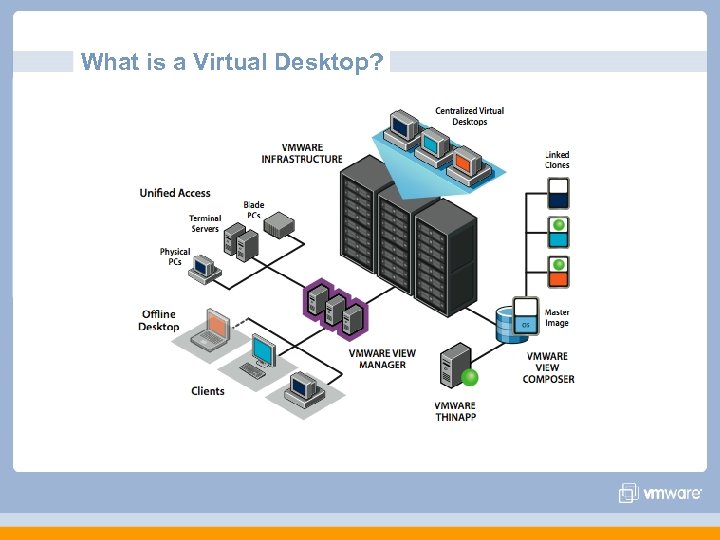
What is a Virtual Desktop?
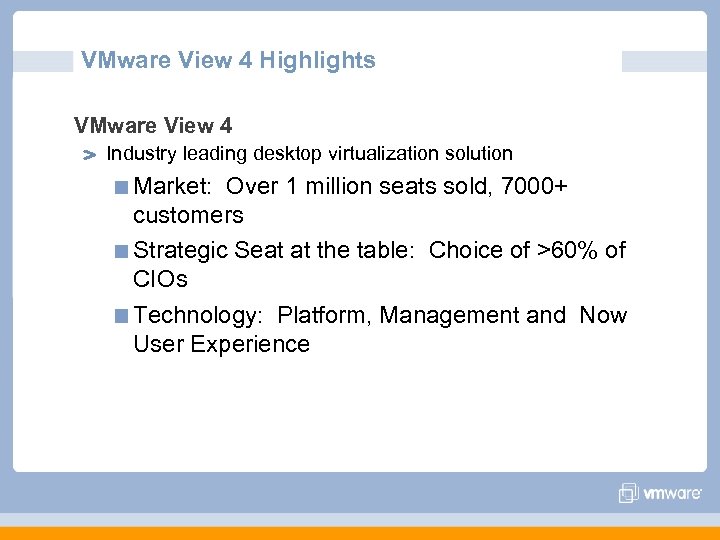
VMware View 4 Highlights VMware View 4 Industry leading desktop virtualization solution Market: Over 1 million seats sold, 7000+ customers Strategic Seat at the table: Choice of >60% of CIOs Technology: Platform, Management and Now User Experience
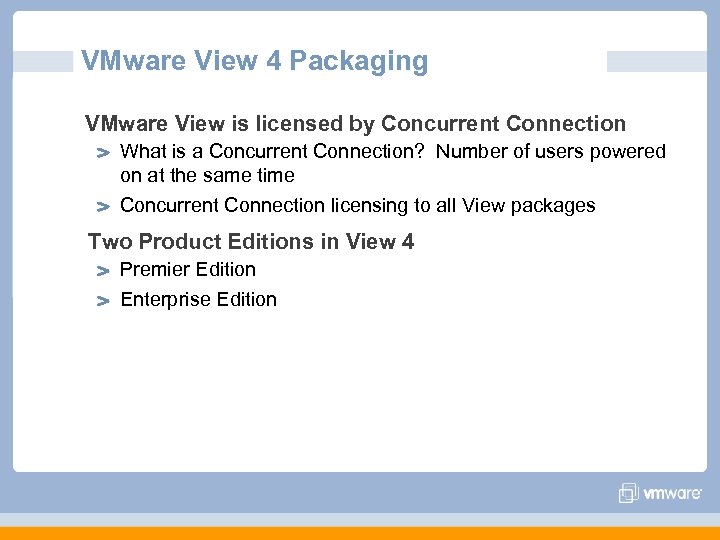
VMware View 4 Packaging VMware View is licensed by Concurrent Connection What is a Concurrent Connection? Number of users powered on at the same time Concurrent Connection licensing to all View packages Two Product Editions in View 4 Premier Edition Enterprise Edition
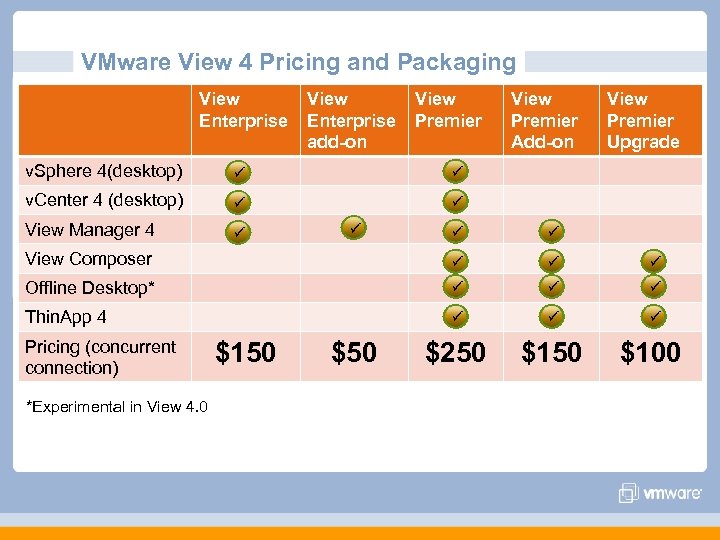
VMware View 4 Pricing and Packaging View Enterprise add-on View Premier v. Sphere 4(desktop) View Manager 4 View Premier Upgrade v. Center 4 (desktop) View Premier Add-on View Composer Offline Desktop* Thin. App 4 $250 $100 Pricing (concurrent connection) *Experimental in View 4. 0 $150 $50
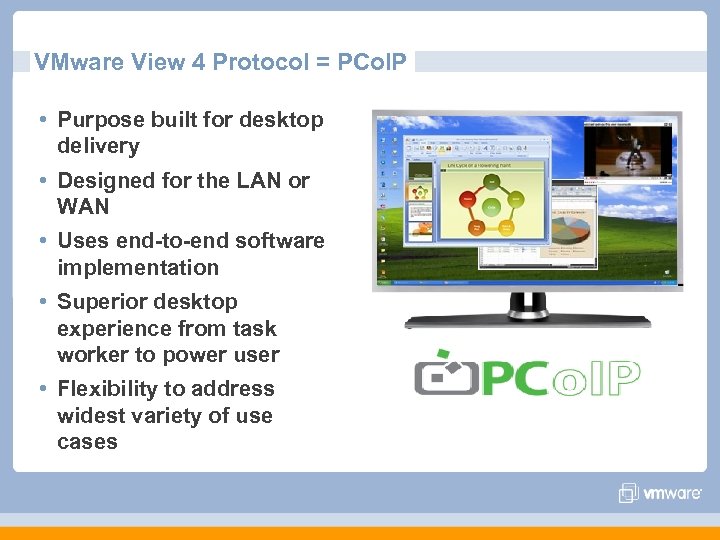
VMware View 4 Protocol = PCo. IP • Purpose built for desktop delivery • Designed for the LAN or WAN • Uses end-to-end software implementation • Superior desktop experience from task worker to power user • Flexibility to address widest variety of use cases
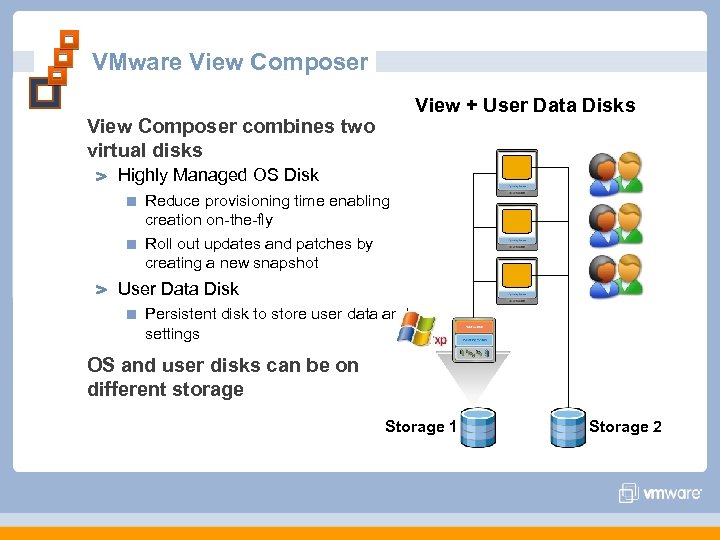
VMware View Composer View + User Data Disks View Composer combines two virtual disks Highly Managed OS Disk Reduce provisioning time enabling creation on-the-fly Roll out updates and patches by creating a new snapshot User Data Disk Persistent disk to store user data and settings OS and user disks can be on different storage Storage 1 Storage 2
Questions?
Скачать презентацию VMware Join the Virtual Revolution Brian Mc Neil
7c897db50d948a92d1350c16fb13b409.ppt