


 Скачать презентацию VKSF 423 System Administration III Thin Client Computing
26536cd210c2b691a4a6b6ecb78af2a5.ppt
- Количество слайдов: 46
 VKSF 423 System Administration III Thin Client Computing
 Announcements v Lab: – Implementation terminal servers and thin clients.
 Recap from Last Time What do our users do? v What computing resources do they need to accomplish their tasks? v If the minimal desktop computers we can buy far exceed our needs what are our options? v
 What are the trends in the Business World Incredible cost pressures v Rising salaries for skilled systems administrators v Desire to decrease TCO v Historically low interest rates make capital investments attractive by lowering internal rate of return in ROI analysis v
 Thin-client Devices Only needs to process keyboard input and screen output v No hard drive, no CDROM drive, no floppy drive, no moving parts v Cannot be used away from the network v Cheap and easy to replace v Can any device be thin? v
 Why Thin Clients? Provide ability to aggregate computing resources in servers instead of spreading them around in clients v Centralization v Consolidation v Virtualization v
 Thin-client Model Benefits v v v v v Lower total cost of ownership (TCO) Easier software installation, uninstallation and maintenance Centralized support, access control, and administration Lowered security risks Uses existing infrastructure Lower power consumption Applications available anywhere on demand Disaster recovery No end of life
 Thin-client Model Limitations Management – Business side v 3 D applications v Specialized hardware needs v Laptops v Are these valid limitations? v Can we think of ways of getting around them and still keep the thin client model? v
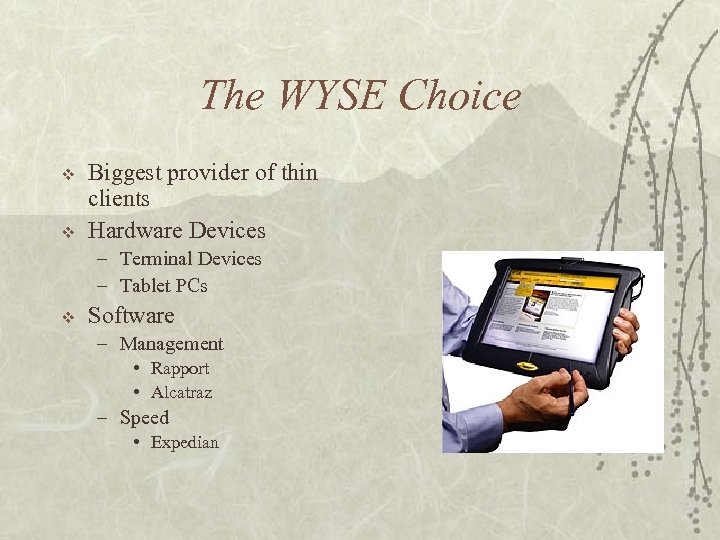 The WYSE Choice v v Biggest provider of thin clients Hardware Devices – Terminal Devices – Tablet PCs v Software – Management • Rapport • Alcatraz – Speed • Expedian
 Available Server Technologies Windows Terminal Server v Citrix Meta. Frame Presentation Server v Linux Terminal Server Project v Sun and Sun Rays v VNC v Nomachine v
 Comparative Points v How thin is thin? – Desktop and server side hardware requirements v Where does the processing actually take place? – What is going over the wire? v What management tools are available? – Ratio of sysadmins to desktops – Characteristics of your enterprise – Future technology needs
 LTSP Linux Terminal Server Project v Supports many devices and platforms v Supports many services v “Zero cost” solution v – No software or hardware licensing No operating system installed locally v Limited points of failure v Freely available “cookbook” directions v
 LTSP Client Side Network Interface Card v Video Card Chipset v Monitor Information v Etherboot, PXE, or eprom v If the client has more memory, it can be configured to store programs locally v
 LTSP Server side v Required – – – – v Syslog NFS DHCP TFTP LTSP Core LTSP Kernel LTSP X Core LTSP X Fonts Optional – NIS
 Files Modified by LTSP Initialization Script v /etc/hosts v /etc/dhcpd. conf v /opt/ltsp/i 386/etc/lts. conf v /etc/exports v /etc/xinetd. d/tftp v XDMCP v
 LTSP - Theory of Operation Client boots into from the network v DHCP v TFTP v DHCP v NFS v SYSLOG v XDMCP v
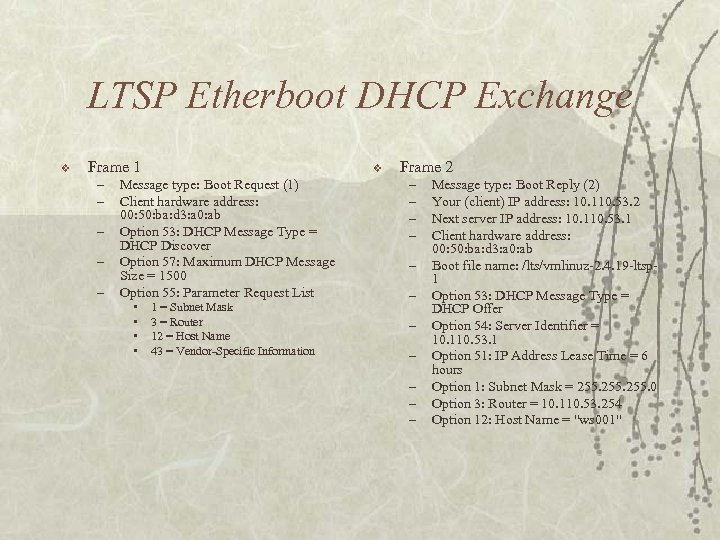 LTSP Etherboot DHCP Exchange v Frame 1 – – – v Message type: Boot Request (1) Client hardware address: 00: 50: ba: d 3: a 0: ab Option 53: DHCP Message Type = DHCP Discover Option 57: Maximum DHCP Message Size = 1500 Option 55: Parameter Request List • • 1 = Subnet Mask 3 = Router 12 = Host Name 43 = Vendor-Specific Information Frame 2 – – – Message type: Boot Reply (2) Your (client) IP address: 10. 110. 53. 2 Next server IP address: 10. 110. 53. 1 Client hardware address: 00: 50: ba: d 3: a 0: ab Boot file name: /lts/vmlinuz-2. 4. 19 -ltsp 1 Option 53: DHCP Message Type = DHCP Offer Option 54: Server Identifier = 10. 110. 53. 1 Option 51: IP Address Lease Time = 6 hours Option 1: Subnet Mask = 255. 0 Option 3: Router = 10. 110. 53. 254 Option 12: Host Name = "ws 001"
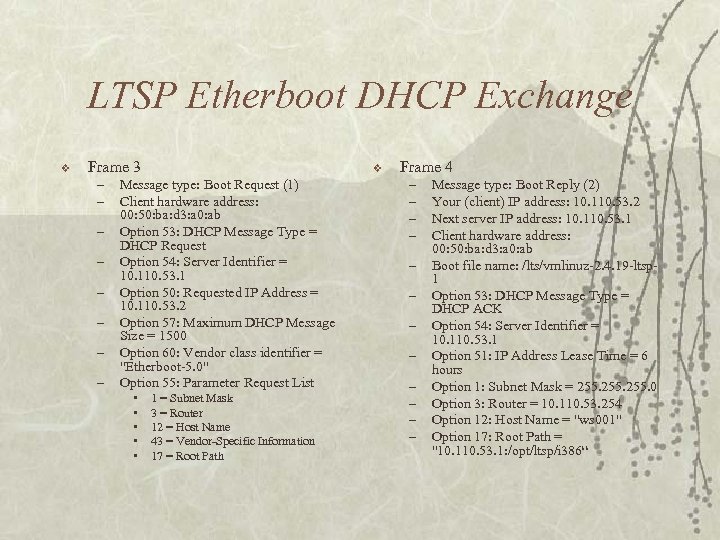 LTSP Etherboot DHCP Exchange v Frame 3 – – – – v Message type: Boot Request (1) Client hardware address: 00: 50: ba: d 3: a 0: ab Option 53: DHCP Message Type = DHCP Request Option 54: Server Identifier = 10. 110. 53. 1 Option 50: Requested IP Address = 10. 110. 53. 2 Option 57: Maximum DHCP Message Size = 1500 Option 60: Vendor class identifier = "Etherboot-5. 0" Option 55: Parameter Request List • • • 1 = Subnet Mask 3 = Router 12 = Host Name 43 = Vendor-Specific Information 17 = Root Path Frame 4 – – – Message type: Boot Reply (2) Your (client) IP address: 10. 110. 53. 2 Next server IP address: 10. 110. 53. 1 Client hardware address: 00: 50: ba: d 3: a 0: ab Boot file name: /lts/vmlinuz-2. 4. 19 -ltsp 1 Option 53: DHCP Message Type = DHCP ACK Option 54: Server Identifier = 10. 110. 53. 1 Option 51: IP Address Lease Time = 6 hours Option 1: Subnet Mask = 255. 0 Option 3: Router = 10. 110. 53. 254 Option 12: Host Name = "ws 001" Option 17: Root Path = "10. 110. 53. 1: /opt/ltsp/i 386“
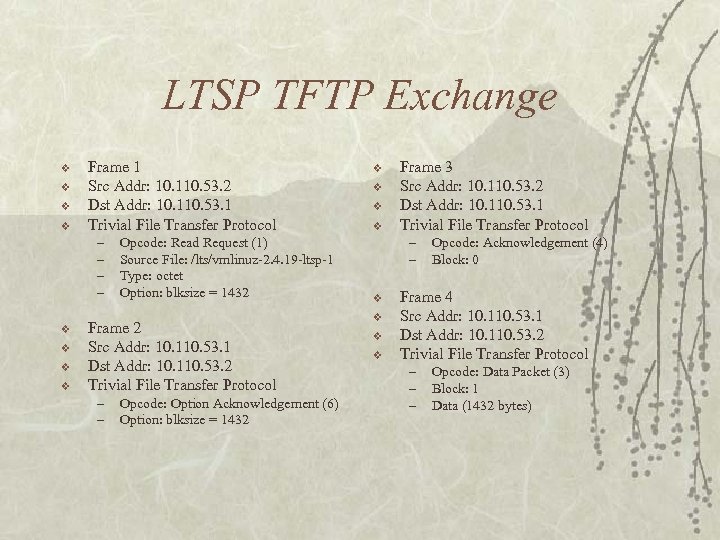 LTSP TFTP Exchange v v Frame 1 Src Addr: 10. 110. 53. 2 Dst Addr: 10. 110. 53. 1 Trivial File Transfer Protocol – – v v Opcode: Read Request (1) Source File: /lts/vmlinuz-2. 4. 19 -ltsp-1 Type: octet Option: blksize = 1432 Frame 2 Src Addr: 10. 110. 53. 1 Dst Addr: 10. 110. 53. 2 Trivial File Transfer Protocol – – Opcode: Option Acknowledgement (6) Option: blksize = 1432 v v Frame 3 Src Addr: 10. 110. 53. 2 Dst Addr: 10. 110. 53. 1 Trivial File Transfer Protocol – – v v Opcode: Acknowledgement (4) Block: 0 Frame 4 Src Addr: 10. 110. 53. 1 Dst Addr: 10. 110. 53. 2 Trivial File Transfer Protocol – – – Opcode: Data Packet (3) Block: 1 Data (1432 bytes)
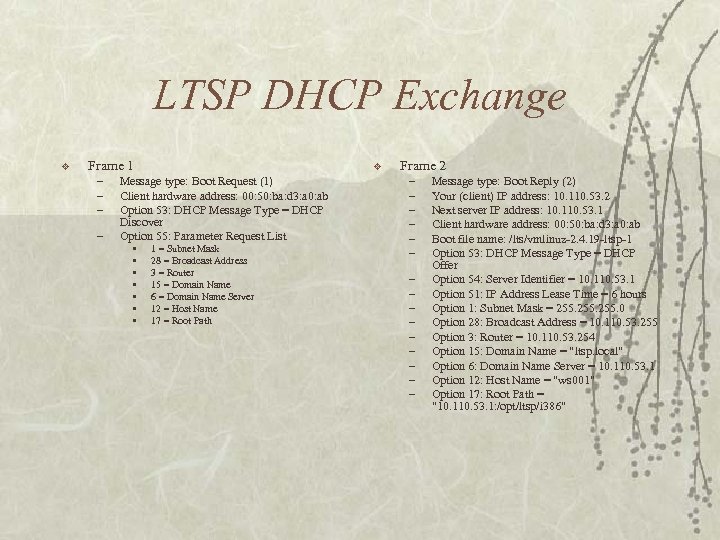 LTSP DHCP Exchange v Frame 1 – – v Message type: Boot Request (1) Client hardware address: 00: 50: ba: d 3: a 0: ab Option 53: DHCP Message Type = DHCP Discover Option 55: Parameter Request List • • 1 = Subnet Mask 28 = Broadcast Address 3 = Router 15 = Domain Name 6 = Domain Name Server 12 = Host Name 17 = Root Path Frame 2 – – – – Message type: Boot Reply (2) Your (client) IP address: 10. 110. 53. 2 Next server IP address: 10. 110. 53. 1 Client hardware address: 00: 50: ba: d 3: a 0: ab Boot file name: /lts/vmlinuz-2. 4. 19 -ltsp-1 Option 53: DHCP Message Type = DHCP Offer Option 54: Server Identifier = 10. 110. 53. 1 Option 51: IP Address Lease Time = 6 hours Option 1: Subnet Mask = 255. 0 Option 28: Broadcast Address = 10. 110. 53. 255 Option 3: Router = 10. 110. 53. 254 Option 15: Domain Name = "ltsp. local" Option 6: Domain Name Server = 10. 110. 53. 1 Option 12: Host Name = "ws 001" Option 17: Root Path = "10. 110. 53. 1: /opt/ltsp/i 386"
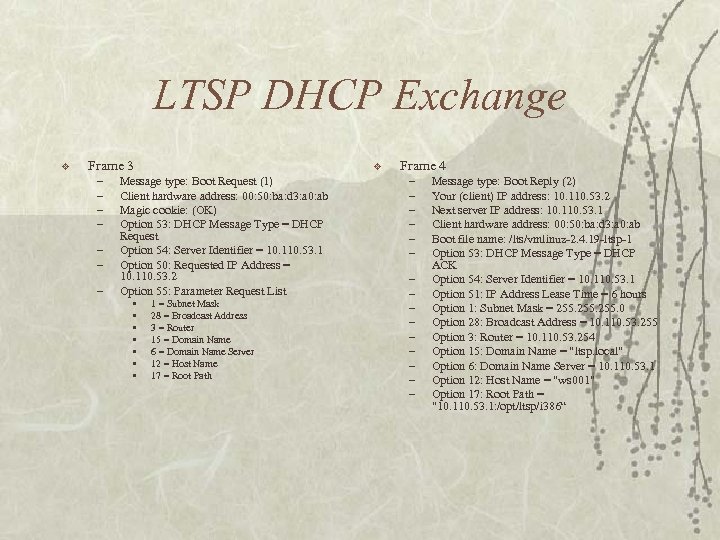 LTSP DHCP Exchange v Frame 3 – – – – v Message type: Boot Request (1) Client hardware address: 00: 50: ba: d 3: a 0: ab Magic cookie: (OK) Option 53: DHCP Message Type = DHCP Request Option 54: Server Identifier = 10. 110. 53. 1 Option 50: Requested IP Address = 10. 110. 53. 2 Option 55: Parameter Request List • • 1 = Subnet Mask 28 = Broadcast Address 3 = Router 15 = Domain Name 6 = Domain Name Server 12 = Host Name 17 = Root Path Frame 4 – – – – Message type: Boot Reply (2) Your (client) IP address: 10. 110. 53. 2 Next server IP address: 10. 110. 53. 1 Client hardware address: 00: 50: ba: d 3: a 0: ab Boot file name: /lts/vmlinuz-2. 4. 19 -ltsp-1 Option 53: DHCP Message Type = DHCP ACK Option 54: Server Identifier = 10. 110. 53. 1 Option 51: IP Address Lease Time = 6 hours Option 1: Subnet Mask = 255. 0 Option 28: Broadcast Address = 10. 110. 53. 255 Option 3: Router = 10. 110. 53. 254 Option 15: Domain Name = "ltsp. local" Option 6: Domain Name Server = 10. 110. 53. 1 Option 12: Host Name = "ws 001" Option 17: Root Path = "10. 110. 53. 1: /opt/ltsp/i 386“
 Practical Application of LTSP 402 OS Scripting v Only terminal mode is needed v All users use NFS v No prelab v Access anywhere v
 Windows Terminal Server v v v Comes standard with Windows Server beginning with Windows 2000 Server Came out of NT 4 Terminal Server Edition Uses RDP Protocol Can be used for administration or application deployment Requires licensing for application deployment Windows XP was not the first to have terminal services
 Windows 2003 RDP 5. 2 v v v Can redirect sound, serial ports, and printers Remote Users group controls access Group Policy RC 4 128 -bit stream cipher Disconnection vs. Logoff Terminal Services Session Directory – Requires Enterprise Edition v Client is installed in Windows XP and later
 Licensing Windows Server License v Windows Client Access License v Windows Terminal Services Client Access License v Terminal Services Licensing Server v
 Limitations of Windows Terminal Services v No easy way of – Pushing just applications – Building web portals v Unsupported clients available
 Why Citrix Meta. Frame? Application Server v Distributed Management v Centralized Resources v 95% Fortune 500 v 95% European FT 100 v 100% Fortune 100 v Over 120, 000 Organizations v
 Current Flavors of Citrix XPs - Standard v XPa - Access v XPe - Enterprise v
 XPs Ideal for small environments v Includes ICA protocol (Independent Computing Architecture), client platform support, network protocol support, seamless desktop v Does not including load balancing features v
 XPa For medium sized businesses v Includes all of XPs features v Includes load management support v
 XPe Enterprise version v Includes all of XPa features v Installation manager, resource manager, and network manager v
 Drawbacks Laptop management v Selling to Management v Poor application design v High initial cost if client server model is already implemented v 3 D Applications/Specific hardware needs v Licensing model v
 Licensing Windows Server License v Windows Client Access License v Windows Terminal Services Client Access License v Terminal Services Licensing Server v Citrix Server License v Citrix Connection License v
 Metaframe v “Any client device, any network connection, any network protocol, seamless desktop integration”
 Metaframe v “Any client device…” – Any application can be run on any OS – Windows CE Devices, Windows 16 -bit/32 -bit, UNIX, Mac, Java, OS/2 Warp, EPOC/Symbol, DOS 16 -bit/32 -bit – Example: MS-DOS 5. 0 running Microsoft Office 2000
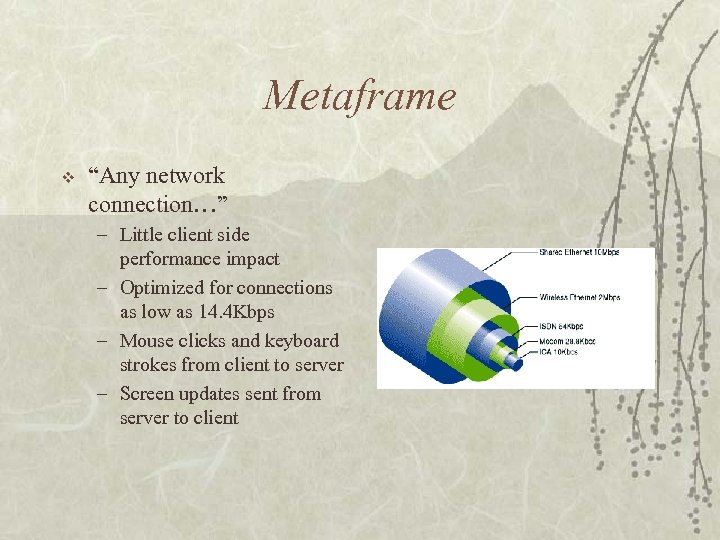 Metaframe v “Any network connection…” – Little client side performance impact – Optimized for connections as low as 14. 4 Kbps – Mouse clicks and keyboard strokes from client to server – Screen updates sent from server to client
 Metaframe v “Any network protocol…” – Works at Presentation level of the OSI model – TCP/IP, IPX, SPX, Net BIOS, Net. BEUI, PPP, Async, ISDN, Frame Relay, ATM, and any other existing or developing protocols.
 Metaframe v “Desktop integration. ” – Application appears local to users – Limit questions posed to IT staff – No retraining for how users run applications
 Metaframe v Application launching and embedding – Launching allows users to open a program from a web browser into a new window – Embedding opens the application right in the web browser
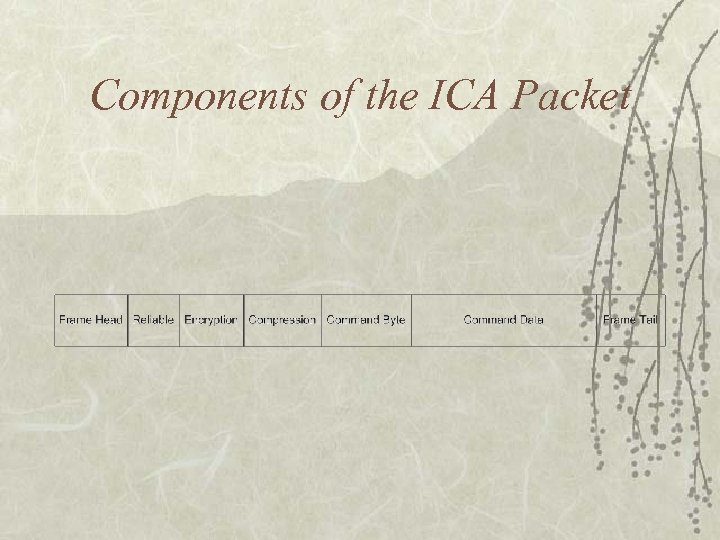 Components of the ICA Packet
 ICA Packet v Reliable: – is used in connectionless protocols such as IPX and UDP to provide reliable, error-free delivery. v Encryption: – is used as the preamble for managing any packets that contain encrypted data. v Compression: – is used as the preamble for managing any packets that contain compressed data.
 ICA Packet v Command byte: – Is the only required ICA command byte. This is the beginning of the base ICA protocol packet. v Command data: – Contains optional data bytes associated with the specific command. The length of the data is dependent on the command.
 Deployment in Windows 2000 v Problems with deployment based on computers – All users must use the same application suite – Same user must login on that terminal all the time v Problems with installs based on users – What happens if that user only logs into that computer once?
 Deployment in Citrix v v Programs are installed once on the server and then deployed for a user or group of users No additional data is stored on the client Hardware can be easily attached and used with the Citrix server Installation Manager used for pushing around applications in the farm
 Disaster Recovery All the data and applications are held centrally v Servers within a farm can be divided across physical boundaries v Clients become more meaningless and can be easily swapped with cheap replacements v
 Storage Solutions Servers talk directly to the storage unit decreasing latency in file transactions v Storage is consolidated in once place v Can be used to prohibit the user from saving files to their local computers v Can be used to transfer files to and from the server v