


 Скачать презентацию Vital Statistics Services USING THE MOTHER S WORKSHEET TO
be03f7ebd44c80bad653d5425ab6ab17.ppt
- Количество слайдов: 43
 Vital Statistics Services USING THE MOTHER’S WORKSHEET TO ENTER THE BIRTH INFORMATION Vital Statistics Services 1
 Quick Information ALL facility births are to be filed electronically. Birth certificates must be filed with the local registrar within 10 days from the date of birth. The medical certifier/attendant must certify to the birth within 7 days after the date of birth. If the attendant has not signed the certificate within seven (7) days of the date of the birth, the person in charge of the institution or a designated representative shall complete and sign the certificate. Vital Statistics Services 2
 Checklist for Filing a Birth Certificate (Mother’s Worksheet) PLEASE MAKE SURE: ü The worksheet has an accurate description in English for each field ü The worksheet is completely filled out, readable and accurate ü If there is missing information please make sure to obtain it before filing the record ü Dates should follow the format: month/day/year ü Mom signed the worksheet, verifying the information was accurate ü If the mother didn’t sign the informant (person providing the information) has provided the information to the best of their knowledge and is an adult Vital Statistics Services 3
 Filing a Birth Certificate Using the electronic system Vital Statistics Services 4
 Getting Logged In Go to https: //vss. health. wyo. gov Log in with the user. ID and password provided by Vital Statistics Services. If you forgot the password or user. ID please contact Vital Statistics Services at wdh-vitalstatisticsservices@wyo. gov. Vital Statistics Services 5
 Confidentiality When logging in for the first time and every quarter you will have to agree to a user confidentiality agreement. Do not share your password with any other user! If you don’t agree to the terms, you will not be allowed to use the system. Vital Statistics Services 6
 Part II Creating the birth certificate Vital Statistics Services 7
 Worksheets All items on the mother’s worksheet must be completed and the document must be signed. If there are ANY blanks OR conflicting information, those items must be completed or verified. The mother’s worksheet SHOULD NOT BE ACCEPTED IF ANY ITEM IS NOT COMPLETE. Vital Statistics Services 8
 Create the Birth Record Choose the “New Record” link from the grey toolbar. Enter the full name of the child. Enter the date of birth. The Birth Facility defaults based on your facility. Choose the medical certifier. In some cases this will be a dropdown menu with different facilities. Choose the facility in which the certifier is associate with. Registration county Defaults based your facility. It can not be changed. Vital Statistics Services 9
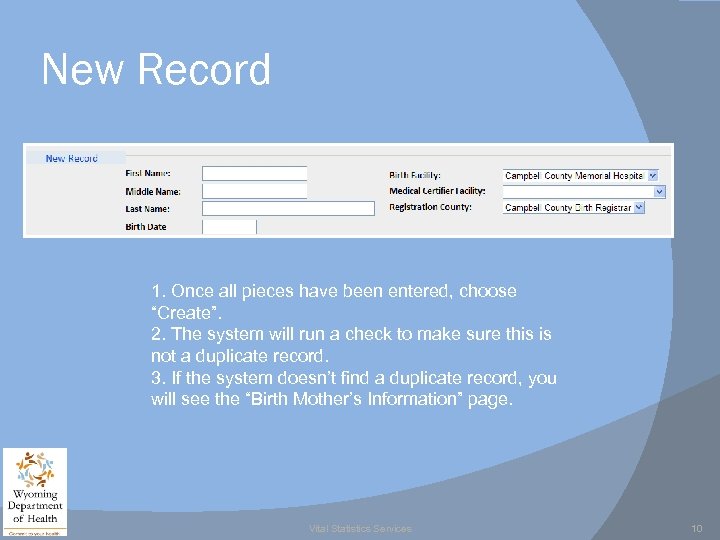 New Record 1. Once all pieces have been entered, choose “Create”. 2. The system will run a check to make sure this is not a duplicate record. 3. If the system doesn’t find a duplicate record, you will see the “Birth Mother’s Information” page. Vital Statistics Services 10
 Birth Mother’s Information Once the record is created you will be taken to the mother’s information page. You will notice that this page is broken up into four different sections: Child Mother Father Information Vital Statistics Services 11
 Child Section The child’s name, date of birth, and the facility are already filled in based on the information entered to create the record. If the child has a suffix, you will still have to enter that information using the drop down list. Enter the time of birth using military time. Vital Statistics Services 12
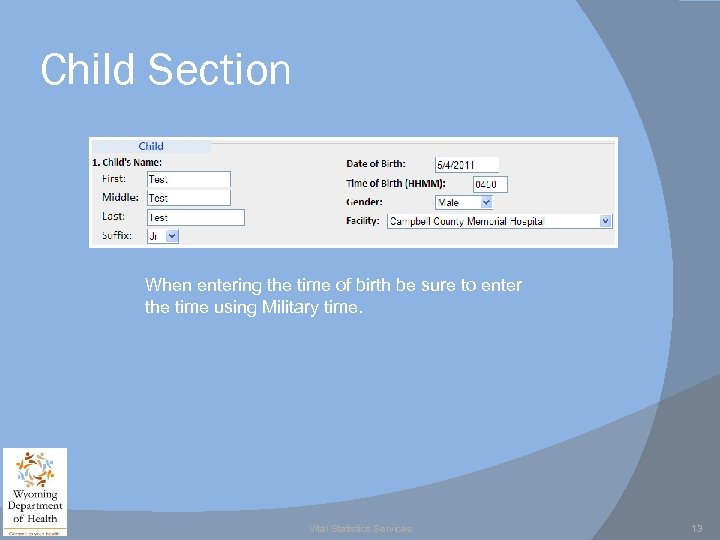 Child Section When entering the time of birth be sure to enter the time using Military time. Vital Statistics Services 13
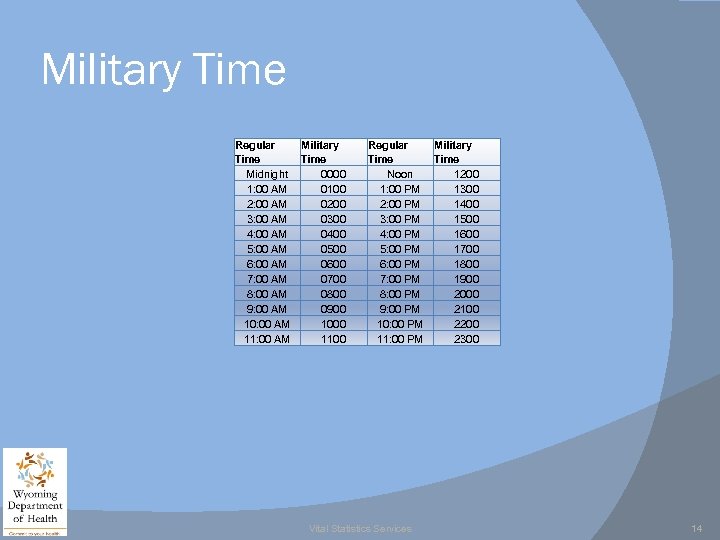 Military Time Regular Military Time Midnight 0000 1: 00 AM 0100 2: 00 AM 0200 3: 00 AM 0300 4: 00 AM 0400 5: 00 AM 0500 6: 00 AM 0600 7: 00 AM 0700 8: 00 AM 0800 9: 00 AM 0900 10: 00 AM 1000 11: 00 AM 1100 Regular Military Time Noon 1200 1: 00 PM 1300 2: 00 PM 1400 3: 00 PM 1500 4: 00 PM 1600 5: 00 PM 1700 6: 00 PM 1800 7: 00 PM 1900 8: 00 PM 2000 9: 00 PM 2100 10: 00 PM 2200 11: 00 PM 2300 Vital Statistics Services 14
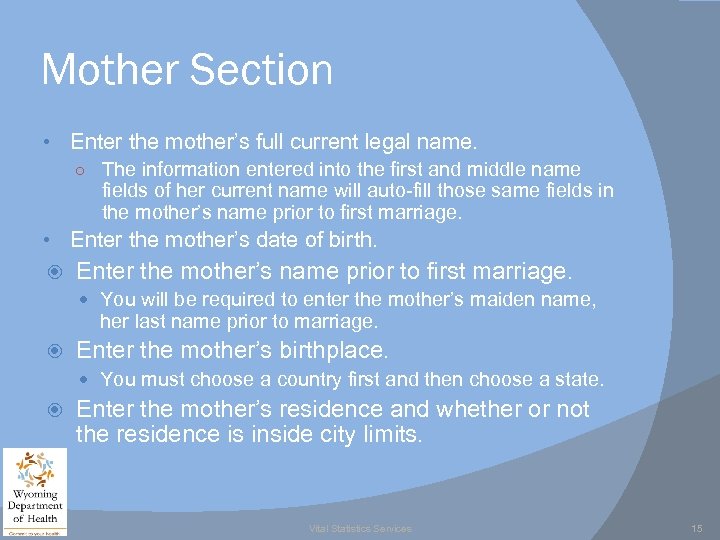 Mother Section • Enter the mother’s full current legal name. ○ The information entered into the first and middle name fields of her current name will auto-fill those same fields in the mother’s name prior to first marriage. • Enter the mother’s date of birth. Enter the mother’s name prior to first marriage. You will be required to enter the mother’s maiden name, her last name prior to marriage. Enter the mother’s birthplace. You must choose a country first and then choose a state. Enter the mother’s residence and whether or not the residence is inside city limits. Vital Statistics Services 15
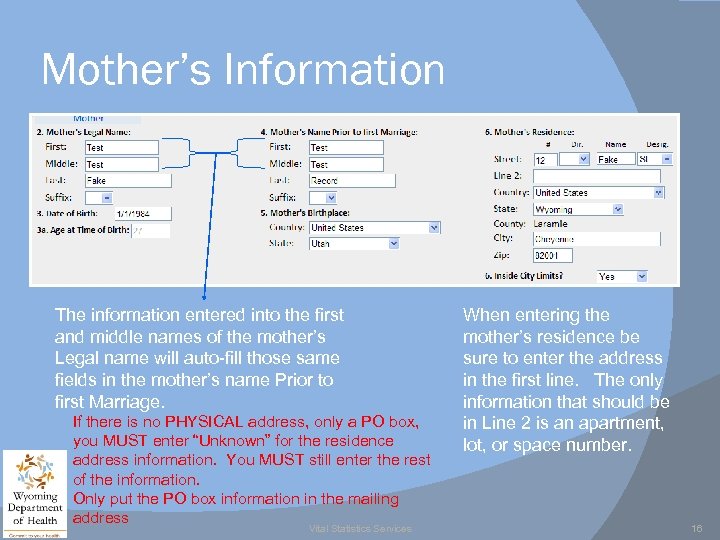 Mother’s Information The information entered into the first and middle names of the mother’s Legal name will auto-fill those same fields in the mother’s name Prior to first Marriage. If there is no PHYSICAL address, only a PO box, you MUST enter “Unknown” for the residence address information. You MUST still enter the rest of the information. Only put the PO box information in the mailing address Vital Statistics Services When entering the mother’s residence be sure to enter the address in the first line. The only information that should be in Line 2 is an apartment, lot, or space number. 16
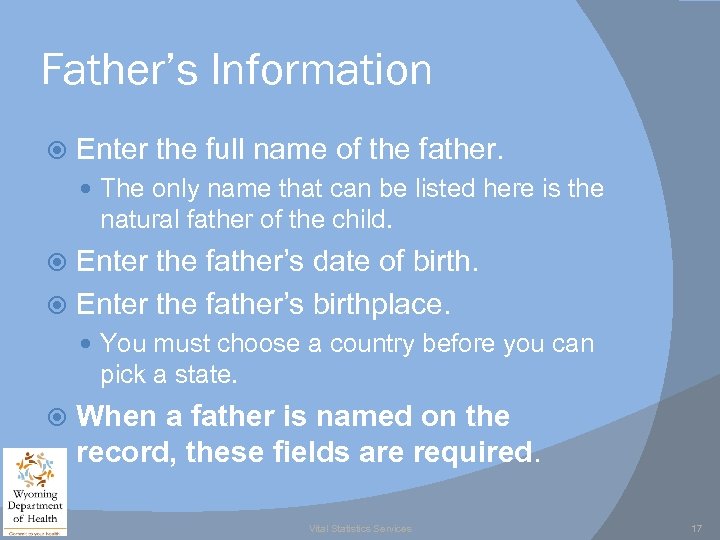 Father’s Information Enter the full name of the father. The only name that can be listed here is the natural father of the child. Enter the father’s date of birth. Enter the father’s birthplace. You must choose a country before you can pick a state. When a father is named on the record, these fields are required. Vital Statistics Services 17
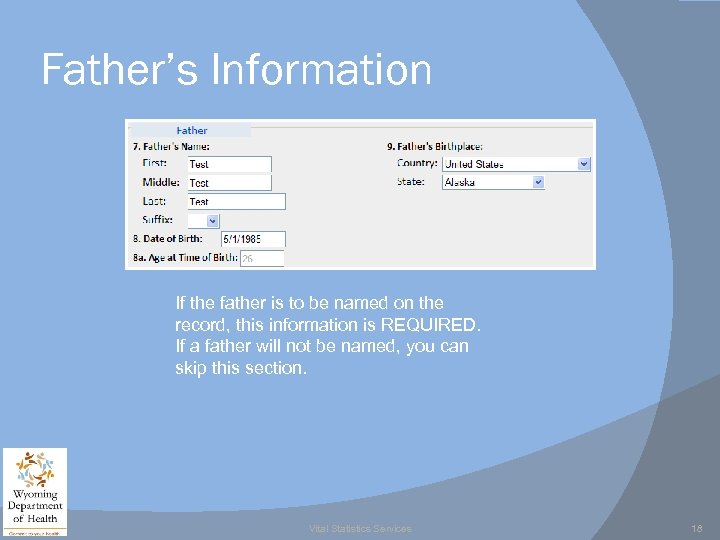 Father’s Information If the father is to be named on the record, this information is REQUIRED. If a father will not be named, you can skip this section. Vital Statistics Services 18
 Other Information Enter the mother’s mailing address. You are allowed to enter PO box number for this field. However, you are still required to enter the city and zip code information as well. Choose the mother’s marital status. This information must be entered exactly as it is shown on the mother’s worksheet. When Vital Statistics Services has questions about the marital status we will go back and review the worksheet completed by the mother. If there are questions about this section, call VSS for additional information Choose whether or not a Paternity/Denial Affidavit has been completed. Vital Statistics Services 19
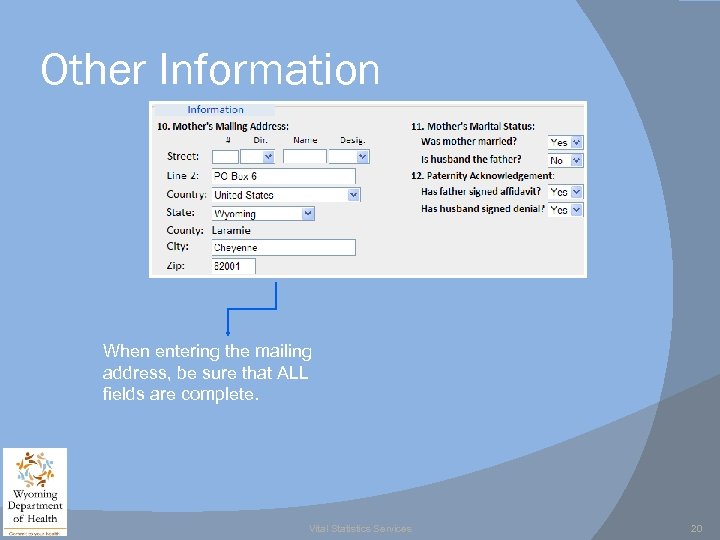 Other Information When entering the mailing address, be sure that ALL fields are complete. Vital Statistics Services 20
 Mother’s Marital Status If the mother was married at the time of conception, birth, or anytime in between and her husband is the father: Wyoming statute 35 -1 -411 “Name of father on birth certificate”, The husband’s name shall be entered on the Birth Certificate as the father. You may run into situations in which the mother refuses to name or provide information about the father, please call VSS when this happens. Vital Statistics Services 21
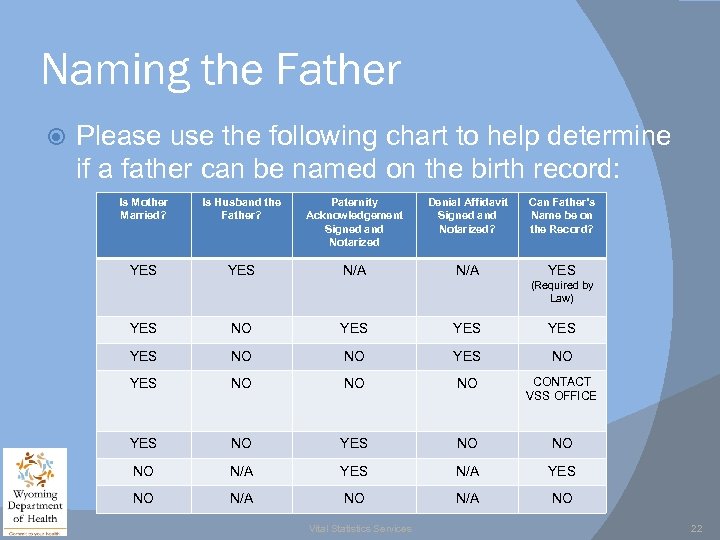 Naming the Father Please use the following chart to help determine if a father can be named on the birth record: Is Mother Married? Is Husband the Father? Paternity Acknowledgement Signed and Notarized Denial Affidavit Signed and Notarized? Can Father’s Name be on the Record? YES N/A YES (Required by Law) YES NO YES YES NO NO NO CONTACT VSS OFFICE YES NO NO NO N/A YES NO N/A NO Vital Statistics Services 22
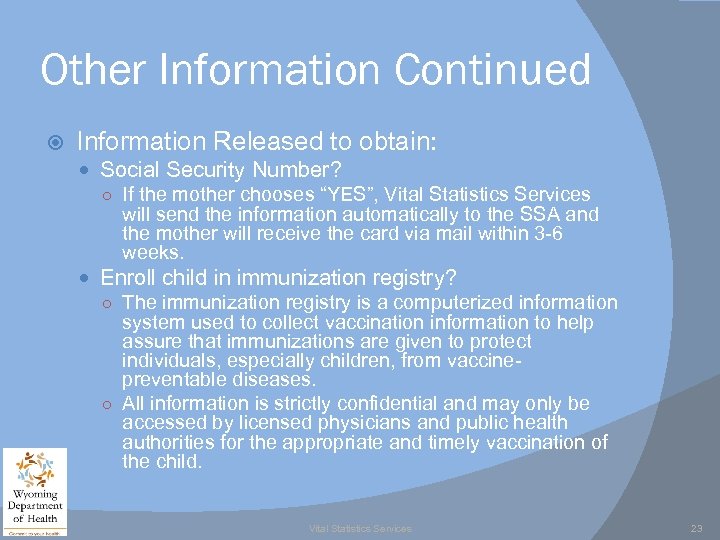 Other Information Continued Information Released to obtain: Social Security Number? ○ If the mother chooses “YES”, Vital Statistics Services will send the information automatically to the SSA and the mother will receive the card via mail within 3 -6 weeks. Enroll child in immunization registry? ○ The immunization registry is a computerized information system used to collect vaccination information to help assure that immunizations are given to protect individuals, especially children, from vaccinepreventable diseases. ○ All information is strictly confidential and may only be accessed by licensed physicians and public health authorities for the appropriate and timely vaccination of the child. Vital Statistics Services 23
 Parent’s Social Security Numbers Furnishing the parent’s Social Security Numbers is required by Federal Law, 42 USC 405(c) (section 205(c)). The numbers will be made available to the Wyoming Department of Family Services to assist with child support enforcement activities and to the IRS for the purpose of determining Earned Income Tax Credit compliance. If either parent does not have a SSN you must enter 999 -99 -9999. If a father is not named, no SSN information is required. Vital Statistics Services 24
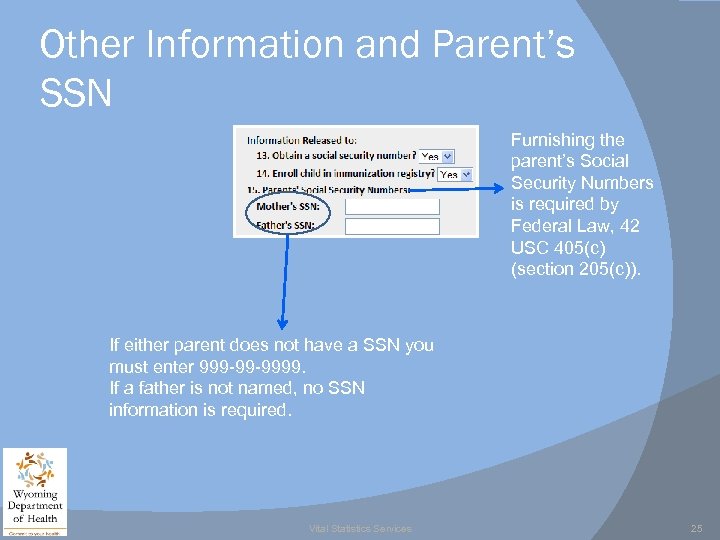 Other Information and Parent’s SSN Furnishing the parent’s Social Security Numbers is required by Federal Law, 42 USC 405(c) (section 205(c)). If either parent does not have a SSN you must enter 999 -99 -9999. If a father is not named, no SSN information is required. Vital Statistics Services 25
 Filing a Birth Certificate Mother and father statistical information Vital Statistics Services 26
 Education Level Choose the box that indicates the highest education level completed by the mother. If she is currently enrolled, check the box that indicates the previous grade or highest degree received. Do not leave this item blank. Education is highly related to fertility, health practices, and pregnancy outcome. It is also used as an indicator of socioeconomic status. Vital Statistics Services 27
 Hispanic Origin The Hispanic origin and Race questions should be asked independently. ‘‘Hispanic’’ is not a race, and a mother/father who is of Hispanic origin may be of any race. Do not leave this item blank. ‘‘Hispanic’’ is a selfdesignated classification for people whose origins are from Spain, the Spanish-speaking countries of Central or South America, the Caribbean, or those identifying themselves generally as Spanish or Spanish-American. Origin can be viewed as ancestry, nationality, or country of birth of the person or person’s parents or ancestors prior to their arrival in the United States. Although the prompts include the major Hispanic groups, other groups may be specified under ‘‘Yes, other Spanish/Hispanic/Latino(a). ’’ Vital Statistics Services 28
 Hispanic Origin Continued Check the box that best describe whether the mother/father is Spanish/Hispanic/ Latino(a). If the mother/father indicates an ethnic origin not on the list, enter it in the ‘‘Specify’’ space. If the mother/father is not of Hispanic origin, check the box indicating ‘‘No, not Spanish/Hispanic/Latino(a). ” Vital Statistics Services 29
 Race The Race and Hispanic origin questions should be answered independently. Do not leave item blank. If there is no checkbox for the response, check the box ‘‘Other (Specify)’’ and enter the response in the blank, even if it is not a race. American Indian and Alaska Native refer only to those native to North and South America (including Central America) and do not include Asian Indian. Please specify the name of enrolled or principal tribe (e. g. , Navajo or Cheyenne) for the American Indian or Alaska Native. For Asians and Pacific Islanders, enter the national origin of the mother. For Asians check Asian Indian, Chinese, Filipino, Japanese, Korean, Vietnamese, or specify Other Asian group; for Pacific Islanders check Hawaiian, Guamanian or Chamorro, Samoan, or specify Other Pacific Islander. Vital Statistics Services 30
 Race Continued In 1997, the Office of Management and Budget mandated the use of specific guidelines in collecting information on race and ethnicity and provided an opportunity for individuals to choose more than one racial category if they wish to reflect multiple racial heritage. Race is essential in producing data for minority groups and is an important variable in planning for and evaluating the effectiveness of health programs. It is also used to study racial variations in childbearing, access to health care, and pregnancy outcomes (perinatal mortality and birth weight). Vital Statistics Services 31
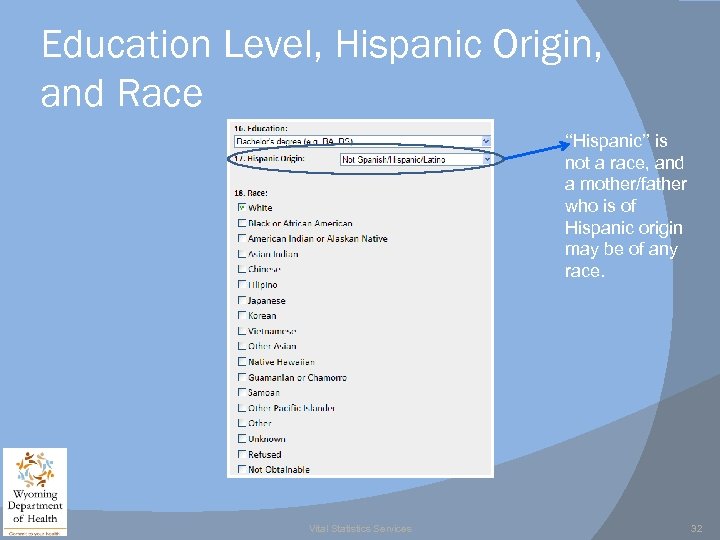 Education Level, Hispanic Origin, and Race ‘‘Hispanic’’ is not a race, and a mother/father who is of Hispanic origin may be of any race. Vital Statistics Services 32
 Filing a Birth Certificate Statistical Information about the mother only Vital Statistics Services 33
 Mother’s Height Enter the mother’s height in feet and inches. If the record indicates height in fractions such as 5 feet 6 and one-half inches, truncate and enter 5 feet, 6 inches. In combination with prepregnancy weight, mother’s height is used to calculate the body mass index (BMI). Maternal BMI is associated with maternal morbidity and mortality. Maternal weight gain data are of little value without knowledge of maternal BMI. Vital Statistics Services 34
 Mother’s Pregnancy Weight Record the weight in whole pounds only; do not include fractions. This item collects the weight of the mother immediately before she became pregnant. Vital Statistics Services 35
 Did the Mother get WIC Food during the Pregnancy WIC is a Special Supplemental Nutrition Program for Women, Infants, and Children which serves to safeguard the health of low -income women, infants, & children up to age 5 who are at nutritional risk by providing nutritious supplemental foods, health and nutrition, screening and education, breastfeeding support, and referrals to healthcare. Choose either YES or NO Vital Statistics Services 36
 Why is WIC Needed? Knowledge of participation in government programs such as WIC is helpful in judging program use and its effect on health outcome. Participation in programs such as WIC is also an indicator of socioeconomic status. Vital Statistics Services 37
 Did the Mother Use Cigarettes? Enter the number of cigarettes the mother smoked during an average day during the certain time periods before and during pregnancy. When entering information only enter a value in one column (Cigarettes OR Packs), not both. Vital Statistics Services 38
 Cigarette Use Smoking during pregnancy has been determined to have an adverse affect on pregnancy outcome. This information is used to evaluate the relationship between certain lifestyle factors and pregnancy outcome and to determine at what levels these factors clearly being to affect pregnancy outcome. Vital Statistics Services 39
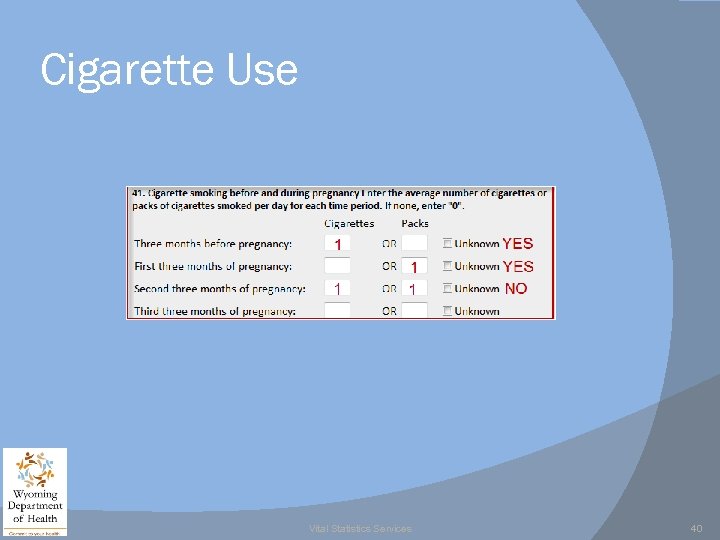 Cigarette Use Vital Statistics Services 40
 Month Prenatal Care Began Enter the month of pregnancy when the mother began going to the doctor for prenatal care. This question is asking if the mother began prenatal care in the 1 st, 2 nd, 3 rd, 4 th, 5 th, 6 th, 7 th, 8 th, 9 th, or 10 th month of pregnancy. Acceptable values are only between 01 and 10. Do not enter January, February, March, etc… Vital Statistics Services 41
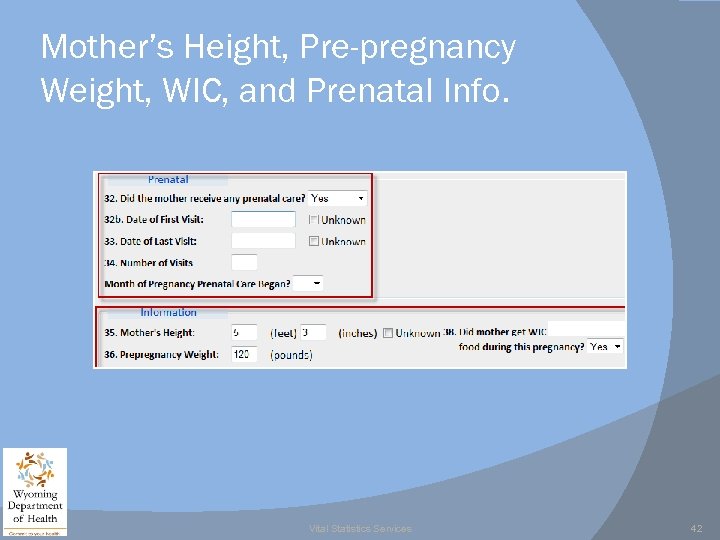 Mother’s Height, Pre-pregnancy Weight, WIC, and Prenatal Info. Vital Statistics Services 42
 Finished with Mother’s Worksheet Information Once you have answered the tobacco use per day you will notice that you are done with the mother’s worksheet. It is very important this worksheet is completed and signed, it provides all of the information to establish a birth record. If there any questions unanswered you should get a response so the worksheet is complete. Vital Statistics Services 43