


 Скачать презентацию Vijesh J Shukla M K Institute Computer Studies
d0de9a75080a4a40e324552ae16d0d13.ppt
- Количество слайдов: 20
 Vijesh J Shukla M. K. Institute Computer Studies Bharuch 51 st Orientation Programme (11/07/2006 to 07/08/2006) Presentation on WI _Fi (Wirless LAN)
 What is Wi-Fi (Wirless. Frequency) • If you've been in to the European / American Countries one can see an airport, coffee shop, library or hotel recently, chances are there you've been right in the middle of a wireless network • Many people also use wireless networking, which is also called Wi FI
 • Wifi was intended to be used for mobile computing devices, such as laptops, in LANs, but is now often used for increasingly more applications, including Internet and Vo. IP phone access, gaming, and basic connectivity of consumer electronics such as televisions and DVD players. There are even more standards in development that will allow Wi-Fi to be used by cars in highways in support of an Intelligent Transportation System to increase safety, gather statistics, and enable mobile commerce IEEE 802
 • Now networking, to connect their computers at home, and an increasing number of Are in European / USA use the technology to provide free or low-cost Internet access to residents. • In the near future, wireless networking may become so widespread that you can access the Internet just about anywhere at any time, without using wires
 Basic of WI FI • • • A wireless network uses Radio Waves , just like cell phone Television and radios. In fact, communication across a wireless network is a lot like two-way radio communication. This is how it works (1)A computer's wireless adapter translates data into a radio signal and transmits it using an antenna (2) A wireless router receives the signal and decodes it. It sends the information to the Internet using a physical, wired Ethernet connection. (A Ethernet is LAN Card which is used for Connection of Computer with the network)
 • This process also works in reverse, with the router receiving information from the Internet, translating it into a radio signal and sending it to the computer's wireless adapter • The WIFI communication is similar to the walkie-talkie/ cellphones and other device. Just like it Radio waves are transmitted and this are converted into 1 s and 0 s and then into radio waves and again from radio waves back into 1 s and 0 s.
 • But WIFI is some what different from above WI FI can transmit at frequencies of 2. 4 GHz or 5 GHz. This frequency is considerably higher than the frequencies used for cell phones, walkie -talkies and televisions. The higher frequency allows the signal to carry more data. • They use 802. 11 networking standards, which come in several flavors: – It can handle up to 11 megabits of data per second, and it uses complimentary code keying (CCK) coding.
 • A person with a Wifi device, such as a computer, telephone, or personal digital assistant (PDA) can connect to the Internet when in proximity of an access point. The region covered by one or several access points is called a hotspot. Hotspots can range from a single room to many square miles of overlapping hotspots. Wifi can also be used to create a Wireless mesh network. Both architectures are used in
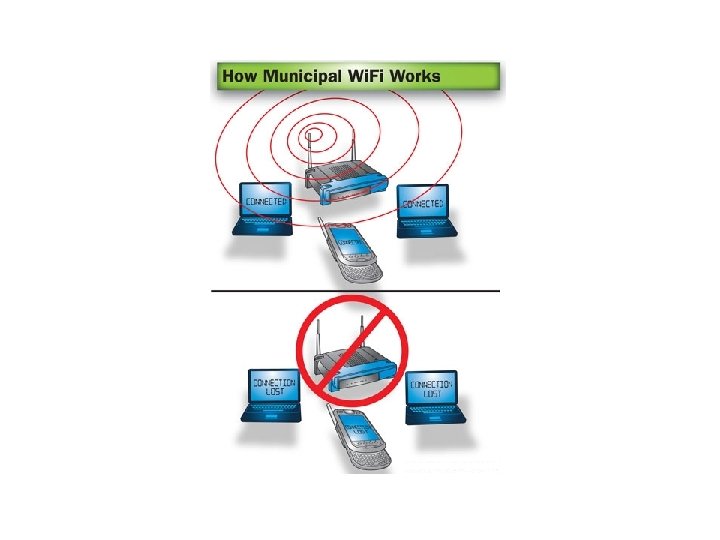
 Wi. Fi radios can transmit on any of three frequency bands. Or, they can "frequency hop" rapidly between the different bands. Frequency hopping helps reduce interference and lets multiple devices use the same wireless connection simultaneously. • As long as they all have wireless adapters, several devices can use one router to connect to the Internet. This connection is convenient and virtually invisible, and it's fairly reliable. If the router fails or if too many people try to use highbandwidth applications at the same time, however, users can experience interference or lose their connections
 HOW TO Construct Wireless Network • If you want to take advantage of public Wi. Fi hotspots or start a wireless network in your home, the first thing you'll need to do is make sure your computer has the right wireless gear. Most new LAPTOPS and many new desktop computers come with built-in wireless transmitters. • If your laptop doesn't, you can buy a wireless adapter that plugs into the PC card slot or USB port. Desktop computers can use USB adapters, or you can buy an adapter that plugs into the PCI slot inside the computer's case
 • If your laptop doesn't, you can buy a wireless adapter that plugs into the PC card slot or USB port. Desktop computers can use USB adapters, or you can buy an adapter that plugs into the PCI slot inside the computer's case • Being able to connect to the Internet in public hotspots is extremely convenient. Wireless home networks are convenient as well. They allow you to easily connect multiple computers and to move them from place to place without disconnecting and reconnecting wires. • If you already have several computers networked in your home, you can create a wireless network with a wireless access point. If you have several computers that are not networked, you'll need a wireless router
 • A Wireless Router Contains A port to connect to your CABLE or DSL modem A ROUTER An Ethernet hub A firewall A wireless access point
 • A wireless router allows you to use wireless signals or Ethernet cables to connect your computers to one another, to a printer and to the Internet. Most routers provide coverage for about 100 feet i. e 30. 5 meters in all directions, although walls and doors can block the signal. If your home is very large, One can have inexpensive Repetator to increase your router's range.
 • Once you plug in your router, it should start working at its default settings. Most routers let you use a Web interface to change your settings. You can select • The name of the network, known as its service set identifier (SSID) • The channel that the router uses – • Your router's security options -- Many routers use a standard, publicly-available sign-on, so it's a good idea to set your own username and password.
 Security In Wireless Network • Security is an important part of a home wireless network, as well as public Wi. Fi hotspots. If you set your router to create an open hotspot, anyone who has a wireless card will be able to use your signal. Most people would rather keep strangers out of their network, though. Doing so requires you to take a few security precautions
 • To keep your network private, you can use one of the following methods (1) Wired Equivalency Privacy (WEP) (2) Wi. Fi Protected Access (WPA) (3)Media Access Control (MAC )
 • In Short Wi Fi technology is Technology of Future as far as India is Concerned. Wi Fi technology is very much useful as far as giving Internet Access or Networking Access to student of University or college is concerned. The students can invariable logs into the network and they can copy the Assignment / Lectures and also student can submit their Term work in college without coming • Also If this technology is implemented at our Airports / Railways Station / or in any public Place A common Man can easily get connected through Internet to his/ her computer Network and get his work done. / Submit in their office • Many Colleges and Private Groups in their Campus have easily Implemented this technology for getting Connected to their network
 • Advantages of Wi-Fi • Allows LANs to be deployed without cabling, typically reducing the costs of network deployment and expansion. Spaces where cables cannot be run, such as outdoor areas and historical buildings, can host wireless LANs. • Wi-Fi silicon pricing continues to come down, making Wi-Fi a very economical networking option and driving inclusion of Wi-Fi in an ever-widening array of devices. • Wi-Fi networks support roaming, in which a mobile client station such as a laptop computer can move from one access point to another as the user moves around a building or area. • Wi-Fi is a global set of standards. Unlike cellular carriers, the same Wi-Fi client works in different countries around the world. • Widely available in more than 250, 000 public hot spots and millions of homes and corporate and university campuses worldwide.
 DISADVATANGE OF WI-FI • Wi-Fi networks have limited range. A typical Wi-Fi home router using 802. 11 b or 802. 11 g with a stock antenna might have a range of 45 m (150 ft) indoors and 90 m (300 ft) outdoors. Range also varies with frequency band, as Wi. Fi is no exception to the physics of radio wave propagation. Wi. Fi in the 2. 4 GHz frequency block has better range than Wi. Fi in the 5 GHz frequency block, and less range than the oldest Wi. Fi (and pre-Wi. Fi) 900 MHz block. Outdoor range with improved antennas can be several kilometres or more with line-ofsight. • Problem of Accessing the Network in High Density area i. e Large Building Complex , with Many WI-FI Access point. ( Decrease in Signal to Noise Ratio, Overlapping) Wi. Fi networks can be monitored and used to read and copy data (including personal information) transmitted over the network when no encryption such as VPN is used.