


 Скачать презентацию Using WSS 4 J and Axis to Secure
be6b5a30dec2c7c13421d67531d24ab6.ppt
- Количество слайдов: 25
 Using WSS 4 J and Axis to Secure Web Services in the U. S. Government Kevin T. Smith Technical Director, Mc. Donald Bradley Inc.
 Agenda • Introduction • Part 1 – Web Services Security Implementation for the Government’s Horizontal Fusion Program • Part 2 – Web Services Security for a Not-To. Be-Named Current Government Program • Part 3 – Resources, code, etc.
 Introduction • Kevin T. Smith – Director of SOA & Semantics Security Team (S 3 T) at Mc. Donald Bradley – Focused on Information Assurance & SOA • Author/Co-Author of Several Technology Books and Articles • Contact Info: – ksmith@mcdonaldbradley. com or – kevintsmith@comcast. net
 Part 1: Horizontal Fusion
 What is Horizontal Fusion (HF)? • From Web Site (http: //www. horizontalfusion. dtic. mil/) : – “As an award-winning effort consistent with the goals and guidance for military transformation, Horizontal Fusion has been organized to focus technology on the information-sharing challenges of net-centric warfare and to demonstrate innovation and benefit quickly…” – “Horizontal Fusion deploys web-services to leverage existing and emerging technologies in a secure environment. ” • From A Technology Perspective: – – Lots of Data, Everything exposed as web services Large amount of data, many participants, large amount of services Much web service chaining, federated search capabilities Government requirements mandated very strong security
 HF Technology History • 2003 – Initial Phase, Deployment of Many Web Services • 2004 - Developed Security Toolkit using Apache WSS 4 J & Apache Axis handlers – Done for Axis 1. 1 and 1. 2 – Used WSS 4 J “snapshot” at that point + Open. SAML (updated WSS 4 J in early ’ 05) • 2004 -Present : In Production
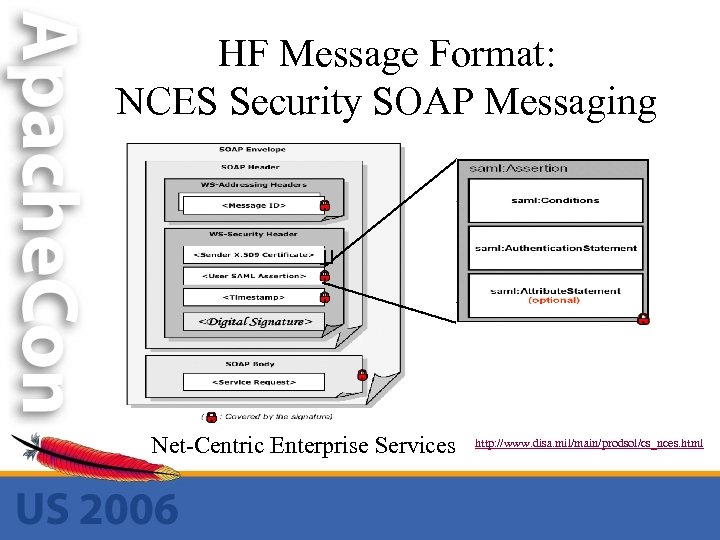 HF Message Format: NCES Security SOAP Messaging Net-Centric Enterprise Services http: //www. disa. mil/main/prodsol/cs_nces. html
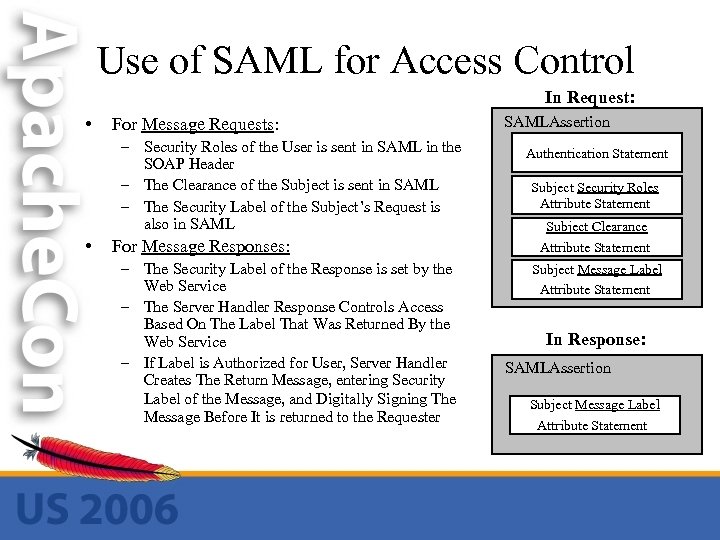 Use of SAML for Access Control In Request: • For Message Requests: – Security Roles of the User is sent in SAML in the SOAP Header – The Clearance of the Subject is sent in SAML – The Security Label of the Subject’s Request is also in SAML • For Message Responses: – The Security Label of the Response is set by the Web Service – The Server Handler Response Controls Access Based On The Label That Was Returned By the Web Service – If Label is Authorized for User, Server Handler Creates The Return Message, entering Security Label of the Message, and Digitally Signing The Message Before It is returned to the Requester SAMLAssertion Authentication Statement Subject Security Roles Attribute Statement Subject Clearance Attribute Statement Subject Message Label Attribute Statement In Response: SAMLAssertion Subject Message Label Attribute Statement
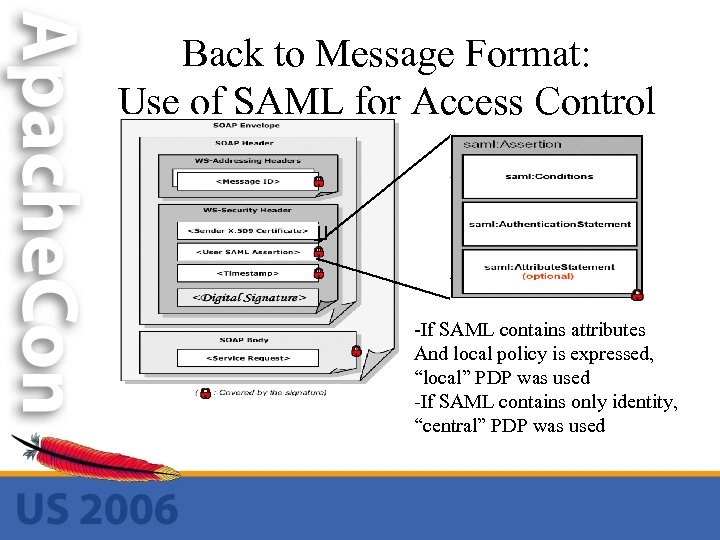 Back to Message Format: Use of SAML for Access Control -If SAML contains attributes And local policy is expressed, “local” PDP was used -If SAML contains only identity, “central” PDP was used
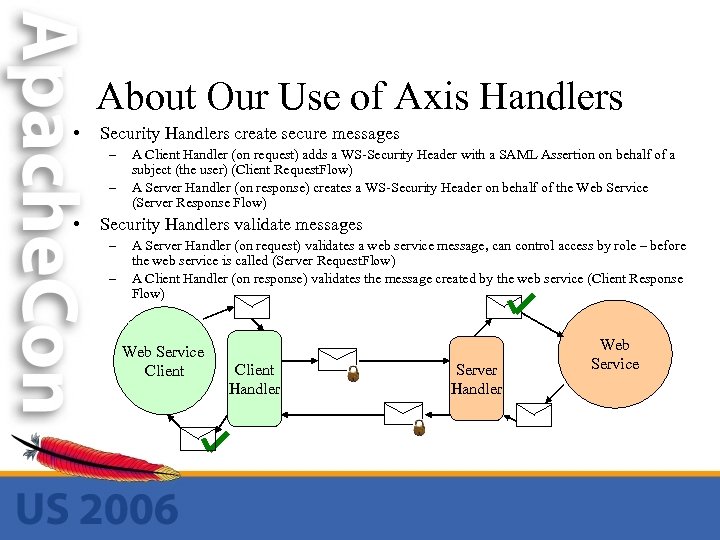 About Our Use of Axis Handlers • Security Handlers create secure messages – – • A Client Handler (on request) adds a WS-Security Header with a SAML Assertion on behalf of a subject (the user) (Client Request. Flow) A Server Handler (on response) creates a WS-Security Header on behalf of the Web Service (Server Response Flow) Security Handlers validate messages – – A Server Handler (on request) validates a web service message, can control access by role – before the web service is called (Server Request. Flow) A Client Handler (on response) validates the message created by the web service (Client Response Flow) Web Service Client Handler Server Handler Web Service
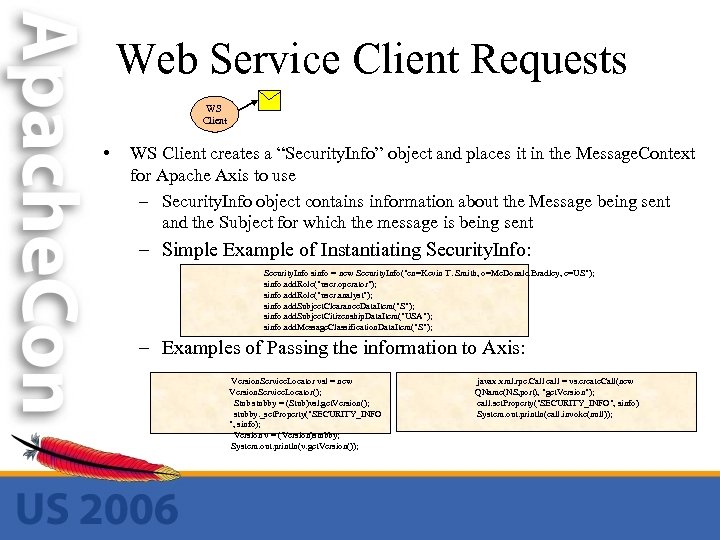 Web Service Client Requests WS Client • WS Client creates a “Security. Info” object and places it in the Message. Context for Apache Axis to use – Security. Info object contains information about the Message being sent and the Subject for which the message is being sent – Simple Example of Instantiating Security. Info: Security. Info sinfo = new Security. Info("cn=Kevin T. Smith, o=Mc. Donald Bradley, c=US"); sinfo. add. Role("user. operator"); sinfo. add. Role("user. analyst"); sinfo. add. Subject. Clearance. Data. Item("S"); sinfo. add. Subject. Citizenship. Data. Item("USA"); sinfo. add. Message. Classification. Data. Item("S"); – Examples of Passing the information to Axis: Version. Service. Locator vsl = new Version. Service. Locator(); Stub stubby = (Stub)vsl. get. Version(); stubby. _set. Property("SECURITY_INFO ", sinfo); Version v = (Version)stubby; System. out. println(v. get. Version()); javax. xml. rpc. Call call = vs. create. Call(new QName(NS, port), "get. Version"); call. set. Property("SECURITY_INFO", sinfo) System. out. println(call. invoke(null));
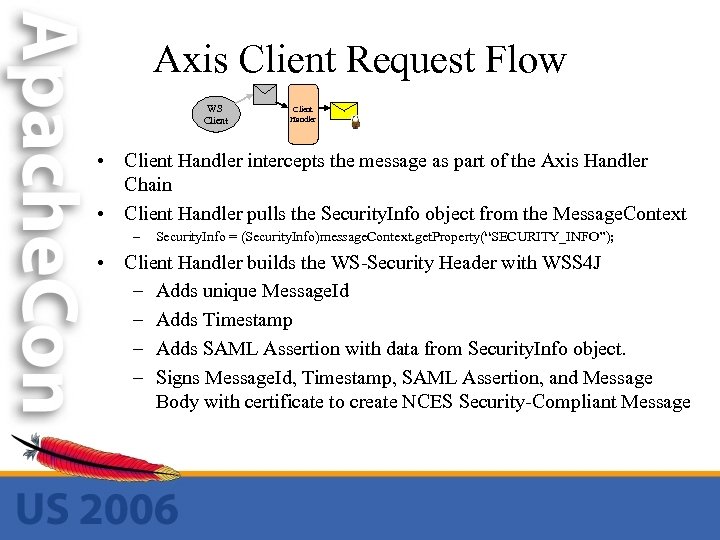 Axis Client Request Flow WS Client Handler • Client Handler intercepts the message as part of the Axis Handler Chain • Client Handler pulls the Security. Info object from the Message. Context – Security. Info = (Security. Info)message. Context. get. Property(“SECURITY_INFO”); • Client Handler builds the WS-Security Header with WSS 4 J – Adds unique Message. Id – Adds Timestamp – Adds SAML Assertion with data from Security. Info object. – Signs Message. Id, Timestamp, SAML Assertion, and Message Body with certificate to create NCES Security-Compliant Message
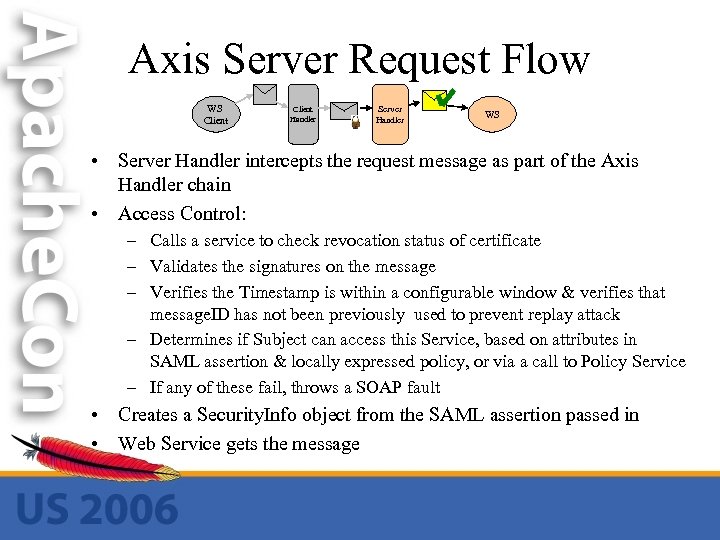 Axis Server Request Flow WS Client Handler Server Handler WS • Server Handler intercepts the request message as part of the Axis Handler chain • Access Control: – Calls a service to check revocation status of certificate – Validates the signatures on the message – Verifies the Timestamp is within a configurable window & verifies that message. ID has not been previously used to prevent replay attack – Determines if Subject can access this Service, based on attributes in SAML assertion & locally expressed policy, or via a call to Policy Service – If any of these fail, throws a SOAP fault • Creates a Security. Info object from the SAML assertion passed in • Web Service gets the message
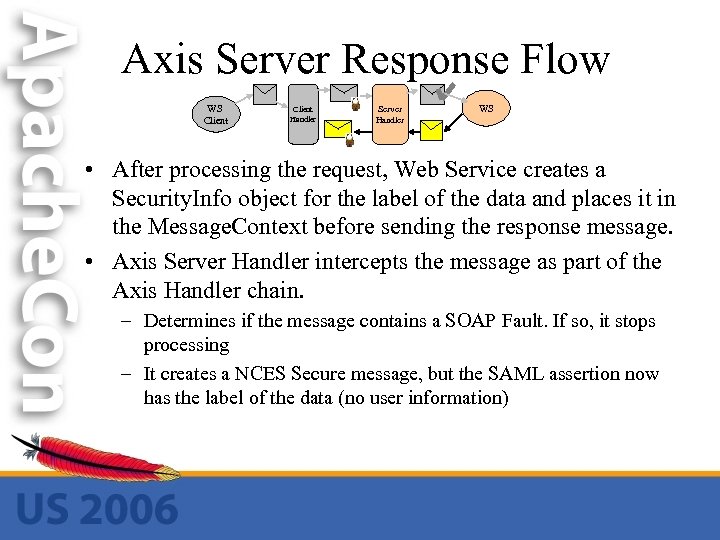 Axis Server Response Flow WS Client Handler Server Handler WS • After processing the request, Web Service creates a Security. Info object for the label of the data and places it in the Message. Context before sending the response message. • Axis Server Handler intercepts the message as part of the Axis Handler chain. – Determines if the message contains a SOAP Fault. If so, it stops processing – It creates a NCES Secure message, but the SAML assertion now has the label of the data (no user information)
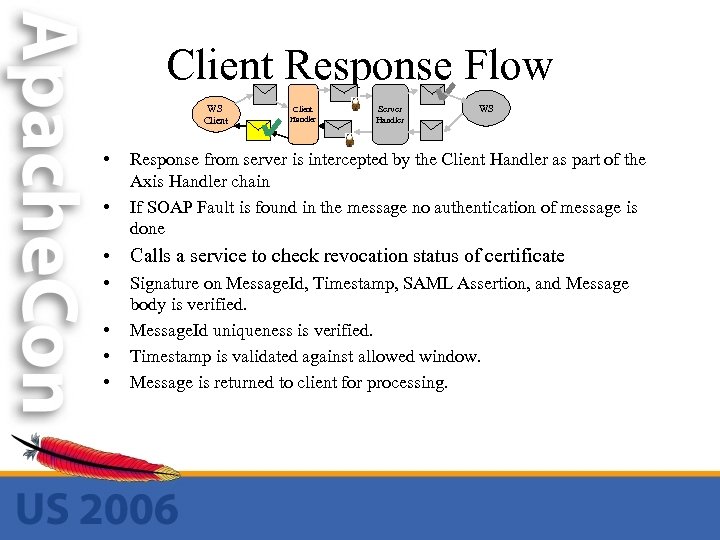 Client Response Flow WS Client • • Client Handler Server Handler WS Response from server is intercepted by the Client Handler as part of the Axis Handler chain If SOAP Fault is found in the message no authentication of message is done • Calls a service to check revocation status of certificate • • Signature on Message. Id, Timestamp, SAML Assertion, and Message body is verified. Message. Id uniqueness is verified. Timestamp is validated against allowed window. Message is returned to client for processing.
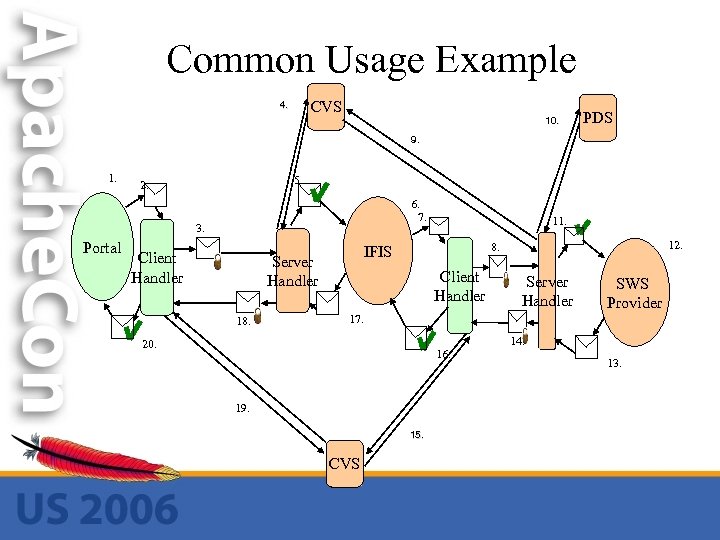 Common Usage Example CVS 4. 10. PDS 9. 1. 5. 2. 6. 7. 3. Portal Client Handler 12. 8. IFIS Server Handler 18. 11. Client Handler Server Handler SWS Provider 17. 20. 16. 19. 15. CVS 14. 13.
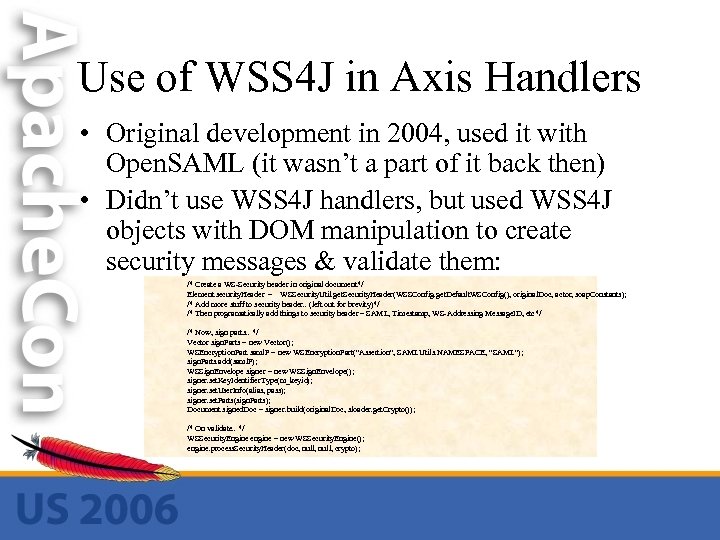 Use of WSS 4 J in Axis Handlers • Original development in 2004, used it with Open. SAML (it wasn’t a part of it back then) • Didn’t use WSS 4 J handlers, but used WSS 4 J objects with DOM manipulation to create security messages & validate them: /* Create a WS-Security header in original document*/ Element security. Header = WSSecurity. Util. get. Security. Header(WSSConfig. get. Default. WSConfig(), original. Doc, actor, soap. Constants); /* Add more stuff to security header. . (left out for brevity)*/ /* Then programatically add things to security header – SAML, Timestamp, WS-Addressing Message. ID, etc*/ /* Now, sign parts. . */ Vector sign. Parts = new Vector(); WSEncryption. Part saml. P = new WSEncryption. Part("Assertion", SAMLUtils. NAMESPACE, "SAML"); sign. Parts. add(saml. P); WSSign. Envelope signer = new WSSign. Envelope(); signer. set. Key. Identifier. Type(m_keyid); signer. set. User. Info(alias, pass); signer. set. Parts(sign. Parts); Document signed. Doc = signer. build(original. Doc, sloader. get. Crypto()); /* On validate. . */ WSSecurity. Engine engine = new WSSecurity. Engine(); engine. process. Security. Header(doc, null, crypto);
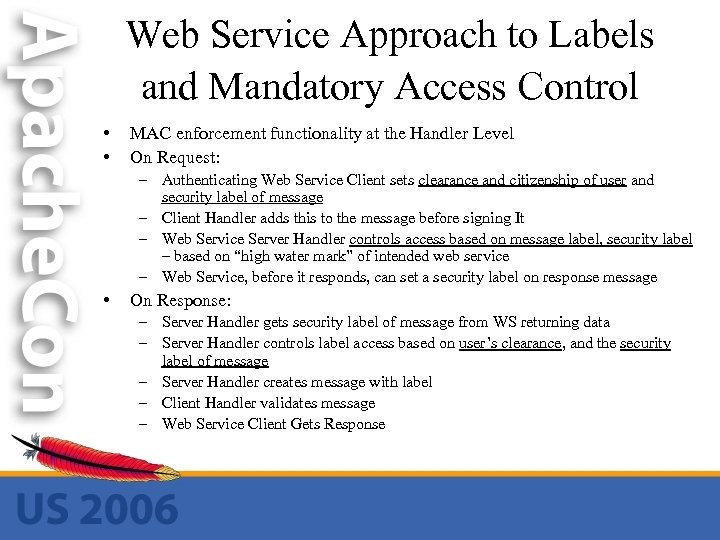 Web Service Approach to Labels and Mandatory Access Control • • MAC enforcement functionality at the Handler Level On Request: – Authenticating Web Service Client sets clearance and citizenship of user and security label of message – Client Handler adds this to the message before signing It – Web Service Server Handler controls access based on message label, security label – based on “high water mark” of intended web service – Web Service, before it responds, can set a security label on response message • On Response: – Server Handler gets security label of message from WS returning data – Server Handler controls label access based on user’s clearance, and the security label of message – Server Handler creates message with label – Client Handler validates message – Web Service Client Gets Response
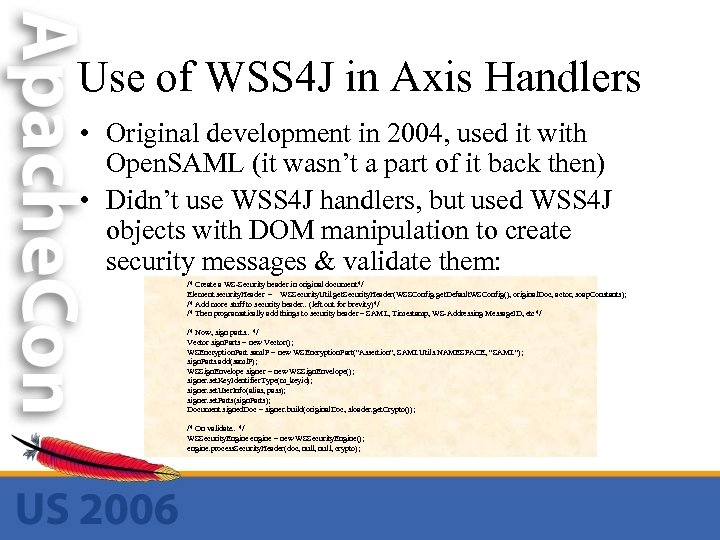 Use of WSS 4 J in Axis Handlers • Original development in 2004, used it with Open. SAML (it wasn’t a part of it back then) • Didn’t use WSS 4 J handlers, but used WSS 4 J objects with DOM manipulation to create security messages & validate them: /* Create a WS-Security header in original document*/ Element security. Header = WSSecurity. Util. get. Security. Header(WSSConfig. get. Default. WSConfig(), original. Doc, actor, soap. Constants); /* Add more stuff to security header. . (left out for brevity)*/ /* Then programatically add things to security header – SAML, Timestamp, WS-Addressing Message. ID, etc*/ /* Now, sign parts. . */ Vector sign. Parts = new Vector(); WSEncryption. Part saml. P = new WSEncryption. Part("Assertion", SAMLUtils. NAMESPACE, "SAML"); sign. Parts. add(saml. P); WSSign. Envelope signer = new WSSign. Envelope(); signer. set. Key. Identifier. Type(m_keyid); signer. set. User. Info(alias, pass); signer. set. Parts(sign. Parts); Document signed. Doc = signer. build(original. Doc, sloader. get. Crypto()); /* On validate. . */ WSSecurity. Engine engine = new WSSecurity. Engine(); engine. process. Security. Header(doc, null, crypto);
 Original Code on HF Web Site • Code with ANT build, examples, sample keystores was put on government site in 2004 • http: //horizontalfusion. dtic. mil/docs/specs/20040417_nces_dia_security. zip
 Part 2: Use of WSS 4 J & Axis In Current Gov’t Program
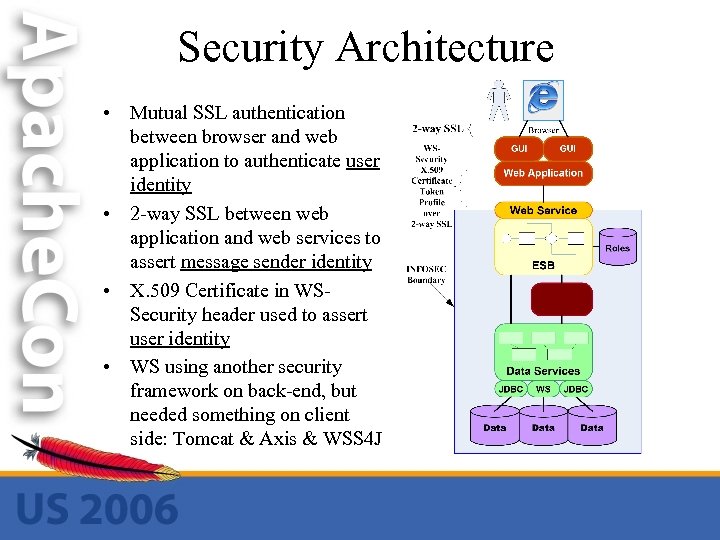 Security Architecture • Mutual SSL authentication between browser and web application to authenticate user identity • 2 -way SSL between web application and web services to assert message sender identity • X. 509 Certificate in WSSecurity header used to assert user identity • WS using another security framework on back-end, but needed something on client side: Tomcat & Axis & WSS 4 J
![A Glance at Axis/WSS 4 J Code //In Servlet/JSP code: X 509 Certificate[] certs](https://present5.com/presentation/be6b5a30dec2c7c13421d67531d24ab6/image-23.jpg "A Glance at Axis/WSS 4 J Code //In Servlet/JSP code: X 509 Certificate[] certs") A Glance at Axis/WSS 4 J Code //In Servlet/JSP code: X 509 Certificate[] certs = (X 509 Certificate[]) request. get. Attribute("javax. servlet. request. X 509 Certificate"); //. . //Put that in the property Axis uses Version. Service. Locator vsl = new Version. Service. Locator(); Stub stubby = (Stub)vsl. get. Version(); stubby. _set. Property("CLIENT_CERT", certs[0]); //passes in the X 509 Certificate object Version v = (Version)stubby; System. out. println(v. get. Version()); //In client request handler: X 509 Certificate cert = (X 509 Certificate)inout. Context. get. Property("CLIENT_CERT"); /* Make a binary. Security. Token element */ Document. Builder builder = Document. Builder. Factory. new. Instance(). new. Document. Builder(); Document doc = builder. new. Document(); org. apache. xml. security. Init. init(); X 509 Security binary. Token = new X 509 Security(doc); binary. Token. set. X 509 Certificate(cert); /* Now create a WS-Security Header, and put the Binary Token Under It */ WSSec. Header wsh = new WSSec. Header(); wsh. set. Must. Understand(false); Element e = wsh. insert. Security. Header(orig. Doc); Node dup = orig. Doc. import. Node(binary. Token. get. Element(), true); e. append. Child(dup); Message new. Msg = (Message)to. SOAPMessage(orig. Doc); inout. Context. set. Request. Message(new. Msg);
A Glance at Axis/WSS 4 J Code //In Servlet/JSP code: X 509 Certificate[] certs = (X 509 Certificate[]) request. get. Attribute("javax. servlet. request. X 509 Certificate"); //. . //Put that in the property Axis uses Version. Service. Locator vsl = new Version. Service. Locator(); Stub stubby = (Stub)vsl. get. Version(); stubby. _set. Property("CLIENT_CERT", certs[0]); //passes in the X 509 Certificate object Version v = (Version)stubby; System. out. println(v. get. Version()); //In client request handler: X 509 Certificate cert = (X 509 Certificate)inout. Context. get. Property("CLIENT_CERT"); /* Make a binary. Security. Token element */ Document. Builder builder = Document. Builder. Factory. new. Instance(). new. Document. Builder(); Document doc = builder. new. Document(); org. apache. xml. security. Init. init(); X 509 Security binary. Token = new X 509 Security(doc); binary. Token. set. X 509 Certificate(cert); /* Now create a WS-Security Header, and put the Binary Token Under It */ WSSec. Header wsh = new WSSec. Header(); wsh. set. Must. Understand(false); Element e = wsh. insert. Security. Header(orig. Doc); Node dup = orig. Doc. import. Node(binary. Token. get. Element(), true); e. append. Child(dup); Message new. Msg = (Message)to. SOAPMessage(orig. Doc); inout. Context. set. Request. Message(new. Msg);
 Conclusion • We found that WSS 4 J and Apache Axis were easy to use to build a complex Web Services Security Solution • Interoperability issues – – Originally (in early 2004) WS-Security namespace changes made interoperability difficult – Now, no such problems – interoperates with. NET solutions, and Axis client handler with WSS 4 J in current project interoperates well with BEA weblogic ALSB security subsystem.
 Questions?