


 Скачать презентацию User Guide e Payment of Uttar Pradesh Commercial
42dd35dcc026c4bc5c6c8b26878d3536.ppt
- Количество слайдов: 40
 User Guide e. Payment of Uttar Pradesh Commercial Taxes Baroda Connect
 e. Payment of Uttar Pradesh Commercial Taxes General “Baroda Connect” is an umbrella of e. Banking products offered to the customers on echannels. Under this umbrella an additional Product, e. Payment of Uttar Pradesh Commercial Taxes has been added to give more convenience and comfort to our Customers.
 e. Payment of Uttar Pradesh Commercial Taxes General Under e. Payment of Uttar Pradesh Commercial Taxes, Customer registers at Uttar Pradesh Commercial Taxes site https: //secure. up. nic. in/comtax/ Customer to login with TIN and password for making the UP Commercial tax payment Baroda Connect User id and login and transaction Password required.
 e. Payment of Uttar Pradesh Commercial Taxes Advantages to Customers No physical challan required Instant updation of e. Payment at CTD Portal e. Payment can be made from any where, irrespective of location e. Payment can be made on behalf of any individual, corporate No more visits, queues and waiting at Collection center No limit on amount Ease of operation and convenience Instant cyber receipt for e. Payment made CIN No. for e. Payment of Commercial taxes in description of transaction e. Payment of Uttar Pradesh Commercial Tax is free of Charge Challan can be generated for payments made on any future date
 Uttar Pradesh Commercial Tax Who can avail these services? Customer having operative account with any CBS Branch Customer registered with Baroda Connect, Bank’s ebanking services Customer to register for Uttar Pradesh Commercial Tax at CTD Portal
 Uttar Pradesh Commercial Tax Baroda Connect Registration Customer to visit the Baroda Connect website – http: //www. bobibanking. com Download Application form for e. Banking for Retail or Corporate User This form is also available at the Bo. B CBS Branches Customer to fill the form and submit along with relevant documents to a Bo. B CBS Branch with a request for transaction Password Bo. B Branch validates the customer information Bo. B Dispatches the User ID to Customers communication address Customer to collect the Sign On and Transaction Passwords from the Bo. B Branch Customer is enabled for Baroda Connect Services after receiving PW
 Uttar Pradesh Commercial Tax Registration Process User logs in UP Commercial Tax website through https: //www. bobibanking. com Or https: //secure. up. nic. in/comtax/ Or www. bankofbaroda. com New user would log-in using the TIN No. (Traders Identification Number) as User Id and password as ‘ 123’ for the first time. Immediately after log in, User will be prompted to change the password compulsorily. Next time onwards User can log in using his TIN No. and password he has chosen the first time.
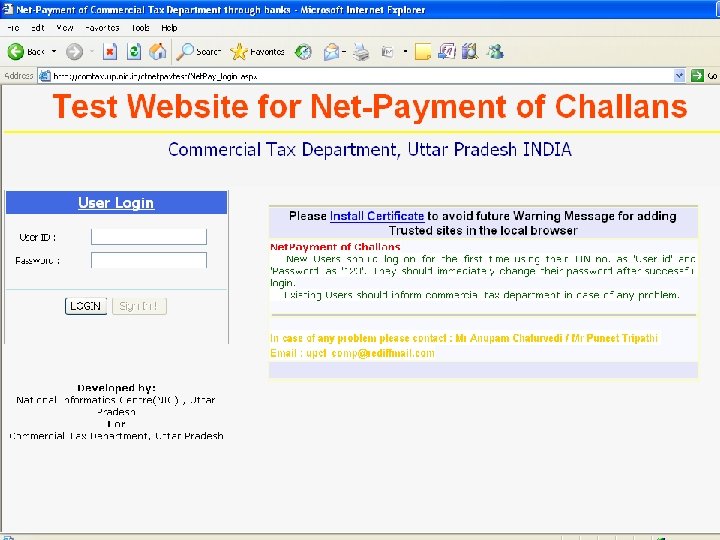
 e. Payment of Uttar Pradesh Commercial Tax Payment Process ◦ User logs to UP Commercial Tax website either through https: //www. bobibanking. com Or https: //secure. up. nic. in/comtax/ ◦ When the user directly goes to UP CTD site, Net Payment of Challans has to be clicked and the user’s login page at CTD site will be displayed ◦ New user for UP Commercial Tax would log-in using the TIN No. (Traders Identification Number) as User Id and password as ‘ 123’ for the first time in UP CTD portal. ◦ Immediately after log in, User will be prompted to change the password compulsorily. ◦ For subsequent login by the User, TIN No. and password set at the first time has to be used. ◦ After Successful login challan form is displayed and click on Ok button if details are correct. ◦ User to select “Bank of Baroda”
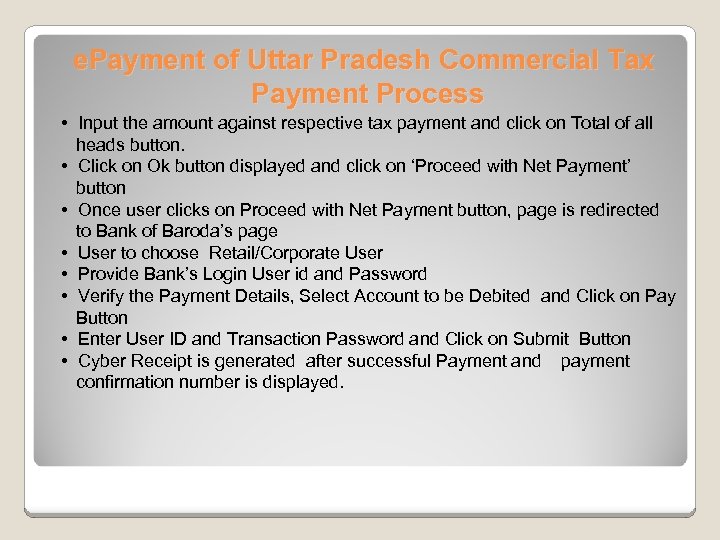 e. Payment of Uttar Pradesh Commercial Tax Payment Process • Input the amount against respective tax payment and click on Total of all heads button. • Click on Ok button displayed and click on ‘Proceed with Net Payment’ button • Once user clicks on Proceed with Net Payment button, page is redirected to Bank of Baroda’s page • User to choose Retail/Corporate User • Provide Bank’s Login User id and Password • Verify the Payment Details, Select Account to be Debited and Click on Pay Button • Enter User ID and Transaction Password and Click on Submit Button • Cyber Receipt is generated after successful Payment and payment confirmation number is displayed.
 e. Payment of Uttar Pradesh Commercial Tax Payment Process • User can Print/Save the Cyber Receipt • User to click on the hyperlink available for completing the process and will be redirected to UP Commercial Tax website. Details of payment is displayed in UP CTD portal and user can also print the challan. • Successful Payment Completion Message will be shown at UP Commercial Tax Portal Regeneration of Challan : For any challan regeneration, the user has to login to CTD website and regenerate the respective challan through the Dealer status link available.
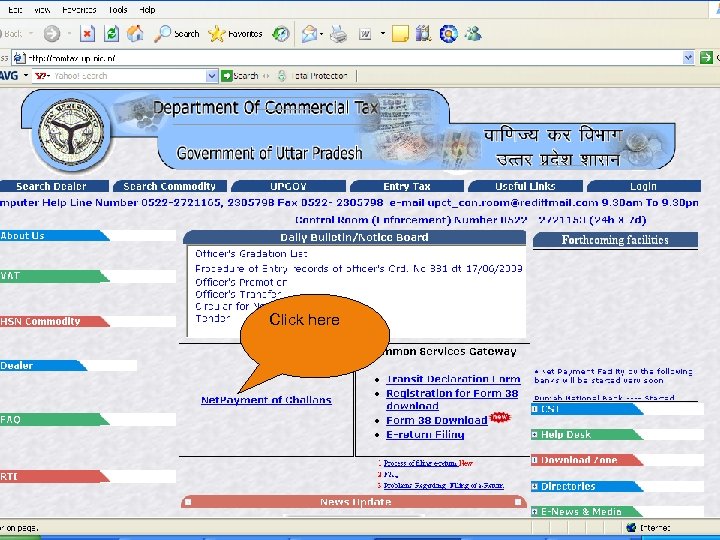 Click here
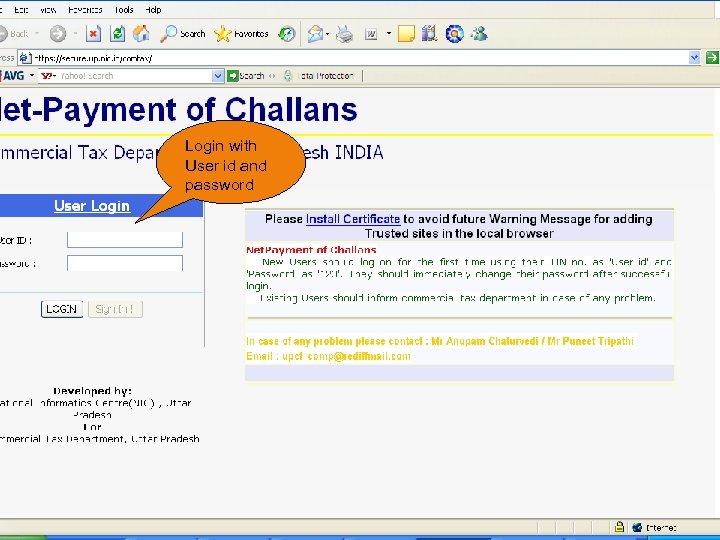 Login with User id and password
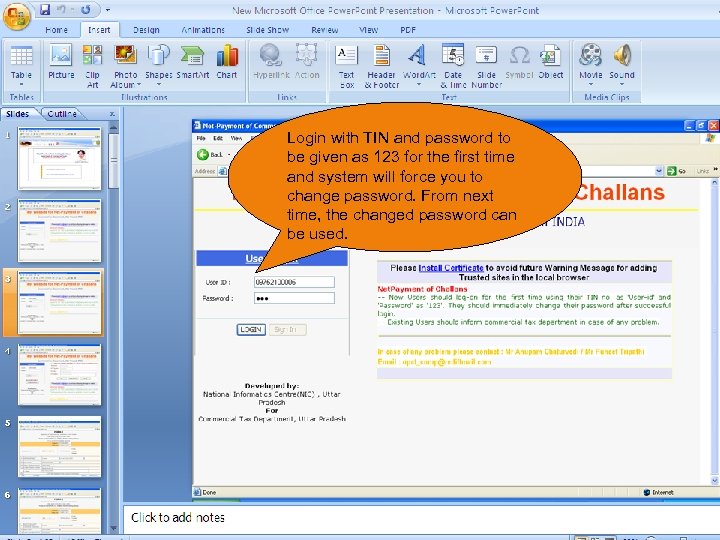 Login with TIN and password to be given as 123 for the first time and system will force you to change password. From next time, the changed password can be used.
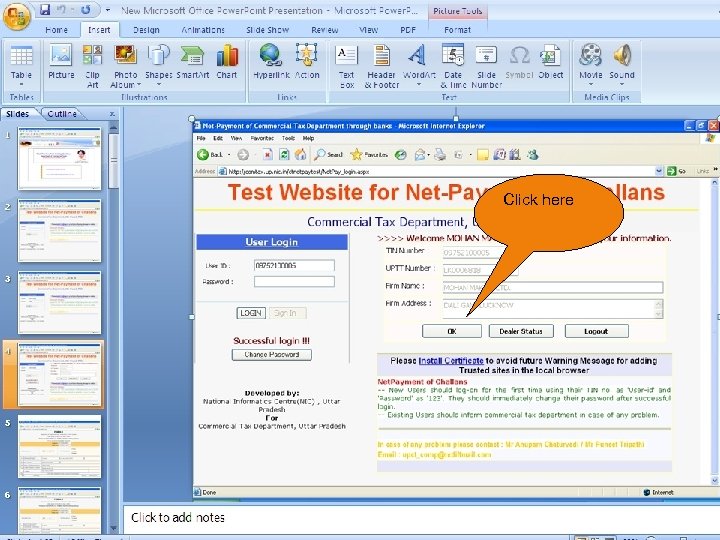 Click here
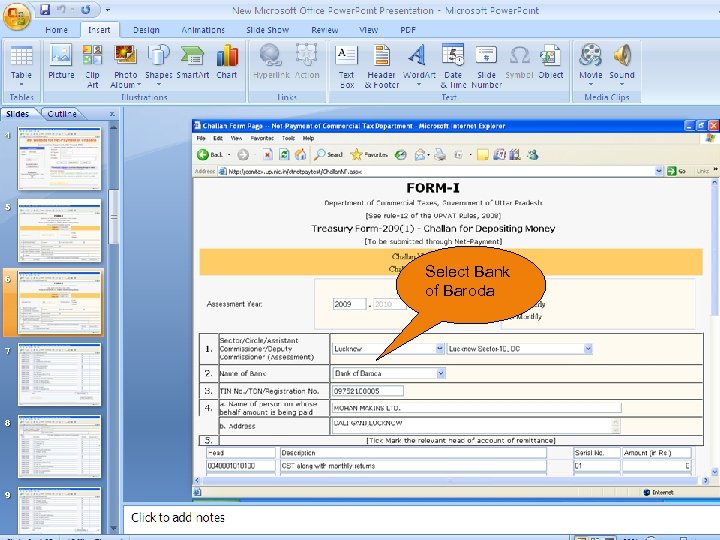 Select Bank of Baroda
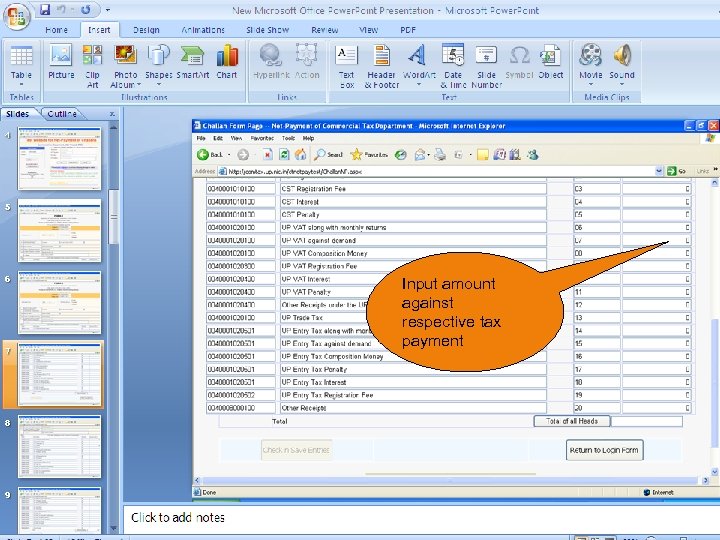 Input amount against respective tax payment
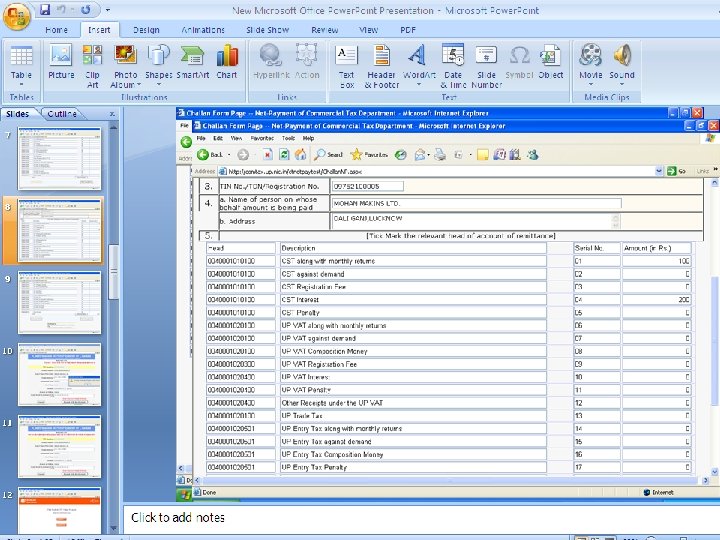
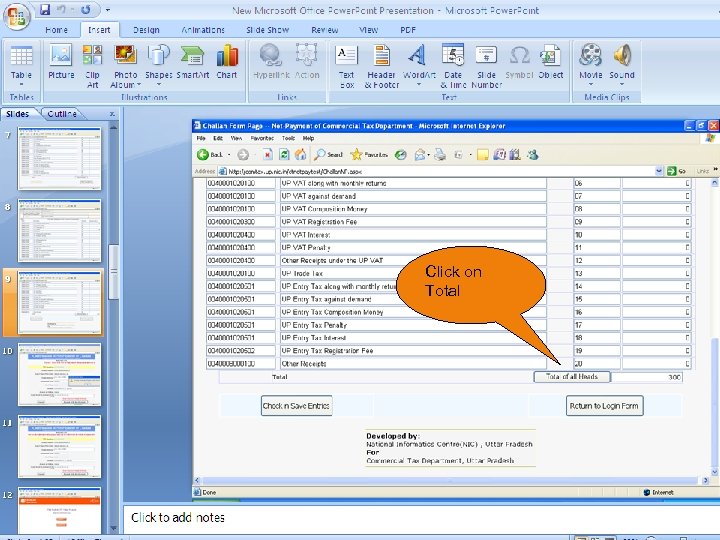 Click on Total
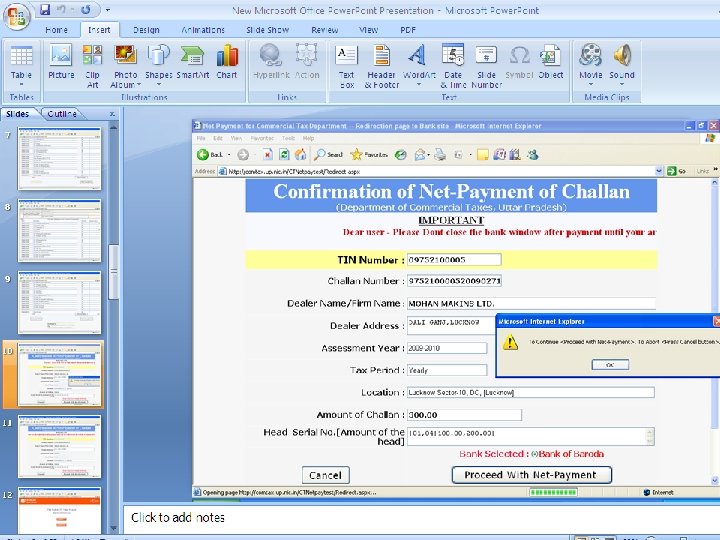
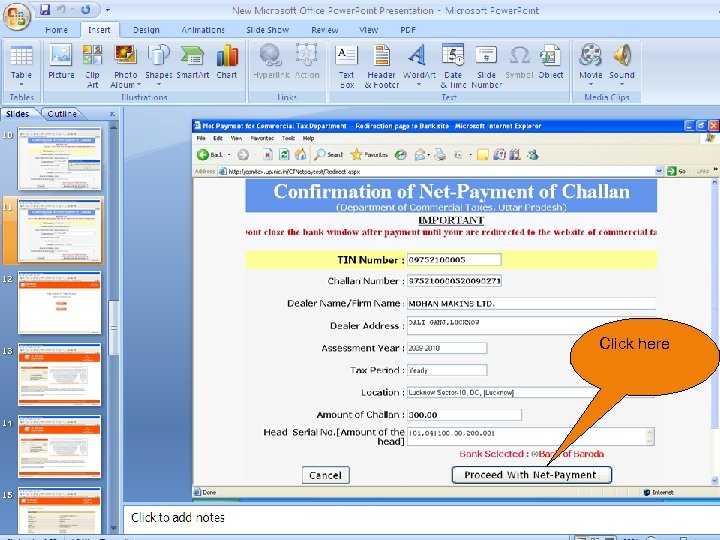 Click here
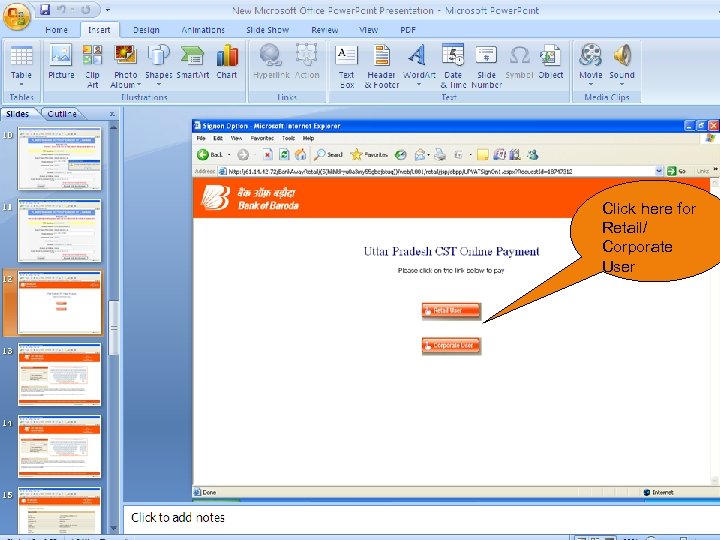 Click here for Retail/ Corporate User
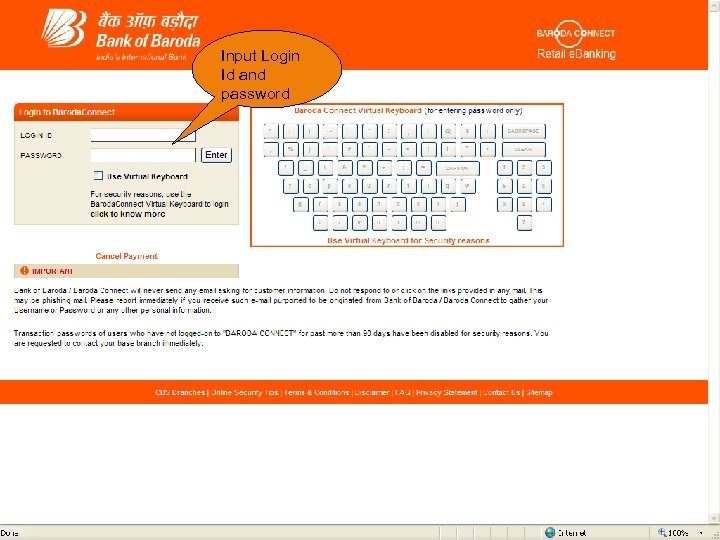 Input Login Id and password
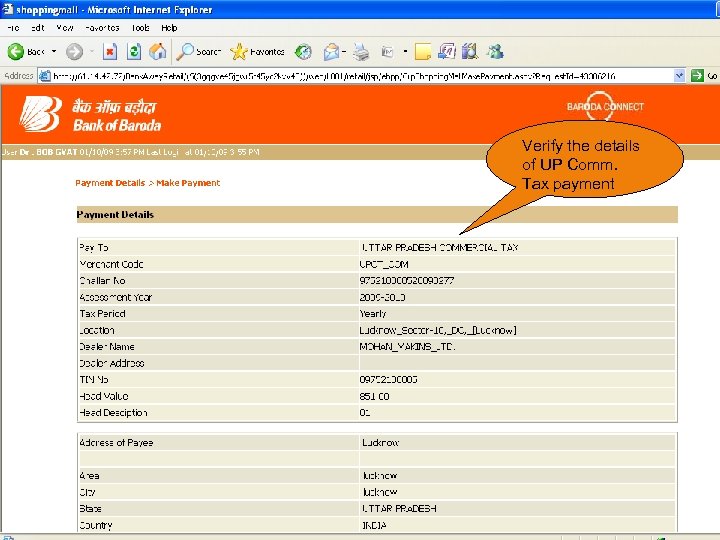 Verify the details of UP Comm. Tax payment
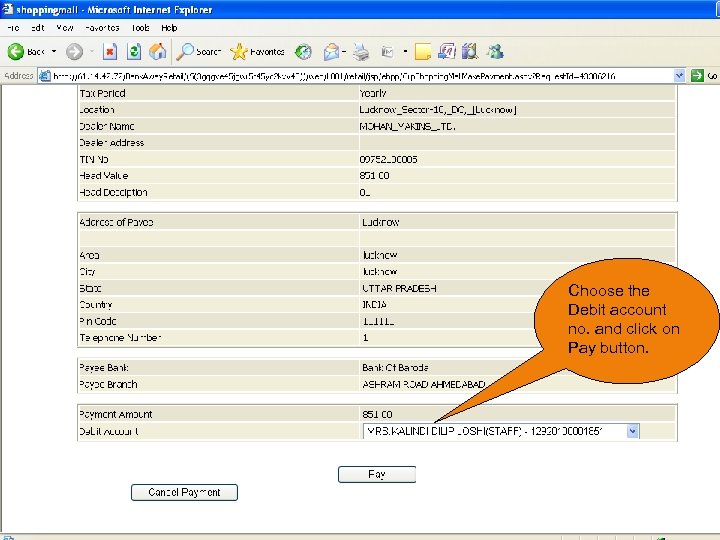 Choose the Debit account no. and click on Pay button.
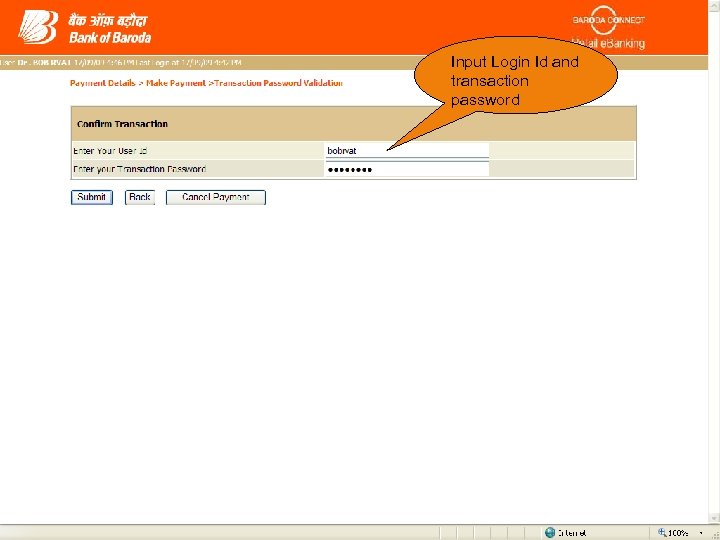 Input Login Id and transaction password
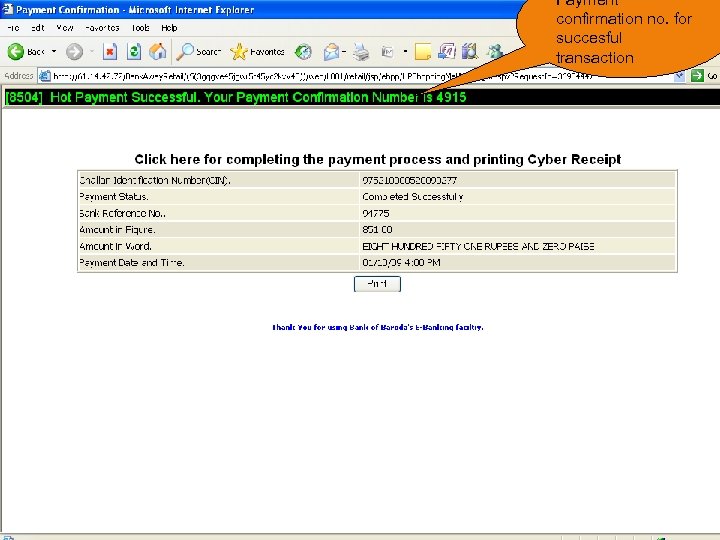 Payment confirmation no. for succesful transaction
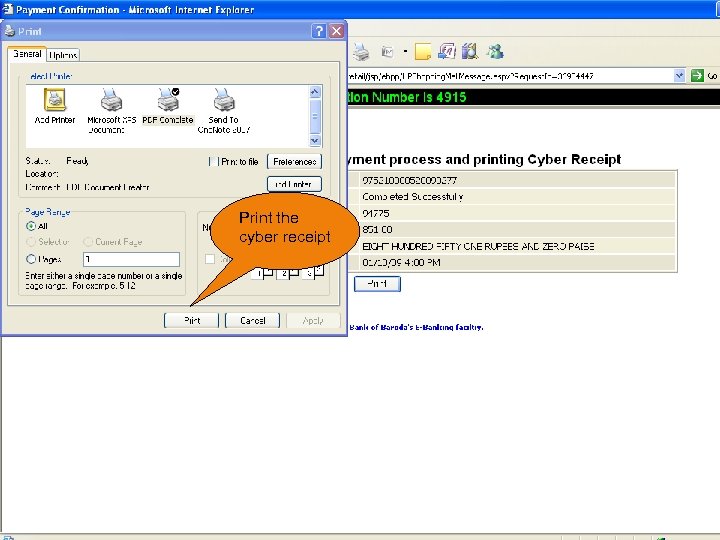 Print the cyber receipt
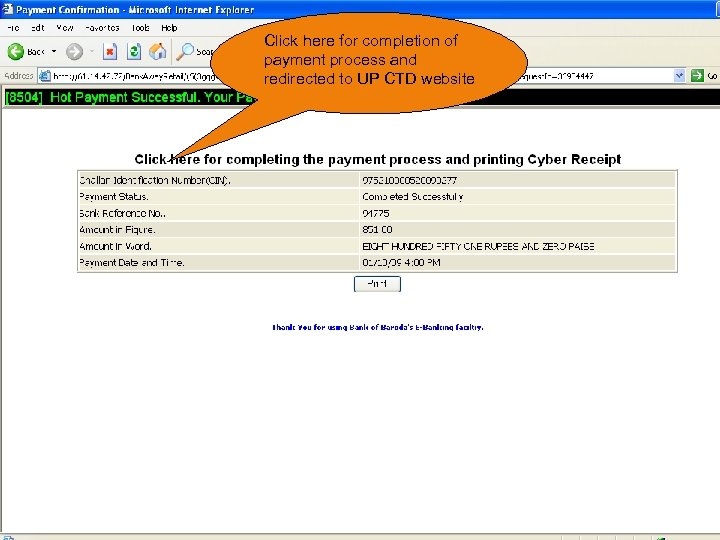 Click here for completion of payment process and redirected to UP CTD website
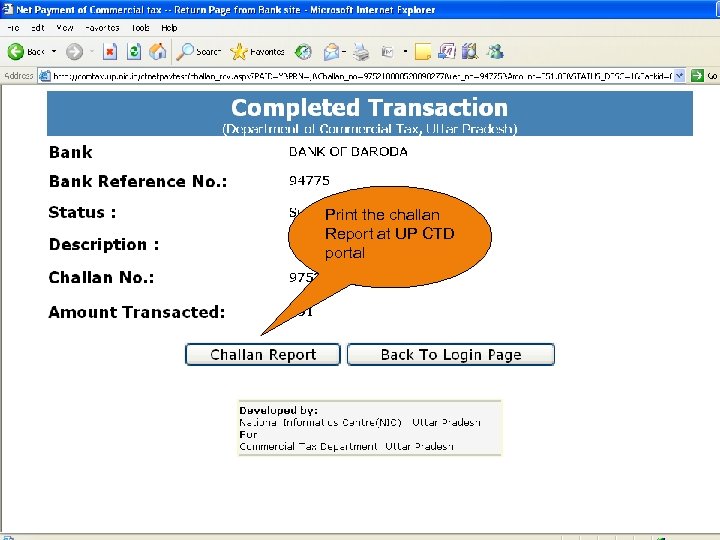 Print the challan Report at UP CTD portal
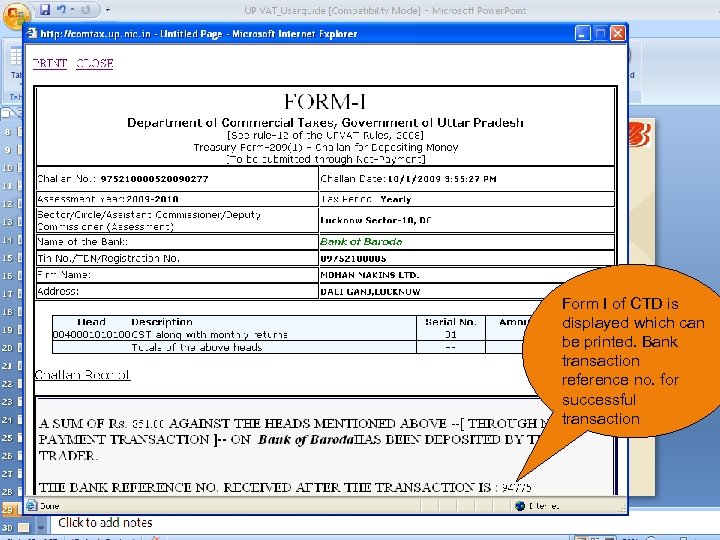 Form I of CTD is displayed which can be printed. Bank transaction reference no. for successful transaction
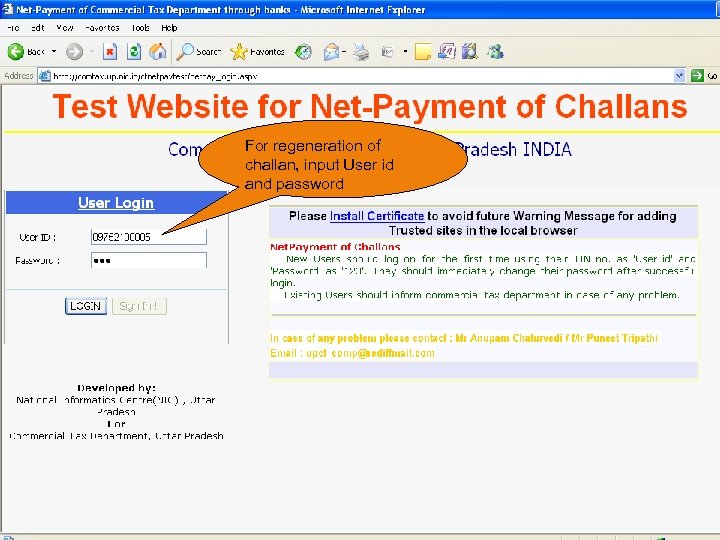 For regeneration of challan, input User id and password
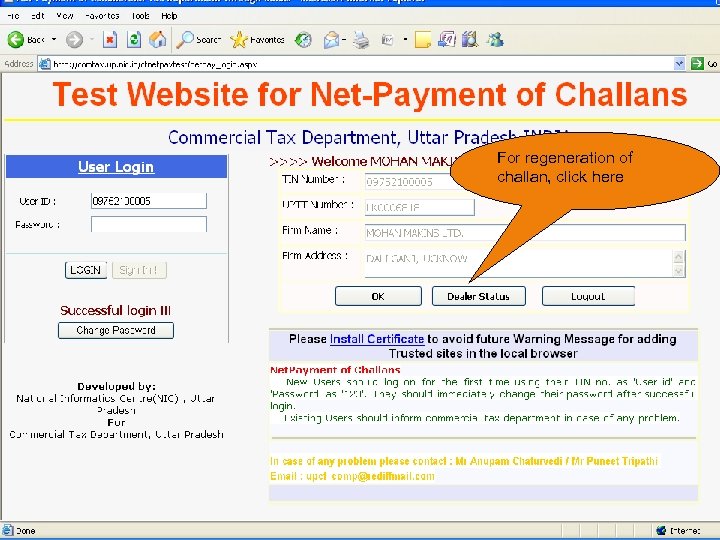 For regeneration of challan, click here
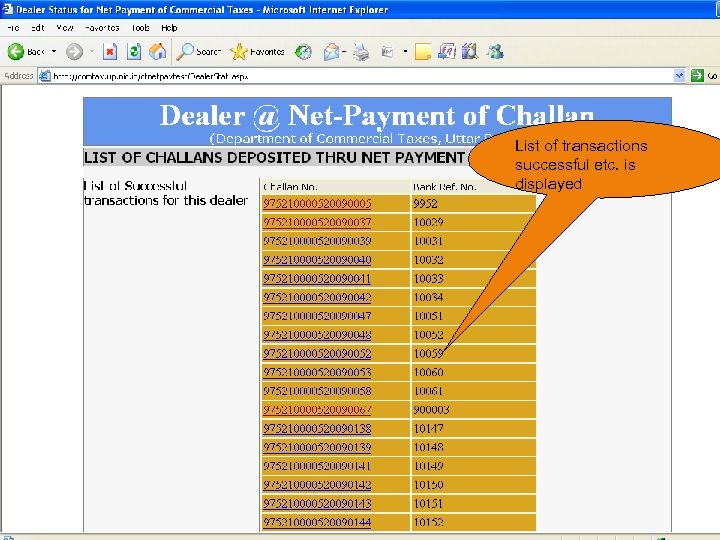 List of transactions successful etc. is displayed
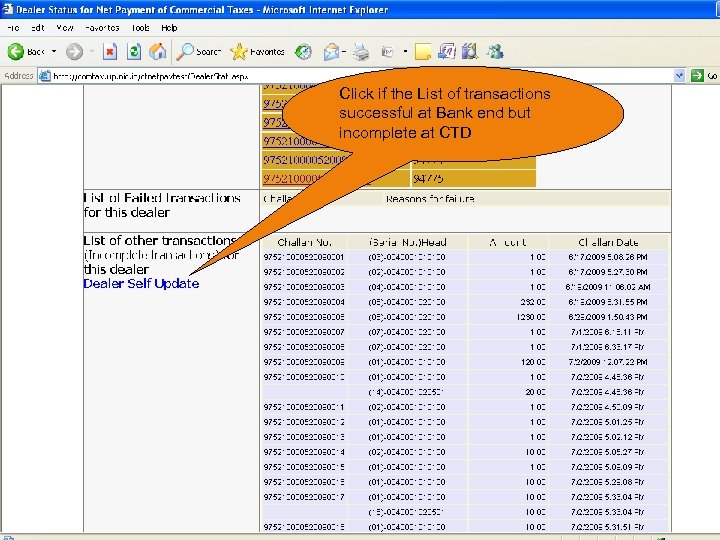 Click if the List of transactions successful at Bank end but incomplete at CTD
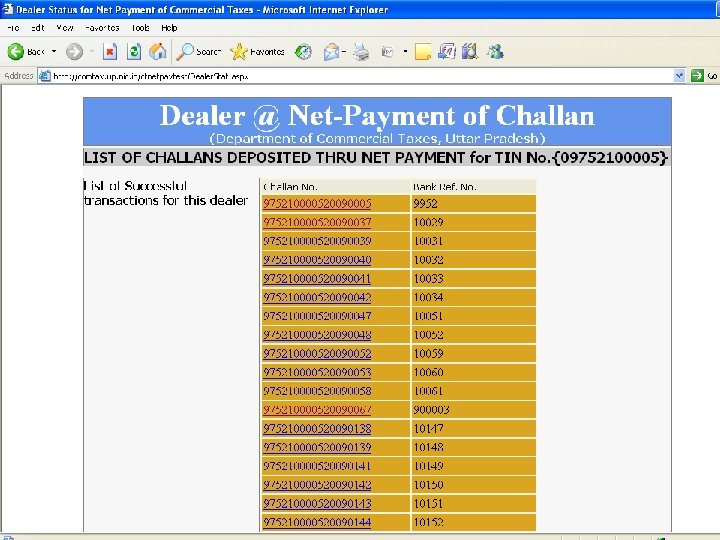
 e. Payment of Uttar Pradesh Commercial Taxes • User can “Generate/Regenerate Challan” on UP CTD website and the user can view and print the complete Challan. • A 20 digit unique Challan Identification Number (CIN) is displayed for each successful transactions at Bank level • The CIN will also be printed in the Challan
 e. Payment of Uttar Pradesh Commercial Taxes For e. Payment of Uttar Pradesh Commercial Tax our Cantonment Branch, Lucknow, is identified as the efocal branch
 e. Payment of Uttar Pradesh Commercial Taxes DO’s Always look for Success/Failure or system message
 e. Payment of Uttar Pradesh Commercial Taxes Dont’s Do not click twice on any option. Do not use back/refresh/forward button. Do not proceed in case of doubt