 Скачать презентацию USAS BUDGETING ACCESS Presented by Eileen Pakula March
67224683d70e47496b714ffaf9837c48.ppt
- Количество слайдов: 78



USAS BUDGETING ACCESS Presented by Eileen Pakula March 24, 2009 3/18/2018 1
Overview w Budgeting Fields w Use of *WRK budgeting worksheets w Use of APPROP program options n n 3/18/2018 Before closing fiscal year After closing fiscal year Changing Temporary to Permanent Amounts GAAPSET option 2
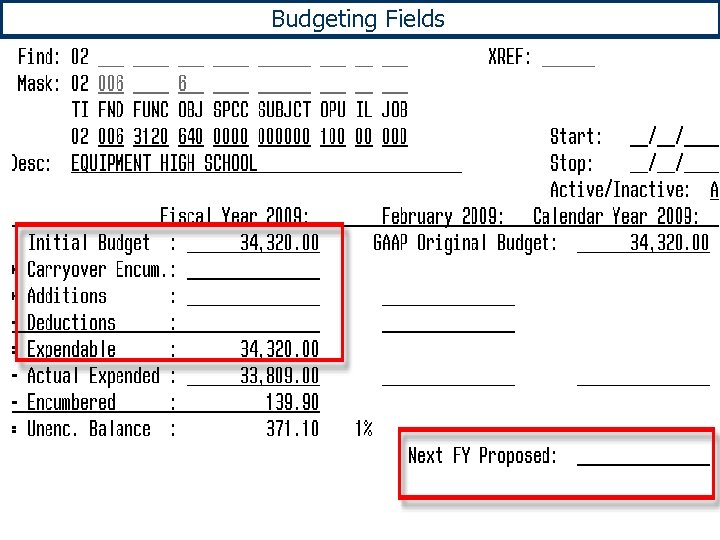
Budgeting Fields
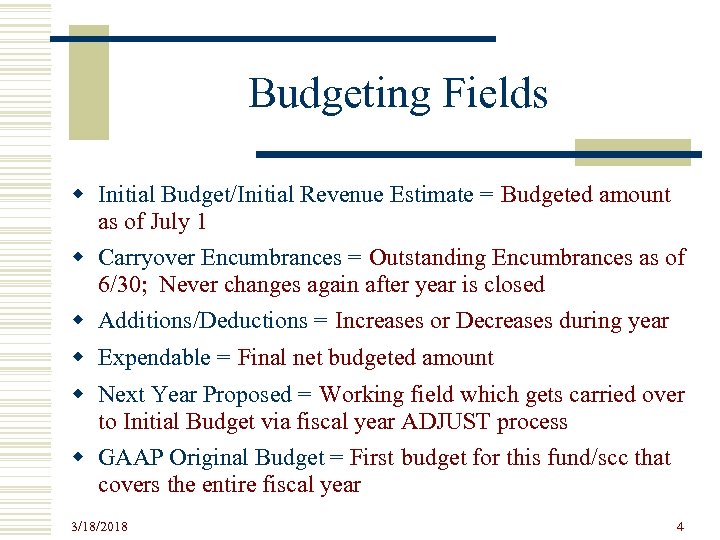
Budgeting Fields w Initial Budget/Initial Revenue Estimate = Budgeted amount as of July 1 w Carryover Encumbrances = Outstanding Encumbrances as of 6/30; Never changes again after year is closed w Additions/Deductions = Increases or Decreases during year w Expendable = Final net budgeted amount w Next Year Proposed = Working field which gets carried over to Initial Budget via fiscal year ADJUST process w GAAP Original Budget = First budget for this fund/scc that covers the entire fiscal year 3/18/2018 4
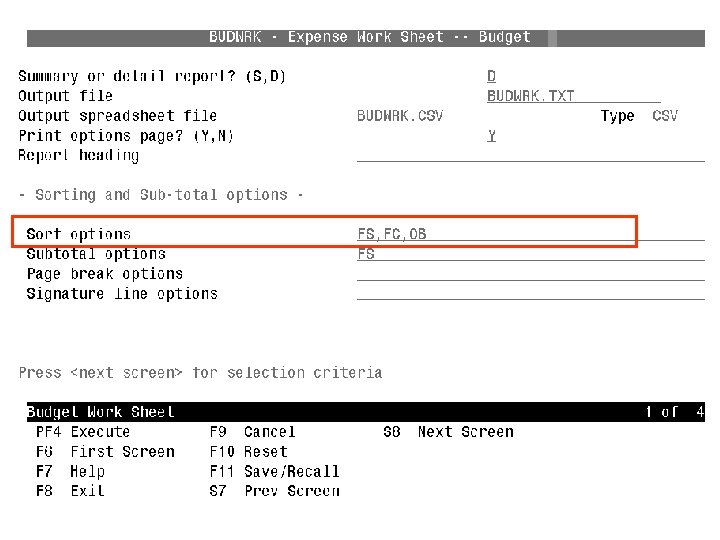
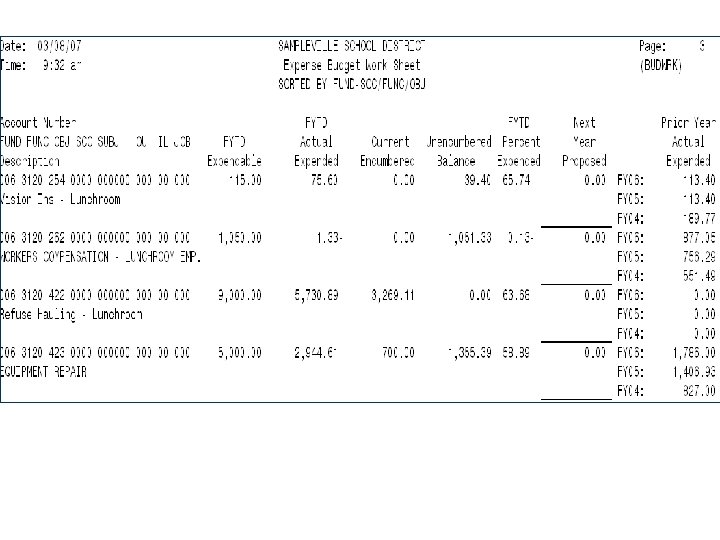
Using *WRK Programs w WHEN TO USE n As worksheet in preparation for entering next year proposed or initial appropriations and revenues n As report to the board before and after appropriations have been entered on the system n To generate spreadsheets that can be loaded into the NYPLOAD or IABLOAD options of APPROP w SORTING OPTIONS n Match sorts available in APPROP data entry options 3/18/2018 5
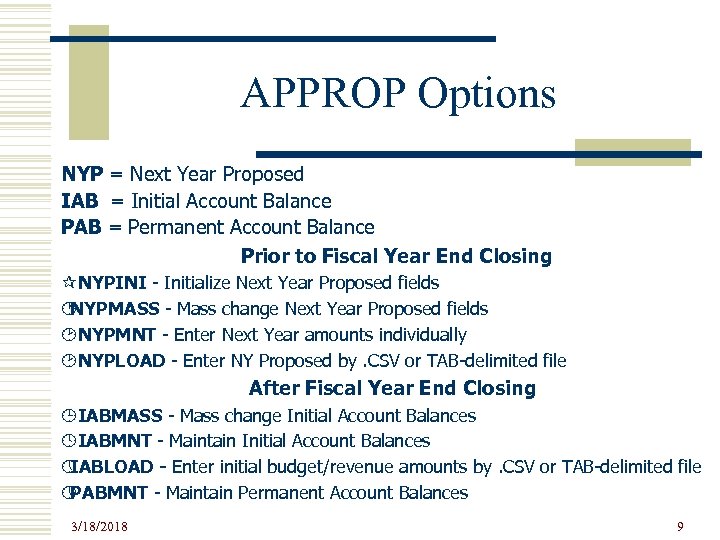
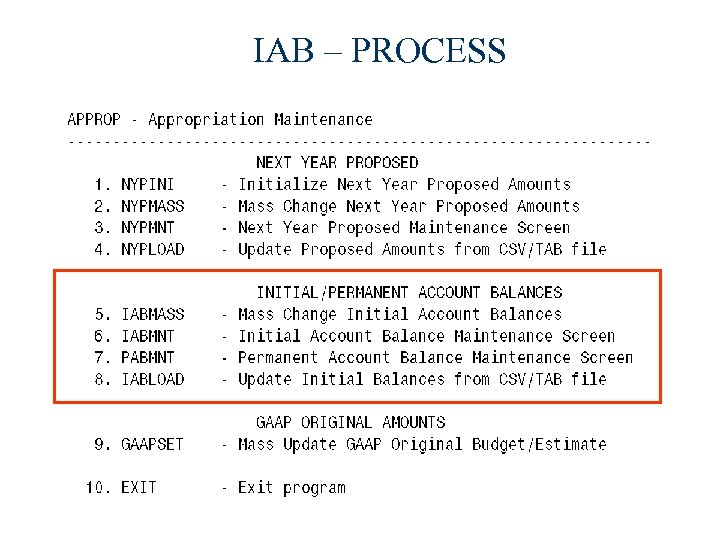
APPROP Options NYP = Next Year Proposed IAB = Initial Account Balance PAB = Permanent Account Balance Prior to Fiscal Year End Closing ¶NYPINI - Initialize Next Year Proposed fields · NYPMASS - Mass change Next Year Proposed fields ¸NYPMNT - Enter Next Year amounts individually ¸NYPLOAD - Enter NY Proposed by. CSV or TAB-delimited file After Fiscal Year End Closing ¹IABMASS - Mass change Initial Account Balances ºIABMNT - Maintain Initial Account Balances » IABLOAD - Enter initial budget/revenue amounts by. CSV or TAB-delimited file » PABMNT - Maintain Permanent Account Balances 3/18/2018 9
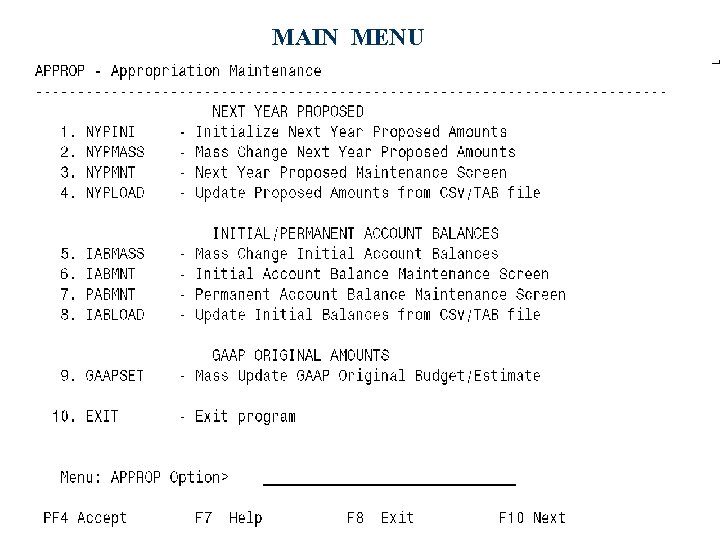
MAIN MENU
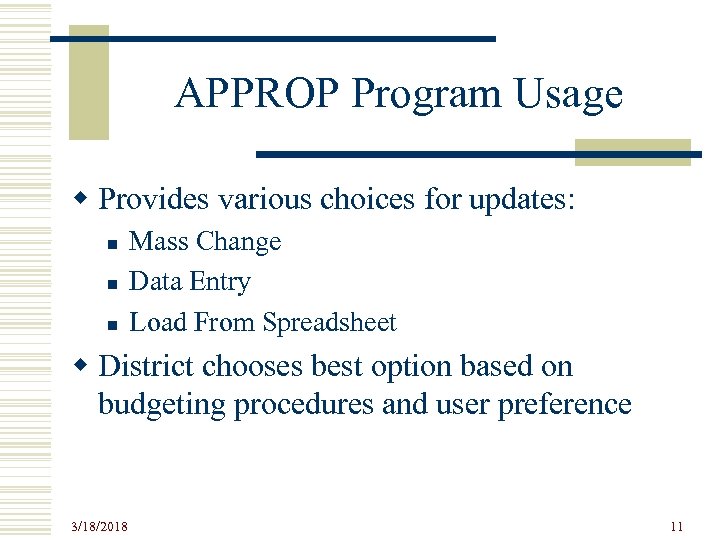
APPROP Program Usage w Provides various choices for updates: n n n Mass Change Data Entry Load From Spreadsheet w District chooses best option based on budgeting procedures and user preference 3/18/2018 11
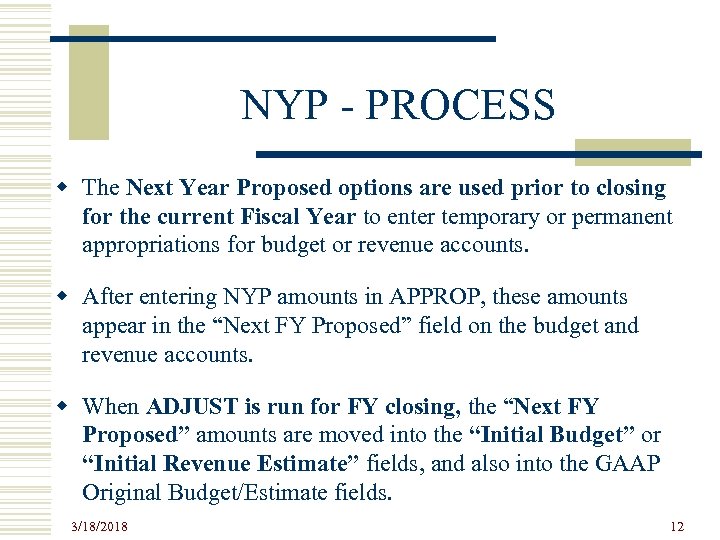
NYP - PROCESS w The Next Year Proposed options are used prior to closing for the current Fiscal Year to enter temporary or permanent appropriations for budget or revenue accounts. w After entering NYP amounts in APPROP, these amounts appear in the “Next FY Proposed” field on the budget and revenue accounts. w When ADJUST is run for FY closing, the “Next FY Proposed” amounts are moved into the “Initial Budget” or “Initial Revenue Estimate” fields, and also into the GAAP Original Budget/Estimate fields. 3/18/2018 12
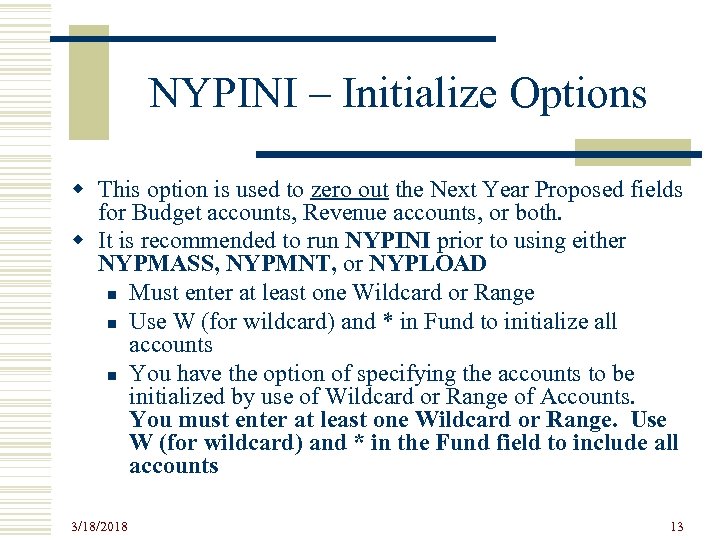
NYPINI – Initialize Options w This option is used to zero out the Next Year Proposed fields for Budget accounts, Revenue accounts, or both. w It is recommended to run NYPINI prior to using either NYPMASS, NYPMNT, or NYPLOAD n Must enter at least one Wildcard or Range n Use W (for wildcard) and * in Fund to initialize all accounts n You have the option of specifying the accounts to be initialized by use of Wildcard or Range of Accounts. You must enter at least one Wildcard or Range. Use W (for wildcard) and * in the Fund field to include all accounts 3/18/2018 13
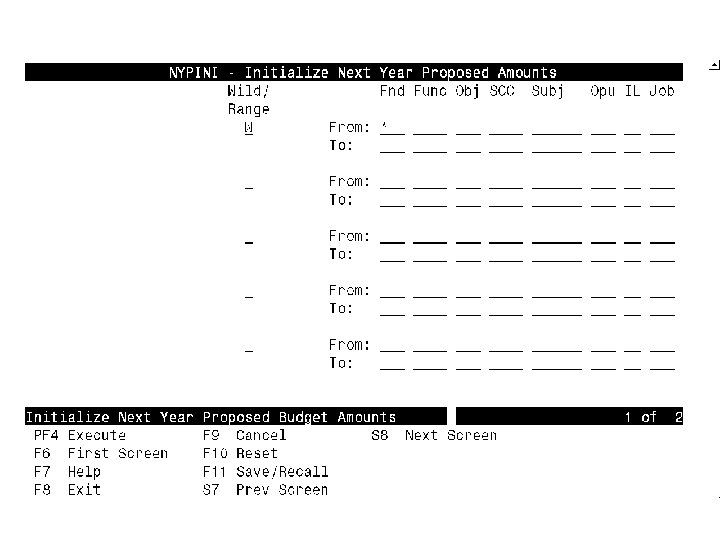
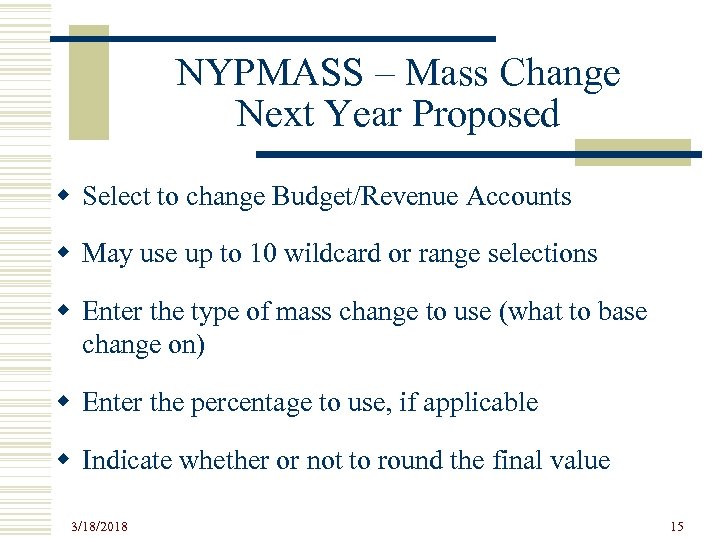
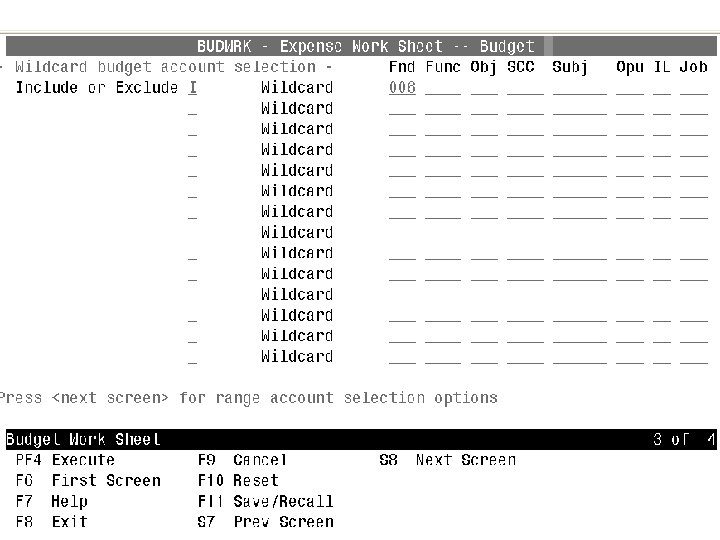
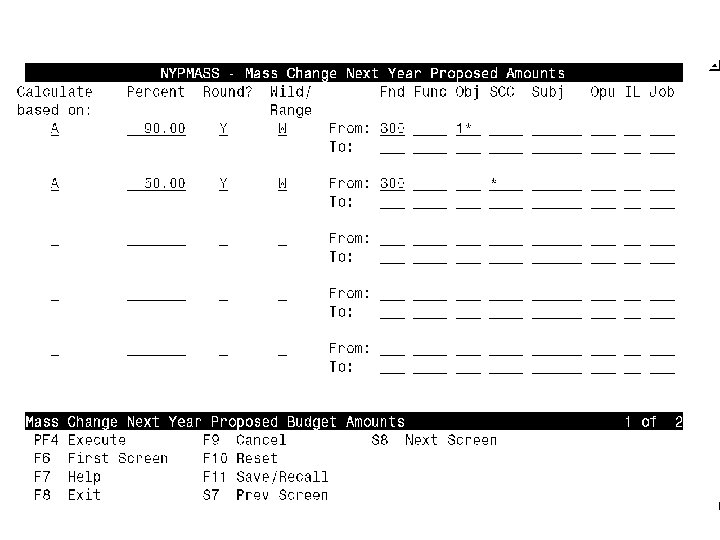
NYPMASS – Mass Change Next Year Proposed w Select to change Budget/Revenue Accounts w May use up to 10 wildcard or range selections w Enter the type of mass change to use (what to base change on) w Enter the percentage to use, if applicable w Indicate whether or not to round the final value 3/18/2018 15
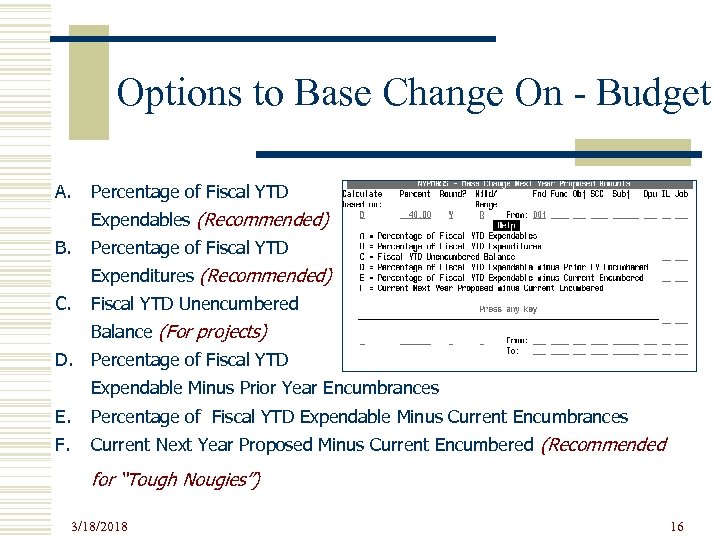
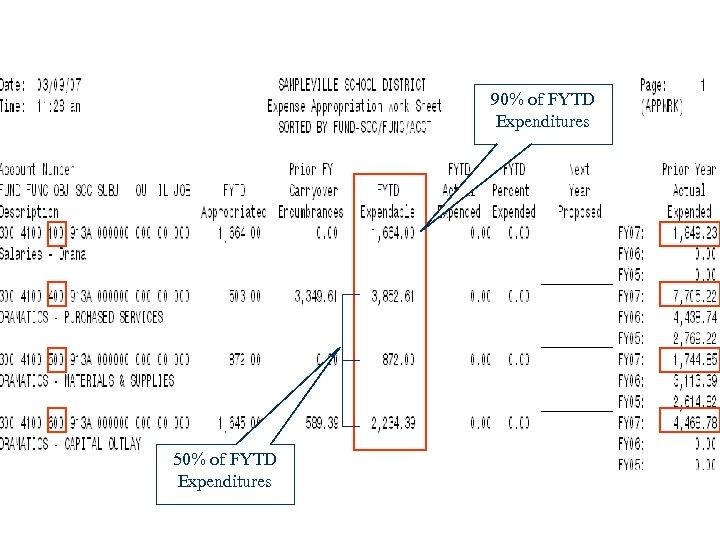
Options to Base Change On - Budget A. Percentage of Fiscal YTD Expendables (Recommended) B. Percentage of Fiscal YTD Expenditures (Recommended) C. Fiscal YTD Unencumbered Balance (For projects) D. Percentage of Fiscal YTD Expendable Minus Prior Year Encumbrances E. Percentage of Fiscal YTD Expendable Minus Current Encumbrances F. Current Next Year Proposed Minus Current Encumbered (Recommended for “Tough Nougies”) 3/18/2018 16
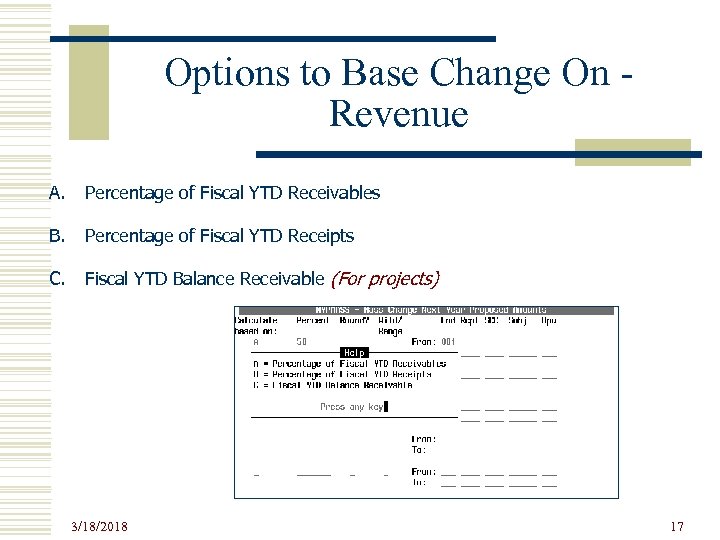
Options to Base Change On Revenue A. Percentage of Fiscal YTD Receivables B. Percentage of Fiscal YTD Receipts C. Fiscal YTD Balance Receivable (For projects) 3/18/2018 17
NYPMNT – Build Option w To be used prior to Fiscal Year End closing w Will prompt for an amount for each budget or revenue account selected w Sort options are identical to those in the *WRK programs 3/18/2018 20
NYPMNT – Build Option (continued) w For budget accounts, must select for the type of district: n n Benevolent (amount Board approved does not include CO encumbrances; instead, CO encumbrances are allowed to be spent IN ADDITION TO what is approved by the Board) Tough Nougie (amount Board approved is the total amount they can spend thus initial amounts must be REDUCED BY any CO encumbrances) w May use wildcards and/or range of accounts. w Can stop and start up with a particular account. 3/18/2018 21
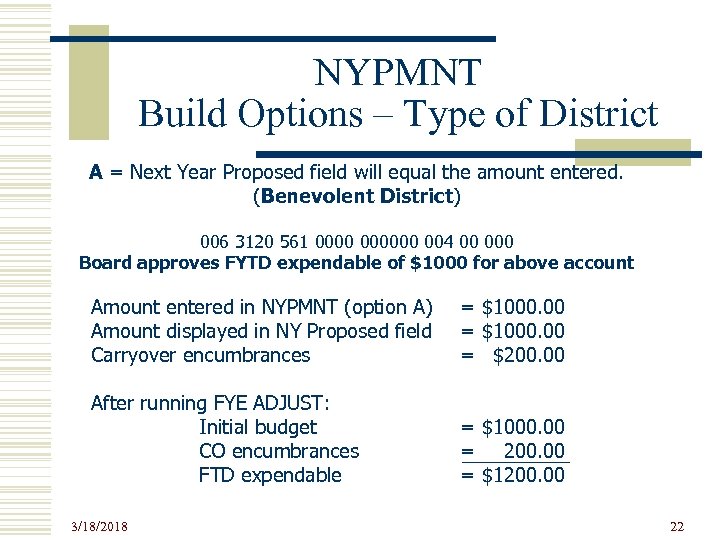
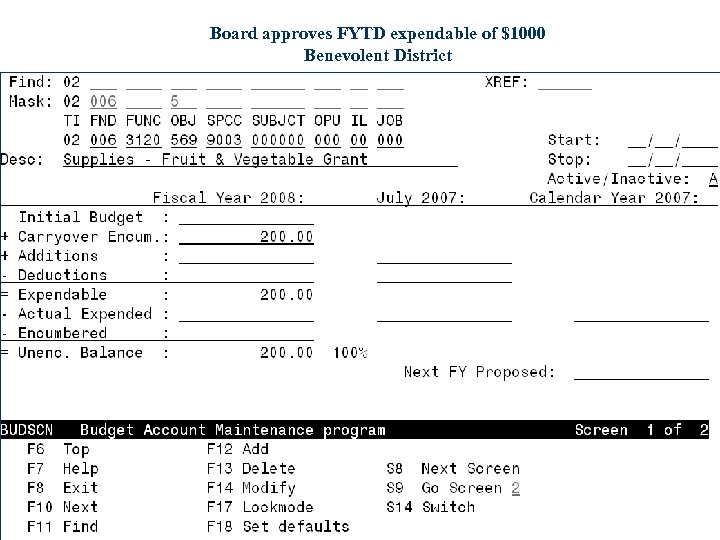
NYPMNT Build Options – Type of District A = Next Year Proposed field will equal the amount entered. (Benevolent District) 006 3120 561 000000 004 00 000 Board approves FYTD expendable of $1000 for above account Amount entered in NYPMNT (option A) Amount displayed in NY Proposed field Carryover encumbrances = $1000. 00 = $200. 00 After running FYE ADJUST: Initial budget CO encumbrances FTD expendable = $1000. 00 = 200. 00 = $1200. 00 3/18/2018 22
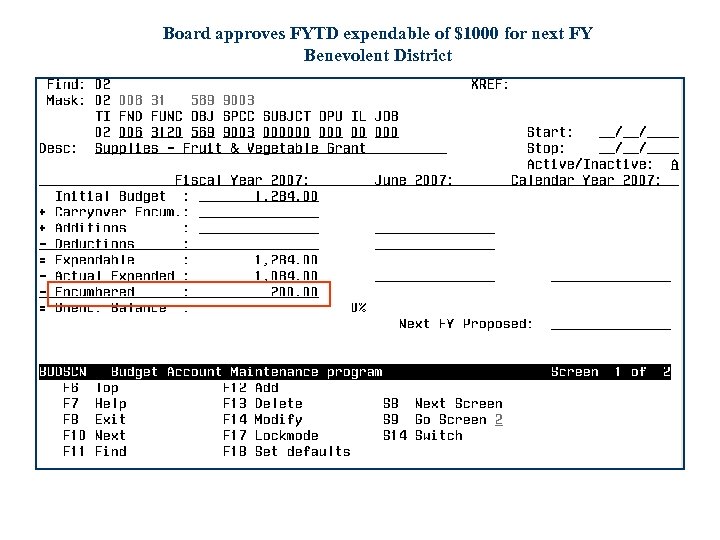
Board approves FYTD expendable of $1000 for next FY Benevolent District
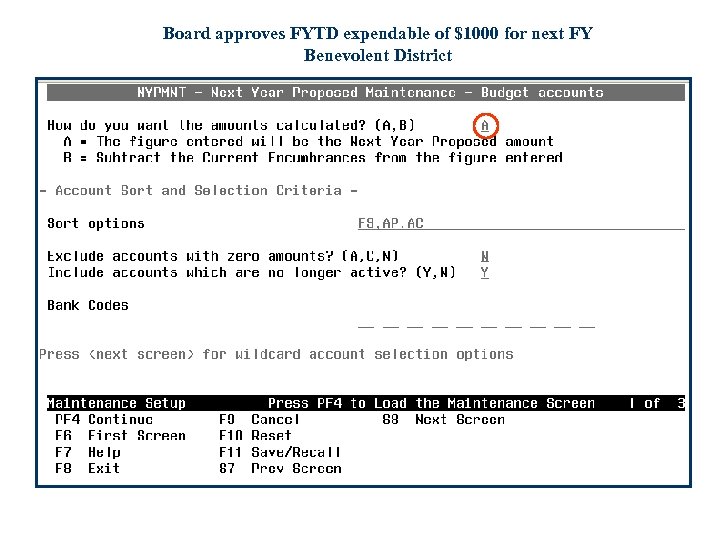
Board approves FYTD expendable of $1000 for next FY Benevolent District
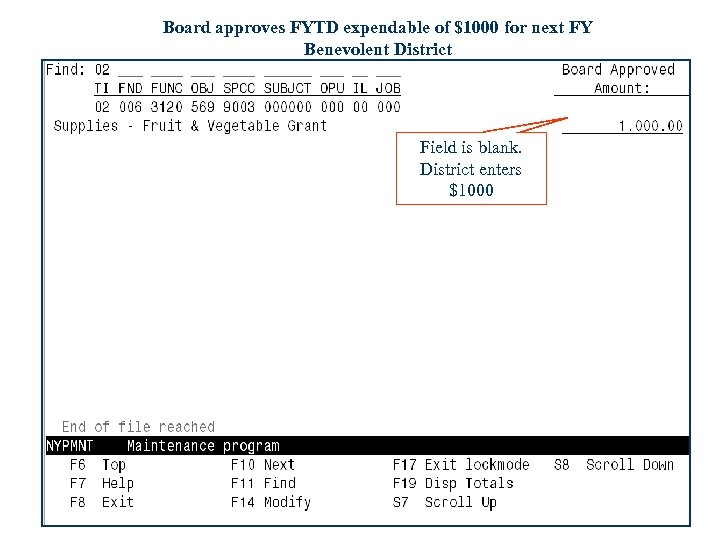
Board approves FYTD expendable of $1000 for next FY Benevolent District Field is blank. District enters $1000
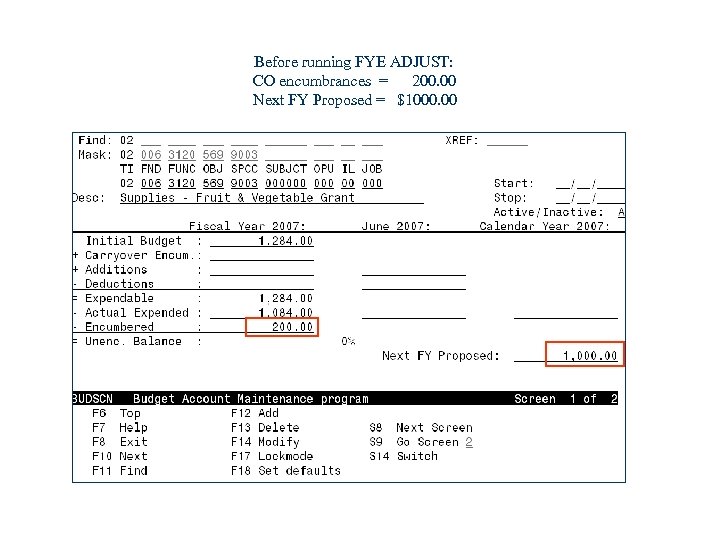
Before running FYE ADJUST: CO encumbrances = 200. 00 Next FY Proposed = $1000. 00
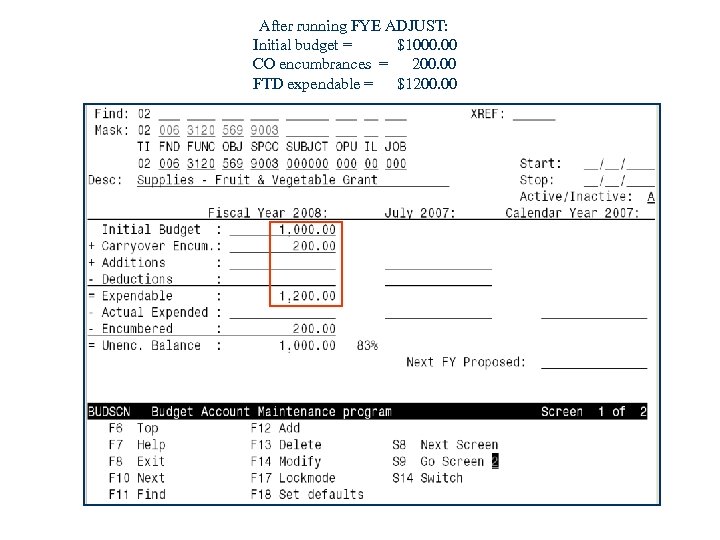
After running FYE ADJUST: Initial budget = $1000. 00 CO encumbrances = 200. 00 FTD expendable = $1200. 00
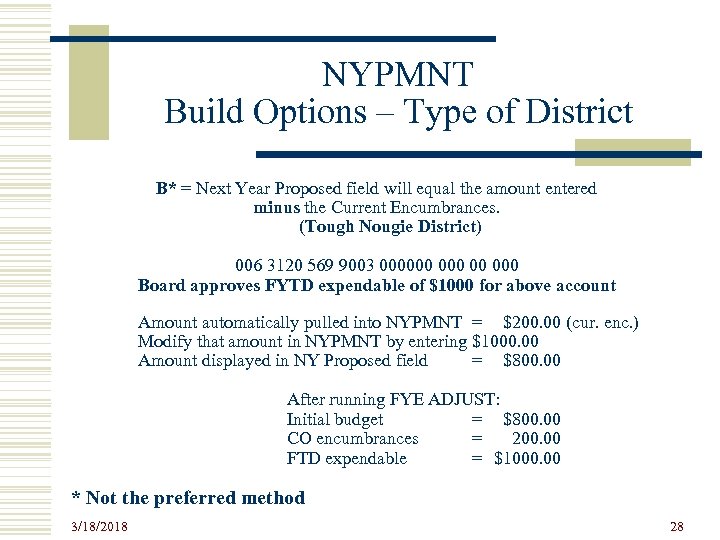
NYPMNT Build Options – Type of District B* = Next Year Proposed field will equal the amount entered minus the Current Encumbrances. (Tough Nougie District) 006 3120 569 9003 000000 00 000 Board approves FYTD expendable of $1000 for above account Amount automatically pulled into NYPMNT = $200. 00 (cur. enc. ) Modify that amount in NYPMNT by entering $1000. 00 Amount displayed in NY Proposed field = $800. 00 After running FYE ADJUST: Initial budget = $800. 00 CO encumbrances = 200. 00 FTD expendable = $1000. 00 * Not the preferred method 3/18/2018 28
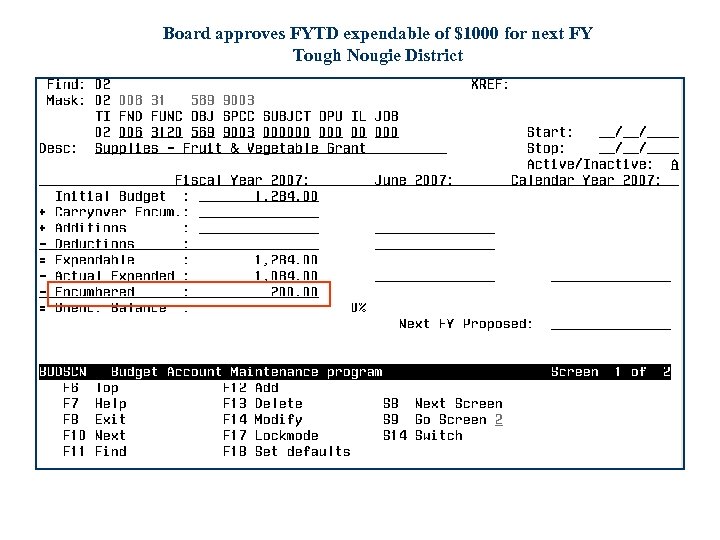
Board approves FYTD expendable of $1000 for next FY Tough Nougie District
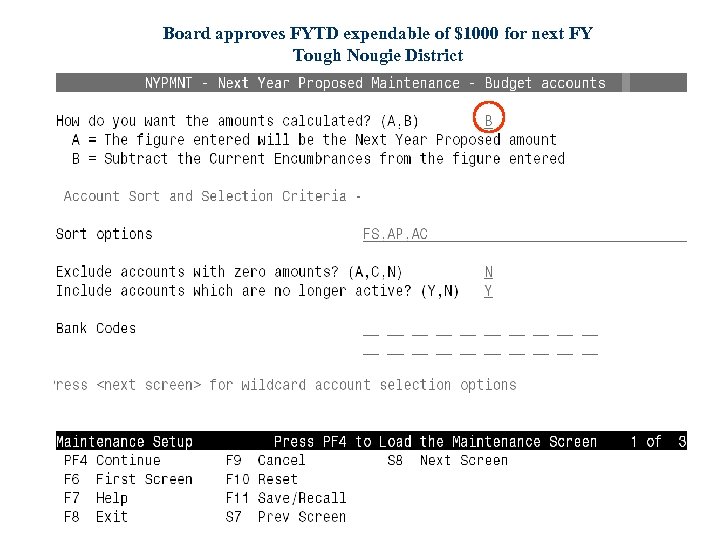
Board approves FYTD expendable of $1000 for next FY Tough Nougie District
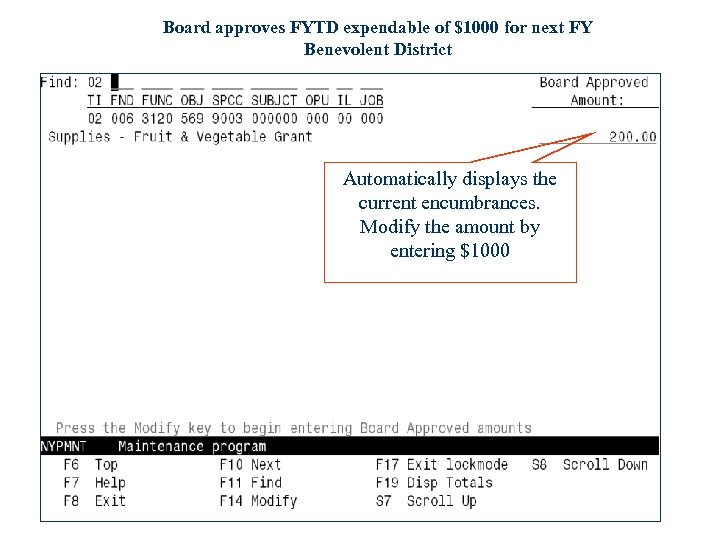
Board approves FYTD expendable of $1000 for next FY Benevolent District Automatically displays the current encumbrances. Modify the amount by entering $1000
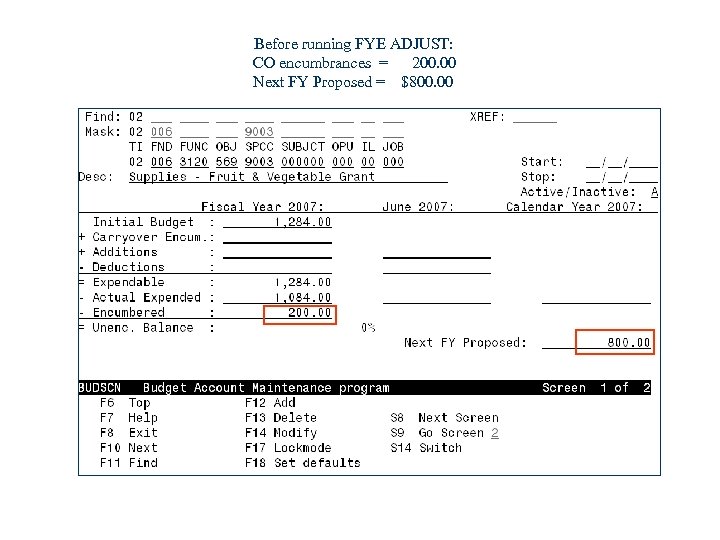
Before running FYE ADJUST: CO encumbrances = 200. 00 Next FY Proposed = $800. 00
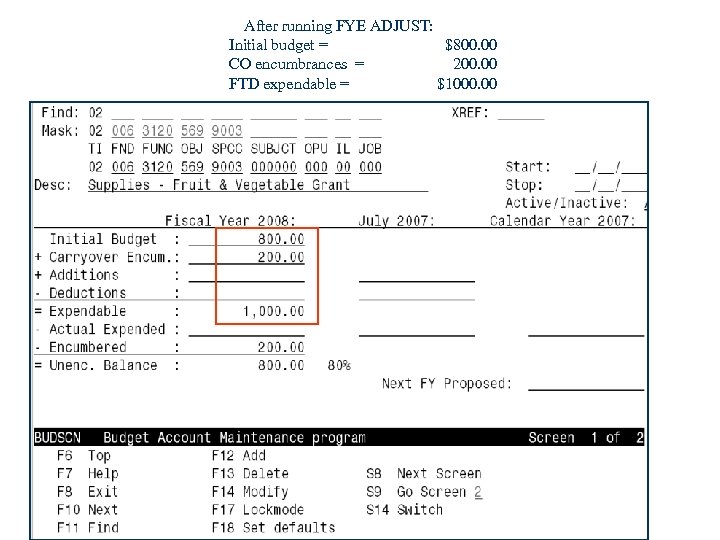
After running FYE ADJUST: Initial budget = $800. 00 CO encumbrances = 200. 00 FTD expendable = $1000. 00
Tip for Tough Nougies w However, the preferred method (for tough nougie districts) is to use option A ahead of time (in NYPMNT), and then right before running FYE ADJUST, use the NYPMASS option 6 (current NY proposed minus current encumbrances) to subtract the end of year encumbrances from the current Next Year Proposed amounts for all accounts. w If you use B option too far ahead of time, you run the risk of your encumbered amount changing from the time you entered your NY proposed in APPROP to the time you run ADJUST for FYE. 3/18/2018 34
NYPMNT vs. ACTSCN vs. NYPLOAD NOTE - Instead of using NYPMNT, you could enter the Next Year Proposed amounts directly into the accounts by using ACTSCN. (ACTSCN is not the most efficient unless there are only a few accounts to modify). Or, if you want to load NYP amounts from a spreadsheet, you can use the NYPLOAD option. 3/18/2018 35
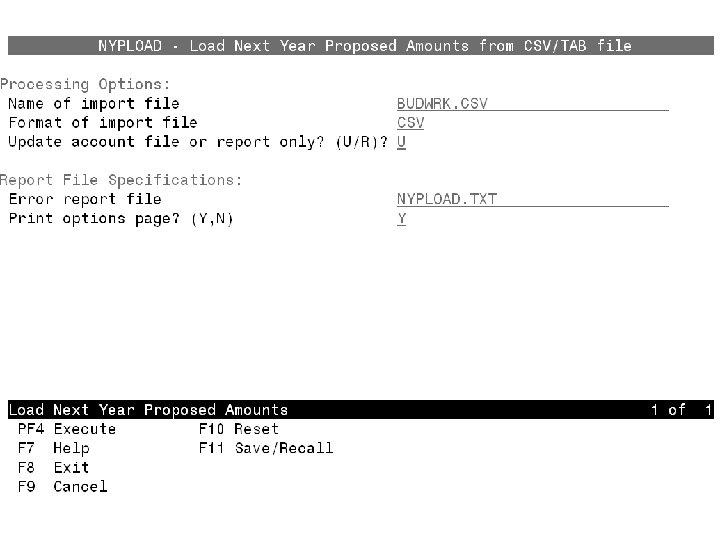
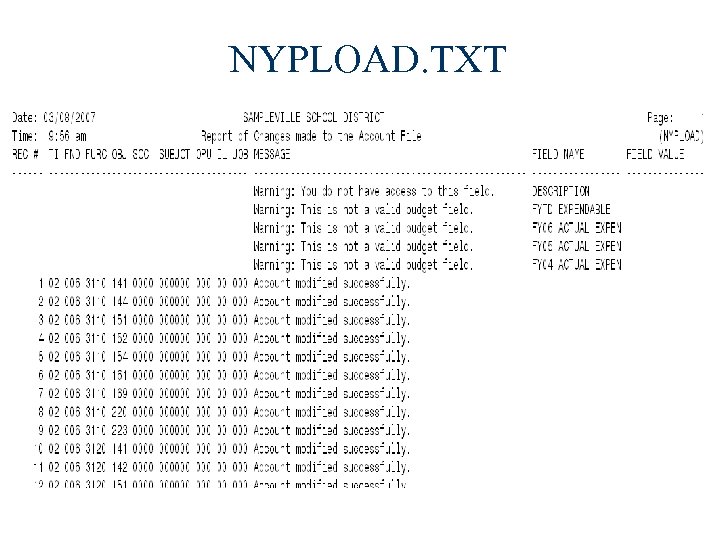
NYPLOAD w Allows you to load the NY proposed amounts from a. CSV or TAB-delimited input file. You need to specify the input file and whether you want a test run or update the accounts. A report is generated indicating any warnings or errors and the success or failure of the account updates. 3/18/2018 36
EXPWRK & NYPLOAD The CSV spreadsheet files generated from BUDWRK or REVWRK programs are compatible with the NYPLOAD program. The first row of the spreadsheet automatically includes the required column descriptions. Once the next year proposed amounts are entered in the spreadsheet, the CSV file can then be loaded into the NYPLOAD program. 3/18/2018 37
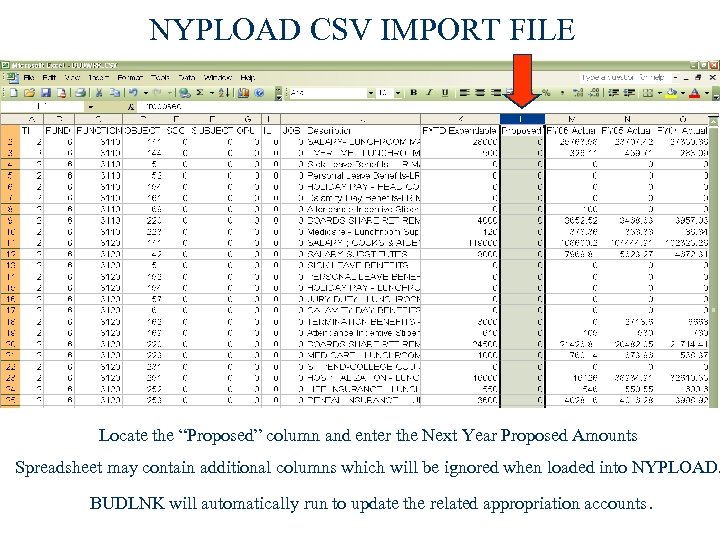
NYPLOAD CSV IMPORT FILE Locate the “Proposed” column and enter the Next Year Proposed Amounts Spreadsheet may contain additional columns which will be ignored when loaded into NYPLOAD. BUDLNK will automatically run to update the related appropriation accounts.
NYPLOAD. TXT
IAB – PROCESS
IAB – PROCESS w The Initial Account Balance options are used after closing for the current Fiscal Year, and preferably prior to any processing for the new FY. w These options are to be used only if the NYP options were not used in the prior year. w Using these options will enter Board Approved Amounts directly into the Initial Budget or Initial Estimate Revenue fields. These amounts might not be permanent. 3/18/2018 42
IABMASS- Mass Change IAB w May use up to 10 wildcard or range selections w Enter the type of mass change to use (what to base change on) w Enter the percentage to use, if applicable w Indicate whether or not to round the final value Screen format is exactly the same as the Mass Change Screens for the NYPMASS option 3/18/2018 43
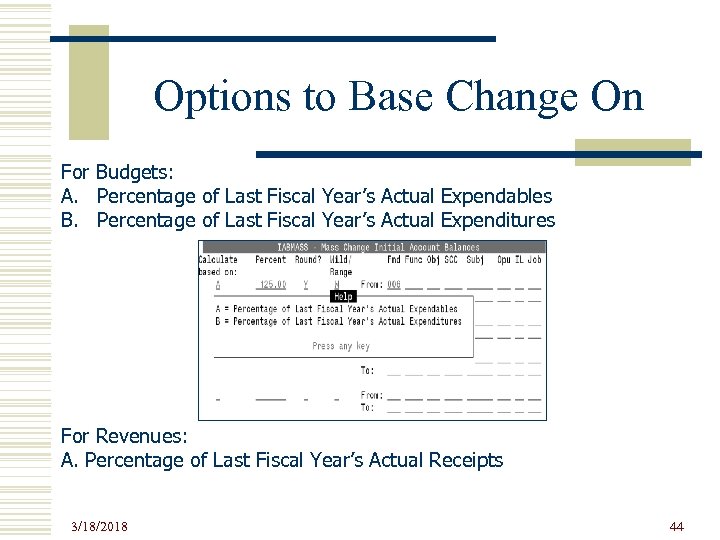
Options to Base Change On For Budgets: A. Percentage of Last Fiscal Year’s Actual Expendables B. Percentage of Last Fiscal Year’s Actual Expenditures For Revenues: A. Percentage of Last Fiscal Year’s Actual Receipts 3/18/2018 44
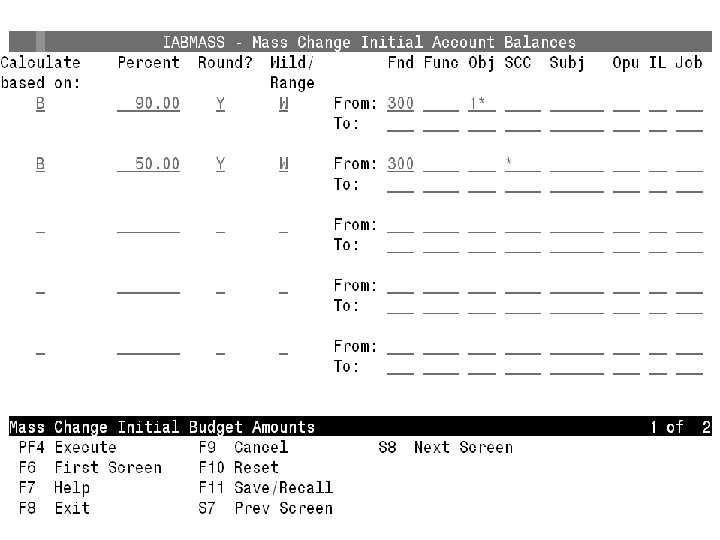
90% of FYTD Expenditures 50% of FYTD Expenditures
IABMNT – Build Option w Program will prompt for an amount for each budget or revenue account selected w Amount will be entered in the Initial Budget or Initial Revenue Estimate field w Sort options are identical to those in the *WRK programs 3/18/2018 47
IABMNT – Build Option (continued) w For budget accounts, must select for the type of district – n n Benevolent (amount Board approved does not include CO encumbrances but CO encumbrances are allowed to be spent IN ADDITION TO what is approved by the Board) Tough Nougie (amount Board approved is the total amount they can spend thus initial amounts must be REDUCED BY any CO encumbrances) w May use wildcards and/or range of accounts w Can stop and start up with a particular account 3/18/2018 48
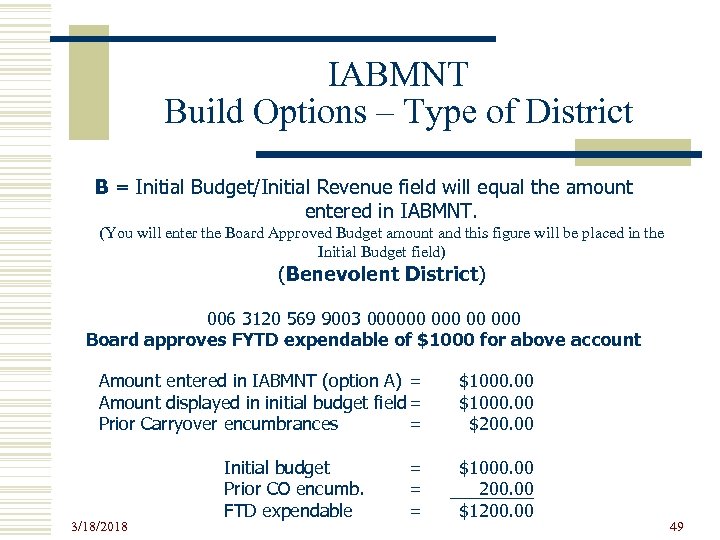
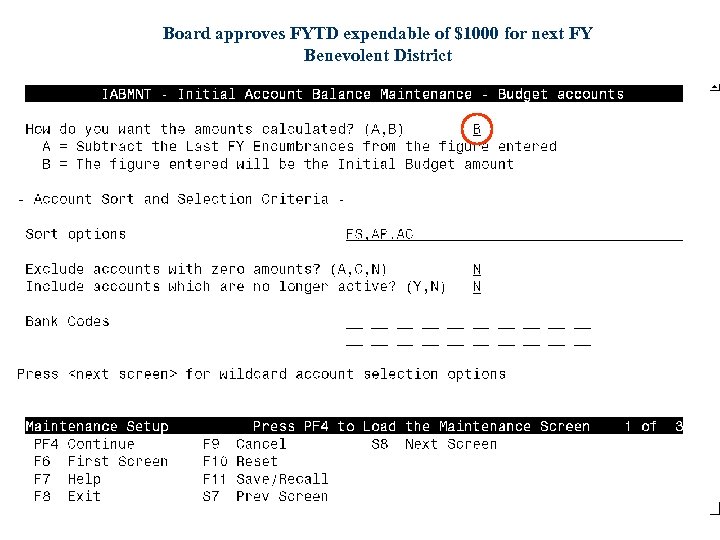
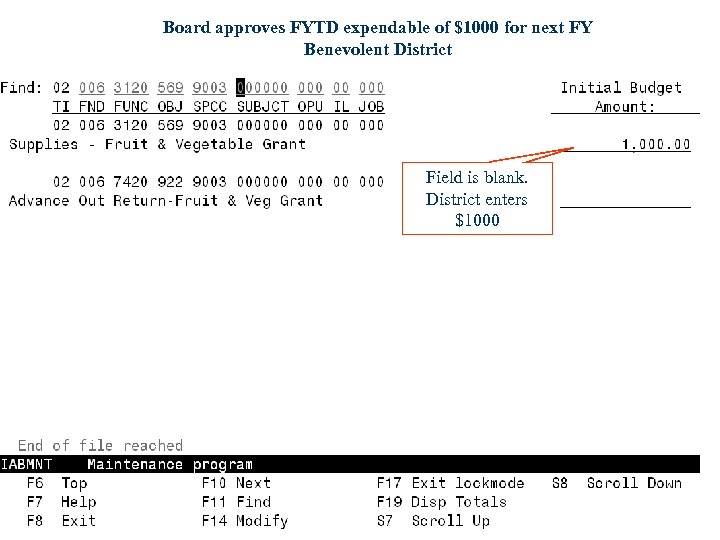
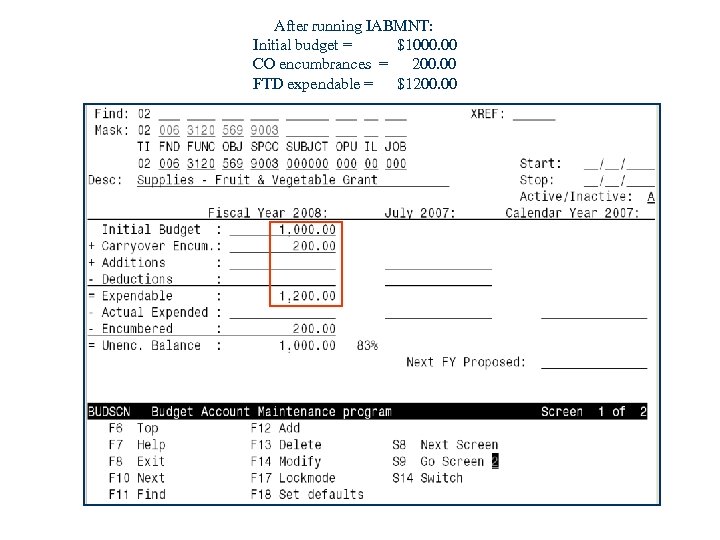
IABMNT Build Options – Type of District B = Initial Budget/Initial Revenue field will equal the amount entered in IABMNT. (You will enter the Board Approved Budget amount and this figure will be placed in the Initial Budget field) (Benevolent District) 006 3120 569 9003 000000 00 000 Board approves FYTD expendable of $1000 for above account Amount entered in IABMNT (option A) = Amount displayed in initial budget field = Prior Carryover encumbrances = 3/18/2018 Initial budget Prior CO encumb. FTD expendable = = = $1000. 00 $200. 00 $1000. 00 200. 00 $1200. 00 49
Board approves FYTD expendable of $1000 Benevolent District
Board approves FYTD expendable of $1000 for next FY Benevolent District
Board approves FYTD expendable of $1000 for next FY Benevolent District Field is blank. District enters $1000
After running IABMNT: Initial budget = $1000. 00 CO encumbrances = 200. 00 FTD expendable = $1200. 00
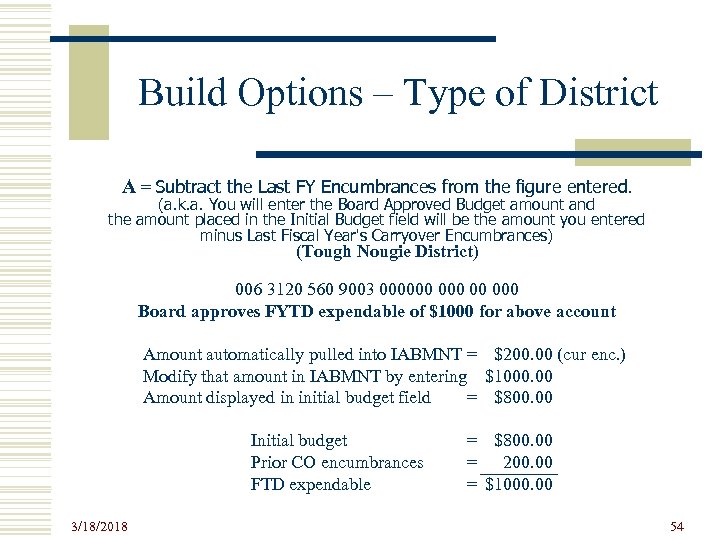
Build Options – Type of District A = Subtract the Last FY Encumbrances from the figure entered. (a. k. a. You will enter the Board Approved Budget amount and the amount placed in the Initial Budget field will be the amount you entered minus Last Fiscal Year's Carryover Encumbrances) (Tough Nougie District) 006 3120 560 9003 000000 00 000 Board approves FYTD expendable of $1000 for above account Amount automatically pulled into IABMNT = $200. 00 (cur enc. ) Modify that amount in IABMNT by entering $1000. 00 Amount displayed in initial budget field = $800. 00 Initial budget Prior CO encumbrances FTD expendable 3/18/2018 = $800. 00 = 200. 00 = $1000. 00 54
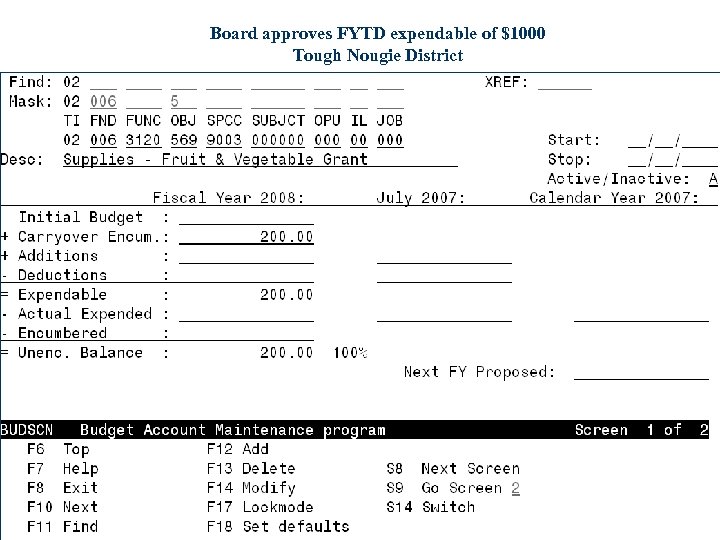
Board approves FYTD expendable of $1000 Tough Nougie District
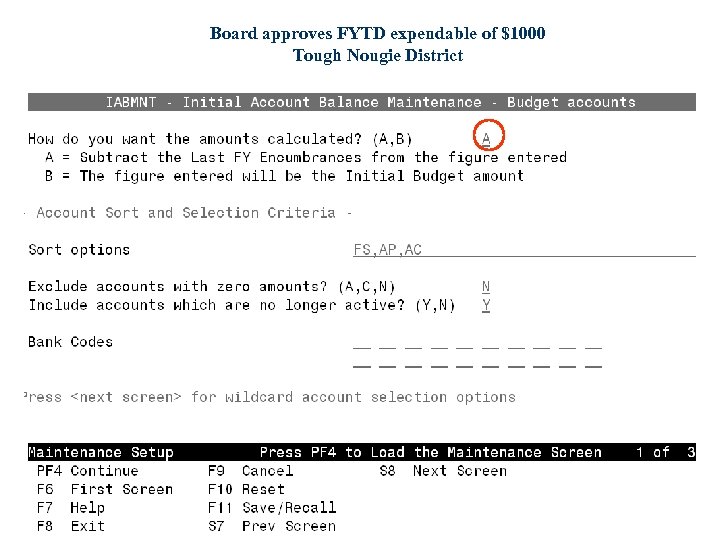
Board approves FYTD expendable of $1000 Tough Nougie District
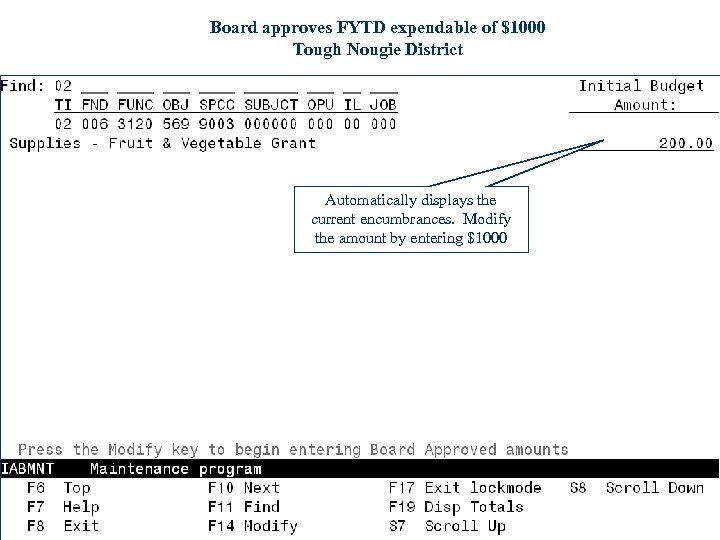
Board approves FYTD expendable of $1000 Tough Nougie District Automatically displays the current encumbrances. Modify the amount by entering $1000
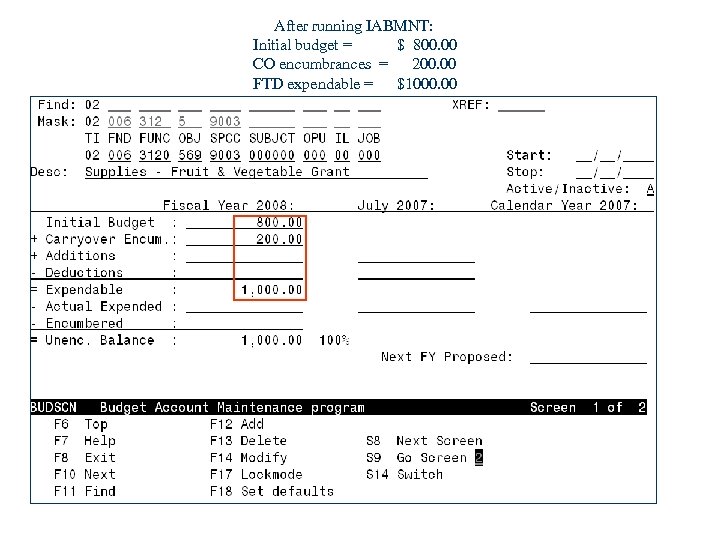
After running IABMNT: Initial budget = $ 800. 00 CO encumbrances = 200. 00 FTD expendable = $1000. 00
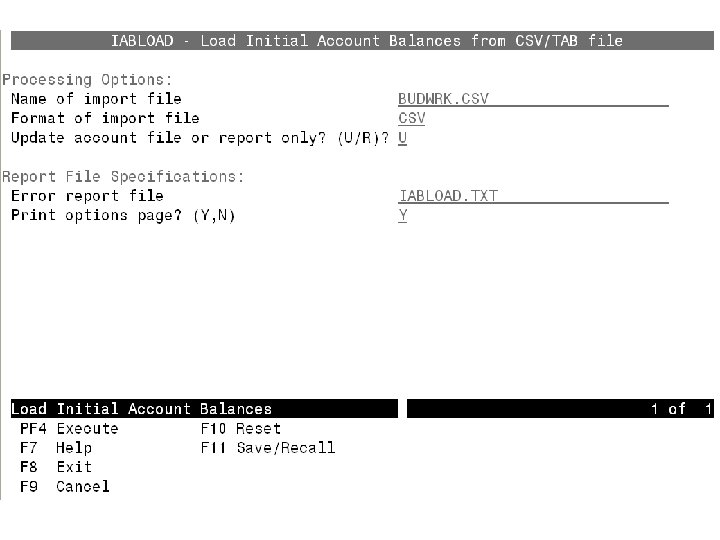
Alternative - IABLOAD w Allows you to load the initial budget amounts or initial revenue estimates from a. CSV or TAB-delimited input file. You need to specify the input file and whether you want a test run or update the accounts. A report is generated indicating any warnings or errors and the success or failure of the account updates. 3/18/2018 59
EXPWRK & IABLOAD The CSV spreadsheet files generated from BUDWRK or REVWRK programs are compatible with the IABLOAD program. The first row of the spreadsheet automatically includes the required column descriptions. Once the initial amounts are entered in the spreadsheet, the CSV file can then be loaded into the IABLOAD program. 3/18/2018 60
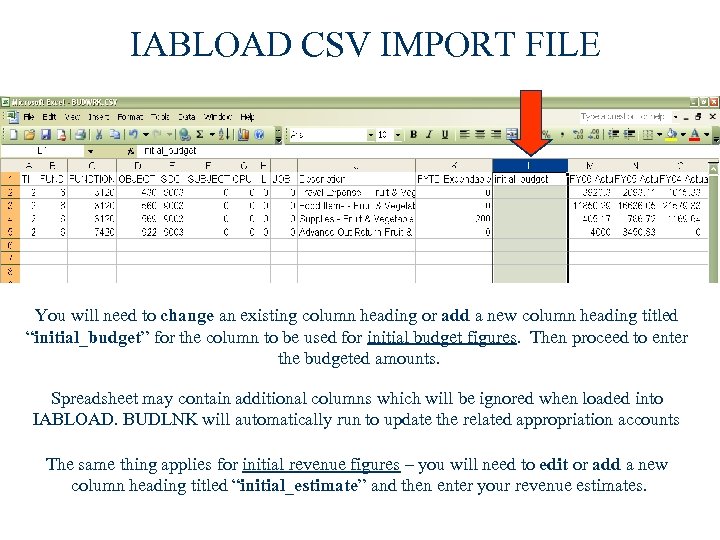
IABLOAD CSV IMPORT FILE You will need to change an existing column heading or add a new column heading titled “initial_budget” for the column to be used for initial budget figures. Then proceed to enter the budgeted amounts. Spreadsheet may contain additional columns which will be ignored when loaded into IABLOAD. BUDLNK will automatically run to update the related appropriation accounts The same thing applies for initial revenue figures – you will need to edit or add a new column heading titled “initial_estimate” and then enter your revenue estimates.
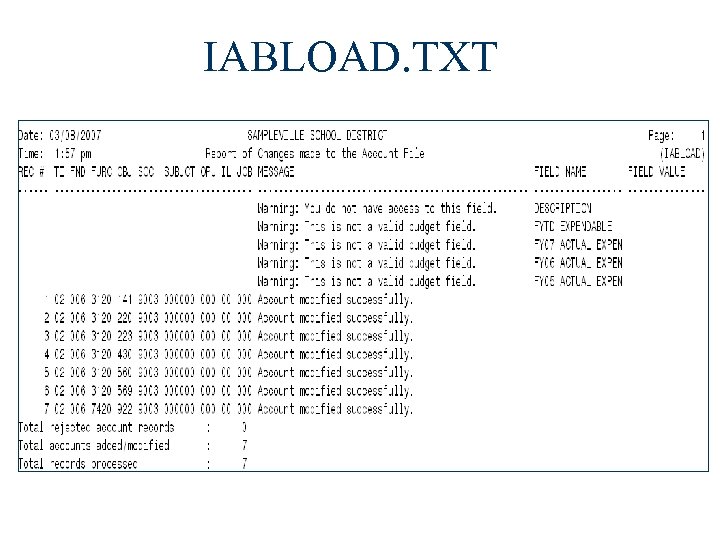
IABLOAD. TXT
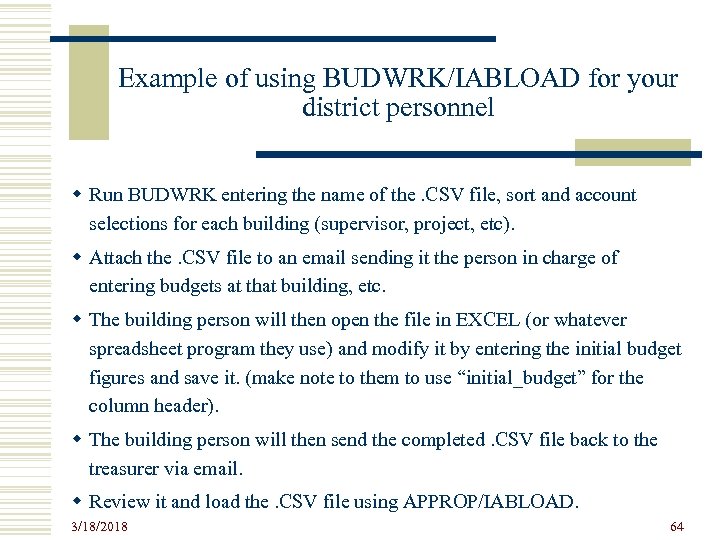
Example of using BUDWRK/IABLOAD for your district personnel w Run BUDWRK entering the name of the. CSV file, sort and account selections for each building (supervisor, project, etc). w Attach the. CSV file to an email sending it the person in charge of entering budgets at that building, etc. w The building person will then open the file in EXCEL (or whatever spreadsheet program they use) and modify it by entering the initial budget figures and save it. (make note to them to use “initial_budget” for the column header). w The building person will then send the completed. CSV file back to the treasurer via email. w Review it and load the. CSV file using APPROP/IABLOAD. 3/18/2018 64
PAB – PROCESS w The Permanent Account Balance option is used after closing for the current Fiscal Year, and after receiving final certification of the district’s spending plan. w This option is used to change any temporary appropriations, entered by either the NYP or IAB options, to permanent appropriations. w Using this option will enter Board Approved Amounts directly into the FYTD EXPENDABLE or RECEIVABLE fields. w Any adjustments that need to be made for the new expendable/receivable amounts , will be made in the additions or deductions fields (the initial budget/initial revenue amounts will not change). 3/18/2018 65
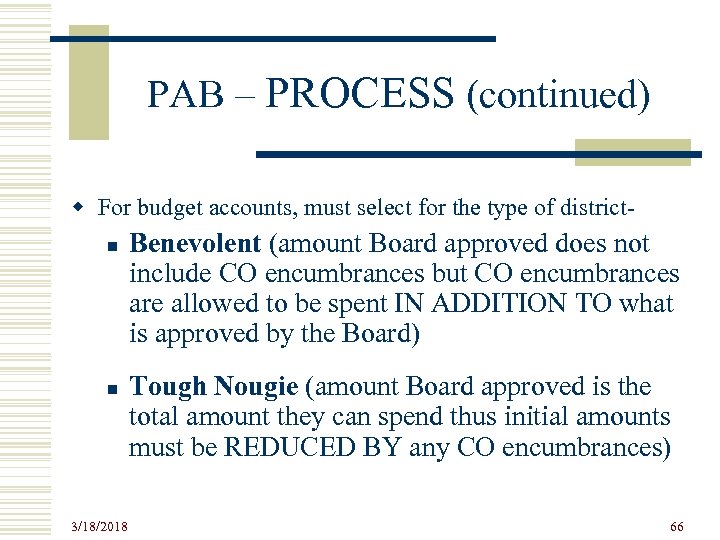
PAB – PROCESS (continued) w For budget accounts, must select for the type of districtn n 3/18/2018 Benevolent (amount Board approved does not include CO encumbrances but CO encumbrances are allowed to be spent IN ADDITION TO what is approved by the Board) Tough Nougie (amount Board approved is the total amount they can spend thus initial amounts must be REDUCED BY any CO encumbrances) 66
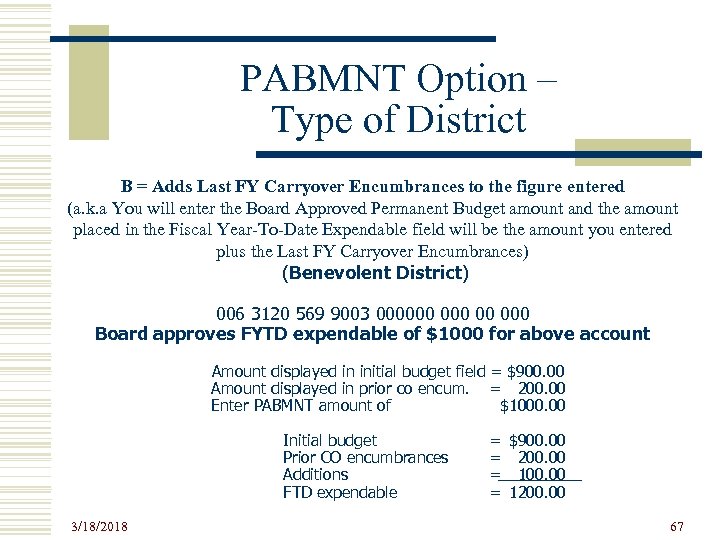
PABMNT Option – Type of District B = Adds Last FY Carryover Encumbrances to the figure entered (a. k. a You will enter the Board Approved Permanent Budget amount and the amount placed in the Fiscal Year-To-Date Expendable field will be the amount you entered plus the Last FY Carryover Encumbrances) (Benevolent District) 006 3120 569 9003 000000 00 000 Board approves FYTD expendable of $1000 for above account Amount displayed in initial budget field = $900. 00 Amount displayed in prior co encum. = 200. 00 Enter PABMNT amount of $1000. 00 Initial budget Prior CO encumbrances Additions FTD expendable 3/18/2018 = = $900. 00 200. 00 1200. 00 67
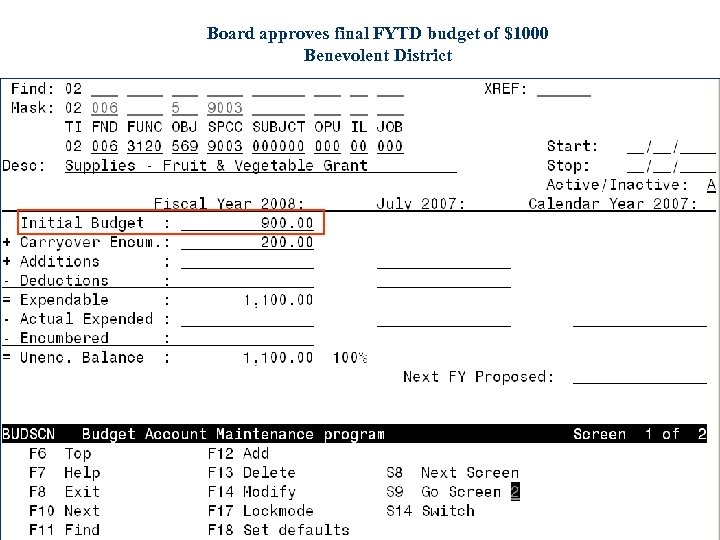
Board approves final FYTD budget of $1000 Benevolent District
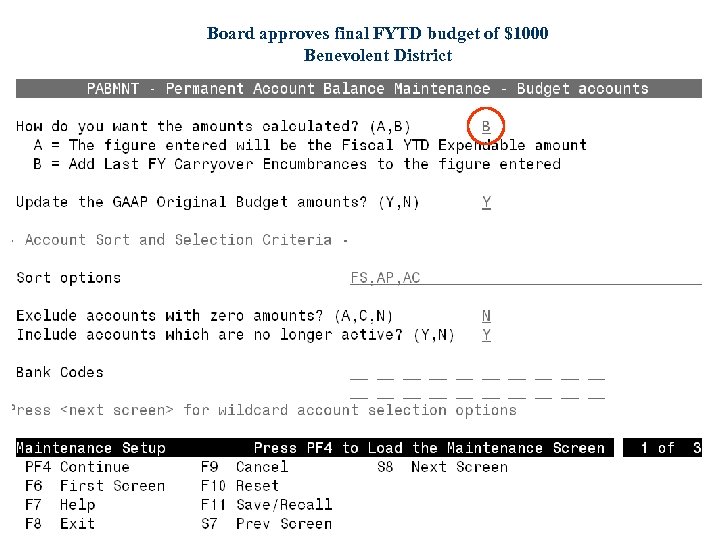
Board approves final FYTD budget of $1000 Benevolent District
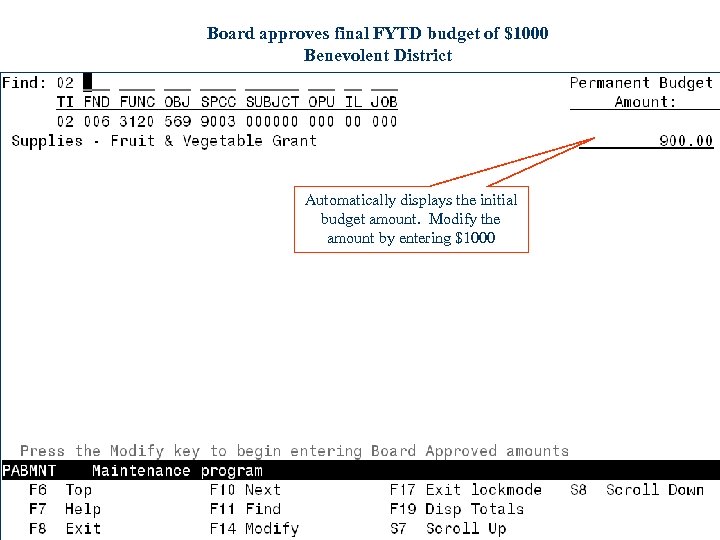
Board approves final FYTD budget of $1000 Benevolent District Automatically displays the initial budget amount. Modify the amount by entering $1000
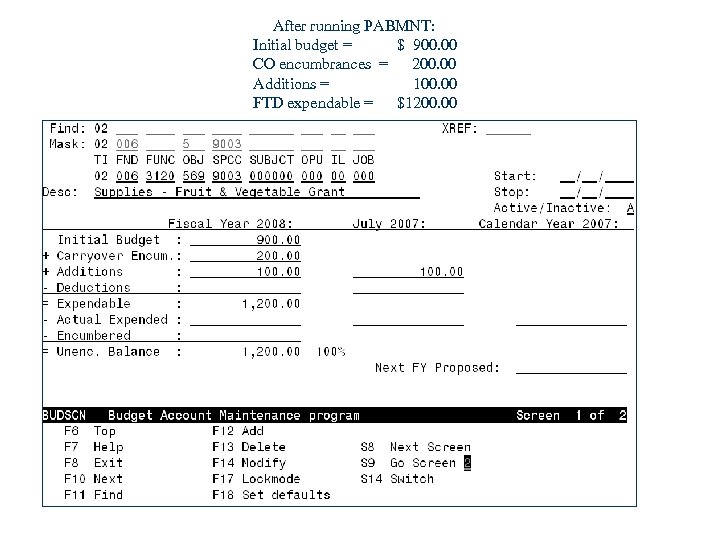
After running PABMNT: Initial budget = $ 900. 00 CO encumbrances = 200. 00 Additions = 100. 00 FTD expendable = $1200. 00
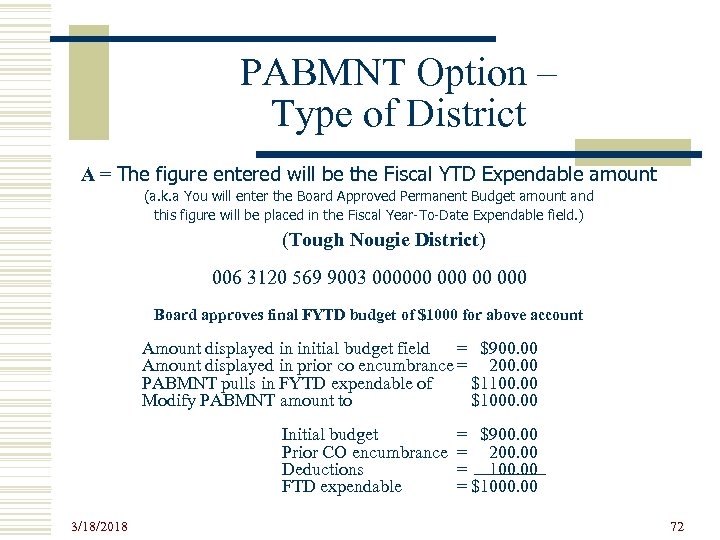
PABMNT Option – Type of District A = The figure entered will be the Fiscal YTD Expendable amount (a. k. a You will enter the Board Approved Permanent Budget amount and this figure will be placed in the Fiscal Year-To-Date Expendable field. ) (Tough Nougie District) 006 3120 569 9003 000000 00 000 Board approves final FYTD budget of $1000 for above account Amount displayed in initial budget field = $900. 00 Amount displayed in prior co encumbrance = 200. 00 PABMNT pulls in FYTD expendable of $1100. 00 Modify PABMNT amount to $1000. 00 Initial budget Prior CO encumbrance Deductions FTD expendable 3/18/2018 = $900. 00 = 200. 00 = 100. 00 = $1000. 00 72
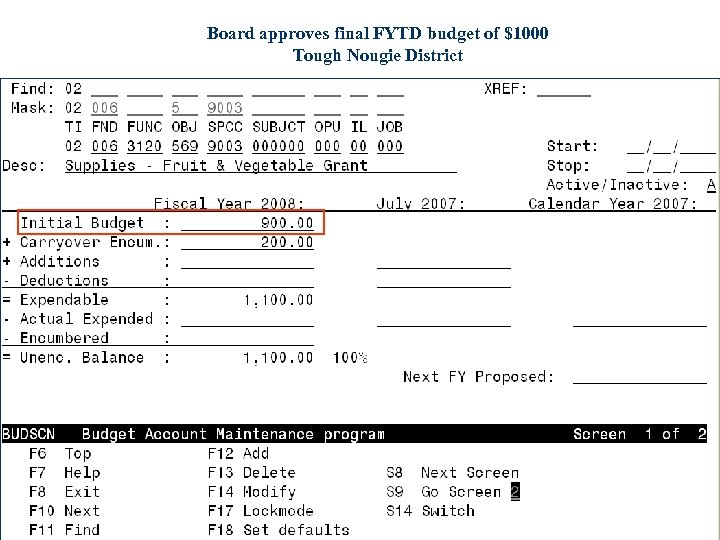
Board approves final FYTD budget of $1000 Tough Nougie District
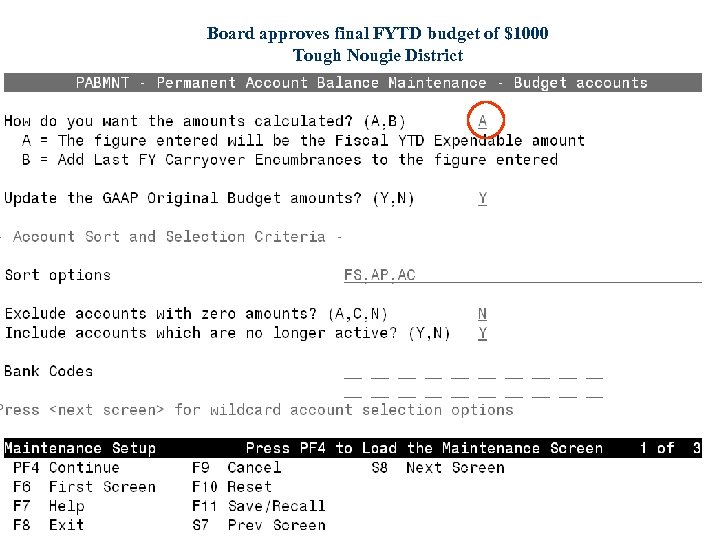
Board approves final FYTD budget of $1000 Tough Nougie District
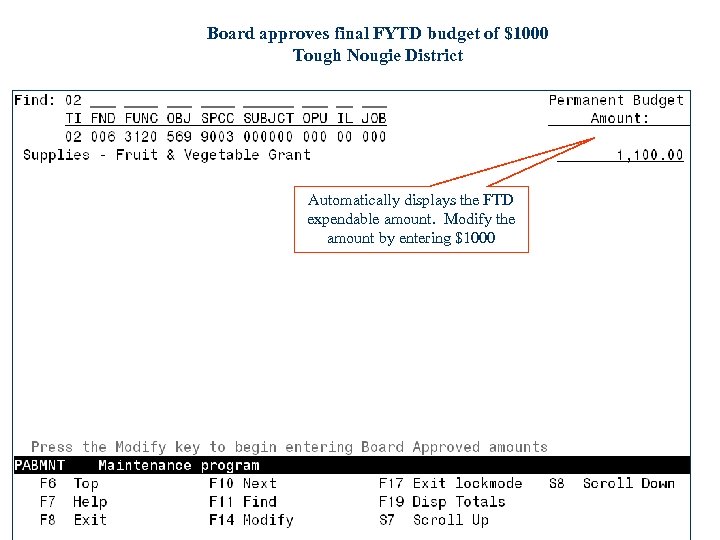
Board approves final FYTD budget of $1000 Tough Nougie District Automatically displays the FTD expendable amount. Modify the amount by entering $1000
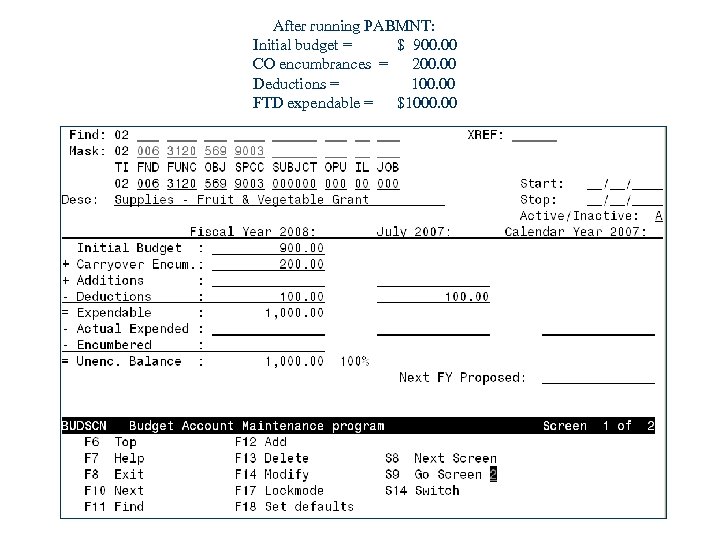
After running PABMNT: Initial budget = $ 900. 00 CO encumbrances = 200. 00 Deductions = 100. 00 FTD expendable = $1000. 00
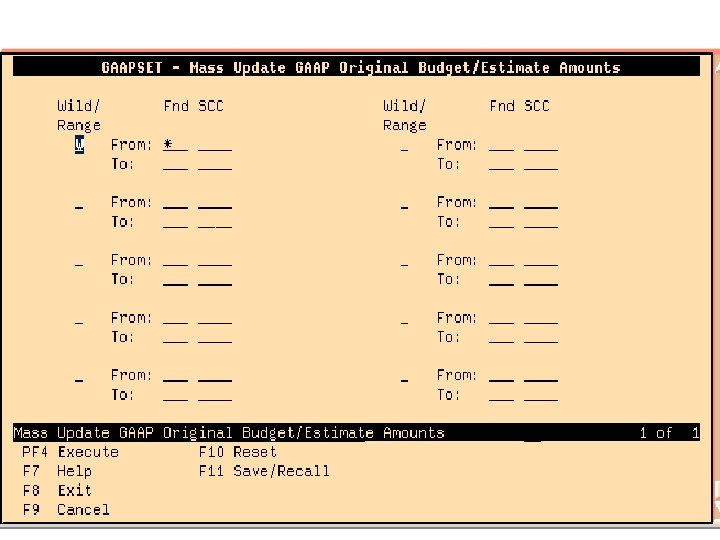
GAAPSET Option w Allows you to set the GAAP original budget equal to the FYTD Expendable and the GAAP original revenue estimate equal to the FYTD Receivable amount for all accounts in a particular fund/scc. w Useful primarily for new funds or for districts who enter appropriated amounts directly into ACTSCN. 3/18/2018 77

QUESTIONS? Contact Information: Help desk URL: https: //helpdesk. usd. oecn. k 12. oh. us/CAISD/PDMWEB. EXE Eileen Pakula 330 -702 -9828 Patty Daniels 330 -702 -9822 3/18/2018 104
Скачать презентацию USAS BUDGETING ACCESS Presented by Eileen Pakula March
67224683d70e47496b714ffaf9837c48.ppt