


 Скачать презентацию UPn P DLNA Speaker Yi-Lei Chang Advisor
7c7f1ce9918fe080b0f4ba55a8743bba.ppt
- Количество слайдов: 46
 UPn. P & DLNA Speaker: Yi-Lei Chang Advisor: Dr. Kai-Wei Ke 2012/03/27 1
 Outline • • • Introduction UPn. P DLNA Example - DLNA Family Intercom System Reference 2
 Introduction • Networking is easy, except… – Network is unreliable – Programs need to talk to programs • But software is heterogeneous – Must upgrade system piece at a time 3
 UPn. P • UPn. P Universal Plug-and-Play • Describe the protocols for communication between – Control point (CP) • Controllers – Device • Provide services – An actual device might contain both functions 4
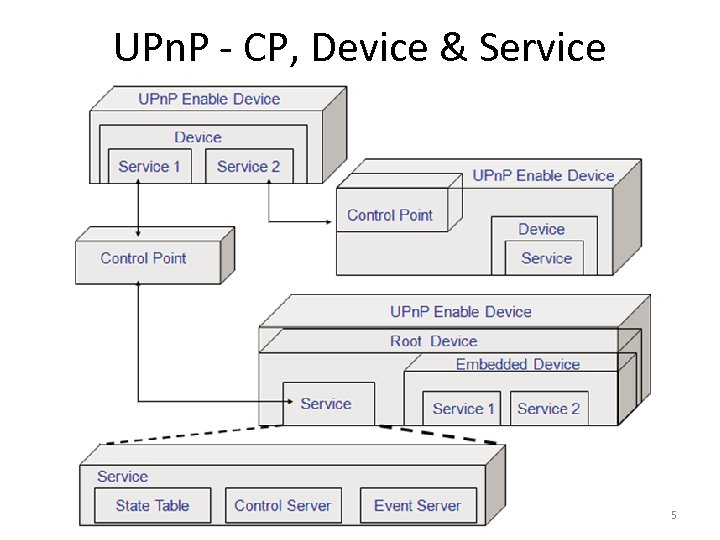 UPn. P - CP, Device & Service ? ? 5
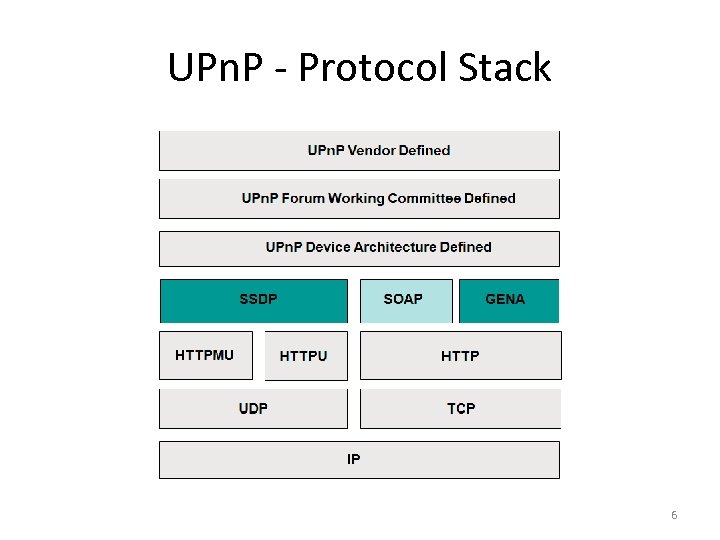 UPn. P - Protocol Stack 6
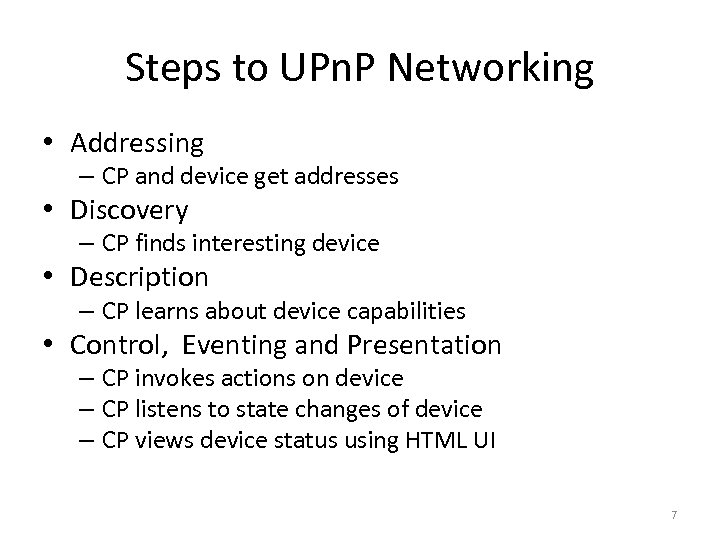 Steps to UPn. P Networking • Addressing – CP and device get addresses • Discovery – CP finds interesting device • Description – CP learns about device capabilities • Control, Eventing and Presentation – CP invokes actions on device – CP listens to state changes of device – CP views device status using HTML UI 7
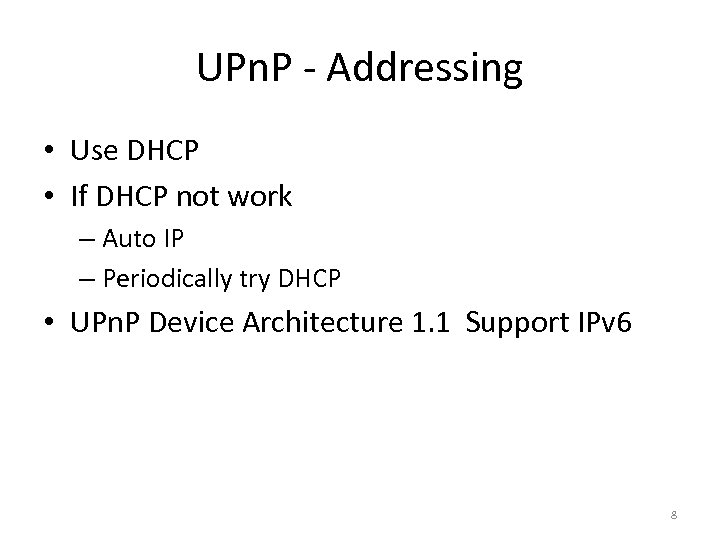 UPn. P - Addressing • Use DHCP • If DHCP not work – Auto IP – Periodically try DHCP • UPn. P Device Architecture 1. 1 Support IPv 6 8
 UPn. P - Discovery • Use SSDP (Simple Service Discovery Protocol) • Control points – Find interesting device/service – All/filter • Device – Advertise when added – Refresh advertisements – Cancel advertisements when removed – Response search request 9
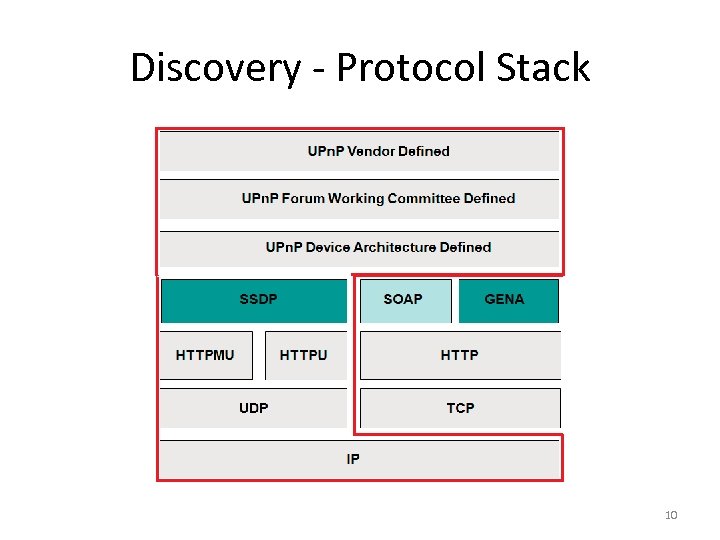 Discovery - Protocol Stack 10
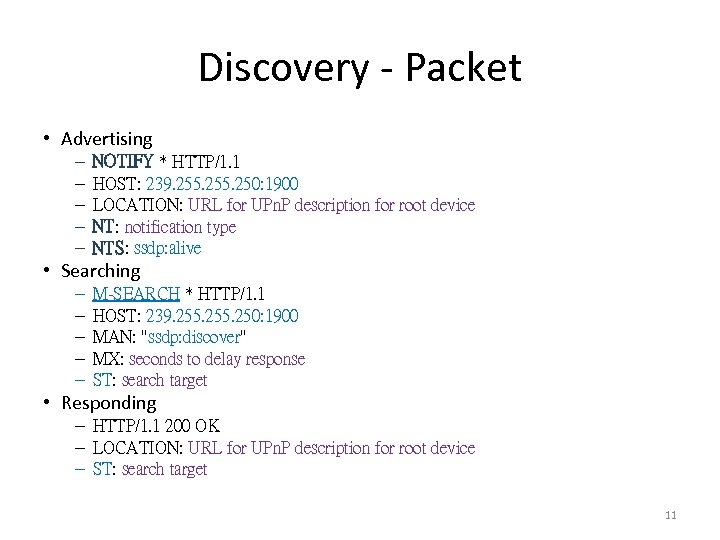 Discovery - Packet • Advertising – – – NOTIFY * HTTP/1. 1 HOST: 239. 255. 250: 1900 LOCATION: URL for UPn. P description for root device NT: notification type NTS: ssdp: alive • Searching – – – M-SEARCH * HTTP/1. 1 HOST: 239. 255. 250: 1900 MAN: "ssdp: discover" MX: seconds to delay response ST: search target • Responding – HTTP/1. 1 200 OK – LOCATION: URL for UPn. P description for root device – ST: search target 11
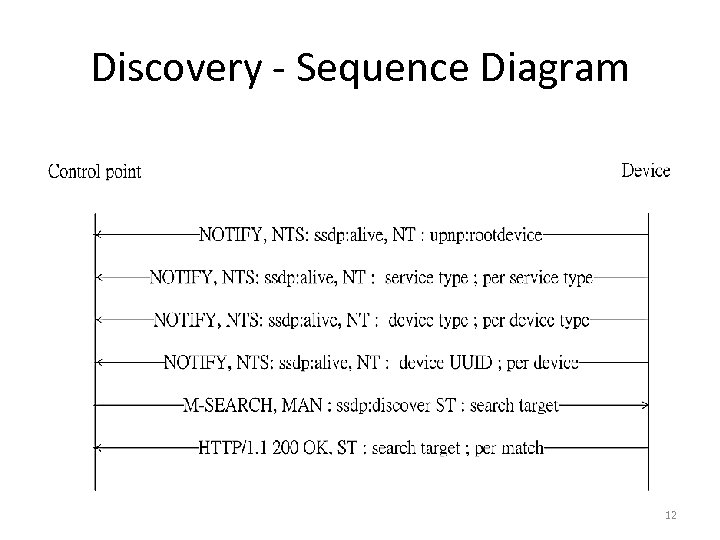 Discovery - Sequence Diagram 12
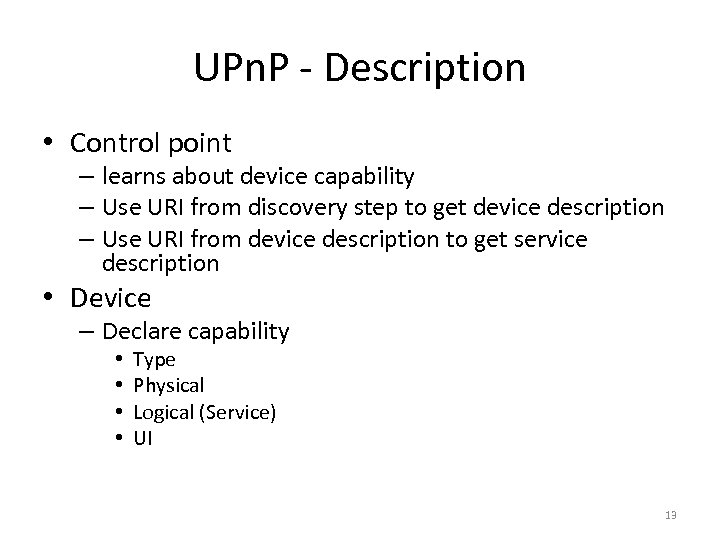 UPn. P - Description • Control point – learns about device capability – Use URI from discovery step to get device description – Use URI from device description to get service description • Device – Declare capability • • Type Physical Logical (Service) UI 13
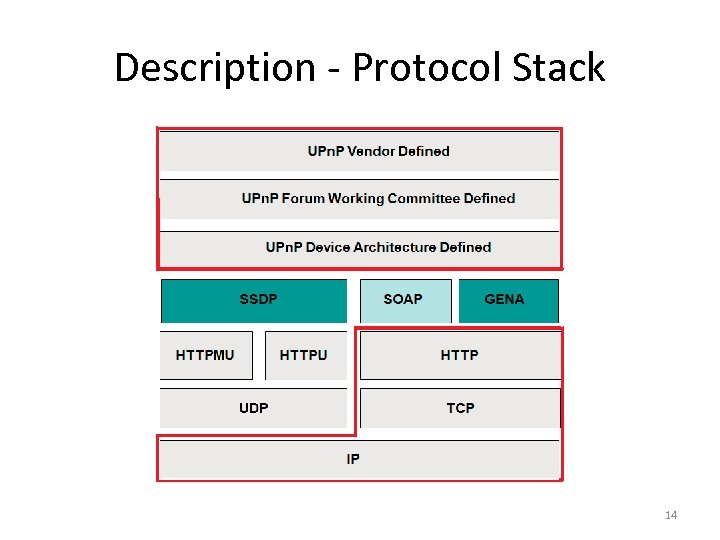 Description - Protocol Stack 14
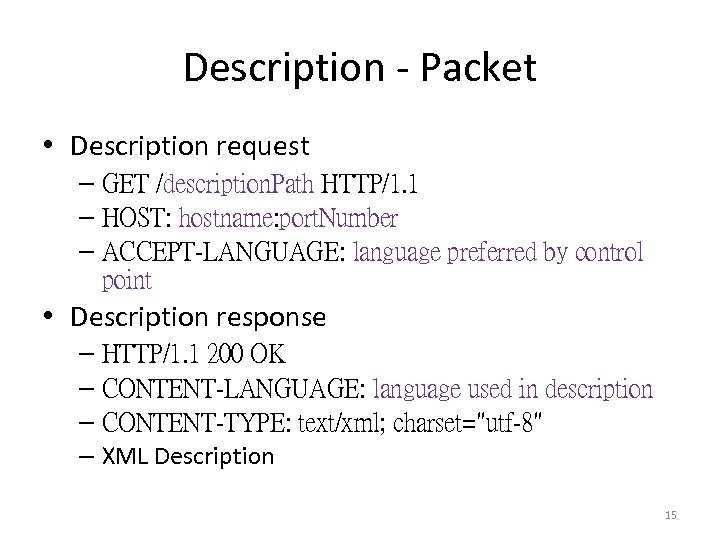 Description - Packet • Description request – GET /description. Path HTTP/1. 1 – HOST: hostname: port. Number – ACCEPT-LANGUAGE: language preferred by control point • Description response – HTTP/1. 1 200 OK – CONTENT-LANGUAGE: language used in description – CONTENT-TYPE: text/xml; charset="utf-8" – XML Description 15
•
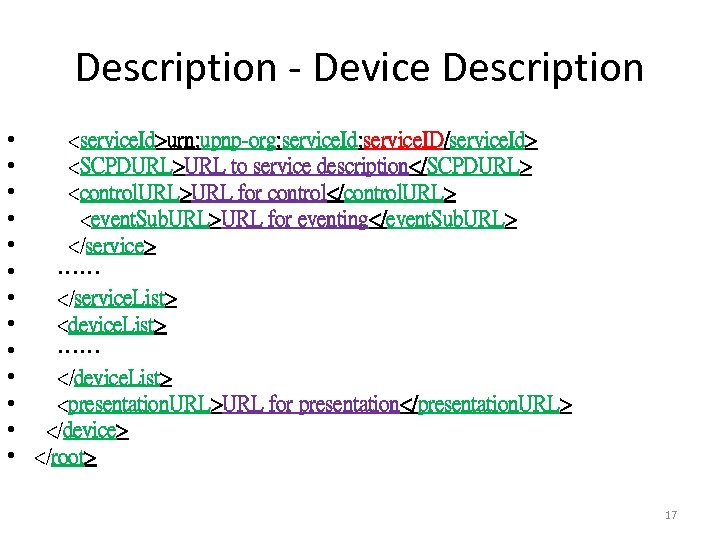 Description - Device Description •
•
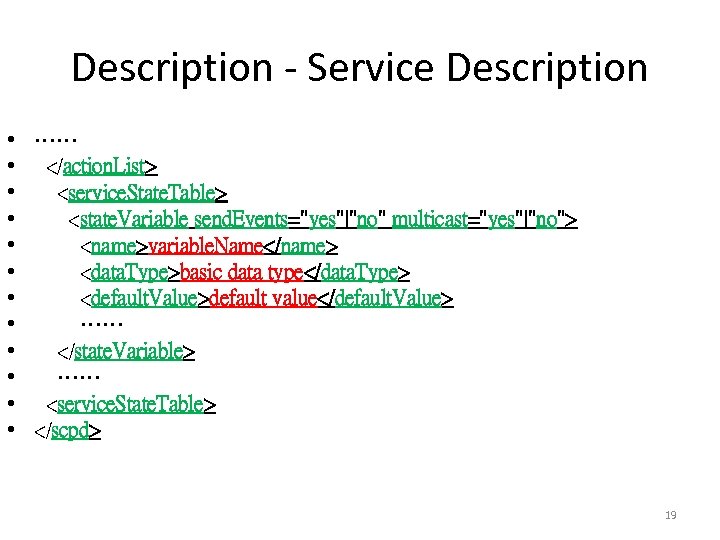 Description - Service Description • …… • •
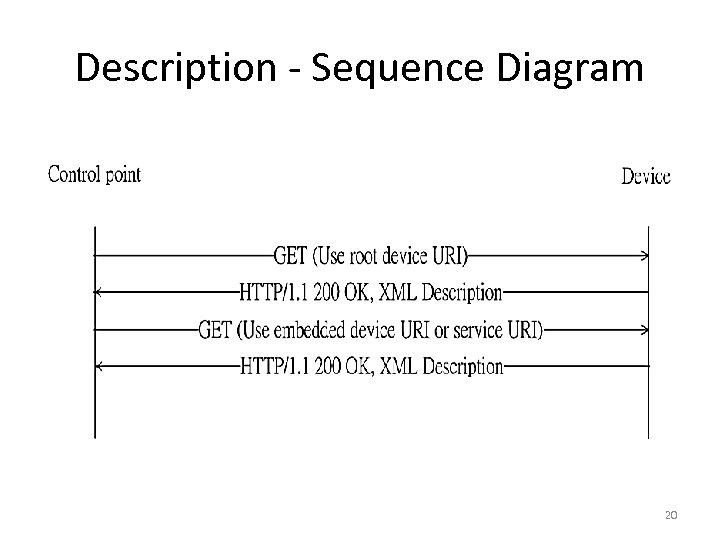 Description - Sequence Diagram 20
 UPn. P - Control • Use SOAP Simple Object Access Protocol • Control point – Invokes actions on device – Use URI from description step to send actions to device • Device – Response action result 21
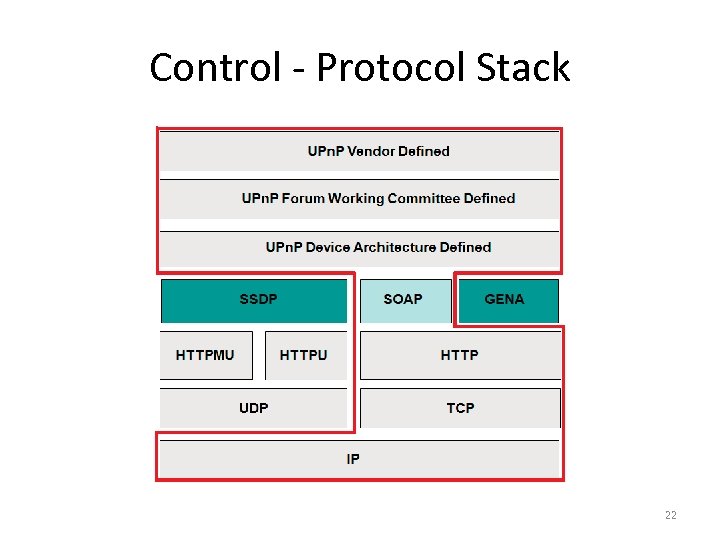 Control - Protocol Stack 22
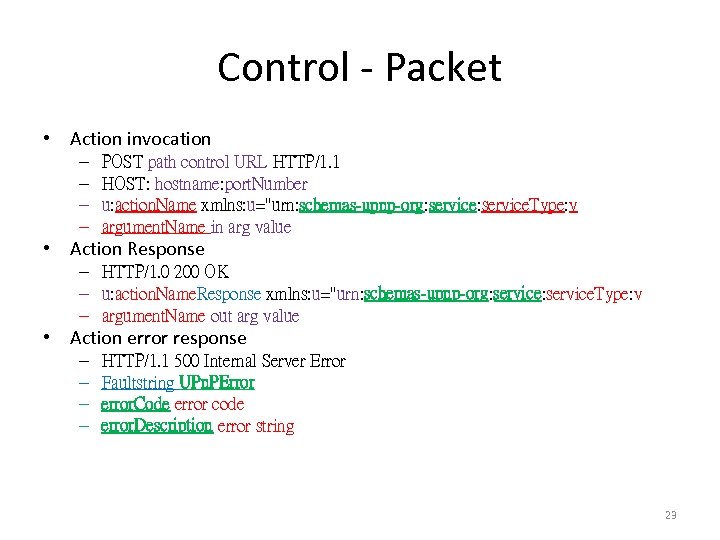 Control - Packet • Action invocation – – POST path control URL HTTP/1. 1 HOST: hostname: port. Number u: action. Name xmlns: u="urn: schemas-upnp-org: service. Type: v argument. Name in arg value • Action Response – HTTP/1. 0 200 OK – u: action. Name. Response xmlns: u="urn: schemas-upnp-org: service. Type: v – argument. Name out arg value • Action error response – – HTTP/1. 1 500 Internal Server Error Faultstring UPn. PError error. Code error code error. Description error string 23
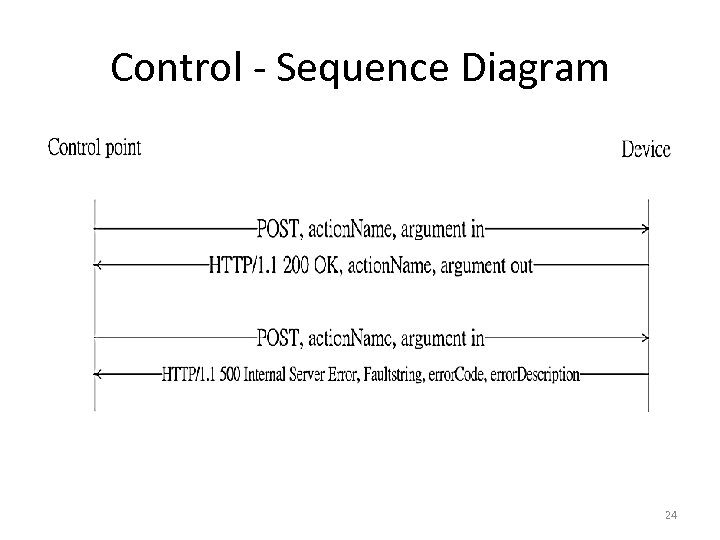 Control - Sequence Diagram 24
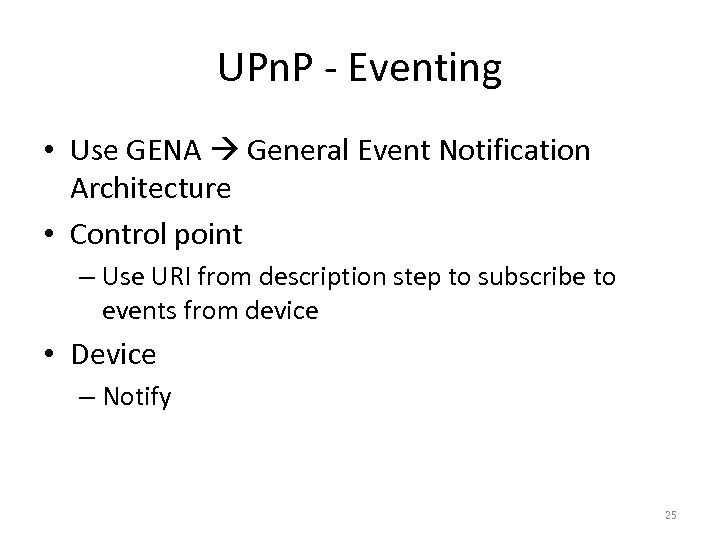 UPn. P - Eventing • Use GENA General Event Notification Architecture • Control point – Use URI from description step to subscribe to events from device • Device – Notify 25
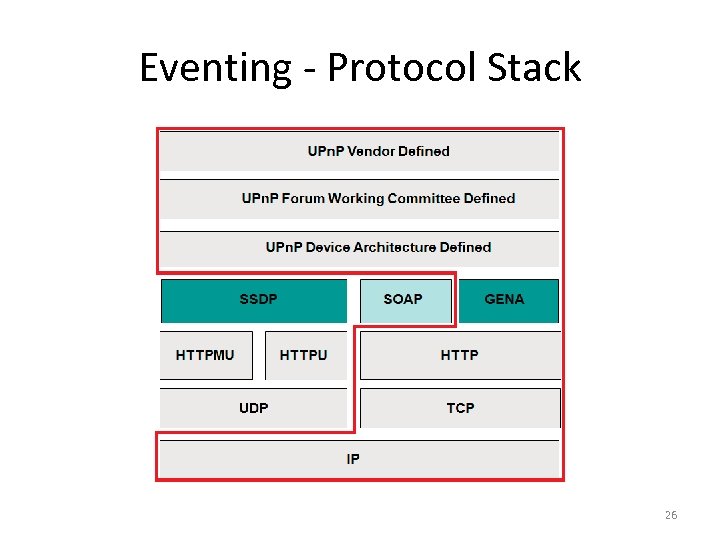 Eventing - Protocol Stack 26
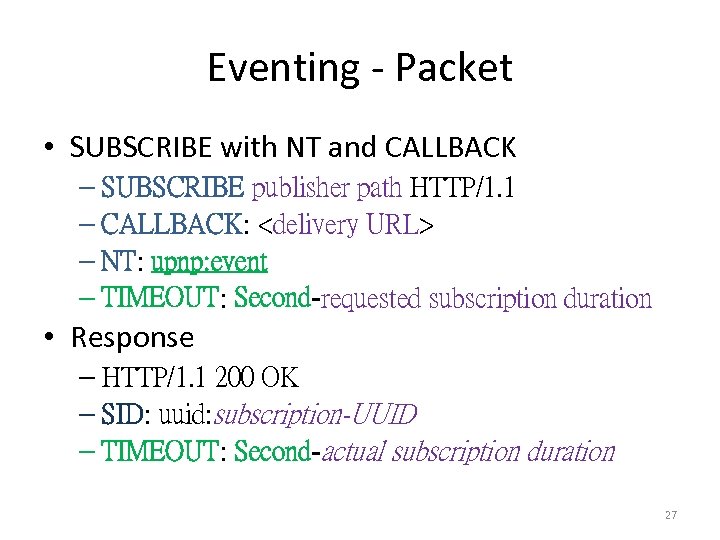 Eventing - Packet • SUBSCRIBE with NT and CALLBACK – SUBSCRIBE publisher path HTTP/1. 1 – CALLBACK:
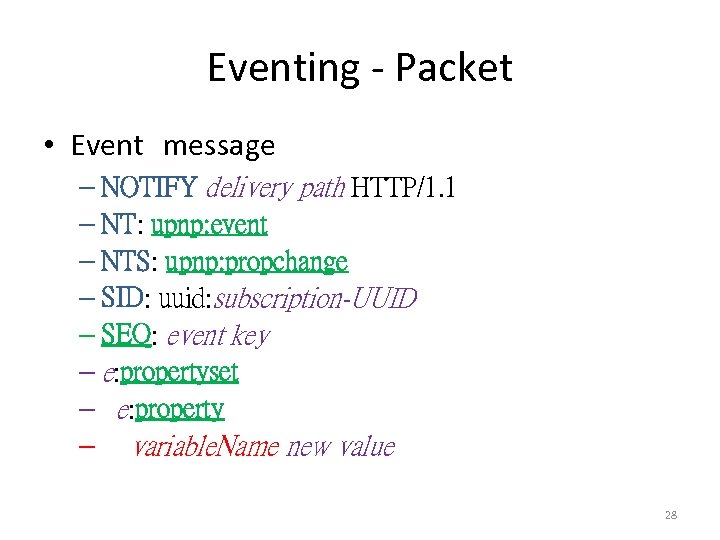 Eventing - Packet • Event message – NOTIFY delivery path HTTP/1. 1 – NT: upnp: event – NTS: upnp: propchange – SID: uuid: subscription-UUID – SEQ: event key – e: propertyset – e: property – variable. Name new value 28
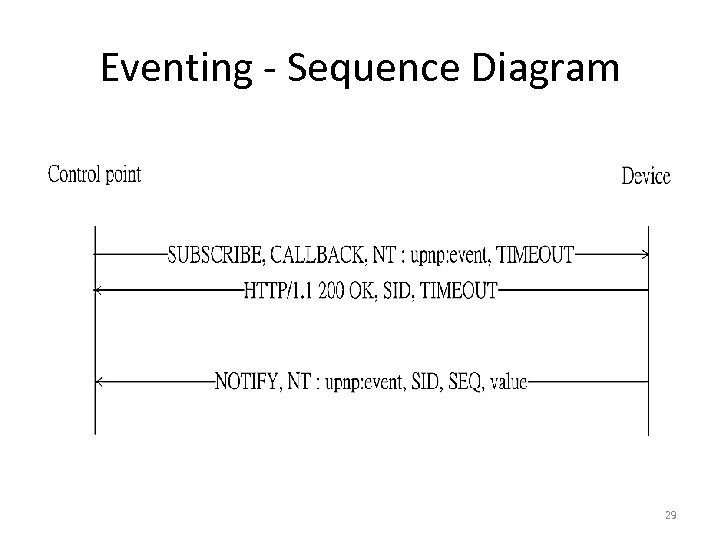 Eventing - Sequence Diagram 29
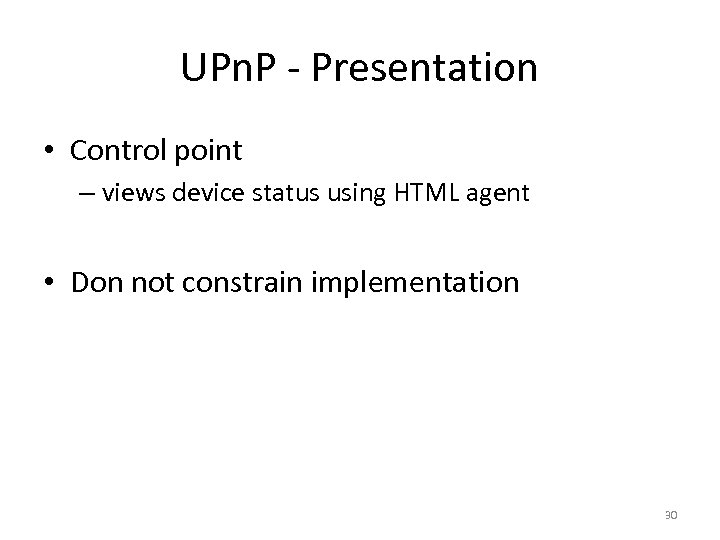 UPn. P - Presentation • Control point – views device status using HTML agent • Don not constrain implementation 30
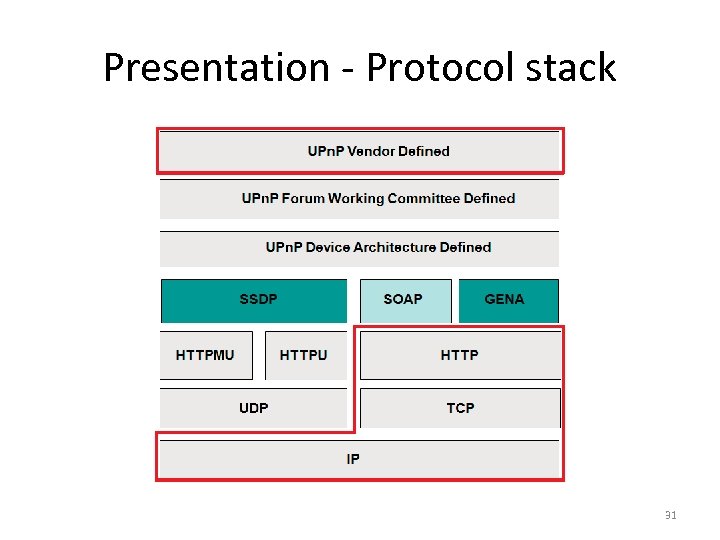 Presentation - Protocol stack 31
 DLNA • DLNA Digital Living Network Alliance • Goal: Establish an ecosystem of compatible products for networked media devices • Develops standards-based specifications – DLNA Guidelines 32
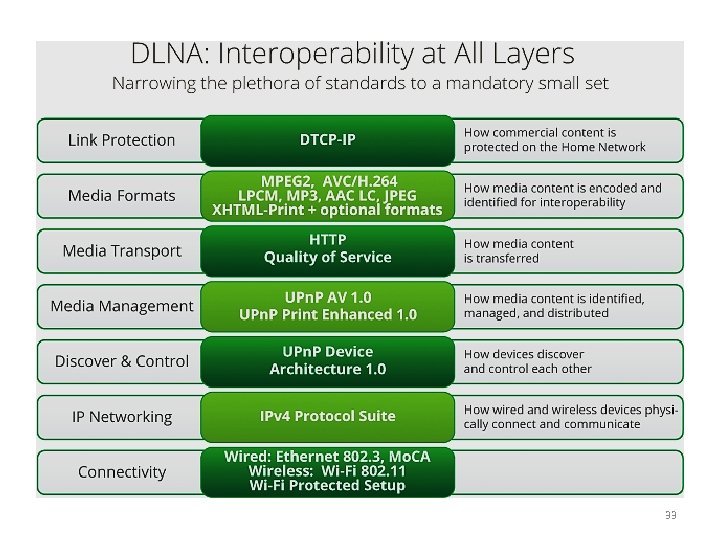 33
33
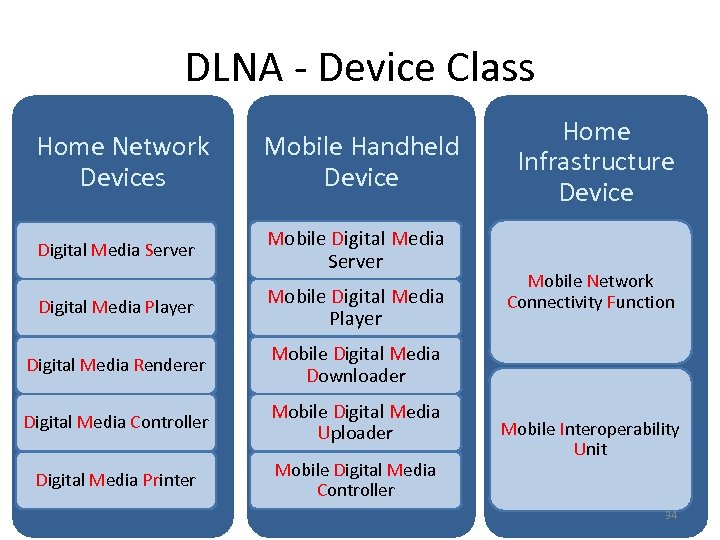 DLNA - Device Class Home Network Devices Mobile Handheld Device Digital Media Server Mobile Digital Media Server Digital Media Player Mobile Digital Media Player Digital Media Renderer Mobile Digital Media Uploader Digital Media Printer Mobile Digital Media Controller Mobile Network Connectivity Function Mobile Digital Media Downloader Digital Media Controller Home Infrastructure Device Mobile Interoperability Unit 34
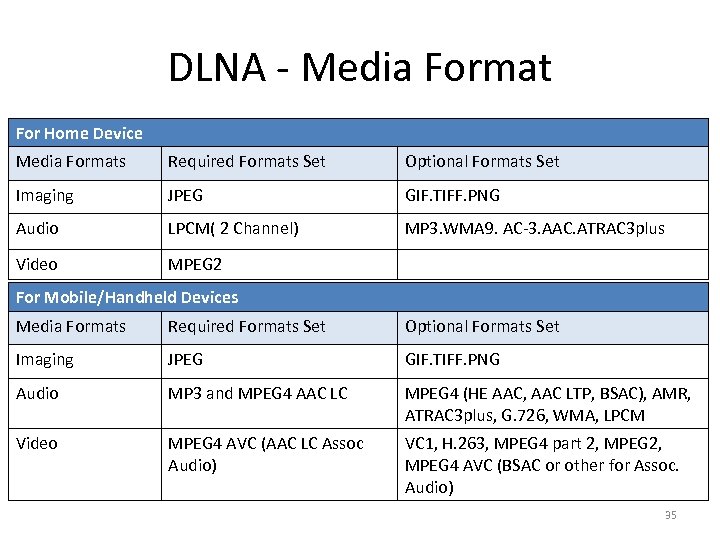 DLNA - Media Format For Home Device Media Formats Required Formats Set Optional Formats Set Imaging JPEG GIF. TIFF. PNG Audio LPCM( 2 Channel) MP 3. WMA 9. AC-3. AAC. ATRAC 3 plus Video MPEG 2 For Mobile/Handheld Devices Media Formats Required Formats Set Optional Formats Set Imaging JPEG GIF. TIFF. PNG Audio MP 3 and MPEG 4 AAC LC MPEG 4 (HE AAC, AAC LTP, BSAC), AMR, ATRAC 3 plus, G. 726, WMA, LPCM Video MPEG 4 AVC (AAC LC Assoc Audio) VC 1, H. 263, MPEG 4 part 2, MPEG 4 AVC (BSAC or other for Assoc. Audio) 35
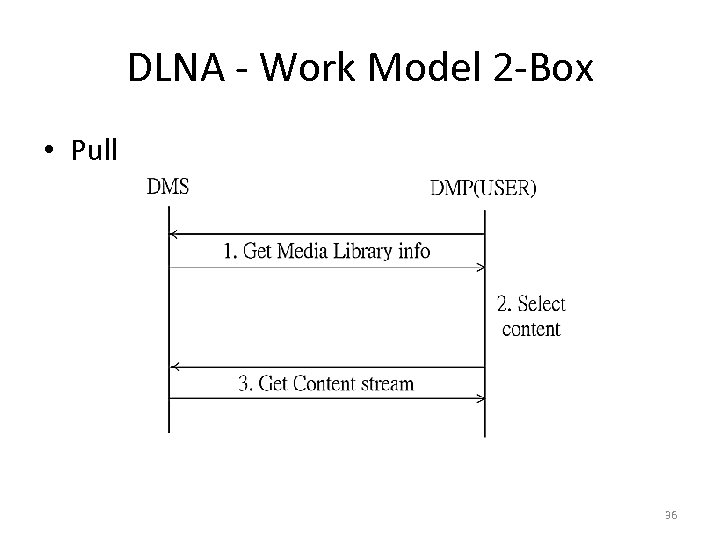 DLNA - Work Model 2 -Box • Pull 36
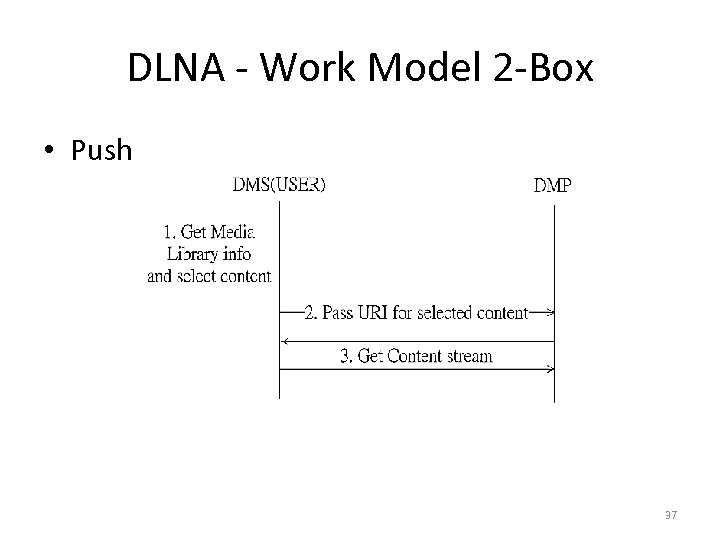 DLNA - Work Model 2 -Box • Push 37
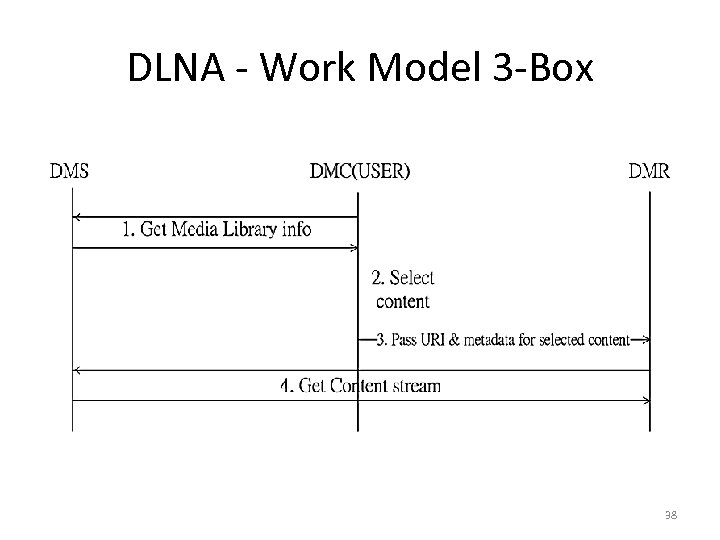 DLNA - Work Model 3 -Box 38
 An example - DFIS • DFIS DLNA Family Intercom System • Traditional intercom system – Only allows place-to-place communication – Necessary to dial the extension number of a specific family member • DFIS – Support user mobility – Without the knowledge of the extension number that caters to a fixed location 39
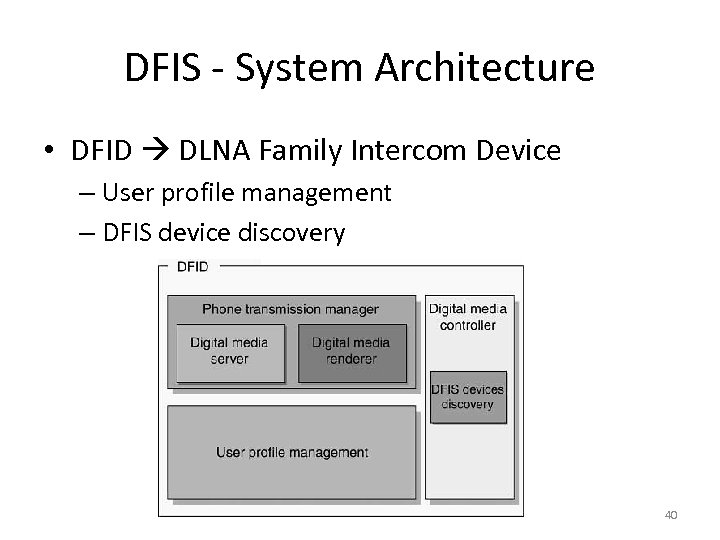 DFIS - System Architecture • DFID DLNA Family Intercom Device – User profile management – DFIS device discovery 40
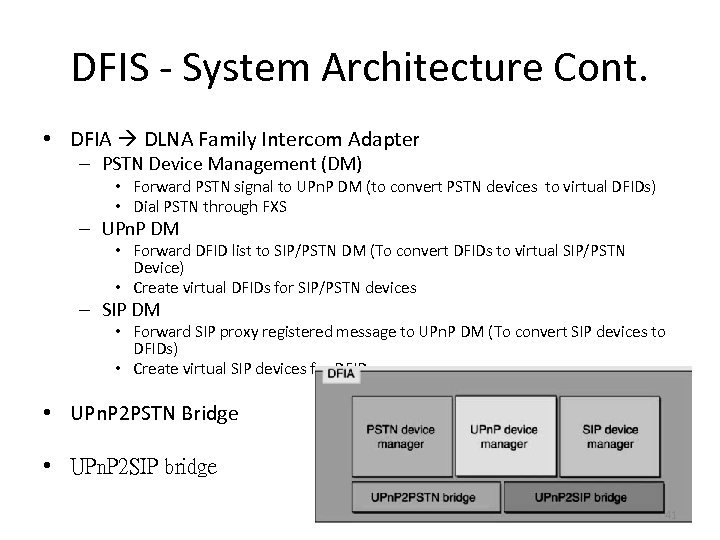 DFIS - System Architecture Cont. • DFIA DLNA Family Intercom Adapter – PSTN Device Management (DM) • Forward PSTN signal to UPn. P DM (to convert PSTN devices to virtual DFIDs) • Dial PSTN through FXS – UPn. P DM • Forward DFID list to SIP/PSTN DM (To convert DFIDs to virtual SIP/PSTN Device) • Create virtual DFIDs for SIP/PSTN devices – SIP DM • Forward SIP proxy registered message to UPn. P DM (To convert SIP devices to DFIDs) • Create virtual SIP devices for DFIDs • UPn. P 2 PSTN Bridge • UPn. P 2 SIP bridge 41
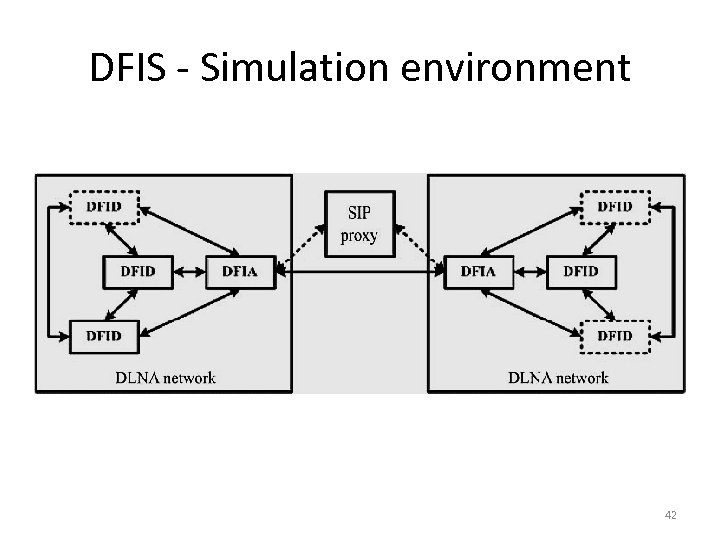 DFIS - Simulation environment 42
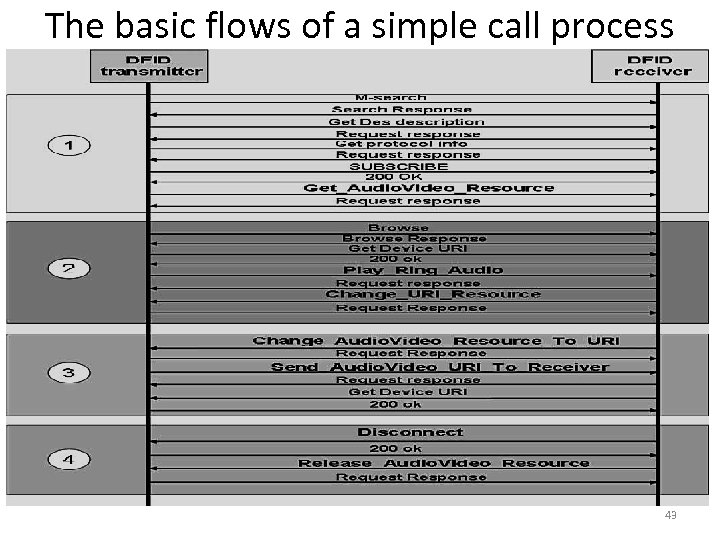 The basic flows of a simple call process 43
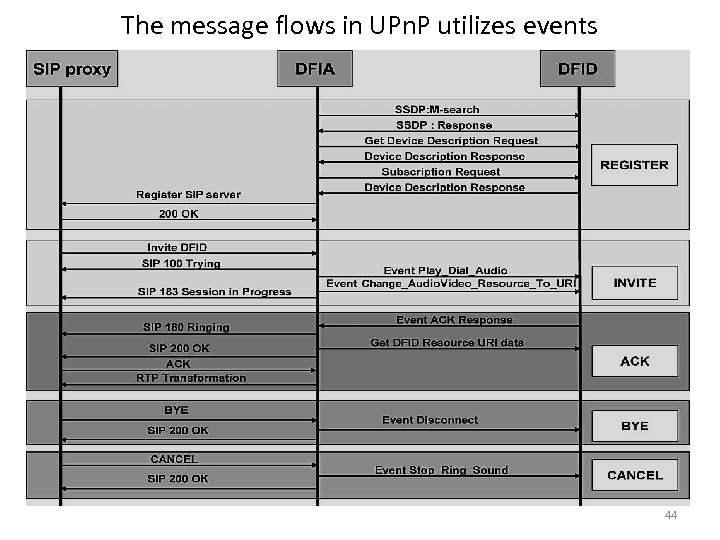 The message flows in UPn. P utilizes events 44
![Reference [1] Contributing Members of the UPn. P Forum, “UPn. P™ Device Architecture 1.](https://present5.com/presentation/7c7f1ce9918fe080b0f4ba55a8743bba/image-45.jpg "Reference [1] Contributing Members of the UPn. P Forum, “UPn. P™ Device Architecture 1.") Reference [1] Contributing Members of the UPn. P Forum, “UPn. P™ Device Architecture 1. 1, ” October 15, 2008. Retrieved March 18, 2012 from World Wide Web: http: //www. upnp. org/specs/arch/UPn. P-arch -Device. Architecture-v 1. 1. pdf. [2] Contributing Members of the UPn. P Forum, “UPn. P™ Device Architecture 1. 0, ” April 24, 2008. Retrieved March 10, 2012 from World Wide Web: http: //www. upnp. org/specs/arch/UPn. P-arch. Device. Architecture-v 1. 0. pdf. [3] Digital Living Network Alliance, “How It Works, ” 2012. Retrieved March 10, 2012 from World Wide Web: http: //www. dlna. org/dlna-for-industry/digital-living/how-it-works. [4] Allegro Software Development Corporation, “Networked Digital Media Standards: A UPn. P/DLNA Overview, ” 2006. Retrieved March 12, 2012 from World Wide Web: http: //www. allegrosoft. com/UPn. P_DLNA_White_Paper. pdf [5] Chin-Feng Lai, Hsien-Chao Huang, Yueh-Min Huang and Han-Chieh Chao, “Design and Implementation of the DLNA Family Intercom System for Smart Homes, ” Computer Journal, Vol. 52, No. 8, pp. 960 -968. 45
Reference [1] Contributing Members of the UPn. P Forum, “UPn. P™ Device Architecture 1. 1, ” October 15, 2008. Retrieved March 18, 2012 from World Wide Web: http: //www. upnp. org/specs/arch/UPn. P-arch -Device. Architecture-v 1. 1. pdf. [2] Contributing Members of the UPn. P Forum, “UPn. P™ Device Architecture 1. 0, ” April 24, 2008. Retrieved March 10, 2012 from World Wide Web: http: //www. upnp. org/specs/arch/UPn. P-arch. Device. Architecture-v 1. 0. pdf. [3] Digital Living Network Alliance, “How It Works, ” 2012. Retrieved March 10, 2012 from World Wide Web: http: //www. dlna. org/dlna-for-industry/digital-living/how-it-works. [4] Allegro Software Development Corporation, “Networked Digital Media Standards: A UPn. P/DLNA Overview, ” 2006. Retrieved March 12, 2012 from World Wide Web: http: //www. allegrosoft. com/UPn. P_DLNA_White_Paper. pdf [5] Chin-Feng Lai, Hsien-Chao Huang, Yueh-Min Huang and Han-Chieh Chao, “Design and Implementation of the DLNA Family Intercom System for Smart Homes, ” Computer Journal, Vol. 52, No. 8, pp. 960 -968. 45
 Thanks for Listening Q&A 46