 Скачать презентацию Unit 2 DB 2 and SQL Outline
9149faeae31283e78682018861bc74fe.ppt
- Количество слайдов: 51



Unit 2 DB 2 and SQL
Outline of Unit 2 2. 1 Overview 2. 2 Data Definition 2. 3 Data Manipulation 2. 4 The System Catalog 2. 5 Embedded SQL Wei-Pang Yang, Information Management, NDHU 2 -2
2. 1 Overview
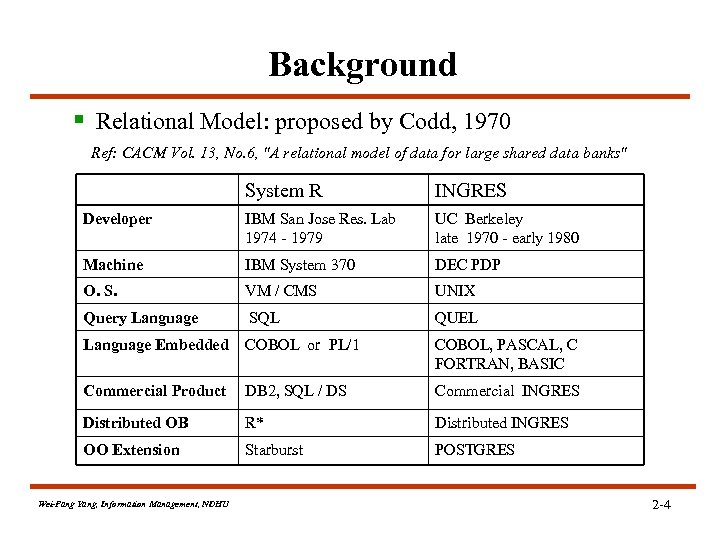
Background § Relational Model: proposed by Codd, 1970 Ref: CACM Vol. 13, No. 6, "A relational model of data for large shared data banks" System R INGRES Developer IBM San Jose Res. Lab 1974 - 1979 UC Berkeley late 1970 - early 1980 Machine IBM System 370 DEC PDP O. S. VM / CMS UNIX Query Language SQL QUEL Language Embedded COBOL or PL/1 COBOL, PASCAL, C FORTRAN, BASIC Commercial Product DB 2, SQL / DS Commercial INGRES Distributed OB R* Distributed INGRES OO Extension Starburst POSTGRES Wei-Pang Yang, Information Management, NDHU 2 -4

Relational Databases § Definition: A Relational Database is a database that is perceived by its users as a collection of tables (and nothing but tables). <e. g. > Supplier-and-Parts Database S P S# S 1 S 2 S 3 S 4 S 5 P# P 1 P 2 P 3 P 4 P 5 P 6 SNAME Smith Jones Blake Clark Adams PNAME Nut Bolt Screw Cam Cog STATUS 20 10 30 20 30 COLOR Red Green Blue Red WEIGHT 12 17 17 14 12 19 SP S# CITY London Paris London Athens Wei-Pang Yang, Information Management, NDHU CITY London Paris Rome London Paris London S 1 S 1 S 1 S 2 S 3 S 4 S 4 P# QTY P 1 300 P 2 200 P 3 400 P 4 200 P 5 100 P 6 100 P 1 300 P 2 400 P 2 200 P 4 300 P 5 400 (Hierarchical) IMS 2 -5
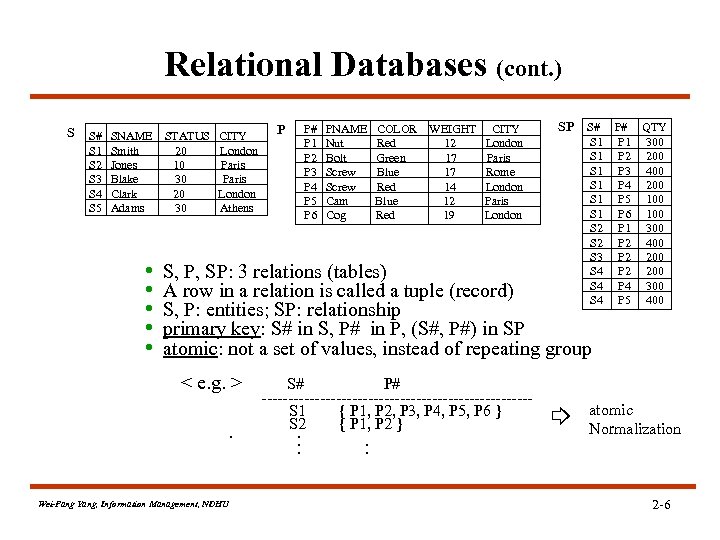
Relational Databases (cont. ) S S# S 1 S 2 S 3 S 4 S 5 SNAME Smith Jones Blake Clark Adams • • • STATUS 20 10 30 20 30 CITY London Paris London Athens P P# P 1 P 2 P 3 P 4 P 5 P 6 PNAME Nut Bolt Screw Cam Cog COLOR Red Green Blue Red WEIGHT 12 17 17 14 12 19 CITY London Paris Rome London Paris London SP S# S 1 S 1 S 1 S 2 S 3 S 4 S 4 S, P, SP: 3 relations (tables) A row in a relation is called a tuple (record) S, P: entities; SP: relationship primary key: S# in S, P# in P, (S#, P#) in SP atomic: not a set of values, instead of repeating group < e. g. >. Wei-Pang Yang, Information Management, NDHU S# P# -------------------------S 1 { P 1, P 2, P 3, P 4, P 5, P 6 } S 2 { P 1, P 2 }. . . P# QTY P 1 300 P 2 200 P 3 400 P 4 200 P 5 100 P 6 100 P 1 300 P 2 400 P 2 200 P 4 300 P 5 400 atomic Normalization 2 -6
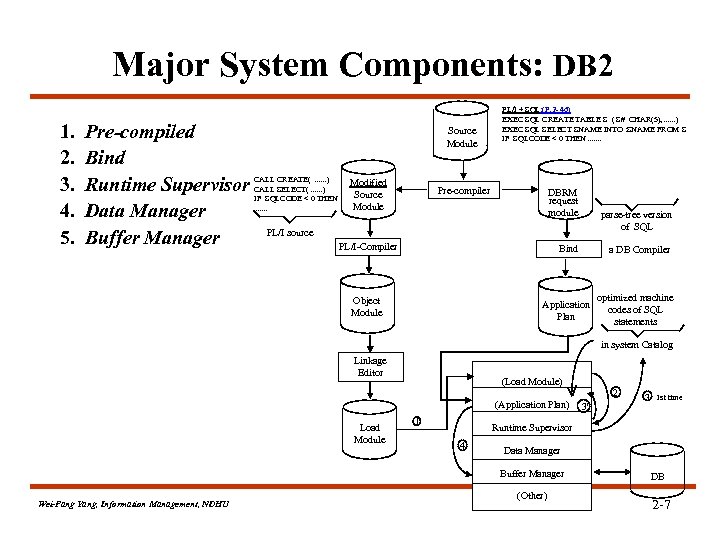
Major System Components: DB 2 1. 2. 3. 4. 5. Pre-compiled Bind Runtime Supervisor Data Manager Buffer Manager Source Module CALL CREATE(. . . ) CALL SELECT(. . . ) IF SQLCODE < 0 THEN. . . . Modified Source Module PL/I + SQL: (P. 2 - 46) EXEC SQL CREATE TABLE S ( S# CHAR(5), . . . ) EXEC SQL SELECT SNAME INTO : SNAME FROM S IF SQLCODE < 0 THEN. . . . Pre-compiler DBRM request module parse-tree version of SQL PL/I source PL/I-Compiler Bind Object Module Application Plan a DB Compiler optimized machine codes of SQL statements in system Catalog Linkage Editor (Load Module) (Application Plan) Load Module 1 3 1 st time Runtime Supervisor 4 Data Manager Buffer Manager Wei-Pang Yang, Information Management, NDHU 2 3' (Other) DB 2 -7
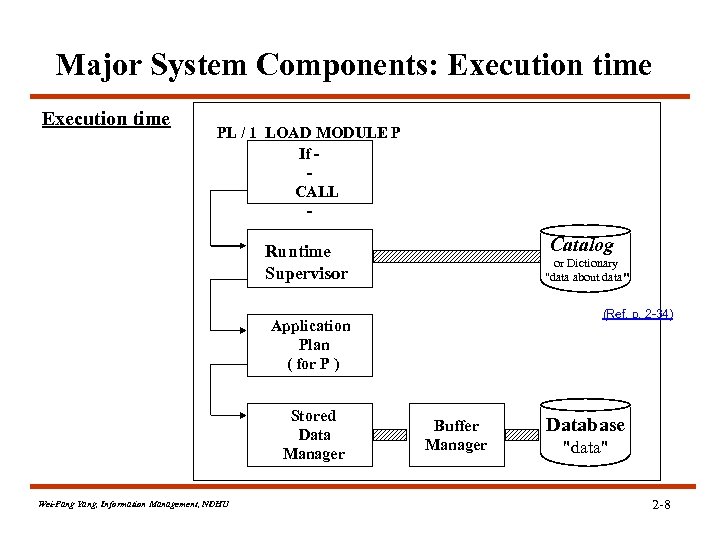
Major System Components: Execution time PL / 1 LOAD MODULE P If CALL - Catalog Runtime Supervisor or Dictionary "data about data" (Ref. p. 2 -34) Application Plan ( for P ) Stored Data Manager Wei-Pang Yang, Information Management, NDHU Buffer Manager Database "data" 2 -8
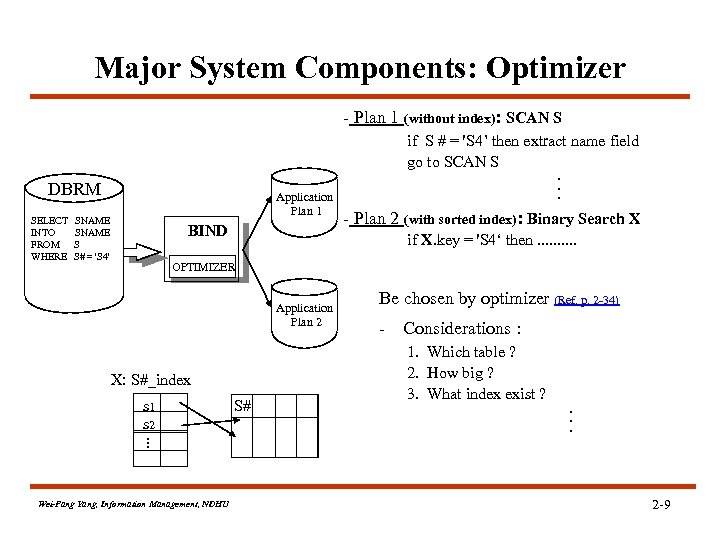
Major System Components: Optimizer - Plan 1 (without index): SCAN S DBRM SELECT INTO FROM WHERE Application Plan 1 SNAME S S# = 'S 4' BIND if S # = 'S 4’ then extract name field go to SCAN S. . . - Plan 2 (with sorted index): Binary Search X if X. key = 'S 4‘ then. . OPTIMIZER Application Plan 2 X: S#_index s 1 s 2. . . Wei-Pang Yang, Information Management, NDHU S# Be chosen by optimizer (Ref. p. 2 -34) - Considerations : 1. Which table ? 2. How big ? 3. What index exist ? . . . 2 -9
2. 2 Data Definition
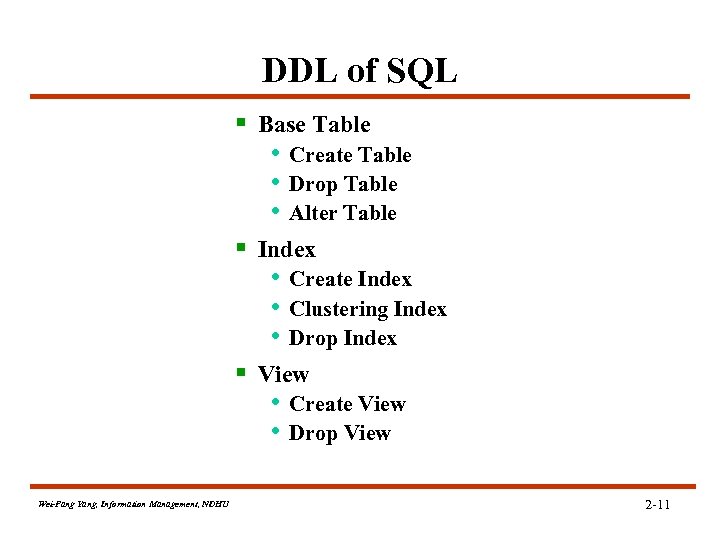
DDL of SQL § Base Table • Create Table • Drop Table • Alter Table § Index • Create Index • Clustering Index • Drop Index § View • Create View • Drop View Wei-Pang Yang, Information Management, NDHU 2 -11
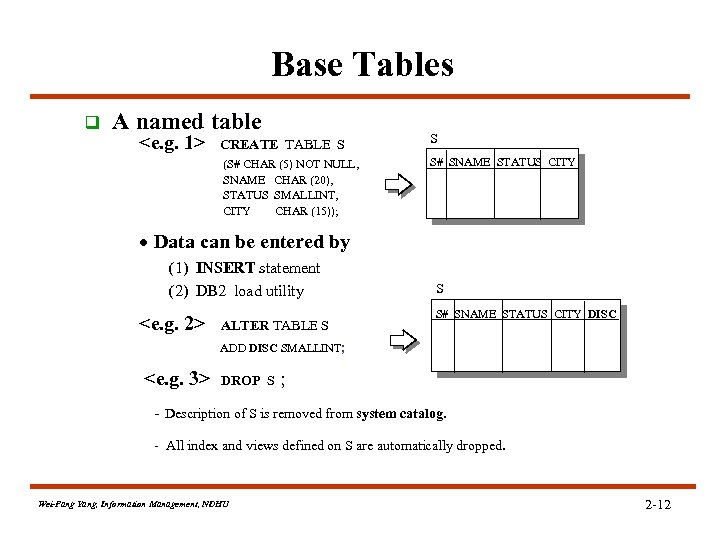
Base Tables q A named table CREATE TABLE S S (S# CHAR (5) NOT NULL, SNAME CHAR (20), STATUS SMALLINT, CITY CHAR (15)); <e. g. 1> S# SNAME STATUS CITY · Data can be entered by (1) INSERT statement (2) DB 2 load utility <e. g. 2> ALTER TABLE S S S# SNAME STATUS CITY DISC ADD DISC SMALLINT; <e. g. 3> DROP S ; - Description of S is removed from system catalog. - All index and views defined on S are automatically dropped. Wei-Pang Yang, Information Management, NDHU 2 -12
![Base Tables (cont. ) § FOREIGN KEY (column-commalist ) REFERENCES base-table [(column-commalist )] [ON](https://present5.com/presentation/9149faeae31283e78682018861bc74fe/image-13.jpg "Base Tables (cont. ) § FOREIGN KEY (column-commalist ) REFERENCES base-table [(column-commalist )] [ON")
Base Tables (cont. ) § FOREIGN KEY (column-commalist ) REFERENCES base-table [(column-commalist )] [ON DELETE option] [ON UPDATE option] § CHECK (conditional-expression) S (Ref. p. 3 -9) S# S 1 Smith …. . SP S# P# QTY S 1 P 1 …. <e. g. > : CREATE TABLE SP ( S# S# NOT NULL, P# P# NOT NULL, QTY NOT NULL, PRIMARY KEY ( S#, P# ) , FOREIGN KEY ( S# ) REFERENCES S ON DELETE CASCADE ON UPDATE CASCADE , FOREIGN KEY ( P# ) REFERENCES P ON DELETE CASCADE ON UPDATE CASCADE , CHECK ( QTY >0 AND QTY <5001 ) ) ; (Ref. p. 10 -16, Integrity Rule) Wei-Pang Yang, Information Management, NDHU 2 -13
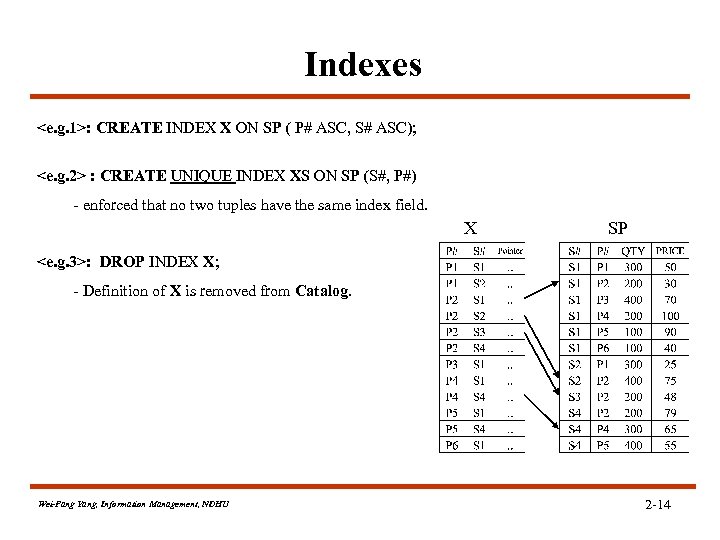
Indexes <e. g. 1>: CREATE INDEX X ON SP ( P# ASC, S# ASC); <e. g. 2> : CREATE UNIQUE INDEX XS ON SP (S#, P#) - enforced that no two tuples have the same index field. X SP <e. g. 3>: DROP INDEX X; - Definition of X is removed from Catalog. Wei-Pang Yang, Information Management, NDHU 2 -14
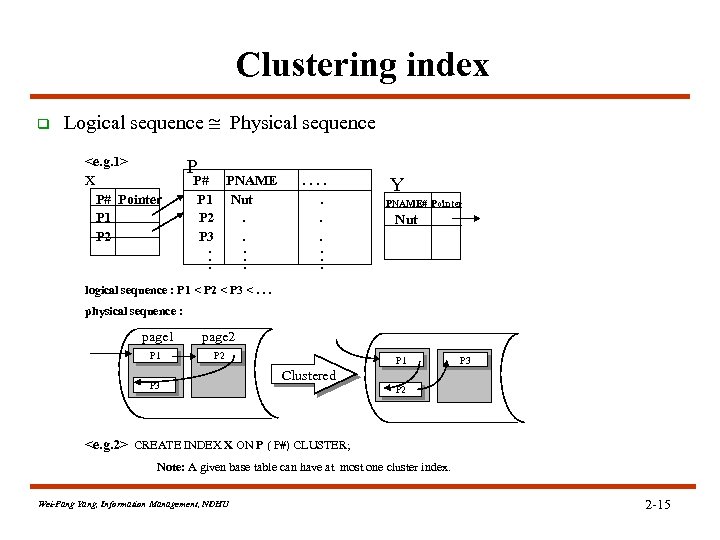
Clustering index q Logical sequence Physical sequence <e. g. 1> X P# Pointer P 1 P 2 P P# PNAME P 1 Nut P 2. P 3. . . . Y PNAME# Pointer Nut logical sequence : P 1 < P 2 < P 3 <. . . physical sequence : page 1 page 2 P 1 P 2 P 3 P 1 P 3 Clustered P 2 <e. g. 2> CREATE INDEX X ON P ( P#) CLUSTER; Note: A given base table can have at most one cluster index. Wei-Pang Yang, Information Management, NDHU 2 -15
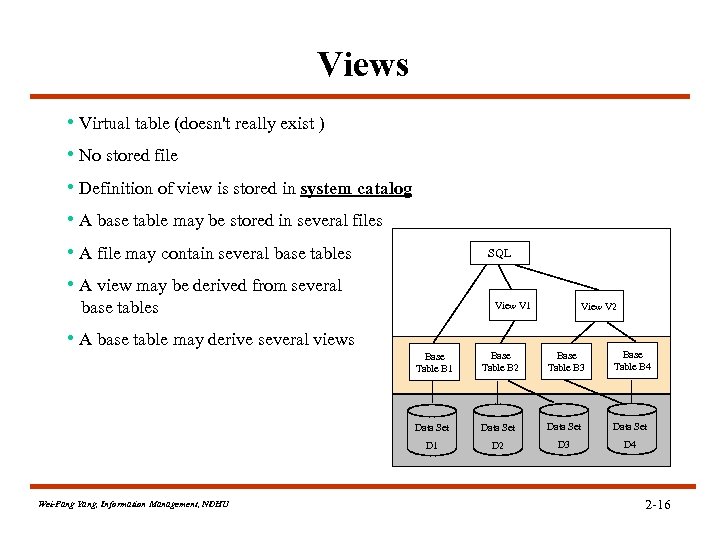
Views • Virtual table (doesn't really exist ) • No stored file • Definition of view is stored in system catalog • A base table may be stored in several files • A file may contain several base tables • A view may be derived from several SQL base tables View V 1 View V 2 • A base table may derive several views Base Table B 1 Base Table B 3 Base Table B 4 Data Set D 1 Wei-Pang Yang, Information Management, NDHU Base Table B 2 D 3 D 4 2 -16
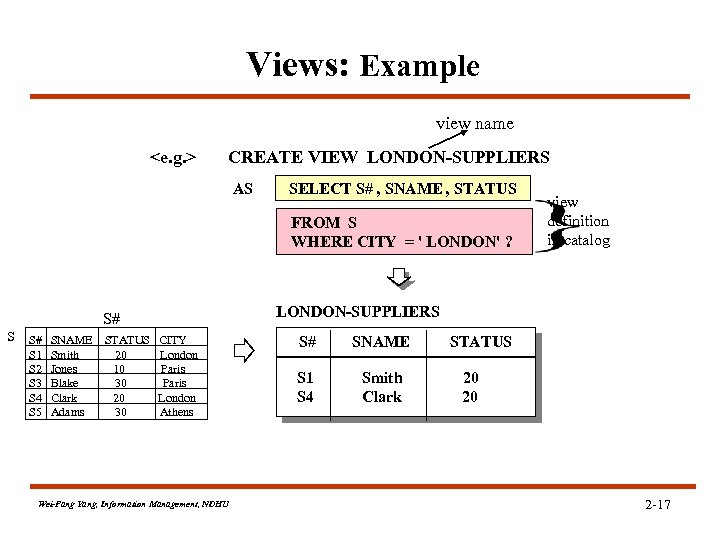
Views: Example view name <e. g. > CREATE VIEW LONDON-SUPPLIERS AS SELECT S# , SNAME , STATUS FROM S WHERE CITY = ' LONDON' ? LONDON-SUPPLIERS S# S 1 S 2 S 3 S 4 S 5 SNAME Smith Jones Blake Clark Adams STATUS 20 10 30 20 30 view definition in catalog CITY London Paris London Athens Wei-Pang Yang, Information Management, NDHU S# SNAME S 1 S 4 Smith Clark STATUS 20 20 2 -17
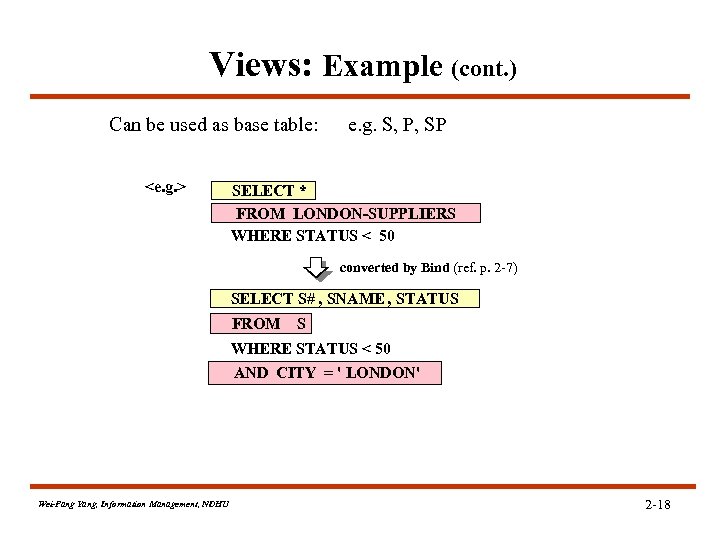
Views: Example (cont. ) Can be used as base table: <e. g. > e. g. S, P, SP SELECT * FROM LONDON-SUPPLIERS WHERE STATUS < 50 converted by Bind (ref. p. 2 -7) SELECT S# , SNAME , STATUS FROM S WHERE STATUS < 50 AND CITY = ' LONDON' Wei-Pang Yang, Information Management, NDHU 2 -18
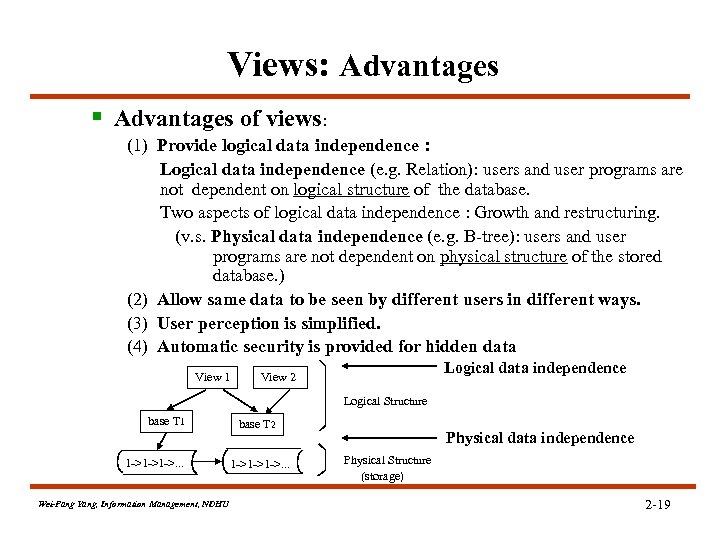
Views: Advantages § Advantages of views: (1) Provide logical data independence : Logical data independence (e. g. Relation): users and user programs are not dependent on logical structure of the database. Two aspects of logical data independence : Growth and restructuring. (v. s. Physical data independence (e. g. B-tree): users and user programs are not dependent on physical structure of the stored database. ) (2) Allow same data to be seen by different users in different ways. (3) User perception is simplified. (4) Automatic security is provided for hidden data View 1 Logical data independence View 2 Logical Structure base T 1 1 ->1 ->1 ->. . . Wei-Pang Yang, Information Management, NDHU base T 2 1 ->1 ->1 ->. . . Physical data independence Physical Structure (storage) 2 -19
2. 3 Data Manipulation
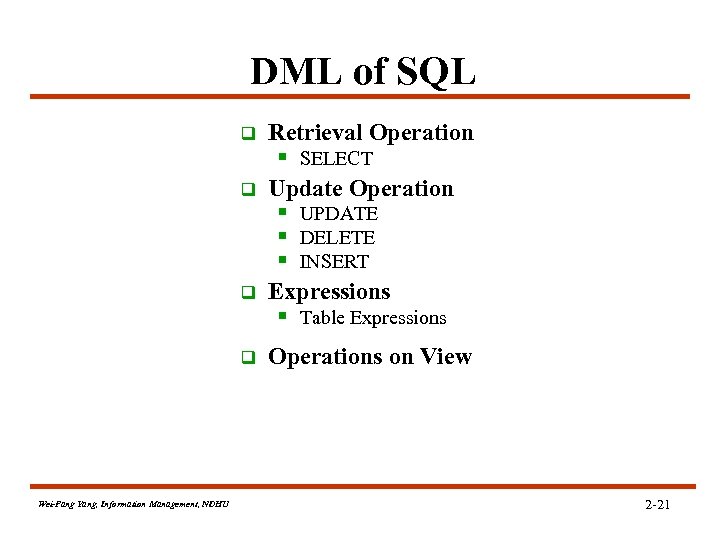
DML of SQL q Retrieval Operation § SELECT q Update Operation § UPDATE § DELETE § INSERT q Expressions § Table Expressions q Wei-Pang Yang, Information Management, NDHU Operations on View 2 -21
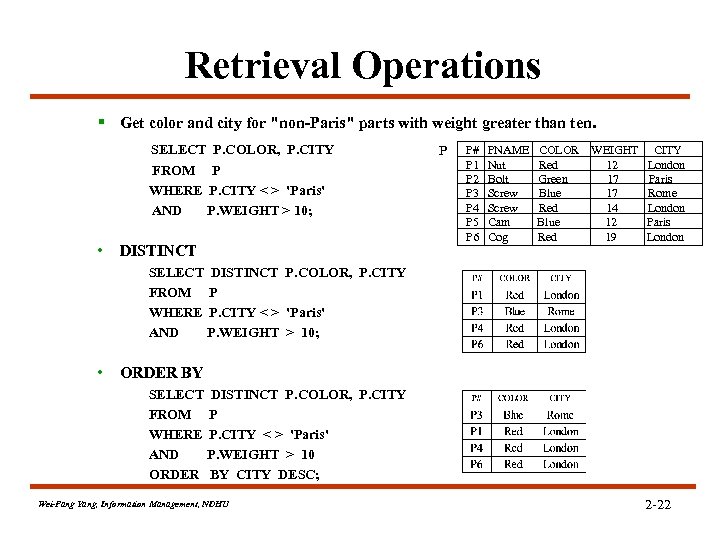
Retrieval Operations § Get color and city for "non-Paris" parts with weight greater than ten. SELECT P. COLOR, P. CITY FROM P WHERE P. CITY < > 'Paris' AND P. WEIGHT > 10; • DISTINCT P P# P 1 P 2 P 3 P 4 P 5 P 6 PNAME Nut Bolt Screw Cam Cog COLOR Red Green Blue Red WEIGHT 12 17 17 14 12 19 CITY London Paris Rome London Paris London SELECT DISTINCT P. COLOR, P. CITY FROM P WHERE P. CITY < > 'Paris' AND P. WEIGHT > 10; • ORDER BY SELECT DISTINCT P. COLOR, P. CITY FROM P WHERE P. CITY < > 'Paris' AND P. WEIGHT > 10 ORDER BY CITY DESC; Wei-Pang Yang, Information Management, NDHU 2 -22
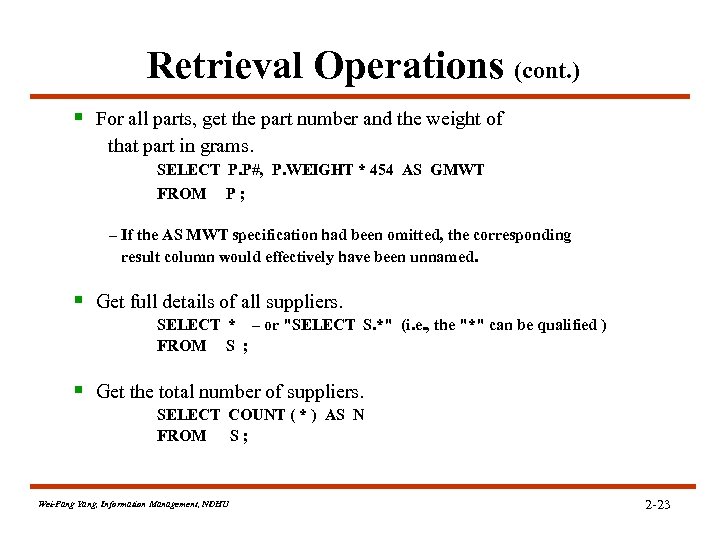
Retrieval Operations (cont. ) § For all parts, get the part number and the weight of that part in grams. SELECT P. P#, P. WEIGHT * 454 AS GMWT FROM P; – If the AS MWT specification had been omitted, the corresponding result column would effectively have been unnamed. § Get full details of all suppliers. SELECT * – or "SELECT S. *" (i. e. , the "*" can be qualified ) FROM S ; § Get the total number of suppliers. SELECT COUNT ( * ) AS N FROM S; Wei-Pang Yang, Information Management, NDHU 2 -23
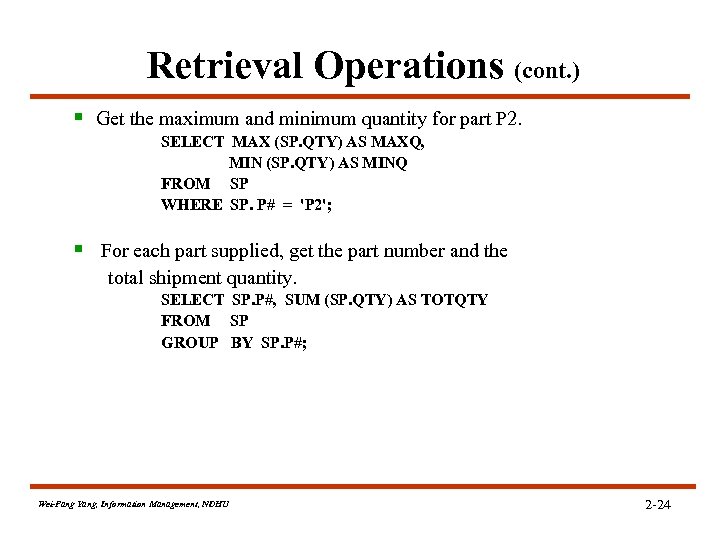
Retrieval Operations (cont. ) § Get the maximum and minimum quantity for part P 2. SELECT MAX (SP. QTY) AS MAXQ, MIN (SP. QTY) AS MINQ FROM SP WHERE SP. P# = 'P 2'; § For each part supplied, get the part number and the total shipment quantity. SELECT SP. P#, SUM (SP. QTY) AS TOTQTY FROM SP GROUP BY SP. P#; Wei-Pang Yang, Information Management, NDHU 2 -24
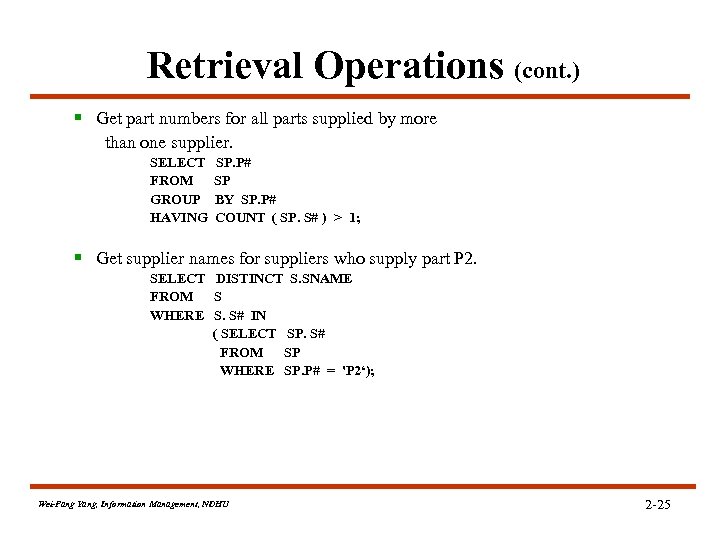
Retrieval Operations (cont. ) § Get part numbers for all parts supplied by more than one supplier. SELECT FROM GROUP HAVING SP. P# SP BY SP. P# COUNT ( SP. S# ) > 1; § Get supplier names for suppliers who supply part P 2. SELECT DISTINCT S. SNAME FROM S WHERE S. S# IN ( SELECT SP. S# FROM SP WHERE SP. P# = 'P 2‘); Wei-Pang Yang, Information Management, NDHU 2 -25
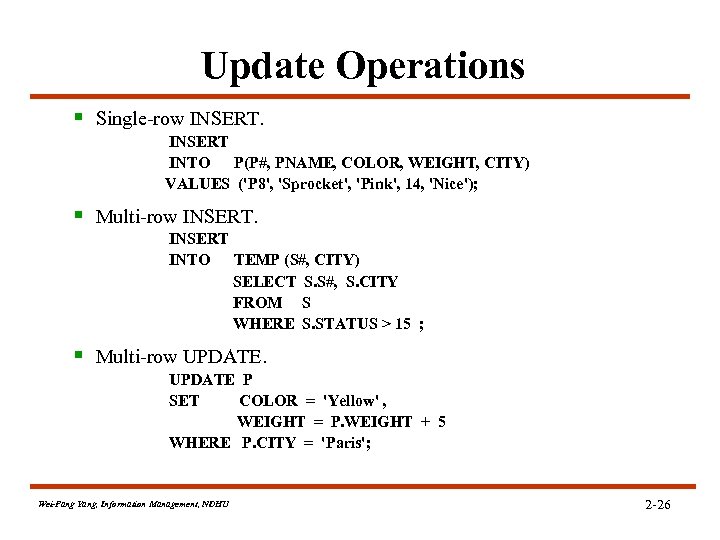
Update Operations § Single-row INSERT INTO P(P#, PNAME, COLOR, WEIGHT, CITY) VALUES ('P 8', 'Sprocket', 'Pink', 14, 'Nice'); § Multi-row INSERT INTO TEMP (S#, CITY) SELECT S. S#, S. CITY FROM S WHERE S. STATUS > 15 ; § Multi-row UPDATE P SET COLOR = 'Yellow' , WEIGHT = P. WEIGHT + 5 WHERE P. CITY = 'Paris'; Wei-Pang Yang, Information Management, NDHU 2 -26
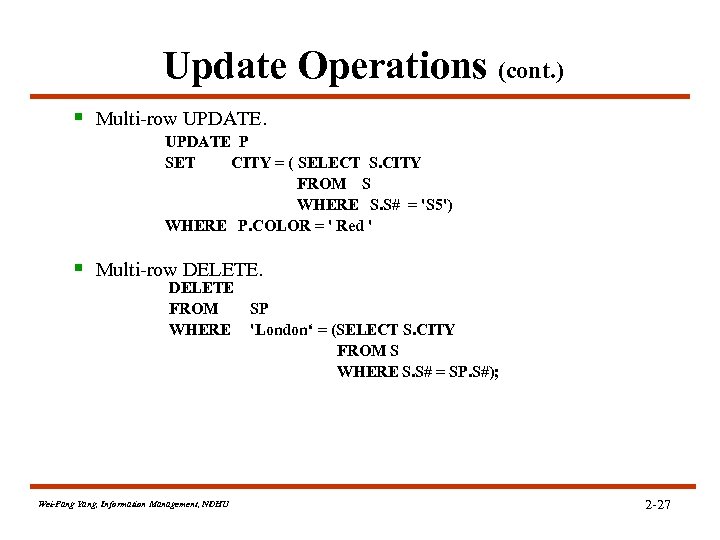
Update Operations (cont. ) § Multi-row UPDATE P SET CITY = ( SELECT S. CITY FROM S WHERE S. S# = 'S 5') WHERE P. COLOR = ' Red ' § Multi-row DELETE FROM SP WHERE 'London‘ = (SELECT S. CITY FROM S WHERE S. S# = SP. S#); Wei-Pang Yang, Information Management, NDHU 2 -27
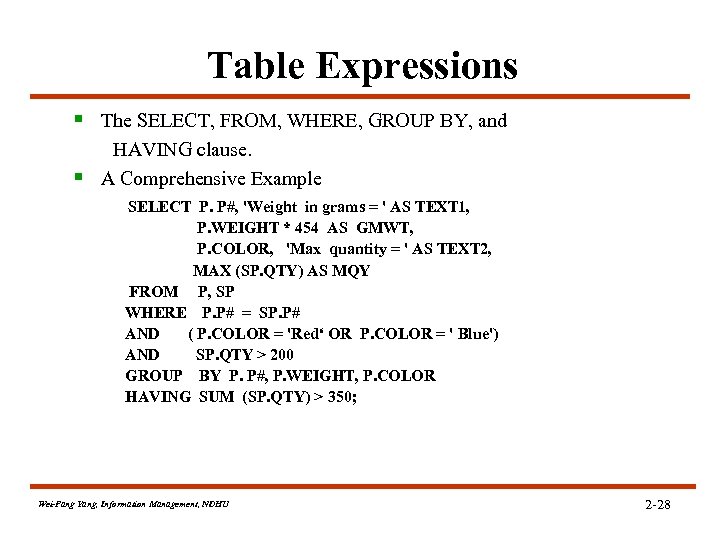
Table Expressions § The SELECT, FROM, WHERE, GROUP BY, and HAVING clause. § A Comprehensive Example SELECT P. P#, 'Weight in grams = ' AS TEXT 1, P. WEIGHT * 454 AS GMWT, P. COLOR, 'Max quantity = ' AS TEXT 2, MAX (SP. QTY) AS MQY FROM P, SP WHERE P. P# = SP. P# AND ( P. COLOR = 'Red‘ OR P. COLOR = ' Blue') AND SP. QTY > 200 GROUP BY P. P#, P. WEIGHT, P. COLOR HAVING SUM (SP. QTY) > 350; Wei-Pang Yang, Information Management, NDHU 2 -28
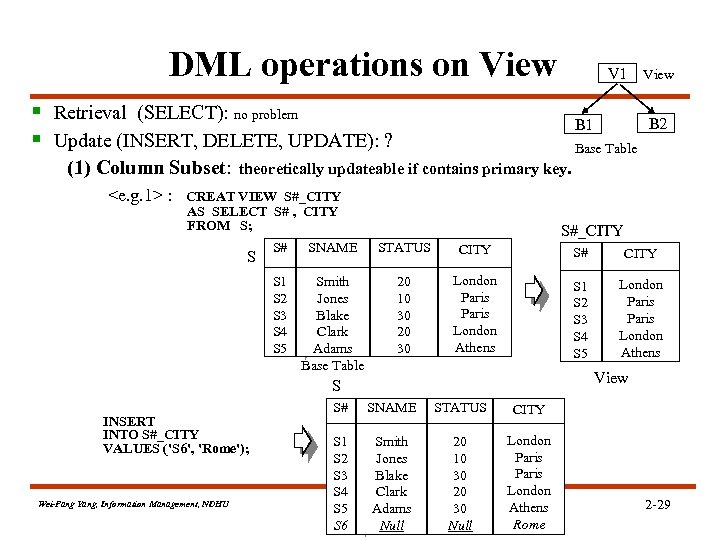
DML operations on View V 1 § Retrieval (SELECT): no problem § Update (INSERT, DELETE, UPDATE): ? (1) Column Subset: <e. g. 1> : View B 2 B 1 Base Table theoretically updateable if contains primary key. CREAT VIEW S#_CITY AS SELECT S# , CITY FROM S; S#_CITY S# SNAME STATUS CITY S# CITY S 1 S 2 S 3 S 4 S 5 S Smith Jones Blake Clark Adams Base Table 20 10 30 20 30 London Paris London Athens S 1 S 2 S 3 S 4 S 5 London Paris London Athens View S INSERT INTO S#_CITY VALUES ('S 6', 'Rome'); Wei-Pang Yang, Information Management, NDHU S# SNAME STATUS CITY S 1 S 2 S 3 S 4 S 5 S 6 Smith Jones Blake Clark Adams Null 20 10 30 20 30 Null London Paris London Athens Rome 2 -29
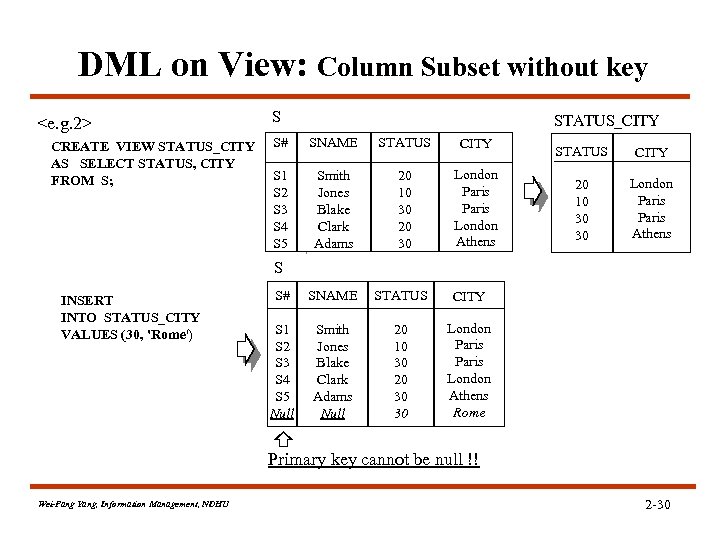
DML on View: Column Subset without key <e. g. 2> CREATE VIEW STATUS_CITY AS SELECT STATUS, CITY FROM S; S STATUS_CITY S# SNAME STATUS CITY S 1 S 2 S 3 S 4 S 5 Smith Jones Blake Clark Adams 20 10 30 20 30 London Paris London Athens S# SNAME STATUS CITY S 1 S 2 S 3 S 4 S 5 Null Smith Jones Blake Clark Adams Null 20 10 30 20 30 30 London Paris London Athens Rome STATUS CITY 20 10 30 30 London Paris Athens S INSERT INTO STATUS_CITY VALUES (30, 'Rome') Primary key cannot be null !! Wei-Pang Yang, Information Management, NDHU 2 -30

DML on View: Row Subset and Join (2) Row Subset: updateable ! (3) Join: some are not updateable. § CREATE VIEW COLOCATED ( S#, SNAME, S. CITY, P#, PNAME, P. CITY) AS SELECT S# , SNAME , S. C ITY, P# , PNAME , P. CITY FORM S, P S P 1 1 WHERE S. CITY=P. CITY; n m COLOCATED n *m S P COLOCATED § If issued the following command: UPDATE COLOCATED SET S. CITY = 'Athens‘ WHERE S. CITY ='London' § Then S. CITY P. CITY Violate the definition of the view!! Wei-Pang Yang, Information Management, NDHU S# S 1 S 1 S 2 S 3 S 4 S 4 SNAME Smith Jones Blake Clark S. CITY London Paris London P# P 1 P 4 P 6 P 2 P 5 P 1 P 4 P 6 PNAME Nut Screw Cog Bolt Cam Nut Screw Cog P. CITY London Paris London 2 -31
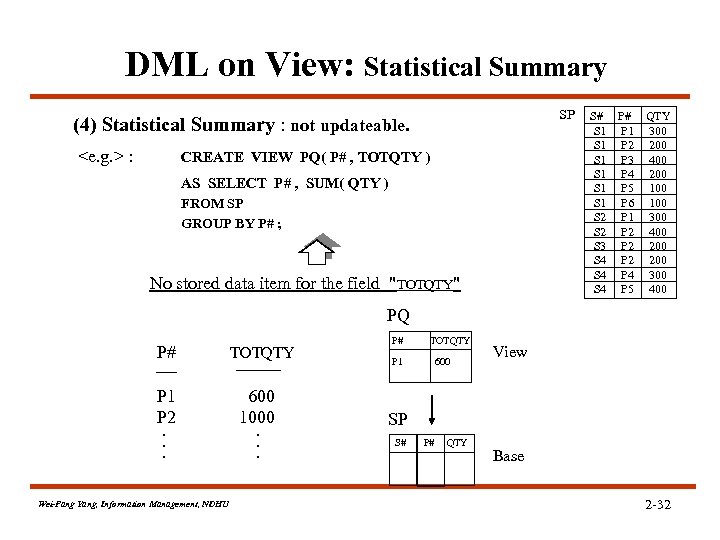
DML on View: Statistical Summary SP (4) Statistical Summary : not updateable. <e. g. > : CREATE VIEW PQ( P# , TOTQTY ) AS SELECT P# , SUM( QTY ) FROM SP GROUP BY P# ; No stored data item for the field "TOTQTY" S# P# QTY S 1 P 1 300 S 1 P 2 200 S 1 P 3 400 S 1 P 4 200 S 1 P 5 100 S 1 P 6 100 S 2 P 1 300 S 2 P 2 400 S 3 P 2 200 S 4 P 4 300 S 4 P 5 400 PQ P# P 1 P 2. . . Wei-Pang Yang, Information Management, NDHU TOTQTY 600 1000. . . P# TOTQTY P 1 600 View SP S# P# QTY Base 2 -32
2. 4 The System Catalog
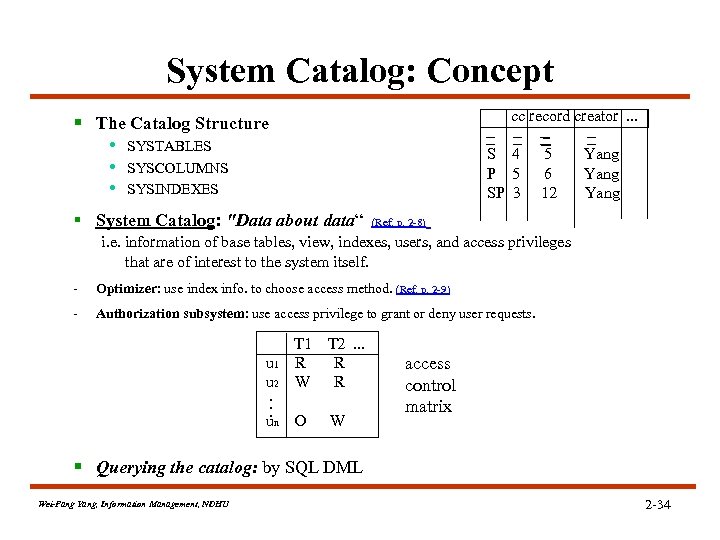
System Catalog: Concept cc record creator. . . § The Catalog Structure • SYSTABLES • SYSCOLUMNS • SYSINDEXES S 4 P 5 SP 3 § System Catalog: "Data about data“ 5 6 12 Yang (Ref. p. 2 -8) i. e. information of base tables, view, indexes, users, and access privileges that are of interest to the system itself. - Optimizer: use index info. to choose access method. (Ref. p. 2 -9) - Authorization subsystem: use access privilege to grant or deny user requests. u 1 u 2. . . un T 1 R W T 2. . . R R O W access control matrix § Querying the catalog: by SQL DML Wei-Pang Yang, Information Management, NDHU 2 -34
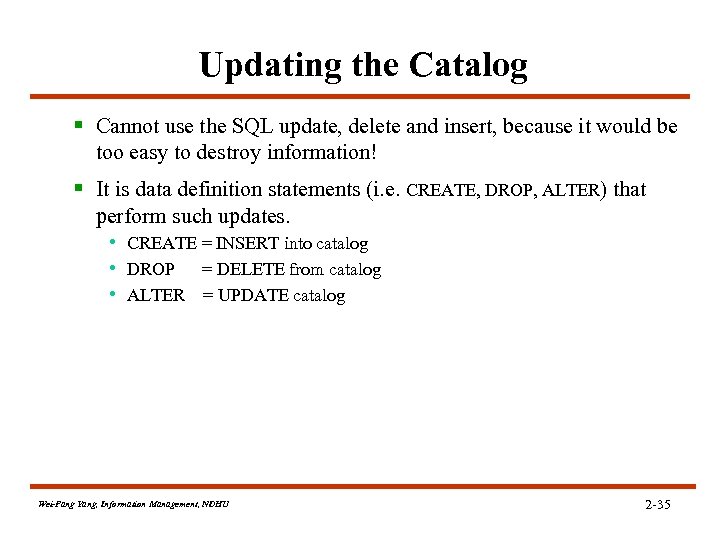
Updating the Catalog § Cannot use the SQL update, delete and insert, because it would be too easy to destroy information! § It is data definition statements (i. e. CREATE, DROP, ALTER) that perform such updates. • CREATE = INSERT into catalog • DROP = DELETE from catalog • ALTER = UPDATE catalog Wei-Pang Yang, Information Management, NDHU 2 -35
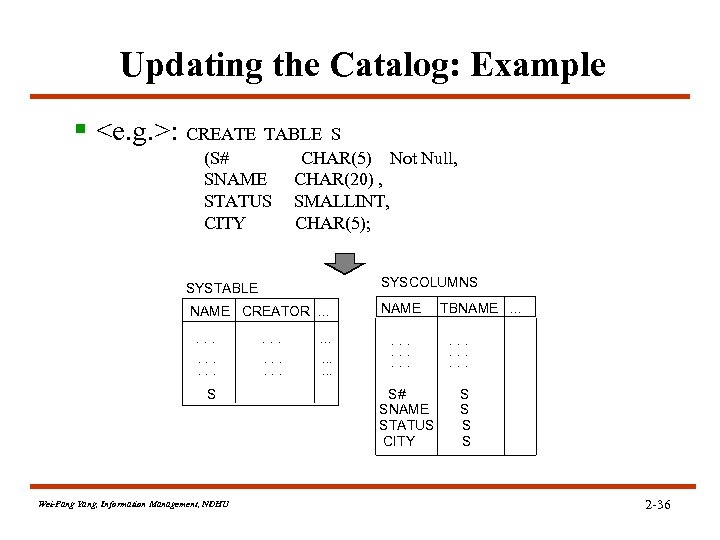
Updating the Catalog: Example § <e. g. >: CREATE TABLE S (S# SNAME STATUS CITY CHAR(5) Not Null, CHAR(20) , SMALLINT, CHAR(5); SYSTABLE SYSCOLUMNS NAME CREATOR. . . NAME . . S Wei-Pang Yang, Information Management, NDHU . . . . S# SNAME STATUS CITY TBNAME. . . S S 2 -36
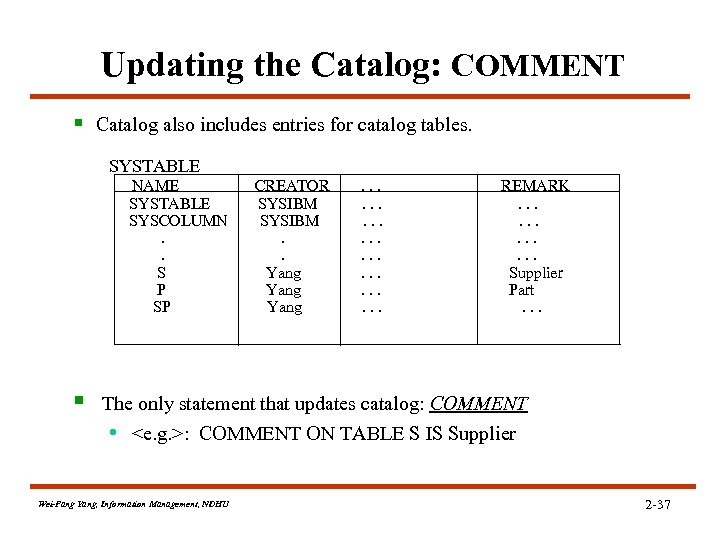
Updating the Catalog: COMMENT § Catalog also includes entries for catalog tables. SYSTABLE NAME SYSTABLE SYSCOLUMN. . S P SP § CREATOR SYSIBM. . Yang . . . REMARK. . . Supplier Part. . . The only statement that updates catalog: COMMENT • <e. g. >: COMMENT ON TABLE S IS Supplier Wei-Pang Yang, Information Management, NDHU 2 -37
2. 5 Embedded SQL
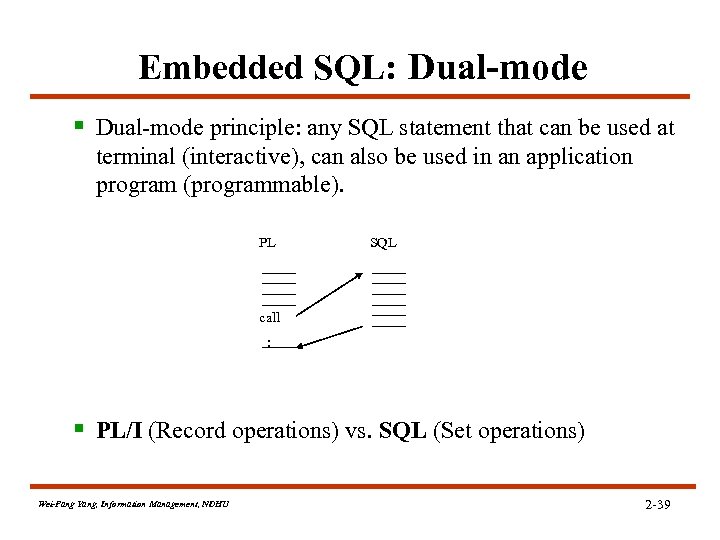
Embedded SQL: Dual-mode § Dual-mode principle: any SQL statement that can be used at terminal (interactive), can also be used in an application program (programmable). PL SQL call : § PL/I (Record operations) vs. SQL (Set operations) Wei-Pang Yang, Information Management, NDHU 2 -39

Embedded SQL: a Fragment § <e. g. > Fragment of a PL/I program with embedded SQL 1 2 3 4 5 6 7 8 9 10 11 12 13 EXEC SQL BEGIN DECLARE SECTION ; DCL SQLSTATE CHAR(5) ; DCL P# CHAR(6) ; DCL WEIGHT FIXED DECIMAL(3) ; EXEC SQL END DECLARE SECTION ; P# = ' P 2 ' ; /* for example */ EXEC SQL SELECT P. WEIGHT INTO : WEIGHT FROM P WHERE P. P# = : P# ; IF SQLSTATE = ' 00000 ' THEN …. ; /* WEIGHT = retrieved value */ ELSE …. ; /* some exception occurred */ Wei-Pang Yang, Information Management, NDHU 2 -40
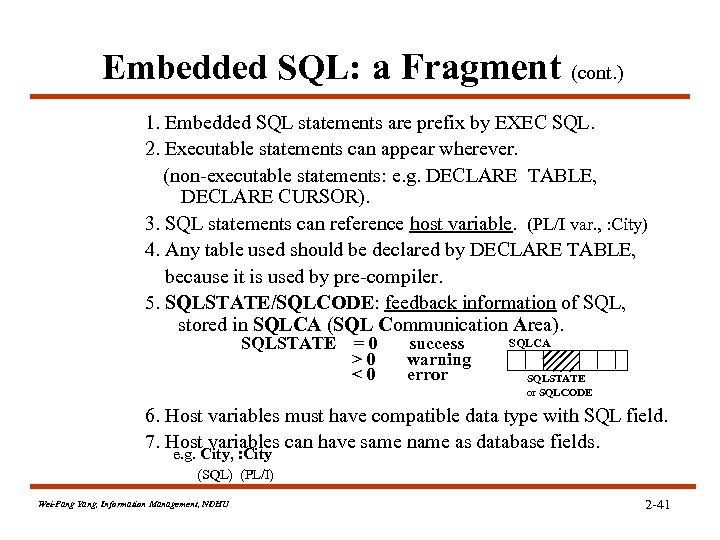
Embedded SQL: a Fragment (cont. ) 1. Embedded SQL statements are prefix by EXEC SQL. 2. Executable statements can appear wherever. (non-executable statements: e. g. DECLARE TABLE, DECLARE CURSOR). 3. SQL statements can reference host variable. (PL/I var. , : City) 4. Any table used should be declared by DECLARE TABLE, because it is used by pre-compiler. 5. SQLSTATE/SQLCODE: feedback information of SQL, stored in SQLCA (SQL Communication Area). SQLSTATE =0 >0 <0 success warning error SQLCA SQLSTATE or SQLCODE 6. Host variables must have compatible data type with SQL field. 7. Host variables can have same name as database fields. e. g. City, : City (SQL) (PL/I) Wei-Pang Yang, Information Management, NDHU 2 -41
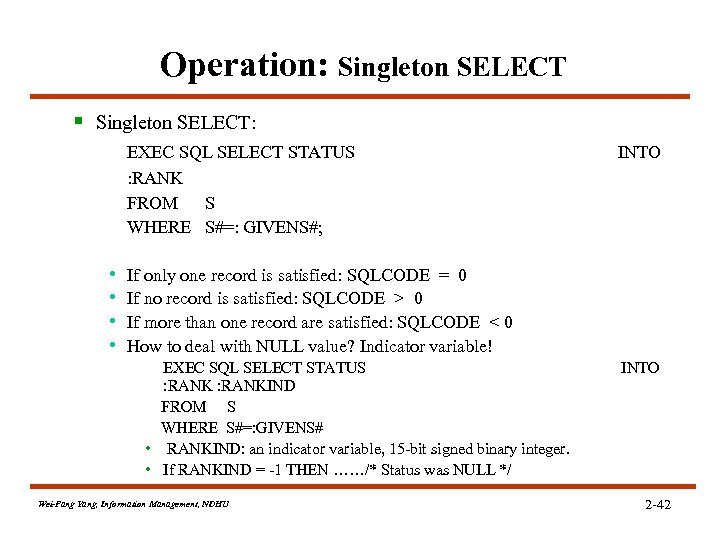
Operation: Singleton SELECT § Singleton SELECT: EXEC SQL SELECT STATUS : RANK FROM S WHERE S#=: GIVENS#; • • INTO If only one record is satisfied: SQLCODE = 0 If no record is satisfied: SQLCODE > 0 If more than one record are satisfied: SQLCODE < 0 How to deal with NULL value? Indicator variable! EXEC SQL SELECT STATUS : RANKIND FROM S WHERE S#=: GIVENS# • RANKIND: an indicator variable, 15 -bit signed binary integer. • If RANKIND = -1 THEN ……/* Status was NULL */ Wei-Pang Yang, Information Management, NDHU INTO 2 -42
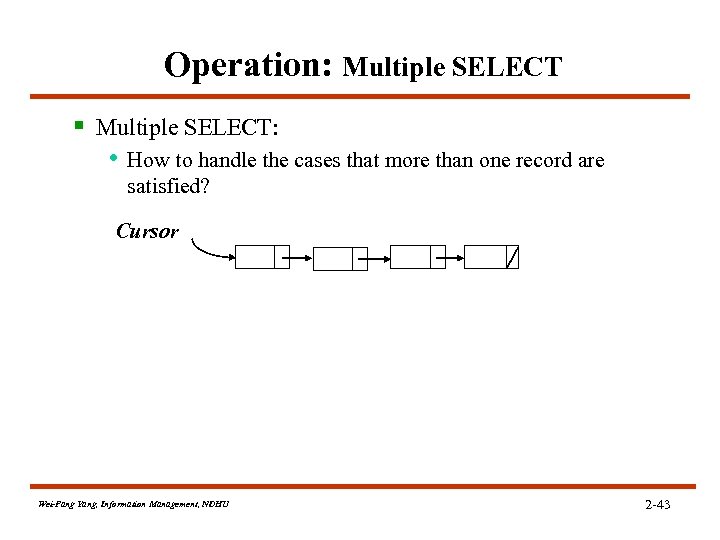
Operation: Multiple SELECT § Multiple SELECT: • How to handle the cases that more than one record are satisfied? Cursor Wei-Pang Yang, Information Management, NDHU 2 -43
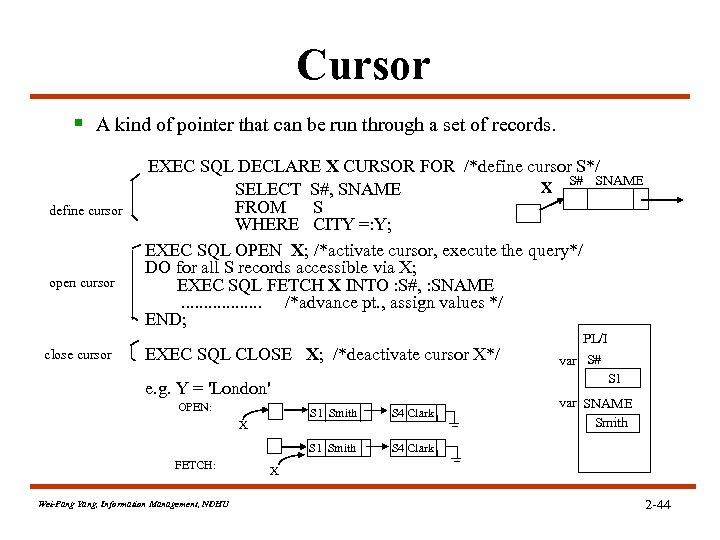
Cursor § A kind of pointer that can be run through a set of records. define cursor open cursor close cursor EXEC SQL DECLARE X CURSOR FOR /*define cursor S*/ S# SNAME X SELECT S#, SNAME FROM S WHERE CITY =: Y; EXEC SQL OPEN X; /*activate cursor, execute the query*/ DO for all S records accessible via X; EXEC SQL FETCH X INTO : S#, : SNAME. . . . /*advance pt. , assign values */ END; EXEC SQL CLOSE X; /*deactivate cursor X*/ S 1 Smith FETCH: Wei-Pang Yang, Information Management, NDHU S 4 Clark S 1 Smith X var S# S 1 e. g. Y = 'London' OPEN: PL/I var SNAME Smith S 4 Clark X 2 -44
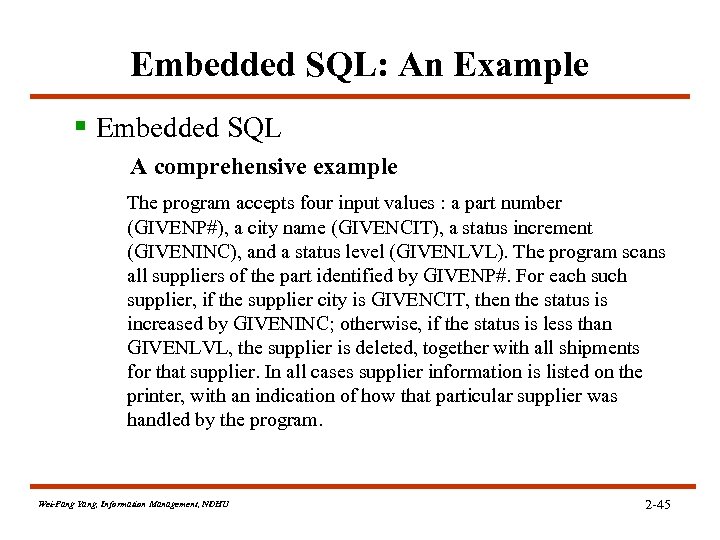
Embedded SQL: An Example § Embedded SQL A comprehensive example The program accepts four input values : a part number (GIVENP#), a city name (GIVENCIT), a status increment (GIVENINC), and a status level (GIVENLVL). The program scans all suppliers of the part identified by GIVENP#. For each supplier, if the supplier city is GIVENCIT, then the status is increased by GIVENINC; otherwise, if the status is less than GIVENLVL, the supplier is deleted, together with all shipments for that supplier. In all cases supplier information is listed on the printer, with an indication of how that particular supplier was handled by the program. Wei-Pang Yang, Information Management, NDHU 2 -45
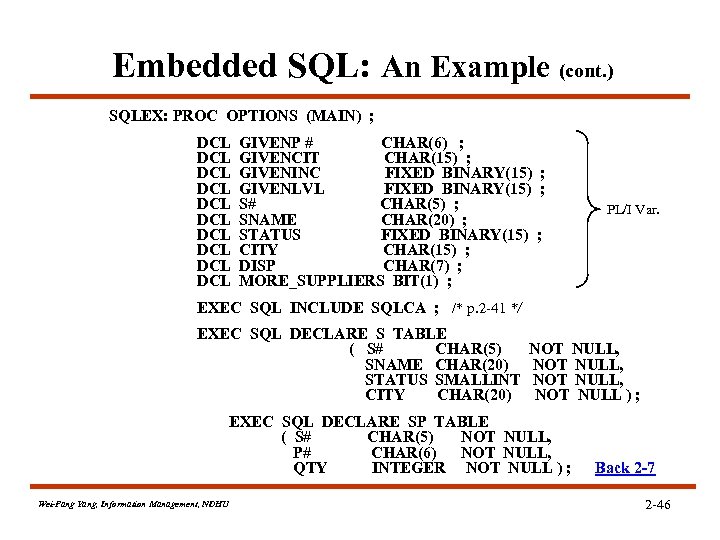
Embedded SQL: An Example (cont. ) SQLEX: PROC OPTIONS (MAIN) ; DCL DCL DCL GIVENP # CHAR(6) ; GIVENCIT CHAR(15) ; GIVENINC FIXED BINARY(15) ; GIVENLVL FIXED BINARY(15) ; S# CHAR(5) ; SNAME CHAR(20) ; STATUS FIXED BINARY(15) ; CITY CHAR(15) ; DISP CHAR(7) ; MORE_SUPPLIERS BIT(1) ; PL/I Var. EXEC SQL INCLUDE SQLCA ; /* p. 2 -41 */ EXEC SQL DECLARE S TABLE ( S# CHAR(5) SNAME CHAR(20) STATUS SMALLINT CITY CHAR(20) NOT NULL, NOT NULL ) ; EXEC SQL DECLARE SP TABLE ( S# CHAR(5) NOT NULL, P# CHAR(6) NOT NULL, QTY INTEGER NOT NULL ) ; Wei-Pang Yang, Information Management, NDHU Back 2 -7 2 -46
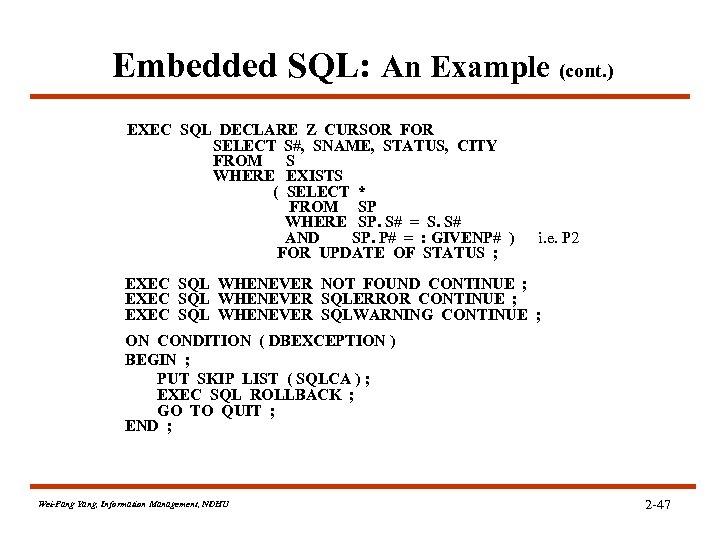
Embedded SQL: An Example (cont. ) EXEC SQL DECLARE Z CURSOR FOR SELECT S#, SNAME, STATUS, CITY FROM S WHERE EXISTS ( SELECT * FROM SP WHERE SP. S# = S. S# AND SP. P# = : GIVENP# ) FOR UPDATE OF STATUS ; i. e. P 2 EXEC SQL WHENEVER NOT FOUND CONTINUE ; EXEC SQL WHENEVER SQLERROR CONTINUE ; EXEC SQL WHENEVER SQLWARNING CONTINUE ; ON CONDITION ( DBEXCEPTION ) BEGIN ; PUT SKIP LIST ( SQLCA ) ; EXEC SQL ROLLBACK ; GO TO QUIT ; END ; Wei-Pang Yang, Information Management, NDHU 2 -47
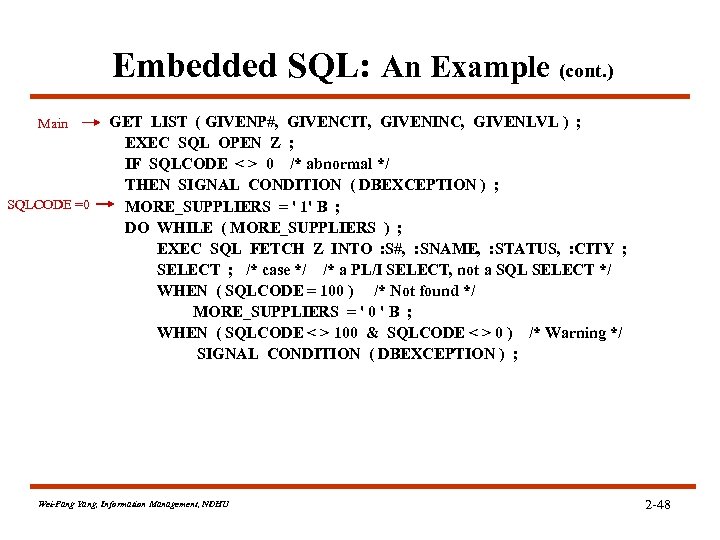
Embedded SQL: An Example (cont. ) Main SQLCODE =0 GET LIST ( GIVENP#, GIVENCIT, GIVENINC, GIVENLVL ) ; EXEC SQL OPEN Z ; IF SQLCODE < > 0 /* abnormal */ THEN SIGNAL CONDITION ( DBEXCEPTION ) ; MORE_SUPPLIERS = ' 1' B ; DO WHILE ( MORE_SUPPLIERS ) ; EXEC SQL FETCH Z INTO : S#, : SNAME, : STATUS, : CITY ; SELECT ; /* case */ /* a PL/I SELECT, not a SQL SELECT */ WHEN ( SQLCODE = 100 ) /* Not found */ MORE_SUPPLIERS = ' 0 ' B ; WHEN ( SQLCODE < > 100 & SQLCODE < > 0 ) /* Warning */ SIGNAL CONDITION ( DBEXCEPTION ) ; Wei-Pang Yang, Information Management, NDHU 2 -48
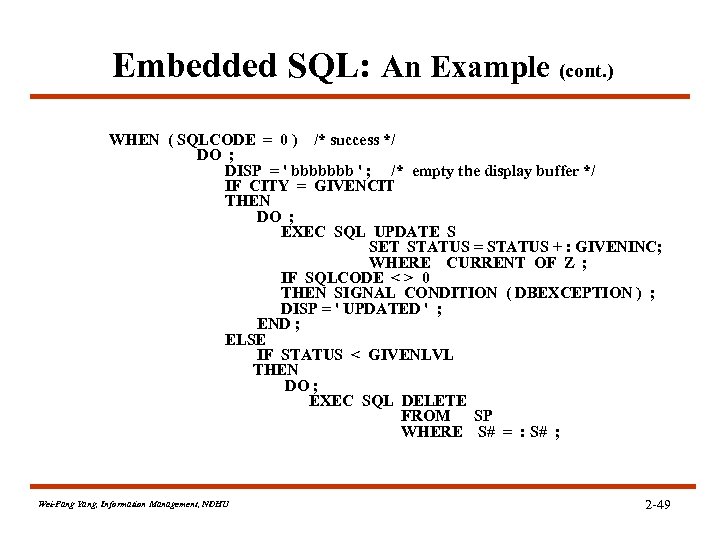
Embedded SQL: An Example (cont. ) WHEN ( SQLCODE = 0 ) /* success */ DO ; DISP = ' bbbbbbb ' ; /* empty the display buffer */ IF CITY = GIVENCIT THEN DO ; EXEC SQL UPDATE S SET STATUS = STATUS + : GIVENINC; WHERE CURRENT OF Z ; IF SQLCODE < > 0 THEN SIGNAL CONDITION ( DBEXCEPTION ) ; DISP = ' UPDATED ' ; END ; ELSE IF STATUS < GIVENLVL THEN DO ; EXEC SQL DELETE FROM SP WHERE S# = : S# ; Wei-Pang Yang, Information Management, NDHU 2 -49
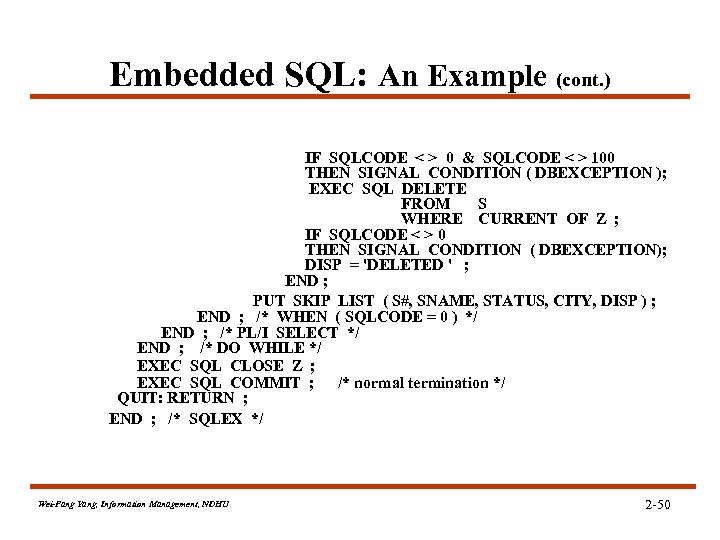
Embedded SQL: An Example (cont. ) IF SQLCODE < > 0 & SQLCODE < > 100 THEN SIGNAL CONDITION ( DBEXCEPTION ); EXEC SQL DELETE FROM S WHERE CURRENT OF Z ; IF SQLCODE < > 0 THEN SIGNAL CONDITION ( DBEXCEPTION); DISP = 'DELETED ' ; END ; PUT SKIP LIST ( S#, SNAME, STATUS, CITY, DISP ) ; END ; /* WHEN ( SQLCODE = 0 ) */ END ; /* PL/I SELECT */ END ; /* DO WHILE */ EXEC SQL CLOSE Z ; EXEC SQL COMMIT ; /* normal termination */ QUIT: RETURN ; END ; /* SQLEX */ Wei-Pang Yang, Information Management, NDHU 2 -50
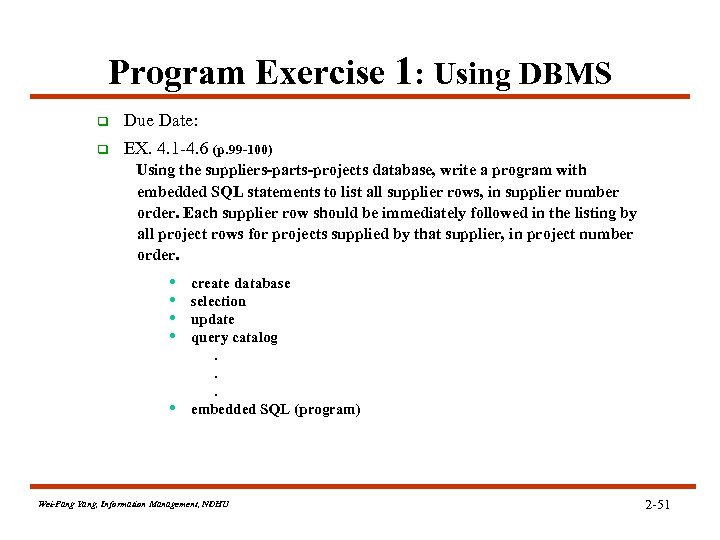
Program Exercise 1: Using DBMS q Due Date: q EX. 4. 1 -4. 6 (p. 99 -100) Using the suppliers-parts-projects database, write a program with embedded SQL statements to list all supplier rows, in supplier number order. Each supplier row should be immediately followed in the listing by all project rows for projects supplied by that supplier, in project number order. • • • create database selection update query catalog. . . embedded SQL (program) Wei-Pang Yang, Information Management, NDHU 2 -51
Скачать презентацию Unit 2 DB 2 and SQL Outline
9149faeae31283e78682018861bc74fe.ppt