 Скачать презентацию UNIFIED DYNAMIC INVOCATION SYSTEM FOR WEB SERVICES ICCSA
4c4fab62f122d34ca6424d64be670003.ppt
- Количество слайдов: 25




UNIFIED DYNAMIC INVOCATION SYSTEM FOR WEB SERVICES ICCSA 2004 29 June 200 4 Takashi KOSHIDA Matsue National College of Technology Nara Institute of Science and Technology 1
Content 1. Introduction • Some background/Problems 2. System features • About WSIF/Output data type • Features of our system 3. System structure and Processing • Implementation 4. Experimental Results • Conventional system/Our system 5. Conclusion 2
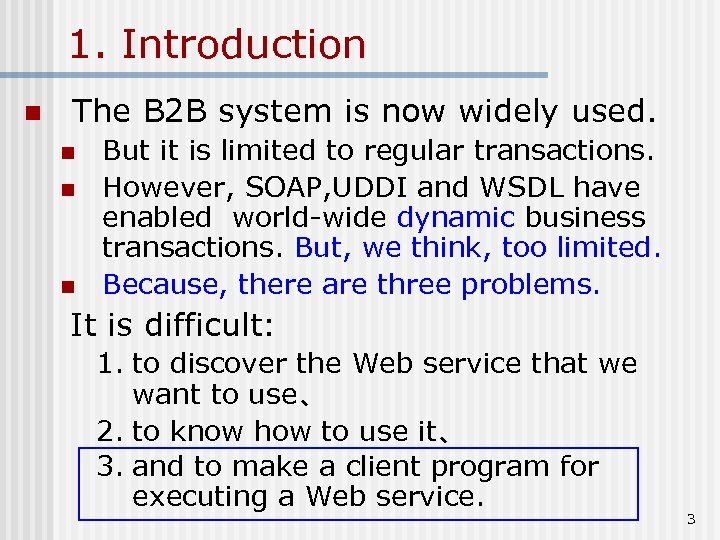
1. Introduction n The B 2 B system is now widely used. n n n But it is limited to regular transactions. However, SOAP, UDDI and WSDL have enabled world-wide dynamic business transactions. But, we think, too limited. Because, there are three problems. It is difficult: 1. to discover the Web service that we want to use、 2. to know how to use it、 3. and to make a client program for executing a Web service. 3
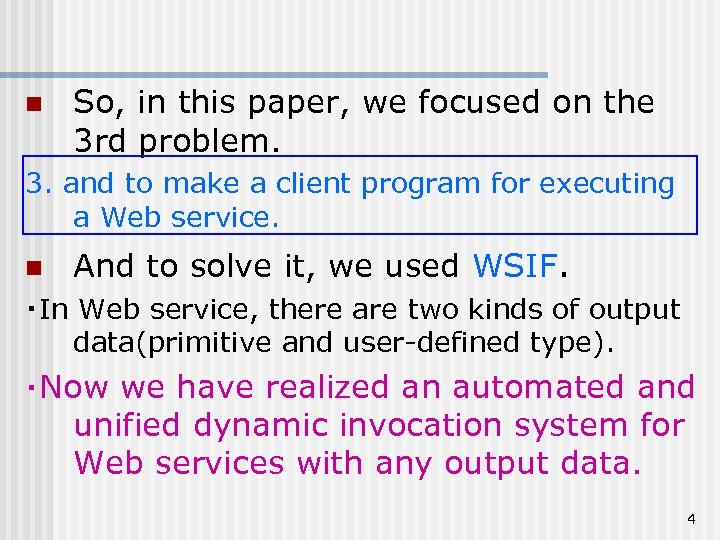
n So, in this paper, we focused on the 3 rd problem. 3. and to make a client program for executing a Web service. n And to solve it, we used WSIF. ・In Web service, there are two kinds of output data(primitive and user-defined type). ・Now we have realized an automated and unified dynamic invocation system for Web services with any output data. 4
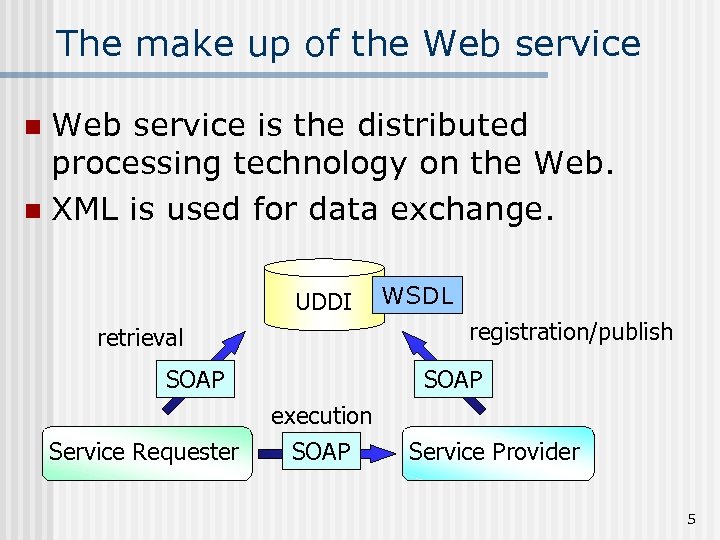
The make up of the Web service is the distributed processing technology on the Web. n XML is used for data exchange. n UDDI WSDL registration/publish retrieval SOAP execution Service Requester SOAP Service Provider 5
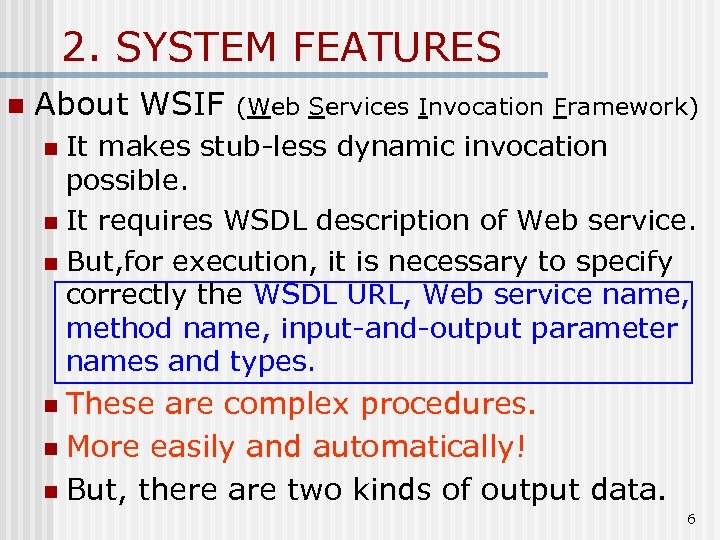
2. SYSTEM FEATURES n About WSIF (Web Services Invocation Framework) It makes stub-less dynamic invocation possible. n It requires WSDL description of Web service. n But, for execution, it is necessary to specify correctly the WSDL URL, Web service name, method name, input-and-output parameter names and types. n These are complex procedures. n More easily and automatically! n But, there are two kinds of output data. n 6
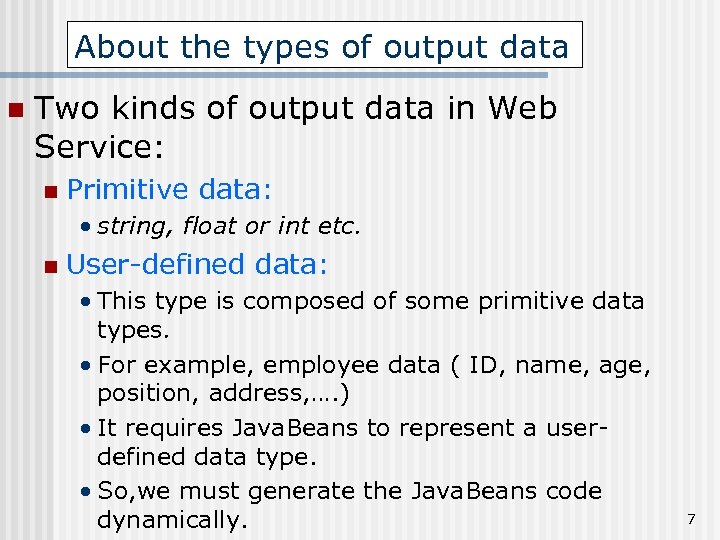
About the types of output data n Two kinds of output data in Web Service: n Primitive data: • string, float or int etc. n User-defined data: • This type is composed of some primitive data types. • For example, employee data ( ID, name, age, position, address, …. ) • It requires Java. Beans to represent a userdefined data type. • So, we must generate the Java. Beans code dynamically. 7
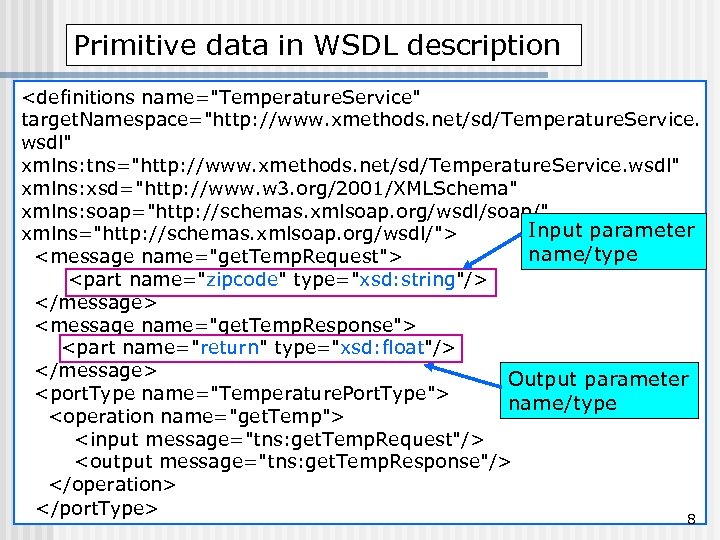
Primitive data in WSDL description <definitions name="Temperature. Service" target. Namespace="http: //www. xmethods. net/sd/Temperature. Service. wsdl" xmlns: tns="http: //www. xmethods. net/sd/Temperature. Service. wsdl" xmlns: xsd="http: //www. w 3. org/2001/XMLSchema" xmlns: soap="http: //schemas. xmlsoap. org/wsdl/soap/" Input parameter xmlns="http: //schemas. xmlsoap. org/wsdl/"> name/type <message name="get. Temp. Request"> <part name="zipcode" type="xsd: string"/> </message> <message name="get. Temp. Response"> <part name="return" type="xsd: float"/> </message> Output parameter <port. Type name="Temperature. Port. Type"> name/type <operation name="get. Temp"> <input message="tns: get. Temp. Request"/> <output message="tns: get. Temp. Response"/> </operation> </port. Type> 8
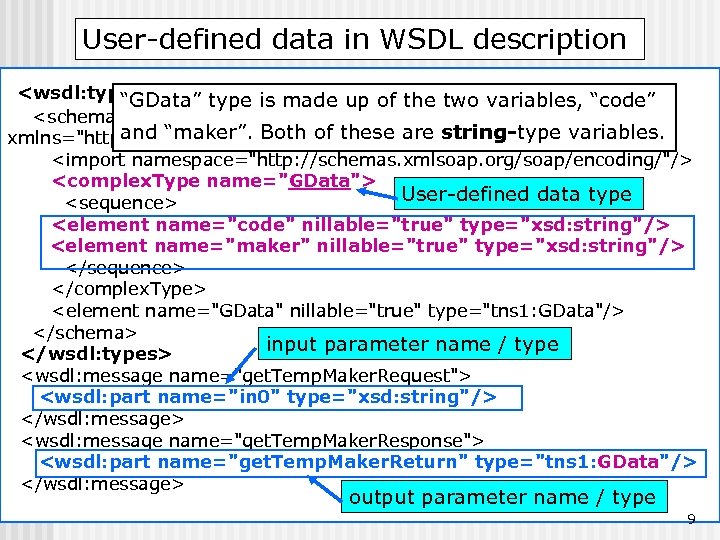
User-defined data in WSDL description <wsdl: types> “GData” type is made up of the two variables, “code” <schema target. Namespace="http: //10. 70. 51. 20: 8080/axis/services" and “maker”. Both of these are string-type variables. xmlns="http: //www. w 3. org/2001/XMLSchema"> <import namespace="http: //schemas. xmlsoap. org/soap/encoding/"/> <complex. Type name="GData"> User-defined data type <sequence> <element name="code" nillable="true" type="xsd: string"/> <element name="maker" nillable="true" type="xsd: string"/> </sequence> </complex. Type> <element name="GData" nillable="true" type="tns 1: GData"/> </schema> input parameter name / type </wsdl: types> <wsdl: message name="get. Temp. Maker. Request"> <wsdl: part name="in 0" type="xsd: string"/> </wsdl: message> <wsdl: message name="get. Temp. Maker. Response"> <wsdl: part name="get. Temp. Maker. Return" type="tns 1: GData"/> </wsdl: message> output parameter name / type 9
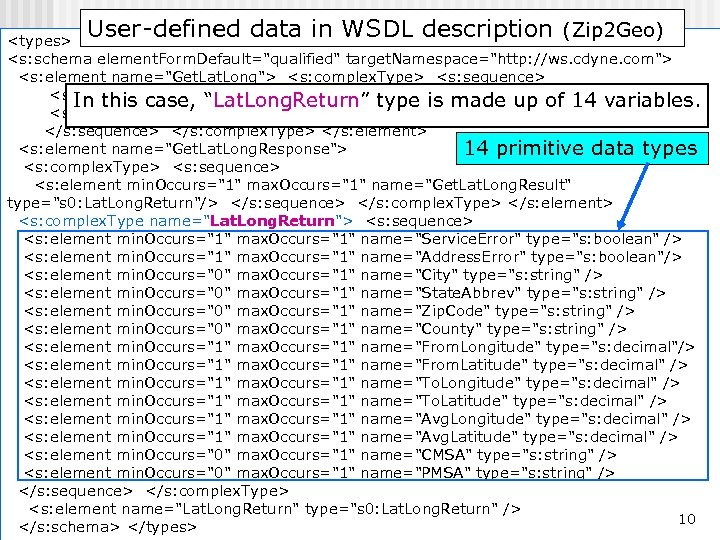
User-defined data in WSDL description (Zip 2 Geo) <types> <s: schema element. Form. Default="qualified" target. Namespace="http: //ws. cdyne. com"> <s: element name="Get. Lat. Long"> <s: complex. Type> <s: sequence> <s: element min. Occurs="0" max. Occurs="1" name="zipcode" up of 14 variables. In this case, “Lat. Long. Return” type is made type="s: string"/> <s: element min. Occurs="0" max. Occurs="1" name="License. Key" type="s: string"/> </s: sequence> </s: complex. Type> </s: element> <s: element name="Get. Lat. Long. Response"> 14 primitive data types <s: complex. Type> <s: sequence> <s: element min. Occurs="1" max. Occurs="1" name="Get. Lat. Long. Result" type="s 0: Lat. Long. Return"/> </s: sequence> </s: complex. Type> </s: element> <s: complex. Type name="Lat. Long. Return"> <s: sequence> <s: element min. Occurs="1" max. Occurs="1" name="Service. Error" type="s: boolean" /> <s: element min. Occurs="1" max. Occurs="1" name="Address. Error" type="s: boolean"/> <s: element min. Occurs="0" max. Occurs="1" name="City" type="s: string" /> <s: element min. Occurs="0" max. Occurs="1" name="State. Abbrev" type="s: string" /> <s: element min. Occurs="0" max. Occurs="1" name="Zip. Code" type="s: string" /> <s: element min. Occurs="0" max. Occurs="1" name="County" type="s: string" /> <s: element min. Occurs="1" max. Occurs="1" name="From. Longitude" type="s: decimal"/> <s: element min. Occurs="1" max. Occurs="1" name="From. Latitude" type="s: decimal" /> <s: element min. Occurs="1" max. Occurs="1" name="To. Longitude" type="s: decimal" /> <s: element min. Occurs="1" max. Occurs="1" name="To. Latitude" type="s: decimal" /> <s: element min. Occurs="1" max. Occurs="1" name="Avg. Longitude" type="s: decimal" /> <s: element min. Occurs="1" max. Occurs="1" name="Avg. Latitude" type="s: decimal" /> <s: element min. Occurs="0" max. Occurs="1" name="CMSA" type="s: string" /> <s: element min. Occurs="0" max. Occurs="1" name="PMSA" type="s: string" /> </s: sequence> </s: complex. Type> <s: element name="Lat. Long. Return" type="s 0: Lat. Long. Return" /> 10 </s: schema> </types>
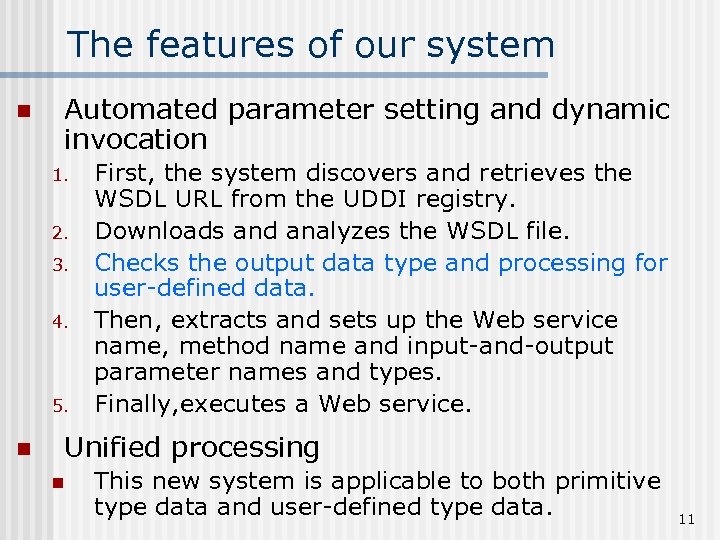
The features of our system n Automated parameter setting and dynamic invocation 1. 2. 3. 4. 5. n First, the system discovers and retrieves the WSDL URL from the UDDI registry. Downloads and analyzes the WSDL file. Checks the output data type and processing for user-defined data. Then, extracts and sets up the Web service name, method name and input-and-output parameter names and types. Finally, executes a Web service. Unified processing n This new system is applicable to both primitive type data and user-defined type data. 11
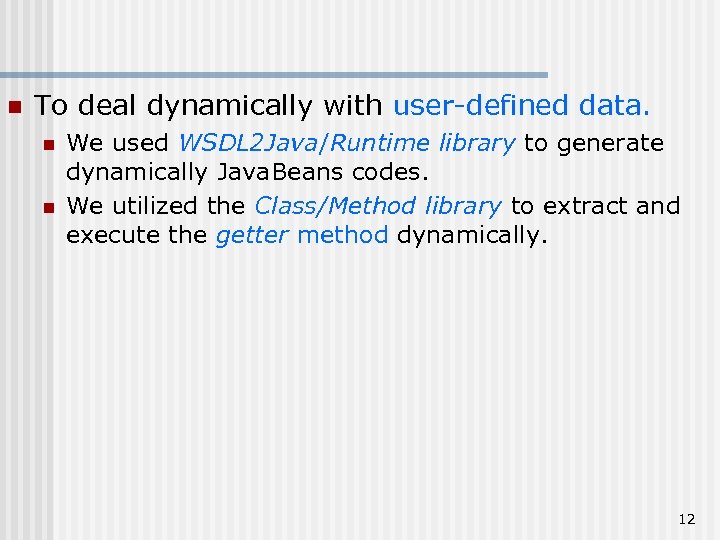
n To deal dynamically with user-defined data. n n We used WSDL 2 Java/Runtime library to generate dynamically Java. Beans codes. We utilized the Class/Method library to extract and execute the getter method dynamically. 12
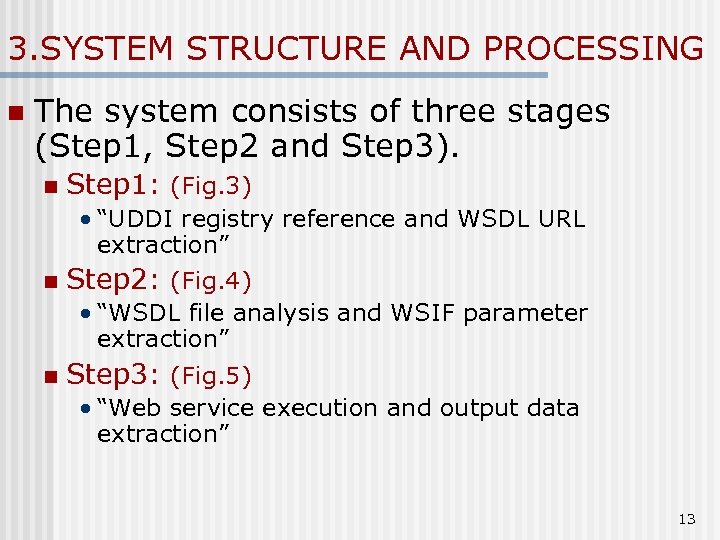
3. SYSTEM STRUCTURE AND PROCESSING n The system consists of three stages (Step 1, Step 2 and Step 3). n Step 1: (Fig. 3) • “UDDI registry reference and WSDL URL extraction” n Step 2: (Fig. 4) • “WSDL file analysis and WSIF parameter extraction” n Step 3: (Fig. 5) • “Web service execution and output data extraction” 13
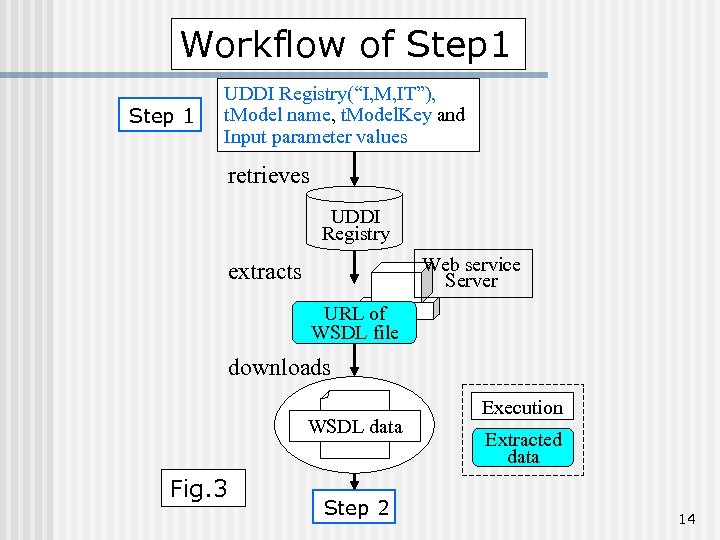
Workflow of Step 1 UDDI Registry(“I, M, IT”), t. Model name, t. Model. Key and Input parameter values retrieves UDDI Registry Web service Server extracts URL of WSDL file downloads WSDL data Fig. 3 Step 2 Execution Extracted data 14
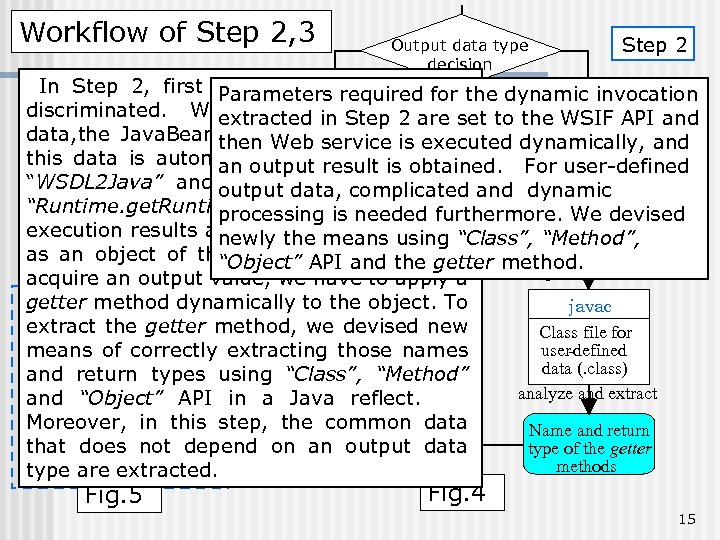
Workflow of Step 2, 3 Output data type decision Step 2 In Step 2, first the output data type isthe dynamic invocation Parameters required for User-defined discriminated. When it Primitive 2 are set to the WSIF API and is user-defined extracted intype Step data type data, the. Execution Java. Beans code corresponding to then Web service is executed dynamically, and this data is automatically generated obtained. For user-defined Extracted an output result is using <types>, <message> data WSDL 2 Java “WSDL 2 Java” and output compiled using a and dynamic it is data, complicated <port. Type> data “Runtime. get. Runtime(). exec()”. needed The Java code for processing is furthermore. We devised analyze and extract a client user-defined execution results are transmitted to using “Class”, “Method”, newly the means data as an Step 3 of this user-definedname, getter method. (. java) object Web API and the To Service data. “Object” compile method name, acquire an output value, we have to apply a Nam espace getter method dynamically to the object. To javac Input parameter WSIF API extract the getter method, we devised new Class file for name and type Web Service correctly user-defined means of Execution extracting those names parameter data (. class) and return types using Output and type “Class”, “Method” name analyze and extract getter “Object” API and method invocation in a Java reflect. setting up using Method object Moreover, in this step, the common data Name and return that Output results depend on Step 3 does not an output data type of the getter methods type are extracted. Fig. 5 Fig. 4 15
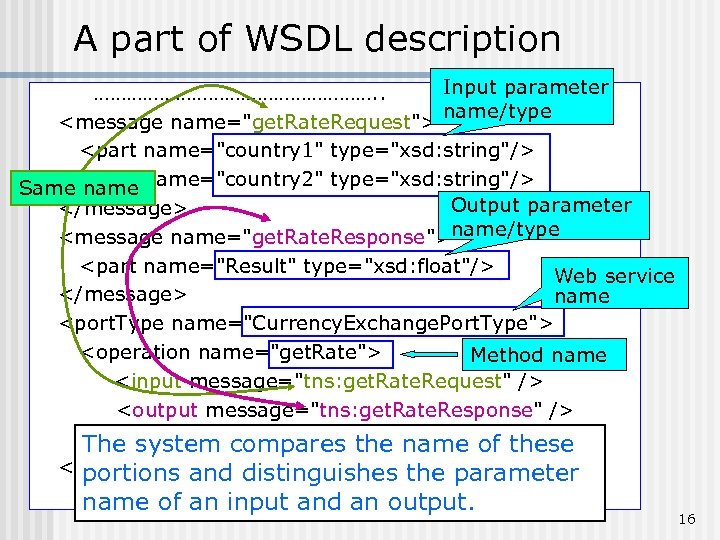
A part of WSDL description Input parameter ………………………. . name/type <message name="get. Rate. Request"> <part name="country 1" type="xsd: string"/> Same <part name="country 2" type="xsd: string"/> name Output parameter </message> <message name="get. Rate. Response">name/type <part name="Result" type="xsd: float"/> Web service </message> name <port. Type name="Currency. Exchange. Port. Type"> <operation name="get. Rate"> Method name <input message="tns: get. Rate. Request" /> <output message="tns: get. Rate. Response" /> </operation> compares the name of these The system </port. Type>and distinguishes the parameter portions …………………… name of an input and an output. 16
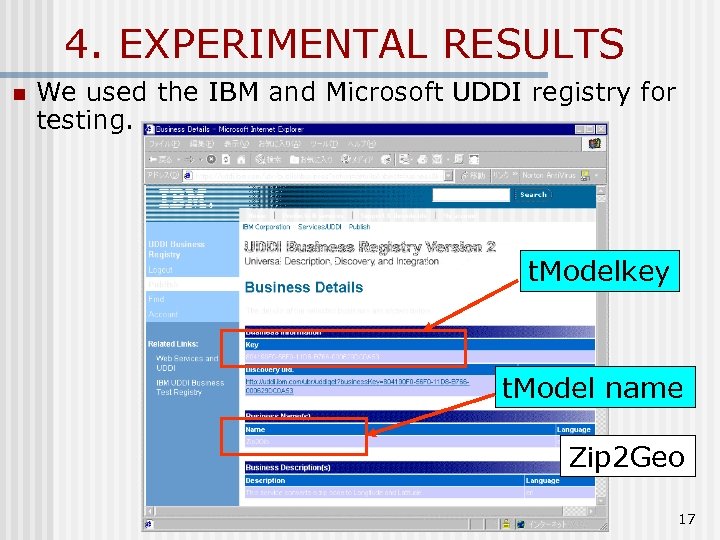
4. EXPERIMENTAL RESULTS n We used the IBM and Microsoft UDDI registry for testing. t. Modelkey t. Model name Zip 2 Geo 17
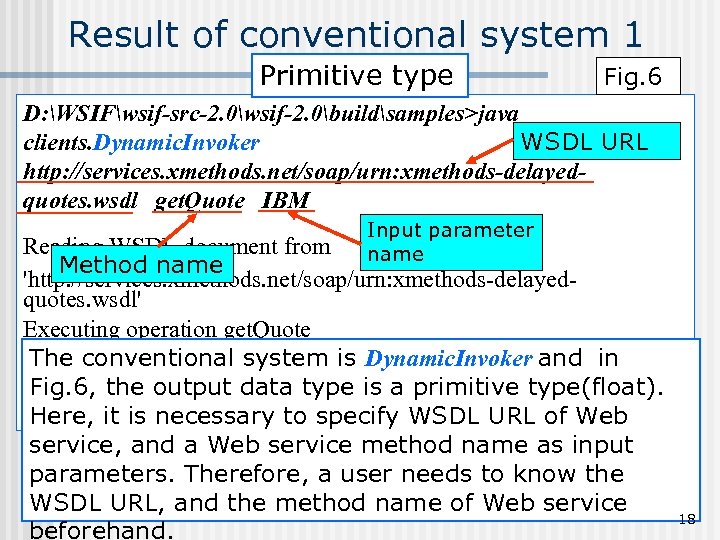
Result of conventional system 1 Primitive type Fig. 6 D: WSIFwsif-src-2. 0wsif-2. 0buildsamples>java WSDL URL clients. Dynamic. Invoker http: //services. xmethods. net/soap/urn: xmethods-delayedquotes. wsdl get. Quote IBM Input parameter name Reading WSDL document from Method name 'http: //services. xmethods. net/soap/urn: xmethods-delayedquotes. wsdl' Executing operation get. Quote Result: The conventional system is Dynamic. Invoker and in Result=91. 01 output data type is a primitive type(float). Fig. 6, the Done! it is necessary to specify WSDL URL of Web Here, service, and a Web service method name as input parameters. Therefore, a user needs to know the WSDL URL, and the method name of Web service beforehand. 18
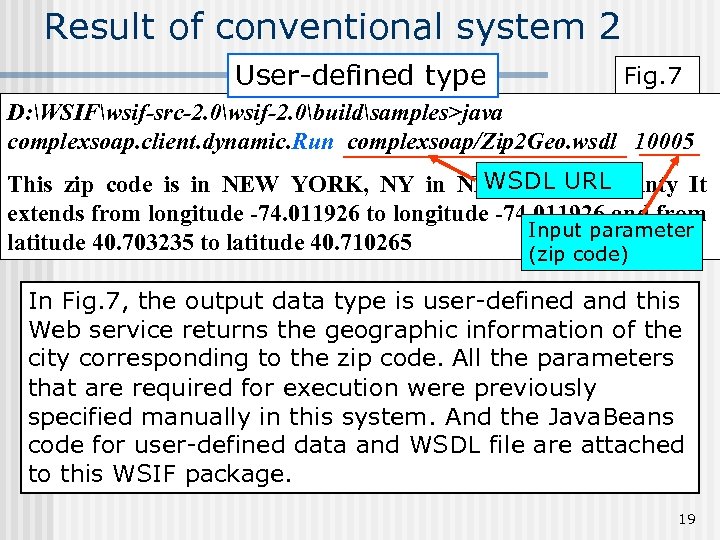
Result of conventional system 2 User-defined type Fig. 7 D: WSIFwsif-src-2. 0wsif-2. 0buildsamples>java complexsoap. client. dynamic. Run complexsoap/Zip 2 Geo. wsdl 10005 WSDL URL This zip code is in NEW YORK, NY in NEW YORK county It extends from longitude -74. 011926 to longitude -74. 011926 and from Input parameter latitude 40. 703235 to latitude 40. 710265 (zip code) In Fig. 7, the output data type is user-defined and this Web service returns the geographic information of the city corresponding to the zip code. All the parameters that are required for execution were previously specified manually in this system. And the Java. Beans code for user-defined data and WSDL file are attached to this WSIF package. 19
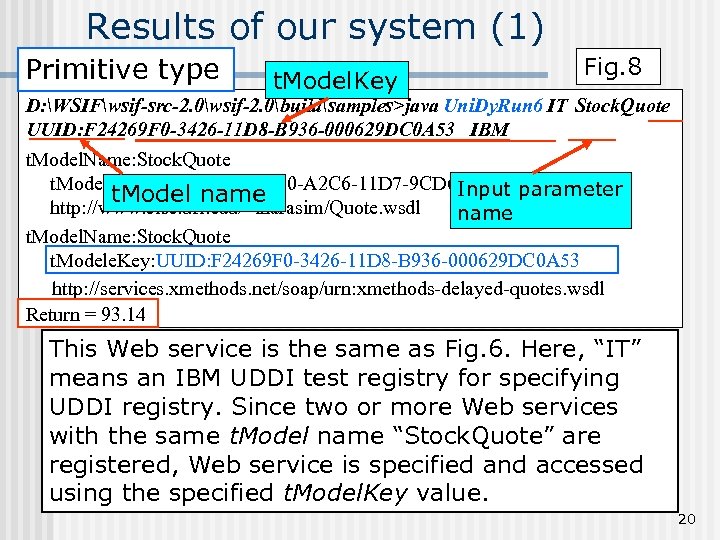
Results of our system (1) Primitive type t. Model. Key Fig. 8 D: WSIFwsif-src-2. 0wsif-2. 0buildsamples>java Uni. Dy. Run 6 IT Stock. Quote UUID: F 24269 F 0 -3426 -11 D 8 -B 936 -000629 DC 0 A 53 IBM t. Model. Name: Stock. Quote t. Modele. Key: UUID: 62 B 655 E 0 -A 2 C 6 -11 D 7 -9 CD 6 -000629 DC 0 A 53 Input parameter t. Model name http: //www. cise. ufl. edu/~lnarasim/Quote. wsdl name t. Model. Name: Stock. Quote t. Modele. Key: UUID: F 24269 F 0 -3426 -11 D 8 -B 936 -000629 DC 0 A 53 http: //services. xmethods. net/soap/urn: xmethods-delayed-quotes. wsdl Return = 93. 14 This Web service is the same as Fig. 6. Here, “IT” means an IBM UDDI test registry for specifying UDDI registry. Since two or more Web services with the same t. Model name “Stock. Quote” are registered, Web service is specified and accessed using the specified t. Model. Key value. 20
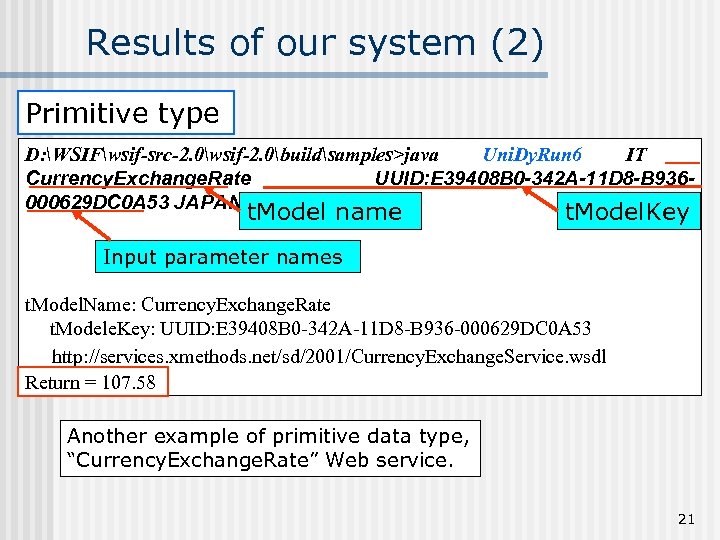
Results of our system (2) Primitive type D: WSIFwsif-src-2. 0wsif-2. 0buildsamples>java Uni. Dy. Run 6 IT Currency. Exchange. Rate UUID: E 39408 B 0 -342 A-11 D 8 -B 936000629 DC 0 A 53 JAPAN USA t. Model name t. Model. Key Input parameter names t. Model. Name: Currency. Exchange. Rate t. Modele. Key: UUID: E 39408 B 0 -342 A-11 D 8 -B 936 -000629 DC 0 A 53 http: //services. xmethods. net/sd/2001/Currency. Exchange. Service. wsdl Return = 107. 58 Another example of primitive data type, “Currency. Exchange. Rate” Web service. 21
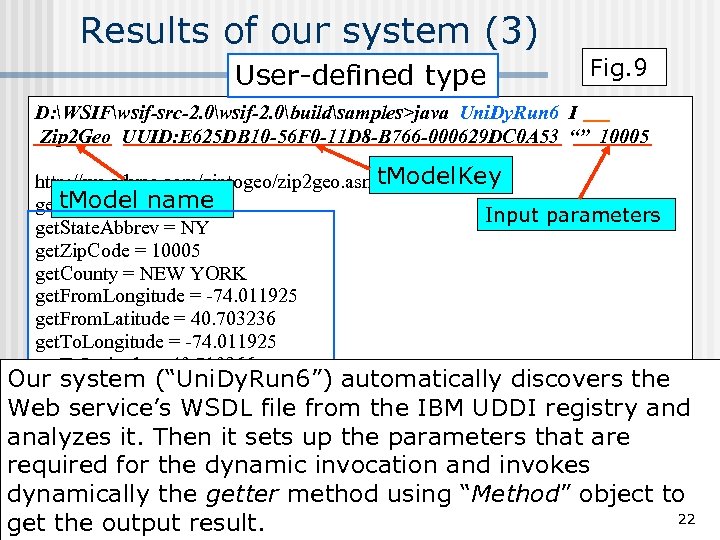
Results of our system (3) User-defined type Fig. 9 D: WSIFwsif-src-2. 0wsif-2. 0buildsamples>java Uni. Dy. Run 6 I Zip 2 Geo UUID: E 625 DB 10 -56 F 0 -11 D 8 -B 766 -000629 DC 0 A 53 “” 10005 t. Model. Key http: //ws. cdyne. com/ziptogeo/zip 2 geo. asmx? WSDL t. Model name get. City = NEW YORK Input parameters get. State. Abbrev = NY get. Zip. Code = 10005 get. County = NEW YORK get. From. Longitude = -74. 011925 get. From. Latitude = 40. 703236 get. To. Longitude = -74. 011925 get. To. Latitude = 40. 710266 Our system (“Uni. Dy. Run 6”) automatically discovers the get. Avg. Longitude = -74. 00837 Web service’s WSDL file from the IBM UDDI registry and get. Avg. Latitude = 40. 70675 get. CMSA = 5602 analyzes it. Then it sets up the parameters that are get. PMSA = 5600 required for the dynamic invocation and invokes dynamically the getter method using “Method” object to 22 get the output result.
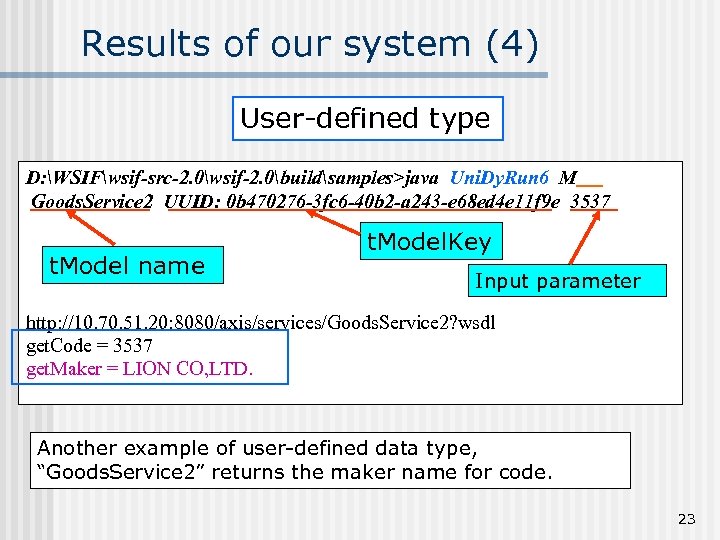
Results of our system (4) User-defined type D: WSIFwsif-src-2. 0wsif-2. 0buildsamples>java Uni. Dy. Run 6 M Goods. Service 2 UUID: 0 b 470276 -3 fc 6 -40 b 2 -a 243 -e 68 ed 4 e 11 f 9 e 3537 t. Model name t. Model. Key Input parameter http: //10. 70. 51. 20: 8080/axis/services/Goods. Service 2? wsdl get. Code = 3537 get. Maker = LION CO, LTD. Another example of user-defined data type, “Goods. Service 2” returns the maker name for code. 23
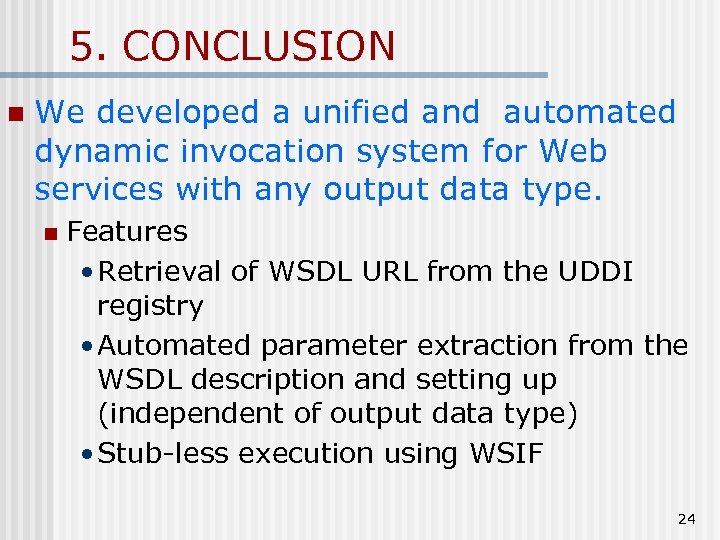
5. CONCLUSION n We developed a unified and automated dynamic invocation system for Web services with any output data type. n Features • Retrieval of WSDL URL from the UDDI registry • Automated parameter extraction from the WSDL description and setting up (independent of output data type) • Stub-less execution using WSIF 24
The UDDI registry is the core of Web service technology. n But in practice, it is difficult to quickly discover necessary Web services from the UDDI registry. n Important ! n We have to make it easily for the registry to find those Web services that users need. 25
Скачать презентацию UNIFIED DYNAMIC INVOCATION SYSTEM FOR WEB SERVICES ICCSA
4c4fab62f122d34ca6424d64be670003.ppt