


 Скачать презентацию UNCLASSIFIED Leveraging VMware to implement Disaster Recovery at
587f01a080293f04ea97694b5af41518.ppt
- Количество слайдов: 15
 UNCLASSIFIED Leveraging VMware to implement Disaster Recovery at LANL Anil Karmel Technical Staff Member akarmel@lanl. gov UNCLASSIFIED LA-UR-08 -2807
 UNCLASSIFIED Outline • What is Server Virtualization? • What Challenges Did We Face? • VMware Capabilities • VMware Architecture • Where Are We Today? • Summary • Q&A UNCLASSIFIED LA-UR-08 -2807 Slide 1
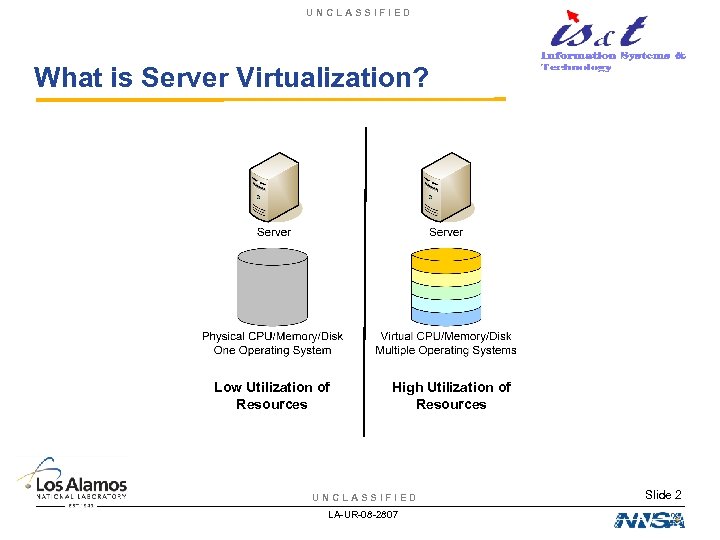 UNCLASSIFIED What is Server Virtualization? Low Utilization of Resources High Utilization of Resources UNCLASSIFIED LA-UR-08 -2807 Slide 2
 UNCLASSIFIED What Challenges Did We Face? Application and Citrix Servers • ~300 Intel-based HP Pro. Liant and Dell servers – Primarily 3 rd/4 th Generation HP Pro. Liant DL 360 servers • Enterprise Approach to Imaging, Patching, Backups – Allows for standardized management of heterogeneous servers • Hosting Application and Citrix Environments – 32+ Web Applications – 10, 000 hits/day – 50 Citrix Servers – 70 applications – Lotus Notes/Domino, Web. Sphere, Share. Point, Project, SQL Server, Exchange and others UNCLASSIFIED LA-UR-08 -2807 Slide 3
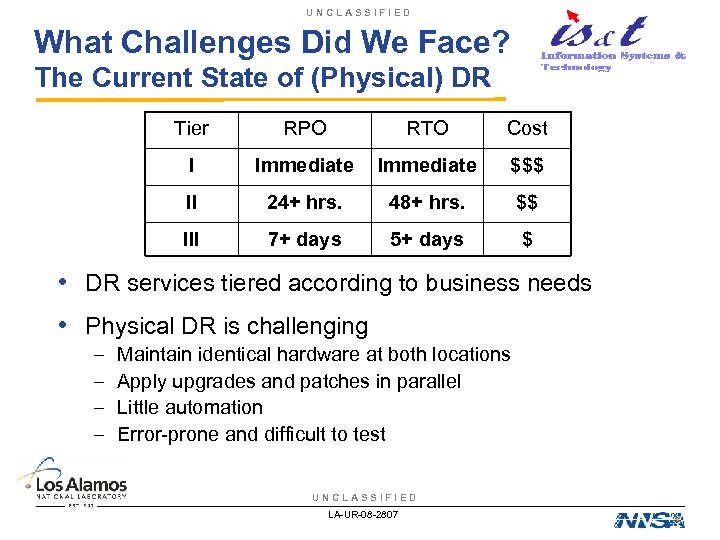 UNCLASSIFIED What Challenges Did We Face? The Current State of (Physical) DR Tier RPO RTO Cost I Immediate $$$ II 24+ hrs. 48+ hrs. $$ III 7+ days 5+ days $ • DR services tiered according to business needs • Physical DR is challenging – – Maintain identical hardware at both locations Apply upgrades and patches in parallel Little automation Error-prone and difficult to test UNCLASSIFIED LA-UR-08 -2807
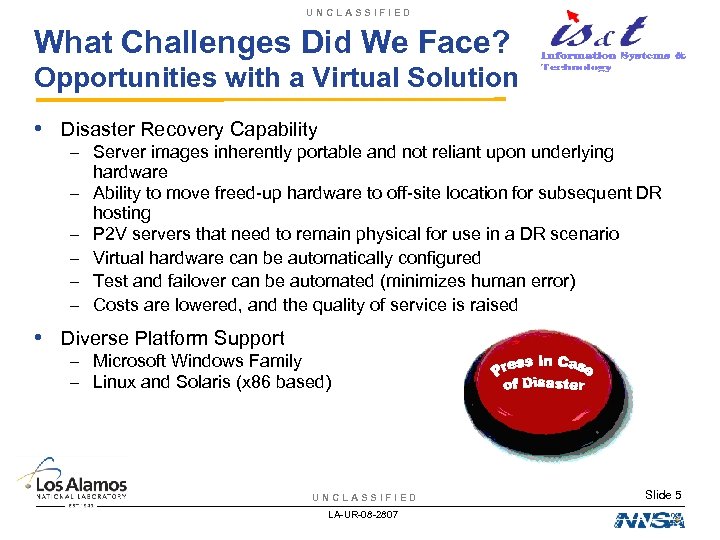 UNCLASSIFIED What Challenges Did We Face? Opportunities with a Virtual Solution • Disaster Recovery Capability – Server images inherently portable and not reliant upon underlying hardware – Ability to move freed-up hardware to off-site location for subsequent DR hosting – P 2 V servers that need to remain physical for use in a DR scenario – Virtual hardware can be automatically configured – Test and failover can be automated (minimizes human error) – Costs are lowered, and the quality of service is raised • Diverse Platform Support – Microsoft Windows Family – Linux and Solaris (x 86 based) UNCLASSIFIED LA-UR-08 -2807 Slide 5
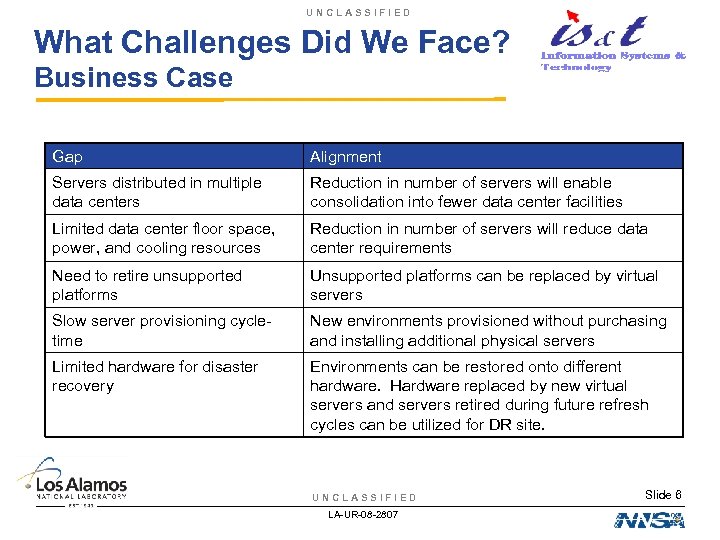 UNCLASSIFIED What Challenges Did We Face? Business Case Gap Alignment Servers distributed in multiple data centers Reduction in number of servers will enable consolidation into fewer data center facilities Limited data center floor space, power, and cooling resources Reduction in number of servers will reduce data center requirements Need to retire unsupported platforms Unsupported platforms can be replaced by virtual servers Slow server provisioning cycletime New environments provisioned without purchasing and installing additional physical servers Limited hardware for disaster recovery Environments can be restored onto different hardware. Hardware replaced by new virtual servers and servers retired during future refresh cycles can be utilized for DR site. UNCLASSIFIED LA-UR-08 -2807 Slide 6
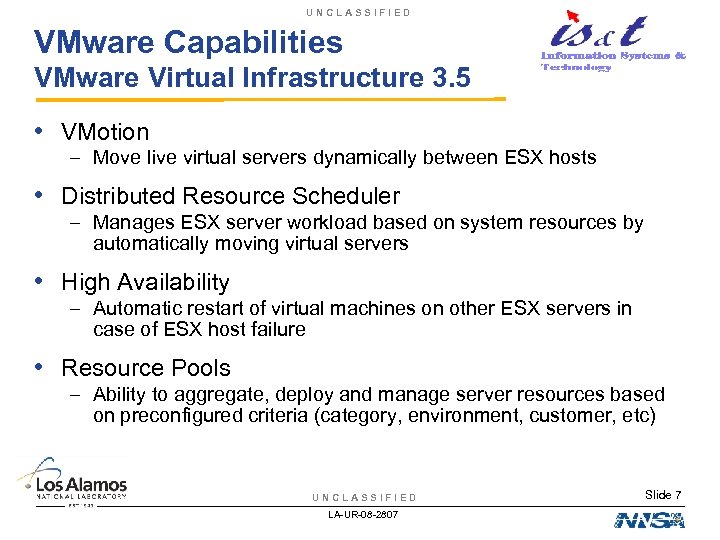 UNCLASSIFIED VMware Capabilities VMware Virtual Infrastructure 3. 5 • VMotion – Move live virtual servers dynamically between ESX hosts • Distributed Resource Scheduler – Manages ESX server workload based on system resources by automatically moving virtual servers • High Availability – Automatic restart of virtual machines on other ESX servers in case of ESX host failure • Resource Pools – Ability to aggregate, deploy and manage server resources based on preconfigured criteria (category, environment, customer, etc) UNCLASSIFIED LA-UR-08 -2807 Slide 7
 UNCLASSIFIED VMware Capabilities VMware Virtual Infrastructure 3. 5 • VMware Update Manager – Push software updates to ESX hosts, VM’s and templates • VMware Site Recovery Manager – Automates the failover and recovery process to meet RTO and RPO requirements – Create recovery plans for different failover scenarios – Perform non-disruptive test of failover and recovery – Requires Array-Based Replication UNCLASSIFIED LA-UR-08 -2807 Slide 8
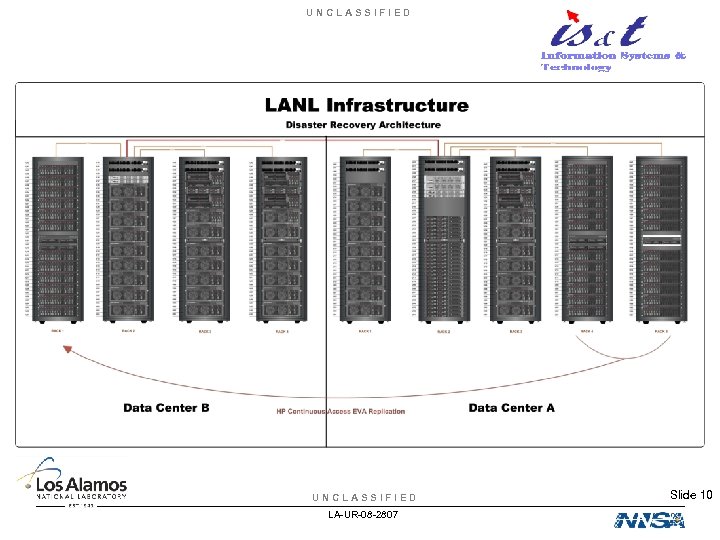
 UNCLASSIFIED VMware Architecture Consolidation onto Virtual Platform • Hardware Configuration – Thirteen (13) HP DL 585 servers – Dual-core AMD Opteron processors (4) – 32 GB memory – Multiple network and fiber channel cards – HP EVA 8000/8100 SAN environment (119 TB total) – Shared Production VMware EVA 8000 – 27 TB – Shared DEVL/BETA VMware EVA 8000 – 45 TB – Shared DR EVA 8100 – 47 TB – Active SAN-SAN Replication between EVA 8 k’s and EVA 8100 – Near-line Storage for Disaster Recovery UNCLASSIFIED LA-UR-08 -2807 Slide 9
 UNCLASSIFIED LA-UR-08 -2807 Slide 10
 UNCLASSIFIED VMware Architecture Consolidation onto Virtual Platform • Monitoring / Consolidation Planning – Plate. Spin Power. Recon – Ability to gather Windows/Linux physical server utilization metrics – Metrics used to identify physical candidates for consolidation • Physical to Virtual (P 2 V) Technology – Plate. Spin Power. Convert – Ability to rapidly migrate physical machines into a virtual environment – Migrate physical machines running on disparate hardware to standard IS&T hardware – Create weekly images of physical servers into inactive VM’s for DR • Backup Technology – Vizioncore ESX Ranger with VMware Consolidated Backup – Ability to backup entire VM for DR purposes UNCLASSIFIED LA-UR-08 -2807 Slide 11
 UNCLASSIFIED Where Are We Today? Consolidated Infrastructure • Statistics – 210 total VM’s running in a 13 Server VMware DRS/HA cluster – Average resource utilization of cluster is 50% – Anticipating a 40: 1 consolidation ratio (dependant on load) – 100 physical servers decommissioned • Return On Investment (ROI) – Initial projection called for ROI to be achieved by end of FY ’ 08 – Actual ROI achieved by March 2007 (9 months) • Plan to evaluate VMware Site Recovery Manager UNCLASSIFIED LA-UR-08 -2807 Slide 12
 UNCLASSIFIED VMware Project Summary • Virtualization provides for: – Supporting specialized environments in a more resource effective manner – Migrating legacy platforms onto supported infrastructure – Implementation of a cost-effective, tiered Disaster Recovery solution UNCLASSIFIED LA-UR-08 -2807 Slide 13
 UNCLASSIFIED Questions? UNCLASSIFIED LA-UR-08 -2807 Slide 14