


 Скачать презентацию UFEEP 4 -15 -M — WEEK 8 CURRENT
5910a16825ba4a8520fa077d252dcc36.ppt
- Количество слайдов: 14
 UFEEP 4 -15 -M - WEEK 8 CURRENT PROJECTS / FUTURES ion ss Se A look at the current initiatives within UWE such as Share. Point, consolidation and virtualisation as well as some of the technology trends we can see coming down the road such as new forms of communication, mobility and unified communications / VOIP. ell d. T an ow Sh Alistair Sandford
 Menu Active Directory 1. Open demonstration Share. Point 2007 2. Overview and demonstration VMWare and Virtualisation 3. Overview of VMWare ESX as a platform for consolidation Demonstration of Virtual Centre SMS 4. Demonstration of SMS and overview of the PC buildsystem The future of Exchange 2007 5. Unified Communications
 Active Directory Administration Day to day admin here does NOT include: Making user accounts - automated using MIIS, 1000 s of users so don’t want to be doing that! Making changes all the time – changes must be planned as a large system like ours can be badly affected by a mistake and we have a service to deliver Changes happen at specific times called the “At Risk Period” when ITS is aware of changes occurring and are on call to notify of any problems as they occur 3
 Virtualisation and Consolidation Definition: the masking of server resources, including the number and identity of individual physical servers, processors, and operating systems, from server users Modern servers so fast we don’t use all the resources available so they sit idle 99% of the time Waste is immense (power, money, time, natural resources, and space) Currently, the best method of utilising resources effectively is by virtualisation & consolidation 4
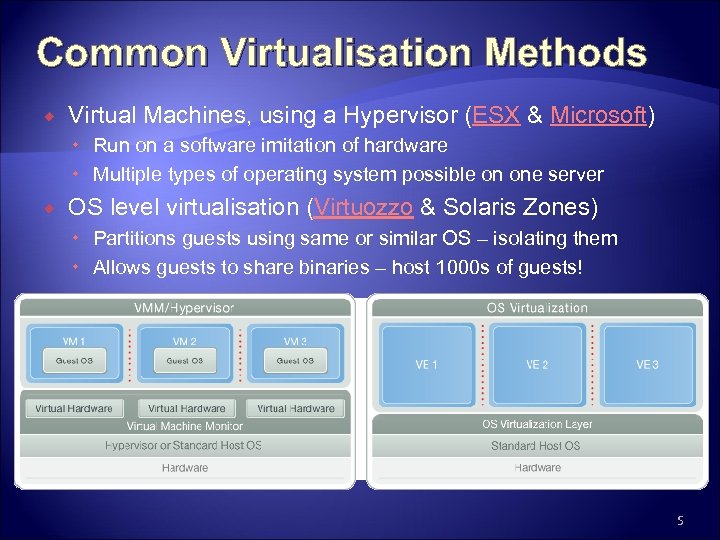 Common Virtualisation Methods Virtual Machines, using a Hypervisor (ESX & Microsoft) Run on a software imitation of hardware Multiple types of operating system possible on one server OS level virtualisation (Virtuozzo & Solaris Zones) Partitions guests using same or similar OS – isolating them Allows guests to share binaries – host 1000 s of guests! 5
 UWE’s Use of Virtualisation Virtual Infrastructure 2 – uses ESX 3 hosts Multiple hosts in an array, across two sites Guest HD’s on SAN storage Automatically migrated to hosts with available resources If one site fails the VMs can be brought up on the other site Can give permissions for admin/s of specific machines to look after VMs themselves 6
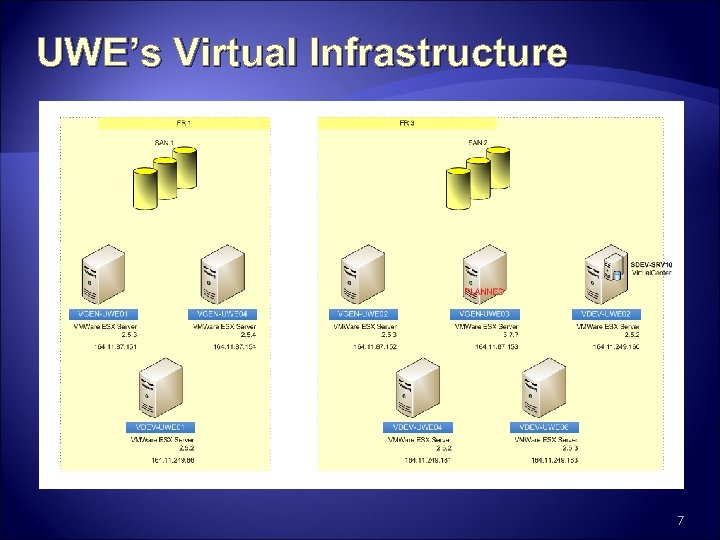 UWE’s Virtual Infrastructure 7
 UWE’s Use of SMS Main uses: software deployment & delivering standard operating systems to PCs Process: software installed by faculty experts on a standard OS install, then packaged into an. msi file Software added to SMS then advertised to rooms PCs poll the SMS server and discover the advert and install the. msi file using admin privileges Problems: Apps run badly due to poor testing of packages 8
 Delivering XP to PCs Install Windows XP and make standard desktop Sysprep and then ‘image’ to a WIM file using a specially created CD Added in to SMS as a new OS package SMS allows for scripts to run at specific stages of the OS delivery State capture – copy user’s old files and prepare vars Pre-install – prepare HD for OS delivery Post-install – add custom drivers or other files State restore – install core applications 9
 Current and Future Plans Currently: Add or change PC in a database Put in a CD and reboot PC OS automatically installs depending on details in database Requires someone with a CD and a db change Planned: Make use of PXE to boot PCs without a CD Allow users to rebuild their own PCs after a simple call to the help-desk! 10
 Share. Point 2007 Official Title Microsoft Office Share. Point Server 2007 (MOSS) What is it? Microsoft Office Share. Point Server 2007 is an integrated suite of server capabilities Accessed via a Web Interface or directly from applications or via web services Microsoft fastest selling product of all time
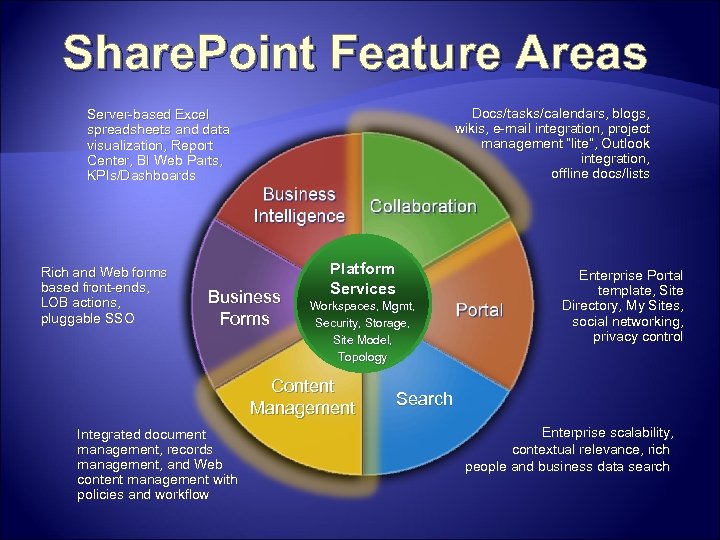 Share. Point Feature Areas Docs/tasks/calendars, blogs, wikis, e-mail integration, project management “lite”, Outlook integration, offline docs/lists Server-based Excel spreadsheets and data visualization, Report Center, BI Web Parts, KPIs/Dashboards Rich and Web forms based front-ends, LOB actions, pluggable SSO Business Forms Platform Services Workspaces, Mgmt, Security, Storage, Site Model, Topology Content Management Integrated document management, records management, and Web content management with policies and workflow Enterprise Portal template, Site Directory, My Sites, social networking, privacy control Search Enterprise scalability, contextual relevance, rich people and business data search
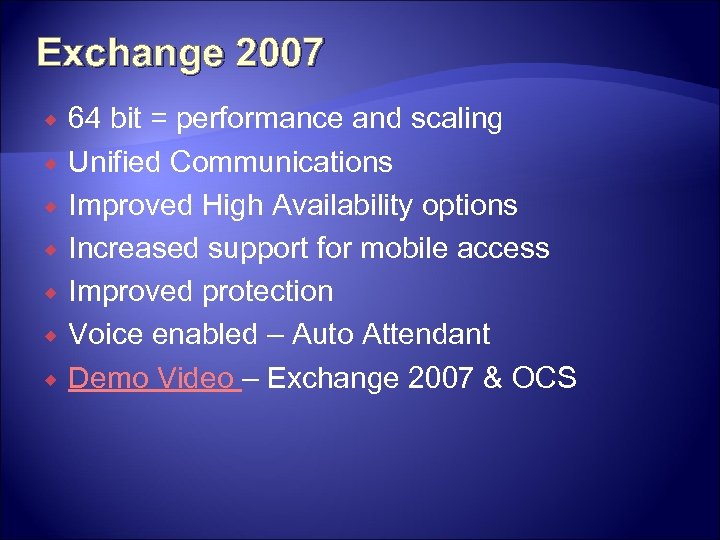 Exchange 2007 64 bit = performance and scaling Unified Communications Improved High Availability options Increased support for mobile access Improved protection Voice enabled – Auto Attendant Demo Video – Exchange 2007 & OCS
 Questions ? alistair. sandford@uwe. ac. uk