 Скачать презентацию Уеб дизайн 2011 12 Лекционен модул 2 1
40199bf214a06cd3b2d79d380d00a8bf.ppt
- Количество слайдов: 64




Уеб дизайн 2011/12 Лекционен модул 2 1
Лекционен модул 2 Съдържание 1. 2. 3. 4. 5. 6. 7. HTML – версии, възможности и начини на използване XML и структуриране на съдържанието HXTML – версии, примери HTML 5 – концепции HTML 5 – нови елементи и атрибути SVG (Scalable Vector Graphics) HTML 5 – възможности и примери Уеб дизайн 2011/12 Лекционен модул 2 2
Стандартизиране на Уеб сайтове Стандартизацията на уеб сайтове се отнася до процеса на разработка на стандартни уеб сайтове или на корекция на нестандартни такива, с цел да отговарят на изискванията на съвременните стандарти и начини за използването им. Основните цели на стандартизацията са: ü Функционалност ü Оперативен обмен на данни (interoperability) ü Назависимост от браузъра и крайното клиентско устройство (резолюция, процесорна мощност, дефинирани бутони и др. ) ЗА ДА СЕ ОСИГУРИ: q Достъп до съдържанието съгласно изискванията на потребителя q Използваемост на менютата, разположението (лейаут) и др. q Предсказуемо поведение. Уеб дизайн 2011/12 Лекционен модул 2 3
Цената на нестандартния маркъп 1/2 § Уеб роботите не могат да индексират неправилно кодирани документи => загуба на посетители => загубен трафик, помалко посетители, и по-малко продажби § По-дълго време за изтегляне и представяне в браузъра (rendering) § Неправилно представяне (един от найзначимите недостатъци) § Лесна разработка, но: § Ниско ниво на достъпност Уеб дизайн 2011/12 Лекционен модул 2 4
Цената на нестандартния маркъп 2/2 § Ниско ниво на обратна съвместимост (backward compatibility) § Множество ненужни символи в изходния код - увеличават размера на файла и сложността му § Трудно актуализиране и поддръжка Уеб дизайн 2011/12 Лекционен модул 2 5
Предимства на използването на стандартен маркъп 1/2 o Уеб роботите индексират адекватно съдържанието – на практика то е search engine optimized (SEO) o Няма нарушение на стандартите => съвместимите със стандартите уеб сайтове се изтеглят по-бързо o Добре-структурираното (оформено) маркиране осигурява бързо и точно рендиране o Правилното оформяне на външния вид и оформлението води до повече потребители и за по-дълго време Уеб дизайн 2011/12 Лекционен модул 2 6
Предимства на използването на стандартен маркъп 2/2 o Сайт, отговарящ на стандартните изисквания за маркиране, служи като база за достъпност o Обратна съвместимост се гарантира, като браузърите продължават да се развиват. o Оптимална дължина на съдържанието и големина на файла (без излишни знаци в изходния код), както и на оптимални разходи за съхранение (потенциал за поевтин хостинг) Уеб дизайн 2011/12 Лекционен модул 2 7
Последствие от войната на браузърите q Надпревара в предлагането на нови функционалности и по-бавно корегиране на проблемите q Добавяне на уникални за браузера нови маркери (тагове) на съдържание вместо придържане към стандартите – напр. <marquee> в Microsoft's Internet Explorer и <blink> в Netscape q Изоставане в развитието на стандарта HTML, поддържан от W 3 C q Проблеми със сигурността – зареждане на вируси при зареждане на документи с активно съдържание (документи-приложения) Уеб дизайн 2011/12 Лекционен модул 2 8
Справка за нестандартен HTML v Непрепоръчителни (deprecated) и патентовани (рroprietary): Ø Елементи Ø Атрибути v Поддръжка от различни layout engines за съответните браузъри - http: //en. wikipedia. org/wiki/Comparison_of_layout_engines _(Non-standard_HTML) Уеб дизайн 2011/12 Лекционен модул 2 9
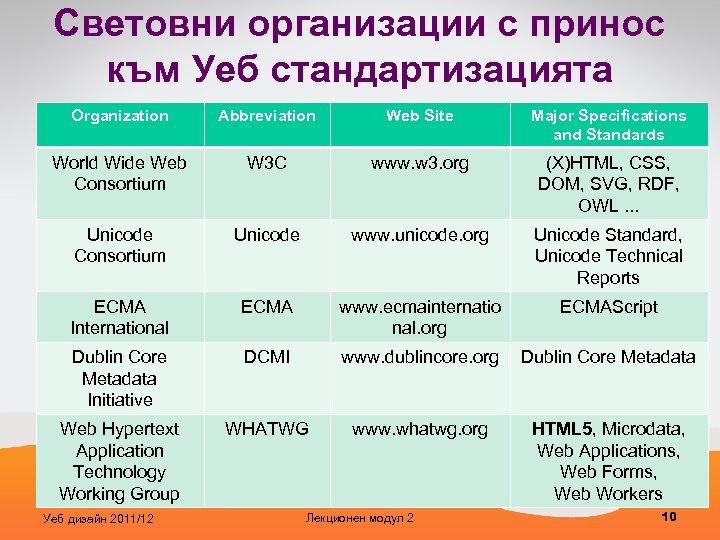
Световни организации с принос към Уеб стандартизацията Organization Abbreviation Web Site Major Specifications and Standards World Wide Web Consortium W 3 C www. w 3. org (X)HTML, CSS, DOM, SVG, RDF, OWL. . . Unicode Consortium Unicode www. unicode. org Unicode Standard, Unicode Technical Reports ECMA International ECMA www. ecmainternatio nal. org ECMAScript Dublin Core Metadata Initiative DCMI www. dublincore. org Dublin Core Metadata Web Hypertext Application Technology Working Group WHATWG www. whatwg. org HTML 5, Microdata, Web Applications, Web Forms, Web Workers Уеб дизайн 2011/12 Лекционен модул 2 10
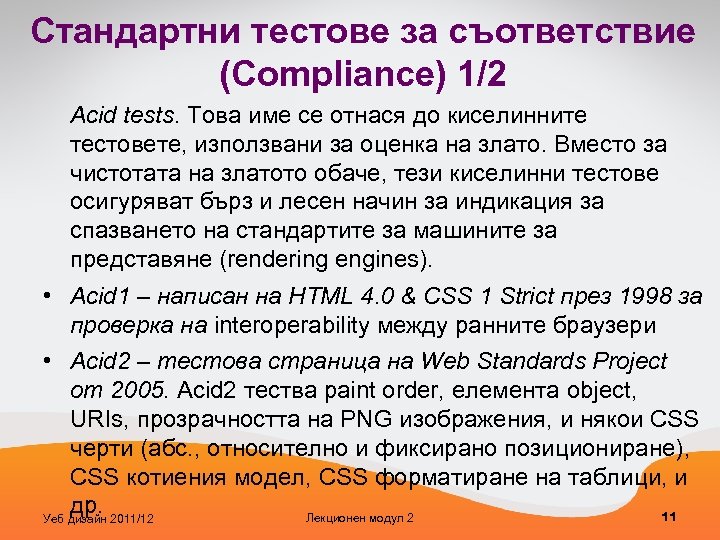
Стандартни тестове за съответствие (Compliance) 1/2 Acid tests. Това име се отнася до киселинните тестовете, използвани за оценка на злато. Вместо за чистотата на златото обаче, тези киселинни тестове осигуряват бърз и лесен начин за индикация за спазването на стандартите за машините за представяне (rendering engines). • Acid 1 – написан на HTML 4. 0 & CSS 1 Strict през 1998 за проверка на interoperability между ранните браузери • Acid 2 – тестова страница на Web Standards Project от 2005. Acid 2 тества paint order, елемента object, URIs, прозрачността на PNG изображения, и някои CSS черти (абс. , относително и фиксирано позициониране), CSS котиения модел, CSS форматиране на таблици, и др. 11 Лекционен модул 2 Уеб дизайн 2011/12
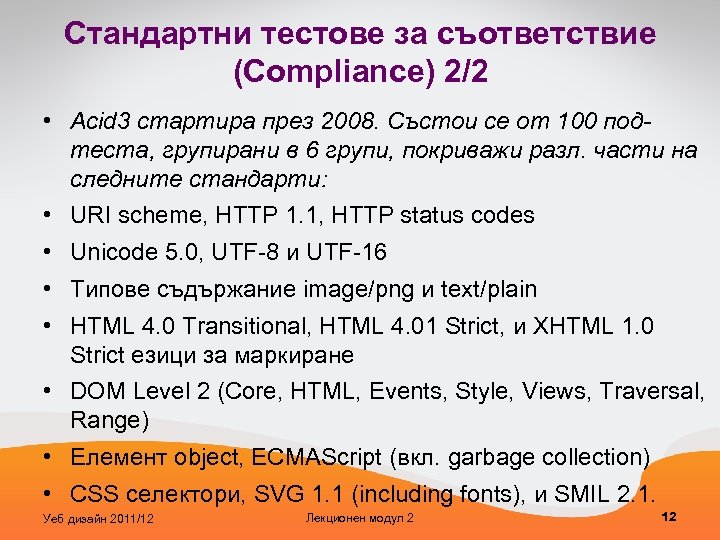
Стандартни тестове за съответствие (Compliance) 2/2 • Acid 3 стартира през 2008. Състои се от 100 подтеста, групирани в 6 групи, покриважи разл. части на следните стандарти: • URI scheme, HTTP 1. 1, HTTP status codes • Unicode 5. 0, UTF-8 и UTF-16 • Типове съдържание image/png и text/plain • HTML 4. 0 Transitional, HTML 4. 01 Strict, и XHTML 1. 0 Strict езици за маркиране • DOM Level 2 (Core, HTML, Events, Style, Views, Traversal, Range) • Елемент object, ECMAScript (вкл. garbage collection) • CSS селектори, SVG 1. 1 (including fonts), и SMIL 2. 1. Уеб дизайн 2011/12 Лекционен модул 2 12
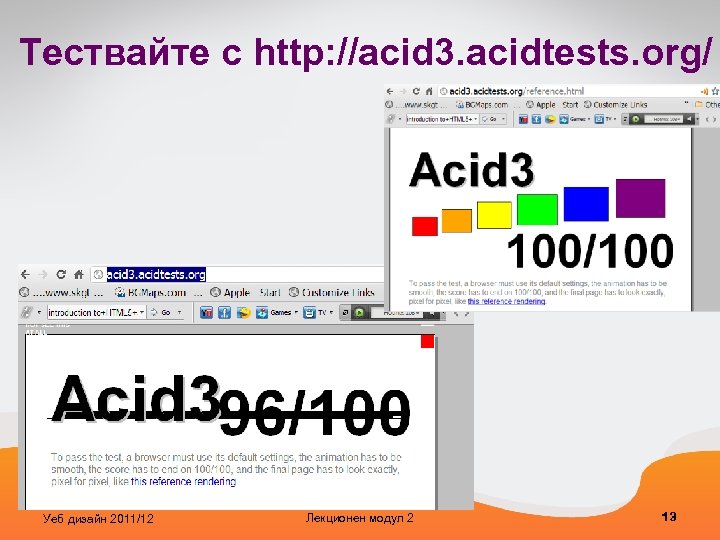
Тествайте с http: //acid 3. acidtests. org/ Уеб дизайн 2011/12 Лекционен модул 2 13
Първи стабилни и публични версии на браузъри, които са преминали Acid 3 тест • Apple Safari 4. 0 (първият Уеб браузър, преминал Acid 3) • Opera 10. 6 • Google Chrome 4. 0. 249. 78 • Epiphany 2. 28. 0 • i. Phone 7 3. 1 • Iris Browser 7 1. 1. 4 • Bolt browser 7 1. 6 • Opera Mobile 7 9. 7 Уеб дизайн 2011/12 Лекционен модул 2 14
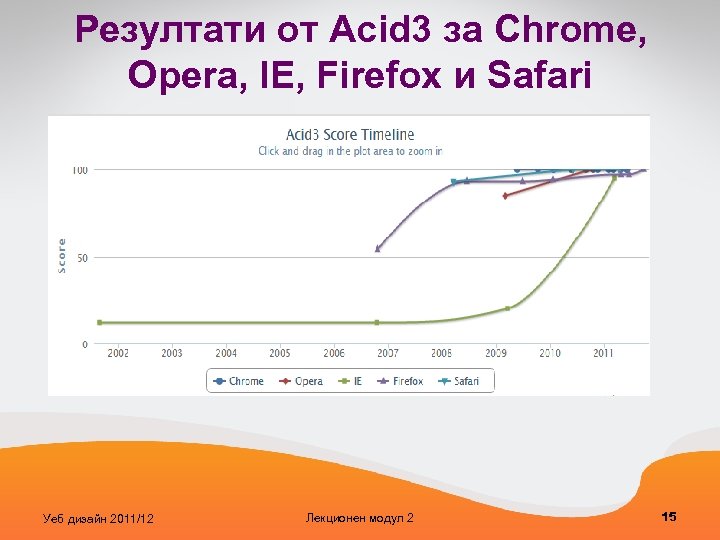
Резултати от Acid 3 за Chrome, Opera, IE, Firefox и Safari Уеб дизайн 2011/12 Лекционен модул 2 15
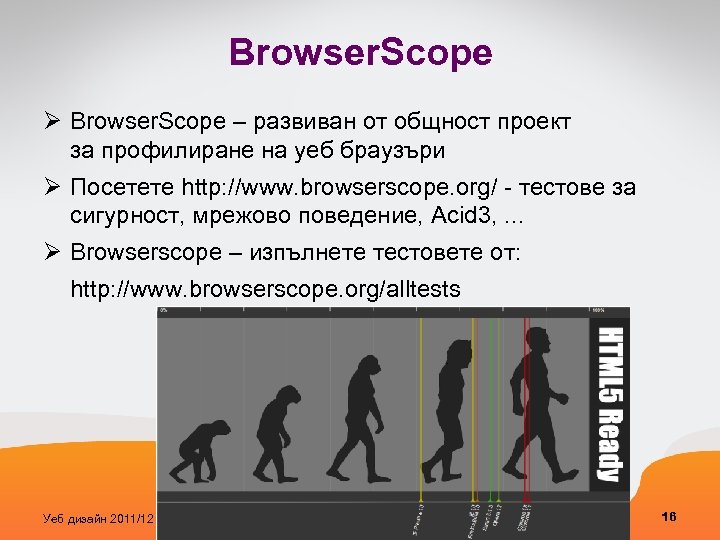
Browser. Scope Ø Browser. Scope – развиван от общност проект за профилиране на уеб браузъри Ø Посетете http: //www. browserscope. org/ - тестове за сигурност, мрежово поведение, Acid 3, . . . Ø Browserscope – изпълнете тестовете от: http: //www. browserscope. org/alltests Уеб дизайн 2011/12 Лекционен модул 2 16
Проблем: уеб сайтове предоставят невалиден и остарял код • разработчиците на сайта може да решат да следват някои от препоръките, но това не е задължително • през 2011 г. , 94% от 350 най-популярните сайтове в света не успяха да преминат тестовете за валидиране по уеб стандартите, които обхващат кодиране на символите (character encoding), маркиране, и стилове • 99, 9% от уеб сайтовете са остарели от гледна точка на технологията • среден брой на грешки в маркирането: 6 • среден брой на CSS грешки: 45 • максимален брой на CSS грешки: 738 (в един CSS файл!) Sources: Gertner M (2008) Is Web Standardization Obsolete? Just Browsing. http: //browsing. justdiscourse. com/2008/01/22 /is-web-standardizationobsolete/; Zeldman J, Marcotte E (2009) 99. 9% of websites are obsolete. In: Designing with Web standards, 3 rd ed. , ew Riders, Berkeley N Уеб дизайн 2011/12 Лекционен модул 2 17
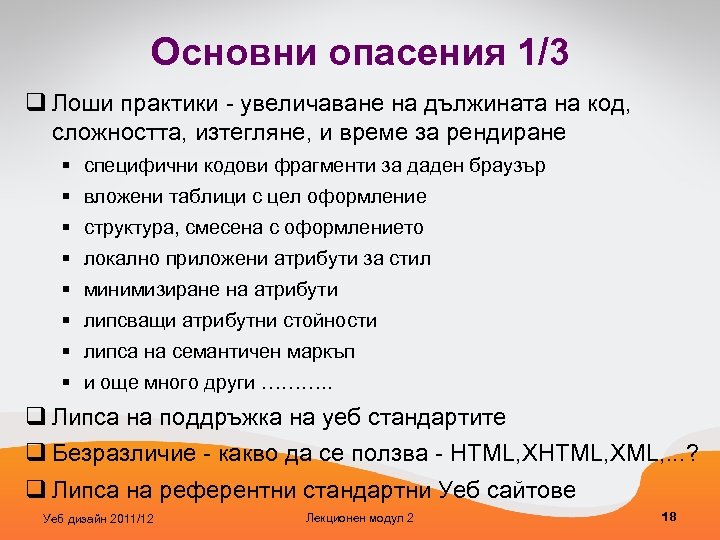
Основни опасения 1/3 q Лоши практики - увеличаване на дължината на код, сложността, изтегляне, и време за рендиране § специфични кодови фрагменти за даден браузър § вложени таблици с цел оформление § структура, смесена с оформлението § локално приложени атрибути за стил § минимизиране на атрибути § липсващи атрибутни стойности § липса на семантичен маркъп § и още много други ………. . q Липса на поддръжка на уеб стандартите q Безразличие - какво да се ползва - HTML, XML, . . . ? q Липса на референтни стандартни Уеб сайтове Уеб дизайн 2011/12 Лекционен модул 2 18
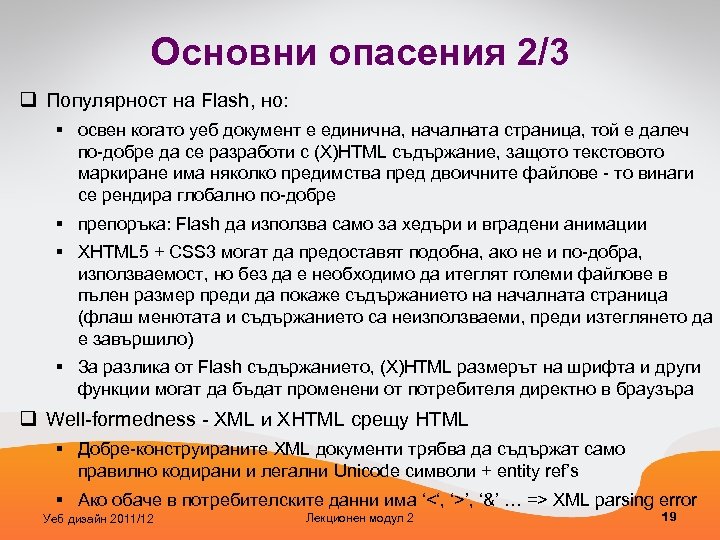
Основни опасения 2/3 q Популярност на Flash, но: § освен когато уеб документ е единична, началната страница, той е далеч по-добре да се разработи с (X)HTML съдържание, защото текстовото маркиране има няколко предимства пред двоичните файлове - то винаги се рендира глобално по-добре § препоръка: Flash да използва само за хедъри и вградени анимации § XHTML 5 + CSS 3 могат да предоставят подобна, ако не и по-добра, използваемост, но без да е необходимо да итеглят големи файлове в пълен размер преди да покаже съдържанието на началната страница (флаш менютата и съдържанието са неизползваеми, преди изтеглянето да е завършило) § За разлика от Flash съдържанието, (X)HTML размерът на шрифта и други функции могат да бъдат променени от потребителя директно в браузъра q Well-formedness - XML и XHTML срещу HTML § Добре-конструираните XML документи трябва да съдържат само правилно кодирани и легални Unicode символи + entity ref’s § Ако обаче в потребителските данни има ‘<‘, ‘>’, ‘&’ … => XML parsing error Уеб дизайн 2011/12 Лекционен модул 2 19
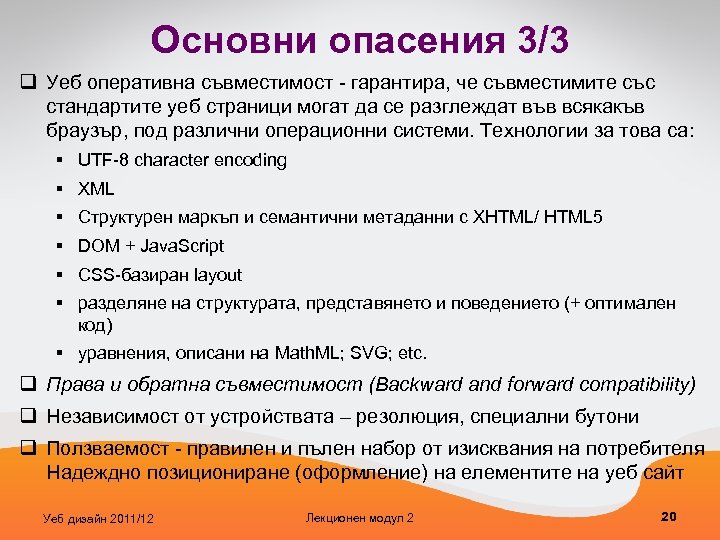
Основни опасения 3/3 q Уеб оперативна съвместимост - гарантира, че съвместимите със стандартите уеб страници могат да се разглеждат във всякакъв браузър, под различни операционни системи. Технологии за това са: § UTF-8 character encoding § XML § Структурен маркъп и семантични метаданни с XHTML/ HTML 5 § DOM + Java. Script § CSS-базиран layout § разделяне на структурата, представянето и поведението (+ оптимален код) § уравнения, описани на Math. ML; SVG; etc. q Права и обратна съвместимост (Backward and forward compatibility) q Независимост от устройствата – резолюция, специални бутони q Ползваемост - правилен и пълен набор от изисквания на потребителя Надеждно позициониране (оформление) на елементите на уеб сайт Уеб дизайн 2011/12 Лекционен модул 2 20
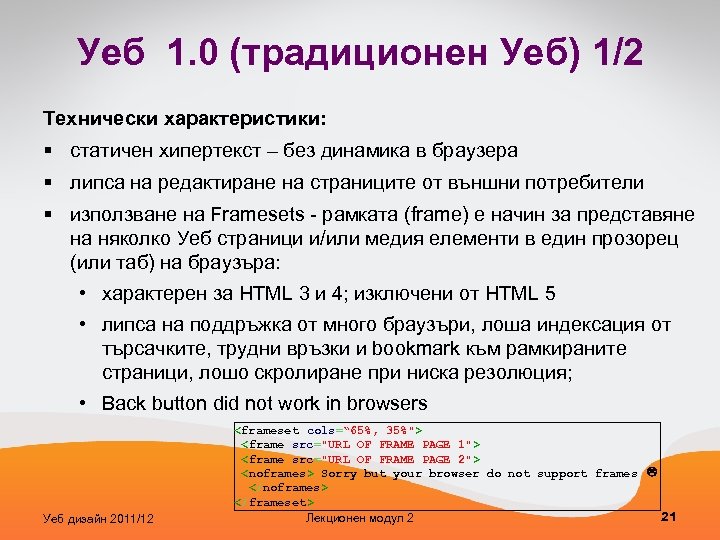
Уеб 1. 0 (традиционен Уеб) 1/2 Технически характеристики: § статичен хипертекст – без динамика в браузера § липса на редактиране на страниците от външни потребители § използване на Framesets - рамката (frame) е начин за представяне на няколко Уеб страници и/или медия елементи в един прозорец (или таб) на браузъра: • характерен за HTML 3 и 4; изключени от HTML 5 • липса на поддръжка от много браузъри, лоша индексация от търсачките, трудни връзки и bookmark към рамкираните страници, лошо скролиране при ниска резолюция; • Back button did not work in browsers Уеб дизайн 2011/12 <frameset cols=“ 65%, 35%"> <frame src="URL OF FRAME PAGE 1"> <frame src="URL OF FRAME PAGE 2"> <noframes> Sorry but your browser do not support frames </noframes> </frameset> 21 Лекционен модул 2
Уеб 1. 0 (традиционен Уеб) 2/2 Още технически характеристики: § използване на таблици (<table>) за подравняване на съдържанието на страницата § отделяне на съдържание с прозрачни 1 x 1 pixel изображения в GIF format § патентовани нестандартни HTML елементи като <blink> и <marquee> § онлайн книги за гости § изпращане на HTML форми като ел. поща от статичен хипертекст § сървърни технологии като PHP, Ruby, Perl, Python, JSP, and ASP. NET Уеб дизайн 2011/12 Лекционен модул 2 22
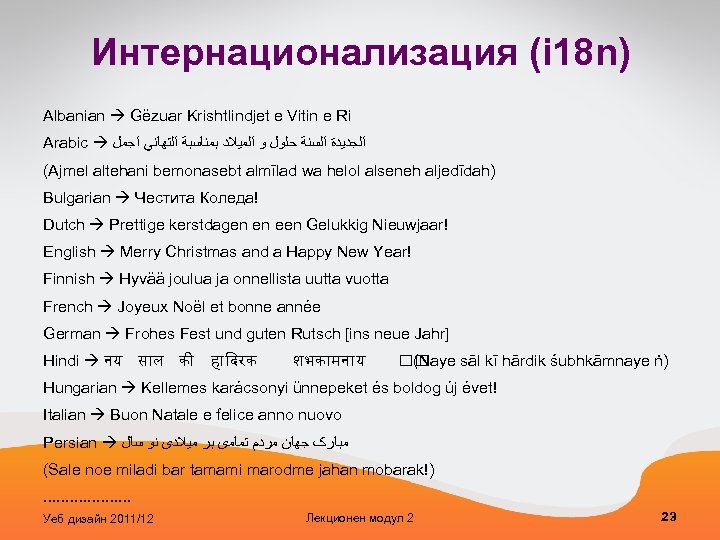
Интернационализация (i 18 n) Albanian Gëzuar Krishtlindjet e Vitin e Ri Arabic ﺍﻟﺠﺪﻳﺪﺓ ﺍﻟﺴﻨﺔ ﺣﻠﻮﻝ ﻭ ﺍﻟﻤﻴﻼﺩ ﺑﻤﻨﺎﺳﺒﺔ ﺍﻟﺘﻬﺎﻧﻲ ﺍﺟﻤﻞ (Ajmel altehani bemonasebt almīlad wa helol alseneh aljedīdah) Bulgarian Честита Коледа! Dutch Prettige kerstdagen en een Gelukkig Nieuwjaar! English Merry Christmas and a Happy New Year! Finnish Hyvää joulua ja onnellista uutta vuotta French Joyeux Noël et bonne année German Frohes Fest und guten Rutsch [ins neue Jahr] Hindi नय स ल क ह दरक शभक मन य (Naye sāl kī hārdik śubhkāmnaye ṅ) Hungarian Kellemes karácsonyi ünnepeket és boldog új évet! Italian Buon Natale e felice anno nuovo Persian ﻣﺒﺎﺭک ﺟﻬﺎﻥ ﻣﺮﺩﻡ ﺗﻤﺎﻣی ﺑﺮ ﻣﻴﻼﺩی ﻧﻮ ﺳﺎﻝ (Sale noe miladi bar tamami marodme jahan mobarak!). . . . . Уеб дизайн 2011/12 Лекционен модул 2 23
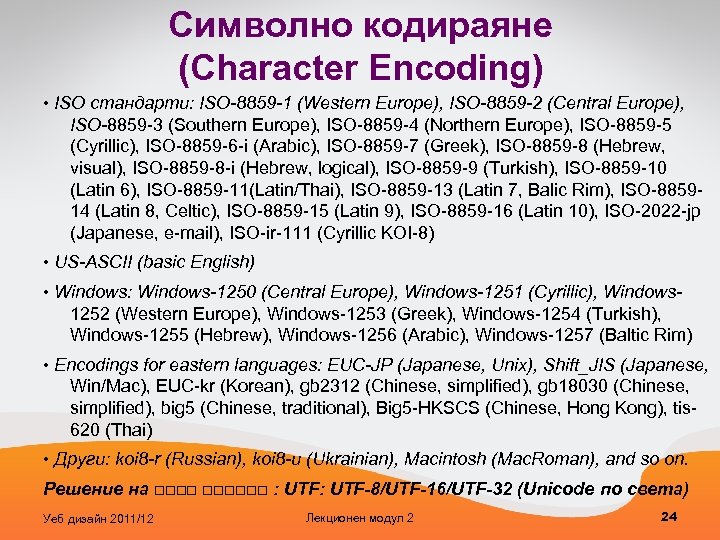
Символно кодираяне (Character Encoding) • ISO стандарти: ISO-8859 -1 (Western Europe), ISO-8859 -2 (Central Europe), ISO-8859 -3 (Southern Europe), ISO-8859 -4 (Northern Europe), ISO-8859 -5 (Cyrillic), ISO-8859 -6 -i (Arabic), ISO-8859 -7 (Greek), ISO-8859 -8 (Hebrew, visual), ISO-8859 -8 -i (Hebrew, logical), ISO-8859 -9 (Turkish), ISO-8859 -10 (Latin 6), ISO-8859 -11(Latin/Thai), ISO-8859 -13 (Latin 7, Balic Rim), ISO-885914 (Latin 8, Celtic), ISO-8859 -15 (Latin 9), ISO-8859 -16 (Latin 10), ISO-2022 -jp (Japanese, e-mail), ISO-ir-111 (Cyrillic KOI-8) • US-ASCII (basic English) • Windows: Windows-1250 (Central Europe), Windows-1251 (Cyrillic), Windows 1252 (Western Europe), Windows-1253 (Greek), Windows-1254 (Turkish), Windows-1255 (Hebrew), Windows-1256 (Arabic), Windows-1257 (Baltic Rim) • Encodings for eastern languages: EUC-JP (Japanese, Unix), Shift_JIS (Japanese, Win/Mac), EUC-kr (Korean), gb 2312 (Chinese, simplified), gb 18030 (Chinese, simplified), big 5 (Chinese, traditional), Big 5 -HKSCS (Chinese, Hong Kong), tis 620 (Thai) • Други: koi 8 -r (Russian), koi 8 -u (Ukrainian), Macintosh (Mac. Roman), and so on. Решение на □□□□□□ : UTF-8/UTF-16/UTF-32 (Unicode по света) Уеб дизайн 2011/12 Лекционен модул 2 24
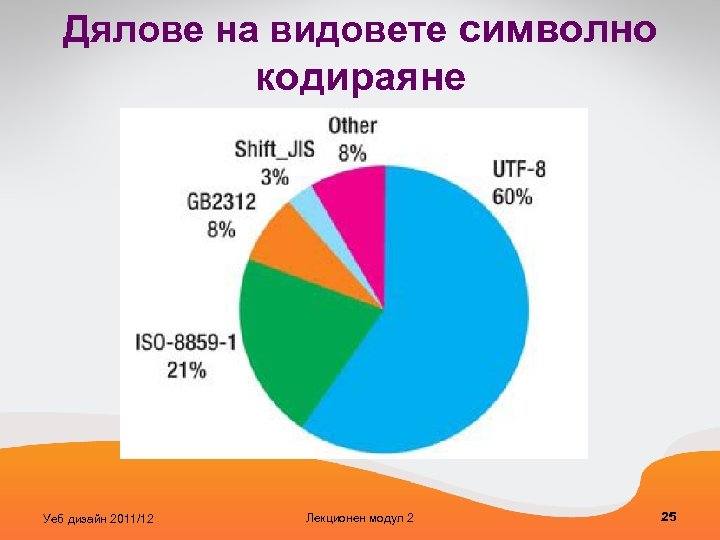
Дялове на видовете символно кодираяне Уеб дизайн 2011/12 Лекционен модул 2 25
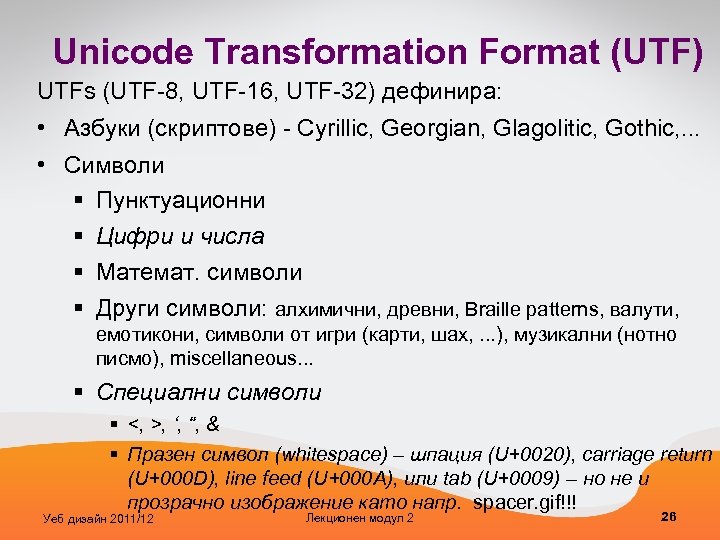
Unicode Transformation Format (UTF) UTFs (UTF-8, UTF-16, UTF-32) дефинира: • Азбуки (скриптове) - Cyrillic, Georgian, Glagolitic, Gothic, . . . • Символи § Пунктуационни § Цифри и числа § Математ. символи § Други символи: алхимични, древни, Braille patterns, валути, емотикони, символи от игри (карти, шах, . . . ), музикални (нотно писмо), miscellaneous. . . § Специални символи § <, >, ‘, “, & § Празен символ (whitespace) – шпация (U+0020), carriage return (U+000 D), line feed (U+000 A), или tab (U+0009) – но не и прозрачно изображение като напр. spacer. gif!!! Уеб дизайн 2011/12 Лекционен модул 2 26
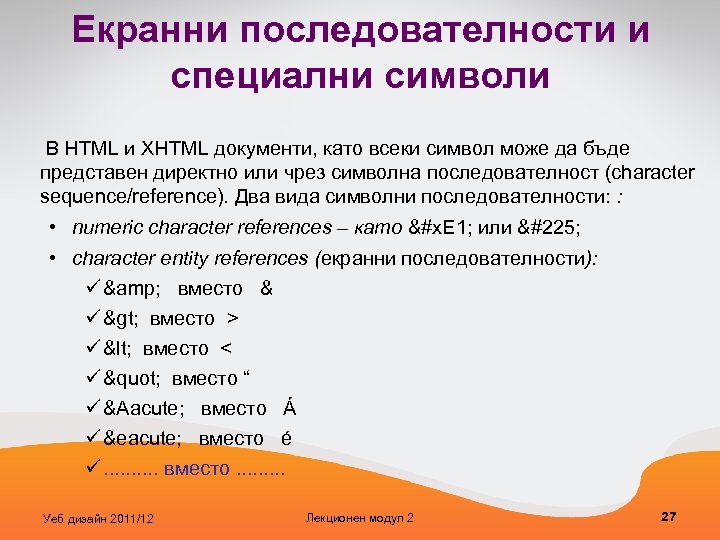
Екранни последователности и специални символи В HTML и XHTML документи, като всеки символ може да бъде представен директно или чрез символна последователност (character sequence/reference). Два вида символни последователности: : • numeric character references – като &#x. E 1; или á • character entity references (екранни последователности): ü & вместо & ü > вместо > ü < вместо < ü " вместо “ ü Á вместо Á ü é вместо é ü. . вместо. . Уеб дизайн 2011/12 Лекционен модул 2 27
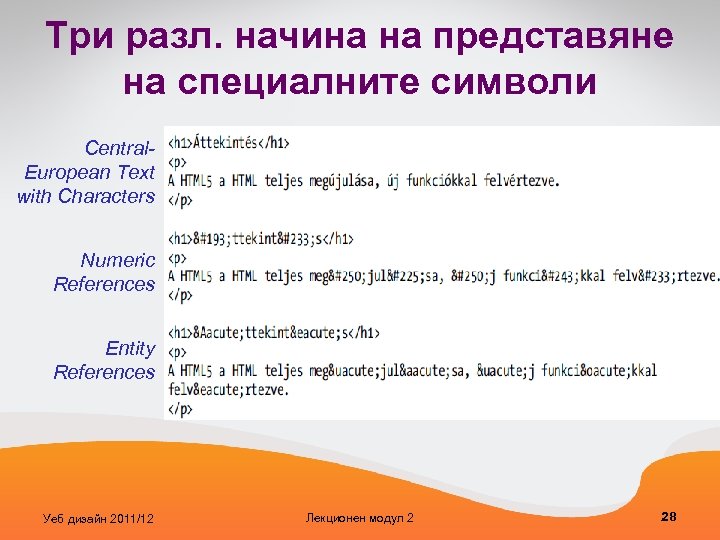
Три разл. начина на представяне на специалните символи Central. European Text with Characters Numeric References Entity References Уеб дизайн 2011/12 Лекционен модул 2 28
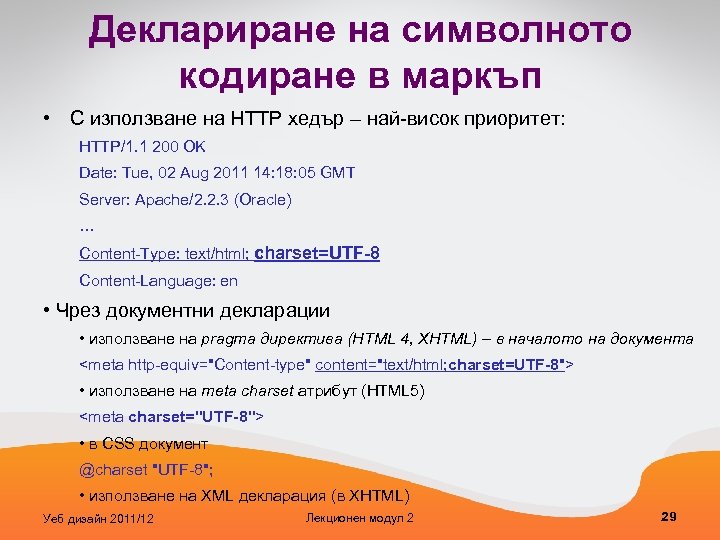
Деклариране на символното кодиране в маркъп • С използване на HTTP хедър – най-висок приоритет: HTTP/1. 1 200 OK Date: Tue, 02 Aug 2011 14: 18: 05 GMT Server: Apache/2. 2. 3 (Oracle) … Content-Type: text/html; charset=UTF-8 Content-Language: en • Чрез документни декларации • използване на pragma директива (HTML 4, XHTML) – в началото на документа <meta http-equiv="Content-type" content="text/html; charset=UTF-8"> • използване на meta charset атрибут (HTML 5) <meta charset="UTF-8"> • в CSS документ @charset "UTF-8"; • използване на XML декларация (в XHTML) Уеб дизайн 2011/12 Лекционен модул 2 29
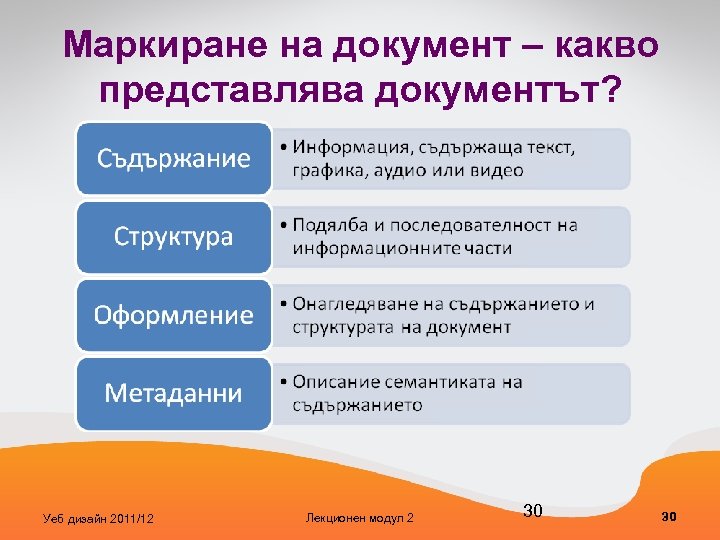
Маркиране на документ – какво представлява документът? Уеб дизайн 2011/12 Лекционен модул 2 30 30
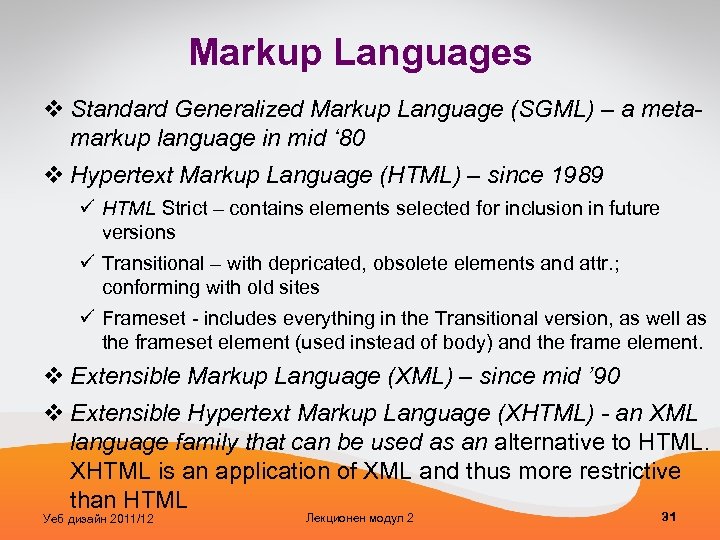
Markup Languages v Standard Generalized Markup Language (SGML) – a metamarkup language in mid ‘ 80 v Hypertext Markup Language (HTML) – since 1989 ü HTML Strict – contains elements selected for inclusion in future versions ü Transitional – with depricated, obsolete elements and attr. ; conforming with old sites ü Frameset - includes everything in the Transitional version, as well as the frameset element (used instead of body) and the frame element. v Extensible Markup Language (XML) – since mid ’ 90 v Extensible Hypertext Markup Language (XHTML) - an XML language family that can be used as an alternative to HTML. XHTML is an application of XML and thus more restrictive than HTML Уеб дизайн 2011/12 Лекционен модул 2 31
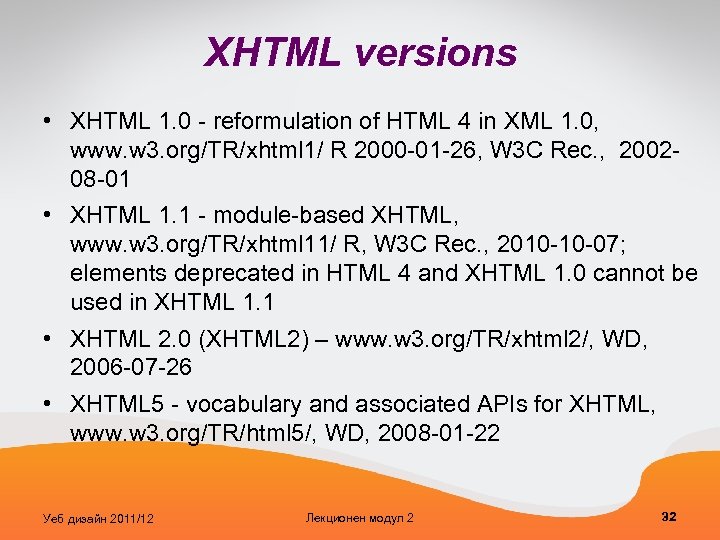
XHTML versions • XHTML 1. 0 - reformulation of HTML 4 in XML 1. 0, www. w 3. org/TR/xhtml 1/ R 2000 -01 -26, W 3 C Rec. , 200208 -01 • XHTML 1. 1 - module-based XHTML, www. w 3. org/TR/xhtml 11/ R, W 3 C Rec. , 2010 -10 -07; elements deprecated in HTML 4 and XHTML 1. 0 cannot be used in XHTML 1. 1 • XHTML 2. 0 (XHTML 2) – www. w 3. org/TR/xhtml 2/, WD, 2006 -07 -26 • XHTML 5 - vocabulary and associated APIs for XHTML, www. w 3. org/TR/html 5/, WD, 2008 -01 -22 Уеб дизайн 2011/12 Лекционен модул 2 32
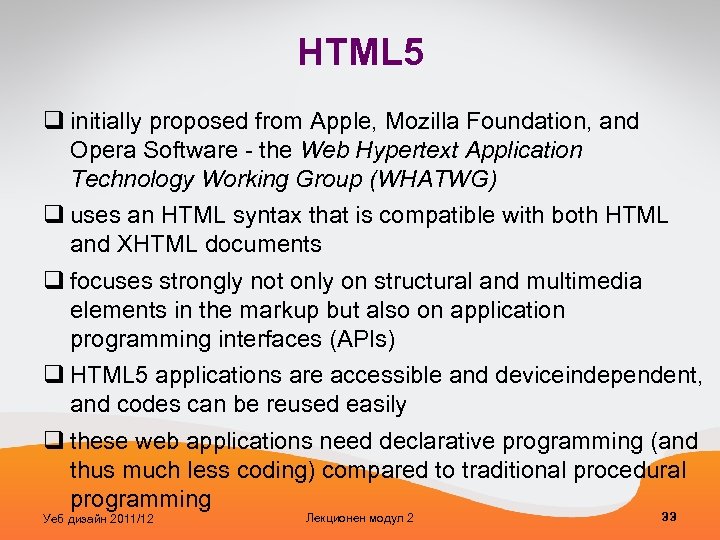
HTML 5 q initially proposed from Apple, Mozilla Foundation, and Opera Software - the Web Hypertext Application Technology Working Group (WHATWG) q uses an HTML syntax that is compatible with both HTML and XHTML documents q focuses strongly not only on structural and multimedia elements in the markup but also on application programming interfaces (APIs) q HTML 5 applications are accessible and deviceindependent, and codes can be reused easily q these web applications need declarative programming (and thus much less coding) compared to traditional procedural programming Уеб дизайн 2011/12 Лекционен модул 2 33
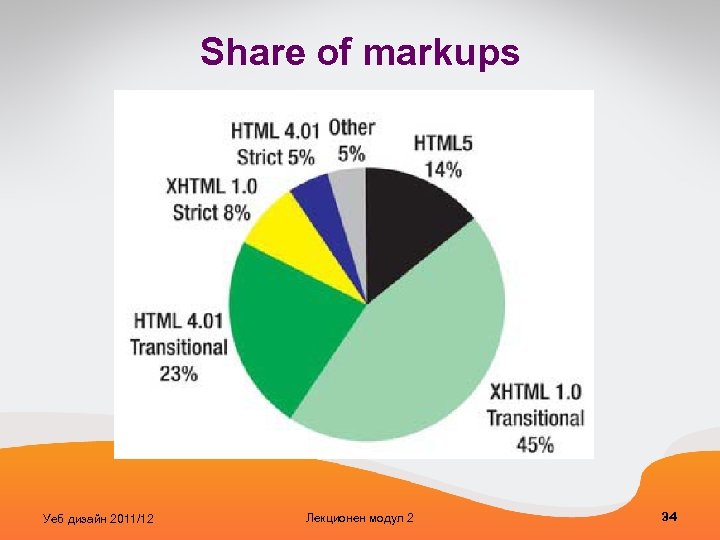
Share of markups Уеб дизайн 2011/12 Лекционен модул 2 34
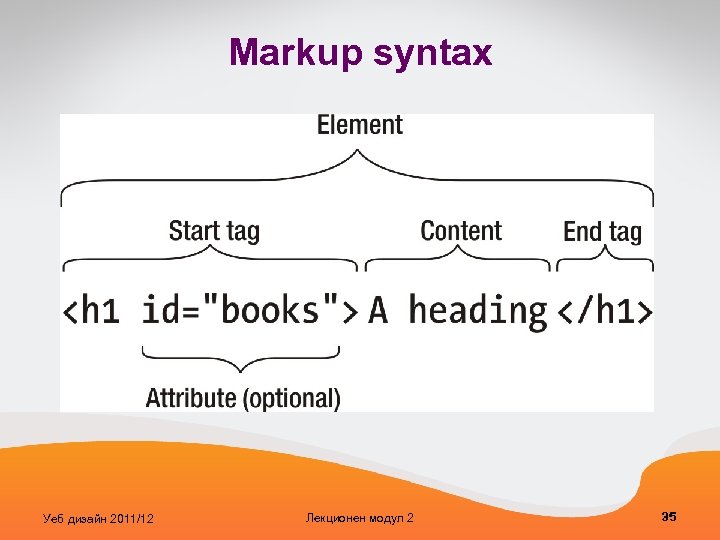
Markup syntax Уеб дизайн 2011/12 Лекционен модул 2 35
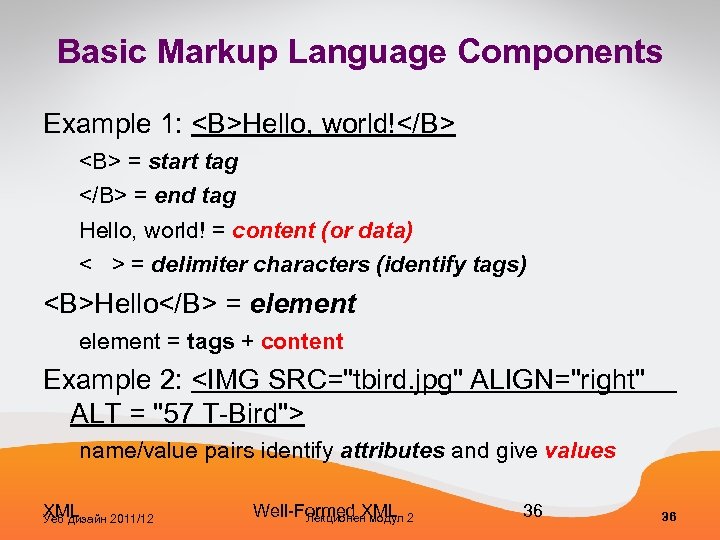
Basic Markup Language Components Example 1: <B>Hello, world!</B> <B> = start tag </B> = end tag Hello, world! = content (or data) < > = delimiter characters (identify tags) <B>Hello</B> = element = tags + content Example 2: <IMG SRC="tbird. jpg" ALIGN="right" ALT = "57 T-Bird"> name/value pairs identify attributes and give values XML Уеб дизайн 2011/12 Well-Formed XML Лекционен модул 2 36 36
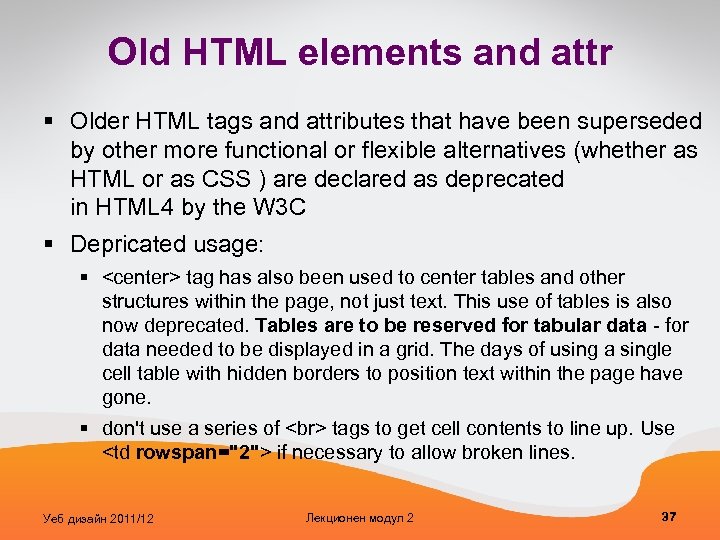
Old HTML elements and attr § Older HTML tags and attributes that have been superseded by other more functional or flexible alternatives (whether as HTML or as CSS ) are declared as deprecated in HTML 4 by the W 3 C § Depricated usage: § <center> tag has also been used to center tables and other structures within the page, not just text. This use of tables is also now deprecated. Tables are to be reserved for tabular data - for data needed to be displayed in a grid. The days of using a single cell table with hidden borders to position text within the page have gone. § don't use a series of tags to get cell contents to line up. Use <td rowspan="2"> if necessary to allow broken lines. Уеб дизайн 2011/12 Лекционен модул 2 37
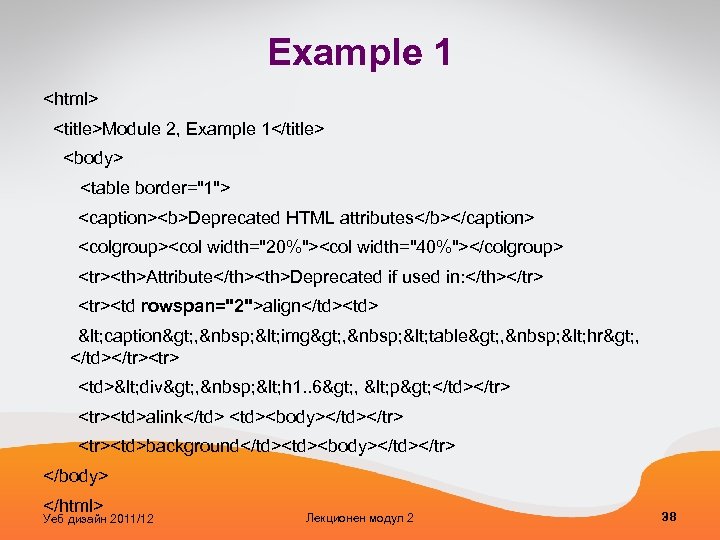
Example 1 <html> <title>Module 2, Example 1</title> <body> <table border="1"> <caption><b>Deprecated HTML attributes</b></caption> <colgroup><col width="20%"><col width="40%"></colgroup> <tr><th>Attribute</th><th>Deprecated if used in: </th></tr> <tr><td rowspan="2">align</td><td> < caption> , < img> , < table> , < hr> , </td></tr><tr> <td>< div> , < h 1. . 6> , < p> </td></tr> <tr><td>alink</td> <td><body></td></tr> <tr><td>background</td><body></td></tr> </body> </html> Уеб дизайн 2011/12 Лекционен модул 2 38
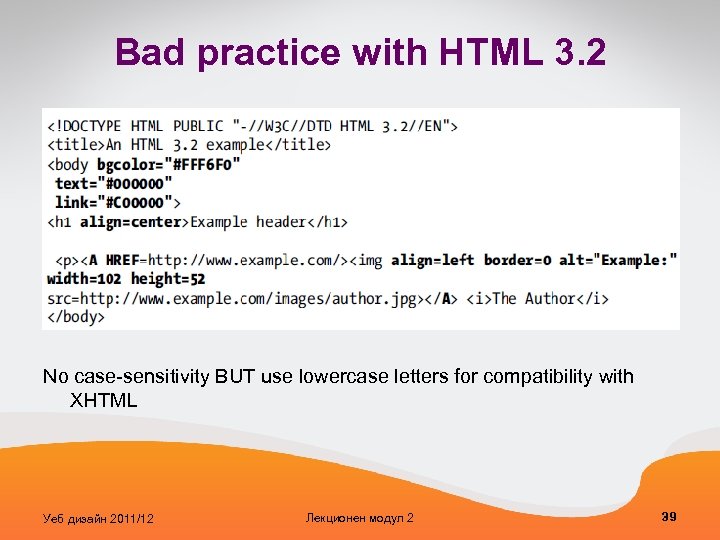
Bad practice with HTML 3. 2 No case-sensitivity BUT use lowercase letters for compatibility with XHTML Уеб дизайн 2011/12 Лекционен модул 2 39
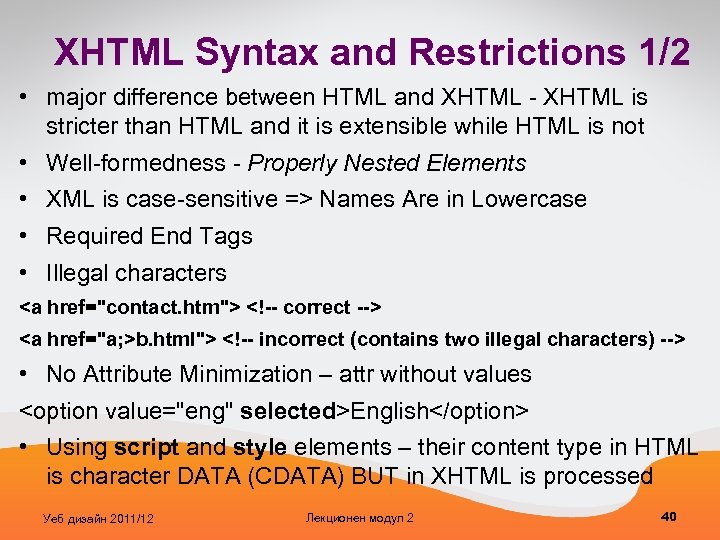
XHTML Syntax and Restrictions 1/2 • major difference between HTML and XHTML - XHTML is stricter than HTML and it is extensible while HTML is not • Well-formedness - Properly Nested Elements • XML is case-sensitive => Names Are in Lowercase • Required End Tags • Illegal characters <a href="contact. htm"> <!-- correct --> <a href="a; >b. html"> <!-- incorrect (contains two illegal characters) --> • No Attribute Minimization – attr without values <option value="eng" selected>English</option> • Using script and style elements – their content type in HTML is character DATA (CDATA) BUT in XHTML is processed Уеб дизайн 2011/12 Лекционен модул 2 40
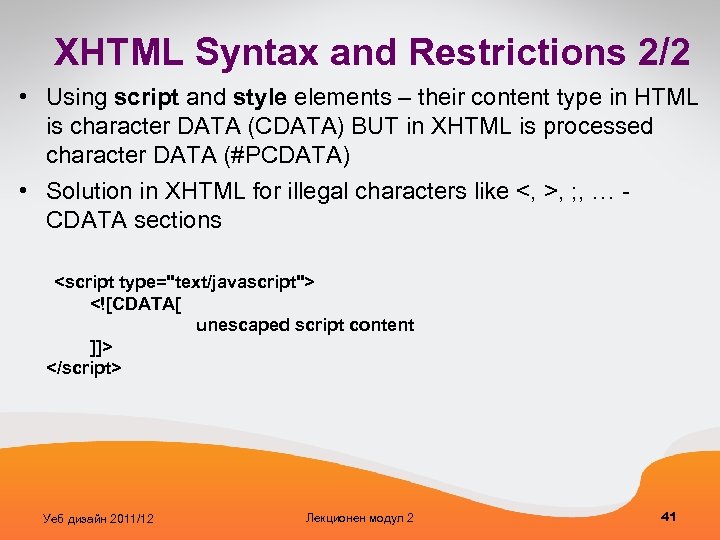
XHTML Syntax and Restrictions 2/2 • Using script and style elements – their content type in HTML is character DATA (CDATA) BUT in XHTML is processed character DATA (#PCDATA) • Solution in XHTML for illegal characters like <, >, ; , … - CDATA sections <script type="text/javascript"> <![CDATA[ unescaped script content ]]> </script> Уеб дизайн 2011/12 Лекционен модул 2 41
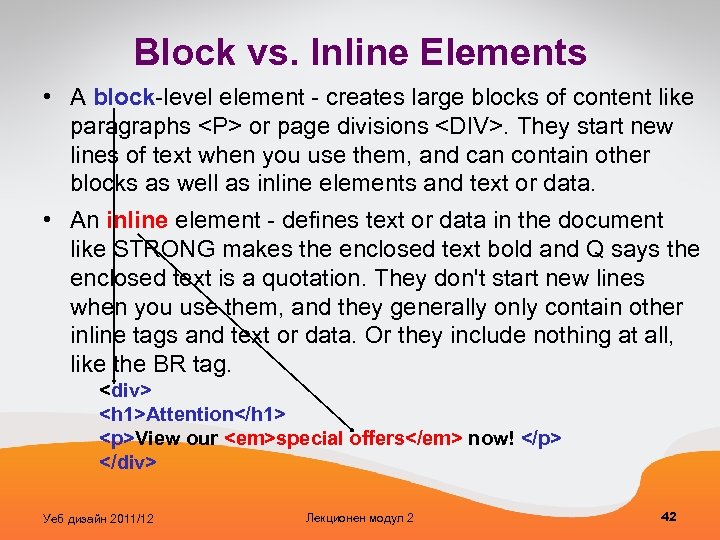
Block vs. Inline Elements • A block-level element - creates large blocks of content like paragraphs <P> or page divisions <DIV>. They start new lines of text when you use them, and can contain other blocks as well as inline elements and text or data. • An inline element - defines text or data in the document like STRONG makes the enclosed text bold and Q says the enclosed text is a quotation. They don't start new lines when you use them, and they generally only contain other inline tags and text or data. Or they include nothing at all, like the BR tag. <div> <h 1>Attention</h 1> <p>View our <em>special offers</em> now! </p> </div> Уеб дизайн 2011/12 Лекционен модул 2 42
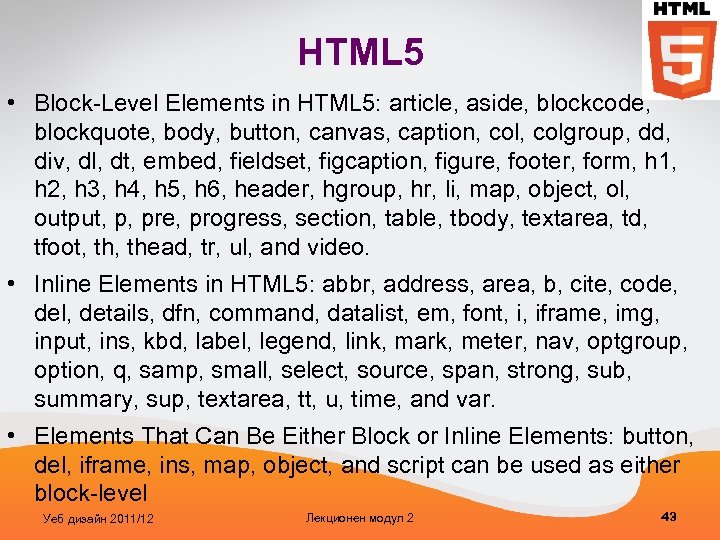
HTML 5 • Block-Level Elements in HTML 5: article, aside, blockcode, blockquote, body, button, canvas, caption, colgroup, dd, div, dl, dt, embed, fieldset, figcaption, figure, footer, form, h 1, h 2, h 3, h 4, h 5, h 6, header, hgroup, hr, li, map, object, ol, output, p, pre, progress, section, table, tbody, textarea, td, tfoot, thead, tr, ul, and video. • Inline Elements in HTML 5: abbr, address, area, b, cite, code, del, details, dfn, command, datalist, em, font, i, iframe, img, input, ins, kbd, label, legend, link, mark, meter, nav, optgroup, option, q, samp, small, select, source, span, strong, sub, summary, sup, textarea, tt, u, time, and var. • Elements That Can Be Either Block or Inline Elements: button, del, iframe, ins, map, object, and script can be used as either block-level Уеб дизайн 2011/12 Лекционен модул 2 43
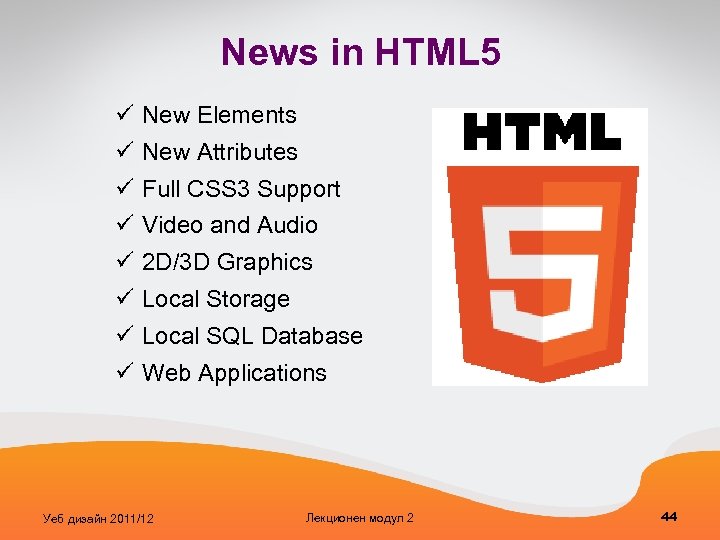
News in HTML 5 ü New Elements ü New Attributes ü Full CSS 3 Support ü Video and Audio ü 2 D/3 D Graphics ü Local Storage ü Local SQL Database ü Web Applications Уеб дизайн 2011/12 Лекционен модул 2 44
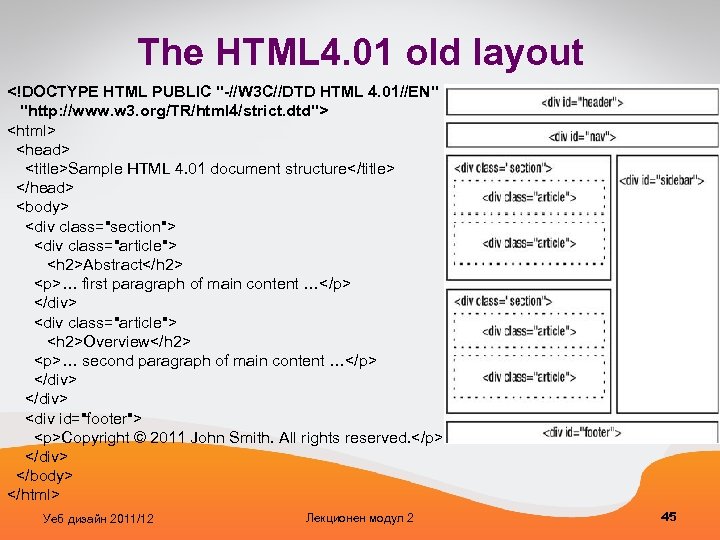
The HTML 4. 01 old layout <!DOCTYPE HTML PUBLIC "-//W 3 C//DTD HTML 4. 01//EN" "http: //www. w 3. org/TR/html 4/strict. dtd"> <html> <head> <title>Sample HTML 4. 01 document structure</title> </head> <body> <div class="section"> <div class="article"> <h 2>Abstract</h 2> <p>… first paragraph of main content …</p> </div> <div class="article"> <h 2>Overview</h 2> <p>… second paragraph of main content …</p> </div> <div id="footer"> <p>Copyright © 2011 John Smith. All rights reserved. </p> </div> </body> </html> Уеб дизайн 2011/12 Лекционен модул 2 45
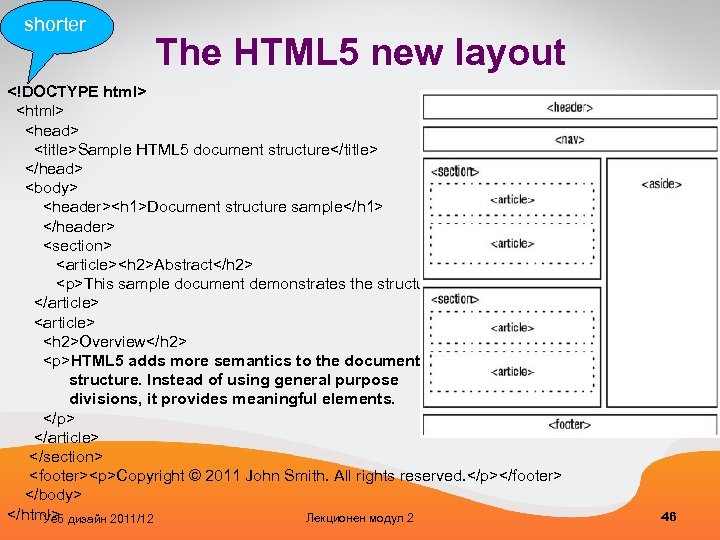
shorter The HTML 5 new layout <!DOCTYPE html> <html> <head> <title>Sample HTML 5 document structure</title> </head> <body> <header><h 1>Document structure sample</h 1> </header> <section> <article><h 2>Abstract</h 2> <p>This sample document demonstrates the structure of HTML 5 documents. </p> </article> <article> <h 2>Overview</h 2> <p>HTML 5 adds more semantics to the document structure. Instead of using general purpose divisions, it provides meaningful elements. </p> </article> </section> <footer><p>Copyright © 2011 John Smith. All rights reserved. </p></footer> </body> </html> Лекционен модул 2 Уеб дизайн 2011/12 46
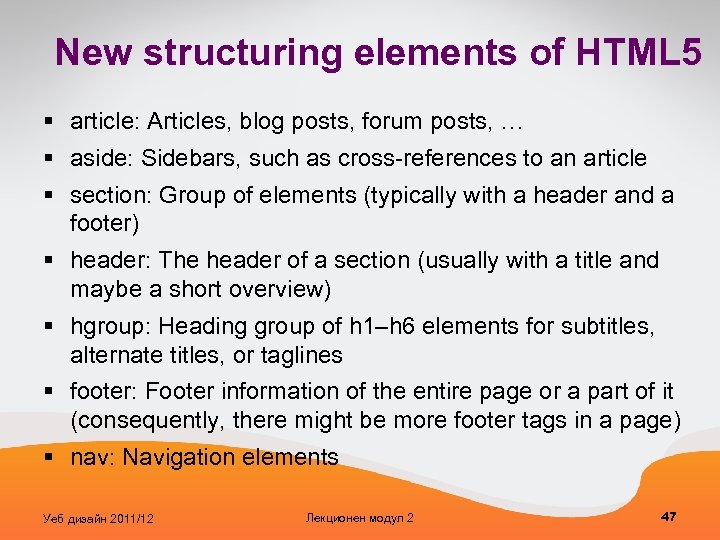
New structuring elements of HTML 5 § article: Articles, blog posts, forum posts, … § aside: Sidebars, such as cross-references to an article § section: Group of elements (typically with a header and a footer) § header: The header of a section (usually with a title and maybe a short overview) § hgroup: Heading group of h 1–h 6 elements for subtitles, alternate titles, or taglines § footer: Footer information of the entire page or a part of it (consequently, there might be more footer tags in a page) § nav: Navigation elements Уеб дизайн 2011/12 Лекционен модул 2 47
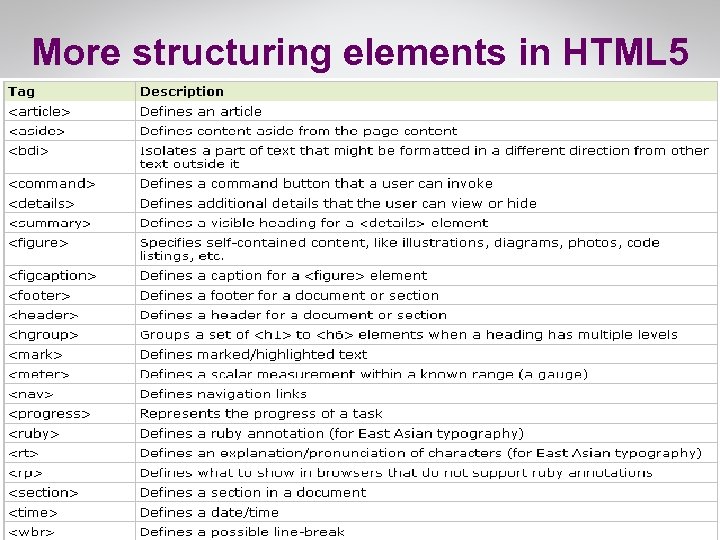
More structuring elements in HTML 5 Уеб дизайн 2011/12 Лекционен модул 2 48
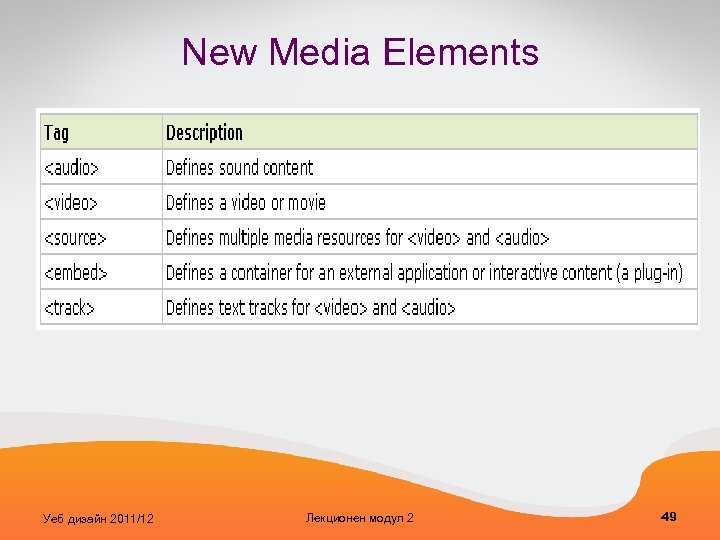
New Media Elements Уеб дизайн 2011/12 Лекционен модул 2 49
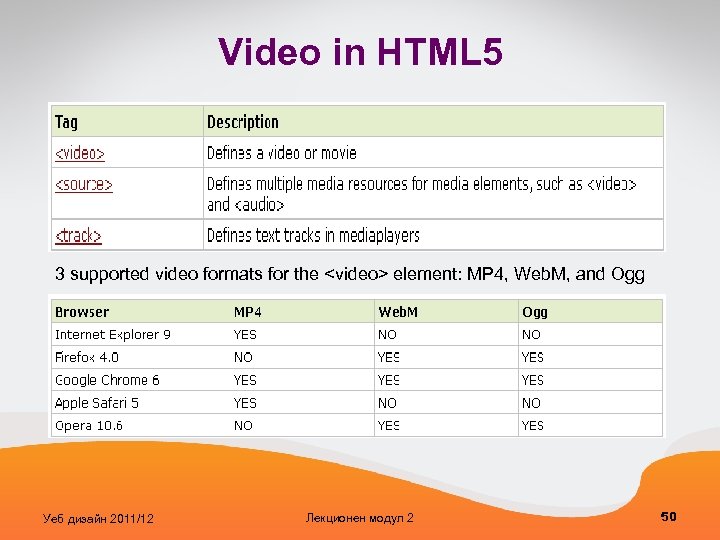
Video in HTML 5 3 supported video formats for the <video> element: MP 4, Web. M, and Ogg Уеб дизайн 2011/12 Лекционен модул 2 50
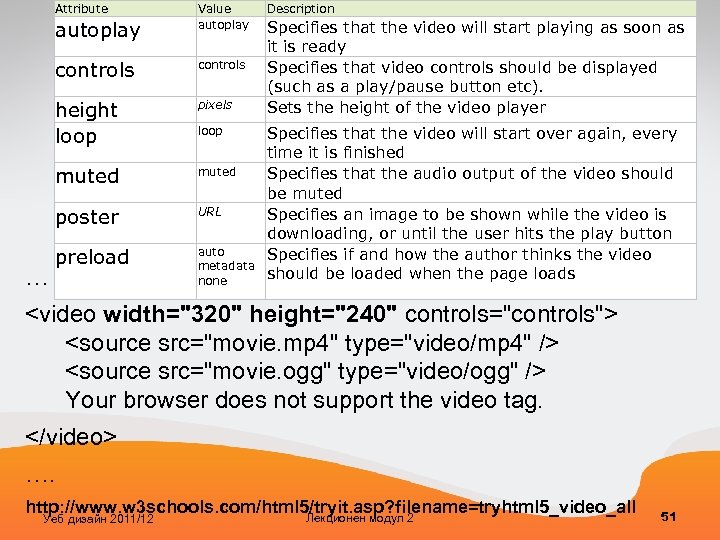
Attribute autoplay Value autoplay controls height loop pixels muted poster … controls URL preload auto metadata none loop Description Specifies that the video will start playing as soon as it is ready Specifies that video controls should be displayed (such as a play/pause button etc). Sets the height of the video player Specifies that the video will start over again, every time it is finished Specifies that the audio output of the video should be muted Specifies an image to be shown while the video is downloading, or until the user hits the play button Specifies if and how the author thinks the video should be loaded when the page loads <video width="320" height="240" controls="controls"> <source src="movie. mp 4" type="video/mp 4" /> <source src="movie. ogg" type="video/ogg" /> Your browser does not support the video tag. </video> …. http: //www. w 3 schools. com/html 5/tryit. asp? filename=tryhtml 5_video_all Лекционен модул 2 Уеб дизайн 2011/12 51
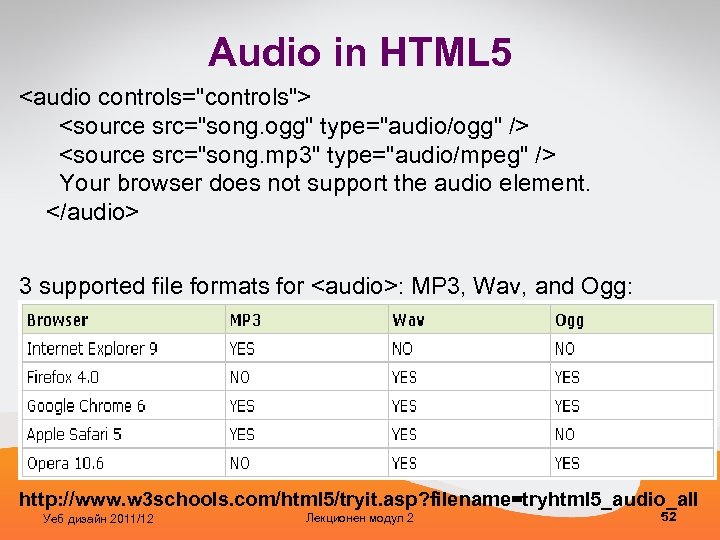
Audio in HTML 5 <audio controls="controls"> <source src="song. ogg" type="audio/ogg" /> <source src="song. mp 3" type="audio/mpeg" /> Your browser does not support the audio element. </audio> 3 supported file formats for <audio>: MP 3, Wav, and Ogg: http: //www. w 3 schools. com/html 5/tryit. asp? filename=tryhtml 5_audio_all Уеб дизайн 2011/12 Лекционен модул 2 52
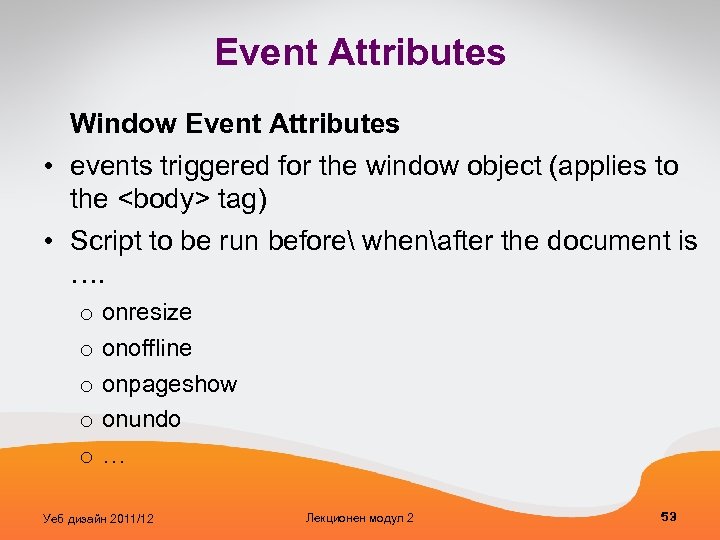
Event Attributes Window Event Attributes • events triggered for the window object (applies to the <body> tag) • Script to be run before whenafter the document is …. o o onresize onoffline onpageshow onundo … Уеб дизайн 2011/12 Лекционен модул 2 53
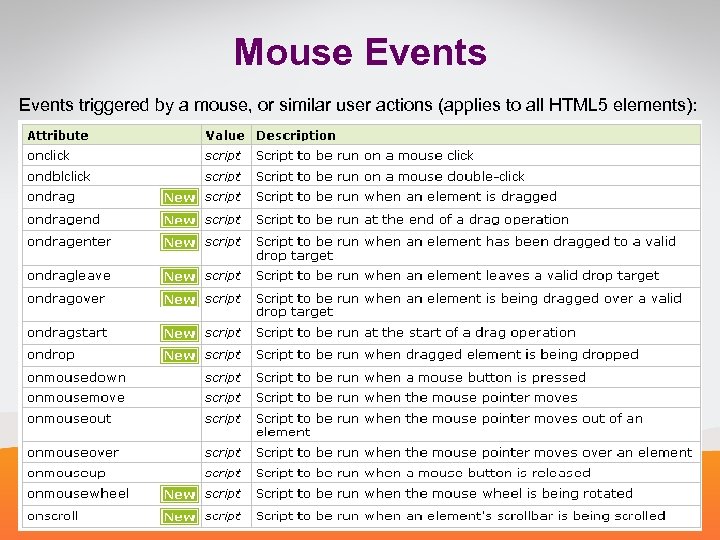
Mouse Events triggered by a mouse, or similar user actions (applies to all HTML 5 elements): Уеб дизайн 2011/12 Лекционен модул 2 54
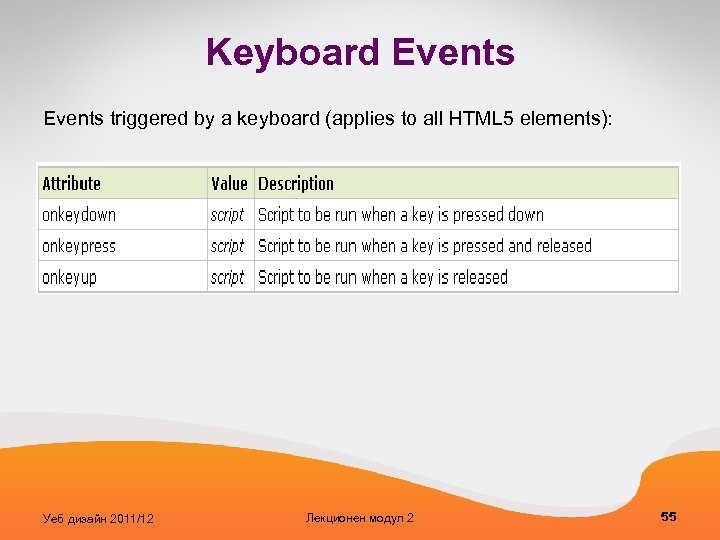
Keyboard Events triggered by a keyboard (applies to all HTML 5 elements): Уеб дизайн 2011/12 Лекционен модул 2 55
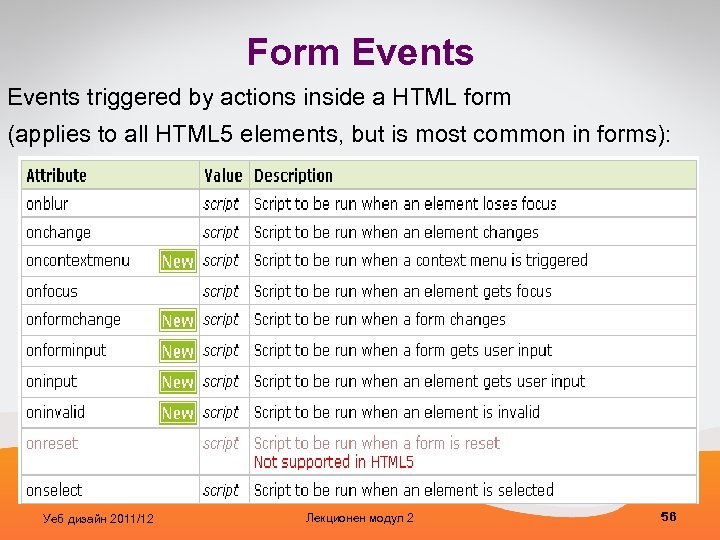
Form Events triggered by actions inside a HTML form (applies to all HTML 5 elements, but is most common in forms): Уеб дизайн 2011/12 Лекционен модул 2 56
Media Events • Events triggered by medias like videos, images and audio (applies to all HTML 5 elements, but is most common in media elements, like audio, embed, img, object, and video) • Script to be run when media § § data is loaded - onloadeddata is paused – onpause is ready to start playing – onplay has started playing – onplaying § …. Уеб дизайн 2011/12 Лекционен модул 2 57
<div id="div 1" ondrop="drop(event)" ondragover="allow. Drop(event)"> <img src="img_w 3 slogo. gif" draggable="true" ondragstart="drag(event)" id="drag 1" width="88" height="31" /> </div> See http: //www. w 3 schools. com/html 5/tryit. asp? filename=tryhtml 5_draganddrop 2 Уеб дизайн 2011/12 Лекционен модул 2 58
HTML 5 Canvas • The <canvas> element is used to draw graphics, on the fly, on a web page, via scripting (usually Java. Script). • The <canvas> element is only a container for graphics, you must use a script to actually draw the graphics. • A canvas is a drawable region defined in HTML code with height and width attributes. • Canvas has several methods for drawing paths, boxes, circles, characters, and adding images. <canvas id="my. Canvas" width="200" height="100"></canvas> Уеб дизайн 2011/12 Лекционен модул 2 59
Try the canvas! http: //www. w 3 schools. com/html 5_canvas. asp Уеб дизайн 2011/12 Лекционен модул 2 60
HTML 5 has support for inline SVG (Scalable Vector Graphics) • used to define 2 D vector-based graphics for the Web • defines the graphics in XML format • graphics do NOT lose any quality if they are zoomed or resized • Every element and every attribute in SVG files can be animated • W 3 C recommendation Уеб дизайн 2011/12 Лекционен модул 2 61
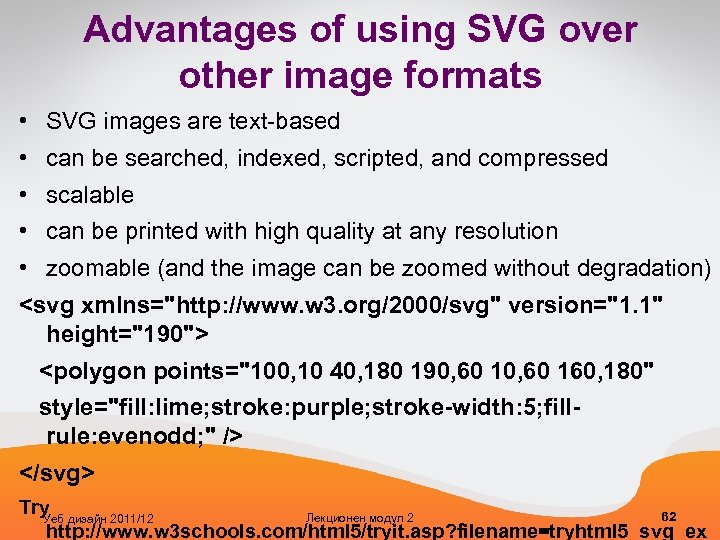
Advantages of using SVG over other image formats • SVG images are text-based • can be searched, indexed, scripted, and compressed • scalable • can be printed with high quality at any resolution • zoomable (and the image can be zoomed without degradation) <svg xmlns="http: //www. w 3. org/2000/svg" version="1. 1" height="190"> <polygon points="100, 10 40, 180 190, 60 160, 180" style="fill: lime; stroke: purple; stroke-width: 5; fillrule: evenodd; " /> </svg> Try 62 Лекционен модул 2 Уеб дизайн 2011/12 http: //www. w 3 schools. com/html 5/tryit. asp? filename=tryhtml 5_svg_ex
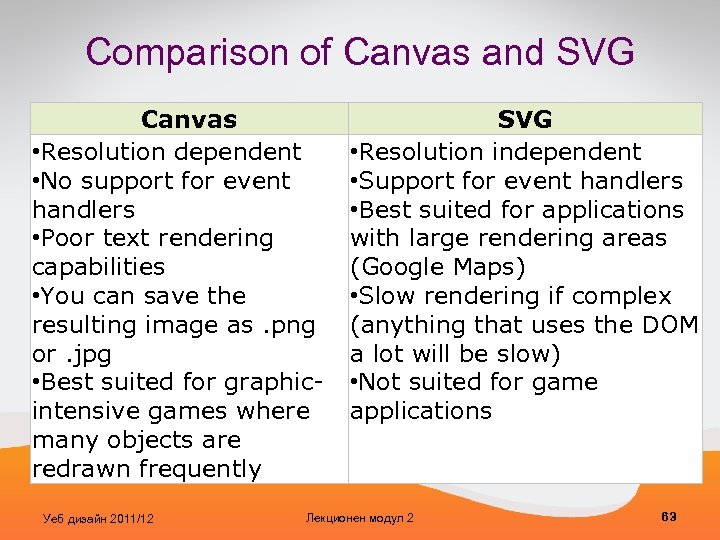
Comparison of Canvas and SVG Canvas • Resolution dependent • No support for event handlers • Poor text rendering capabilities • You can save the resulting image as. png or. jpg • Best suited for graphicintensive games where many objects are redrawn frequently Уеб дизайн 2011/12 SVG • Resolution independent • Support for event handlers • Best suited for applications with large rendering areas (Google Maps) • Slow rendering if complex (anything that uses the DOM a lot will be slow) • Not suited for game applications Лекционен модул 2 63
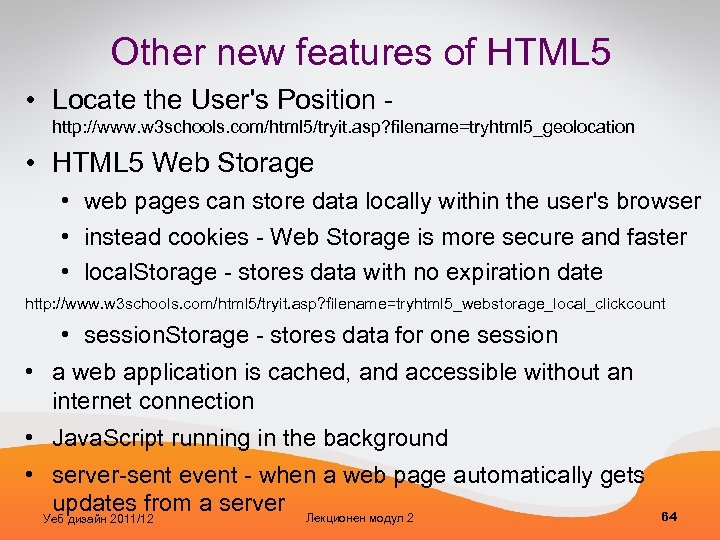
Other new features of HTML 5 • Locate the User's Position - http: //www. w 3 schools. com/html 5/tryit. asp? filename=tryhtml 5_geolocation • HTML 5 Web Storage • web pages can store data locally within the user's browser • instead cookies - Web Storage is more secure and faster • local. Storage - stores data with no expiration date http: //www. w 3 schools. com/html 5/tryit. asp? filename=tryhtml 5_webstorage_local_clickcount • session. Storage - stores data for one session • a web application is cached, and accessible without an internet connection • Java. Script running in the background • server-sent event - when a web page automatically gets updates from a server Лекционен модул 2 Уеб дизайн 2011/12 64
Скачать презентацию Уеб дизайн 2011 12 Лекционен модул 2 1
40199bf214a06cd3b2d79d380d00a8bf.ppt