


 Скачать презентацию U S General Services Administration Federal Acquisition Service
2e2360224ce07b8759dad43297f503c8.ppt
- Количество слайдов: 40
 U. S. General Services Administration Federal Acquisition Service IT-Solutions Shop (ITSS) IWAC Contractor Workflow Contractor Training Module
 ITSS IWAC Contractor Workflow Overview Description: overview of the IWAC RBA Extension project and will take you step-by-step through the IT-Solutions Shop (ITSS) component of the Regional Business Application (RBA) workflow as experienced by Integrated Workplace Acquisition Center (IWAC) Contractors. Navigation: If the tutorial opens up in your web browser, simply click your mouse or your space bar to advance to the next slide. Use the “Backspace” key to go back. If the tutorial opens in the Power. Point application, click on “F 5” to view the tutorial. Use the spacebar or click your mouse to advance to the next slide. To go back, click on the “Backspace” key. 2
 U. S. General Services Administration Federal Acquisition Service Purpose After completing this training you will understand: Ø Ø Ø IWAC RBA Extension project background Differences between the old IWAC RBA workflow and the new one What is ITSS Contractor registration process The solicitation process: • RFQ • Quote Ø Purchase order award Ø Post-award activities: • Invoicing 3
 U. S. General Services Administration Federal Acquisition Service IWAC RBA Extension Project Background Ø Previously, the Integrated Workplace Acquisition Center (IWAC) was utilizing the Regional Business Application (RBA) IT-Solutions Shop (ITSS) component for pre-award activities, mainly the solicitation and evaluation phases. Signing/awarding of purchase orders to contractors was performed in FSS-Online. Ø Now, the IWA Center workflow in ITSS is extended. All acquisition activities are performed within ITSS, including awarding orders and processing invoices. FSS-Online is no longer used for new furniture orders awarded by the IWA Center. 4
 U. S. General Services Administration Federal Acquisition Service New Region Ø Previously, IWAC orders were processed as Region 30. Ø Now, IWAC orders are processed as Region 31. All new Region 31 orders will use the same full end-to-end workflow as Regions 1 -13, 40. Region 30 (abbreviated workflow) is now retired and will no longer be used for new orders. All pre-existing Region 30 orders will continue to have the abbreviated workflow where a Notice of Award is issued. 5
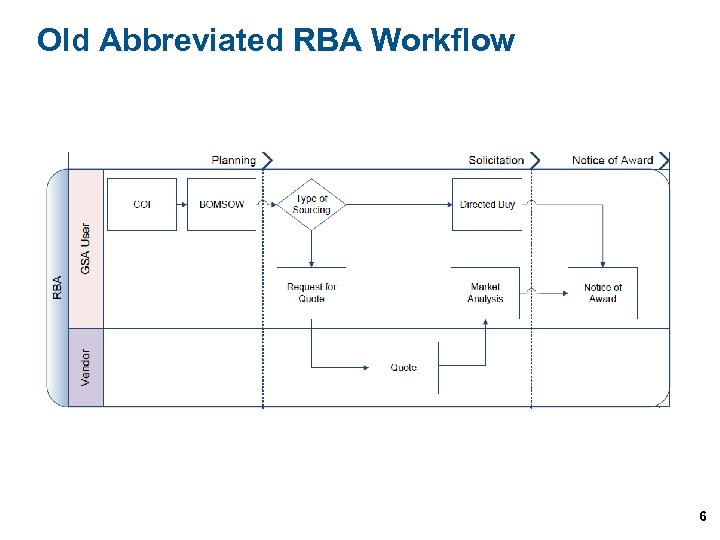 Old Abbreviated RBA Workflow 6
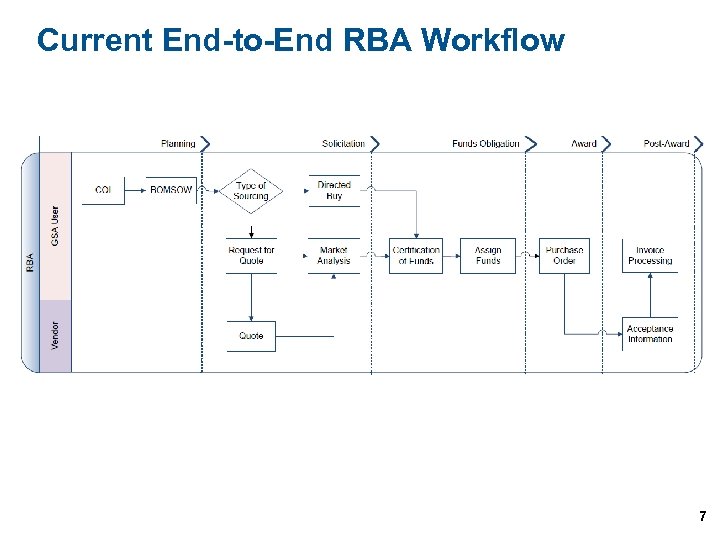 Current End-to-End RBA Workflow 7
 U. S. General Services Administration Federal Acquisition Service IT-Solutions Shop (ITSS) Ø ITSS is an online, web-based purchase order system designed to facilitate the development of delivery and purchase orders within FAS programs. ITSS provides convenient access to a centralized work environment where orders are submitted, processed, and awarded. Ø Used for solicitation RBA registration database verified against the Central Contractor Registration (CCR) Ability to publish solicitation in e-Buy Ø Used for awarding Purchase Orders and invoice acceptance 8
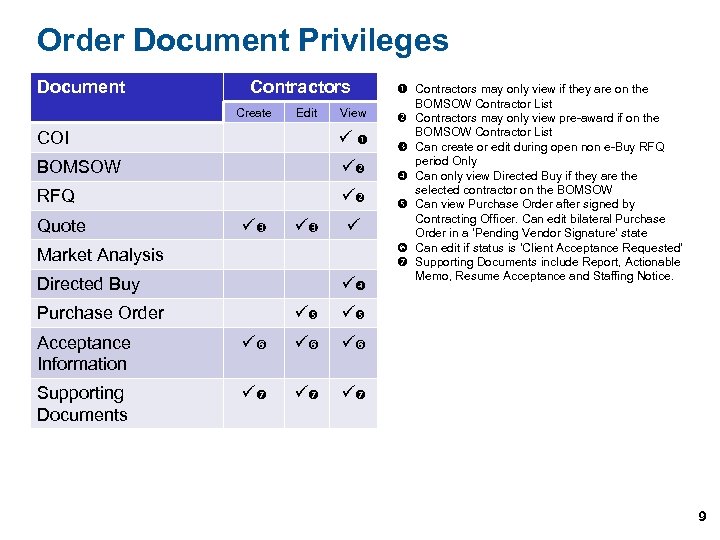 Order Document Privileges Document Contractors Create Edit View COI BOMSOW RFQ Quote Market Analysis Directed Buy Purchase Order Contractors may only view if they are on the BOMSOW Contractor List Contractors may only view pre-award if on the BOMSOW Contractor List Can create or edit during open non e-Buy RFQ period Only Can only view Directed Buy if they are the selected contractor on the BOMSOW Can view Purchase Order after signed by Contracting Officer. Can edit bilateral Purchase Order in a ‘Pending Vendor Signature’ state Can edit if status is ‘Client Acceptance Requested’ Supporting Documents include Report, Actionable Memo, Resume Acceptance and Staffing Notice. Acceptance Information Supporting Documents 9
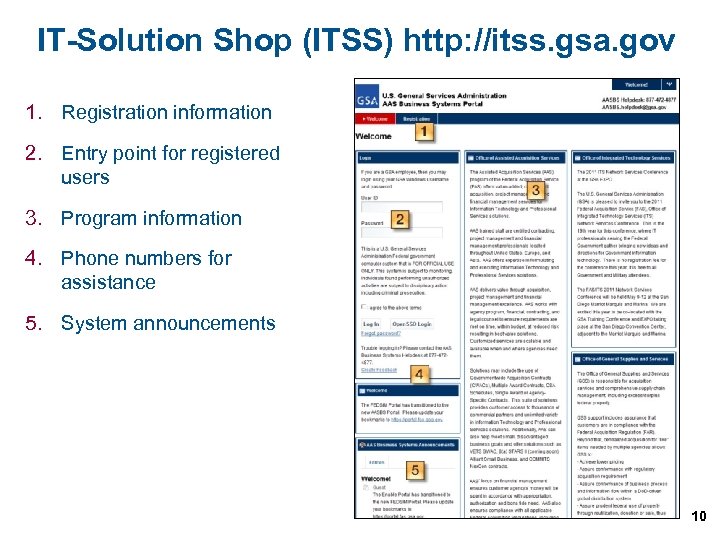 IT-Solution Shop (ITSS) http: //itss. gsa. gov 1. Registration information 2. Entry point for registered users 3. Program information 4. Phone numbers for assistance 5. System announcements 10
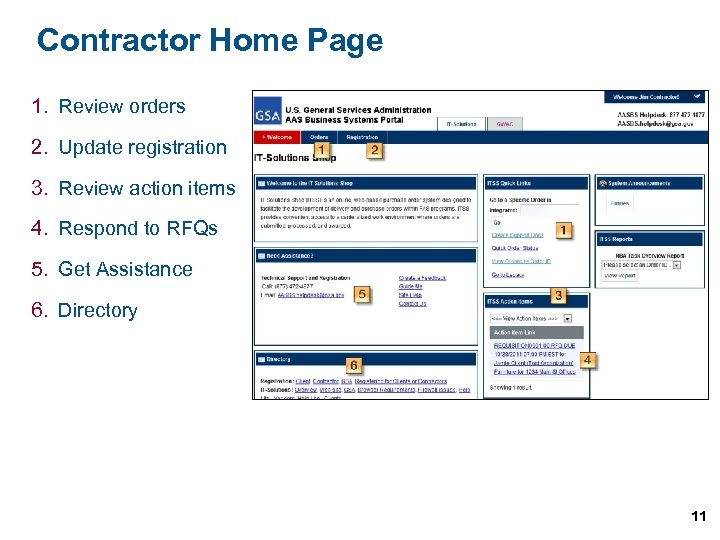 Contractor Home Page 1. Review orders 2. Update registration 3. Review action items 4. Respond to RFQs 5. Get Assistance 6. Directory 11
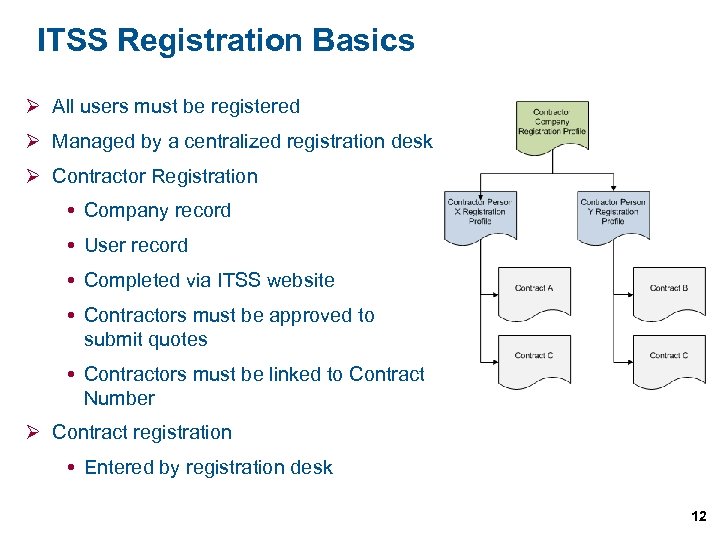 ITSS Registration Basics Ø All users must be registered Ø Managed by a centralized registration desk Ø Contractor Registration Company record User record Completed via ITSS website Contractors must be approved to submit quotes Contractors must be linked to Contract Number Ø Contract registration Entered by registration desk 12
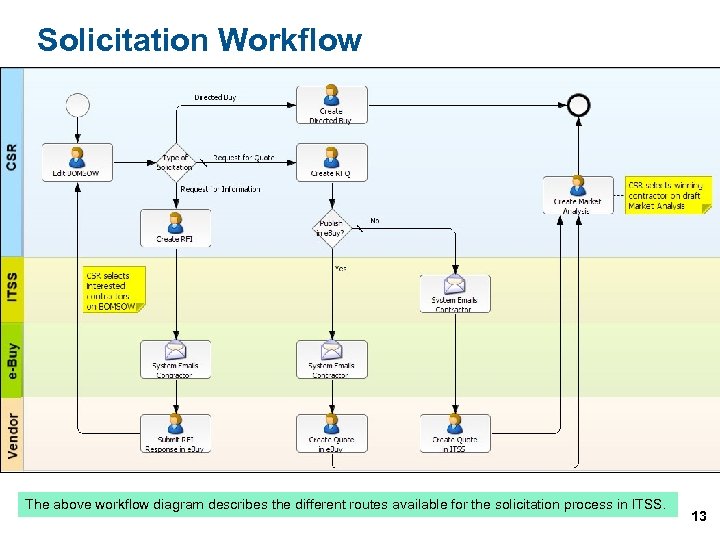 Solicitation Workflow The above workflow diagram describes the different routes available for the solicitation process in ITSS. 13
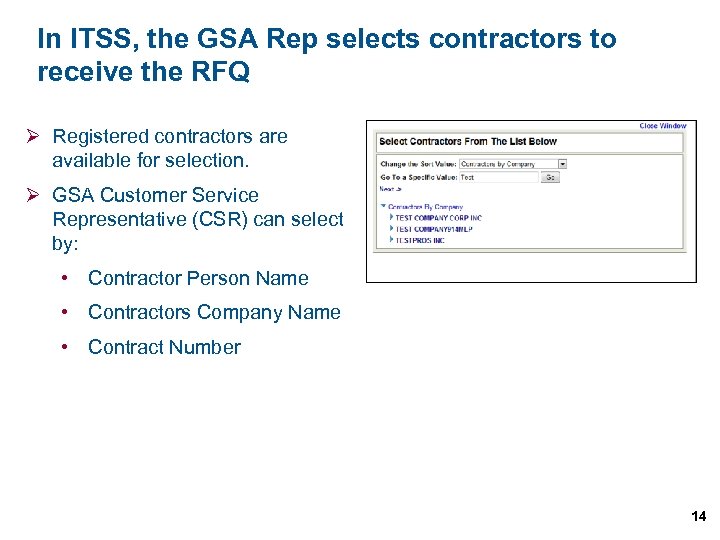 In ITSS, the GSA Rep selects contractors to receive the RFQ Ø Registered contractors are available for selection. Ø GSA Customer Service Representative (CSR) can select by: • Contractor Person Name • Contractors Company Name • Contract Number 14
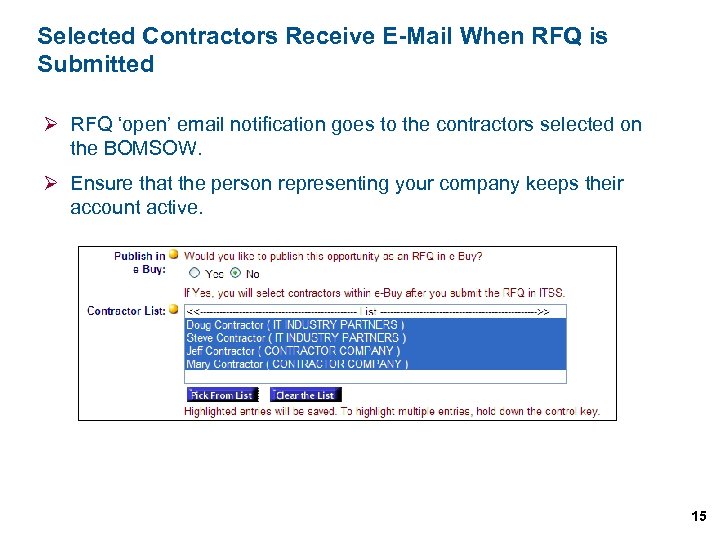 Selected Contractors Receive E-Mail When RFQ is Submitted Ø RFQ ‘open’ email notification goes to the contractors selected on the BOMSOW. Ø Ensure that the person representing your company keeps their account active. 15
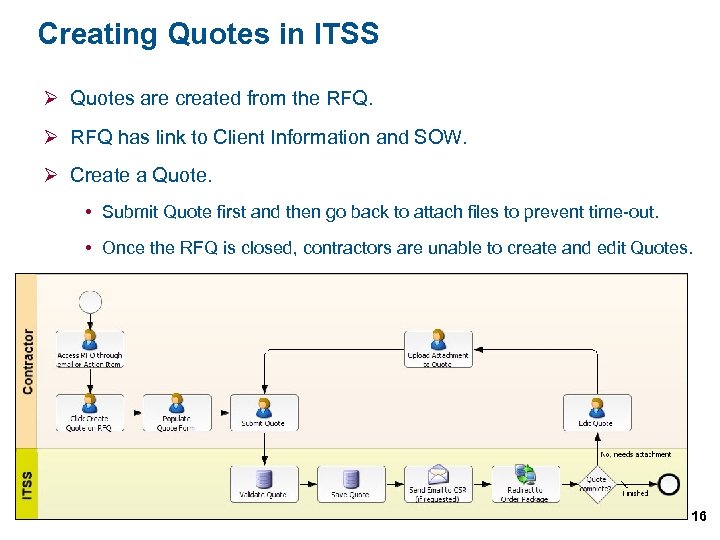 Creating Quotes in ITSS Ø Quotes are created from the RFQ. Ø RFQ has link to Client Information and SOW. Ø Create a Quote. Submit Quote first and then go back to attach files to prevent time-out. Once the RFQ is closed, contractors are unable to create and edit Quotes. 16
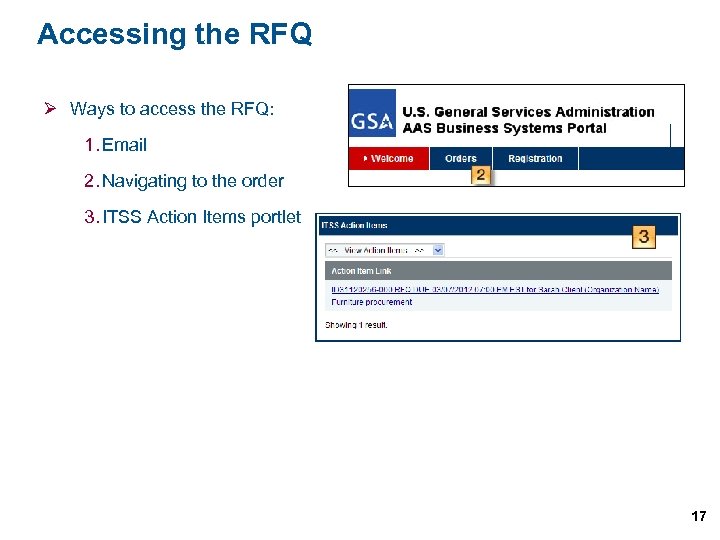 Accessing the RFQ Ø Ways to access the RFQ: 1. Email 2. Navigating to the order 3. ITSS Action Items portlet 17
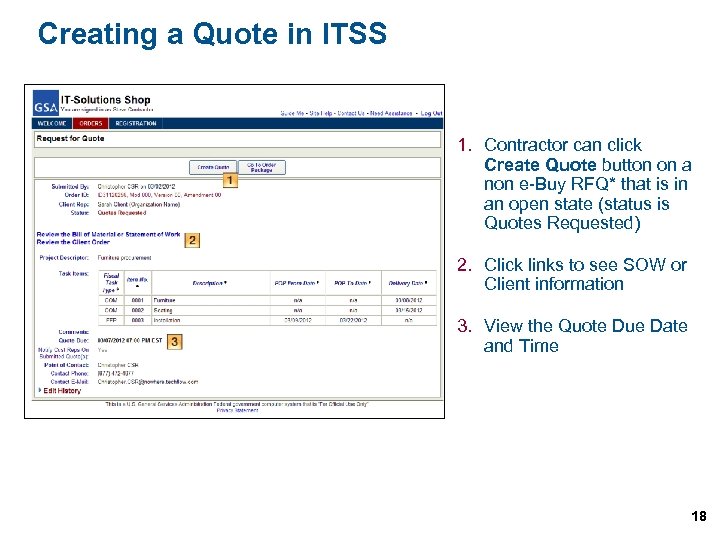 Creating a Quote in ITSS 1. Contractor can click Create Quote button on a non e-Buy RFQ* that is in an open state (status is Quotes Requested) 2. Click links to see SOW or Client information 3. View the Quote Due Date and Time 18
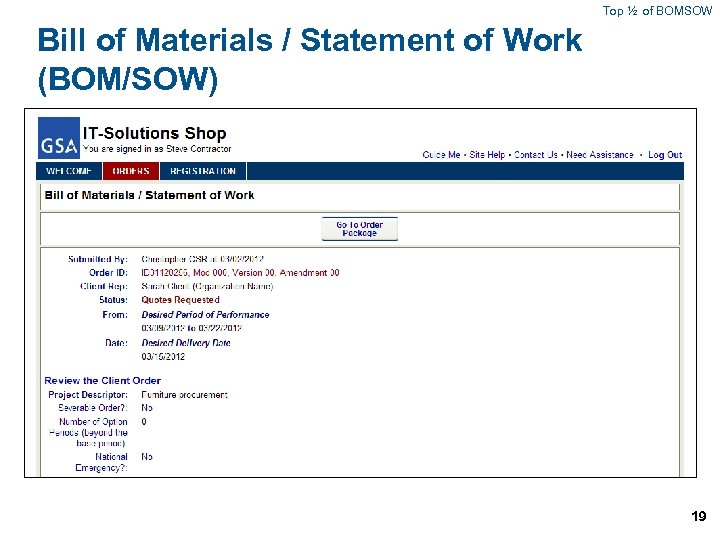 Top ½ of BOMSOW Bill of Materials / Statement of Work (BOM/SOW) 19
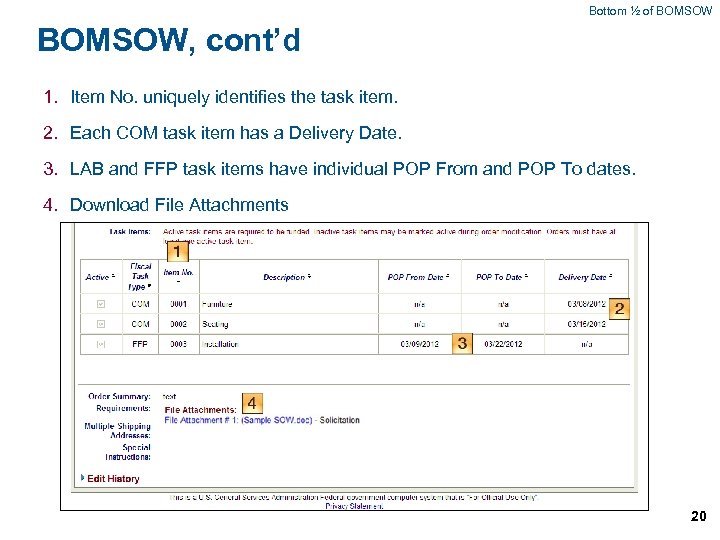 Bottom ½ of BOMSOW, cont’d 1. Item No. uniquely identifies the task item. 2. Each COM task item has a Delivery Date. 3. LAB and FFP task items have individual POP From and POP To dates. 4. Download File Attachments 20
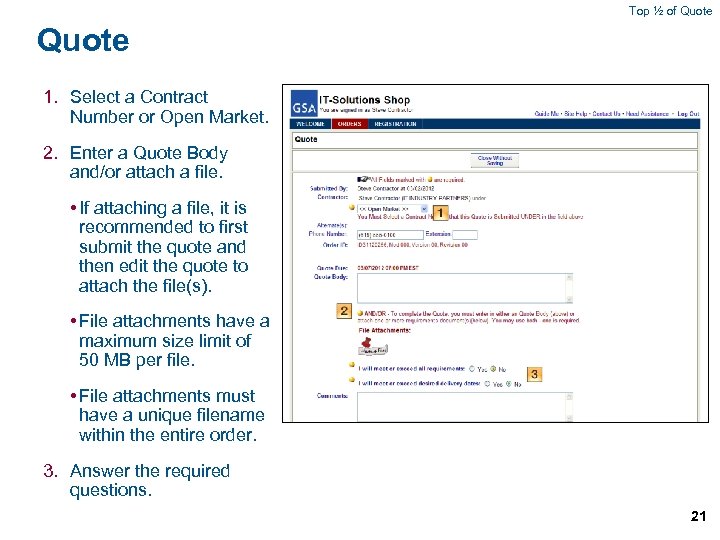 Top ½ of Quote 1. Select a Contract Number or Open Market. 2. Enter a Quote Body and/or attach a file. • If attaching a file, it is recommended to first submit the quote and then edit the quote to attach the file(s). • File attachments have a maximum size limit of 50 MB per file. • File attachments must have a unique filename within the entire order. 3. Answer the required questions. 21
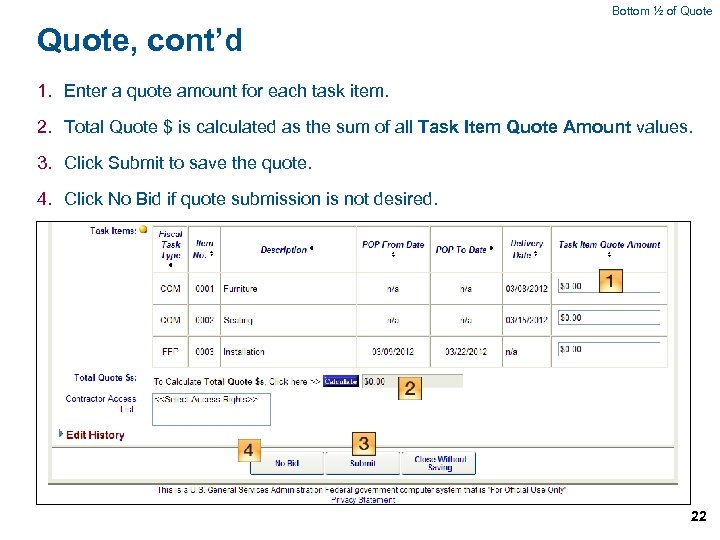 Bottom ½ of Quote, cont’d 1. Enter a quote amount for each task item. 2. Total Quote $ is calculated as the sum of all Task Item Quote Amount values. 3. Click Submit to save the quote. 4. Click No Bid if quote submission is not desired. 22
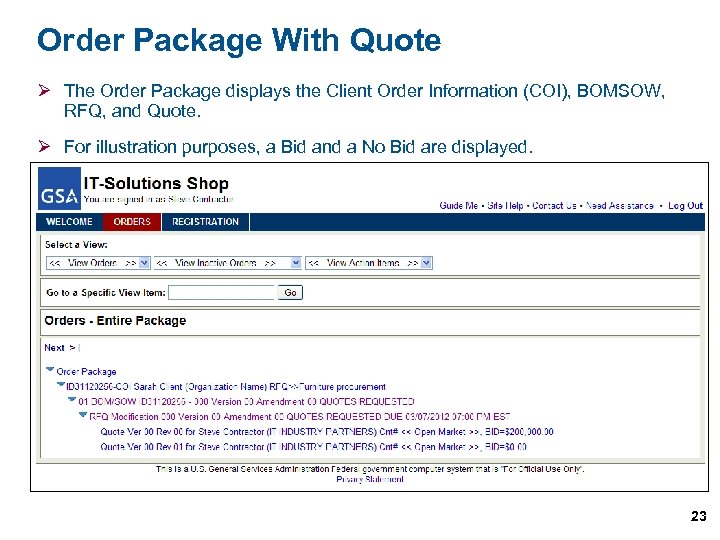 Order Package With Quote Ø The Order Package displays the Client Order Information (COI), BOMSOW, RFQ, and Quote. Ø For illustration purposes, a Bid and a No Bid are displayed. 23
 More on RFQ and Quotes Ø Amendments GSA may amend RFQs to reopen or extend the Quote Due Date. GSA may amend BOMSOWs to add/modify file attachments or make other changes. If GSA amends the BOMSOW / RFQ, the system will email all contractors to alert them of the amendment. Ø Quotes may be modified up until the time the Request for Quote (RFQ) closes. Ø After the RFQ is closed, GSA will evaluate and make a selection. 24
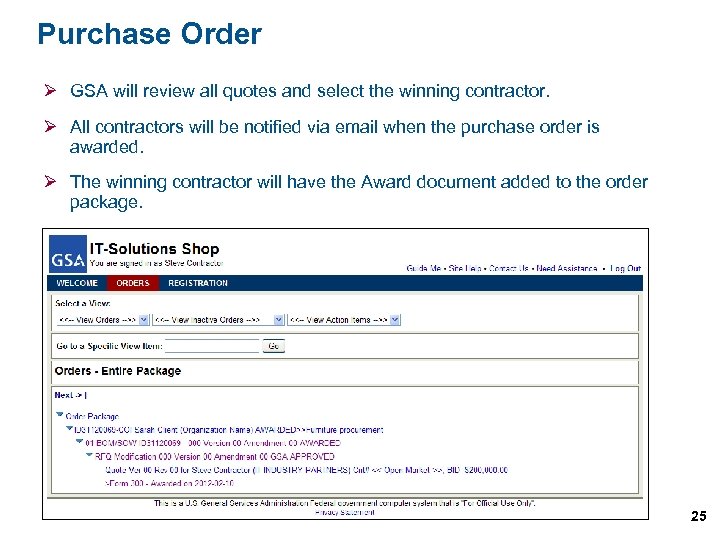 Purchase Order Ø GSA will review all quotes and select the winning contractor. Ø All contractors will be notified via email when the purchase order is awarded. Ø The winning contractor will have the Award document added to the order package. 25
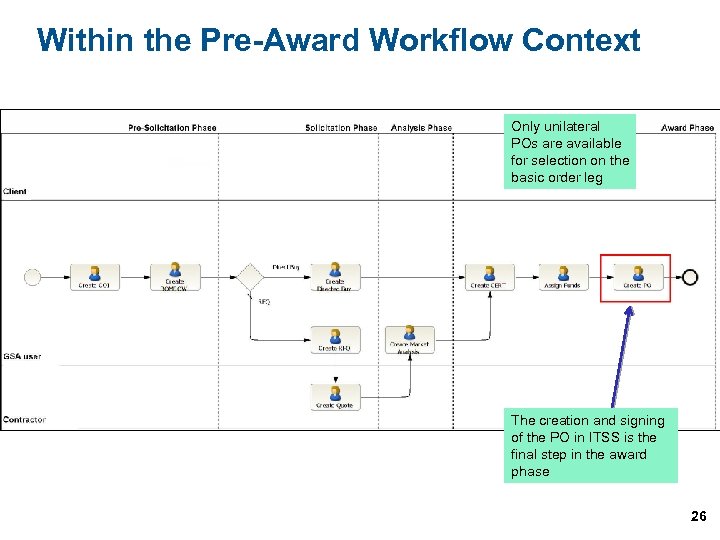 Within the Pre-Award Workflow Context Only unilateral POs are available for selection on the basic order leg The creation and signing of the PO in ITSS is the final step in the award phase 26
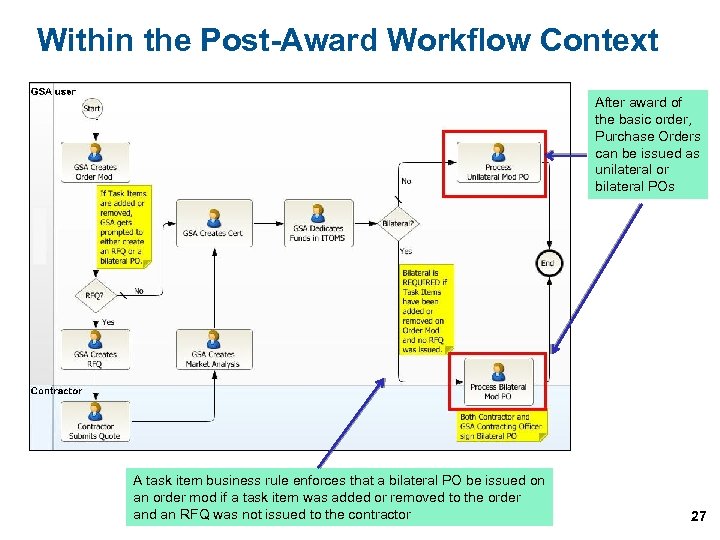 Within the Post-Award Workflow Context After award of the basic order, Purchase Orders can be issued as unilateral or bilateral POs A task item business rule enforces that a bilateral PO be issued on an order mod if a task item was added or removed to the order and an RFQ was not issued to the contractor 27
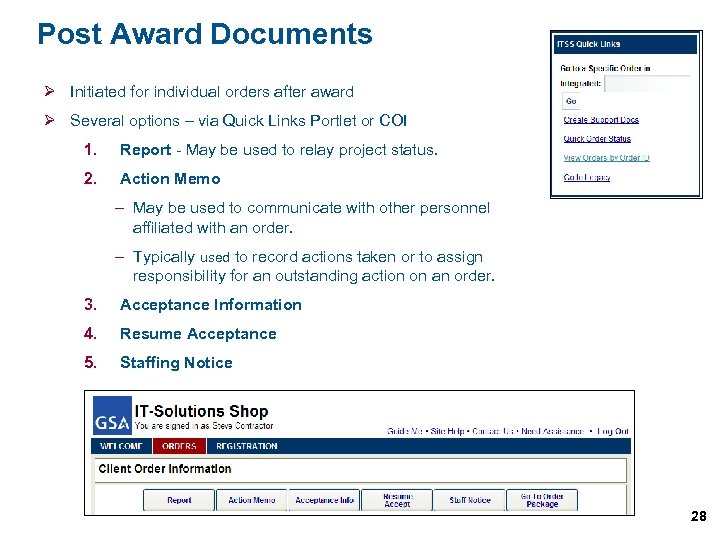 Post Award Documents Ø Initiated for individual orders after award Ø Several options – via Quick Links Portlet or COI 1. Report - May be used to relay project status. 2. Action Memo – May be used to communicate with other personnel affiliated with an order. – Typically used to record actions taken or to assign responsibility for an outstanding action on an order. 3. Acceptance Information 4. Resume Acceptance 5. Staffing Notice 28
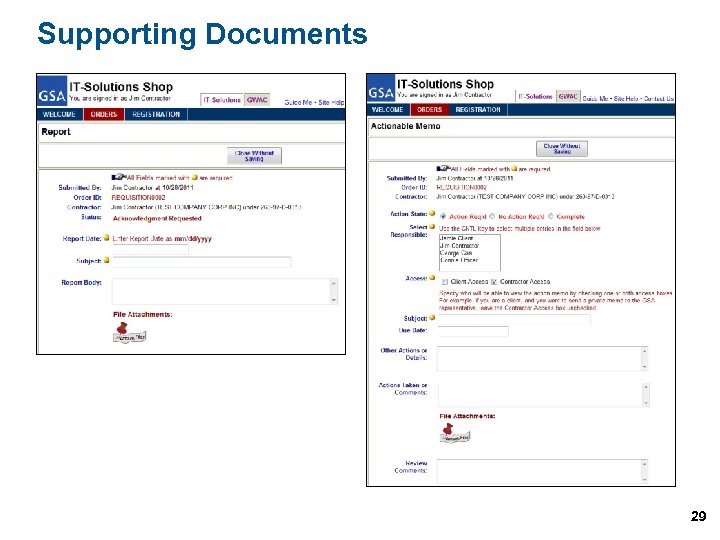 Supporting Documents 29
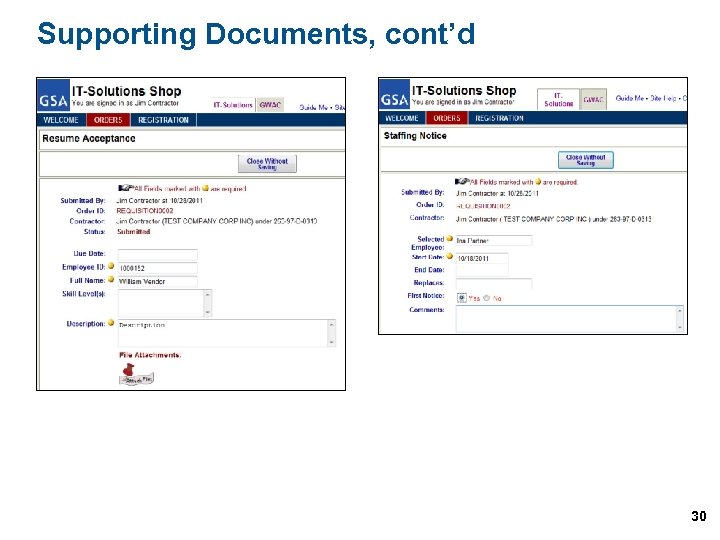 Supporting Documents, cont’d 30
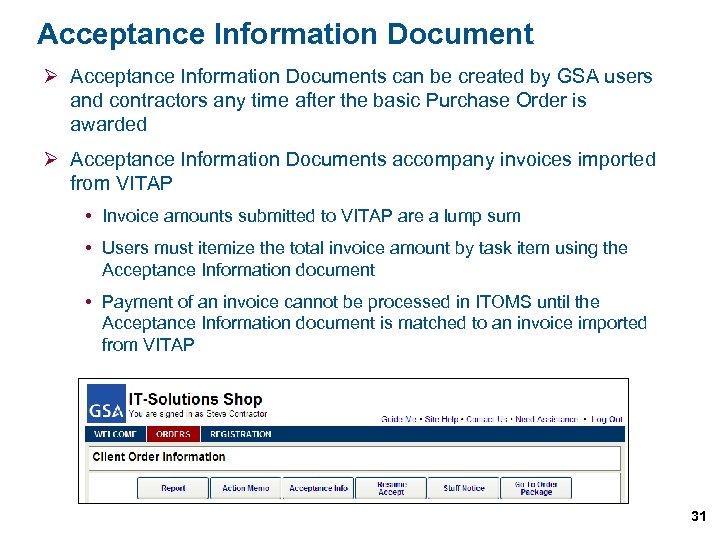 Acceptance Information Document Ø Acceptance Information Documents can be created by GSA users and contractors any time after the basic Purchase Order is awarded Ø Acceptance Information Documents accompany invoices imported from VITAP Invoice amounts submitted to VITAP are a lump sum Users must itemize the total invoice amount by task item using the Acceptance Information document Payment of an invoice cannot be processed in ITOMS until the Acceptance Information document is matched to an invoice imported from VITAP 31
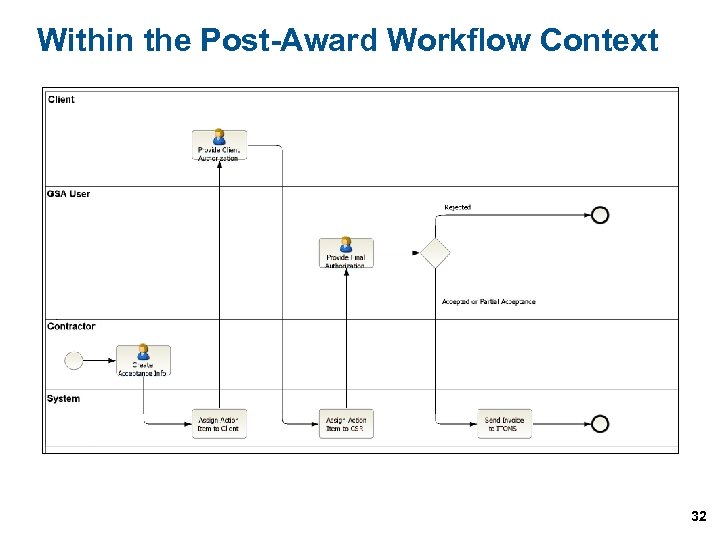 Within the Post-Award Workflow Context 32
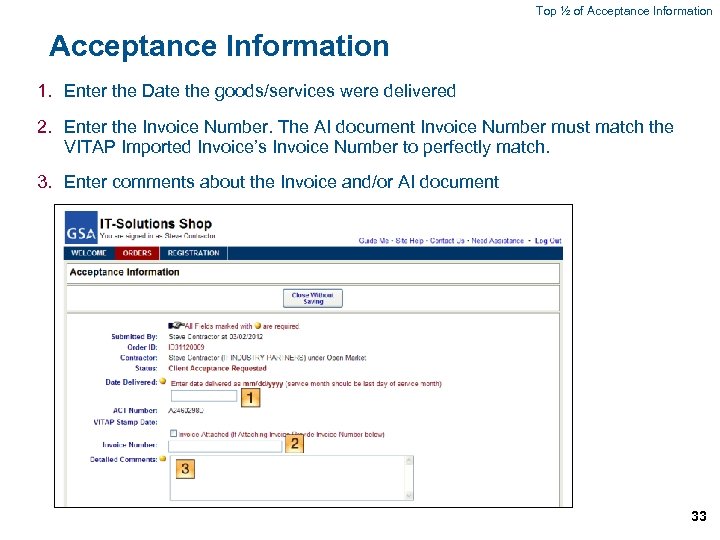 Top ½ of Acceptance Information 1. Enter the Date the goods/services were delivered 2. Enter the Invoice Number. The AI document Invoice Number must match the VITAP Imported Invoice’s Invoice Number to perfectly match. 3. Enter comments about the Invoice and/or AI document 33
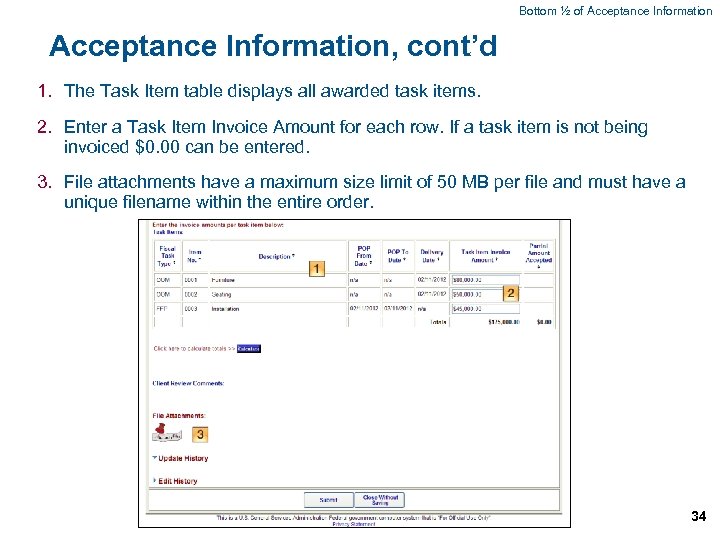 Bottom ½ of Acceptance Information, cont’d 1. The Task Item table displays all awarded task items. 2. Enter a Task Item Invoice Amount for each row. If a task item is not being invoiced $0. 00 can be entered. 3. File attachments have a maximum size limit of 50 MB per file and must have a unique filename within the entire order. 34
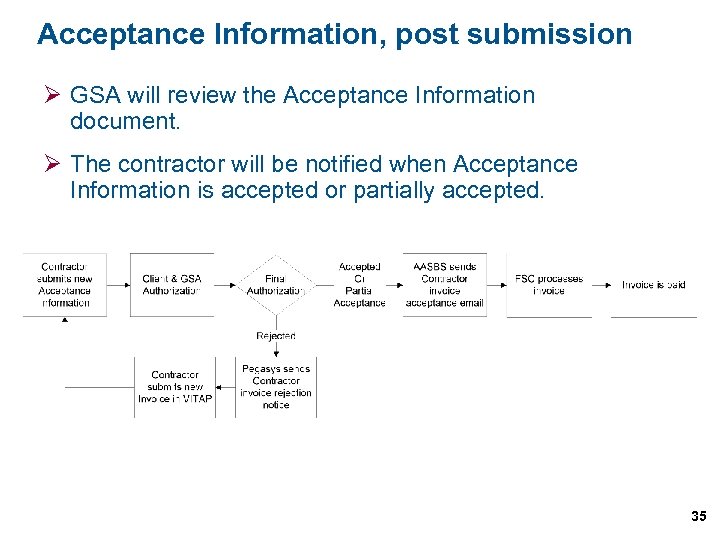 Acceptance Information, post submission Ø GSA will review the Acceptance Information document. Ø The contractor will be notified when Acceptance Information is accepted or partially accepted. 35
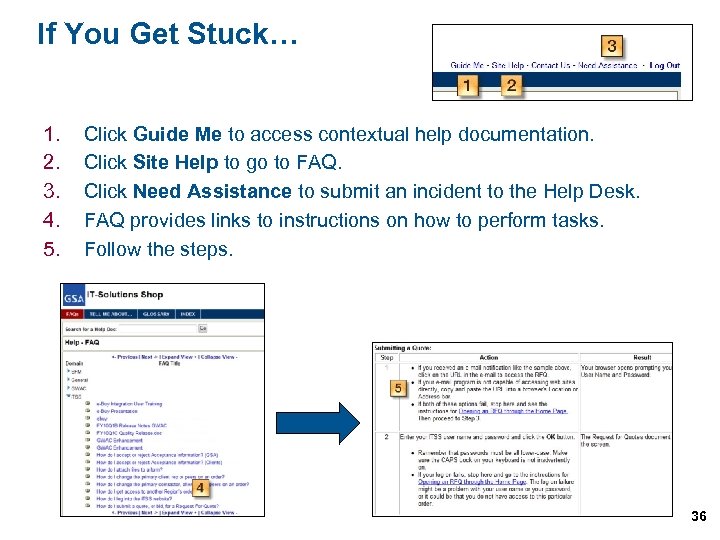 If You Get Stuck… 1. 2. 3. 4. 5. Click Guide Me to access contextual help documentation. Click Site Help to go to FAQ. Click Need Assistance to submit an incident to the Help Desk. FAQ provides links to instructions on how to perform tasks. Follow the steps. 36
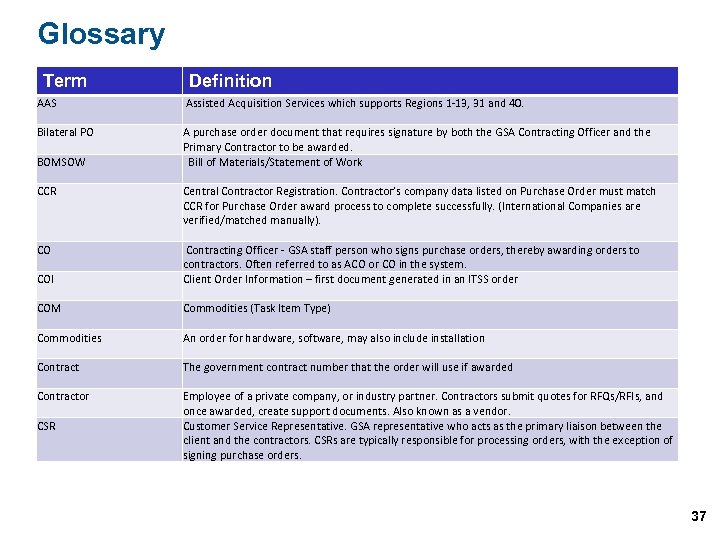 Glossary Term Definition AAS Assisted Acquisition Services which supports Regions 1 -13, 31 and 40. Bilateral PO A purchase order document that requires signature by both the GSA Contracting Officer and the Primary Contractor to be awarded. Bill of Materials/Statement of Work BOMSOW CCR Central Contractor Registration. Contractor’s company data listed on Purchase Order must match CCR for Purchase Order award process to complete successfully. (International Companies are verified/matched manually). CO COI Contracting Officer - GSA staff person who signs purchase orders, thereby awarding orders to contractors. Often referred to as ACO or CO in the system. Client Order Information – first document generated in an ITSS order COM Commodities (Task Item Type) Commodities An order for hardware, software, may also include installation Contract The government contract number that the order will use if awarded Contractor Employee of a private company, or industry partner. Contractors submit quotes for RFQs/RFIs, and once awarded, create support documents. Also known as a vendor. Customer Service Representative. GSA representative who acts as the primary liaison between the client and the contractors. CSRs are typically responsible for processing orders, with the exception of signing purchase orders. CSR 37
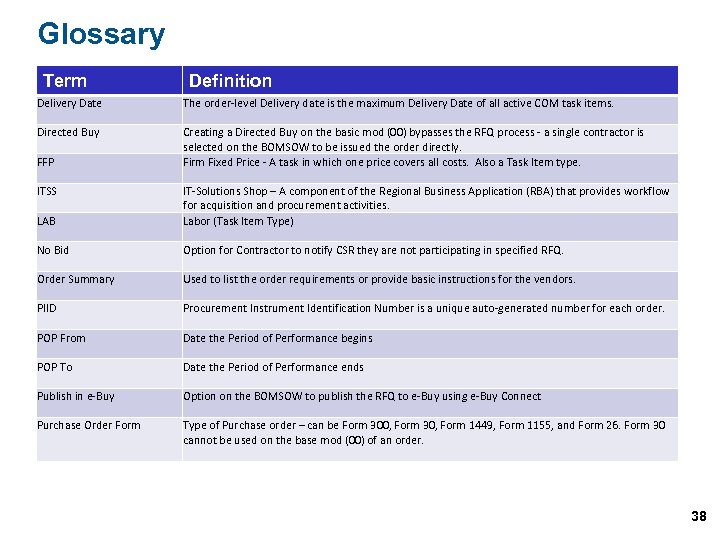 Glossary Term Definition Delivery Date The order-level Delivery date is the maximum Delivery Date of all active COM task items. Directed Buy Creating a Directed Buy on the basic mod (00) bypasses the RFQ process - a single contractor is selected on the BOMSOW to be issued the order directly. Firm Fixed Price - A task in which one price covers all costs. Also a Task Item type. FFP ITSS LAB IT-Solutions Shop – A component of the Regional Business Application (RBA) that provides workflow for acquisition and procurement activities. Labor (Task Item Type) No Bid Option for Contractor to notify CSR they are not participating in specified RFQ. Order Summary Used to list the order requirements or provide basic instructions for the vendors. PIID Procurement Instrument Identification Number is a unique auto-generated number for each order. POP From Date the Period of Performance begins POP To Date the Period of Performance ends Publish in e-Buy Option on the BOMSOW to publish the RFQ to e-Buy using e-Buy Connect Purchase Order Form Type of Purchase order – can be Form 300, Form 30, Form 1449, Form 1155, and Form 26. Form 30 cannot be used on the base mod (00) of an order. 38
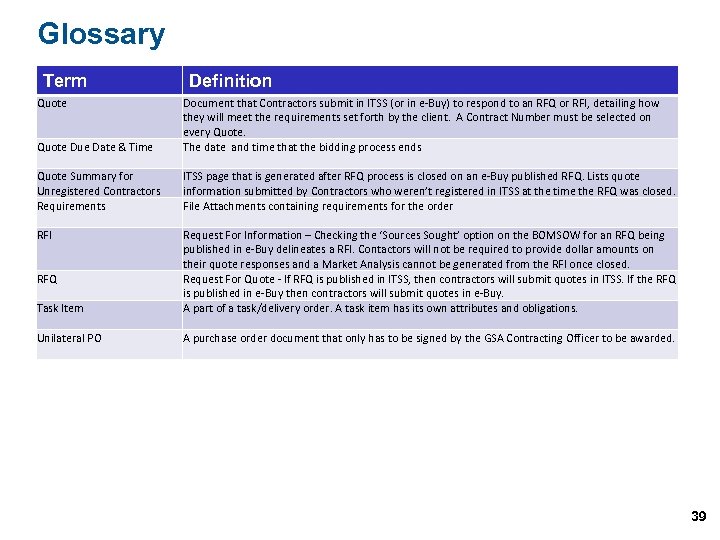 Glossary Term Quote Definition Quote Due Date & Time Document that Contractors submit in ITSS (or in e-Buy) to respond to an RFQ or RFI, detailing how they will meet the requirements set forth by the client. A Contract Number must be selected on every Quote. The date and time that the bidding process ends Quote Summary for Unregistered Contractors Requirements ITSS page that is generated after RFQ process is closed on an e-Buy published RFQ. Lists quote information submitted by Contractors who weren’t registered in ITSS at the time the RFQ was closed. File Attachments containing requirements for the order RFI Task Item Request For Information – Checking the ‘Sources Sought’ option on the BOMSOW for an RFQ being published in e-Buy delineates a RFI. Contactors will not be required to provide dollar amounts on their quote responses and a Market Analysis cannot be generated from the RFI once closed. Request For Quote - If RFQ is published in ITSS, then contractors will submit quotes in ITSS. If the RFQ is published in e-Buy then contractors will submit quotes in e-Buy. A part of a task/delivery order. A task item has its own attributes and obligations. Unilateral PO A purchase order document that only has to be signed by the GSA Contracting Officer to be awarded. RFQ 39
 U. S. General Services Administration Federal Acquisition Service Questions & Support Ø For questions regarding IWAC Contractor ITSS Workflow training module please contact RBA Technical Support: Phone: (877) 472 -4877 Email: AASBS. helpdesk@gsa. gov 40