


 Скачать презентацию U S Department of Agriculture e Government Program
5814e77be93e5d9a747d0a65c9b97c6f.ppt
- Количество слайдов: 48
 U. S. Department of Agriculture e. Government Program Enablers Initiatives Executive Summary January 2003
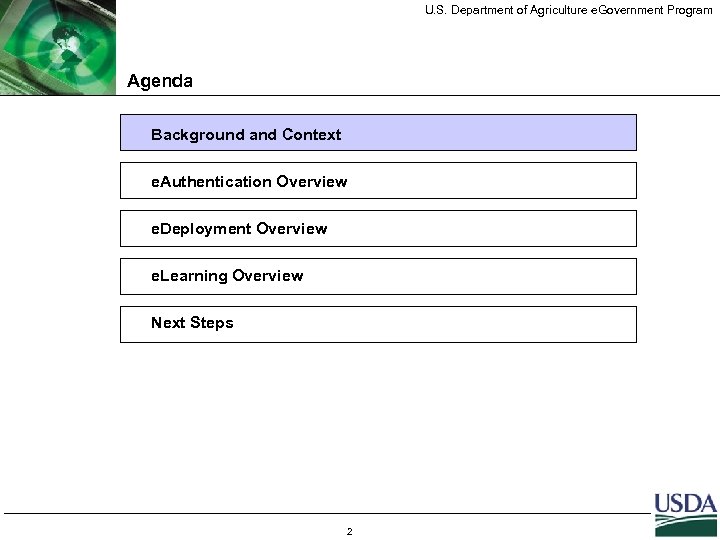 U. S. Department of Agriculture e. Government Program Agenda Background and Context e. Authentication Overview e. Deployment Overview e. Learning Overview Next Steps 2
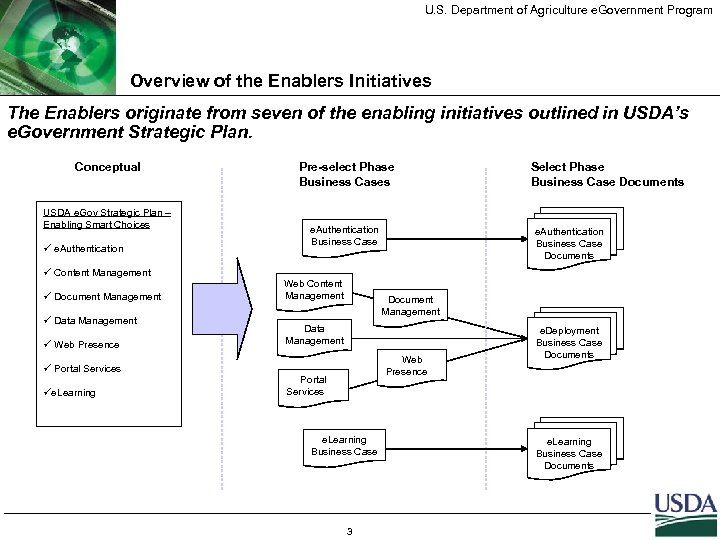 U. S. Department of Agriculture e. Government Program Overview of the Enablers Initiatives The Enablers originate from seven of the enabling initiatives outlined in USDA’s e. Government Strategic Plan. Conceptual USDA e. Gov Strategic Plan – Enabling Smart Choices ü e. Authentication ü Content Management ü Document Management ü Data Management ü Web Presence ü Portal Services üe. Learning Pre-select Phase Business Cases e. Authentication Business Case Web Content Management Select Phase Business Case Documents e. Authentication Business Case Documents Document Management Data Management Web Presence Portal Services e. Learning Business Case 3 e. Deployment Business Case Documents e. Learning Business Case Documents
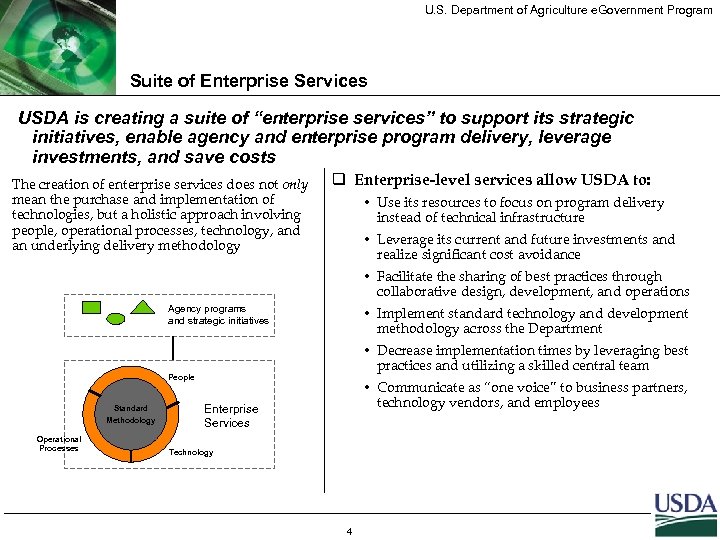 U. S. Department of Agriculture e. Government Program Suite of Enterprise Services USDA is creating a suite of “enterprise services” to support its strategic initiatives, enable agency and enterprise program delivery, leverage investments, and save costs The creation of enterprise services does not only mean the purchase and implementation of technologies, but a holistic approach involving people, operational processes, technology, and an underlying delivery methodology q Enterprise-level services allow USDA to: • Use its resources to focus on program delivery instead of technical infrastructure • Leverage its current and future investments and realize significant cost avoidance • Facilitate the sharing of best practices through collaborative design, development, and operations Agency programs and strategic initiatives • Implement standard technology and development methodology across the Department • Decrease implementation times by leveraging best practices and utilizing a skilled central team People Standard Methodology Operational Processes • Communicate as “one voice” to business partners, technology vendors, and employees Enterprise Services Technology 4
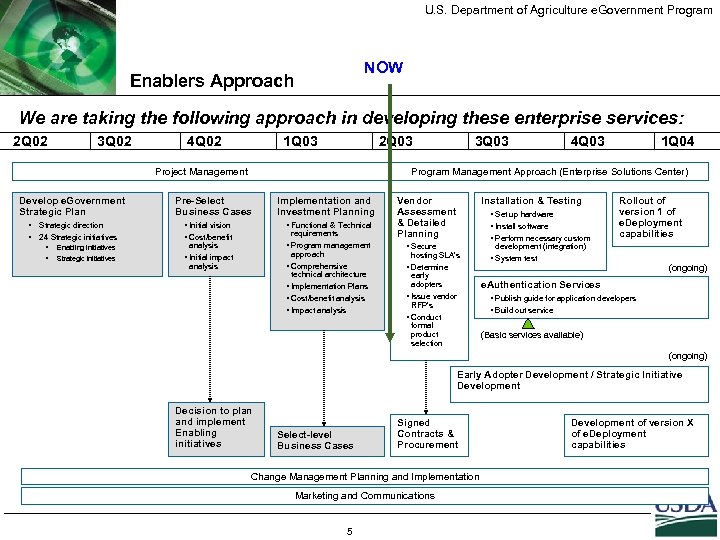 U. S. Department of Agriculture e. Government Program NOW Enablers Approach We are taking the following approach in developing these enterprise services: 2 Q 02 3 Q 02 4 Q 02 1 Q 03 2 Q 03 Project Management Develop e. Government Strategic Plan • Strategic direction • 24 Strategic initiatives • • Enabling initiatives Strategic initiatives 3 Q 03 4 Q 03 1 Q 04 Program Management Approach (Enterprise Solutions Center) Pre-Select Business Cases • Initial vision • Cost/benefit Implementation and Investment Planning • Functional & Technical requirements • Program management analysis • Initial impact analysis approach Vendor Assessment & Detailed Planning Installation & Testing • Set up hardware • Install software • Perform necessary custom • Secure hosting SLA’s • Comprehensive technical architecture • Implementation Plans • Cost/benefit analysis • Impact analysis • Determine early adopters • Issue vendor RFP’s • Conduct formal product selection Rollout of version 1 of e. Deployment capabilities development (integration) • System test (ongoing) e. Authentication Services • Publish guide for application developers • Build out service (Basic services available) (ongoing) Early Adopter Development / Strategic Initiative Development Decision to plan and implement Enabling initiatives Select-level Business Cases Signed Contracts & Procurement Change Management Planning and Implementation Marketing and Communications 5 Development of version X of e. Deployment capabilities
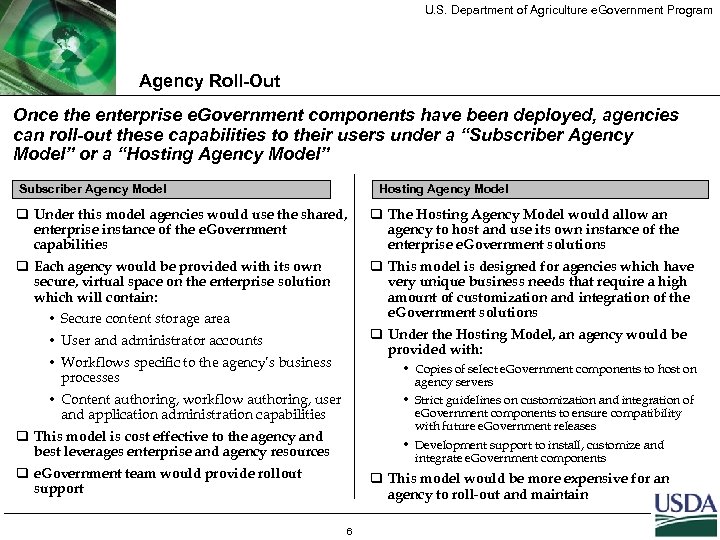 U. S. Department of Agriculture e. Government Program Agency Roll-Out Once the enterprise e. Government components have been deployed, agencies can roll-out these capabilities to their users under a “Subscriber Agency Model” or a “Hosting Agency Model” Subscriber Agency Model Hosting Agency Model q Under this model agencies would use the shared, enterprise instance of the e. Government capabilities q The Hosting Agency Model would allow an agency to host and use its own instance of the enterprise e. Government solutions q Each agency would be provided with its own secure, virtual space on the enterprise solution which will contain: q This model is designed for agencies which have very unique business needs that require a high amount of customization and integration of the e. Government solutions • Secure content storage area q Under the Hosting Model, an agency would be provided with: • User and administrator accounts • Workflows specific to the agency’s business processes • Copies of select e. Government components to host on agency servers • Strict guidelines on customization and integration of e. Government components to ensure compatibility with future e. Government releases • Development support to install, customize and integrate e. Government components • Content authoring, workflow authoring, user and application administration capabilities q This model is cost effective to the agency and best leverages enterprise and agency resources q e. Government team would provide rollout support q This model would be more expensive for an agency to roll-out and maintain 6
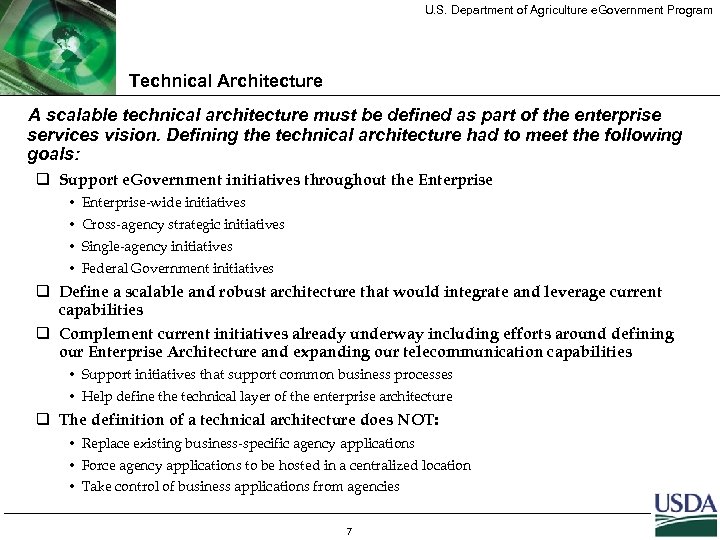 U. S. Department of Agriculture e. Government Program Technical Architecture A scalable technical architecture must be defined as part of the enterprise services vision. Defining the technical architecture had to meet the following goals: q Support e. Government initiatives throughout the Enterprise • Enterprise-wide initiatives • Cross-agency strategic initiatives • Single-agency initiatives • Federal Government initiatives q Define a scalable and robust architecture that would integrate and leverage current capabilities q Complement current initiatives already underway including efforts around defining our Enterprise Architecture and expanding our telecommunication capabilities • Support initiatives that support common business processes • Help define the technical layer of the enterprise architecture q The definition of a technical architecture does NOT: • Replace existing business-specific agency applications • Force agency applications to be hosted in a centralized location • Take control of business applications from agencies 7
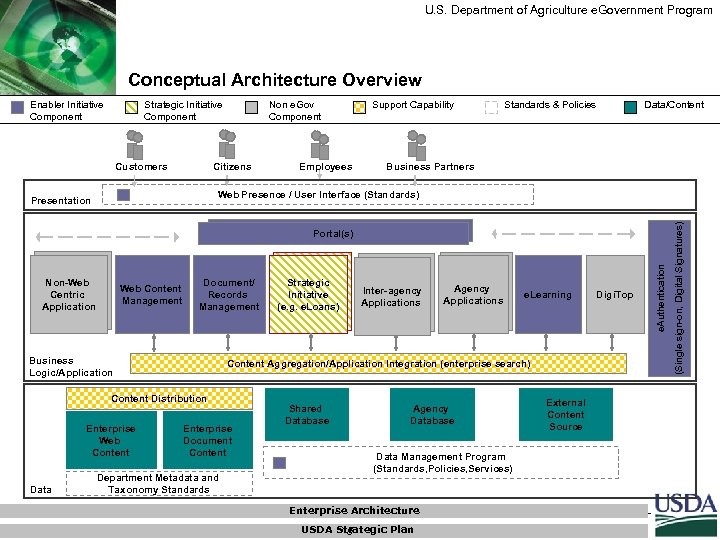 U. S. Department of Agriculture e. Government Program Conceptual Architecture Overview Enabler Initiative Component Strategic Initiative Component Non e. Gov Component Citizens Customers Employees Support Capability Standards & Policies Data/Content Business Partners Non-Web Centric Application Web Content Management Document/ Records Management Business Logic/Application Data Inter-agency Applications Agency Applications e. Learning Content Aggregation/Application Integration (enterprise search) Content Distribution Enterprise Web Content Strategic Initiative (e. g. e. Loans) Enterprise Document Content Department Metadata and Taxonomy Standards Shared Database Agency Database Data Management Program (Standards, Policies, Services) Enterprise Architecture USDA Strategic Plan 8 External Content Source Digi. Top e. Authentication Portal(s) (Single sign-on, Digital Signatures) Web Presence / User Interface (Standards) Presentation
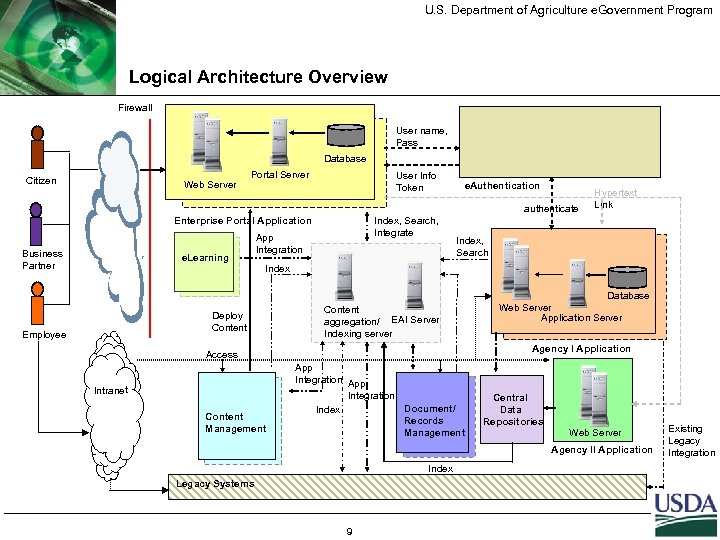 U. S. Department of Agriculture e. Government Program Logical Architecture Overview Firewall User name, Pass Database Citizen Web Server Portal Server User Info Token e. Authentication authenticate Enterprise Portal Application Business Partner e. Learning App Integration Index, Search Index Deploy Content Employee Index, Search, Integrate Hypertext Link Content aggregation/ EAI Server Indexing server Agency I Application Access Intranet Content Management Database Web Server Application Server App Integration Document/ Index Records Management Central Data Repositories Web Server Agency II Application Index Legacy Systems 9 Existing Legacy Integration
 U. S. Department of Agriculture e. Government Program Agenda Background and Context e. Authentication Overview e. Deployment Overview e. Learning Overview Next Steps 10
 U. S. Department of Agriculture e. Government Program What is e. Authentication? e. Authentication verifies a user’s identity when accessing online services… q USDA’s e. Authentication solution will consist of a set of products and services to authenticate the identity of persons accessing USDA’s online offerings. q USDA’s e. Authentication approach will include the use of: • Electronic signatures (e. Signatures) which allow a user to “sign” an online transaction. An e. Signature signals a person’s consent, approval, or acknowledgement. An electronic signature can take many forms, such as a name typed at the end of an email message, a digitized image of a handwritten signature, or even a secret code or PIN that identifies the sender to the recipient; and • Digital signatures, a more advanced electronic signature, that support greater levels of confidentiality, integrity, and non-repudiation. 11
 U. S. Department of Agriculture e. Government Program e. Authentication - Business Requirements q Provide a suite of products and services for Agencies to use across the Enterprise. Existing solutions will be leveraged to the extent possible/practicable and external solutions will be used to complete the suite; q Leverage security best practices. A consolidated approach can ensure that each Agency is drawing upon the best authentication solutions to ensure proof of identify and to protect the confidentiality and sensitivity of data in the applications; q Integrate USDA resources with other Government resources as part of the Presidential Initiative; q Improve the user’s experience by not requiring multiple authentication credentials, such as multiple passwords or certificates; q Promote both interoperability and enhanced security across USDA applications; and q Reduce the cost associated with the development and maintenance of multiple sets of authentication solutions. 12
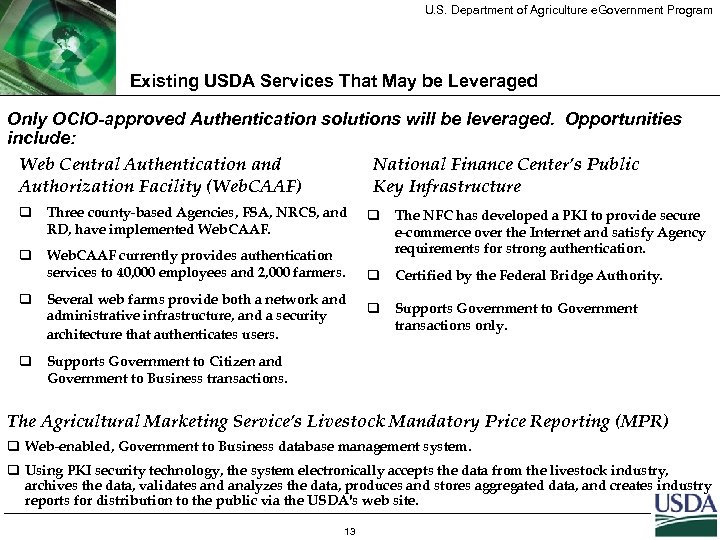 U. S. Department of Agriculture e. Government Program Existing USDA Services That May be Leveraged Only OCIO-approved Authentication solutions will be leveraged. Opportunities include: Web Central Authentication and National Finance Center’s Public Authorization Facility (Web. CAAF) Key Infrastructure q Three county-based Agencies, FSA, NRCS, and RD, have implemented Web. CAAF. q Web. CAAF currently provides authentication services to 40, 000 employees and 2, 000 farmers. q Several web farms provide both a network and administrative infrastructure, and a security architecture that authenticates users. q q The NFC has developed a PKI to provide secure e-commerce over the Internet and satisfy Agency requirements for strong authentication. q Certified by the Federal Bridge Authority. q Supports Government to Government transactions only. Supports Government to Citizen and Government to Business transactions. The Agricultural Marketing Service’s Livestock Mandatory Price Reporting (MPR) q Web-enabled, Government to Business database management system. q Using PKI security technology, the system electronically accepts the data from the livestock industry, archives the data, validates and analyzes the data, produces and stores aggregated data, and creates industry reports for distribution to the public via the USDA's web site. 13
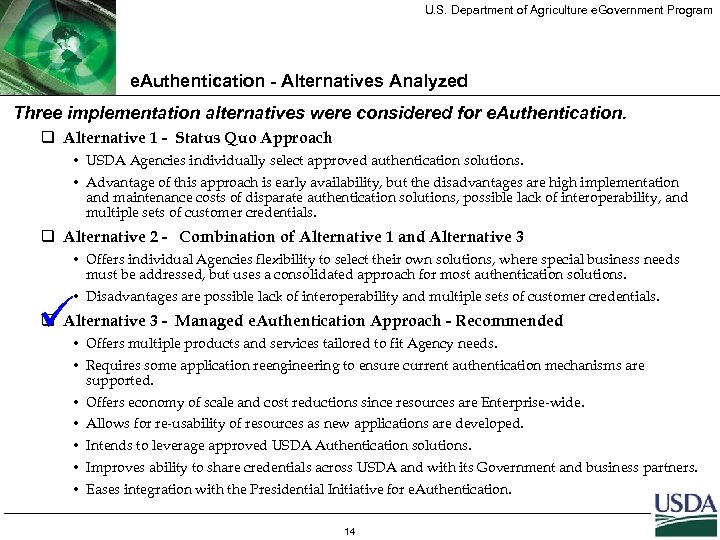 U. S. Department of Agriculture e. Government Program e. Authentication - Alternatives Analyzed Three implementation alternatives were considered for e. Authentication. q Alternative 1 - Status Quo Approach • USDA Agencies individually select approved authentication solutions. • Advantage of this approach is early availability, but the disadvantages are high implementation and maintenance costs of disparate authentication solutions, possible lack of interoperability, and multiple sets of customer credentials. q Alternative 2 - Combination of Alternative 1 and Alternative 3 • Offers individual Agencies flexibility to select their own solutions, where special business needs must be addressed, but uses a consolidated approach for most authentication solutions. • Disadvantages are possible lack of interoperability and multiple sets of customer credentials. ü q Alternative 3 - Managed e. Authentication Approach - Recommended • Offers multiple products and services tailored to fit Agency needs. • Requires some application reengineering to ensure current authentication mechanisms are supported. • Offers economy of scale and cost reductions since resources are Enterprise-wide. • Allows for re-usability of resources as new applications are developed. • Intends to leverage approved USDA Authentication solutions. • Improves ability to share credentials across USDA and with its Government and business partners. • Eases integration with the Presidential Initiative for e. Authentication. 14
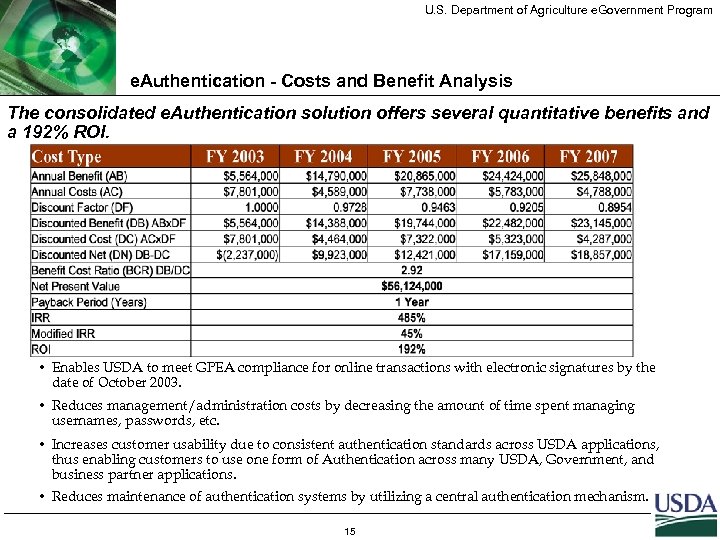 U. S. Department of Agriculture e. Government Program e. Authentication - Costs and Benefit Analysis The consolidated e. Authentication solution offers several quantitative benefits and a 192% ROI. • Enables USDA to meet GPEA compliance for online transactions with electronic signatures by the date of October 2003. • Reduces management/administration costs by decreasing the amount of time spent managing usernames, passwords, etc. • Increases customer usability due to consistent authentication standards across USDA applications, thus enabling customers to use one form of Authentication across many USDA, Government, and business partner applications. • Reduces maintenance of authentication systems by utilizing a central authentication mechanism. 15
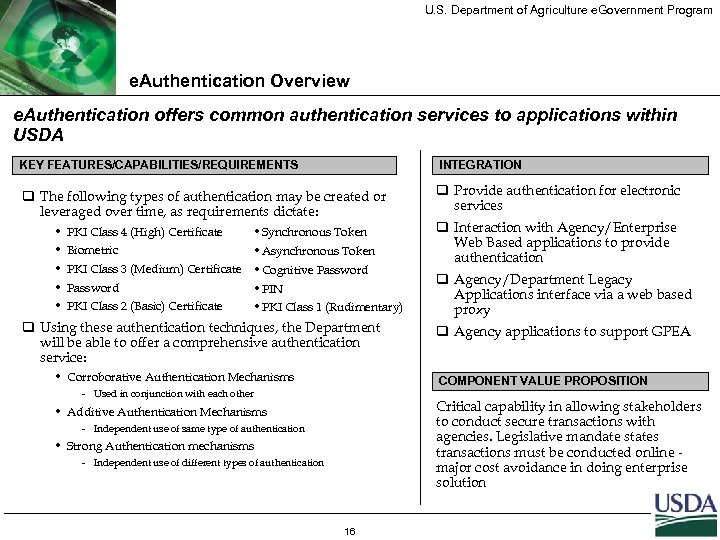 U. S. Department of Agriculture e. Government Program e. Authentication Overview e. Authentication offers common authentication services to applications within USDA KEY FEATURES/CAPABILITIES/REQUIREMENTS INTEGRATION q The following types of authentication may be created or leveraged over time, as requirements dictate: q Provide authentication for electronic services • • • PKI Class 4 (High) Certificate • Synchronous Token Biometric • Asynchronous Token PKI Class 3 (Medium) Certificate • Cognitive Password • PIN PKI Class 2 (Basic) Certificate • PKI Class 1 (Rudimentary) q Using these authentication techniques, the Department will be able to offer a comprehensive authentication service: • Corroborative Authentication Mechanisms – q Agency applications to support GPEA Critical capability in allowing stakeholders to conduct secure transactions with agencies. Legislative mandate states transactions must be conducted online major cost avoidance in doing enterprise solution Independent use of same type of authentication • Strong Authentication mechanisms – q Agency/Department Legacy Applications interface via a web based proxy COMPONENT VALUE PROPOSITION Used in conjunction with each other • Additive Authentication Mechanisms – q Interaction with Agency/Enterprise Web Based applications to provide authentication Independent use of different types of authentication 16
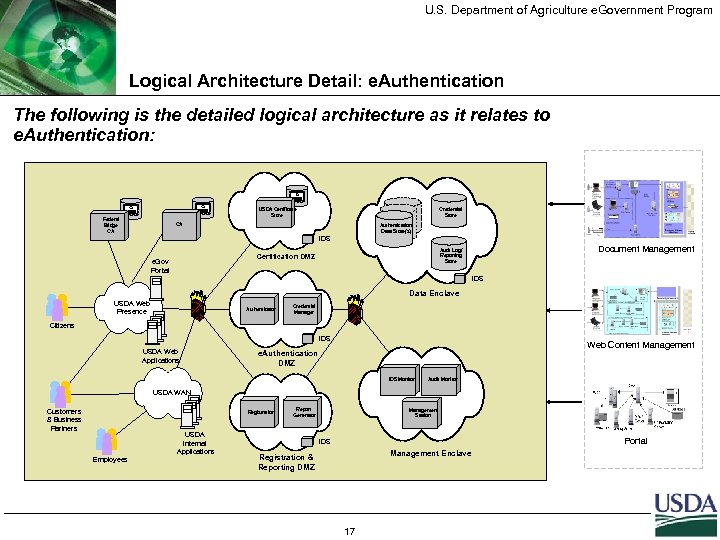 U. S. Department of Agriculture e. Government Program Logical Architecture Detail: e. Authentication The following is the detailed logical architecture as it relates to e. Authentication: USDA Certificate Store Federal Bridge CA Credential Store CA Authentication Data Store(s) IDS e. Gov Portal Document Management Audit Log/ Reporting Store Certification DMZ IDS Data Enclave USDA Web Presence Authenticator Credential Manager Citizens IDS USDA Web Applications Web Content Management e. Authentication DMZ IDS Monitor Audit Monitor USDA WAN Customers & Business Partners Registration Employees USDA Internal Applications Report Generator Management Station Portal IDS Management Enclave Registration & Reporting DMZ 17
 U. S. Department of Agriculture e. Government Program Agenda Background and Context e. Authentication Overview e. Deployment Overview e. Learning Overview Next Steps 18
 U. S. Department of Agriculture e. Government Program What is e. Deployment? e. Deployment is a fusion of multiple enabling capabilities that will support delivery of USDA information and services. q Web Content Management • A Web Content Management solution will aid the creation, review, delivery, and maintenance of agency-defined information. q Document Management • A Document Management solution will enable the sharing and managing of documents and other electronic assets across USDA (according to records retention schedules. ) q Web Presence • Web Presence will provide standards and guidelines to improve the “look and feel” and usability of Web pages and Web-based applications across USDA. q Portal Services • Portals will provide customers, public and private organizations, and USDA employees with integrated access to USDA information and services. 19
 U. S. Department of Agriculture e. Government Program What is e. Deployment? Conceptual Architecture components continued: q Central Data Repositories • The Data Management component represents standards, policies and services around database/data design and implementation. These standards will reduce data redundancy, improve data quality, promote interoperability and data reuse q Content Aggregation/Application Integration • The Content Aggregation/Application Integration component provides integration of content and application services for use by portals and other agency and cross agency applications • A centralized index will allow ubiquitous searching of distributed, heterogeneous content/data repositories q Content Distribution • The Content Distribution component will facilitate the deployment of content to distributed servers for optimal delivery of content. Distribution of content will reduce application response time, ultimately enhancing the user experience 20
 U. S. Department of Agriculture e. Government Program e. Deployment - Business Requirements Key requirements identified by Agencies include: q Provide an automated workflow capability to mirror the creation, review, publishing, and archival process that is currently performed manually. q Enforce the inclusion of standard metadata, headers, footers, etc. for a file or online content. Enforcing these standards enables information to be organized, re-used, and located. q Provide a comprehensive information architecture (organization and classification of information) to improve access to information. q Provide fast and accurate information retrieval capabilities. q Provide standards and guidelines that ensure a consistent “look and feel” and navigational structure in USDA’s Web pages and Web-based applications. q Provide the ability to integrate with existing legacy systems. 21
 U. S. Department of Agriculture e. Government Program e. Deployment - Current Environment Existing capabilities vary by Agency and often reflect duplicative and redundant business and technical processes. Most notably, there is a lack of consistency and information sharing across the enterprise. q Some Agencies are currently evaluating individual Web Content Management, Document Management, and Data Management solutions as well as separate Web Presence and Portal initiatives to meet their distinct needs. q Workflow processes are conducted manually and there is no means to drive content and documents throughout their lifecycle, from creation to maintenance to archiving. q Agency documents are primarily static, unstructured content that is not interactive with Web applications, databases, and multiple Web delivery mechanisms. q Agencies have dissimilar technical architectures, which pose a challenge to interoperability. q “Stove-pipe" delivery systems that currently exist are organization bound; content creators from subject matter expertise at any level are not able to contribute to the content that will be delivered to users. 22
 U. S. Department of Agriculture e. Government Program e. Deployment - Alternatives Analyzed Three implementation alternatives were considered for e. Deployment. q Maintain the existing environment – “Status Quo” • Grants the most flexibility by allowing Agencies to choose their own e. Deployment solution and eliminates the need to work through culture barriers; and • USDA Agencies spend millions in duplicative monies to design, build, deploy, and operate their own solutions and do not benefit from economies of scale pricing. ü q Integrated enterprise solutions in a distributed environment - Recommended • Delivers enterprise-wide services from multiple hosting facilities (such as NITC, other USDA hosting facilities, and potential third-party hosting centers); • Supports reuse of existing USDA hardware, software, network, and personnel resources; and • Provides economies of scale for the purchase of software licenses; • Reduces the complexity of system implementation; and • Provides the greatest processing power to ensure optimal response time for users. q Integrated enterprise solutions in a centralized environment • Delivers enterprise-wide services from a centralized hosting facility; • Provides an effective option if audiences are concentrated in a small geographic region and external systems that need to be integrated are few and centrally located; and • Provides the same benefits as distributed environment, but the processing power would not be as great and integration would be more complex. 23
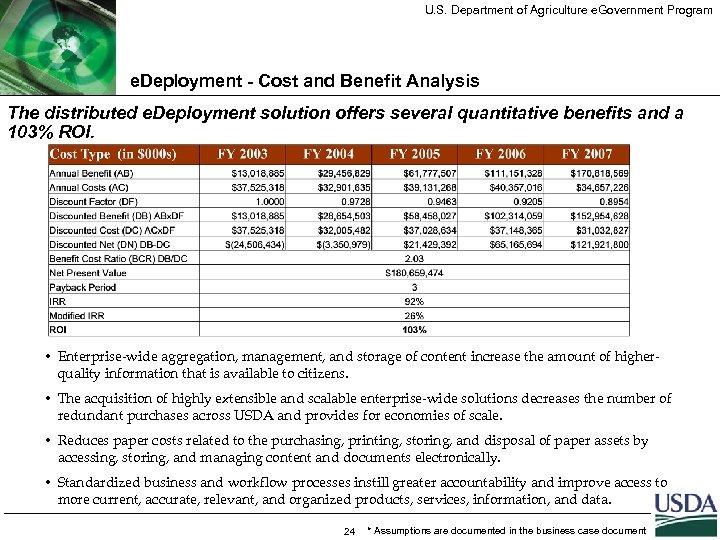 U. S. Department of Agriculture e. Government Program e. Deployment - Cost and Benefit Analysis The distributed e. Deployment solution offers several quantitative benefits and a 103% ROI. • Enterprise-wide aggregation, management, and storage of content increase the amount of higherquality information that is available to citizens. • The acquisition of highly extensible and scalable enterprise-wide solutions decreases the number of redundant purchases across USDA and provides for economies of scale. • Reduces paper costs related to the purchasing, printing, storing, and disposal of paper assets by accessing, storing, and managing content and documents electronically. • Standardized business and workflow processes instill greater accountability and improve access to more current, accurate, relevant, and organized products, services, information, and data. 24 * Assumptions are documented in the business case document
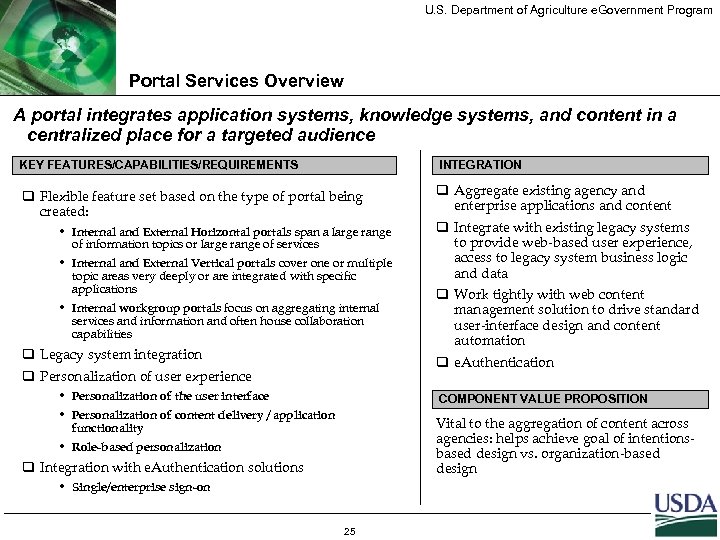 U. S. Department of Agriculture e. Government Program Portal Services Overview A portal integrates application systems, knowledge systems, and content in a centralized place for a targeted audience KEY FEATURES/CAPABILITIES/REQUIREMENTS INTEGRATION q Flexible feature set based on the type of portal being created: q Aggregate existing agency and enterprise applications and content • Internal and External Horizontal portals span a large range of information topics or large range of services • Internal and External Vertical portals cover one or multiple topic areas very deeply or are integrated with specific applications • Internal workgroup portals focus on aggregating internal services and information and often house collaboration capabilities q Legacy system integration q Integrate with existing legacy systems to provide web-based user experience, access to legacy system business logic and data q Work tightly with web content management solution to drive standard user-interface design and content automation q e. Authentication q Personalization of user experience • Personalization of the user interface • Personalization of content delivery / application functionality • Role-based personalization COMPONENT VALUE PROPOSITION Vital to the aggregation of content across agencies: helps achieve goal of intentionsbased design vs. organization-based design q Integration with e. Authentication solutions • Single/enterprise sign-on 25
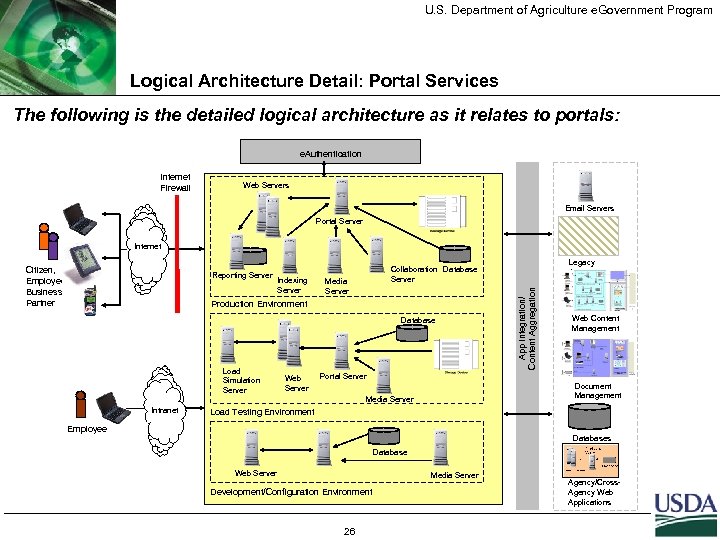 U. S. Department of Agriculture e. Government Program Logical Architecture Detail: Portal Services The following is the detailed logical architecture as it relates to portals: e. Authentication Internet Firewall Web Servers Email Servers Portal Server Internet Reporting Server Indexing Server Media Server Production Environment Database Load Simulation Server Intranet Web Server Legacy Apps Collaboration Database Server App Integration/ Content Aggregation Citizen, Employee, Business Partner Web Content Management Portal Server Document Management Media Server Load Testing Environment Employee Databases Database Web Server Media Server Development/Configuration Environment 26 Agency/Cross. Agency Web Applications
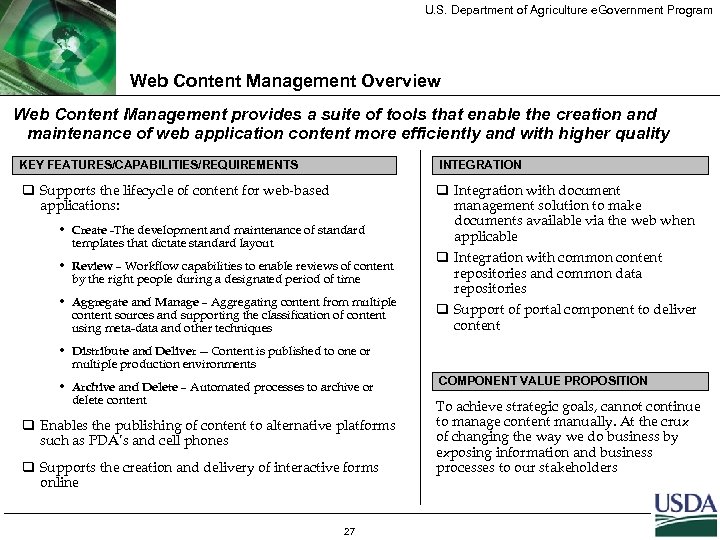 U. S. Department of Agriculture e. Government Program Web Content Management Overview Web Content Management provides a suite of tools that enable the creation and maintenance of web application content more efficiently and with higher quality KEY FEATURES/CAPABILITIES/REQUIREMENTS INTEGRATION q Supports the lifecycle of content for web-based applications: q Integration with document management solution to make documents available via the web when applicable • Create -The development and maintenance of standard templates that dictate standard layout • Review – Workflow capabilities to enable reviews of content by the right people during a designated period of time • Aggregate and Manage – Aggregating content from multiple content sources and supporting the classification of content using meta-data and other techniques q Integration with common content repositories and common data repositories q Support of portal component to deliver content • Distribute and Deliver -- Content is published to one or multiple production environments • Archive and Delete – Automated processes to archive or delete content q Enables the publishing of content to alternative platforms such as PDA’s and cell phones q Supports the creation and delivery of interactive forms online 27 COMPONENT VALUE PROPOSITION To achieve strategic goals, cannot continue to manage content manually. At the crux of changing the way we do business by exposing information and business processes to our stakeholders
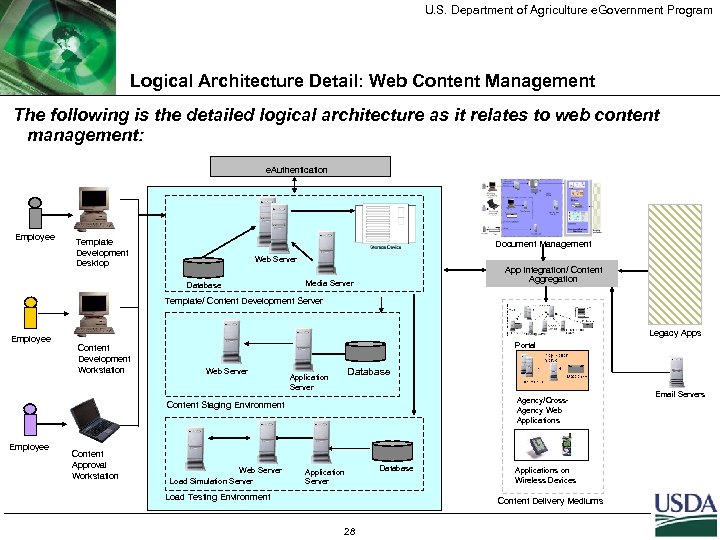 U. S. Department of Agriculture e. Government Program Logical Architecture Detail: Web Content Management The following is the detailed logical architecture as it relates to web content management: e. Authentication Employee Template Development Desktop Document Management Web Server Database App Integration/ Content Aggregation Media Server Template/ Content Development Server Employee Legacy Apps Content Development Workstation Portal Web Server Database Application Server Agency/Cross. Agency Web Applications Content Staging Environment Employee Content Approval Workstation Web Server Load Simulation Server Application Server Load Testing Environment Database Applications on Wireless Devices Content Delivery Mediums 28 Email Servers
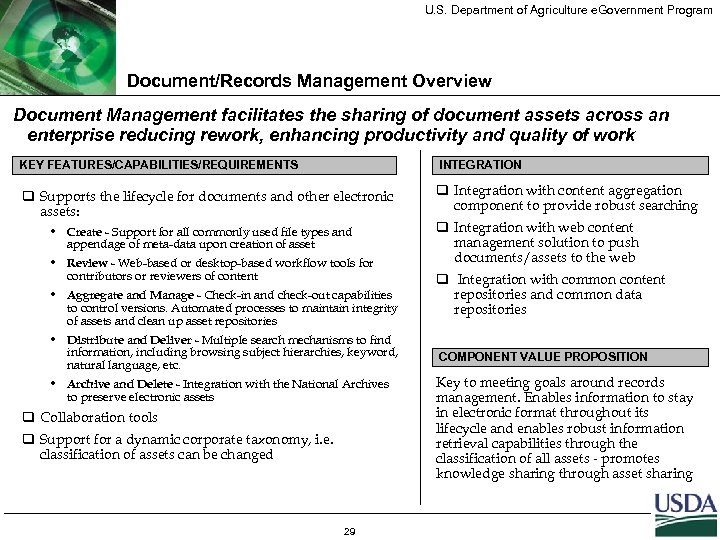 U. S. Department of Agriculture e. Government Program Document/Records Management Overview Document Management facilitates the sharing of document assets across an enterprise reducing rework, enhancing productivity and quality of work KEY FEATURES/CAPABILITIES/REQUIREMENTS INTEGRATION q Supports the lifecycle for documents and other electronic assets: q Integration with content aggregation component to provide robust searching • Create - Support for all commonly used file types and appendage of meta-data upon creation of asset • Review - Web-based or desktop-based workflow tools for contributors or reviewers of content • Aggregate and Manage - Check-in and check-out capabilities to control versions. Automated processes to maintain integrity of assets and clean up asset repositories • Distribute and Deliver - Multiple search mechanisms to find information, including browsing subject hierarchies, keyword, natural language, etc. • Archive and Delete - Integration with the National Archives to preserve electronic assets q Collaboration tools q Support for a dynamic corporate taxonomy, i. e. classification of assets can be changed 29 q Integration with web content management solution to push documents/assets to the web q Integration with common content repositories and common data repositories COMPONENT VALUE PROPOSITION Key to meeting goals around records management. Enables information to stay in electronic format throughout its lifecycle and enables robust information retrieval capabilities through the classification of all assets - promotes knowledge sharing through asset sharing
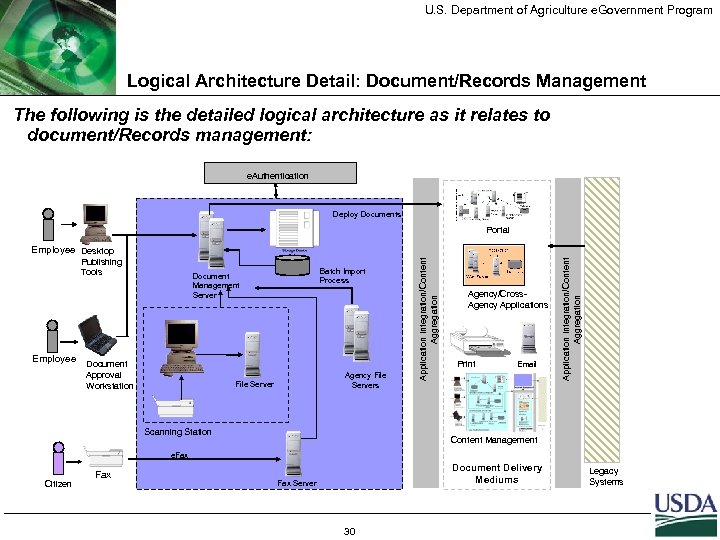 U. S. Department of Agriculture e. Government Program Logical Architecture Detail: Document/Records Management The following is the detailed logical architecture as it relates to document/Records management: e. Authentication Deploy Documents Portal Employee Batch Import Process Document Management Server Document Approval Workstation Agency File Servers File Server Scanning Station Agency/Cross. Agency Applications Print Email Application Integration/Content Aggregation Publishing Tools Application Integration/Content Aggregation Employee Desktop Content Management e. Fax Citizen Fax Document Delivery Mediums Fax Server 30 Legacy Systems
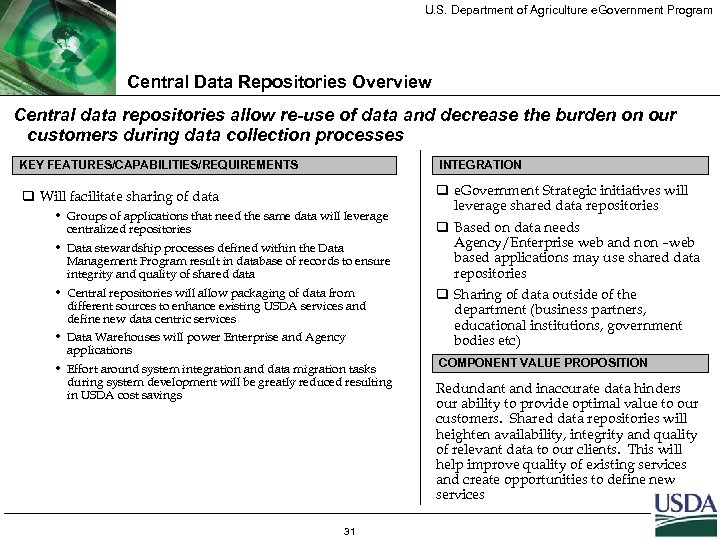 U. S. Department of Agriculture e. Government Program Central Data Repositories Overview Central data repositories allow re-use of data and decrease the burden on our customers during data collection processes KEY FEATURES/CAPABILITIES/REQUIREMENTS INTEGRATION q Will facilitate sharing of data q e. Government Strategic initiatives will leverage shared data repositories • Groups of applications that need the same data will leverage centralized repositories • Data stewardship processes defined within the Data Management Program result in database of records to ensure integrity and quality of shared data • Central repositories will allow packaging of data from different sources to enhance existing USDA services and define new data centric services • Data Warehouses will power Enterprise and Agency applications • Effort around system integration and data migration tasks during system development will be greatly reduced resulting in USDA cost savings 31 q Based on data needs Agency/Enterprise web and non –web based applications may use shared data repositories q Sharing of data outside of the department (business partners, educational institutions, government bodies etc) COMPONENT VALUE PROPOSITION Redundant and inaccurate data hinders our ability to provide optimal value to our customers. Shared data repositories will heighten availability, integrity and quality of relevant data to our clients. This will help improve quality of existing services and create opportunities to define new services
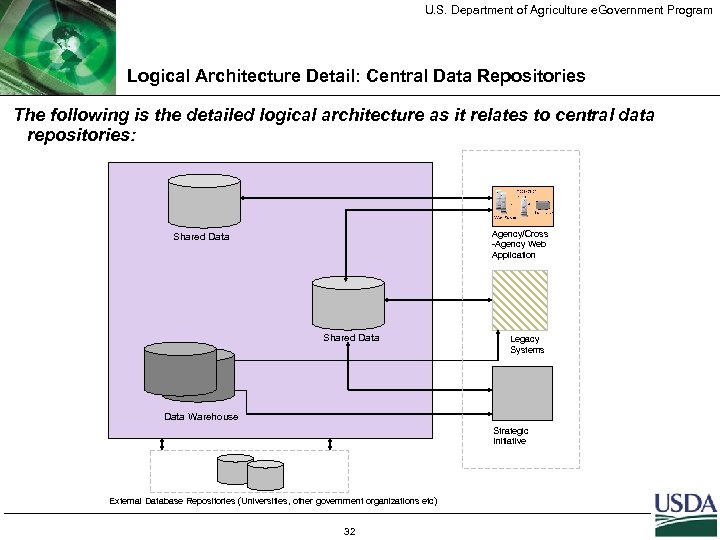 U. S. Department of Agriculture e. Government Program Logical Architecture Detail: Central Data Repositories The following is the detailed logical architecture as it relates to central data repositories: Agency/Cross -Agency Web Application Shared Data Legacy Systems Data Warehouse Strategic Initiative External Database Repositories (Universities, other government organizations etc) 32
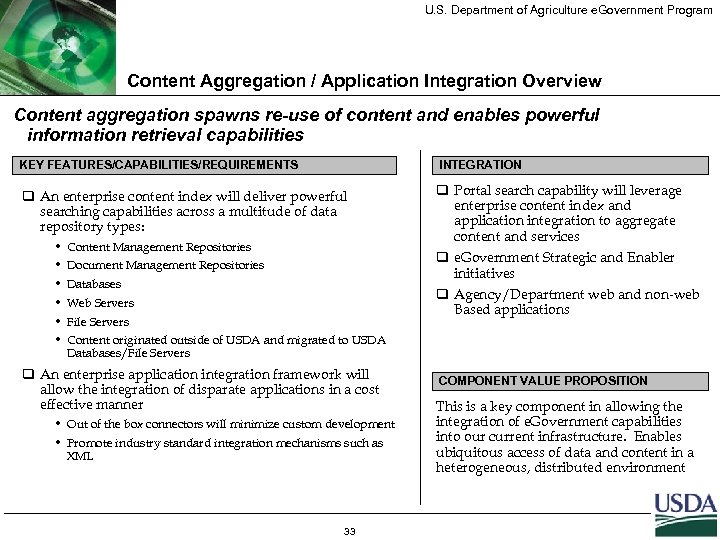 U. S. Department of Agriculture e. Government Program Content Aggregation / Application Integration Overview Content aggregation spawns re-use of content and enables powerful information retrieval capabilities KEY FEATURES/CAPABILITIES/REQUIREMENTS INTEGRATION q An enterprise content index will deliver powerful searching capabilities across a multitude of data repository types: q Portal search capability will leverage enterprise content index and application integration to aggregate content and services • • • Content Management Repositories q e. Government Strategic and Enabler initiatives Document Management Repositories Databases q Agency/Department web and non-web Based applications Web Servers File Servers Content originated outside of USDA and migrated to USDA Databases/File Servers q An enterprise application integration framework will allow the integration of disparate applications in a cost effective manner • Out of the box connectors will minimize custom development • Promote industry standard integration mechanisms such as XML 33 COMPONENT VALUE PROPOSITION This is a key component in allowing the integration of e. Government capabilities into our current infrastructure. Enables ubiquitous access of data and content in a heterogeneous, distributed environment
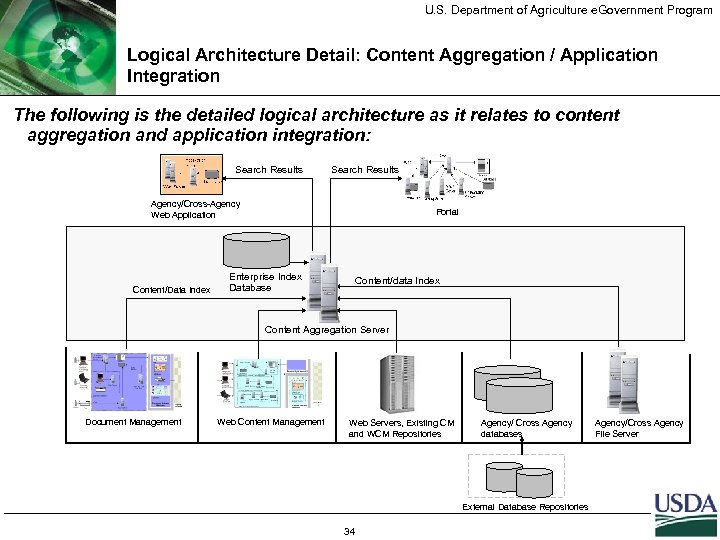 U. S. Department of Agriculture e. Government Program Logical Architecture Detail: Content Aggregation / Application Integration The following is the detailed logical architecture as it relates to content aggregation and application integration: Search Results Agency/Cross-Agency Web Application Content/Data Index Portal Enterprise Index Database Content/data Index Content Aggregation Server Document Management Web Content Management Web Servers, Existing CM and WCM Repositories Agency/ Cross Agency databases External Database Repositories 34 Agency/Cross Agency File Server
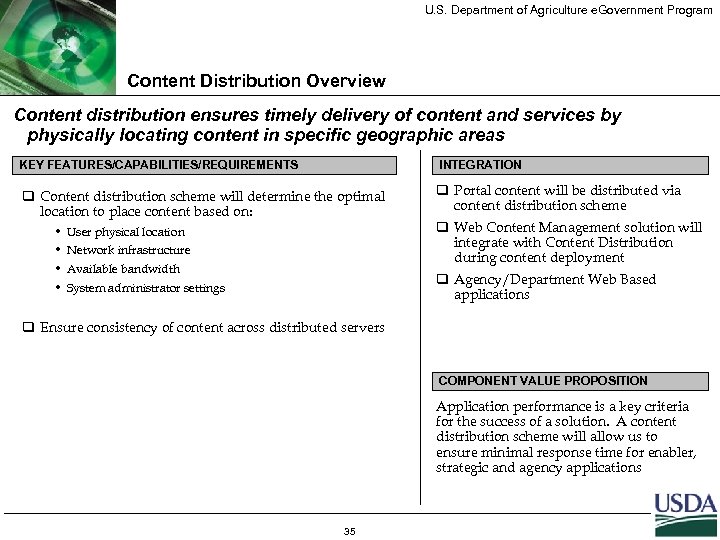 U. S. Department of Agriculture e. Government Program Content Distribution Overview Content distribution ensures timely delivery of content and services by physically locating content in specific geographic areas KEY FEATURES/CAPABILITIES/REQUIREMENTS INTEGRATION q Content distribution scheme will determine the optimal location to place content based on: q Portal content will be distributed via content distribution scheme • • User physical location Network infrastructure Available bandwidth q Web Content Management solution will integrate with Content Distribution during content deployment q Agency/Department Web Based applications System administrator settings q Ensure consistency of content across distributed servers COMPONENT VALUE PROPOSITION Application performance is a key criteria for the success of a solution. A content distribution scheme will allow us to ensure minimal response time for enabler, strategic and agency applications 35
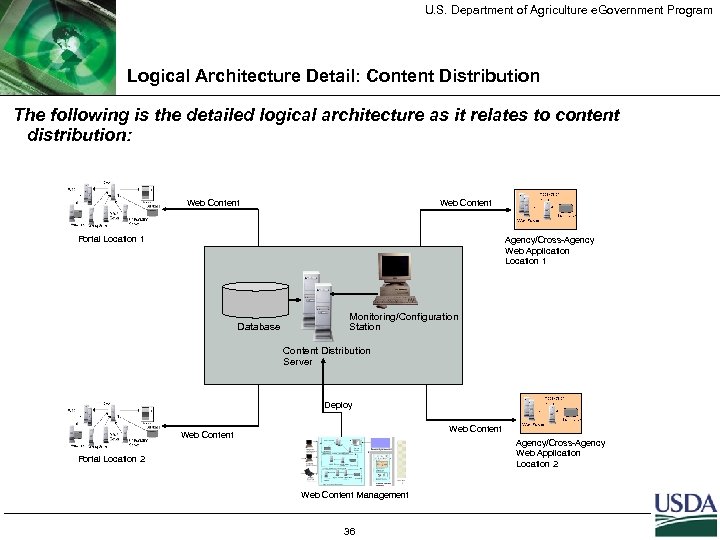 U. S. Department of Agriculture e. Government Program Logical Architecture Detail: Content Distribution The following is the detailed logical architecture as it relates to content distribution: Web Content Portal Location 1 Agency/Cross-Agency Web Application Location 1 Database Monitoring/Configuration Station Content Distribution Server Deploy Web Content Agency/Cross-Agency Web Application Location 2 Portal Location 2 Web Content Management 36
 U. S. Department of Agriculture e. Government Program Agenda Background and Context e. Authentication Overview e. Deployment Overview e. Learning Overview Next Steps 37
 U. S. Department of Agriculture e. Government Program What is a Learning Management System? A Learning Management System (LMS) is a software application that enables the delivery and management of all facets of training. q An LMS allows individuals and groups of users to: • Manage classrooms, learning assets, instructors, schedules, learning paths, and all of the necessary components to deliver training; • View complete course listings and course information; • Register, schedule, and track training sessions; • Create, edit, manage and deliver content; • Track competency and certification progress; • Personalize training and development plans; and • Manage payments. q A learning management system provides support in every phase of the learning management life cycle, transforming learning from an event to a continuous process. 38
 U. S. Department of Agriculture e. Government Program e. Learning - Business Requirements A world-class enterprise solution will be established with these capabilities: q Multiple online delivery platforms, such as web, video, audio, and videoconferencing, to augment or replace classroom-based training. Some face to face training classes will always need to remain in use since they maximize interactions. • Robust suite of collaborative tools to allow learners to work with one another to better solve realworld problems and simulate conversation in real situations. q Online administration of curriculum by trainers, such as automatically adding and removing courses to an online course catalog. q Individualized training capabilities and online registration allowing employees to structure curriculums based on training needs and self-register for the courses online. q HR systems are automatically updated with an employee’s training; Department financial systems are automatically updated based on activity in the LMS. q Common content management capability to easily update and customize course content. • Provide access to expertise and support for developing courses and modules to help the users learn q Partnering with other Government Agencies to maximize new contracting mechanisms. q Full integration with the Presidential Initiative, e. Training, and www. golearn. gov. 39
 U. S. Department of Agriculture e. Government Program e. Learning - Current Environment Agencies use three online systems, following are highlights of those systems… q Internet Combined Administrative Management System (I-CAMS) • Web-based integrated human resources information system in use by the county based Agencies, FSA, NRCS, RD and AMS that allows employees to access employment information, career plans, training requests, and history. • Provides the ability to process personnel actions, manages and tracks learning, provides automatic workflow, creates automatic reminders, and enables online evaluation for non-catalog training. q m. Gen • “Off the shelf” third-party learning management system used by APHIS, OC, RMA, and RD with course content available from Learn 2, Smart. Force, NETg, and Element. K. • Provides built-in content management system, content authoring tools, assessment tools for quizzes and exams, skills gap analysis. q Training Integrated Personnel System (TIPS) /Virtual Training Assistant (VTA) • TIPS system, utilized by the Forest Service, allows students to evaluate themselves against competencies while completing their Individual Development Plan. • Included in the Forest Service’s system is an off-the-shelf learning management system called Virtual Training Assistant (VTA) that has administration, training delivery, and evaluation tools; The Food Safety and Inspection Service uses the VTA system without TIPS, but they are only using it for tracking purposes, not its full learning management capabilities. 40
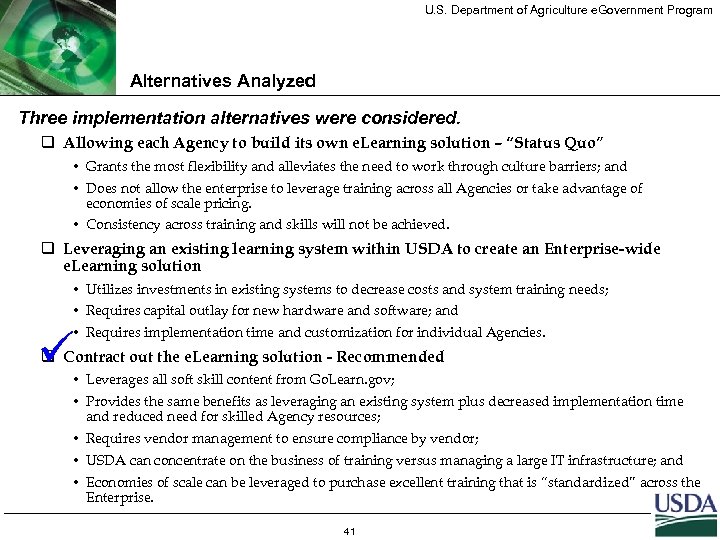 U. S. Department of Agriculture e. Government Program Alternatives Analyzed Three implementation alternatives were considered. q Allowing each Agency to build its own e. Learning solution – “Status Quo” • Grants the most flexibility and alleviates the need to work through culture barriers; and • Does not allow the enterprise to leverage training across all Agencies or take advantage of economies of scale pricing. • Consistency across training and skills will not be achieved. q Leveraging an existing learning system within USDA to create an Enterprise-wide e. Learning solution • Utilizes investments in existing systems to decrease costs and system training needs; • Requires capital outlay for new hardware and software; and • Requires implementation time and customization for individual Agencies. ü q Contract out the e. Learning solution - Recommended • Leverages all soft skill content from Go. Learn. gov; • Provides the same benefits as leveraging an existing system plus decreased implementation time and reduced need for skilled Agency resources; • Requires vendor management to ensure compliance by vendor; • USDA can concentrate on the business of training versus managing a large IT infrastructure; and • Economies of scale can be leveraged to purchase excellent training that is “standardized” across the Enterprise. 41
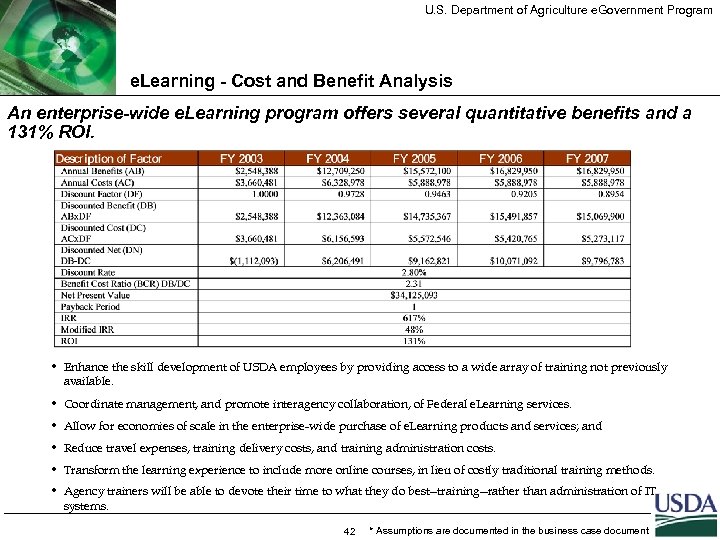 U. S. Department of Agriculture e. Government Program e. Learning - Cost and Benefit Analysis An enterprise-wide e. Learning program offers several quantitative benefits and a 131% ROI. • Enhance the skill development of USDA employees by providing access to a wide array of training not previously available. • Coordinate management, and promote interagency collaboration, of Federal e. Learning services. • Allow for economies of scale in the enterprise-wide purchase of e. Learning products and services; and • Reduce travel expenses, training delivery costs, and training administration costs. • Transform the learning experience to include more online courses, in lieu of costly traditional training methods. • Agency trainers will be able to devote their time to what they do best--training--rather than administration of IT systems. 42 * Assumptions are documented in the business case document
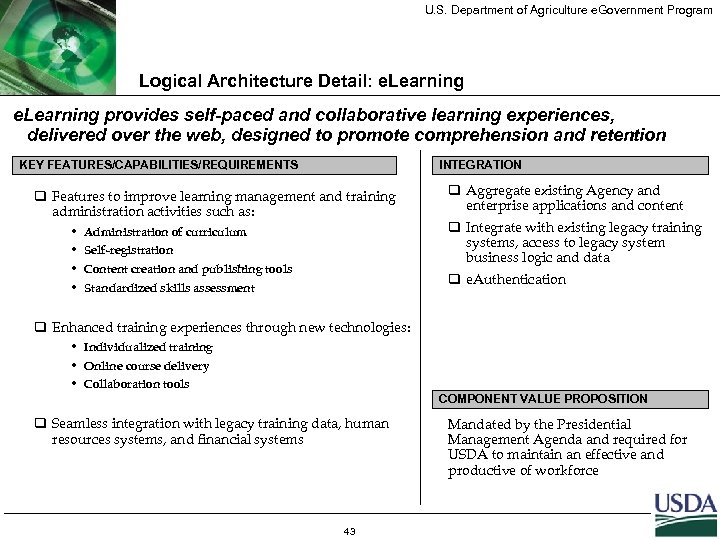 U. S. Department of Agriculture e. Government Program Logical Architecture Detail: e. Learning provides self-paced and collaborative learning experiences, delivered over the web, designed to promote comprehension and retention KEY FEATURES/CAPABILITIES/REQUIREMENTS INTEGRATION q Features to improve learning management and training administration activities such as: • • Administration of curriculum Self-registration Content creation and publishing tools q Aggregate existing Agency and enterprise applications and content q Integrate with existing legacy training systems, access to legacy system business logic and data q e. Authentication Standardized skills assessment q Enhanced training experiences through new technologies: • Individualized training • Online course delivery • Collaboration tools COMPONENT VALUE PROPOSITION q Seamless integration with legacy training data, human resources systems, and financial systems 43 Mandated by the Presidential Management Agenda and required for USDA to maintain an effective and productive of workforce
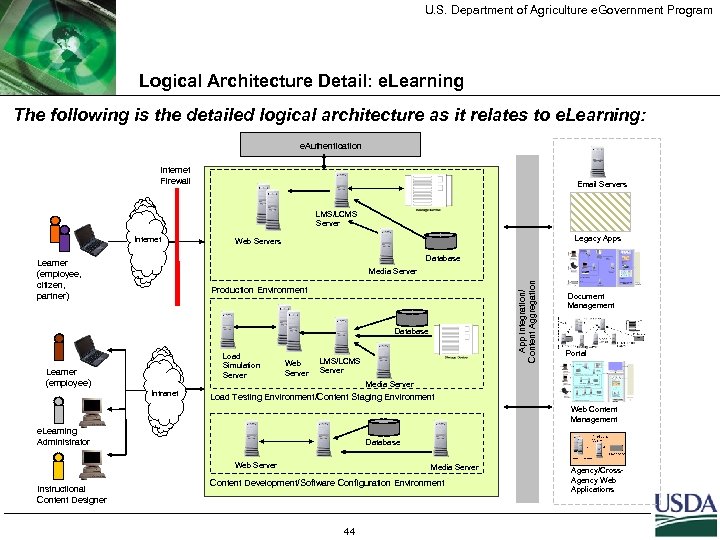 U. S. Department of Agriculture e. Government Program Logical Architecture Detail: e. Learning The following is the detailed logical architecture as it relates to e. Learning: e. Authentication Internet Firewall Email Servers LMS/LCMS Server Internet Legacy Apps Web Servers Database Learner (employee, citizen, partner) App Integration/ Content Aggregation Media Server Production Environment Database Load Simulation Server Learner (employee) Intranet Web Server LMS/LCMS Server Document Management Portal Media Server Load Testing Environment/Content Staging Environment Web Content Management e. Learning Administrator Database Web Server Instructional Content Designer Media Server Content Development/Software Configuration Environment 44 Agency/Cross. Agency Web Applications
 U. S. Department of Agriculture e. Government Program Agenda Background and Context e. Authentication Overview e. Deployment Overview e. Learning Overview Next Steps 45
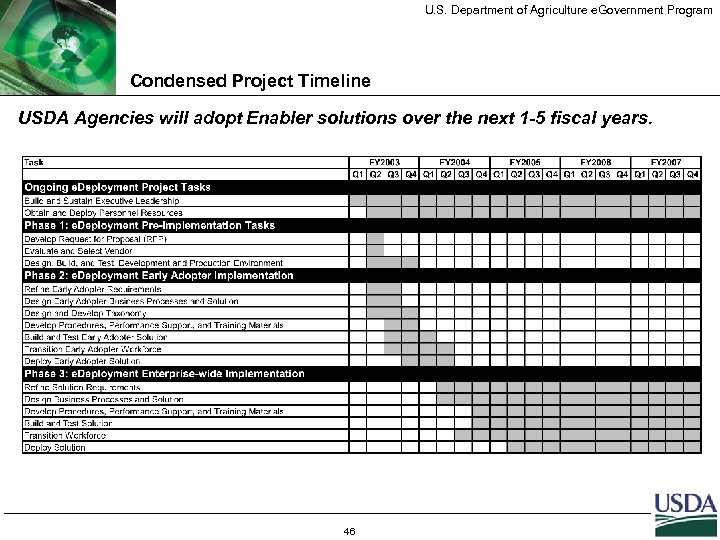 U. S. Department of Agriculture e. Government Program Condensed Project Timeline USDA Agencies will adopt Enabler solutions over the next 1 -5 fiscal years. 46
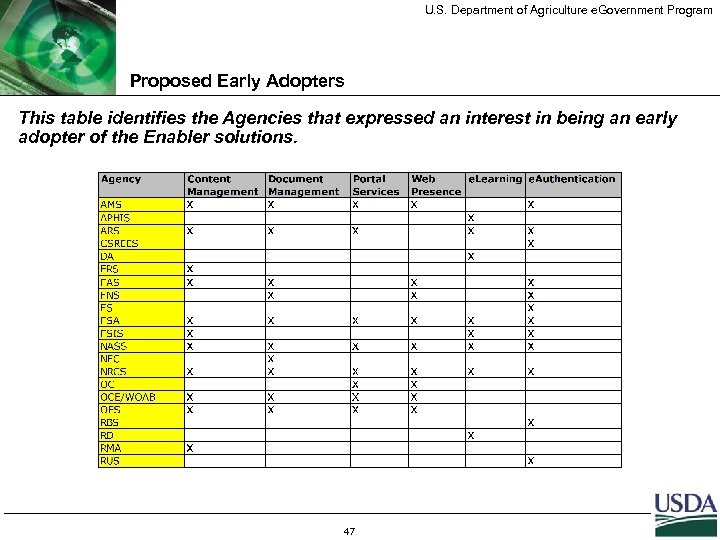 U. S. Department of Agriculture e. Government Program Proposed Early Adopters This table identifies the Agencies that expressed an interest in being an early adopter of the Enabler solutions. 47
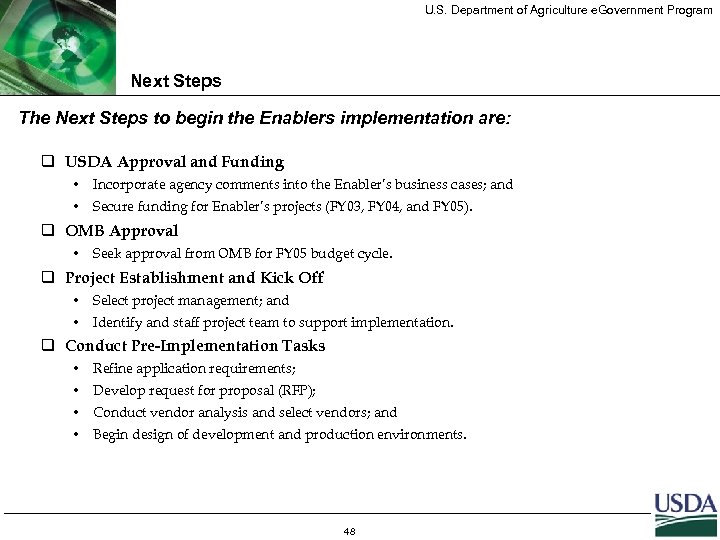 U. S. Department of Agriculture e. Government Program Next Steps The Next Steps to begin the Enablers implementation are: q USDA Approval and Funding • Incorporate agency comments into the Enabler’s business cases; and • Secure funding for Enabler’s projects (FY 03, FY 04, and FY 05). q OMB Approval • Seek approval from OMB for FY 05 budget cycle. q Project Establishment and Kick Off • Select project management; and • Identify and staff project team to support implementation. q Conduct Pre-Implementation Tasks • Refine application requirements; • Develop request for proposal (RFP); • Conduct vendor analysis and select vendors; and • Begin design of development and production environments. 48