


 Скачать презентацию u Portal and UNICON Using open-source u Portal
cec7acb6b5920e75d8f16efc5b63b9b9.ppt
- Количество слайдов: 40
 u. Portal and UNICON “Using open-source u. Portal technology to create a comprehensive online environment for your campus” Copyright UNICON 2004. This work is the intellectual property of UNICON. Permission is granted for this material to be shared for non-commercial, educational purposes, provided that this copyright statement appears on the reproduced materials and notice is given that the copying is by permission of the author. To disseminate otherwise or to republish requires written permission from the author.
 Introduction Presenter Information: Jason C. Lacy Senior Sales Consultant jlacy@unicon. net (480) 558 -2461 - office Dr. Harry Koehnemann Associate Professor, ASU harry@asu. edu (480) 727 -1673 Corporate Information: Founded in 1993, Unicon has a strong history of delivering educational and community technology for corporations and institutions world-wide. Core competencies: • Designing, implementing and supporting enterprise portal, learning and integration technology for higher education institutions • Specializing in Enterprise Information Portals (EIP), Advanced Learning, and Content Technology. • The leading commercial supporter of the u. Portal open source initiative
 Agenda • Introduction • Agenda Review Chapter 1 – “Portals” * Why do I need a portal? * How do I decide what portal to use? * What should be in my portal? * Is Open-Source a real solution? Chapter 2 – “u. Portal” * Background / Future * Advantages * Success Stories * Support Services Chapter 3 – “Academus” * Difference from u. Portal * Advantages * Key functionality * Success Stories Chapter 4 – “Question and Answer”
 Chapter 1 – “Portals”
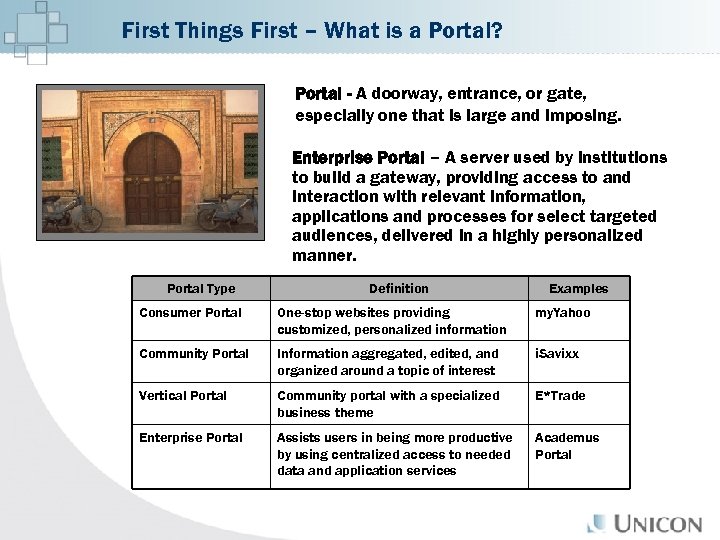 First Things First – What is a Portal? Portal - A doorway, entrance, or gate, especially one that is large and imposing. Enterprise Portal – A server used by institutions to build a gateway, providing access to and interaction with relevant information, applications and processes for select targeted audiences, delivered in a highly personalized manner. Portal Type Definition Examples Consumer Portal One-stop websites providing customized, personalized information my. Yahoo Community Portal Information aggregated, edited, and organized around a topic of interest i. Savixx Vertical Portal Community portal with a specialized business theme E*Trade Enterprise Portal Assists users in being more productive by using centralized access to needed data and application services Academus Portal
 Why do I need a Portal? IT Challenges: • Increasing number of sources of information • Increasing competition for users “eyes” – users not seeing important information • Increasing number of services requiring authorization • Complexity of providing secure login to all systems • Staff and budgets are being tightened to support these systems Constituent Expectations: • Users expect systems to be easier to use, even in the face of increased complexity • Users expect more services to be offered via the web • Users expect greater personalization
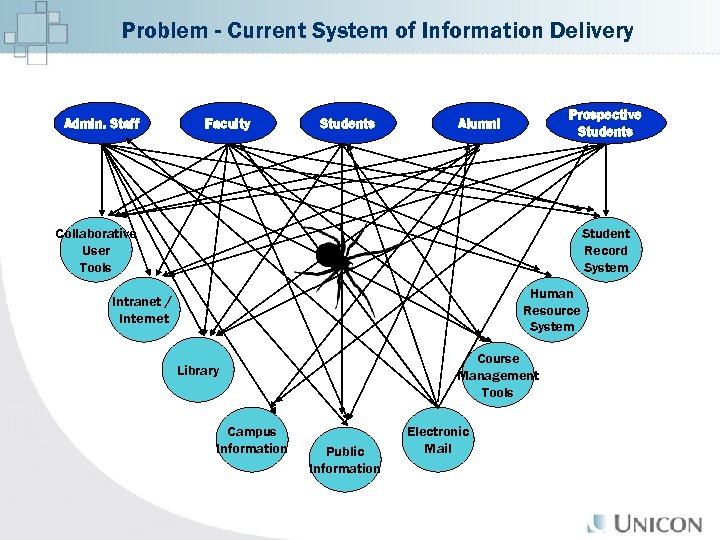 Problem - Current System of Information Delivery Admin. Staff Faculty Students Prospective Students Alumni Collaborative User Tools Student Record System Human Resource System Intranet / Internet Course Management Tools Library Campus Information Public Information Electronic Mail
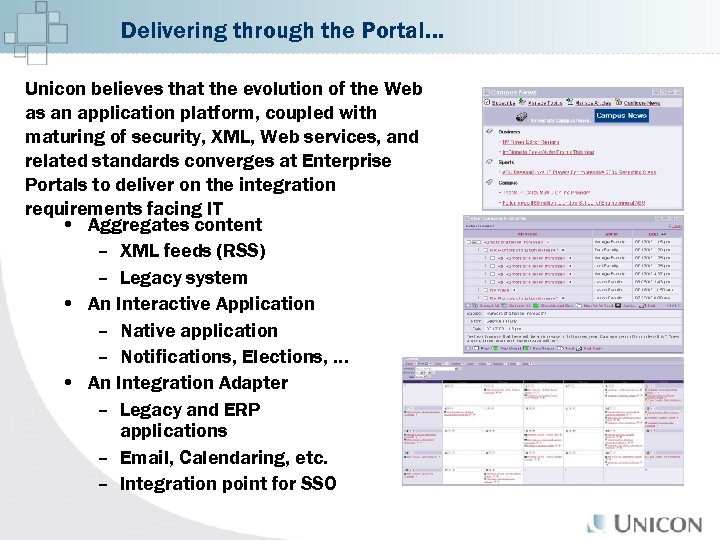 Delivering through the Portal… Unicon believes that the evolution of the Web as an application platform, coupled with maturing of security, XML, Web services, and related standards converges at Enterprise Portals to deliver on the integration requirements facing IT • Aggregates content – XML feeds (RSS) – Legacy system • An Interactive Application – Native application – Notifications, Elections, … • An Integration Adapter – Legacy and ERP applications – Email, Calendaring, etc. – Integration point for SSO
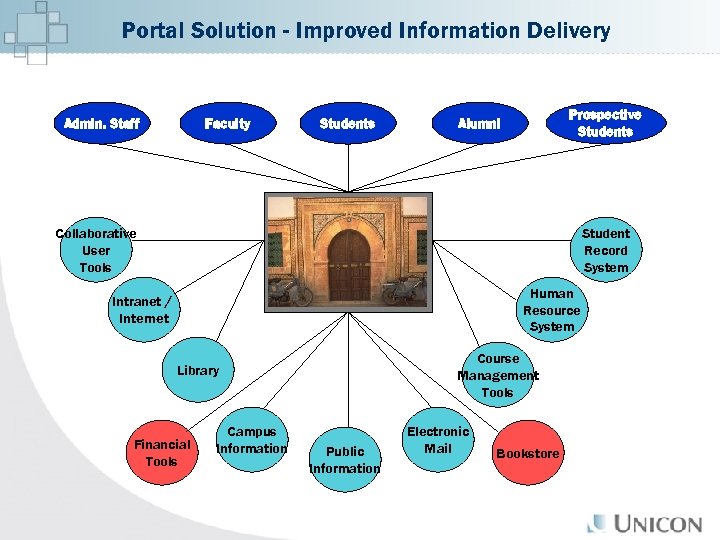 Portal Solution - Improved Information Delivery Admin. Staff Faculty Students Prospective Students Alumni Collaborative User Tools Student Record System Human Resource System Intranet / Internet Course Management Tools Library Financial Tools Campus Information Public Information Electronic Mail Bookstore
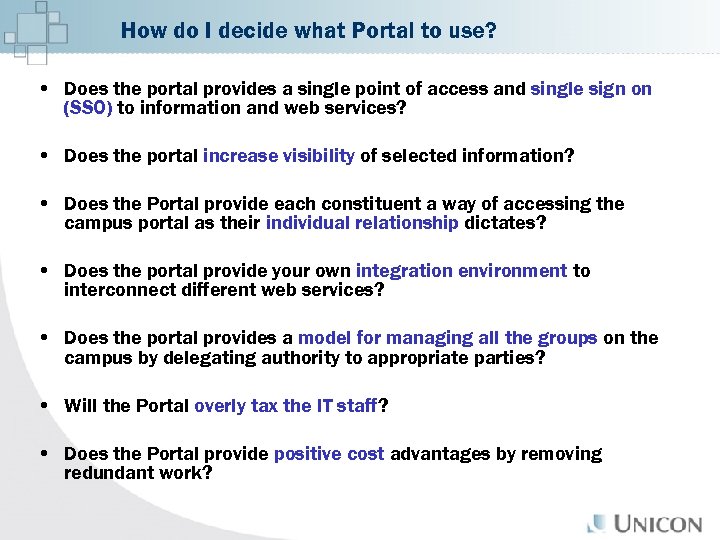 How do I decide what Portal to use? • Does the portal provides a single point of access and single sign on (SSO) to information and web services? • Does the portal increase visibility of selected information? • Does the Portal provide each constituent a way of accessing the campus portal as their individual relationship dictates? • Does the portal provide your own integration environment to interconnect different web services? • Does the portal provides a model for managing all the groups on the campus by delegating authority to appropriate parties? • Will the Portal overly tax the IT staff? • Does the Portal provide positive cost advantages by removing redundant work?
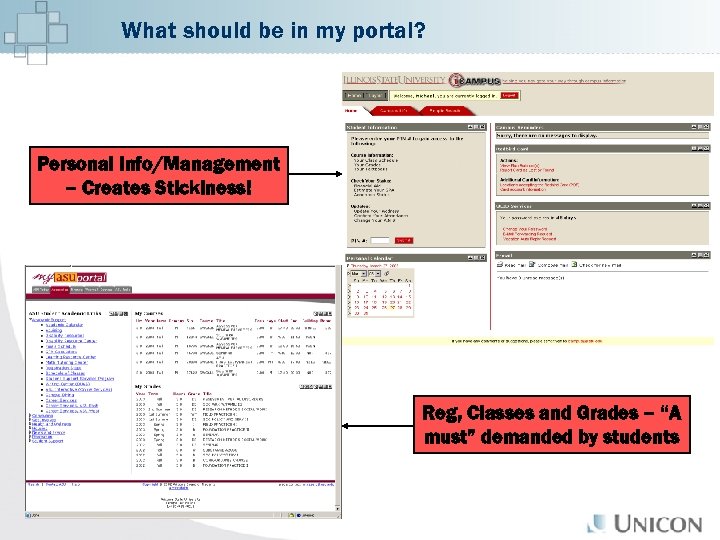 What should be in my portal? Personal Info/Management – Creates Stickiness! Reg, Classes and Grades – “A must” demanded by students
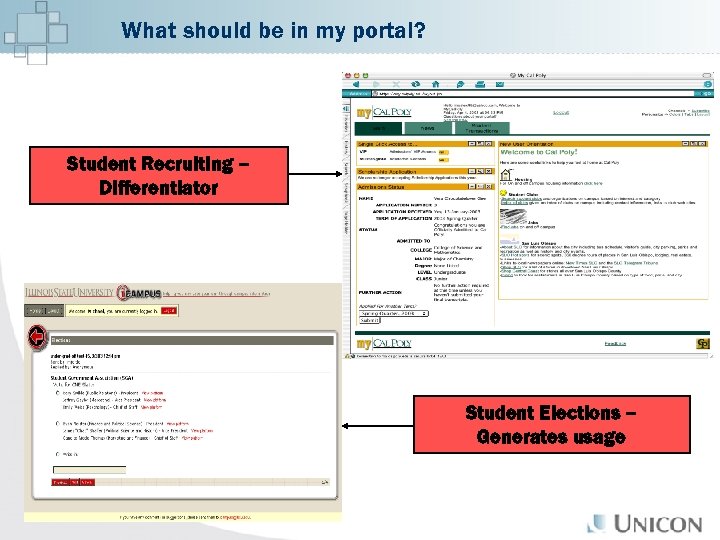 What should be in my portal? Student Recruiting – Differentiator Student Elections – Generates usage
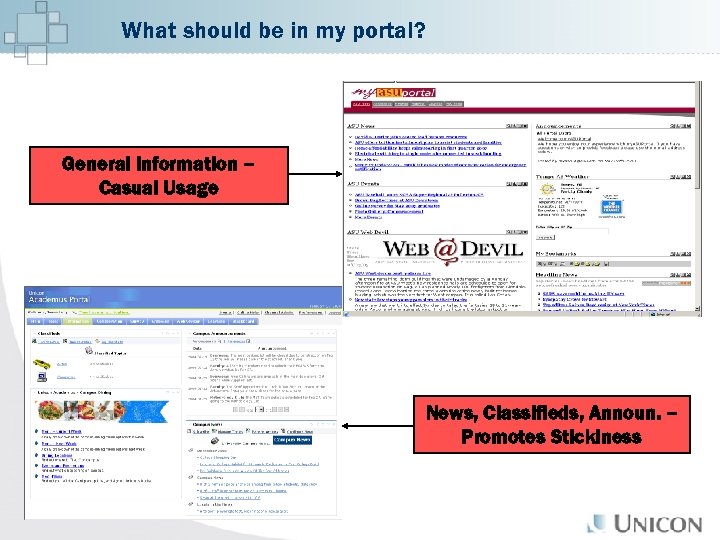 What should be in my portal? General Information – Casual Usage News, Classifieds, Announ. – Promotes Stickiness
 Is Open Source a Real Solution? General Advantages of Open Source: • Cost • Adaptability • Community • Availability Common Disadvantages with Open Source: • Lack of Documentation • Lack of Commercial Support • Unstable Code Base • Unknown Future u. Portal complements these advantages while UNICON mitigates opensource disadvantages with its support services!
 Chapter 2 – “What is u. Portal? ”
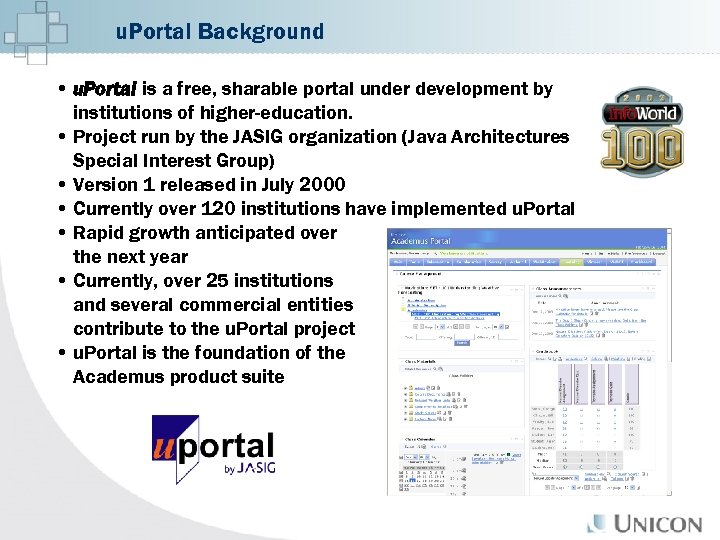 u. Portal Background • u. Portal is a free, sharable portal under development by institutions of higher-education. • Project run by the JASIG organization (Java Architectures Special Interest Group) • Version 1 released in July 2000 • Currently over 120 institutions have implemented u. Portal • Rapid growth anticipated over the next year • Currently, over 25 institutions and several commercial entities contribute to the u. Portal project • u. Portal is the foundation of the Academus product suite
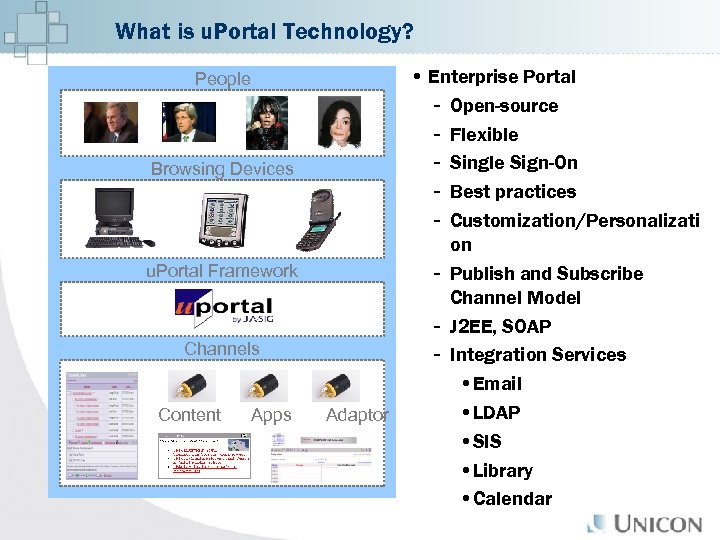 What is u. Portal Technology? People Browsing Devices u. Portal Framework Channels Content Apps • Enterprise Portal - Open-source - Flexible - Single Sign-On - Best practices - Customization/Personalizati on - Publish and Subscribe Channel Model - J 2 EE, SOAP - Integration Services • Email • LDAP Adaptor • SIS • Library • Calendar
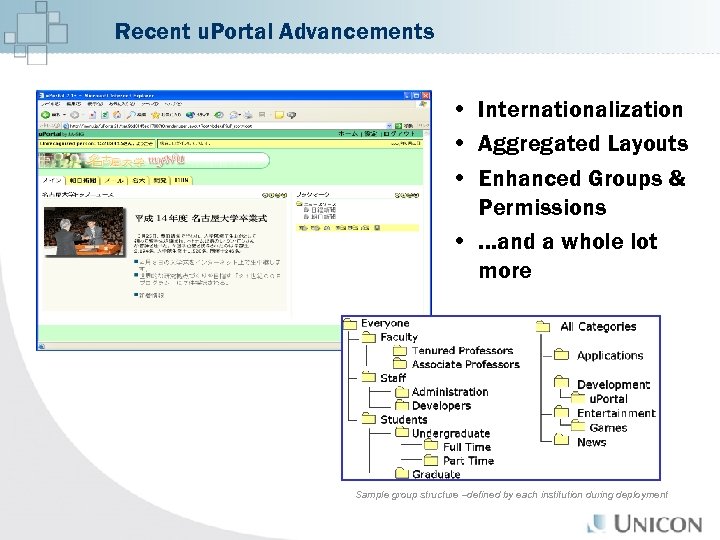 Recent u. Portal Advancements • Internationalization • Aggregated Layouts • Enhanced Groups & Permissions • …and a whole lot more Sample group structure –defined by each institution during deployment
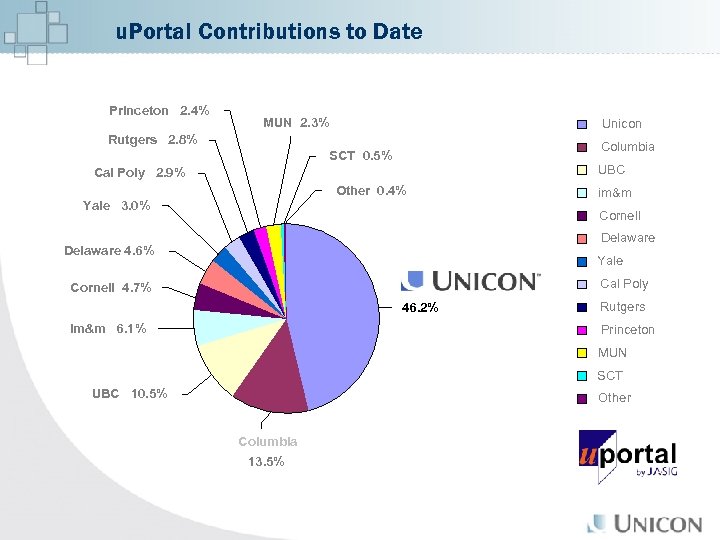 u. Portal Contributions to Date Princeton 2. 4% MUN 2. 3% Unicon Rutgers 2. 8% Columbia SCT 0. 5% UBC Cal Poly 2. 9% Other 0. 4% Yale 3. 0% im&m Cornell Delaware 4. 6% Yale Cal Poly Cornell 4. 7% 46. 2% im&m 6. 1% Rutgers Princeton MUN SCT UBC 10. 5% Other Columbia 13. 5%
 The Future of u. Portal - Sakai http: //www. sakaiproject. org “The University of Michigan, Indiana University, MIT, Stanford, the u. Portal Consortium, and the Open Knowledge Initiative (OKI) are joining forces to integrate and synchronize their considerable educational software into a modular, pre-integrated collection of open source tools. ” • Enterprise Services-based Portal (u. Portal) • Course Management System with sophisticated Assessment Tools • Research Support Collaboration System • Tool Portability Profile $2. 4 million grant from Mellon Foundation $2. 0 million committed by Sakai member institutions
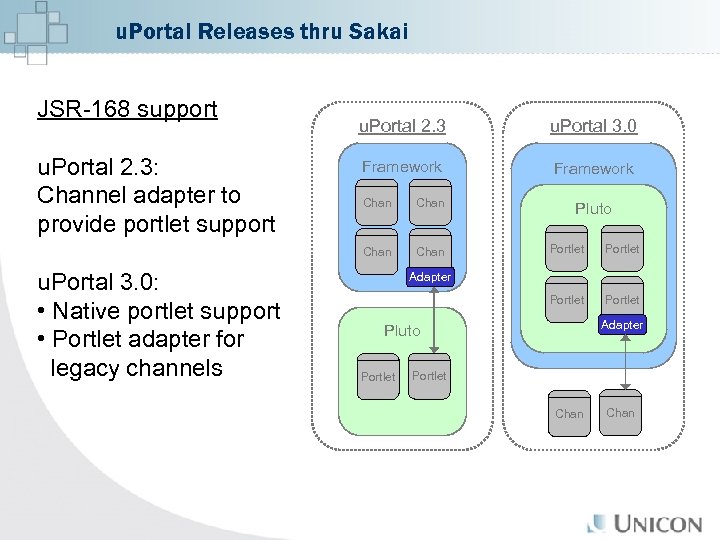 u. Portal Releases thru Sakai JSR-168 support u. Portal 2. 3: Channel adapter to provide portlet support u. Portal 2. 3 u. Portal 3. 0 Framework Chan u. Portal 3. 0: • Native portlet support • Portlet adapter for legacy channels Chan Pluto Portlet Adapter Pluto Portlet Chan
 u. Portal Advantages • Open Source means reduced cost of ownership • Developed by/for Higher Education • Growing community of users / Broad adoption • Standards Based • Development Platform vs. Proprietary Solution – vast customization • Database and Authentication System independent • Platform / OS Independent • Backed by commercial entities to ensure stability and continued future support • UNICON provides all support services - Training, mentoring, customization, conversion, etc. • Continued funding
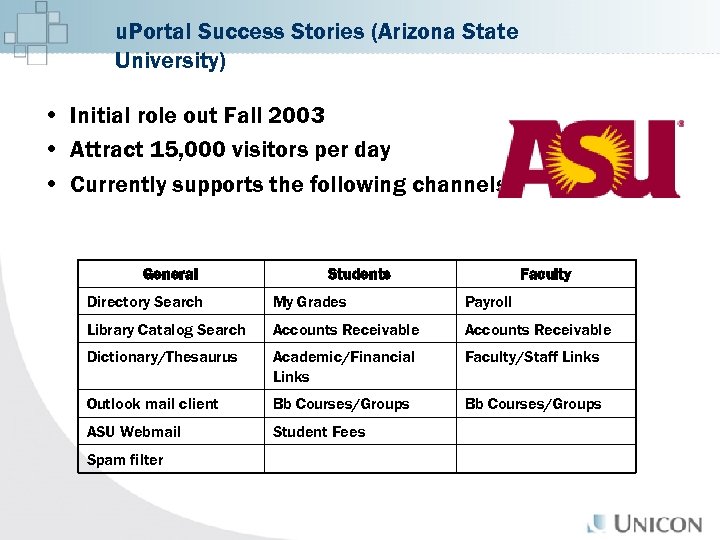 u. Portal Success Stories (Arizona State University) • Initial role out Fall 2003 • Attract 15, 000 visitors per day • Currently supports the following channels General Students Faculty Directory Search My Grades Payroll Library Catalog Search Accounts Receivable Dictionary/Thesaurus Academic/Financial Links Faculty/Staff Links Outlook mail client Bb Courses/Groups ASU Webmail Student Fees Spam filter
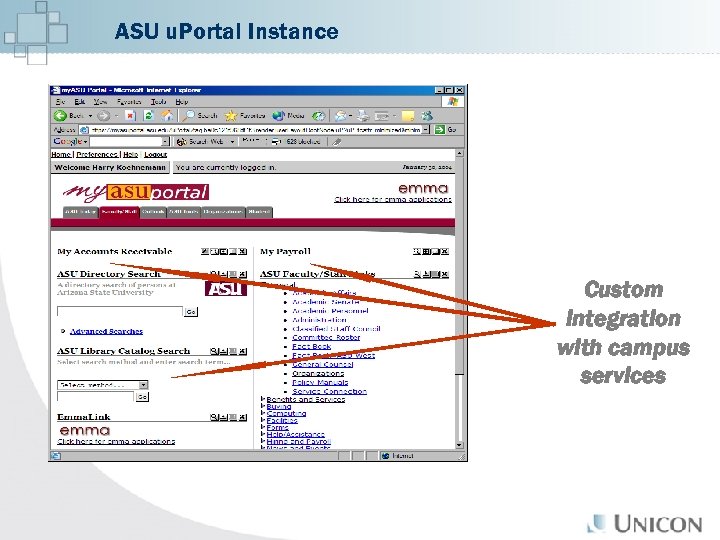 ASU u. Portal Instance Custom integration with campus services
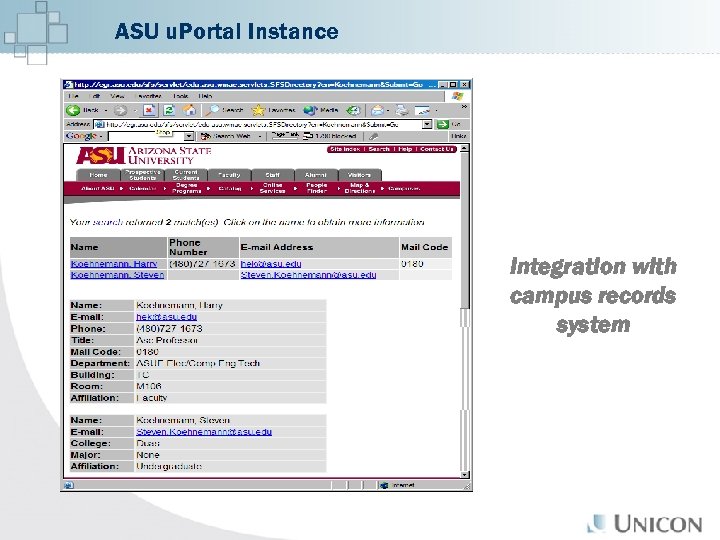 ASU u. Portal Instance Integration with campus records system
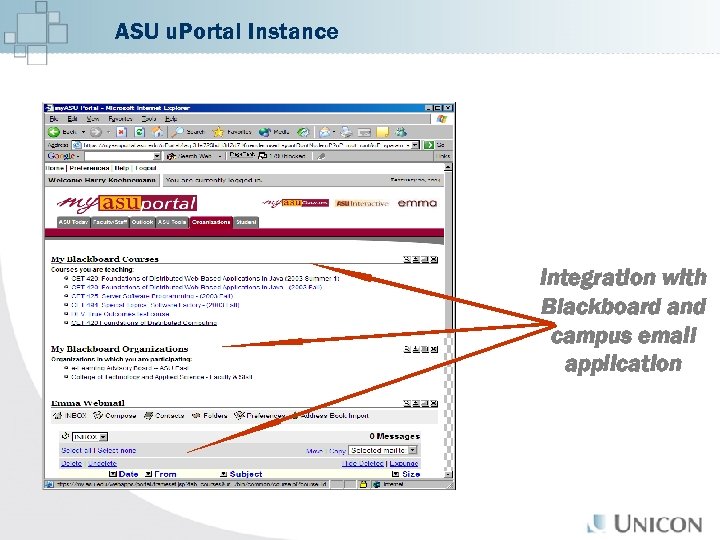 ASU u. Portal Instance Integration with Blackboard and campus email application
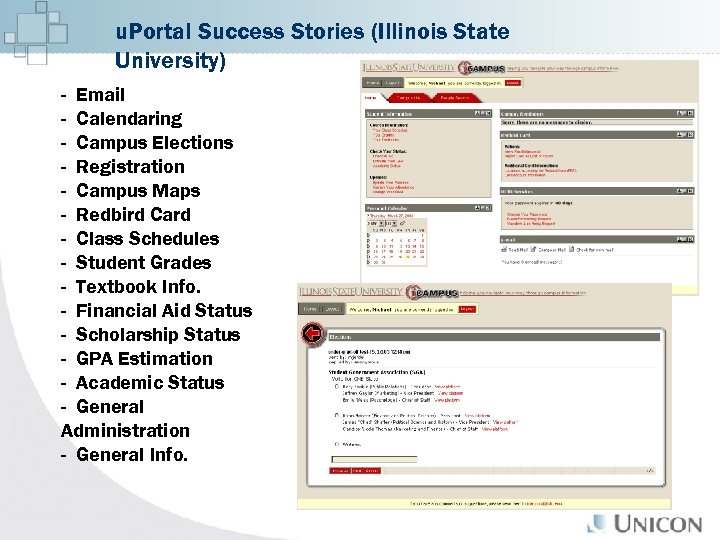 u. Portal Success Stories (Illinois State University) - Email - Calendaring - Campus Elections - Registration - Campus Maps - Redbird Card - Class Schedules - Student Grades - Textbook Info. - Financial Aid Status - Scholarship Status - GPA Estimation - Academic Status - General Administration - General Info.
 u. Portal Support Services From UNICON • Assessment • Education Services – u. Portal Fundamentals Training – u. Portal Advanced Training • Implementation Project Management • Architecture and Design • Capacity Planning • Installation and Configuration • Central Authentication Service (CAS) • Mentoring • Development and Test Environment Setup • Integration • Custom Channel Development • Upgrade and Conversion • Technical Support
 u. Portal Expertise – UNICON’s u. Portal Services Customers US Higher Education Customers • • • • University of Delaware Illinois St. University of Minnesota University of Chicago Iowa St. University Syracuse University Texas Christian University of New Mexico Cornell University Villanova University Rutgers University of Kansas Northern Arizona University Santa Barbara City College Columbia University • University of Utah • Salve Regina University • Virginia Commonwealth University • Yale School of Management International Customers • University of British Columbia • Kwantlen University College • University of Nottingham • French Ministry • Deakin University • Umea Universitet • Universite De Geneve • Guelph University * Partial Listing of Customers
 u. Portal Expertise – UNICON’s u. Portal Training U. S. • Georgia Tech University • Dowling College • Miami University • Texas Tech University • Heidelberg College • Loyola University Chicago • Roanoke College • Ashland University • Millersville College • Cedarville University • California Polytechnic State University • California State University, Hayward • Tufts University • Arizona State University International • University of Bristol • University of Nottingham • Stolkholms Universitet • University of Saskatchewan • Chalmers University of Technology • Selwyn College Cambridge • De. Montford University • John Moores University • Lund University * Partial Listing of Customers
 Chapter 3 – “Academus”
 UNICON Academus is an enterprise solution built on open source technology with integration services that easily pull together the missioncritical components for higher education institutions.
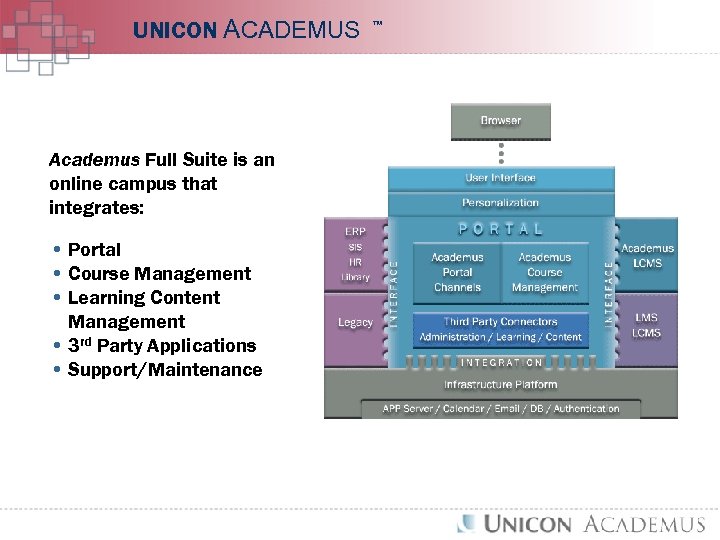 UNICON ACADEMUS TM Enterprise Portal Academus Full Suite is an online campus that integrates: • Portal • Course Management • Learning Content Management • 3 rd Party Applications • Support/Maintenance PORTAL CHANNELS CLI Virtuoso® COURSE MANAGEMENT SYSTEM LCMS Support, Training and Mentoring
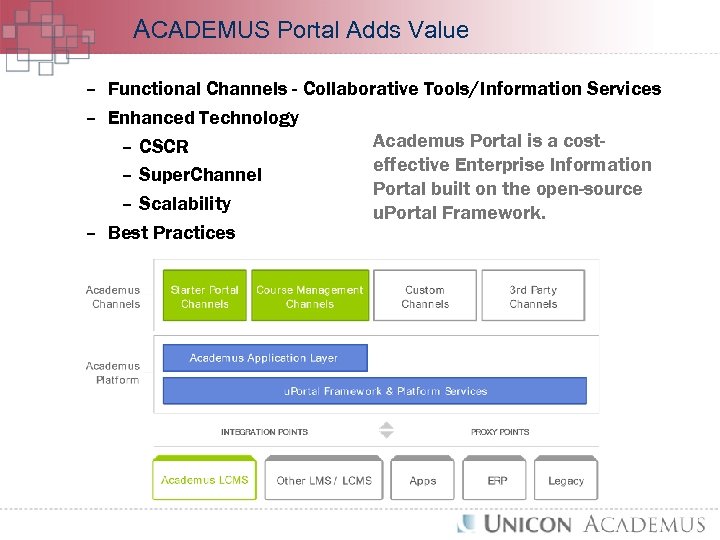 ACADEMUS Portal Adds Value – Functional Channels - Collaborative Tools/Information Services – Enhanced Technology Academus Portal is a cost– CSCR effective Enterprise Information – Super. Channel Portal built on the open-source – Scalability u. Portal Framework. – Best Practices
 ACADEMUS Technology - Functional Channels Academus Portal provides use of the following eighteen channels as part of its licensing costs. • • • Three Calendar Channels Campus Announcements Notification Channel Bookmarks Briefcase Address Book My Notes Campus News Classifieds • • • Discussion Forums Administration Group Chat Administration Web. Mail Survey Poll Survey Author User Admin
 ACADEMUS Customers Academus Customers • Roanoke College – Portal • El Camino Community College – Portal • Trinity University – Portal • Marietta College – Portal • Lambton College – Portal • Lethbridge Community College – Portal • Champlain College - Portal • San Joaquin Valley College – Full Suite • Randolph-Macon Woman’s College – Portal • New Teacher Center @ UC Santa Cruz – Full Suite • Brooklyn College – Portal • University of California, Merced – Full Suite • Western Kentucky University – Portal • The Rockefeller University – Portal • Yuba College – Portal • Saint Leo University - Portal
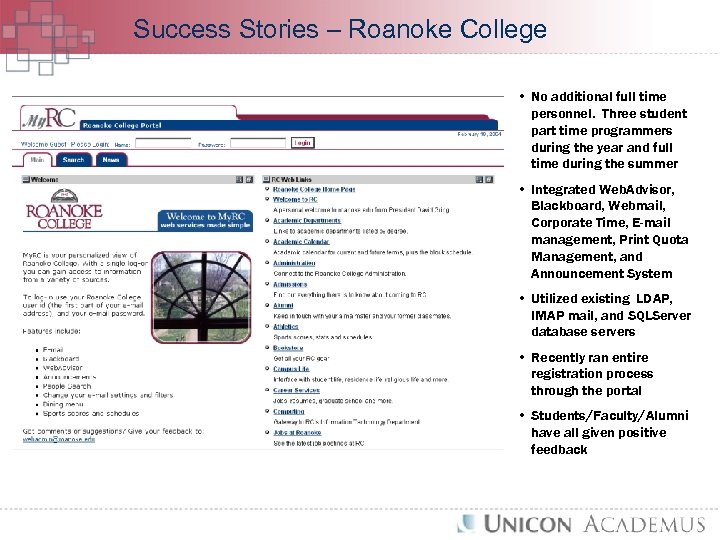 Success Stories – Roanoke College • No additional full time personnel. Three student part time programmers during the year and full time during the summer • Integrated Web. Advisor, Blackboard, Webmail, Corporate Time, E-mail management, Print Quota Management, and Announcement System • Utilized existing LDAP, IMAP mail, and SQLServer database servers • Recently ran entire registration process through the portal • Students/Faculty/Alumni have all given positive feedback
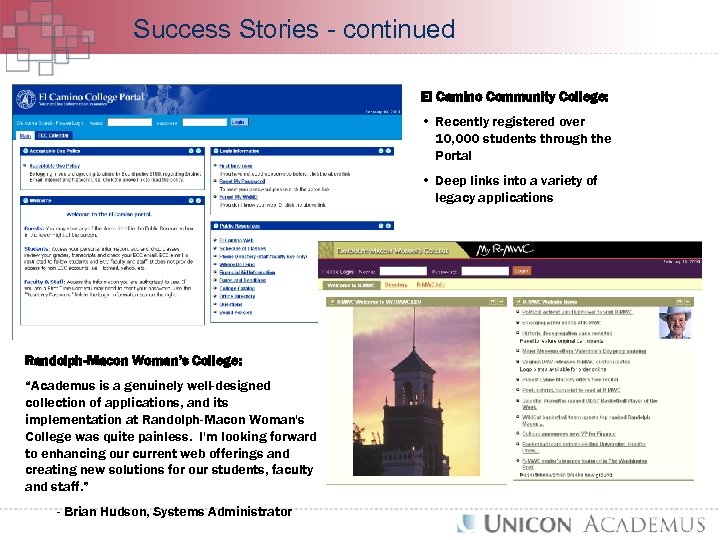 Success Stories - continued El Camino Community College: • Recently registered over 10, 000 students through the Portal • Deep links into a variety of legacy applications Randolph-Macon Woman’s College: “Academus is a genuinely well-designed collection of applications, and its implementation at Randolph-Macon Woman's College was quite painless. I'm looking forward to enhancing our current web offerings and creating new solutions for our students, faculty and staff. ” - Brian Hudson, Systems Administrator
 Devil in the Details… Campus portals can be very complex. For their success many things must be considered: - Do I want an open, expandable system or simply a packaged system? What is the primary role of the portal? What systems do I want to integrate with and how? Do I plan to push users to the portal and how? Who will be the first user groups? What information do I want the users to access? How much customization by the user do I want to allow and maintain? How do I push new channels to the users? Are their certain channels I don’t want the user to remove? On what OS do I want to implement? What application server do I want to use? What portal database server do I want to use? How will I handle older browsers? What will it cost to implement? What will be the on going cost? UNICON can help you make these decisions!
 Chapter 4 – “Question and Answer”