 Скачать презентацию To be an architect Ding Qing dingqing ustc edu
95145a24c86b15ead7fa257845fdd728.ppt
- Количество слайдов: 162



To be an architect Ding Qing dingqing@ustc. edu. cn
Course Goal l This course provides you with knowledge and skills to: – – – Create architectures using Java™ 2 Platform, Enterprise Edition (J 2 EE™) best practices and design guidelines Use design patterns to create scalable, extensible, multi-tiered J 2 EE solutions Form a sound basis for further study in architecture and design
Course Overview l l l Basic architectural principles J 2 EE technology and basic architectural principles J 2 EE Patterns Best practices and design guidelines J 2 EE technology’s applicability to the following applications: – – – Business-to-Business (B 2 B) Enterprise Resource Planning (ERP) Workflow
Module-by-Module Overview l l l l Module 1 – Architect and Architecture Module 2 – Principles of Architecture Module 3 – Creating an Architecture Using J 2 EE Technology Module 4 – J 2 EE Best Practices – Overview Module 5 – J 2 EE Best Practices – Web Tier Module 6 – J 2 EE Best Practices – EJB Tier Module 7 – J 2 EE Best Practices – EIS Integration Tier
Module-by-Module Overview l l l Module 8 – J 2 EE Best Practices – Services Module 9 – J 2 EE Patterns Module 10 – Special Topics
Module 1 Architect and Architecture
The Architect’s Role l The architect: – – – Visualizes the behavior of the system Creates the blueprint for the system Defines the way in which the elements of the system work together Distinguishes between functional and nonfunctional system requirements Is responsible for integrating non-functional requirements into the system
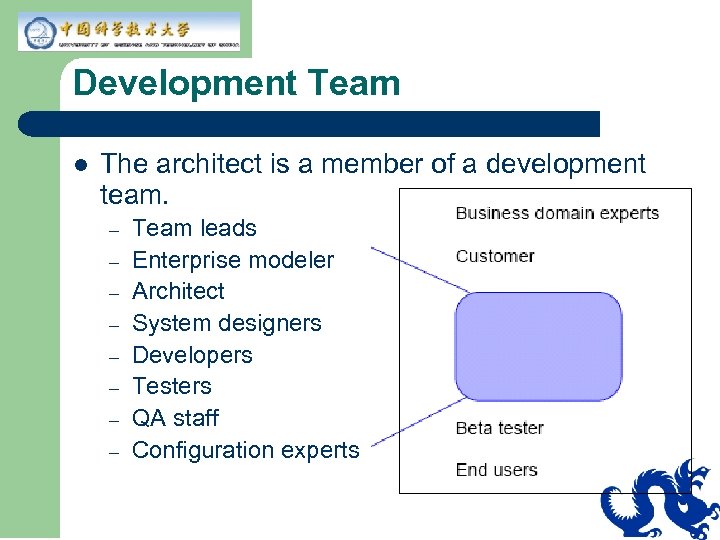
Development Team l The architect is a member of a development team. – – – – Team leads Enterprise modeler Architect System designers Developers Testers QA staff Configuration experts
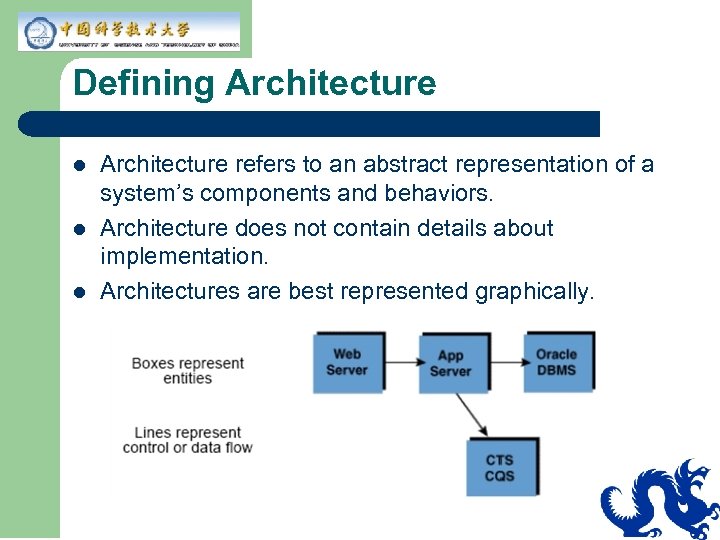
Defining Architecture l l l Architecture refers to an abstract representation of a system’s components and behaviors. Architecture does not contain details about implementation. Architectures are best represented graphically.
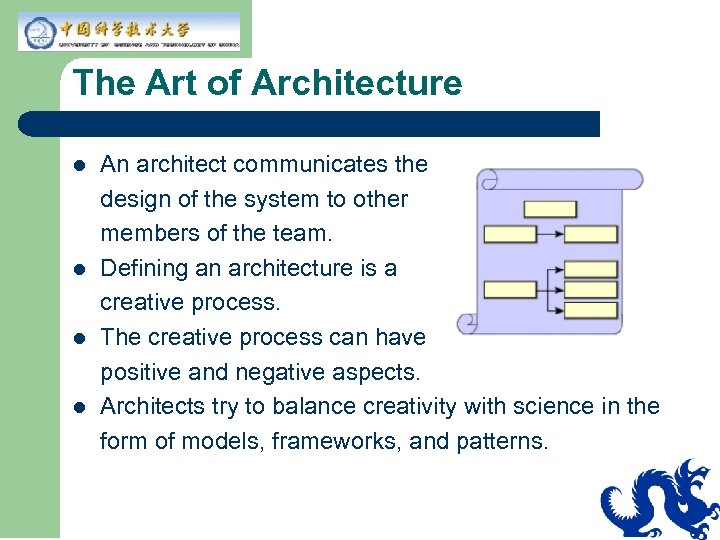
The Art of Architecture l l An architect communicates the design of the system to other members of the team. Defining an architecture is a creative process. The creative process can have positive and negative aspects. Architects try to balance creativity with science in the form of models, frameworks, and patterns.
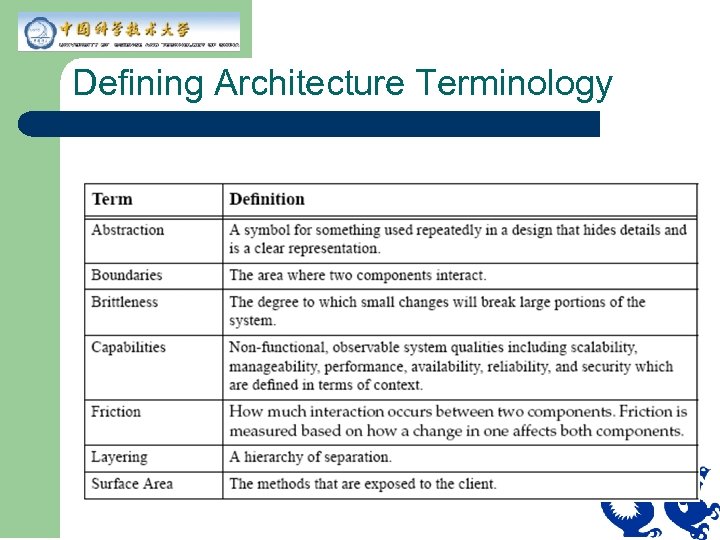
Defining Architecture Terminology
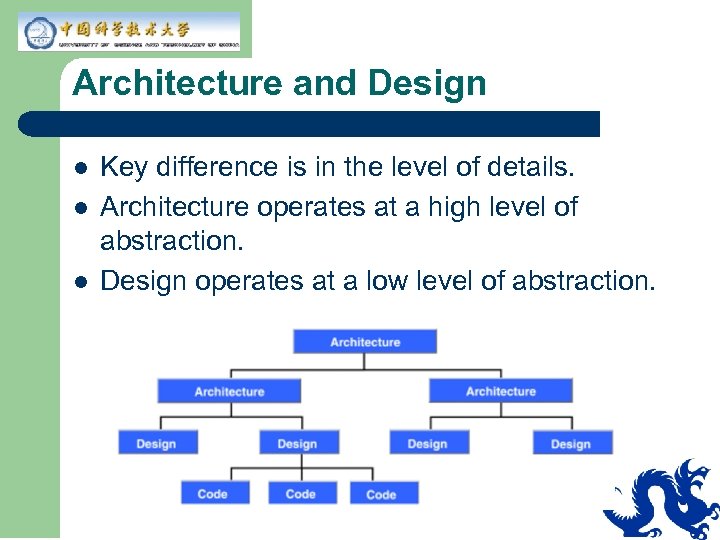
Architecture and Design l l l Key difference is in the level of details. Architecture operates at a high level of abstraction. Design operates at a low level of abstraction.
Architectural Building Blocks Capabilities and design goals l Process and artifacts l Communication mechanisms To build an architecture, the architect uses the following: l Architectural fundamentals l Experience: l – – Best practices Frameworks, patterns, and idioms
Capabilities and Design Goals Capabilities: l Are non-functional, observable system qualities that affect the long term viability of your architecture. l Depend on the context of your system. l Can be specified, measured, and prioritized. – Example of specifying reliability — No more than 1 failure per 1000 attempts or 99. 9 percent. Design goals: l Are non-functional, non-observable system qualities designed into a system to achieve the capabilities.
Process and Artifacts l l A process consists of an orderly sequence of steps from initiation to delivery to deployment. The purpose of a process is to: – – – l l Address assumptions Minimize the impact of risks Identify constraints Artifacts result from the process. UML is used to communicate the architecture and design to other members of the team, both present and future.
Communication Mechanisms l l l HTTP, HTTPS RMI IIOP Messaging Transactions (ACID)
Architectural Fundamentals l l Top-down design approach Identifying layers, tiers, and services Establishing service-based architectures Abstraction
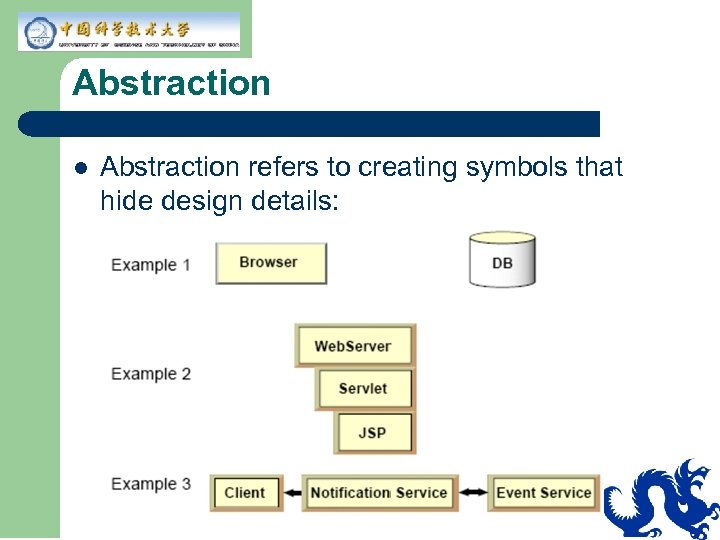
Abstraction l Abstraction refers to creating symbols that hide design details:
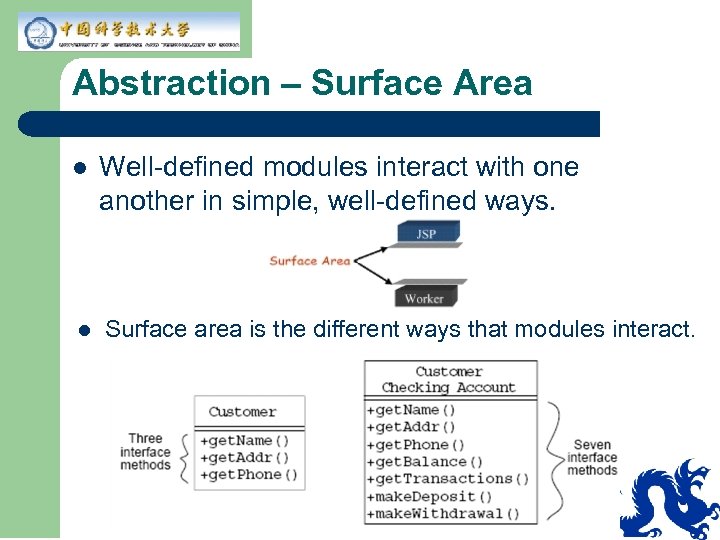
Abstraction – Surface Area l l Well-defined modules interact with one another in simple, well-defined ways. Surface area is the different ways that modules interact.
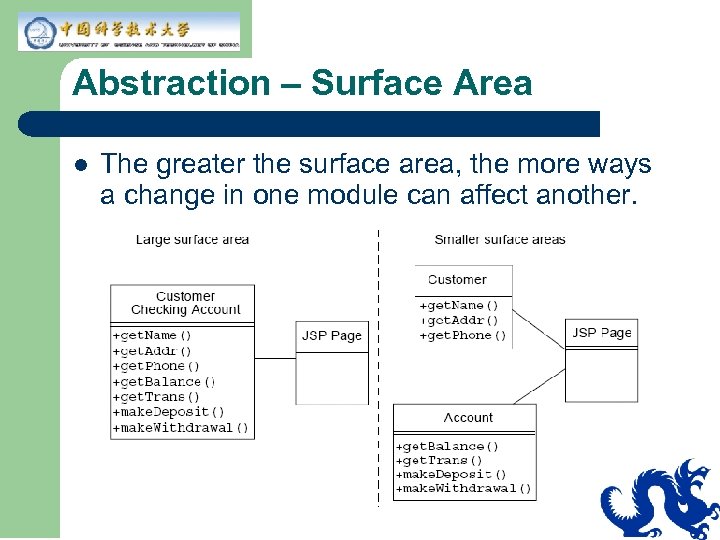
Abstraction – Surface Area l The greater the surface area, the more ways a change in one module can affect another.
Check Your Progress l l l l Define the role of an architect Define the term “architecture” Explain architectural terms such as abstraction, boundaries, brittleness, and capabilities List the differences between “architecture” and “design” Identify the fundamentals of system architecture Identify and define key architectural principles Explain the concept of abstraction, and how it is implemented in system architecture
Think Beyond l l The architect has many issues to consider, as discussed in this module. How absolute are these issues? Can you think of how they relate to each other? Can you think of other issues that should be considered?
Module 2 Principles of Architecture
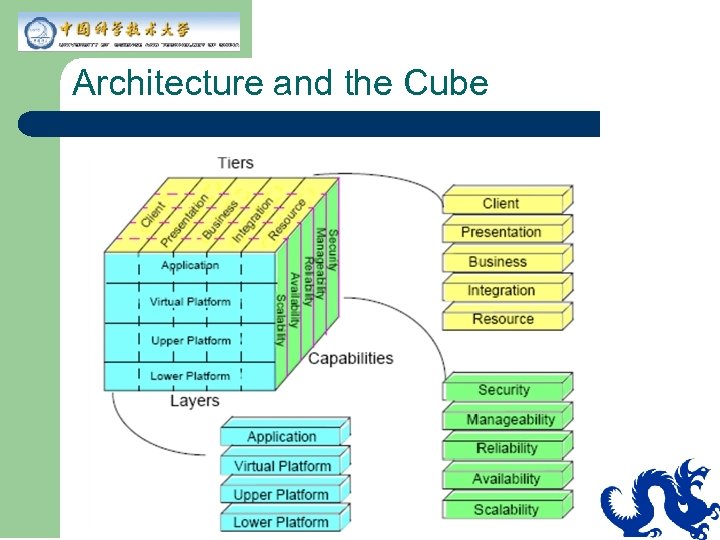
Architecture and the Cube
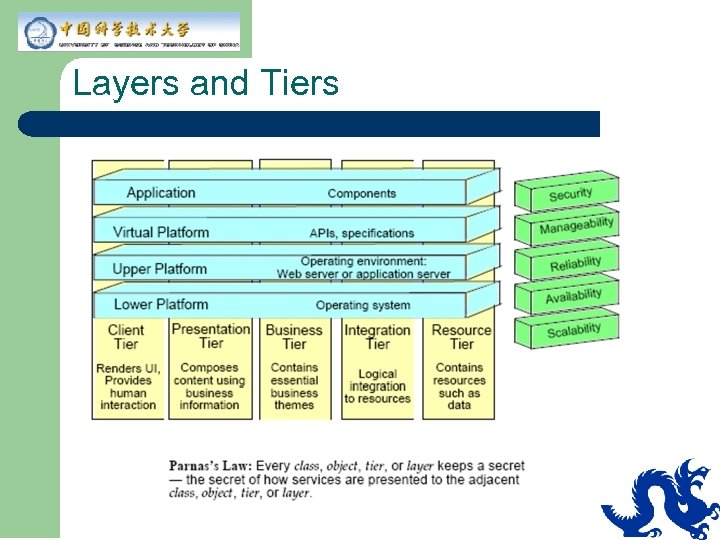
Layers and Tiers
Capabilities l Nonfunctional, observable system qualities: – – l Do not represent separate specified functions Cannot be satisfied by any one component Example: – – Retail toy store’s web site cannot handle the load and crashes: Two weeks before Christmas After a $50 million advertisement campaign Expansion of capacity will take six weeks
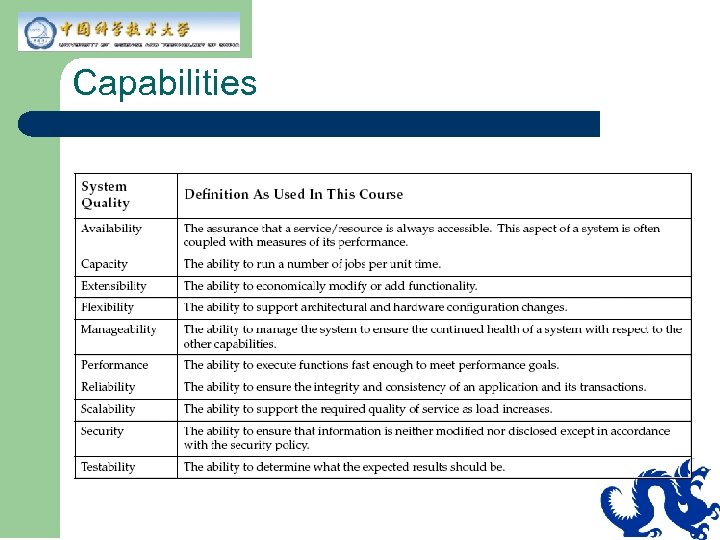
Capabilities
Availability and Reliability Availability l The assurance that a service or a resource is highly accessible. (time available) / (time possible) l Example – 201 seconds down/week Reliability l The ability to ensure the integrity and consistency of the application and all of its transactions. l Example – Users will experience failed sessions no more than 1 time in 1000 attempts (99. 9 percent reliability).
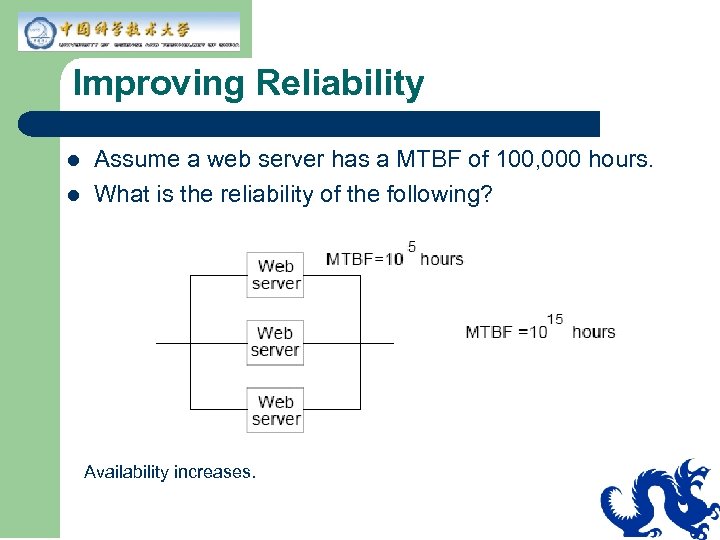
Improving Reliability l l Assume a web server has a MTBF of 100, 000 hours. What is the reliability of the following? Availability increases.
Manageability l l The ability to manage the system to ensure the continued health of a system with respect to the other system qualities. Metric example – Number of staff hours per month to perform normal upgrades.
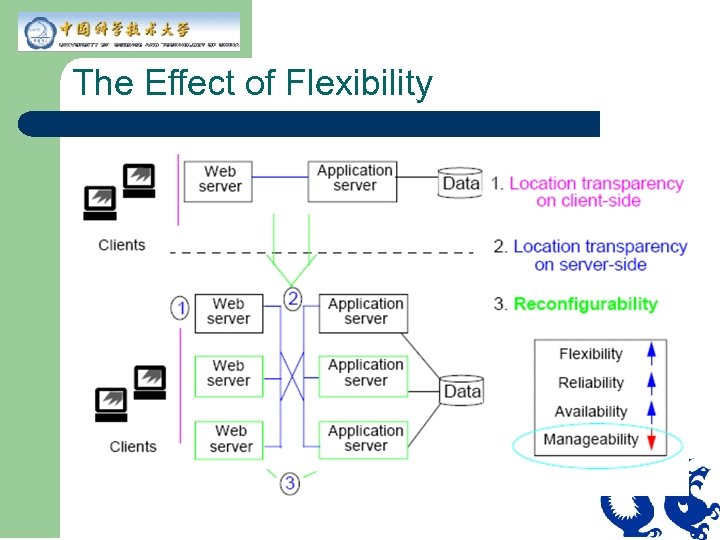
Flexibility l l l Is the ability to change architecture to meet new requirements in a cost-efficient manner Is the key to an available, reliable, and scalable application Can be improved through location independence of application code
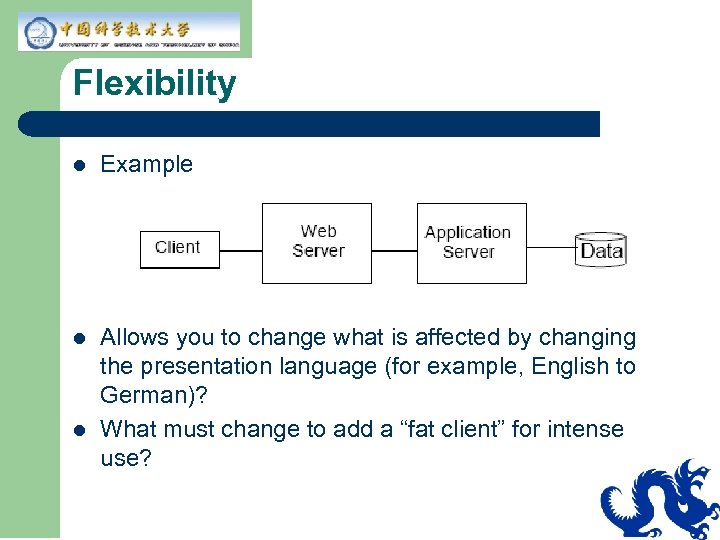
Flexibility l Example l Allows you to change what is affected by changing the presentation language (for example, English to German)? What must change to add a “fat client” for intense use? l
Flexibility Metrics l l l No standard way of measuring flexibility Basic measure is cost of change but this depends on what change is probable. Use change cases to evaluate what in system must change.
The Effect of Flexibility
Performance l l l The ability to execute functions fast enough to meet performance goals. Response time is important to an application. Identify and control expensive calls. State performance goals before implementing. Example—first visible response in browser under maximum specified load occurs in less than 3 seconds, 95 percent of the time. Measurement is made at company external firewall.
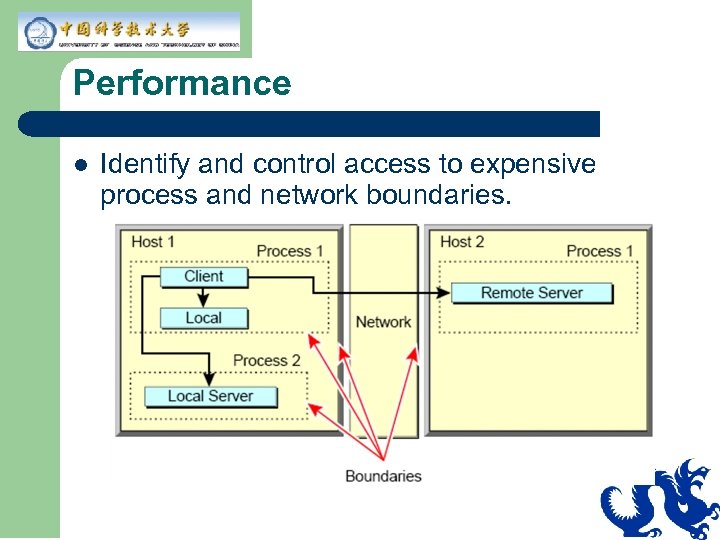
Performance l Identify and control access to expensive process and network boundaries.
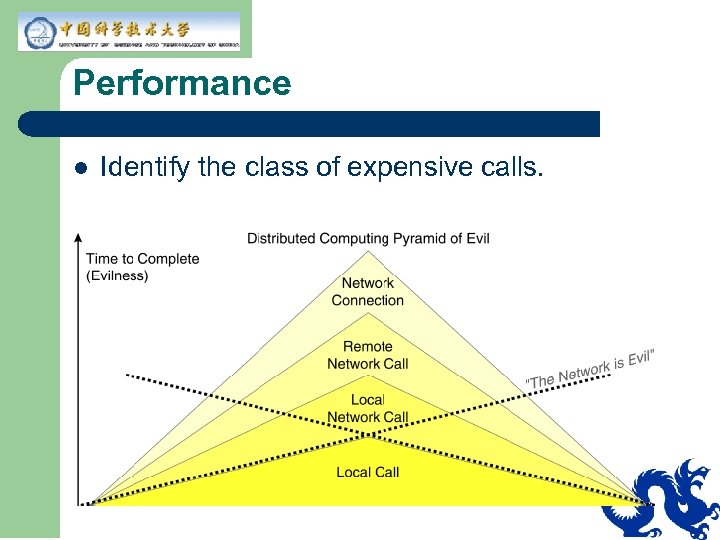
Performance l Identify the class of expensive calls.
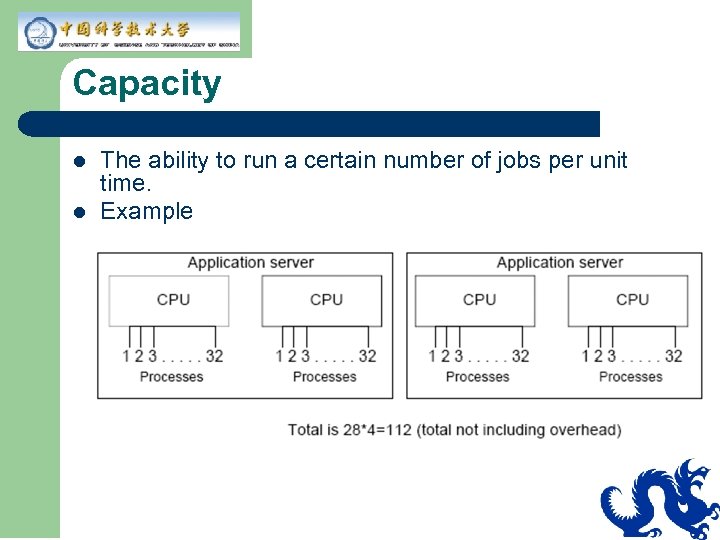
Capacity l l The ability to run a certain number of jobs per unit time. Example
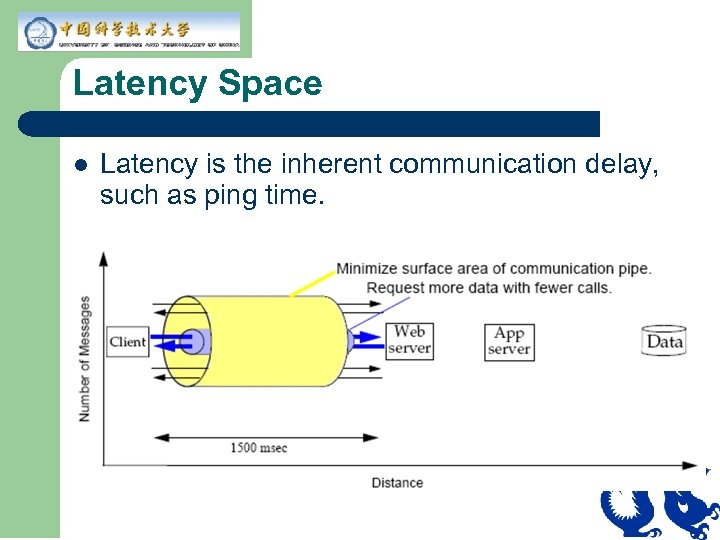
Latency Space l Latency is the inherent communication delay, such as ping time.
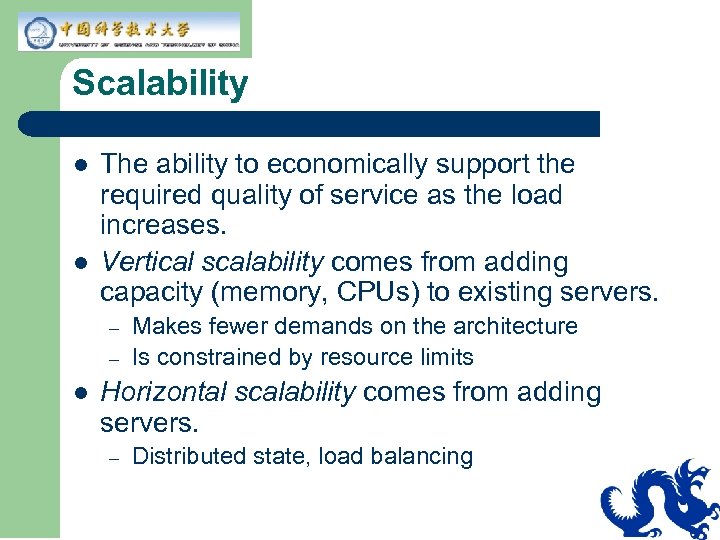
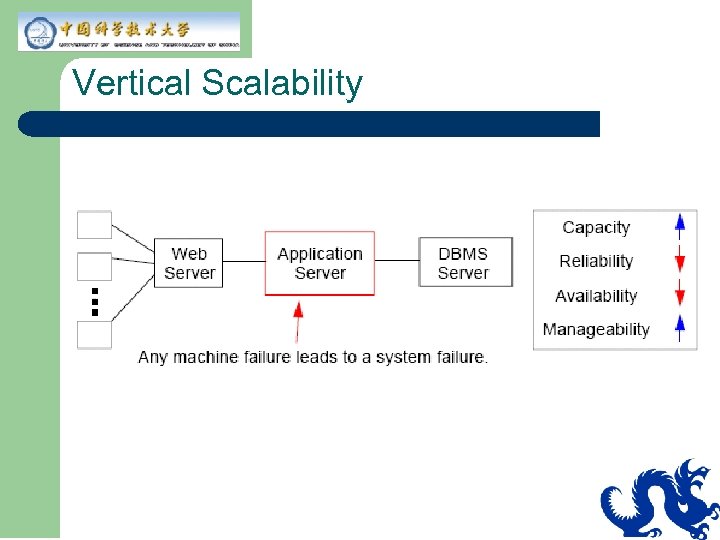
Scalability l l The ability to economically support the required quality of service as the load increases. Vertical scalability comes from adding capacity (memory, CPUs) to existing servers. – – l Makes fewer demands on the architecture Is constrained by resource limits Horizontal scalability comes from adding servers. – Distributed state, load balancing
Vertical Scalability
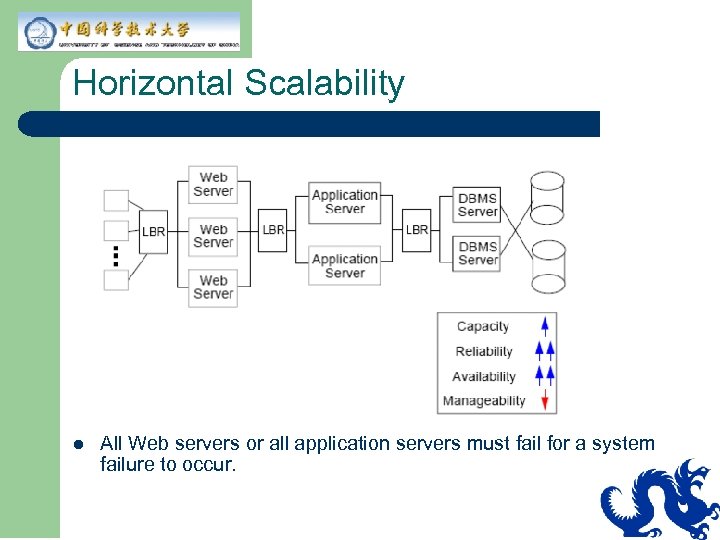
Horizontal Scalability l All Web servers or all application servers must fail for a system failure to occur.
The Effect of Scalability How are other capabilities driven by scalability? l Availability and reliability are obtained through scalability. l Capacity is affected by scalability: – One machine handles 500 transactions or – – 5 machines handle 100 transactions each 50 machines handle 10 transactions each
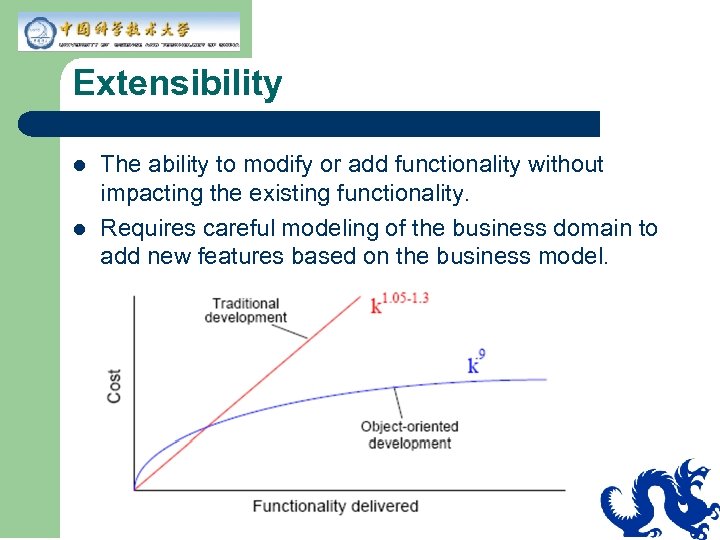
Extensibility l l The ability to modify or add functionality without impacting the existing functionality. Requires careful modeling of the business domain to add new features based on the business model.
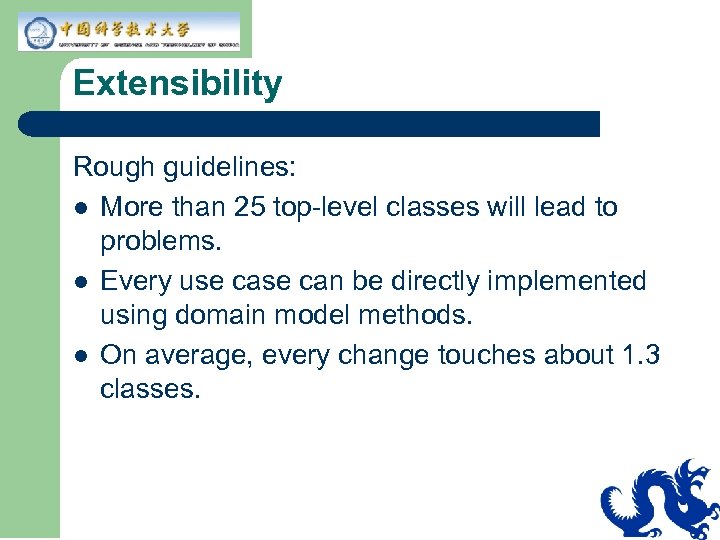
Extensibility Rough guidelines: l More than 25 top-level classes will lead to problems. l Every use can be directly implemented using domain model methods. l On average, every change touches about 1. 3 classes.
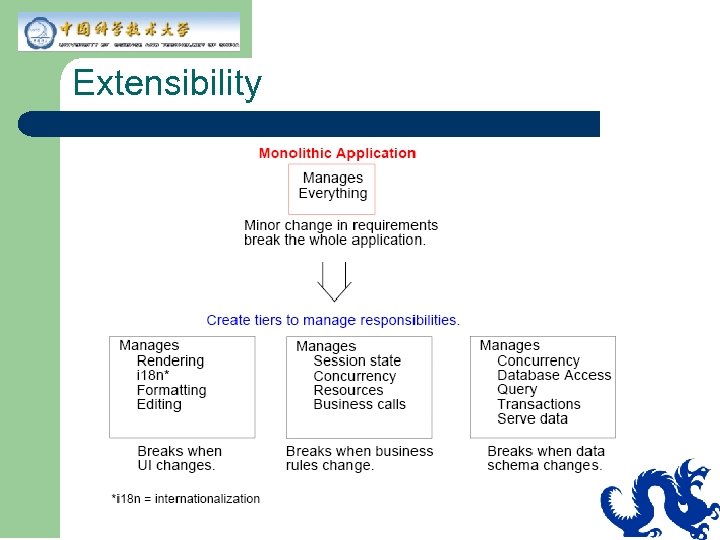
Extensibility
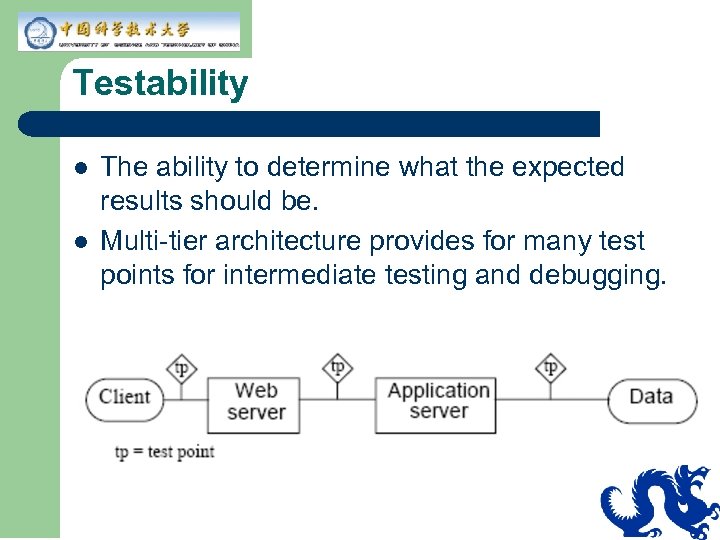
Testability l l The ability to determine what the expected results should be. Multi-tier architecture provides for many test points for intermediate testing and debugging.
Security
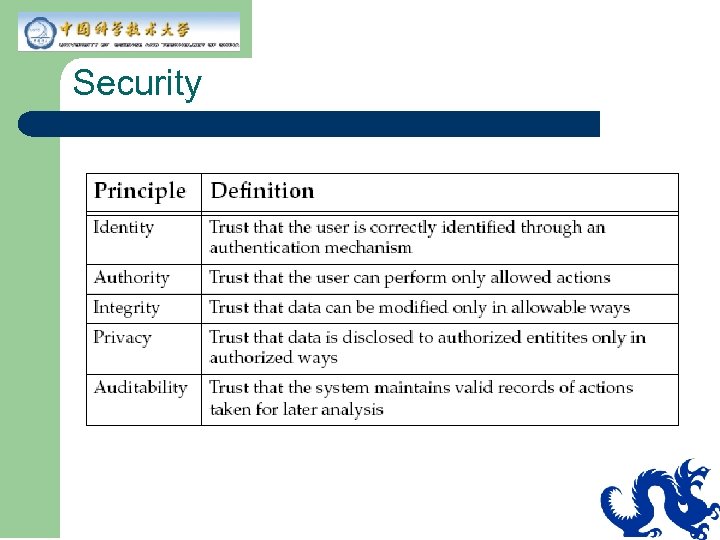
Security l l Proper use of technology. More than just technology. – – – l Hiring a trusted employee Procedural – intrusion detection Keep server in locked room Trade-off between privacy, ease-of-use, and expense
Security Policy l A security policy should state the acceptable risks and costs. It requires at least 30 hours using the best known attacks to compromise one customer account. Three or more successive login failures will be logged.
Service-based Capabilities l Scalable, available architectures are typically service-based architectures with collections of cooperating, communicating services. – – Small, coherent sets of APIs to the business Provides “outlets” for connecting to services Decouples clients from implementations Proper implementation of services is the key to security, scalability, and availability
Why Service-based Architectures? Service-based architectures: l Are less brittle l Respond easily to changes in business demands. l Can tune each system for the functionality it provides Alternatives: l Partition by tiers l Partition by special functions
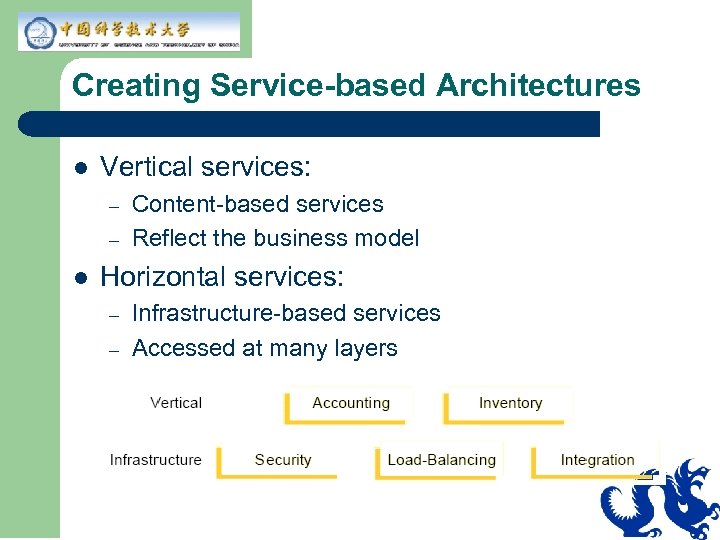
Creating Service-based Architectures l Vertical services: – – l Content-based services Reflect the business model Horizontal services: – – Infrastructure-based services Accessed at many layers
Heuristics for Developing Servicebased Architectures l A service is like a server in Client-Server architecture: – – – l Represents shared resources Accessed concurrently Maintaining integrity Services map to essential business themes, which map to top-level domain objects.
Architectural Design Goals l To achieve capabilities, an architect creates an architecture with the following goals in mind. – – – Modularity Protection and exposure Component extensibility Roles and responsibilities Contracts Pluggable behavior
Modularity l Separate the code into self-sufficient, highly cohesive, low-coupling pieces. – – – Modularity creates good code abstractions. Modularity hides details. Modular code is like a black box.
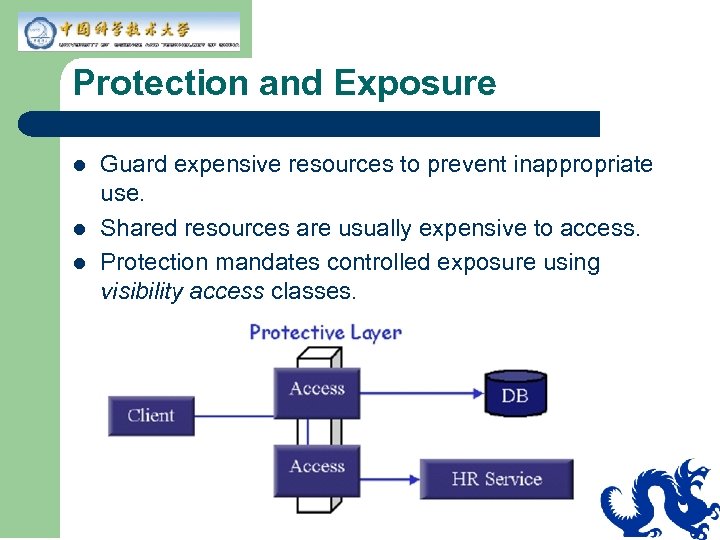
Protection and Exposure l l l Guard expensive resources to prevent inappropriate use. Shared resources are usually expensive to access. Protection mandates controlled exposure using visibility access classes.
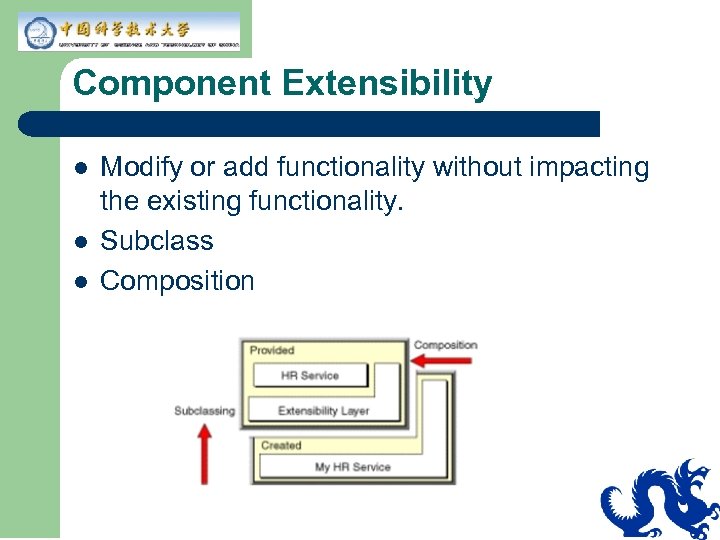
Component Extensibility l l l Modify or add functionality without impacting the existing functionality. Subclass Composition
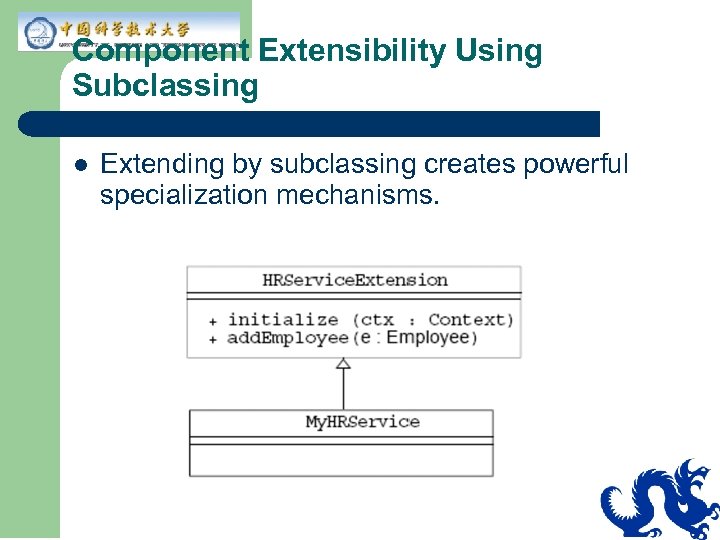
Component Extensibility Using Subclassing l Extending by subclassing creates powerful specialization mechanisms.
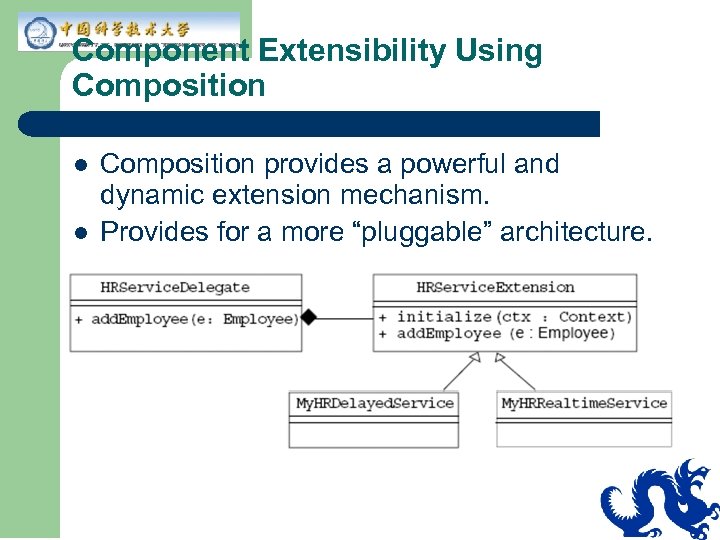
Component Extensibility Using Composition l l Composition provides a powerful and dynamic extension mechanism. Provides for a more “pluggable” architecture.
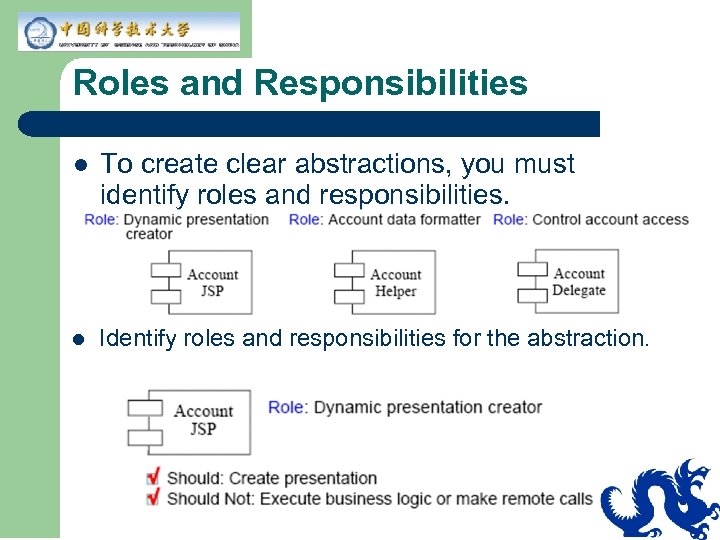
Roles and Responsibilities l To create clear abstractions, you must identify roles and responsibilities. l Identify roles and responsibilities for the abstraction.
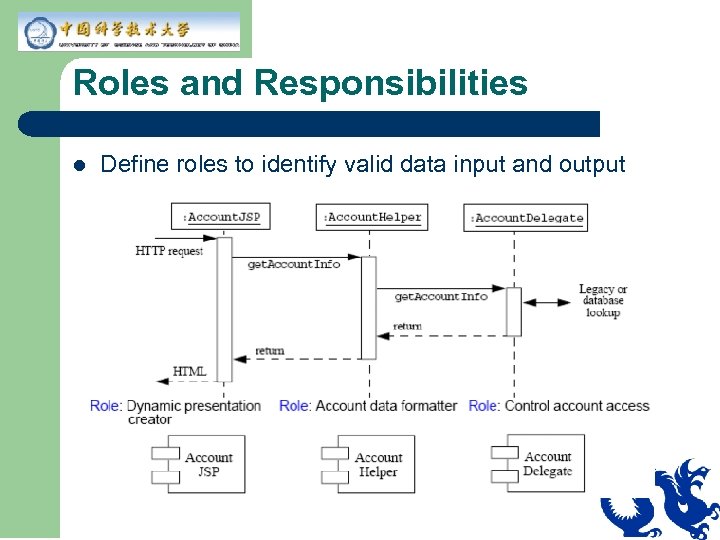
Roles and Responsibilities l Define roles to identify valid data input and output
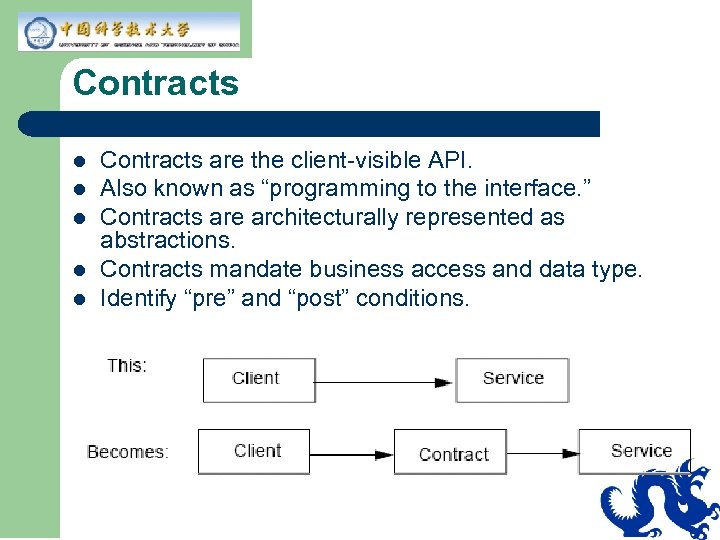
Contracts l l l Contracts are the client-visible API. Also known as “programming to the interface. ” Contracts are architecturally represented as abstractions. Contracts mandate business access and data type. Identify “pre” and “post” conditions.
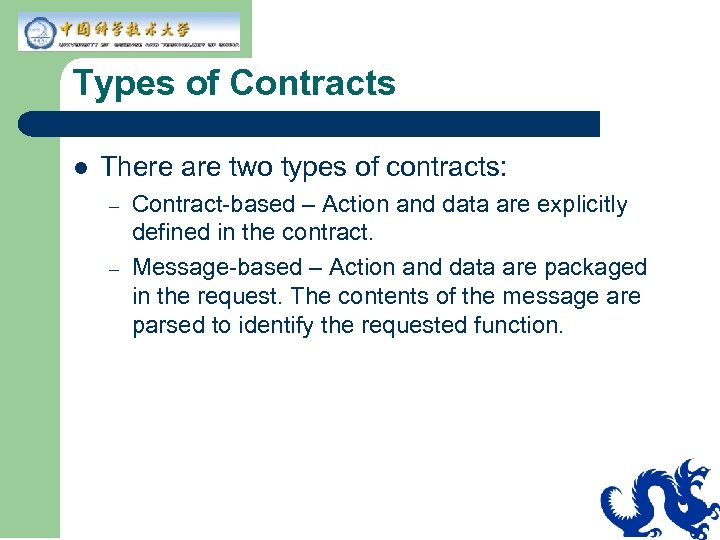
Types of Contracts l There are two types of contracts: – – Contract-based – Action and data are explicitly defined in the contract. Message-based – Action and data are packaged in the request. The contents of the message are parsed to identify the requested function.
Pluggable Behavior In general, you expect to use a method by simply passing parameters. a. Text. Area. insert. Text(“This is inserted”, 42); l You can also put complicated behavior into a parameter object, such as fonts, paragraph layouts, and so on in a. Styled. Document. a. JText. Pane. set. Styled. Document(a. Styled. Document); l The ability to pass complex objects makes a system more flexible. l
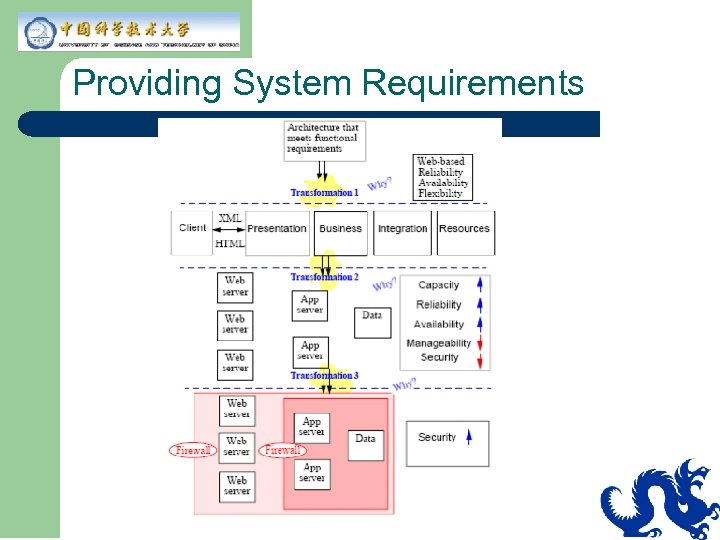
Providing System Requirements
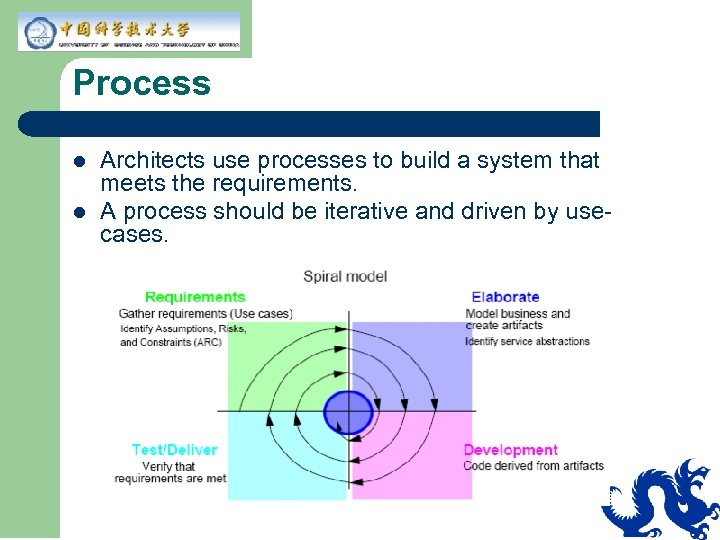
Process l l Architects use processes to build a system that meets the requirements. A process should be iterative and driven by usecases.
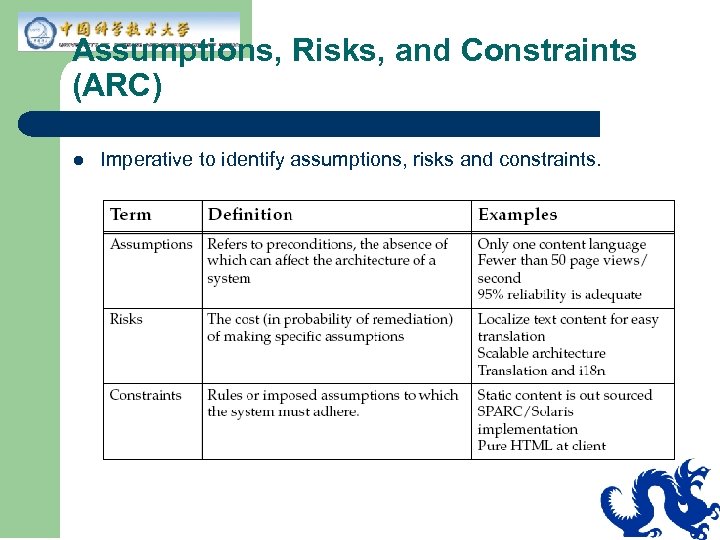
Assumptions, Risks, and Constraints (ARC) l Imperative to identify assumptions, risks and constraints.
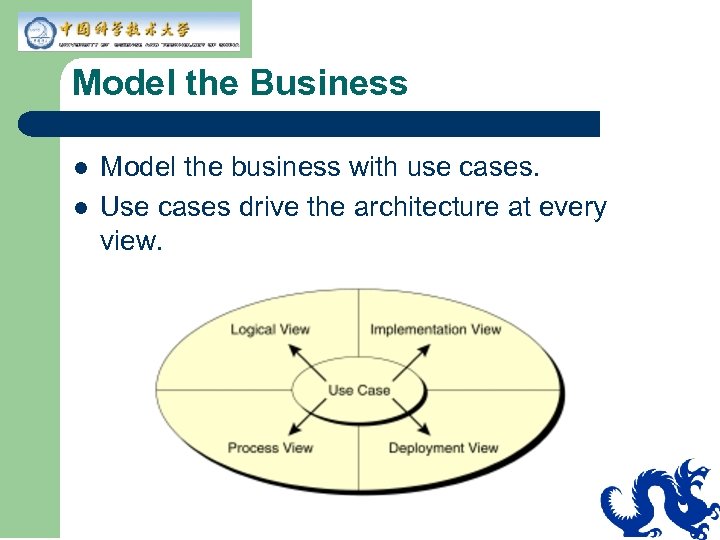
Model the Business l l Model the business with use cases. Use cases drive the architecture at every view.
Check Your Progress l l l List and define the key architectural capabilities List and define the key architectural design goals List and describe the trade-offs that result from architectural decisions.
Think Beyond l How does J 2 EE technology work with the principles of architecture, specifically capabilities?
Module 3 Creating an Architecture Using J 2 EE Technology
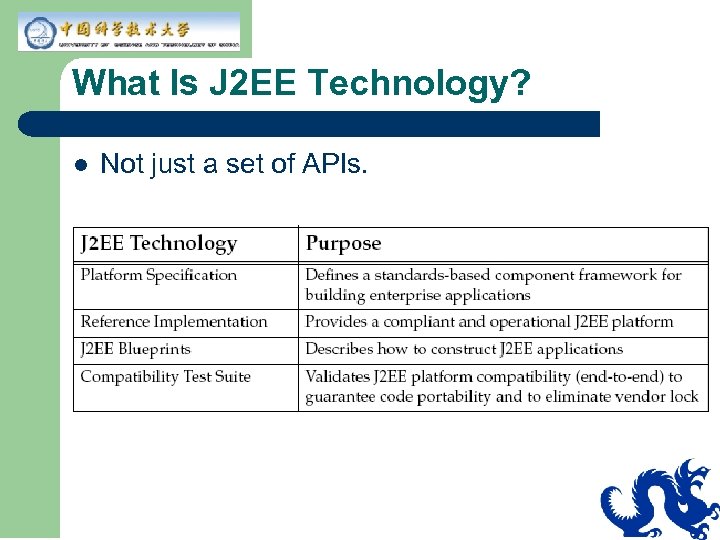
What Is J 2 EE Technology? l Not just a set of APIs.
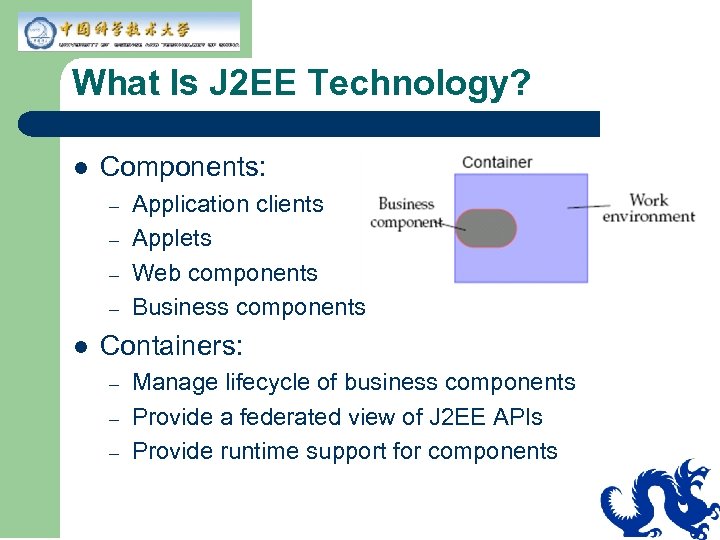
What Is J 2 EE Technology? l Components: – – l Application clients Applets Web components Business components Containers: – – – Manage lifecycle of business components Provide a federated view of J 2 EE APIs Provide runtime support for components
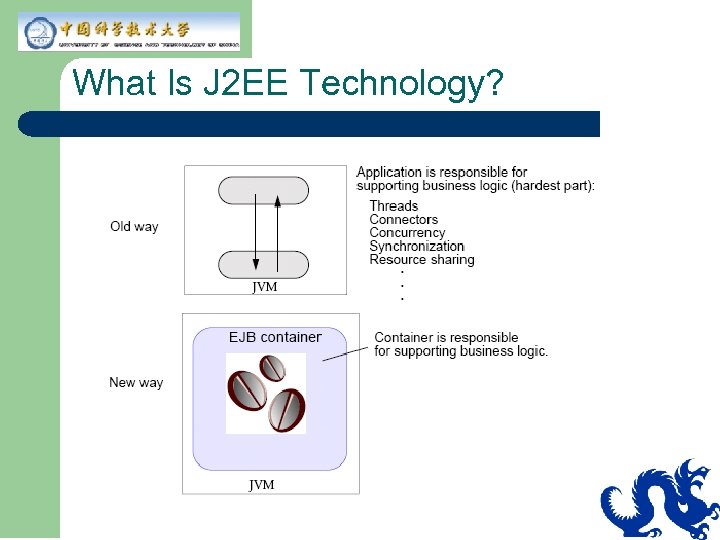
What Is J 2 EE Technology?
What Is J 2 EE Technology? l Connectors: – – – Contract between container and Enterprise Information System (EIS). Proprietary and under the hood. Implementation is available with J 2 EE specification version 1. 3.
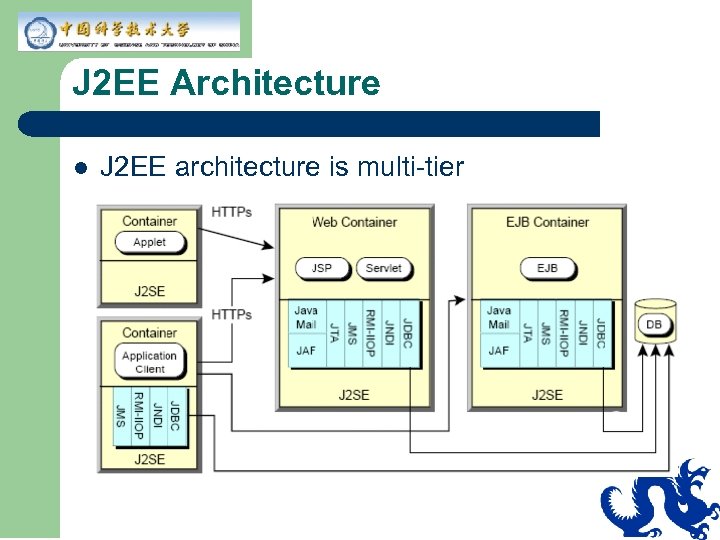
J 2 EE Architecture l J 2 EE architecture is multi-tier
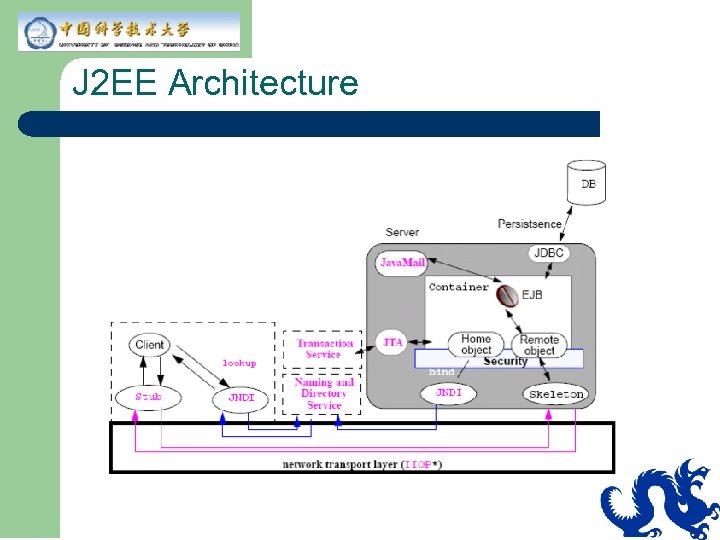
J 2 EE Architecture
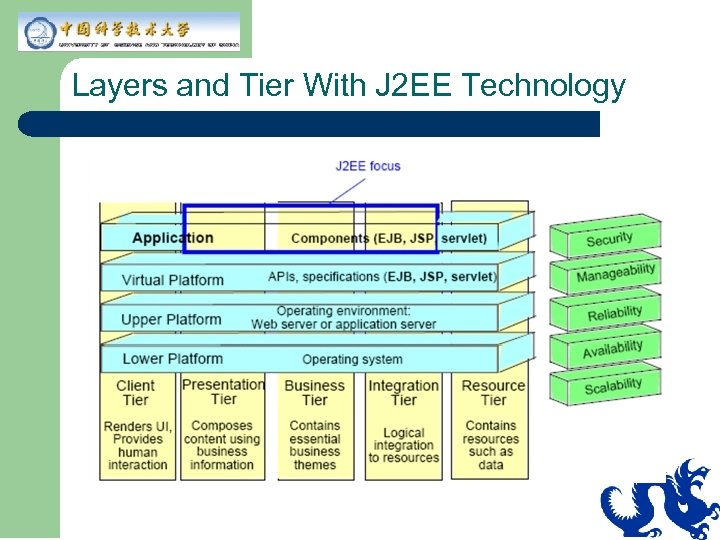
Layers and Tier With J 2 EE Technology
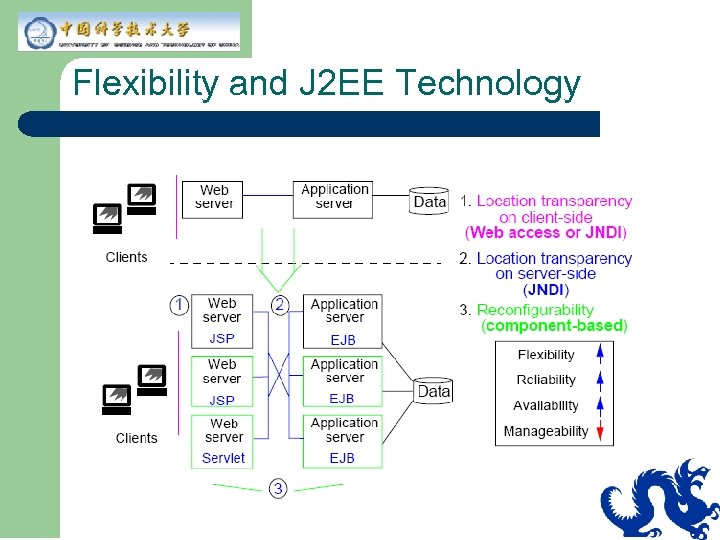
Flexibility and J 2 EE Technology
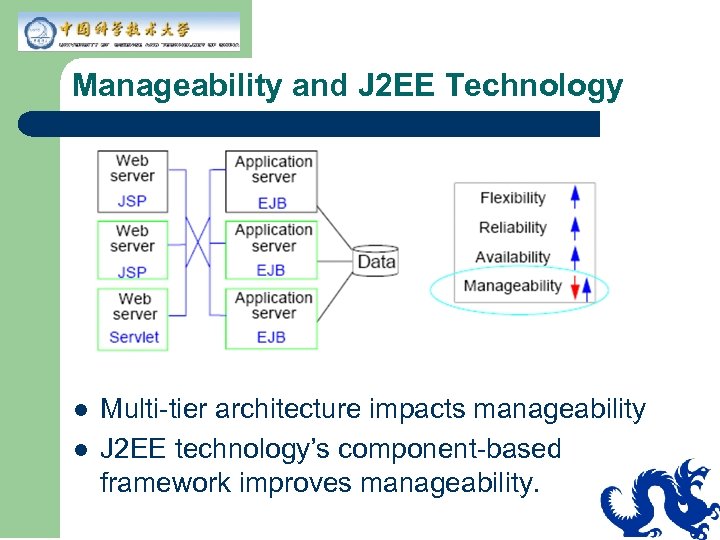
Manageability and J 2 EE Technology l l Multi-tier architecture impacts manageability J 2 EE technology’s component-based framework improves manageability.
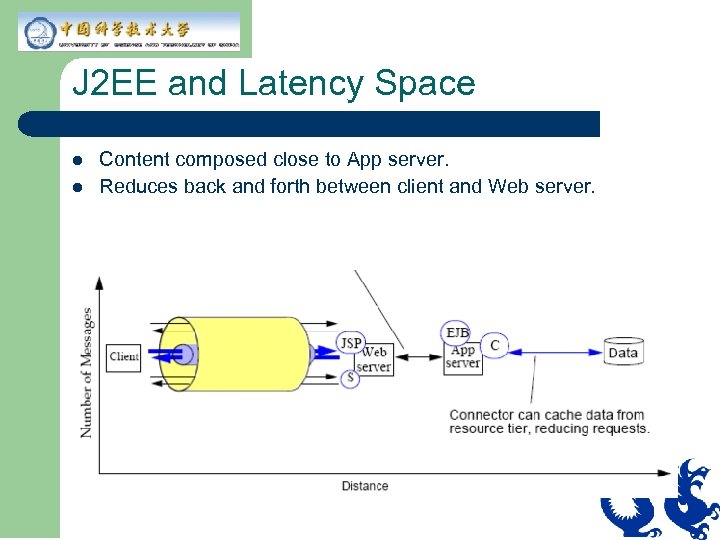
J 2 EE and Latency Space l l Content composed close to App server. Reduces back and forth between client and Web server.
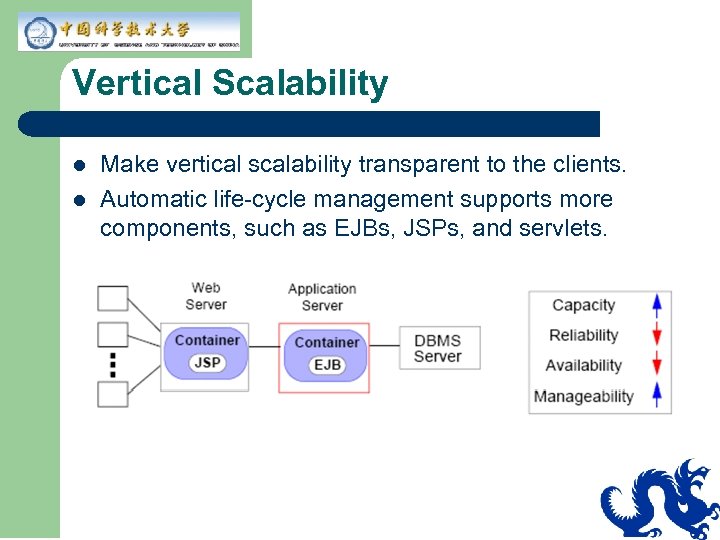
Vertical Scalability l l Make vertical scalability transparent to the clients. Automatic life-cycle management supports more components, such as EJBs, JSPs, and servlets.
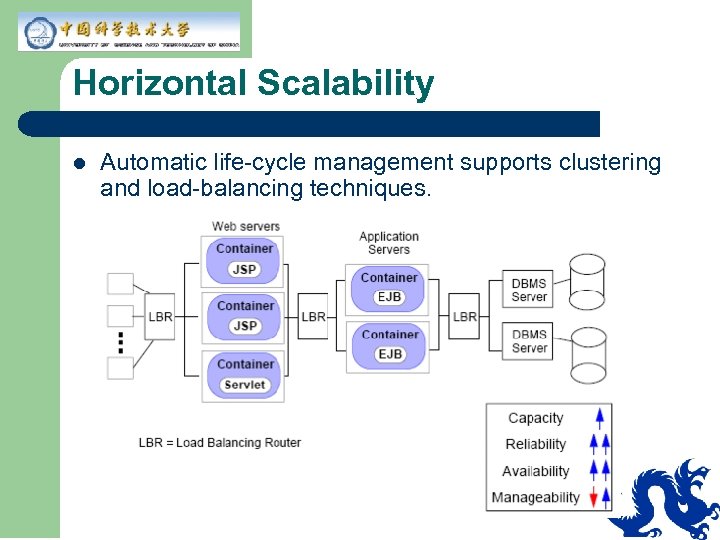
Horizontal Scalability l Automatic life-cycle management supports clustering and load-balancing techniques.
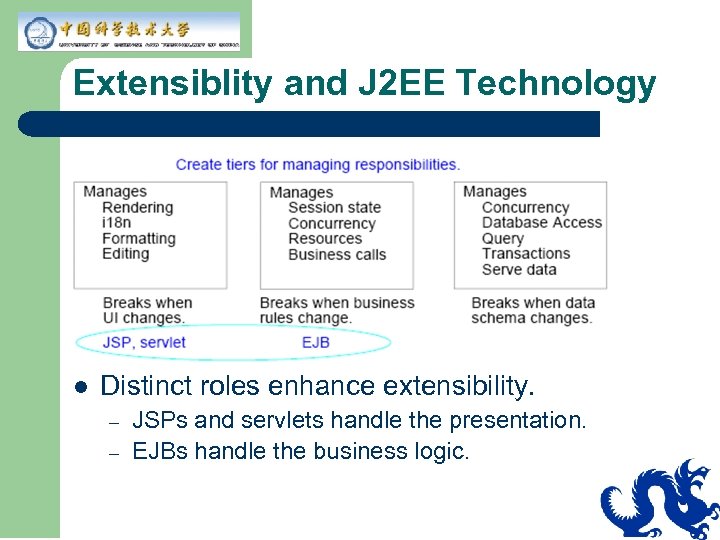
Extensiblity and J 2 EE Technology l Distinct roles enhance extensibility. – – JSPs and servlets handle the presentation. EJBs handle the business logic.
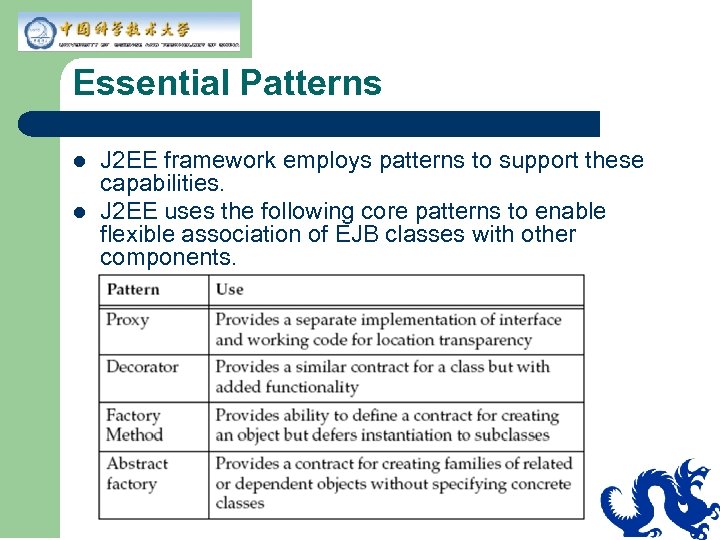
Essential Patterns l l J 2 EE framework employs patterns to support these capabilities. J 2 EE uses the following core patterns to enable flexible association of EJB classes with other components.
Check Your Progress l l Describe how J 2 EE architecture affects the nonfunctional requirements of a system. Describe the use of patterns in the J 2 EE framework.
Think Beyond l Vendor implementations of J 2 EE provide the Virtual Platform layer on which you can build an enterprise application. As an architect, how do you know how to structure the components of your application?
Module 4 J 2 EE Best Practices – Overview
Experience in Creating Architectures Experience yields blueprints for solving recurring problems. l Best Practice–A suggested practice used to drive design at the component level. – l Example–Use session beans as facades to entity beans. Guideline–A rule applied horizontally to the design. – Example–Minimize network traffic by maximizing data requests.
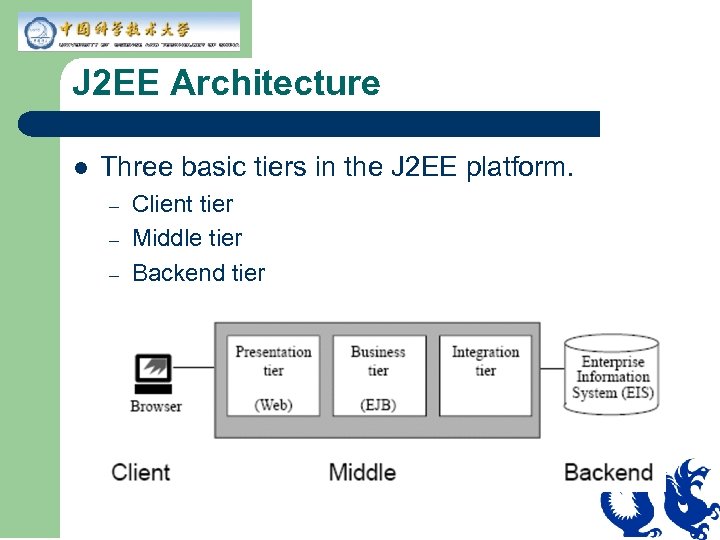
J 2 EE Architecture l Three basic tiers in the J 2 EE platform. – – – Client tier Middle tier Backend tier
J 2 EE Best Practices and Guidelines l You can apply best practices and guidelines in each tier. – – l Client tier Web tier (presentation) EJB tier (business) EIS Integration tier (integration) You can apply best practices and guidelines to orthogonal services that span tiers. – – Security Transactions
Best Practice – Client Tier l Decouple the client type from the enterprise application: – – HTML browser Applet Java application Non-Java application
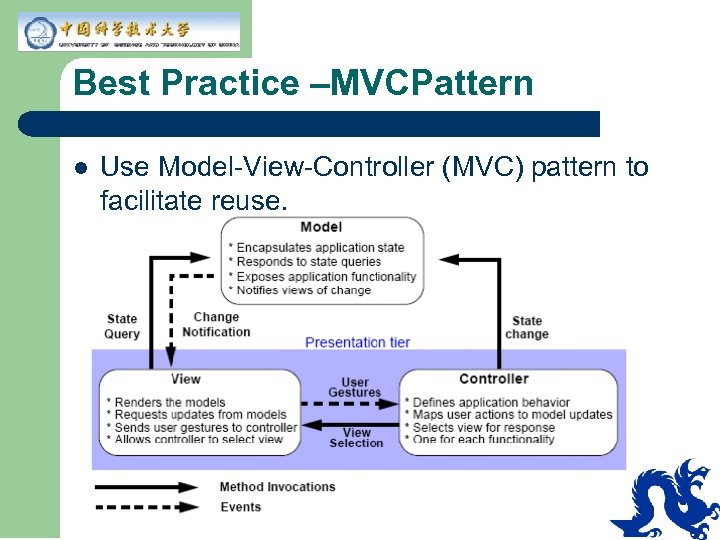
Best Practice –MVCPattern l Use Model-View-Controller (MVC) pattern to facilitate reuse.
Best Practice – Business Objects l l l Business objects are software abstractions of application data. Avoid duplicating code by sharing business objects among different client types To reuse business objects, you can apply: – – – Encapsulation Delegation Inheritance
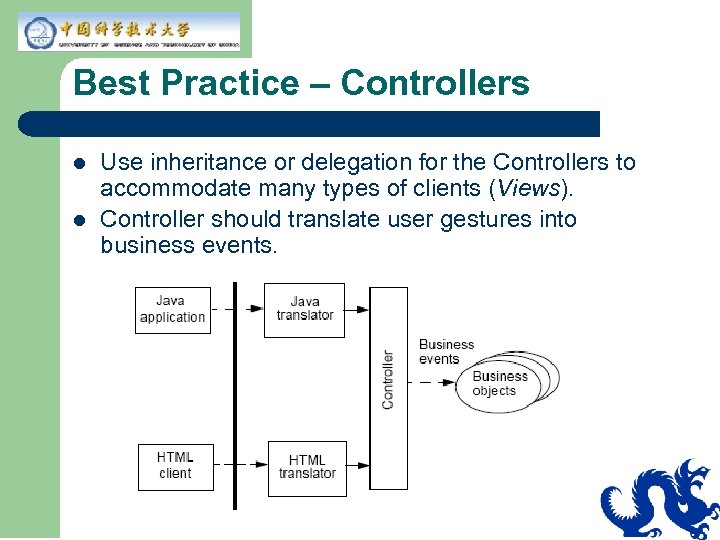
Best Practice – Controllers l l Use inheritance or delegation for the Controllers to accommodate many types of clients (Views). Controller should translate user gestures into business events.
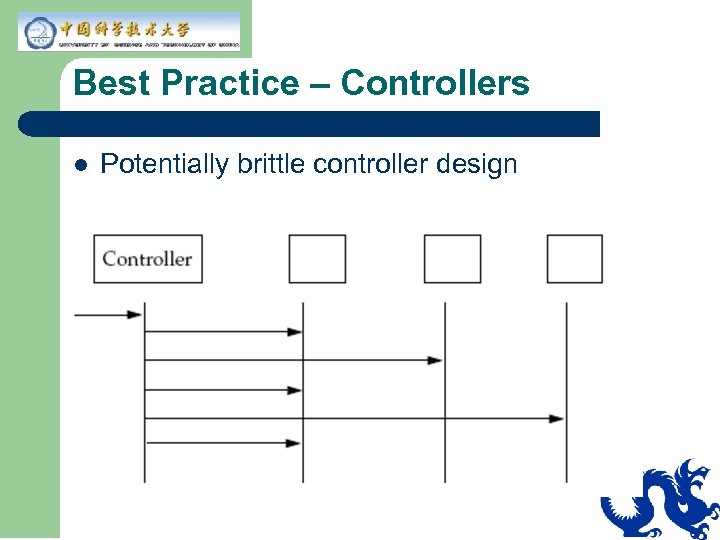
Best Practice – Controllers l Potentially brittle controller design
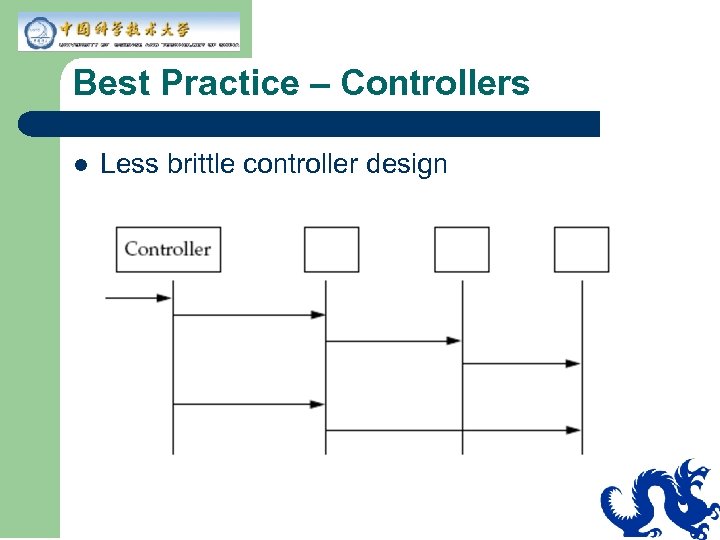
Best Practice – Controllers l Less brittle controller design
Check Your Progress l l l Define the concepts of “best practice” and “guideline” Describe the J 2 EE best practices that you can apply across all tiers Describe the J 2 EE client tier best practices
Think Beyond l l l Thin-client solutions (HTML on a browser) are important to Internet-based applications. The browser acts as your client for rendering the presentation as encoded in HTML. What other solutions are available to render content in a Web browser? In a Web application, what type of component is usually used for the View and controller elements of the MVC pattern? What type of component is usually used for the Model element?
Module 5 J 2 EE Best Practices – Web Tier
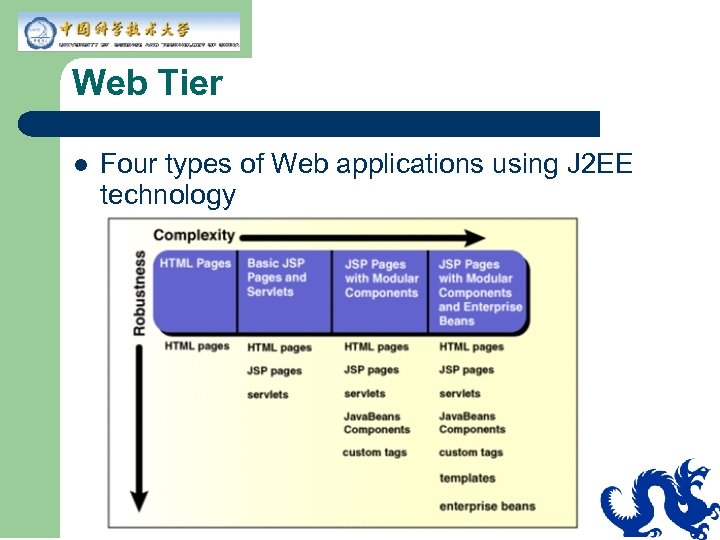
Web Tier l Four types of Web applications using J 2 EE technology
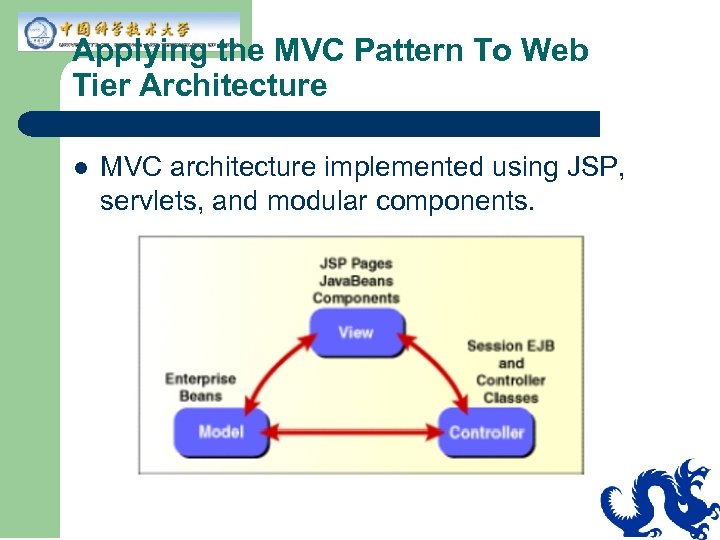
Applying the MVC Pattern To Web Tier Architecture l MVC architecture implemented using JSP, servlets, and modular components.
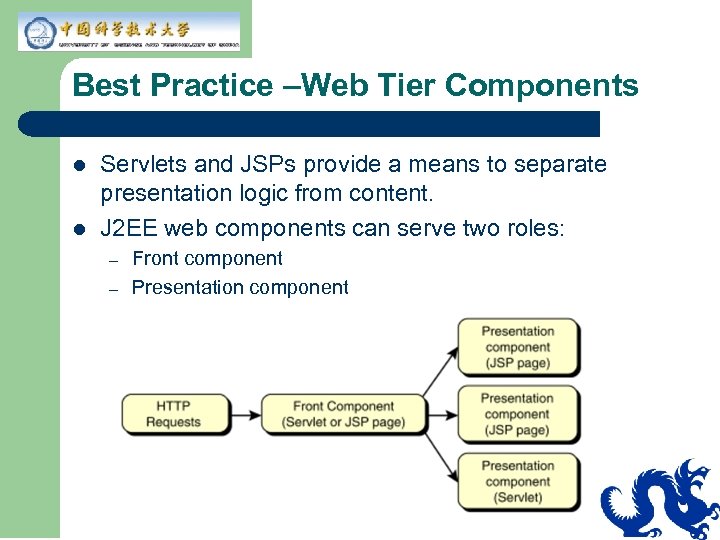
Best Practice –Web Tier Components l l Servlets and JSPs provide a means to separate presentation logic from content. J 2 EE web components can serve two roles: – – Front component Presentation component
Front Component l l Manages other components Translates and dispatches the HTTP request Front component acts as a controller Provides a single entry point to facilitate: – – – Security Application state maintenance Uniform presentation
Presentation Component l l Generates the HTML/XML response. Should be modular and reusable. Modular design allows for separation of roles. Presentation components create consistent look and feel, but also allows you to personalize your user interface.
Best Practices – JSPs and Servlets l No single correct answer on using JSP or servlets. Can depend on: – – – l Team composition Time constraints Application architecture You can use both servlets and JSPs for modular, reusable presentation components.
Best Practices – JSPs and Servlets l Use servlets for low level application functions – – l Control selection of view (front component) Generate binary/image data Use JSP for presentation-centric declarative means of binding dynamic content and logic – Handle HTML representation generated by a page
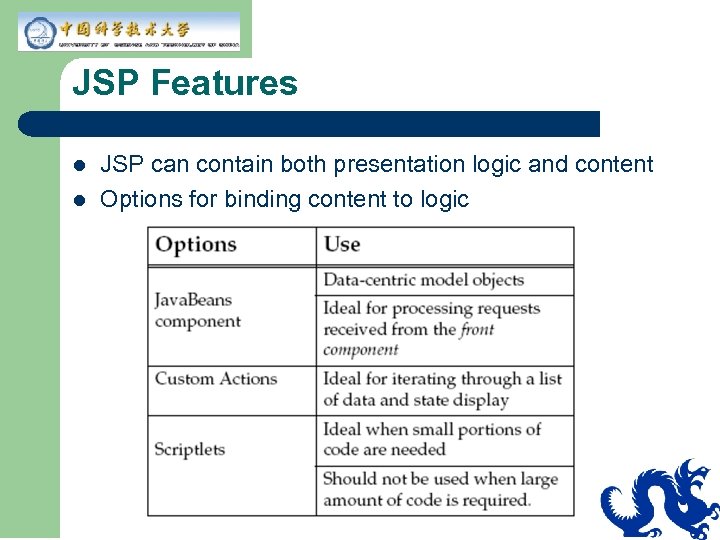
JSP Features l l JSP can contain both presentation logic and content Options for binding content to logic
Localization and Internationalization l l l Localization (l 10 n) is the process of adapting an application or applet to a specific language or region. Internationalization (i 18 n) is the process of designing an application or applet to adapt to various languages and regions. The presentation tier is the focus of internationalization and localization efforts to be able to – – – Add new languages without recompilation Provide regionally dependent data, such as currency Provide regionally dependent behavior
Module 6 J 2 EE Best Practices – EJB Tier
The EJB Tier l The Enterprise Java. Beans (EJB) tier hosts the following: – – l Application-specific business objects System-level services (such as transaction management, concurrency control, and security) The EJB tier is a critical link between the web tier and the EIS integration tier. – – Entity beans and session beans Data access objects and value objects Session beans as a facade to entity beans Master-detail modeling using enterprise beans
Guidelines – Using Session Beans l Stateful session beans: – – – l Maintain client-specific state Represent non-persistent objects Represent workflow between business objects Stateless session beans: – – Model reusable service objects Provide high performance Operate on multiple rows in the database Provide procedural view of data
Guidelines – Using Entity Beans Use entity beans to model business objects when the following circumstances apply: l Coarse-grained business objects: – – l l l Represent persistent data Provides behavior beyond accessor methods Shared, concurrent access by clients Represent a single logical record in the database Provide robust, long-lived persistent data management that can recover from crashes
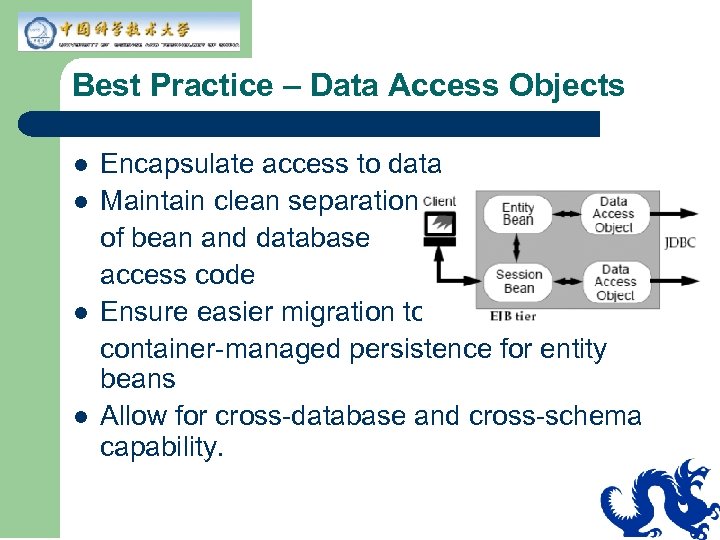
Best Practice – Data Access Objects l l Encapsulate access to data Maintain clean separation of bean and database access code Ensure easier migration to container-managed persistence for entity beans Allow for cross-database and cross-schema capability.
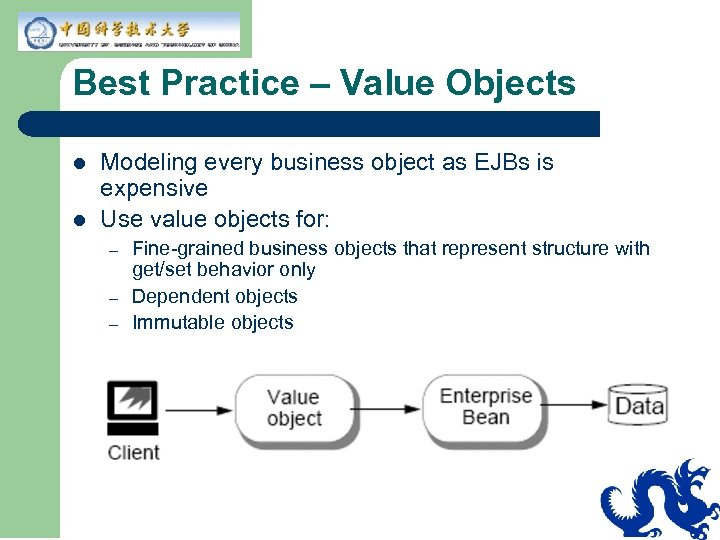
Best Practice – Value Objects l l Modeling every business object as EJBs is expensive Use value objects for: – – – Fine-grained business objects that represent structure with get/set behavior only Dependent objects Immutable objects
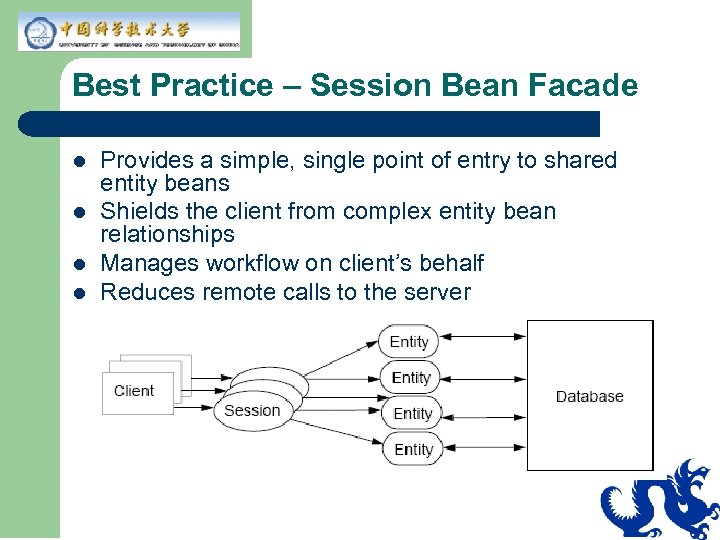
Best Practice – Session Bean Facade l l Provides a simple, single point of entry to shared entity beans Shields the client from complex entity bean relationships Manages workflow on client’s behalf Reduces remote calls to the server
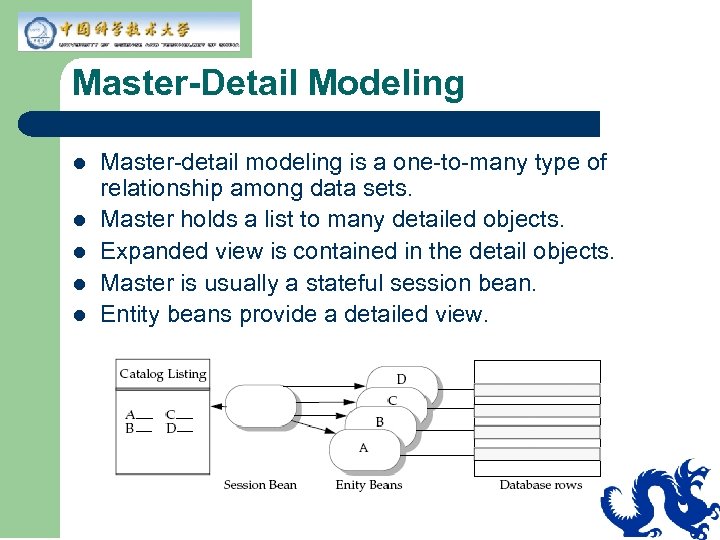
Master-Detail Modeling l l l Master-detail modeling is a one-to-many type of relationship among data sets. Master holds a list to many detailed objects. Expanded view is contained in the detail objects. Master is usually a stateful session bean. Entity beans provide a detailed view.
Check Your Progress l l List the best practices and guidelines for using entity beans and session beans Define Data Access Objects and describe their purpose Define Value Objects and describe their purpose Describe the use of Session Bean Facades
Think Beyond l l You have seen two ways of hiding the details of the EIS tier: Data Access Objects and Master-Detail encapsulation. These two are specifically used for integrating to a database. What other EIS resources might an application need to integrate? In this module you saw that you can control the client’s access to the application using a session bean facade pattern and in Module 4, ‘‘J 2 EE Best Practices – Overview" you learned that central controllers can be brittle. How can the SEF pattern be extended to minimize the brittleness of the session bean?
Module 7 J 2 EE Best Practices – EIS Integration Tier
EIS Integration Tier l l EIS Integration tier provides the information infrastructure for an enterprise. Accessing EIS can be complex, requiring vendor specific knowledge of: – – – l Application programming model Transactions Security J 2 EE reduces the complexity of accessing an enterprise information system by relying on the Web and EJB containers to handle transactions, security, and scalability.
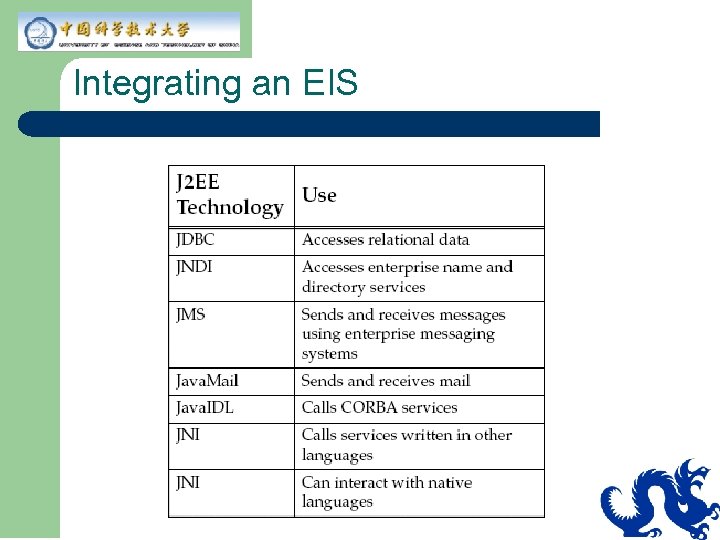
Integrating an EIS
EIS Guidelines – Data Access l Rely on vendor tools for EIS integration: – – – l Data and function mining tools Object-oriented analysis and design tools Application code generation tools Application composition tools Deployment tools Rely on deployers to set transaction, security, and deployment requirements
EIS Access Objects l Abstract complex, low-level details of EIS system access into access objects: – – – Provide a common, consistent access to various types of EIS Separate access objects from business objects Access objects can be made into well know Java. Beans for use in development tools
Guidelines – Access Objects l Access objects abstract the complex, lowlevel details of accessing an EIS system: – – – Provide a common, consistent access to various types of EIS systems Separates access objects from business objects Access objects can be made into well known Java. Beans for use in development tools
Guidelines – Access Objects l l When implementing access objects, do not make assumptions about environments outside access objects. Design for reusability across tiers and components. Access objects should not define declarative transactions or security requirements. Maintain consistency in programming restrictions between business objects and access objects.
Guidelines – Connections l l Components should acquire and release connections within a single method Account for differences across component types in connection management: – – – l JSP and servlet Stateful and stateless session beans Entity beans Components should avoid opening multiple concurrent connections to a single database (not supported by some JDBC drivers)
Check Your Progress l l l Define the concepts of “best practice” and “guideline” Describe the best practices using J 2 EE technology that you can apply across all tiers Describe the J 2 EE client tier best practices
Think Beyond l l Integration to backend resources can be challenging. Even dealing with a relational database is not trivial. Can you imagine what an access object might need to do to adapt to a legacy database?
Module 8 J 2 EE Best Practices — Services
Module 9 J 2 EE Patterns
Introducing J 2 EE Patterns l l J 2 EE is a relatively new platform for delivering Web-based applications. Difficulty in designing reusable, flexible object -oriented applications. Task becomes more complex with distributed and transactional objects. Facilitate the design process with a collection of proven design patterns.
Defining Patterns l l A pattern is a common repeatable solution. Patterns are generic and take many forms: – – – Architectural Design Deployment
Defining Idioms l l l Are technology-specific patterns Can be specific to languages Generic to solution, but specific implementation
Using the J 2 EE Patterns l You use J 2 EE patterns to ensure the following: – – – – Modularity Protection and exposure Component extensibility Roles and responsibilities Contracts Pluggable behavior Performance
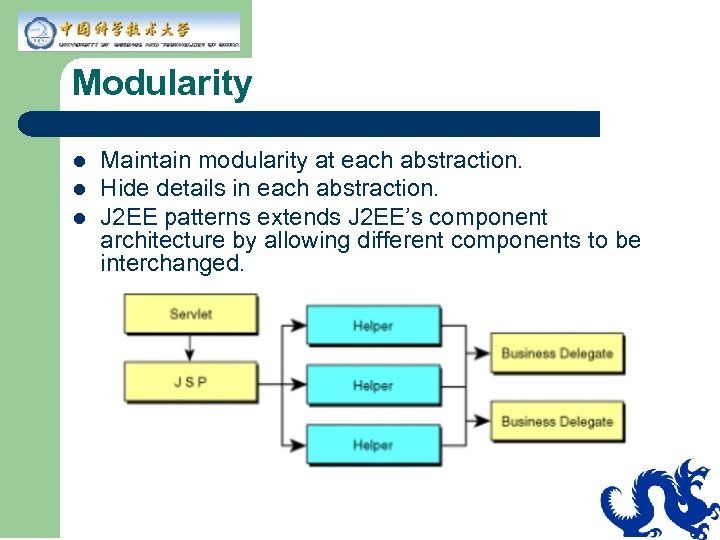
Modularity l l l Maintain modularity at each abstraction. Hide details in each abstraction. J 2 EE patterns extends J 2 EE’s component architecture by allowing different components to be interchanged.
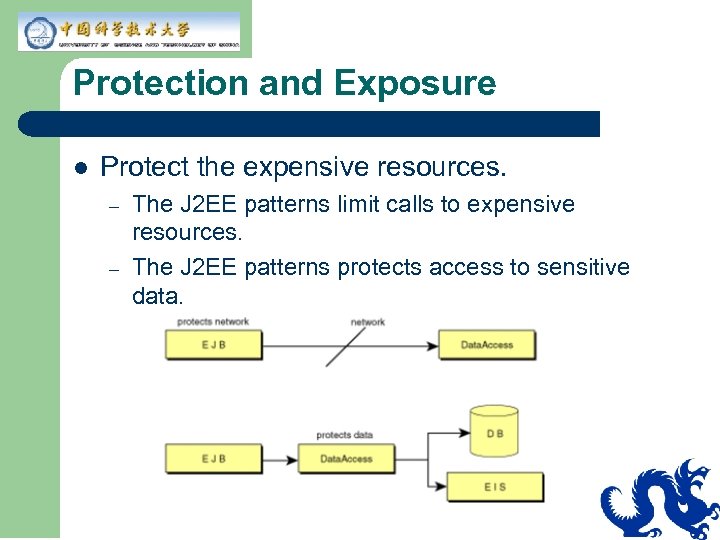
Protection and Exposure l Protect the expensive resources. – – The J 2 EE patterns limit calls to expensive resources. The J 2 EE patterns protects access to sensitive data.
Component Extensibility l l The J 2 EE patterns can address limitations. EJB specification does not specify the concept of object inheritance. – – l l How does the primary key of the derived class relate to the primary key of the parent class? How does component inheritance affect the parent component’s persistence? Home and Remote interfaces can be extended, as well as corresponding enterprise bean implementations. Factory and Facade patterns can offer an alternative.
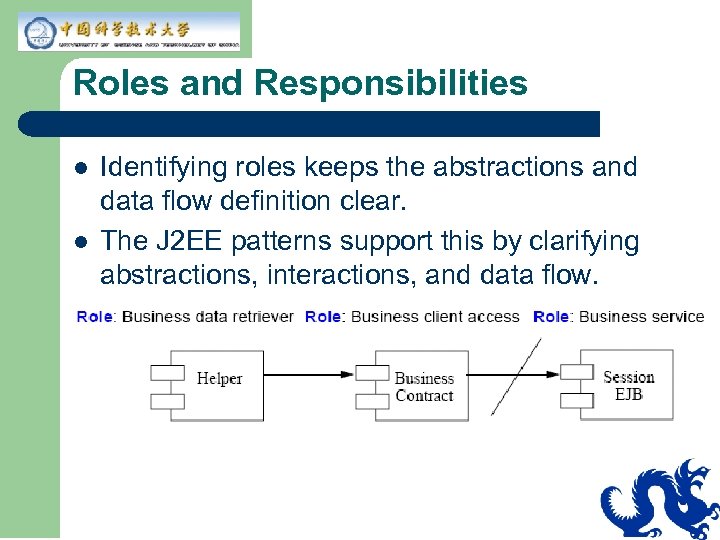
Roles and Responsibilities l l Identifying roles keeps the abstractions and data flow definition clear. The J 2 EE patterns support this by clarifying abstractions, interactions, and data flow.
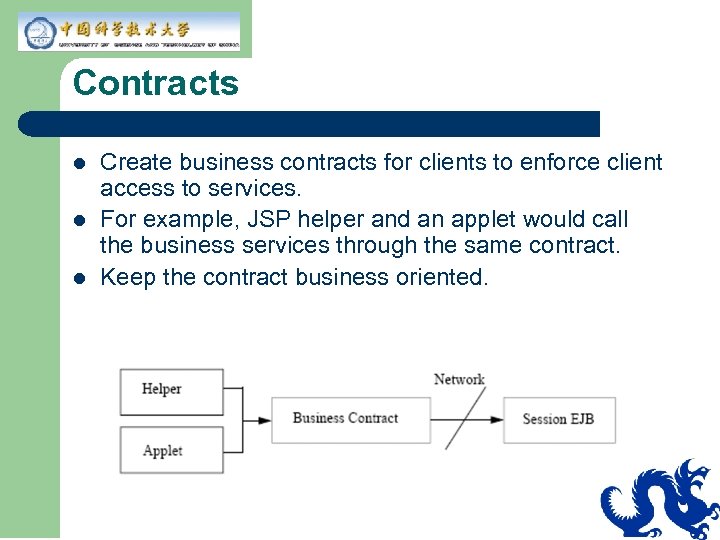
Contracts l l l Create business contracts for clients to enforce client access to services. For example, JSP helper and an applet would call the business services through the same contract. Keep the contract business oriented.
Pluggable Behavior l l l Command strategy patterns are examples of pluggable behavior that enforce client access to services. The ability to pass complex objects dynamically makes a system much more flexible. J 2 EE supports the ability to pass data dynamically using XML as well as the ability to pass complex objects.
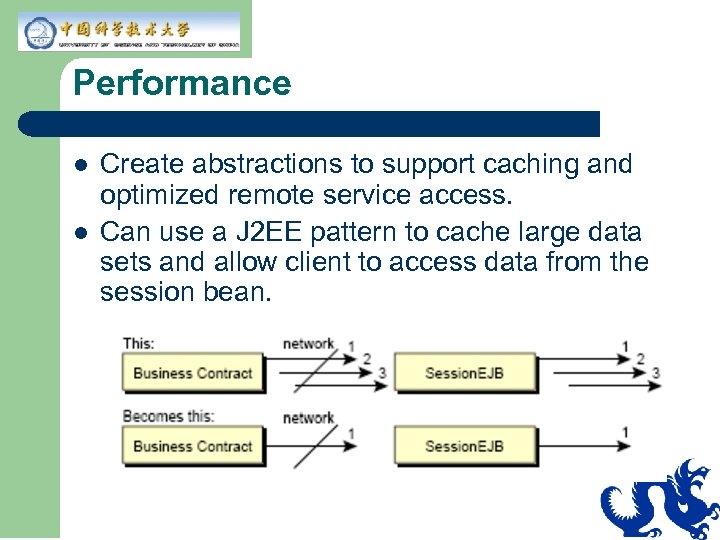
Performance l l Create abstractions to support caching and optimized remote service access. Can use a J 2 EE pattern to cache large data sets and allow client to access data from the session bean.
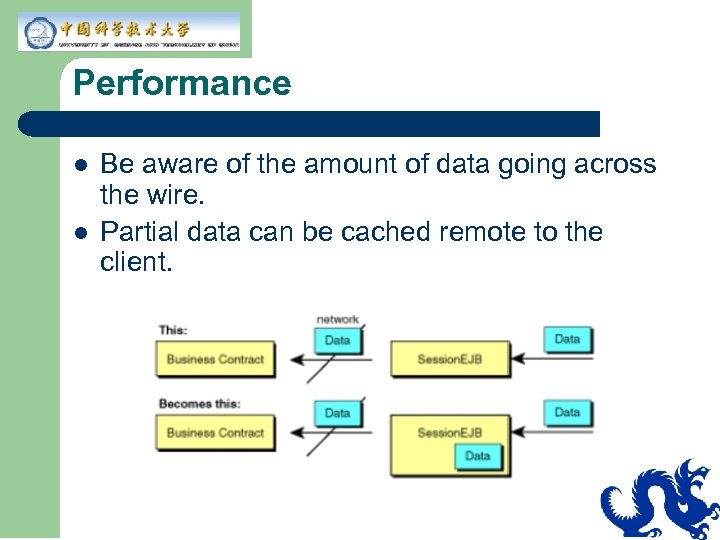
Performance l l Be aware of the amount of data going across the wire. Partial data can be cached remote to the client.
J 2 EE Patterns Categories
Module 10 Special Topics
Applicability of J 2 EE Technology l The J 2 EE™ Blueprints’ Java™ Pet Store application is an example of Web-enabled consumer transactions. – l Business-to-Consumer (B 2 C) You can apply the J 2 EE programming model to many different kinds of applications. – – – Business-to-Business (B 2 B) web systems Enterprise resource planning (ERP) Workflow applications
Business-to-Business (B 2 B) l Applications that web-enable business transactions: – – – Interbank transactions Chemical feedstock auctions Distributor-to-distributor inventory exchange
When Is it a B 2 B Application? l l Difficult to tell the difference between B 2 B and B 2 C because the division is somewhat arbitrary. Some B 2 B systems are almost identical to B 2 C. – Example: www. grainger. com provides office products using the web.
Interbank Transactions l Banks require secure, auditable, “nonrepudiable” transactions for: – – – Letters of credit Interbank transfers “Signature guaranteed” transactions
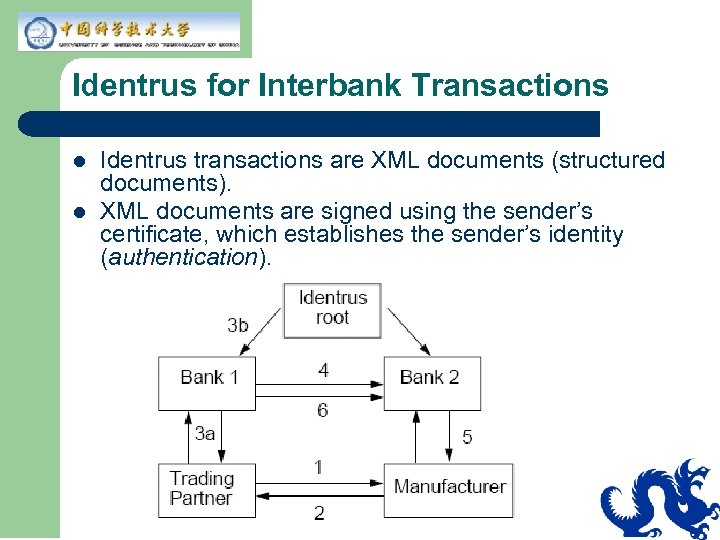
Identrus for Interbank Transactions l l Identrus transactions are XML documents (structured documents). XML documents are signed using the sender’s certificate, which establishes the sender’s identity (authentication).
Why XML and EDI? l l l Using XML-based EDI reduces cost of entry dramatically Web-based communications Common protocol (HTTP, HTTPS) Eliminates expensive X. 25 VANS Standard software supports XML
Enterprise Resource Planning l l Really means enterprise integration. Integrated management of business data throughout the enterprise Major vendors: SAP, Peoplesoft, and JD Edwards Provides: – – – Uniform data representation Uniform user interface Flexible reporting tools
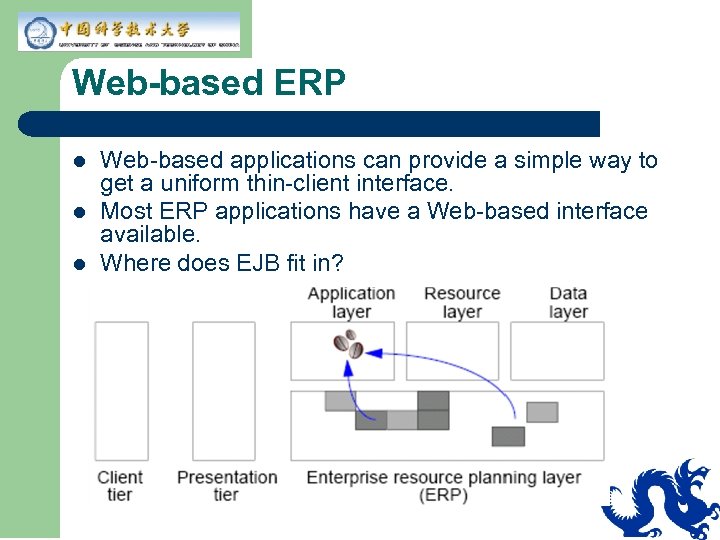
Web-based ERP l l l Web-based applications can provide a simple way to get a uniform thin-client interface. Most ERP applications have a Web-based interface available. Where does EJB fit in?
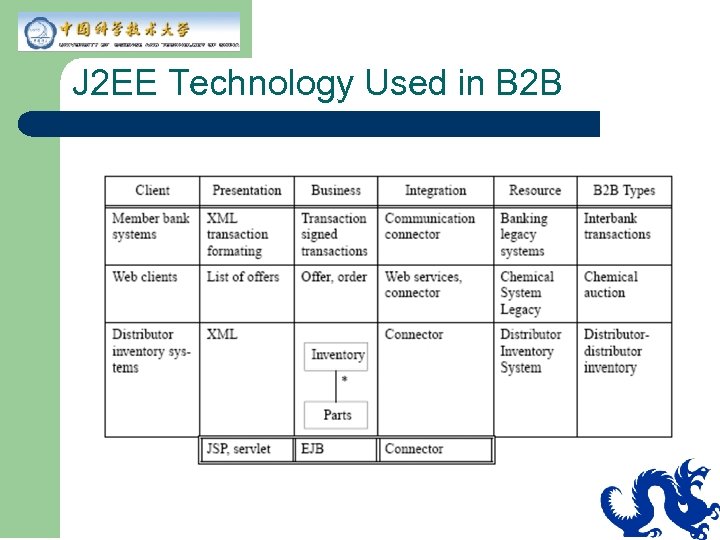
J 2 EE Technology Used in B 2 B
Workflow Application l In any multistep business process, such as: – – – l l Entering, verifying, packing, and shipping an order Receiving, entering, processing, and closing a trouble ticket or problem report Drafting, reviewing, and finalizing a contract Can be done by one person or many people Has a number of discrete steps over a relatively long time, for example: a person interacts with another peoson at each step like an assembly line.
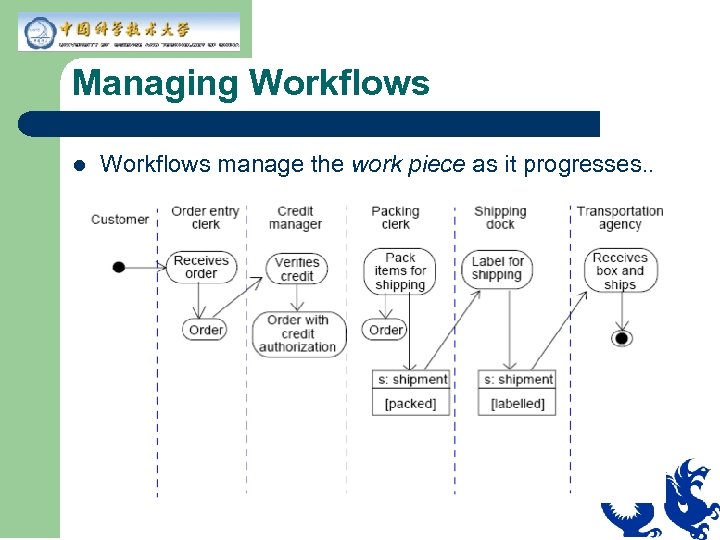
Managing Workflows l Workflows manage the work piece as it progresses. .
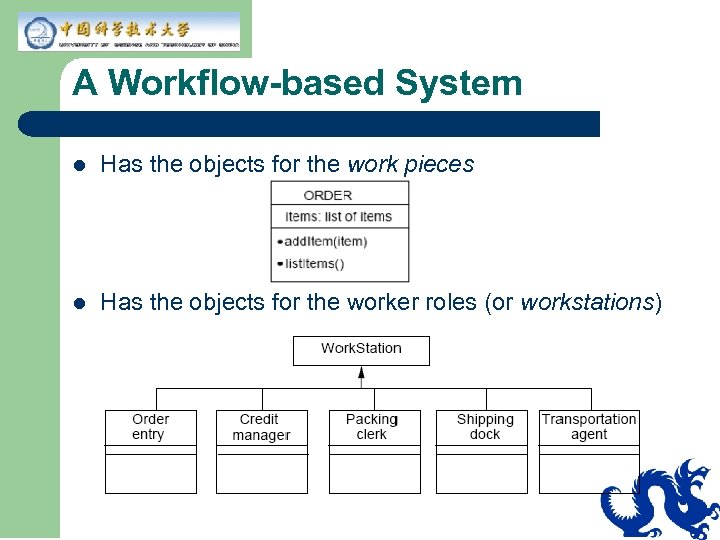
A Workflow-based System l Has the objects for the work pieces l Has the objects for the worker roles (or workstations)
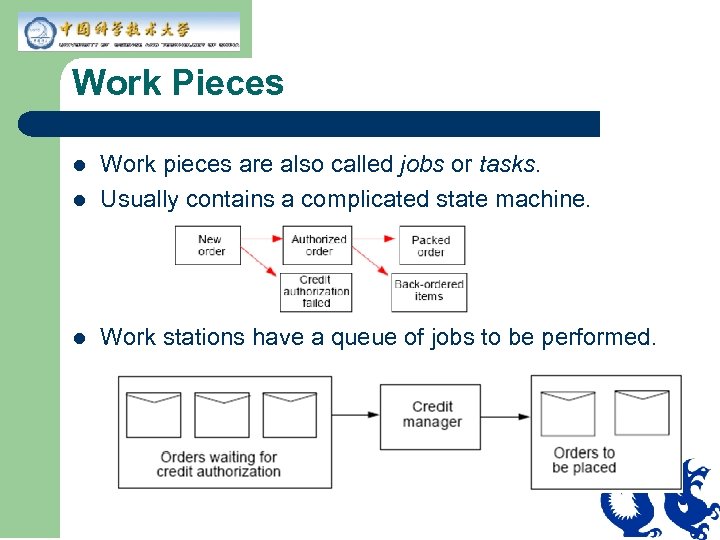
Work Pieces l Work pieces are also called jobs or tasks. Usually contains a complicated state machine. l Work stations have a queue of jobs to be performed. l
J 2 EE Technology in a Workflow Application l l l A workflow system is just another domain model. Often the work piece has a set of workflow rules. Workflow is a common place to apply the strategy pattern.
Check Your Progress l l l Define the concepts of “best practice” and “guideline” Describe the best practices using J 2 EE technology that can be applied across all tiers Describe the J 2 EE client tier best practices
Think Beyond l l Are there other areas where you think J 2 EE technology would work? If yes, please list them. Are there other areas where you think J 2 EE technology would not work well? If so, please list them.
Скачать презентацию To be an architect Ding Qing dingqing ustc edu
95145a24c86b15ead7fa257845fdd728.ppt