


 Скачать презентацию The EPIKH Project Exchange Programme to advance e-Infrastructure
c7bdfdc47806c151cb8e87d977756dc8.ppt
- Количество слайдов: 20
 The EPIKH Project (Exchange Programme to advance e-Infrastructure Know-How) Workload Management System + Logging&Bookkeeping Installation and Configuration Nabil Talhaoui(talhaoui@cnrst. ma) Joint EPIKH/EUMEDGRID Support event in Rabat Morocco, 31. 05. 2011 www. epikh. eu
 Outline • Brief introduction to WMS, LB • Before installation • Preliminaries steps : Preparing the Linux machine • Installing the Middleware 3. 1 – Step 0 : Repository settings – Step 1 : WMS and LB installation – Step 2 : Yaim Configuration of installed services • Testing of installed services Rabat, Joint EPIKH/EUMEDGRID Support Site Admin 31. 05. 2011 2
 g. Lite Grid WM service : WMS Rabat, Joint EPIKH/EUMEDGRID Support Site Admin 31. 05. 2011 3
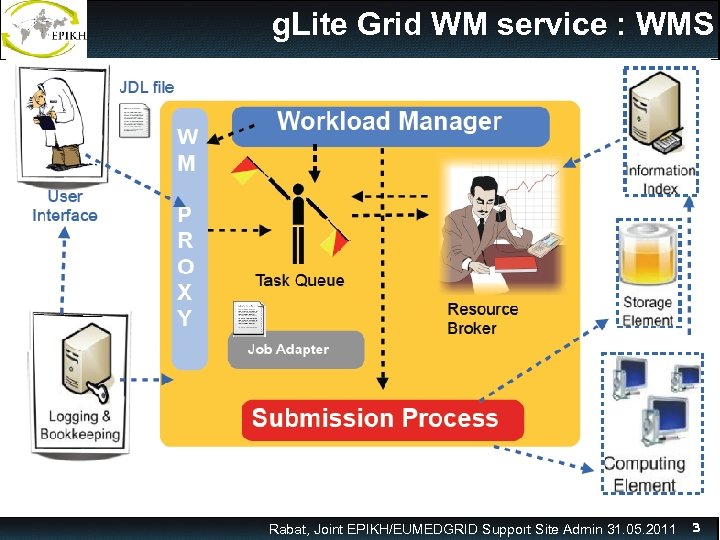
 g. Lite Grid WM service : WMS o The Workload Management System (WMS) is the g. Lite service that allows users to submit jobs, and performs all tasks required to execute them, without exposing the user to the complexity of the Grid. o The workload manager (WM) is the principal component in the WMS. o Purpose of the Workload Manager (WM) is to accept and satisfy requests for job management coming from its clients o The WM hands over the job to an appropriate Computing Element (CE) for execution taking into account requirements and the preferences expressed in the job description. Rabat, Joint EPIKH/EUMEDGRID Support Site Admin 31. 05. 2011 4
 Logging and Bookkeeping service (LB) o The Logging and Bookkeeping service (LB) tracks jobs in terms of event (important points of job life, e. g. submission, finding a matching CE, starting execution etc. ) gathered from various WMS components as well as CEs. o L&B collects informations about all important events in the Grid job life - transitions between components or services (WMS components) results of matching and brokerage waiting in queue systems start and end of execution Rabat, Joint EPIKH/EUMEDGRID Support Site Admin 31. 05. 2011 5
 Before installation • The instructions provided in this presentation assume that you are going to use a machine with Scientific Linux 4. 8 i 386 32 bit installed. Ø Virtual Machine image (GILDA VM Base_SLC 4. 8_i 386) available at: https: //gilda. ct. infn. it/Virtual. Services. html • We will install a 3. 1 Middleware version 32 bit – The YUM package manager is considered the default installation tool – The Yaim is a tool to configure the middleware Grid services • For this TEST installation: we are going to configure a VO Eumed Rabat, Joint EPIKH/EUMEDGRID Support Site Admin 31. 05. 2011 6
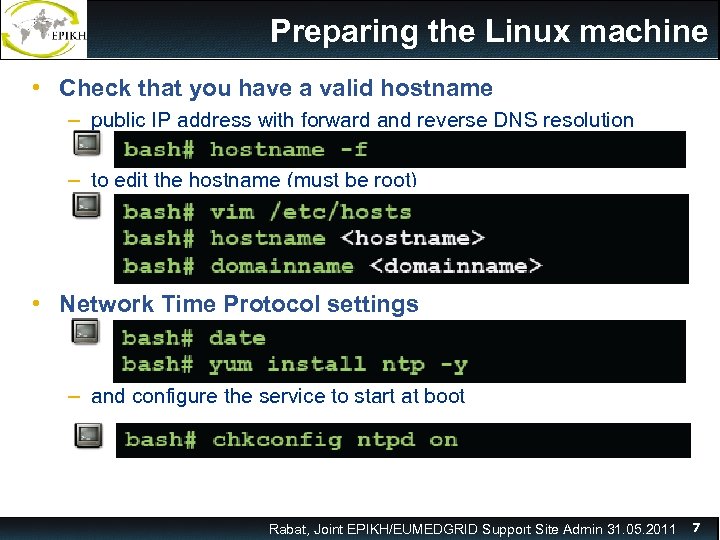 Preparing the Linux machine • Check that you have a valid hostname – public IP address with forward and reverse DNS resolution – to edit the hostname (must be root) • Network Time Protocol settings – to edit the hostname (must be root) – and configure the service to start at boot Rabat, Joint EPIKH/EUMEDGRID Support Site Admin 31. 05. 2011 7
 • To login to the VM you can use the winscp then open a terminal and write the password • Password: grid 2011 Rabat, Joint EPIKH/EUMEDGRID Support Site Admin 31. 05. 2011 8
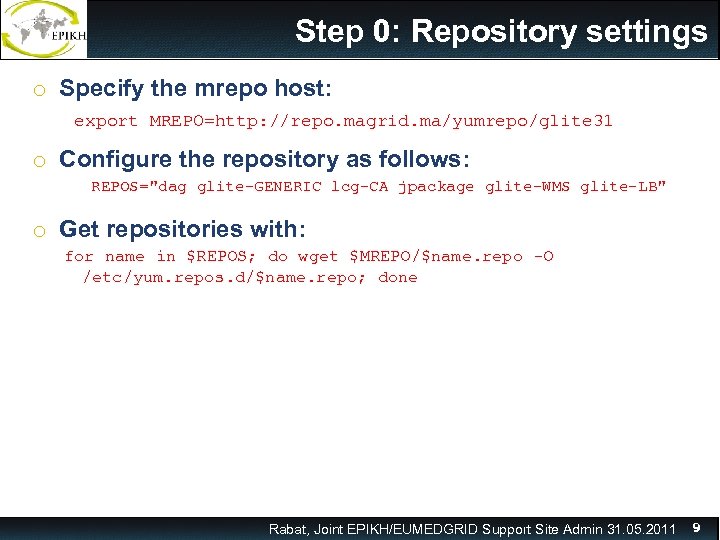 Step 0: Repository settings o Specify the mrepo host: export MREPO=http: //repo. magrid. ma/yumrepo/glite 31 o Configure the repository as follows: REPOS="dag glite-GENERIC lcg-CA jpackage glite-WMS glite-LB" o Get repositories with: for name in $REPOS; do wget $MREPO/$name. repo -O /etc/yum. repos. d/$name. repo; done Rabat, Joint EPIKH/EUMEDGRID Support Site Admin 31. 05. 2011 9
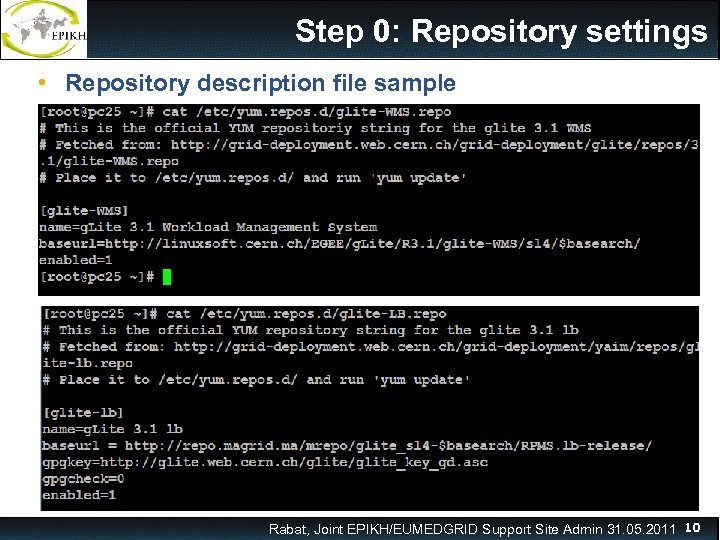 Step 0: Repository settings • Repository description file sample Rabat, Joint EPIKH/EUMEDGRID Support Site Admin 31. 05. 2011 10
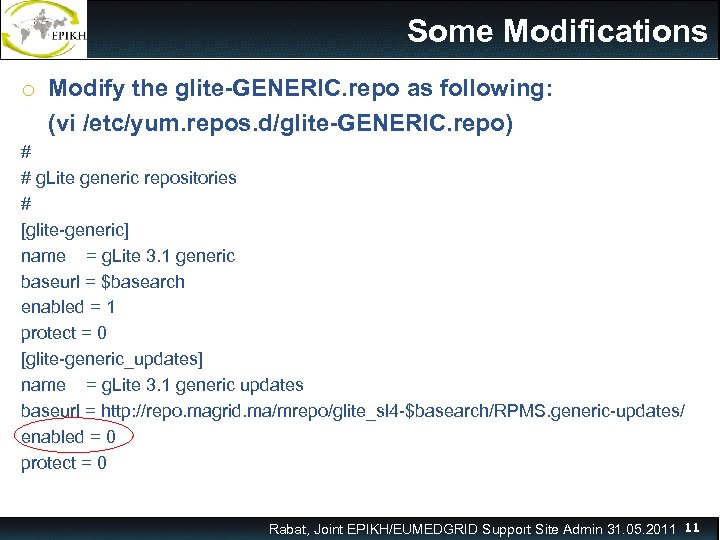 Some Modifications o Modify the glite-GENERIC. repo as following: (vi /etc/yum. repos. d/glite-GENERIC. repo) # # g. Lite generic repositories # [glite-generic] name = g. Lite 3. 1 generic baseurl = $basearch enabled = 1 protect = 0 [glite-generic_updates] name = g. Lite 3. 1 generic updates baseurl = http: //repo. magrid. ma/mrepo/glite_sl 4 -$basearch/RPMS. generic-updates/ enabled = 0 protect = 0 Rabat, Joint EPIKH/EUMEDGRID Support Site Admin 31. 05. 2011 11
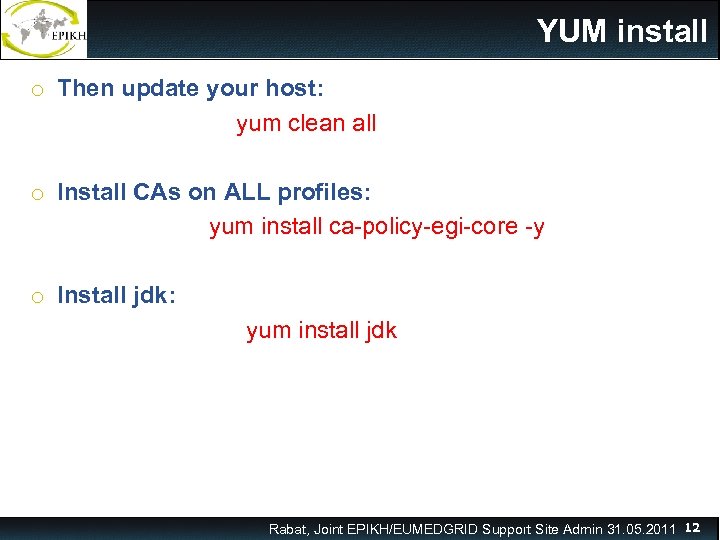 YUM install o Then update your host: yum clean all o Install CAs on ALL profiles: yum install ca-policy-egi-core -y o Install jdk: yum install jdk Rabat, Joint EPIKH/EUMEDGRID Support Site Admin 31. 05. 2011 12
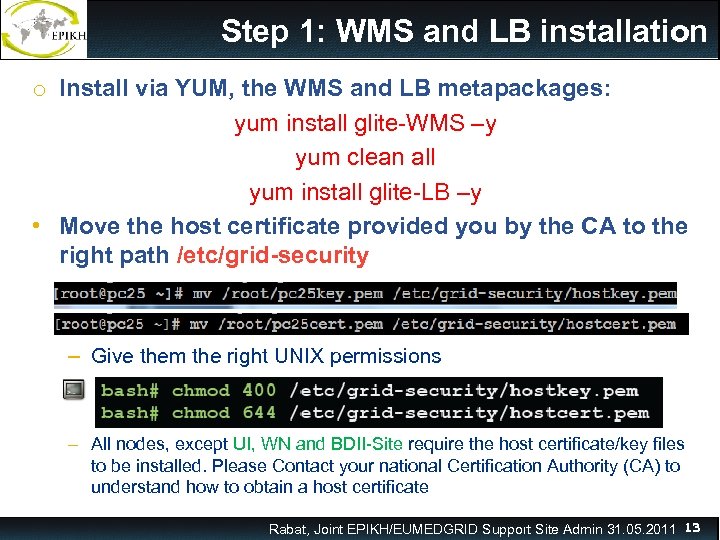 Step 1: WMS and LB installation o Install via YUM, the WMS and LB metapackages: yum install glite-WMS –y yum clean all yum install glite-LB –y • Move the host certificate provided you by the CA to the right path /etc/grid-security – Give them the right UNIX permissions – All nodes, except UI, WN and BDII-Site require the host certificate/key files to be installed. Please Contact your national Certification Authority (CA) to understand how to obtain a host certificate Rabat, Joint EPIKH/EUMEDGRID Support Site Admin 31. 05. 2011 13
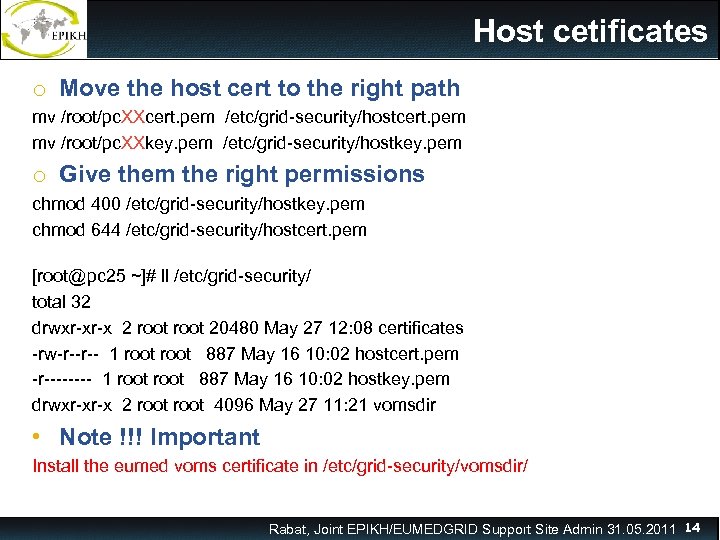 Host cetificates o Move the host cert to the right path mv /root/pc. XXcert. pem /etc/grid-security/hostcert. pem mv /root/pc. XXkey. pem /etc/grid-security/hostkey. pem o Give them the right permissions chmod 400 /etc/grid-security/hostkey. pem chmod 644 /etc/grid-security/hostcert. pem [root@pc 25 ~]# ll /etc/grid-security/ total 32 drwxr-xr-x 2 root 20480 May 27 12: 08 certificates -rw-r--r-- 1 root 887 May 16 10: 02 hostcert. pem -r---- 1 root 887 May 16 10: 02 hostkey. pem drwxr-xr-x 2 root 4096 May 27 11: 21 vomsdir • Note !!! Important Install the eumed voms certificate in /etc/grid-security/vomsdir/ Rabat, Joint EPIKH/EUMEDGRID Support Site Admin 31. 05. 2011 14
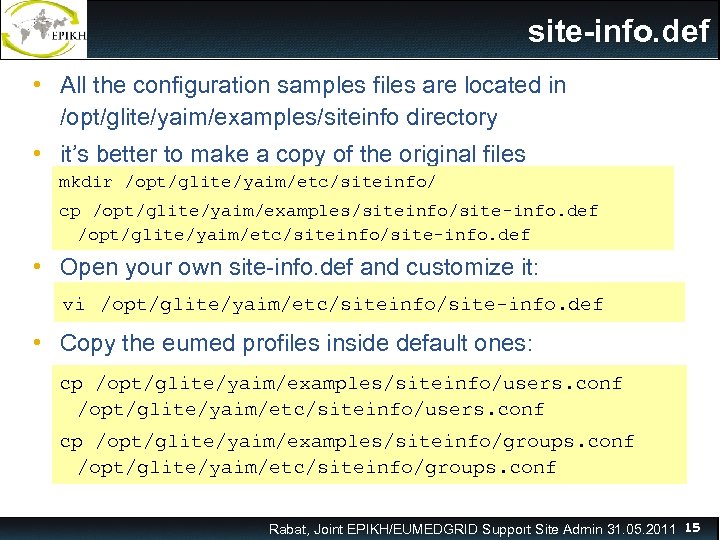 site-info. def • All the configuration samples files are located in /opt/glite/yaim/examples/siteinfo directory • it’s better to make a copy of the original files mkdir /opt/glite/yaim/etc/siteinfo/ cp /opt/glite/yaim/examples/siteinfo/site-info. def /opt/glite/yaim/etc/siteinfo/site-info. def • Open your own site-info. def and customize it: vi /opt/glite/yaim/etc/siteinfo/site-info. def • Copy the eumed profiles inside default ones: cp /opt/glite/yaim/examples/siteinfo/users. conf /opt/glite/yaim/etc/siteinfo/users. conf cp /opt/glite/yaim/examples/siteinfo/groups. conf /opt/glite/yaim/etc/siteinfo/groups. conf Rabat, Joint EPIKH/EUMEDGRID Support Site Admin 31. 05. 2011 15
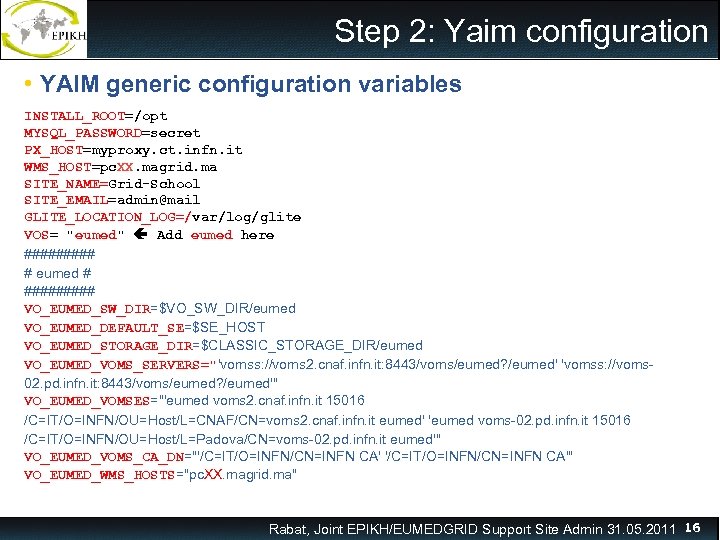 Step 2: Yaim configuration • YAIM generic configuration variables INSTALL_ROOT=/opt MYSQL_PASSWORD=secret PX_HOST=myproxy. ct. infn. it WMS_HOST=pc. XX. magrid. ma SITE_NAME=Grid-School SITE_EMAIL=admin@mail GLITE_LOCATION_LOG=/var/log/glite VOS= "eumed" Add eumed here ##### # eumed # ##### VO_EUMED_SW_DIR=$VO_SW_DIR/eumed VO_EUMED_DEFAULT_SE=$SE_HOST VO_EUMED_STORAGE_DIR=$CLASSIC_STORAGE_DIR/eumed VO_EUMED_VOMS_SERVERS="'vomss: //voms 2. cnaf. infn. it: 8443/voms/eumed? /eumed' 'vomss: //voms 02. pd. infn. it: 8443/voms/eumed? /eumed'" VO_EUMED_VOMSES="'eumed voms 2. cnaf. infn. it 15016 /C=IT/O=INFN/OU=Host/L=CNAF/CN=voms 2. cnaf. infn. it eumed' 'eumed voms-02. pd. infn. it 15016 /C=IT/O=INFN/OU=Host/L=Padova/CN=voms-02. pd. infn. it eumed'" VO_EUMED_VOMS_CA_DN="'/C=IT/O=INFN/CN=INFN CA'" VO_EUMED_WMS_HOSTS="pc. XX. magrid. ma" Rabat, Joint EPIKH/EUMEDGRID Support Site Admin 31. 05. 2011 16
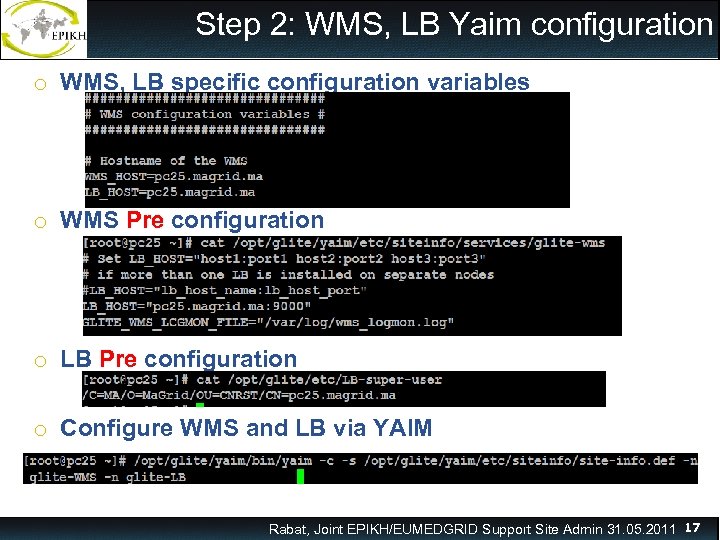 Step 2: WMS, LB Yaim configuration o WMS, LB specific configuration variables o WMS Pre configuration o LB Pre configuration o Configure WMS and LB via YAIM Rabat, Joint EPIKH/EUMEDGRID Support Site Admin 31. 05. 2011 17
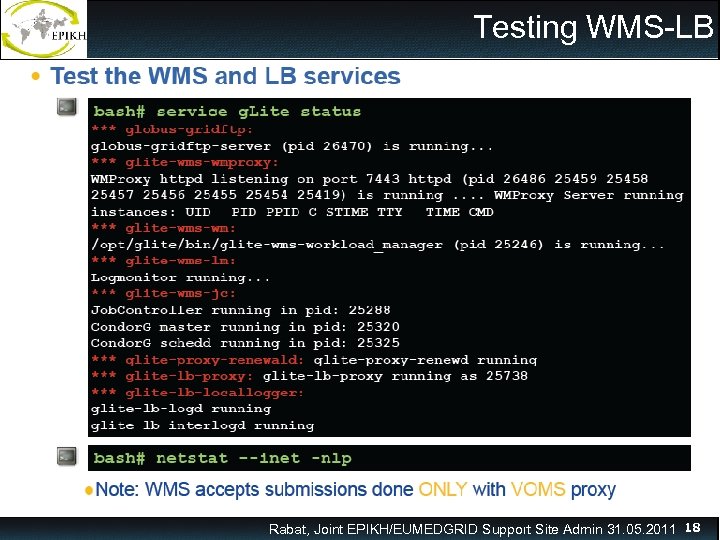 Testing WMS-LB Rabat, Joint EPIKH/EUMEDGRID Support Site Admin 31. 05. 2011 18
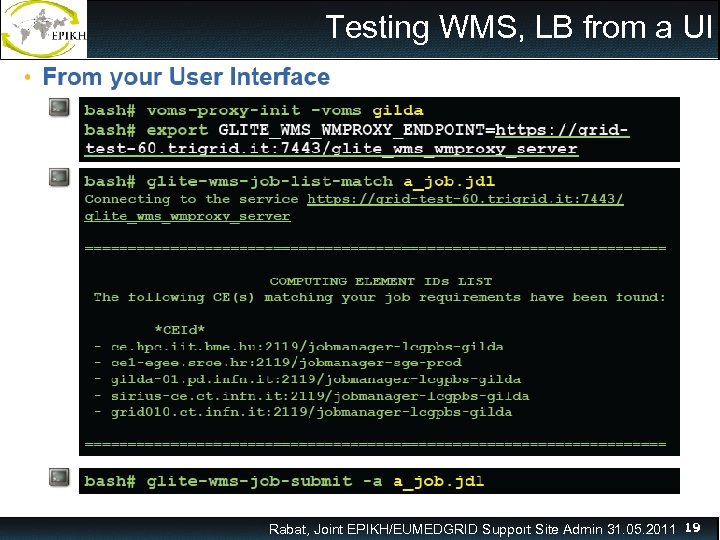 Testing WMS, LB from a UI Rabat, Joint EPIKH/EUMEDGRID Support Site Admin 31. 05. 2011 19
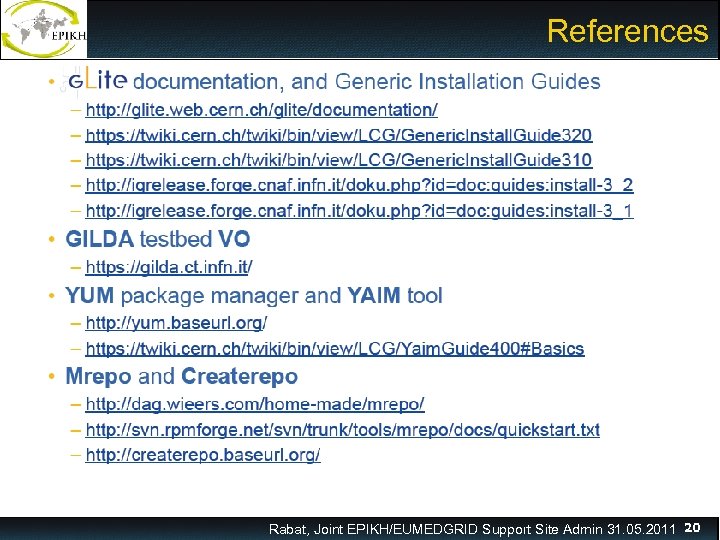 References Rabat, Joint EPIKH/EUMEDGRID Support Site Admin 31. 05. 2011 20