 Скачать презентацию THE BECKMAN COULTER logo COULTER Dx H Tru
d7c912d5325e7d079de4c0c3425ec85f.ppt
- Количество слайдов: 53




THE BECKMAN COULTER logo, COULTER, Dx. H, Tru. Color, and Uni. Cel are trademarks of Beckman Coulter, Inc; COULTER and Uni. Cel are registered in the USPTO. 1 of 53 Rev A. 1 (03/2013) Beckman Coulter Professional Development © 2013 Beckman Coulter, Inc.
Objectives ¬Software Overview ¬System & Details Status ¬Daily Checks & Shutdown ¬System Maintenance ¬Set-Up ¬Sample Processing ¬Cleaning Procedures ¬Sample-Flow 2 of 53 Rev A. 1 (03/2013) Beckman Coulter Professional Development © 2013 Beckman Coulter, Inc.
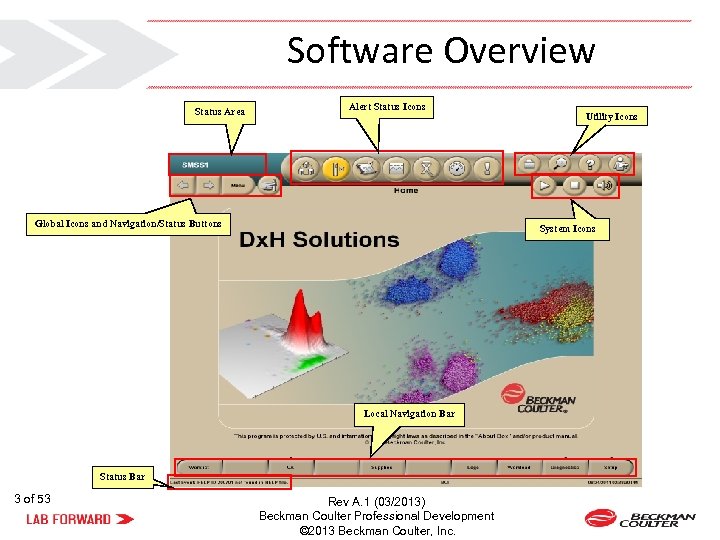
Software Overview Status Area Alert Status Icons Global Icons and Navigation/Status Buttons System Icons Local Navigation Bar Status Bar 3 of 53 Utility Icons Rev A. 1 (03/2013) Beckman Coulter Professional Development © 2013 Beckman Coulter, Inc.
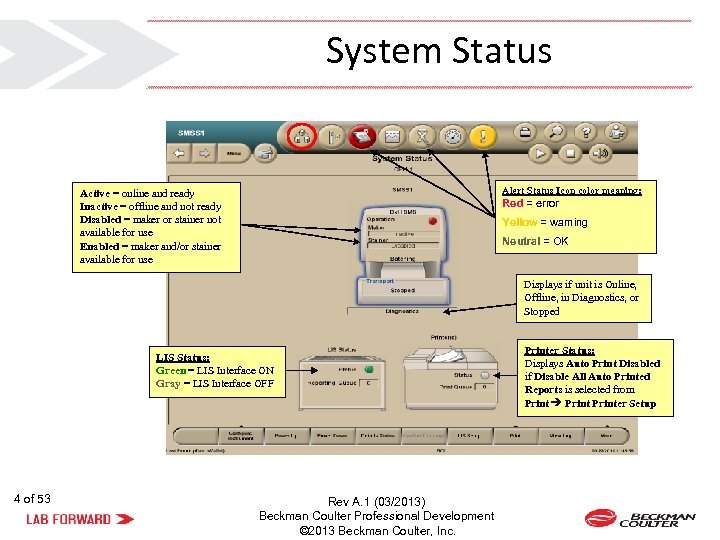
System Status Alert Status Icon color meaning: Active = online and ready Inactive = offline and not ready Disabled = maker or stainer not available for use Enabled = maker and/or stainer available for use Red = error Yellow = warning Neutral = OK Displays if unit is Online, Offline, in Diagnostics, or Stopped LIS Status: Green = LIS Interface ON Gray = LIS Interface OFF 4 of 53 Rev A. 1 (03/2013) Beckman Coulter Professional Development © 2013 Beckman Coulter, Inc. Printer Status: Displays Auto Print Disabled if Disable All Auto Printed Reports is selected from Printer Setup
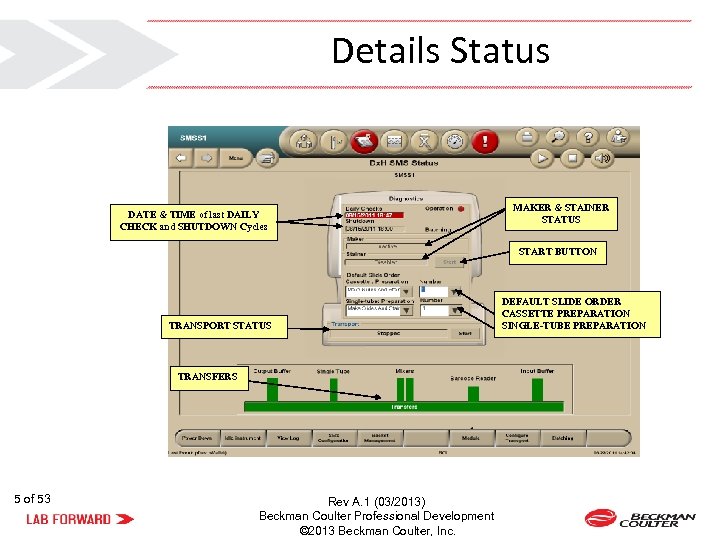
Details Status DATE & TIME of last DAILY CHECK and SHUTDOWN Cycles MAKER & STAINER STATUS START BUTTON TRANSPORT STATUS TRANSFERS 5 of 53 Rev A. 1 (03/2013) Beckman Coulter Professional Development © 2013 Beckman Coulter, Inc. DEFAULT SLIDE ORDER CASSETTE PREPARATION SINGLE-TUBE PREPARATION
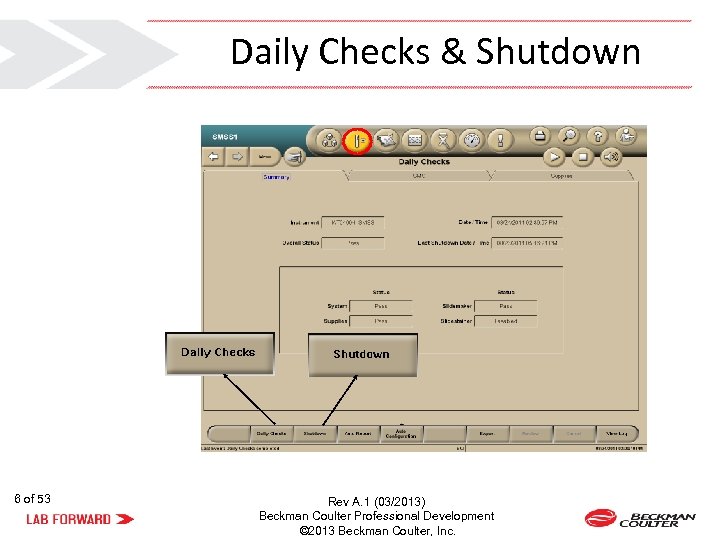
Daily Checks & Shutdown 6 of 53 Rev A. 1 (03/2013) Beckman Coulter Professional Development © 2013 Beckman Coulter, Inc.
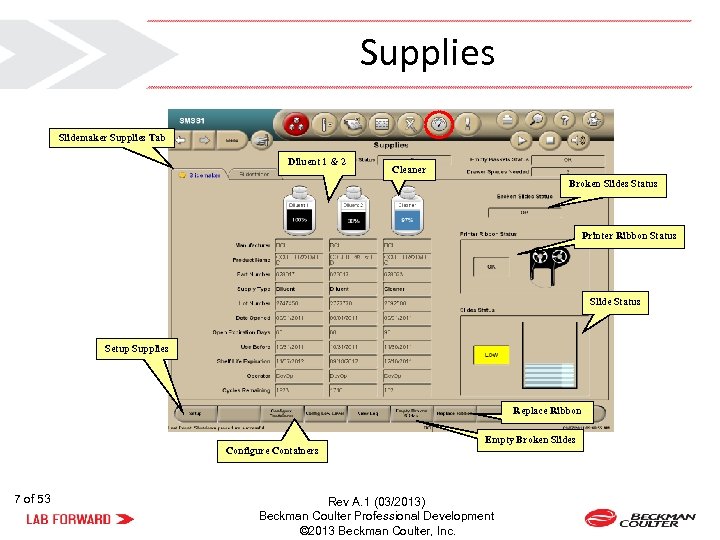
Supplies Slidemaker Supplies Tab Diluent 1 & 2 Cleaner Broken Slides Status Printer Ribbon Status Slide Status Setup Supplies Replace Ribbon Configure Containers 7 of 53 Empty Broken Slides Rev A. 1 (03/2013) Beckman Coulter Professional Development © 2013 Beckman Coulter, Inc.
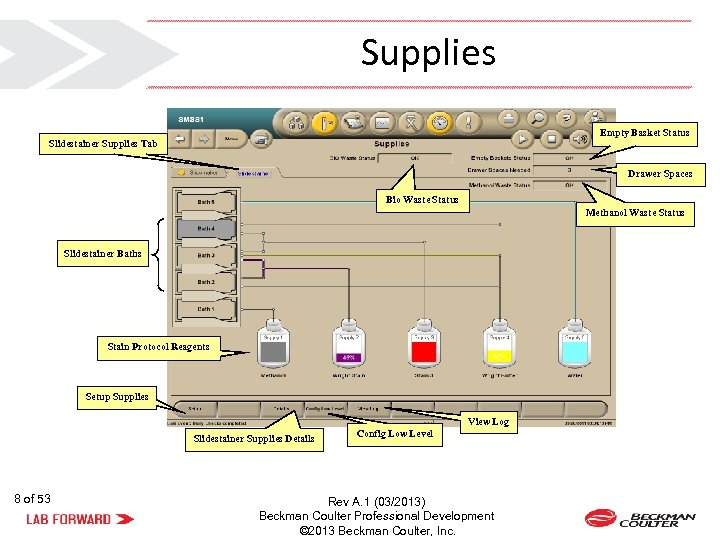
Supplies Empty Basket Status Slidestainer Supplies Tab Drawer Spaces Bio Waste Status Methanol Waste Status Slidestainer Baths Stain Protocol Reagents Setup Supplies View Log Slidestainer Supplies Details 8 of 53 Config Low Level Rev A. 1 (03/2013) Beckman Coulter Professional Development © 2013 Beckman Coulter, Inc.
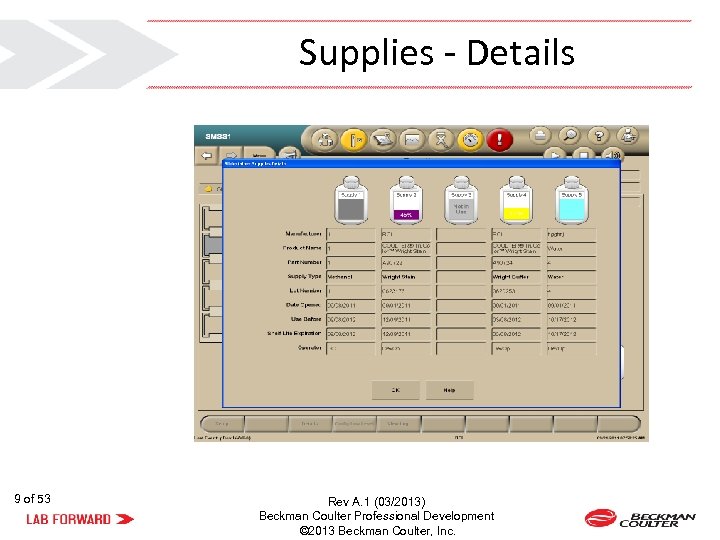
Supplies - Details 9 of 53 Rev A. 1 (03/2013) Beckman Coulter Professional Development © 2013 Beckman Coulter, Inc.
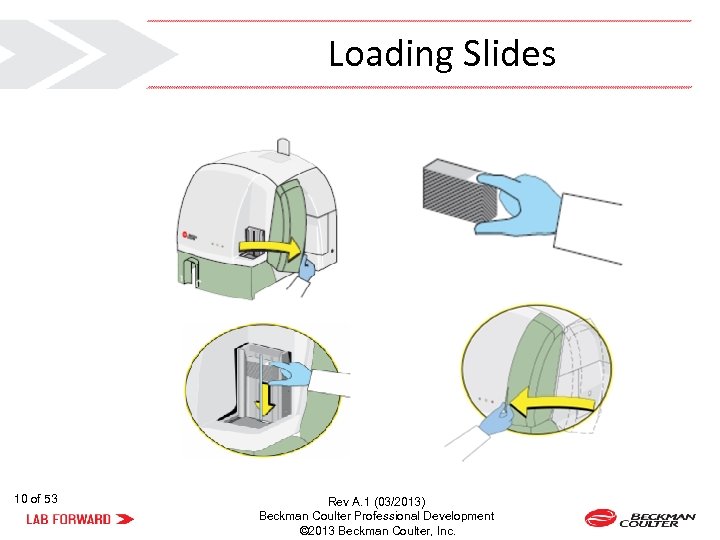
Loading Slides 10 of 53 Rev A. 1 (03/2013) Beckman Coulter Professional Development © 2013 Beckman Coulter, Inc.

11 of 53 Rev A. 1 (03/2013) Beckman Coulter Professional Development © 2013 Beckman Coulter, Inc.
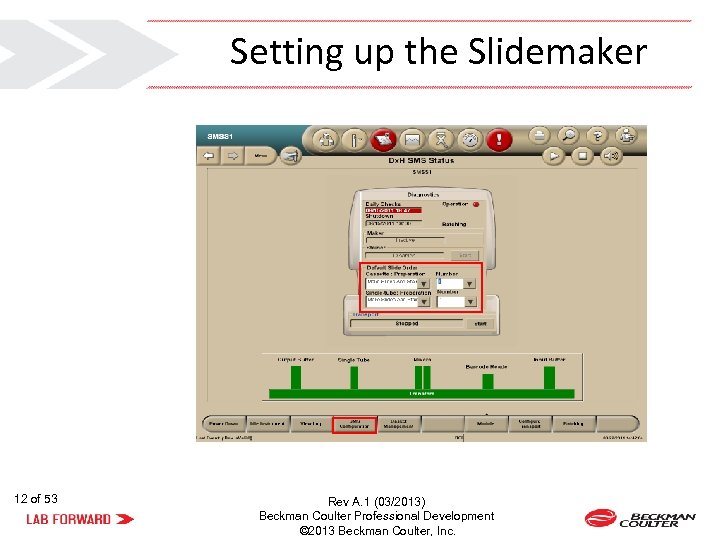
Setting up the Slidemaker 12 of 53 Rev A. 1 (03/2013) Beckman Coulter Professional Development © 2013 Beckman Coulter, Inc.
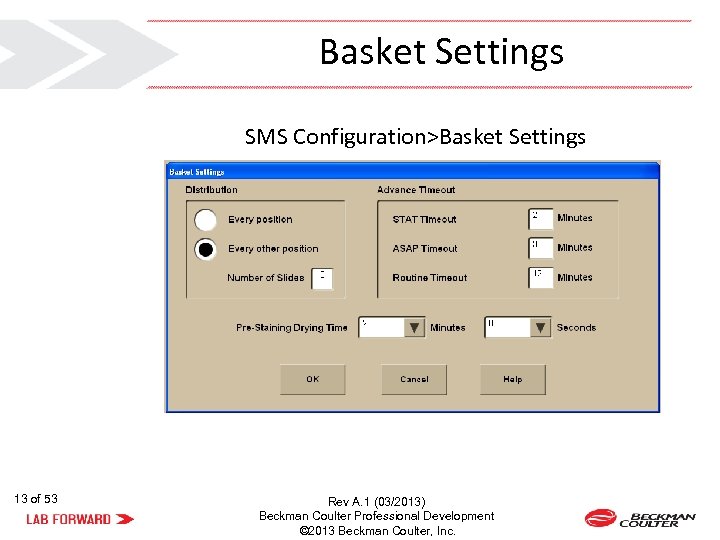
Basket Settings SMS Configuration>Basket Settings 13 of 53 Rev A. 1 (03/2013) Beckman Coulter Professional Development © 2013 Beckman Coulter, Inc.
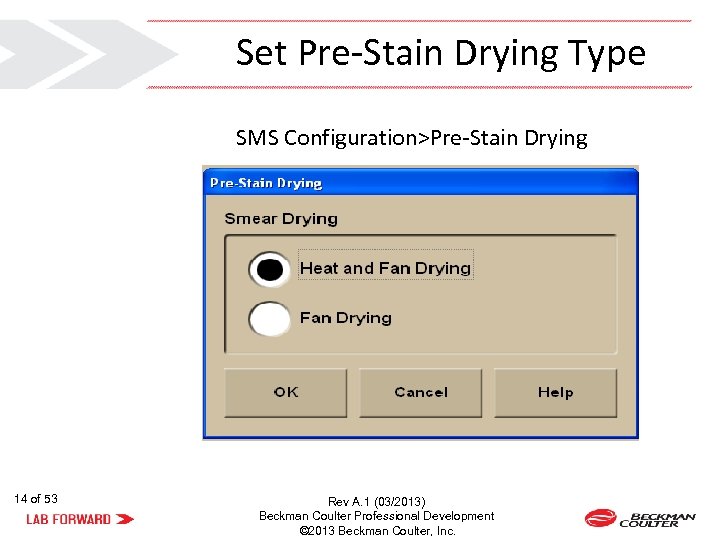
Set Pre-Stain Drying Type SMS Configuration>Pre-Stain Drying 14 of 53 Rev A. 1 (03/2013) Beckman Coulter Professional Development © 2013 Beckman Coulter, Inc.
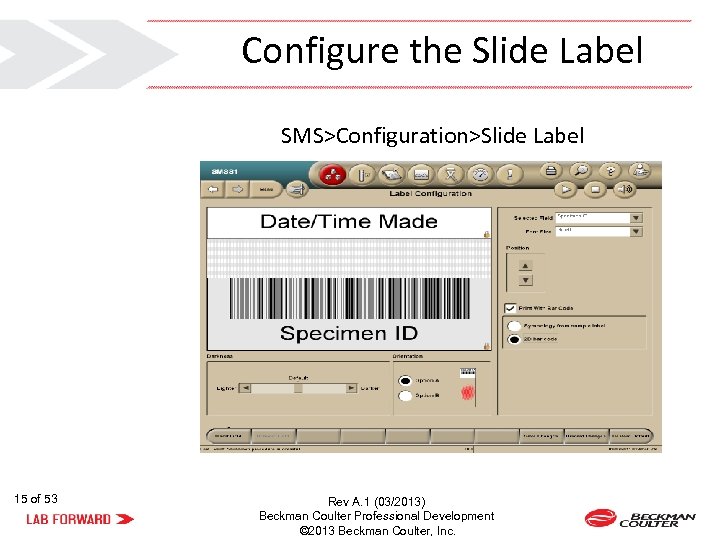
Configure the Slide Label SMS>Configuration>Slide Label 15 of 53 Rev A. 1 (03/2013) Beckman Coulter Professional Development © 2013 Beckman Coulter, Inc.
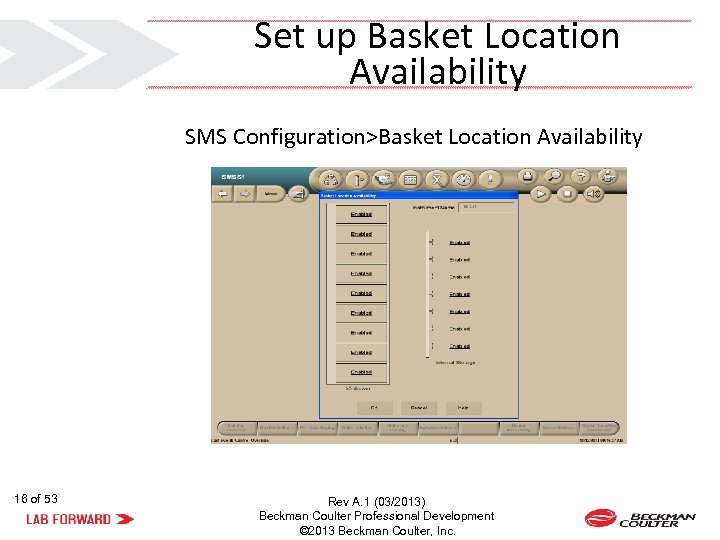
Set up Basket Location Availability SMS Configuration>Basket Location Availability 16 of 53 Rev A. 1 (03/2013) Beckman Coulter Professional Development © 2013 Beckman Coulter, Inc.
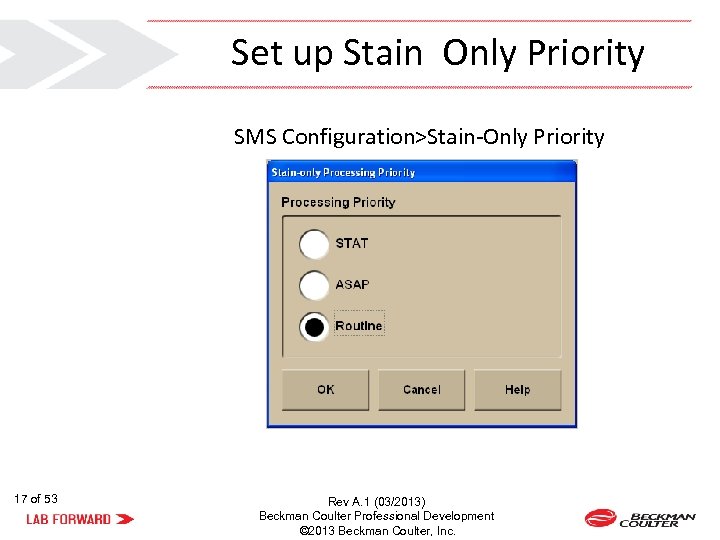
Set up Stain Only Priority SMS Configuration>Stain-Only Priority 17 of 53 Rev A. 1 (03/2013) Beckman Coulter Professional Development © 2013 Beckman Coulter, Inc.
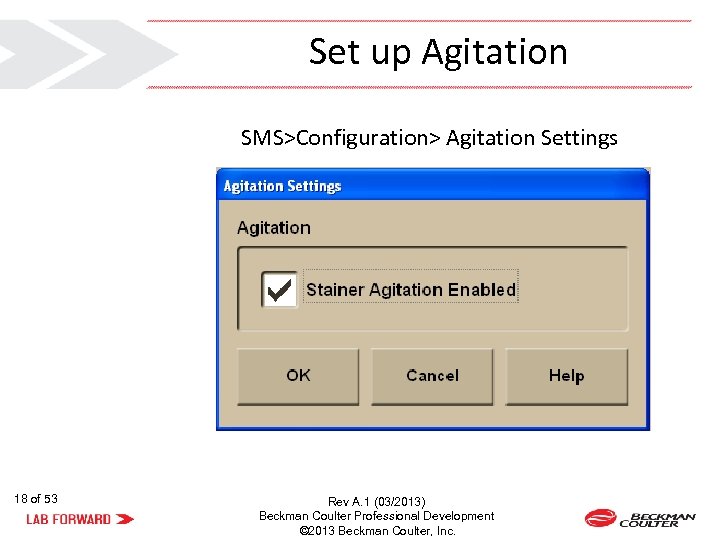
Set up Agitation SMS>Configuration> Agitation Settings 18 of 53 Rev A. 1 (03/2013) Beckman Coulter Professional Development © 2013 Beckman Coulter, Inc.
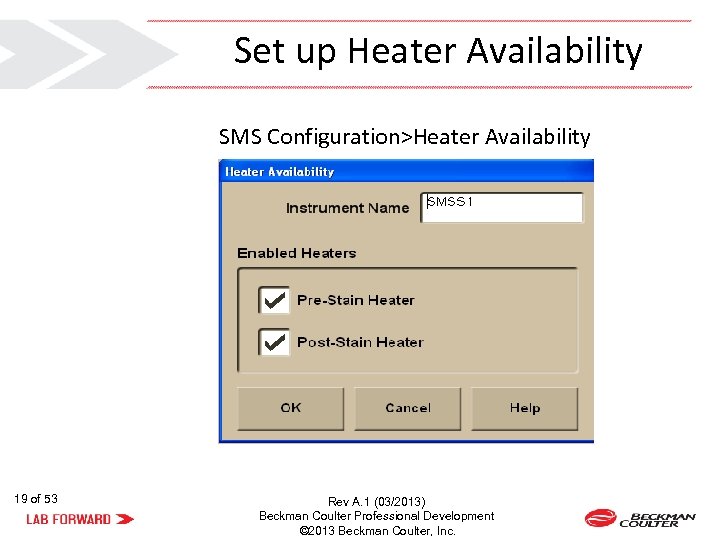
Set up Heater Availability SMS Configuration>Heater Availability 19 of 53 Rev A. 1 (03/2013) Beckman Coulter Professional Development © 2013 Beckman Coulter, Inc.
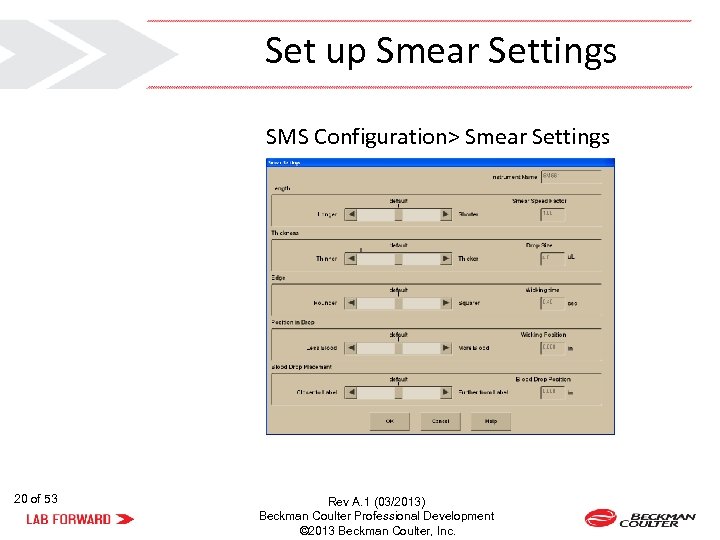
Set up Smear Settings SMS Configuration> Smear Settings 20 of 53 Rev A. 1 (03/2013) Beckman Coulter Professional Development © 2013 Beckman Coulter, Inc.

21 of 53 Rev A. 1 (03/2013) Beckman Coulter Professional Development © 2013 Beckman Coulter, Inc.
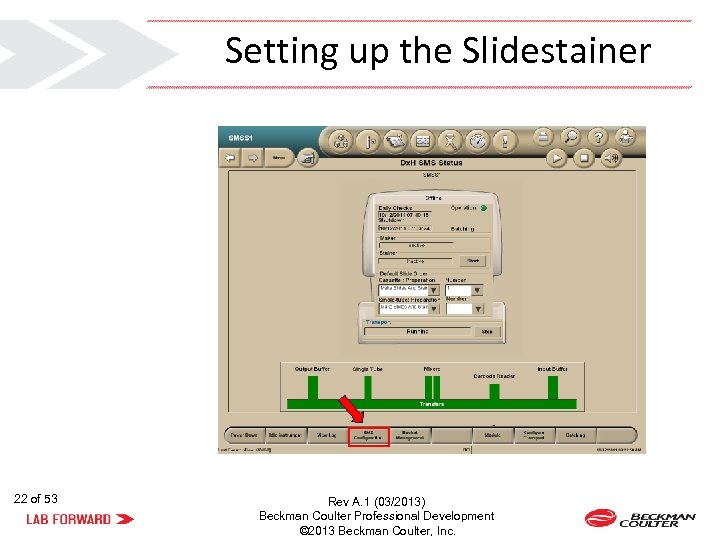
Setting up the Slidestainer 22 of 53 Rev A. 1 (03/2013) Beckman Coulter Professional Development © 2013 Beckman Coulter, Inc.
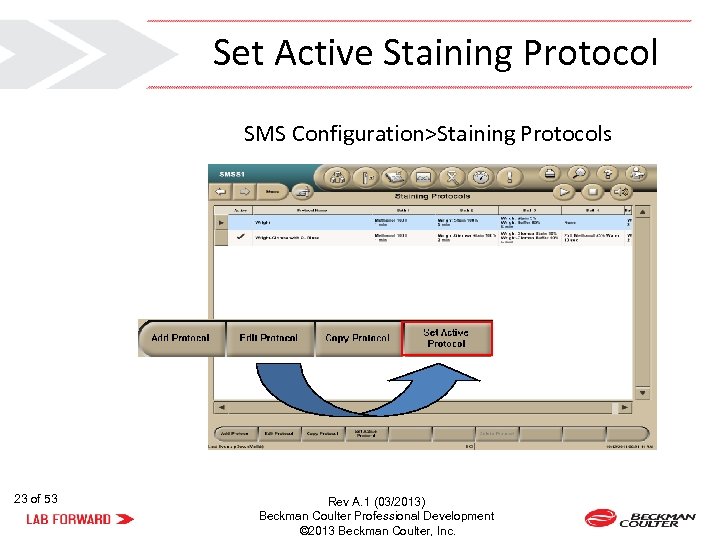
Set Active Staining Protocol SMS Configuration>Staining Protocols 23 of 53 Rev A. 1 (03/2013) Beckman Coulter Professional Development © 2013 Beckman Coulter, Inc.
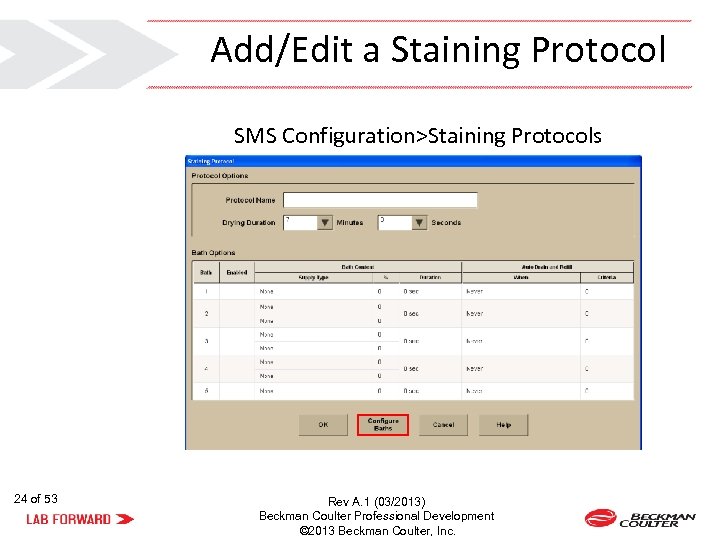
Add/Edit a Staining Protocol SMS Configuration>Staining Protocols 24 of 53 Rev A. 1 (03/2013) Beckman Coulter Professional Development © 2013 Beckman Coulter, Inc.
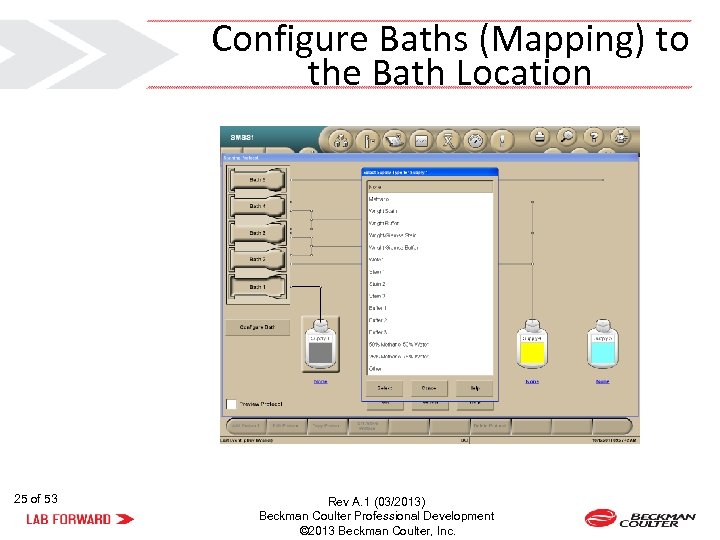
Configure Baths (Mapping) to the Bath Location 25 of 53 Rev A. 1 (03/2013) Beckman Coulter Professional Development © 2013 Beckman Coulter, Inc.
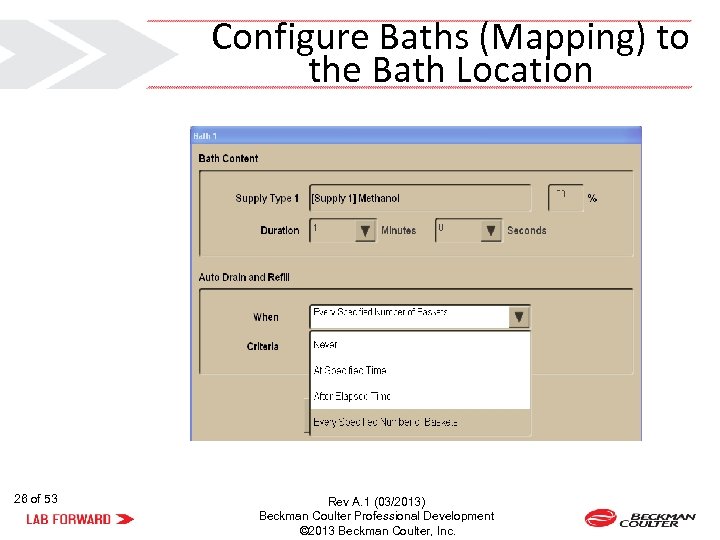
Configure Baths (Mapping) to the Bath Location 26 of 53 Rev A. 1 (03/2013) Beckman Coulter Professional Development © 2013 Beckman Coulter, Inc.
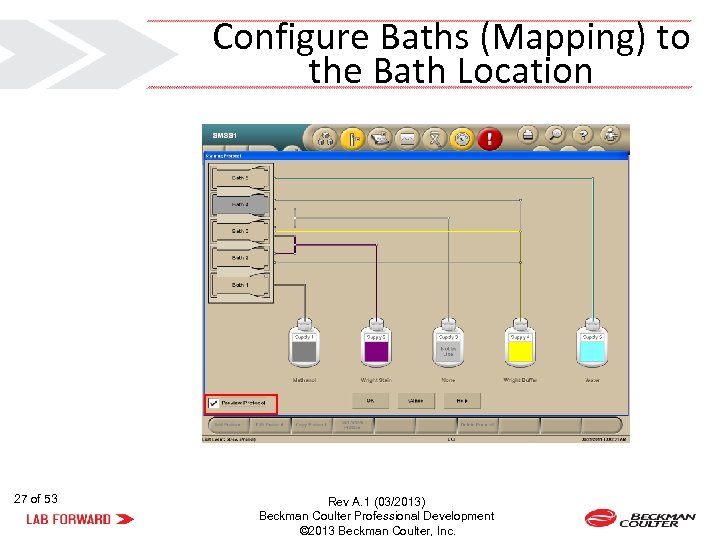
Configure Baths (Mapping) to the Bath Location 27 of 53 Rev A. 1 (03/2013) Beckman Coulter Professional Development © 2013 Beckman Coulter, Inc.
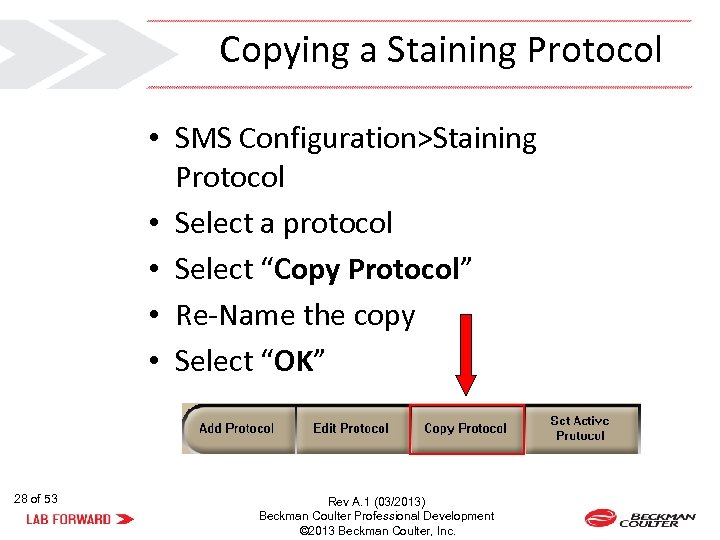
Copying a Staining Protocol • SMS Configuration>Staining Protocol • Select a protocol • Select “Copy Protocol” • Re-Name the copy • Select “OK” 28 of 53 Rev A. 1 (03/2013) Beckman Coulter Professional Development © 2013 Beckman Coulter, Inc.
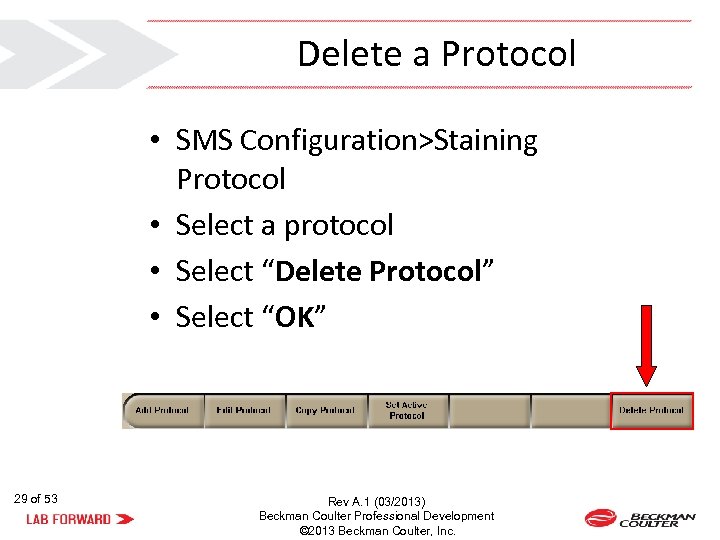
Delete a Protocol • SMS Configuration>Staining Protocol • Select a protocol • Select “Delete Protocol” • Select “OK” 29 of 53 Rev A. 1 (03/2013) Beckman Coulter Professional Development © 2013 Beckman Coulter, Inc.

Quick Rinse Follow the procedure, when needed, to reduce stain precipitate on the slide for the Wright Giemsa QR (quick rinse) default stain protocol. 30 of 53 Rev A. 1 (03/2013) Beckman Coulter Professional Development © 2013 Beckman Coulter, Inc.
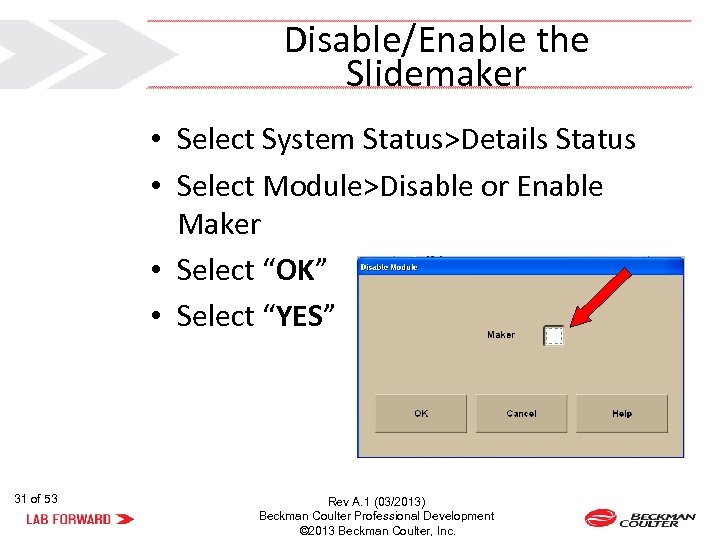
Disable/Enable the Slidemaker • Select System Status>Details Status • Select Module>Disable or Enable Maker • Select “OK” • Select “YES” 31 of 53 Rev A. 1 (03/2013) Beckman Coulter Professional Development © 2013 Beckman Coulter, Inc.
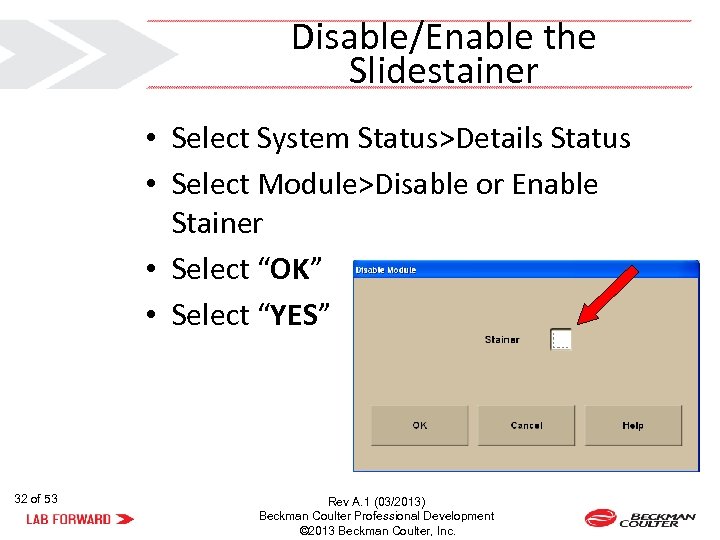
Disable/Enable the Slidestainer • Select System Status>Details Status • Select Module>Disable or Enable Stainer • Select “OK” • Select “YES” 32 of 53 Rev A. 1 (03/2013) Beckman Coulter Professional Development © 2013 Beckman Coulter, Inc.

33 of 53 Rev A. 1 (03/2013) Beckman Coulter Professional Development © 2013 Beckman Coulter, Inc.
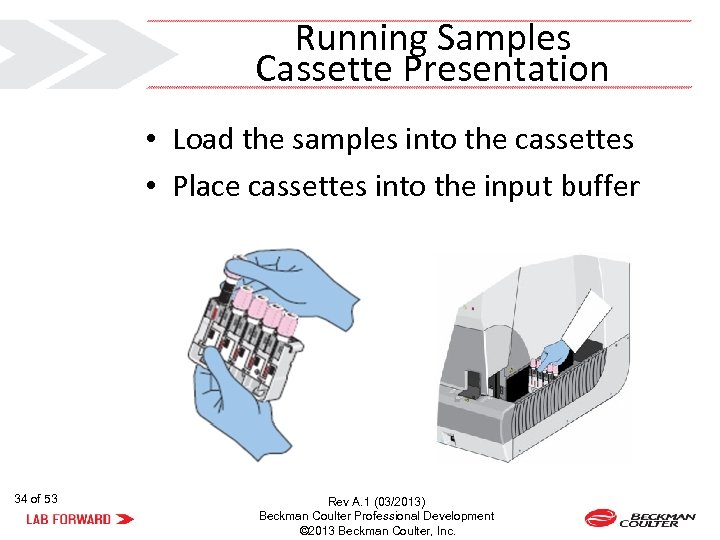
Running Samples Cassette Presentation • Load the samples into the cassettes • Place cassettes into the input buffer 34 of 53 Rev A. 1 (03/2013) Beckman Coulter Professional Development © 2013 Beckman Coulter, Inc.
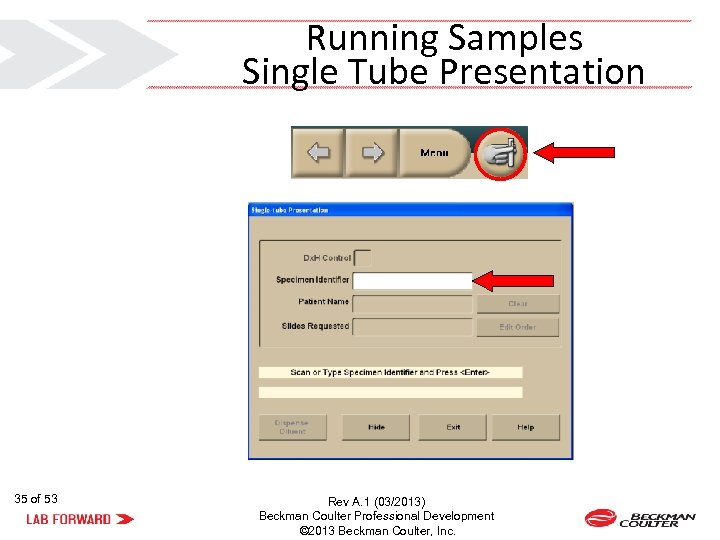
Running Samples Single Tube Presentation 35 of 53 Rev A. 1 (03/2013) Beckman Coulter Professional Development © 2013 Beckman Coulter, Inc.

36 of 53 Rev A. 1 (03/2013) Beckman Coulter Professional Development © 2013 Beckman Coulter, Inc.
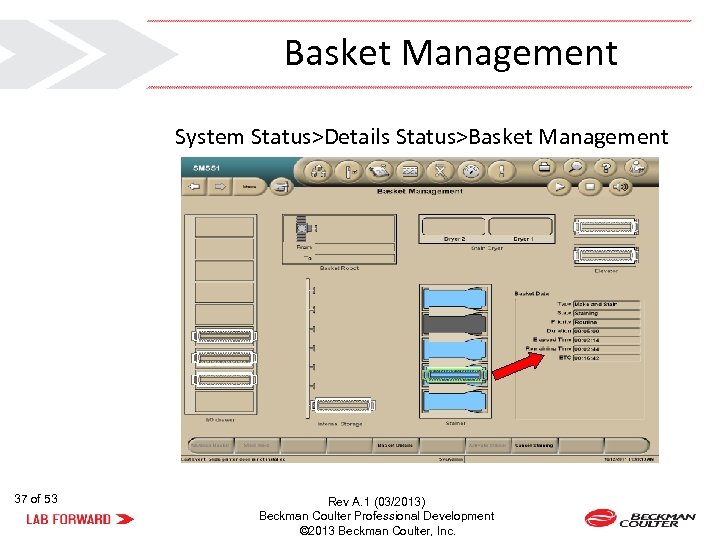
Basket Management System Status>Details Status>Basket Management 37 of 53 Rev A. 1 (03/2013) Beckman Coulter Professional Development © 2013 Beckman Coulter, Inc.
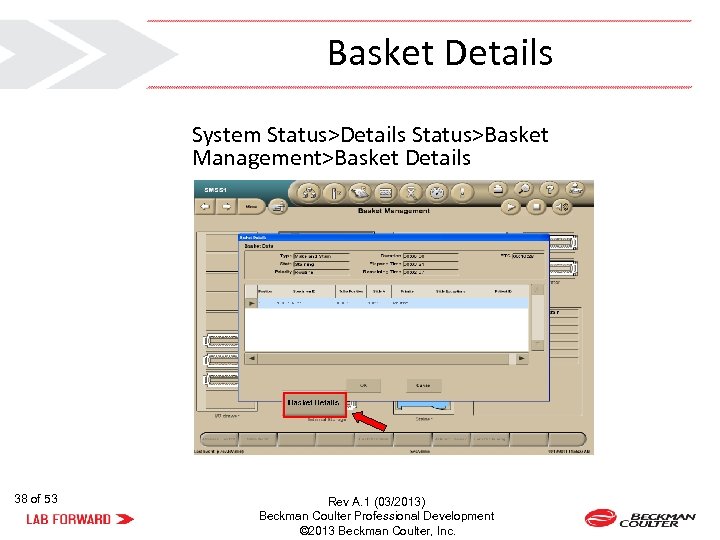
Basket Details System Status>Details Status>Basket Management>Basket Details 38 of 53 Rev A. 1 (03/2013) Beckman Coulter Professional Development © 2013 Beckman Coulter, Inc.
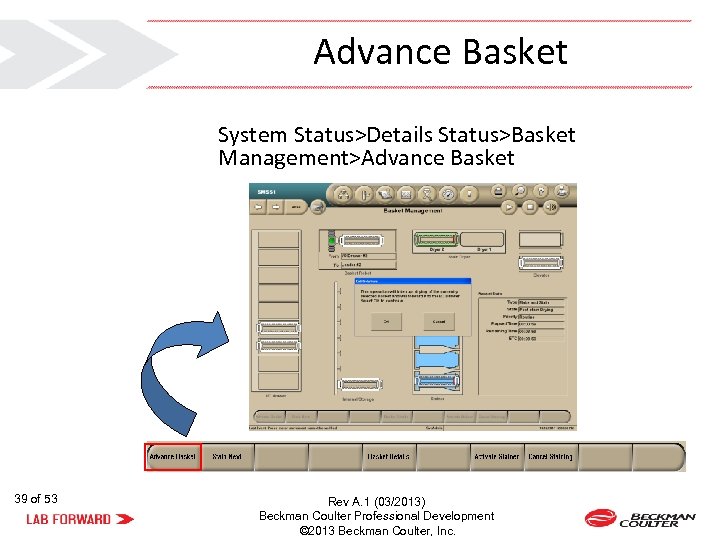
Advance Basket System Status>Details Status>Basket Management>Advance Basket 39 of 53 Rev A. 1 (03/2013) Beckman Coulter Professional Development © 2013 Beckman Coulter, Inc.
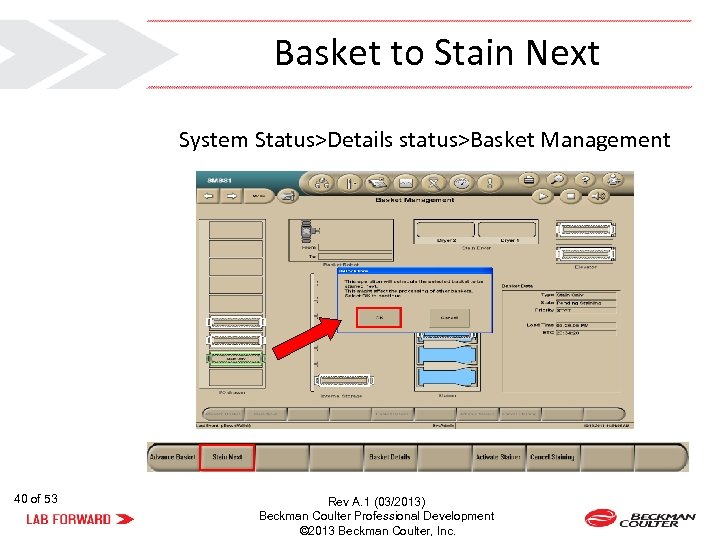
Basket to Stain Next System Status>Details status>Basket Management 40 of 53 Rev A. 1 (03/2013) Beckman Coulter Professional Development © 2013 Beckman Coulter, Inc.
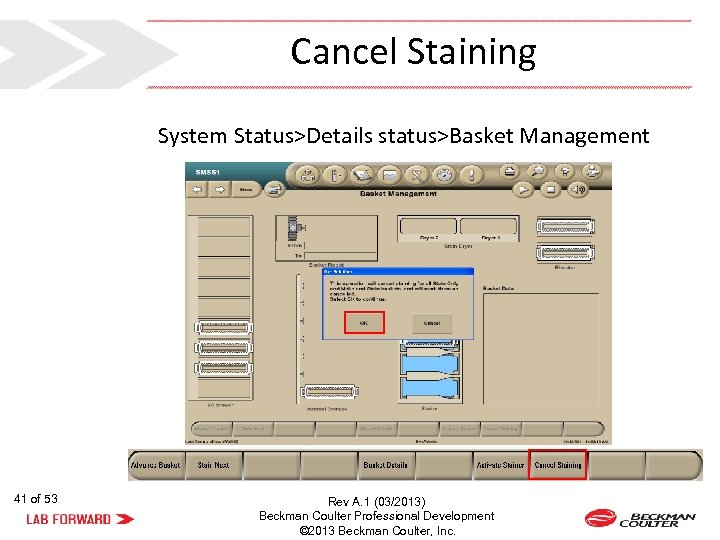
Cancel Staining System Status>Details status>Basket Management 41 of 53 Rev A. 1 (03/2013) Beckman Coulter Professional Development © 2013 Beckman Coulter, Inc.

42 of 53 Rev A. 1 (03/2013) Beckman Coulter Professional Development © 2013 Beckman Coulter, Inc.
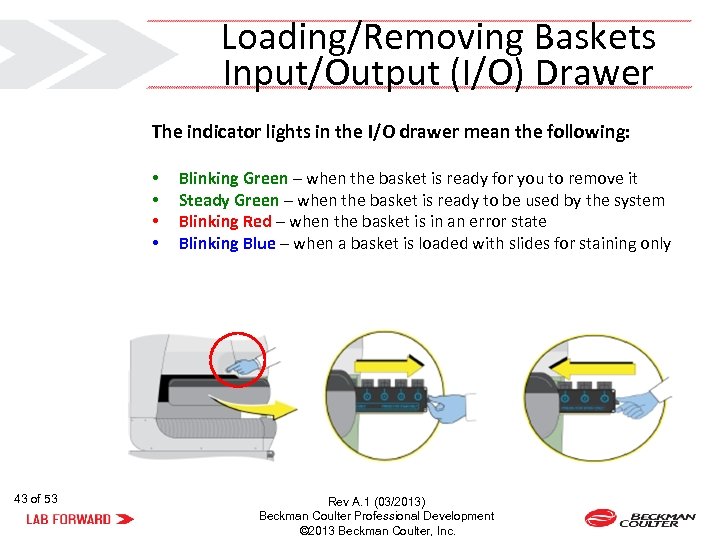
Loading/Removing Baskets Input/Output (I/O) Drawer The indicator lights in the I/O drawer mean the following: • • 43 of 53 Blinking Green – when the basket is ready for you to remove it Steady Green – when the basket is ready to be used by the system Blinking Red – when the basket is in an error state Blinking Blue – when a basket is loaded with slides for staining only Rev A. 1 (03/2013) Beckman Coulter Professional Development © 2013 Beckman Coulter, Inc.
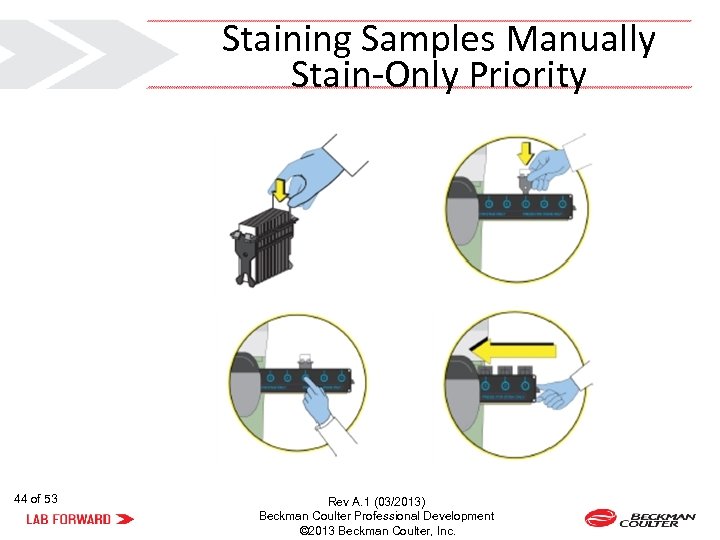
Staining Samples Manually Stain-Only Priority 44 of 53 Rev A. 1 (03/2013) Beckman Coulter Professional Development © 2013 Beckman Coulter, Inc.
Making Slides (No Staining) • Select “Make Slide” on the Default Test Order for the applicable cassette or single tube preparation (OR) • Add or edit a test from the Worklist Pending tab (OR) • Load the samples for the processing of downloaded Test Orders from the LIS 45 of 53 Rev A. 1 (03/2013) Beckman Coulter Professional Development © 2013 Beckman Coulter, Inc.

46 of 53 Rev A. 1 (03/2013) Beckman Coulter Professional Development © 2013 Beckman Coulter, Inc.
Cleaning Procedures Daily • Daily Checks • Shutdown • Cleaning Stainer Baths and Tray (Daily or as Needed) Weekly • Cleaning Baskets • Clean Stainer Fill Probes, Drain Probes and Level Sense Probes As Needed Procedures • For additional information on As Needed Procedures refer to Instructions For Use (IFU) 47 of 53 Rev A. 1 (03/2013) Beckman Coulter Professional Development © 2013 Beckman Coulter, Inc.

48 of 53 Rev A. 1 (03/2013) Beckman Coulter Professional Development © 2013 Beckman Coulter, Inc.
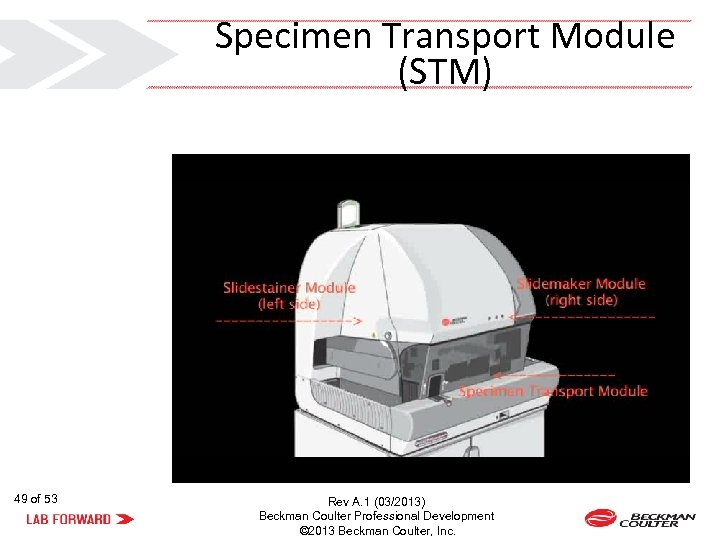
Specimen Transport Module (STM) 49 of 53 Rev A. 1 (03/2013) Beckman Coulter Professional Development © 2013 Beckman Coulter, Inc.
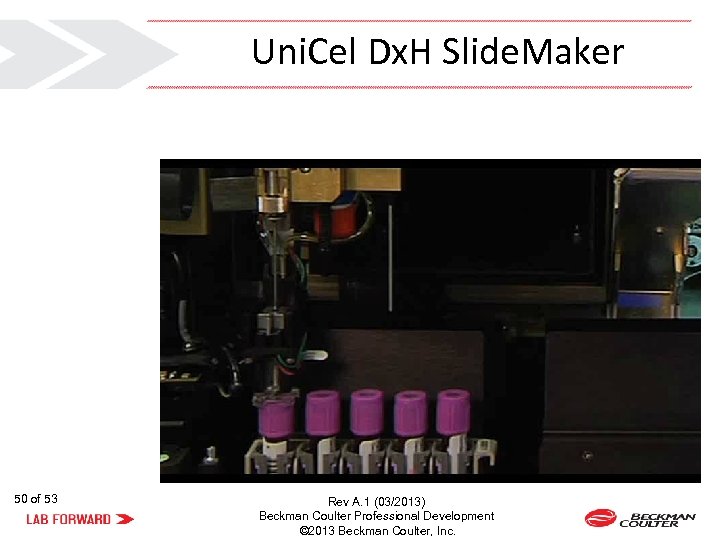
Uni. Cel Dx. H Slide. Maker 50 of 53 Rev A. 1 (03/2013) Beckman Coulter Professional Development © 2013 Beckman Coulter, Inc.
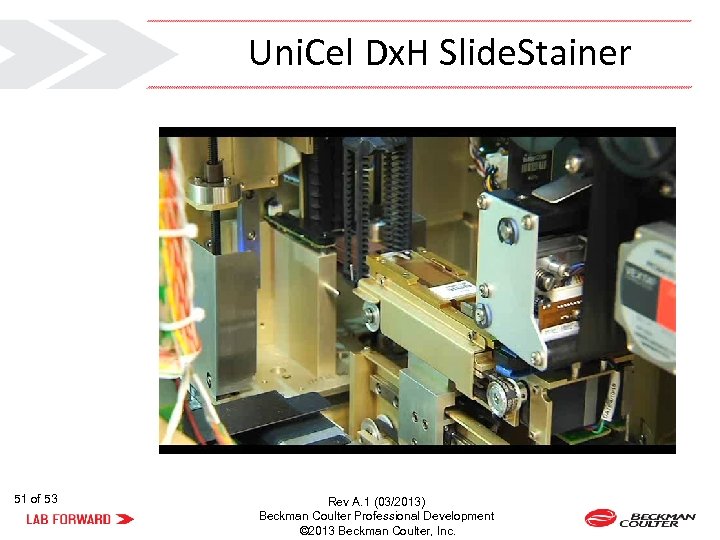
Uni. Cel Dx. H Slide. Stainer 51 of 53 Rev A. 1 (03/2013) Beckman Coulter Professional Development © 2013 Beckman Coulter, Inc.
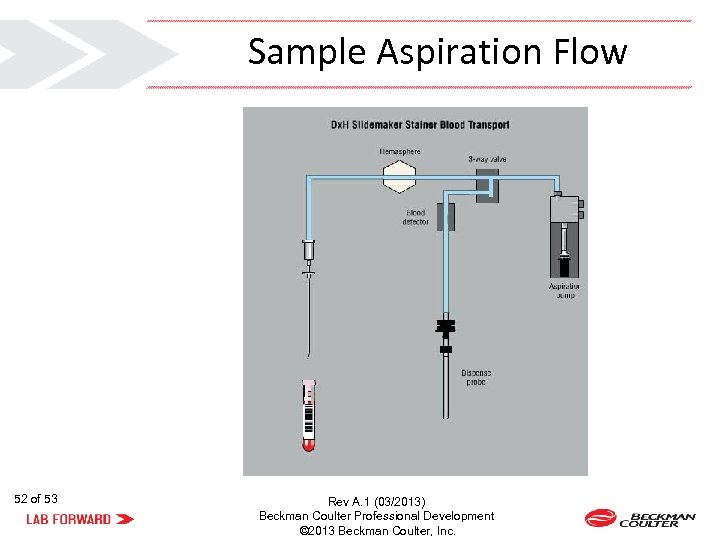
Sample Aspiration Flow 52 of 53 Rev A. 1 (03/2013) Beckman Coulter Professional Development © 2013 Beckman Coulter, Inc.

Any Questions? Move your lab forward with Beckman Coulter. 53 of 53 Rev A. 1 (03/2013) Beckman Coulter Professional Development © 2013 Beckman Coulter, Inc.
Скачать презентацию THE BECKMAN COULTER logo COULTER Dx H Tru
d7c912d5325e7d079de4c0c3425ec85f.ppt