 Скачать презентацию Teleseminar Nice-Mannheim Firewalls Tuesday September 25 th 2001
0cf8fd99d0694690e9af19ce9c0ceddd.ppt
- Количество слайдов: 36



Teleseminar Nice-Mannheim Firewalls Tuesday, September 25 th, 2001 Prof. Dr. Stefan Fischer Teleseminar Nice-Mannheim Tue Sept 25 th, 2001 1
Overview • Motivation: – Security threats for a network – Typical attacks on a computer • Firewalls as a solution – Properties of firewalls – Firewall components • Packet filter • Gateway • Bastion Host – Firewall configurations – Available software solutions • Additional Security Measures Prof. Dr. Stefan Fischer Teleseminar Nice-Mannheim Tue Sept 25 th, 2001 2
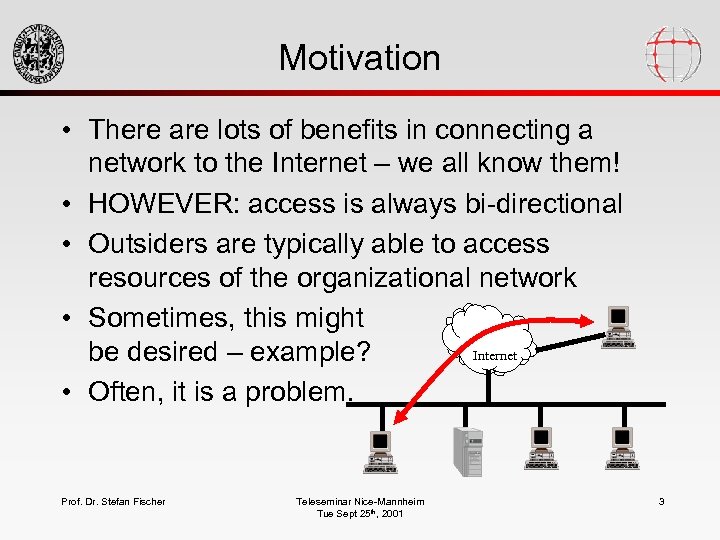
Motivation • There are lots of benefits in connecting a network to the Internet – we all know them! • HOWEVER: access is always bi-directional • Outsiders are typically able to access resources of the organizational network • Sometimes, this might Internet be desired – example? • Often, it is a problem. Prof. Dr. Stefan Fischer Teleseminar Nice-Mannheim Tue Sept 25 th, 2001 3
Typical Outsider Attacks • Denial-of-Service Attacks – make a host unusable – Example: TCP SYN flooding • Distributed Do. S Attack – massive Do. S • Spoofing (IP/DNS) – fake source addresses • Smurf and Fraggle Attacks – indirect Do. S via ICMP or UDP echo reply • Ping of Death – send IP packets which are too big and lead to a buffer overflow and thus a shutdown of the machine • Worms – use security holes to get into a system, then duplicate and try to access other systems • Trojan Horses – claim to provide useful functions, but have some malicious code run in the background • Simple Password Guessing Prof. Dr. Stefan Fischer Teleseminar Nice-Mannheim Tue Sept 25 th, 2001 4
DNS Spoofing • Basically, DNS is a distributed database of symbolic names and corresponding IP addresses. • For efficiency reasons, DNS answers are stored in a cache for later re-use. • Distribution and caching are weaknesses that can be exploited for spoofing. Prof. Dr. Stefan Fischer Teleseminar Nice-Mannheim Tue Sept 25 th, 2001 5
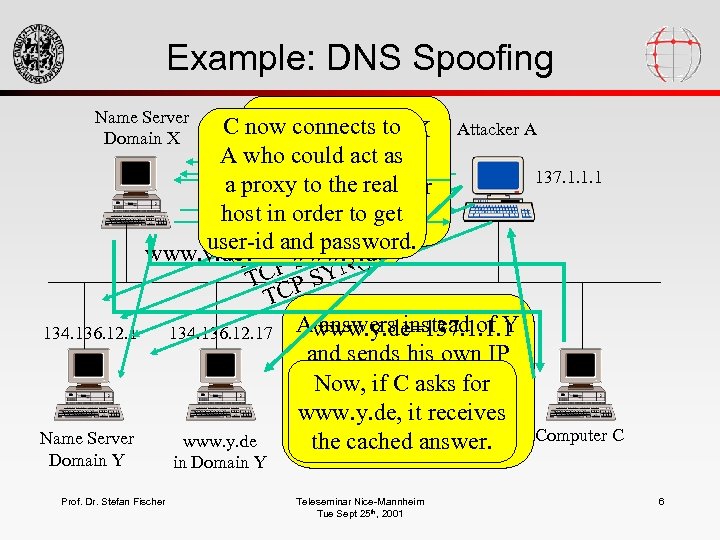
Example: DNS Spoofing Name Server Domain X 134. 136. 12. 1 Name Server Domain Y C now connects to X Attacker A Name server of www. y. de? ftp. y. de? A who could act as asks = 137. 1. 1. 1 www. y. dename server 137. 1. 1. 1 a proxy to the real of Y. But the latter ask 134. 136. 12. 1! www. y. de. N()137. 1. 1. 1 Now, orderanswer! host in ask for the cannot) to get Y = ( S N CP target password. user-id and host. T P SY N() www. y. de? C www. y. de T P SY N() TC P SY TC Awww. y. de=137. 1. 1. 1 answers instead of 134. 136. 12. 17 Attacker first findsto Y SYN flooding out and sends hisserver’s the address own avoid name of Y’s. IP addressifas an(byfor Now, response an C asks name server answer. This answer receives www. y. de, it is cached iterative query). Computer C www. y. de by answer. the cached. X. Prof. Dr. Stefan Fischer in Domain Y Teleseminar Nice-Mannheim Tue Sept 25 th, 2001 6
Efficient Security Measures • • Educate your users! Use the newest protocol versions Use authentication Protect your systems – – No protection at all Protection by obscuration Protecting single systems Protecting the whole network – Comments? Which one? More than one? Prof. Dr. Stefan Fischer Teleseminar Nice-Mannheim Tue Sept 25 th, 2001 7
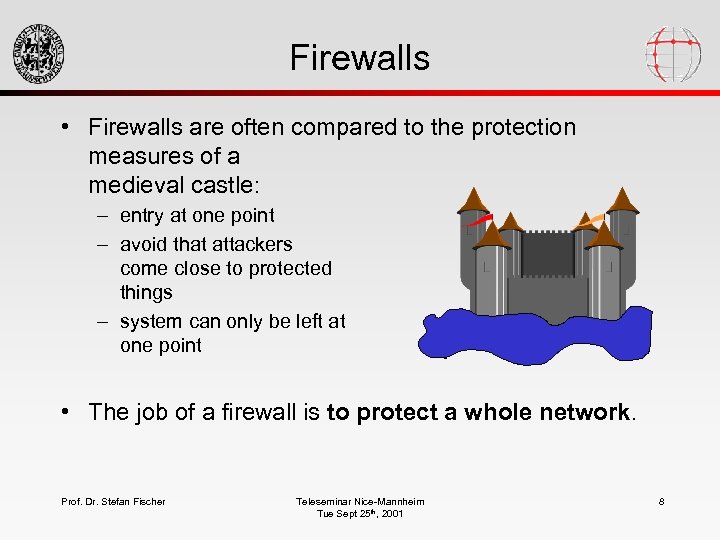
Firewalls • Firewalls are often compared to the protection measures of a medieval castle: – entry at one point – avoid that attackers come close to protected things – system can only be left at one point • The job of a firewall is to protect a whole network. Prof. Dr. Stefan Fischer Teleseminar Nice-Mannheim Tue Sept 25 th, 2001 8
Firewall Placement and Task • Firewalls are placed between the own intranet and the global Internet • The complete traffic between the two networks is running through the firewall. • The firewall only admits acceptable traffic. • What acceptable means is defined by the security policy. Prof. Dr. Stefan Fischer Teleseminar Nice-Mannheim Tue Sept 25 th, 2001 9
Firewall Properties • A firewall allows • It cannot – To concentrate all security measures onto one point in the network, – To support the company’s security policy, – To log all Internet activity. – To protect internal networks against each other. Prof. Dr. Stefan Fischer – protect against malicious insiders, – protect against traffic not running through it (modem), – protect against unknown threats, – protect against viruses Teleseminar Nice-Mannheim Tue Sept 25 th, 2001 10
Firewall Components • The logical device “firewall” usually consists of physically separate devices. The following devices are available: – packet filters – application gateways – Connection gateways Prof. Dr. Stefan Fischer Teleseminar Nice-Mannheim Tue Sept 25 th, 2001 11
Packet Filters • As can be told from the name, a packet filter decides which incoming packets to forward and which to drop. • Packet filters work in both directions! • Basically, a packet filter is a router with additional capabilities: – Router: How do it forward the packet? – Filter: Do I forward the packet at all, and if so, how? • Can be implemented on a dedicated router or on a normal PC/workstation (in software) Prof. Dr. Stefan Fischer Teleseminar Nice-Mannheim Tue Sept 25 th, 2001 12
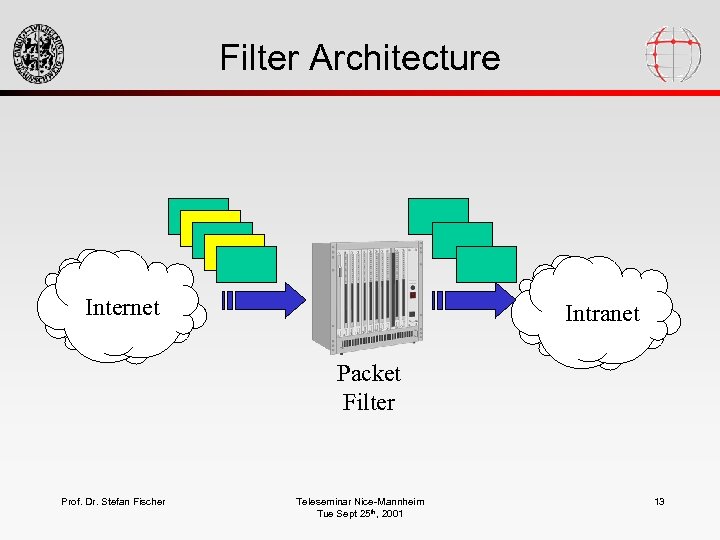
Filter Architecture Internet Intranet Packet Filter Prof. Dr. Stefan Fischer Teleseminar Nice-Mannheim Tue Sept 25 th, 2001 13
Filtering Decisions • The decision whether to let a packet pass or not is based on protocol information: – source address – destination address – application protocols to be used • It can not be based on application data - a filter does not understand the semantics. Prof. Dr. Stefan Fischer Teleseminar Nice-Mannheim Tue Sept 25 th, 2001 14
Capabilities of Packet Filters • They can inhibit an outsider’s access to an application like telnet to avoid his/her logging on to an inside computer. • They can allow any outsider to send email into the intranet. • They can allow a certain machine to send NNTP data to a certain inside machine, and disallow it for all others. Prof. Dr. Stefan Fischer • They cannot prevent only certain users from logging in to an inside machine and allow it for others. • They cannot allow or forbid to transfer certain files from inside to outside. Packet filters do not have a notion of “file”. Teleseminar Nice-Mannheim Tue Sept 25 th, 2001 15
Advantages/Disadvantages • A single filter can protect a complete network when configured accordingly. • To access network services, no special knowledge is required on the users’s side - it works or it does not … • Most commercial routers can be easily configured for packet filtering. Prof. Dr. Stefan Fischer • Packet filter configuration often is a complex task and thus leads to mistakes. • Low protocol level only allows for coarsegrained filtering of packets. • When a packet filter fails to work, the whole network is unprotected protection is based on proper functioning of the device. Teleseminar Nice-Mannheim Tue Sept 25 th, 2001 16
Filter Rules • Filter rules define which packets are allowed to pass. • When a packet arrives, the rules are checked one after the other. A soon as one applies, it is executed, and as a result, the packet is forwarded or dropped. • The last rule either is: – What is not forbidden is allowed or – What is not allowed is forbidden. Prof. Dr. Stefan Fischer Teleseminar Nice-Mannheim Tue Sept 25 th, 2001 17
Gateways • Gateways are placed on a higher level in the protocol architecture (application layer). • They provide access to network services – either by forwarding packets from a client to a server on TCP level (connection level gateway, 2 TCP connections) – or by providing specific application login facilities on a host (application gateway/proxy server) • Packets are checked before they are forwarded. Prof. Dr. Stefan Fischer Teleseminar Nice-Mannheim Tue Sept 25 th, 2001 18
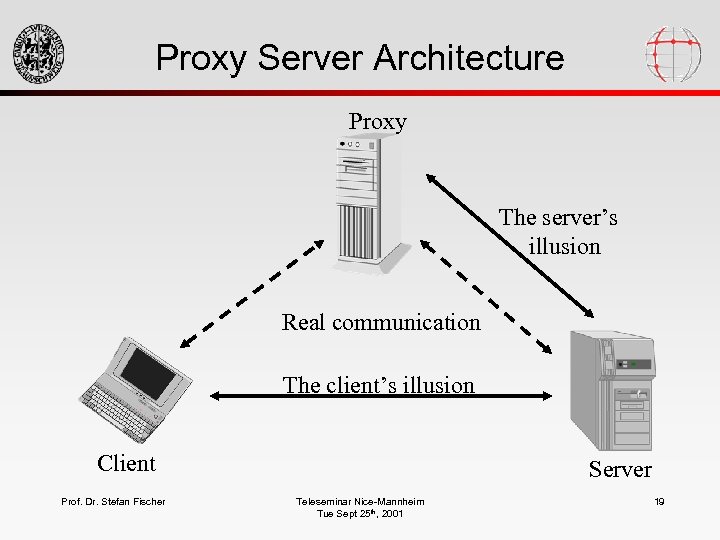
Proxy Server Architecture Proxy The server’s illusion Real communication The client’s illusion Client Prof. Dr. Stefan Fischer Server Teleseminar Nice-Mannheim Tue Sept 25 th, 2001 19
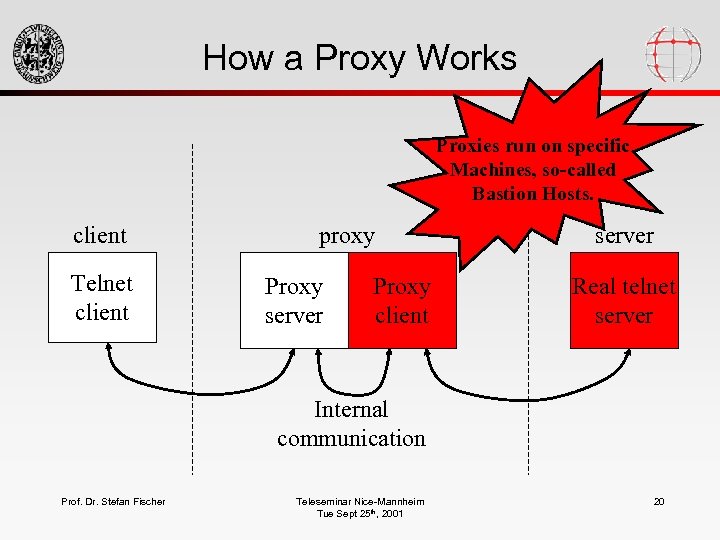
How a Proxy Works Proxies run on specific Machines, so-called Bastion Hosts. client Telnet client proxy Proxy server Proxy client server Real telnet server Internal communication Prof. Dr. Stefan Fischer Teleseminar Nice-Mannheim Tue Sept 25 th, 2001 20
Bastion Hosts • Bastion hosts are those machines that are exposed to the Internet without being protected by the firewall (maybe by a packet filter). • It is mostly used to run proxies. • In order to make it secure, it should be as simple as possible (no unnecessary services, programs and files). • Do not trust the bastion host completely! Prof. Dr. Stefan Fischer Teleseminar Nice-Mannheim Tue Sept 25 th, 2001 21
Characteristics • Use well-tested operating systems (UNIX). – Well-known security mechanisms must be available. – Administrator must be familiar with it. • Do not use high-end machine: – Performance is not determined by CPU, but by line capacity. – The slower the machine, the more inconvenient for an attacker. • Memory and swap is important. Prof. Dr. Stefan Fischer Teleseminar Nice-Mannheim Tue Sept 25 th, 2001 22
Advantages of Proxies • Allow direct Internet access without visible indirection. • Allowing and forbidding actions is much more fine-grained since it is on the application level. – Example: ftp proxy could allow reads but forbid writes • Logging activities is simple. • If the proxy fails, security is still protected - it is based on a running device. Prof. Dr. Stefan Fischer Teleseminar Nice-Mannheim Tue Sept 25 th, 2001 23
Disadvantages • Proxy software is still unavailable or not welltested for many new services (http). • Each service needs another proxy. • Client and server programs must be modified. • Data itself cannot be checked - proxies do not understand file formats etc. Prof. Dr. Stefan Fischer Teleseminar Nice-Mannheim Tue Sept 25 th, 2001 24
Firewall Configurations • Firewalls do not necessarily consist of only one of the above components. • There is a number of configurations that make sense. • Most important: – screened host – dual-homed host – screened subnet Prof. Dr. Stefan Fischer Teleseminar Nice-Mannheim Tue Sept 25 th, 2001 25
Screened Host Architecture • Here, the bastion host has only one network connection (the Intranet). • Firewall functionality is assured by additional router/packet filter. • The filter only admits packets that are addressed to the bastion host (or reroutes them). Prof. Dr. Stefan Fischer Teleseminar Nice-Mannheim Tue Sept 25 th, 2001 26
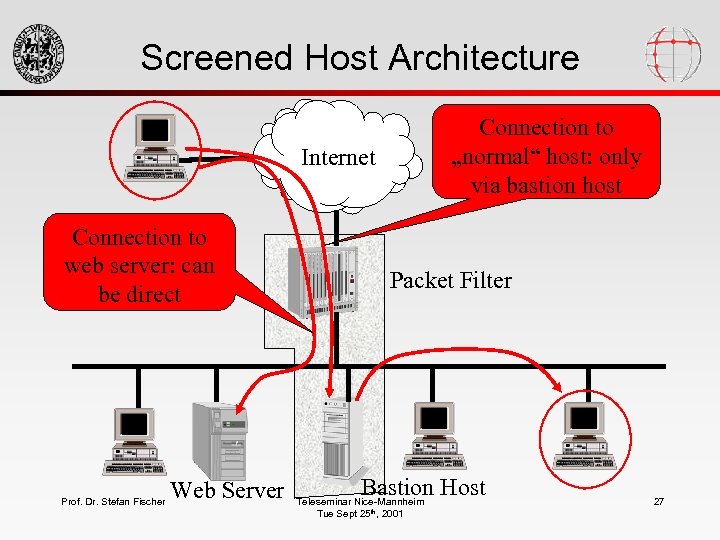
Screened Host Architecture Connection to „normal“ host: only via bastion host Internet Connection to web server: can be direct Prof. Dr. Stefan Fischer Web Server Packet Filter Bastion Host Teleseminar Nice-Mannheim Tue Sept 25 th, 2001 27
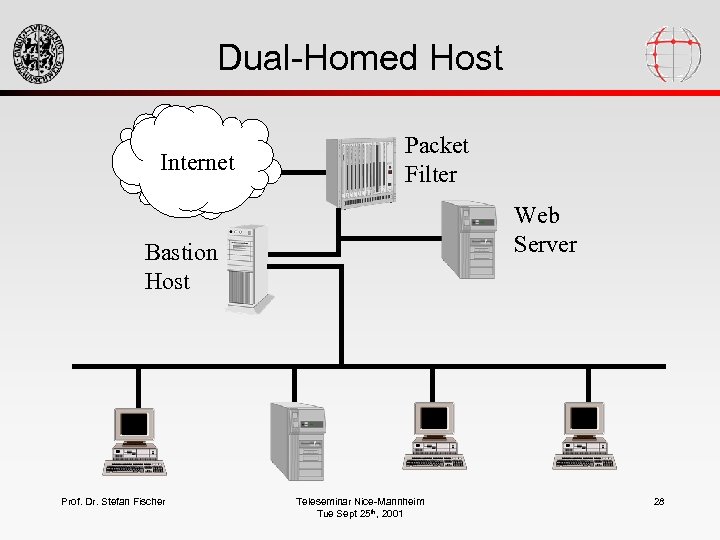
Dual-Homed Host Internet Packet Filter Web Server Bastion Host Prof. Dr. Stefan Fischer Teleseminar Nice-Mannheim Tue Sept 25 th, 2001 28
Characteristics • Very flexible control (up to forbidding any communication between intranet and Internet) • Two possibilities – install proxy servers – allow user accounts on the host • Additional level of security: in order to get into internal network, attack has to pass filter and bastion host Prof. Dr. Stefan Fischer Teleseminar Nice-Mannheim Tue Sept 25 th, 2001 29
Screened Subnet • introduces one more security layer with a perimeter network • bastion host is placed into this network and thus has no easy access to intranet • two routers are necessary Prof. Dr. Stefan Fischer Teleseminar Nice-Mannheim Tue Sept 25 th, 2001 30
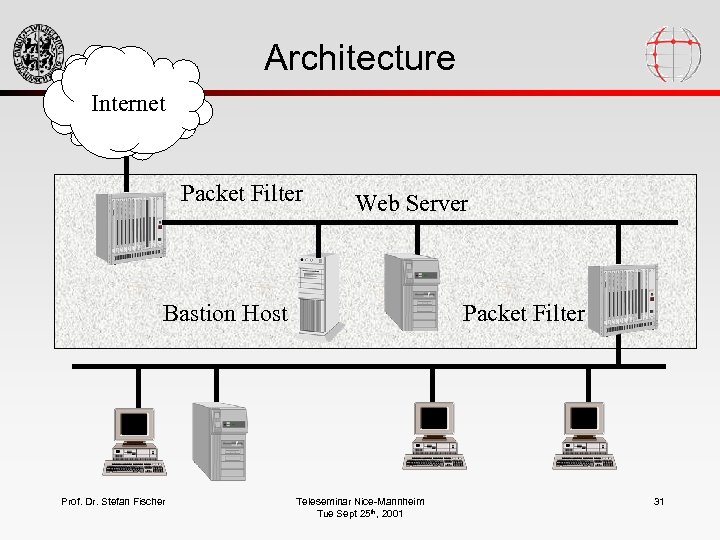
Architecture Internet Packet Filter Web Server Bastion Host Prof. Dr. Stefan Fischer Packet Filter Teleseminar Nice-Mannheim Tue Sept 25 th, 2001 31
Software Solutions • Squid – The standard Linux application gateway, relatively complex configuration • SOCKS: – Probably best-known application gateway • ipchains: – a Linux packet filter in the kernel • Su. SEfirewall: – Relatively complex packet filter in Su. SE Linux • Personal-firewall: – Easy-to-configure Su. SE Linux packet filter: allow connections to the Internet, but no connections from outside Prof. Dr. Stefan Fischer Teleseminar Nice-Mannheim Tue Sept 25 th, 2001 32
Additional Security Measures • Network Address Translation • IP Masquerading • Virtual Private Networks Prof. Dr. Stefan Fischer Teleseminar Nice-Mannheim Tue Sept 25 th, 2001 33
IP Masquerading/NAT • Idea: don‘t expose the structure of the internal net to the outside • Internal net has only one official IP address • All internal addresses are so-called private addresses (e. g. 192. 168. 23. 13) and are not known to the outside • NAT-Router maps the internal private addresses to a combination of the external address and a port number • Connections from outside to inside are impossible Prof. Dr. Stefan Fischer Teleseminar Nice-Mannheim Tue Sept 25 th, 2001 34
VPNs • Problem: a firewall restricts access for outsiders to internal resources • What about telecommuters etc, i. e. people who are logically insiders, but physically outisders? • Solution: Virtual Private Networks • Idea: use authentication and encryption to allow secure access to internal resources • Possible implementations: IPsec, ssh, Microsoft‘s PPTP, . . . Prof. Dr. Stefan Fischer Teleseminar Nice-Mannheim Tue Sept 25 th, 2001 35
Bibliography • S. Fischer, U. Walther: Linux Netzwerke, Su. SE Press, 2000. • W. Stallings: Network Security Essentials, Prentice Hall, 2000. • D. Chapman, E. Zwicky: Building Internet Firewalls, O‘Reilly, 1995. • R. Oppliger: Internet and Intranet Security, Artech House, 1997. • . . . and Clifford Stoll: Cuckoo‘s Egg – for fun Prof. Dr. Stefan Fischer Teleseminar Nice-Mannheim Tue Sept 25 th, 2001 36
Скачать презентацию Teleseminar Nice-Mannheim Firewalls Tuesday September 25 th 2001
0cf8fd99d0694690e9af19ce9c0ceddd.ppt