


 Скачать презентацию Technology Friend or Foe to the Communication Service
acf0c576a2b38d6e4d80eb5fffd1fdb1.ppt
- Количество слайдов: 32
 Technology: Friend or Foe to the Communication Service Coordinator Jennie Bourgeois Deaf and Hard of Hearing Specialist Louisiana State University Cindy Camp Disability Specialist in Deafness Jacksonville State University
 Postsecondary Education Consortium (PEC) PEC is one of the four postsecondary education regional technical assistance centers developed to assist people in locating information related to postsecondary education and students who are deaf and hard of hearing.
 Goals of PEC • To provide outreach and technical assistance to participating states • To develop training materials and proven models of service provision that can be included in technical assistance and outreach efforts • To develop professional proficiency and technical expertise among service providers • To develop cross-regional initiatives for outreach and technical assistance
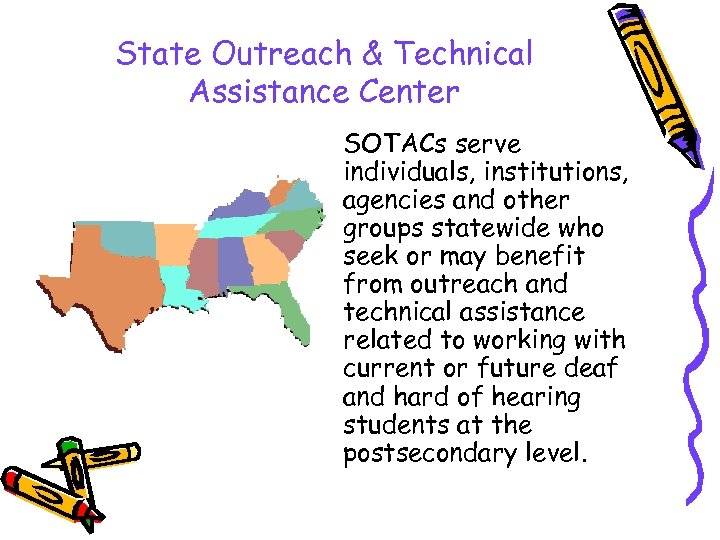 State Outreach & Technical Assistance Center SOTACs serve individuals, institutions, agencies and other groups statewide who seek or may benefit from outreach and technical assistance related to working with current or future deaf and hard of hearing students at the postsecondary level.
 What is your Technology IQ? ss e el u Cl Intermediate • Many people are afraid of technology. Ad va nc ed • Some people know just enough to be dangerous. • Computer geeks forget how to speak English. Why can’t there be a happy medium? ? !!
 Topics for discussion • Communicating with Students and Staff • Disseminating notes • Scheduling • Resources
 Helpful Hints • Give yourself time to learn new programs • Don’t try to do last minute technology • Be willing to try something new • Find a techie mentor • Know what resources are available
 Enhancing Communication • • • Text Pagers Cell Phone / Alpha Numeric Pagers E-Mail Listserv Bulletin Board Video conferencing
 Text Pagers • This option is probably one of the more expensive options available, however it is probably one of the most effective. Text messages can be sent to one, a group or all communication facilitators through your computer or other text messaging device. Information can be delivered to the communication facilitators virtually instantly regardless of where they are on or off campus. Paging devices with two-way communication can also be obtained that will allow the communication facilitators to be able to send e-mail messages and responses back to the office from even remote locations.
 Cell Phone / Alpha Numeric Pagers • These are a little more cost efficient and may be more readily available. It is important that these devices be equipped with a vibration mode so that an audible alarm is not heard in the classroom environment. These can be provided by the institution or can be the requirement of each individual communication facilitator.
 E-Mail • If computers and/or computer labs are readily available to the communication facilitators then sending out group e-mails for non-urgent messages may be an inexpensive means of communication. Yahoo Groups (www. yahoogroups. com) offers free e-mail group setup. In addition, you might want to investigate your regular e-mail program to set up an outgoing e-mail group. Most e-mail programs have this capability built into the program for you already.
 Listservs • This can be used similarly to email groups. The differences are that the individual email address are not shown only the address for the listserv group. Also when an individual clicks on reply the message is sent to everyone on the list serve and not just the sender. http: //groups. yahoo. com/
 Bulletin Boards are an easy way to keep people up to date. They allow subscribers to check messages at their own convenience. Discussions can be archived and email notices can be sent when important information is added. Some services allow for storage of common files. http: //www. beseen. com/board/ http: //www. ezboard. com/ http: //www. communityzero. com/
 Video Conferencing If you have a fast connection to the internet then you can video chat with students through the internet. Some computers are coming with web cameras and if yours doesn’t the expense isn’t much. Also the program “Net. Meeting” which comes standard on PCs now allows you to video chat. There also many free services as well, such as MSN. The major obstacles are having a fast enough internet connection and firewall restrictions at some institutions. A standard modem connection will not be fast enough to allow for understanding signing.
 Disseminating Notes • Hard copy – File system in office • Diskette – Don’t open programs for a student disk; this can transfer viruses – Be sure the disk is in good condition or it can damage the computer • Email – Free email services: hotmail and yahoo mail – Institution provided email • FTP server
 Scheduling • Low Tech – Pen & Paper – Dry Erase Boards • High Tech – Spread Sheets : Ex. Excel – Online systems – Hosting your own web site
 Scheduling Options • Outlook – Will coordinate schedules if everyone involved has it. • Yahoo calendar – Free service • Online calendar
 PDAs (Personal Digital Assistants) • • • Palm or Windows CE device? Keep up with scheduling Beam notes and appointments Sync with your desk top Wireless connections to the Internet Read a book or listen to a book in down time.
 Web Site • Establishing an institution based or free web site is an excellent way to post information, files, current schedules, contact information, etc. The possibilities of what you can include in this inexpensive information sharing medium are endless. • http: //www. register. com/ – Domain Names • http: //www. verio. com/ – Web hosting • http: //ontimeonline. com – Web hosting
 Hosting Your Web Site • Does your institution provide web space? – Can you upload your own files? – Is there a limit on your space? – Are there institutional standards for design? – Does your institution offer design services? – Is it automated or can you direct FTP? • Do you want your own domain name? • What is your budget? – Purchasing web space – Free web space • Do you require CGI support?
 Reporting Stats • Using a database or spread sheet • What’s the difference between a database and spread sheet? Which should I use? What do you need it for?
 Ethical Practices • • Is the information secure? Why is security important? How paranoid should you be? How much information should be shared within an educational team?
 Freeware…. Shareware…. What’s the Difference? • Freeware – Programs available at no cost to the user • Shareware – Programs that can be used on a trial basis and then a small fee must be paid. • Commercial Programs – Programs available for purchase – Check on academic pricing
 Software Tips • • Know what your goals are Know your budget Know your skill level Know where to find support, how much support is available, and how much it will cost you • Check with your institution to see what they have available • Check on academic prices
 List of Training Resources • Books – Simplified series: Maran Graphics – Bible series: IDG (more advanced) • CD Roms – Video Professor: 1 -800 -201 -7143 http: //www. videoprofessor. com/ • Continuing Education • Online
 Web Based Computer Training http: //www. freeskills. com/ Good information. Some areas may too technical for some. Text based no bells and whistles. Free http: //www. intelinfo. com/ links to many free online tutorials and classes on programming topics. More advanced http: //www. computertim. com/ Basic instruction in commonly used programs such as Word and Windows. Step by step how to. http: //www. cctglobal. com/ Tutorials from basic to advanced. Complete demo copies available. Reasonably priced site licensing for additional training.
 Want to learn html? Check out these sites: http: //www. boogiejack. com/html_tutorials. html Beginning Tutorials for creating web pages http: //members. tripod. com/~chrismartin 2/ Beginning to Advanced html tutorials http: //www. netpedia. com/html/tutorials/ Learning to write html code. Down to earth approach. http: //www. pagetutor. com/index. html Beginning to Advanced html guide. Engaging teaching method. http: //freewarejava. com/ A resource for the advanced web master. List free java script sites.
 Web Resources http: //www. worldbank. org/worldlinks/english/html/free. html Resource for Free Stuff Sites for downloading Freeware and Shareware: ZDNet: www. zdnet. com CNet: www. cnet. com
 Building Your Web Site • WYSIWYG editing – Front Page and other commercial programs – Netscape • Text editing – Notepad – First Page • http: //evrsoft. com/ • Free to educational institutions
 Password Protect Programs http: //www. atrise. com/htmlock/index. php $24. 95, Shareware, Free trail, easy to use interface. http: //www. softcab. com/textguard/index. asp $24. 95 http: //javascriptkit. com/script/cut 34. shtml Free Java script
 Counters http: //gostats. com/ Free web counter, uses advertising banner http: //www. web-stat. com/ 30 day free trial, $5 a month after http: //www. yinga. net/ Free counter, no advertising, limited choice of styles http: //www. digits. com/ Free counter to page with under 1000 hits per day
 Contact Cindy & Jennie Cindy Camp JSU / AL SOTAC Disability Support Services 700 Pelham Road North Jacksonville, AL 36265 256 -782 -5099 ccamp@jsucc. jsu. edu Jennie Bourgeois LSU / LA SOTAC Disability Services 112 Johnston Hall Baton Rouge, La 70803 225/578 -4913 jsbourg@lsu. edu