


 Скачать презентацию Technical Analysis of Parallel Mode Migration from Meta
baf83e25e5320f55be2ec70d33673dba.ppt
- Количество слайдов: 43
 Technical Analysis of Parallel Mode Migration from Meta. Frame 1. 8 to Meta. Frame XP David Hart & Patrick Boucher Systems Engineers – Southern & Northeast Regions Citrix Systems Inc.
 Non Disclosure Agreement • This presentation is confidential. By virtue of your relationship with Citrix, you are bound to retain in confidence all information in this presentation. Citrix Confidential
 Learning Objectives • Understand technical architecture differences between Meta. Frame 1. 8 and Meta. Frame XP • Overview different migration strategies • Understand how Meta. Frame 1. 8 and Meta. Frame XP work in parallel migration • Bridging different Meta. Frame XP and 1. 8 Farms using the Web interface for Meta. Frame XP Citrix Confidential
 Agenda • Customer hesitations regarding Meta. Frame XP – Why migrate to Meta. Frame XP? • Architecture - Meta. Frame 1. 8 vs. Meta. Frame XP • Migration strategies overview – Focus on Native-Mode Parallel Migration • Meta. Frame XP migration methodology • Tech Tips for successful Parallel-Mode Migration • Meta. Frame XP technical migration resources Citrix Confidential
 Customer Hesitations Regarding Meta. Frame XP Some reasons users choose not to migrate Meta. Frame 1. 8
 After the Meta. Frame XP TCO and ROI Pitch • If it’s not broke, why fix it? • No longer have Subscription Advantage • We will wait until Windows 2000 ->2003 • Web applications will replace Meta. Frame XP • We tried the 90 -day evaluation with no luck Citrix Confidential
 Why Migrate to Meta. Frame XP? • Increased enterprise farm scalability and stability • Less server-to-server network traffic • Centralized control with the Management Console Less Administration for Meta. Frame XP – Integrated advanced management capabilities – Simplified license management and activation – Printer management & driver replication • • • = $Saved Money$ Delegated Administration User Policy Support Application-based Load Management License Pooling Meta. Frame XP Server for Windows with Feature Release 3 prepares for Microsoft Server 2003 Citrix Confidential
 Technical Architecture Meta. Frame 1. 8 vs. Meta. Frame XP – Built for the Enterprise
 Meta. Frame 1. 8 & XP Farms Meta. Frame 1. 8 Farm • Server Farms in Meta. Frame 1. 8 are collection of servers on a given network that may be managed as single unit • Server Farms in Meta. Frame 1. 8 may also be defined by sharing common Program Neighborhood Meta. Frame XP Farm • Server Farm in Meta. Frame XP defines Scope of Management • Meta. Frame XP farms operate across enterprise network via Independent Management Architecture Citrix Confidential
 Independent Management Architecture (IMA) • Single point of access for information and control of Meta. Frame XP Components • Infrastructure for remote administration of Server Farms • Single management interface supporting current and future administration abilities • Extensible and supportable server to server communications architecture Citrix Confidential
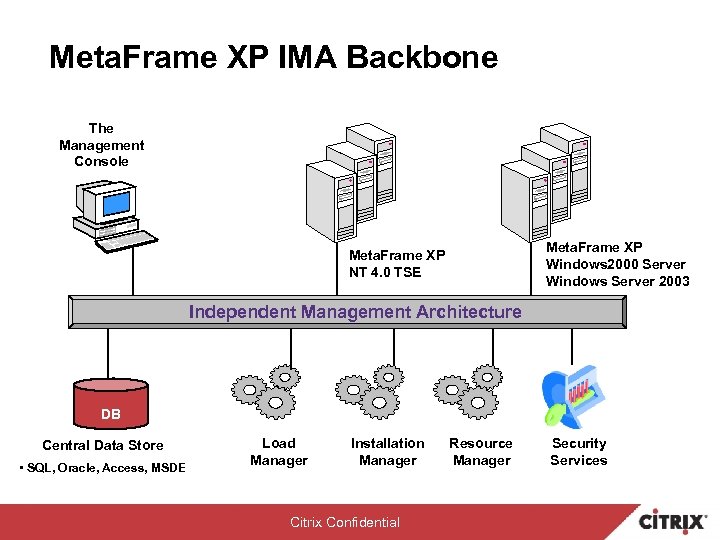 Meta. Frame XP IMA Backbone The Management Console Meta. Frame XP Windows 2000 Server Windows Server 2003 Meta. Frame XP NT 4. 0 TSE Independent Management Architecture DB Central Data Store • SQL, Oracle, Access, MSDE Load Manager Installation Manager Citrix Confidential Resource Manager Security Services
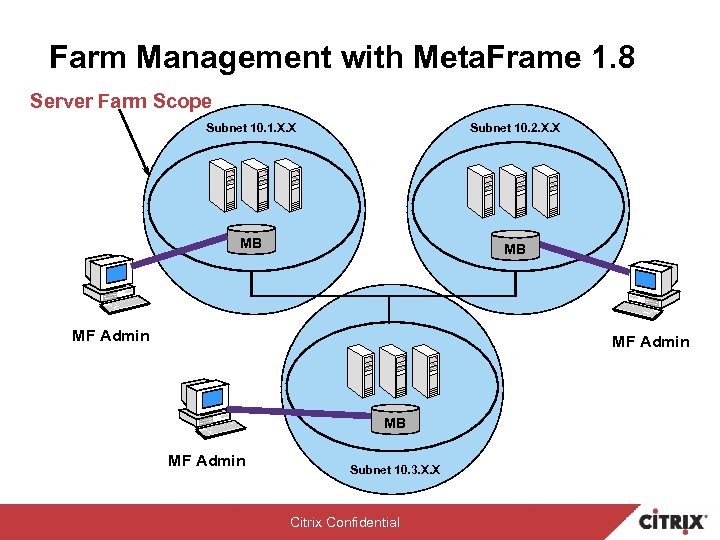 Farm Management with Meta. Frame 1. 8 Server Farm Scope Subnet 10. 1. X. X Subnet 10. 2. X. X MB MB MF Admin Subnet 10. 3. X. X Citrix Confidential
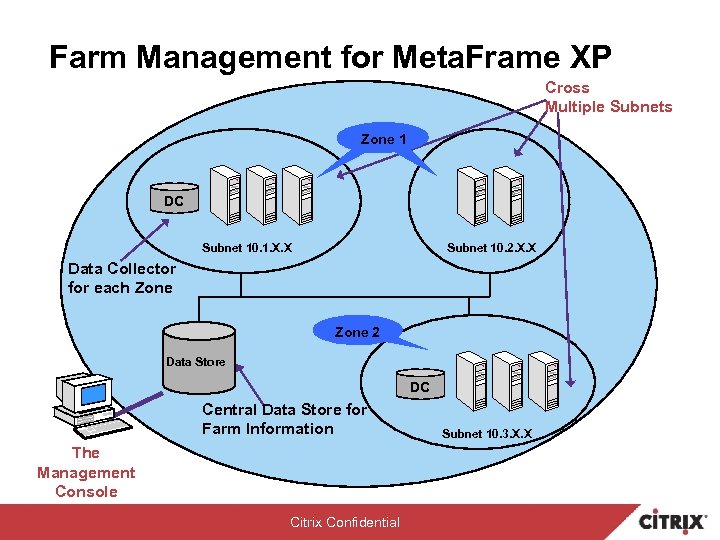 Farm Management for Meta. Frame XP Cross Multiple Subnets Zone 11 DC Subnet 10. 1. X. X Subnet 10. 2. X. X Data Collector for each Zone 2 Data Store DC Central Data Store for Farm Information The Management Console Citrix Confidential Subnet 10. 3. X. X
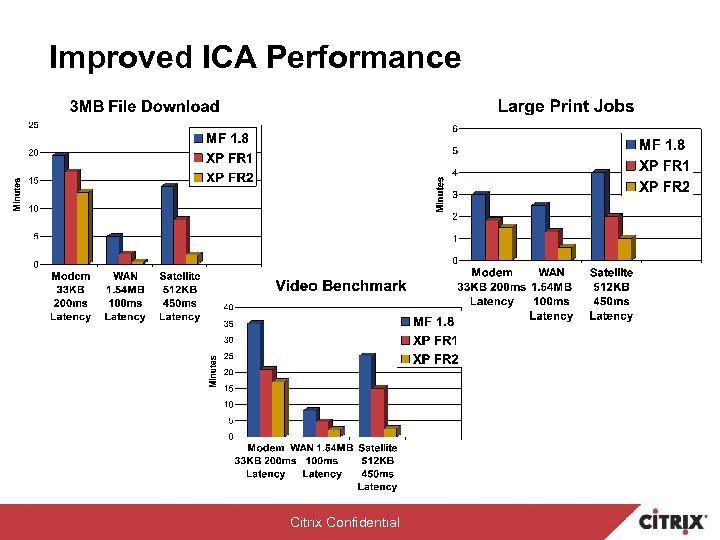 Improved ICA Performance Citrix Confidential
 Meta. Frame XP Native-Mode and Interoperability-Mode Understanding Meta. Frame XP Operation Modes with Meta. Frame 1. 8
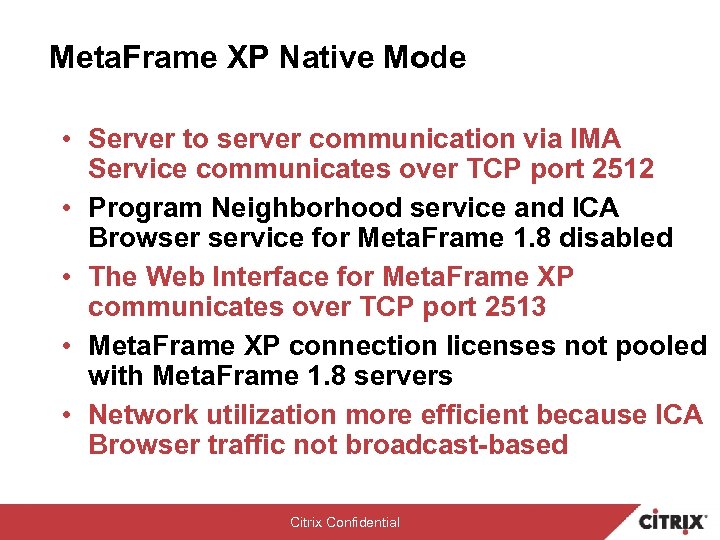 Meta. Frame XP Native Mode • Server to server communication via IMA Service communicates over TCP port 2512 • Program Neighborhood service and ICA Browser service for Meta. Frame 1. 8 disabled • The Web Interface for Meta. Frame XP communicates over TCP port 2513 • Meta. Frame XP connection licenses not pooled with Meta. Frame 1. 8 servers • Network utilization more efficient because ICA Browser traffic not broadcast-based Citrix Confidential
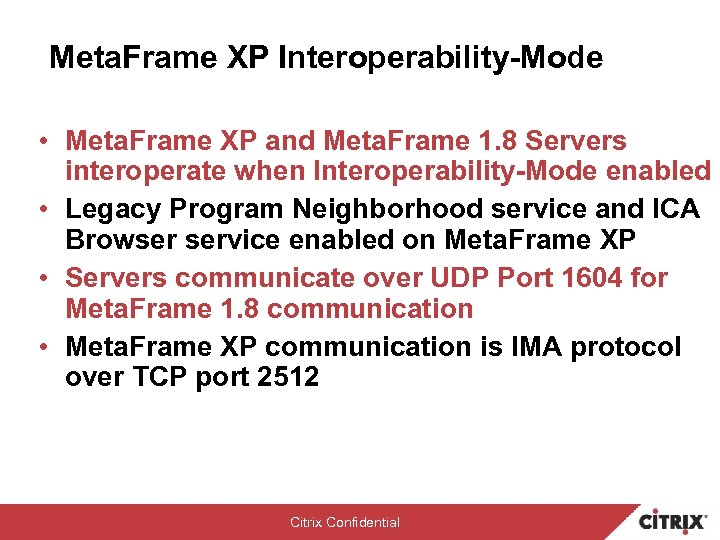 Meta. Frame XP Interoperability-Mode • Meta. Frame XP and Meta. Frame 1. 8 Servers interoperate when Interoperability-Mode enabled • Legacy Program Neighborhood service and ICA Browser service enabled on Meta. Frame XP • Servers communicate over UDP Port 1604 for Meta. Frame 1. 8 communication • Meta. Frame XP communication is IMA protocol over TCP port 2512 Citrix Confidential
 Remind Your Customers Interoperability-Mode Is NOT designed to be a permanent solution! Citrix Confidential
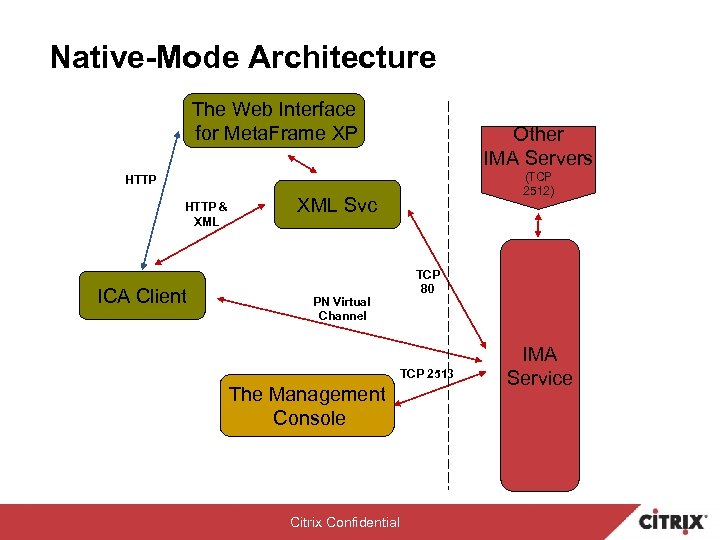 Native-Mode Architecture The Web Interface for Meta. Frame XP Other IMA Servers (TCP 2512) HTTP & XML ICA Client XML Svc PN Virtual Channel TCP 80 TCP 2513 The Management Console Citrix Confidential IMA Service
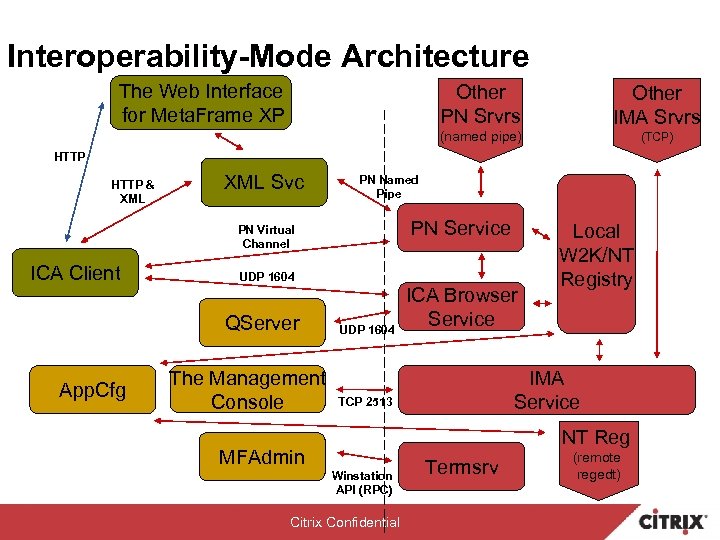 Interoperability-Mode Architecture The Web Interface for Meta. Frame XP Other PN Srvrs Other IMA Srvrs (named pipe) (TCP) HTTP & XML Svc PN Named Pipe PN Service PN Virtual Channel ICA Client UDP 1604 QServer App. Cfg The Management Console UDP 1604 ICA Browser Service Local W 2 K/NT Registry IMA Service TCP 2513 NT Reg MFAdmin Winstation API (RPC) Citrix Confidential Termsrv (remote regedt)
 Migration Strategies Anatomy of Meta. Frame 1. 8 to Meta. Frame XP Migration
 Migration Strategies • Flash Upgrade • Interoperability-Mode Migration – Incremental in-place migration • Parallel Migration – Migrate several existing MF 1. 8 Servers to new Meta. Frame XP Server Farm – Create new Meta. Frame XP Server Farm with clean System OS and service pack installs Citrix Confidential
 Flash Upgrade • All servers are upgraded to Meta. Frame XP during scheduled maintenance window • Highly centralized and/or cloned server environments • Smaller or less critical server farms • Unattended and cloned installs for all but first server in an XP Farm (MSFT Access Data Store only) – See MF XP Administrator’s Guide and Advanced Concepts Guide Citrix Confidential
 Get all Technical Details on Interoperability-Mode Migration • Technical Breakout Session: Migrating to Citrix Meta. Frame XP Server via Interoperability-Mode • Presenter: Patrick Boucher Citrix Confidential
 Parallel Migration – Technical Considerations • Meta. Frame XP servers built/upgraded in Native-Mode • Meta. Frame 1. 8 and Meta. Frame XP servers do not communicate • Possible additional hardware and licenses – Users may be manually migrated in proportion to servers and licenses • Publish Meta. Frame 1. 8 and Meta. Frame XP applications to distinct user groups – Prevent redundant icons (if using the Web Interface) • Meta. Frame XP applications published manually (the Management Console) rather than migrated Citrix Confidential
 Parallel Migration Advantages: • No Program Neighborhood and ICA Browser traffic when in Native-Mode • Potential issues with migrating published applications are eliminated Disadvantages: • Published applications not available from one Program Neighborhood application set – Consider using the Web Interface for Windows XP • Servers that are migrated to Meta. Frame XP will require published applications created and configured manually Citrix Confidential
 Consolidated Parallel Migration – Type I Migrate Existing MF 1. 8 Servers to new XP Server Farm Consider when: • Keeping existing Published Application deployments • Use existing servers in Farm during migration • Allowing native IMA communication and access to full Meta. Frame XP feature set during migration Process: • During migration create new Meta. Frame XP Farm • Migrate existing Meta. Frame 1. 8 servers and join new Meta. Frame XP Farm in Native Mode Citrix Confidential
 Scratch Parallel Migration – Type II New Meta. Frame XP Server Farm - Clean System Installs Consider when: • Re-deploying published application installations • Potentially using new server hardware • Implementing Directory Services architecture - i. e. Active Directory (AD) Novell Directory Services (NDS) • Need for “Clean” system migration Process: • Install OS, Meta. Frame XP, and applications on existing or new hardware (Scripted Install/Cloned) • Create new Meta. Frame XP Farm and join new servers to Farm • Migrate existing Meta Frame 1. 8 users to new Meta. Frame XP Farm Citrix Confidential
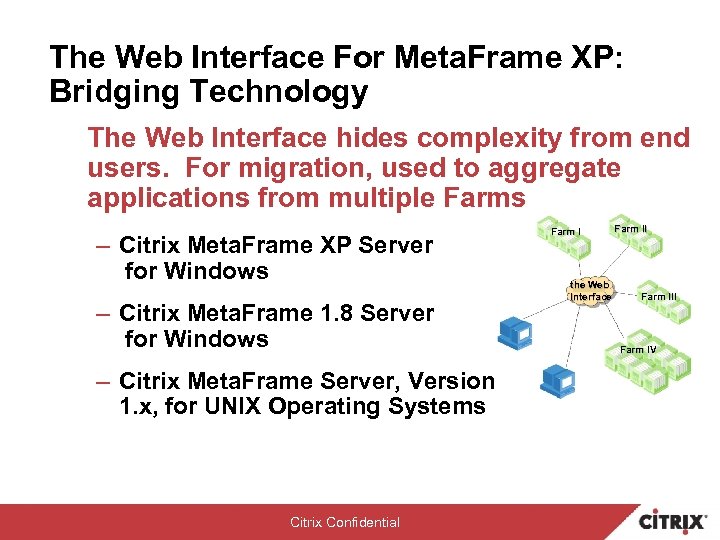 The Web Interface For Meta. Frame XP: Bridging Technology The Web Interface hides complexity from end users. For migration, used to aggregate applications from multiple Farms – Citrix Meta. Frame XP Server for Windows – Citrix Meta. Frame 1. 8 Server for Windows – Citrix Meta. Frame Server, Version 1. x, for UNIX Operating Systems Citrix Confidential Farm I the Web Interface Farm III Farm IV
 Meta. Frame XP Migration Methodology Plan for the Future & Make it Work Today
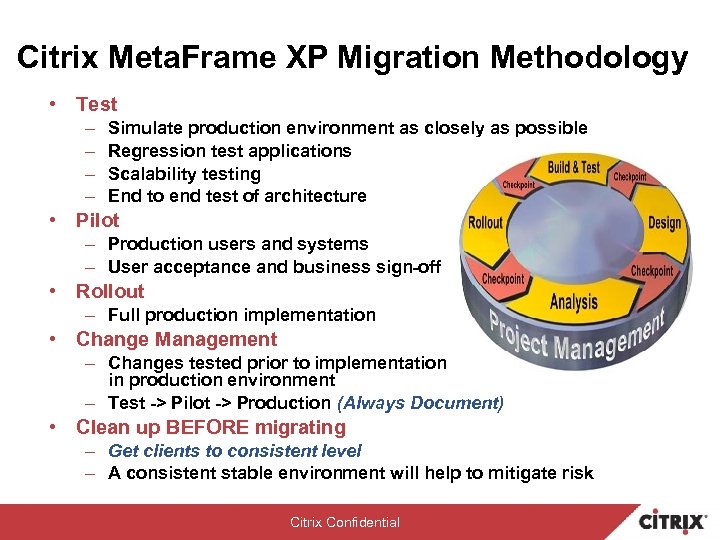 Citrix Meta. Frame XP Migration Methodology • Test – – Simulate production environment as closely as possible Regression test applications Scalability testing End to end test of architecture • Pilot – Production users and systems – User acceptance and business sign-off • Rollout – Full production implementation • Change Management – Changes tested prior to implementation in production environment – Test -> Pilot -> Production (Always Document) • Clean up BEFORE migrating – Get clients to consistent level – A consistent stable environment will help to mitigate risk Citrix Confidential
 Tech Tips for Successful Parallel-Mode Migration Technical Points to Consider before Migrating to Citrix Meta. Frame XP for Windows
 The Web Interface for Meta. Frame XP • Requirements for Farm Bridging – The Web Interface for Meta. Frame XP • Minimum Version 1. 6 x and Project Columbia 6. 01. 038 – Works, Not Supported by Citrix, www. citrix. com/cdn • Recommended Version released with Citrix Meta. Frame XP Server for Windows with Feature Release 3 • Redundant Web Interface Servers with Network Load Balancing • The Web Interface pointing to Meta. Frame XML servers – Meta. Frame 1. 8 Server: Master and Backup browsers with Citrix with Feature Release 1 and Service Pack 3 – Meta. Frame XP Server with Feature Release 1 and Service Pack 3: Zone Data Collector and server set to “Most Preferred” • XML service on Meta. Frame 1. 8 and XP servers – Windows NT 4. 0/2000 IIS share port 80 XML service – Recommend separate XML service port for troubleshooting Citrix Confidential
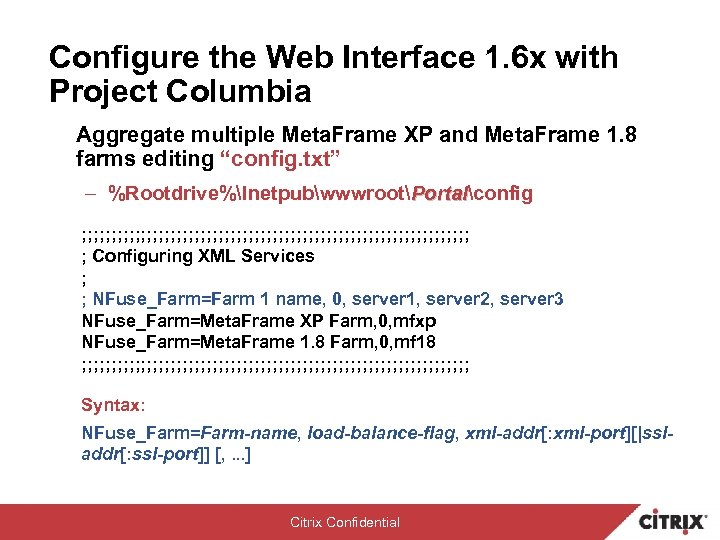 Configure the Web Interface 1. 6 x with Project Columbia Aggregate multiple Meta. Frame XP and Meta. Frame 1. 8 farms editing “config. txt” – %Rootdrive%InetpubwwwrootPortalconfig Portal ; ; ; ; ; ; ; ; ; ; ; ; ; ; ; ; ; Configuring XML Services ; ; NFuse_Farm=Farm 1 name, 0, server 1, server 2, server 3 NFuse_Farm=Meta. Frame XP Farm, 0, mfxp NFuse_Farm=Meta. Frame 1. 8 Farm, 0, mf 18 ; ; ; ; ; ; ; ; ; ; ; ; ; ; ; ; ; Syntax: NFuse_Farm=Farm-name, load-balance-flag, xml-addr[: xml-port][|ssladdr[: ssl-port]] [, . . . ] Citrix Confidential
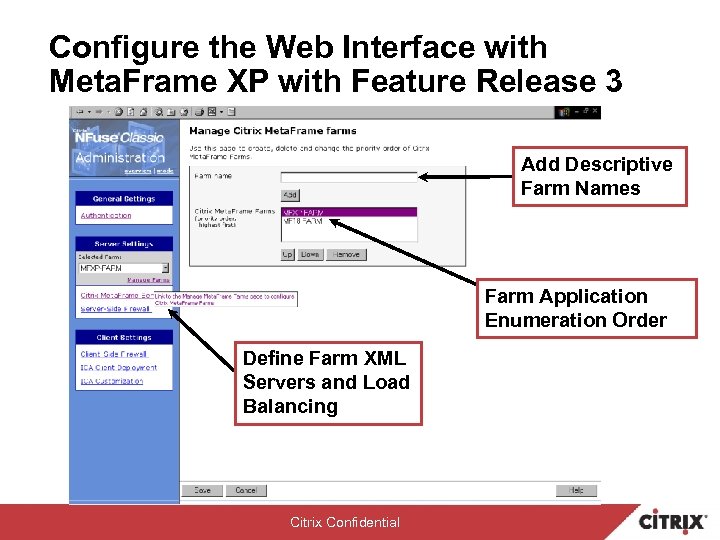 Configure the Web Interface with Meta. Frame XP with Feature Release 3 Add Descriptive Farm Names Farm Application Enumeration Order Define Farm XML Servers and Load Balancing Citrix Confidential
 Meta. Frame XP Native-Mode Security: Microsoft Active Directory (AD) • Citrix recommendations for Active Directory – – Server farm is in a single AD forest All Meta. Frame XP servers reside in same domain No trust relationships with non-AD domains Use Domain Global Groups for published application and network printer access • Windows 2000 and/or Windows Server 2003 – User Principal Name (UPN) not supported by Windows NT Server 4. 0 even with AD Services Interface • Else use AD - PDC Emulator in AD mixed mode for domainnameusername login Citrix Confidential
 Meta. Frame XP Application Migration • Meta. Frame 1. 8 applications can fail to migrate – Command for published application greater than 256 characters • HKLMSystemCurrent. Control. SetControlCitrixManaged ApplicationsApp. NameServer. Name – Working directory for the published application greater than 256 characters • HKLMSystemCurrent. Control. SetControlCitrix Managed. ApplicationsApp. NameServer. NameWork. Directory • Publishing same applications to Meta. Frame 1. 8 and Meta. Frame XP farms not recommended • Switching back and forth between Native and Interoperability modes not recommended Citrix Confidential
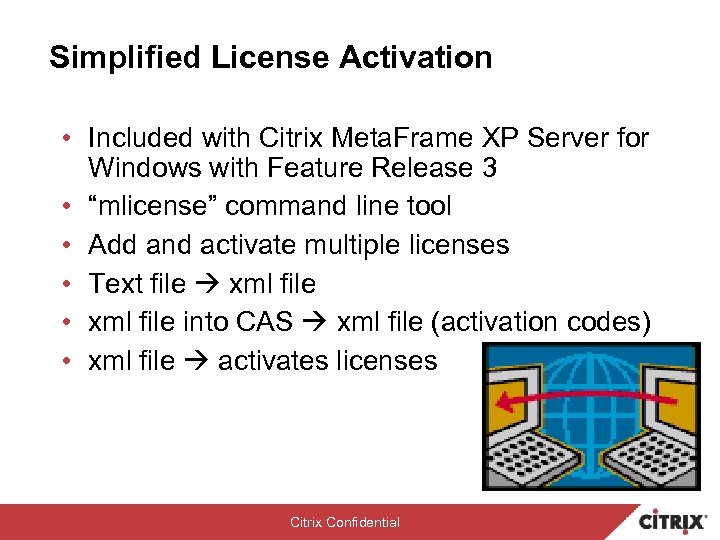 Simplified License Activation • Included with Citrix Meta. Frame XP Server for Windows with Feature Release 3 • “mlicense” command line tool • Add and activate multiple licenses • Text file xml file • xml file into CAS xml file (activation codes) • xml file activates licenses Citrix Confidential
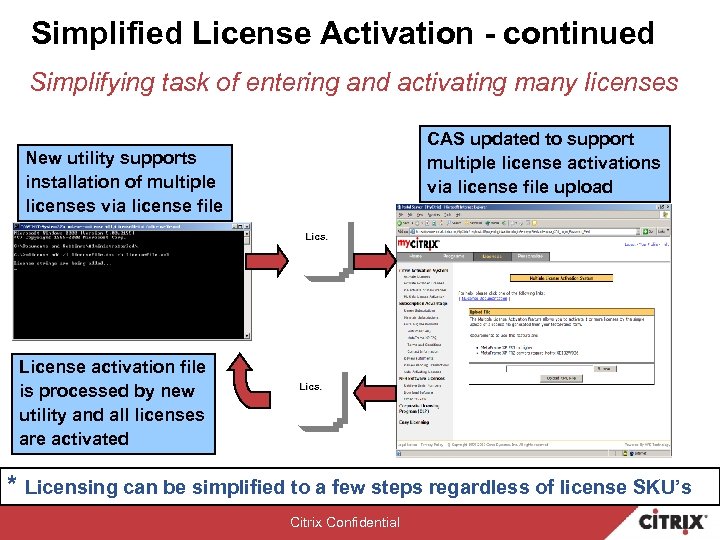 Simplified License Activation - continued Simplifying task of entering and activating many licenses CAS updated to support multiple license activations via license file upload New utility supports installation of multiple licenses via license file Lics. License activation file is processed by new utility and all licenses are activated Lics. * Licensing can be simplified to a few steps regardless of license SKU’s Citrix Confidential
 Miscellaneous Migration Tools & Tips • Migrate Installation Management Services 1. 0 b application packages deployed - Meta. Frame 1. 8 – Utility found on MF XP Installation Manager CD • supportdebugi 386Im_app_upgrd. exe • Do not remap drive letters during upgrade if originally mapped during Meta. Frame 1. 8 install Citrix Confidential
 Where to go from here? • Meta. Frame XP migration documentation – Migrating from Meta. Frame 1. 8 to Meta. Frame XP (CCS) – Advanced Concepts for Meta. Frame XP 1. 0 Guide – Meta. Frame XP 1. 0 Administrator’s Guide – Citrix Meta. Frame XP Migration and Upgrade Guide – Planning Your Meta. Frame XP Deployment • Citrix Solutions Knowledgebase & Support – http: //www. citrix. com/support Citrix Confidential
 Citrix Authorized Training • With Citrix Training: – Learn tips and techniques for managing and administering Citrix software – Obtain valuable lab time for hands-on practice – Prepare for Citrix certification exams – Learn quickly and efficiently in the classroom • New Courses and Certification Include: – CTX-7201 Meta. Frame Secure Access Manager Administration – CTX-6100 Citrix Core Technologies and Architecture – Citrix Certified Integration Architect (CCIA) program to be launched in Q 4 2003 • Available Worldwide from 350 CALCs – Training Locations from www. citrix. com/training • Meta. Frame XP Migration Course: – Citrix Meta. Frame 1. 8 to Meta. Frame XP Course# CTX-1210 Citrix Confidential TM
 Citrix Confidential