 Скачать презентацию Team 4 18 -749 Fault-Tolerant Distributed Systems Bryan
1a4d0d93eee17735a5e25a69a16e30f0.ppt
- Количество слайдов: 25



Team 4: 18 -749: Fault-Tolerant Distributed Systems Bryan Murawski Meg Hyland Jon Gray Joseph Trapasso Prameet Shah Michael Mishkin
Team Members Br. Yan Murawski bmurawsk@andrew. cmu. edu Meg Hyland mhyland@andrew. cmu. edu Jonathan Gray jongray@cmu. edu Michael Mishkin mmishkin@andrew. cmu. edu Joe Trapasso jtrapass@andrew. cmu. edu Prameet Shah phs@andrew. cmu. edu http: //www. ece. cmu. edu/~ece 749/teams-06/team 4/ 2
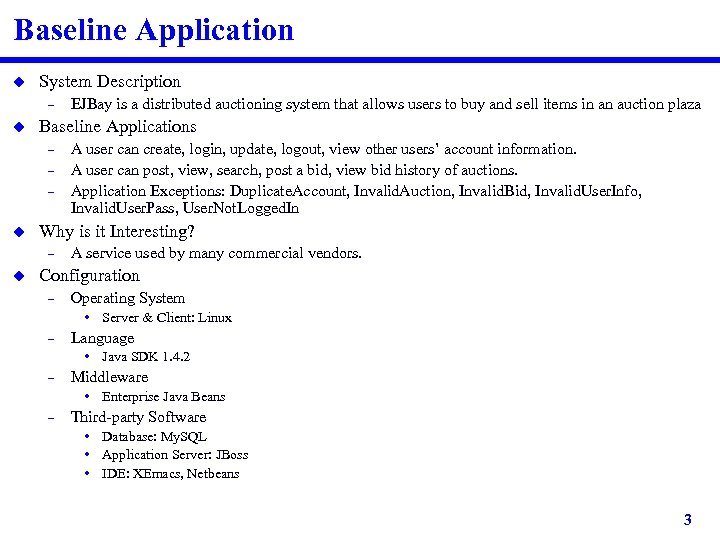
Baseline Application u System Description – u Baseline Applications – – – u A user can create, login, update, logout, view other users’ account information. A user can post, view, search, post a bid, view bid history of auctions. Application Exceptions: Duplicate. Account, Invalid. Auction, Invalid. Bid, Invalid. User. Info, Invalid. User. Pass, User. Not. Logged. In Why is it Interesting? – u EJBay is a distributed auctioning system that allows users to buy and sell items in an auction plaza A service used by many commercial vendors. Configuration – Operating System • Server & Client: Linux – Language • Java SDK 1. 4. 2 – Middleware • Enterprise Java Beans – Third-party Software • Database: My. SQL • Application Server: JBoss • IDE: XEmacs, Netbeans 3
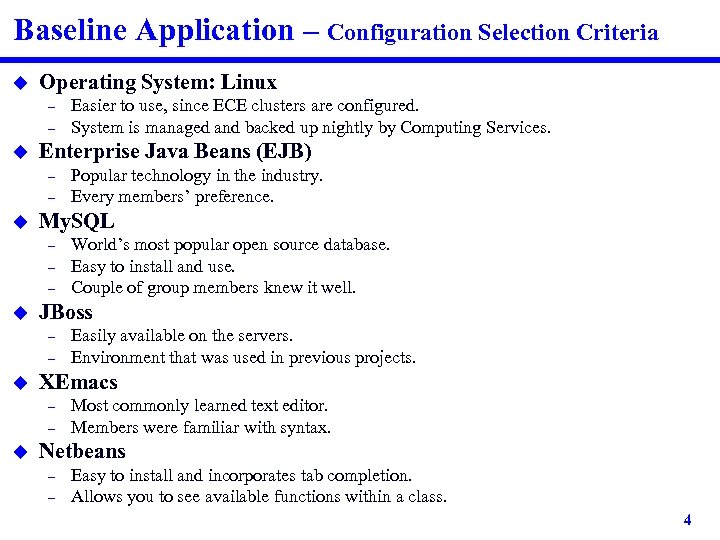
Baseline Application – Configuration Selection Criteria u Operating System: Linux – – u Enterprise Java Beans (EJB) – – u – – – Easily available on the servers. Environment that was used in previous projects. XEmacs – – u World’s most popular open source database. Easy to install and use. Couple of group members knew it well. JBoss – u Popular technology in the industry. Every members’ preference. My. SQL – u Easier to use, since ECE clusters are configured. System is managed and backed up nightly by Computing Services. Most commonly learned text editor. Members were familiar with syntax. Netbeans – – Easy to install and incorporates tab completion. Allows you to see available functions within a class. 4
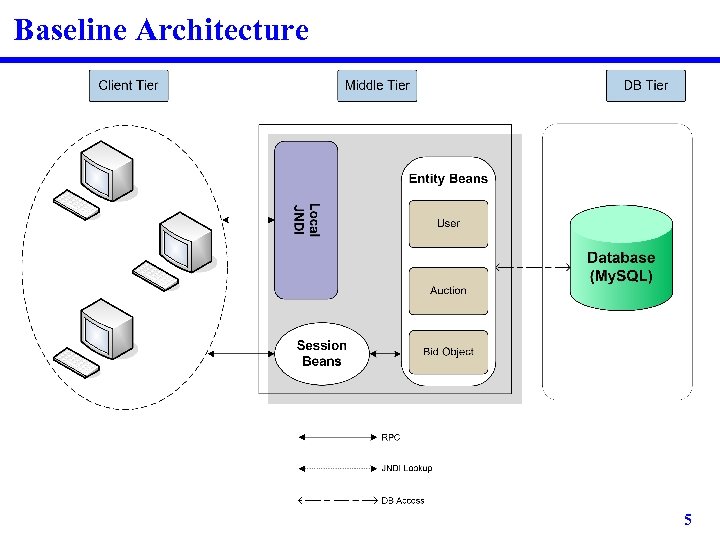
Baseline Architecture 5
Experimental Evaluation – Architecture u u Unmodified Server Application New Automated Client – – u Experimental variables taken as command-line inputs Performs specified number of invocations and dies Central Library of MATLAB scripts – – One script to read in data from all probes Others scripts each responsible for a specific graph 6
Experimental Evaluation – Results u Expected results – – u Increasing clients yield increasing latency Most time spent in Middleware “Magical 1%” Slightly longer latencies in non-standard reply size cases Actual results – – Memory / Heap problems Java optimizations changing behavior of code • Shorter latency in non-standard reply size cases – – – Database INSERTs take much longer than SELECTs Only exhibited “Magical 1%” to some extent Very high variability and some unusual/unexpected results • During test runs close to deadline; very high server/database loads 7
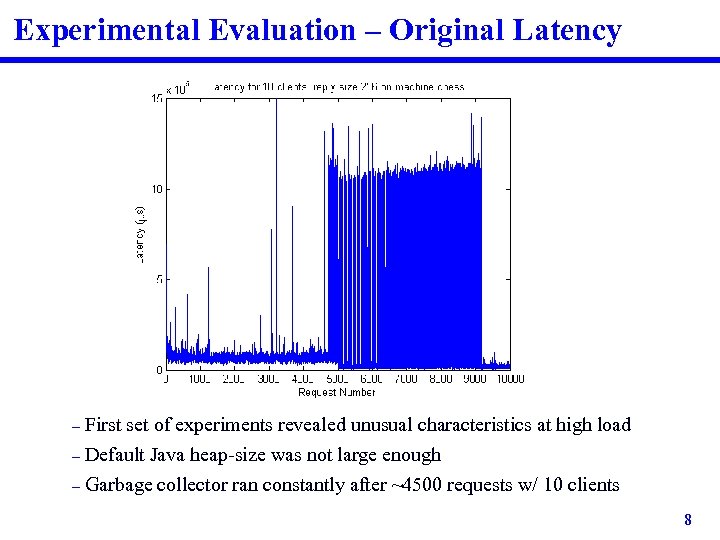
Experimental Evaluation – Original Latency First set of experiments revealed unusual characteristics at high load – Default Java heap-size was not large enough – Garbage collector ran constantly after ~4500 requests w/ 10 clients – 8
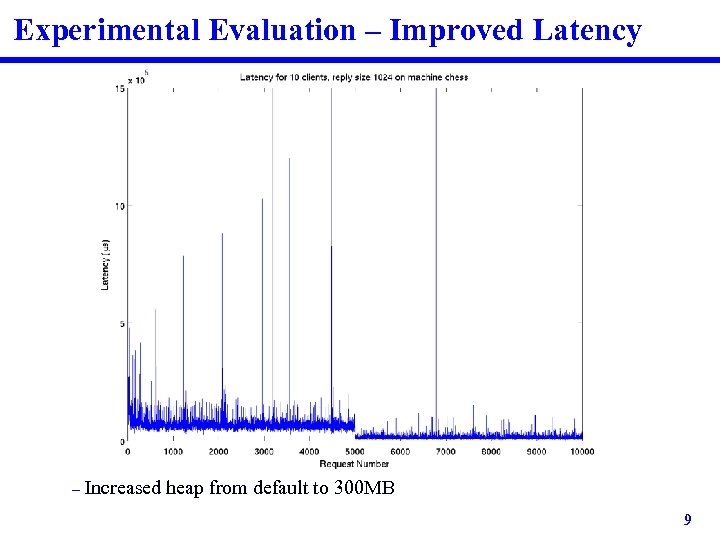
Experimental Evaluation – Improved Latency – Increased heap from default to 300 MB 9
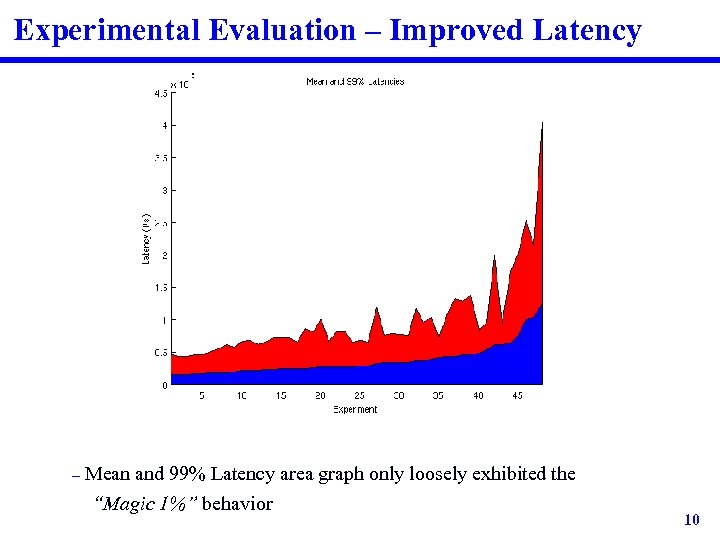
Experimental Evaluation – Improved Latency – Mean and 99% Latency area graph only loosely exhibited the “Magic 1%” behavior 10
Fault-Tolerance Framework u Replicate servers – – – Passive replication Stateless servers Allow for up to 14 replicas • One for each machine in the Games cluster (minus ASL and Mahjongg) u Sacred Machines – – – u Clients Replication Manager Naming Service Fault Injector Database Elements of Fault-tolerance Framework – Replication Manager • Heartbeat • Fault detector • Automatic recovery (maintenance of number of replicas) – Fault Injector 11
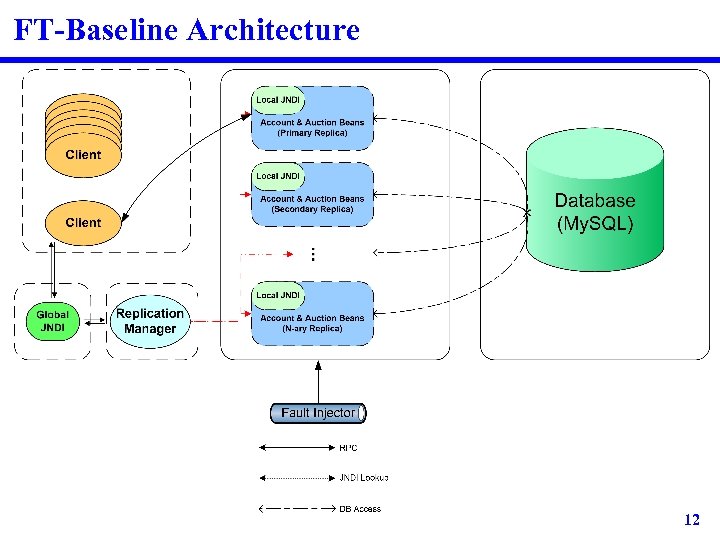
FT-Baseline Architecture 12
Replication Manager u u Responsible for launching and maintaining servers Heartbeats replicas periodically – u Differentiates between crash faults and process faults – – u A server is already running on the current machine remove from active list Maintains global JNDI – – – u Crash fault: Server is removed from the active list Process fault: Process is killed and restarted Catches port binding exceptions – u 500 ms period Updating server references for clients Indicates which server is primary/secondary Keeps a count of the number of times any primary has failed Advanced Features – – Allows the user to see the current status of all replicas Allows the user to see the bindings in the JNDI 13
Fault Injector u u 2 Modes Manual Fault Injection – u Runs a “kill -9” on a user specified server Periodic Fault Injection – Prompts user to set up a kill timer • Base period • Max jitter about the base period • Option to only kill primary replica, or a random replica 14
Mechanisms for Fail-Over u Replication Manager detected fail-over – – – u Detects that a heartbeat thread failed Kills the associated server Checks cause of death Launches new replica If no active servers are free, the replication manager will print a message, kill all servers and exit Client detected fail-over – – Receives a Remote. Exception Queries naming service for a new primary • Previously accessed JNDI directly – Required a pause for JNDI to be corrected • Sometimes this resulted in multiple failover attempts – When JNDI was not ready after predetermined wait time 15
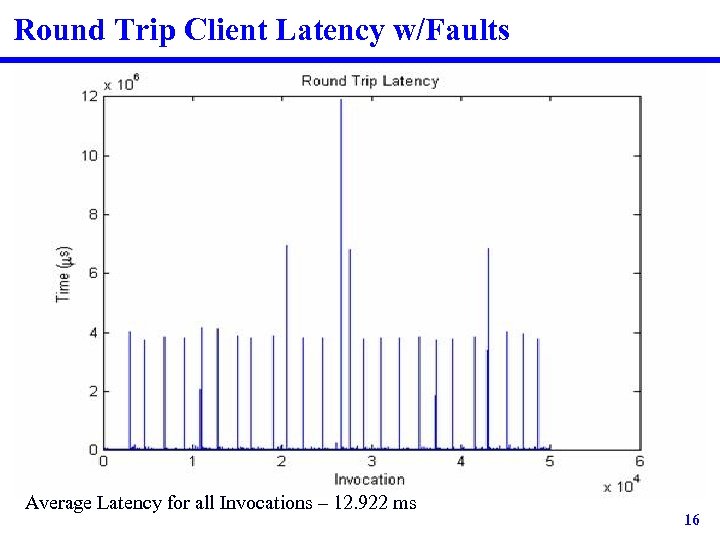
Round Trip Client Latency w/Faults Average Latency for all Invocations – 12. 922 ms 16
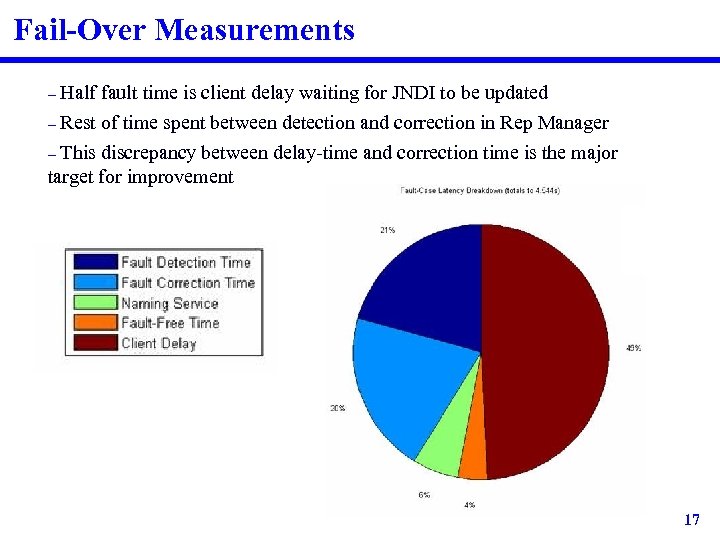
Fail-Over Measurements Half fault time is client delay waiting for JNDI to be updated – Rest of time spent between detection and correction in Rep Manager – This discrepancy between delay-time and correction time is the major target for improvement – 17
RT-FT-Baseline Architecture Improvements u Target fault-detection and correction time in Replication Manager – – Tweaking heartbeat frequency and heartbeat monitor frequency Improvements in interactions with JNDI • Additional parameters to specify primary server • Update JNDI by modifying entries rather than rebuilding each time u Target fail-over time in client – – – Client pre-establishes connections to all active servers Background thread queries JNDI and maintains updated list On fail-over, client immediately fails-over to next active server • No delay waiting for Replication Manager to update JNDI • Background thread will synchronize client’s server list once it has been updated by the Replication Manager 18
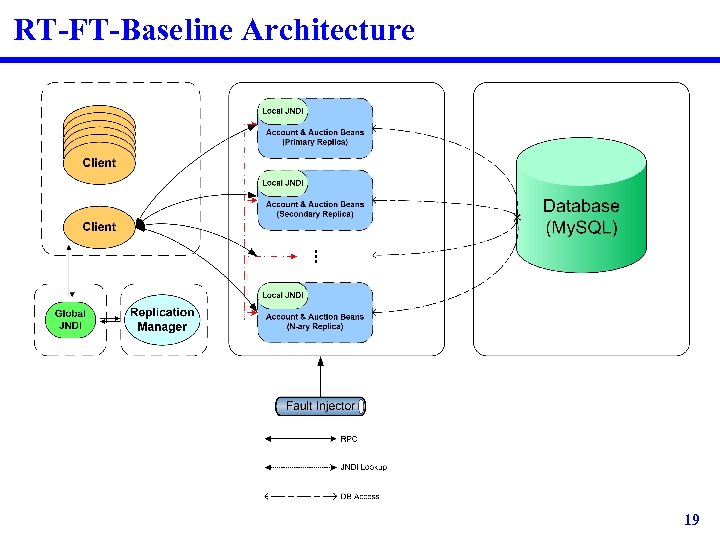
RT-FT-Baseline Architecture 19
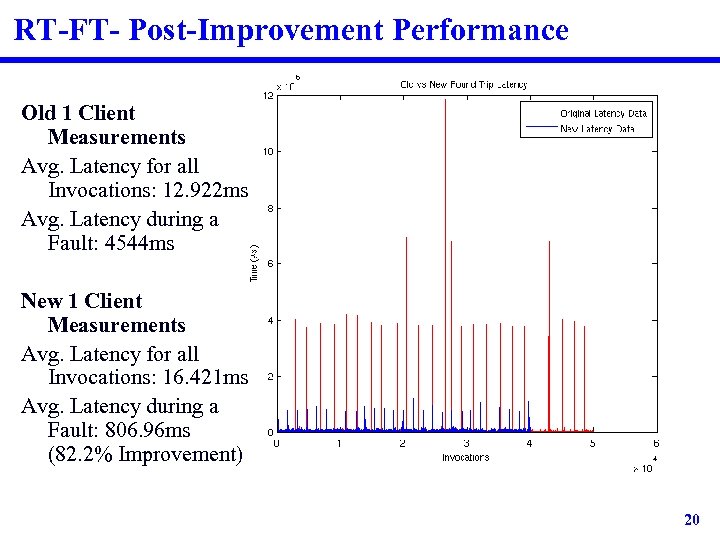
RT-FT- Post-Improvement Performance Old 1 Client Measurements Avg. Latency for all Invocations: 12. 922 ms Avg. Latency during a Fault: 4544 ms New 1 Client Measurements Avg. Latency for all Invocations: 16. 421 ms Avg. Latency during a Fault: 806. 96 ms (82. 2% Improvement) 20
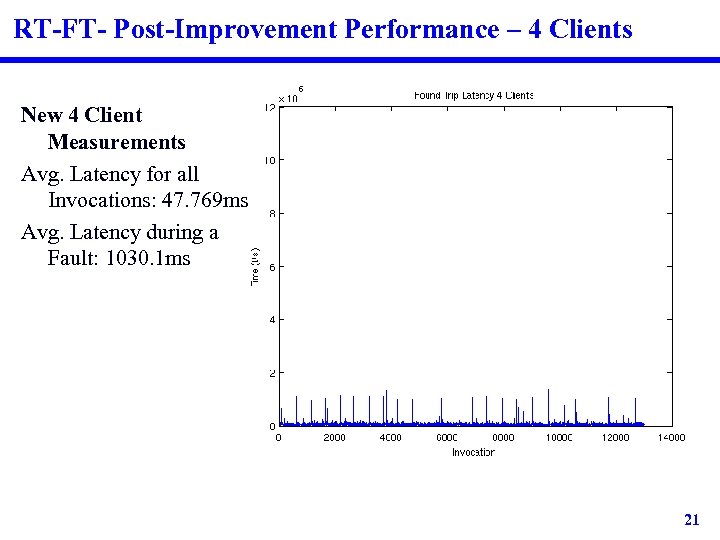
RT-FT- Post-Improvement Performance – 4 Clients New 4 Client Measurements Avg. Latency for all Invocations: 47. 769 ms Avg. Latency during a Fault: 1030. 1 ms 21
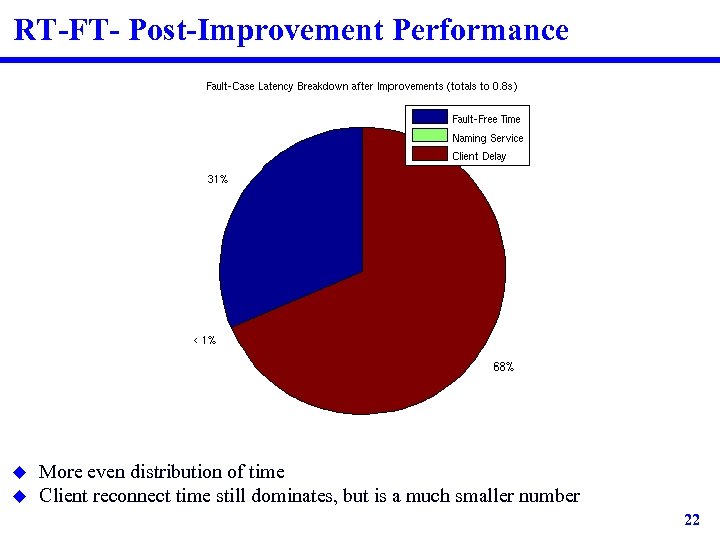
RT-FT- Post-Improvement Performance u u More even distribution of time Client reconnect time still dominates, but is a much smaller number 22
Special Features u Experimental Evaluation – – – u Fault-Tolerant Baseline – – – u Utilized JNI for microsecond precision timers Maintained a central library of MATLAB processing scripts Perl and shell scripts to automate entire process Powerful Replication Manager that starts, restarts, and kills servers Integrated command-line interface for additional automation Fault-Injector with dual-modes Fault-Case Performance – – New client functionality to pre-establish all connections Contents of JNDI directly correlated to actual status of servers • Online, offline, booting 23
Open Issues u Problems launching multiple servers concurrently from Rep Manager – – u Improved Client Interface – u Many attempts to address/debug this issue with only some success If multiple faults occur within short period of time, some servers may die unexpectedly GUI or Web-Based Additional Application Features – – – Allow deletion of accounts, auctions, and bids Security! Improved search functionality 24
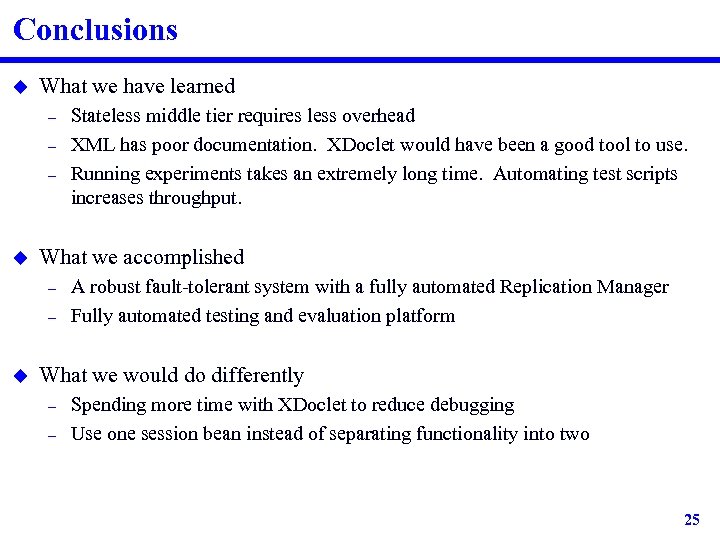
Conclusions u What we have learned – – – u What we accomplished – – u Stateless middle tier requires less overhead XML has poor documentation. XDoclet would have been a good tool to use. Running experiments takes an extremely long time. Automating test scripts increases throughput. A robust fault-tolerant system with a fully automated Replication Manager Fully automated testing and evaluation platform What we would do differently – – Spending more time with XDoclet to reduce debugging Use one session bean instead of separating functionality into two 25
Скачать презентацию Team 4 18 -749 Fault-Tolerant Distributed Systems Bryan
1a4d0d93eee17735a5e25a69a16e30f0.ppt