


 Скачать презентацию Teaching within Dell s Intelligent Classroom Skip Tyler Pete
1ba7c4a6a638a197e3b868d23e804ff1.ppt
- Количество слайдов: 28
 Teaching within Dell’s Intelligent Classroom Skip Tyler Pete Anderson estyler@henrico. k 12. va. us pganders@henrico. k 12. va. us NECC Conference July, 2006
 About Us o o Teach high school math in Henrico County, VA Develop online curricula Work in a school division that funds a one-to-one computer initiative with Dell Instruct using Intelligent Classrooms
 Presentation Objectives o o To make you aware of different types of technology available with Dell’s Intelligent Classroom. To show you how technology can create a positive classroom environment that fosters curiosity, excitement, and student learning.
 What is your position? A. B. C. D. E. F. Teacher Tech Coordinator Administrator Staff Development Other Sitting Down
 Sample Lesson o o Let’s see it in action! Click here to go to a web applet of the floor plan
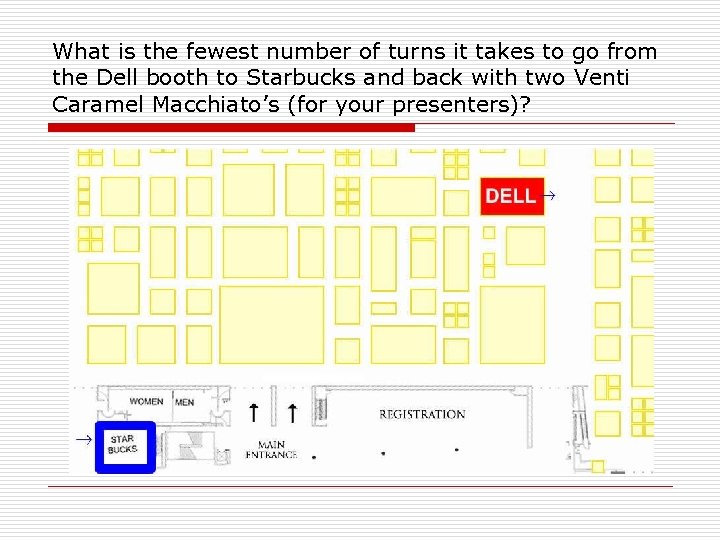 What is the fewest number of turns it takes to go from the Dell booth to Starbucks and back with two Venti Caramel Macchiato’s (for your presenters)?
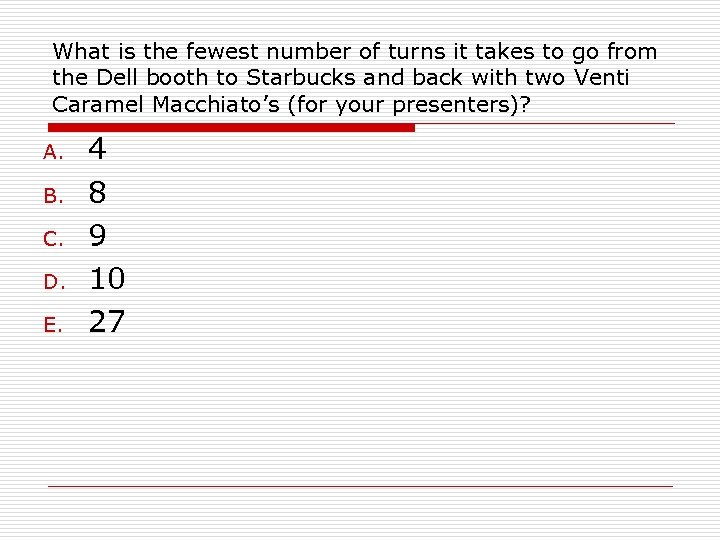 What is the fewest number of turns it takes to go from the Dell booth to Starbucks and back with two Venti Caramel Macchiato’s (for your presenters)? A. B. C. D. E. 4 8 9 10 27
 What is the fewest number of turns it takes to go from the Dell booth to Starbucks and back with two Venti Caramel Macchiato’s (for your presenters)?
 Intelligent Classroom Minimum Requirements o o o Computer Projector Screen/Wall Additional components can help you create interactive, collaborative learning environments.
 How many computers are in your classroom? A. B. C. D. E. None Teacher computer only 1 -5 student computers 6+ students computers 1 -1 computer initiative Answer Now
 Benefits of computer and projector o o o Only 1 computer is needed to display a presentation (Power. Point, Internet, etc. ) for a class Improved classroom management More dynamic student interaction
 What is your experience with student responders? A. B. C. D. Never heard of them I have seen them I have used them I have my own set Answer Now
 Benefits of Student Responders o Engage all students n n n o Assess n o Respond instantly to questions supporting interactive, dynamic lessons No fear of wrong answers Interactive game show - set up teams, fastest responder, high score, etc. Gives immediate data to analyze and direct instruction Achieve n Students try harder, results can be saved and tracked
 What is your experience with an interactive whiteboard or wireless pad? A. B. C. D. Never heard of them I have seen them I have used one I have used both Answer Now
 Benefits of Interactive Whiteboards and Wireless Pads o Maintain student attention n n o Save notes and documentation n o Students want to interact with the technology Element of the unknown Can be sent via email, stored on a network, posted on a web page Flexibility and Mobility n Wireless pad can be controlled from any location in the classroom
 Sample Lessons o o Annotations and Tools Object Oriented Drag and Drop Digital Manipulatives
 What is your experience with a document camera? A. B. C. D. What’s a document camera? I have heard of it I have used one I have one in my classroom Answer Now
 Benefits of a document camera o Enables teachers and students to display material to the entire class n n n Review homework answers Show newspaper or magazine article Model hands-on activity
 Additional Technologies o Digital Camera and Camcorder n o o o Teacher project Multimedia devices (DVD, VCR, stereo system) Laser Printer Dell DJ MP 3 Players Storage Devices (CD/DVD Burners, Flash Drive) Scanner
 Do you have your own web page? A. B. Yes No Answer Now
 Benefits of a Web Page o o o Acts as a lesson plan book Can be modified easily Dynamic Central location for notes, assignments, policies, contact info, etc. Minimizes excuses from students who are absent
 Different Types of Web Pages No hosting required: o o o Free – http: //www. Schoolnotes. com $25/yr – http: //www. Teacherweb. com $49/yr – http: //www. Quia. com Hosting required: o o You can create your own page using software applications like: n Microsoft Office (Save As Web Page) n Mozilla (free download) n Dreamweaver (purchase) Benefit: Files are on your computer for updating, less restrictions
 How often do you use the Internet in your classroom? A. B. C. D. E. F. Daily 2 -3 times a week Once a week Twice a month Once a month Never Answer Now
 Examples of Internet Usage o o o Virtual Manipulatives Online Textbooks HCPS e. Learning Web. Quests Videostreaming Assessments
 Conclusions Dell’s Intelligent Classroom… o Creates a collaborative, interactive learning environment when used effectively. o Supports numerous learning styles, including visual, auditory and kinesthetic. o Facilitates interaction and connects classrooms with information, images and meaning. o Makes instruction more effective and improves classroom management, student participation, and student achievement. It does not replace effective teachers.
 The most important question about technology usage… Does the technology complement or hinder instruction?
 Q & A Session o o o Where do you go from here? What things can you incorporate into your classroom? Act now while motivated! How do you go about getting these items? Library? Departmental request? Grant writing?
 Important information! o Email: Skip Tyler Pete Anderson estyler@henrico. k 12. va. us View Skip’s web site pganders@henrico. k 12. va. us View Pete’s web site This presentation and web resources can be found at http: //teachers. henrico. k 12. va. us/varina/ tyler_e/NECC 06/index. htm Feel free to contact us with any questions! Thanks!