



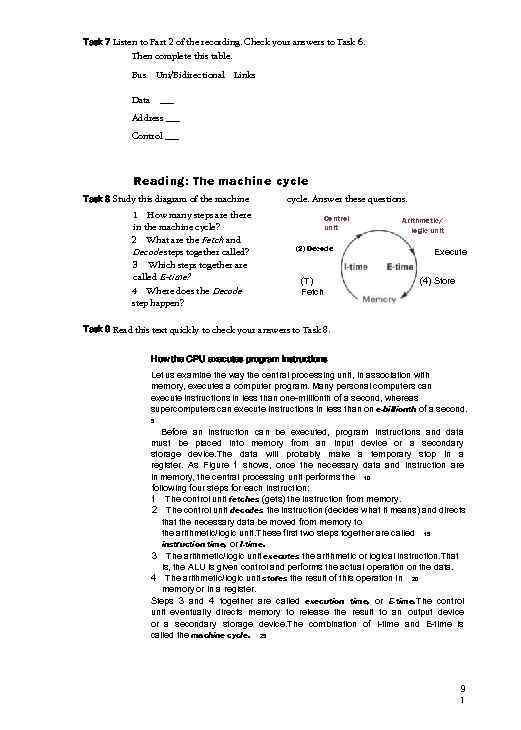
 Task 7 Listen to Part 2 of the recording. Check your answers to Task 6. Then complete this table. Bus Uni/Bidirectional Data Links ___ Address ___ Control ___ Reading: The machine cycle Task 8 Study this diagram of the machine 1 How many steps are there in the machine cycle? 2 What are the Fetch and Decode steps together called? 3 Which steps together are called E-time? 4 Where does the Decode step happen? cycle. Answer these questions. Control unit (2) Decode (T) Fetch Arithmetic/ logic unit Execute (4) Store Task 9 Read this text quickly to check your answers to Task 8. How the CPU executes program instructions Let us examine the way the central processing unit, in association with memory, executes a computer program. Many personal computers can execute instructions in less than one-millionth of a second, whereas supercomputers can execute instructions in less than on e-billionth of a second. 5 Before an instruction can be executed, program instructions and data must be placed into memory from an input device or a secondary storage device. The data will probably make a temporary stop in a register. As Figure 1 shows, once the necessary data and instruction are in memory, the central processing unit performs the 10 following four steps for each instruction: 1 The control unit fetches (gets) the instruction from memory. 2 The control unit decodes the instruction (decides what it means) and directs that the necessary data be moved from memory to the arithmetic/logic unit. These first two steps together are called 15 instruction time, or l-time. 3 The arithmetic/logic unit executes the arithmetic or logical instruction. That is, the ALU is given control and performs the actual operation on the data. 4 The arithmetic/logic unit stores the result of this operation in 20 memory or in a register. Steps 3 and 4 together are called execution time, or E-time. The control unit eventually directs memory to release the result to an output device or a secondary storage device. The combination of l-time and E-time is called the machine cycle. 25 9 1
 Task 10 Read the text again to find the answers to these questions. 1 2 3 4 5 6 What must be put into memory before an instruction can be executed? Where will the data be stored temporarily? What operation does the control unit perform on the data? Where does the ALU store the results of its operations? What happens to the results eventually? What is the machine cycle? Language work: Contrast Study these pairs of statements. 1 The data bus is bidirectional. The address bus is unidirectional. 2 Registers hold data immediately required. Main memory stores data required in the near future. 3 PCs can process in a millionth of a second. Supercomputers can process in a billionth of a second. Each pair contains a contrast. We can show this by linking them as follows: 1 The data bus is bidirectional, whereas the address bus is unidirectional. 2 Registers hold data immediately required. In contrast, main memory stores data required in the near future. 3 PCs can process in a millionth of a second, but supercomputers can process in a billionth of a second. Task 11 Link each of these pairs of contrasting statements using whereas, in contrast, or but. 1 2 3 4 5 6 7 8 Dot matrix printers are noisy. Laser printers are quiet. Floppy disks store small amounts of data. Hard disks store large amounts of data. Handheld computers fit into your pocket. Supercomputers occupy a whole room. High-level languages are easy to understand. Machine code is very difficult to understand. BASIC is a simple language. C++ is complex. Modern computers are powerful and relatively cheap. Older computers were less powerful and quite expensive. An analyst analyses problems and finds solutions. A programmer turns these solutions into computer programs. A graphics package produces images and designs. A word processor produces texts.
 Problem-solving Task 12 Work in pairs, A and B. Explain to your partner how to convert a number from one system to another. You can write down the steps and show them to your partner, but you must explain each step in English. Student A Your conversion is on page 118. Student B Your conversion is on page 119. Writing Task 13 Describe how an interrupt works by linking these pairs of sentences using suitable time words. 1 A printer runs out of paper. An interrupt carries a signal to the CPU. 2 The CPU receives the signal. The CPU interrupts its tasks. 3 The CPU saves its current status in a special area of memory. The CPU sends a message to the user. 4 The user reloads the paper tray. The processor returns to its previous state. 9 3
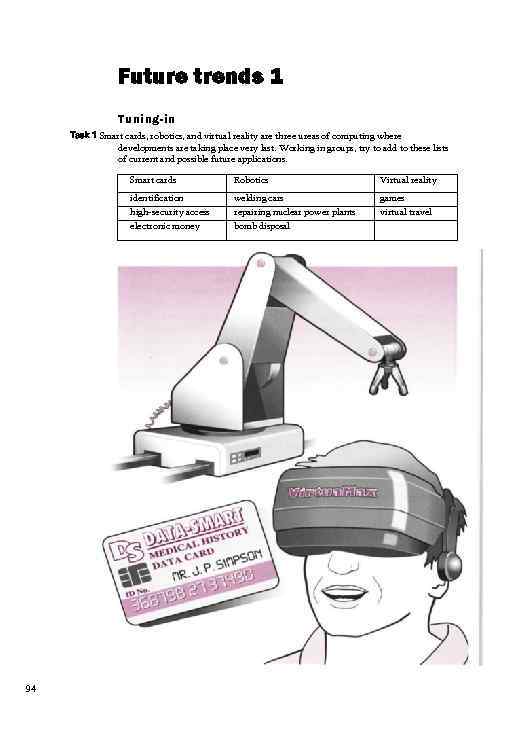 Future trends 1 Tuning-in Task 1 Smart cards, robotics, and virtual reality are three ureas of computing where developments are taking place very last. Working in groups, try to add to these lists of current and possible future applications. Smart cards Virtual reality identification high-security access electronic money 94 Robotics welding cars repairing nuclear power plants bomb disposal games virtual travel
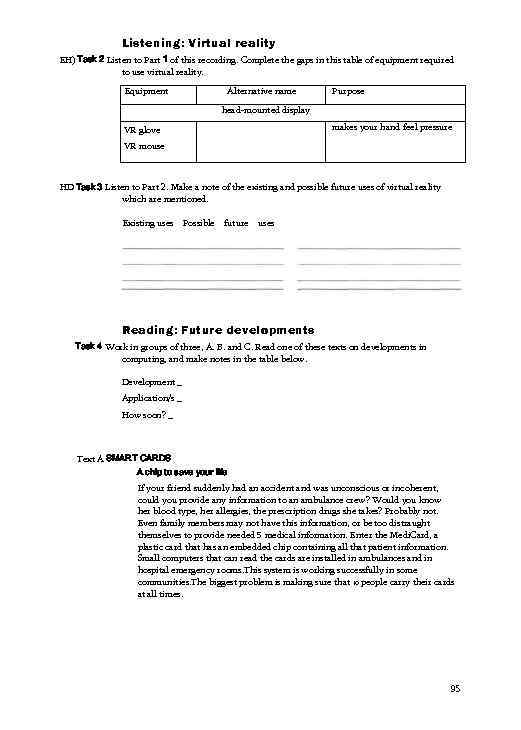 Listening: Virtual reality EH) Task 2 Listen to Part 1 of this recording. Complete the gaps in this table of equipment required to use virtual reality. Equipment Alternative name Purpose head-mounted display makes your hand feel pressure VR glove VR mouse HD Task 3 Listen to Part 2. Make a note of the existing and possible future uses of virtual reality which are mentioned. Existing uses Possible future uses Reading: Future developments Task 4 Work in groups of three, A. B. and C. Read one of these texts on developments in computing, and make notes in the table below. Development _ Application/s _ How soon? _ Text A SMART CARDS A chip to save your life If your friend suddenly had an accident and was unconscious or incoherent, could you provide any information to an ambulance crew? Would you know her blood type, her allergies, the prescription drugs she takes? Probably not. Even family members may not have this information, or be too distraught themselves to provide needed 5 medical information. Enter the Medi. Card, a plastic card that has an embedded chip containing all that patient information. Small computers that can read the cards are installed in ambulances and in hospital emergency rooms. This system is working successfully in some communities. The biggest problem is making sure that 10 people carry their cards at all times. 95
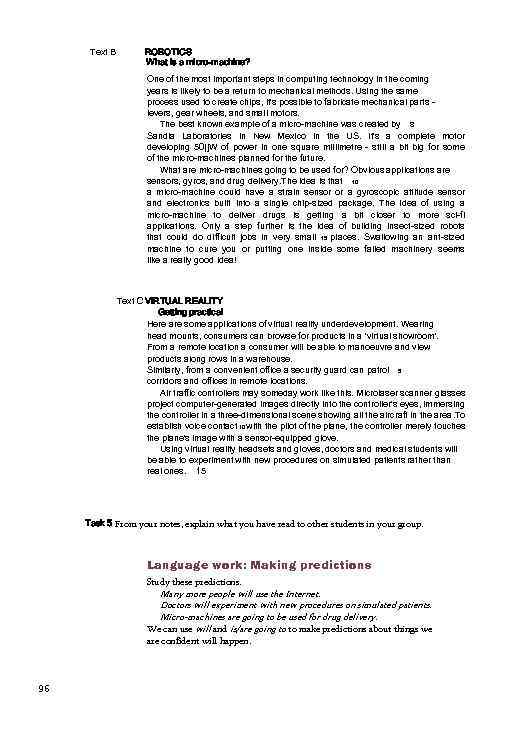 Text B ROBOTICS What is a micro-machine? One of the most important steps in computing technology in the coming years is likely to be a return to mechanical methods. Using the same process used to create chips, it's possible to fabricate mechanical parts levers, gear wheels, and small motors. The best known example of a micro-machine was created by s Sandia Laboratories in New Mexico in the US. It's a complete motor developing 50|j. W of power in one square millimetre - still a bit big for some of the micro-machines planned for the future. What are micro-machines going to be used for? Obvious applications are sensors, gyros, and drug delivery. The idea is that 10 a micro-machine could have a strain sensor or a gyroscopic attitude sensor and electronics built into a single chip-sized package. The idea of using a micro-machine to deliver drugs is getting a bit closer to more sci-fi applications. Only a step further is the idea of building insect-sized robots that could do difficult jobs in very small 15 places. Swallowing an ant-sized machine to cure you or putting one inside some failed machinery seems like a really good idea! Text C VIRTUAL REALITY Getting practical Here are some applications of virtual reality underdevelopment. Wearing head mounts, consumers can browse for products in a 'virtual showroom'. From a remote location a consumer will be able to manoeuvre and view products along rows in a warehouse. Similarly, from a convenient office a security guard can patrol 5 corridors and offices in remote locations. Air traffic controllers may someday work like this. Microlaser scanner glasses project computer-generated images directly into the controller's eyes, immersing the controller in a three-dimensional scene showing all the aircraft in the area. To establish voice contact 10 with the pilot of the plane, the controller merely touches the plane's image with a sensor-equipped glove. Using virtual reality headsets and gloves, doctors and medical students will be able to experiment with new procedures on simulated patients rather than real ones. 15 Task 5 From your notes, explain what you have read to other students in your group. Language work: Making predictions Study these predictions. Many more people will use the Internet. Doctors will experiment with new procedures on simulated patients. Micro-machines are going to be used for drug delivery. We can use will and is/are going to to make predictions about things we are confident will happen. 96
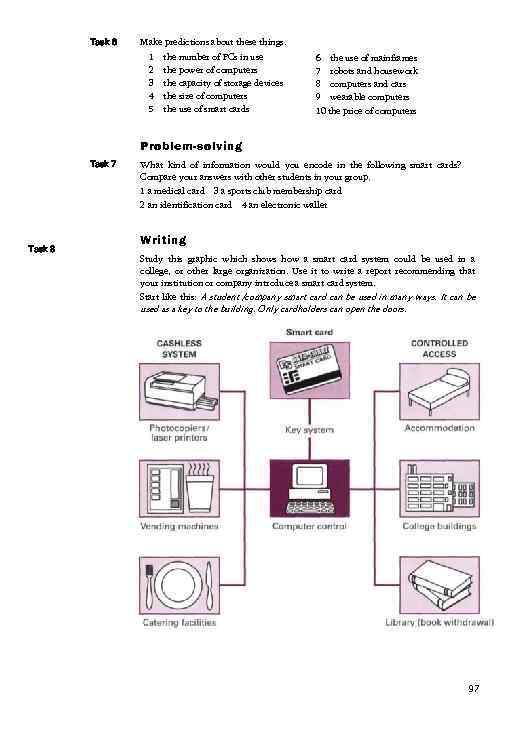 Task 6 Make predictions about these things. 1 2 3 4 5 the number of PCs in use the power of computers the capacity of storage devices the size of computers the use of smart cards 6 the use of mainframes 7 robots and housework 8 computers and cars 9 wearable computers 10 the price of computers Problem-solving Task 7 Task 8 What kind of information would you encode in the following smart cards? Compare your answers with other students in your group. 1 a medical card 3 a sports club membership card 2 an identification card 4 an electronic wallet Writing Study this graphic which shows how a smart card system could be used in a college, or other large organization. Use it to write a report recommending that your institution or company introduce a smart card system. Start like this: A student /company smart card can be used in many ways. It can be used as a key to the building. Only cardholders can open the doors. 97
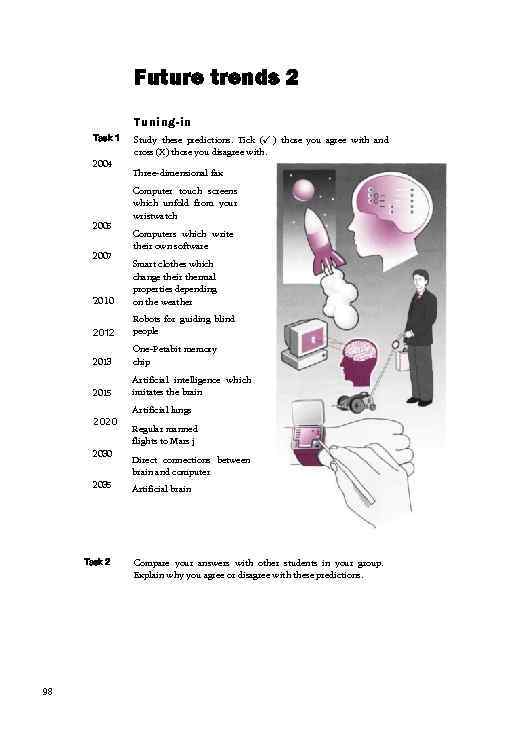 Future trends 2 Tuning-in Task 1 2004 2005 2007 Study these predictions. Tick (✓ ) those you agree with and cross (X) those you disagree with. Three-dimensional fax Computer touch screens which unfold from your wristwatch Computers which write their own software 2010 Smart clothes which change their thermal properties depending on the weather 2012 Robots for guiding blind people 2013 One-Petabit memory chip 2015 Artificial intelligence which imitates the brain 2020 2035 Task 2 98 Artificial lungs Regular manned flights to Mars j Direct connections between brain and computer Artificial brain Compare your answers with other students in your group. Explain why you agree or disagree with these predictions.
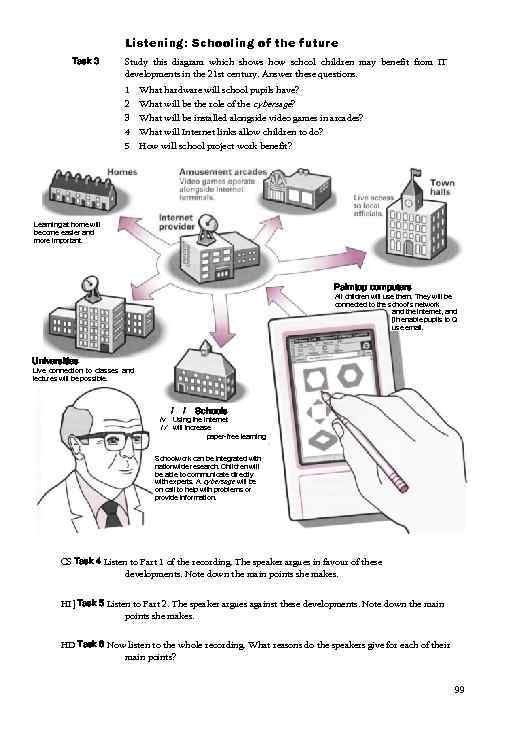 Listening: Schooling of the future Task 3 Study this diagram which shows how school children may benefit from IT developments in the 21 st century. Answer these questions. 1 2 3 4 5 What hardware will school pupils have? What will be the role of the cybersage? What will be installed alongside video games in arcades? What will Internet links allow children to do? How will school project work benefit? Learning at home will become easier and more important. Palmtop computers All children will use them. They will be connected to the school's network and the Internet, and [ih enable pupils to Q use email. Universities Live connection to classes and lectures will be possible. /v I/ / / Schools Using the Internet will increase paper-free learning Schoolwork can be integrated with nationwide research. Children will be able to communicate directly with experts. A cybersage will be on call to help with problems or provide information. CS Task 4 Listen to Part 1 of the recording. The speaker argues in favour of these developments. Note down the main points she makes. HI] Task 5 Listen to Part 2. The speaker argues against these developments. Note down the main points she makes. HD Task 6 Now listen to the whole recording. What reasons do the speakers give for each of their main points? 99
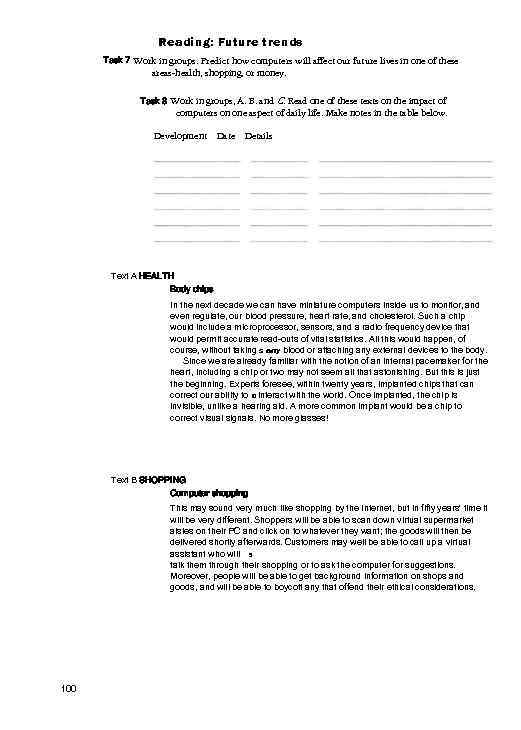 Reading: Future trends Task 7 Work in groups. Predict how computers will affect our future lives in one of these areas-health, shopping, or money. Task 8 Work in groups, A. B. and C. Read one of these texts on the impact of computers on one aspect of daily life. Make notes in the table below. Development Date Details Text A HEALTH Body chips In the next decade we can have miniature computers inside us to monitor, and even regulate, our blood pressure, heart rate, and cholesterol. Such a chip would include a microprocessor, sensors, and a radio frequency device that would permit accurate read-outs of vital statistics. All this would happen, of course, without taking s any blood or attaching any external devices to the body. Since we are already familiar with the notion of an internal pacemaker for the heart, including a chip or two may not seem all that astonishing. But this is just the beginning. Experts foresee, within twenty years, implanted chips that can correct our ability to 10 interact with the world. Once implanted, the chip is invisible, unlike a hearing aid. A more common implant would be a chip to correct visual signals. No more glasses! Text B SHOPPING Computer shopping This may sound very much like shopping by the Internet, but in fifty years' time it will be very different. Shoppers will be able to scan down virtual supermarket aisles on their PC and click on to whatever they want; the goods will then be delivered shortly afterwards. Customers may well be able to call up a virtual assistant who will 5 talk them through their shopping or to ask the computer for suggestions. Moreover, people will be able to get background information on shops and goods, and will be able to boycott any that offend their ethical considerations. 100
 Text C MONEY Electronic cash Bank customers can now download money from their account to an electronic wallet, a smart card, using a specially designed phone equipped with a smart card reader. To download cash you have to enter your PIN. You can then use your electronic wallet to pay for goods and services, to purchase goods across the Internet, and to 5 transfer money to other cardholders. Using the Internet, customers can now check their account balance and see their latest statement. One bank has developed a multi-currency payment engine which allows online retailers to sell their goods in sixteen countries, with customers paying in their local 10 currency. With these developments, coins and notes are likely to disappear. Language work: will and would Compare these examples of predictions. A bodychip will include a microprocessor. A bodychip would include a microprocessor. A common implant will be a chip to correct visual signals. A common implant would be a chip to correct visual signals. We use would as a "less definite’ form of will when we make predictions. Often we imply that something else must happen first. For example: A body chip would include a microprocessor, (first we have to develop body chips) The National Grid would link all schools and colleges, (first we have to make sure there is enough money to make it happen) Task 9 Link these words to make predictions with would. 1 2 3 4 5 6 7 8 computers / write / own software implants / stimulate / muscles of disabled screen / unfold / wrist watch clothes / alter / thermal properties robot pets / require / no food artificial lungs / help / cancer patients people / be able to / travel to Mars a body chip / correct / poor vision 10 1
 Task 10 Study these notes about a possible ‘cybercity’ of the future. Make each set of notes into a prediction using would. 1 lib re-optic links between every house 2 paper-free education 3 no money used 4 computers in every house 5 driver-less public transport 6 wall-size computer screens for entertainment 7 houses cleaned by robots 8 virtual doctors for medical advice Task 11 Work in pairs. Write other predictions of your own about the cybercity. Speaking Task 12 Work in pairs, A and B. Explain to each other a new development which may replace passports at border controls. Student A Your information is on page 1 18. Student B Your information is on page 119. Problem-solving Task 13 In groups, discuss how future developments in computing could help solve the problems of people who: 1 cannot hear 2 cannot see 3 cannot use their arms and legs. Compare your ideas with the rest of the class. 10 2
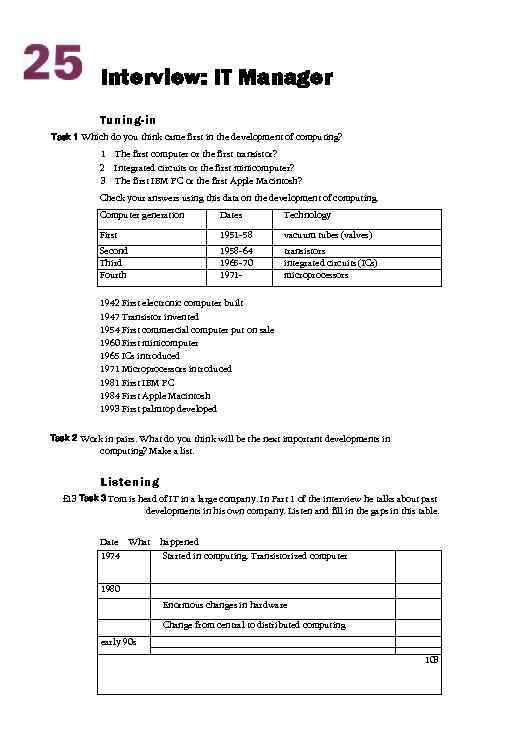 Interview: IT Manager Tuning-in Task 1 Which do you think came first in the development of computing? 1 The first computer or the first transistor? 2 Integrated circuits or the first minicomputer? 3 The first IBM PC or the first Apple Macintosh? Check your answers using this data on the development of computing. Computer generation Dates Technology First 1951 -58 vacuum tubes (valves) Second Third Fourth 1958 -64 1965 -70 1971 - transistors integrated circuits (ICs) microprocessors 1942 First electronic computer built 1947 Transistor invented 1954 First commercial computer put on sale 1960 First minicomputer 1965 ICs introduced 1971 Microprocessors introduced 1981 First IBM PC 1984 First Apple Macintosh 1993 First palmtop developed Task 2 Work in pairs. What do you think will be the next important developments in computing? Make a list. Listening £ 13 Task 3 Tom is head of IT in a large company. In Part 1 of the interview he talks about past developments in his own company. Listen and fill in the gaps in this table. Date What 1974 happened Started in computing. Transistorized computer 1980 Enormous changes in hardware Change from central to distributed computing early 90 s 103
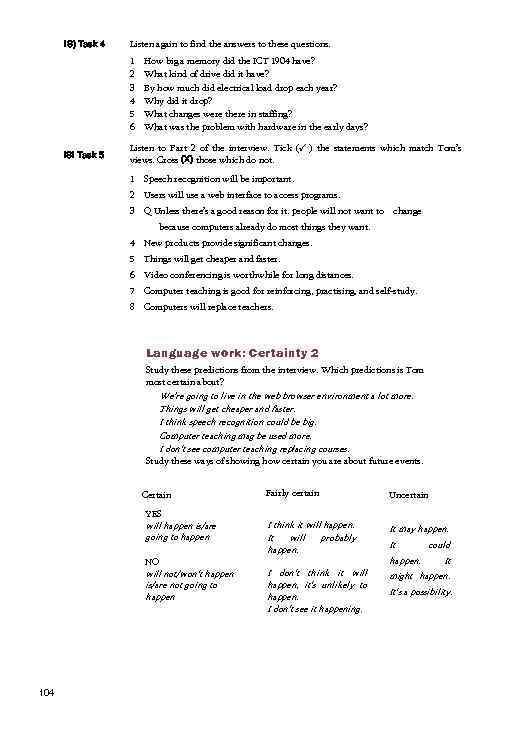 IS) Task 4 Listen again to find the answers to these questions. 1 2 3 4 5 6 IS! Task 5 How big a memory did the ICT 1904 have? What kind of drive did it have? By how much did electrical load drop each year? Why did it drop? What changes were there in staffing? What was the problem with hardware in the early days? Listen to Part 2 of the interview. Tick (✓ ) the statements which match Tom’s views. Cross (X) those which do not. 1 Speech recognition will be important. 2 Users will use a web interface to access programs. 3 Q Unless there’s a good reason for it. people will not want to change because computers already do most things they want. 4 New products provide significant changes. 5 Things will get cheaper and faster. 6 Video conferencing is worthwhile for long distances. 7 Computer teaching is good for reinforcing, practising, and self-study. 8 Computers will replace teachers. Language work: Certainty 2 Study these predictions from the interview. Which predictions is Tom most certain about? We’re going to live in the web browser environment a lot more. Things will get cheaper and faster. I think speech recognition could be big. Computer teaching mag be used more. I don't see computer teaching replacing courses. Study these ways of showing how certain you are about future events. Certain YES will happen is/are going to happen NO will not/won't happen is/are not going to happen 104 Fairly certain Uncertain I think it will happen. It will probably happen. It may happen. I don't think it will happen, it's unlikely to happen. I don't see it happening. might happen. It happen. could It It's a possibility.
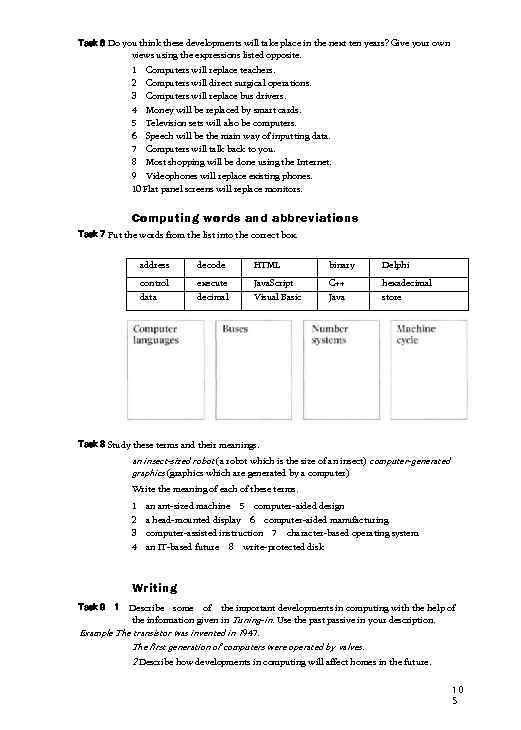 Task 6 Do you think these developments will take place in the next ten years? Give your own views using the expressions listed opposite. 1 Computers will replace teachers. 2 Computers will direct surgical operations. 3 Computers will replace bus drivers. 4 Money will be replaced by smart cards. 5 Television sets will also be computers. 6 Speech will be the main way of inputting data. 7 Computers will talk back to you. 8 Most shopping will be done using the Internet. 9 Videophones will replace existing phones. 10 Flat panel screens will replace monitors. Computing words and abbreviations Task 7 Put the words from the list into the correct box. address decode HTML binary Delphi control data execute decimal Java. Script Visual Basic C++ Java hexadecimal store Task 8 Study these terms and their meanings. an insect-sized robot (a robot which is the size of an insect) computer-generated graphics (graphics which are generated by a computer) Write the meaning of each of these terms. 1 2 3 4 an ant-sized machine 5 computer-aided design a head-mounted display 6 computer-aided manufacturing computer-assisted instruction 7 character-based operating system an IT-based future 8 write-protected disk Writing Describe some of the important developments in computing with the help of the information given in Tuning-in. Use the past passive in your description. Example The transistor was invented in 1 947. Task 9 1 The first generation of computers were operated by valves. 2 Describe how developments in computing will affect homes in the future. 10 5