


 Скачать презентацию SYST 512 Unit 3 The Unified Software Development
2e1ded8b75898278ba85d94848dde73e.ppt
- Количество слайдов: 54
 SYST 512 Unit 3: The Unified Software Development Process Part 1 of 3 An Introduction 1
 A Requirements Statement for the Unified Process z According to Booch, et. al. , software development needs a process that: y. Provides guidance to the order of a teams activities y. Directs the tasks of individual developers and the team as a whole y. Specifies what artifacts should be developed y. Offers criteria for monitoring and measuring a project’s products and activities 2
 The Unified Process: A Snapshot z The unified process is made of components connected via well defined interfaces y. Based on the Unified Modeling Language (UML) y. Use Case Driven, Architecture-centric, Iterative and Incremental 3
 Use Cases z A Use Case can be defined as a piece of functionality that gives a user a result of value y. Sum of all use cases form the use case model z Use cases capture functional requirements replace the traditional functional specification 4
 Architectures z Booch, et. al. describe an architecture as the different views of the system being built z Embodies the most significant static and dynamic aspects of the system y Influenced by platform, operating systems, DBMS, etc. y View of the whole design with the important characteristics mode more visible by leaving the details aside 5
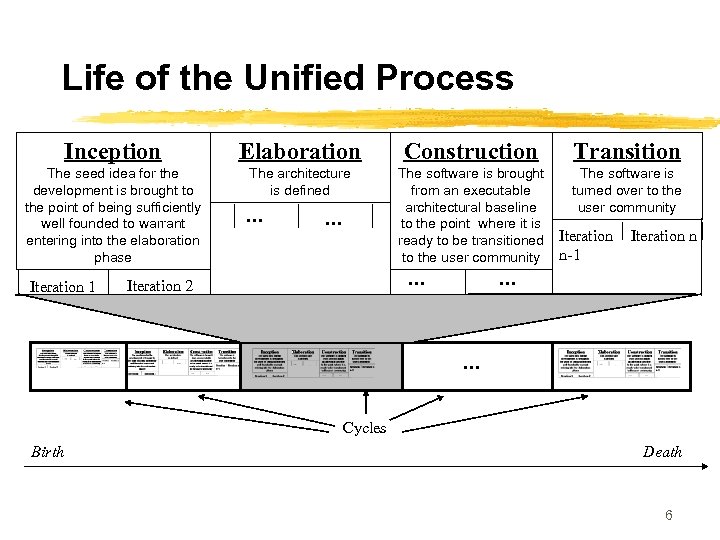 Life of the Unified Process Inception Elaboration Construction Transition The seed idea for the development is brought to the point of being sufficiently well founded to warrant entering into the elaboration phase The architecture is defined The software is brought from an executable architectural baseline to the point where it is ready to be transitioned to the user community The software is turned over to the user community Iteration 1 . . Iteration 2 . . . Iteration n-1 Iteration n . . . Cycles Birth Death 6
 Core Work Flows 7
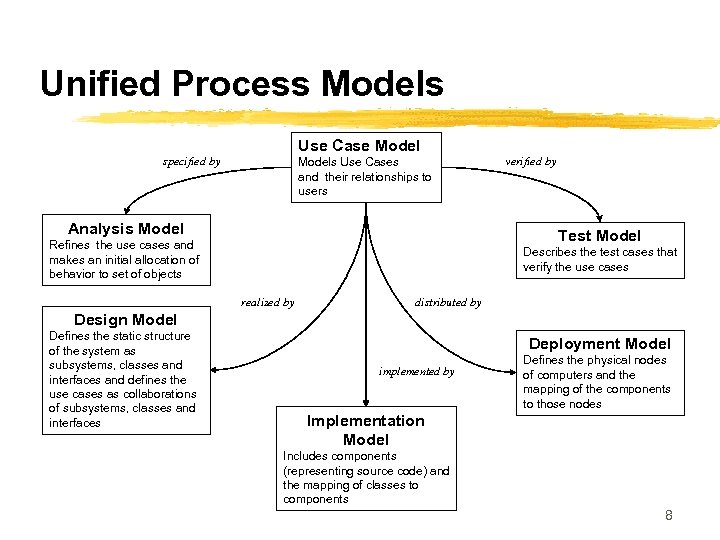 Unified Process Models Use Case Model specified by Models Use Cases and their relationships to users Analysis Model verified by Test Model Refines the use cases and makes an initial allocation of behavior to set of objects Describes the test cases that verify the use cases realized by distributed by Design Model Defines the static structure of the system as subsystems, classes and interfaces and defines the use cases as collaborations of subsystems, classes and interfaces Deployment Model implemented by Defines the physical nodes of computers and the mapping of the components to those nodes Implementation Model Includes components (representing source code) and the mapping of classes to components 8
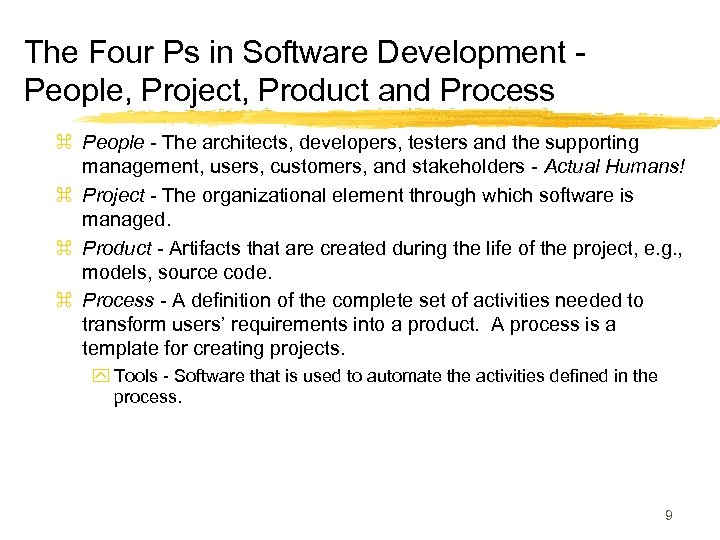 The Four Ps in Software Development People, Project, Product and Process z People - The architects, developers, testers and the supporting management, users, customers, and stakeholders - Actual Humans! z Project - The organizational element through which software is managed. z Product - Artifacts that are created during the life of the project, e. g. , models, source code. z Process - A definition of the complete set of activities needed to transform users’ requirements into a product. A process is a template for creating projects. y Tools - Software that is used to automate the activities defined in the process. 9
 Resources and Workers z People are resources z Worker is a position that a person is assigned and they accept y Worker types is a role that an individual may play in software development, e. g. use case specifier y Workers are responsible for a set of activities y A worker may be realized by a set of individuals working together y A resource may be many workers during the development of the software 10
 Software Systems and Artifacts z A software system is composed of all the artifacts that it takes to represent it to the machines, workers and stakeholders z An artifact is a general term for any kind of information created, produced, changed or used by workers in developing the system y Artifacts include UML diagrams and their associated text, user-interface sketches and prototypes y Management artifacts include business case for the system, allocation of resources to workers and specification of development environment 11
 Process and Projects z Process is a definition of a set of activities, not their execution y A process instance is a project z A process is composed of workflows where a workflow is a set of activities z To create a work flow y Identify the workers y Identify the artifacts y Identify the relationships between workers and artifacts z Activity diagrams and swim-lanes (p. 25) show work flows from worker to worker 12
 Process Merits z The process can be modified to accommodate organizational factors, domain factors, life cycle factors and technical factors z Everyone on the development team understands their responsibilities z Developers can better understand what other developers are doing z Supervisors and managers who may be code illiterate can understand what the developers are doing z Developers, supervisors and managers can transfer between projects and divisions without having to learn a new process z Training can be standardized within a company and obtained from colleges and short courses. z The course of software development is repeatable. 13
 Tools Are Essential for Development z Requirements Management - Store, browse, review, track and navigate the requirements for a software project. z Visual Modeling - Used to automate the use of UML (or other modeling languages!) and assemble an application visually. Integrate with programming environments and ensure that the model and implementation are consistent. z Programming tools - Used to provide a range of tools to include editors, compilers, debuggers, error detectors and performance analyzers. z Quality Assurance - Used to test applications and components, i. e. , to execute test cases and regression test. 14
 A View Into Use Cases ( 1 of 4) (From UML Language User Guide)* z A Use Case describes as set of sequences, in which each sequence represents the interaction of the things outside the system (its actors) with the system itself (its key abstractions). These behaviors are in effect system level functions used to visualize, specify, construct and document the intended behavior of the system during requirements capture and analysis. A use case represents a functional requirement of the system as a whole. z *Booch, Jacobson, Rumbaugh, Addison-Wesley 1999 15
 A View Into Use Cases (2 of 4) z Use cases involve the interaction of actors and the system. Actors can be human or automated systems. z Use cases can have variants, particularly specialization, composition and behavioral extension. z Use cases can be applied to the system as a whole or subsystems. x. Applied to subsystems they are useful for regression testing x. Applied to system as a whole they are useful for integration and system testing 16
 A View Into Use Cases (3 of 4) z Each use case must have a unique name y Typically represented as an oval with the name inside z An actor represents a coherent set of roles that users play when interacting with the user y Connected to use cases only by association y Can be specialized y Typically represented as a labeled stick figure z Behavior of a use case is described by a flow of events in textual format y Include how and when use case starts and ends y When use case interacts with actors y What objects are exchanged y Exceptions 17
 A View Into Use Cases (4 of 4) z Scenarios are to Use Cases as instances are to classes y Represents one possible flow through all of the variations described by the use case z To model the behavior of an element (i. e. , system or subsystem) y Identify the actors that interact with the element. y Organize the actors by identifying general and more specialized roles y For each actor, consider the primary ways in which the actor interacts with the element y Consider also the exceptional ways in which each actor interacts with the element y Organize these behaviors as use cases, applying include and extend relationships to factor common behavior and extend exceptional behavior. 18
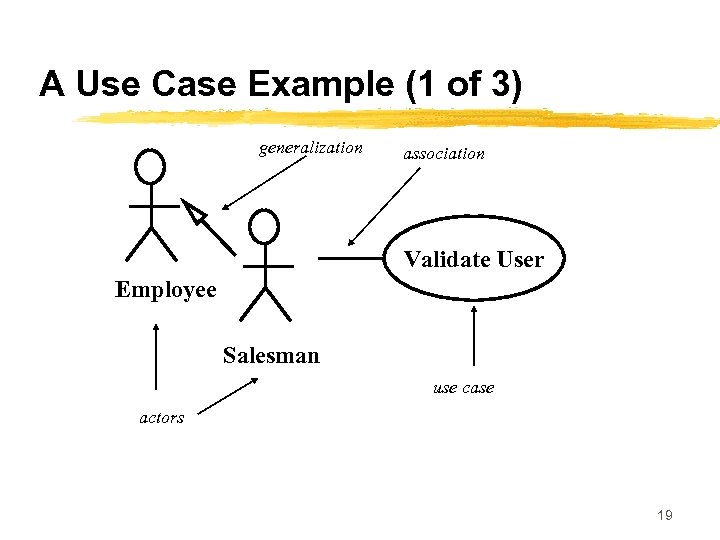 A Use Case Example (1 of 3) generalization association Validate User Employee Salesman use case actors 19
 A Use Case Example (2 of 3) (Adapted from UML Language User Guide)* z Flow of Events y Main flow of events: The use case starts when the system prompts the salesman for a password. The salesman can now enter a password via the keypad. The salesman commits the entry by pressing the Enter button. The system then checks the password to see if it is valid. If the password is valid, the system acknowledges the entry, thus ending the use case. y Exceptional flow of events: The salesman cancel a transaction at any time by pressing the cancel button, thus restarting the use case. No changes are made to the salesman’s account. y Exception flow of events: The salesman clear a password anytime before committing it and reenter a new password. *Booch, Jacobson, Rumbaugh, Addison-Wesley 1999 20
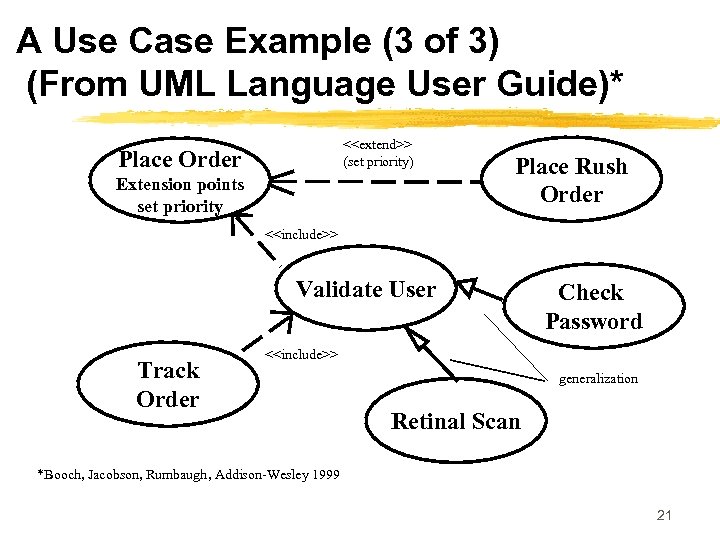 A Use Case Example (3 of 3) (From UML Language User Guide)* <
 Why Use Cases? z Use cases provide a systematic and intuitive means of capturing functional requirements z Use cases drive the development process since most activities such as analysis, design and test are performed starting from use cases. z Ties functionality to users (actors) y Focuses the analysis and reduces specification of superfluous functionality z Use cases are simple to read y Facilitates reaching an agreement with customers and users 22
 The Need for Software Architectures z Software architectures are needed to: y Understand often large technologically complex systems which combine distributed computing, COTS and reusable components which result in complex behavior y Organize development to result in reduced communications between geographically distributed entities y Foster use of reusable components y Design the system for evolution 23
 Software Architectures z Software architectures encompass the significant decisions about: y The organization of a software system y The structural elements and their interfaces that will comprise the system, together with their behavior as specified in the collaborations among those elements y The composition of the structural and behavioral elements into progressively larger subsystems y The architectural style that guides the organization: the elements and their interfaces, their collaborations and their composition 24
 Architectural Concepts z Architectures are specified in an architectural description z An architecture is developed iteratively during the elaboration phase through requirements, analysis, design, implementation and test z The architecture description is a view into the models of the system 25
 The Architecture Description z The architecture is represented by views into the various models y. Contains five sections, one for the use case model, the analysis model (often not maintained), the design model, the deployment model and the implementation model y. No view into the test model as it has no role in describing the architecture and used to verify the architecture baseline only 26
 Architectural Views z The architectural view of the use-case model presents the most important actors and use-cases z The architectural view of the design model presents the most important subsystems, interfaces and a few very important classes z The architectural view of the deployment model defines the architecture in terms of connected nodes, hardware units that the software components can execute on z The architectural view of the implementation model is a straightforward mapping from the design and deployment model each design service subsystem results in one component that is installed on a node 27
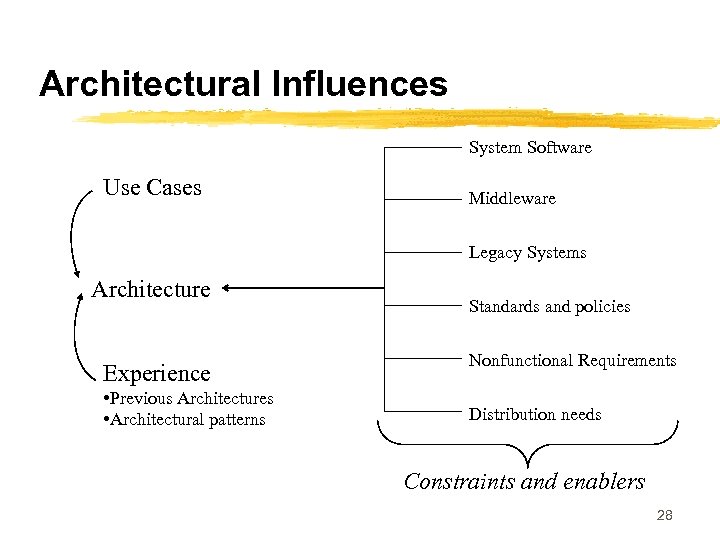 Architectural Influences System Software Use Cases Middleware Legacy Systems Architecture Experience • Previous Architectures • Architectural patterns Standards and policies Nonfunctional Requirements Distribution needs Constraints and enablers 28
 What Is Not Architecture z Most classes, with operations, interfaces and attributes that are private to subsystems z Subsystems that are variants of other subsystems z Most Use Case realizations z Information needed to validate or verify the architecture 29
 Architectural Patterns z A pattern is a solution to a commonly occurring design problem y. A general collaboration that can be specialized as defined by a template z Architectural patterns focus on larger grained structure and interactions of subsystems and systems (e. g. , broker, client server, peer-to-peer) z Layered architecture has individual subsystems at various layers (a set of subsystems that share the same degree of generality and volatility) 30
 SYST 512 Unit 3: The Unified Software Development Process Part 2 of 3 Requirements Capture and Workflow 31
 Requirements Capture Defined z Requirements capture can be defined as the process of finding out what needs to be built y Achieved by describing the system requirements well enough so that an agreement can be reached between the customer and the system developers z Aka Jacobson et. al. “it is absurd to believe that the human mind can come up with a consistent and relevant list of thousands of requirements of the form “The system shall…”” z The users often do not understand what the system ought to do until the system is completed y Jacobson suggests that believing that users know what the requirements are can be incorrect 32
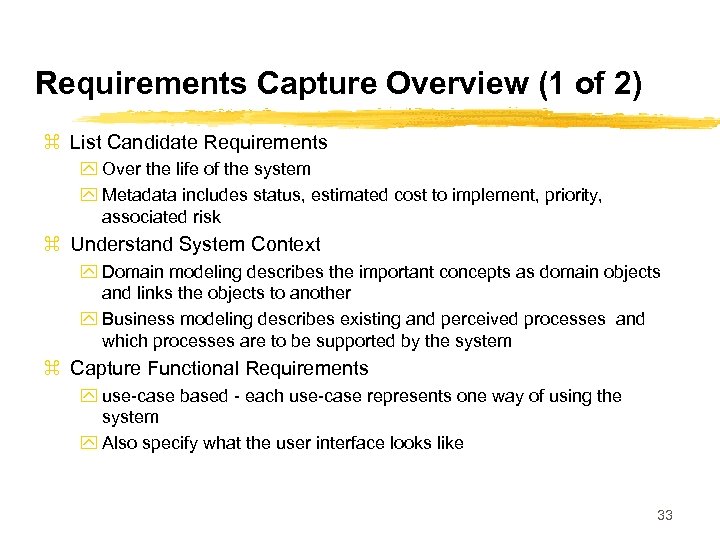 Requirements Capture Overview (1 of 2) z List Candidate Requirements y Over the life of the system y Metadata includes status, estimated cost to implement, priority, associated risk z Understand System Context y Domain modeling describes the important concepts as domain objects and links the objects to another y Business modeling describes existing and perceived processes and which processes are to be supported by the system z Capture Functional Requirements y use-case based - each use-case represents one way of using the system y Also specify what the user interface looks like 33
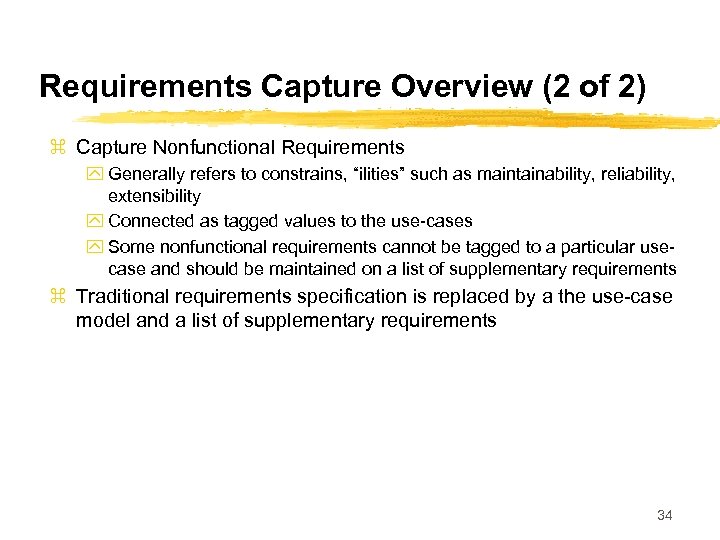 Requirements Capture Overview (2 of 2) z Capture Nonfunctional Requirements y Generally refers to constrains, “ilities” such as maintainability, reliability, extensibility y Connected as tagged values to the use-cases y Some nonfunctional requirements cannot be tagged to a particular usecase and should be maintained on a list of supplementary requirements z Traditional requirements specification is replaced by a the use-case model and a list of supplementary requirements 34
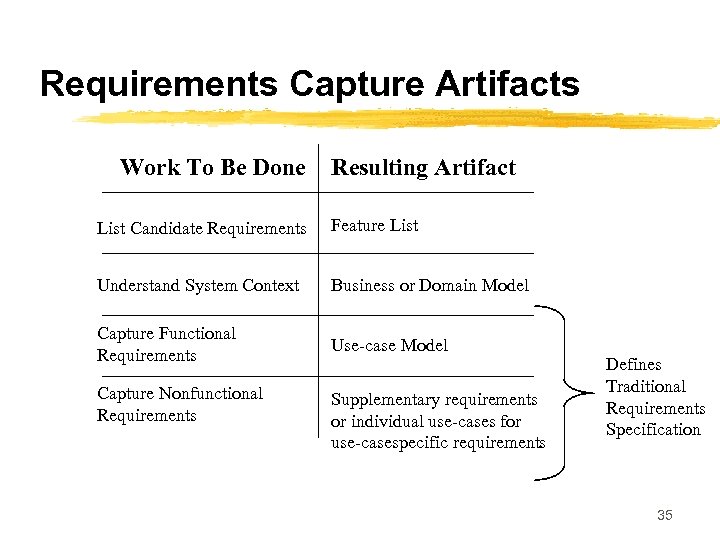 Requirements Capture Artifacts Work To Be Done Resulting Artifact List Candidate Requirements Feature List Understand System Context Business or Domain Model Capture Functional Requirements Use-case Model Capture Nonfunctional Requirements Supplementary requirements or individual use-cases for use-casespecific requirements Defines Traditional Requirements Specification 35
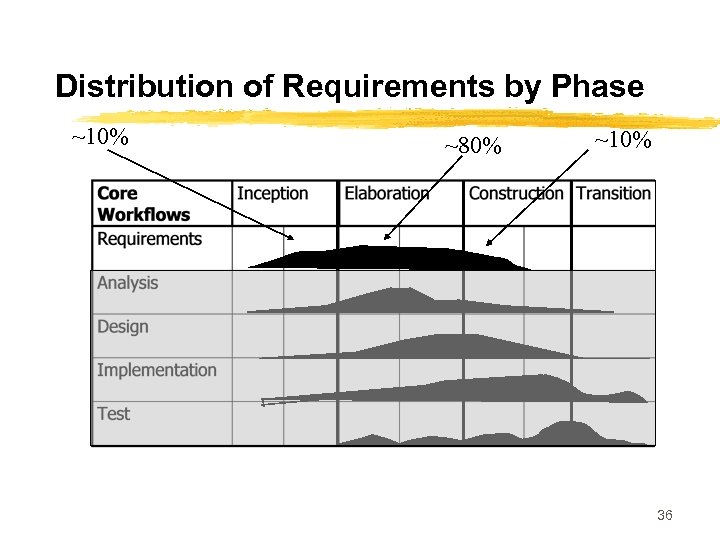 Distribution of Requirements by Phase ~10% ~80% ~10% 36
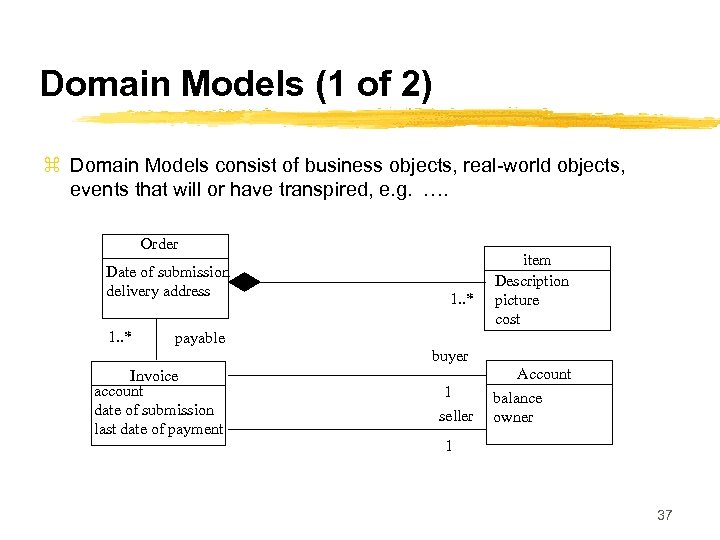 Domain Models (1 of 2) z Domain Models consist of business objects, real-world objects, events that will or have transpired, e. g. …. Order Date of submission delivery address 1. . * item Description picture cost payable buyer Invoice account date of submission last date of payment 1 seller Account balance owner 1 37
 Domain Models (2 of 2) z Modest domains usually require between 10 and 50 classes z The purpose is not to model system internals but to contribute to an understanding of the system’s requirements as the originate from context 38
 Business Models (1 of 4) z Goal is to understand the system by understanding the business processes y Can model the system encompassing the software system that is being developed z Describes the business processes of a company in terms of business usecases and business actors z Described in terms of use-case diagrams z Business-object is an interior model of the business z Business-entity represents something which workers access, inpsect, manipulate, produce or use in a business case z A work unit is a set of buiness entities that forms a recognizable whole to the end use 39
 Business Models (2 of 4) z Business models are developed by first preparing a business usecase model that identifies the actors to the business and the business use-cases that the actors use. z Secondly, a business object model is developed which consists of workers, business entities and work units that realize the business use-cases. z Business models differ from domain models in three primary ways y Domain classed are pulled out of the knowledge base of a few domain experts while business entities are derived by starting from the customers of the business, identifying the business use-cases and the finding the entities 40
 Business Models (3 of 4) z Business models differ from domain models in three primary ways (cont. ) y Domain classes have attributes but few if any operations. Business modeling identifies the workers that will participate by using the entities and through the operations that the entities will provide y Workers found in business modeling are used as a starting point to derive a first set of actors and use-cases for the information system to be built. z To derive use-cases from business models y Identify the system actors for every worker and business actor (customer) 41
 Business Models (4 of 4) z To derive use-cases from business models (cont. ) y Identify all the business use-case realizations in which each worker participates y Find use-cases for the system actors of the information system y Identify a tentative set of use-cases by creating a use-case for each corresponding actor for each role of each worker and business actor 42
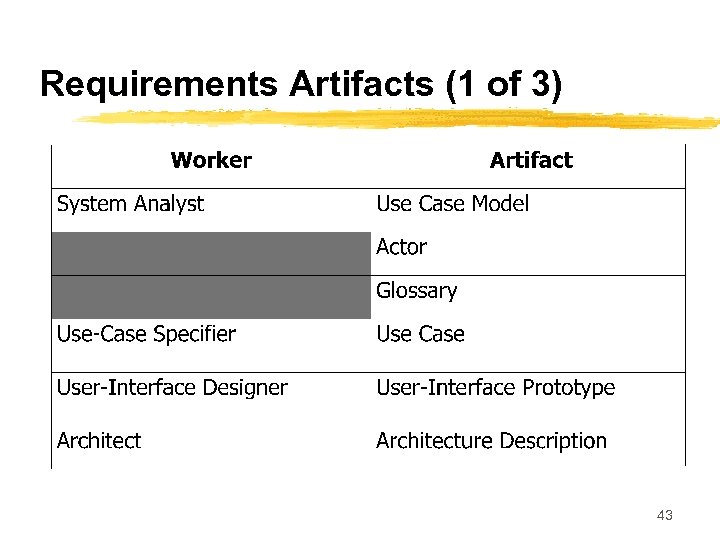 Requirements Artifacts (1 of 3) 43
 Requirements Artifacts (2 of 3) z Use-case model provides the functional model of the system containing actors, use-cases and their relationships y Actors are all parties (human and automated) that collaborate with the system plays one role for each use-case that it collaborates with y Use-cases specify a sequence of actions, including alternatives to the sequence, that the system can perform y Use-cases have operations and attributes - thus a use-case description can include state chart diagrams, collaborations and sequence diagrams y Use-case attributes represent the values that a use-case instance uses and manipulates y Use-case instances do not interact with other use-case instances - reason is that use-case models should be simple and intuitive y The flow of events and special requirements are captured in special textual descriptions 44
 Requirements Artifacts (3 of 3) z Architecture description contains a view of the use-case model depicting the architecturally significant use cases z Glossary defines important and common terms used by analysts when they describe the system - tends to be focused on the system to be built as opposed to the context z The user-interface prototype helps understand specify the interactions between the human actors and the system 45
 Four Workers Involved In Use. Case Modeling z System Analyst is responsible for all requirements modeled as use-cases, use-case specific non-functional requirements, finding the actors and ensuring consistency as well as structuring the use-case model y Not responsible for individual use-cases y One system analyst for each system z Use-Case Specifiers take the responsibility for the detailed descriptions of one or more of the use-cases, working closely with intended users of the system z User-Interface Designers create user interfaces specified by use-cases z Architects prioritize the use-cases to describe architectural view of the usecase model 46
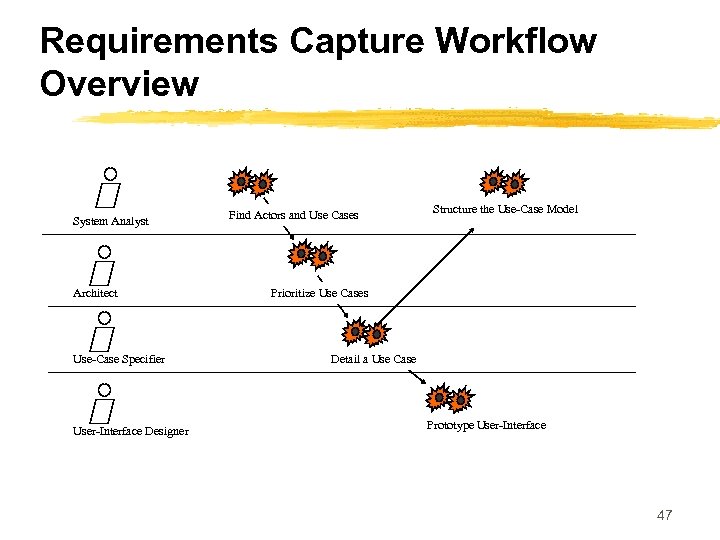 Requirements Capture Workflow Overview System Analyst Architect Use-Case Specifier User-Interface Designer Find Actors and Use Cases Structure the Use-Case Model Prioritize Use Cases Detail a Use Case Prototype User-Interface 47
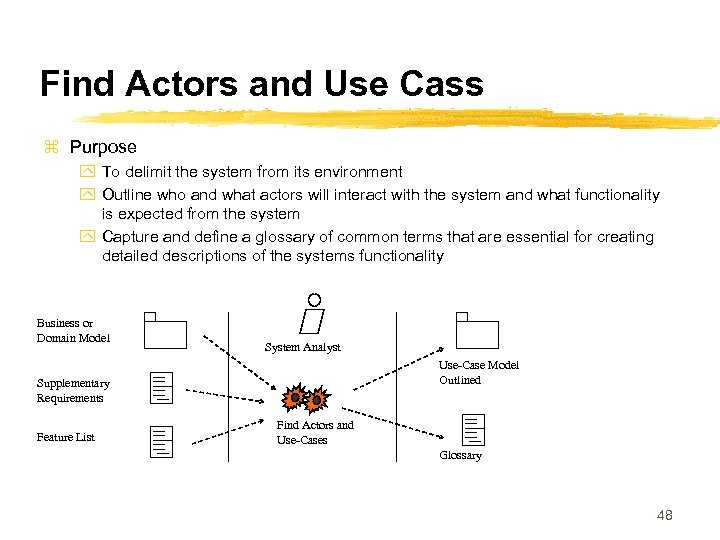 Find Actors and Use Cass z Purpose y To delimit the system from its environment y Outline who and what actors will interact with the system and what functionality is expected from the system y Capture and define a glossary of common terms that are essential for creating detailed descriptions of the systems functionality Business or Domain Model System Analyst Use-Case Model Outlined Supplementary Requirements Feature List Find Actors and Use-Cases Glossary 48
 More On Finding Actors and Use. Cases (1 of 2) z If a business model exists, a one to one mapping between actors and workers and business actors z It should be possible to find at least one user per candidate actor z There should be a minimum of overlap between the roles that instances of the different actors play in relation to the system z As a starting point, a use-case is suggested for every role of each worker or each actor in supporting the work to create, change, track, remove or study business objects y Some initial use-cases may become parts of other use-cases z Each successfully performed use case should provide some value to the actor such that the actor achieves some goal. As discussed, use-cases should be tied to a particular actor. z Segments of the use-case model can be organized into use-case packages 49
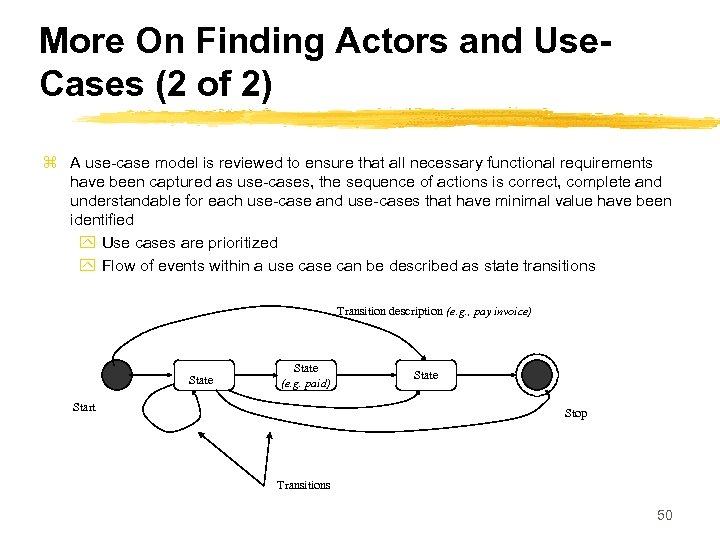 More On Finding Actors and Use. Cases (2 of 2) z A use-case model is reviewed to ensure that all necessary functional requirements have been captured as use-cases, the sequence of actions is correct, complete and understandable for each use-case and use-cases that have minimal value have been identified y Use cases are prioritized y Flow of events within a use can be described as state transitions Transition description (e. g. , pay invoice) State (e. g. paid) Start State Stop Transitions 50
 What to Include in Use-Cases z z z z Define the start state How and when the use-case starts Required order of actions performed How and when the use-case ends Possible end states of the use-case Paths of execution that are allowed and not allowed Alternative path descriptions that have been extracted System interactions with the actors and what they exchange Usage of objects, values and resources in the system Use-case instances that access other use-case instances attributes are forbidden Non-functional requirements are tagged Protocols for interactions with other systems A use-case description is finished when it is deemd understandable, correct, complete and consistent with other descriptions 51
 Creating Logical User-Interface Design z For each actor, user interface issues can be driven by the following: y Determine which user interface elements are needed to enable the use-cases and their relationships y How should they look and be manipulated and how do they differ from each other y Which of the domain classes, business entities or work units are suitable as user -interface elements for the use-case? y What user-interface elements doe the actor work with? y What actions can the actor invoke and what decision can he make? y What guidance and info does the actor need before invoking the actions in the use case y What info does the actor need to supply to the system? y What info does the actor need to supply to the system y What are the average values for all input/output parameters? y Consider essential use-case modeling a la Constantine. 52
 Structuring the Use Case Model z Extract general and shared use-case descriptions of functionality that can be used by more specific use-case descriptions y Generalization between use-cases is a kind of inheritance - use-cases can perform all behavior described in the generalizing use-case y Complete use-cases are concrete y Abstract use-cases can be instantiated and reused z Extract additional or optional use-case descriptions of functionality that can extend more specific use-case descriptions z An extend relationship models additions to a use case’s sequence of actions z Extend relationships model the condition(s) for extension and the extension point, I. e. , the position in the use-case where the extension can be made z Can view the include relationships as a reversed extend relationship that provides explicit and unconditioned extensions to a use-case 53
 Requirements Workflow Summary z Requirements capture can be viewed as: y A business model or a domain model to set the context of the system y A use-case model that captures the functional and nonfunctional requirements that are specific to individual use-cases y A set of user interface sketches and prototypes for each actor representing the design of the user interfaces y A supplementary requirements specification for the requirements that are generic and not specific for a particular use-case 54