


 Скачать презентацию Supporting Technologies III Security 11 16 Lecture Notes
f8d67f837f0b4b47d2b1270ebcb17dc1.ppt
- Количество слайдов: 24
 Supporting Technologies III: Security 11/16 Lecture Notes
 Outline • Internet Security – encryption, digital signatures, digital certificates – SSL, SET – Firewalls – Virtual Private Networks • Electronic Payment Systems – protocols – electronic card systems (credit cards, elec. Wallet) – ecash, echeck
 Internet Security • Major barrier to e-commerce • Requirements for secure e-commerce: – Authenticity: Is the sender of the message who they claim to be? – Privacy: Are the contents of a message secret? – Integrity: Have the contents of a message been modified during transmission? – Nonrepudiation: Can the sender of a message deny that they actually sent the message?
 Cryptography • 4 parts: – Plaintext - original message (readable form). – Ciphertext - encrypted plaintext message (unreadable form). – Encryption Algorithm - mathematical formula used to compute a ciphertext from a plaintext (and decrypt a ciphertext to recover the plaintext). – Key - secret key used to encrypt and decrypt a message.
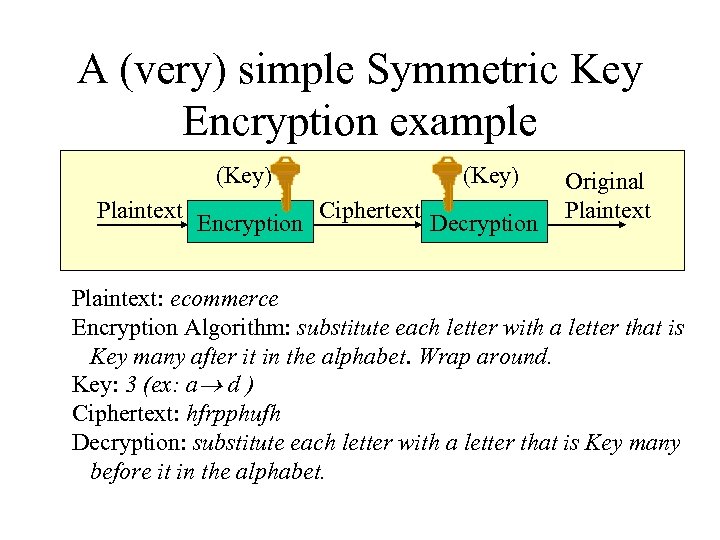 A (very) simple Symmetric Key Encryption example (Key) Plaintext Encryption (Key) Ciphertext Decryption Original Plaintext: ecommerce Encryption Algorithm: substitute each letter with a letter that is Key many after it in the alphabet. Wrap around. Key: 3 (ex: a d ) Ciphertext: hfrpphufh Decryption: substitute each letter with a letter that is Key many before it in the alphabet.
 • For encryption, a mathematical formula which involves the key is used. (usually) • Usually the algorithm is known. • The security of the system is dependent on the key. • Generally, the longer the key, the harder to break the message by trying all the possibilities: “Brute Force Attack” • ex: binary key of 4 bits long 24 =16 possibilities • ex: 56 bits long 256 72 quadrillion possibilities : will take some time to crack it • Life of the key is an important criterion to determine length of a key (credit card number vs. credit history of an individual).
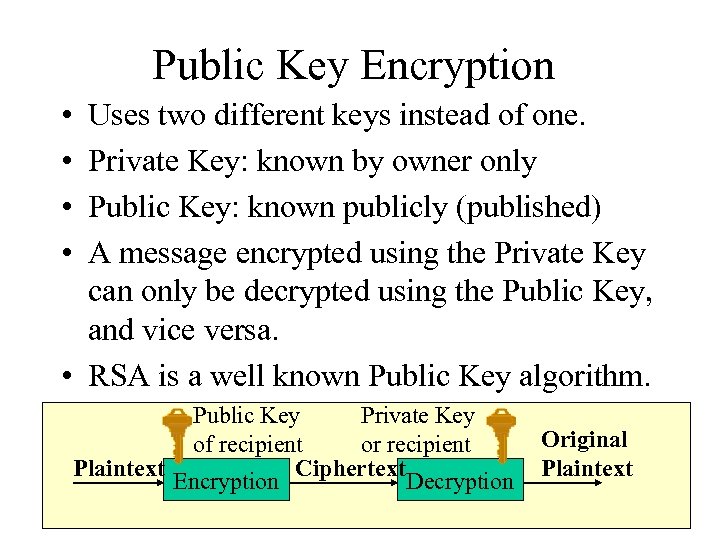 Public Key Encryption • • Uses two different keys instead of one. Private Key: known by owner only Public Key: known publicly (published) A message encrypted using the Private Key can only be decrypted using the Public Key, and vice versa. • RSA is a well known Public Key algorithm. Public Key Private Key of recipient or recipient Plaintext Ciphertext Encryption Decryption Original Plaintext
 Digital Signatures • Used for ensuring that a message is actually coming from the person you think sent it. • Based on public key encryption. • Sender creates a phrase and encrypts it with his/her private key. • The phrase is attached to the message and the combined message is encrypted with the recipient’s public key. • Recipient decrypts the message using its private key, then decrypts the signature with the sender’s public key.
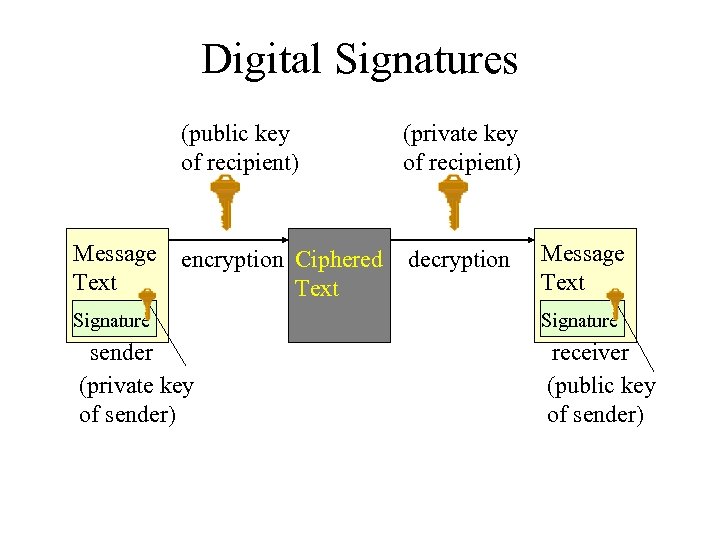 Digital Signatures (public key of recipient) Message Text (private key of recipient) encryption Ciphered Text decryption Message Text Signature sender (private key of sender) receiver (public key of sender)
 Digital Certificates • Used to assure authenticity of the sender. • Issued by third parties: certificate authorities (CA). • Individuals and companies apply by sending CA their public key and identifying info. • CA verifies this info and creates a certificate containing public key and identifying info and encrypts this using its private key. • When someone wants to send the applicant a message, they request the certificate, decrypt it and obtain the public key. • Certificates to authenticate web sites, software companies, etc. CA companies include Veri. Sign.
 Secure Socket Layer (SSL) • Protocol to handle encryption between web browsers and web servers (transparently). • Operates at TCP/IP layer. Client contacts the server. ex: https: //www. wellsfargo. com They agree on a protocol suite (the algorithm). All communications are encrypted.
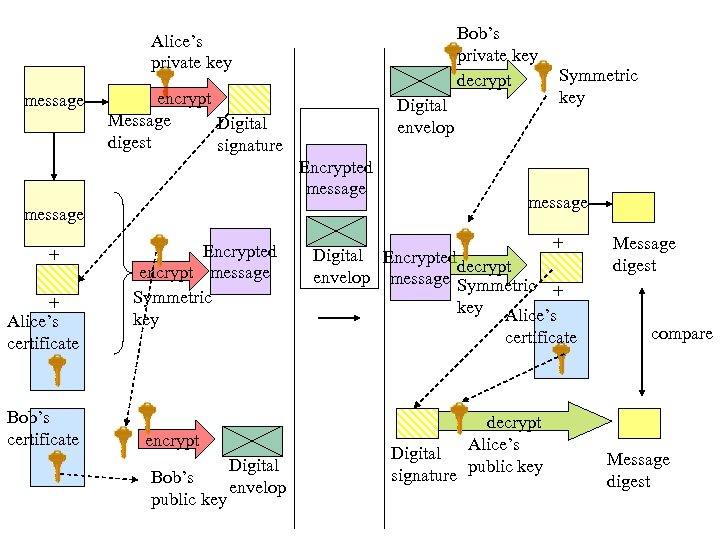 Bob’s private key decrypt Alice’s private key message encrypt Message Digital digest signature Digital envelop Encrypted message + + Alice’s certificate Bob’s certificate Encrypted encrypt message Symmetric key encrypt Bob’s public key Digital envelop Symmetric key message + Digital Encrypted decrypt envelop message Symmetric + key Alice’s certificate decrypt Digital Alice’s signature public key Message digest compare Message digest
 SSL Protocol 1. At Alice’s site, the message to be sent is hashed to a previous fixed length for message digest. 2. The message digest is encrypted with Alice’s private key and the output is a digital signature. 3. The digital signature and Alice’s certificate are attached to the original message. Alice generates a secret key using the symmetric (DES) algorithm and uses that key to encrypt this bundle. 4. Alice encrypts the symmetric key with Bob’s public key which resides in Bob’s certificate (received in advance). The result is a digital envelop. 5. The encrypted message and the digital envelop are transmitted to Bob’s computer over the Internet.
 SSL Protocol (cont’d) 6. The digital envelop is decrypted with Bob’s private key. 7. Using the restored secret key, Bob decrypts the message, obtaining the original message, digital signature, and Alice’s certificate. 8. To confirm the integrity, Bob decrypts the digital signature by Alice’s public key (that resides in Alice’s certificate), obtaining the message digest. 9. Bob hashes the delivered message to generate a message digest. 10. The message digest obtained by steps 8 and 9 are compared to confirm that they are correctly received. This step confirms the integrity.
 Payment on the Internet • • • Electronic Credit Cards Electronic Fund Transfer and Debit Cards Stored-Value Cards and E-Cash Electronic Check Systems Unified Systems
 Electronic Credit Cards • Players: Cardholder: consumer who uses credit cards. Merchant: offers goods/services, accepts credit cards. Card Issuer: financial institution (bank) that establishes accounts for cardholders and issues credit cards. Acquirer: financial institution (bank) that establishes accounts for merchants and acquires the vouchers of authorized sales slips. Card Brand: bank card associations (Visa, Master. Card) that provide networks to connect the involved financial institutions.
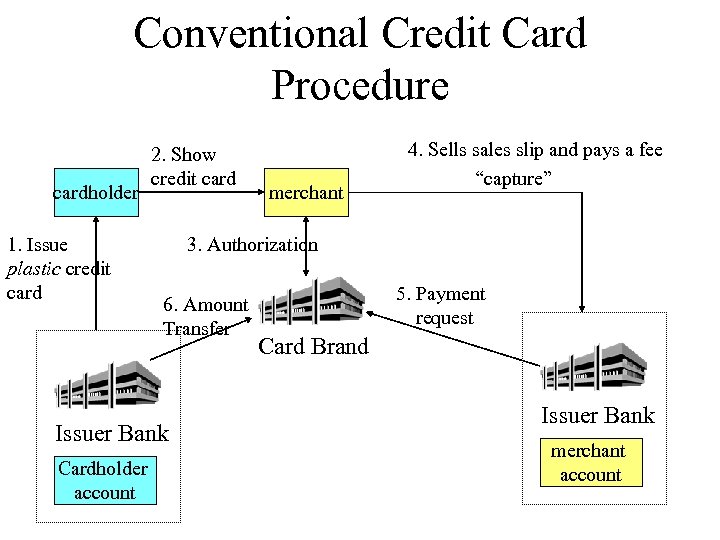 Conventional Credit Card Procedure cardholder 1. Issue plastic credit card 2. Show credit card 3. Authorization 6. Amount Transfer Issuer Bank Cardholder account merchant 4. Sells sales slip and pays a fee “capture” 5. Payment request Card Brand Issuer Bank merchant account
 Secure Electronic Transaction (SET) Protocol • Designed to fully automate the credit card procedure and carry it out on the Internet. • Four entities: Cardholder: keeps a certificate in electronic wallet Merchant : keeps a certificate in electronic wallet Certificate Authority (CA): issues certificates Payment Gateway: connects networks of banks to the Internet (other entities are beyond the scope of SET)
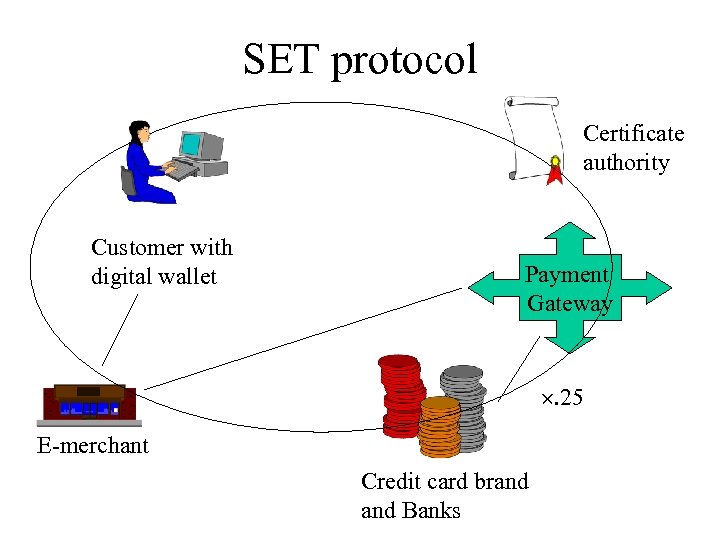 SET protocol Certificate authority Customer with digital wallet Payment Gateway . 25 E-merchant Credit card brand Banks
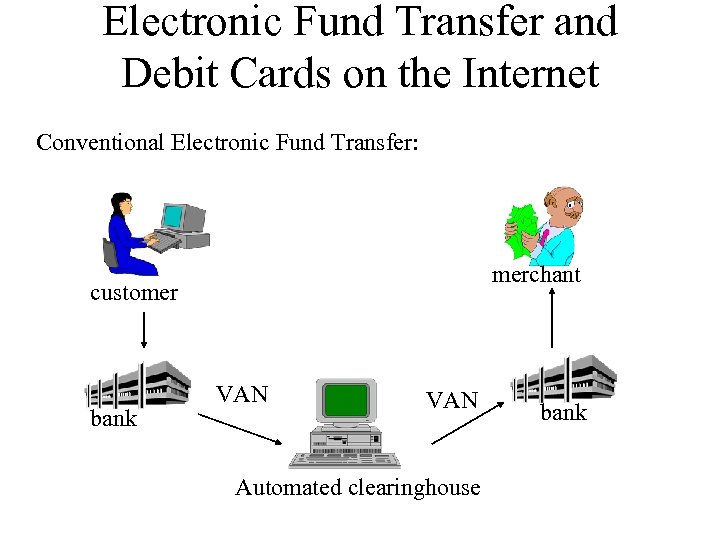 Electronic Fund Transfer and Debit Cards on the Internet Conventional Electronic Fund Transfer: merchant customer bank VAN Automated clearinghouse bank
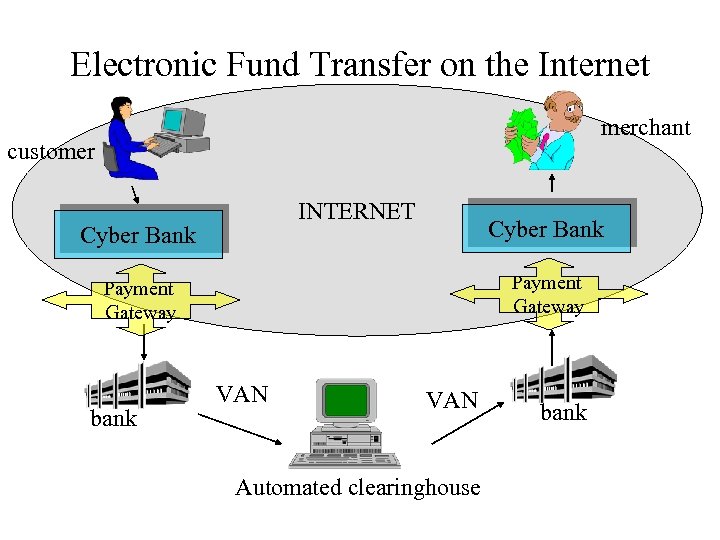 Electronic Fund Transfer on the Internet merchant customer INTERNET Cyber Bank Payment Gateway bank VAN Automated clearinghouse bank
 Stored Value Cards and E-Cash • Avoids high fees for small payments (micropayments) • provides anonymity, convenience • eliminates multiple currency problem • smart card: introduced in 1970 s (non. Internet). Ex: phone, transportation, copies. • Now has IC chips. Can recharge card. Use through your PC. Ex: Mondex, Visa. Cash.
 Electronic Check Systems • Similar security mechanism as in SET, but different use of procedures. (similar to electronic fund transfer). • For B 2 B transactions: – High security required – needs to be integrated to accounting system – a trusted third party must keep copy of records • ex: Safe. Check. • For more info www. echeck. org
 Unified Payment Systems • Online e-check merging with Electronic fund transfer and electronic credit cards. • Ex: Security First Network Bank (www. sfnb. com), Bank of America, Visa. Cash (stored-value money card), e. Pay (EFT), electronic bill payment, Master. Card.