


 Скачать презентацию Sunflower Project Change Agent Network Meeting 13 June
3a331c4f3670d321eb430879abdc0c59.ppt
- Количество слайдов: 128
 Sunflower Project Change Agent Network Meeting #13 June 7, 2010 1
 Message Implementation Manager Paul Lavery Sunflower Project Implementation Manager; Accenture 2
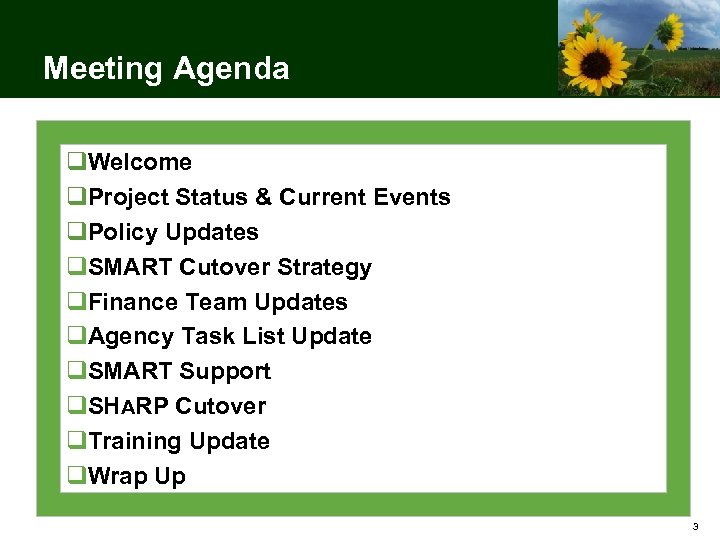 Meeting Agenda q. Welcome q. Project Status & Current Events q. Policy Updates q. SMART Cutover Strategy q. Finance Team Updates q. Agency Task List Update q. SMART Support q. SHARP Cutover q. Training Update q. Wrap Up 3
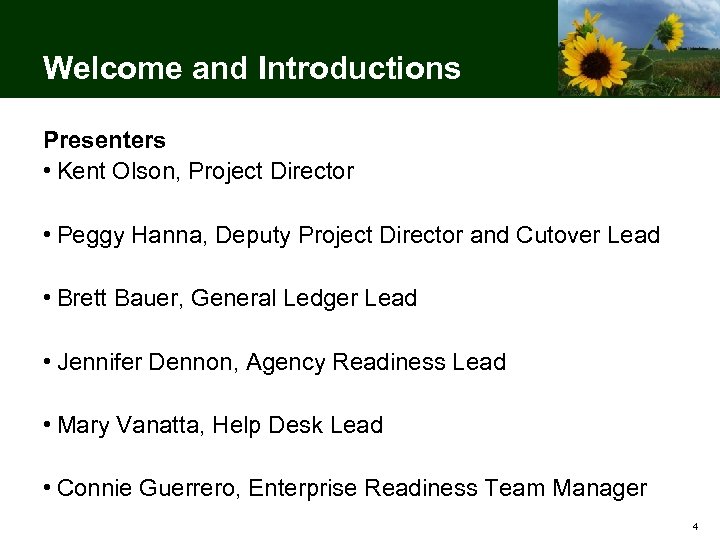 Welcome and Introductions Presenters • Kent Olson, Project Director • Peggy Hanna, Deputy Project Director and Cutover Lead • Brett Bauer, General Ledger Lead • Jennifer Dennon, Agency Readiness Lead • Mary Vanatta, Help Desk Lead • Connie Guerrero, Enterprise Readiness Team Manager 4
 Housekeeping • Bathrooms • Please set cell phones and pagers to silent • 10 minute break is planned • Note cards for questions 5
 Project Status & Current Events 6
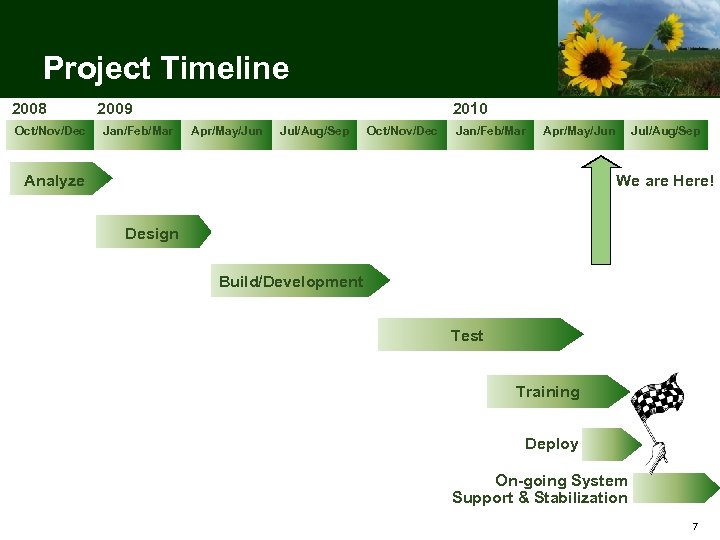 Project Timeline 2008 Oct/Nov/Dec 2009 Jan/Feb/Mar 2010 Apr/May/Jun Jul/Aug/Sep Oct/Nov/Dec Jan/Feb/Mar Apr/May/Jun Jul/Aug/Sep We are Here! Analyze Design Build/Development Test Training Deploy On-going System Support & Stabilization 7
 Sunflower Project Current Events • SMART goes live in 17 work days, or 3 weeks! • Statewide completion of Agency Go-Live Readiness items is 32% • All WBT courses are deployed • ILT is approximately 56% complete • ORT completed successfully on 5/28 • Security is being loaded for cutover • Final conversions are in progress • First Production interface (INF 01) begins tonight 8
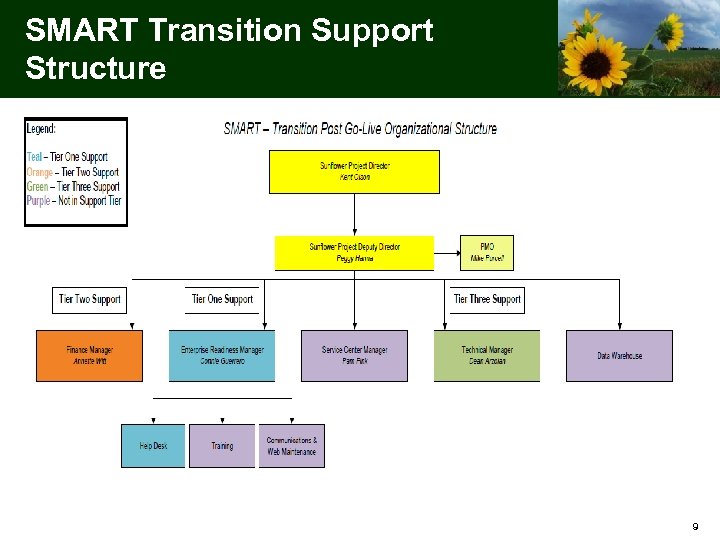 SMART Transition Support Structure 9
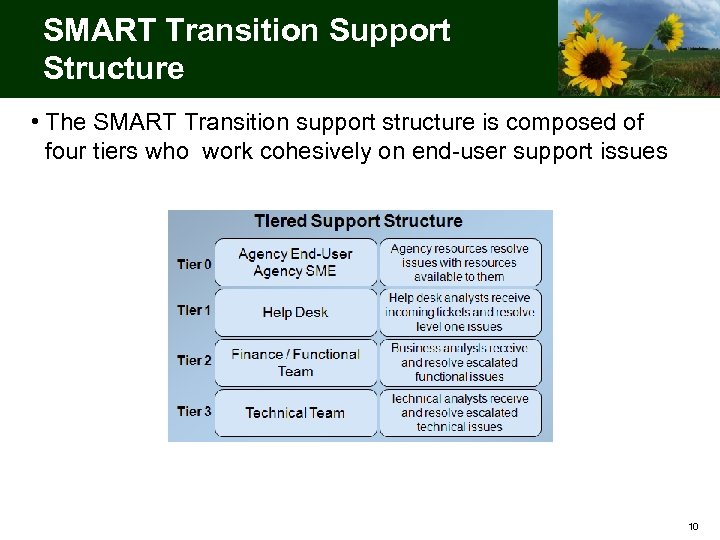 SMART Transition Support Structure • The SMART Transition support structure is composed of four tiers who work cohesively on end-user support issues 10
 Transition Structure Functions Performed Help Desk (Tier 1) • Provide end-user support – Document each incident fully; detailed and informative • Reset SMART passwords – via the phone • Maintain security access to Service. Desk • Resolve high-level functional requests (navigation, functionality, etc. ) • Escalate requests as needed to Tier 2 and Tier 3 • Create and maintain knowledge base • Provide announcements and updates 11
 Transition Structure Functions Performed Finance Team (Tier 2) • Provide end user application support – detailed level functional support • Work with end-users to analyze and resolve requests escalated to Tier 1 and document in Service. Desk software • Maintain system configuration • Escalate requests as needed to Tier 3 • Assist in maintenance of knowledge base articles 12
 Transition Structure Functions Performed Technical Team (Tier 3) • Provide end user application support – detailed level technical support • Analyze and resolve technical requests • Support the data warehouse • Support interfaces and integration • Administer application and operating system security • Administer and maintain the batch process 13
 Transition Structure Functions Performed SMART Service Center • Perform shared service functions for member agencies (accounts payable, accounts receivable, general ledger, etc. ) • Perform centralized workflow approval functions • Initiate requests as needed to Tier 1, Tier 2, or Tier 3 14
 Transition Structure Functions Performed Enterprise Readiness • Manage communications • Manage the SMART Website • Deliver end-user training • Administer and track course attendance and evaluations • Maintain data in training environment • Collaborate with Help Desk Tier 1 to link knowledge base articles with existing training materials 15
 Policy Updates 16
 Forms • Forms associated with SMART will be published in a new page on the Accounts & Reports website – Links from the SMART website will direct you to this new page • Forms are generally submitted electronically by attaching them to a new incident in Service. Desk (the SMART Help Desk software) 17
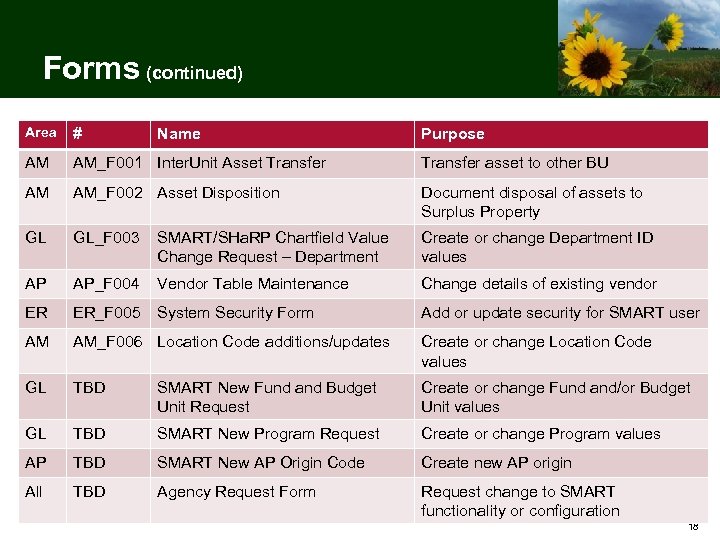 Forms (continued) Area # AM AM_F 001 Inter. Unit Asset Transfer asset to other BU AM AM_F 002 Asset Disposition Document disposal of assets to Surplus Property GL GL_F 003 SMART/SHa. RP Chartfield Value Change Request – Department Create or change Department ID values AP AP_F 004 Vendor Table Maintenance Change details of existing vendor ER ER_F 005 System Security Form Add or update security for SMART user AM AM_F 006 Location Code additions/updates Create or change Location Code values GL TBD SMART New Fund and Budget Unit Request Create or change Fund and/or Budget Unit values GL TBD SMART New Program Request Create or change Program values AP TBD SMART New AP Origin Code Create new AP origin All TBD Agency Request Form Request change to SMART functionality or configuration Name Purpose 18
 Policy & Procedure Updates • Implementation of 100% Direct Deposit for State of Kansas – Payroll (10 -P-026) – Effective October 1, 2010, all payroll and travel & expense reimbursements will be made via direct deposit – Info Circular 10 -A-017 provides details regarding defaults for expense payees in SMART • Management of State P-Card and Travel Card Programs (10 -A-015) – Effective June 14, 2010, management of P-Cards will be transferred from A&R to the Division of Purchases • Meal Expense Reimbursement (10 -A-016) – Meal Expense Reimbursement for overnight travel – Change from quarterly to a per meal allowance 19
 Service Center • 33 agencies participating in Service Center – 23 agencies – Full participation – 10 agencies – Participating in select modules • Service Center Kick-off was held May 4, 2010 – Additional meetings to discuss agency-specific details are in progress • Service Center will be located on the 11 th Floor of the Docking State Office Building through Mid September – Future home will be the former Customer Service location on the first floor of the Landon State Office Building 20
 Service Center (continued) • Each participating agency has a designated Service Center Accountant – Participating agencies have access to the entire team of Service Center Accountants as needed – Service Center Accountants coordinate with Division of Budget Analysts • Each request requires documentation in writing – Method of submitting documentation will be standardized for each agency’s finance operations – Copies will be held by the Service Center – By request, we arranging to return originals to agencies • Forms will be used on a limited basis to communicate information, such as control totals – Forms will be published later this month 21
 SMART Cutover Strategy 22
 Operational Readiness Test • Thank you to all the agencies who participated in ORT! – This activity was a valuable step in preparing for go-live – Your participation was critical to the success of ORT • We recognize that there were some bumps along our ORT path – Those bumps are to be expected – they are the reason we have ORT in the first place – We are applying lessons learned to the cutover plan and post go-live operations 23
 Operational Readiness Test – Lessons Learned • In order to obtain correct vendor numbers and Chart. Fields, interfacing agencies MUST: – Clear out vendor files and reload a new INF 01 • These vendors will have the final vendor number after the final conversion – Clear out Chart. Fields and reload a new INF 15 • These will be available on June 7 th and June 8 th 24
 Operational Readiness Test – Lessons Learned (continued) • On the INF 02, each voucher can have no more 5, 000 rows/lines – Vouchers should be split to meet this requirement, but will be rejoined for the payment 25
 Operational Readiness Test – Lessons Learned (continued) • Each agency is responsible to ensure its transactions process completely – Interfaces and Excel uploads generate error messages for certain types of issues – Even if no error message is generated, often some online processing is required – There are several potential fail points for different types of transactions • Job aids are in development to help users recognize and avoid common problems 26
 Operational Readiness Test – Lessons Learned (continued) • SMART only processes transactions containing valid Chart. Field values – Download INF 15 (Chart. Field extract) and review your agency’s valid values – Update source systems and agency documentation as needed 27
 Operational Readiness Test – Lessons Learned (continued) • ORT Lessons Learned Survey – Agencies who participated in ORT were asked to respond to survey questions related to lessons learned – We are compiling responses and will share additional lessons learned at the next CAN meeting 28
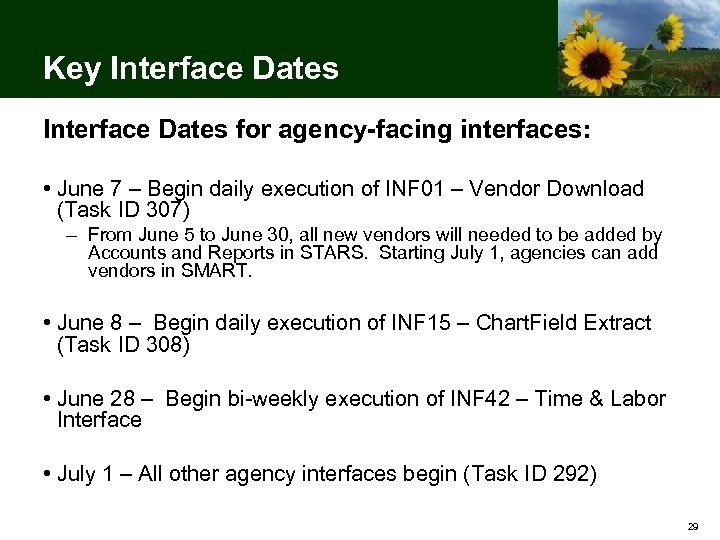 Key Interface Dates for agency-facing interfaces: • June 7 – Begin daily execution of INF 01 – Vendor Download (Task ID 307) – From June 5 to June 30, all new vendors will needed to be added by Accounts and Reports in STARS. Starting July 1, agencies can add vendors in SMART. • June 8 – Begin daily execution of INF 15 – Chart. Field Extract (Task ID 308) • June 28 – Begin bi-weekly execution of INF 42 – Time & Labor Interface • July 1 – All other agency interfaces begin (Task ID 292) 29
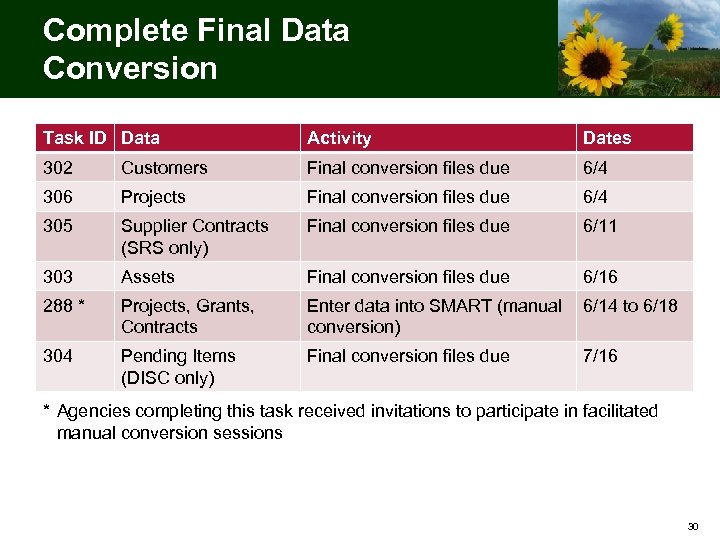 Complete Final Data Conversion Task ID Data Activity Dates 302 Customers Final conversion files due 6/4 306 Projects Final conversion files due 6/4 305 Supplier Contracts (SRS only) Final conversion files due 6/11 303 Assets Final conversion files due 6/16 288 * Projects, Grants, Contracts Enter data into SMART (manual 6/14 to 6/18 conversion) 304 Pending Items (DISC only) Final conversion files due 7/16 * Agencies completing this task received invitations to participate in facilitated manual conversion sessions 30
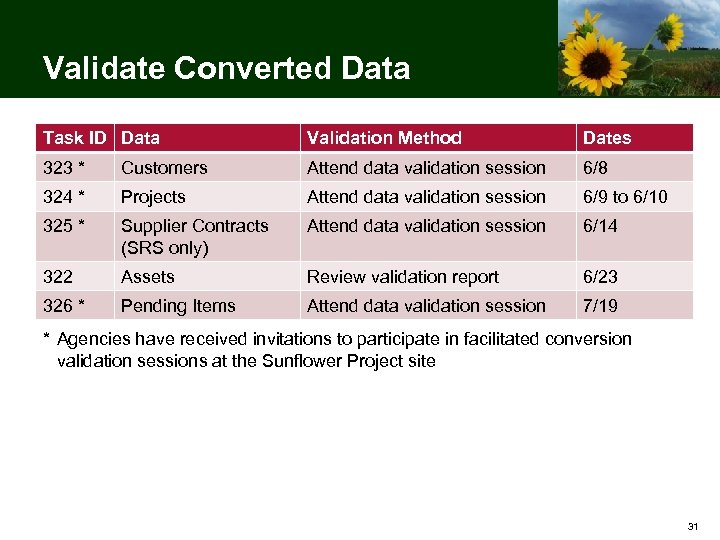 Validate Converted Data Task ID Data Validation Method Dates 323 * Customers Attend data validation session 6/8 324 * Projects Attend data validation session 6/9 to 6/10 325 * Supplier Contracts (SRS only) Attend data validation session 6/14 322 Assets Review validation report 6/23 326 * Pending Items Attend data validation session 7/19 * Agencies have received invitations to participate in facilitated conversion validation sessions at the Sunflower Project site 31
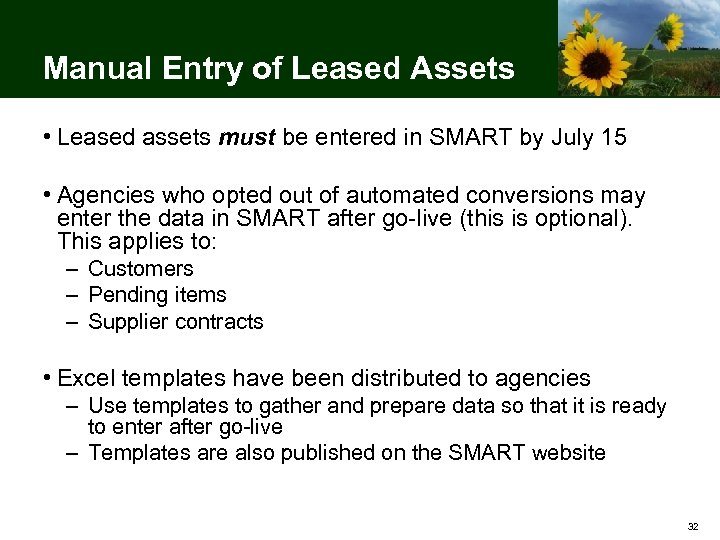 Manual Entry of Leased Assets • Leased assets must be entered in SMART by July 15 • Agencies who opted out of automated conversions may enter the data in SMART after go-live (this is optional). This applies to: – Customers – Pending items – Supplier contracts • Excel templates have been distributed to agencies – Use templates to gather and prepare data so that it is ready to enter after go-live – Templates are also published on the SMART website 32
 Conversion of Encumbrances and GL Balances Conversion of encumbrances and beginning GL balances will occur the weekend of July 17: • Friday, July 16 – SMART closes at 2: 00 PM to begin conversion programs – No access until Monday morning • Monday, July 19 – Converted encumbrances must be updated in SMART (affects 6 agencies) 33
 FY 2011 Encumbrances FAQ Q: I need to make payments to vendors during the first week of July. Has A&R established a process to enter FY 2011 encumbrances before July 1? A: No. FY 2011 encumbrances can be established starting July 1 using the SMART Purchasing module. Agencies should work with their vendors to set expectations regarding the timing of payments. More information on the batch processing schedule (including budget check and pay cycle) will be provided at CAN 14. 34
 Finance Team Updates 35
 General Ledger Topics • What is a Ledger? • Budget Rules • Commitment Control Ledgers • Budget Checking • Commitment Control Reporting 36
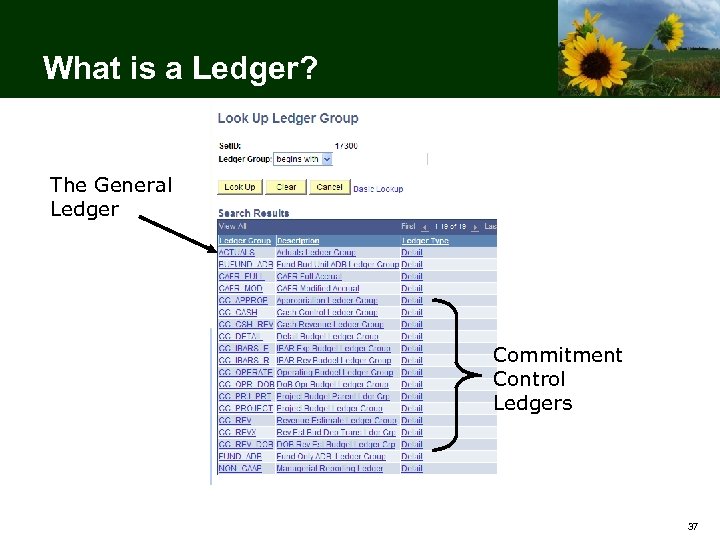 What is a Ledger? The General Ledger Commitment Control Ledgers 37
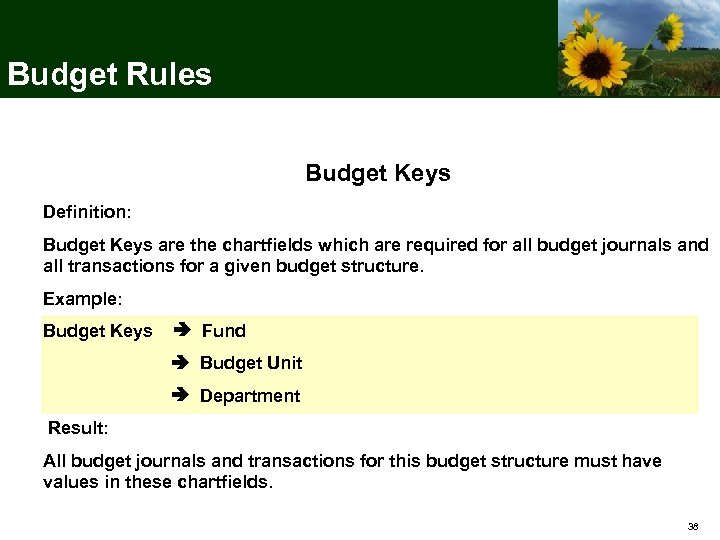 Budget Rules Budget Keys Definition: Budget Keys are the chartfields which are required for all budget journals and all transactions for a given budget structure. Example: Budget Keys Fund Budget Unit Department Result: All budget journals and transactions for this budget structure must have values in these chartfields. 38
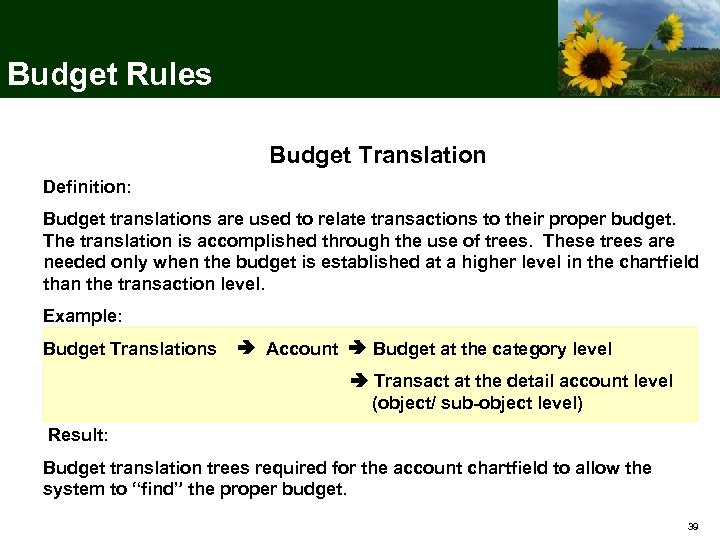 Budget Rules Budget Translation Definition: Budget translations are used to relate transactions to their proper budget. The translation is accomplished through the use of trees. These trees are needed only when the budget is established at a higher level in the chartfield than the transaction level. Example: Budget Translations Account Budget at the category level Transact at the detail account level (object/ sub-object level) Result: Budget translation trees required for the account chartfield to allow the system to “find” the proper budget. 39
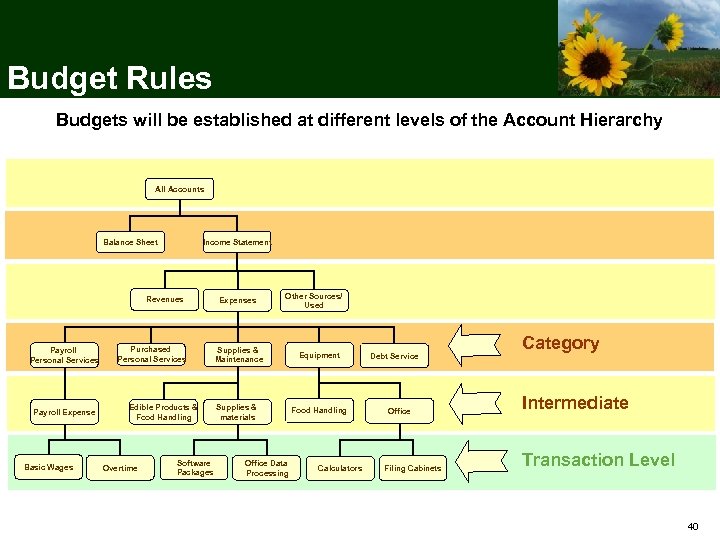 Budget Rules Budgets will be established at different levels of the Account Hierarchy All Accounts Income Statement Balance Sheet Revenues Payroll Personal Services Payroll Expense Basic Wages Purchased Personal Services Edible Products & Food Handling Overtime Software Packages Expenses Other Sources/ Used Supplies & Maintenance Supplies & materials Office Data Processing Equipment Food Handling Calculators Debt Service Office Filing Cabinets Category Intermediate Transaction Level 40
 Budget Rules Control Options Control: Transactions that exceed the budget will error out during the budget checking process. No further processing can be performed until the transaction error is corrected by an authorized agency user or the budget is overridden by an authorized user. Track: Transactions that exceed the budget will pass the budget checking process and be tracked without error messages. 41
 Budget Rules Track Options Track with Budget: Track transaction amounts against a budget but do not issue error messages for exceeding budget amounts. Verifies transactions based on valid chartfield combination and NOT on monetary amount. Example: A transaction with a corresponding budget row that has a valid chartfield combination and an amount greater than or equal to zero will pass budget check. That same transaction without a corresponding budget row will fail budget check. Track without Budget: Track transactions even if there is no budget set up. All transactions pass without error. Copyright © 2008 Accenture All Rights Reserved. 42
 Commitment Control Ledgers • Referred to as “KK” Ledgers • Used in budget checking • Stores an agency’s budget • “Saves” transaction details if budget check is successful 43
 General Ledger: • Known as the “Actuals” ledger • Records accounting entries from sub-modules • Official book of record for the State of Kansas • Modified Accrual Basis of Accounting 44
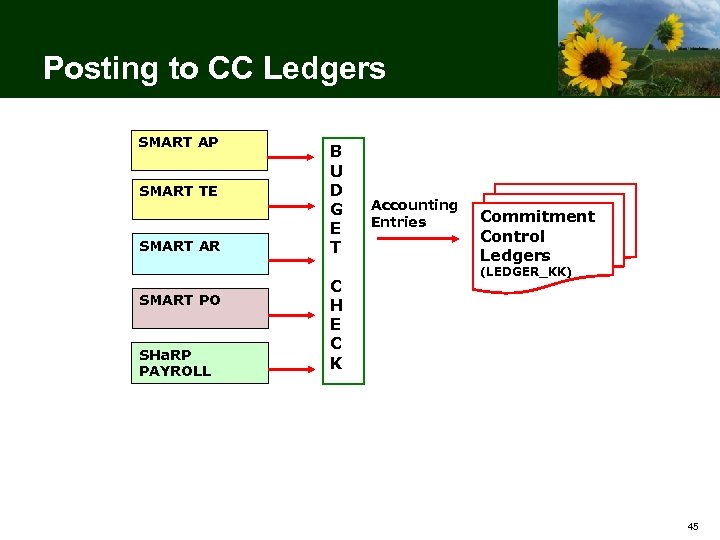 Posting to CC Ledgers SMART AP SMART TE SMART AR SMART PO SHa. RP PAYROLL B U D G E T C H E C K Accounting Entries Commitment Control Ledgers (LEDGER_KK) 45
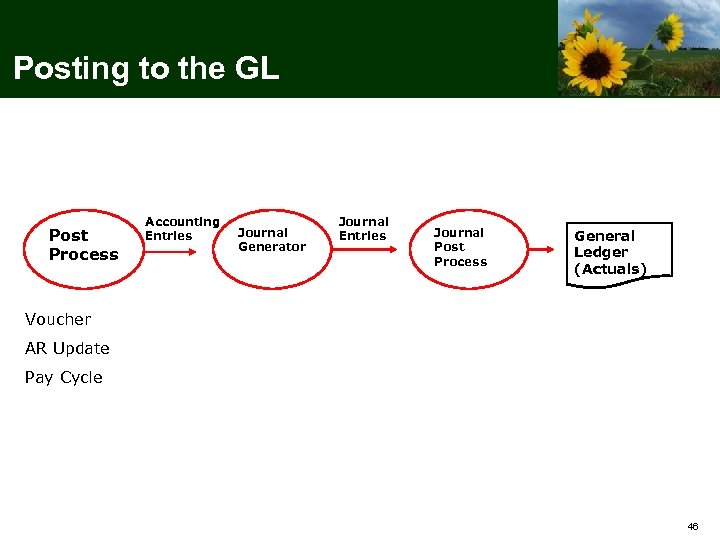 Posting to the GL Post Process Accounting Entries Journal Generator Journal Entries Journal Post Process General Ledger (Actuals) Voucher AR Update Pay Cycle 46
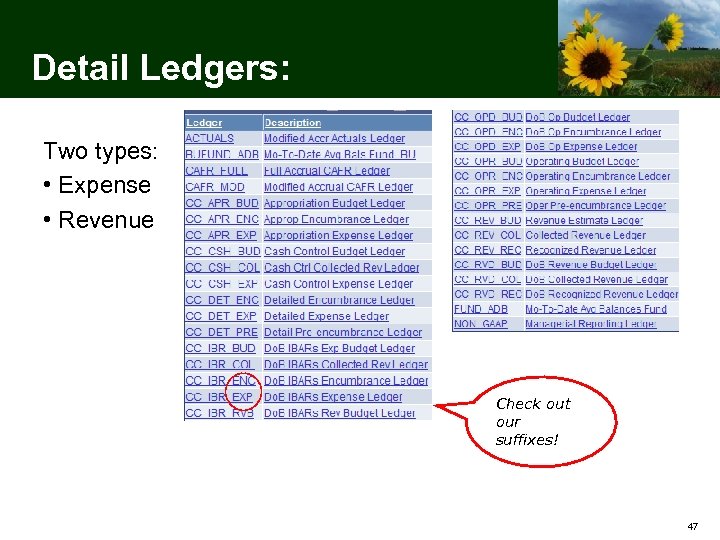 Detail Ledgers: Two types: • Expense • Revenue Check out our suffixes! 47
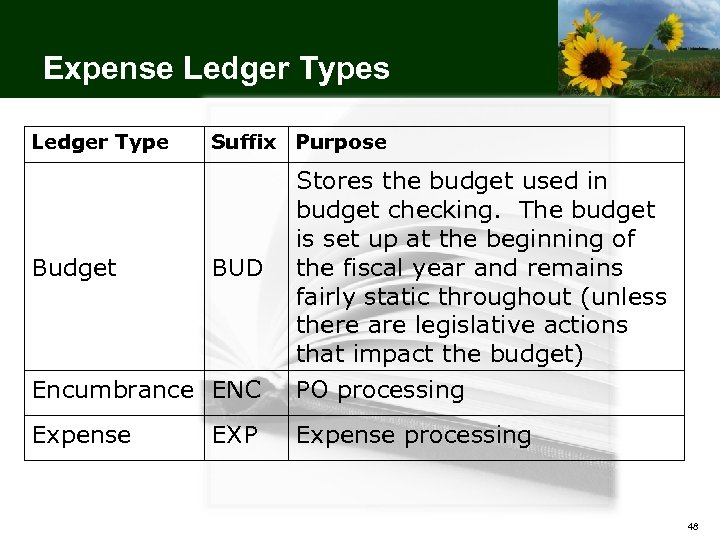 Expense Ledger Types Ledger Type Suffix Purpose Encumbrance ENC Stores the budget used in budget checking. The budget is set up at the beginning of the fiscal year and remains fairly static throughout (unless there are legislative actions that impact the budget) PO processing Expense processing Budget BUD EXP 48
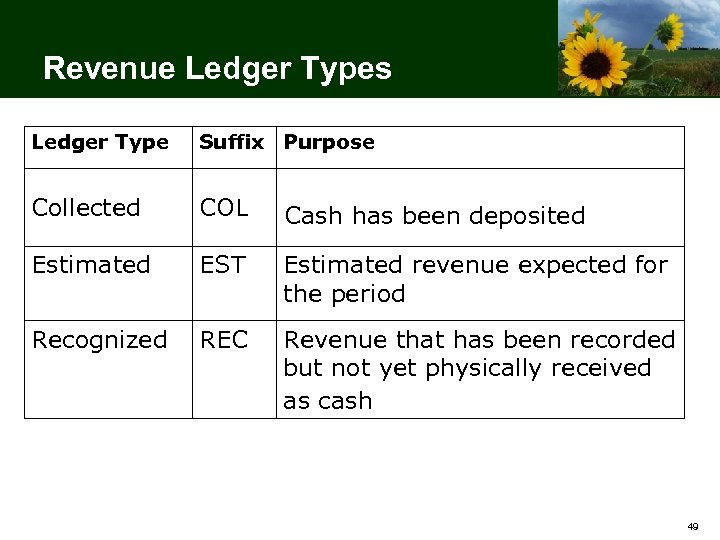 Revenue Ledger Types Ledger Type Suffix Purpose Collected COL Cash has been deposited Estimated EST Estimated revenue expected for the period Recognized REC Revenue that has been recorded but not yet physically received as cash 49
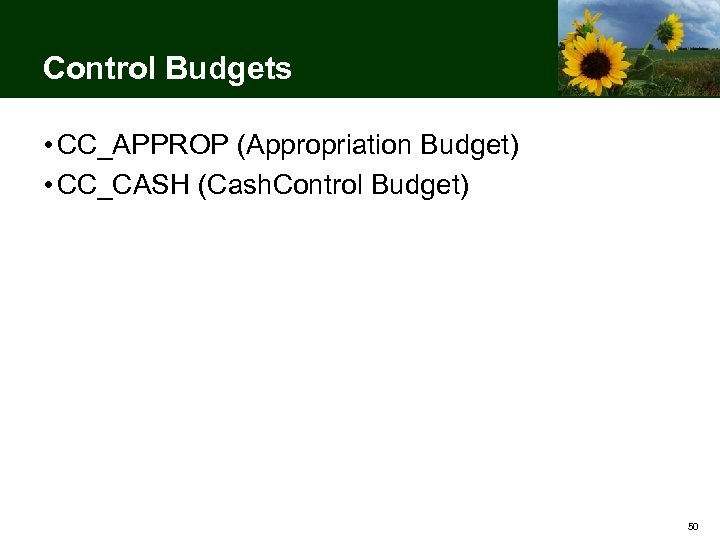 Control Budgets • CC_APPROP (Appropriation Budget) • CC_CASH (Cash. Control Budget) 50
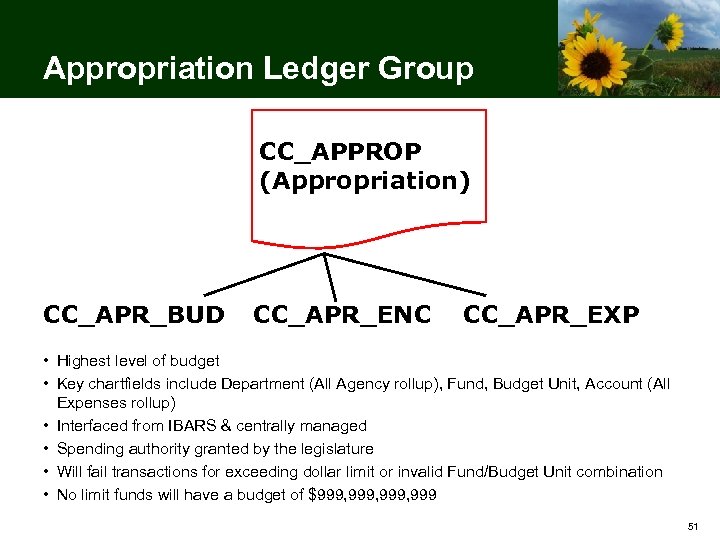 Appropriation Ledger Group CC_APPROP (Appropriation) CC_APR_BUD CC_APR_ENC CC_APR_EXP • Highest level of budget • Key chartfields include Department (All Agency rollup), Fund, Budget Unit, Account (All Expenses rollup) • Interfaced from IBARS & centrally managed • Spending authority granted by the legislature • Will fail transactions for exceeding dollar limit or invalid Fund/Budget Unit combination • No limit funds will have a budget of $999, 999 51
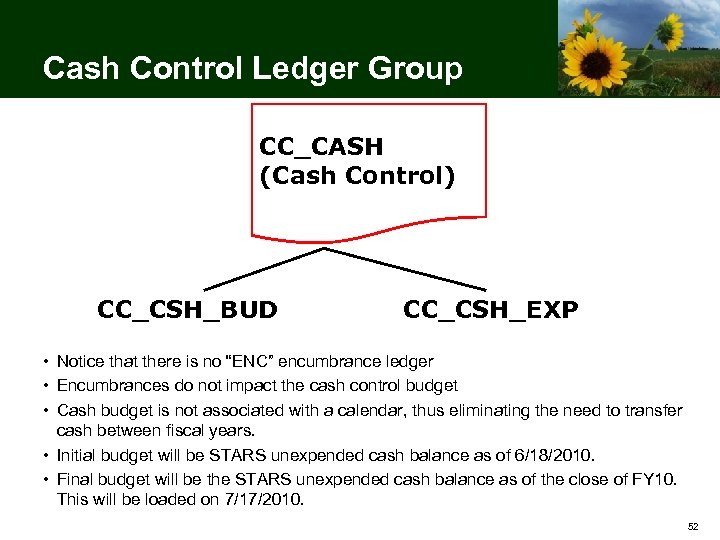 Cash Control Ledger Group CC_CASH (Cash Control) CC_CSH_BUD CC_CSH_EXP • Notice that there is no “ENC” encumbrance ledger • Encumbrances do not impact the cash control budget • Cash budget is not associated with a calendar, thus eliminating the need to transfer cash between fiscal years. • Initial budget will be STARS unexpended cash balance as of 6/18/2010. • Final budget will be the STARS unexpended cash balance as of the close of FY 10. This will be loaded on 7/17/2010. 52
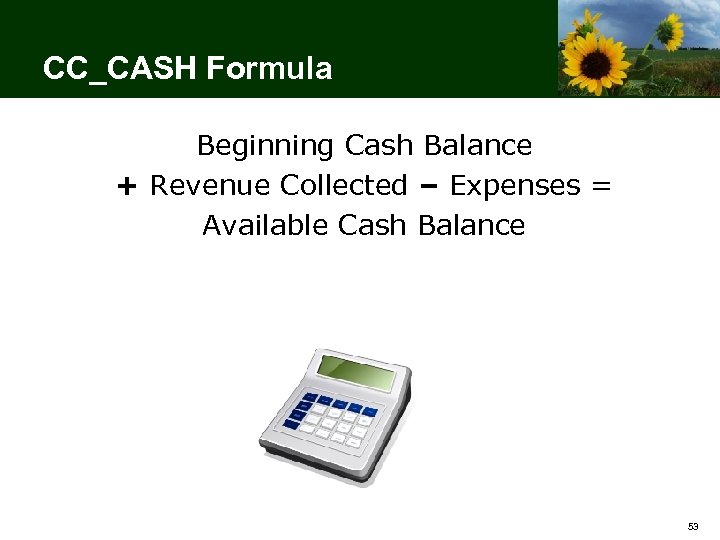 CC_CASH Formula Beginning Cash Balance + Revenue Collected – Expenses = Available Cash Balance 53
 Default Budgets • CC_OPR_DOB (Default Operating) • CC_REV_DOB (Default Revenue Estimate) • CC_DETAIL (Default Detail) 54
 CC_OPR_DOB Default Operating Budget • Interfaced from IBARS • Agency maintained through online budget journal entry and/or budget journal spreadsheet upload. • Track w/o budget • Annual Calendar • Key chartfields: Department (All Agency roll-up), Fund, Budget Unit, Program (Do. B roll-up), Account (Category roll-up) 55
 CC_REV_DOB Default Revenue Estimate • Interfaced from IBARS • Agency maintained through online budget journal entry and/or budget journal spreadsheet upload. • Track w/o budget • Annual Calendar • Key Chart. Fields: Department (All Agency roll-up), Fund, Account (Intermediate roll-up) 56
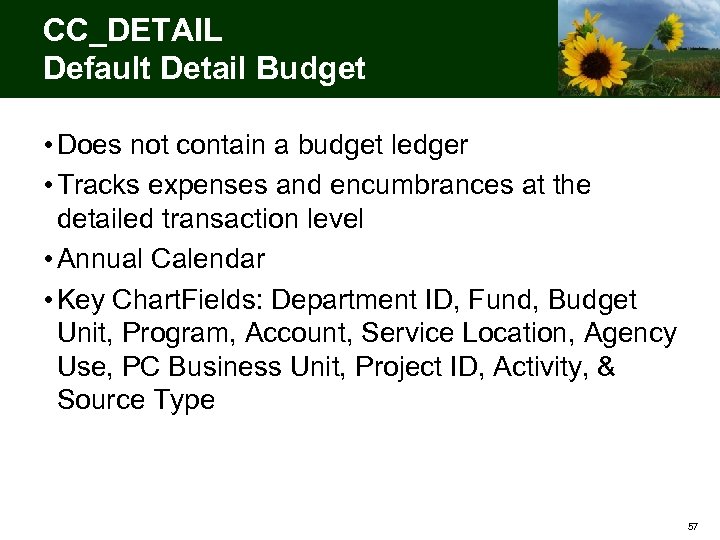 CC_DETAIL Default Detail Budget • Does not contain a budget ledger • Tracks expenses and encumbrances at the detailed transaction level • Annual Calendar • Key Chart. Fields: Department ID, Fund, Budget Unit, Program, Account, Service Location, Agency Use, PC Business Unit, Project ID, Activity, & Source Type 57
 Optional Budgets • CC_OPERATE (Agency Operating) • CC_PROJECT (Agency Project) • CC_REV (Agency Revenue) 58
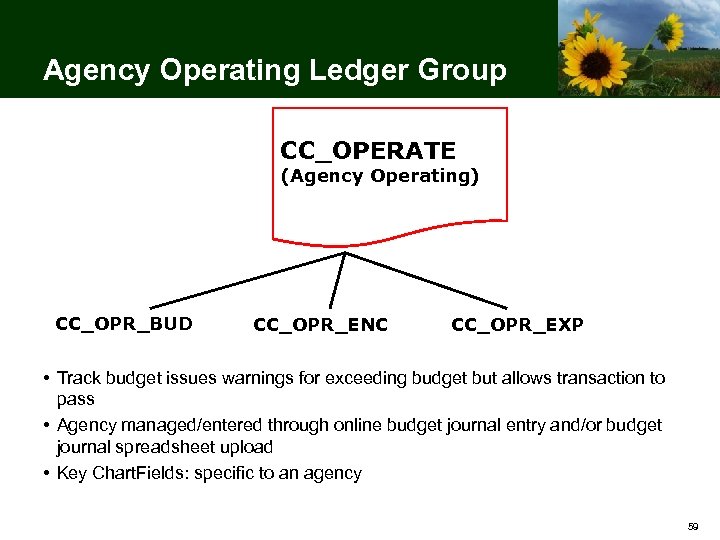 Agency Operating Ledger Group CC_OPERATE (Agency Operating) CC_OPR_BUD CC_OPR_ENC CC_OPR_EXP • Track budget issues warnings for exceeding budget but allows transaction to pass • Agency managed/entered through online budget journal entry and/or budget journal spreadsheet upload • Key Chart. Fields: specific to an agency 59
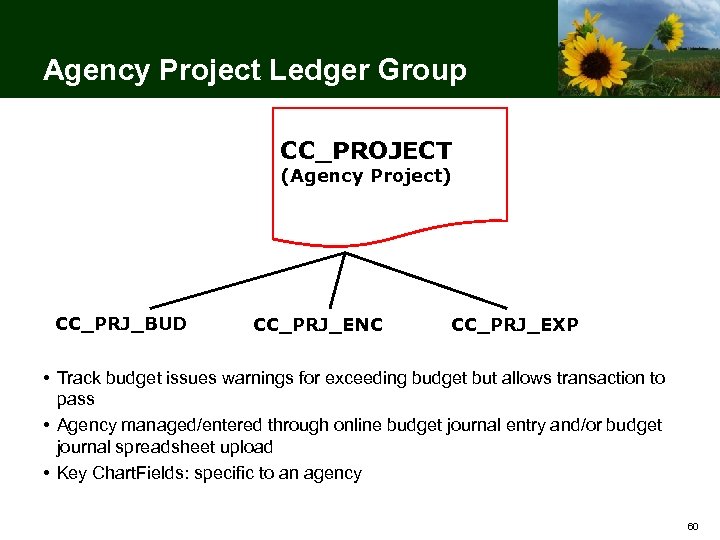 Agency Project Ledger Group CC_PROJECT (Agency Project) CC_PRJ_BUD CC_PRJ_ENC CC_PRJ_EXP • Track budget issues warnings for exceeding budget but allows transaction to pass • Agency managed/entered through online budget journal entry and/or budget journal spreadsheet upload • Key Chart. Fields: specific to an agency 60
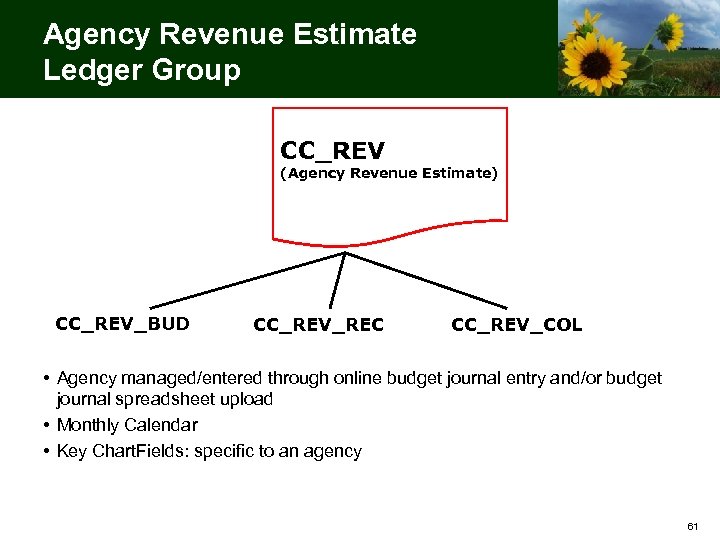 Agency Revenue Estimate Ledger Group CC_REV (Agency Revenue Estimate) CC_REV_BUD CC_REV_REC CC_REV_COL • Agency managed/entered through online budget journal entry and/or budget journal spreadsheet upload • Monthly Calendar • Key Chart. Fields: specific to an agency 61
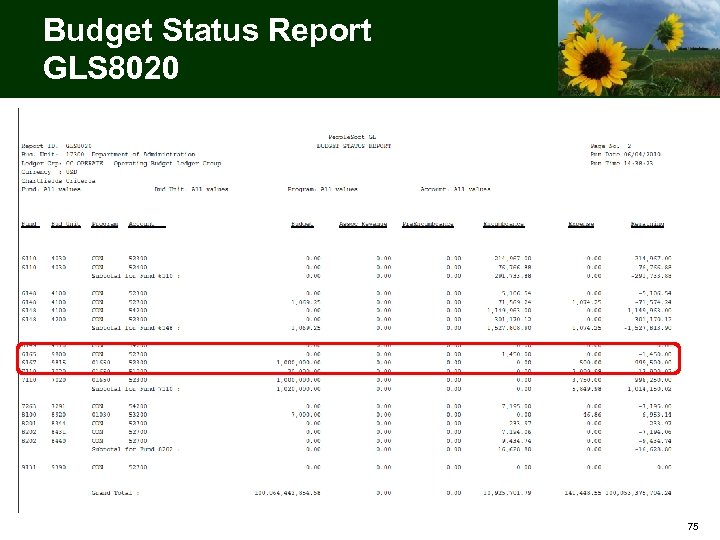
 Budget Reports/Inquiries • Budget Status Report (GLS 8020) • Budget Details Inquiry 62
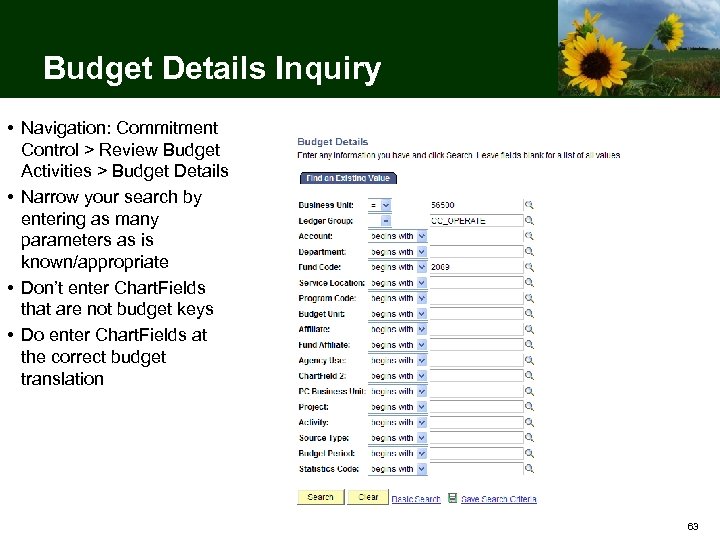 Budget Details Inquiry • Navigation: Commitment Control > Review Budget Activities > Budget Details • Narrow your search by entering as many parameters as is known/appropriate • Don’t enter Chart. Fields that are not budget keys • Do enter Chart. Fields at the correct budget translation 63
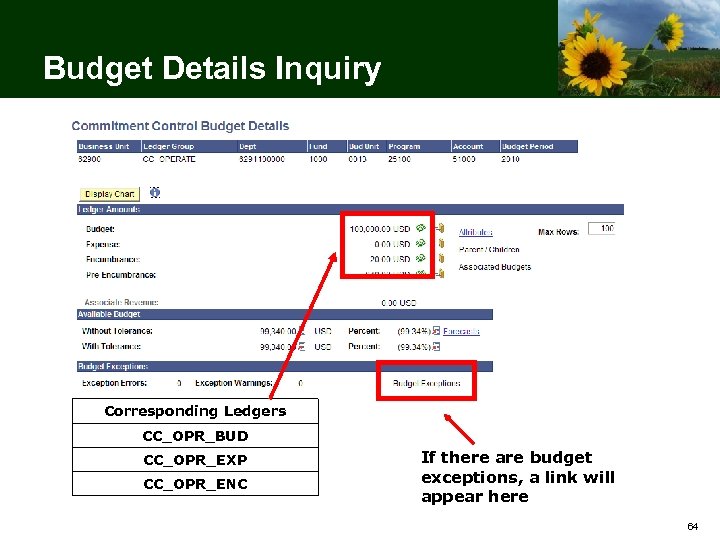 Budget Details Inquiry Corresponding Ledgers CC_OPR_BUD CC_OPR_EXP CC_OPR_ENC If there are budget exceptions, a link will appear here 64
 Budget Reporting Scenario 65
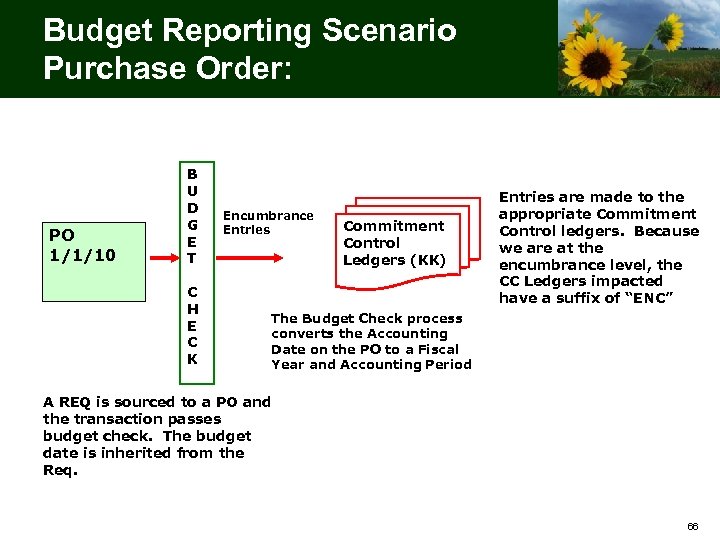 Budget Reporting Scenario Purchase Order: PO 1/1/10 B U D G E T C H E C K Encumbrance Entries Commitment Control Ledgers (KK) Entries are made to the appropriate Commitment Control ledgers. Because we are at the encumbrance level, the CC Ledgers impacted have a suffix of “ENC” The Budget Check process converts the Accounting Date on the PO to a Fiscal Year and Accounting Period A REQ is sourced to a PO and the transaction passes budget check. The budget date is inherited from the Req. 66
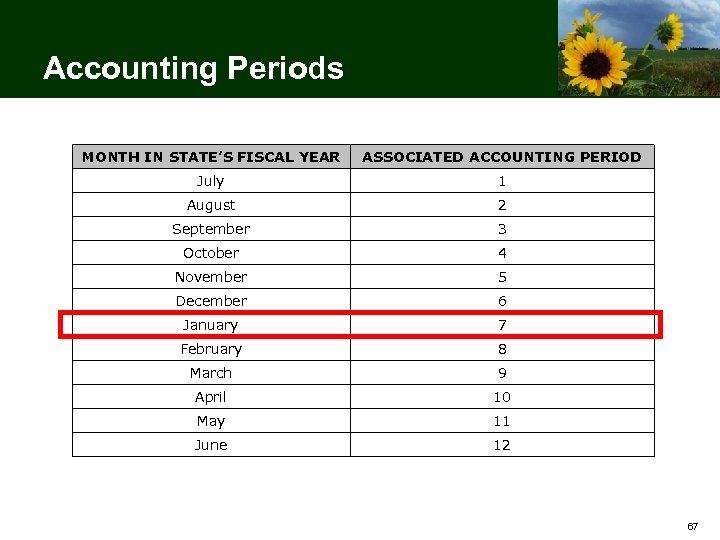 Accounting Periods MONTH IN STATE’S FISCAL YEAR ASSOCIATED ACCOUNTING PERIOD July 1 August 2 September 3 October 4 November 5 December 6 January 7 February 8 March 9 April 10 May 11 June 12 67
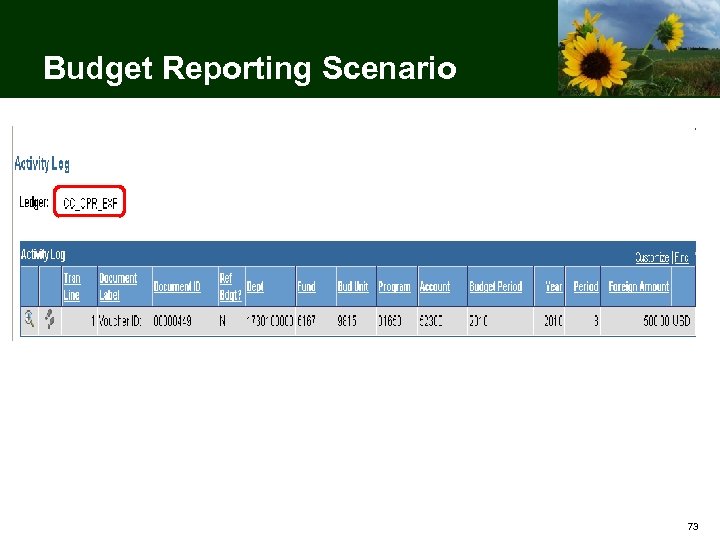
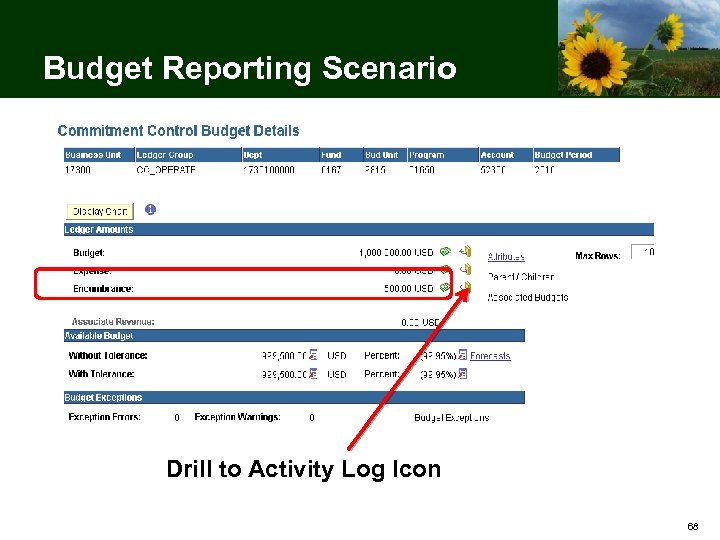 Budget Reporting Scenario Drill to Activity Log Icon 68
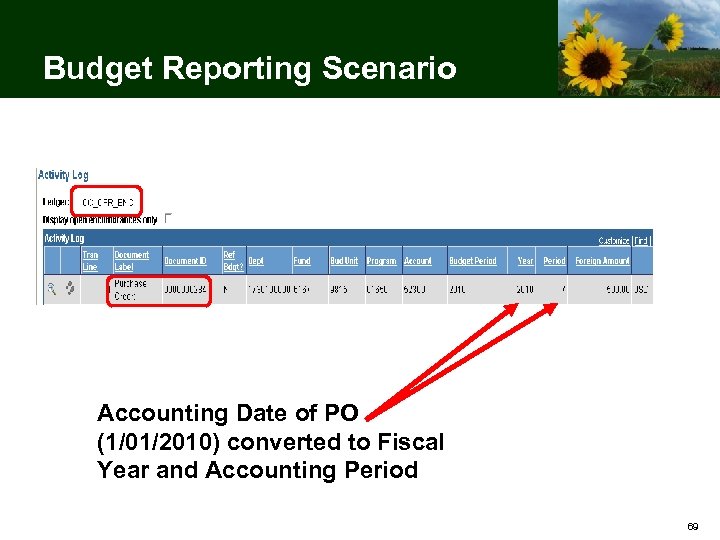 Budget Reporting Scenario Accounting Date of PO (1/01/2010) converted to Fiscal Year and Accounting Period 69
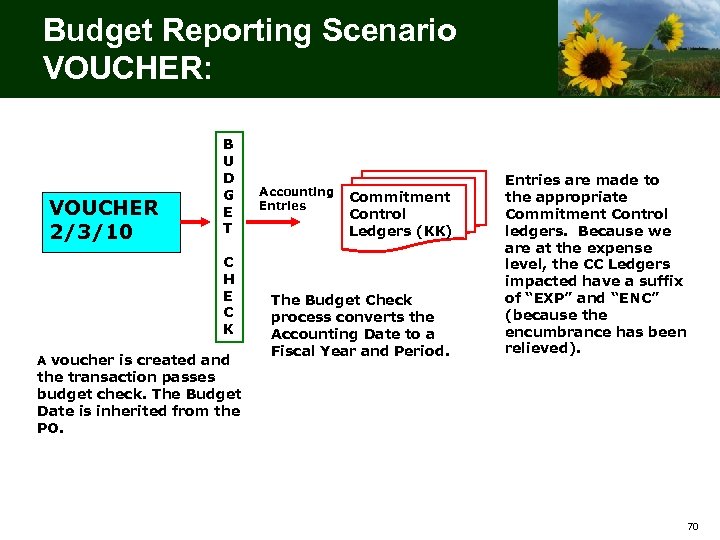 Budget Reporting Scenario VOUCHER: VOUCHER 2/3/10 B U D G E T C H E C K A voucher is created and Accounting Entries Commitment Control Ledgers (KK) The Budget Check process converts the Accounting Date to a Fiscal Year and Period. Entries are made to the appropriate Commitment Control ledgers. Because we are at the expense level, the CC Ledgers impacted have a suffix of “EXP” and “ENC” (because the encumbrance has been relieved). the transaction passes budget check. The Budget Date is inherited from the PO. 70
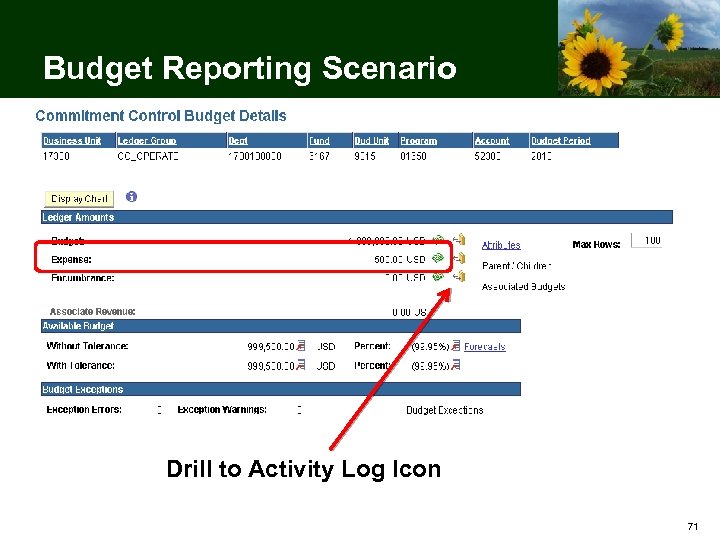 Budget Reporting Scenario Drill to Activity Log Icon 71
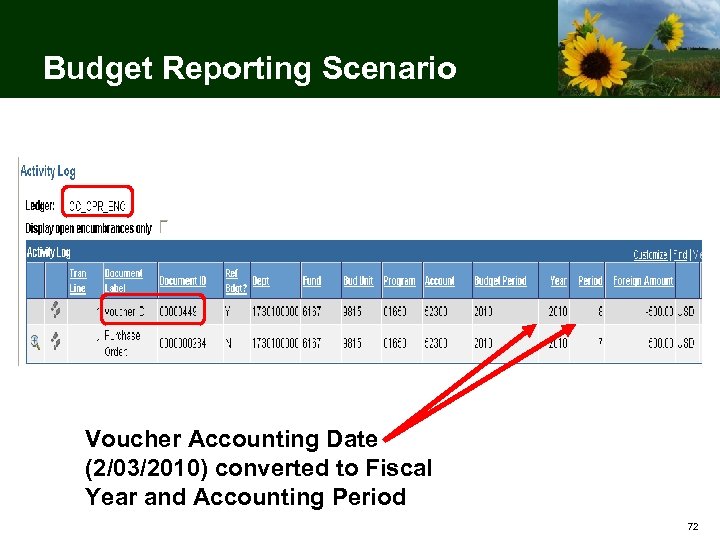 Budget Reporting Scenario Voucher Accounting Date (2/03/2010) converted to Fiscal Year and Accounting Period 72
 Budget Reporting Scenario 73
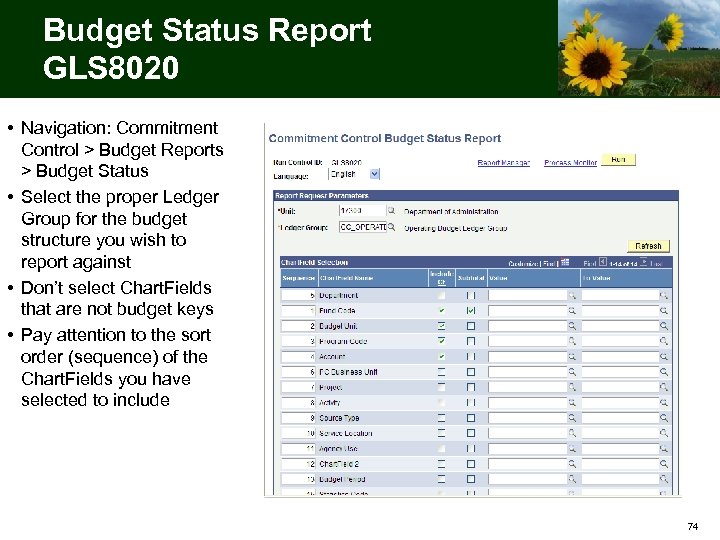 Budget Status Report GLS 8020 • Navigation: Commitment Control > Budget Reports > Budget Status • Select the proper Ledger Group for the budget structure you wish to report against • Don’t select Chart. Fields that are not budget keys • Pay attention to the sort order (sequence) of the Chart. Fields you have selected to include 74
 Budget Status Report GLS 8020 75
 10 Minute Break • Please return promptly so the meeting may end on time • If you wrote questions on note cards: – Pass them to a presenter – Include your name and agency – We will respond to all questions 76
 Break Please return in 10 minutes C 77
 Agency Task List Update 78
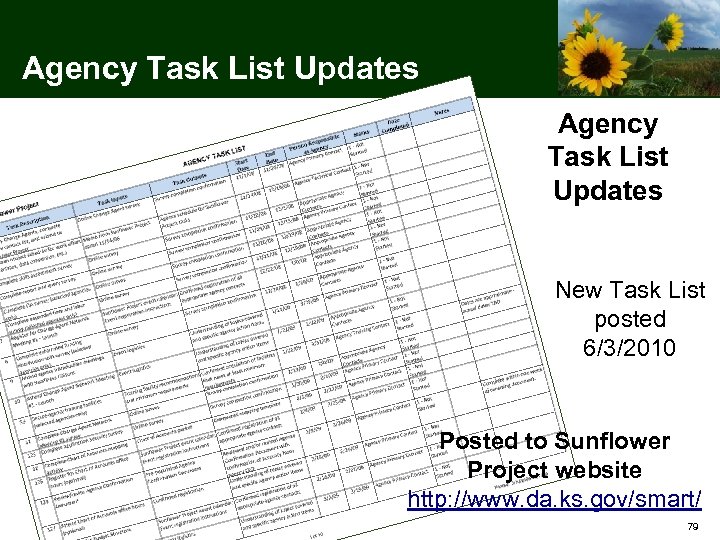 Agency Task List Updates New Task List posted 6/3/2010 Posted to Sunflower Project website http: //www. da. ks. gov/smart/ 79
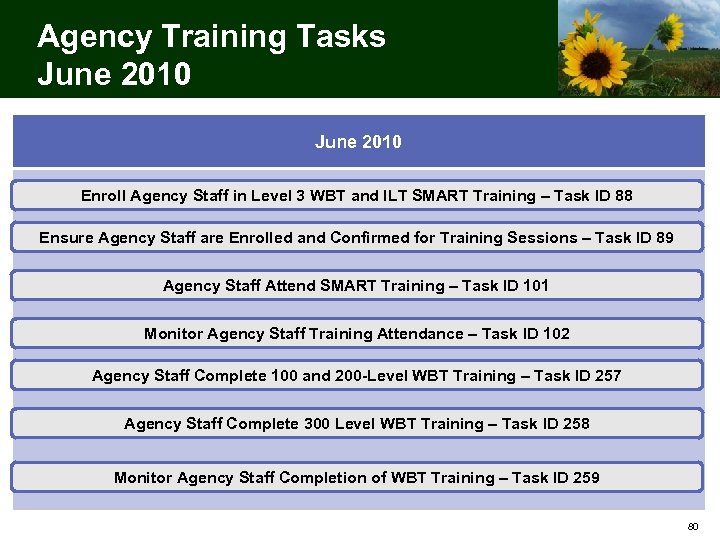 Agency Training Tasks June 2010 Enroll Agency Staff in Level 3 WBT and ILT SMART Training – Task ID 88 Ensure Agency Staff are Enrolled and Confirmed for Training Sessions – Task ID 89 Agency Staff Attend SMART Training – Task ID 101 Monitor Agency Staff Training Attendance – Task ID 102 Agency Staff Complete 100 and 200 -Level WBT Training – Task ID 257 Agency Staff Complete 300 Level WBT Training – Task ID 258 Monitor Agency Staff Completion of WBT Training – Task ID 259 80
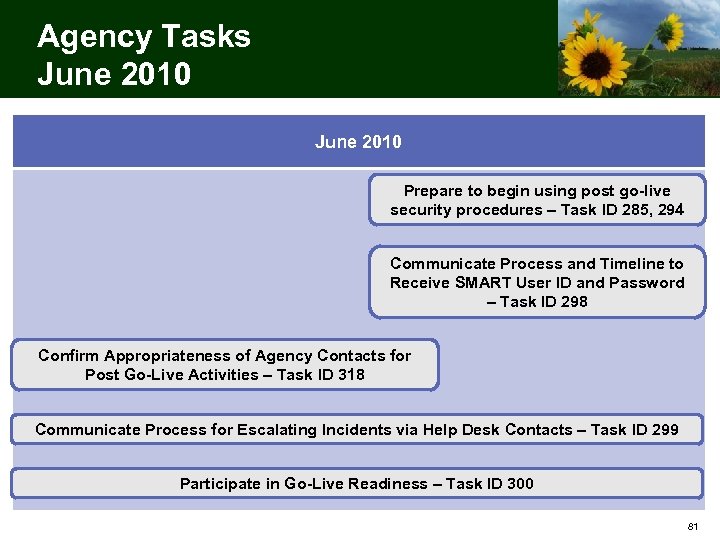 Agency Tasks June 2010 Prepare to begin using post go-live security procedures – Task ID 285, 294 Communicate Process and Timeline to Receive SMART User ID and Password – Task ID 298 Confirm Appropriateness of Agency Contacts for Post Go-Live Activities – Task ID 318 Communicate Process for Escalating Incidents via Help Desk Contacts – Task ID 299 Participate in Go-Live Readiness – Task ID 300 81
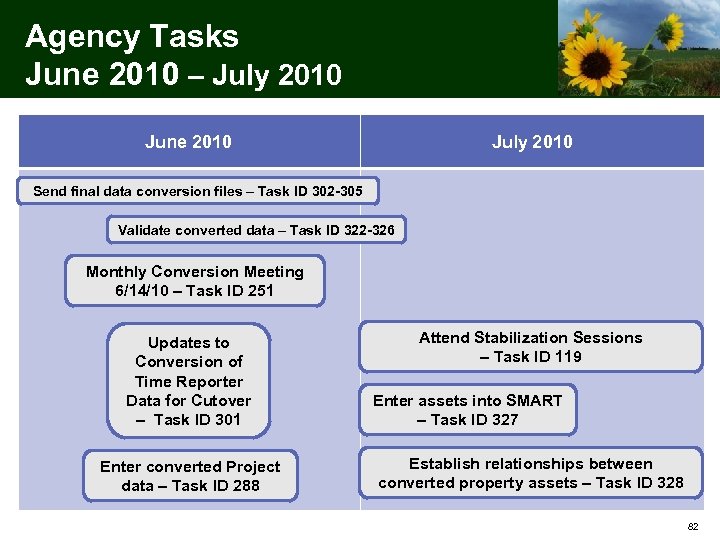 Agency Tasks June 2010 – July 2010 June 2010 July 2010 Send final data conversion files – Task ID 302 -305 Validate converted data – Task ID 322 -326 Monthly Conversion Meeting 6/14/10 – Task ID 251 Updates to Conversion of Time Reporter Data for Cutover – Task ID 301 Enter converted Project data – Task ID 288 Attend Stabilization Sessions – Task ID 119 Enter assets into SMART – Task ID 327 Establish relationships between converted property assets – Task ID 328 82
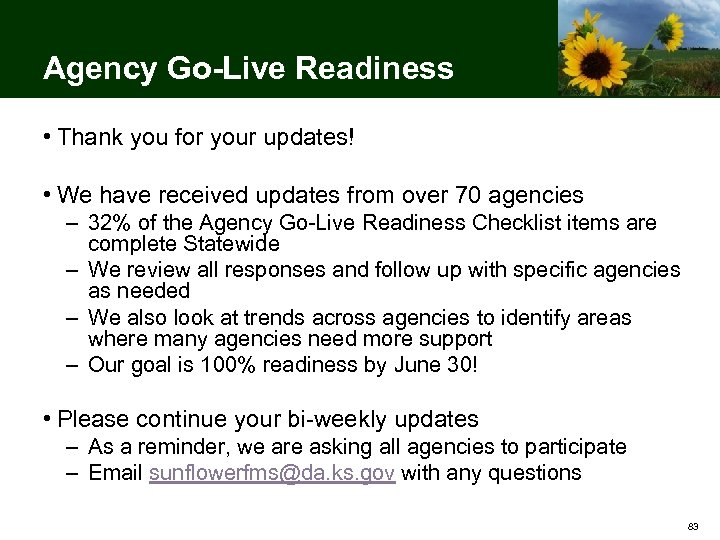 Agency Go-Live Readiness • Thank you for your updates! • We have received updates from over 70 agencies – 32% of the Agency Go-Live Readiness Checklist items are complete Statewide – We review all responses and follow up with specific agencies as needed – We also look at trends across agencies to identify areas where many agencies need more support – Our goal is 100% readiness by June 30! • Please continue your bi-weekly updates – As a reminder, we are asking all agencies to participate – Email sunflowerfms@da. ks. gov with any questions 83
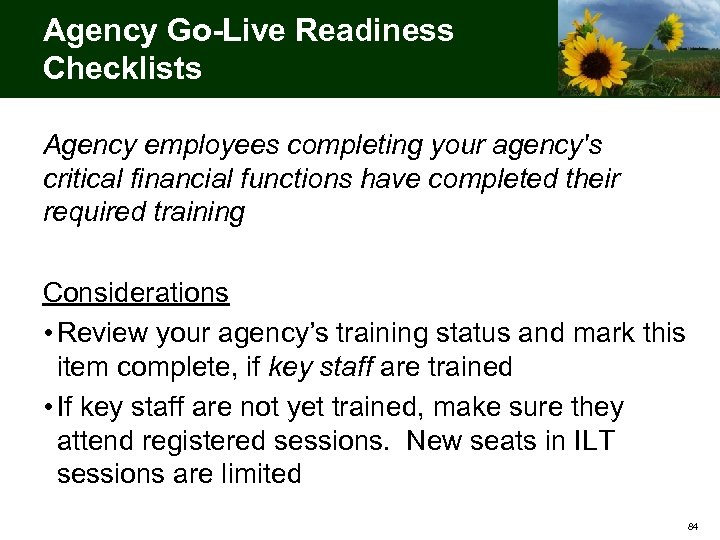 Agency Go-Live Readiness Checklists Agency employees completing your agency's critical financial functions have completed their required training Considerations • Review your agency’s training status and mark this item complete, if key staff are trained • If key staff are not yet trained, make sure they attend registered sessions. New seats in ILT sessions are limited 84
 Agency Go-Live Readiness Checklists (continued) Agency has submitted updates to all applicable configuration tasks Considerations • Configuration tasks are now closed – any updates would be considered after go-live • All agencies should be able to mark this item complete 85
 Agency Go-Live Readiness Checklists (continued) Agency has worked in legacy systems to resolve FY 10 transactions, delete unneeded transactions, reconcile balances, and submit encumbrances - includes STARS, SOKI, and any other legacy systems from which transactions will be converted into SMART Considerations • This refers to general data clean-up in preparation for cutover • Applies to most agencies, even if not participating in programmatic conversions • Mark complete is the clean-up is finished or a plan is in place 86
 Agency Go-Live Readiness Checklists (continued) Agency has a plan to address previously identified issues affecting the agency's readiness for go-live, and has escalated those issues to the Sunflower Project as appropriate Considerations • We are working with several agencies to resolve open issues • If you have no open issues, please mark this item complete • If you do have open issues, ensure project staff are aware and are assisting if appropriate 87
 Agency Go-Live Readiness Checklists (continued) Agency has identified the relevant business process impacts and executed an action plan to reduce adverse affects Considerations • Refers to any business process impacts noted by the agency, including impacts identified in your agency’s impact analysis (Task ID 30) • Mark complete if there is a plan in place to address the impact 88
 Agency Go-Live Readiness Checklists (continued) Agency SMART users understand how they will receive their SMART user IDs and passwords Considerations • The process for distributing SMART user IDs and passwords will be discussed at CAN 14 • This item should not be marked complete yet 89
 Agency Go-Live Readiness Checklists (continued) If applicable, agency is prepared to process interfaces in production Considerations • Applies only to interfacing agencies • All interfacing agencies should be able to mark this item complete • If there is a barrier to completing this item, notify the project 90
 Agency Go-Live Readiness Checklists (continued) Agency has prepared contingency plans in case agency systems are unable to process interfaces in production Considerations • Applies only to interfacing agencies • Refers to any formal or informal plan maintained by your agency 91
 Final Change Agent Network Meeting! Monday, June 21, 2010 from 1: 00 PM to 4: 00 PM Held at the Topeka and Shawnee County Public Library, Marvin Auditorium 101 ABC 92
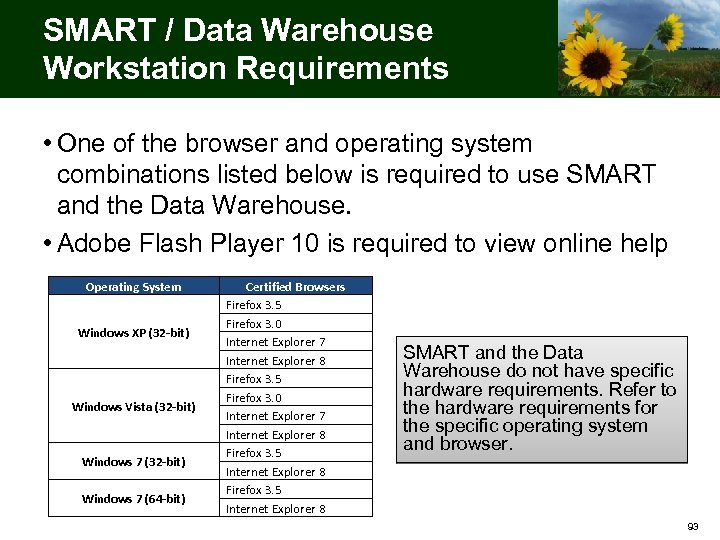 SMART / Data Warehouse Workstation Requirements • One of the browser and operating system combinations listed below is required to use SMART and the Data Warehouse. • Adobe Flash Player 10 is required to view online help Operating System Windows XP (32 -bit) Windows Vista (32 -bit) Windows 7 (64 -bit) Certified Browsers Firefox 3. 5 Firefox 3. 0 Internet Explorer 7 Internet Explorer 8 Firefox 3. 5 Internet Explorer 8 SMART and the Data Warehouse do not have specific hardware requirements. Refer to the hardware requirements for the specific operating system and browser. 93
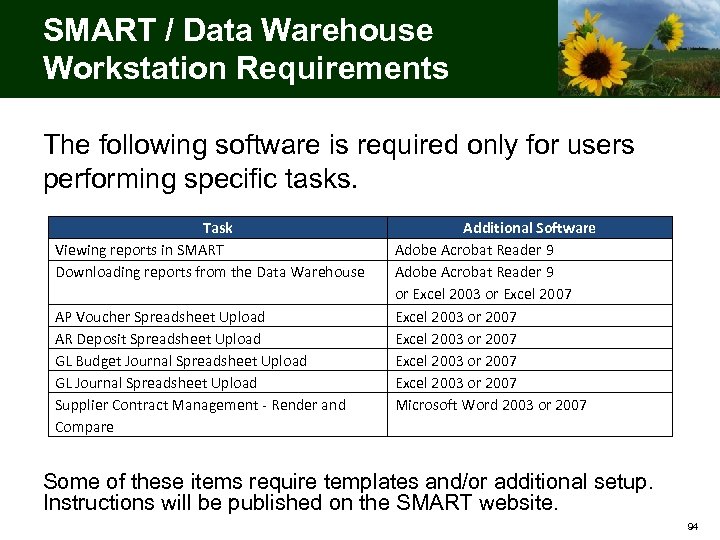 SMART / Data Warehouse Workstation Requirements The following software is required only for users performing specific tasks. Task Viewing reports in SMART Downloading reports from the Data Warehouse AP Voucher Spreadsheet Upload AR Deposit Spreadsheet Upload GL Budget Journal Spreadsheet Upload GL Journal Spreadsheet Upload Supplier Contract Management - Render and Compare Additional Software Adobe Acrobat Reader 9 or Excel 2003 or Excel 2007 Excel 2003 or 2007 Microsoft Word 2003 or 2007 Some of these items require templates and/or additional setup. Instructions will be published on the SMART website. 94
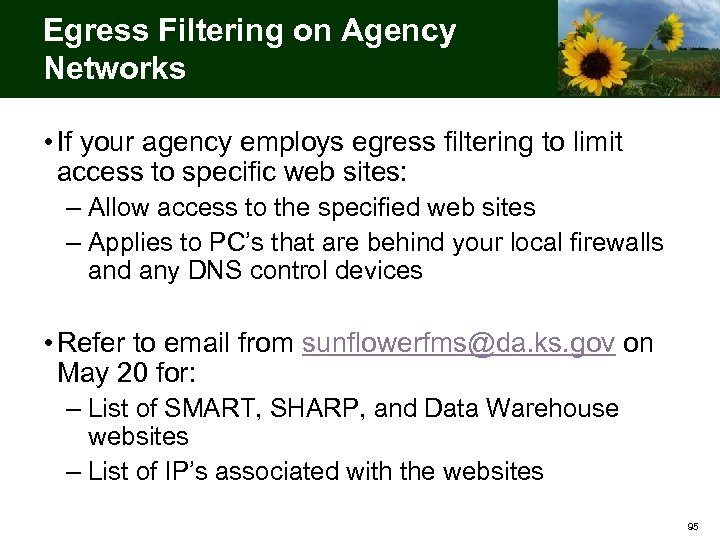 Egress Filtering on Agency Networks • If your agency employs egress filtering to limit access to specific web sites: – Allow access to the specified web sites – Applies to PC’s that are behind your local firewalls and any DNS control devices • Refer to email from sunflowerfms@da. ks. gov on May 20 for: – List of SMART, SHARP, and Data Warehouse websites – List of IP’s associated with the websites 95
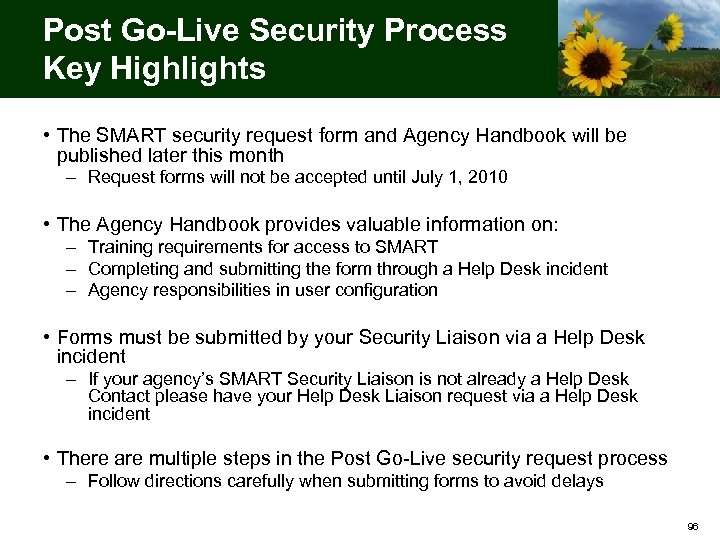 Post Go-Live Security Process Key Highlights • The SMART security request form and Agency Handbook will be published later this month – Request forms will not be accepted until July 1, 2010 • The Agency Handbook provides valuable information on: – Training requirements for access to SMART – Completing and submitting the form through a Help Desk incident – Agency responsibilities in user configuration • Forms must be submitted by your Security Liaison via a Help Desk incident – If your agency’s SMART Security Liaison is not already a Help Desk Contact please have your Help Desk Liaison request via a Help Desk incident • There are multiple steps in the Post Go-Live security request process – Follow directions carefully when submitting forms to avoid delays 96
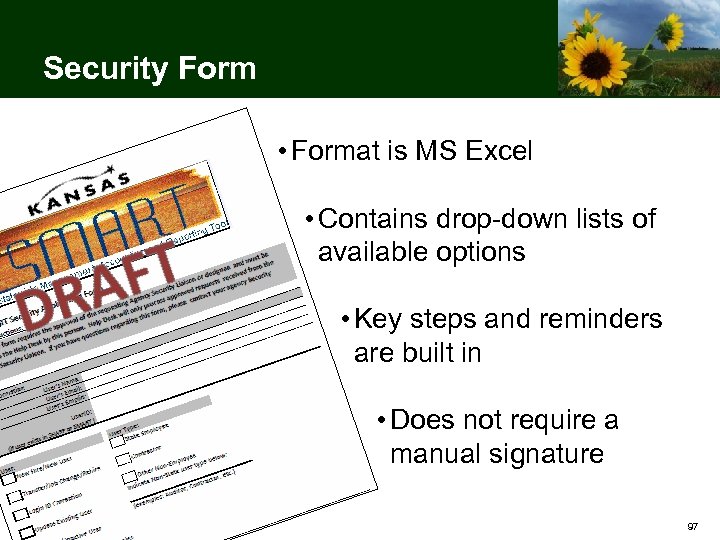 Security Form • Format is MS Excel • Contains drop-down lists of available options • Key steps and reminders are built in • Does not require a manual signature 97
 Reporting Update • SMART Report Catalog will be published later this month – Contains listing of available reports, inquiries and queries – Will continue to update with changes as new reports are added • Agency Reporting gap process – Finalizing reporting gap resolutions with agencies – Begun development of reports identified as gaps • Will be publishing the post go-live report request process later in June 98
 Data Warehouse Update • Data Warehouse subject areas will be deployed in waves • SHARP (HR) subject areas on July 19 – – Employee Job Payroll Earnings Other Time & Labor in October • Second wave will be Finance subject areas – – Custom #1 AP subject area on July 30 Custom #2 AR subject area on August 30 Custom #3 Undetermined subject area October 15 Custom #4 Undetermined subject area October 15 99
 SMART Support 100
 Help Desk Update • The SMART Help Desk has received over 350 requests to date – Requests from ORT, Training, and general questions – Most utilized the web form and self-service capabilities – Requesters have reported the software intuitive and easy to use 101
 Help Desk Lessons Learned • Give detail when describing the incident – Fully describe the situation – Include navigational paths – Include screenshots and anything else that can help us recreate the issue • Remember: do not enter sensitive information into Service. Desk • Do not reply to an e-mail generated from the Help Desk – Use the “Reply” feature within Service. Desk 102
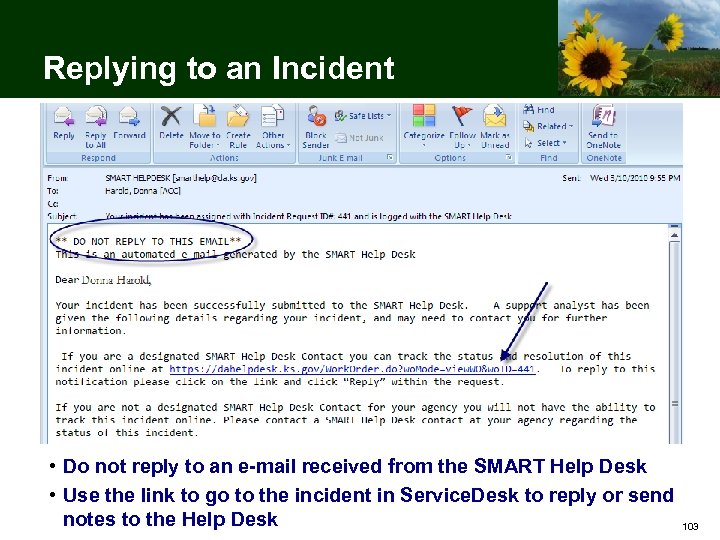 Replying to an Incident • Do not reply to an e-mail received from the SMART Help Desk • Use the link to go to the incident in Service. Desk to reply or send notes to the Help Desk 103
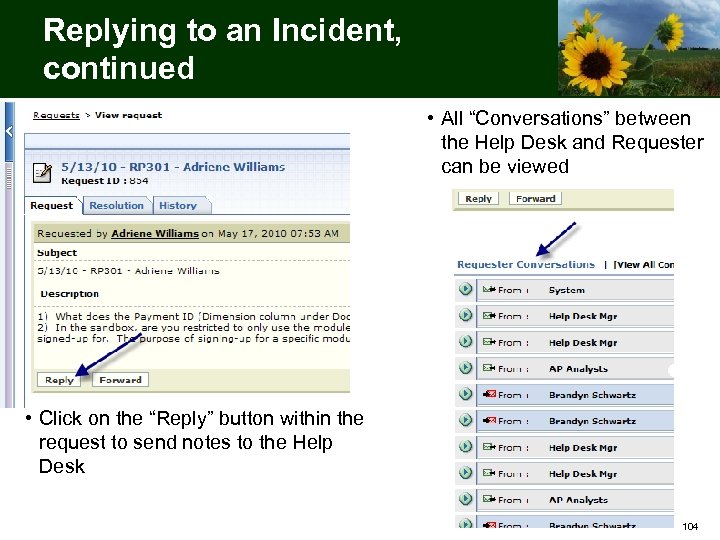 Replying to an Incident, continued • All “Conversations” between the Help Desk and Requester can be viewed • Click on the “Reply” button within the request to send notes to the Help Desk 104
 Tier 0 Resources at the Agency Resources Available to all End-users: • UPK’s – See it, Do it, Know it and Print it components – Access from the “Help” link within SMART • Training Materials – Web-Based Training (WBT), job aids, and more – Access online at: http: //www. da. ks. gov/smart/training. html • “Solutions” Knowledge Base – Searchable database of articles about SMART – Access through a link on the SMART website (http: //da. ks. gov/smart) and within the Service. Desk software Resources Available to Help Desk Contacts: • Service Desk Incidents – Current and previous incidents logged by your agency – Accessible by Help Desk Contacts and Liaisons within Service. Desk 105
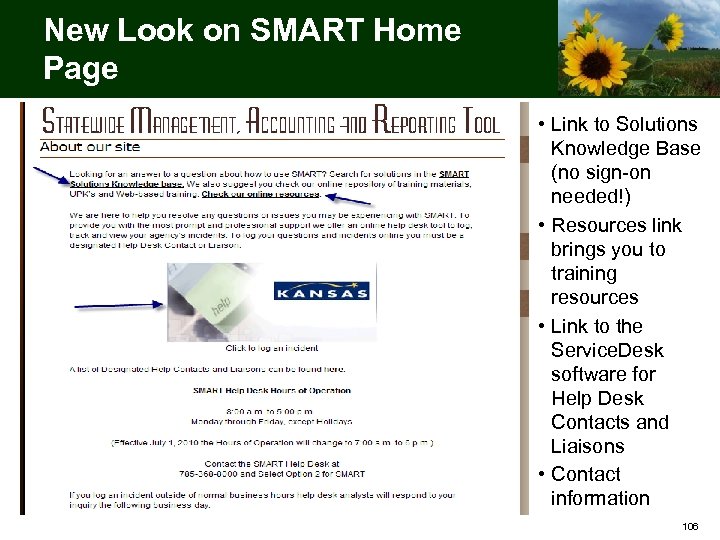 New Look on SMART Home Page • Link to Solutions Knowledge Base (no sign-on needed!) • Resources link brings you to training resources • Link to the Service. Desk software for Help Desk Contacts and Liaisons • Contact information 106
 How to Contact the Help Desk • SMART Help Desk Contacts and Liaisons can log an incident online in Service. Desk – use the Service. Desk link on the SMART website (http: //www. da. ks. gov/smart/) • For Password Resets, all SMART users can call the SMART Help Desk at 785 -368 -8000 – select Option 2 • The Help Desk is staffed Monday – Friday, 8 to 5 – Hours will be extended at go-live Utilize the Sunflowerfms@da. ks. gov email only for Agency Go-Live Readiness Checklists or if specifically directed in Sunflower Project emails. All other communication should be directed to the SMART Help Desk 107
 SHARP Cutover 108
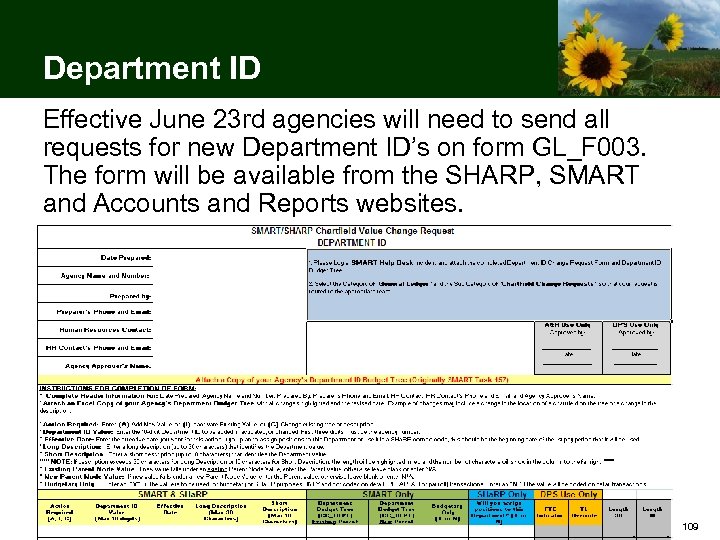 Department ID Effective June 23 rd agencies will need to send all requests for new Department ID’s on form GL_F 003. The form will be available from the SHARP, SMART and Accounts and Reports websites. 109
 Department ID • All forms will require an agency Finance contact to review and submit the form because of how Department ID’s are used in SMART • Completed forms should be attached to a help desk incident using the category ‘General Ledger’ and Subcategory ‘Chartfield Change Requests’ • The SMART team will review the request and make sure that it is appropriate, falls within a logical range, and works with existing budget definitions. They will make the necessary Chart. Field and tree changes and notify the Division of Personnel Services 110
 Combocodes • Agency Combocode task for conversion is closed • Combocode additions cannot be done on-line in SHARP • All new Combocode additions must be submitted via spreadsheet to Heather De. Busk at Heather. De. Busk@da. ks. gov • All Combocode spreadsheets will be edited, validated, and corrected (if necessary) prior to being loaded to SHARP • New Combocode spreadsheets received and validated now will be loaded beginning June 23, 2010 111
 Department Budget Funding • Agency Dept Budget Funding task for conversion is closed • Agency validation and changes to the Department Budget tables can be done on-line beginning June 23, 2010 • Agency contacts will be requested to provide the name of the contact(s) at their agency who will be responsible for working with Payroll Services staff in the Division of Accounts and Reports to provide the chartfield corrections/changes that should be made to resolve payroll journal edit errors 112
 Agency Data Validation • Employee United Way and Org Dues general deduction rows in SHARP will be updated during conversion to split out the United Way and Org Dues processing fee • Agencies are encouraged to review their employee United Way and Org Dues general deduction rows beginning June 23, 2010 113
 SHARP Computer Based Training • Updated SHARP Computer Based Training courses are scheduled to be posted on June 9, 2010 • Most changes relate to new chartfields in the Department Budget tables • Agency staff are encouraged to review the CBT updates but are not required to complete the courses to maintain their current SHARP security 114
 Data Conversion Events and Dates • Friday, June 18, 2010: This is the last day that users will be able to enter transactions prior to the conversion. Conversion to the integrated version of SHARP will take place starting after batch processing finishes Friday evening • Saturday, June 19, 2010 to Tuesday, June 22, 2010: SHARP will be converted to include the integration with SMART • Wednesday, June 23, 2010: Access for SHARP and Self. Service users to the integrated version of SHARP is scheduled to be restored on June 23 rd. SHARP and Self. Service User IDs and passwords will be the same as User IDs and passwords on Friday, June 18, 2010 115
 SHARP Cutover • Informational Circular No. 10 -P-024 is available on the A&R website – Provides dates for Fiscal Year End 2010 Payroll Processing activities and Transition to SMART for Fiscal Year 2011 – http: //www. da. ks. gov/ar/infocirc/fy 2010/ic 10 p 024. htm 116
 Important Payroll Processing Dates & Notes • Please help reduce the number of adjustments by doing the following: – Enter job data changes prior to the creation of paysheets. Job actions must be entered by 6: 00 pm on Monday, June 14, 2010 for the period ending June 12, 2010 – Review the accuracy of gross-to-net and employer contributions on the PAY 002 report and on-line after each preliminary pay calculation 117
 Important Payroll Processing Dates & Notes (continued) Payroll processing for payroll period ending June 12, 2010 Monday, June 14 th • Job Data Entry deadline 6: 00 PM • Paysheets created (one day early) • Time and Leave initial entry and ‘OK to process’ deadline 6: 00 PM • 1 st payroll pre-calc 118
 Important Payroll Processing Dates & Notes (continued) Payroll processing for payroll period ending June 12, 2010 Wednesday, June 16 th • Time and Leave final entry; ’OK to process’; deduction/tax changes deadline 6: 00 PM • Final pay confirmation • Regent on-cycle file deadline 6: 00 AM 119
 Important Payroll Processing Dates & Notes (continued) Payroll processing for payroll period ending June 12, 2010 Thursday, June 17 th • Regent Run ‘A’ off-cycle file deadline 5: 00 PM • Regent on-cycle processed 120
 Important Payroll Processing Dates & Notes (continued) Payroll processing for payroll period ending June 12, 2010 Friday, June 18 th • SHARP Supplemental/Adjustment off-cycle ‘A’ entry deadline 6: 00 PM • FINAL opportunity for agencies to enter prior period adjustments on-line for pay periods prior to June 12, 2010 • Off-Cycle ‘A’ processed (Final payroll run FY 2010) • SHARP closes for conversion 121
 Training Update 122
 SMART Post Go-Live Training Highlights • Additional course sessions are being added in July and August • Staff who were role mapped by May 14, 2010 will have priority access to these additional training sessions. Exceptions will be made for new staff that have been appointed to key positions. • A revised process for enrolling in training sessions will be provided at the last Change Agent Network meeting. • It is important that you communicate to the employees you role mapped for access to SMART that they must complete their required training 123
 SMART Post Go-Live Training Highlights • All individuals that were role mapped by agencies by May 14 will receive a sign-on at go-live. At the end of August we will remove the access of any individuals who did not complete their assigned instructor led or web-based training. • Agencies should inform employees not yet registered for instructor-led training or with incomplete web-based training that they must have their training completed or scheduled within 2 months of go-live. As stated earlier, the training team will be adding additional instructor-led training sessions in Topeka during July and August with enough capacity to accommodate employees who have not yet fulfilled their training obligations. • If an employee has not enrolled in these sessions by the end of July we will assume that they do not plan on attending training and will removed their access ahead of the August deadline. 124
 SMART Post Go-Live Training Highlights • SMART Security Contacts will be sent a secure email containing the SMART User ID’s for employees role mapped by May 14 th prior to go-live. The exact date will be provided at the CAN on June 21, 2010. The default password schema will also be provided at the last CAN. • Agencies that should review their weekly Training enrollment reports to identify employees who have not yet fulfilled their training obligations. If you have employees who have not taken any of their required training we strongly encourage you not to distribute the User ID to those individuals. 125
 Wrap Up 126
 Project Resources • Sunflower Project website: http: //www. da. ks. gov/smart/ • Sunflower Infolist – Subscribe at http: //www. da. ks. gov/listserv. htm • SMART Help Desk • Search the SMART Solutions Knowledgebase at https: //dahelpdesk. ks. gov/sd/Solutions. Home. sd • Log in to Service Desk at https: //dahelpdesk. ks. gov/ • Call 785 -368 -8000, Select Option 2 • Sunflower Project Site: Sunflower Project, 915 SW Harrison, Room 1181, Topeka, Kansas 66612 127
 Questions? 128