 Скачать презентацию Sunflower Project Business Process Workshop Accounts Payable and
92ed5e0d22168bfbc090eaae088406ea.ppt
- Количество слайдов: 102



Sunflower Project Business Process Workshop Accounts Payable and Travel & Expense

Welcome 2
Accounts Payable and Travel & Expense Business Process Workshop Agenda q. Welcome q. BPW Purpose and Objectives q. Context for Accounts Payable and Travel & Expense q. Business Process Walkthroughs q. Agency Impact Analysis q. BPW Wrap-Up 3
Welcome and Introductions • Presenters: – Connie Guerrero, Enterprise Readiness Team Manager – Jennifer Dennon, Agency Readiness Team Lead – Adriene Williams, Agency Readiness Liaison 4
Ground Rules • Turn phones to silent or vibrate • Be courteous of presenters and other speakers • Return promptly after breaks • Participation is expected • Questions are encouraged – if we can not answer today we will research and get back to you with an answer 5
BPW Purpose and Objectives 6
BPWs Objectives After completing this workshop you should: • Understand SMART business processes • Understand key organizational impacts, as identified by the Sunflower Project • Be prepared to conduct your agency’s Agency Impact Analysis (Task ID 30) 7
What BPWs WILL Do… • Provide detailed information on key process points • Review potential agency impacts • Introduce recommendations and action items to reduce the impacts of identified changes • Provide tools for identifying alternate and/or additional impacts specific to your agency 8
What BPWs Will NOT Do… • Provide system training • Identify every process change and agency impact • Evaluate process change impacts at the agency level Note: The information contained in this presentation is accurate as of this point in the project. Further build and testing of SMART may alter information at which point updated topics will be communicated 9
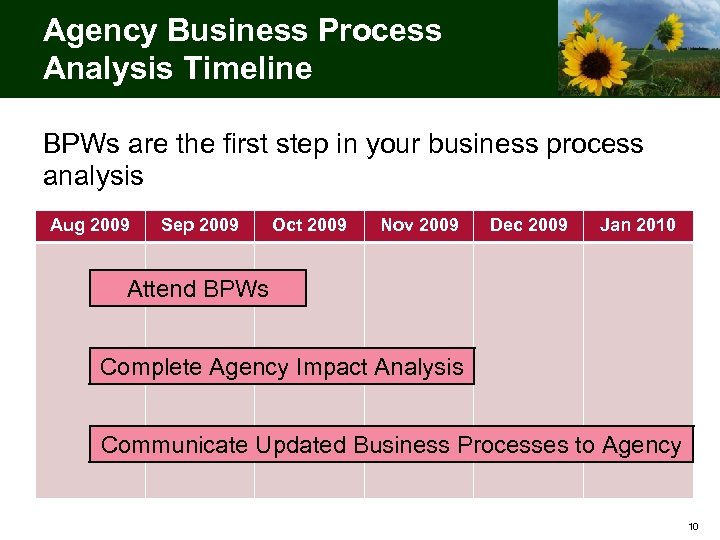
Agency Business Process Analysis Timeline BPWs are the first step in your business process analysis Aug 2009 Sep 2009 Oct 2009 Nov 2009 Dec 2009 Jan 2010 Attend BPWs Complete Agency Impact Analysis Communicate Updated Business Processes to Agency 10
Business Process Analysis Areas Agencies will need to consider the following areas for each business process: • User Roles and Responsibilities • Reporting • Policies and Procedures • Manuals and Desk Instructions • Forms • Document Storage 11
Meet and Greet 12
Context for Accounts Payable and Travel & Expense 13
Accounts Payable and Travel & Expense Overview • Accounts Payable (AP) and Travel & Expense are the sources of payment information in SMART • The benefits of Accounts Payable and Travel & Expense in SMART are: – The use of workflow to track and route vouchers and expense documents through the approval process in SMART – Statewide integration and standard payment process and methodology 14
Accounts Payable and Travel & Expense Key Terms & Definitions • Accounts Payable – The module in which vouchers are recorded to process payments to vendors. Also records the liability for amounts due to vendors for invoiced goods or services received. • Business Unit – The SMART fields that define each agency of the State. • Commitment Control – The process of budgetary accounting which enables the tracking or controlling of expenses against budgets and revenues against estimates. • Control Group – A means of grouping vouchers for processing. • Location - The SMART field that is an identifier of where an asset or vendor may be found or where an employee resides and enables you to differentiate vendor locations when more than one exists. 15
Accounts Payable and Travel & Expense Key Terms & Definitions (Continued) • Location Code - The SMART field that enables you to indicate the different types of addresses for a company, for example, one address to receive bills, another for shipping, a third for postal deliveries, and a separate street address. Each address has a different location number (called a location code). • Matching – An automated process of comparing values found in three different business documents: Voucher, Purchase Order, and Receiver prior to approving a voucher for payment. This process provides assurance that the products listed on a vendor invoice were requested and received at the appropriate price and in the appropriate quantity. • Payment Processing – Checks or electronic payments (via Automated Clearinghouse) that are issued to a vendor to pay for a voucher. • Posting – An automated process of creating and recording accounting entries in SMART. 16
Accounts Payable and Travel & Expense Key Terms & Definitions (Continued) • Tax Identification Number (TIN) - A tax processing number that is issued by the Internal Revenue Service - typically Social Security Number (SSN) or Federal Employer Identification Number (FEIN). • Vendor - Any person or company from which the State of Kansas purchases goods or services, including state agencies, sub-recipients and sub-grantees. • Vendor ID - A unique identifier for each vendor in SMART. • Voucher – Records created to process vendor invoices or adjustments and can either be entered manually or through an Electronic Data Interchange (EDI) interface or spreadsheet. • Workflow – A tool in SMART that routes a transaction electronically for approvals via a work list or email notification. 17
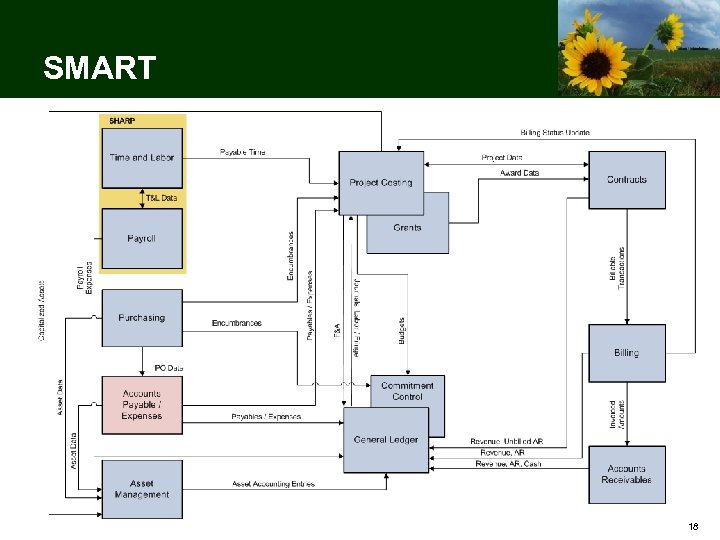
SMART 18
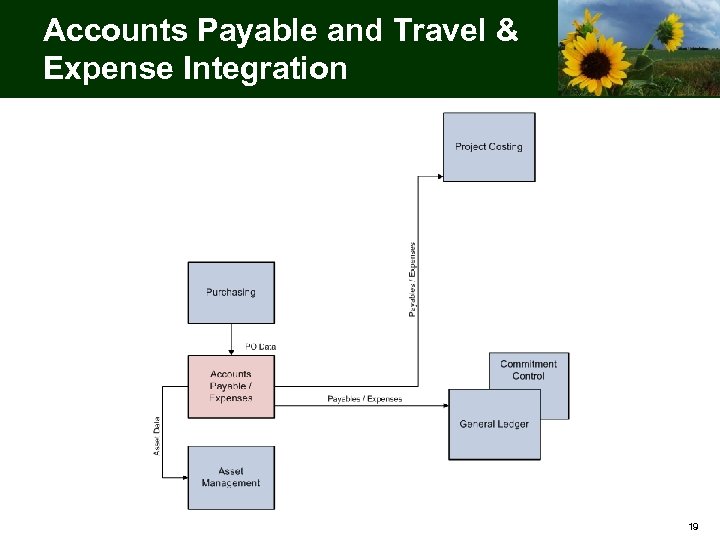
Accounts Payable and Travel & Expense Integration 19
Accounts Payable 20
Accounts Payable Overview • Accounts Payable (AP) is the source of all vendor payment information • The benefits of Accounts Payable in SMART are: – The automation of matching vouchers, purchase orders (POs), and receipts (documentation of goods received from vendors) – The use of workflow to track and route vouchers through the approval process in SMART 21
Accounts Payable Processes This section includes the following processes: • Entering a vendor • Creating a non-PO voucher • Creating a PO voucher • Approving a voucher 22
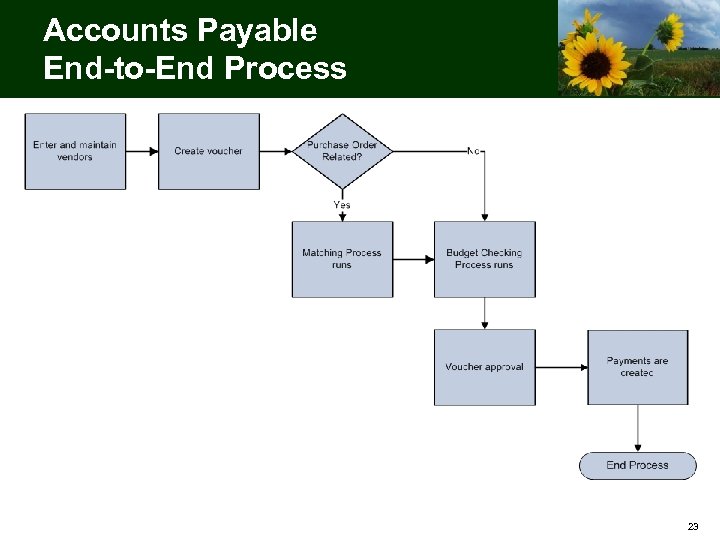
Accounts Payable End-to-End Process 23
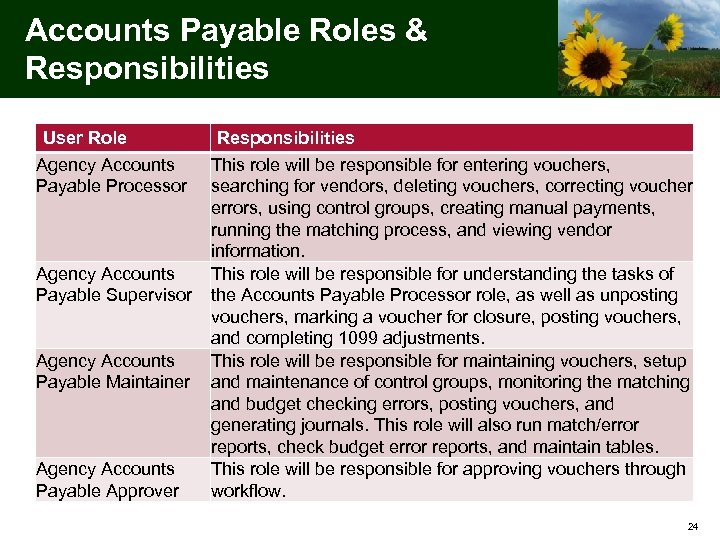
Accounts Payable Roles & Responsibilities User Role Agency Accounts Payable Processor Agency Accounts Payable Supervisor Agency Accounts Payable Maintainer Agency Accounts Payable Approver Responsibilities This role will be responsible for entering vouchers, searching for vendors, deleting vouchers, correcting voucher errors, using control groups, creating manual payments, running the matching process, and viewing vendor information. This role will be responsible for understanding the tasks of the Accounts Payable Processor role, as well as unposting vouchers, marking a voucher for closure, posting vouchers, and completing 1099 adjustments. This role will be responsible for maintaining vouchers, setup and maintenance of control groups, monitoring the matching and budget checking errors, posting vouchers, and generating journals. This role will also run match/error reports, check budget error reports, and maintain tables. This role will be responsible for approving vouchers through workflow. 24
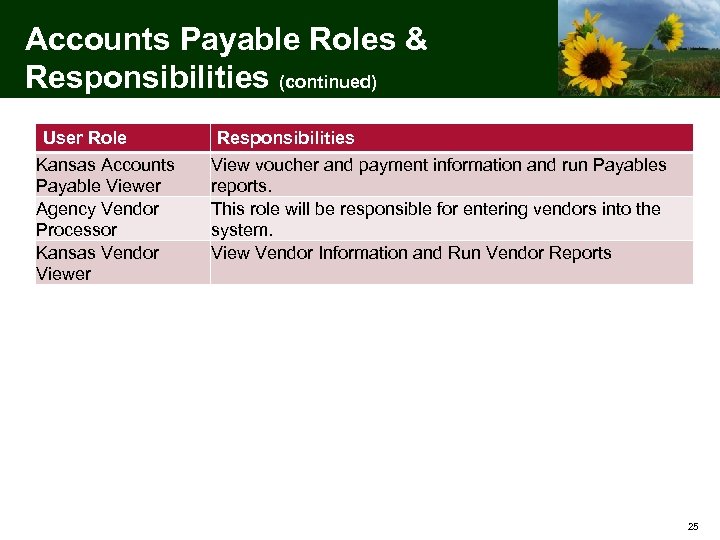
Accounts Payable Roles & Responsibilities (continued) User Role Kansas Accounts Payable Viewer Agency Vendor Processor Kansas Vendor Viewer Responsibilities View voucher and payment information and run Payables reports. This role will be responsible for entering vendors into the system. View Vendor Information and Run Vendor Reports 25
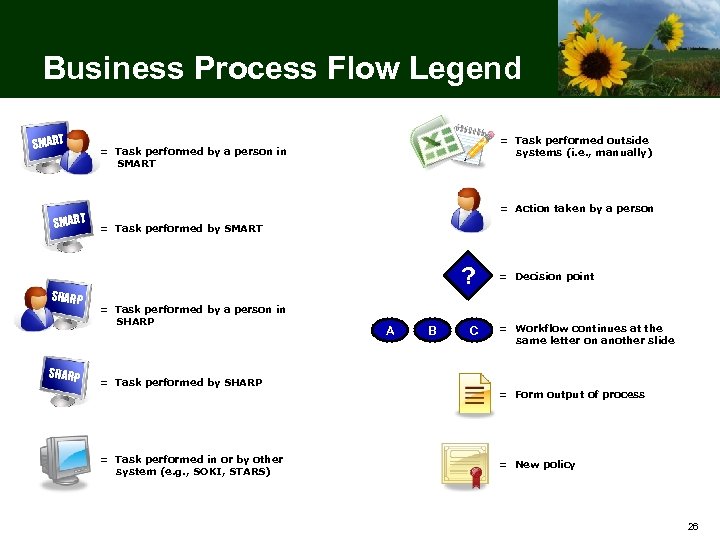
Business Process Flow Legend SMART SHARP = Task performed outside systems (i. e. , manually) = Task performed by a person in SMART = Action taken by a person = Task performed by SMART ? = Task performed by a person in SHARP = Task performed by SHARP = Task performed in or by other system (e. g. , SOKI, STARS) A B C = Decision point = Workflow continues at the same letter on another slide = Form output of process = New policy 26
Entering a Vendor 27
Process Definition: Entering a Vendor Entering a vendor is defined as the process of recording vendor information into SMART for the purpose of entering a requisition, PO, or voucher. 28
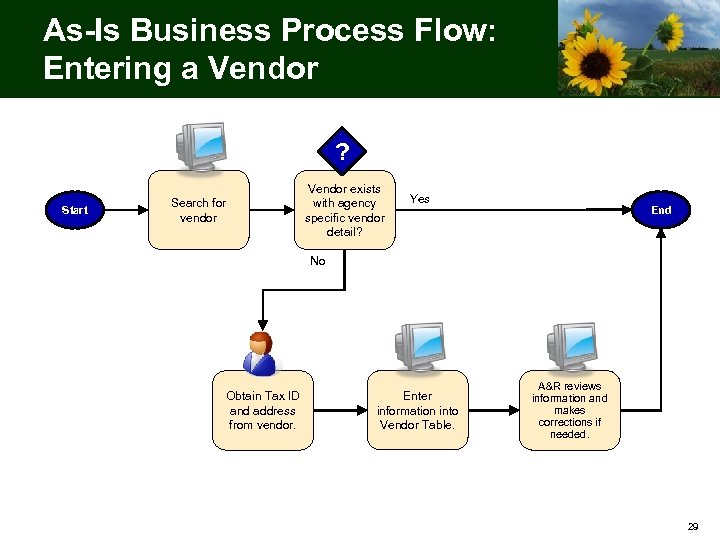
As-Is Business Process Flow: Entering a Vendor ? Start Search for vendor Vendor exists with agency specific vendor detail? Yes End No Obtain Tax ID and address from vendor. Enter information into Vendor Table. A&R reviews information and makes corrections if needed. 29
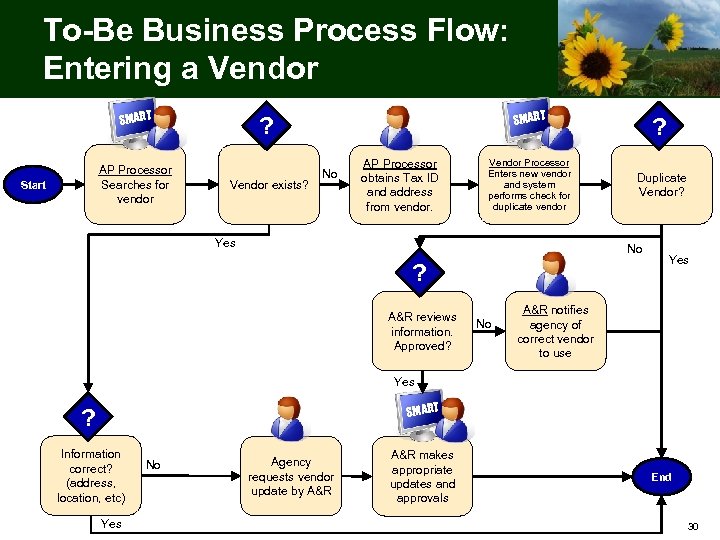
To-Be Business Process Flow: Entering a Vendor SMART AP Processor Searches for vendor Start SMART ? Vendor exists? No AP Processor obtains Tax ID and address from vendor. Vendor Processor Enters new vendor and system performs check for duplicate vendor Yes ? Duplicate Vendor? No ? A&R reviews Yes information. Approved? No Yes A&R notifies agency of correct vendor to use Yes SMART ? Information correct? (address, location, etc) Yes No Agency requests vendor update by A&R makes appropriate updates and approvals End 30
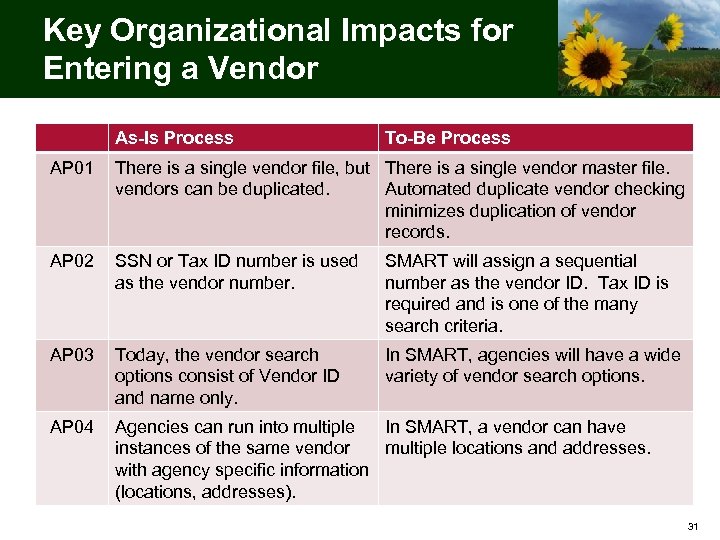
Key Organizational Impacts for Entering a Vendor As-Is Process To-Be Process AP 01 There is a single vendor file, but There is a single vendor master file. vendors can be duplicated. Automated duplicate vendor checking minimizes duplication of vendor records. AP 02 SSN or Tax ID number is used as the vendor number. SMART will assign a sequential number as the vendor ID. Tax ID is required and is one of the many search criteria. AP 03 Today, the vendor search options consist of Vendor ID and name only. In SMART, agencies will have a wide variety of vendor search options. AP 04 Agencies can run into multiple In SMART, a vendor can have instances of the same vendor multiple locations and addresses. with agency specific information (locations, addresses). 31
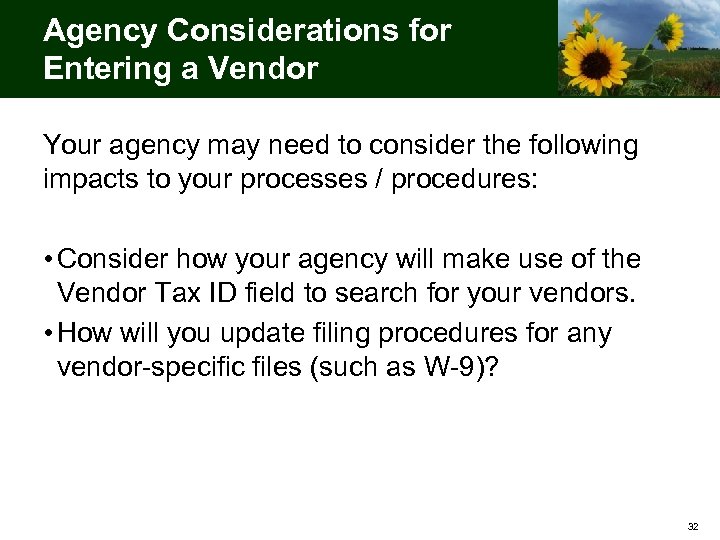
Agency Considerations for Entering a Vendor Your agency may need to consider the following impacts to your processes / procedures: • Consider how your agency will make use of the Vendor Tax ID field to search for your vendors. • How will you update filing procedures for any vendor-specific files (such as W-9)? 32
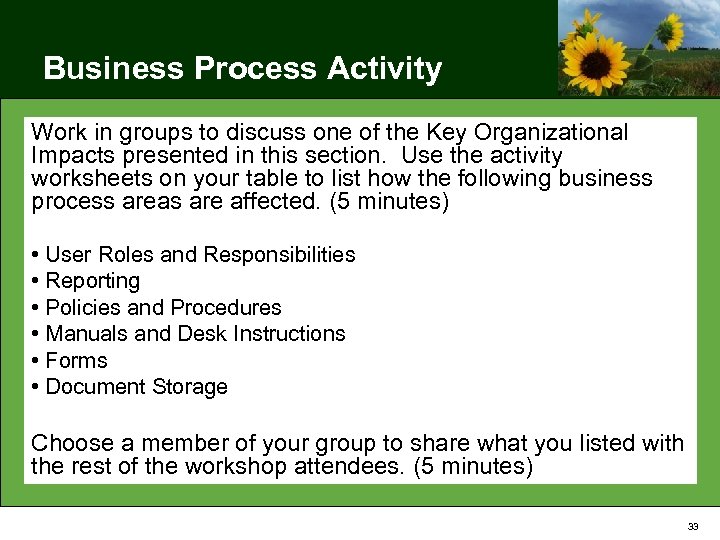
Business Process Activity Work in groups to discuss one of the Key Organizational Impacts presented in this section. Use the activity worksheets on your table to list how the following business process areas are affected. (5 minutes) • User Roles and Responsibilities • Reporting • Policies and Procedures • Manuals and Desk Instructions • Forms • Document Storage Choose a member of your group to share what you listed with the rest of the workshop attendees. (5 minutes) 33
Break Please return in 10 minutes C 34
Creating a Non-PO Voucher 35
Process Definition: Creating a Non-PO Voucher Creating a non-PO voucher is defined as the process by which vendor invoice information is gathered and entered into the system for the purpose of payment not related to a purchase order. 36
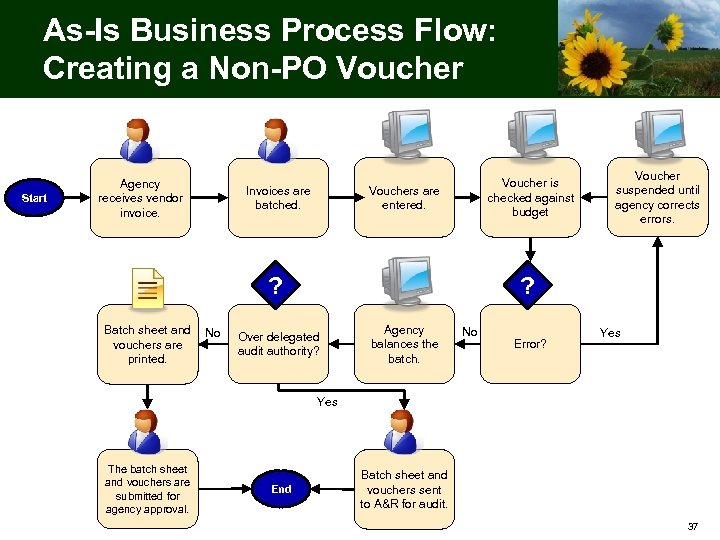
As-Is Business Process Flow: Creating a Non-PO Voucher Start Agency receives vendor invoice. Voucher is checked against budget Vouchers are entered. Invoices are batched. ? Batch sheet and No vouchers are printed. Voucher suspended until agency corrects errors. ? Over delegated audit authority? Agency balances the batch. No Error? Yes The batch sheet and vouchers are submitted for agency approval. End Batch sheet and vouchers sent to A&R for audit. 37
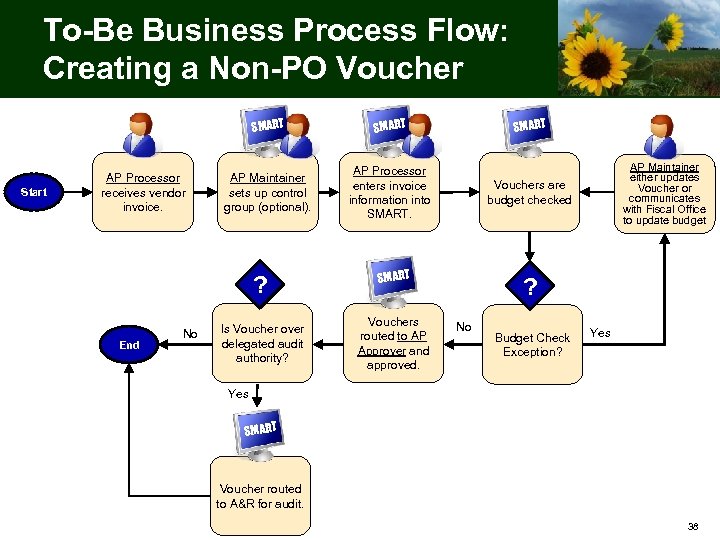
To-Be Business Process Flow: Creating a Non-PO Voucher SMART Start AP Processor receives vendor invoice. SMART AP Maintainer sets up control group (optional). AP Processor enters invoice information into SMART. ? End No Is Voucher over delegated audit authority? SMART Vouchers are budget checked SMART Vouchers routed to AP Approver and approved. AP Maintainer either updates Voucher or communicates with Fiscal Office to update budget ? No Budget Check Exception? Yes SMART Voucher routed to A&R for audit. 38
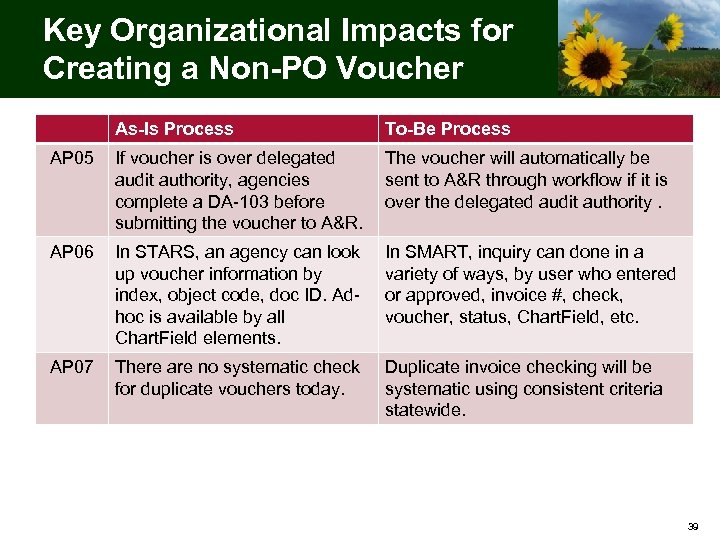
Key Organizational Impacts for Creating a Non-PO Voucher As-Is Process To-Be Process AP 05 If voucher is over delegated audit authority, agencies complete a DA-103 before submitting the voucher to A&R. The voucher will automatically be sent to A&R through workflow if it is over the delegated audit authority. AP 06 In STARS, an agency can look up voucher information by index, object code, doc ID. Adhoc is available by all Chart. Field elements. In SMART, inquiry can done in a variety of ways, by user who entered or approved, invoice #, check, voucher, status, Chart. Field, etc. AP 07 There are no systematic check for duplicate vouchers today. Duplicate invoice checking will be systematic using consistent criteria statewide. 39
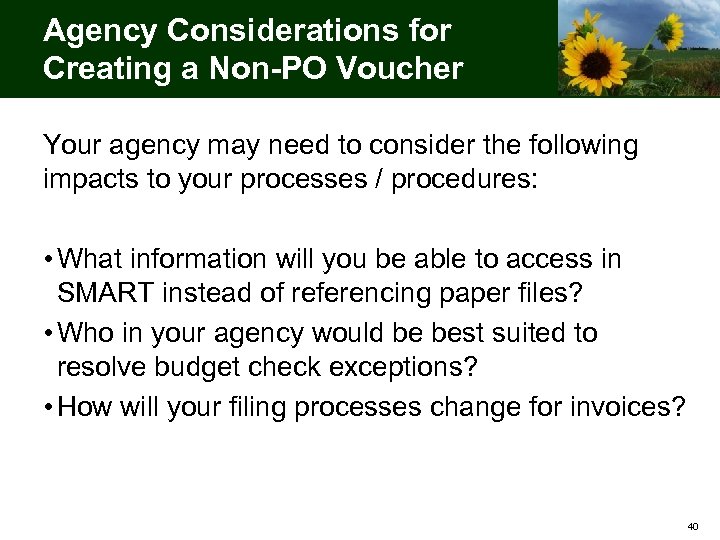
Agency Considerations for Creating a Non-PO Voucher Your agency may need to consider the following impacts to your processes / procedures: • What information will you be able to access in SMART instead of referencing paper files? • Who in your agency would be best suited to resolve budget check exceptions? • How will your filing processes change for invoices? 40
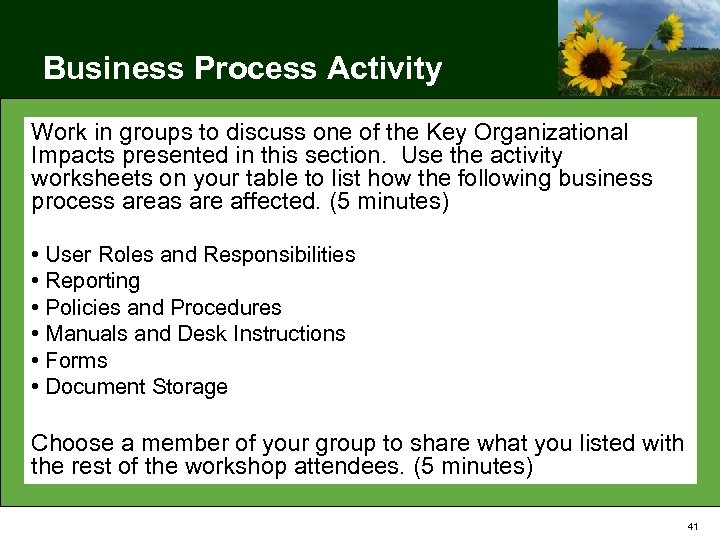
Business Process Activity Work in groups to discuss one of the Key Organizational Impacts presented in this section. Use the activity worksheets on your table to list how the following business process areas are affected. (5 minutes) • User Roles and Responsibilities • Reporting • Policies and Procedures • Manuals and Desk Instructions • Forms • Document Storage Choose a member of your group to share what you listed with the rest of the workshop attendees. (5 minutes) 41
Creating a PO Voucher 42
Process Definition: Creating a PO Voucher Creating a PO voucher is defined as the process by which vendor invoice information is gathered and entered into the system for the purpose of payment associated with a PO. PO vouchers are “matched” in SMART with the associated PO and receipt. This helps assure the validity and correctness of transactions and payments. 43
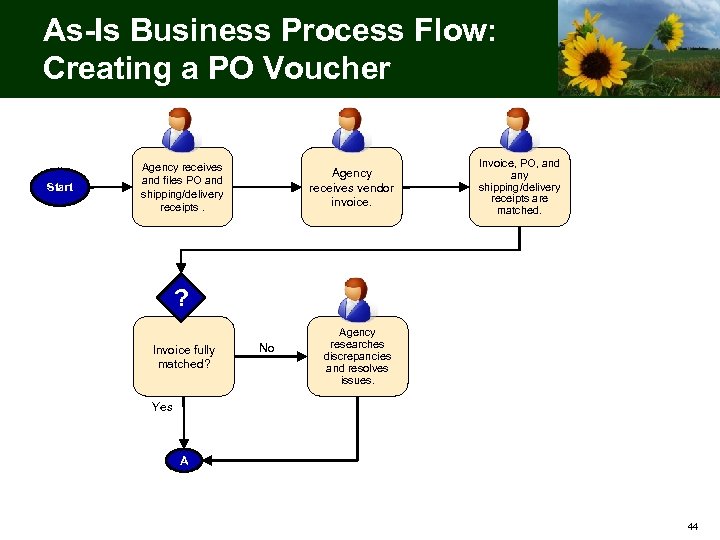
As-Is Business Process Flow: Creating a PO Voucher Start Agency receives and files PO and shipping/delivery receipts. Agency receives vendor invoice. Invoice, PO, and any shipping/delivery receipts are matched. ? Invoice fully matched? No Agency researches discrepancies and resolves issues. Yes A 44
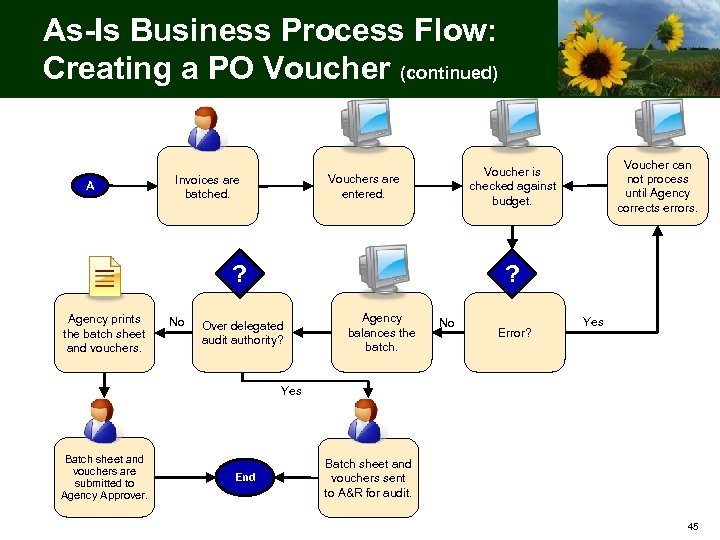
As-Is Business Process Flow: Creating a PO Voucher (continued) A ? Agency prints the batch sheet and vouchers. No Voucher can not process until Agency corrects errors. Voucher is checked against budget. Vouchers are entered. Invoices are batched. ? Over delegated audit authority? Agency balances the batch. No Error? Yes Batch sheet and vouchers are submitted to Agency Approver. End Batch sheet and vouchers sent to A&R for audit. 45
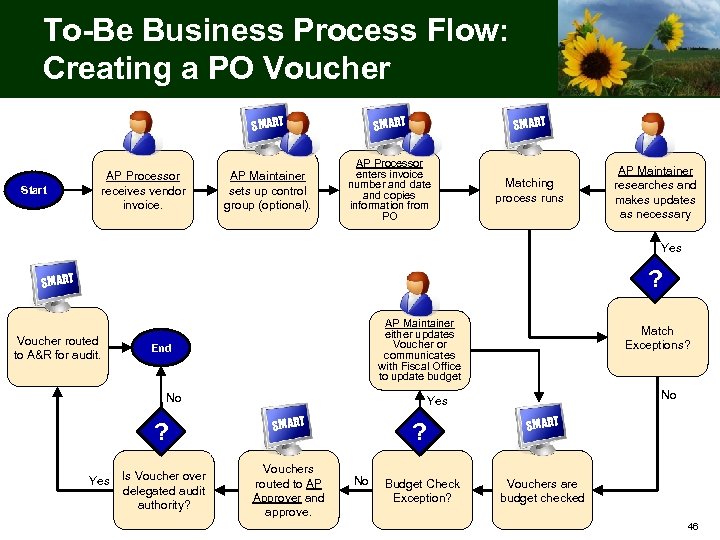
To-Be Business Process Flow: Creating a PO Voucher SMART Start AP Processor receives vendor invoice. SMART AP Maintainer sets up control group (optional). AP Processor enters invoice number and date and copies information from PO Matching process runs AP Maintainer researches and makes updates as necessary Yes ? SMART Voucher routed to A&R for audit. AP Maintainer either updates Voucher or communicates with Fiscal Office to update budget End No ? Yes Is Voucher over delegated audit authority? Match Exceptions? No Yes SMART Vouchers routed to AP Approver and approve. ? No Budget Check Exception? SMART Vouchers are budget checked 46
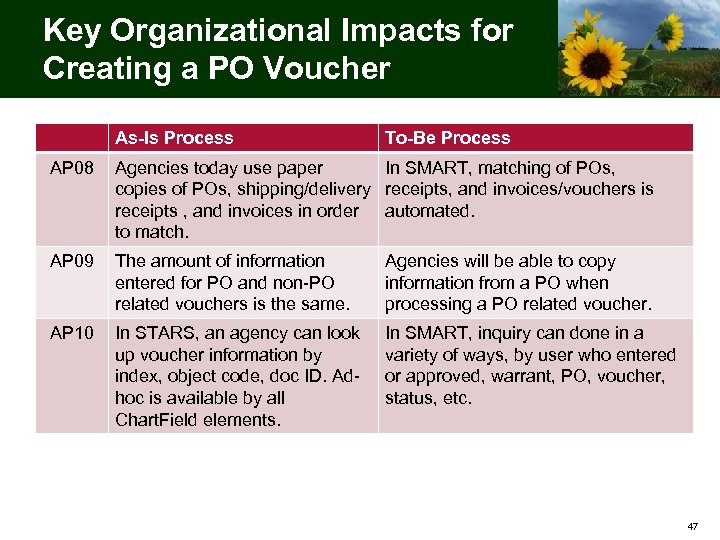
Key Organizational Impacts for Creating a PO Voucher As-Is Process To-Be Process AP 08 Agencies today use paper In SMART, matching of POs, copies of POs, shipping/delivery receipts, and invoices/vouchers is receipts , and invoices in order automated. to match. AP 09 The amount of information entered for PO and non-PO related vouchers is the same. Agencies will be able to copy information from a PO when processing a PO related voucher. AP 10 In STARS, an agency can look up voucher information by index, object code, doc ID. Adhoc is available by all Chart. Field elements. In SMART, inquiry can done in a variety of ways, by user who entered or approved, warrant, PO, voucher, status, etc. 47
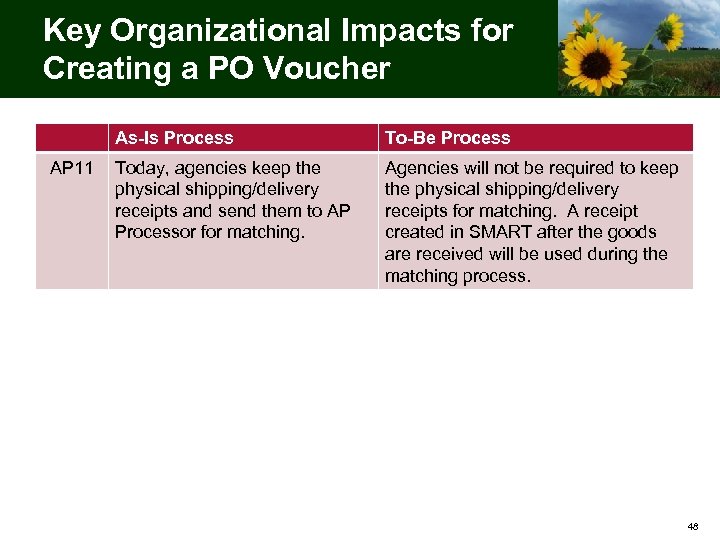
Key Organizational Impacts for Creating a PO Voucher As-Is Process AP 11 To-Be Process Today, agencies keep the physical shipping/delivery receipts and send them to AP Processor for matching. Agencies will not be required to keep the physical shipping/delivery receipts for matching. A receipt created in SMART after the goods are received will be used during the matching process. 48
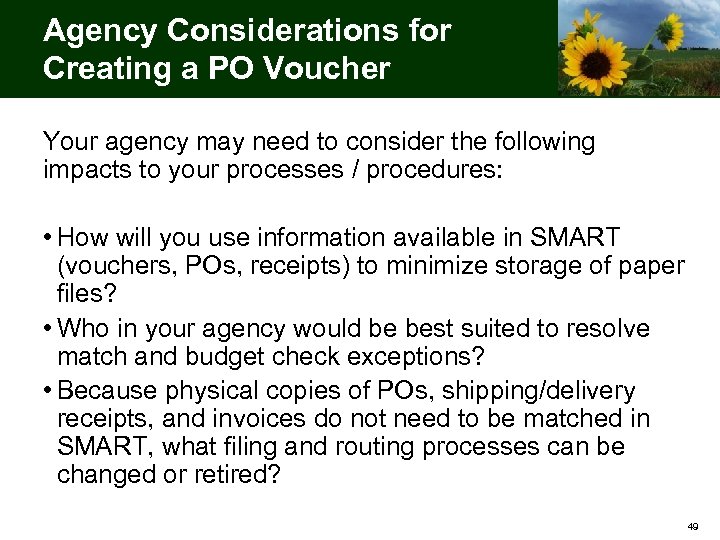
Agency Considerations for Creating a PO Voucher Your agency may need to consider the following impacts to your processes / procedures: • How will you use information available in SMART (vouchers, POs, receipts) to minimize storage of paper files? • Who in your agency would be best suited to resolve match and budget check exceptions? • Because physical copies of POs, shipping/delivery receipts, and invoices do not need to be matched in SMART, what filing and routing processes can be changed or retired? 49
Approving a Voucher 50
Process Definition: Approving a Voucher Approving a voucher is defined as the audit and approval process to verify the information on the voucher is correct. 51
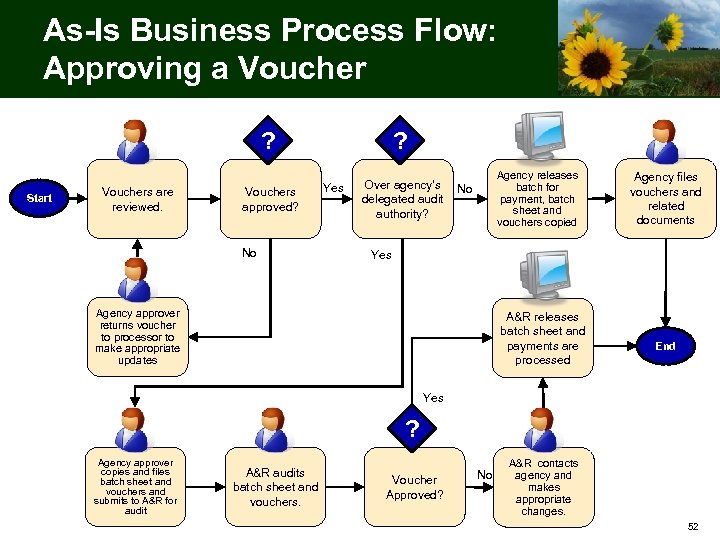
As-Is Business Process Flow: Approving a Voucher ? Start Vouchers are reviewed. Vouchers approved? No ? Yes Agency releases batch for payment, batch sheet and vouchers copied Over agency’s No delegated audit authority? Agency files vouchers and related documents Yes Agency approver returns voucher to processor to make appropriate updates A&R releases batch sheet and payments are processed End Yes ? Agency approver copies and files batch sheet and vouchers and submits to A&R for audit A&R audits batch sheet and vouchers. Voucher Approved? No A&R contacts agency and makes appropriate changes. 52
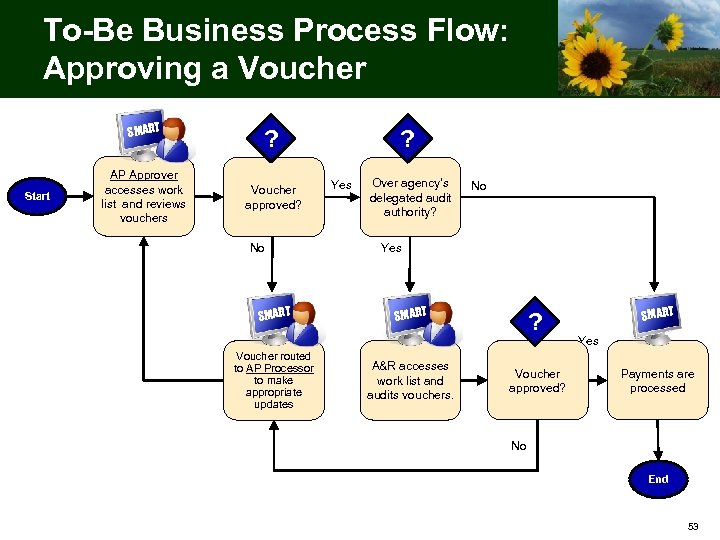
To-Be Business Process Flow: Approving a Voucher SMART Start AP Approver accesses work list and reviews vouchers ? Voucher approved? No SMART Voucher routed to AP Processor to make appropriate updates ? Yes Over agency’s delegated audit authority? No Yes SMART A&R accesses work list and audits vouchers. ? Voucher approved? SMART Yes Payments are processed No End 53
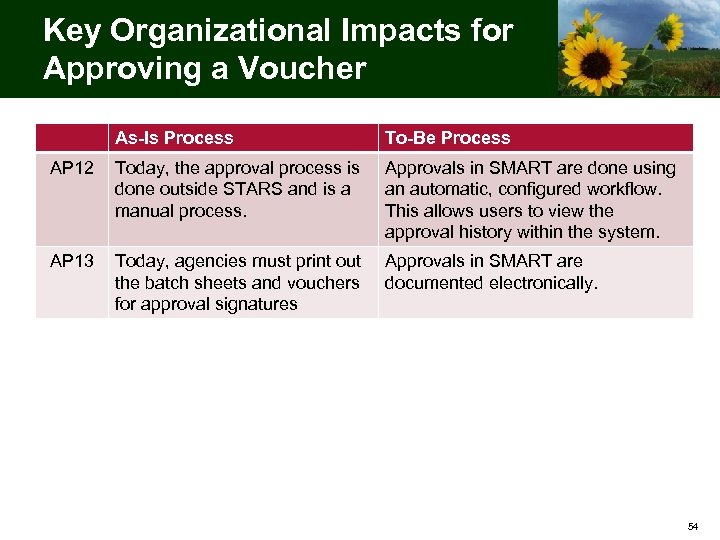
Key Organizational Impacts for Approving a Voucher As-Is Process To-Be Process AP 12 Today, the approval process is done outside STARS and is a manual process. Approvals in SMART are done using an automatic, configured workflow. This allows users to view the approval history within the system. AP 13 Today, agencies must print out the batch sheets and vouchers for approval signatures Approvals in SMART are documented electronically. 54
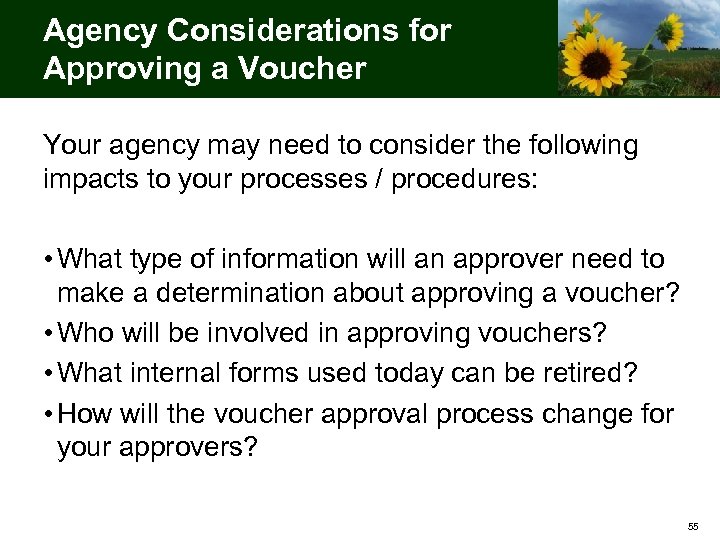
Agency Considerations for Approving a Voucher Your agency may need to consider the following impacts to your processes / procedures: • What type of information will an approver need to make a determination about approving a voucher? • Who will be involved in approving vouchers? • What internal forms used today can be retired? • How will the voucher approval process change for your approvers? 55
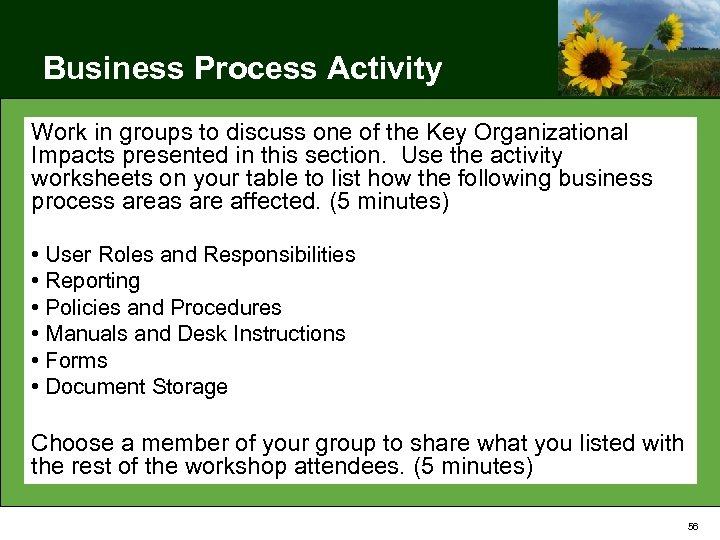
Business Process Activity Work in groups to discuss one of the Key Organizational Impacts presented in this section. Use the activity worksheets on your table to list how the following business process areas are affected. (5 minutes) • User Roles and Responsibilities • Reporting • Policies and Procedures • Manuals and Desk Instructions • Forms • Document Storage Choose a member of your group to share what you listed with the rest of the workshop attendees. (5 minutes) 56

Travel & Expense 57
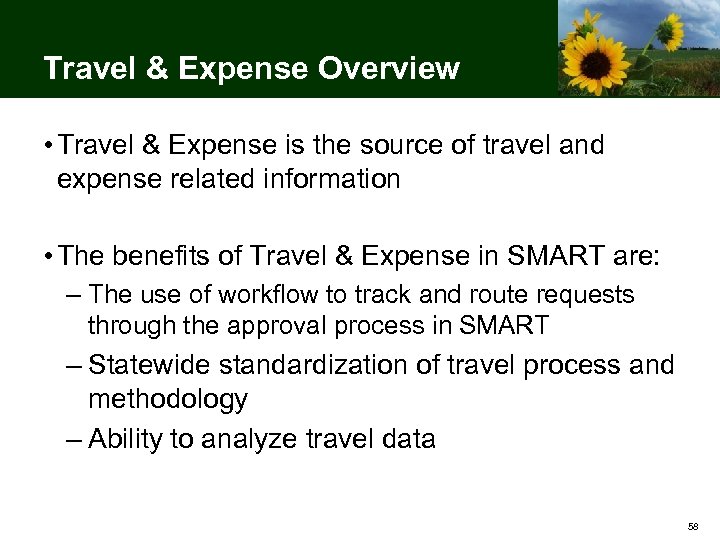
Travel & Expense Overview • Travel & Expense is the source of travel and expense related information • The benefits of Travel & Expense in SMART are: – The use of workflow to track and route requests through the approval process in SMART – Statewide standardization of travel process and methodology – Ability to analyze travel data 58
Travel & Expense Processes This section includes the following processes: • Processing travel authorization • Processing an expense report 59
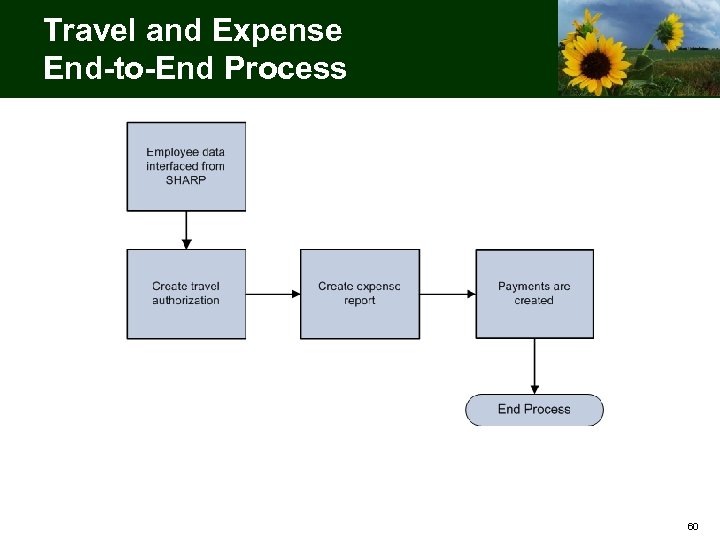
Travel and Expense End-to-End Process 60
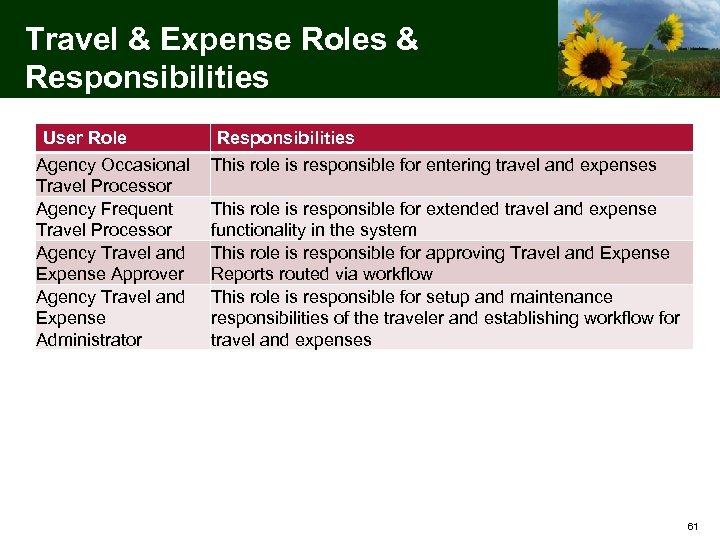
Travel & Expense Roles & Responsibilities User Role Agency Occasional Travel Processor Agency Frequent Travel Processor Agency Travel and Expense Approver Agency Travel and Expense Administrator Responsibilities This role is responsible for entering travel and expenses This role is responsible for extended travel and expense functionality in the system This role is responsible for approving Travel and Expense Reports routed via workflow This role is responsible for setup and maintenance responsibilities of the traveler and establishing workflow for travel and expenses 61
Processing Travel Authorization 62
Process Definition: Processing Travel Authorization Processing travel authorization is defined as entering, reviewing, and approving of travel requests and related expenses. 63
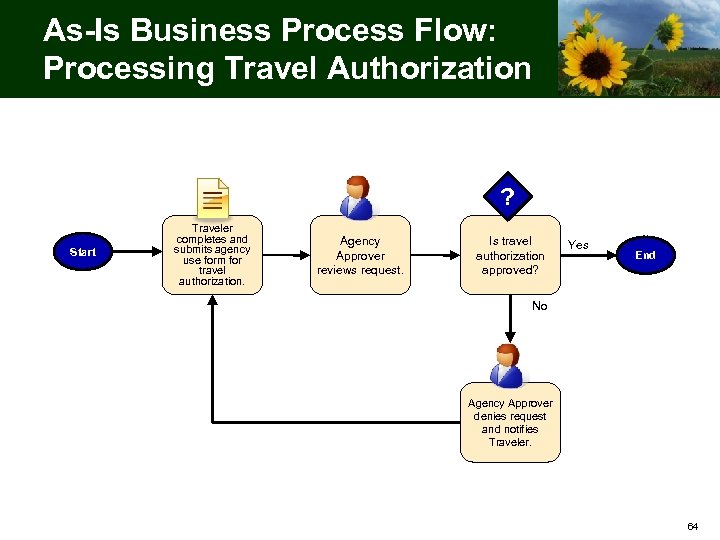
As-Is Business Process Flow: Processing Travel Authorization ? Start Traveler completes and submits agency use form for travel authorization. Agency Approver reviews request. Is travel authorization approved? Yes End No Agency Approver denies request and notifies Traveler. 64
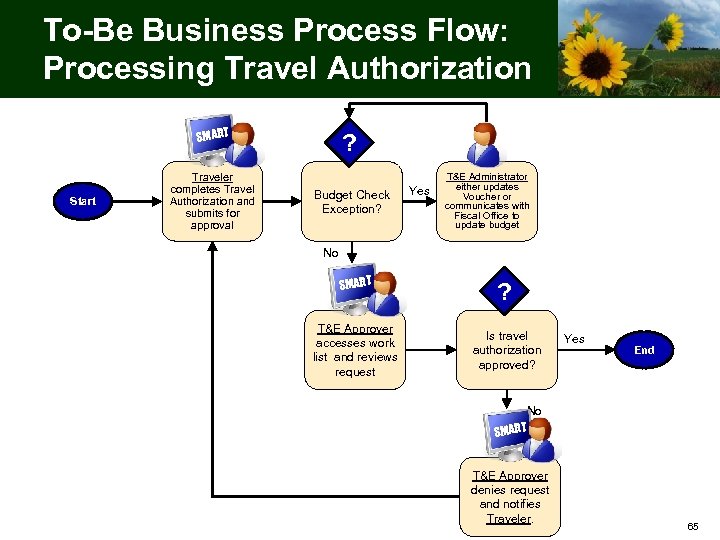
To-Be Business Process Flow: Processing Travel Authorization SMART Start Traveler completes Travel Authorization and submits for approval ? Budget Check Exception? Yes T&E Administrator either updates Voucher or communicates with Fiscal Office to update budget No SMART T&E Approver accesses work list and reviews request ? Is travel authorization approved? Yes End No SMART T&E Approver denies request and notifies Traveler. 65
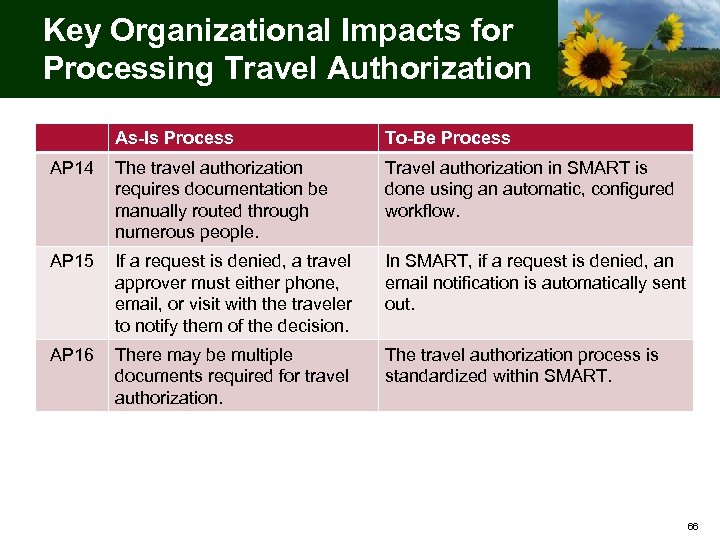
Key Organizational Impacts for Processing Travel Authorization As-Is Process To-Be Process AP 14 The travel authorization requires documentation be manually routed through numerous people. Travel authorization in SMART is done using an automatic, configured workflow. AP 15 If a request is denied, a travel approver must either phone, email, or visit with the traveler to notify them of the decision. In SMART, if a request is denied, an email notification is automatically sent out. AP 16 There may be multiple documents required for travel authorization. The travel authorization process is standardized within SMART. 66
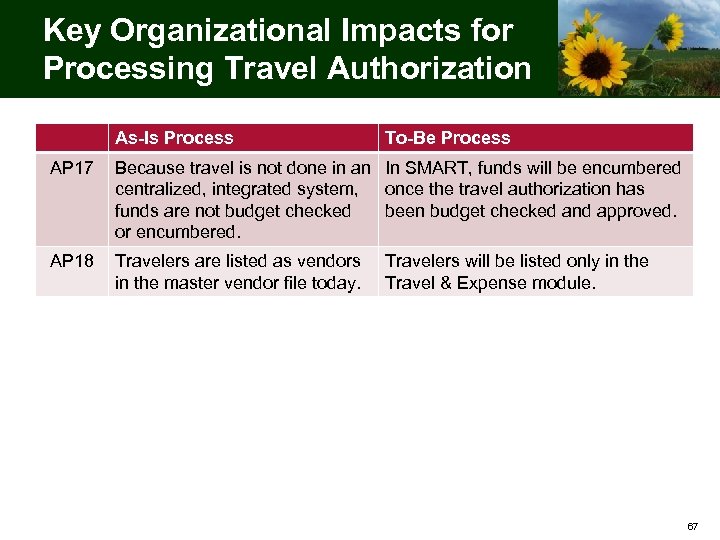
Key Organizational Impacts for Processing Travel Authorization As-Is Process To-Be Process AP 17 Because travel is not done in an In SMART, funds will be encumbered centralized, integrated system, once the travel authorization has funds are not budget checked been budget checked and approved. or encumbered. AP 18 Travelers are listed as vendors in the master vendor file today. Travelers will be listed only in the Travel & Expense module. 67
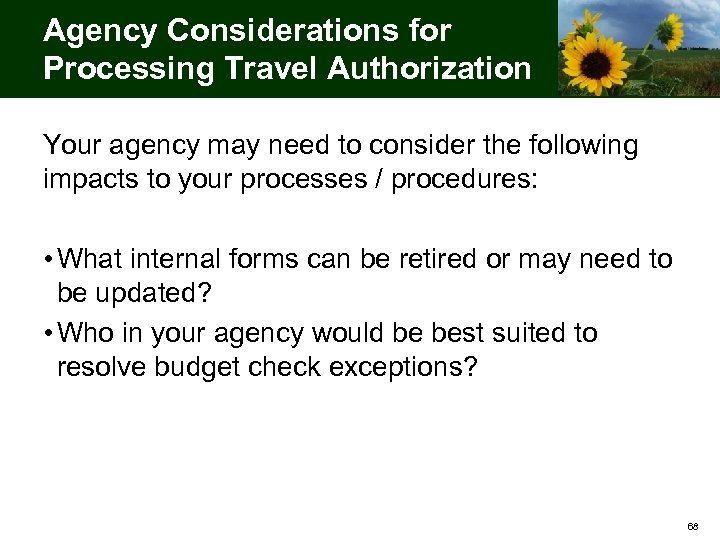
Agency Considerations for Processing Travel Authorization Your agency may need to consider the following impacts to your processes / procedures: • What internal forms can be retired or may need to be updated? • Who in your agency would be best suited to resolve budget check exceptions? 68
Processing an Expense Report 69
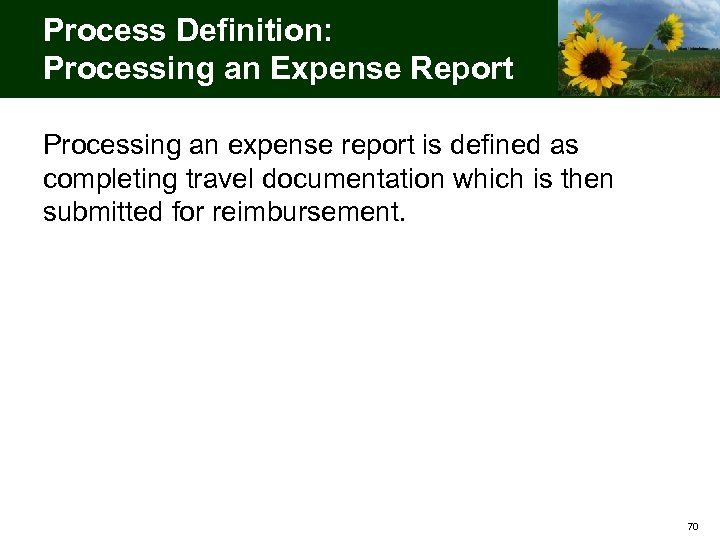
Process Definition: Processing an Expense Report Processing an expense report is defined as completing travel documentation which is then submitted for reimbursement. 70
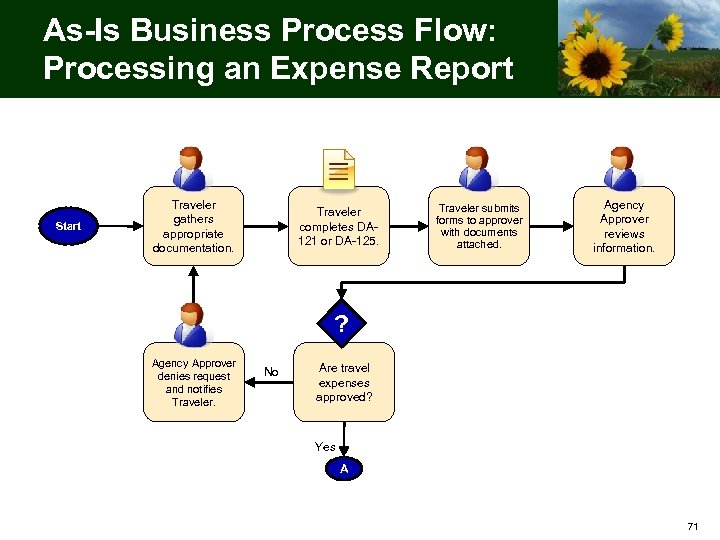
As-Is Business Process Flow: Processing an Expense Report Start Traveler gathers appropriate documentation. Traveler completes DA 121 or DA-125. Traveler submits forms to approver with documents attached. Agency Approver reviews information. ? Agency Approver denies request and notifies Traveler. No Are travel expenses approved? Yes A 71
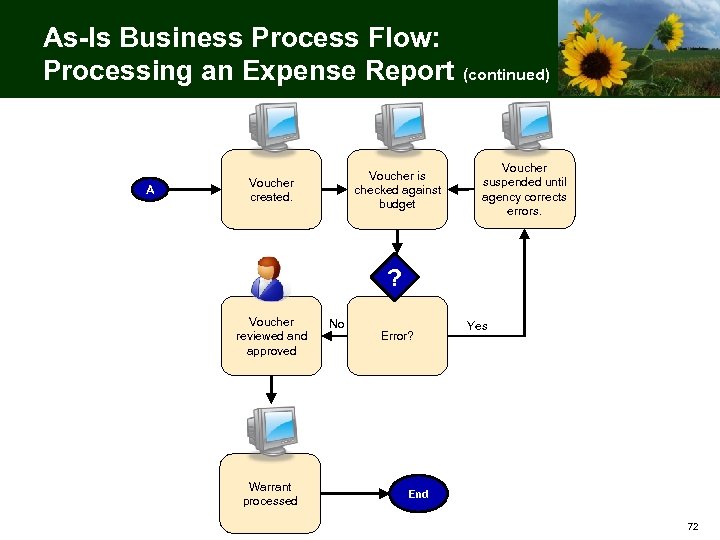
As-Is Business Process Flow: Processing an Expense Report (continued) A Voucher is checked against budget Voucher created. Voucher suspended until agency corrects errors. ? Voucher reviewed and approved Warrant processed No Error? Yes End 72
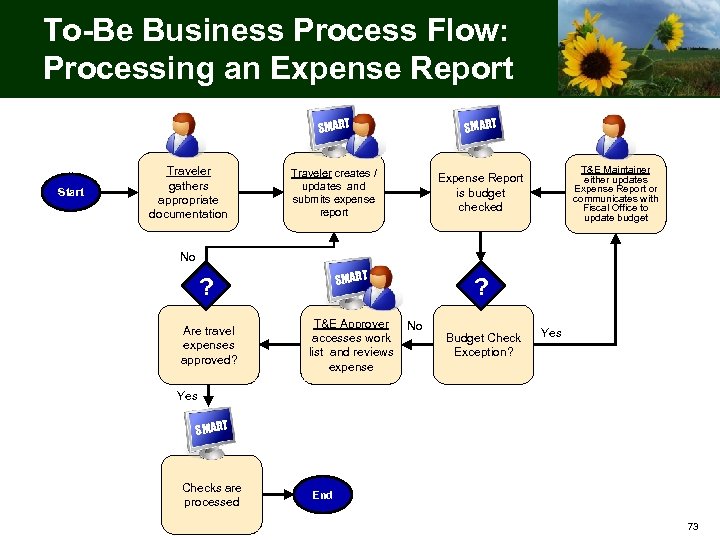
To-Be Business Process Flow: Processing an Expense Report SMART Start Traveler gathers appropriate documentation SMART Traveler creates / updates and submits expense report Expense Report is budget checked T&E Maintainer either updates Expense Report or communicates with Fiscal Office to update budget No SMART ? Are travel expenses approved? T&E Approver No accesses work list and reviews expense ? Budget Check Exception? Yes SMART Checks are processed End 73
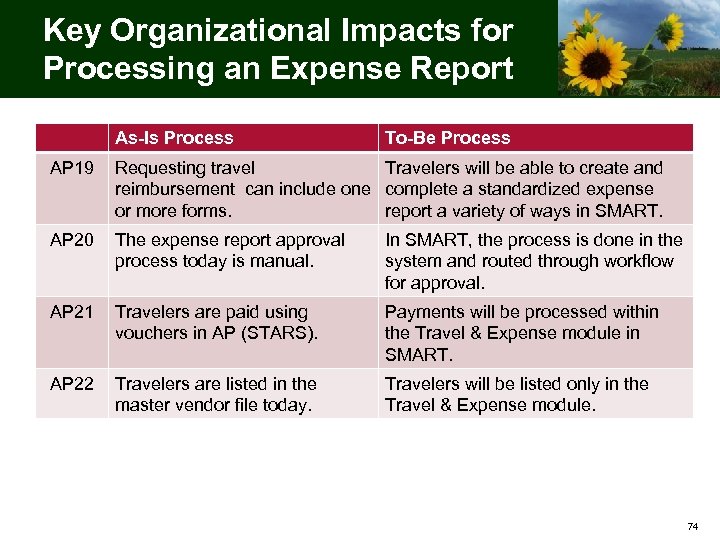
Key Organizational Impacts for Processing an Expense Report As-Is Process To-Be Process AP 19 Requesting travel Travelers will be able to create and reimbursement can include one complete a standardized expense or more forms. report a variety of ways in SMART. AP 20 The expense report approval process today is manual. In SMART, the process is done in the system and routed through workflow for approval. AP 21 Travelers are paid using vouchers in AP (STARS). Payments will be processed within the Travel & Expense module in SMART. AP 22 Travelers are listed in the master vendor file today. Travelers will be listed only in the Travel & Expense module. 74
Agency Considerations for Processing an Expense Report Your agency may need to consider the following impacts to your processes / procedures: • What internal forms can be retired or need to be updated? 75
Business Process Activity Work in groups to discuss one of the Key Organizational Impacts presented in this section. Use the activity worksheets on your table to list how the following business process areas are affected. (5 minutes) • User Roles and Responsibilities • Reporting • Policies and Procedures • Manuals and Desk Instructions • Forms • Document Storage Choose a member of your group to share what you listed with the rest of the workshop attendees. (5 minutes) 76
Break Please return in 10 minutes C 77
Agency Impact Analysis 78
Agency Impact Analysis Task (Task ID 30) • This is an opportunity to apply this workshop’s content to your agency’s unique business processes • Compare your agency’s current processes and practices (as-is) to the SMART (to-be) business processes • Consider whether each of the identified impacts affects your agency and to what extent 79
Agency Impact Analysis Task (Task ID 30) • Each agency completes its own impact analysis • Complete the Agency Impact Analysis spreadsheet and return to Sunflower Project within one month of this BPW session • Contact your Agency Readiness Liaison with questions as needed 80
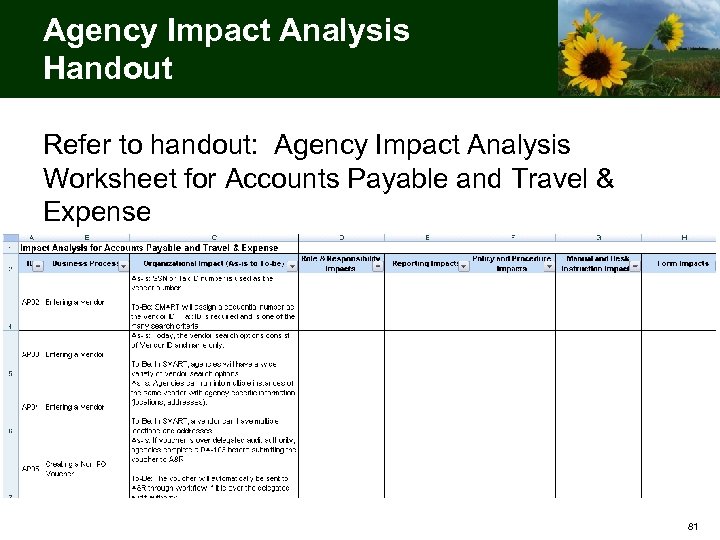
Agency Impact Analysis Handout Refer to handout: Agency Impact Analysis Worksheet for Accounts Payable and Travel & Expense 81
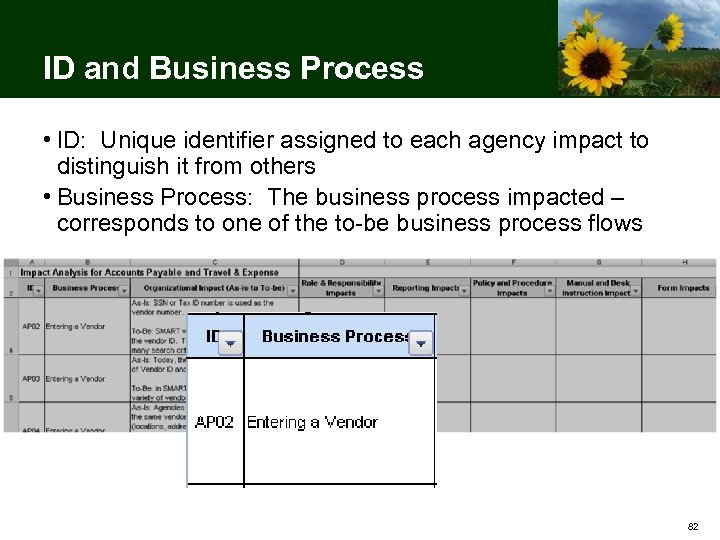
ID and Business Process • ID: Unique identifier assigned to each agency impact to distinguish it from others • Business Process: The business process impacted – corresponds to one of the to-be business process flows 82
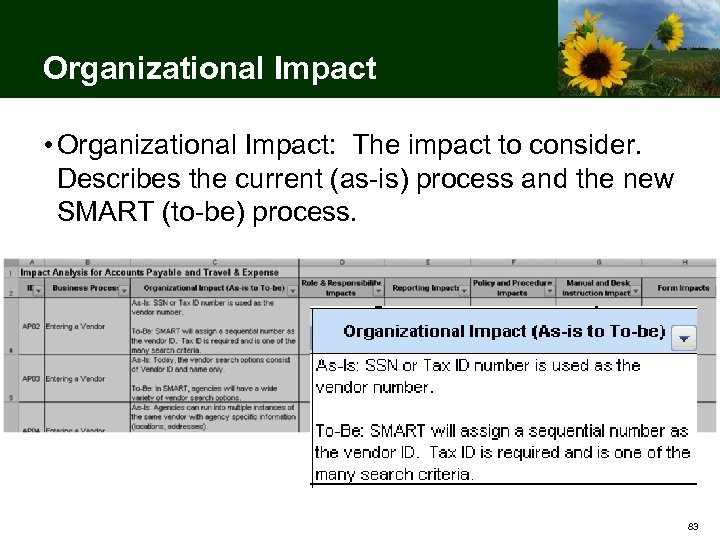
Organizational Impact • Organizational Impact: The impact to consider. Describes the current (as-is) process and the new SMART (to-be) process. 83
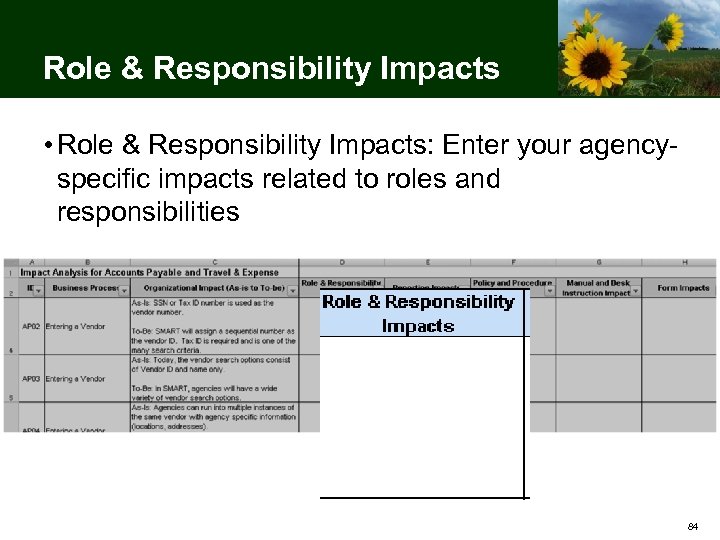
Role & Responsibility Impacts • Role & Responsibility Impacts: Enter your agencyspecific impacts related to roles and responsibilities 84
Role & Responsibility Considerations • Review your agency’s current roles and responsibilities relating to impacted business processes • Review SMART user roles to determine whether any of your agency’s roles are impacted – Accounts Payable and Travel & Expense user roles are listed in the “Context for Accounts Payable and Travel & Expense” section of this presentation • Consider how your agency may be best organized post golive to carry out business functions using SMART business processes and user roles – Refer to to-be business process flows in this presentation • Consider how and when you will communicate these changes to affected staff Comprehensive SMART user role mapping activities will occur in the winter 85
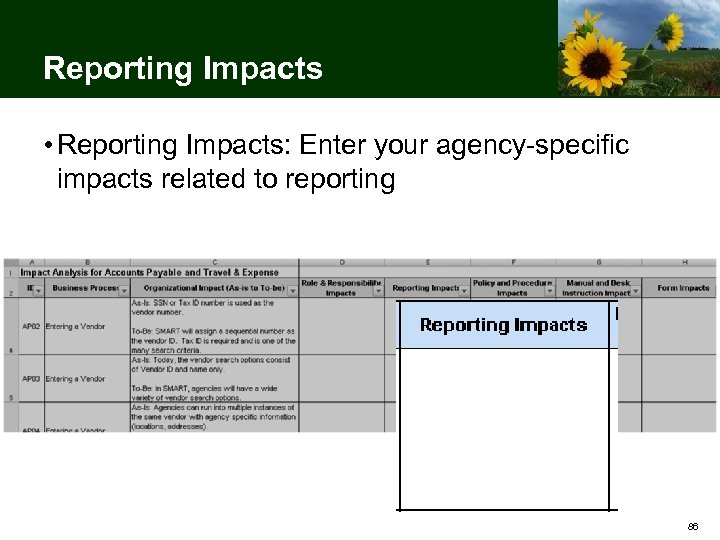
Reporting Impacts • Reporting Impacts: Enter your agency-specific impacts related to reporting 86
Reporting Considerations • Review the reports your agency currently receives or generates and uses regarding Purchasing • Consider how your reporting needs may change based on the integration of data within SMART As mentioned at CAN 4, there will be an additional agency reporting needs analysis task. 87
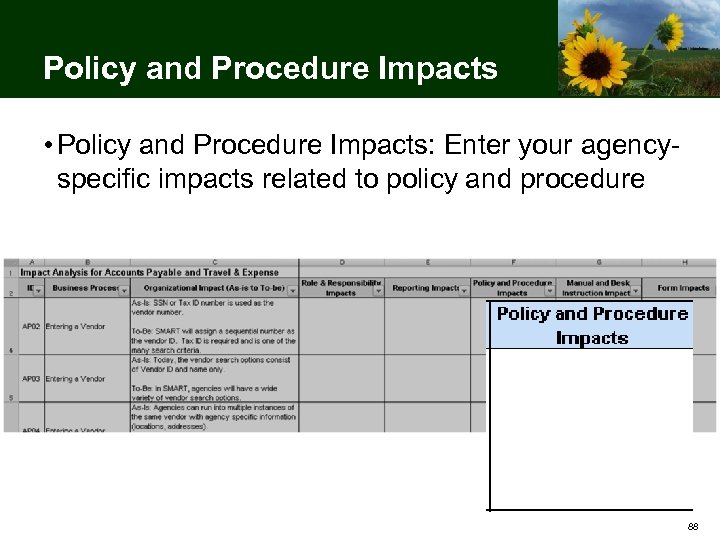
Policy and Procedure Impacts • Policy and Procedure Impacts: Enter your agencyspecific impacts related to policy and procedure 88
Policy and Procedure Considerations • Identify the policies and procedures relating to impacted financial processes that your agency owns and maintains • Review SMART business process flows to determine whether any of these policies are impacted • Determine which policies and procedures your agency will need to update or retire • Update or retire selected policies and procedures • Review informational circulars provided by Accounts and Reports and other central agencies for potential impacts to agency processes • Consider how and when you will communicate these changes to affected staff 89
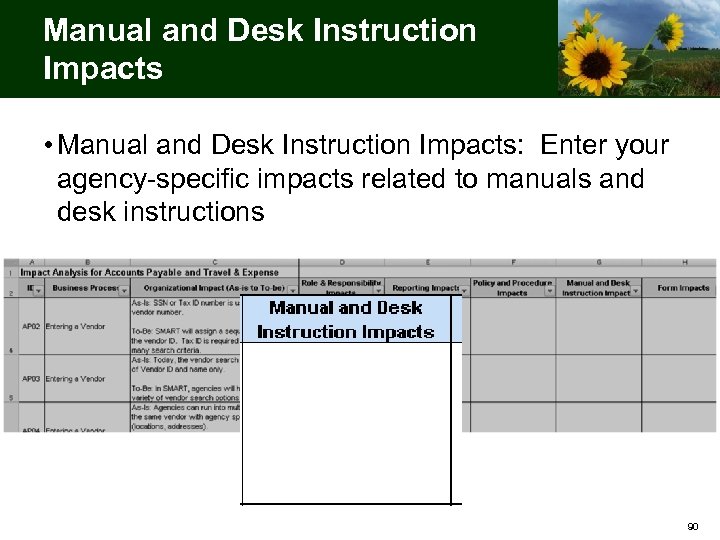
Manual and Desk Instruction Impacts • Manual and Desk Instruction Impacts: Enter your agency-specific impacts related to manuals and desk instructions 90
Manual and Desk Instruction Considerations • Identify the manuals and desk instructions relating to impacted financial processes that your agency owns and maintains • Review SMART business process flows to determine whether any of these manuals and desk instructions are impacted • Determine which manuals and desk instructions your agency will need to update or retire • Update or retire selected manuals and desk instructions • Consider how and when you will communicate these changes to affected staff 91
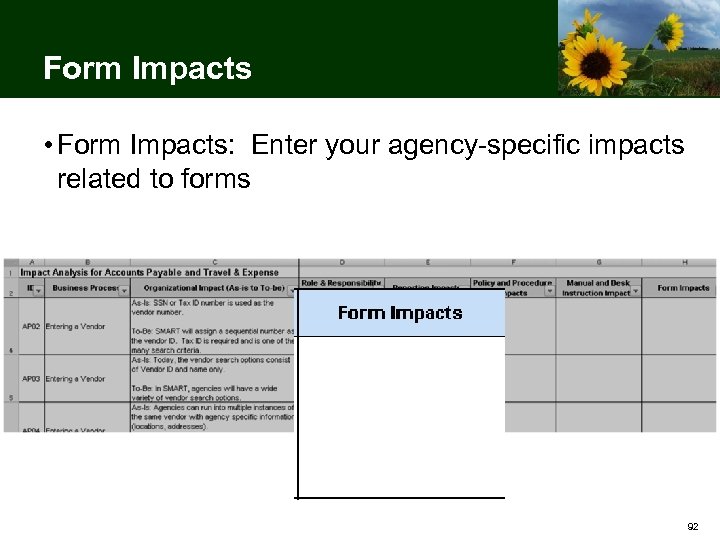
Form Impacts • Form Impacts: Enter your agency-specific impacts related to forms 92
Form Considerations • Identify the forms relating to impacted financial processes that your agency owns and maintains • Review SMART business process flows to determine whether any of these forms are impacted • Review any new or updated central forms relating to these processes as they become available • Determine which forms your agency owns and maintains will need to be updated or retired • Update or retire selected forms • Consider how and when you will communicate these changes to affected staff 93
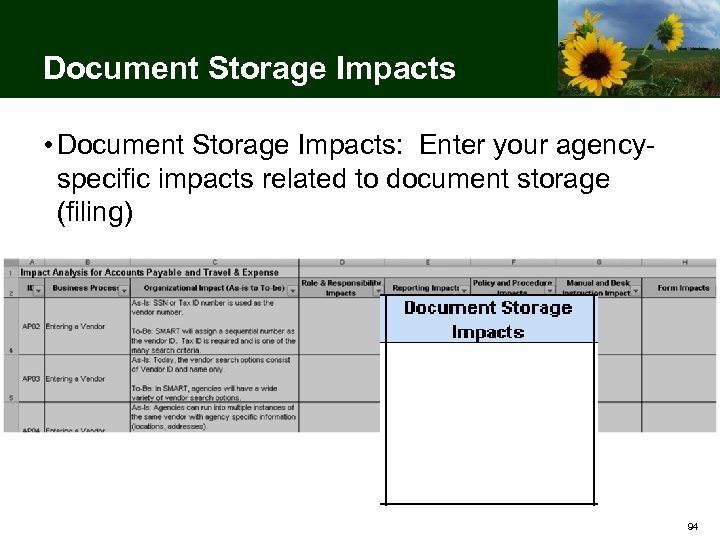
Document Storage Impacts • Document Storage Impacts: Enter your agencyspecific impacts related to document storage (filing) 94
Document Storage Considerations • Review the document storage procedures your agency follows relating to impacted financial processes • Review SMART business process flows to determine whether any of these document storage procedures are impacted • Determine which document storage procedures your agency will need to change or retire • Change or retire selected document storage procedures • Consider how and when you will communicate these changes to affected staff 95
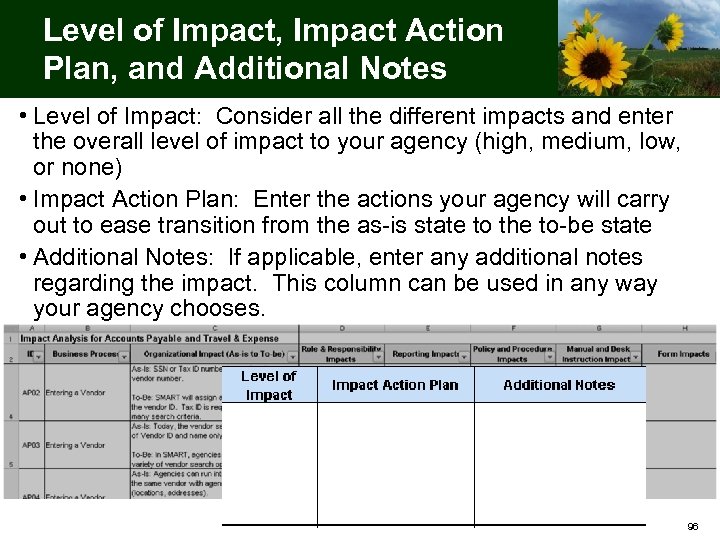
Level of Impact, Impact Action Plan, and Additional Notes • Level of Impact: Consider all the different impacts and enter the overall level of impact to your agency (high, medium, low, or none) • Impact Action Plan: Enter the actions your agency will carry out to ease transition from the as-is state to the to-be state • Additional Notes: If applicable, enter any additional notes regarding the impact. This column can be used in any way your agency chooses. 96
Business Process Activity Work in groups to select one or two impacts listed in the Agency Impact Analysis spreadsheet Begin completing the spreadsheet by filling in agencyspecific details Points for discussion: – Who will you need to meet with at your agency to complete the Agency Impact Analysis? – How will you communicate and implement business process changes you identify? (15 minutes) 97
Agency Impact Analysis Task Next Steps • Complete the Agency Impact Analysis spreadsheet and return to the Sunflower Project (sunflowerfms@da. ks. gov) within one month of this workshop session • Contact your Agency Readiness Liaison with questions as needed 98
BPW Wrap-Up 99
Project Resources • Sunflower Project website (Agency Impact Analysis spreadsheet located on the CAN tab): http: //www. da. ks. gov/smart/ • Sunflower Project Email Address: sunflowerfms@da. ks. gov • Sunflower Project List-serv – Sunflower Infolist – Subscribe at http: //www. da. ks. gov/smart/ • Sunflower Project Site: Sunflower Project, 915 SW Harrison, Room 1181, Topeka, Kansas 66612 100
Questions? 101
Please Share Your Feedback Registered participants will receive a communication containing the URL to an online evaluation form for this Business Process Workshop Thank You for Participating! 102
Скачать презентацию Sunflower Project Business Process Workshop Accounts Payable and
92ed5e0d22168bfbc090eaae088406ea.ppt