


 Скачать презентацию Storing Data Disk Organization and I O Yea from
7ba1040e9a572f5c0389916861f5ed1f.ppt
- Количество слайдов: 14
 Storing Data: Disk Organization and I/O “Yea, from the table of my memory I’ll wipe away all trivial fond records. ” -- Shakespeare, Hamlet 1
 Disks DBMS stores information on (“hard”) disks. v This has major implications for DBMS design! v – READ: transfer data from disk to main memory (RAM). – WRITE: transfer data from RAM to disk. – Both are high-cost operations, relative to in-memory operations, so must be planned carefully! 2
 Why Not Store Everything in Main Memory? Costs too much. $1000 will buy you over 128 MB of RAM or 7. 5 GB of disk today. v Main memory is volatile. We want data to be saved between runs. (Obviously!) v Typical storage hierarchy: v – Main memory (RAM) for currently used data. – Disk for the main database (secondary storage). – Tapes for archiving older versions of the data (tertiary storage). 3
 Disks Secondary storage device of choice. v Main advantage over tapes: random access vs. sequential. v Data is stored and retrieved in units called disk blocks or pages. v Unlike RAM, time to retrieve a disk page varies depending upon location on disk. v – Therefore, relative placement of pages on disk has major impact on DBMS performance! 4
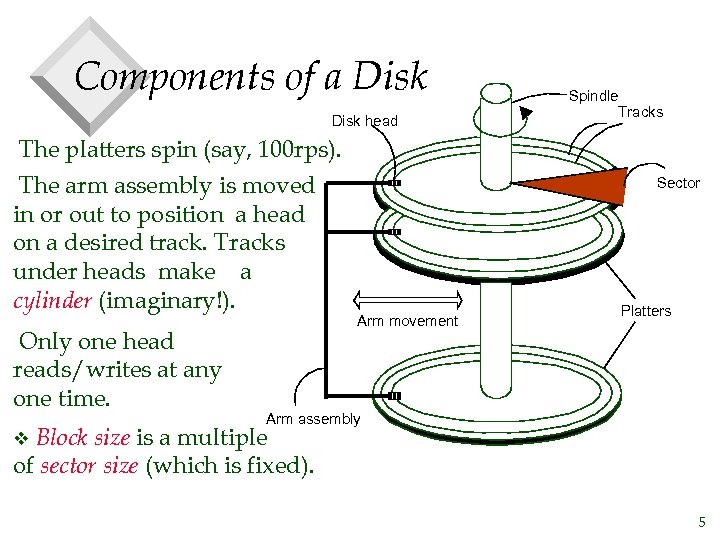 Components of a Disk head The platters spin (say, 100 rps). The arm assembly is moved in or out to position a head on a desired track. Tracks under heads make a cylinder (imaginary!). Only one head reads/writes at any one time. Spindle Tracks Sector Arm movement Platters Arm assembly Block size is a multiple of sector size (which is fixed). v 5
 Accessing a Disk Page v Time to access (read/write) a disk block: – seek time (moving arms to position disk head on track) – rotational delay (waiting for block to rotate under head) u often called “rotational latency” – transfer time (actually moving data to/from disk surface) v Seek time and rotational delay dominate. – Seek time varies from about 1 to 20 msec – Rotational delay varies from 0 to 10 msec – Transfer rate is about 1 msec per 4 KB page v Key to lower I/O cost: reduce seek/rotation delays! Hardware vs. software solutions? 6
 Arranging Pages on Disk v `Next’ block concept: – blocks on same track, followed by – blocks on same cylinder, followed by – blocks on adjacent cylinder Blocks in a file should be arranged sequentially on disk (by `next’), to minimize seek and rotational delay. v For a sequential scan, pre-fetching several pages at a time is a big win! v 7
 Disk Space Management Lowest layer of DBMS software manages space on disk. v Higher levels call upon this layer to: v – allocate/de-allocate a page – read/write a page v One such “higher level” is the buffer manager, which receives a request to bring a page into memory and then, if needed, requests the disk space layer to read the page into the buffer pool. 8
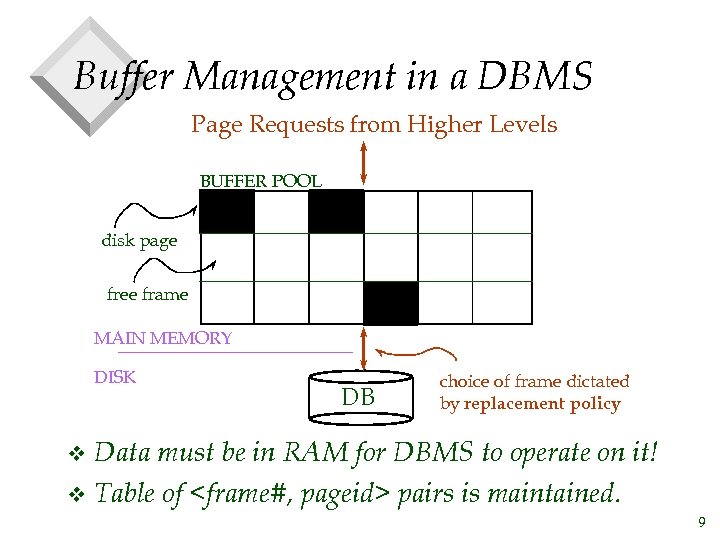 Buffer Management in a DBMS Page Requests from Higher Levels BUFFER POOL disk page free frame MAIN MEMORY DISK DB choice of frame dictated by replacement policy Data must be in RAM for DBMS to operate on it! v Table of
 When a Page is Requested. . . v If requested page is not in pool: – Choose an unpinned frame for replacement; pin_count : = 1 – If frame is dirty, write it to disk – Read requested page into chosen frame v Else: – increment pin_count v Return its address. * If requests can be predicted (e. g. , sequential scans) pages can be pre-fetched several pages at a time! 10
 More on Buffer Management v Requestor of page must unpin it, and indicate whether page has been modified: – dirty bit is used for this. v Page in pool may be requested many times: – a pin count is used. A page is a candidate for replacement iff pin count = 0. v CC & recovery may entail additional I/O when a frame is chosen for replacement. (Write-Ahead Log protocol; more later. ) 11
 Buffer Replacement Policy v Frame is chosen for replacement by a replacement policy: – Least-recently-used (LRU), Clock, MRU, etc. Policy can have big impact on # of I/O’s; depends on the access pattern. v Sequential flooding: Nasty situation caused by LRU + repeated sequential scans. v – # buffer frames < # pages in file means each page request causes an I/O. MRU much better in this situation (but not in all situations, of course). 12
 Files of Records v v Page or block is OK when doing I/O, but higher levels of DBMS operate on records, and files of records. FILE: A collection of pages, each containing a collection of records. Must support: – insert/delete/modify record – read a particular record (specified using record id) – scan all records (possibly with some conditions on the records to be retrieved) 13
 Disk and File Summary v Disks provide cheap, non-volatile storage. – Random access, but cost depends on location of page on disk; important to arrange data sequentially to minimize seek and rotation delays. v Buffer manager brings pages into RAM. – Page stays in RAM until released by requestor(s). – Written to disk when frame chosen for replacement (which is after all requestors release the page), or earlier. – Choice of frame to replace based on replacement policy. v File layer keeps track of pages in a file, and 14