


 Скачать презентацию Statistics for Managers Using Microsoft Excel 5 th
0d8863d78ba8866613e871de73a7794e.ppt
- Количество слайдов: 61
 Statistics for Managers Using Microsoft® Excel 5 th Edition Chapter 13 Simple Linear Regression Statistics for Managers Using Microsoft Excel, 5 e © 2008 Prentice-Hall, Inc. Chap 13 -1
 Learning Objectives In this chapter, you learn: § To use regression analysis to predict the value of a dependent variable based on an independent variable § The meaning of the regression coefficients b 0 and b 1 § To evaluate the assumptions of regression analysis and know what to do if the assumptions are violated § To make inferences about the slope § To estimate mean values and predict individual values Statistics for Managers Using Microsoft Excel, 5 e © 2008 Prentice-Hall, Inc. 2
 Correlation vs. Regression § A scatter plot (or scatter diagram) can be used to show the relationship between two numerical variables § Correlation analysis is used to measure strength of the association (linear relationship) between two variables § Correlation is only concerned with strength of the relationship § No causal effect is implied with correlation § Correlation was first presented in Chapter 3 Statistics for Managers Using Microsoft Excel, 5 e © 2008 Prentice-Hall, Inc. 3
 Regression Analysis Regression analysis is used to: § Predict the value of a dependent variable based on the value of at least one independent variable § Explain the impact of changes in an independent variable on the dependent variable Dependent variable: the variable you wish to explain Independent variable: the variable used to explain the dependent variable Statistics for Managers Using Microsoft Excel, 5 e © 2008 Prentice-Hall, Inc. 4
 Simple Linear Regression Model § Only one independent variable, X § Relationship between X and Y is described by a linear function § Changes in Y are related to changes in X Statistics for Managers Using Microsoft Excel, 5 e © 2008 Prentice-Hall, Inc. 5
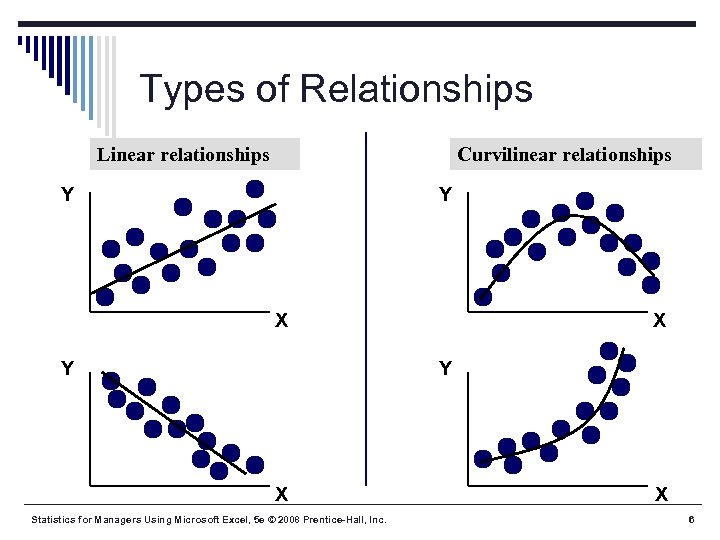 Types of Relationships Linear relationships Curvilinear relationships Y Y X Y X Statistics for Managers Using Microsoft Excel, 5 e © 2008 Prentice-Hall, Inc. X 6
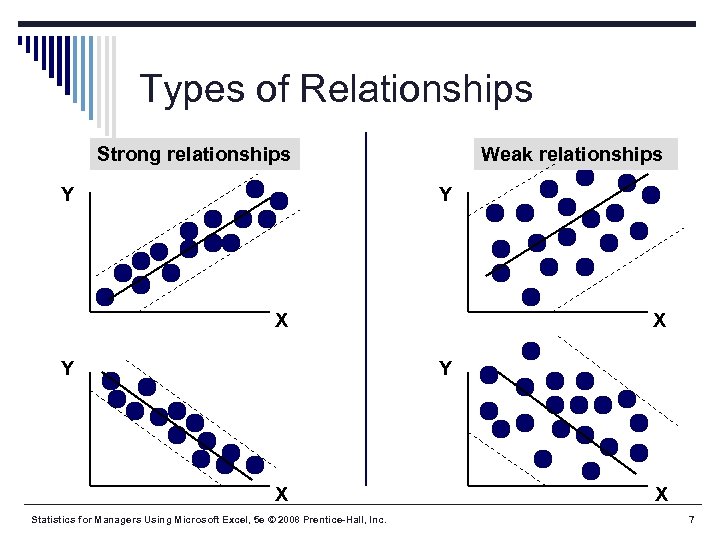 Types of Relationships Strong relationships Y Weak relationships Y X Y X Statistics for Managers Using Microsoft Excel, 5 e © 2008 Prentice-Hall, Inc. X 7
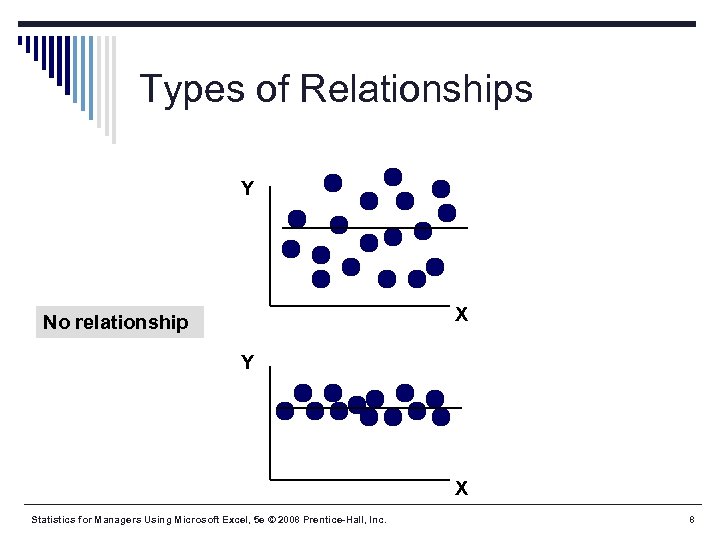 Types of Relationships Y X No relationship Y X Statistics for Managers Using Microsoft Excel, 5 e © 2008 Prentice-Hall, Inc. 8
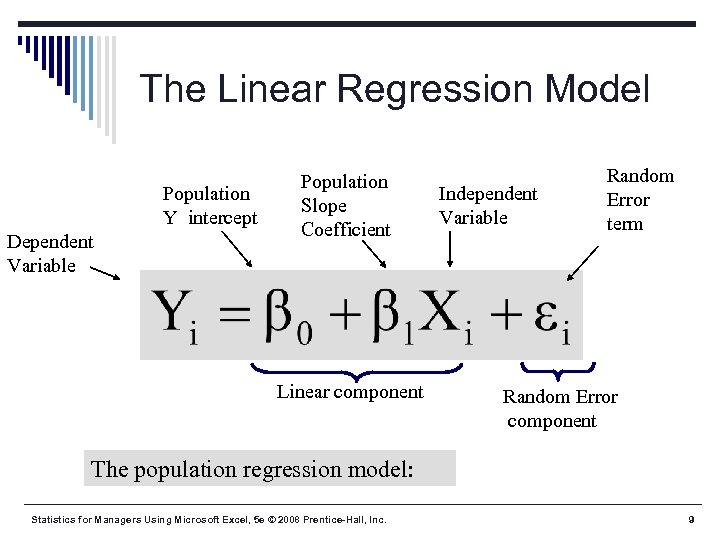 The Linear Regression Model Population Y intercept Dependent Variable Population Slope Coefficient Linear component Independent Variable Random Error term Random Error component The population regression model: Statistics for Managers Using Microsoft Excel, 5 e © 2008 Prentice-Hall, Inc. 9
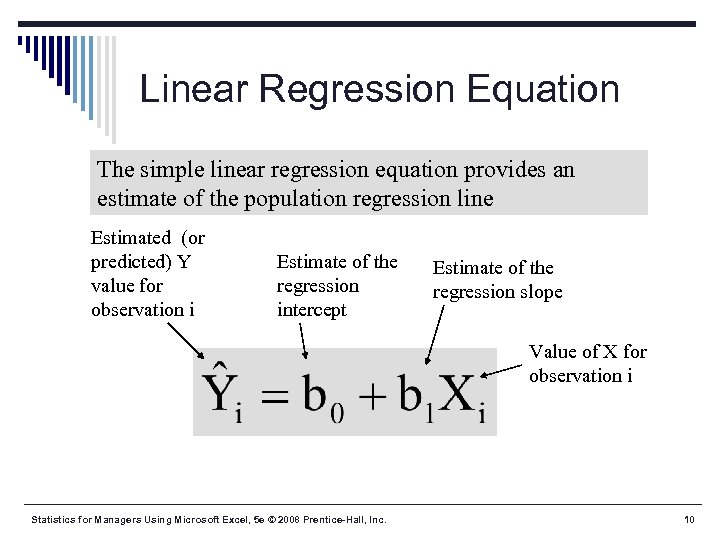 Linear Regression Equation The simple linear regression equation provides an estimate of the population regression line Estimated (or predicted) Y value for observation i Estimate of the regression intercept Estimate of the regression slope Value of X for observation i Statistics for Managers Using Microsoft Excel, 5 e © 2008 Prentice-Hall, Inc. 10
 Finding the Least Squares Equation § The coefficients b 0 and b 1 , and other regression results in this chapter, can be found using Data Analysis or Ph. Stat Formulas are shown in the text at the end of the chapter for those who are interested Statistics for Managers Using Microsoft Excel, 5 e © 2008 Prentice-Hall, Inc. 11
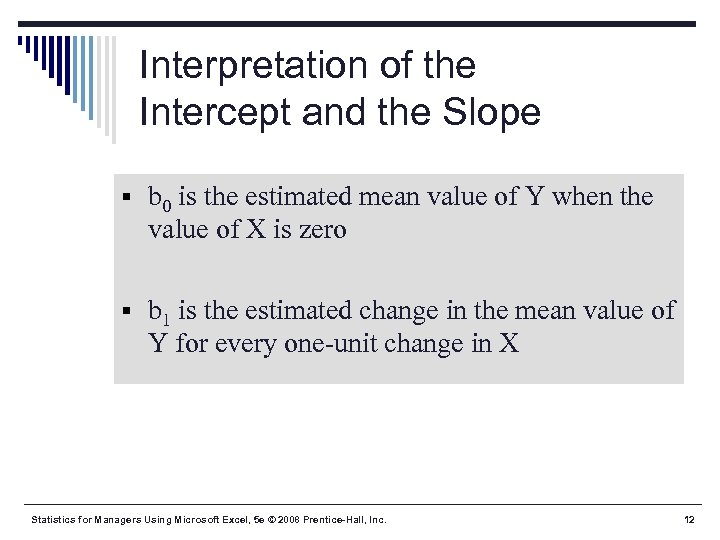 Interpretation of the Intercept and the Slope § b 0 is the estimated mean value of Y when the value of X is zero § b 1 is the estimated change in the mean value of Y for every one-unit change in X Statistics for Managers Using Microsoft Excel, 5 e © 2008 Prentice-Hall, Inc. 12
 Linear Regression Example § A real estate agent wishes to examine the relationship between the selling price of a home and its size (measured in square feet) § A random sample of 10 houses is selected § Dependent variable (Y) = house price in $1000 s § Independent variable (X) = square feet Statistics for Managers Using Microsoft Excel, 5 e © 2008 Prentice-Hall, Inc. 13
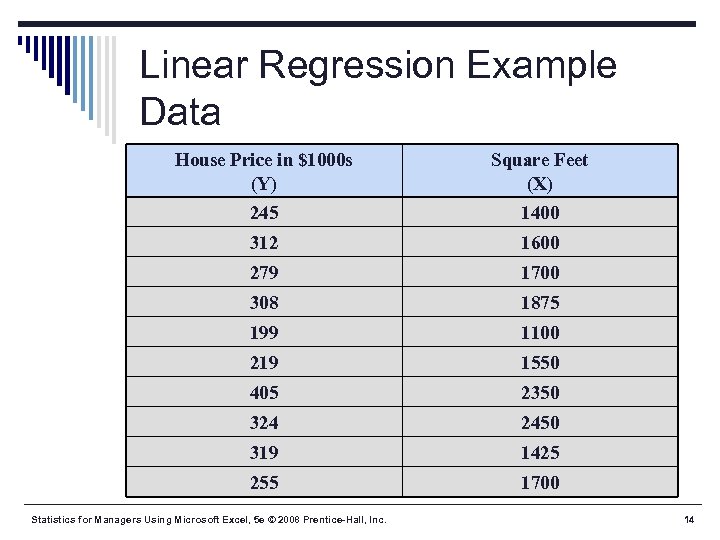 Linear Regression Example Data House Price in $1000 s (Y) Square Feet (X) 245 1400 312 1600 279 1700 308 1875 199 1100 219 1550 405 2350 324 2450 319 1425 255 1700 Statistics for Managers Using Microsoft Excel, 5 e © 2008 Prentice-Hall, Inc. 14
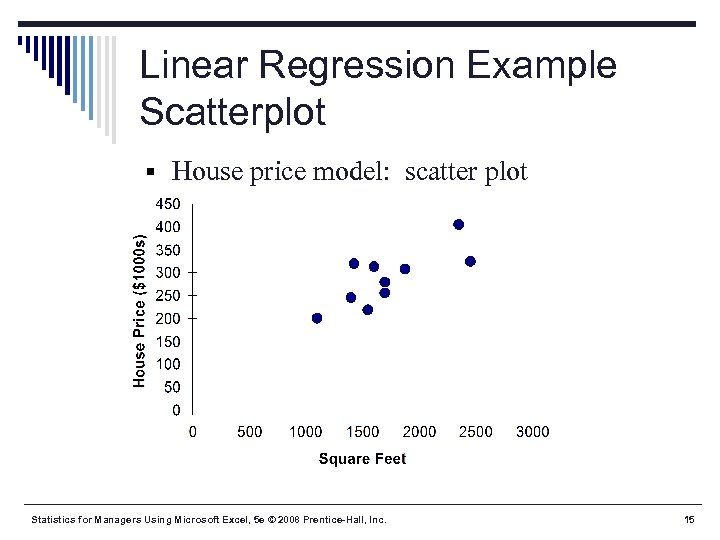 Linear Regression Example Scatterplot § House price model: scatter plot Statistics for Managers Using Microsoft Excel, 5 e © 2008 Prentice-Hall, Inc. 15
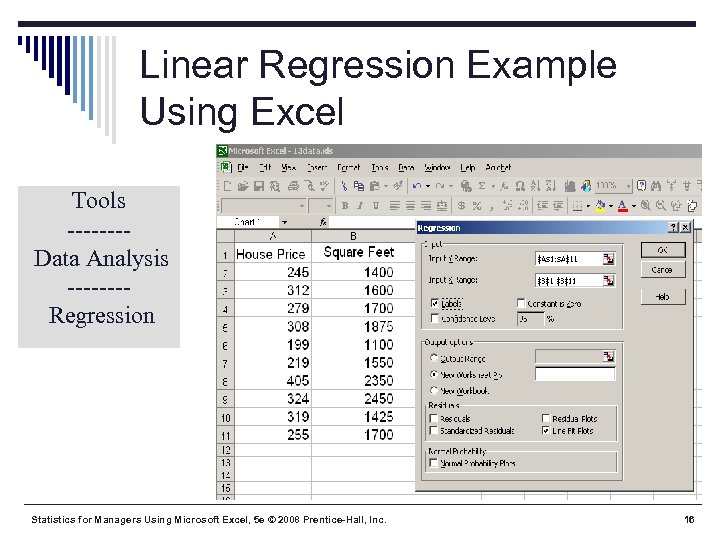 Linear Regression Example Using Excel Tools -------Data Analysis -------Regression Statistics for Managers Using Microsoft Excel, 5 e © 2008 Prentice-Hall, Inc. 16
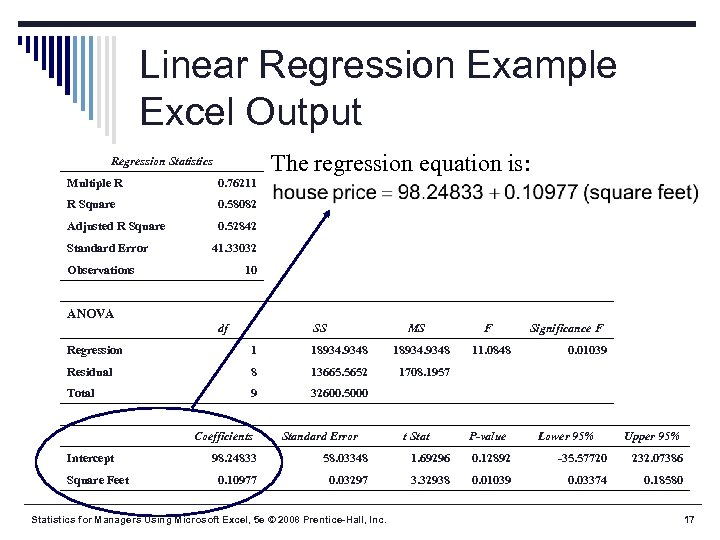 Linear Regression Example Excel Output The regression equation is: Regression Statistics Multiple R 0. 76211 R Square 0. 58082 Adjusted R Square 0. 52842 Standard Error 41. 33032 Observations 10 ANOVA df SS MS Regression 1 18934. 9348 Residual 8 13665. 5652 9 32600. 5000 Significance F 1708. 1957 Total F Intercept Square Feet Coefficients Standard Error 11. 0848 t Stat 0. 01039 P-value Lower 95% Upper 95% 98. 24833 58. 03348 1. 69296 0. 12892 -35. 57720 232. 07386 0. 10977 0. 03297 3. 32938 0. 01039 0. 03374 0. 18580 Statistics for Managers Using Microsoft Excel, 5 e © 2008 Prentice-Hall, Inc. 17
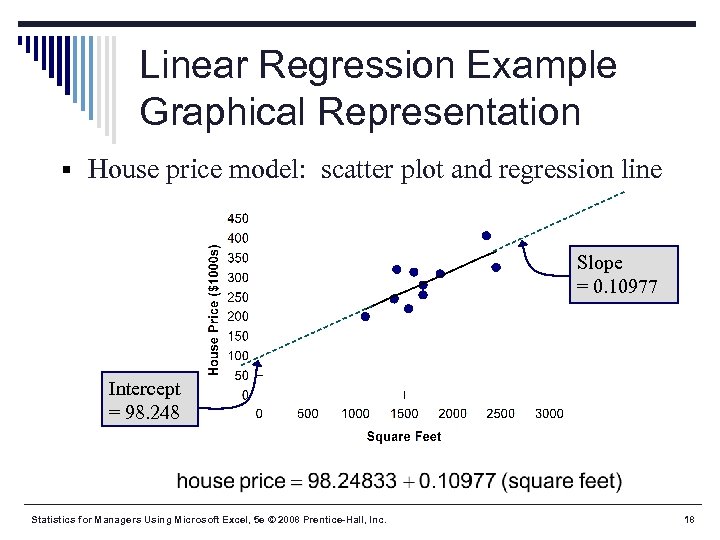 Linear Regression Example Graphical Representation § House price model: scatter plot and regression line Slope = 0. 10977 Intercept = 98. 248 Statistics for Managers Using Microsoft Excel, 5 e © 2008 Prentice-Hall, Inc. 18
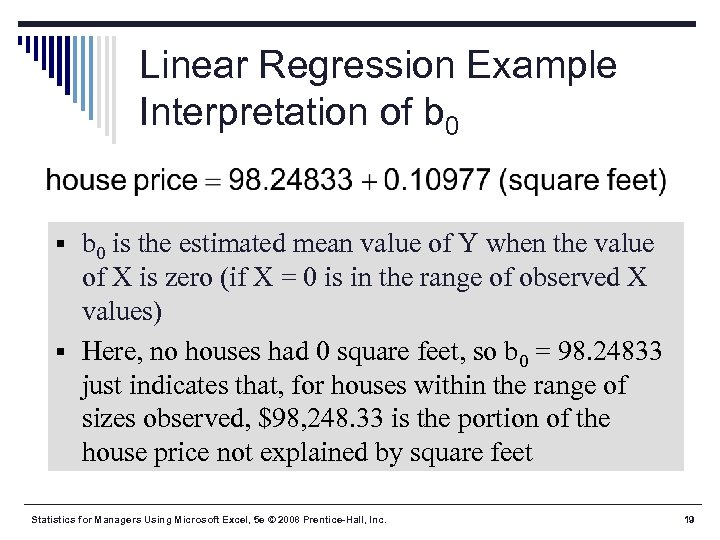 Linear Regression Example Interpretation of b 0 § b 0 is the estimated mean value of Y when the value of X is zero (if X = 0 is in the range of observed X values) § Here, no houses had 0 square feet, so b 0 = 98. 24833 just indicates that, for houses within the range of sizes observed, $98, 248. 33 is the portion of the house price not explained by square feet Statistics for Managers Using Microsoft Excel, 5 e © 2008 Prentice-Hall, Inc. 19
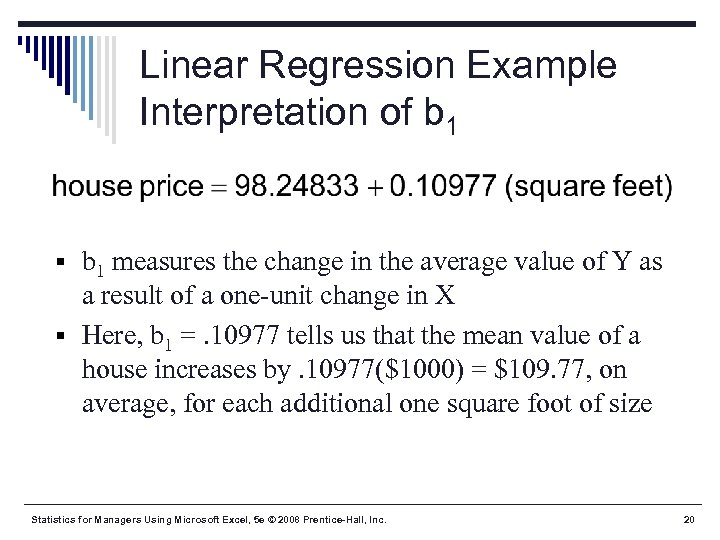 Linear Regression Example Interpretation of b 1 § b 1 measures the change in the average value of Y as a result of a one-unit change in X § Here, b 1 =. 10977 tells us that the mean value of a house increases by. 10977($1000) = $109. 77, on average, for each additional one square foot of size Statistics for Managers Using Microsoft Excel, 5 e © 2008 Prentice-Hall, Inc. 20
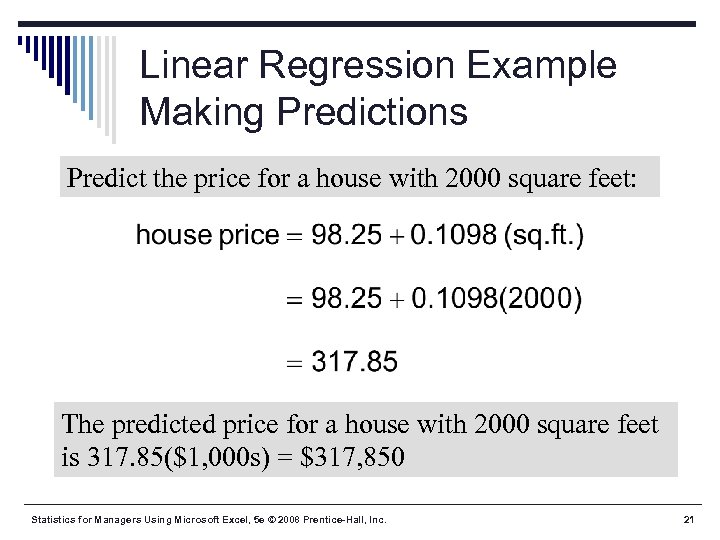 Linear Regression Example Making Predictions Predict the price for a house with 2000 square feet: The predicted price for a house with 2000 square feet is 317. 85($1, 000 s) = $317, 850 Statistics for Managers Using Microsoft Excel, 5 e © 2008 Prentice-Hall, Inc. 21
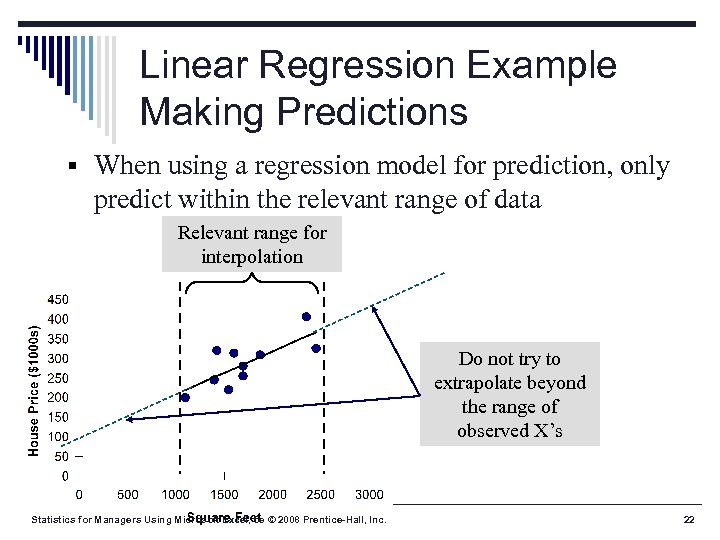 Linear Regression Example Making Predictions § When using a regression model for prediction, only predict within the relevant range of data Relevant range for interpolation Do not try to extrapolate beyond the range of observed X’s Statistics for Managers Using Microsoft Excel, 5 e © 2008 Prentice-Hall, Inc. 22
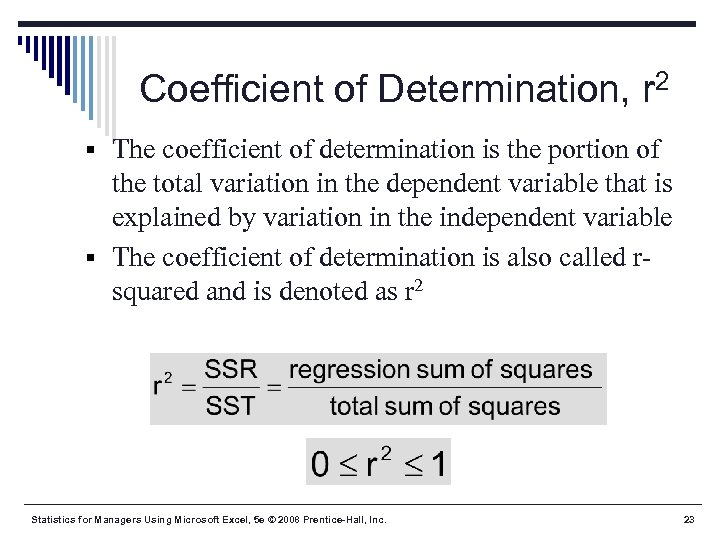 Coefficient of Determination, r 2 § The coefficient of determination is the portion of the total variation in the dependent variable that is explained by variation in the independent variable § The coefficient of determination is also called rsquared and is denoted as r 2 Statistics for Managers Using Microsoft Excel, 5 e © 2008 Prentice-Hall, Inc. 23
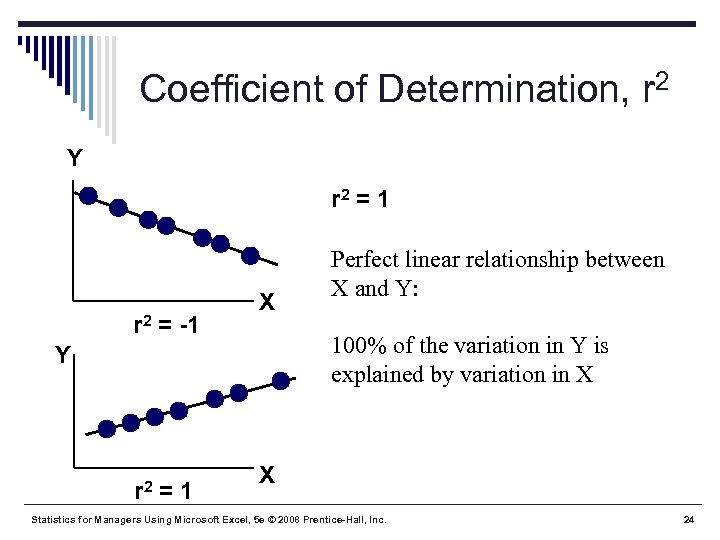 Coefficient of Determination, r 2 Y r 2 = 1 r 2 = -1 X 100% of the variation in Y is explained by variation in X Y r 2 =1 Perfect linear relationship between X and Y: X Statistics for Managers Using Microsoft Excel, 5 e © 2008 Prentice-Hall, Inc. 24
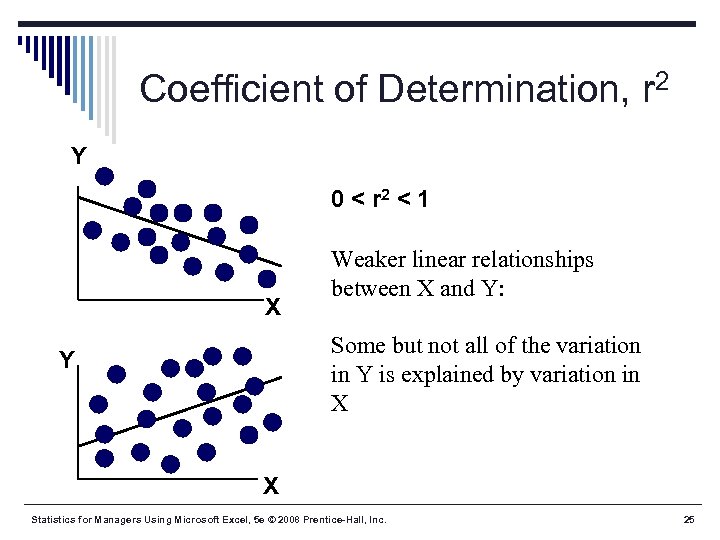 Coefficient of Determination, r 2 Y 0 < r 2 < 1 X Weaker linear relationships between X and Y: Some but not all of the variation in Y is explained by variation in X Y X Statistics for Managers Using Microsoft Excel, 5 e © 2008 Prentice-Hall, Inc. 25
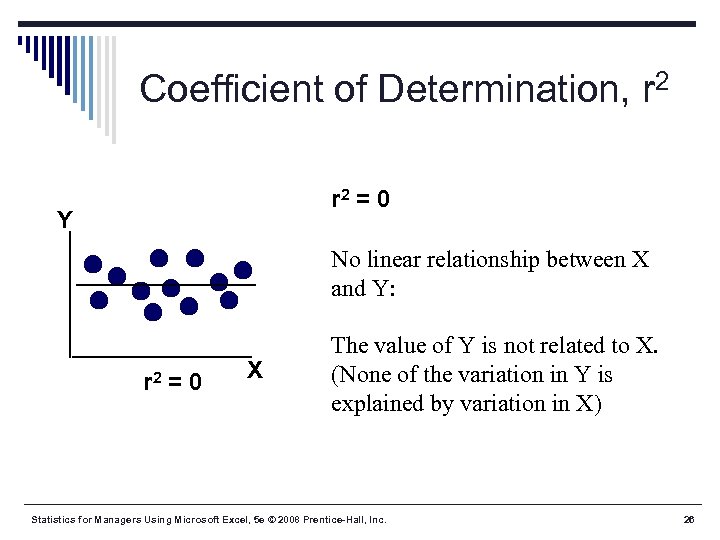 Coefficient of Determination, r 2 = 0 Y No linear relationship between X and Y: r 2 = 0 X The value of Y is not related to X. (None of the variation in Y is explained by variation in X) Statistics for Managers Using Microsoft Excel, 5 e © 2008 Prentice-Hall, Inc. 26
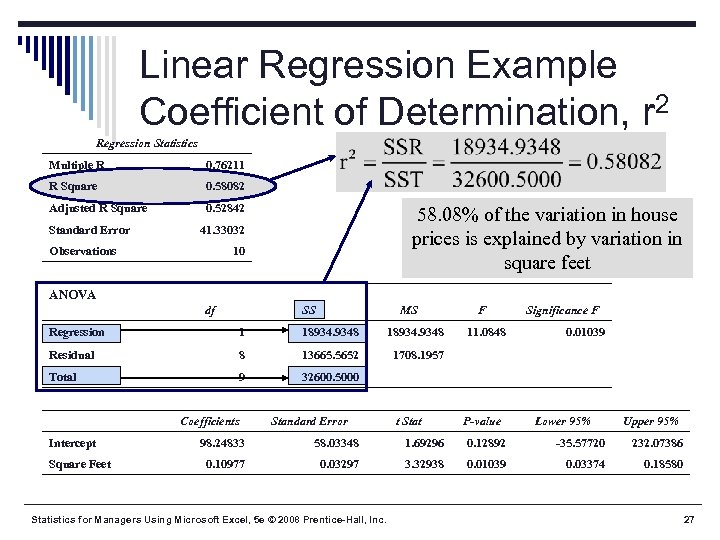 Linear Regression Example Coefficient of Determination, r 2 Regression Statistics Multiple R 0. 76211 R Square 0. 58082 Adjusted R Square 0. 52842 Standard Error 58. 08% of the variation in house prices is explained by variation in square feet 41. 33032 Observations 10 ANOVA df SS MS Regression 1 18934. 9348 Residual 8 13665. 5652 9 32600. 5000 Significance F 1708. 1957 Total F Intercept Square Feet Coefficients Standard Error 11. 0848 t Stat 0. 01039 P-value Lower 95% Upper 95% 98. 24833 58. 03348 1. 69296 0. 12892 -35. 57720 232. 07386 0. 10977 0. 03297 3. 32938 0. 01039 0. 03374 0. 18580 Statistics for Managers Using Microsoft Excel, 5 e © 2008 Prentice-Hall, Inc. 27
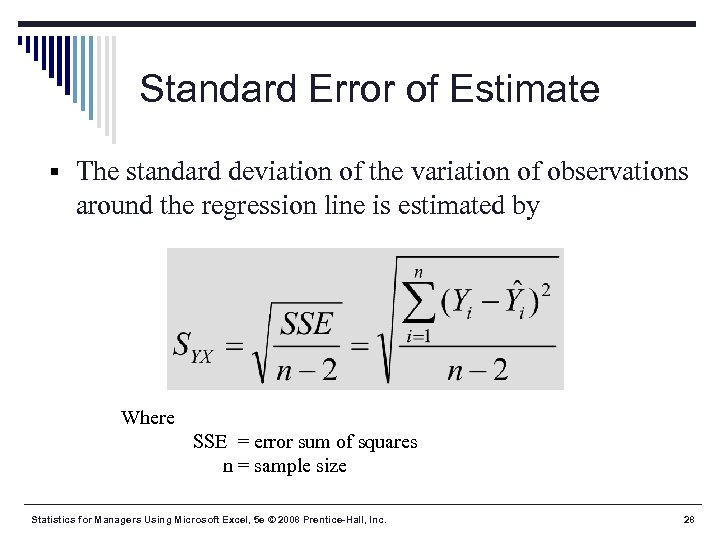 Standard Error of Estimate § The standard deviation of the variation of observations around the regression line is estimated by Where SSE = error sum of squares n = sample size Statistics for Managers Using Microsoft Excel, 5 e © 2008 Prentice-Hall, Inc. 28
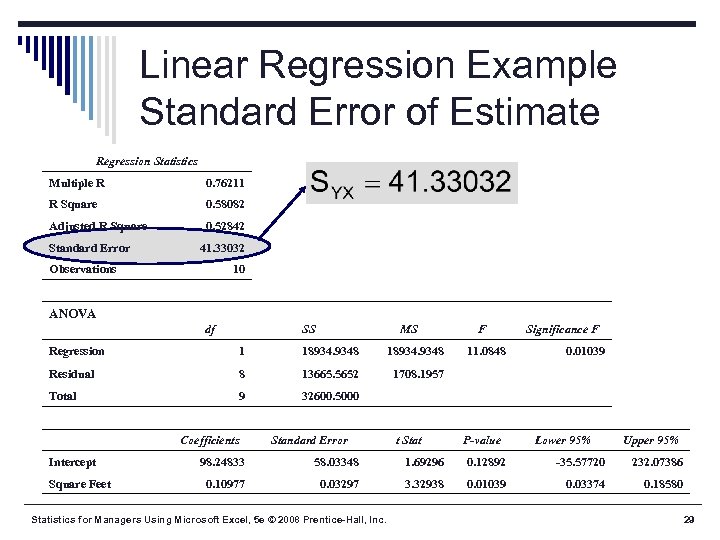 Linear Regression Example Standard Error of Estimate Regression Statistics Multiple R 0. 76211 R Square 0. 58082 Adjusted R Square 0. 52842 Standard Error 41. 33032 Observations 10 ANOVA df SS MS Regression 1 18934. 9348 Residual 8 13665. 5652 9 32600. 5000 Significance F 1708. 1957 Total F Intercept Square Feet Coefficients Standard Error 11. 0848 t Stat 0. 01039 P-value Lower 95% Upper 95% 98. 24833 58. 03348 1. 69296 0. 12892 -35. 57720 232. 07386 0. 10977 0. 03297 3. 32938 0. 01039 0. 03374 0. 18580 Statistics for Managers Using Microsoft Excel, 5 e © 2008 Prentice-Hall, Inc. 29
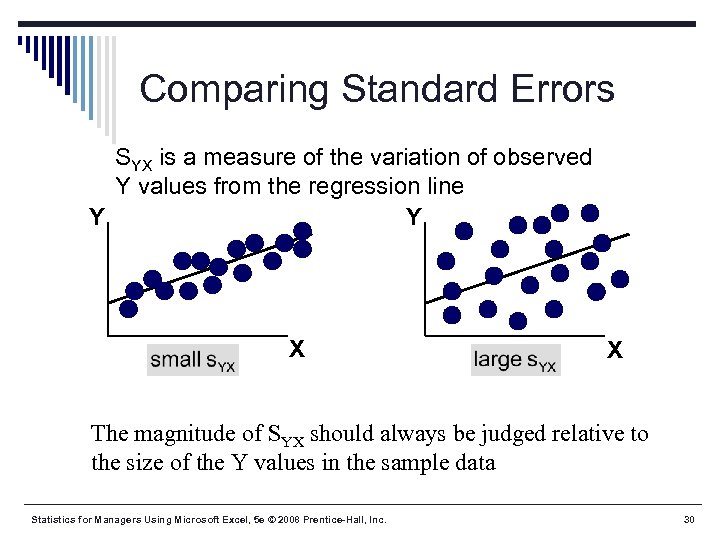 Comparing Standard Errors SYX is a measure of the variation of observed Y values from the regression line Y Y X X The magnitude of SYX should always be judged relative to the size of the Y values in the sample data Statistics for Managers Using Microsoft Excel, 5 e © 2008 Prentice-Hall, Inc. 30
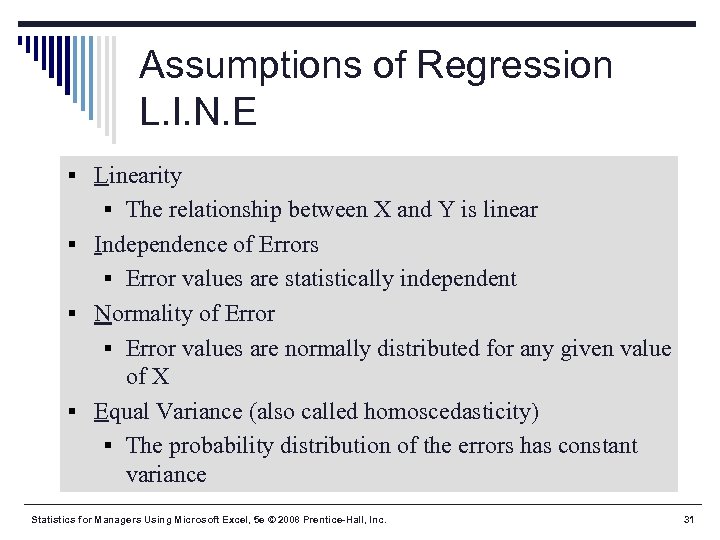 Assumptions of Regression L. I. N. E § Linearity § The relationship between X and Y is linear § Independence of Errors § Error values are statistically independent § Normality of Error § Error values are normally distributed for any given value of X § Equal Variance (also called homoscedasticity) § The probability distribution of the errors has constant variance Statistics for Managers Using Microsoft Excel, 5 e © 2008 Prentice-Hall, Inc. 31
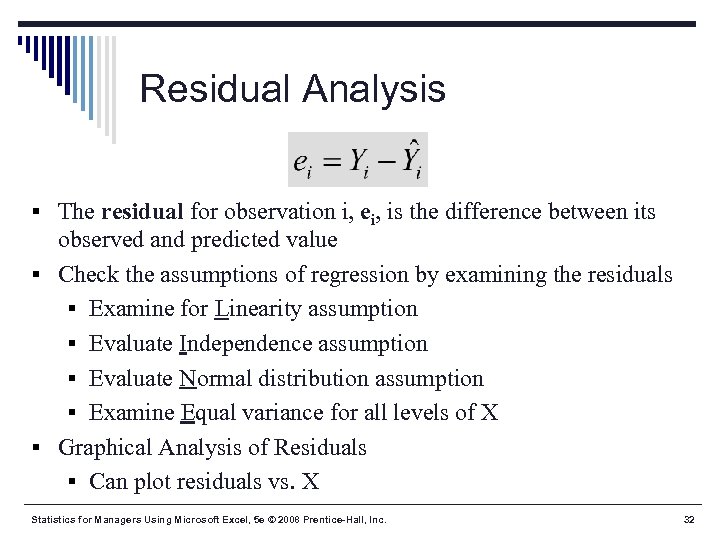 Residual Analysis § The residual for observation i, ei, is the difference between its observed and predicted value § Check the assumptions of regression by examining the residuals § Examine for Linearity assumption § Evaluate Independence assumption § Evaluate Normal distribution assumption § Examine Equal variance for all levels of X § Graphical Analysis of Residuals § Can plot residuals vs. X Statistics for Managers Using Microsoft Excel, 5 e © 2008 Prentice-Hall, Inc. 32
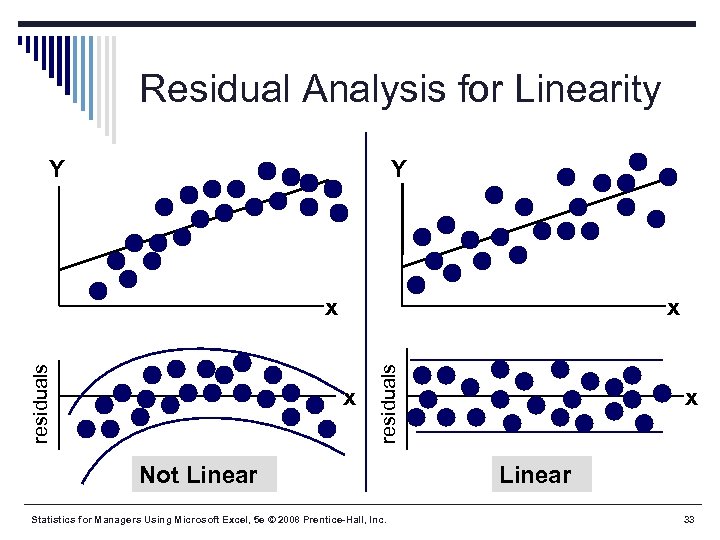 Residual Analysis for Linearity Y Y x x residuals x Not Linear Statistics for Managers Using Microsoft Excel, 5 e © 2008 Prentice-Hall, Inc. x Linear 33
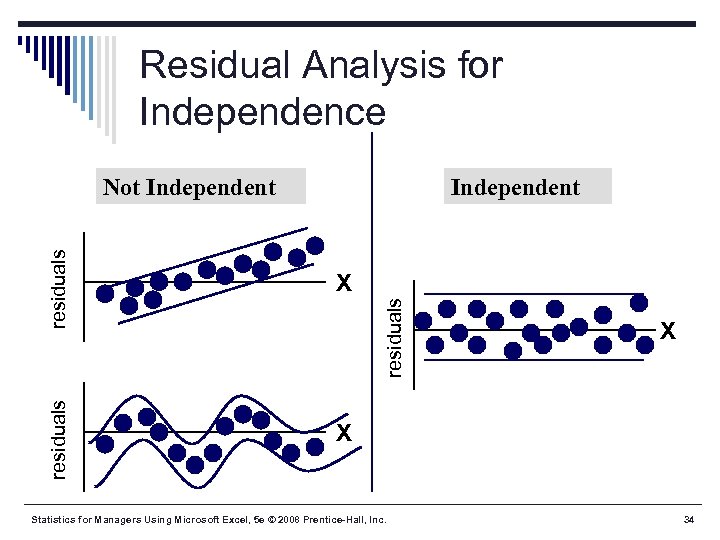 Residual Analysis for Independence X X residuals Independent residuals Not Independent Statistics for Managers Using Microsoft Excel, 5 e © 2008 Prentice-Hall, Inc. X 34
 Checking for Normality § Examine the Stem-and-Leaf Display of the Residuals § Examine the Box-and-Whisker Plot of the Residuals § Examine the Histogram of the Residuals § Construct a Normal Probability Plot of the Residuals Statistics for Managers Using Microsoft Excel, 5 e © 2008 Prentice-Hall, Inc. 35
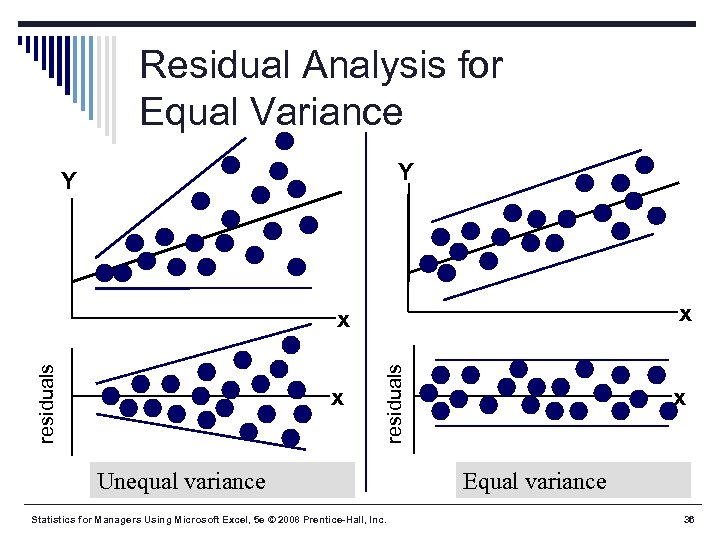 Residual Analysis for Equal Variance Y Y x x residuals x Unequal variance Statistics for Managers Using Microsoft Excel, 5 e © 2008 Prentice-Hall, Inc. x Equal variance 36
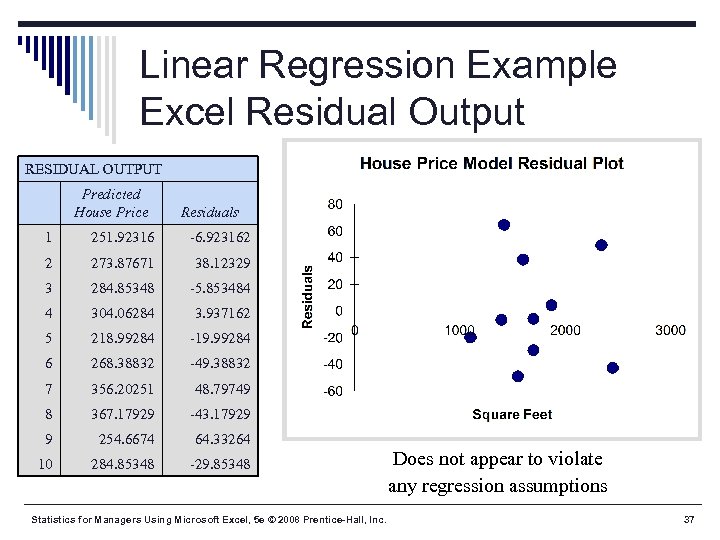 Linear Regression Example Excel Residual Output RESIDUAL OUTPUT Predicted House Price Residuals 1 251. 92316 -6. 923162 2 273. 87671 38. 12329 3 284. 85348 -5. 853484 4 304. 06284 3. 937162 5 218. 99284 -19. 99284 6 268. 38832 -49. 38832 7 356. 20251 48. 79749 8 367. 17929 -43. 17929 9 254. 6674 64. 33264 10 284. 85348 -29. 85348 Statistics for Managers Using Microsoft Excel, 5 e © 2008 Prentice-Hall, Inc. Does not appear to violate any regression assumptions 37
 Measuring Autocorrelation: The Durbin-Watson Statistic § Used when data are collected over time to detect if autocorrelation is present § Autocorrelation exists if residuals in one time period are related to residuals in another period Statistics for Managers Using Microsoft Excel, 5 e © 2008 Prentice-Hall, Inc. 38
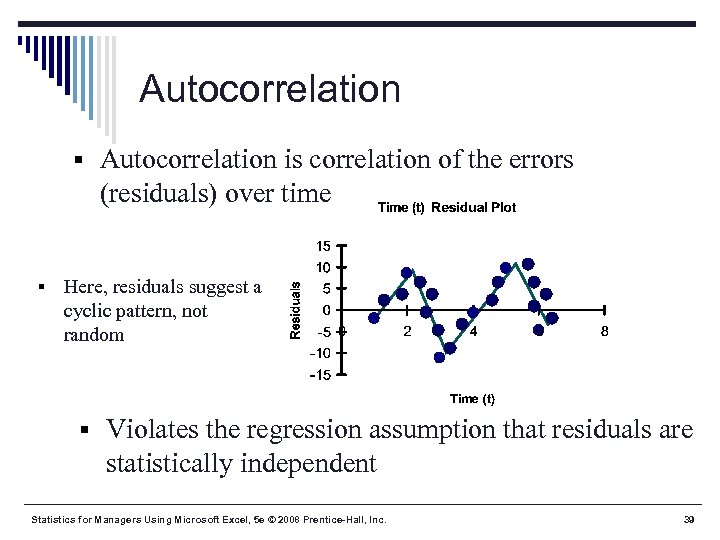 Autocorrelation § Autocorrelation is correlation of the errors (residuals) over time § Here, residuals suggest a cyclic pattern, not random § Violates the regression assumption that residuals are statistically independent Statistics for Managers Using Microsoft Excel, 5 e © 2008 Prentice-Hall, Inc. 39
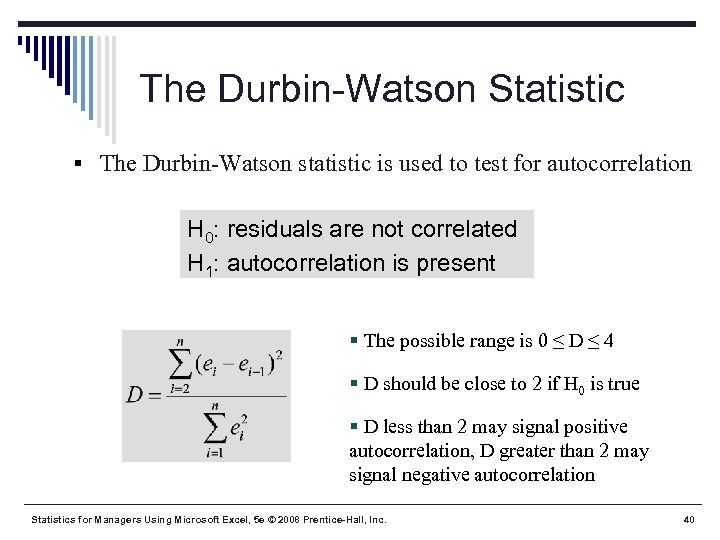 The Durbin-Watson Statistic § The Durbin-Watson statistic is used to test for autocorrelation H 0: residuals are not correlated H 1: autocorrelation is present § The possible range is 0 ≤ D ≤ 4 § D should be close to 2 if H 0 is true § D less than 2 may signal positive autocorrelation, D greater than 2 may signal negative autocorrelation Statistics for Managers Using Microsoft Excel, 5 e © 2008 Prentice-Hall, Inc. 40
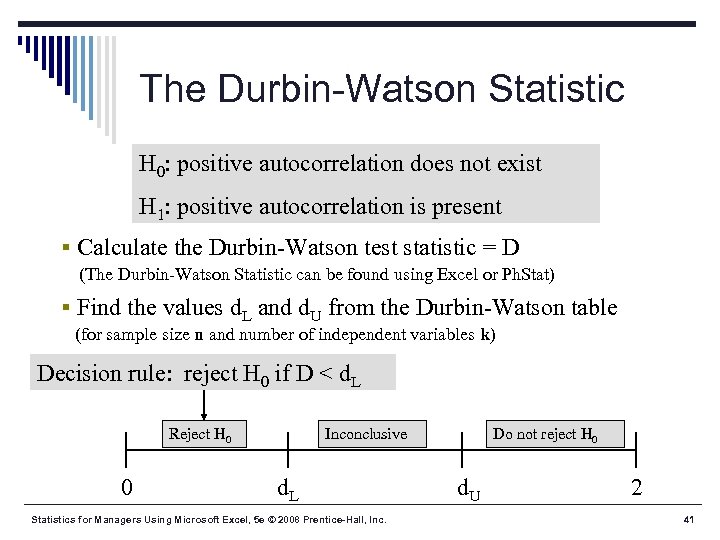 The Durbin-Watson Statistic H 0: positive autocorrelation does not exist H 1: positive autocorrelation is present § Calculate the Durbin-Watson test statistic = D (The Durbin-Watson Statistic can be found using Excel or Ph. Stat) § Find the values d. L and d. U from the Durbin-Watson table (for sample size n and number of independent variables k) Decision rule: reject H 0 if D < d. L Reject H 0 0 Inconclusive d. L Statistics for Managers Using Microsoft Excel, 5 e © 2008 Prentice-Hall, Inc. Do not reject H 0 d. U 2 41
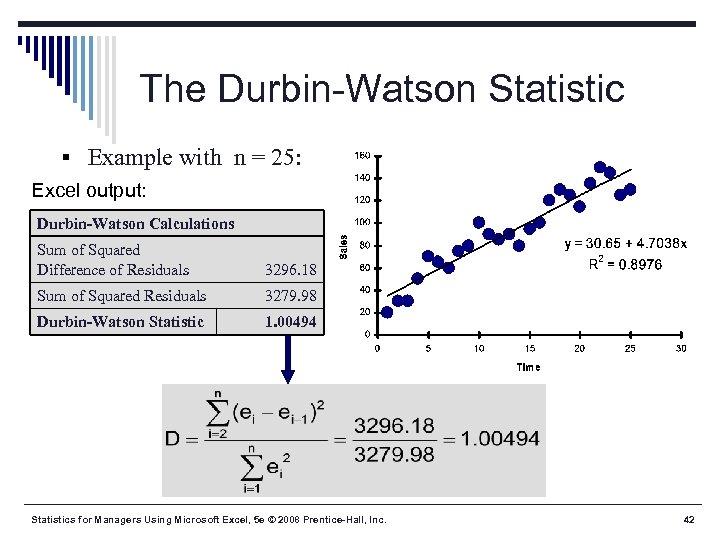 The Durbin-Watson Statistic § Example with n = 25: Excel output: Durbin-Watson Calculations Sum of Squared Difference of Residuals 3296. 18 Sum of Squared Residuals 3279. 98 Durbin-Watson Statistic 1. 00494 Statistics for Managers Using Microsoft Excel, 5 e © 2008 Prentice-Hall, Inc. 42
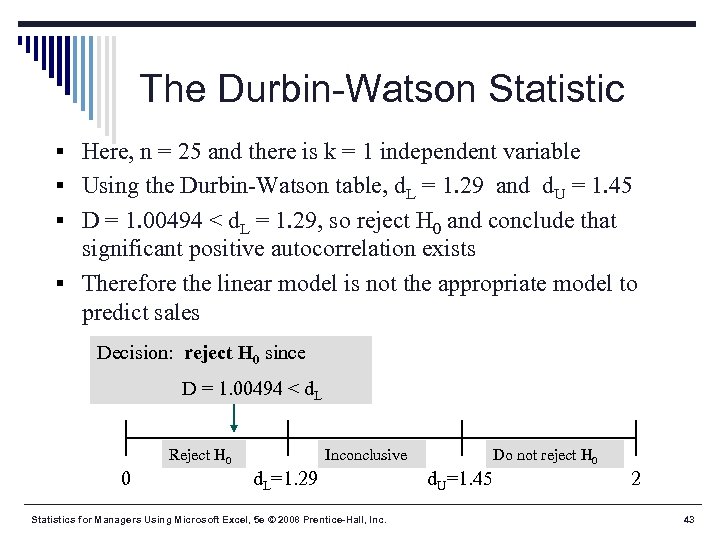 The Durbin-Watson Statistic § Here, n = 25 and there is k = 1 independent variable § Using the Durbin-Watson table, d. L = 1. 29 and d. U = 1. 45 § D = 1. 00494 < d. L = 1. 29, so reject H 0 and conclude that significant positive autocorrelation exists § Therefore the linear model is not the appropriate model to predict sales Decision: reject H 0 since D = 1. 00494 < d. L Reject H 0 0 Inconclusive d. L=1. 29 Statistics for Managers Using Microsoft Excel, 5 e © 2008 Prentice-Hall, Inc. Do not reject H 0 d. U=1. 45 2 43
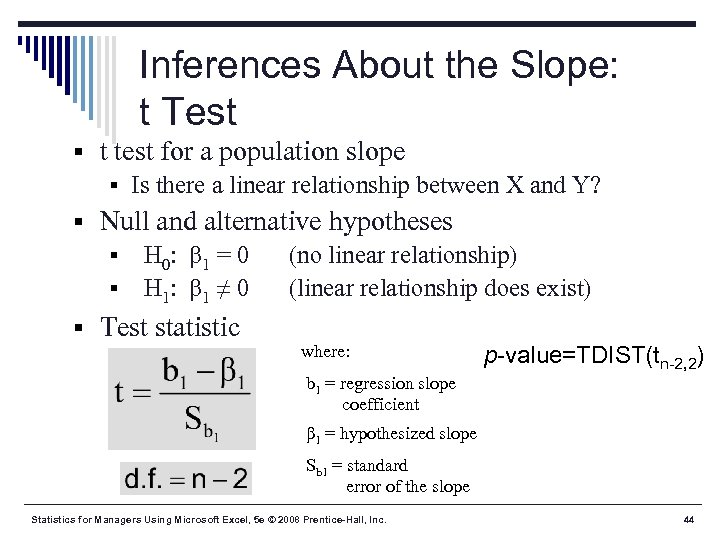 Inferences About the Slope: t Test § t test for a population slope § Is there a linear relationship between X and Y? § Null and alternative hypotheses § H 0: β 1 = 0 (no linear relationship) § H 1: β 1 ≠ 0 (linear relationship does exist) § Test statistic where: p-value=TDIST(tn-2, 2) b 1 = regression slope coefficient β 1 = hypothesized slope Sb 1 = standard error of the slope Statistics for Managers Using Microsoft Excel, 5 e © 2008 Prentice-Hall, Inc. 44
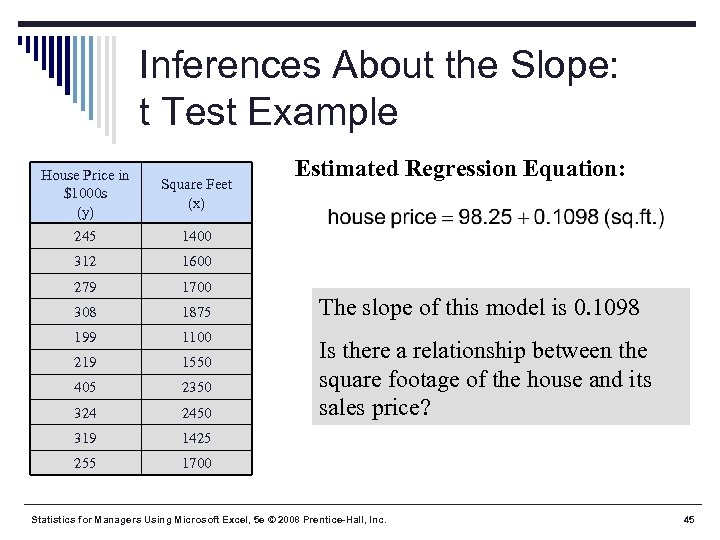 Inferences About the Slope: t Test Example House Price in $1000 s (y) Square Feet (x) 245 1400 312 1600 279 1700 308 1875 199 1100 219 1550 405 2350 324 2450 319 1425 255 Estimated Regression Equation: 1700 The slope of this model is 0. 1098 Is there a relationship between the square footage of the house and its sales price? Statistics for Managers Using Microsoft Excel, 5 e © 2008 Prentice-Hall, Inc. 45
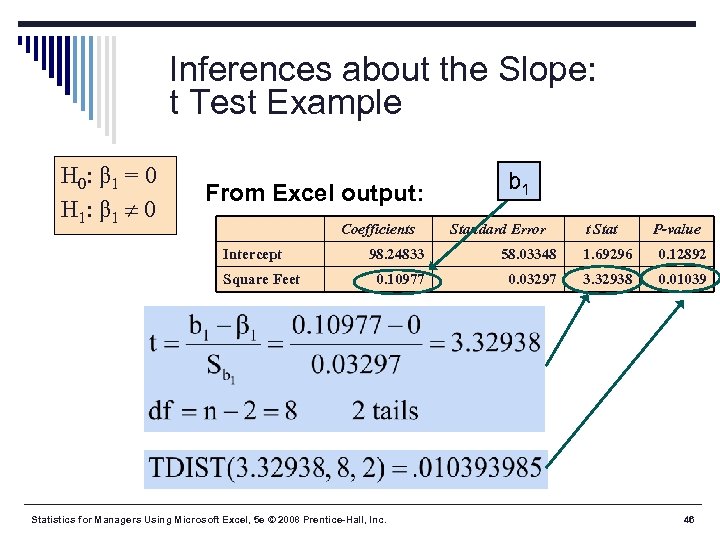 Inferences about the Slope: t Test Example H 0: β 1 = 0 H 1: β 1 0 From Excel output: Intercept Square Feet Coefficients b 1 Standard Error t Stat P-value 98. 24833 58. 03348 1. 69296 0. 12892 0. 10977 0. 03297 3. 32938 0. 01039 Statistics for Managers Using Microsoft Excel, 5 e © 2008 Prentice-Hall, Inc. 46
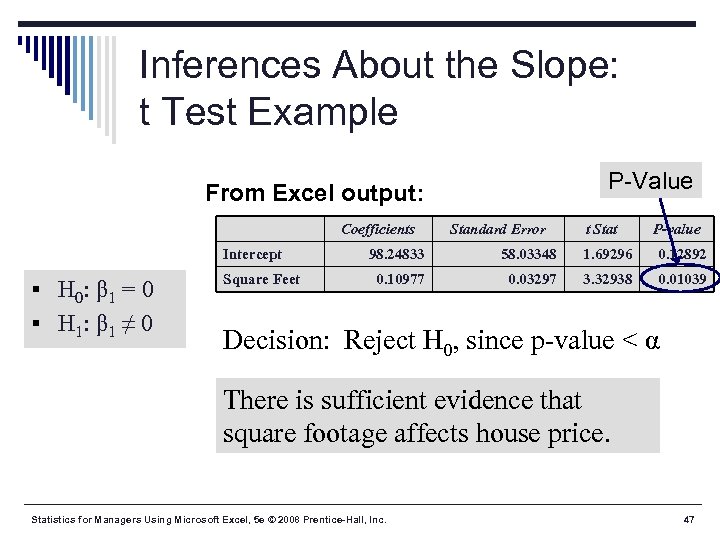 Inferences About the Slope: t Test Example P-Value From Excel output: Intercept § H 0: β 1 = 0 § H 1: β 1 ≠ 0 Square Feet Coefficients Standard Error t Stat P-value 98. 24833 58. 03348 1. 69296 0. 12892 0. 10977 0. 03297 3. 32938 0. 01039 Decision: Reject H 0, since p-value < α There is sufficient evidence that square footage affects house price. Statistics for Managers Using Microsoft Excel, 5 e © 2008 Prentice-Hall, Inc. 47
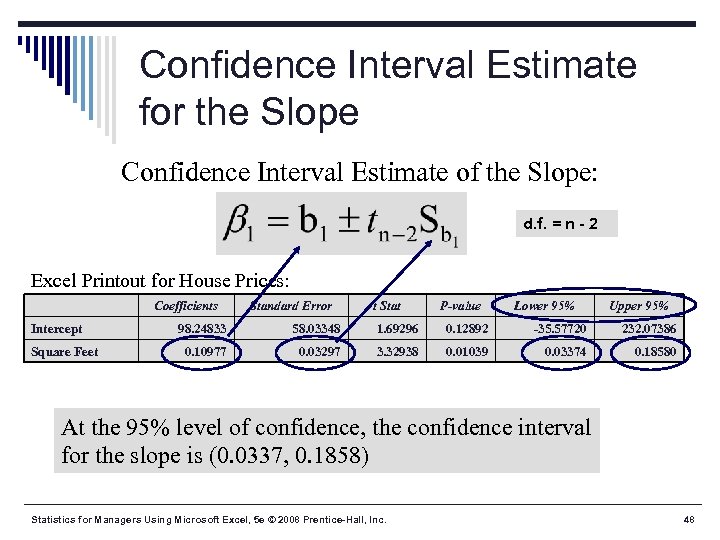 Confidence Interval Estimate for the Slope Confidence Interval Estimate of the Slope: d. f. = n - 2 Excel Printout for House Prices: Intercept Square Feet Coefficients Standard Error t Stat P-value Lower 95% Upper 95% 98. 24833 58. 03348 1. 69296 0. 12892 -35. 57720 232. 07386 0. 10977 0. 03297 3. 32938 0. 01039 0. 03374 0. 18580 At the 95% level of confidence, the confidence interval for the slope is (0. 0337, 0. 1858) Statistics for Managers Using Microsoft Excel, 5 e © 2008 Prentice-Hall, Inc. 48
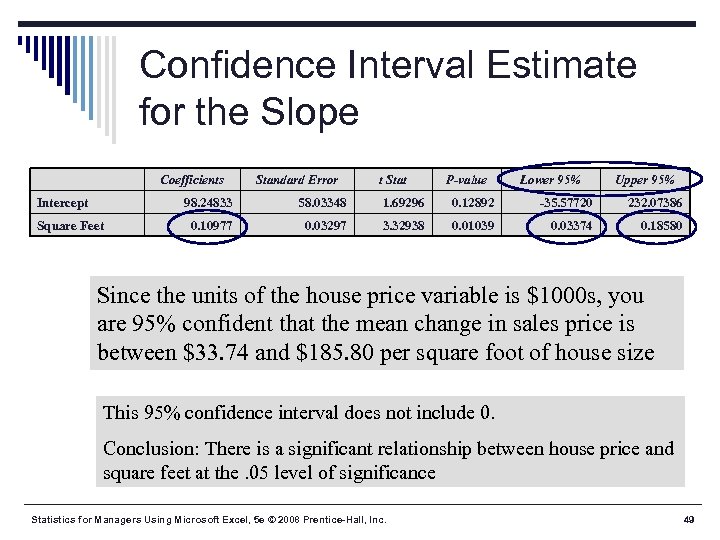 Confidence Interval Estimate for the Slope Coefficients Intercept Standard Error t Stat P-value Lower 95% Upper 95% 98. 24833 Square Feet 58. 03348 1. 69296 0. 12892 -35. 57720 232. 07386 0. 10977 0. 03297 3. 32938 0. 01039 0. 03374 0. 18580 Since the units of the house price variable is $1000 s, you are 95% confident that the mean change in sales price is between $33. 74 and $185. 80 per square foot of house size This 95% confidence interval does not include 0. Conclusion: There is a significant relationship between house price and square feet at the. 05 level of significance Statistics for Managers Using Microsoft Excel, 5 e © 2008 Prentice-Hall, Inc. 49
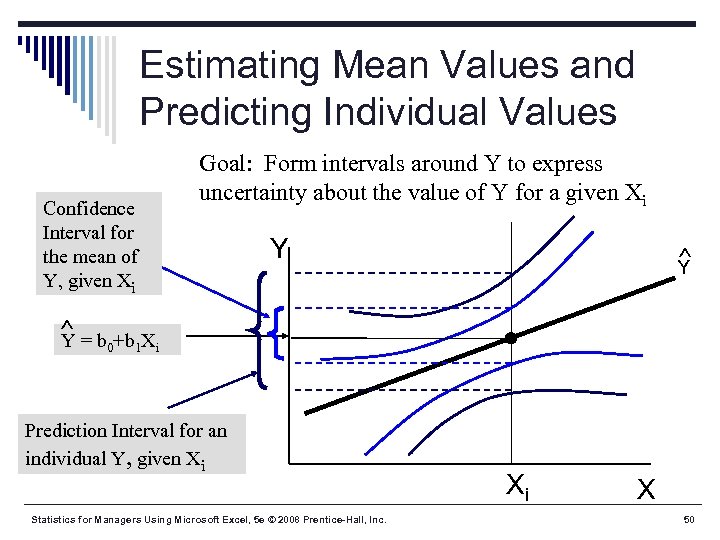 Estimating Mean Values and Predicting Individual Values Confidence Interval for the mean of Y, given Xi Goal: Form intervals around Y to express uncertainty about the value of Y for a given Xi Y Y Y = b 0+b 1 Xi Prediction Interval for an individual Y, given Xi Statistics for Managers Using Microsoft Excel, 5 e © 2008 Prentice-Hall, Inc. Xi X 50
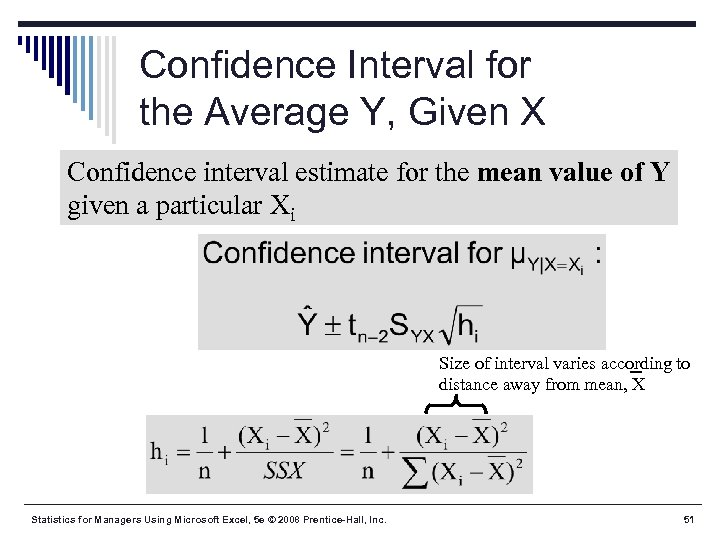 Confidence Interval for the Average Y, Given X Confidence interval estimate for the mean value of Y given a particular Xi Size of interval varies according to distance away from mean, X Statistics for Managers Using Microsoft Excel, 5 e © 2008 Prentice-Hall, Inc. 51
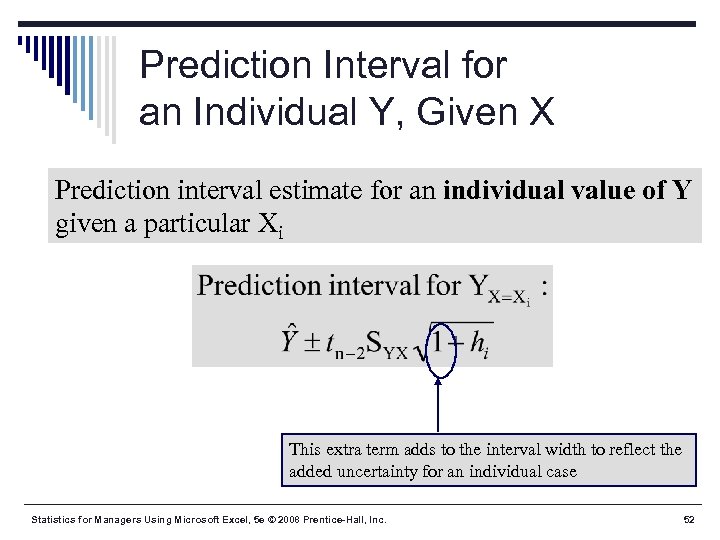 Prediction Interval for an Individual Y, Given X Prediction interval estimate for an individual value of Y given a particular Xi This extra term adds to the interval width to reflect the added uncertainty for an individual case Statistics for Managers Using Microsoft Excel, 5 e © 2008 Prentice-Hall, Inc. 52
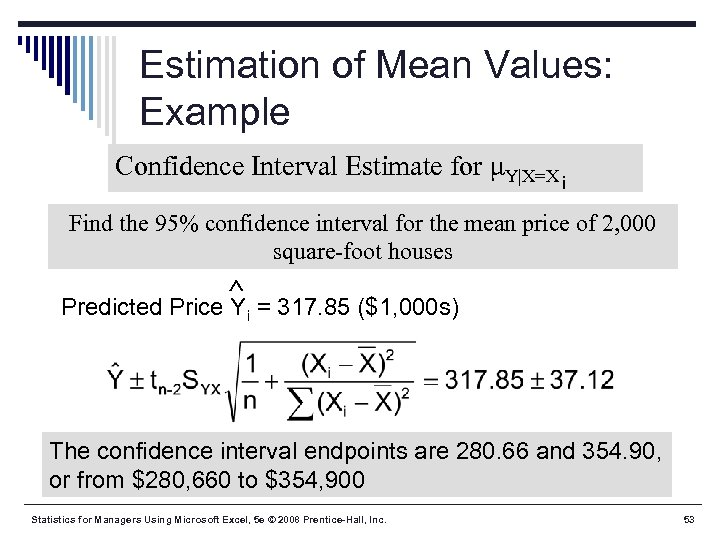 Estimation of Mean Values: Example Confidence Interval Estimate for μY|X=X i Find the 95% confidence interval for the mean price of 2, 000 square-foot houses Predicted Price Yi = 317. 85 ($1, 000 s) The confidence interval endpoints are 280. 66 and 354. 90, or from $280, 660 to $354, 900 Statistics for Managers Using Microsoft Excel, 5 e © 2008 Prentice-Hall, Inc. 53
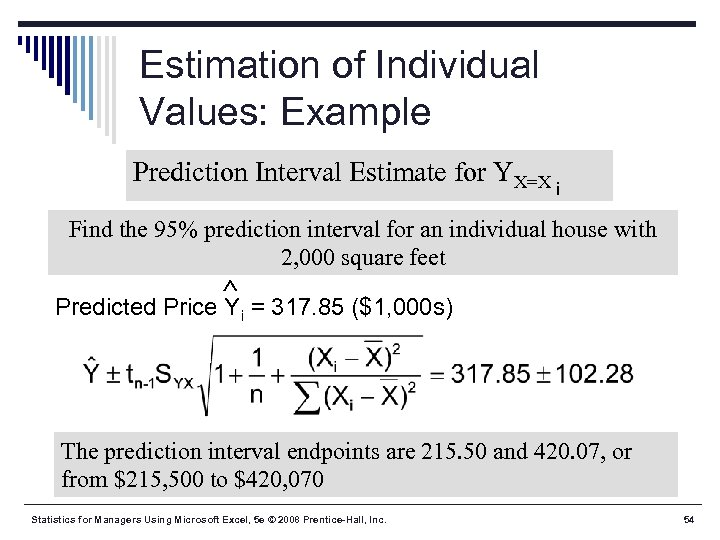 Estimation of Individual Values: Example Prediction Interval Estimate for YX=X i Find the 95% prediction interval for an individual house with 2, 000 square feet Predicted Price Yi = 317. 85 ($1, 000 s) The prediction interval endpoints are 215. 50 and 420. 07, or from $215, 500 to $420, 070 Statistics for Managers Using Microsoft Excel, 5 e © 2008 Prentice-Hall, Inc. 54
 Finding Confidence and Prediction Intervals in Excel § In Excel, use PHStat | regression | simple linear regression … § Check the “confidence and prediction interval for X=” box and enter the X-value and confidence level desired Statistics for Managers Using Microsoft Excel, 5 e © 2008 Prentice-Hall, Inc. 55
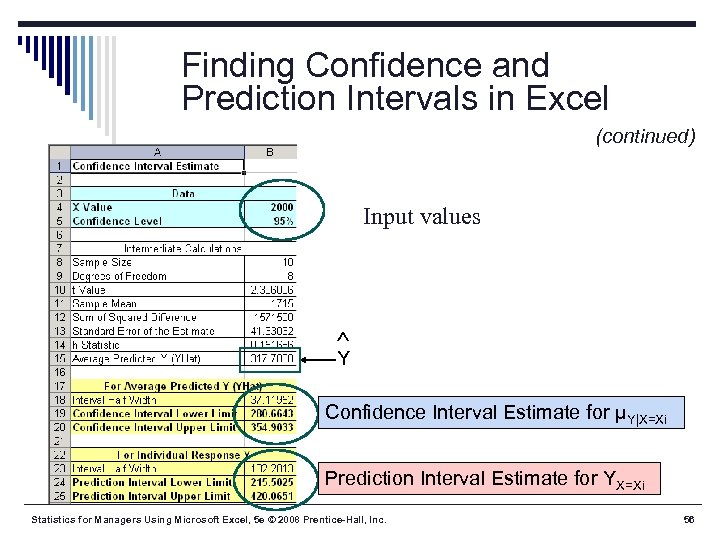 Finding Confidence and Prediction Intervals in Excel (continued) Input values Y Confidence Interval Estimate for μY|X=Xi Prediction Interval Estimate for YX=Xi Statistics for Managers Using Microsoft Excel, 5 e © 2008 Prentice-Hall, Inc. 56
 Pitfalls of Regression Analysis § Lacking an awareness of the assumptions § § underlying least-squares regression Not knowing how to evaluate the assumptions Not knowing the alternatives to least-squares regression if a particular assumption is violated Using a regression model without knowledge of the subject matter Extrapolating outside the relevant range Statistics for Managers Using Microsoft Excel, 5 e © 2008 Prentice-Hall, Inc. 57
 Strategies for Avoiding the Pitfalls of Regression § Start with a scatter plot of X on Y to observe possible relationship § Perform residual analysis to check the assumptions § Plot the residuals vs. X to check for violations of assumptions such as equal variance § Use a histogram, stem-and-leaf display, boxand-whisker plot, or normal probability plot of the residuals to uncover possible non-normality Statistics for Managers Using Microsoft Excel, 5 e © 2008 Prentice-Hall, Inc. 58
 Strategies for Avoiding the Pitfalls of Regression § If there is violation of any assumption, use alternative methods or models § If there is no evidence of assumption violation, then test for the significance of the regression coefficients and construct confidence intervals and prediction intervals § Avoid making predictions or forecasts outside the relevant range Statistics for Managers Using Microsoft Excel, 5 e © 2008 Prentice-Hall, Inc. 59
 Chapter Summary In this chapter, we have § Introduced types of regression models § Reviewed assumptions of regression and § § correlation Discussed determining the simple linear regression equation Described measures of variation Discussed residual analysis Addressed measuring autocorrelation Statistics for Managers Using Microsoft Excel, 5 e © 2008 Prentice-Hall, Inc. 60
 Chapter Summary In this chapter, we have § Described inference about the slope § Discussed correlation -- measuring the strength of the association § Addressed estimation of mean values and prediction of individual values § Discussed possible pitfalls in regression and recommended strategies to avoid them Statistics for Managers Using Microsoft Excel, 5 e © 2008 Prentice-Hall, Inc. 61