 Скачать презентацию SQL Net Consultation Session 3 Dr Gábor Pauler
630764884a134e5fc29d0efd5cea2a50.ppt
- Количество слайдов: 15




SQL. Net Consultation Session 3 Dr. Gábor Pauler, Associate Professor, Private Entrepeneur Tax Reg. No. : 63673852 -3 -22 Bank account: 50400113 -11065546 Location: 1 st Széchenyi str. 7666 Pogány, Hungary Tel: +36 -309 -015 -488 E-mail: pauler@t-online. hu
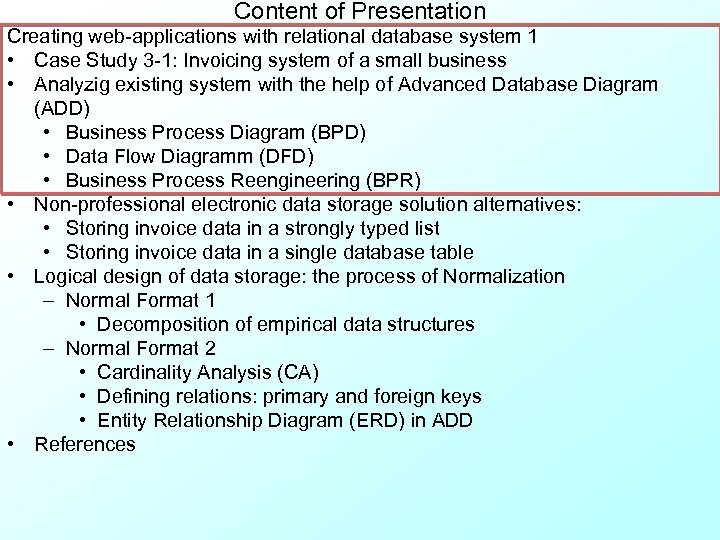
Content of Presentation Creating web-applications with relational database system 1 • Case Study 3 -1: Invoicing system of a small business • Analyzig existing system with the help of Advanced Database Diagram (ADD) • Business Process Diagram (BPD) • Data Flow Diagramm (DFD) • Business Process Reengineering (BPR) • Non-professional electronic data storage solution alternatives: • Storing invoice data in a strongly typed list • Storing invoice data in a single database table • Logical design of data storage: the process of Normalization – Normal Format 1 • Decomposition of empirical data structures – Normal Format 2 • Cardinality Analysis (CA) • Defining relations: primary and foreign keys • Entity Relationship Diagram (ERD) in ADD • References
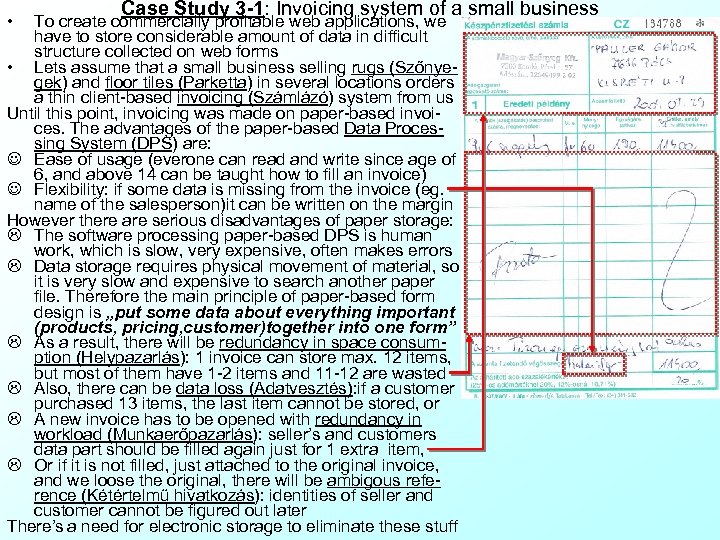
• Case Study 3 -1: Invoicing system of a small business To create commercially profitable web applications, we have to store considerable amount of data in difficult structure collected on web forms • Lets assume that a small business selling rugs (Szőnyegek) and floor tiles (Parketta) in several locations orders a thin client-based invoicing (Számlázó) system from us Until this point, invoicing was made on paper-based invoices. The advantages of the paper-based Data Processing System (DPS) are: J Ease of usage (everone can read and write since age of 6, and above 14 can be taught how to fill an invoice) J Flexibility: if some data is missing from the invoice (eg. name of the salesperson)it can be written on the margin However there are serious disadvantages of paper storage: L The software processing paper-based DPS is human work, which is slow, very expensive, often makes errors L Data storage requires physical movement of material, so it is very slow and expensive to search another paper file. Therefore the main principle of paper-based form design is „put some data about everything important (products, pricing, customer)together into one form” L As a result, there will be redundancy in space consumption (Helypazarlás): 1 invoice can store max. 12 items, but most of them have 1 -2 items and 11 -12 are wasted L Also, there can be data loss (Adatvesztés): if a customer purchased 13 items, the last item cannot be stored, or L A new invoice has to be opened with redundancy in workload (Munkaerőpazarlás): seller’s and customers data part should be filled again just for 1 extra item, L Or if it is not filled, just attached to the original invoice, and we loose the original, there will be ambigous reference (Kétértelmű hivatkozás): identities of seller and customer cannot be figured out later There’s a need for electronic storage to eliminate these stuff
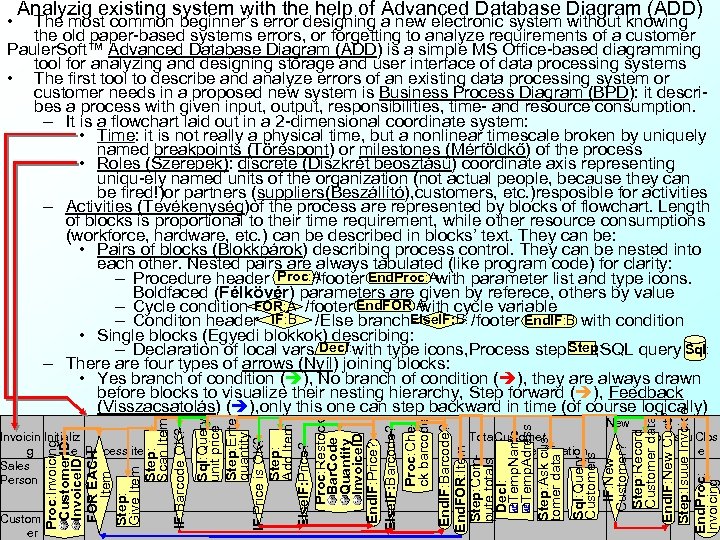
• Analyzig existing system with the help of Advanced Database Diagram (ADD) Custom er Sql: Query Customers IF: New Customer? Step: Record Customer data End. IF: New Cust? Step: Isuue Invoice End. Proc: Invoicing Invoicin Initializ g e Process items Sales Person Sql: Query unit price Step: Enter quantity IF: Price is OK? Step: Add Item Else. IF: Price? Proc: Restock Bar. Code Quantity Invoice. ID End. IF: Price? Else. IF: Barcode? Proc: Check barcode End. IF: Barcode? End. FOR: Item Step: Compute totals Decl: Temp. Name Temp. Adress Step: Ask customer data Proc: Invoicing Customer. ID Invoice. ID FOR EACH Item Step: Give Item Step: Scan Item IF: Barcode OK? The most common beginner’s error designing a new electronic system without knowing the old paper-based systems errors, or forgetting to analyze requirements of a customer Pauler. Soft™ Advanced Database Diagram (ADD) is a simple MS Office-based diagramming tool for analyzing and designing storage and user interface of data processing systems • The first tool to describe and analyze errors of an existing data processing system or customer needs in a proposed new system is Business Process Diagram (BPD): it describes a process with given input, output, responsibilities, time- and resource consumption. – It is a flowchart laid out in a 2 -dimensional coordinate system: • Time: it is not really a physical time, but a nonlinear timescale broken by uniquely named breakpoints (Töréspont) or milestones (Mérföldkő) of the process • Roles (Szerepek): discrete (Diszkrét beosztású) coordinate axis representing uniqu-ely named units of the organization (not actual people, because they can be fired!)or partners (suppliers(Beszállító), customers, etc. )resposible for activities – Activities (Tevékenység)of the process are represented by blocks of flowchart. Length of blocks is proportional to their time requirement, while other resource consumptions (workforce, hardware, etc. ) can be described in blocks’ text. They can be: • Pairs of blocks (Blokkpárok) describing process control. They can be nested into each other. Nested pairs are always tabulated (like program code) for clarity: Proc: A End. Proc: A – Procedure header /footer with parameter list and type icons. Boldfaced (Félkövér) parameters are given by referece, others by value End. FOR: A – Cycle condition /footer with cycle variable IF: B Else. IF: B: End. IF: B – Conditon header /Else branch /footer with condition • Single blocks (Egyedi blokkok) describing: Step: Decl: – Declaration of local vars with type icons, Process step , SQL query Sql: – There are four types of arrows (Nyíl) joining blocks: • Yes branch of condition ( ), No branch of condition ( ), they are always drawn before blocks to visualize their nesting hierarchy, Step forward ( ), Feedback (Visszacsatolás) ( ), only this one can step backward in time (of course logically) Tota Customer l identification New custo Issu Clos mer e
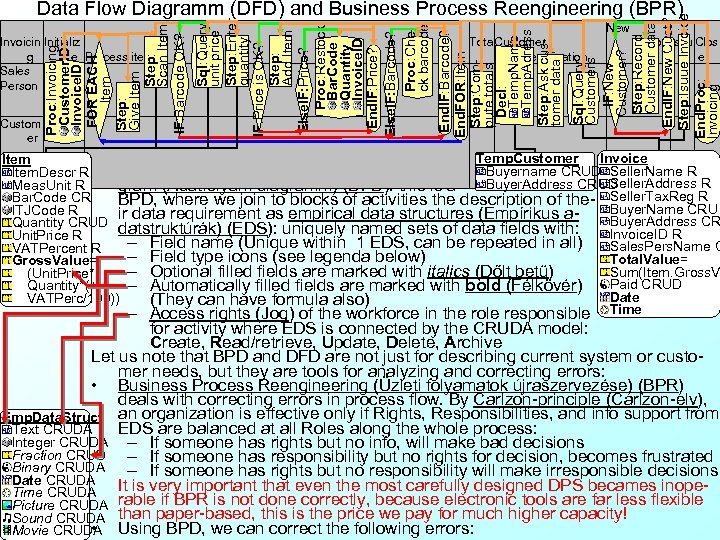
Custom er Sql: Query Customers IF: New Customer? Step: Record Customer data End. IF: New Cust? Step: Isuue Invoice End. Proc: Invoicing Invoicin Initializ g e Process items Sales Person Sql: Query unit price Step: Enter quantity IF: Price is OK? Step: Add Item Else. IF: Price? Proc: Restock Bar. Code Quantity Invoice. ID End. IF: Price? Else. IF: Barcode? Proc: Check barcode End. IF: Barcode? End. FOR: Item Step: Compute totals Decl: Temp. Name Temp. Adress Step: Ask customer data Proc: Invoicing Customer. ID Invoice. ID FOR EACH Item Step: Give Item Step: Scan Item IF: Barcode OK? Data Flow Diagramm (DFD) and Business Process Reengineering (BPR) Tota Customer l identification New custo Issu Clos mer e • The next step of describing the current system Temp. Customer Invoice Item or detecting customer needs is Data Flow Dia- Buyername CRUD Seller. Name R Item. Descr R Seller. Address R Meas. Unit R gram (Adatfolyam diagramm) (DFD): this is a Buyer. Address CRUD Bar. Code CR BPD, where we join to blocks of activities the description of the- Seller. Tax. Reg R Buyer. Name CRU ITJCode R ir data requirement as empirical data structures (Empírikus a. Buyer. Address CR Quantity CRUD datstruktúrák) (EDS): uniquely named sets of data fields with: Invoice. ID R Unit. Price R – Field name (Unique within 1 EDS, can be repeated in all) Sales. Pers. Name C VATPercent R – Field type icons (see legenda below) Total. Value= Gross. Value= – Optional filled fields are marked with italics (Dőlt betű) Sum(Item. Gross. V (Unit. Price* Paid CRUD Quantity*(+ – Automatically filled fields are marked with bold (Félkövér) Date VATPerc/100)) (They can have formula also) – Access rights (Jog) of the workforce in the role responsible Time for activity where EDS is connected by the CRUDA model: Create, Read/retrieve, Update, Delete, Archive Let us note that BPD and DFD are not just for describing current system or customer needs, but they are tools for analyzing and correcting errors: • Business Process Reengineering (Üzleti folyamatok újraszervezése) (BPR) deals with correcting errors in process flow. By Carlzon-principle (Carlzon-elv), Emp. Data. Struct an organization is effective only if Rights, Responsibilities, and info support from EDS are balanced at all Roles along the whole process: Text CRUDA Integer CRUDA – If someone has rights but no info, will make bad decisions Fraction CRUD – If someone has responsibility but no rights for decision, becomes frustrated Binary CRUDA – If someone has rights but no responsibility will make irresponsible decisions Date CRUDA It is very important that even the most carefully designed DPS becames inope. Time CRUDA Picture CRUDA rable if BPR is not done correctly, because electronic tools are far less flexible Sound CRUDA than paper-based, this is the price we pay for much higher capacity! • Movie CRUDA Using BPD, we can correct the following errors:
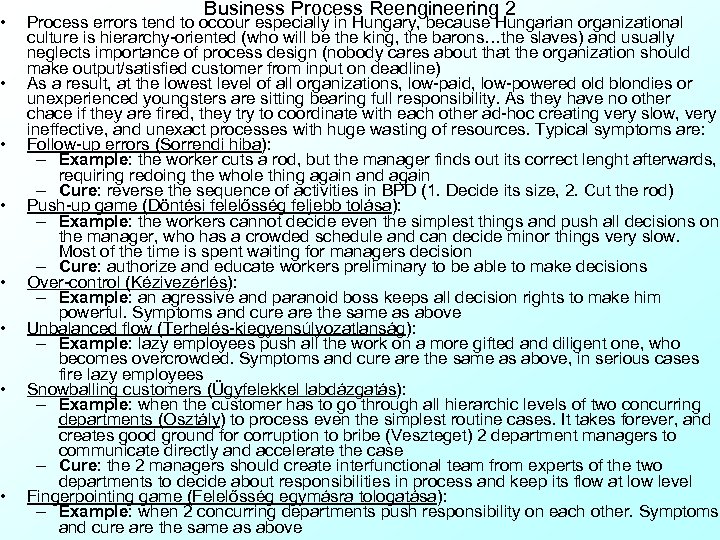
• • Business Process Reengineering 2 Process errors tend to occour especially in Hungary, because Hungarian organizational culture is hierarchy-oriented (who will be the king, the barons…the slaves) and usually neglects importance of process design (nobody cares about that the organization should make output/satisfied customer from input on deadline) As a result, at the lowest level of all organizations, low-paid, low-powered old blondies or unexperienced youngsters are sitting bearing full responsibility. As they have no other chace if they are fired, they try to coordinate with each other ad-hoc creating very slow, very ineffective, and unexact processes with huge wasting of resources. Typical symptoms are: Follow-up errors (Sorrendi hiba): – Example: the worker cuts a rod, but the manager finds out its correct lenght afterwards, requiring redoing the whole thing again and again – Cure: reverse the sequence of activities in BPD (1. Decide its size, 2. Cut the rod) Push-up game (Döntési felelősség feljebb tolása): – Example: the workers cannot decide even the simplest things and push all decisions on the manager, who has a crowded schedule and can decide minor things very slow. Most of the time is spent waiting for managers decision – Cure: authorize and educate workers preliminary to be able to make decisions Over-control (Kézivezérlés): – Example: an agressive and paranoid boss keeps all decision rights to make him powerful. Symptoms and cure are the same as above Unbalanced flow (Terhelés-kiegyensúlyozatlanság): – Example: lazy employees push all the work on a more gifted and diligent one, who becomes overcrowded. Symptoms and cure are the same as above, in serious cases fire lazy employees Snowballing customers (Ügyfelekkel labdázgatás): – Example: when the customer has to go through all hierarchic levels of two concurring departments (Osztály) to process even the simplest routine cases. It takes forever, and creates good ground for corruption to bribe (Veszteget) 2 department managers to communicate directly and accelerate the case – Cure: the 2 managers should create interfunctional team from experts of the two departments to decide about responsibilities in process and keep its flow at low level Fingerpointing game (Felelősség egymásra tologatása): – Example: when 2 concurring departments push responsibility on each other. Symptoms and cure are the same as above
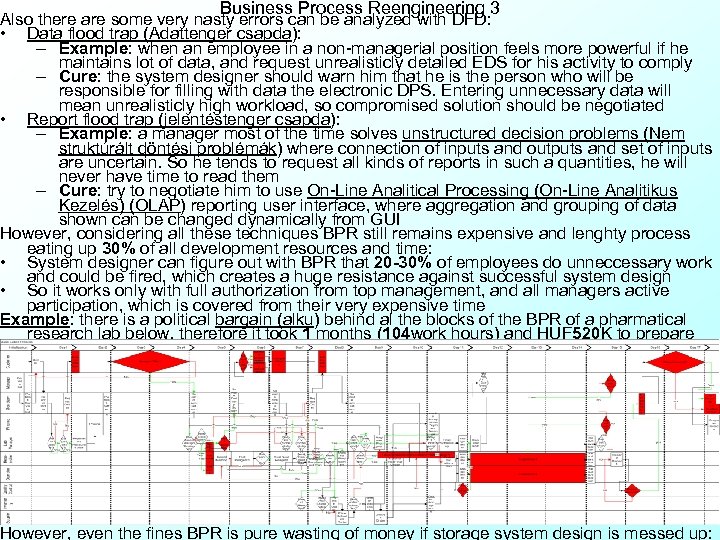
Business Process Reengineering 3 Also there are some very nasty errors can be analyzed with DFD: • Data flood trap (Adattenger csapda): – Example: when an employee in a non-managerial position feels more powerful if he maintains lot of data, and request unrealisticly detailed EDS for his activity to comply – Cure: the system designer should warn him that he is the person who will be responsible for filling with data the electronic DPS. Entering unnecessary data will mean unrealisticly high workload, so compromised solution should be negotiated • Report flood trap (jelentéstenger csapda): – Example: a manager most of the time solves unstructured decision problems (Nem struktúrált döntési problémák) where connection of inputs and outputs and set of inputs are uncertain. So he tends to request all kinds of reports in such a quantities, he will never have time to read them – Cure: try to negotiate him to use On-Line Analitical Processing (On-Line Analitikus Kezelés) (OLAP) reporting user interface, where aggregation and grouping of data shown can be changed dynamically from GUI However, considering all these techniques BPR still remains expensive and lenghty process eating up 30% of all development resources and time: • System designer can figure out with BPR that 20 -30% of employees do unneccessary work and could be fired, which creates a huge resistance against successful system design • So it works only with full authorization from top management, and all managers active participation, which is covered from their very expensive time Example: there is a political bargain (alku) behind al the blocks of the BPR of a pharmatical research lab below, therefore it took 1 months (104 work hours) and HUF 520 K to prepare However, even the fines BPR is pure wasting of money if storage system design is messed up:
Practice 3 -1: Creating business process diagram • Shortly, you will be asked to create BPD from the processes detailed below. Please create a new empty slide in Power. Point and use ADD symbols (blocks, pairs of blocks, arrows and roles × milestones grid) to describe BPD. Present your design in 3 minutes (2 pts): Student 1: Park a car in a parking house Student 2: Boiling an egg Student 3: Start a car in cold weather Student 4: Open a bank account Student 5: Fill a car (it can be diesel or gasoline engined) in a gas station Student 6: Park a car in downtown Student 7: Order a cab Student 8: Report an accident to police Student 9: Arrange a visit at dentist Student 10: Register somebody on a community website Student 11: Buy ticket on an Intercity train personally Student 12: Reserve an airticket by phone
Content of Presentation Creating web-applications with relational database system 1 • Case Study 3 -1: Invoicing system of a small business • Analyzig existing system with the help of Advanced Database Diagram (ADD) • Business Process Diagram (BPD) • Data Flow Diagramm (DFD) • Business Process Reengineering (BPR) • Non-professional electronic data storage solution alternatives: • Storing invoice data in a strongly typed list • Storing invoice data in a single database table • Logical design of data storage: the process of Normalization – Normal Format 1 • Decomposition of empirical data structures – Normal Format 2 • Cardinality Analysis (CA) • Defining relations: primary and foreign keys • Entity Relationship Diagram (ERD) in ADD • References
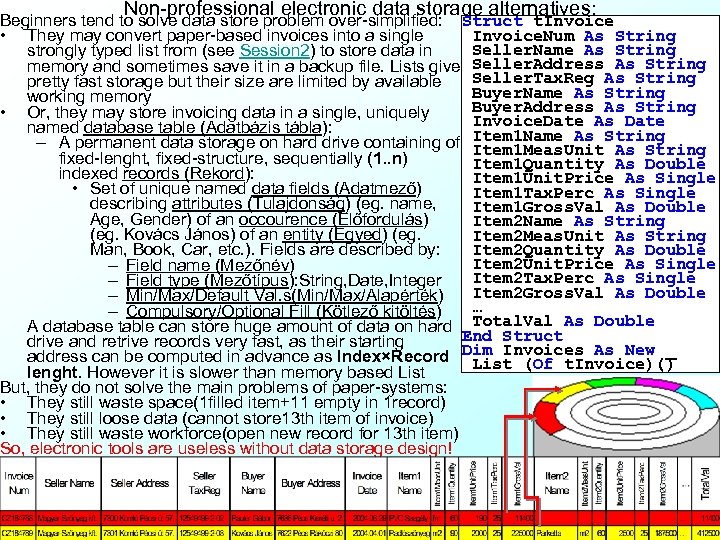
Non-professional electronic data storage alternatives: Beginners tend to solve data store problem over-simplified: Struct t. Invoice. Num As String • They may convert paper-based invoices into a single Seller. Name As String strongly typed list from (see Session 2) to store data in memory and sometimes save it in a backup file. Lists give Seller. Address As String pretty fast storage but their size are limited by available Seller. Tax. Reg As String Buyer. Name As String working memory Buyer. Address As String • Or, they may store invoicing data in a single, uniquely Invoice. Date As Date named database table (Adatbázis tábla): – A permanent data storage on hard drive containing of Item 1 Name As String Item 1 Meas. Unit As String fixed-lenght, fixed-structure, sequentially (1. . n) Item 1 Quantity As Double indexed records (Rekord): Item 1 Unit. Price As Single • Set of unique named data fields (Adatmező) Item 1 Tax. Perc As Single describing attributes (Tulajdonság) (eg. name, Item 1 Gross. Val As Double Age, Gender) of an occourence (Előfordulás) Item 2 Name As String (eg. Kovács János) of an entity (Egyed) (eg. Item 2 Meas. Unit As String Item 2 Quantity As Double Man, Book, Car, etc. ). Fields are described by: Item 2 Unit. Price As Single – Field name (Mezőnév) Item 2 Tax. Perc As Single – Field type (Mezőtípus): String, Date, Integer Item 2 Gross. Val As Double – Min/Max/Default Val. s(Min/Max/Alapérték) … – Compulsory/Optional Fill (Kötlező kitöltés) A database table can store huge amount of data on hard Total. Val As Double End Struct drive and retrive records very fast, as their starting address can be computed in advance as Index×Record Dim Invoices As New _ List (Of t. Invoice)() lenght. However it is slower than memory based List But, they do not solve the main problems of paper-systems: • They still waste space(1 filled item+11 empty in 1 record) • They still loose data (cannot store 13 th item of invoice) • They still waste workforce(open new record for 13 th item) So, electronic tools are useless without data storage design!
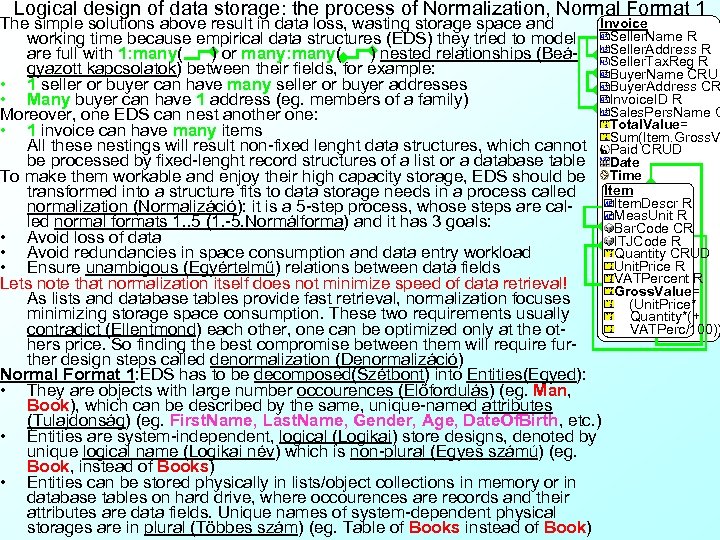
Logical design of data storage: the process of Normalization, Normal Format 1 Invoice The simple solutions above result in data loss, wasting storage space and Seller. Name R working time because empirical data structures (EDS) they tried to model Seller. Address R are full with 1: many( ) or many: many( ) nested relationships (BeáSeller. Tax. Reg R gyazott kapcsolatok) between their fields, for example: Buyer. Name CRU • 1 seller or buyer can have many seller or buyer addresses Buyer. Address CR Invoice. ID R • Many buyer can have 1 address (eg. members of a family) Sales. Pers. Name C Moreover, one EDS can nest another one: Total. Value= • 1 invoice can have many items Sum(Item. Gross. V All these nestings will result non-fixed lenght data structures, which cannot Paid CRUD be processed by fixed-lenght record structures of a list or a database table Date To make them workable and enjoy their high capacity storage, EDS should be Time transformed into a structure fits to data storage needs in a process called Item. Descr R normalization (Normalizáció): it is a 5 -step process, whose steps are cal. Meas. Unit R led normal formats 1. . 5 (1. -5. Normálforma) and it has 3 goals: Bar. Code CR • Avoid loss of data ITJCode R • Avoid redundancies in space consumption and data entry workload Quantity CRUD Unit. Price R • Ensure unambigous (Egyértelmű) relations between data fields VATPercent R Lets note that normalization itself does not minimize speed of data retrieval! Gross. Value= As lists and database tables provide fast retrieval, normalization focuses (Unit. Price* minimizing storage space consumption. These two requirements usually Quantity*(+ VATPerc/100)) contradict (Ellentmond) each other, one can be optimized only at the others price. So finding the best compromise between them will require further design steps called denormalization (Denormalizáció) Normal Format 1: EDS has to be decomposed(Szétbont) into Entities(Egyed): • They are objects with large number occourences (Előfordulás) (eg. Man, Book), which can be described by the same, unique-named attributes (Tulajdonság) (eg. First. Name, Last. Name, Gender, Age, Date. Of. Birth, etc. ) • Entities are system-independent, logical (Logikai) store designs, denoted by unique logical name (Logikai név) which is non-plural (Egyes számú) (eg. Book, instead of Books) • Entities can be stored physically in lists/object collections in memory or in database tables on hard drive, where occourences are records and their attributes are data fields. Unique names of system-dependent physical storages are in plural (Többes szám) (eg. Table of Books instead of Book)
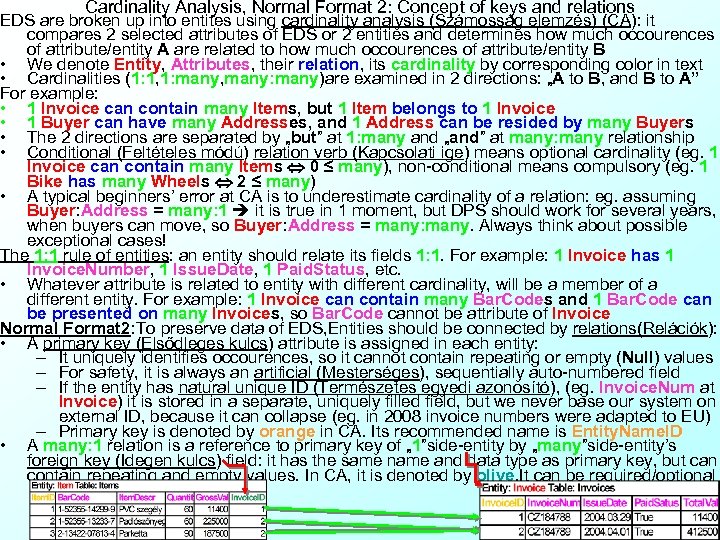
Cardinality Analysis, Normal Format 2: Concept of keys and relations EDS are broken up into entites using cardinality analysis (Számosság elemzés) (CA): it compares 2 selected attributes of EDS or 2 entities and determines how much occourences of attribute/entity A are related to how much occourences of attribute/entity B • We denote Entity, Attributes, their relation, its cardinality by corresponding color in text • Cardinalities (1: 1, 1: many, many: many)are examined in 2 directions: „A to B, and B to A” For example: • 1 Invoice can contain many Items, but 1 Item belongs to 1 Invoice • 1 Buyer can have many Addresses, and 1 Address can be resided by many Buyers • The 2 directions are separated by „but” at 1: many and „and” at many: many relationship • Conditional (Feltételes módú) relation verb (Kapcsolati ige) means optional cardinality (eg. 1 Invoice can contain many Items 0 ≤ many), non-conditional means compulsory (eg. 1 Bike has many Wheels 2 ≤ many) • A typical beginners’ error at CA is to underestimate cardinality of a relation: eg. assuming Buyer: Address = many: 1 it is true in 1 moment, but DPS should work for several years, when buyers can move, so Buyer: Address = many: many. Always think about possible exceptional cases! The 1: 1 rule of entities: an entity should relate its fields 1: 1. For example: 1 Invoice has 1 Invoice. Number, 1 Issue. Date, 1 Paid. Status, etc. • Whatever attribute is related to entity with different cardinality, will be a member of a different entity. For example: 1 Invoice can contain many Bar. Codes and 1 Bar. Code can be presented on many Invoices, so Bar. Code cannot be attribute of Invoice Normal Format 2: To preserve data of EDS, Entities should be connected by relations(Relációk): • A primary key (Elsődleges kulcs) attribute is assigned in each entity: – It uniquely identifies occourences, so it cannot contain repeating or empty (Null) values – For safety, it is always an artificial (Mesterséges), sequentially auto-numbered field – If the entity has natural unique ID (Természetes egyedi azonosító), (eg. Invoice. Num at Invoice) it is stored in a separate, uniquely filled field, but we never base our system on external ID, because it can collapse (eg. in 2008 invoice numbers were adapted to EU) – Primary key is denoted by orange in CA. Its recommended name is Entity. Name. ID • A many: 1 relation is a reference to primary key of „ 1”side-entity by „many”side-entity’s foreign key (Idegen kulcs) field: it has the same name and data type as primary key, but can contain repeating and empty values. In CA, it is denoted by olive. It can be required/optional
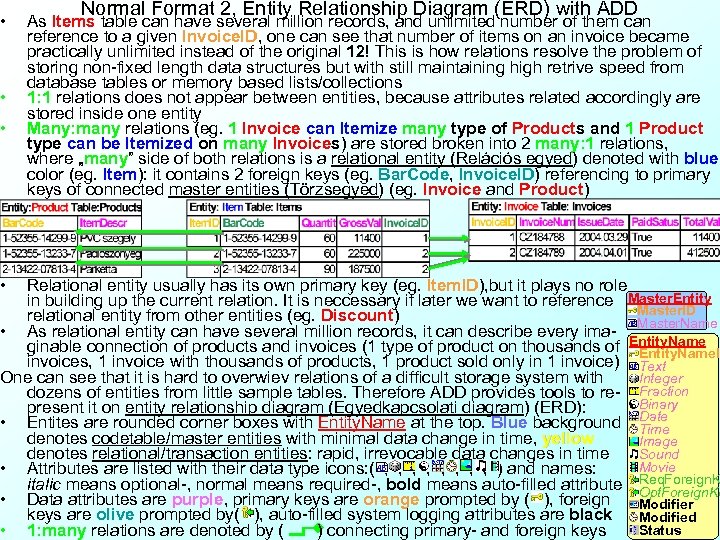
• • Normal Format 2, Entity Relationship Diagram (ERD) with ADD As Items table can have several million records, and unlimited number of them can reference to a given Invoice. ID, one can see that number of items on an invoice became practically unlimited instead of the original 12! This is how relations resolve the problem of storing non-fixed length data structures but with still maintaining high retrive speed from database tables or memory based lists/collections 1: 1 relations does not appear between entities, because attributes related accordingly are stored inside one entity Many: many relations (eg. 1 Invoice can Itemize many type of Products and 1 Product type can be Itemized on many Invoices) are stored broken into 2 many: 1 relations, where „many” side of both relations is a relational entity (Relációs egyed) denoted with blue color (eg. Item): it contains 2 foreign keys (eg. Bar. Code, Invoice. ID) referencing to primary keys of connected master entities (Törzsegyed) (eg. Invoice and Product) Relational entity usually has its own primary key (eg. Item. ID), but it plays no role in building up the current relation. It is neccessary if later we want to reference Master. Entity Master. ID relational entity from other entities (eg. Discount) Master. Name • As relational entity can have several million records, it can describe every imaginable connection of products and invoices (1 type of product on thousands of Entity. Name. ID invoices, 1 invoice with thousands of products, 1 product sold only in 1 invoice) Text One can see that it is hard to overwiev relations of a difficult storage system with Integer dozens of entities from little sample tables. Therefore ADD provides tools to re- Fraction Binary present it on entity relationship diagram (Egyedkapcsolati diagram) (ERD): • Entites are rounded corner boxes with Entity. Name at the top. Blue background Date Time denotes codetable/master entities with minimal data change in time, yellow Image Sound denotes relational/transaction entities: rapid, irrevocable data changes in time Movie • Attributes are listed with their data type icons: ( , , ) and names: italic means optional-, normal means required-, bold means auto-filled attribute Req. Foreign. K • Data attributes are purple, primary keys are orange prompted by ( ), foreign Opt. Foreign. Ke Modifier keys are olive prompted by( ), auto-filled system logging attributes are black Modified Status • 1: many relations are denoted by ( ) connecting primary- and foreign keys
Content of Presentation Creating web-applications with relational database system 1 • Case Study 3 -1: Invoicing system of a small business • Analyzig existing system with the help of Advanced Database Diagram (ADD) • Business Process Diagram (BPD) • Data Flow Diagramm (DFD) • Business Process Reengineering (BPR) • Non-professional electronic data storage solution alternatives: • Storing invoice data in a strongly typed list • Storing invoice data in a single database table • Logical design of data storage: the process of Normalization – Normal Format 1 • Decomposition of empirical data structures – Normal Format 2 • Cardinality Analysis (CA) • Defining relations: primary and foreign keys • Entity Relationship Diagram (ERD) in ADD • References
References (--------------- Practice 3 -1 Should be performed here! ----------------) Relational analysis websites: • http: //www. dcs. bbk. ac. uk/~steve/rdanineteen/ • http: //www. redbrick. dcu. ie/~foo/ssadm/exam-stuff/rda. pdf • http: //gawain. soc. staffs. ac. uk/modules/level 1/CE 515001/s 1 w 8/RELATIONAL%20 DATA%20 ANALYSIS. htm
Скачать презентацию SQL Net Consultation Session 3 Dr Gábor Pauler
630764884a134e5fc29d0efd5cea2a50.ppt